New Update for trueSpace7.61 Beta 8 Std Unofficial Update
viewtopic.php?t=3731
RC14 July 17, 2020
Recommend that you completely Uninstall and Install trueSpace7.61 Beta 8 Standalone to a clean directory before installing this update. This update precedes all previous updates and recommend that you delete any and all previous updates
Toolbars.RsObj
Add
3D Unencapsulate icon
Update
2D Unencapsulate icon
ScriptCommands
Add
Unencapsulate.xml
Add the missing
OpenD3DRenderPath.xml
Widgets.RsObj
Point Edit Widget's Help
Update
O + LMB select the widget switches to Mesh Object Coordinate Mode On/Off
Switch to the Object Coordinate system to change the widget's behavior
IMPORTANT: This will also have an effect on the Tangent Coordinate system
Switch back before using the Tangent Coordinate system
Material Editor/MaterialConverter
Updated 07/16/2020 Author - Clinton Reese
"Fix instancing script to work with materials from the FBX import scripts"
ClintonsToolbar
MeshOrigin
Updated 07/16/2020 Author - Clinton Reese
ConvertSpotToIES
Updated 07/17/2020 Author - Clinton Reese
Final trueSpace7.61 Beta 8 Std Unofficial Update
-
trueBlue

- Captain
- Posts: 5548
- Joined: 06 Jul 2009, 22:50
- Type the number ten into the box: 10
Re: Final trueSpace7.61 Beta 8 Std Unofficial Update
-
clintonman

- Captain
- Posts: 5659
- Joined: 21 May 2009, 21:08
- Type the number ten into the box: 0
- Location: California
Re: Final trueSpace7.61 Beta 8 Std Unofficial Update
I found that the locking only works if 1 item is selected or the first item selected is the locked item.trueBlue wrote: 06 Jul 2020, 17:34 ...
Included is a different Locking script that is incorporated and UnDo's the last selection when Active
......Code: Select all
function Execute(params)
{
if (Node.ConExists('', "UnSelectable"))
{
RsApp.Undo()
Node.Value(System.ThisOwner(), "Active") = -1
}
}
So the line if (Node.ConExists('', "UnSelectable")) is behaving the same as if (Node.ConExists(Node.FirstSelected(), "UnSelectable"))
Here is the part of my code that checks every item individually
Code: Select all
	if(Node.SelectedCount() < 1) return;

	var selectionString = Node.Selection();

	var selectionArray = selectionString.split(";");
	var re = /^\s/; // whitespace in first character position

	if(selectionArray.length > 0) {
		for(var i=0;i<selectionArray.length;i++) {
			//remove whitespace from the node path
			var sel = selectionArray[i].replace(re,"");
			if (Node.ConExists(sel, "UnSelectable")) {
				//System.Trace("unselectable found");
				RsApp.Undo();
				break;
			}
		}
	}
Couple of side things I found out.
Rectangle select in the link editor and the selection is in the order the items were created.
Ctrl select in the 3D view and it will be in selection order.
-
trueBlue
- Captain
- Posts: 5548
- Joined: 06 Jul 2009, 22:50
- Type the number ten into the box: 10
Re: Final trueSpace7.61 Beta 8 Std Unofficial Update
Awesome!clintonman wrote: 18 Jul 2020, 01:30I found that the locking only works if 1 item is selected or the first item selected is the locked item.trueBlue wrote: 06 Jul 2020, 17:34 ...
Included is a different Locking script that is incorporated and UnDo's the last selection when Active
......Code: Select all
function Execute(params)
{
if (Node.ConExists('', "UnSelectable"))
{
RsApp.Undo()
Node.Value(System.ThisOwner(), "Active") = -1
}
}
So the line if (Node.ConExists('', "UnSelectable")) is behaving the same as if (Node.ConExists(Node.FirstSelected(), "UnSelectable"))
Here is the part of my code that checks every item individually
Code: Select all
	if(Node.SelectedCount() < 1) return;

	var selectionString = Node.Selection();

	var selectionArray = selectionString.split(";");
	var re = /^\s/; // whitespace in first character position

	if(selectionArray.length > 0) {
		for(var i=0;i<selectionArray.length;i++) {
			//remove whitespace from the node path
			var sel = selectionArray[i].replace(re,"");
			if (Node.ConExists(sel, "UnSelectable")) {
				//System.Trace("unselectable found");
				RsApp.Undo();
				break;
			}
		}
	}
Couple of side things I found out.
Rectangle select in the link editor and the selection is in the order the items were created.
Ctrl select in the 3D view and it will be in selection order.
I was going to suggest you make your version, but you already did!
Will this work with the UU Workspace layers?
If not, I think you said you were planning on an update, that uses this new version and the one with the WebUI
-
clintonman
- Captain
- Posts: 5659
- Joined: 21 May 2009, 21:08
- Type the number ten into the box: 0
- Location: California
Re: Final trueSpace7.61 Beta 8 Std Unofficial Update
This is already released in the unselectable script and it should work with UU Workspace Layers. The only difference I see is the buttons on the layers panel. Mine has a button to open the web ui and a toolbar button for the unselectable script and your layers panel button opens the unselectable script.trueBlue wrote: 18 Jul 2020, 03:18 Awesome!
I was going to suggest you make your version, but you already did!
Will this work with the UU Workspace layers?
If not, I think you said you were planning on an update, that uses this new version and the one with the WebUI
-
trueBlue
- Captain
- Posts: 5548
- Joined: 06 Jul 2009, 22:50
- Type the number ten into the box: 10
Re: Final trueSpace7.61 Beta 8 Std Unofficial Update
I exchanged the code into the Locking/Undo script.
It seems to work.
One thing though when you uncheck the UnSelectable attribute on an object and the Selection Change Event is Active, the object is still UnSelectable.
I did not see a button that opens the WebUI on the new unSelectable panel
It seems to work.
One thing though when you uncheck the UnSelectable attribute on an object and the Selection Change Event is Active, the object is still UnSelectable.
I did not see a button that opens the WebUI on the new unSelectable panel
-
clintonman
- Captain
- Posts: 5659
- Joined: 21 May 2009, 21:08
- Type the number ten into the box: 0
- Location: California
Re: Final trueSpace7.61 Beta 8 Std Unofficial Update
Hmm, must be a side effect of changing the code to remove the node when unlockingtrueBlue wrote: 18 Jul 2020, 04:46 I exchanged the code into the Locking/Undo script.
It seems to work.
One thing though when you uncheck the UnSelectable attribute on an object and the Selection Change Event is Active, the object is still UnSelectable
Edit: I already see it.
Code: Select all
if (Node.ConExists(sel, "UnSelectable")) {It's on the layer panel. No new buttons on the unSelectable panel.trueBlue wrote: 18 Jul 2020, 04:46 ...
I did not see a button that opens the WebUI on the new unSelectable panel
-
trueBlue
- Captain
- Posts: 5548
- Joined: 06 Jul 2009, 22:50
- Type the number ten into the box: 10
Re: Final trueSpace7.61 Beta 8 Std Unofficial Update
New Update for trueSpace7.61 Beta 8 Std Unofficial Update
viewtopic.php?t=3731
RC15 July 18, 2020
Recommend that you completely Uninstall and Install trueSpace7.61 Beta 8 Standalone to a clean directory before installing this update. This update precedes all previous updates and recommend that you delete any and all previous updates
unSelectable.RsObj Author - Clinton Reese
Updated 7/17/2020
workspacelayers3.RsObj Author - Clinton Reese
Locking
Updated 7/17/2020
viewtopic.php?t=3731
RC15 July 18, 2020
Recommend that you completely Uninstall and Install trueSpace7.61 Beta 8 Standalone to a clean directory before installing this update. This update precedes all previous updates and recommend that you delete any and all previous updates
unSelectable.RsObj Author - Clinton Reese
Updated 7/17/2020
workspacelayers3.RsObj Author - Clinton Reese
Locking
Updated 7/17/2020
-
trueBlue
- Captain
- Posts: 5548
- Joined: 06 Jul 2009, 22:50
- Type the number ten into the box: 10
Re: Final trueSpace7.61 Beta 8 Std Unofficial Update
New Update for trueSpace7.61 Beta 8 Std Unofficial Update
viewtopic.php?t=3731
RC16 July 19, 2020
Recommend that you completely Uninstall and Install trueSpace7.61 Beta 8 Standalone to a clean directory before installing this update. This update precedes all previous updates and recommend that you delete any and all previous updates
unSelectable.RsObj Author - Clinton Reese
Updated 7/19/2020
workspacelayers3.RsObj Author - Clinton Reese
Locking
Updated 7/19/2020
Toolbars.RsObj
Updated 7/19/2020
Hide and Show icons
RMB = Settings "Opens the selected object's Object Render Attributes panel in Panels"
viewtopic.php?t=3731
RC16 July 19, 2020
Recommend that you completely Uninstall and Install trueSpace7.61 Beta 8 Standalone to a clean directory before installing this update. This update precedes all previous updates and recommend that you delete any and all previous updates
unSelectable.RsObj Author - Clinton Reese
Updated 7/19/2020
workspacelayers3.RsObj Author - Clinton Reese
Locking
Updated 7/19/2020
Toolbars.RsObj
Updated 7/19/2020
Hide and Show icons
RMB = Settings "Opens the selected object's Object Render Attributes panel in Panels"
-
clintonman
- Captain
- Posts: 5659
- Joined: 21 May 2009, 21:08
- Type the number ten into the box: 0
- Location: California
Re: Final trueSpace7.61 Beta 8 Std Unofficial Update

- NeonLetters.jpg (32.63 KiB) Viewed 2918 times
This script will fix the neon green color of the various toolbar buttons so they are easier to read and fit in better with the other buttons.
- Attachments
-
- FixNeonGreenIcons03.RsObj
- (6.65 KiB) Downloaded 182 times
-
trueBlue
- Captain
- Posts: 5548
- Joined: 06 Jul 2009, 22:50
- Type the number ten into the box: 10
Re: Final trueSpace7.61 Beta 8 Std Unofficial Update
Thanks, I'll add it to the next update.
Any chance you could look into these suggestions?
D3DmaterialConverter July 16, 2020
MaterialInstanceConverterScript/ConvertMaterialType
guid = System.CreateDO("Clintons3D Package/Material guid data");
Suggestions
1) Add check if plugin is Installed/Loaded?
2) Update installer to include UU6 in the Material Editor?
Any chance you could look into these suggestions?
D3DmaterialConverter July 16, 2020
MaterialInstanceConverterScript/ConvertMaterialType
guid = System.CreateDO("Clintons3D Package/Material guid data");
Suggestions
1) Add check if plugin is Installed/Loaded?
2) Update installer to include UU6 in the Material Editor?
-
clintonman
- Captain
- Posts: 5659
- Joined: 21 May 2009, 21:08
- Type the number ten into the box: 0
- Location: California
Re: Final trueSpace7.61 Beta 8 Std Unofficial Update
Maybe I'll add the check next time.trueBlue wrote: 23 Jul 2020, 21:19 Thanks, I'll add it to the next update.
Any chance you could look into these suggestions?
D3DmaterialConverter July 16, 2020
MaterialInstanceConverterScript/ConvertMaterialType
guid = System.CreateDO("Clintons3D Package/Material guid data");
Suggestions
1) Add check if plugin is Installed/Loaded?
2) Update installer to include UU6 in the Material Editor?
Don't understand #2, include UU6?
-
trueBlue
- Captain
- Posts: 5548
- Joined: 06 Jul 2009, 22:50
- Type the number ten into the box: 10
Re: Final trueSpace7.61 Beta 8 Std Unofficial Update
New Update for trueSpace7.61 Beta 8 Std Unofficial Update
viewtopic.php?t=3731
RC17 July 24, 2020
Recommend that you completely Uninstall and Install trueSpace7.61 Beta 8 Standalone to a clean directory before installing this update. This update precedes all previous updates and recommend that you delete any and all previous updates
ClintonsToolbar
Updated 7/24/2020
PE, NT, IT, and TB icons
Toolbars.RsObj
Updated 7/24/2020
LENavigatorBar
Add
H
LMB = Hide All except selection
RMB = Show All
viewtopic.php?t=3731
RC17 July 24, 2020
Recommend that you completely Uninstall and Install trueSpace7.61 Beta 8 Standalone to a clean directory before installing this update. This update precedes all previous updates and recommend that you delete any and all previous updates
ClintonsToolbar
Updated 7/24/2020
PE, NT, IT, and TB icons
Toolbars.RsObj
Updated 7/24/2020
LENavigatorBar
Add
H
LMB = Hide All except selection
RMB = Show All

- HideAllexceptSelection.png (14.05 KiB) Viewed 3038 times
-
trueBlue
- Captain
- Posts: 5548
- Joined: 06 Jul 2009, 22:50
- Type the number ten into the box: 10
Re: Final trueSpace7.61 Beta 8 Std Unofficial Update
Found an issue with your Q_PESnappingToolbarclintonman wrote: 26 Jun 2020, 19:24I don't know why you removed the SPACE shortcut. I don't see any problem with having a default shortcut.trueBlue wrote: 26 Jun 2020, 18:09 I did not know about your Quad Menu button.
I removed the SPACE shortcut.
Added the buttons to ClintonsPointEditToolbar
User will need to be in Point Editing mode and Assign a Shortcut to the buttons or else LMB clicking the buttons opens the panel at the button's current location.
Which is why I assigned an AgentID and TagAliss = pe "Only works in Point Editing Mode"
AssignShortcut.png
There is an issue with your Quad toolbar.
You are able to open multiple panels endlessly.
Endless panels.png
Yep, it would be better with the pe tagalias stuff.
Either you found something new or you have an old copy of the quad toolbar. "bug allowed quad toolbar to be opened multiple times", April 17, 2020 update notes.
I'll check that the correct version was uploaded.
Edit:
Website had old version.
website has been updated with proper April 17 version.
PivotCoordinateButton
LMB command is wrong since your update to the trueObject Coordinate Mode script
Wrong command
//Activity.Run("Scripts/CustomCommands/PivotCoordinateSystem/SaveSelection");Activity.Run("Scripts/CustomCommands/QuadToolbar/CloseQuadToolbar")
Correct command
Activity.Run("Scripts/CustomCommands/MeshObjectCoordinateSystem/SaveSelection");Activity.Run("Scripts/CustomCommands/QuadToolbar/CloseQuadToolbar")
-
clintonman
- Captain
- Posts: 5659
- Joined: 21 May 2009, 21:08
- Type the number ten into the box: 0
- Location: California
Re: Final trueSpace7.61 Beta 8 Std Unofficial Update
Thanks, I'll fix that.
Also still don't know what you mean by "2) Update installer to include UU6 in the Material Editor? " from earlier.
Also still don't know what you mean by "2) Update installer to include UU6 in the Material Editor? " from earlier.
-
trueBlue
- Captain
- Posts: 5548
- Joined: 06 Jul 2009, 22:50
- Type the number ten into the box: 10
Re: Final trueSpace7.61 Beta 8 Std Unofficial Update
I was referring to your installer for the Material Converterclintonman wrote: 27 Jul 2020, 18:21 Thanks, I'll fix that.
Also still don't know what you mean by "2) Update installer to include UU6 in the Material Editor? " from earlier.
In the Unofficial Updates it has been incorporated into the Material Editor

The only thing missing is a check for your plugin being Installed and or Loaded
And I am not sure if your FBX Import/Export scripts is compatible and or even using the incorporated Material Converter
-
clintonman
- Captain
- Posts: 5659
- Joined: 21 May 2009, 21:08
- Type the number ten into the box: 0
- Location: California
Re: Final trueSpace7.61 Beta 8 Std Unofficial Update
No, I don't have anything that depends on or uses the material converter. It's a standalone thing not tied to anything else.trueBlue wrote: 27 Jul 2020, 18:46I was referring to your installer for the Material Converterclintonman wrote: 27 Jul 2020, 18:21 Thanks, I'll fix that.
Also still don't know what you mean by "2) Update installer to include UU6 in the Material Editor? " from earlier.
In the Unofficial Updates it has been incorporated into the Material Editor
D3D Material Converter.png
I am fairly sure I updated the scripts correctly with your new updates
The only thing missing is a check for your plugin being Installed and or Loaded
And I am not sure if your FBX Import/Export scripts is compatible and or even using the incorporated Material Converter
-
trueBlue
- Captain
- Posts: 5548
- Joined: 06 Jul 2009, 22:50
- Type the number ten into the box: 10
Re: Final trueSpace7.61 Beta 8 Std Unofficial Update
Okay thanks for the confirmation.
Also discovered the unSelectable script does not work when saving it with a scene
When you open the scene, with the unSelectable script Active, it does not work
Guessing the Check Box is in a undefined state
Edit
I add the below and it works but I am not sure how to check if the unselectable script is Active or not
Also discovered the unSelectable script does not work when saving it with a scene
When you open the scene, with the unSelectable script Active, it does not work
Guessing the Check Box is in a undefined state
Edit
I add the below and it works but I am not sure how to check if the unselectable script is Active or not
Code: Select all
	var Show = params.ConValue('Show');
Node.Delete(Space.CurrentScene() + "/unSelectable,1")
Node.Delete(Space.CurrentScene() + "/unSelectable, 1")
var ChkBox = Node.Value(System.ThisOwner(), "Active")

	if(Show) {
		Node.Value(System.ThisOwner() + "/UnSelect_Panel_Frame", "RootNode") = System.ThisOwner();
		Node.Value(System.ThisOwner() + "/UnSelect_Panel_Frame/Panel Node", "PanelEditorNode") = System.ThisOwner();
		WindowsManager.CloseWindow('Project/Windows Manager Space/UnSelect_Panel_Frame');
		Node.Copy(System.ThisOwner() + "/UnSelect_Panel_Frame", "/Project/Windows Manager Space") ;
		WindowsManager.Activate();
		WindowsManager.UpdateWindowsStructure();
	}
	if(ChkBox) {
		Node.Value(System.ThisOwner(), "Active") = false
		Node.Value(System.ThisOwner(), "Active") = true
	}
}- Attachments
-
- unSelectable Scene.RsScn
- (1.22 MiB) Downloaded 162 times
-
clintonman
- Captain
- Posts: 5659
- Joined: 21 May 2009, 21:08
- Type the number ten into the box: 0
- Location: California
Re: Final trueSpace7.61 Beta 8 Std Unofficial Update
You can use something like this to check for the plugin installation.
Code: Select all
// Execute
// Called to execute the command
function Execute(params)
{

	// TODO: put your action code here
	if( pluginInstalled() )
		System.Alert("plugin is installed and loaded");
}

function pluginInstalled()
{
	// check that plugin is installed and loaded

	var xmldoc = new ActiveXObject("Msxml2.DOMDocument.6.0");
	xmldoc.load(System.GetMainDir() + "\\Scripts\\Plugins.xml");

	var doc = xmldoc.documentElement;

	for(var i=0;i<doc.childNodes.length;i++)
	{
		var child = doc.childNodes.item(i);
		var grandchild = child.childNodes.item(0);
		var NAME = grandchild.getAttribute("NAME");

		if(NAME == "Clintons3D Package") {
			var STATUS = grandchild.getAttribute("STATUS");
			if(STATUS == "LOADED") {
				return true
			}
		}
	}

	System.Alert("Clintons3dView plugin must be installed and loaded.");

	return false;
}
-
clintonman
- Captain
- Posts: 5659
- Joined: 21 May 2009, 21:08
- Type the number ten into the box: 0
- Location: California
Re: Final trueSpace7.61 Beta 8 Std Unofficial Update
Looks more like the selection change is sleeping.trueBlue wrote: 27 Jul 2020, 18:58 Okay thanks for the confirmation.
Also discovered the unSelectable script does not work when saving it with a scene
When you open the scene, with the unSelectable script Active, it does not work
Guessing the Check Box is in a undefined state
This added to the RemoteCommand seems to fix it.
Code: Select all
	RsTool.ToggleValue(System.ThisOwner() + "/Active");
	RsTool.ToggleValue(System.ThisOwner() + "/Active");
-
trueBlue
- Captain
- Posts: 5548
- Joined: 06 Jul 2009, 22:50
- Type the number ten into the box: 10
Re: Final trueSpace7.61 Beta 8 Std Unofficial Update
Yep that works.clintonman wrote: 27 Jul 2020, 19:11Looks more like the selection change is sleeping.trueBlue wrote: 27 Jul 2020, 18:58 Okay thanks for the confirmation.
Also discovered the unSelectable script does not work when saving it with a scene
When you open the scene, with the unSelectable script Active, it does not work
Guessing the Check Box is in a undefined state
This added to the RemoteCommand seems to fix it.Code: Select all
	RsTool.ToggleValue(System.ThisOwner() + "/Active");
	RsTool.ToggleValue(System.ThisOwner() + "/Active");
Question is, since your version does not seem to be using the Show attribute, are you going to make the necessary changes?
-
trueBlue
- Captain
- Posts: 5548
- Joined: 06 Jul 2009, 22:50
- Type the number ten into the box: 10
Re: Final trueSpace7.61 Beta 8 Std Unofficial Update
Shouldn't you add:clintonman wrote: 27 Jul 2020, 19:00 You can use something like this to check for the plugin installation.
Code: Select all
// Execute
// Called to execute the command
function Execute(params)
{

	// TODO: put your action code here
	if( pluginInstalled() )
		System.Alert("plugin is installed and loaded");
}

function pluginInstalled()
{
	// check that plugin is installed and loaded

	var xmldoc = new ActiveXObject("Msxml2.DOMDocument.6.0");
	xmldoc.load(System.GetMainDir() + "\\Scripts\\Plugins.xml");

	var doc = xmldoc.documentElement;

	for(var i=0;i<doc.childNodes.length;i++)
	{
		var child = doc.childNodes.item(i);
		var grandchild = child.childNodes.item(0);
		var NAME = grandchild.getAttribute("NAME");

		if(NAME == "Clintons3D Package") {
			var STATUS = grandchild.getAttribute("STATUS");
			if(STATUS == "LOADED") {
				return true
			}
		}
	}

	System.Alert("Clintons3dView plugin must be installed and loaded.");

	return false;
}
params.SetTerminationFlag();//stop downstream execution
return;
as follows?
Code: Select all
	System.Alert("Clintons3dView plugin must be Installed and Loaded.");
			params.SetTerminationFlag();//stop downstream execution
			return;
	return false;
Nope, Error: params is undefined
Can not get it to stop running if the plugin is not Loaded
-
clintonman
- Captain
- Posts: 5659
- Joined: 21 May 2009, 21:08
- Type the number ten into the box: 0
- Location: California
Re: Final trueSpace7.61 Beta 8 Std Unofficial Update
I'll be adding those 2 commands.trueBlue wrote: 27 Jul 2020, 19:22Yep that works.clintonman wrote: 27 Jul 2020, 19:11Looks more like the selection change is sleeping.trueBlue wrote: 27 Jul 2020, 18:58 Okay thanks for the confirmation.
Also discovered the unSelectable script does not work when saving it with a scene
When you open the scene, with the unSelectable script Active, it does not work
Guessing the Check Box is in a undefined state
This added to the RemoteCommand seems to fix it.Code: Select all
	RsTool.ToggleValue(System.ThisOwner() + "/Active");
	RsTool.ToggleValue(System.ThisOwner() + "/Active");
Question is, since your version does not seem to be using the Show attribute, are you going to make the necessary changes?
-
clintonman
- Captain
- Posts: 5659
- Joined: 21 May 2009, 21:08
- Type the number ten into the box: 0
- Location: California
Re: Final trueSpace7.61 Beta 8 Std Unofficial Update
Try this for the SetMaterialEditModetrueBlue wrote: 27 Jul 2020, 19:31 ...
Shouldn't you add:
params.SetTerminationFlag();//stop downstream execution
return;
as follows?Edit:Code: Select all
	System.Alert("Clintons3dView plugin must be Installed and Loaded.");
			params.SetTerminationFlag();//stop downstream execution
			return;
	return false;
Nope, Error: params is undefined
Can not get it to stop running if the plugin is not Loaded
Code: Select all
// Execute
// Called to execute the command
function Execute(params)
{
	var MatEditInstancing = params.ConValue('MatEditInstancing');

	if( !pluginInstalled() ) {
		System.Alert("Clintons3dView plugin must be installed and loaded.");
		params.SetTerminationFlag();//stop downstream execution
		return;
	}

	var meNode = "/Material Editor/Material Editor";

	if(!Node.Exists(meNode)) {
		System.Alert("Material Editor not found.");
		params.SetTerminationFlag();//stop downstream execution
		return;
	}

	var mei = System.CreateDO("Common Data Package/String Enum Data");
	mei = Node.Value(meNode,"Material instancing");

	params.ConValue('MatInstancingBackup') = mei.GetSelectedString();

	mei.SetSelectedString(MatEditInstancing);

	Node.Value(meNode, "Material instancing") = mei;


}

function pluginInstalled()
{
	// check that plugin is installed and loaded

	var xmldoc = new ActiveXObject("Msxml2.DOMDocument.6.0");
	xmldoc.load(System.GetMainDir() + "\\Scripts\\Plugins.xml");

	var doc = xmldoc.documentElement;

	for(var i=0;i<doc.childNodes.length;i++)
	{
		var child = doc.childNodes.item(i);
		var grandchild = child.childNodes.item(0);
		var NAME = grandchild.getAttribute("NAME");

		if(NAME == "Clintons3D Package") {
			var STATUS = grandchild.getAttribute("STATUS");
			if(STATUS == "LOADED") {
				return true
			}
		}
	}

	//System.Alert("Clintons3dView plugin must be installed and loaded.");

	return false;
}
-
trueBlue
- Captain
- Posts: 5548
- Joined: 06 Jul 2009, 22:50
- Type the number ten into the box: 10
Re: Final trueSpace7.61 Beta 8 Std Unofficial Update
Yeah! That works!!
You also have
Instead of stopping it from running, why not open the Material Editor?
MeshModifiers.OpenMaterialEditor()
You also have
Code: Select all
	if(!Node.Exists(meNode)) {
		System.Alert("Material Editor not found.");
		params.SetTerminationFlag();//stop downstream execution
		return;
}MeshModifiers.OpenMaterialEditor()
-
trueBlue
- Captain
- Posts: 5548
- Joined: 06 Jul 2009, 22:50
- Type the number ten into the box: 10
Re: Final trueSpace7.61 Beta 8 Std Unofficial Update
New Update for trueSpace7.61 Beta 8 Std Unofficial Update
viewtopic.php?t=3731
RC18 July 27, 2020
Recommend that you completely Uninstall and Install trueSpace7.61 Beta 8 Standalone to a clean directory before installing this update. This update precedes all previous updates and recommend that you delete any and all previous updates
Material Editor
Update
D3D Material Converter
Toolbars
Update
Q_PESnappingToolbar
Cameras
Update
LMB = Normalize Rotatiion
RMB = Reset to Perspective
LMB = Camera Render to File
RMB = Open folder
viewtopic.php?t=3731
RC18 July 27, 2020
Recommend that you completely Uninstall and Install trueSpace7.61 Beta 8 Standalone to a clean directory before installing this update. This update precedes all previous updates and recommend that you delete any and all previous updates
Material Editor
Update
D3D Material Converter
Toolbars
Update
Q_PESnappingToolbar

- Update Icons.png (34.21 KiB) Viewed 2927 times
Update
LMB = Normalize Rotatiion
RMB = Reset to Perspective

RMB = Open folder

- Camera updates2.png (13 KiB) Viewed 2927 times
-
trueBlue
- Captain
- Posts: 5548
- Joined: 06 Jul 2009, 22:50
- Type the number ten into the box: 10
Re: Final trueSpace7.61 Beta 8 Std Unofficial Update
@Clinton
I noticed that the Copy Attributes script does not really stop the script from running if the Clintons3dPlugin.rsx plugin is not Loaded
Using the code you shared with the Material Converter, does this seem to be correct for the Copy script?
Does it need to have the try & Catch and if so how would you implement that?
I noticed that the Copy Attributes script does not really stop the script from running if the Clintons3dPlugin.rsx plugin is not Loaded
Using the code you shared with the Material Converter, does this seem to be correct for the Copy script?
Does it need to have the try & Catch and if so how would you implement that?
Code: Select all
var CONFLG_DIRTY = 1
var CONFLG_OUT = 2
var CONFLG_IN = 4
var CONFLG_INOUT = 6
var CONFLG_RESERVED = 8
var CONFLG_EXPORTED = 16
var CONFLG_HIDDEN = 32
var CONFLG_CACHING = 64
var CONFLG_NONOTIFY = 128
var CONFLG_CONTROLFLOW = 256
var CONFLG_DISABLECACHING = 512
var CONFLG_REGISTERED = 1024
var CONFLG_CUSTOM = 2048
var CONFLG_TOPOLOGY = 4096
var CONFLG_LOCAL = 8192
var CONFLG_LAST = 8193

function Execute(params)
{
	var Source = params.ConValue('Source');
	var Destination = params.ConValue('Destination');
	var Verify = params.ConValue('Verify');

	if(!Source) return
	if(!Destination) return

	if(!pluginInstalled() ) {
		System.Alert("Clintons3dView plugin must be Installed and Loaded.");
		params.SetTerminationFlag();//stop downstream execution
		return;
	}

//	try {
//		utilitydata = System.CreateDO("Clintons3D Package/Utility functions");
//	} catch(err) {
//System.Error("Requires the " + "("+" Clintons3dPlugin.rsx )" + " plugin to be Installed and Loaded in the Package Manager")
//		return "Requires Clintons3dPlugin.rsx plugin";
//	}


var utilitydata = System.CreateDO("Clintons3D Package/Utility functions");

	currentnode = Source;
	thedata = utilitydata.GetConnectorData(currentnode);
	connectors = thedata.split("\n");
	for(i=0;i<connectors.length;i++)
	{
	connector = connectors[i].split("\t");
//connector[0] = script connector name
//connector[1] = connector name
//connector[2] = connector type
//connector[3] = flags
	if(connector[3] & CONFLG_IN && !(connector[3] & CONFLG_HIDDEN)) {
//System.Trace(connector[0]);
		if(Node.ConExists(Destination, connector[0])) {
			System.Trace(connector[0]);
			try {
				if(Verify) {
				if(Question("Copy the " + "( " + connector[0] + " )" + " attribute to the Destination?"))
					Node.Value(Destination, connector[0]) = Node.Value(Source, connector[0]);
				}
				else
					Node.Value(Destination, connector[0]) = Node.Value(Source, connector[0]);
			} catch(e) {
//System.Trace("Failed to copy " + connector[0]);
//System.Error("Failed to copy " + connector[0]);
			}

		}
	}
}
	Node.ConReset(System.ThisOwner(),"Source")
	Node.ConReset(System.ThisOwner(),"Destination")
}

function pluginInstalled()
{
	// check that plugin is installed and loaded

	var xmldoc = new ActiveXObject("Msxml2.DOMDocument.6.0");
	xmldoc.load(System.GetMainDir() + "\\Scripts\\Plugins.xml");

	var doc = xmldoc.documentElement;

	for(var i=0;i<doc.childNodes.length;i++)
	{
		var child = doc.childNodes.item(i);
		var grandchild = child.childNodes.item(0);
		var NAME = grandchild.getAttribute("NAME");

		if(NAME == "Clintons3D Package") {
			var STATUS = grandchild.getAttribute("STATUS");
			if(STATUS == "LOADED") {
				return true
			}
		}
	}

	//System.Alert("Clintons3dView plugin must be installed and loaded.");

	return false;
}

function Question(strText)
{
	var nSecondsToWait = -1;
	var strTitle = "Question"; // Titlebar text
//values are hexadecimal
	var MB_YESNO = 4;
	var MB_SYSTEMMODAL = 4096;//1000L force on top
	var MB_ICONQUESTION = 32;//20L question mark symbol // 16;= 10L stop-sign symbol


	var nType = MB_YESNO+MB_SYSTEMMODAL+MB_ICONQUESTION;
	var IDYES = 6;
	var IDNO = 7;

	var shell = new ActiveXObject("WScript.shell");
	var button = shell.Popup (strText, nSecondsToWait, strTitle, nType);

	if(button == IDYES) return true;
	return false;
}
-
clintonman
- Captain
- Posts: 5659
- Joined: 21 May 2009, 21:08
- Type the number ten into the box: 0
- Location: California
Re: Final trueSpace7.61 Beta 8 Std Unofficial Update
Looks ok to me. The try catch is checking for the existence of the plugin, so it's not needed anymore.trueBlue wrote: 28 Jul 2020, 14:04 @Clinton
I noticed that the Copy Attributes script does not really stop the script from running if the Clintons3dPlugin.rsx plugin is not Loaded
Using the code you shared with the Material Converter, does this seem to be correct for the Copy script?
Does it need to have the try & Catch and if so how would you implement that?Code: Select all
var CONFLG_DIRTY = 1
var CONFLG_OUT = 2
var CONFLG_IN = 4
var CONFLG_INOUT = 6
var CONFLG_RESERVED = 8
var CONFLG_EXPORTED = 16
var CONFLG_HIDDEN = 32
var CONFLG_CACHING = 64
var CONFLG_NONOTIFY = 128
var CONFLG_CONTROLFLOW = 256
var CONFLG_DISABLECACHING = 512
var CONFLG_REGISTERED = 1024
var CONFLG_CUSTOM = 2048
var CONFLG_TOPOLOGY = 4096
var CONFLG_LOCAL = 8192
var CONFLG_LAST = 8193

function Execute(params)
{
	var Source = params.ConValue('Source');
	var Destination = params.ConValue('Destination');
	var Verify = params.ConValue('Verify');

	if(!Source) return
	if(!Destination) return

	if(!pluginInstalled() ) {
		System.Alert("Clintons3dView plugin must be Installed and Loaded.");
		params.SetTerminationFlag();//stop downstream execution
		return;
	}

//	try {
//		utilitydata = System.CreateDO("Clintons3D Package/Utility functions");
//	} catch(err) {
//System.Error("Requires the " + "("+" Clintons3dPlugin.rsx )" + " plugin to be Installed and Loaded in the Package Manager")
//		return "Requires Clintons3dPlugin.rsx plugin";
//	}


var utilitydata = System.CreateDO("Clintons3D Package/Utility functions");

	currentnode = Source;
	thedata = utilitydata.GetConnectorData(currentnode);
	connectors = thedata.split("\n");
	for(i=0;i<connectors.length;i++)
	{
	connector = connectors[i].split("\t");
//connector[0] = script connector name
//connector[1] = connector name
//connector[2] = connector type
//connector[3] = flags
	if(connector[3] & CONFLG_IN && !(connector[3] & CONFLG_HIDDEN)) {
//System.Trace(connector[0]);
		if(Node.ConExists(Destination, connector[0])) {
			System.Trace(connector[0]);
			try {
				if(Verify) {
				if(Question("Copy the " + "( " + connector[0] + " )" + " attribute to the Destination?"))
					Node.Value(Destination, connector[0]) = Node.Value(Source, connector[0]);
				}
				else
					Node.Value(Destination, connector[0]) = Node.Value(Source, connector[0]);
			} catch(e) {
//System.Trace("Failed to copy " + connector[0]);
//System.Error("Failed to copy " + connector[0]);
			}

		}
	}
}
	Node.ConReset(System.ThisOwner(),"Source")
	Node.ConReset(System.ThisOwner(),"Destination")
}

function pluginInstalled()
{
	// check that plugin is installed and loaded

	var xmldoc = new ActiveXObject("Msxml2.DOMDocument.6.0");
	xmldoc.load(System.GetMainDir() + "\\Scripts\\Plugins.xml");

	var doc = xmldoc.documentElement;

	for(var i=0;i<doc.childNodes.length;i++)
	{
		var child = doc.childNodes.item(i);
		var grandchild = child.childNodes.item(0);
		var NAME = grandchild.getAttribute("NAME");

		if(NAME == "Clintons3D Package") {
			var STATUS = grandchild.getAttribute("STATUS");
			if(STATUS == "LOADED") {
				return true
			}
		}
	}

	//System.Alert("Clintons3dView plugin must be installed and loaded.");

	return false;
}

function Question(strText)
{
	var nSecondsToWait = -1;
	var strTitle = "Question"; // Titlebar text
//values are hexadecimal
	var MB_YESNO = 4;
	var MB_SYSTEMMODAL = 4096;//1000L force on top
	var MB_ICONQUESTION = 32;//20L question mark symbol // 16;= 10L stop-sign symbol


	var nType = MB_YESNO+MB_SYSTEMMODAL+MB_ICONQUESTION;
	var IDYES = 6;
	var IDNO = 7;

	var shell = new ActiveXObject("WScript.shell");
	var button = shell.Popup (strText, nSecondsToWait, strTitle, nType);

	if(button == IDYES) return true;
	return false;
}
The params.SetTerminationFlag();//stop downstream execution is only needed if another command node is connected to it. It stops the next connected command from running. So if the command node doesn't have any other command nodes connected to it's "Control Out" connector then that command is not needed.
-
trueBlue
- Captain
- Posts: 5548
- Joined: 06 Jul 2009, 22:50
- Type the number ten into the box: 10
Re: Final trueSpace7.61 Beta 8 Std Unofficial Update
Okay thanks for the explanation.
I was misunderstanding that the 'stop downstream execution' was from within the script.
I was misunderstanding that the 'stop downstream execution' was from within the script.
-
trueBlue
- Captain
- Posts: 5548
- Joined: 06 Jul 2009, 22:50
- Type the number ten into the box: 10
Re: Final trueSpace7.61 Beta 8 Std Unofficial Update
New Update for trueSpace7.61 Beta 8 Std Unofficial Update
viewt ... =55&t=3731
RC19 July 28, 2020
Recommend that you completely Uninstall and Install trueSpace7.61 Beta 8 Standalone to a clean directory before installing this update. This update precedes all previous updates and recommend that you delete any and all previous updates
Copy Attributes
Updated script with plugin check
viewt ... =55&t=3731
RC19 July 28, 2020
Recommend that you completely Uninstall and Install trueSpace7.61 Beta 8 Standalone to a clean directory before installing this update. This update precedes all previous updates and recommend that you delete any and all previous updates
Copy Attributes
Updated script with plugin check
-
trueBlue
- Captain
- Posts: 5548
- Joined: 06 Jul 2009, 22:50
- Type the number ten into the box: 10
Re: Final trueSpace7.61 Beta 8 Std Unofficial Update
New Update for trueSpace7.61 Beta 8 Std Unofficial Update
viewtopic.php?t=3731
Final Update August 6, 2020
Recommend that you completely Uninstall and Install trueSpace7.61 Beta 8 Standalone to a clean directory before installing this update. This update precedes all previous updates and recommend that you delete any and all previous updates
Widgets
Rotate
RMB click the icon to Exit
Additional controls:
* Shift + LMB click in empty 3D Space deactivates Object widgets
Add
* Ctrl + LMB click rotates selected object +45 degrees
* Alt + LMB click rotates selected object -45 degrees
Toolbars
Workspace File Menu
Help
Update
United 3D Artist button
Changed link to: RsTool.OpenWebPage("www.united3dartists.com/forum");
Special thanks to Clinton Reese for all his help and awesome contributions in this update!
http://www.clintons3d.com
viewtopic.php?t=3731
Final Update August 6, 2020
Recommend that you completely Uninstall and Install trueSpace7.61 Beta 8 Standalone to a clean directory before installing this update. This update precedes all previous updates and recommend that you delete any and all previous updates
Widgets
Rotate

- Rotate.png (8.09 KiB) Viewed 2923 times
Additional controls:
* Shift + LMB click in empty 3D Space deactivates Object widgets
Add
* Ctrl + LMB click rotates selected object +45 degrees
* Alt + LMB click rotates selected object -45 degrees
Toolbars
Workspace File Menu
Help
Update
United 3D Artist button
Changed link to: RsTool.OpenWebPage("www.united3dartists.com/forum");
Special thanks to Clinton Reese for all his help and awesome contributions in this update!
http://www.clintons3d.com
-
clintonman
- Captain
- Posts: 5659
- Joined: 21 May 2009, 21:08
- Type the number ten into the box: 0
- Location: California
Re: Final trueSpace7.61 Beta 8 Std Unofficial Update
I recommend setting the link to RsTool.OpenWebPage("united3dartists.com/forum/"); since the forums don't like www addresses.trueBlue wrote: 06 Aug 2020, 16:56 New Update for trueSpace7.61 Beta 8 Std Unofficial Update
viewtopic.php?t=3731
Final Update August 6, 2020
...
United 3D Artist button
Changed link to: RsTool.OpenWebPage("www.united3dartists.com/forum");
Special thanks to Clinton Reese for all his help and awesome contributions in this update!
http://www.clintons3d.com
-
trueBlue
- Captain
- Posts: 5548
- Joined: 06 Jul 2009, 22:50
- Type the number ten into the box: 10
Re: Final trueSpace7.61 Beta 8 Std Unofficial Update
It seems to be working for me
I am using Edge as my default browser
For me it redirects to
The Updates redirects to viewforum.php?f=55
Is there something else I am not aware of?
I am using Edge as my default browser
For me it redirects to
The Updates redirects to viewforum.php?f=55
Is there something else I am not aware of?
-
clintonman
- Captain
- Posts: 5659
- Joined: 21 May 2009, 21:08
- Type the number ten into the box: 0
- Location: California
Re: Final trueSpace7.61 Beta 8 Std Unofficial Update
Website has extra code added in it to force the removal of www, but some things can still get through and cause problems for the user. It's better not to depend on the website to catch the bad links.trueBlue wrote: 06 Aug 2020, 17:50 It seems to be working for me
I am using Edge as my default browser
For me it redirects to
The Updates redirects to viewforum.php?f=55
Is there something else I am not aware of?
-
trueBlue
- Captain
- Posts: 5548
- Joined: 06 Jul 2009, 22:50
- Type the number ten into the box: 10
Re: Final trueSpace7.61 Beta 8 Std Unofficial Update
Okay thanks! I'll upload the changes
-
trueBlue
- Captain
- Posts: 5548
- Joined: 06 Jul 2009, 22:50
- Type the number ten into the box: 10
Re: Final trueSpace7.61 Beta 8 Std Unofficial Update
New Update for trueSpace7.61 Beta 8 Std Unofficial Update
viewtopic.php?t=3731
Final Update August 6, 2020
Recommend that you completely Uninstall and Install trueSpace7.61 Beta 8 Standalone to a clean directory before installing this update. This update precedes all previous updates and recommend that you delete any and all previous updates
Widgets
Rotate
RMB click the icon to Exit
Widget Additional controls:
* Shift + LMB click in empty 3D Space deactivates Object widgets
Add
* Ctrl + LMB click rotates selected object +45 degrees
* Alt + LMB click rotates selected object -45 degrees
Toolbars
Workspace File Menu
Help
Update
United 3D Artist button
Changed link to: RsTool.OpenWebPage("united3dartists.com/forum");
Special thanks to Clinton Reese for all his help and awesome contributions in this update!
http://www.clintons3d.com
viewtopic.php?t=3731
Final Update August 6, 2020
Recommend that you completely Uninstall and Install trueSpace7.61 Beta 8 Standalone to a clean directory before installing this update. This update precedes all previous updates and recommend that you delete any and all previous updates
Widgets
Rotate

- Rotate.png (8.09 KiB) Viewed 2883 times
Widget Additional controls:
* Shift + LMB click in empty 3D Space deactivates Object widgets
Add
* Ctrl + LMB click rotates selected object +45 degrees
* Alt + LMB click rotates selected object -45 degrees
Toolbars
Workspace File Menu
Help
Update
United 3D Artist button
Changed link to: RsTool.OpenWebPage("united3dartists.com/forum");
Special thanks to Clinton Reese for all his help and awesome contributions in this update!
http://www.clintons3d.com
-
trueBlue
- Captain
- Posts: 5548
- Joined: 06 Jul 2009, 22:50
- Type the number ten into the box: 10
Re: Final trueSpace7.61 Beta 8 Std Unofficial Update
New Update for trueSpace7.61 Beta 8 Std Unofficial Update
viewtopic.php?t=3731
Final Update August 8, 2020
Recommend that you completely Uninstall and Install trueSpace7.61 Beta 8 Standalone to a clean directory before installing this update. This update precedes all previous updates and recommend that you delete any and all previous updates
Update
NURBS Curves and Sweep Curve for Workspace - Author Clinton Reese
Add
Select.RsObj - Author Clinton Reese
Incorporate
"Selection Scripts and Alphabetize Scene / Object"
preobjects
Update
LePreferences.rsobj
Add
Button that shows the above Select script in Panels
viewtopic.php?t=3731
Final Update August 8, 2020
Recommend that you completely Uninstall and Install trueSpace7.61 Beta 8 Standalone to a clean directory before installing this update. This update precedes all previous updates and recommend that you delete any and all previous updates
Update
NURBS Curves and Sweep Curve for Workspace - Author Clinton Reese
CustomCommadsUpdate August 2020
SVG import works with reflection type curve path tags s, S, t, and T
now reads the single line DTD, so manual edit of some svg files from adobe illustrator is not needed before importing
installer updated to clear the recent files lists
Biggest change for this release is that it will read all curve types now.
Add
Select.RsObj - Author Clinton Reese
Incorporate
"Selection Scripts and Alphabetize Scene / Object"

- Select and Sort.png (10.94 KiB) Viewed 2873 times
preobjects
Update
LePreferences.rsobj
Add
Button that shows the above Select script in Panels

- LEpreferences button.png (8.05 KiB) Viewed 2873 times
-
trueBlue
- Captain
- Posts: 5548
- Joined: 06 Jul 2009, 22:50
- Type the number ten into the box: 10
Re: Final trueSpace7.61 Beta 8 Std Unofficial Update
New Update for trueSpace7.61 Beta 8 Std Unofficial Update
viewtopic.php?t=3731
Final Update August 11, 2020
Recommend that you completely Uninstall and Install trueSpace7.61 Beta 8 Standalone to a clean directory before installing this update. This update precedes all previous updates and recommend that you delete any and all previous updates
Objects - tS7.61 Update objects library
Update
tS Community.RsObj
trueHelp.RsObj
Animation PanelRsObj
Widgets
Shear.RsObj
Update
Freeze normalizes Shear only
PDFMan
Update
tS65Help.chm
Version 6.6 - May, 2004
Edit
ch01_IntroductoryTutorial.htm
viewtopic.php?t=3731
Final Update August 11, 2020
Recommend that you completely Uninstall and Install trueSpace7.61 Beta 8 Standalone to a clean directory before installing this update. This update precedes all previous updates and recommend that you delete any and all previous updates
Objects - tS7.61 Update objects library
Update
tS Community.RsObj
trueHelp.RsObj
Animation PanelRsObj
Widgets
Shear.RsObj
Update
Freeze normalizes Shear only
PDFMan
Update
tS65Help.chm
Version 6.6 - May, 2004
Edit
ch01_IntroductoryTutorial.htm
-
trueBlue
- Captain
- Posts: 5548
- Joined: 06 Jul 2009, 22:50
- Type the number ten into the box: 10
Re: Final trueSpace7.61 Beta 8 Std Unofficial Update
New Update for trueSpace7.61 Beta 8 Std Unofficial Update
viewtopic.php?t=3731
Final Update August 16, 2020
Recommend that you completely Uninstall and Install trueSpace7.61 Beta 8 Standalone to a clean directory before installing this update. This update precedes all previous updates and recommend that you delete any and all previous updates
Layouts - Configurations library
Update
Default layout
Add
Postprocess library
Load the Update RsD3DBloomFilter.RsObj to setup Post Processing
Widgets
Update
3D View Widget
Lights
Add
Widget to all Workspace lights - Author - Prodigy
RMB select the unselected light's shape, opens it's floating panel
Spot & Projector lights
Add
IES button
Spot Cone bitmap exported out to Preferences
Ambient
Add
Set Vray GI Color button - Author - Prodigy
Note: Useful for setting Vray's GI Color with Intensity
CustomCommands
ConvertToIES
Update scripts to apply generated bitmap to Spot Cone bitmap
IES script
Add
var selcount = Node.SelectedCount();
if(selcount == 0) return;
Note: Stops generating a bitmap if nothing is selected
copyBitmap script
Add
var pr = Node.Value(System.ThisOwner(), "Preview refresh")
if (pr == 0) return;
Note: Stops applying a black bitmap if the IES bitmap was not generated first
viewtopic.php?t=3731
Final Update August 16, 2020
Recommend that you completely Uninstall and Install trueSpace7.61 Beta 8 Standalone to a clean directory before installing this update. This update precedes all previous updates and recommend that you delete any and all previous updates
Layouts - Configurations library
Update
Default layout
Add
Postprocess library
Load the Update RsD3DBloomFilter.RsObj to setup Post Processing
Widgets
Update
3D View Widget
Lights
Add
Widget to all Workspace lights - Author - Prodigy
RMB select the unselected light's shape, opens it's floating panel
Spot & Projector lights

IES button
Spot Cone bitmap exported out to Preferences
Ambient

Set Vray GI Color button - Author - Prodigy
Note: Useful for setting Vray's GI Color with Intensity
CustomCommands
ConvertToIES
Update scripts to apply generated bitmap to Spot Cone bitmap
IES script
Add
var selcount = Node.SelectedCount();
if(selcount == 0) return;
Note: Stops generating a bitmap if nothing is selected
copyBitmap script
Add
var pr = Node.Value(System.ThisOwner(), "Preview refresh")
if (pr == 0) return;
Note: Stops applying a black bitmap if the IES bitmap was not generated first
-
trueBlue
- Captain
- Posts: 5548
- Joined: 06 Jul 2009, 22:50
- Type the number ten into the box: 10
Re: Final trueSpace7.61 Beta 8 Std Unofficial Update
New Update for trueSpace7.61 Beta 8 Std Unofficial Update
viewtopic.php?t=3731
Final Update August 19, 2020
Recommend that you completely Uninstall and Install trueSpace7.61 Beta 8 Standalone to a clean directory before installing this update. This update precedes all previous updates and recommend that you delete any and all previous updates
Ambient
Update - Previous version was using the wrong Color value
Set Vray GI Color button - Author - Prodigy
Note: Useful for setting Vray's GI Color with Intensity
viewtopic.php?t=3731
Final Update August 19, 2020
Recommend that you completely Uninstall and Install trueSpace7.61 Beta 8 Standalone to a clean directory before installing this update. This update precedes all previous updates and recommend that you delete any and all previous updates
Ambient
Update - Previous version was using the wrong Color value
Set Vray GI Color button - Author - Prodigy
Note: Useful for setting Vray's GI Color with Intensity

- New Ambient Light.png (41.25 KiB) Viewed 2847 times
-
trueBlue
- Captain
- Posts: 5548
- Joined: 06 Jul 2009, 22:50
- Type the number ten into the box: 10
Re: Final trueSpace7.61 Beta 8 Std Unofficial Update
New Update for trueSpace7.61 Beta 8 Std Unofficial Update
viewtopic.php?t=3731
Final Update August 22, 2020
Recommend that you completely Uninstall and Install trueSpace7.61 Beta 8 Standalone to a clean directory before installing this update. This update precedes all previous updates and recommend that you delete any and all previous updates
freezeTransfoms script - Author Clinton Reese
Update
Fixed and issue with selecting No when Converting to an Editable mesh
Updated the toolbar button with a TagAlias
viewtopic.php?t=3731
Final Update August 22, 2020
Recommend that you completely Uninstall and Install trueSpace7.61 Beta 8 Standalone to a clean directory before installing this update. This update precedes all previous updates and recommend that you delete any and all previous updates
freezeTransfoms script - Author Clinton Reese
Update
Fixed and issue with selecting No when Converting to an Editable mesh
Updated the toolbar button with a TagAlias
-
trueBlue
- Captain
- Posts: 5548
- Joined: 06 Jul 2009, 22:50
- Type the number ten into the box: 10
Re: Final trueSpace7.61 Beta 8 Std Unofficial Update
New Update for trueSpace7.61 Beta 8 Std Unofficial Update
viewtopic.php?t=3731
Final Update August 24, 2020
Recommend that you completely Uninstall and Install trueSpace7.61 Beta 8 Standalone to a clean directory before installing this update. This update precedes all previous updates and recommend that you delete any and all previous updates
Removed the Vray.RsObj and PhotoRender.RsObj
Widgets.RsObj
Fix
Previous version had the Point Edit Widget saved with the trueObject Coordinate Mode enabled
Toolbars.RsObj
Link Editor Navigator
Add
Select
CustomCommands
Select - Author Clinton Reese
Add
3D Objects
2D Objects
Update
SelectAll & SelectInverse
Remove the YafaRay4tS, Vray and PhotoRender nodes from the selection
Alphabetize aspect
Selected Object
Update
Opens the selected object in the Link Editor and Alphabetize/Arranges the nodes
Select, Sort, and Arrange Tutorial
Open the Select panel
Select one of the selection options
Delete
Undo
With the Link Editor Navigator select Open/Organize
Results
Minimize and Arranges all nodes and moves your selection to the end of the arrangement
viewtopic.php?t=3731
Final Update August 24, 2020
Recommend that you completely Uninstall and Install trueSpace7.61 Beta 8 Standalone to a clean directory before installing this update. This update precedes all previous updates and recommend that you delete any and all previous updates
Removed the Vray.RsObj and PhotoRender.RsObj
Widgets.RsObj
Fix
Previous version had the Point Edit Widget saved with the trueObject Coordinate Mode enabled
Toolbars.RsObj
Link Editor Navigator
Add
Select

CustomCommands
Select - Author Clinton Reese

- SelectPanel.png (7.04 KiB) Viewed 2820 times
3D Objects
2D Objects
Update
SelectAll & SelectInverse
Remove the YafaRay4tS, Vray and PhotoRender nodes from the selection
Alphabetize aspect
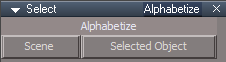
- SelectPanelA2Z.png (2.97 KiB) Viewed 2820 times
Update
Opens the selected object in the Link Editor and Alphabetize/Arranges the nodes
Select, Sort, and Arrange Tutorial
Open the Select panel
Select one of the selection options
Delete
Undo
With the Link Editor Navigator select Open/Organize
Results
Minimize and Arranges all nodes and moves your selection to the end of the arrangement
-
trueBlue
- Captain
- Posts: 5548
- Joined: 06 Jul 2009, 22:50
- Type the number ten into the box: 10
Re: Final trueSpace7.61 Beta 8 Std Unofficial Update
New Update for trueSpace7.61 Beta 8 Std Unofficial Update
viewtopic.php?t=3731
Final Update August 26, 2020
Recommend that you completely Uninstall and Install trueSpace7.61 Beta 8 Standalone to a clean directory before installing this update. This update precedes all previous updates and recommend that you delete any and all previous updates
Lights
Widget / LightPanelFrame
Disable - SnapToRatio
Spot & Projector
Preferences / Spot Cone
Add
LMB click opens the Shadow Map & Image Browser
AnimPrefPanelFrame
Disable - SnapToRatio
Update WS - Default light setup
Update Scene Lights & Camera
Select - Author Clinton Reese
Add
None button
Widgets
Camera(s)
Add
RMB select the Camera Widget's (sides) shows the Camera's floating panel
View Widget
Encircle 'Green' / Perspective
Add
Alt + RMB click resets the Perspective view
Note: This is using new values and is different then trueSpace's Reset View command
C3DRestore.xml - Author Clinton Reese
Update
viewtopic.php?t=3731
Final Update August 26, 2020
Recommend that you completely Uninstall and Install trueSpace7.61 Beta 8 Standalone to a clean directory before installing this update. This update precedes all previous updates and recommend that you delete any and all previous updates
Lights
Widget / LightPanelFrame
Disable - SnapToRatio
Spot & Projector
Preferences / Spot Cone
Add
LMB click opens the Shadow Map & Image Browser

Disable - SnapToRatio
Update WS - Default light setup
Update Scene Lights & Camera
Select - Author Clinton Reese
Add
None button
Widgets
Camera(s)
Add
RMB select the Camera Widget's (sides) shows the Camera's floating panel

Encircle 'Green' / Perspective
Add
Alt + RMB click resets the Perspective view
Note: This is using new values and is different then trueSpace's Reset View command
C3DRestore.xml - Author Clinton Reese
Update
-
trueBlue
- Captain
- Posts: 5548
- Joined: 06 Jul 2009, 22:50
- Type the number ten into the box: 10
Re: Final trueSpace7.61 Beta 8 Std Unofficial Update
New Update for trueSpace7.61 Beta 8 Std Unofficial Update
viewtopic.php?t=3731
Final Update August 28, 2020
Recommend that you completely Uninstall and Install trueSpace7.61 Beta 8 Standalone to a clean directory before installing this update. This update precedes all previous updates and recommend that you delete any and all previous updates
Toolbars - Object button(s)
Select - None button
Link Editor Navigation - Ctrl+ button
Camera(s) - Camera Window script
All of the above have been updated to remove the selection in the Stack/Panels when Unselecting
viewtopic.php?t=3731
Final Update August 28, 2020
Recommend that you completely Uninstall and Install trueSpace7.61 Beta 8 Standalone to a clean directory before installing this update. This update precedes all previous updates and recommend that you delete any and all previous updates
Toolbars - Object button(s)
Select - None button
Link Editor Navigation - Ctrl+ button
Camera(s) - Camera Window script
All of the above have been updated to remove the selection in the Stack/Panels when Unselecting
-
trueBlue
- Captain
- Posts: 5548
- Joined: 06 Jul 2009, 22:50
- Type the number ten into the box: 10
Re: Final trueSpace7.61 Beta 8 Std Unofficial Update
New Update for trueSpace7.61 Beta 8 Std Unofficial Update
viewtopic.php?t=3731
Final Update August 28, 2020
Recommend that you completely Uninstall and Install trueSpace7.61 Beta 8 Standalone to a clean directory before installing this update. This update precedes all previous updates and recommend that you delete any and all previous updates
Toolbars
Update
Look at Selection icon(s)
Widgets
Object Move, Rotate, and Scale
Camera Move, Rotate, and FOV
Spot and Projector
Camera(s)
Add
Automatic Keyframing Author - Clinton Reese
Enable Automatic Keyframing from the Animation Preferences panel
Navigation widget(s), Object Move, Rotate, Scale, Camera Move, Rotate, FOV, Spot, Projector, and Camera(s) widgets include Automatic Keyframing
Note:
The Spot and Projector Angle needs to be enabled in the Keying panel
The Camera FOV needs to be enabled in the Keying panel
Try
Add Cube
Enable Automatic Keyframing
Enable Object Rotate
In 3D Space, Alt + LMB click or Ctrl + LMB click
Advance timeline 30 Frames
In 3D Space, Alt + LMB click
Advance timeline 30 Frames
In 3D Space, Alt + LMB click
Advance timeline 30 Frames
In 3D Space, Alt + LMB click
Advance timeline 30 Frames
Disable Automatic Keyframing
Play animation
viewtopic.php?t=3731
Final Update August 28, 2020
Recommend that you completely Uninstall and Install trueSpace7.61 Beta 8 Standalone to a clean directory before installing this update. This update precedes all previous updates and recommend that you delete any and all previous updates
Toolbars
Update
Look at Selection icon(s)
Widgets
Object Move, Rotate, and Scale
Camera Move, Rotate, and FOV
Spot and Projector
Camera(s)
Add
Automatic Keyframing Author - Clinton Reese
Enable Automatic Keyframing from the Animation Preferences panel
Navigation widget(s), Object Move, Rotate, Scale, Camera Move, Rotate, FOV, Spot, Projector, and Camera(s) widgets include Automatic Keyframing
Note:
The Spot and Projector Angle needs to be enabled in the Keying panel
The Camera FOV needs to be enabled in the Keying panel

Try
Add Cube
Enable Automatic Keyframing
Enable Object Rotate
In 3D Space, Alt + LMB click or Ctrl + LMB click
Advance timeline 30 Frames
In 3D Space, Alt + LMB click
Advance timeline 30 Frames
In 3D Space, Alt + LMB click
Advance timeline 30 Frames
In 3D Space, Alt + LMB click
Advance timeline 30 Frames
Disable Automatic Keyframing
Play animation
-
trueBlue
- Captain
- Posts: 5548
- Joined: 06 Jul 2009, 22:50
- Type the number ten into the box: 10
Re: Final trueSpace7.61 Beta 8 Std Unofficial Update
New Update for trueSpace7.61 Beta 8 Std Unofficial Update
viewtopic.php?t=3731
Final Update August 30, 2020
Recommend that you completely Uninstall and Install trueSpace7.61 Beta 8 Standalone to a clean directory before installing this update. This update precedes all previous updates and recommend that you delete any and all previous updates
Toolbars
Update
HelpText attributes to be compatible with Keyboard shortcuts
Windows.Shortcuts.xml
Moved
Quad Toolbar to Point Edit
CustomCommands
MeshObjectCoordinateSystem
Add
CoordinatePopupFrame
viewtopic.php?t=3731
Final Update August 30, 2020
Recommend that you completely Uninstall and Install trueSpace7.61 Beta 8 Standalone to a clean directory before installing this update. This update precedes all previous updates and recommend that you delete any and all previous updates
Toolbars
Update
HelpText attributes to be compatible with Keyboard shortcuts
Windows.Shortcuts.xml
Moved
Quad Toolbar to Point Edit
CustomCommands
MeshObjectCoordinateSystem
Add
CoordinatePopupFrame

- trueObjectCoordinate.png (10.74 KiB) Viewed 2844 times
-
trueBlue
- Captain
- Posts: 5548
- Joined: 06 Jul 2009, 22:50
- Type the number ten into the box: 10
Re: Final trueSpace7.61 Beta 8 Std Unofficial Update
New Update for trueSpace7.61 Beta 8 Std Unofficial Update
viewtopic.php?t=3731
Final Update September 2, 2020
Recommend that you completely Uninstall and Install trueSpace7.61 Beta 8 Standalone to a clean directory before installing this update. This update precedes all previous updates and recommend that you delete any and all previous updates
Widgets
Inspect
Add
Shift - Open scene in the Link Editor
Soft paint
Add
Custom color to the bitmap control
Point Edit Widgets 2 & 3
Sphere & Triangles
Add
Alt + LMB select - Opens the Quad Menu
Ctrl + LMB select - Closes the Quad Menu or
RMB click in 3D Space to End Point Editing
Note:
Point Edit Widget 2 has the Quad Menu
Point Edit Widget 3 has the Quad Toolbar and it's own Widget Help
RotatePOV.xml
Add
try&catch(error)
Mesh Editor Settings
Add
Aspect titles
Displacement Mapper
Export Default aspect
Displacement Brush icon
Fix
RMB - Displacement Brush settings
viewtopic.php?t=3731
Final Update September 2, 2020
Recommend that you completely Uninstall and Install trueSpace7.61 Beta 8 Standalone to a clean directory before installing this update. This update precedes all previous updates and recommend that you delete any and all previous updates
Widgets
Inspect
Add
Shift - Open scene in the Link Editor
Soft paint
Add
Custom color to the bitmap control
Point Edit Widgets 2 & 3
Sphere & Triangles
Add
Alt + LMB select - Opens the Quad Menu
Ctrl + LMB select - Closes the Quad Menu or
RMB click in 3D Space to End Point Editing
Note:
Point Edit Widget 2 has the Quad Menu
Point Edit Widget 3 has the Quad Toolbar and it's own Widget Help
RotatePOV.xml
Add
try&catch(error)
Mesh Editor Settings
Add
Aspect titles
Displacement Mapper
Export Default aspect
Displacement Brush icon
Fix
RMB - Displacement Brush settings

-
trueBlue
- Captain
- Posts: 5548
- Joined: 06 Jul 2009, 22:50
- Type the number ten into the box: 10
Re: Final trueSpace7.61 Beta 8 Std Unofficial Update
New Update for trueSpace7.61 Beta 8 Std Unofficial Update
viewtopic.php?t=3731
Final Update September 25, 2020
Recommend that you completely Uninstall and Install trueSpace7.61 Beta 8 Standalone to a clean directory before installing this update. This update precedes all previous updates and recommend that you delete any and all previous updates
Clinton toolbar
Add
UnSelectable icon Author - Clinton Reese
LMB - Lock selection
Installs the UnSelectable script into the scene if it does not exist
Enable - Updates the Select widget with new plugin based selection system
LMB selecting 3D Objects in 3D Space that have been Locked will be unselectable
Alt + LMB - Selects Locked objects
Disable - Restores the Select widget
Close - Removes the UnSelectable script from the scene and restores the Select widget
Recommend that you Disable this process before saving your scene or closing trueSpace!
Workspace Layers 3 icon Author - Clinton Reese
Update
Removed the Selection Change Event/Undo selection and added the new plugin based selection system
Enable Locking - Updates the Select widget with new plugin based selection system
Disable Locking - Restores the Select widget
Recommend that you Disable this process before saving your scene or closing trueSpace!
Link Editor toolbar
Add
Set
LMB - Sets the active Link Editor (2D) window's Link Editor toolbar as the source
RMB - Installs the Link Editor toolbar in the active Link Editor (2D) window's titlebar and sets it as the source
QuadToolbar scripts Author - Clinton Reese
Updated September 11, 2020
New plugin commands are GetFrameRect for reading the window position, SetFrameRect for setting the window position and UpdateFrameRect which will update the display of a window after changing it's frame node values (width, height, title, frame type etc.)
Clintons3D Package v.1638419 plugin Author - Clinton Reese
Update
Removed Collada plugin code (3 MBS)
Add
Widget based selection system
GetWindowAspect
GetFrameRect, SetFrameRect, and UpdateFrameRect
IMPORTANT: All of the above updates require this plugin v.1638419 or higher to be Installed and Loaded
viewtopic.php?t=3731
Final Update September 25, 2020
Recommend that you completely Uninstall and Install trueSpace7.61 Beta 8 Standalone to a clean directory before installing this update. This update precedes all previous updates and recommend that you delete any and all previous updates
Clinton toolbar
Add
UnSelectable icon Author - Clinton Reese
LMB - Lock selection
Installs the UnSelectable script into the scene if it does not exist

- UnSelectable.png (3.49 KiB) Viewed 2817 times
LMB selecting 3D Objects in 3D Space that have been Locked will be unselectable
Alt + LMB - Selects Locked objects
Disable - Restores the Select widget
Close - Removes the UnSelectable script from the scene and restores the Select widget
Recommend that you Disable this process before saving your scene or closing trueSpace!
Workspace Layers 3 icon Author - Clinton Reese
Update
Removed the Selection Change Event/Undo selection and added the new plugin based selection system
Enable Locking - Updates the Select widget with new plugin based selection system
Disable Locking - Restores the Select widget
Recommend that you Disable this process before saving your scene or closing trueSpace!
Link Editor toolbar
Add
Set

RMB - Installs the Link Editor toolbar in the active Link Editor (2D) window's titlebar and sets it as the source
QuadToolbar scripts Author - Clinton Reese
Updated September 11, 2020
New plugin commands are GetFrameRect for reading the window position, SetFrameRect for setting the window position and UpdateFrameRect which will update the display of a window after changing it's frame node values (width, height, title, frame type etc.)
Clintons3D Package v.1638419 plugin Author - Clinton Reese
Update
Removed Collada plugin code (3 MBS)
Add
Widget based selection system
GetWindowAspect
GetFrameRect, SetFrameRect, and UpdateFrameRect
IMPORTANT: All of the above updates require this plugin v.1638419 or higher to be Installed and Loaded
-
trueBlue
- Captain
- Posts: 5548
- Joined: 06 Jul 2009, 22:50
- Type the number ten into the box: 10
Re: Final trueSpace7.61 Beta 8 Std Unofficial Update
New Update for trueSpace7.61 Beta 8 Std Unofficial Update
viewtopic.php?t=3731
Final Update September 30, 2020
Recommend that you completely Uninstall and Install trueSpace7.61 Beta 8 Standalone to a clean directory before installing this update. This update precedes all previous updates and recommend that you delete any and all previous updates
unSelectable.RsObj
Update
selectionLocking
Export the Default aspect
Note: Uses the unSelectable scripts prior to the Tue Sep 29, 2020 6:21 pm update
Clintons3D Package v.1638420 plugin Author - Clinton Reese
Update
Widget based selection system
viewtopic.php?t=3731
Final Update September 30, 2020
Recommend that you completely Uninstall and Install trueSpace7.61 Beta 8 Standalone to a clean directory before installing this update. This update precedes all previous updates and recommend that you delete any and all previous updates
unSelectable.RsObj
Update
selectionLocking
Export the Default aspect
Note: Uses the unSelectable scripts prior to the Tue Sep 29, 2020 6:21 pm update
Clintons3D Package v.1638420 plugin Author - Clinton Reese
Update
Widget based selection system
Clintons3D Package v.1638420 plugin will check for the "UnSelectable" connector and read it's value, checked is locked, unchecked is unlocked.
-
trueBlue
- Captain
- Posts: 5548
- Joined: 06 Jul 2009, 22:50
- Type the number ten into the box: 10
Re: Final trueSpace7.61 Beta 8 Std Unofficial Update
New Update for trueSpace7.61 Beta 8 Std Unofficial Update
viewtopic.php?t=3731
Final Update October 02, 2020
Recommend that you completely Uninstall and Install trueSpace7.61 Beta 8 Standalone to a clean directory before installing this update. This update precedes all previous updates and recommend that you delete any and all previous updates
Face to Face Snapping Author - Clinton Reese
Update
Change Model status message to Workspace status message
update selection if using copy mode.RsObj
Add
UserInterface.OpenToolPanelViewEx2("" , "" ,"Scripts/CustomCommands/facetoface", 3, 1, 0);
Removed Face Snap from Widgets/Tools
Update Face Snap icon(s) all toolbars
viewtopic.php?t=3731
Final Update October 02, 2020
Recommend that you completely Uninstall and Install trueSpace7.61 Beta 8 Standalone to a clean directory before installing this update. This update precedes all previous updates and recommend that you delete any and all previous updates
Face to Face Snapping Author - Clinton Reese
Update
Change Model status message to Workspace status message
update selection if using copy mode.RsObj
Add
UserInterface.OpenToolPanelViewEx2("" , "" ,"Scripts/CustomCommands/facetoface", 3, 1, 0);
Removed Face Snap from Widgets/Tools
Update Face Snap icon(s) all toolbars
-
trueBlue
- Captain
- Posts: 5548
- Joined: 06 Jul 2009, 22:50
- Type the number ten into the box: 10
Re: Final trueSpace7.61 Beta 8 Std Unofficial Update
New Update for trueSpace7.61 Beta 8 Std Unofficial Update
viewtopic.php?t=3731
Final Update October 06, 2020
Recommend that you completely Uninstall and Install trueSpace7.61 Beta 8 Standalone to a clean directory before installing this update. This update precedes all previous updates and recommend that you delete any and all previous updates
Clintons3dPlugin.rsx v.1638421
unSelectable.RsObj
Update - Author Clinton Reese
Note: You must have atleast one 3D object, Light, or Camera selected before using the Lock Selection toolbar icon or panel Lock and Unlock buttons.
Workspace Layers 3.RsObj
Update - Author Clinton Reese
Replaced the Web UI plugin based Locking button with Enable/Disable - Widget based locking system
viewtopic.php?t=3731
Final Update October 06, 2020
Recommend that you completely Uninstall and Install trueSpace7.61 Beta 8 Standalone to a clean directory before installing this update. This update precedes all previous updates and recommend that you delete any and all previous updates
Clintons3dPlugin.rsx v.1638421
unSelectable.RsObj
Update - Author Clinton Reese
Note: You must have atleast one 3D object, Light, or Camera selected before using the Lock Selection toolbar icon or panel Lock and Unlock buttons.
Workspace Layers 3.RsObj
Update - Author Clinton Reese
Replaced the Web UI plugin based Locking button with Enable/Disable - Widget based locking system
-
trueBlue
- Captain
- Posts: 5548
- Joined: 06 Jul 2009, 22:50
- Type the number ten into the box: 10
Re: Final trueSpace7.61 Beta 8 Std Unofficial Update
New Update for trueSpace7.61 Beta 8 Std Unofficial Update
viewtopic.php?t=3731
Final Update October 09, 2020
Recommend that you completely Uninstall and Install trueSpace7.61 Beta 8 Standalone to a clean directory before installing this update. This update precedes all previous updates and recommend that you delete any and all previous updates
Clintons3dPlugin.rsx v.1638421
Widgets/Default context widget/Select
* Ctrl + X + LMB click in 3D Space = Cut selected object
* Ctrl + V + LMB click in 3D Space = Paste last Cut object
Add
Widget based locking - Author - Clinton Reese
* L + LMB click in 3D Space = Lock selection
* U + LMB click in 3D Space = Unlock selection
* ALT + LMB click in 3D Space = Select Locked object
unSelectable Author - Clinton Reese
Update
Removed the Restore aspect
Note: Reset the Default Context to restore the Widget based locking
Removed the Enable/Disable buttons
Workspace Layers 3 Author - Clinton Reese
Removed the Start Web Server button
Update
Layer object count Row - Changed to White Bold font
loadIt script alerts and warnings
Checks scene for existing unSelectable and workspacelayers3 nodes with Alerts
Add
RemoteCommand
Opens the panel on startup
Runs Scripts/CustomCommands/unSelectable/ActivateWidgetLocking
Primitives
* Settings icon
LMB command
Add
RsAnimKeying.OpenView()
LMB click - Selects the preferences node and opens Settings in the Keying panel
RMB click - Selects the parent object
Text
Add
* Settings icon
viewtopic.php?t=3731
Final Update October 09, 2020
Recommend that you completely Uninstall and Install trueSpace7.61 Beta 8 Standalone to a clean directory before installing this update. This update precedes all previous updates and recommend that you delete any and all previous updates
Clintons3dPlugin.rsx v.1638421
Widgets/Default context widget/Select
* Ctrl + X + LMB click in 3D Space = Cut selected object
* Ctrl + V + LMB click in 3D Space = Paste last Cut object
Add
Widget based locking - Author - Clinton Reese
* L + LMB click in 3D Space = Lock selection
* U + LMB click in 3D Space = Unlock selection
* ALT + LMB click in 3D Space = Select Locked object
unSelectable Author - Clinton Reese
Update
Removed the Restore aspect
Note: Reset the Default Context to restore the Widget based locking
Removed the Enable/Disable buttons
Workspace Layers 3 Author - Clinton Reese
Removed the Start Web Server button
Update
Layer object count Row - Changed to White Bold font
loadIt script alerts and warnings
Checks scene for existing unSelectable and workspacelayers3 nodes with Alerts
Add
RemoteCommand
Opens the panel on startup
Runs Scripts/CustomCommands/unSelectable/ActivateWidgetLocking
Primitives
* Settings icon
LMB command
Add
RsAnimKeying.OpenView()
LMB click - Selects the preferences node and opens Settings in the Keying panel
RMB click - Selects the parent object
Text
Add
* Settings icon
-
trueBlue
- Captain
- Posts: 5548
- Joined: 06 Jul 2009, 22:50
- Type the number ten into the box: 10
Re: Final trueSpace7.61 Beta 8 Std Unofficial Update
New Update for trueSpace7.61 Beta 8 Std Unofficial Update
viewtopic.php?t=3731
Update October 19, 2020
Recommend that you completely Uninstall and Install trueSpace7.61 Beta 8 Standalone to a clean directory before installing this update. This update precedes all previous updates and recommend that you delete any and all previous updates
ReloadCustomScripts Author - Clinton Reese
Add
Check for valid RsObj extension
Window.Shortcuts.xml
Add
<RS_ACC KEY="CTRL SHIFT C" DESC="Copy selected objects to active Link Editor" GROUP="LINKEDITOR" COMMAND="Activity.Run('/Scripts/Commands/Copy');" />
Radial Array 2, Grid Array 2, and PointClone Author - Clinton Reese
Add
Flatten panel script
ClintonsToolbar
Removed most of the RMB Help commands and added it to their panels
Workspace Layers 3 Author - Clinton Reese
Update
October 19, 2020
bug fix infinite loop caused by slow connector update
removed webserver based locking
option to replace older layers node version when loading the ui
Updated
loadIt script
Fixed the plugin warnings and added Alerts
Layer object count Row - Changed to White Bold font
Checks scene for existing unSelectable script
Add
RemoteCommand
Opens the panel on startup
Rectangle Select Author - Clinton Reese
Modified
Incorporated the Rectangle Select Widget node into a Rectangle Zoom Widget
Added two RsApp.Undo() lines to that data script to undo the Zoom
Default aspect 'Invisible'
Add
Rectangle Zoom button
Connects the Rectangle Zoom Widget and switches to the Rectangle aspect
Add
Rectangle aspect 'Visible'
Zoom to Selection selects objects and Zooms to selection
Keep Active keeps the widget active until user RMB selects in 3D Space
Default button disconnects the Rectangle Zoom Widget and switches to the Default aspect
The Rectangle Zoom aspect is not perfect by no means as there is a periodically zoom in/out, but not all of the time.
Tip: Seems better if you hold the rectangle over the selection a little bit before releasing it.
Also using Objects in the Desktop/Selection Highlight gives you feedback when using Rectangle Select.
UnSelectable Author - Clinton Reese
Lock
Add
PVT_LOCKED = 2;RsStackView.RemovePanelsFromCurrSelection(PVT_LOCKED, 0);Space.Unselect()
Lock, Unlock, and Unlock All scripts
Add
Return if object is in Point Edit Mode
RMB script
Add
Check if floating panel is already open
If Show false, open panel in Stack/Panels
viewtopic.php?t=3731
Update October 19, 2020
Recommend that you completely Uninstall and Install trueSpace7.61 Beta 8 Standalone to a clean directory before installing this update. This update precedes all previous updates and recommend that you delete any and all previous updates
ReloadCustomScripts Author - Clinton Reese
Add
Check for valid RsObj extension
Window.Shortcuts.xml
Add
<RS_ACC KEY="CTRL SHIFT C" DESC="Copy selected objects to active Link Editor" GROUP="LINKEDITOR" COMMAND="Activity.Run('/Scripts/Commands/Copy');" />
Radial Array 2, Grid Array 2, and PointClone Author - Clinton Reese
Add
Flatten panel script
ClintonsToolbar
Removed most of the RMB Help commands and added it to their panels
Workspace Layers 3 Author - Clinton Reese
Update
October 19, 2020
bug fix infinite loop caused by slow connector update
removed webserver based locking
option to replace older layers node version when loading the ui
Updated
loadIt script
Fixed the plugin warnings and added Alerts
Layer object count Row - Changed to White Bold font
Checks scene for existing unSelectable script
Add
RemoteCommand
Opens the panel on startup
Rectangle Select Author - Clinton Reese

- Visible Rectangle Select.png (65.98 KiB) Viewed 3269 times
Incorporated the Rectangle Select Widget node into a Rectangle Zoom Widget
Added two RsApp.Undo() lines to that data script to undo the Zoom
Default aspect 'Invisible'

- DefaultAspect.png (4.38 KiB) Viewed 3269 times
Rectangle Zoom button
Connects the Rectangle Zoom Widget and switches to the Rectangle aspect
Add
Rectangle aspect 'Visible'

- RectangleAspect.png (3.49 KiB) Viewed 3269 times
Keep Active keeps the widget active until user RMB selects in 3D Space
Default button disconnects the Rectangle Zoom Widget and switches to the Default aspect
The Rectangle Zoom aspect is not perfect by no means as there is a periodically zoom in/out, but not all of the time.
Tip: Seems better if you hold the rectangle over the selection a little bit before releasing it.
Also using Objects in the Desktop/Selection Highlight gives you feedback when using Rectangle Select.
UnSelectable Author - Clinton Reese
Lock
Add
PVT_LOCKED = 2;RsStackView.RemovePanelsFromCurrSelection(PVT_LOCKED, 0);Space.Unselect()
Lock, Unlock, and Unlock All scripts
Add
Return if object is in Point Edit Mode
RMB script
Add
Check if floating panel is already open
If Show false, open panel in Stack/Panels
-
trueBlue
- Captain
- Posts: 5548
- Joined: 06 Jul 2009, 22:50
- Type the number ten into the box: 10
Re: Final trueSpace7.61 Beta 8 Std Unofficial Update
New Update for trueSpace7.61 Beta 8 Std Unofficial Update
viewtopic.php?t=3731
Final Update October 23, 2020
Recommend that you completely Uninstall and Install trueSpace7.61 Beta 8 Standalone to a clean directory before installing this update. This update precedes all previous updates and recommend that you delete any and all previous updates
Toolbars/Link Editor Navigator/Set LE button
Add
RMB = Switch to 3D
Toolbars/Main2
LE Window icon
Add Link Editor Navigator aspect toolbar and set as active
Toolbars/WinGUID_Bar/Reset View icon
Add
RMB = Perspective
Note: Resets to a custom Perspective view
RectSelect Author = Clinton Reese
Add
Rectangle Select icon to the panel
Widgets/Tools/Rect select widget Author = Clinton Reese
Add
Alt + LMB click = Reset View
Note: Only usefull when using Rectangle Zoom with Keep Active and Zoom to Selection checked
RMB click to close the widget
Toolbars/WorkspaceNav/Face Snap icon
Opens the Face Snap toolbar in active window
Face Snap
LMB = Face Snap
RMB = Copy Source
* Fixed an issue when right clicking during processing a Face Snap
Cancel = LMB select the orange Face Snap widget
Add
Widgets/Tools/Face Snap widget
Includes a modified facetoface script Author = Clinton Reese
* Fixed an issue with the Copied object's Pivot
Changed the PE selection from Destination to Source plus Copied object
Added Workspace status messages
Tip: Select two 3D Objects and enter into Point Edit mode.
Select an Object Source's face.
RMB select the Face Snap's icon
Select the Object Destination's face
RMB select the Face Snap's icon to countinue...
viewtopic.php?t=3731
Final Update October 23, 2020
Recommend that you completely Uninstall and Install trueSpace7.61 Beta 8 Standalone to a clean directory before installing this update. This update precedes all previous updates and recommend that you delete any and all previous updates
Toolbars/Link Editor Navigator/Set LE button
Add
RMB = Switch to 3D
Toolbars/Main2
LE Window icon
Add Link Editor Navigator aspect toolbar and set as active
Toolbars/WinGUID_Bar/Reset View icon
Add
RMB = Perspective
Note: Resets to a custom Perspective view
RectSelect Author = Clinton Reese
Add
Rectangle Select icon to the panel
Widgets/Tools/Rect select widget Author = Clinton Reese
Add
Alt + LMB click = Reset View
Note: Only usefull when using Rectangle Zoom with Keep Active and Zoom to Selection checked
RMB click to close the widget
Toolbars/WorkspaceNav/Face Snap icon
Opens the Face Snap toolbar in active window
Face Snap
LMB = Face Snap
RMB = Copy Source
* Fixed an issue when right clicking during processing a Face Snap
Cancel = LMB select the orange Face Snap widget
Add
Widgets/Tools/Face Snap widget
Includes a modified facetoface script Author = Clinton Reese
* Fixed an issue with the Copied object's Pivot
Changed the PE selection from Destination to Source plus Copied object
Added Workspace status messages
Tip: Select two 3D Objects and enter into Point Edit mode.
Select an Object Source's face.
RMB select the Face Snap's icon
Select the Object Destination's face
RMB select the Face Snap's icon to countinue...
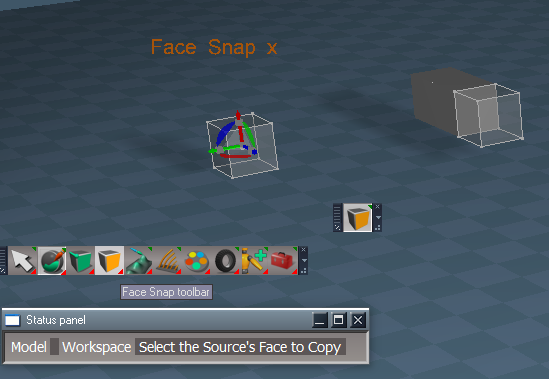
-
trueBlue
- Captain
- Posts: 5548
- Joined: 06 Jul 2009, 22:50
- Type the number ten into the box: 10
Re: Final trueSpace7.61 Beta 8 Std Unofficial Update
New Update for trueSpace7.61 Beta 8 Std Unofficial Update
viewtopic.php?t=3731
Final Update October 29, 2020
Recommend that you completely Uninstall and Install trueSpace7.61 Beta 8 Standalone to a clean directory before installing this update. This update precedes all previous updates and recommend that you delete any and all previous updates
Clintons3dPlugin.rsx - Author Clinton Reese
Update
v.1638424
Selection locked widget
* Fix for UnSelectable to work properly with grouped items
* Fix UnSelectable string type check for Selection locked widget
Workspace Layers 3 - Author Clinton Reese
Update
v.October 25, 2020
CustomCommands
Add
SnappingScripts - Author Clinton Reese
Panels
Widget Options icon
Add commands that shows their panel with the Pick Select Widget's panel in the Stack
Add widget shortcuts list
Toolbar Styles
Add
Option for Status Messages On/Off
Pivot scripts/panels
Option for the Show Axis On/Off
Note: Displays the Axis widget for 500 ms
Toolbars
ClintonsToolbar - Author Clinton Reese
Add
Snapping icon
Changed the loading positions of all toolbars
WorkspaceMain2
Add
Snapping icon
Toolbars
Add
SnappingToolbar
Updated the AgentID & TagAlias
Widgets/Select
Add
ObjectPickingWidget - Author Clinton Reese
Sphere
Add gesture
LMB = Commit to Selection
RMB = Cancel "Already included"
Add
Exit Commit Cancel
ENTER + Move cursor = Commit to Selection
ESC + Move cursor = Cancel
Widgets/Tools
Add
PickFaceWidget, PickFaceWidget2, PickVertexWidget, & PickVertexWidget2 - Author Clinton Reese
Add gestures
ENTER + Move cursor = Commit to Selection
ESC + Move cursor = Cancel
viewtopic.php?t=3731
Final Update October 29, 2020
Recommend that you completely Uninstall and Install trueSpace7.61 Beta 8 Standalone to a clean directory before installing this update. This update precedes all previous updates and recommend that you delete any and all previous updates
Clintons3dPlugin.rsx - Author Clinton Reese
Update
v.1638424
Selection locked widget
* Fix for UnSelectable to work properly with grouped items
* Fix UnSelectable string type check for Selection locked widget
Workspace Layers 3 - Author Clinton Reese
Update
v.October 25, 2020
CustomCommands
Add
SnappingScripts - Author Clinton Reese
Panels
Widget Options icon
Add commands that shows their panel with the Pick Select Widget's panel in the Stack
Add widget shortcuts list
Toolbar Styles
Add
Option for Status Messages On/Off
Pivot scripts/panels
Option for the Show Axis On/Off
Note: Displays the Axis widget for 500 ms
Toolbars
ClintonsToolbar - Author Clinton Reese

Snapping icon
Changed the loading positions of all toolbars
WorkspaceMain2

Snapping icon
Toolbars
Add
SnappingToolbar
Updated the AgentID & TagAlias
Widgets/Select
Add
ObjectPickingWidget - Author Clinton Reese
Sphere
Add gesture
LMB = Commit to Selection
RMB = Cancel "Already included"
Add
Exit Commit Cancel
ENTER + Move cursor = Commit to Selection
ESC + Move cursor = Cancel
Widgets/Tools
Add
PickFaceWidget, PickFaceWidget2, PickVertexWidget, & PickVertexWidget2 - Author Clinton Reese
Add gestures
ENTER + Move cursor = Commit to Selection
ESC + Move cursor = Cancel
-
trueBlue
- Captain
- Posts: 5548
- Joined: 06 Jul 2009, 22:50
- Type the number ten into the box: 10
Re: Final trueSpace7.61 Beta 8 Std Unofficial Update
New Update for trueSpace7.61 Beta 8 Std Unofficial Update
viewtopic.php?t=3731
Final Update October 30, 2020
Recommend that you completely Uninstall and Install trueSpace7.61 Beta 8 Standalone to a clean directory before installing this update. This update precedes all previous updates and recommend that you delete any and all previous updates
I made a mistake in the previous update
The Snapping toolbar Icon(S) were not highlighting when in use, as was intended by the Author - Clinton Reese
Sorry about that!
Toolbars
Update
SnappingToolbar - Author Clinton Reese
Restored the AgentID & TagAlias
Axis to Point Editing
Add
Button Highlight
CustomCommands
Update
SnappingScripts - Author Clinton Reese
Axis to Point Editing
Add
Button Highlight
Updated the Show Axis scripts for the Pivot scripts, so that it does not run if it is Not Checked.
viewtopic.php?t=3731
Final Update October 30, 2020
Recommend that you completely Uninstall and Install trueSpace7.61 Beta 8 Standalone to a clean directory before installing this update. This update precedes all previous updates and recommend that you delete any and all previous updates
I made a mistake in the previous update
The Snapping toolbar Icon(S) were not highlighting when in use, as was intended by the Author - Clinton Reese
Sorry about that!
Toolbars
Update
SnappingToolbar - Author Clinton Reese
Restored the AgentID & TagAlias
Axis to Point Editing
Add
Button Highlight
CustomCommands
Update
SnappingScripts - Author Clinton Reese
Axis to Point Editing
Add
Button Highlight
Updated the Show Axis scripts for the Pivot scripts, so that it does not run if it is Not Checked.
-
clintonman
- Captain
- Posts: 5659
- Joined: 21 May 2009, 21:08
- Type the number ten into the box: 0
- Location: California
Re: Final trueSpace7.61 Beta 8 Std Unofficial Update
Where can I find the various toolbars in this new version?
Looking for interpolation, nurbs and toolbar manager toolbars.
Looking for interpolation, nurbs and toolbar manager toolbars.
-
trueBlue
- Captain
- Posts: 5548
- Joined: 06 Jul 2009, 22:50
- Type the number ten into the box: 10
Re: Final trueSpace7.61 Beta 8 Std Unofficial Update
They are stacked together now.
Trying to keep the toolbar length as short as possible
When I open your Clinton toolbar in a new smaller window, I usually RMB click the PE icon.
You can also close all of the toolbars by RMB clicking the red toolbox (trueSpace toolbars) in the Red toolbar
Just a convenience thing for my personal use
Question?
Is your new NURBs tools compatible with tS761 Standalone?
Trying to keep the toolbar length as short as possible
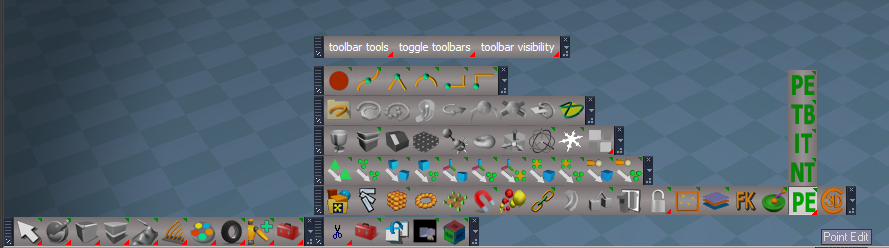
You can also close all of the toolbars by RMB clicking the red toolbox (trueSpace toolbars) in the Red toolbar
Just a convenience thing for my personal use

Is your new NURBs tools compatible with tS761 Standalone?
-
clintonman
- Captain
- Posts: 5659
- Joined: 21 May 2009, 21:08
- Type the number ten into the box: 0
- Location: California
Re: Final trueSpace7.61 Beta 8 Std Unofficial Update
Thanks.trueBlue wrote: 31 Oct 2020, 09:12 They are stacked together now.
...
Question?
Is your new NURBs tools compatible with tS761 Standalone?
Yes, they are workspace NURBS so there is no link to modelspace same as the curves.
-
clintonman
- Captain
- Posts: 5659
- Joined: 21 May 2009, 21:08
- Type the number ten into the box: 0
- Location: California
Re: Final trueSpace7.61 Beta 8 Std Unofficial Update
Nice work with the LE toolbar showing in all LE windows. 
-
clintonman
- Captain
- Posts: 5659
- Joined: 21 May 2009, 21:08
- Type the number ten into the box: 0
- Location: California
Re: Final trueSpace7.61 Beta 8 Std Unofficial Update

- unclosableToolbar.jpg (23.98 KiB) Viewed 3272 times
-
trueBlue
- Captain
- Posts: 5548
- Joined: 06 Jul 2009, 22:50
- Type the number ten into the box: 10
Re: Final trueSpace7.61 Beta 8 Std Unofficial Update
Works like the Quad toolbars
Select one of the Coordinate icons
The Toggle Object Coordinate mode icon is the only one that does not close
Select one of the Coordinate icons
The Toggle Object Coordinate mode icon is the only one that does not close
-
trueBlue
- Captain
- Posts: 5548
- Joined: 06 Jul 2009, 22:50
- Type the number ten into the box: 10
Re: Final trueSpace7.61 Beta 8 Std Unofficial Update
@Clinton re NURBS scripts
Can anything be done with the errors when using the Load and Save button scripts from the Import Patches?
Looks like a , missing file/type in the path?
Also something for an empty string?
This seems to work with an empty string...
Can anything be done with the errors when using the Load and Save button scripts from the Import Patches?
Looks like a , missing file/type in the path?
Also something for an empty string?
This seems to work with an empty string...
Code: Select all
	if(!filename) {
	params.SetTerminationFlag()
	return;
	}
-
trueBlue
- Captain
- Posts: 5548
- Joined: 06 Jul 2009, 22:50
- Type the number ten into the box: 10
Re: Final trueSpace7.61 Beta 8 Std Unofficial Update
Thank you for the plugin to make it possible!clintonman wrote: 31 Oct 2020, 15:25 Nice work with the LE toolbar showing in all LE windows.
-
trueBlue
- Captain
- Posts: 5548
- Joined: 06 Jul 2009, 22:50
- Type the number ten into the box: 10
Re: Final trueSpace7.61 Beta 8 Std Unofficial Update
New Update for trueSpace7.61 Beta 8 Std Unofficial Update
viewtopic.php?t=3731
Final Update November 1, 2020
Recommend that you completely Uninstall and Install trueSpace7.61 Beta 8 Standalone to a clean directory before installing this update. This update precedes all previous updates and recommend that you delete any and all previous updates
Workspace NURBS Curves & Patches - Author - Clinton Reese
These old scripts were removed which are now incorporated into the above NURBS scripts...
Scripts\clintonobjects\CustomScriptsStore\
extendCurveScript
insertControlPointScript
deleteControlPointScript
loadCurveScript
points2curveScript
polygon2curveScript
WARNING! - If you do not follow the above Recommendation they will not be removed and loaded into trueSpace
viewtopic.php?t=3731
Final Update November 1, 2020
Recommend that you completely Uninstall and Install trueSpace7.61 Beta 8 Standalone to a clean directory before installing this update. This update precedes all previous updates and recommend that you delete any and all previous updates
Workspace NURBS Curves & Patches - Author - Clinton Reese


Scripts\clintonobjects\CustomScriptsStore\
extendCurveScript
insertControlPointScript
deleteControlPointScript
loadCurveScript
points2curveScript
polygon2curveScript
WARNING! - If you do not follow the above Recommendation they will not be removed and loaded into trueSpace
-
trueBlue
- Captain
- Posts: 5548
- Joined: 06 Jul 2009, 22:50
- Type the number ten into the box: 10
Re: Final trueSpace7.61 Beta 8 Std Unofficial Update
New Update for trueSpace7.61 Beta 8 Std Unofficial Update
viewtopic.php?t=3731
Final Update November 2, 2020
Recommend that you completely Uninstall and Install trueSpace7.61 Beta 8 Standalone to a clean directory before installing this update. This update precedes all previous updates and recommend that you delete any and all previous updates
SnappingScripts - Author - Clinton Reese
Update
The SnappingScripts in the previous Unofficial Updates (11/1/2020) was not saved in a correct state.
Workspace NURBS Curves & Patches - Author - Clinton Reese
These old scripts were removed which are now incorporated into the above NURBS scripts...
Scripts\clintonobjects\CustomScriptsStore\
extendCurveScript
insertControlPointScript
deleteControlPointScript
loadCurveScript
points2curveScript
polygon2curveScript
WARNING! - If you do not follow the above Recommendation they will not be removed and loaded into trueSpace
viewtopic.php?t=3731
Final Update November 2, 2020
Recommend that you completely Uninstall and Install trueSpace7.61 Beta 8 Standalone to a clean directory before installing this update. This update precedes all previous updates and recommend that you delete any and all previous updates
SnappingScripts - Author - Clinton Reese
Update
The SnappingScripts in the previous Unofficial Updates (11/1/2020) was not saved in a correct state.
Workspace NURBS Curves & Patches - Author - Clinton Reese
These old scripts were removed which are now incorporated into the above NURBS scripts...
Scripts\clintonobjects\CustomScriptsStore\
extendCurveScript
insertControlPointScript
deleteControlPointScript
loadCurveScript
points2curveScript
polygon2curveScript
WARNING! - If you do not follow the above Recommendation they will not be removed and loaded into trueSpace
-
trueBlue
- Captain
- Posts: 5548
- Joined: 06 Jul 2009, 22:50
- Type the number ten into the box: 10
Re: Final trueSpace7.61 Beta 8 Std Unofficial Update
@Clinton
Poly Curve/ Curve Resolution "Reset" error
curveShaper / LODcontrol
Add
OnDefaultValue = 32
Use Plugin Code
Default = 0ff
Not sure why this would be shown on the panel, as an option or any advantage of NOT using your plugin code
Suggestion
Add a user friendly
Edit Control Points button
Node.Select("%THIS_NAME%" + "/controlPointMesh")
MeshModifiers.ActivatePointEditWidget('', '', '')
controlPointMesh
Hide everything on the Default aspect except the isaCurve attribute
I reversed the Invisible attributes using a jScript Object
Poly Curve/ Curve Resolution "Reset" error

Add
OnDefaultValue = 32
Use Plugin Code
Default = 0ff
Not sure why this would be shown on the panel, as an option or any advantage of NOT using your plugin code
Suggestion
Add a user friendly
Edit Control Points button
Node.Select("%THIS_NAME%" + "/controlPointMesh")
MeshModifiers.ActivatePointEditWidget('', '', '')
controlPointMesh
Hide everything on the Default aspect except the isaCurve attribute

- polycurvepanel.png (7.16 KiB) Viewed 2998 times
Code: Select all
function OnComputeOutputs(params)
{
	var Control_Points = params.ConValue('Control_Points');
	var Curve = params.ConValue('Curve');
	params.ConValue('Invisible_Out') = Control_Points -1
	params.ConValue('Invisible2_Out') = Curve -1
}
- Attachments
-
- polycurve6fcf.RsObj
- (121.77 KiB) Downloaded 156 times
-
clintonman
- Captain
- Posts: 5659
- Joined: 21 May 2009, 21:08
- Type the number ten into the box: 0
- Location: California
Re: Final trueSpace7.61 Beta 8 Std Unofficial Update
I'm restructuring the curves and patches so they are compatible with axis tools and moving some functions out of the curve into a general utilities group.
I'll add defaults - there are no defaults so tS makes it false and zero
Add minimum check so curve resolution must be greater than 0
Thanks
Edit:
Here is the current state with some of your suggestions.
I'll add defaults - there are no defaults so tS makes it false and zero
Add minimum check so curve resolution must be greater than 0
Thanks
Edit:

-
trueBlue
- Captain
- Posts: 5548
- Joined: 06 Jul 2009, 22:50
- Type the number ten into the box: 10
Re: Final trueSpace7.61 Beta 8 Std Unofficial Update
IMMHOclintonman wrote: 03 Nov 2020, 16:11 I'm restructuring the curves and patches so they are compatible with axis tools and moving some functions out of the curve into a general utilities group.
I'll add defaults - there are no defaults so tS makes it false and zero
Add minimum check so curve resolution must be greater than 0
Thanks
Edit:
newCurveWIP.jpg
Here is the current state with some of your suggestions.

The panels shown in the Stack look like Half panels
Really like using icons verses buttons

Tooltip = Select Control Points / Edit Control Points
Edit: I had to add RsTool.Arrow() to the Select CP Mesh button
Code: Select all
RsTool.Arrow()
Node.Select("%THIS_NAME%" + "/controlPointMesh")
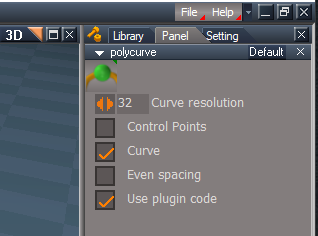
- Half a panel verses a Full panel.png (19.82 KiB) Viewed 3007 times
Some other ideas for the toolbar


-
clintonman
- Captain
- Posts: 5659
- Joined: 21 May 2009, 21:08
- Type the number ten into the box: 0
- Location: California
Re: Final trueSpace7.61 Beta 8 Std Unofficial Update
Why? What does it do?trueBlue wrote: 03 Nov 2020, 17:01 ...
Edit: I had to add RsTool.Arrow() to the Select CP Mesh button
...
-
trueBlue
- Captain
- Posts: 5548
- Joined: 06 Jul 2009, 22:50
- Type the number ten into the box: 10
Re: Final trueSpace7.61 Beta 8 Std Unofficial Update
The Select CP Mesh button did not work after using the Edit CP Mesh buttonclintonman wrote: 04 Nov 2020, 02:36Why? What does it do?trueBlue wrote: 03 Nov 2020, 17:01 ...
Edit: I had to add RsTool.Arrow() to the Select CP Mesh button
...
Guessing it dismisses the PE Widget first.
-
trueBlue
- Captain
- Posts: 5548
- Joined: 06 Jul 2009, 22:50
- Type the number ten into the box: 10
Re: Final trueSpace7.61 Beta 8 Std Unofficial Update
I finding the light blue Handles & Points hard to tell what is being selected with the green highlight
Hopefully you will be able to show the Object Render Attributes panel to enable a user to change the colors
There does not seem to be any other options besides Color for Edges, Points, and Size that work, so maybe just show those two on the panel
Hopefully you will be able to show the Object Render Attributes panel to enable a user to change the colors


- Floating panel.png (19.43 KiB) Viewed 3388 times
-
trueBlue
- Captain
- Posts: 5548
- Joined: 06 Jul 2009, 22:50
- Type the number ten into the box: 10
Re: Final trueSpace7.61 Beta 8 Std Unofficial Update
New Update for trueSpace7.61 Beta 8 Std Unofficial Update
viewtopic.php?t=3731
Final Update November 5, 2020
Recommend that you completely Uninstall and Install trueSpace7.61 Beta 8 Standalone to a clean directory before installing this update. This update precedes all previous updates and recommend that you delete any and all previous updates
Major improvements for all Layouts!
Layouts
default_layout.rsl
Fixed
An issue with the bottom Status Title bar closing
4View.rsl
Add
LENavigatorBar(s)
Default.rsl
Expanded.rsl
Floating.rsl
Add
LENavigatorBar(s)
trueSpace6.rsl
Add
LENavigatorBar(s)
Workspace.rsl
YafaRay4tS.rsl
Update
Changed all of the LE Navigator Toolbar Frame's WinID and the WinGUID_Bar frame's WinID to a unique GUID in all of the Layouts
LEtools
Open LE toolbar script
Add
GUID script that generates a new unique GUID for the LE Navigator Toolbar Frame's WinID
Add
Open LE, AE, 3D scripts
LENavigatorBar
Add
Open LE, AE, 3D buttons
viewtopic.php?t=3731
Final Update November 5, 2020
Recommend that you completely Uninstall and Install trueSpace7.61 Beta 8 Standalone to a clean directory before installing this update. This update precedes all previous updates and recommend that you delete any and all previous updates
Major improvements for all Layouts!
Layouts
default_layout.rsl
Fixed
An issue with the bottom Status Title bar closing
4View.rsl
Add
LENavigatorBar(s)
Default.rsl
Expanded.rsl
Floating.rsl
Add
LENavigatorBar(s)
trueSpace6.rsl
Add
LENavigatorBar(s)
Workspace.rsl
YafaRay4tS.rsl
Update
Changed all of the LE Navigator Toolbar Frame's WinID and the WinGUID_Bar frame's WinID to a unique GUID in all of the Layouts
LEtools
Open LE toolbar script
Add
GUID script that generates a new unique GUID for the LE Navigator Toolbar Frame's WinID
Add
Open LE, AE, 3D scripts
LENavigatorBar
Add
Open LE, AE, 3D buttons
-
trueBlue
- Captain
- Posts: 5548
- Joined: 06 Jul 2009, 22:50
- Type the number ten into the box: 10
Re: Final trueSpace7.61 Beta 8 Std Unofficial Update
New Update for trueSpace7.61 Beta 8 Std Unofficial Update
viewtopic.php?t=3731
Final Update November 5, 2020
Recommend that you completely Uninstall and Install trueSpace7.61 Beta 8 Standalone to a clean directory before installing this update. This update precedes all previous updates and recommend that you delete any and all previous updates
I just noticed I saved the Point Edit Widget in Mesh Object Coordinate Mode
in the previous update. So... a new update. Sorry about that!
Major improvements for all Layouts!
Layouts
default_layout.rsl
Fixed
An issue with the bottom Status Title bar closing
4View.rsl
Add
LENavigatorBar(s)
Default.rsl
Expanded.rsl
Floating.rsl
Add
LENavigatorBar(s)
trueSpace6.rsl
Add
LENavigatorBar(s)
Workspace.rsl
YafaRay4tS.rsl
Update
Changed all of the LE Navigator Toolbar Frame's WinID and the WinGUID_Bar frame's WinID to a unique GUID in all of the Layouts
LEtools
Open LE toolbar script
Add
GUID script that generates a new unique GUID for the LE Navigator Toolbar Frame's WinID
Add
Open LE, AE, 3D scripts
LENavigatorBar
Add
Open LE, AE, 3D buttons
viewtopic.php?t=3731
Final Update November 5, 2020
Recommend that you completely Uninstall and Install trueSpace7.61 Beta 8 Standalone to a clean directory before installing this update. This update precedes all previous updates and recommend that you delete any and all previous updates
I just noticed I saved the Point Edit Widget in Mesh Object Coordinate Mode
in the previous update. So... a new update. Sorry about that!
Major improvements for all Layouts!
Layouts
default_layout.rsl
Fixed
An issue with the bottom Status Title bar closing
4View.rsl
Add
LENavigatorBar(s)
Default.rsl
Expanded.rsl
Floating.rsl
Add
LENavigatorBar(s)
trueSpace6.rsl
Add
LENavigatorBar(s)
Workspace.rsl
YafaRay4tS.rsl
Update
Changed all of the LE Navigator Toolbar Frame's WinID and the WinGUID_Bar frame's WinID to a unique GUID in all of the Layouts
LEtools
Open LE toolbar script
Add
GUID script that generates a new unique GUID for the LE Navigator Toolbar Frame's WinID
Add
Open LE, AE, 3D scripts
LENavigatorBar
Add
Open LE, AE, 3D buttons
-
trueBlue
- Captain
- Posts: 5548
- Joined: 06 Jul 2009, 22:50
- Type the number ten into the box: 10
Re: Final trueSpace7.61 Beta 8 Std Unofficial Update
New Update for trueSpace7.61 Beta 8 Std Unofficial Update
viewtopic.php?t=3731
Final Update November 15, 2020
Recommend that you completely Uninstall and Install trueSpace7.61 Beta 8 Standalone to a clean directory before installing this update. This update precedes all previous updates and recommend that you delete any and all previous updates
Point Edit widget(s)
Add
Period + LMB select the widget - Hides UnSelected elements
Coma + LMB select the widget - UnHides All elements
Workspace Layers 3
Initialize Layers button
Add
Initialize Layers Question script
Warning!
This will Reset all of your Layer Names and Colors!
Are you sure you want to continue?"
3D Text primitive
Add
Material 0, Material 1, and Material 2 button scripts
Shows their materials in the Stack/Panels
CustomCommands
gridArray2Script
Fixed a couple of errors per Clinton Reese
toolbarScripts
Improvements
Fixed a few errors and issues
Add
New selecting method - Double click the toolbar's Handle
Note: After double clicking the toolbar's handle, it pops back to the original state
Select - Toolbar script
Add
Custom Toolbar floating panel for renaming the selected toolbar's Toolbar Frame
Includes a Question script for optionally adding the toolbar to the Toolbar store menu
ClintonToolbar/TB button's LMB command removes the ClintonsToolbarManagerToolbar's Prototype attribute in Windows Manager Space so that it can not be Reset
Note: This is for preserving any custom toolbars that have been added to the ClintonsToolbarManagerToolbar. This is useful for saving the toolbar with any layout
Toolbar Manager Help
Updated with new information
General usage
Position your toolbar and set it to 1D, 2D, Vertical, or Horizontal
Toolbars are selected by Double clicking on the toolbar's Handle or use your keyboard Esc key to Cancel
1. Press Select - Toolbar and double click your toolbar’s Handle
2. Enter your new name, press Rename from the Custom Toolbar panel, or Cancel
3. Select Yes to add your toolbar to the Toolbar store menu, double click the toolbar’s Handle or
No to Cancel
viewtopic.php?t=3731
Final Update November 15, 2020
Recommend that you completely Uninstall and Install trueSpace7.61 Beta 8 Standalone to a clean directory before installing this update. This update precedes all previous updates and recommend that you delete any and all previous updates
Point Edit widget(s)
Add
Period + LMB select the widget - Hides UnSelected elements
Coma + LMB select the widget - UnHides All elements
Workspace Layers 3
Initialize Layers button
Add
Initialize Layers Question script
Warning!
This will Reset all of your Layer Names and Colors!
Are you sure you want to continue?"
3D Text primitive

Material 0, Material 1, and Material 2 button scripts
Shows their materials in the Stack/Panels
CustomCommands
gridArray2Script
Fixed a couple of errors per Clinton Reese
toolbarScripts
Improvements
Fixed a few errors and issues
Add
New selecting method - Double click the toolbar's Handle
Note: After double clicking the toolbar's handle, it pops back to the original state
Select - Toolbar script
Add
Custom Toolbar floating panel for renaming the selected toolbar's Toolbar Frame
Includes a Question script for optionally adding the toolbar to the Toolbar store menu
ClintonToolbar/TB button's LMB command removes the ClintonsToolbarManagerToolbar's Prototype attribute in Windows Manager Space so that it can not be Reset
Note: This is for preserving any custom toolbars that have been added to the ClintonsToolbarManagerToolbar. This is useful for saving the toolbar with any layout
Toolbar Manager Help
Updated with new information
General usage
Position your toolbar and set it to 1D, 2D, Vertical, or Horizontal
Toolbars are selected by Double clicking on the toolbar's Handle or use your keyboard Esc key to Cancel
1. Press Select - Toolbar and double click your toolbar’s Handle


No to Cancel

-
trueBlue
- Captain
- Posts: 5548
- Joined: 06 Jul 2009, 22:50
- Type the number ten into the box: 10
Re: Final trueSpace7.61 Beta 8 Std Unofficial Update
New Update for trueSpace7.61 Beta 8 Std Unofficial Update
viewtopic.php?t=3731
Final Update November 17, 2020
Recommend that you completely Uninstall and Install trueSpace7.61 Beta 8 Standalone to a clean directory before installing this update. This update precedes all previous updates and recommend that you delete any and all previous updates
Found and fixed an error in the toolbarScripts and...
Toolbars.RsObj
ClintonToolbar
Toolbar Manager (TB) button
Update
LMB command Opens the toolbar if it is not open and removes the ClintonsToolbarManagerToolbar's Prototype attribute in Windows Manager Space so that it can not be Reset
Note: This is for preserving any custom toolbars that have been added to the ClintonsToolbarManagerToolbar. This is useful for saving the toolbar with any layout
PESnappingToolbar & Q_PESnappingToolbar
Add
Open Snapping toolbar
ClintonsToolbarManagerToolbar
Renamed buttons & removed Add toolbar to Menu
CustomCommands
toolbarScripts
Fixed an error
HTMLhelp folder
Updated
General usage
Position your toolbar and set it to 1D, 2D, Vertical, or Horizontal
Toolbars are selected by Double clicking on the toolbar's Handle or use your keyboard Esc key to Cancel
1. Press Add - Toolbar and Double click your toolbar’s Handle
2. Enter your new name, press Rename from the Custom Toolbar panel
3. Select Yes to add your toolbar to the Toolbar store menu and Double click the toolbar’s Handle
viewtopic.php?t=3731
Final Update November 17, 2020
Recommend that you completely Uninstall and Install trueSpace7.61 Beta 8 Standalone to a clean directory before installing this update. This update precedes all previous updates and recommend that you delete any and all previous updates
Found and fixed an error in the toolbarScripts and...
Toolbars.RsObj
ClintonToolbar
Toolbar Manager (TB) button
Update
LMB command Opens the toolbar if it is not open and removes the ClintonsToolbarManagerToolbar's Prototype attribute in Windows Manager Space so that it can not be Reset
Note: This is for preserving any custom toolbars that have been added to the ClintonsToolbarManagerToolbar. This is useful for saving the toolbar with any layout
PESnappingToolbar & Q_PESnappingToolbar
Add
Open Snapping toolbar
ClintonsToolbarManagerToolbar
Renamed buttons & removed Add toolbar to Menu

toolbarScripts
Fixed an error
HTMLhelp folder
Updated
General usage
Position your toolbar and set it to 1D, 2D, Vertical, or Horizontal
Toolbars are selected by Double clicking on the toolbar's Handle or use your keyboard Esc key to Cancel
1. Press Add - Toolbar and Double click your toolbar’s Handle
2. Enter your new name, press Rename from the Custom Toolbar panel
3. Select Yes to add your toolbar to the Toolbar store menu and Double click the toolbar’s Handle
-
trueBlue
- Captain
- Posts: 5548
- Joined: 06 Jul 2009, 22:50
- Type the number ten into the box: 10
Re: Final trueSpace7.61 Beta 8 Std Unofficial Update
New Update for trueSpace7.61 Beta 8 Std Unofficial Update
viewtopic.php?t=3731
Final Update November 22, 2020
Recommend that you completely Uninstall and Install trueSpace7.61 Beta 8 Standalone to a clean directory before installing this update. This update precedes all previous updates and recommend that you delete any and all previous updates
Cameras.RsObj
Camera
Add
Flatten script
Note: To restore the Camera to it's original state, run the included Flatten script inside the Camera node
CustomCommands
Add
physics constraint helper Author - Clinton Reese
Before
After
Fixed a few errors
Modified the helpers so that they can be used with the Snapping tools
Add
Physics Constraints icon:
WorkspaceNav
WorkspaceMain2
Physics.RsObj
Objects
Update all of the panels and buttons to Remove Fixation1 & Fixation2 / Preferences to the PhysObject's & PhysGroupObject's Constraints aspect
Widgets
Enabled "In Front" to all widgets
viewtopic.php?t=3731
Final Update November 22, 2020
Recommend that you completely Uninstall and Install trueSpace7.61 Beta 8 Standalone to a clean directory before installing this update. This update precedes all previous updates and recommend that you delete any and all previous updates
Cameras.RsObj
Camera
Add
Flatten script
Note: To restore the Camera to it's original state, run the included Flatten script inside the Camera node
CustomCommands
Add
physics constraint helper Author - Clinton Reese
Before

- Apply Constraint Helpers.png (51.58 KiB) Viewed 3342 times

- Physics Constraint Helpers.png (31.35 KiB) Viewed 3344 times
Modified the helpers so that they can be used with the Snapping tools
Add
Physics Constraints icon:

WorkspaceMain2
Physics.RsObj
Objects
Update all of the panels and buttons to Remove Fixation1 & Fixation2 / Preferences to the PhysObject's & PhysGroupObject's Constraints aspect
Widgets
Enabled "In Front" to all widgets

- Physics Widgets Show in Front.png (17.73 KiB) Viewed 3344 times
-
trueBlue
- Captain
- Posts: 5548
- Joined: 06 Jul 2009, 22:50
- Type the number ten into the box: 10
Re: Final trueSpace7.61 Beta 8 Std Unofficial Update
New Update for trueSpace7.61 Beta 8 Std Unofficial Update
viewtopic.php?t=3731
Final Update November 23, 2020
Recommend that you completely Uninstall and Install trueSpace7.61 Beta 8 Standalone to a clean directory before installing this update. This update precedes all previous updates and recommend that you delete any and all previous updates
Toolbars.RsObj
CustomToolbar
Add
Copy & Paste icon
Tip: Copy & Paste multiple items to another node?
In the Link Editor, navigate inside the node you want the selected items to be placed and the press the Copy & Paste button
Cut and then Paste works the same way
CustomCommands
physics constraint helper Author - Clinton Reese
Fixed another error
viewtopic.php?t=3731
Final Update November 23, 2020
Recommend that you completely Uninstall and Install trueSpace7.61 Beta 8 Standalone to a clean directory before installing this update. This update precedes all previous updates and recommend that you delete any and all previous updates
Toolbars.RsObj
CustomToolbar
Add
Copy & Paste icon

In the Link Editor, navigate inside the node you want the selected items to be placed and the press the Copy & Paste button
Cut and then Paste works the same way
CustomCommands
physics constraint helper Author - Clinton Reese
Fixed another error
-
trueBlue
- Captain
- Posts: 5548
- Joined: 06 Jul 2009, 22:50
- Type the number ten into the box: 10
Re: Final trueSpace7.61 Beta 8 Std Unofficial Update
New Update for trueSpace7.61 Beta 8 Std Unofficial Update
viewtopic.php?t=3731
Final Update December 18, 2020
Recommend that you completely Uninstall and Install trueSpace7.61 Beta 8 Standalone to a clean directory before installing this update. This update precedes all previous updates and recommend that you delete any and all previous updates
Workspace NURBS Patches & Curves version December 16, 2020 Author - Clinton Reese
Update
All panel's title & buttons
NURBStoCPMeshSelection script
Add Try & Catch Error 'Undefined error when using with Rectangle Select'
WARNING! When using Workspace NURBS and point editing with the Control Points, DO NOT use the Delete icon or your keyboard's Delete key!
Toolbars
NURBS toolbar Author - Clinton Reese
Update
Reduced the length of the toolbar by moving icons inside other icons
Add
Edit selected NURBS icon 'For entering into point edit mode when selecting NURBS Patches or Curves'
Add
NURBS Utility icon
Changed
Select CP Mesh icon
RMB opens the NURBS Information panel
CustomCommands
Update
Mirror Matrix Author - Clinton Reese
Select Author - Clinton Reese
Update NURBS & Curves scripts 'For selecting NURBS & Curves'
RectSelect Author - Clinton Reese
Add
Select CP Mesh script 'For selecting NURBS & Curves in 3D Space'
Clintons3dPlugin.rsx v.1638425 Author - Clinton Reese
Show/ShowAll Hide/HideAll xml files
Updated to include NURBS Author - Clinton Reese
Snapping Scripts
Updated to include NURBS Author - Clinton Reese
Widgets
Default Context
Add
NURBS Locking script 'For selecting NURBS to Lock'
NURBS Unlocking script 'For selecting NURBS to Unlock'
Object Navigation Widget(s) & Selector cage/Enter edit mode
Add
No Lights or NURBS script 'For stopping Lights & NURBS's Control Points mesh from entering into point editing mode'
Components - Compositing
Update
Color Picker Author - Clinton Reese
Added a Luminosity and Saturation UI
Updated the Save Swatch script to include saving a color image
Objects - Script objects library
Update
GearObj
Includes Mesh Normals node Author - Clinton Reese
Primitives
Text
Text attribute
Enable
Update on change
Add
Gear primitive
Use Flatten after creating the Gear primitive
Copy icon(s)
LMB command
Activity.Run('/Scripts/Commands/Copy') Author - Clinton Reese
Copies multiple selected objects and relocates the copied objects in the Link Editor
RMB command
Node.Copy('', '')
Original command copies the first selected object
Window.Shortcuts.xml
Workspace 3D Window & Link Editor Window
Ctrl + C
Activity.Run('/Scripts/Commands/Copy') Author - Clinton Reese
Material Editor
D3D Material Converter
Add
Fix/Remove Orphan Materials script Author - Clinton Reese
Note: If you use Seperate Selection on any object that has multple materials, the object can have materials that are no longer being used. This script removes those materials from the scene
Optimize Workspace Scene
Moved to Preferences
Init.js & Reset.js
Updated to load Optimize Workspace Scene.RsObj to Preferences
viewtopic.php?t=3731
Final Update December 18, 2020
Recommend that you completely Uninstall and Install trueSpace7.61 Beta 8 Standalone to a clean directory before installing this update. This update precedes all previous updates and recommend that you delete any and all previous updates
Workspace NURBS Patches & Curves version December 16, 2020 Author - Clinton Reese

All panel's title & buttons
NURBStoCPMeshSelection script
Add Try & Catch Error 'Undefined error when using with Rectangle Select'
WARNING! When using Workspace NURBS and point editing with the Control Points, DO NOT use the Delete icon or your keyboard's Delete key!
Toolbars
NURBS toolbar Author - Clinton Reese
Update
Reduced the length of the toolbar by moving icons inside other icons
Add
Edit selected NURBS icon 'For entering into point edit mode when selecting NURBS Patches or Curves'
Add
NURBS Utility icon
Changed
Select CP Mesh icon
RMB opens the NURBS Information panel
CustomCommands
Update
Mirror Matrix Author - Clinton Reese
Select Author - Clinton Reese
Update NURBS & Curves scripts 'For selecting NURBS & Curves'
RectSelect Author - Clinton Reese
Add
Select CP Mesh script 'For selecting NURBS & Curves in 3D Space'
Clintons3dPlugin.rsx v.1638425 Author - Clinton Reese
Show/ShowAll Hide/HideAll xml files
Updated to include NURBS Author - Clinton Reese
Snapping Scripts
Updated to include NURBS Author - Clinton Reese
Widgets
Default Context
Add
NURBS Locking script 'For selecting NURBS to Lock'
NURBS Unlocking script 'For selecting NURBS to Unlock'
Object Navigation Widget(s) & Selector cage/Enter edit mode
Add
No Lights or NURBS script 'For stopping Lights & NURBS's Control Points mesh from entering into point editing mode'
Components - Compositing
Update
Color Picker Author - Clinton Reese
Added a Luminosity and Saturation UI
Updated the Save Swatch script to include saving a color image
Objects - Script objects library
Update
GearObj
Includes Mesh Normals node Author - Clinton Reese
Primitives
Text
Text attribute
Enable
Update on change
Add
Gear primitive
Use Flatten after creating the Gear primitive
Copy icon(s)
LMB command
Activity.Run('/Scripts/Commands/Copy') Author - Clinton Reese
Copies multiple selected objects and relocates the copied objects in the Link Editor
RMB command
Node.Copy('', '')
Original command copies the first selected object
Window.Shortcuts.xml
Workspace 3D Window & Link Editor Window
Ctrl + C
Activity.Run('/Scripts/Commands/Copy') Author - Clinton Reese
Material Editor
D3D Material Converter
Add
Fix/Remove Orphan Materials script Author - Clinton Reese
Note: If you use Seperate Selection on any object that has multple materials, the object can have materials that are no longer being used. This script removes those materials from the scene
Optimize Workspace Scene
Moved to Preferences
Init.js & Reset.js
Updated to load Optimize Workspace Scene.RsObj to Preferences
-
trueBlue
- Captain
- Posts: 5548
- Joined: 06 Jul 2009, 22:50
- Type the number ten into the box: 10
Re: Final trueSpace7.61 Beta 8 Std Unofficial Update
New Update for trueSpace7.61 Beta 8 Std Unofficial Update
viewtopic.php?t=3731
Final Update December 20, 2020
Recommend that you completely Uninstall and Install trueSpace7.61 Beta 8 Standalone to a clean directory before installing this update. This update precedes all previous updates and recommend that you delete any and all previous updates
Widgets
Default Context
Add optional
Select CP Mesh script 'For selecting NURBS Patches & Curves in 3D Space for transformation'
Default 'Not Active'
N + LMB click or drag in 3D Space = Toggles Active On/Off and opens it's panel
NURBS Information panel/A button = LMB click opens it's panel
Tip: Use your keyboard Up key to Exit CP Mesh selection
Object Navigation Widget(s) & Selector cage/Enter edit mode
No Lights or NURBS script 'For stopping Lights & NURBS's Control Points mesh from entering into point editing mode'
Update 'Include LODMesh if selected'
NURBS scripts
Sweep Path
Update
Captue and Restore Point Edit Selection mode
Restore changes to the Mesh Editor Settings
Disable Default Context/Select CP Mesh
Disable NURBSUtilities/Auto CP Mesh Select
Tip: A Cube with Cubic Projection & 2 layers of SDS makes a nice object to Sweep with a NURBS Curve
polycurve's & polypatch's controlPointMesh
Add
Exit & Edit buttons
viewtopic.php?t=3731
Final Update December 20, 2020
Recommend that you completely Uninstall and Install trueSpace7.61 Beta 8 Standalone to a clean directory before installing this update. This update precedes all previous updates and recommend that you delete any and all previous updates
Widgets
Default Context
Add optional
Select CP Mesh script 'For selecting NURBS Patches & Curves in 3D Space for transformation'

- Auto Select Control Point Mesh.png (6.88 KiB) Viewed 3259 times
N + LMB click or drag in 3D Space = Toggles Active On/Off and opens it's panel
NURBS Information panel/A button = LMB click opens it's panel
Tip: Use your keyboard Up key to Exit CP Mesh selection
Object Navigation Widget(s) & Selector cage/Enter edit mode
No Lights or NURBS script 'For stopping Lights & NURBS's Control Points mesh from entering into point editing mode'
Update 'Include LODMesh if selected'
Code: Select all
if(Node.IsLight('') || Node.Exists(Node.FirstSelected() + "/LODMesh") || Node.Exists(Node.FirstSelected() + "/nurbsNameDisplay"))
params.SetTerminationFlag()
return
Sweep Path
Update
Captue and Restore Point Edit Selection mode
Restore changes to the Mesh Editor Settings
Disable Default Context/Select CP Mesh
Disable NURBSUtilities/Auto CP Mesh Select
Tip: A Cube with Cubic Projection & 2 layers of SDS makes a nice object to Sweep with a NURBS Curve
polycurve's & polypatch's controlPointMesh
Add
Exit & Edit buttons
-
trueBlue
- Captain
- Posts: 5548
- Joined: 06 Jul 2009, 22:50
- Type the number ten into the box: 10
Re: Final trueSpace7.61 Beta 8 Std Unofficial Update
New Update for trueSpace7.61 Beta 8 Std Unofficial Update
viewtopic.php?t=3731
Final Update December 28, 2020
Recommend that you completely Uninstall and Install trueSpace7.61 Beta 8 Standalone to a clean directory before installing this update. This update precedes all previous updates and recommend that you delete any and all previous updates
NURBS toolbar
Add
Point Edit Selection icons
NURBS scripts
Update
NURBSUtilities/Misc - Freeze NURBS or Curve
freezeCurve, 2
Add
Freeze Curve as Polygon Author - Clinton Reese 12/24/2020
Node.ConRemove(newmesh, "UV selection")
Fixed error
NURBS Utilities/Prep - Set Solid Patch
NURBSUtilities/Prep - Set Transparent Patch
primitivePatchScript
Rename polypatch to sourceObjectType
Sweep Path
Add
Open UV Editor settings
Update
Capture and Restore Point Edit Selection mode
Capture and Restore Mesh Editor Settings
Disable Default Context/Select CP Mesh
Disable NURBSUtilities/Auto CP Mesh Select
Tip: A Cube with Cubic Projection & 2 layers of SDS makes a nice object to Sweep with a NURBS Curve
polycurve's & polypatch's controlPointMesh
Update UI
Add
Exit & Edit buttons
NURBSUtilities, rebuildNURBSScript, NURBSInfo, and latheCurveScript
Update
OpenPanelFrame Author - Clinton Reese
All NURBS tools
Add if needed
Capture and Restore Point Edit Selection mode
Fix Bad Geometry
Update
OpenPanelFrame Author - Clinton Reese
Widgets
Default Context
Add optional
Select CP Mesh script 'For selecting NURBS Patches & Curves in 3D Space for transformation'
Default 'Not Active'
N + LMB click or drag in 3D Space = Toggles Active On/Off and opens it's panel
NURBS Information panel/A button = LMB click opens it's panel
Tip: Use your keyboard Up key to Exit CP Mesh selection
Object Navigation Widget(s) & Selector cage/Enter edit mode
Update 'Include LODMesh if selected'
No Lights or NURBS script 'For stopping Lights & NURBS's from entering into point editing mode
viewtopic.php?t=3731
Final Update December 28, 2020
Recommend that you completely Uninstall and Install trueSpace7.61 Beta 8 Standalone to a clean directory before installing this update. This update precedes all previous updates and recommend that you delete any and all previous updates
NURBS toolbar
Add
Point Edit Selection icons

Update
NURBSUtilities/Misc - Freeze NURBS or Curve
freezeCurve, 2
Add
Freeze Curve as Polygon Author - Clinton Reese 12/24/2020
Node.ConRemove(newmesh, "UV selection")
Fixed error
NURBS Utilities/Prep - Set Solid Patch
NURBSUtilities/Prep - Set Transparent Patch
primitivePatchScript
Rename polypatch to sourceObjectType
Sweep Path
Add
Open UV Editor settings

- Open UV Editor.png (2.63 KiB) Viewed 3209 times
Capture and Restore Point Edit Selection mode
Capture and Restore Mesh Editor Settings
Disable Default Context/Select CP Mesh
Disable NURBSUtilities/Auto CP Mesh Select
Tip: A Cube with Cubic Projection & 2 layers of SDS makes a nice object to Sweep with a NURBS Curve
polycurve's & polypatch's controlPointMesh
Update UI
Add
Exit & Edit buttons
NURBSUtilities, rebuildNURBSScript, NURBSInfo, and latheCurveScript
Update
OpenPanelFrame Author - Clinton Reese
All NURBS tools
Add if needed
Capture and Restore Point Edit Selection mode
Fix Bad Geometry
Update
OpenPanelFrame Author - Clinton Reese
Widgets
Default Context
Add optional
Select CP Mesh script 'For selecting NURBS Patches & Curves in 3D Space for transformation'
Default 'Not Active'
N + LMB click or drag in 3D Space = Toggles Active On/Off and opens it's panel
NURBS Information panel/A button = LMB click opens it's panel
Tip: Use your keyboard Up key to Exit CP Mesh selection
Object Navigation Widget(s) & Selector cage/Enter edit mode
Update 'Include LODMesh if selected'
No Lights or NURBS script 'For stopping Lights & NURBS's from entering into point editing mode