Final trueSpace7.61 Beta 8 Std Unofficial Update

User avatar
clintonman
Captain
Posts: 5659
Joined: 21 May 2009, 21:08
Type the number ten into the box: 0
Location: California

Re: Final trueSpace7.61 Beta 8 Std Unofficial Update

Post by clintonman »

trueBlue wrote: 02 Apr 2020, 16:38 ...

So are you okay with what I am purposing in the previous post?
Yep, I'm ok with it. Seems like the best solution.

AutokeyOnOff.jpg
One more discovery for the future.
I copied the Select all geometry button and modified it for the autokey script.
It even updates when manually checking the checkbox.

First button command and alias:

Code: Select all

Node.Value('/Scripts/CustomCommands/AutoKey','auto') = -1;

Code: Select all

/Scripts/CustomCommands/AutoKey/auto;-1
Second button command and alias:

Code: Select all

Node.Value('/Scripts/CustomCommands/AutoKey','auto') = 0;

Code: Select all

/Scripts/CustomCommands/AutoKey/auto;0
Clinton Reese

http://clintons3d.com
User avatar
trueBlue
Captain
Posts: 5548
Joined: 06 Jul 2009, 22:50
Type the number ten into the box: 10

Re: Final trueSpace7.61 Beta 8 Std Unofficial Update

Post by trueBlue »

Both of the XYZLocks and select Geometry buttons have the same AgentID

Code: Select all

{163F13B6-0BDC-43E9-8C90-CFA6B14221FA}
User avatar
clintonman
Captain
Posts: 5659
Joined: 21 May 2009, 21:08
Type the number ten into the box: 0
Location: California

Re: Final trueSpace7.61 Beta 8 Std Unofficial Update

Post by clintonman »

trueBlue wrote: 02 Apr 2020, 17:24 Both of the XYZLocks and select Geometry buttons have the same AgentID

Code: Select all

{163F13B6-0BDC-43E9-8C90-CFA6B14221FA}
What does that mean? or how would I use that info?
Clinton Reese

http://clintons3d.com
User avatar
trueBlue
Captain
Posts: 5548
Joined: 06 Jul 2009, 22:50
Type the number ten into the box: 10

Re: Final trueSpace7.61 Beta 8 Std Unofficial Update

Post by trueBlue »

As I understand it, that unique GUID for the AgentID attribute is needed to get the button to Highlight when active.
Along with the correct TagAlias info.
User avatar
clintonman
Captain
Posts: 5659
Joined: 21 May 2009, 21:08
Type the number ten into the box: 0
Location: California

Re: Final trueSpace7.61 Beta 8 Std Unofficial Update

Post by clintonman »

Bug report:

"January 14, 2020

Point Edit widget 1, 2, and 3
Changed
Sphere and Triangles
RMB + Drag = Opens Point Edit preference panel"

This prevents the RMB drag on triangles to move perpendicular to the triangle.
Clinton Reese

http://clintons3d.com
User avatar
trueBlue
Captain
Posts: 5548
Joined: 06 Jul 2009, 22:50
Type the number ten into the box: 10

Re: Final trueSpace7.61 Beta 8 Std Unofficial Update

Post by trueBlue »

Thanks Clinton
I have changed the Point Edit Widgets to be the same as all of the Object Navigation Widgets

Point Edit Widgets 1, 2 and 3
Sphere
Ctrl + RMB select - Opens the Point Edit Widget's Preferences
User avatar
trueBlue
Captain
Posts: 5548
Joined: 06 Jul 2009, 22:50
Type the number ten into the box: 10

Re: Final trueSpace7.61 Beta 8 Std Unofficial Update

Post by trueBlue »

New Update for trueSpace7.61 Beta 8 Std Unofficial Update
viewtopic.php?t=3731
April 05, 2020

Recommend that you completely Uninstall and Install trueSpace7.61 Beta 8 Standalone to a clean directory before installing this update. This update precedes all previous updates and recommend that you delete any and all previous updates.

Clintons3dPlugin.rsx
Update
version 1638415

Library
Components - Compositing
Update
Bump2Normal.RsObj


Animation Preferences panel
Changed
Automatic Keyframing and Bake Keyframes buttons


CustomScriptsStore
Add
Constraint Scripts.RsObj

Update
AutokeyWidgets.RsObj
Add
Automatic Keyframing panel
AK_PanelFrame

AutoKey.RsObj
Comment

Code: Select all

	var auto = params.ConValue('auto');
	if(auto) 
	{
		RsAnim.SetKeyFrame(Node.FirstSelected(), RsTime.CurrentTime());
//		if(Node.Exists("Scripts/CustomCommands/KeyInterp"))
//			Activity.Run("Scripts/CustomCommands/KeyInterp/copyDefaultInterp");
	}
Point Edit Widgets
Sphere
Changed
Ctrl + RMB click - Opens the Point Edit Widget's Preferences
User avatar
clintonman
Captain
Posts: 5659
Joined: 21 May 2009, 21:08
Type the number ten into the box: 0
Location: California

Re: Final trueSpace7.61 Beta 8 Std Unofficial Update

Post by clintonman »

trueBlue wrote: 05 Apr 2020, 23:53 ...

AutoKey.RsObj
Comment

Code: Select all

	var auto = params.ConValue('auto');
	if(auto) 
	{
		RsAnim.SetKeyFrame(Node.FirstSelected(), RsTime.CurrentTime());
//		if(Node.Exists("Scripts/CustomCommands/KeyInterp"))
//			Activity.Run("Scripts/CustomCommands/KeyInterp/copyDefaultInterp");
	}
...
Why were the comments needed?
Clinton Reese

http://clintons3d.com
User avatar
trueBlue
Captain
Posts: 5548
Joined: 06 Jul 2009, 22:50
Type the number ten into the box: 10

Re: Final trueSpace7.61 Beta 8 Std Unofficial Update

Post by trueBlue »

Because there is no copyDefaultInterp
"Scripts/CustomCommands/KeyInterp/copyDefaultInterp""
User avatar
clintonman
Captain
Posts: 5659
Joined: 21 May 2009, 21:08
Type the number ten into the box: 0
Location: California

Re: Final trueSpace7.61 Beta 8 Std Unofficial Update

Post by clintonman »

Unencaps3Dbug.jpg
I found a bug in the 3D unencapsulate when used with grouped objects. Image shows before group at top and result at the bottom.

Steps:
1. 3d encapsulate a few items
2. hide selected objects button
3. 3dunencapsulate and the Object Render Attributes node is still around and connected
Clinton Reese

http://clintons3d.com
User avatar
trueBlue
Captain
Posts: 5548
Joined: 06 Jul 2009, 22:50
Type the number ten into the box: 10

Re: Final trueSpace7.61 Beta 8 Std Unofficial Update

Post by trueBlue »

I am open to suggestions if you can.
The 3D Unencapsulate script is located in Scripts/Commands/Unglue
User avatar
clintonman
Captain
Posts: 5659
Joined: 21 May 2009, 21:08
Type the number ten into the box: 0
Location: California

Re: Final trueSpace7.61 Beta 8 Std Unofficial Update

Post by clintonman »

I think this works. It was a little trickier than I thought.
Attachments
Unglue.RsObj
(13.18 KiB) Downloaded 210 times
Clinton Reese

http://clintons3d.com
User avatar
trueBlue
Captain
Posts: 5548
Joined: 06 Jul 2009, 22:50
Type the number ten into the box: 10

Re: Final trueSpace7.61 Beta 8 Std Unofficial Update

Post by trueBlue »

Thanks, that does the trick! :bananathumb:
Will be updating the updates ASAP :bananatyping:
User avatar
clintonman
Captain
Posts: 5659
Joined: 21 May 2009, 21:08
Type the number ten into the box: 0
Location: California

Re: Final trueSpace7.61 Beta 8 Std Unofficial Update

Post by clintonman »

Great! :bananathumb:
I finished all my major projects, so I can update to your latest now.
Clinton Reese

http://clintons3d.com
User avatar
trueBlue
Captain
Posts: 5548
Joined: 06 Jul 2009, 22:50
Type the number ten into the box: 10

Re: Final trueSpace7.61 Beta 8 Std Unofficial Update

Post by trueBlue »

New Update for trueSpace7.61 Beta 8 Std Unofficial Update
viewtopic.php?t=3731
April 18, 2020

Recommend that you completely Uninstall and Install trueSpace7.61 Beta 8 Standalone to a clean directory before installing this update. This update precedes all previous updates and recommend that you delete any and all previous updates.

Scripts/CustomCommands
Add
ParticleScripts - Author Clinton Reese

Scripts/preobjects
Update
animpref.RsObj
AnimPrefPanelFrame.RsObj


Scripts/ScriptCommands
Update
Unglue.xml - Author Clinton Reese

Materials - DX9 library
Add
D3D Sequence Material.RsMat

File
Select the Open File control and browse to where you have a sequence of images.
Select the first image and Open it.
Time
Add the Time attribute to the Keying panel
Set Keyframes for the first and last image number in the sequence
Note: You are not limited by setting Keyframes for the first and last number in the sequence, however.
Tip: Ctrl + Drag the Sequence Material panel from the Stack when setting Keyframes.
Alpha On / Alpha Off
Enables the Alpha Texture
D3D Sequence Material.png
User avatar
trueBlue
Captain
Posts: 5548
Joined: 06 Jul 2009, 22:50
Type the number ten into the box: 10

Re: Final trueSpace7.61 Beta 8 Std Unofficial Update

Post by trueBlue »

New Update for trueSpace7.61 Beta 8 Std Unofficial Update
viewtopic.php?t=3731
April 27, 2020

Recommend that you completely Uninstall and Install trueSpace7.61 Beta 8 Standalone to a clean directory before installing this update. This update precedes all previous updates and recommend that you delete any and all previous updates.

Scripts/CustomCommands
Update
ParticleScripts - Author Clinton Reese :worship:
Particle Script Encaps
Add
Alpha Texture
Animation button scripts
Particle Script Encaps.png
Particle Script Encaps.png (6.28 KiB) Viewed 3799 times
User avatar
trueBlue
Captain
Posts: 5548
Joined: 06 Jul 2009, 22:50
Type the number ten into the box: 10

Re: Final trueSpace7.61 Beta 8 Std Unofficial Update

Post by trueBlue »

New Update for trueSpace7.61 Beta 8 Std Unofficial Update
viewtopic.php?t=3731
May 5, 2020

Recommend that you completely Uninstall and Install trueSpace7.61 Beta 8 Standalone to a clean directory before installing this update. This update precedes all previous updates and recommend that you delete any and all previous updates.

Rs Main Libraries

Components - Operators
Saturate.RsObj

Height field
Create Height field.RsObj 'script' - Author Clinton Reese :worship:
Height field object.RsObj 'example object'
Height field.RsObj
Sequence Object.RsObj
RGB Height Field.RsRcd 'example object using the Mandelbrot script'
Mandelbrot Height Field.png
Also can be used to create meshes by simply changing the Height Field Bitmap.
Use the Flatten History
Height Field object.png
Or animate it with a sequence of images
Sequence Object.png
New Update for the 'Vray for trueSpace 7.61 Standalone'
viewtopic.php?t=5479
Revision:
5/05/2020
Not required but compatible with the 'trueSpace Beta 7.61 Standalone Unofficial Update' Version 5
IMPORTANT:
Apply the Vray Update AFTER the (Optional) 'trueSpace Beta 7.61 Standalone Unofficial Update' Version 5
User avatar
clintonman
Captain
Posts: 5659
Joined: 21 May 2009, 21:08
Type the number ten into the box: 0
Location: California

Re: Final trueSpace7.61 Beta 8 Std Unofficial Update

Post by clintonman »

"New Update for the 'Vray for trueSpace 7.61 Standalone'"
I went to the link but didn't see any new info.
So what's new?
Clinton Reese

http://clintons3d.com
User avatar
trueBlue
Captain
Posts: 5548
Joined: 06 Jul 2009, 22:50
Type the number ten into the box: 10

Re: Final trueSpace7.61 Beta 8 Std Unofficial Update

Post by trueBlue »

Updated your Clintons3dPlugin.rsx v.1638415
The Plugins.xml file has the Clintons3dPlugin.rsx v.1638415 'April 5, 2020', Clintons3dPluginExt.rsx v.1638413 and the Vray_ts.rsx, Installed and Loaded.
Added your Clintons3dPluginExt.rsx and updated the included Plugins.xml
So that it is compatible with the trueSpace7.61 Beta 8 Std Unofficial Update
The Vray for trueSpace 7.61 Standalone has to be applied AFTER the (Optional) trueSpace7.61 Beta 8 Std Unofficial Update so that the init.js can be updated which loads the LwME.dll into the Package Manager.
User avatar
clintonman
Captain
Posts: 5659
Joined: 21 May 2009, 21:08
Type the number ten into the box: 0
Location: California

Re: Final trueSpace7.61 Beta 8 Std Unofficial Update

Post by clintonman »

Was only asking about the Vray changes and the vray link. So the change is that it comes half way installed and then it needs to be apply/install the rest of the way?
Clinton Reese

http://clintons3d.com
User avatar
trueBlue
Captain
Posts: 5548
Joined: 06 Jul 2009, 22:50
Type the number ten into the box: 10

Re: Final trueSpace7.61 Beta 8 Std Unofficial Update

Post by trueBlue »

clintonman wrote: 05 May 2020, 17:32 So the change is that it comes half way installed and then it needs to be apply/install the rest of the way?
Huh? :?
What I posted was about the changes to the Vray for trueSpace 7.61 Standalone update.
The trueSpace7.61 Beta 8 Std Unofficial Update is not required for the Vray for trueSpace 7.61 Standalone update.
The Clintons3dPluginExt.rsx was not included in the previous Vray update, which would have broke the trueSpace7.61 Beta 8 Std Unofficial Update and YafaRay 'Tif viewer'
User avatar
clintonman
Captain
Posts: 5659
Joined: 21 May 2009, 21:08
Type the number ten into the box: 0
Location: California

Re: Final trueSpace7.61 Beta 8 Std Unofficial Update

Post by clintonman »

Ok, had to read through it several times to get it. So the change is that a Plugins.xml file included in the vray update has been changed.
Clinton Reese

http://clintons3d.com
User avatar
trueBlue
Captain
Posts: 5548
Joined: 06 Jul 2009, 22:50
Type the number ten into the box: 10

Re: Final trueSpace7.61 Beta 8 Std Unofficial Update

Post by trueBlue »

Changes to the Vray for trueSpace 7.61 Standalone update
Add
Clintons3dPluginExt.rsx 'compatible with the unofficial std update 5'
Updated
Plugins.xml 'compatible with the unofficial std update 5, but also loads the Vray_ts.rsx'
init.js 'Add -> RsApp.ImportPackage('LwME.dll');'
D3D Material Editor ' compatible with the unofficial std 5 update'
Vray Material Editor ' Removed the Live aspect'
Note: Right click reset materials does not work in this Vray for trueSpace 7.61 Standalone update
As an example:
Vray.ResetMaterialEditorShader('Color'); causes an error!

All of the above was necessary to make it compatible with the unofficial std update 5
User avatar
trueBlue
Captain
Posts: 5548
Joined: 06 Jul 2009, 22:50
Type the number ten into the box: 10

Re: Final trueSpace7.61 Beta 8 Std Unofficial Update

Post by trueBlue »

New Update for the 'Vray for trueSpace 7.61 Standalone'
viewtopic.php?t=5479
Revision:
5/08/2020

Update
Vray for tS761Std.txt

Requirements:
Vray installation
1.) Install tS76_Vray1_54B8.exe for trueSpace7.61 Beta 8 to the C:\trueSpace761Std folder.
2.) Apply the 'trueSpace Beta 7.61 Standalone Unofficial Update' Version 5 BEFORE applying the Vray Update!
viewtopic.php?t=3731
IMPORTANT:
3.) Apply the Vray Update AFTER the 'trueSpace Beta 7.61 Standalone Unofficial Update' Version 5

I discovered that the 'trueSpace Beta 7.61 Standalone Unofficial Update' Version 5 is a requirement for this Vray Update because of the modified Offline Render icons and scripts.
Sorry for the confusion! :oops:
User avatar
trueBlue
Captain
Posts: 5548
Joined: 06 Jul 2009, 22:50
Type the number ten into the box: 10

Re: Final trueSpace7.61 Beta 8 Std Unofficial Update

Post by trueBlue »

New Update for trueSpace7.61 Beta 8 Std Unofficial Update
viewtopic.php?t=3731
May 8, 2020

Recommend that you completely Uninstall and Install trueSpace7.61 Beta 8 Standalone to a clean directory before installing this update. This update precedes all previous updates and recommend that you delete any and all previous updates.

Library
Materials - DX9
Add
Made D3D Materials from the Components - Compositing library - Author Clinton Reese
* Image Cloud.RsMat
* Image Marble.RsMat
* Image Perlin.RsMat
* Image Voronoi.RsMat
* Image Wood.RsMat
Cubes.png
User avatar
trueBlue
Captain
Posts: 5548
Joined: 06 Jul 2009, 22:50
Type the number ten into the box: 10

Re: Final trueSpace7.61 Beta 8 Std Unofficial Update

Post by trueBlue »

@ Clinton...
I see now that I made a big mistake creating these materials using the Constant Shaders. :oops:
Here is what I am purposing using a modified Texture Shader
Marble Color Blend.png
Basically using what I think would be a Blended color.
What would be really great is you would be able to have a separate vein color, but that does not seem possible.
Or maybe you could post a better solution?
User avatar
clintonman
Captain
Posts: 5659
Joined: 21 May 2009, 21:08
Type the number ten into the box: 0
Location: California

Re: Final trueSpace7.61 Beta 8 Std Unofficial Update

Post by clintonman »

MarbleColor.jpg
Is this what you had in mind?
Clinton Reese

http://clintons3d.com
User avatar
trueBlue
Captain
Posts: 5548
Joined: 06 Jul 2009, 22:50
Type the number ten into the box: 10

Re: Final trueSpace7.61 Beta 8 Std Unofficial Update

Post by trueBlue »

Oh yeah! :worship:
Would this be good for all of them?
Enable or Disable Compression?
User avatar
clintonman
Captain
Posts: 5659
Joined: 21 May 2009, 21:08
Type the number ten into the box: 0
Location: California

Re: Final trueSpace7.61 Beta 8 Std Unofficial Update

Post by clintonman »

trueBlue wrote: 10 May 2020, 16:07 Oh yeah! :worship:
Would this be good for all of them?
Enable or Disable Compression?
Should work for all.
If you see some problem with compression then turn it off, otherwise probably better to leave at the default.
Clinton Reese

http://clintons3d.com
User avatar
trueBlue
Captain
Posts: 5548
Joined: 06 Jul 2009, 22:50
Type the number ten into the box: 10

Re: Final trueSpace7.61 Beta 8 Std Unofficial Update

Post by trueBlue »

New Update for trueSpace7.61 Beta 8 Std Unofficial Update
viewtopic.php?t=3731
May 10, 2020

Recommend that you completely Uninstall and Install trueSpace7.61 Beta 8 Standalone to a clean directory before installing this update. This update precedes all previous updates and recommend that you delete any and all previous updates.

Library
Materials - DX9
Update - Thanks Clinton! :worship:
Image Cloud.RsMat
Image Marble.RsMat
Image Perlin.RsMat
Image Voronoi.RsMat
Image Wood.RsMat
Image Voronoi Material.png
Examples.png
Components - Compositing
Add
Contact Sheet Generator with Alpha Mask.RsObj Author - Glen Gordon
Contact Sheet.png
Select the first filename from the sequence of images using the File Browser control.
Enter the Cell Size attributes.
Select the Generate Contact Sheet button.
Wait until the Status reports "Bitmap images created"
Note: This can take awhile and you will not be able to use trueSpace until it has completed.
Save the Bitmaps into your Library using Insert As - Object (RsOb)
User avatar
trueBlue
Captain
Posts: 5548
Joined: 06 Jul 2009, 22:50
Type the number ten into the box: 10

Re: Final trueSpace7.61 Beta 8 Std Unofficial Update

Post by trueBlue »

New Update for trueSpace7.61 Beta 8 Std Unofficial Update
viewtopic.php?t=3731
May 11, 2020

Recommend that you completely Uninstall and Install trueSpace7.61 Beta 8 Standalone to a clean directory before installing this update. This update precedes all previous updates and recommend that you delete any and all previous updates.

Widgets
Tools/Material/Inspect
Update the Priority to 3
LMB click to Inspect material
LMB + Drag to Select/Inspect
RMB + Drag to Edit picked material directly in the Link Editor
Note: If you are viewing from a Camera using the Inspect tool, you will be inspecting the camera's material.
Use: LMB + Drag and LMB click another object to Inspect it's material.

Select/Widget(s) 4 - Author Clinton Reese
Sphere
Add
P + LMB click opens Mesh Origin panel

CustomScriptsStore
MeshOrigin.RsObj - Author Clinton Reese

Materials - DX9
Image Wood Alpha Blend.RsMat
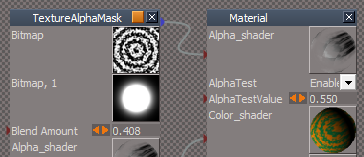
Example material using an experimental TextureAlphaMask shader
TextureAlphaMask.png
TextureAlphaMask.png (27.52 KiB) Viewed 3786 times
Alpha Blend Mask.png
Blends as Alpha Bitmap and Alpha Bitmap Mask
User avatar
trueBlue
Captain
Posts: 5548
Joined: 06 Jul 2009, 22:50
Type the number ten into the box: 10

Re: Final trueSpace7.61 Beta 8 Std Unofficial Update

Post by trueBlue »

New Update for trueSpace7.61 Beta 8 Std Unofficial Update
viewtopic.php?t=3731
May 14, 2020

Recommend that you completely Uninstall and Install trueSpace7.61 Beta 8 Standalone to a clean directory before installing this update. This update precedes all previous updates and recommend that you delete any and all previous updates.

Library
Components - Compositing - Author Clinton Reese 'Updated 5/14/2019'
Update
image saver.RsObj
image sequence loader with scale.RsObj
Add
Contact Sheet Generator with Alpha Mask.RsObj - Author - Glen Gordon
Create Input Bitmaps.RsObj
Tiff Loader.RsObj - Author Clinton Reese
Sequence object.RsObj
Help.RsObj
User avatar
trueBlue
Captain
Posts: 5548
Joined: 06 Jul 2009, 22:50
Type the number ten into the box: 10

Re: Final trueSpace7.61 Beta 8 Std Unofficial Update

Post by trueBlue »

New Update for trueSpace7.61 Beta 8 Std Unofficial Update
viewtopic.php?t=3731
May 18, 2020

Recommend that you completely Uninstall and Install trueSpace7.61 Beta 8 Standalone to a clean directory before installing this update. This update precedes all previous updates and recommend that you delete any and all previous updates.

Widgets
ViewWidget
Bottom Left Triangle
* RMB + Drag creates an Camera at current view
Add
CameraFromView script - Author - Clinton Reese

Top Right Triangle
* RMB + Drag creates an Entry Point camera at current view
Add
EntryPointFromView script - Author - Clinton Reese

Note: Removed 'Create Camera' scripts from the Orthogonal triangles

Library
Objects - tS7.61 Update objects
Update
tS7.61 Background Image Camera

Image Plane - Author - Clinton Reese

Modifications:
* Object Render Attributes for the Image Plane 'Enabled no shadows'
* Locked down the Matrix
* Incorporated a Camera
* View button "View from camera"
Right click "Previous view"
* Exported the OpenFile Control and Frame attributes to the front panel
* Set Timeline button. "Set Animation Time using the current Frame"
Right click "Select the Frame attribute in the Attribute Browser"
* Animation control buttons
* Distance - Moves the Image Plane away from the Camera 'Forwards & Backwards'
* Pixel Aspect - Set the pixel aspect ratio
* X Size - Set the Width dimension of the image
* Y Size - Set the Height dimension of the image
* Image Size " Gets the imported image's Width & Height"
* Open Camera Window button "Opens a new window using the X Size & Y Size"
* Alpha On button "Connects the Texture Alpha shader"
* Alpha2 On button "Connects the Texture Alpha2 shader"
* Alpha Off " Disconnects the Alpha shader"
Note: Use the Camera to move the Background Image Camera.RsObj
Baclground Image Camera.png
User avatar
trueBlue
Captain
Posts: 5548
Joined: 06 Jul 2009, 22:50
Type the number ten into the box: 10

Re: Final trueSpace7.61 Beta 8 Std Unofficial Update

Post by trueBlue »

New Update for trueSpace7.61 Beta 8 Std Unofficial Update
viewtopic.php?t=3731
May 20, 2020

Recommend that you completely Uninstall and Install trueSpace7.61 Beta 8 Standalone to a clean directory before installing this update. This update precedes all previous updates and recommend that you delete any and all previous updates.

Updates
AutokeyWidgets
Background Image Camera
Animation Panel
New updates.png
Library
Materials - Textures
Add
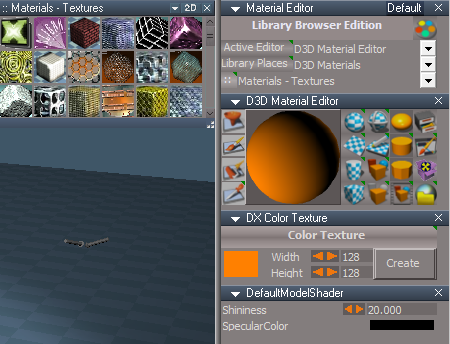
DX Color Texture
Uses Clinton's (Awesome Photo Shop) Components - Compositing/solid color image.RsObj :worship:
DX Color Texture.png
Toolbars
UVEditor toolbar
Add
UV Editor Preferences and Material Editor icons
Undo/Redo icons
Hide and Show geometry icons
Paint Brush(s) RMB click opens the Color aspect
UV toolbar.png
UV toolbar.png (17.35 KiB) Viewed 3741 times
User avatar
trueBlue
Captain
Posts: 5548
Joined: 06 Jul 2009, 22:50
Type the number ten into the box: 10

Re: Final trueSpace7.61 Beta 8 Std Unofficial Update

Post by trueBlue »

New Update for trueSpace7.61 Beta 8 Std Unofficial Update
viewtopic.php?t=3731
May 21, 2020

Recommend that you completely Uninstall and Install trueSpace7.61 Beta 8 Standalone to a clean directory before installing this update. This update precedes all previous updates and recommend that you delete any and all previous updates.

Toolbars
UVEditor toolbar
UVEditor toolbar.png
UVEditor toolbar.png (19.16 KiB) Viewed 3721 times
Add
Select by Material, Hide, and Show geometry icons
UV Editor Preferences and Material Editor icons
Move selection RMB click opens the Snapping aspect
Paint Brush(s) RMB click opens the Color aspect
Export texture RMB click opens the Export aspect
Next Material RMB click Previous Material
Undo/Redo icons

Preferences
UV Editor Preferences panel
Color aspect
UV Color.png
UV Color.png (4.64 KiB) Viewed 3710 times
Add
Brush Size attribute
User avatar
trueBlue
Captain
Posts: 5548
Joined: 06 Jul 2009, 22:50
Type the number ten into the box: 10

Re: Final trueSpace7.61 Beta 8 Std Unofficial Update

Post by trueBlue »

New Update for trueSpace7.61 Beta 8 Std Unofficial Update
viewtopic.php?t=3731
May 30, 2020

Recommend that you completely Uninstall and Install trueSpace7.61 Beta 8 Standalone to a clean directory before installing this update. This update precedes all previous updates and recommend that you delete any and all previous updates.

preobjects
MaterialEditor
Add
Image Browser
Image Browser.png
Library Place
Library Place.png
Library Place.png (100.52 KiB) Viewed 3639 times
Add
Bitmaps - Textures
Update
2D Aspect / 1D 2D Aspect button script
LMB click - Saves the 2D Aspect frame's current Location, Height, and Thumbnail size
RMB click - Saves the 1D 2D Aspect frame's current Location, Height, and Thumbnail size
Note: Also saves the current aspect, 1D, 2D, or 1+2

Library
Shaders - Texture coord shader
Texture Maps.png
Add
AlphaTextureMap
ImageTextureMap
ConstantTextureMap
NormalTextureMap
SpecularReflectionMap
DefaultTextureMap


Objects - tS7.61 Update objects
Update
Background Image Camera
Add
ConstantTextureMap

OpenFile control
Tip: To load only one image, the image's name should end in a Zero
IE: Image0.png
User avatar
trueBlue
Captain
Posts: 5548
Joined: 06 Jul 2009, 22:50
Type the number ten into the box: 10

Re: Final trueSpace7.61 Beta 8 Std Unofficial Update

Post by trueBlue »

@ Clinton
Wanting to add your Copy Attributes script the Updates...
There seems to be a bogus error when using this script to the two Spot Lights in a new workspace scene.
ERROR.png
ERROR.png (13.69 KiB) Viewed 3599 times
Is it possible to fix this? Or add a Try & Catch if not?
Also, I have been using this script on Particle Script Encaps.RsObj(s) and some of the Attributes to not copy over to the Destination.
Is it possible to update this code to include these Attributes?
Edit: I was not selecting the right node. I was selecting the Parent panel. :roll:
Thanks in advance! :D

Code: Select all


var CONFLG_DIRTY = 1
var CONFLG_OUT = 2
var CONFLG_IN = 4
var CONFLG_INOUT = 6
var CONFLG_RESERVED = 8
var CONFLG_EXPORTED = 16
var CONFLG_HIDDEN = 32
var CONFLG_CACHING = 64
var CONFLG_NONOTIFY = 128
var CONFLG_CONTROLFLOW = 256
var CONFLG_DISABLECACHING = 512
var CONFLG_REGISTERED = 1024
var CONFLG_CUSTOM = 2048
var CONFLG_TOPOLOGY = 4096
var CONFLG_LOCAL = 8192
var CONFLG_LAST = 8193

function Execute(params)
{
	var Source = params.ConValue('Source');
	var Destination = params.ConValue('Destination');
	var Verify = params.ConValue('Verify');

	if(!Source) return
	if(!Destination) return

	try {
		utilitydata = System.CreateDO("Clintons3D Package/Utility functions");
	} catch(err) {
		System.Alert("Requires the " + "'" + "Clintons3dPlugin.rsx '" + " plugin to be Installed and Loaded in the Package Manager")
		return "Requires Clintons3dPlugin.rsx plugin";
	}

//	System.Trace("copy from " + Source + " to " + Destination);


	currentnode = Source;
	thedata = utilitydata.GetConnectorData(currentnode);
	connectors = thedata.split("\n");
	for(i=0;i<connectors.length;i++)
	{
//System.Trace(connectors[i]);
	connector = connectors[i].split("\t");
//connector[0] = script connector name
//connector[1] = connector name
//connector[2] = connector type
//connector[3] = flags
	if(connector[3] & CONFLG_IN && !(connector[3] & CONFLG_HIDDEN))
	{
		//System.Trace(connector[0]);
		if(Node.ConExists(Destination, connector[0]))
		{
			if(Verify)
			{
				if(Question("Copy the Source" + "' " + connector[0] + " '" + " value to the Destination?"))
					Node.Value(Destination, connector[0]) = Node.Value(Source, connector[0]);
			}
			else
				Node.Value(Destination, connector[0]) = Node.Value(Source, connector[0]);
			//System.Trace(connector[0]);
		}
	}
	Node.ConReset(System.ThisOwner(),"Source")
	Node.ConReset(System.ThisOwner(),"Destination")
}

function Question(strText)
{
	var nSecondsToWait = -1;
	var strTitle = "Question"; // Titlebar text
	// values are hexadecimal
	var MB_YESNO = 4;
	var MB_SYSTEMMODAL = 4096;//1000L force on top
	var MB_ICONQUESTION = 32;//20L question mark symbol // 16;= 10L stop-sign symbol


	var nType = MB_YESNO+MB_SYSTEMMODAL+MB_ICONQUESTION;
	var IDYES = 6;
	var IDNO = 7;

	var shell = new ActiveXObject("WScript.shell");
	var button = shell.Popup (strText, nSecondsToWait, strTitle, nType);

	if(button == IDYES) return true;
	return false;
}

}

User avatar
clintonman
Captain
Posts: 5659
Joined: 21 May 2009, 21:08
Type the number ten into the box: 0
Location: California

Re: Final trueSpace7.61 Beta 8 Std Unofficial Update

Post by clintonman »

The problem is with the SyncOnOff and the ViewOnOff in the spotlights doesn't have a value. It's not checked and despite appearances it's not unchecked either. Attached has a try catch included you can adjust to your version. Another option is to connect the floating connectors of the spotlights to an object script with default values assigned.
Attachments
CopyAttributes.RsObj
(20.44 KiB) Downloaded 205 times
Clinton Reese

http://clintons3d.com
User avatar
trueBlue
Captain
Posts: 5548
Joined: 06 Jul 2009, 22:50
Type the number ten into the box: 10

Re: Final trueSpace7.61 Beta 8 Std Unofficial Update

Post by trueBlue »

Awesome, thank you!
Odd that when you Copy the Attributes on the two New Scene, Infinite lights, you do not get the error from the SyncOnOff attributes.
:? Those attributes were created the same way for the Spot and Infinite lights.
User avatar
clintonman
Captain
Posts: 5659
Joined: 21 May 2009, 21:08
Type the number ten into the box: 0
Location: California

Re: Final trueSpace7.61 Beta 8 Std Unofficial Update

Post by clintonman »

trueBlue wrote: 05 Jun 2020, 15:33 Awesome, thank you!
Odd that when you Copy the Attributes on the two New Scene, Infinite lights, you do not get the error from the SyncOnOff attributes.
:? Those attributes were created the same way for the Spot and Infinite lights.
Probably because those were saved with actual unchecked value. There's no way to tell the difference between unchecked or invalid by just looking. It only shows itself if you try to use the value in code and get an error.
If you check then uncheck then save I think it saves properly.
Clinton Reese

http://clintons3d.com
User avatar
trueBlue
Captain
Posts: 5548
Joined: 06 Jul 2009, 22:50
Type the number ten into the box: 10

Re: Final trueSpace7.61 Beta 8 Std Unofficial Update

Post by trueBlue »

clintonman wrote: 05 Jun 2020, 15:42
trueBlue wrote: 05 Jun 2020, 15:33 Awesome, thank you!
Odd that when you Copy the Attributes on the two New Scene, Infinite lights, you do not get the error from the SyncOnOff attributes.
:? Those attributes were created the same way for the Spot and Infinite lights.
Probably because those were saved with actual unchecked value. There's no way to tell the difference between unchecked or invalid by just looking. It only shows itself if you try to use the value in code and get an error.
If you check then uncheck then save I think it saves properly.
I'll see if I can fix this.
Here is the Particle Scripts for you to check out.
Workflow for Flip Book Alpha
Flip Book workflow.png
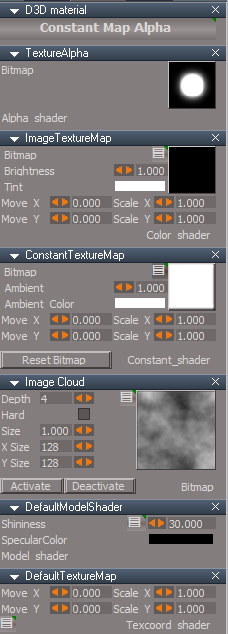
New Dot material
Constant Map Alpha.png
Flip Book 2 Alpha and Flip Book 2 Alpha Mask is for using Alpha, Fade In, and Fade Out
Flip Book 2.png
Flip Book 2.png (4.92 KiB) Viewed 3250 times
User avatar
clintonman
Captain
Posts: 5659
Joined: 21 May 2009, 21:08
Type the number ten into the box: 0
Location: California

Re: Final trueSpace7.61 Beta 8 Std Unofficial Update

Post by clintonman »

trueBlue wrote: 05 Jun 2020, 17:34
Here is the Particle Scripts for you to check out.
Seems to work.
Does "Flip Book Alpha Mask" mean that the image has an alpha channel?
"Create Flip Book" and "Create Flip Book 2" need better names so you know what you're getting when you press them.
Clinton Reese

http://clintons3d.com
User avatar
clintonman
Captain
Posts: 5659
Joined: 21 May 2009, 21:08
Type the number ten into the box: 0
Location: California

Re: Final trueSpace7.61 Beta 8 Std Unofficial Update

Post by clintonman »

exposedConstantTexture.jpg
One more thing.
ConstantTextureMap uv controls can give odd results.
Clinton Reese

http://clintons3d.com
User avatar
trueBlue
Captain
Posts: 5548
Joined: 06 Jul 2009, 22:50
Type the number ten into the box: 10

Re: Final trueSpace7.61 Beta 8 Std Unofficial Update

Post by trueBlue »

clintonman wrote: 05 Jun 2020, 20:05
trueBlue wrote: 05 Jun 2020, 17:34
Here is the Particle Scripts for you to check out.
Seems to work.
Does "Flip Book Alpha Mask" mean that the image has an alpha channel?
"Create Flip Book" and "Create Flip Book 2" need better names so you know what you're getting when you press them.
It is the same material as your original and similar name.
It was labeled as Embedded Alpha.
I changed that name because I kept forgetting which one was which.
Do you have a suggestion for the naming?
User avatar
trueBlue
Captain
Posts: 5548
Joined: 06 Jul 2009, 22:50
Type the number ten into the box: 10

Re: Final trueSpace7.61 Beta 8 Std Unofficial Update

Post by trueBlue »

clintonman wrote: 05 Jun 2020, 20:13 exposedConstantTexture.jpg
One more thing.
ConstantTextureMap uv controls can give odd results.
Yes it can! Not much you can do with number sprites. :P
But it can also create a infinite amount of different textures.
AnimateUVs.png
AnimateUVs.png (19.55 KiB) Viewed 3272 times
Mostly I wanted that option to be able to animate the Move X/Y attributes.
And that it was still possible to use an image color that is supported with your Post Process FX.
User avatar
clintonman
Captain
Posts: 5659
Joined: 21 May 2009, 21:08
Type the number ten into the box: 0
Location: California

Re: Final trueSpace7.61 Beta 8 Std Unofficial Update

Post by clintonman »

trueBlue wrote: 05 Jun 2020, 20:42
clintonman wrote: 05 Jun 2020, 20:13 exposedConstantTexture.jpg
One more thing.
ConstantTextureMap uv controls can give odd results.
Yes it can! Not much you can do with number sprites. :P
But it can also create a infinite amount of different textures.
AnimateUVs.png
Mostly I wanted that option to be able to animate the Move X/Y attributes.
And that it was still possible to use an image color that is supported with your Post Process FX.
Roger that!
Clinton Reese

http://clintons3d.com
User avatar
trueBlue
Captain
Posts: 5548
Joined: 06 Jul 2009, 22:50
Type the number ten into the box: 10

Re: Final trueSpace7.61 Beta 8 Std Unofficial Update

Post by trueBlue »

New Update for trueSpace7.61 Beta 8 Std Unofficial Update
viewtopic.php?t=3731
RC1 June 11, 2020

Recommend that you completely Uninstall and Install trueSpace7.61 Beta 8 Standalone to a clean directory before installing this update. This update precedes all previous updates and recommend that you delete any and all previous updates.

Clintons toolbar - "Gold toolbox icon"
ParticleScripts - Author Clinton Reese
Add
Create Flipbook 2
D3D Materials that works with the Particle System's,
Alpha - Mature transparency of the particles
Fade In - Life percentage to achieve mature alpha value of the particle
Fade Out - Reverse of the above
Flip Book 2.png
Flip Book 2.png (5.07 KiB) Viewed 3214 times
Changed
Assign Flipbook scripts, that opens the Keybook aspect and Materials in the Stack/Panel
Assign Keybook.png
Add
Create Particle Constant Map Alpha
Activate/Deactivate Image Cloud
Reset Bitmap ConstantTextureMap
Constant Map Alpha.png

Add
Connect aspect Connect button script
If Checked, creates a Ground Plane
Connect.png
Connect.png (18.1 KiB) Viewed 3214 times
Add
Settings icon to the ParticleScript Reactive panel and all of the shaders
Settings.png
You can Set Keyframe or Add to keying template

Red toolbox toolbar
Add
Copy Attributes - Author Clinton Reese

preobjects

Cameras.RsObj
Camera & EntryPoint
Add
Open New Window using Width & Height
New Cameras.png
New Cameras.png (6.13 KiB) Viewed 3214 times
New View @ the top titlebar toolbar
Saved
Frame Window New View.RsObj
640x480
Anti Alaising = Level 4

light01.RsObj - Fixed the stuck check box
light02.RsObj - Fixed the stuck check box

Primitives.RsObj
Add
Settings icons
LMB click - Selects the preferences node for showing the attributes in the Keying Panel
RMB click - Selects the parent object
Primitives.png
Primitives.png (4.62 KiB) Viewed 3214 times
Library

Bitmaps - Black and White
Add
index - Black bitmaps show at the top

Materials - DX9
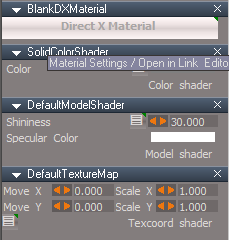
BlankDXMaterial
Exported to the parent object... "When you select your object, the D3D Material shows in the Stack/Panel
LMB click - Shows the materials in the Stack/Panel
RMB click - Opens the materials in the Link Editor
Add
Settings icon to each shader
BlankDXMaterial.png
BlankDXMaterial.png (10.53 KiB) Viewed 3214 times
Texture coord shaders
Add
Settings icon to each shader
LMB click - Selects the node for showing the attributes in the Keying Panel
RMB click - Selects the material
Texture coord shaders.png
User avatar
clintonman
Captain
Posts: 5659
Joined: 21 May 2009, 21:08
Type the number ten into the box: 0
Location: California

Re: Final trueSpace7.61 Beta 8 Std Unofficial Update

Post by clintonman »

"RC1 June 11, 2020"

What's the "RC1" part all about? Is there some final version coming later with RC2, 3 etc before the final?
Clinton Reese

http://clintons3d.com
User avatar
trueBlue
Captain
Posts: 5548
Joined: 06 Jul 2009, 22:50
Type the number ten into the box: 10

Re: Final trueSpace7.61 Beta 8 Std Unofficial Update

Post by trueBlue »

clintonman wrote: 11 Jun 2020, 20:47 "RC1 June 11, 2020"

What's the "RC1" part all about? Is there some final version coming later with RC2, 3 etc before the final?
Hopefully, less any issues, this is it.
I used your Square Creator to create the Ground Plane for the Particle System.
Do you see any disadvantages using that type of mesh?
User avatar
clintonman
Captain
Posts: 5659
Joined: 21 May 2009, 21:08
Type the number ten into the box: 0
Location: California

Re: Final trueSpace7.61 Beta 8 Std Unofficial Update

Post by clintonman »

trueBlue wrote: 11 Jun 2020, 22:35 Hopefully, less any issues, this is it.
I used your Square Creator to create the Ground Plane for the Particle System.
Do you see any disadvantages using that type of mesh?
Ok,sounds good. I wanted to finally update to your latest, but if there was more big changes coming I would have a waited.

The only disadvantage I see compared to a plane object is that you could have a size control and detail/resolution for shadows. That's hypothetical though since I would most likely just hide the ground plane.
Clinton Reese

http://clintons3d.com
User avatar
trueBlue
Captain
Posts: 5548
Joined: 06 Jul 2009, 22:50
Type the number ten into the box: 10

Re: Final trueSpace7.61 Beta 8 Std Unofficial Update

Post by trueBlue »

Most of these updates in RC1 are for Animation.
I was thinking about updating the Cameras, by adding Bitmap Button Controls verses Button Controls.
Also add a Camera Render to File and Defaults for Width and Height
New Camera with Icons.png
Attachments
Camera.RsObj
(61.17 KiB) Downloaded 201 times
User avatar
trueBlue
Captain
Posts: 5548
Joined: 06 Jul 2009, 22:50
Type the number ten into the box: 10

Re: Final trueSpace7.61 Beta 8 Std Unofficial Update

Post by trueBlue »

New Update for trueSpace7.61 Beta 8 Std Unofficial Update
viewtopic.php?t=3731
RC2 June 15, 2020

Recommend that you completely Uninstall and Install trueSpace7.61 Beta 8 Standalone to a clean directory before installing this update. This update precedes all previous updates and recommend that you delete any and all previous updates.

Object Navigation Widget 1, 2, 3, 4, 5, and 6
Arc(s)
Swapped the LMB State with the RMB State
Add Auto Key nodes to the RMB State, including 7 and 8

All Object Navigation Widget's Arcs Additional Shortcuts are the same

LMB + Drag on Arcs rotates from the Axis
RMB + Drag on Arcs rotates from object center
Note: If you Flatten the Axis, RMB + Drag on Arcs rotates from object center no longer works, unless you Reset the Axis!

ParticleScripts/Particle Script Encaps/Particle/Constant Map Alpha D3D material
Add
Color Picker to the Solid Color Image script with a Watch Dog Event

Cameras.RsObj
Cameras.png
Camera & EntryPoint
Add
Bitmap Button Controls

Snapping.RsObj
Axis Snap.png
Reset Axis icon
Add
RMB = Flatten Axis

AutokeyWidgets.RsObj
AutoKeyframing.png
AutoKeyframing.png (1.64 KiB) Viewed 3296 times
Add
OnOff ColorData control
Red = Off
Green = On
User avatar
trueBlue
Captain
Posts: 5548
Joined: 06 Jul 2009, 22:50
Type the number ten into the box: 10

Re: Final trueSpace7.61 Beta 8 Std Unofficial Update

Post by trueBlue »

New Update for trueSpace7.61 Beta 8 Std Unofficial Update
viewtopic.php?t=3731
RC3 June 21, 2020

Updates for the Protect Workspace and Show Objects Attributes scripts - Author Clinton Reese :worship:

Recommend that you completely Uninstall and Install trueSpace7.61 Beta 8 Standalone to a clean directory before installing this update. This update precedes all previous updates and recommend that you delete any and all previous updates.

Scripts/Commands
Add New
CloseORASettings - Author Clinton Reese
Show
ShowAll
Hide
HideAll

Toolbars
PESelectionToolbar
Zoom to Selection.png
Zoom to Selection.png (22.08 KiB) Viewed 3273 times
Add
Zoom to Selection / Zoom Out
LMB click Zooms to Selection
RMB click switches to a reset Perspective view

Protect Workspace - Author Clinton Reese
Update to version 10 6/21/2020

D3D_Render_Grp.RsObj - Author Clinton Reese
Saved the D3D_Render_PanelFrame's location and enabled SnappedTo

Background widget
Changed
Comma + LMB Drag - Shows All
Period + LMB Drag - Hides All (Except selection)

Object Navigation Widget(s)
Add
Auto Keyframing to Arcs RMB Gesture - Author Clinton Reese
User avatar
trueBlue
Captain
Posts: 5548
Joined: 06 Jul 2009, 22:50
Type the number ten into the box: 10

Re: Final trueSpace7.61 Beta 8 Std Unofficial Update

Post by trueBlue »

New Update for trueSpace7.61 Beta 8 Std Unofficial Update
viewtopic.php?t=3731
RC4 June 22, 2020

Recommend that you completely Uninstall and Install trueSpace7.61 Beta 8 Standalone to a clean directory before installing this update. This update precedes all previous updates and recommend that you delete any and all previous updates.

All widget Help scripts were change to close the WidgetHelpFrame first before opening a different widget Help
WindowsManager.CloseWindow("/Project/Windows Manager Space/WidgetHelpFrame")

All Object, Point Edit, and Camera widgets
I + LMB click on any part of the widgets opens Help

Axis widget
I + LMB click on the Sphere opens Help

Background widget
B + I + LMB click in 3D Space opens Help

View widget
I + LMB click on the Green Encircle opens Help

Inspect widget
Removed Space.Unselect() from the Cancel command
Add
Help
I + LMB click in 3D Space opens Help

Background widget
Updated
Look at selection
All Look at Selection commands
Changes make it possible to use the gestures in any window, independently.

Ctrl + MMB click - Looks At Selection
MMB click - Moves the view to the current selection or Point Edit selection
Shift + MMB click - Moves the view to all objects in the scene
Comma + LMB Drag - Shows All
Period + LMB Drag - Hides All (Except selection)
User avatar
trueBlue
Captain
Posts: 5548
Joined: 06 Jul 2009, 22:50
Type the number ten into the box: 10

Re: Final trueSpace7.61 Beta 8 Std Unofficial Update

Post by trueBlue »

New Update for trueSpace7.61 Beta 8 Std Unofficial Update
viewtopic.php?t=3731
RC5 June 25, 2020

Recommend that you completely Uninstall and Install trueSpace7.61 Beta 8 Standalone to a clean directory before installing this update. This update precedes all previous updates and recommend that you delete any and all previous updates.

Synchronize - Author Clinton Reese
Updated

Background widget
Look at selection - Author Clinton Reese
Zoom2All
Removed
RsTool.ResetView('');

ClintonsToolbar
Add
Workspace Layers 3 - Author Clinton Reese

Object and Vertex Snap - Author Clinton Reese
Update - Widget and Help panels updated

FK Controls - Author Clinton Reese
Update- Panel redesigned with bigger buttons


All toolbars buttons with a RMB Help command
Add
Modal Question function
Yes = Open Web Browser?
No = Cancel

Commands
Update
Hide, Show, HideAll, and ShowAll scripts - Author Clinton Reese

MeshObjectCoordinateSystem - Author Clinton Reese
ToggleCoordSystem
Removed
Node.Value('/Preferences/Modeling preferences','Coordinate system') = 'Local'
Node.Value('/Preferences/Modeling preferences','Coordinate system') = 'World'
Replaced with original script - March 23, 2020

Thank you ever so much Clinton! :worship:
User avatar
clintonman
Captain
Posts: 5659
Joined: 21 May 2009, 21:08
Type the number ten into the box: 0
Location: California

Re: Final trueSpace7.61 Beta 8 Std Unofficial Update

Post by clintonman »

Looks like I need to revisit my UU4Clinton scripts. :bananathumb:
Clinton Reese

http://clintons3d.com
User avatar
trueBlue
Captain
Posts: 5548
Joined: 06 Jul 2009, 22:50
Type the number ten into the box: 10

Re: Final trueSpace7.61 Beta 8 Std Unofficial Update

Post by trueBlue »

"Web Based help Ask Permission - asks permission before opening a web browser to get help from the internet"
These RMB commands have been updated with the longest button command known to exist in trueSpace history with your Modal Question script.
"Mesh Object Coordinate Mode switches to world coordinate mode in the updates, instead of between the 2 object coordinate modes."
Restored to you original script.
My feeble attempt was to enable Object coordinate Mode so it worked automatically.
The switching back to World coordinate Mode was my intent to overcome the issue with Tangent coordinate Mode.

"FK Controls has a small dense UI in the Updates that's difficult to read. Better for me to be too big than too small."
Redesigned with bigger buttons.
My intent here was to add the auto popup panel making it easier to use when in use.
I do try to make the panels smaller, when they are floating, only to save space.
"Deformers don't have the new control widgets"
It's been awhile since testing your original verses the widget version.
As I recall, the widget version was incomplete and animating was harder.
The original version still has some value, especially with animation.
My thought was a user could easily overwrite the original by installing the widget version.
"Quad Menu for modeling in the updates has a different layout than the Quad Toolbar which also has a button to receive a user selected shortcut key"
Originally, your first version, I thought you liked the Spacebar as the shortcut.
I have not updated to your newest version and my thought was there could be two flavors. Personally I like the offset aspect so that it does not get in the way of the Point Edit selection.
"Mesh Origin tool doesn't have a button, only a shortcut in the object Nav widget"
I did not include a button because this is not compatible with the other widgets. As I understand it anyway.
"Ctrl button for the link editor only works if the main link editor window is available"
The Ctrl button for the Link Editor is unique to the Link Editor aspect toolbar.
Currently when opening a new Link Editor, the Link Editor aspect toolbar does not exist.
Maybe it would be possible to exchange the RMB= Unselect with calling your script?
"View 3D Layout doesn't work the same way or have the same options"
Quad Window is not your View 3D Layout scripts, it is entirely different. Currently the updates do not include your View 3D Layout scripts
User avatar
clintonman
Captain
Posts: 5659
Joined: 21 May 2009, 21:08
Type the number ten into the box: 0
Location: California

Re: Final trueSpace7.61 Beta 8 Std Unofficial Update

Post by clintonman »

The Quad Toolbar installer includes a button for your Quad Menu. I do like the Spacebar shortcut. I don't like a shortcut that's hard coded and difficult to change because there is no button.

Mesh Origin does have an effect. It can only be seen easily with the special widget.
Example:
Have standard object nav widget active
Add a mesh.
Rotate the mesh using the left and right mouse buttons to see they are the same.
PE the mesh moving all the geometry over some distance.
Exit PE and rotate the mesh using the left and right mouse buttons to see the difference.
Open the Mesh Origin tool and press Origin to Mesh
Now LMB and RMB rotate are the same again.

"The Ctrl button for the Link Editor is unique to the Link Editor aspect toolbar.
Currently when opening a new Link Editor, the Link Editor aspect toolbar does not exist.
Maybe it would be possible to exchange the RMB= Unselect with calling your script?"
I don't follow what you're saying here. Does this fix the "Link Editor aspect toolbar does not exist" in new Link Editor window?

"Quad Window is not your View 3D Layout scripts, it is entirely different." Yep, I see that now. I'll change the wording to reflect that fact.
Clinton Reese

http://clintons3d.com
User avatar
trueBlue
Captain
Posts: 5548
Joined: 06 Jul 2009, 22:50
Type the number ten into the box: 10

Re: Final trueSpace7.61 Beta 8 Std Unofficial Update

Post by trueBlue »

clintonman wrote: 26 Jun 2020, 15:59 The Quad Toolbar installer includes a button for your Quad Menu. I do like the Spacebar shortcut. I don't like a shortcut that's hard coded and difficult to change because there is no button.

Mesh Origin does have an effect. It can only be seen easily with the special widget.
Example:
Have standard object nav widget active
Add a mesh.
Rotate the mesh using the left and right mouse buttons to see they are the same.
PE the mesh moving all the geometry over some distance.
Exit PE and rotate the mesh using the left and right mouse buttons to see the difference.
Open the Mesh Origin tool and press Origin to Mesh
Now LMB and RMB rotate are the same again.

"The Ctrl button for the Link Editor is unique to the Link Editor aspect toolbar.
Currently when opening a new Link Editor, the Link Editor aspect toolbar does not exist.
Maybe it would be possible to exchange the RMB= Unselect with calling your script?"
I don't follow what you're saying here. Does this fix the "Link Editor aspect toolbar does not exist" in new Link Editor window?

"Quad Window is not your View 3D Layout scripts, it is entirely different." Yep, I see that now. I'll change the wording to reflect that fact.
Okay, I'll look at the Quad Toolbar installer and removing the shortcut.
Just hate what tS does to the Shortcut file when adding a shortcut from the dialog.

I will add the Mesh Origin to the ClintonPE toolbar and the Quad Menu

"Does this fix the "Link Editor aspect toolbar does not exist" in new Link Editor window?"
No. I will add your Ctrl+ script to your Clinton toolbar

Here is the icons:
Attachments
ToolbarIcons.zip
(2.79 KiB) Downloaded 166 times
User avatar
trueBlue
Captain
Posts: 5548
Joined: 06 Jul 2009, 22:50
Type the number ten into the box: 10

Re: Final trueSpace7.61 Beta 8 Std Unofficial Update

Post by trueBlue »

I did not know about your Quad Menu button.
I removed the SPACE shortcut.
Added the buttons to ClintonsPointEditToolbar
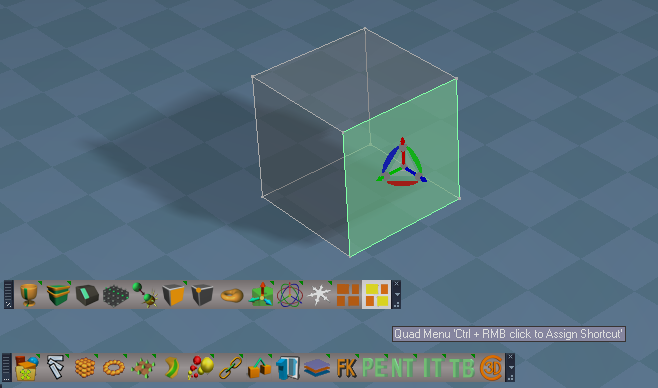
User will need to be in Point Editing mode and Assign a Shortcut to the buttons or else LMB clicking the buttons opens the panel at the button's current location.
Which is why I assigned an AgentID and TagAliss = pe "Only works in Point Editing Mode"
AssignShortcut.png
There is an issue with your Quad toolbar.
You are able to open multiple panels endlessly.
Endless panels.png
User avatar
clintonman
Captain
Posts: 5659
Joined: 21 May 2009, 21:08
Type the number ten into the box: 0
Location: California

Re: Final trueSpace7.61 Beta 8 Std Unofficial Update

Post by clintonman »

trueBlue wrote: 26 Jun 2020, 18:09 I did not know about your Quad Menu button.
I removed the SPACE shortcut.
Added the buttons to ClintonsPointEditToolbar
User will need to be in Point Editing mode and Assign a Shortcut to the buttons or else LMB clicking the buttons opens the panel at the button's current location.
Which is why I assigned an AgentID and TagAliss = pe "Only works in Point Editing Mode"
AssignShortcut.png

There is an issue with your Quad toolbar.
You are able to open multiple panels endlessly.
Endless panels.png
I don't know why you removed the SPACE shortcut. I don't see any problem with having a default shortcut.
Yep, it would be better with the pe tagalias stuff.

Either you found something new or you have an old copy of the quad toolbar. "bug allowed quad toolbar to be opened multiple times", April 17, 2020 update notes.
I'll check that the correct version was uploaded.

Edit:
Website had old version.
website has been updated with proper April 17 version.
Clinton Reese

http://clintons3d.com
User avatar
clintonman
Captain
Posts: 5659
Joined: 21 May 2009, 21:08
Type the number ten into the box: 0
Location: California

Re: Final trueSpace7.61 Beta 8 Std Unofficial Update

Post by clintonman »

trueBlue wrote: 26 Jun 2020, 16:17 ...

Here is the icons:
Thanks, but do you have the source paint 3d files used to make the png files? I was interested in seeing why they look the way they do.
Clinton Reese

http://clintons3d.com
User avatar
trueBlue
Captain
Posts: 5548
Joined: 06 Jul 2009, 22:50
Type the number ten into the box: 10

Re: Final trueSpace7.61 Beta 8 Std Unofficial Update

Post by trueBlue »

Sorry I meant to say I do not have the 3D Paint file.
It is pretty easy to make the 3D Text
I'll redownload the Quad toolbar and try again.
Also test if the current Update shortcut works
User avatar
clintonman
Captain
Posts: 5659
Joined: 21 May 2009, 21:08
Type the number ten into the box: 0
Location: California

Re: Final trueSpace7.61 Beta 8 Std Unofficial Update

Post by clintonman »

Can you make a sample 3dpaint file? I tried using the text tool and didn't get the look you had.
Clinton Reese

http://clintons3d.com
User avatar
trueBlue
Captain
Posts: 5548
Joined: 06 Jul 2009, 22:50
Type the number ten into the box: 10

Re: Final trueSpace7.61 Beta 8 Std Unofficial Update

Post by trueBlue »

I think this is close, including the color.
Maybe uncheck Bold
Attachments
Toolbar3DText.zip
(5.31 KiB) Downloaded 180 times
User avatar
clintonman
Captain
Posts: 5659
Joined: 21 May 2009, 21:08
Type the number ten into the box: 0
Location: California

Re: Final trueSpace7.61 Beta 8 Std Unofficial Update

Post by clintonman »

trueBlue wrote: 26 Jun 2020, 20:42 I think this is close, including the color.
Maybe uncheck Bold
Thanks, now that I see it in action I think I'll try to find a trueSpace way to do it.
Clinton Reese

http://clintons3d.com
User avatar
trueBlue
Captain
Posts: 5548
Joined: 06 Jul 2009, 22:50
Type the number ten into the box: 10

Re: Final trueSpace7.61 Beta 8 Std Unofficial Update

Post by trueBlue »

New Update for trueSpace7.61 Beta 8 Std Unofficial Update
viewtopic.php?t=3731
RC6 June 27, 2020

Recommend that you completely Uninstall and Install trueSpace7.61 Beta 8 Standalone to a clean directory before installing this update. This update precedes all previous updates and recommend that you delete any and all previous updates.

Backgound widget
Perspective & Ortho
RMB + Drag gesture/script
Add
Close Quad toolbar(s)

Window.Shortcuts.xml
Changed
Space keyboard key shortcut to: Open the Quad Toolbar in Point Edit Mode

Toolbars
Model & Workspace - About LMB command
Add Alert = trueSpace 7.61 Standalone Unofficial Update Version 6

ClintonsToolbar
Add
Mesh Origin

ClintonsPointEditToolbar
Add
Quad Toolbar
AssignShortcut.png
User avatar
trueBlue
Captain
Posts: 5548
Joined: 06 Jul 2009, 22:50
Type the number ten into the box: 10

Re: Final trueSpace7.61 Beta 8 Std Unofficial Update

Post by trueBlue »

New Update for trueSpace7.61 Beta 8 Std Unofficial Update
viewtopic.php?t=3731
RC7 July 02, 2020

Recommend that you completely Uninstall and Install trueSpace7.61 Beta 8 Standalone to a clean directory before installing this update. This update precedes all previous updates and recommend that you delete any and all previous updates.

Toolbars
Add
Hide Cameras and Lights icon
Show Cameras and Lights icon
HideShowLightsCameras.png
Updated Hide, Show, HideAll, and ShowAll scripts

ClintonsToolbar
Toolbar(s) icons changed to flat text

Cameras, Lights, default scene lights and camera, and WS - Default.RsSLgts - Object Render Attributes' Cast shadows and Receive shadows, Unchecked.
User avatar
trueBlue
Captain
Posts: 5548
Joined: 06 Jul 2009, 22:50
Type the number ten into the box: 10

Re: Final trueSpace7.61 Beta 8 Std Unofficial Update

Post by trueBlue »

New Update for trueSpace7.61 Beta 8 Std Unofficial Update
viewtopic.php?t=3731
RC8 July 05, 2020

Recommend that you completely Uninstall and Install trueSpace7.61 Beta 8 Standalone to a clean directory before installing this update. This update precedes all previous updates and recommend that you delete any and all previous updates.

HideAll and ShowAll scripts
Updated
Note: HideAll does not hide objects that have an Object Hider if they are selected beforehand.
Adding Space.Unselect() to HideAll interfers with HideAll except selection

Background widget
Fixed
Comma + LMB Drag = ShowAll
Period + LMB Drag = HideAll except current selection

Activities - Base
Add
truePause - Author - Clinton Reese
LeftBackWheel - tricycle's left back wheel, includes the Rotation Engine script

Materials - DX9
Restored to original state
BlankDXMaterial.RsMat

Shaders - Texture coord shader
Add
Direct X Material.RsMat
Direct X Material.png
User avatar
trueBlue
Captain
Posts: 5548
Joined: 06 Jul 2009, 22:50
Type the number ten into the box: 10

Re: Final trueSpace7.61 Beta 8 Std Unofficial Update

Post by trueBlue »

New Update for trueSpace7.61 Beta 8 Std Unofficial Update
viewtopic.php?t=3731
RC9 July 06, 2020

Recommend that you completely Uninstall and Install trueSpace7.61 Beta 8 Standalone to a clean directory before installing this update. This update precedes all previous updates and recommend that you delete any and all previous updates

My Scenes
Update
Scene.RsScn

ShowCameraAndLights
HideCameraAndLights
Updated
Disconnect and Connect the Object hider to Object Render Attributes

DeleteORA
Add
&& Node.ConExists(curNode, "Input Attributes"
User avatar
trueBlue
Captain
Posts: 5548
Joined: 06 Jul 2009, 22:50
Type the number ten into the box: 10

Re: Final trueSpace7.61 Beta 8 Std Unofficial Update

Post by trueBlue »

Here is a trial version of the current Unofficial Update RC9 for trueSpace7.61 Beta 8 Standalone with a modified version of Workspace Layers 3
This version does not need the Clintons3dRsView.rsx plugin nor the Web Server to be active.
Included is a different Locking script that is incorporated and UnDo's the last selection when Active

I really wanted to put the unmodified original Workspace Layers 3 in the Unofficial Updates. Unfortunately it requires a user's interaction depending on their Anti Virus installed on their system and I am not sure how that would work out for different users.
Never the less if this version does not fit your needs, you can Right click the Workspace Layer's toolbar icon that opens your web browser to the original Workspace Layers 3 made by Clinton Reese. In with which you can download and install all of the required items and it will overwrite this modified version.

If Clinton agrees with this modified version, I will add it to the Unofficial Updates.
Changes
loadIt script
Comment // Alert Warnings
Add
Node.Value(scene + "/workspacelayers3/Locking", "Active") = 0
Enable Locking button
Node.Value("%THIS_NAME%/Locking", "Active") = -1
Activity.Run('%THIS_NAME%' + "/Locking/Popup Panel/OpenPanelFrame")
Lock script hooked up to a Selection Change Event

Code: Select all

function Execute(params)
{
if (Node.ConExists('', "UnSelectable")) 
{
RsApp.Undo()
Node.Value(System.ThisOwner(), "Active") = -1
}
}
No other changes to the original code.
WL3UU.png
Removed due to update
User avatar
clintonman
Captain
Posts: 5659
Joined: 21 May 2009, 21:08
Type the number ten into the box: 0
Location: California

Re: Final trueSpace7.61 Beta 8 Std Unofficial Update

Post by clintonman »

trueBlue wrote: 06 Jul 2020, 17:34 Here is a trial version of the current Unofficial Update RC9 for trueSpace7.61 Beta 8 Standalone with a modified version of Workspace Layers 3
This version does not need the Clintons3dRsView.rsx plugin nor the Web Server to be active.
Included is a different Locking script that is incorporated and UnDo's the last selection when Active

I really wanted to put the unmodified original Workspace Layers 3 in the Unofficial Updates. Unfortunately it requires a user's interaction depending on their Anti Virus installed on their system and I am not sure how that would work out for different users.
Never the less if this version does not fit your needs, you can Right click the Workspace Layer's toolbar icon that opens your web browser to the original Workspace Layers 3 made by Clinton Reese. In with which you can download and install all of the required items and it will overwrite this modified version.

If Clinton agrees with this modified version, I will add it to the Unofficial Updates.
Changes
loadIt script
Comment // Alert Warnings
Add
Node.Value(scene + "/workspacelayers3/Locking", "Active") = 0
Enable Locking button
Node.Value("%THIS_NAME%/Locking", "Active") = -1
Activity.Run('%THIS_NAME%' + "/Locking/Popup Panel/OpenPanelFrame")

No other changes to the original code.
Looks ok to me. Though I don't know what you mean by the antivirus stuff. Do you mean the question of allowing access to the network?
To be clear the locking/unlocking is optional on my version so you don't have to install the plugin or the locking scripts.
Clinton Reese

http://clintons3d.com
User avatar
trueBlue
Captain
Posts: 5548
Joined: 06 Jul 2009, 22:50
Type the number ten into the box: 10

Re: Final trueSpace7.61 Beta 8 Std Unofficial Update

Post by trueBlue »

Firewall.png
Firewall.png (69.13 KiB) Viewed 2794 times
When I first opened the WebServer, the above was shown.
I chose Cancel and I am not sure what was blocked and or how to un block it.
More importantly how either or could effect the Workspace Layers 3
It seems to work, just not sure.
User avatar
clintonman
Captain
Posts: 5659
Joined: 21 May 2009, 21:08
Type the number ten into the box: 0
Location: California

Re: Final trueSpace7.61 Beta 8 Std Unofficial Update

Post by clintonman »

I'm pretty sure just pressing cancel is ok. It's a web server so it's going to ask "can I server pages on your network". The trueSpace web stuff doesn't need access to the network unless you wanted to open a web page on another computer to control trueSpace.
Clinton Reese

http://clintons3d.com
User avatar
trueBlue
Captain
Posts: 5548
Joined: 06 Jul 2009, 22:50
Type the number ten into the box: 10

Re: Final trueSpace7.61 Beta 8 Std Unofficial Update

Post by trueBlue »

New Update for trueSpace7.61 Beta 8 Std Unofficial Update
viewtopic.php?t=3731
RC10 July 06, 2020

Recommend that you completely Uninstall and Install trueSpace7.61 Beta 8 Standalone to a clean directory before installing this update. This update precedes all previous updates and recommend that you delete any and all previous updates

My Scenes
Update
Scene.RsScn

ShowCameraAndLights
HideCameraAndLights
Updated
Disconnect and Connect the Object hider to Object Render Attributes

DeleteORA
Add
&& Node.ConExists(curNode, "Input Attributes"

Workspace Layers 3 Author - Clinton Reese
This version does not need the Clintons3dRsView.rsx plugin nor the Web Server to be active.
Included is a different Locking script that is incorporated and UnDo's the last selection when Active
WL3UU.png
If this version does not fit your needs, you can Right click the Workspace Layer's toolbar icon that opens your web browser to the original Workspace Layers 3 made by Clinton Reese. In with which you can download and install all of the required items and it will overwrite this modified version.
User avatar
trueBlue
Captain
Posts: 5548
Joined: 06 Jul 2009, 22:50
Type the number ten into the box: 10

Re: Final trueSpace7.61 Beta 8 Std Unofficial Update

Post by trueBlue »

New Update for trueSpace7.61 Beta 8 Std Unofficial Update
viewtopic.php?t=3731
RC11 July 12, 2020

Recommend that you completely Uninstall and Install trueSpace7.61 Beta 8 Standalone to a clean directory before installing this update. This update precedes all previous updates and recommend that you delete any and all previous updates

Lights.RsObj

Spot & Projector lights Preferences aspect
Update
Add
Hotspot Angle - Scrubber with Min/Max values, Max is the Default
Near Clip Plane - Scrubber with Min/Max values, Max is the Default
Reset Defaults button - LMB - Resets all Defaults / RMB - Resets - Spot Cone
Preferences.png
Preferences.png (15.71 KiB) Viewed 2769 times
Projector
Update
Moved Square bitmap to Projector Preferences and unexported the SpotCone attribute

YafaRay IES Spot
Update
IESimport script per Clinton Reese's update and unexported the SpotCone attribute

CustomCommands
Add
ConvertSpotToIES.RsObj scripts - Author - Clinton Reese
Newly updated scripts with major improvements. Many thanks Clinton!
Other updates:
Compatible with new Projector lights
Remove circular mask code from BitmapBuffer
Several little tweaks
ConvertSpotToIES.png
ConvertSpotToIES.png (22.83 KiB) Viewed 2771 times
Toolbars.RsObj
Add
IES Profiles / Spot Cone
iesSpotButton to all Workspace(s) toolbar(s) Lights
AgentID = {5B44AED2-C4BF-460B-A1D9-7C83F91B307A}
TagAlias = /Widgets/Select/Spot light widget
Lights toolbar.png
User avatar
clintonman
Captain
Posts: 5659
Joined: 21 May 2009, 21:08
Type the number ten into the box: 0
Location: California

Re: Final trueSpace7.61 Beta 8 Std Unofficial Update

Post by clintonman »

I found a bug in the IES Light calculations. It shows itself as a black center. The values are reversed when the data is defined as going from vertical 90 degrees up to 180 degrees. As is it only works properly for files defined as vertical 0 to 90 degrees.

Fix for the iesImport script is around line 182:

Code: Select all

//angdist = dist;
if(vertAngles[0] > 0)
	angdist = 126-dist;
else
	angdist = dist;
Clinton Reese

http://clintons3d.com
User avatar
trueBlue
Captain
Posts: 5548
Joined: 06 Jul 2009, 22:50
Type the number ten into the box: 10

Re: Final trueSpace7.61 Beta 8 Std Unofficial Update

Post by trueBlue »

clintonman wrote: 16 Jul 2020, 16:04 I found a bug in the IES Light calculations. It shows itself as a black center. The values are reversed when the data is defined as going from vertical 90 degrees up to 180 degrees. As is it only works properly for files defined as vertical 0 to 90 degrees.

Fix for the iesImport script is around line 182:

Code: Select all

//angdist = dist;
if(vertAngles[0] > 0)
	angdist = 126-dist;
else
	angdist = dist;
I have RC13 Unofficial Update(s) ready that I am going to upload that includes your other current updates.
And...
ConvertSpotToIES
ies script
Changed code to previous version dated July 8, 2020

The previous ies script was working, but now it errors out for some unknown reason.
I'll add in future updates that you have in store for the IES Profiles
User avatar
trueBlue
Captain
Posts: 5548
Joined: 06 Jul 2009, 22:50
Type the number ten into the box: 10

Re: Final trueSpace7.61 Beta 8 Std Unofficial Update

Post by trueBlue »

New Update for trueSpace7.61 Beta 8 Std Unofficial Update
viewtopic.php?t=3731
RC12 July 16, 2020

Recommend that you completely Uninstall and Install trueSpace7.61 Beta 8 Standalone to a clean directory before installing this update. This update precedes all previous updates and recommend that you delete any and all previous updates

Toolbars.RsObj
Add
3D Unencapsulate icon
Update
2D Unencapsulate icon

ScriptCommands
Add
Unencapsulate.xml
Add the missing
OpenD3DRenderPath.xml

Widgets.RsObj
Point Edit Widget's Help
Update
O + LMB select the widget switches to Mesh Object Coordinate Mode On/Off
Switch to the Object Coordinate system to change the widget's behavior
IMPORTANT: This will also have an effect on the Tangent Coordinate system
Switch back before using the Tangent Coordinate system

Material Editor/MaterialConverter
Updated 07/15/2020 Author - Clinton Reese
"Fix instancing script to work with materials from the FBX import scripts"
Modified
SetMaterialEditorMode script
Add
if(Node.IsCamera(Node.Selection())) return;
if(Node.IsLight(Node.Selection())) return;
Add ! button
LMB = System.Alert(" Converting - D3D Material -> Instancing\n changes your Material Editor's Advance settings\n to your selected choice")
RMB = Node.ConReset("/Material Editor/Material Editor", "Material instancing");Node.ConReset("%THIS_NAME%", "MatEditInstancing")
Add OnDefaultValue = None
Set D3D Material to Instancing Link to the MatEditInstancing attribute

ClintonsToolbar
MeshOrigin
Updated 07/15/2020 Author - Clinton Reese

ConvertSpotToIES
ies script
Changed code to previous version dated July 8, 2020
User avatar
trueBlue
Captain
Posts: 5548
Joined: 06 Jul 2009, 22:50
Type the number ten into the box: 10

Re: Final trueSpace7.61 Beta 8 Std Unofficial Update

Post by trueBlue »

New Update for trueSpace7.61 Beta 8 Std Unofficial Update
viewtopic.php?t=3731
RC13 July 17, 2020

Recommend that you completely Uninstall and Install trueSpace7.61 Beta 8 Standalone to a clean directory before installing this update. This update precedes all previous updates and recommend that you delete any and all previous updates

Toolbars.RsObj
Add
3D Unencapsulate icon
Update
2D Unencapsulate icon

ScriptCommands
Add
Unencapsulate.xml
Add the missing
OpenD3DRenderPath.xml

Widgets.RsObj
Point Edit Widget's Help
Update
O + LMB select the widget switches to Mesh Object Coordinate Mode On/Off
Switch to the Object Coordinate system to change the widget's behavior
IMPORTANT: This will also have an effect on the Tangent Coordinate system
Switch back before using the Tangent Coordinate system

Material Editor/MaterialConverter
Updated 07/16/2020 Author - Clinton Reese
"Fix instancing script to work with materials from the FBX import scripts"

ClintonsToolbar
MeshOrigin
Updated 07/16/2020 Author - Clinton Reese

ConvertSpotToIES
Updated 07/16/2020 Author - Clinton Reese

Return to “General Discussion”