New Update for trueSpace7.61 Beta 8 Std Unofficial Update
viewtopic.php?t=3731
Final Update December 28, 2020
Recommend that you completely Uninstall and Install trueSpace7.61 Beta 8 Standalone to a clean directory before installing this update. This update precedes all previous updates and recommend that you delete any and all previous updates
NURBS toolbar
Create NURBS circle
Fix wrong icon
NURBS scripts
circleTwoPointsScript
circleThreePointsScript
Fixed the restore PE selection mode
Final trueSpace7.61 Beta 8 Std Unofficial Update
-
trueBlue

- Captain
- Posts: 5548
- Joined: 06 Jul 2009, 22:50
- Type the number ten into the box: 10
Re: Final trueSpace7.61 Beta 8 Std Unofficial Update
-
trueBlue
- Captain
- Posts: 5548
- Joined: 06 Jul 2009, 22:50
- Type the number ten into the box: 10
Re: Final trueSpace7.61 Beta 8 Std Unofficial Update
New Update for trueSpace7.61 Beta 8 Std Unofficial Update
viewtopic.php?t=3731
Final Update December 30, 2020
Recommend that you completely Uninstall and Install trueSpace7.61 Beta 8 Standalone to a clean directory before installing this update. This update precedes all previous updates and recommend that you delete any and all previous updates
WorkspaceMain, WorkspaceMain2, BottomBar, and BottomBar2 toolbars
Delete icon - Activity.Run('/Scripts/Commands/Delete');
Delete script includes deleting NURBS Patches & Curves even if in Control Points mode
Window.Shortcuts.xml
Update
<RS_ACC KEY="DELETE" DESC="Delete selected object" GROUP="VIEW3D" COMMAND="Activity.Run('/Scripts/Commands/Delete');" />
<RS_ACC KEY="CTRL K" DESC="Delete selected object" GROUP="VIEW3D" COMMAND="Activity.Run('/Scripts/Commands/Delete');" />
<RS_ACC KEY="DELETE" DESC="Delete selected object" GROUP="LINKEDITOR" COMMAND="Activity.Run('/Scripts/Commands/Delete');" />
NURBS scripts
primitivePatchScript
Update
Rename converted primitive to NURBS + primitive type's safe name
IE: NURBS Cube, NURBS Cone, NURBS Cyliner, NURBS Sphere, NURBS Plane, and NURBS Torus
circleCurveScript(s)
Rename to Curve Circle
align and distribute
alignment script
Add
Try & Catch error with Alert
System.Alert("NURBS not selected correctly\n\nUse the Select CP Mesh icon");
Update
OpenPanelFrame Author - Clinton Reese
viewtopic.php?t=3731
Final Update December 30, 2020
Recommend that you completely Uninstall and Install trueSpace7.61 Beta 8 Standalone to a clean directory before installing this update. This update precedes all previous updates and recommend that you delete any and all previous updates
WorkspaceMain, WorkspaceMain2, BottomBar, and BottomBar2 toolbars
Delete icon - Activity.Run('/Scripts/Commands/Delete');
Delete script includes deleting NURBS Patches & Curves even if in Control Points mode
Window.Shortcuts.xml
Update
<RS_ACC KEY="DELETE" DESC="Delete selected object" GROUP="VIEW3D" COMMAND="Activity.Run('/Scripts/Commands/Delete');" />
<RS_ACC KEY="CTRL K" DESC="Delete selected object" GROUP="VIEW3D" COMMAND="Activity.Run('/Scripts/Commands/Delete');" />
<RS_ACC KEY="DELETE" DESC="Delete selected object" GROUP="LINKEDITOR" COMMAND="Activity.Run('/Scripts/Commands/Delete');" />
NURBS scripts
primitivePatchScript
Update
Rename converted primitive to NURBS + primitive type's safe name
IE: NURBS Cube, NURBS Cone, NURBS Cyliner, NURBS Sphere, NURBS Plane, and NURBS Torus
circleCurveScript(s)
Rename to Curve Circle
align and distribute
alignment script
Add
Try & Catch error with Alert
System.Alert("NURBS not selected correctly\n\nUse the Select CP Mesh icon");
Update
OpenPanelFrame Author - Clinton Reese
-
trueBlue
- Captain
- Posts: 5548
- Joined: 06 Jul 2009, 22:50
- Type the number ten into the box: 10
Re: Final trueSpace7.61 Beta 8 Std Unofficial Update
New Update for trueSpace7.61 Beta 8 Std Unofficial Update
viewtopic.php?t=3731
Final Update January 1, 2021
Recommend that you completely Uninstall and Install trueSpace7.61 Beta 8 Standalone to a clean directory before installing this update. This update precedes all previous updates and recommend that you delete any and all previous updates
Primitives
Tube primitive
Add
Tube3
Includes Radial slice and Bottom segments
NURBSUtilities
fixTriangulation, fixCurveTriangulation, and fixPatchTriangulation scripts
Update Author - Clinton Reese
rebuildNURBSScript & latheCurveScript
Start script
Add
NURBSUtilities
primitivePatchScript/ConvertMesh script
fixTriangulation script
freezeNURBS script
cleanCone script
Add
viewtopic.php?t=3731
Final Update January 1, 2021
Recommend that you completely Uninstall and Install trueSpace7.61 Beta 8 Standalone to a clean directory before installing this update. This update precedes all previous updates and recommend that you delete any and all previous updates
Primitives
Tube primitive
Add
Tube3
Includes Radial slice and Bottom segments
NURBSUtilities
fixTriangulation, fixCurveTriangulation, and fixPatchTriangulation scripts
Update Author - Clinton Reese
rebuildNURBSScript & latheCurveScript
Start script
Add
Code: Select all
if(Node.SelectedCount() >= 2) {
System.Alert("Mutiple selection not supported!\n\nSelect one object at a time");
params.SetTerminationFlag();
return;
}primitivePatchScript/ConvertMesh script
fixTriangulation script
freezeNURBS script
cleanCone script
Add
Code: Select all
if(Node.SelectedCount() >= 2) {
System.Alert("Mutiple selection not supported!\n\nSelect one object at a time");
params.SetTerminationFlag();
return;
}-
trueBlue
- Captain
- Posts: 5548
- Joined: 06 Jul 2009, 22:50
- Type the number ten into the box: 10
Re: Final trueSpace7.61 Beta 8 Std Unofficial Update
New Update for trueSpace7.61 Beta 8 Std Unofficial Update
viewtopic.php?t=3731
Final Update January 2, 2021
Recommend that you completely Uninstall and Install trueSpace7.61 Beta 8 Standalone to a clean directory before installing this update. This update precedes all previous updates and recommend that you delete any and all previous updates
WorkspaceMain, WorkspaceMain2, BottomBar, and BottomBar2 toolbars
3D Encapsulate icon - Activity.Run('/Scripts/Commands/3DEncapsulate');
3DEncapsulate script includes encapsulating NURBS Patches & Curves even if in Control Points mode
Custom Commands
Select
Update
3D Objects
Includes NURBS
NURBSScripts
Update
NURBS Utilities/Misc
Add
3D Encapsulate
3D Unencapsulate
viewtopic.php?t=3731
Final Update January 2, 2021
Recommend that you completely Uninstall and Install trueSpace7.61 Beta 8 Standalone to a clean directory before installing this update. This update precedes all previous updates and recommend that you delete any and all previous updates
WorkspaceMain, WorkspaceMain2, BottomBar, and BottomBar2 toolbars
3D Encapsulate icon - Activity.Run('/Scripts/Commands/3DEncapsulate');
3DEncapsulate script includes encapsulating NURBS Patches & Curves even if in Control Points mode
Custom Commands
Select
Update
3D Objects
Includes NURBS
NURBSScripts
Update
NURBS Utilities/Misc
Add
3D Encapsulate
3D Unencapsulate

- NURBS Misc.png (7.11 KiB) Viewed 3216 times
-
trueBlue
- Captain
- Posts: 5548
- Joined: 06 Jul 2009, 22:50
- Type the number ten into the box: 10
Re: Final trueSpace7.61 Beta 8 Std Unofficial Update
Test Update for trueSpace7.61 Beta 8 Std Unofficial Update
Test Update January 18, 2021
Recommend that you completely Uninstall and Install trueSpace7.61 Beta 8 Standalone to a clean directory before installing this update.
This is a Beta Release for TESTING the below updates
@Clinton
The DeSelectNURBS script is not working for the Paint Face buttons command
Good news is, it stops the NURBS from entering into PE Mode
Bad news is, materials can be applied to the LODMesh
If you run Remove Orphaned Materials from the Material Editor/Convert D3D Materials, ALL of the Materials are removed
Also, I do not see how you would be able to avoid materials being applied to the wrong parts of the NURBS
Clintons3dPlugin.rsx v.1638426 Author - Clinton Reese
Update
Plugin.xml
Update
Custom Commands
SnappingScripts
Update Author - Clinton Reese
Works with Workspace NURBS
Arrange copied nodes in the Link Editor
Align and Distribute
Update Author - Clinton Reese
Works with Workspace NURBS
Add
OpenFloatingPanelFrame Author - Clinton Reese
Parenting Scripts
Update Author - Clinton Reese
Works with Workspace NURBS
Select
Update Author - Clinton Reese
Works with Workspace NURBS
Mesh Origin
Update Author - Clinton Reese
Works with Workspace NURBS
RectSelect
Update Author - Clinton Reese
Works with Workspace NURBS
Workspace Layers 3
Update Author - Clinton Reese 1/14/2021
Works with Workspace NURBS
Add shortut
Shift + L = Load/Show Workspace Layers 3
Mirror Matrix
Add
Deselect NURBS command to the starting script & toolbar icon
NURBS Scripts & NURBS Toolbar
Updates Author - Clinton Reese 1/16/2021
Move
Import - Patch/Curve to the Workspace File menu
Export - Patch/Curve to the Workspace File menu
Modifications
All tools that create a polycurve or polypatch are renamed to Curve or Patch
alignHandleScript
Remove from Default aspect
Align button
AlignToNeighbor
Rename Align Floaters to Align Patch Floaters
toolbar buttons
Remove RMB command for Sharp
Change Help text to Smooth & Sharp
Fix Auto Floaters button
Help text Align Patch Floaters
ScriptCommands
Updates Author - Clinton Reese
Show.xml
Hide.xml
ShowAll.xml
HideAll.xml
Delete.xml
Unglue.xml = 3D Unencapsulate
3DEncapsulate.xml
CloseORASettings.xml
Add
DeSelectNURBS.xml
Removed
Glue.xml
Snapping
Removed
Face Snap
Vertex Snap
Toolbars
Update
All toolbar button commands that run MeshModifiers commands runs DeSelectNURBS first Status Message - NURBS are not supported ... Select a 3D Object
Removed
Face Snap
Vertex Snap
Transform Objects & Replace Objects
Update
Unselects NURBS
Test Update January 18, 2021
Recommend that you completely Uninstall and Install trueSpace7.61 Beta 8 Standalone to a clean directory before installing this update.
This is a Beta Release for TESTING the below updates
@Clinton
The DeSelectNURBS script is not working for the Paint Face buttons command
Good news is, it stops the NURBS from entering into PE Mode
Bad news is, materials can be applied to the LODMesh
If you run Remove Orphaned Materials from the Material Editor/Convert D3D Materials, ALL of the Materials are removed
Also, I do not see how you would be able to avoid materials being applied to the wrong parts of the NURBS
Clintons3dPlugin.rsx v.1638426 Author - Clinton Reese
Update
Plugin.xml
Update
Custom Commands
SnappingScripts
Update Author - Clinton Reese
Works with Workspace NURBS
Arrange copied nodes in the Link Editor
Align and Distribute
Update Author - Clinton Reese
Works with Workspace NURBS
Add
OpenFloatingPanelFrame Author - Clinton Reese
Parenting Scripts
Update Author - Clinton Reese
Works with Workspace NURBS
Select
Update Author - Clinton Reese
Works with Workspace NURBS
Mesh Origin
Update Author - Clinton Reese
Works with Workspace NURBS
RectSelect
Update Author - Clinton Reese
Works with Workspace NURBS
Workspace Layers 3
Update Author - Clinton Reese 1/14/2021
Works with Workspace NURBS
Add shortut
Shift + L = Load/Show Workspace Layers 3
Mirror Matrix
Add
Deselect NURBS command to the starting script & toolbar icon
NURBS Scripts & NURBS Toolbar
Updates Author - Clinton Reese 1/16/2021
Move
Import - Patch/Curve to the Workspace File menu
Export - Patch/Curve to the Workspace File menu
Modifications
All tools that create a polycurve or polypatch are renamed to Curve or Patch
alignHandleScript
Remove from Default aspect
Align button
AlignToNeighbor
Rename Align Floaters to Align Patch Floaters
toolbar buttons
Remove RMB command for Sharp
Change Help text to Smooth & Sharp
Fix Auto Floaters button
Help text Align Patch Floaters
ScriptCommands
Updates Author - Clinton Reese
Show.xml
Hide.xml
ShowAll.xml
HideAll.xml
Delete.xml
Unglue.xml = 3D Unencapsulate
3DEncapsulate.xml
CloseORASettings.xml
Add
DeSelectNURBS.xml
Removed
Glue.xml
Snapping
Removed
Face Snap
Vertex Snap
Toolbars
Update
All toolbar button commands that run MeshModifiers commands runs DeSelectNURBS first Status Message - NURBS are not supported ... Select a 3D Object
Removed
Face Snap
Vertex Snap
Transform Objects & Replace Objects
Update
Unselects NURBS
-
clintonman

- Captain
- Posts: 5659
- Joined: 21 May 2009, 21:08
- Type the number ten into the box: 0
- Location: California
Re: Final trueSpace7.61 Beta 8 Std Unofficial Update
Working on the docs and looking at the synchronize panel. I don't see an option to turn off the sound effects. Specifically for the save settings button.
Insert Scene Name LMB
Reset Scene Name RMB
Scene name entry field
Enter button
What does it mean to insert the scene name? Does it take the existing scene name and set the text field to the same value?
Looks like reset sets the name to "Space 3D"
Enter actually renames the scene to the text input value.
OK I think I got that figured out. Now what does the Display Toolbars button do? I press it and the toolbars all seem to just flash and the checkbox next to it does not seem to do anything.
Insert Scene Name LMB
Reset Scene Name RMB
Scene name entry field
Enter button
What does it mean to insert the scene name? Does it take the existing scene name and set the text field to the same value?
Looks like reset sets the name to "Space 3D"
Enter actually renames the scene to the text input value.
OK I think I got that figured out. Now what does the Display Toolbars button do? I press it and the toolbars all seem to just flash and the checkbox next to it does not seem to do anything.
-
trueBlue
- Captain
- Posts: 5548
- Joined: 06 Jul 2009, 22:50
- Type the number ten into the box: 10
Re: Final trueSpace7.61 Beta 8 Std Unofficial Update
Test Update 2 for trueSpace7.61 Beta 8 Std Unofficial Update
Test Update 2 January 20, 2021
Recommend that you completely Uninstall and Install trueSpace7.61 Beta 8 Standalone to a clean directory before installing this update. If you applied the previous Test Update January 18, 2021 to a clean directory, you do not need to Uninstall trueSpace7.61 Beta 8 Standalone before applying this new update.
This is a Beta Release for TESTING the below updates and the included previous updates
Toolbars
Update All toolbar(s) button commands
Runs DeSelectNURBS first Status Message - NURBS are not supported ... Select a 3D Object
Primitives
Static Sweep
Edge Bevel
Target Weld
Normal Move
ClintonsToolbar
Fix
FK button
ClintonsPointEditToolbar
Update button commands
Runs DeSelectNURBS first Status Message - NURBS are not supported ... Select a 3D Object
Static Sweep
Edge Bevel
Target Weld
Normal Move
CustomCommands
Update scripts
Normal Move
Target Weld including:
PE TargetWeld widget
Moved Cursor from Cancel to Select_apply
Changed Cursor from Attach to Bone to Point Pick Cursor
Changed Basic select Mode to vertex
Changed Mouse LDrag to Mouse LClick
Removed Continuous Sequence from Cancel
Removed ApplyCommand from Select_apply
Updated
trueSpace Beta 7.61 Standalone Unofficial Update.txt
tS761 Workspace Shortcut List.rtf
Test Update 2 January 20, 2021
Recommend that you completely Uninstall and Install trueSpace7.61 Beta 8 Standalone to a clean directory before installing this update. If you applied the previous Test Update January 18, 2021 to a clean directory, you do not need to Uninstall trueSpace7.61 Beta 8 Standalone before applying this new update.
This is a Beta Release for TESTING the below updates and the included previous updates
Toolbars
Update All toolbar(s) button commands
Runs DeSelectNURBS first Status Message - NURBS are not supported ... Select a 3D Object
Primitives
Static Sweep
Edge Bevel
Target Weld
Normal Move
ClintonsToolbar
Fix
FK button
ClintonsPointEditToolbar
Update button commands
Runs DeSelectNURBS first Status Message - NURBS are not supported ... Select a 3D Object
Static Sweep
Edge Bevel
Target Weld
Normal Move
CustomCommands
Update scripts
Normal Move
Target Weld including:
PE TargetWeld widget
Moved Cursor from Cancel to Select_apply
Changed Cursor from Attach to Bone to Point Pick Cursor
Changed Basic select Mode to vertex
Changed Mouse LDrag to Mouse LClick
Removed Continuous Sequence from Cancel
Removed ApplyCommand from Select_apply
Updated
trueSpace Beta 7.61 Standalone Unofficial Update.txt
tS761 Workspace Shortcut List.rtf
-
trueBlue
- Captain
- Posts: 5548
- Joined: 06 Jul 2009, 22:50
- Type the number ten into the box: 10
Re: Final trueSpace7.61 Beta 8 Std Unofficial Update
@ Clinton
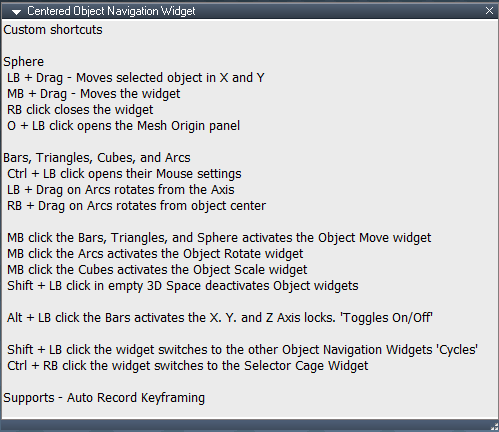
About your Centered Object Navigation Widgets
Ctrl + RB click opens the Object Navigation Widget's Preferences
I think that you should remove the above shortcut!
If you look at the code in the buttons on the Object Navigation Widget's panel, I am fairly sure the code is not supported for your widgets!
About your Centered Object Navigation Widgets
Ctrl + RB click opens the Object Navigation Widget's Preferences

- ONW preferences.png (4.18 KiB) Viewed 3127 times
If you look at the code in the buttons on the Object Navigation Widget's panel, I am fairly sure the code is not supported for your widgets!
-
trueBlue
- Captain
- Posts: 5548
- Joined: 06 Jul 2009, 22:50
- Type the number ten into the box: 10
Re: Final trueSpace7.61 Beta 8 Std Unofficial Update
Test Update 3 for trueSpace7.61 Beta 8 Std Unofficial Update
Test Update 3 January 22, 2021
Recommend that you completely Uninstall and Install trueSpace7.61 Beta 8 Standalone to a clean directory before installing this update. If you applied the previous Test Update to a clean directory, you do not need to Uninstall trueSpace7.61 Beta 8 Standalone before applying this new update.
This is a Beta Release for TESTING the below updates and the included previous updates
Toolbars
Main and Main2
3D Record icon
LMB - Opens the 3D Record toolbar, Settings and the 3D Record preferences panel
RMB - Opens Settings and the 3D Record preferences panel
3D Record, jScript Macro, and VB Macro icons
Changed the opening location to the right of Custom toolbars
Target Weld icon(s)
Add
if(!Node.FirstSelected()) return; to the begining of the LMB command to stop the script from running if nothing is selected
Widgets
Point Edit Widget(s)
Changed
* Alt + LB click the widget moves the Axis to object center and rotates the Axis to the selected Face
Object Navigation Widget(s)
Sphere
Add
* O + LB click opens the Mesh Origin panel
Centered Object Navigation Widget(s)
Sphere
Removed
* Ctrl + RB click opens the Object Navigation Widget's Preferences
All of the above widget's Widget Help text was updated
Test Update 3 January 22, 2021
Recommend that you completely Uninstall and Install trueSpace7.61 Beta 8 Standalone to a clean directory before installing this update. If you applied the previous Test Update to a clean directory, you do not need to Uninstall trueSpace7.61 Beta 8 Standalone before applying this new update.
This is a Beta Release for TESTING the below updates and the included previous updates
Toolbars
Main and Main2
3D Record icon
LMB - Opens the 3D Record toolbar, Settings and the 3D Record preferences panel
RMB - Opens Settings and the 3D Record preferences panel
3D Record, jScript Macro, and VB Macro icons
Changed the opening location to the right of Custom toolbars
Target Weld icon(s)
Add
if(!Node.FirstSelected()) return; to the begining of the LMB command to stop the script from running if nothing is selected
Widgets
Point Edit Widget(s)
Changed
* Alt + LB click the widget moves the Axis to object center and rotates the Axis to the selected Face
Object Navigation Widget(s)
Sphere
Add
* O + LB click opens the Mesh Origin panel
Centered Object Navigation Widget(s)
Sphere
Removed
* Ctrl + RB click opens the Object Navigation Widget's Preferences
All of the above widget's Widget Help text was updated
-
clintonman
- Captain
- Posts: 5659
- Joined: 21 May 2009, 21:08
- Type the number ten into the box: 0
- Location: California
Re: Final trueSpace7.61 Beta 8 Std Unofficial Update
The NURBS sharp and smooth tools aren't working. Gives "Select a Curve or Patch" message.
-
trueBlue
- Captain
- Posts: 5548
- Joined: 06 Jul 2009, 22:50
- Type the number ten into the box: 10
Re: Final trueSpace7.61 Beta 8 Std Unofficial Update
Yep, I was trying to stop it from running on 3D Objects
It only worked on Curves, I guess
This seems to work on a Patch and or a Curve
It only worked on Curves, I guess
This seems to work on a Patch and or a Curve
Code: Select all
if(!Node.Exists(Node.Owner(firstSel) + "/controlPointMesh"))
{
System.Alert("Select a Curve or Patch");
params.SetTerminationFlag();
return;
}
-
trueBlue
- Captain
- Posts: 5548
- Joined: 06 Jul 2009, 22:50
- Type the number ten into the box: 10
Re: Final trueSpace7.61 Beta 8 Std Unofficial Update
Test Update 4 for trueSpace7.61 Beta 8 Std Unofficial Update
Test Update 4 January 24, 2021
Recommend that you completely Uninstall and Install trueSpace7.61 Beta 8 Standalone to a clean directory before installing this update. If you applied the previous Test Update to a clean directory, you do not need to Uninstall trueSpace7.61 Beta 8 Standalone before applying this new update.
This is a Beta Release for TESTING the below updates and the included previous updates
NURBS Scripts
Update
alignHandleScript/start script
Mesh Editor Settings
Mirror tool
Update
Mirror & Copy and Mirror button scripts
Runs DeSelectNURBS first Status Message - NURBS are not supported ... Select a 3D Object
Widgets
Object Navigation Widgets
1.) Ctrl + Right click to switch to the Selector Cage Widget was causing the object to enter into PE Mode!
2.) Removed 4 Object Navigation Widgets that did not have the Selector Cage Widget
Change
Bars Triangles Cubes Arcs
Shift + LB - Switch Object Navigation Widgets
H + LB - Switch Selector Cage Widget
J + LB - Show / Hide Selector Cage Widget
New: Toggles On/Off
Bars Triangles Sphere
Alt + MB - Activate Object Move On/Off
Alt + MB - Arcs - Activate Object Rotate On/Off
Alt + MB - Cubes - Activate Object Scale On/Off
New: Toggles On/Off
Sphere
Alt + LB - Open Object in Link Editor Object/Scene
New: Toggles On/Off
Switch Selector Cage Widget
Change
H + LB - Switch Object Navigation Widget
Point Edit Widgets
1.) P + MB - Move Axis to Object center and Rotate Axis to the selected Face
was interferring with MB - Activate Object Move, Rotate, and Scale widgets!
Change
Bars Triangles Sphere
Alt + MB - Activate Object Move On/Off
Alt + MB - Arcs - Activate Object Rotate On/Off
Alt + MB - Cubes - Activate Object Scale On/Off
New: Toggles On/Off
All of the above widget's Widget Help text was updated
Window.Shortcuts.xml
Removed
K = Set Keyframe in 3D View
Test Update 4 January 24, 2021
Recommend that you completely Uninstall and Install trueSpace7.61 Beta 8 Standalone to a clean directory before installing this update. If you applied the previous Test Update to a clean directory, you do not need to Uninstall trueSpace7.61 Beta 8 Standalone before applying this new update.
This is a Beta Release for TESTING the below updates and the included previous updates
NURBS Scripts
Update
alignHandleScript/start script
Mesh Editor Settings
Mirror tool

- MES.png (7.75 KiB) Viewed 2974 times
Mirror & Copy and Mirror button scripts
Runs DeSelectNURBS first Status Message - NURBS are not supported ... Select a 3D Object
Widgets
Object Navigation Widgets
1.) Ctrl + Right click to switch to the Selector Cage Widget was causing the object to enter into PE Mode!
2.) Removed 4 Object Navigation Widgets that did not have the Selector Cage Widget
Change
Bars Triangles Cubes Arcs
Shift + LB - Switch Object Navigation Widgets
H + LB - Switch Selector Cage Widget
J + LB - Show / Hide Selector Cage Widget
New: Toggles On/Off
Bars Triangles Sphere
Alt + MB - Activate Object Move On/Off
Alt + MB - Arcs - Activate Object Rotate On/Off
Alt + MB - Cubes - Activate Object Scale On/Off
New: Toggles On/Off
Sphere
Alt + LB - Open Object in Link Editor Object/Scene
New: Toggles On/Off
Switch Selector Cage Widget
Change
H + LB - Switch Object Navigation Widget
Point Edit Widgets
1.) P + MB - Move Axis to Object center and Rotate Axis to the selected Face
was interferring with MB - Activate Object Move, Rotate, and Scale widgets!
Change
Bars Triangles Sphere
Alt + MB - Activate Object Move On/Off
Alt + MB - Arcs - Activate Object Rotate On/Off
Alt + MB - Cubes - Activate Object Scale On/Off
New: Toggles On/Off
All of the above widget's Widget Help text was updated
Window.Shortcuts.xml
Removed
K = Set Keyframe in 3D View
-
clintonman
- Captain
- Posts: 5659
- Joined: 21 May 2009, 21:08
- Type the number ten into the box: 0
- Location: California
Re: Final trueSpace7.61 Beta 8 Std Unofficial Update
Centered Object Navigation no way to change the size of the widget.
-
trueBlue
- Captain
- Posts: 5548
- Joined: 06 Jul 2009, 22:50
- Type the number ten into the box: 10
Re: Final trueSpace7.61 Beta 8 Std Unofficial Update
I posted about this on Thu Jan 21, 2021 11:05 am a few post back
I was not sure of any damage to your widget, so I removed the shortcut
I do notice an issue with the Look at Camera
Looks like it screws up your triangles!
I have no idea if the button scripts are compatible with your widget
Edit: Uploaded these changes
Second update 1/24/2021
I was not sure of any damage to your widget, so I removed the shortcut
I do notice an issue with the Look at Camera
Looks like it screws up your triangles!
I have no idea if the button scripts are compatible with your widget

Second update 1/24/2021

-
trueBlue
- Captain
- Posts: 5548
- Joined: 06 Jul 2009, 22:50
- Type the number ten into the box: 10
Re: Final trueSpace7.61 Beta 8 Std Unofficial Update
Test Update 5 for trueSpace7.61 Beta 8 Std Unofficial Update
Test Update 5 January 25, 2021
Recommend that you completely Uninstall and Install trueSpace7.61 Beta 8 Standalone to a clean directory before installing this update. If you applied the previous Test Update to a clean directory, you do not need to Uninstall trueSpace7.61 Beta 8 Standalone before applying this new update.
This is a Beta Release for TESTING the below updates and the included previous updates
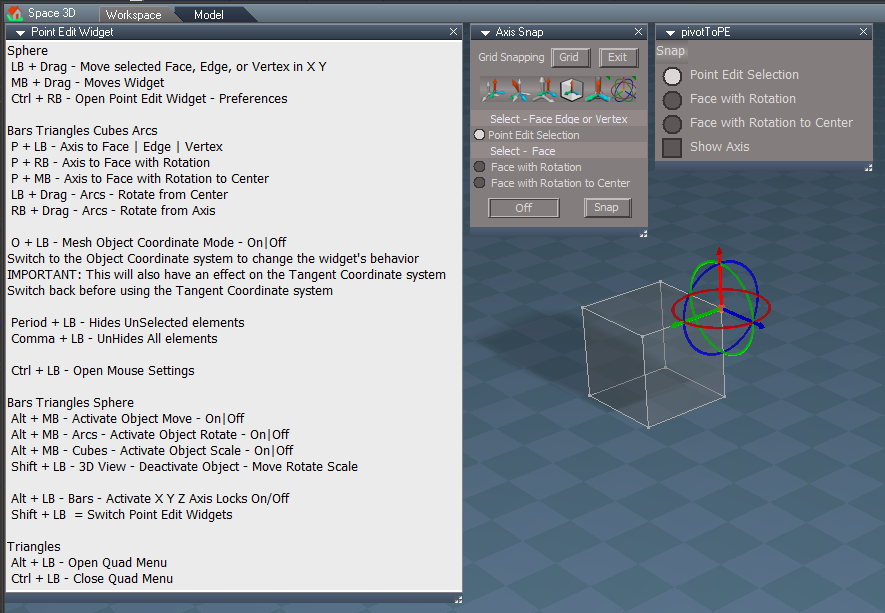
Updated the UI's text to be consistent for:
Axis Snap, Pivot to PE, and Point Edit Widget's Help
Axis Snap
Removed widget Enter shortcut for Snap
Incorporated the panel frame
Pivot to PE toolbar icon
Add
Open Preferences command to the LMB command
Postprocess
RsD3DBloomFilter.fx is updated with the modified RsD3DBloomFilterGLOW.fx file
Add comment to the modified RsD3DBloomFilterGLOW.fx files
/// RsD3DBloomFilterGLOW
/// Replacement for the RsD3DBloomFilter that includes simple blur, alpha and glow display modes
/// Author - Clinton Reese
Update
trueSpace Beta 7.61 Standalone Unofficial Update.txt
Edit:
Add updated
tS761 Workspace Shortcut List.rtf
Fixed typo in PEW's Help
Test Update 5 January 25, 2021
Recommend that you completely Uninstall and Install trueSpace7.61 Beta 8 Standalone to a clean directory before installing this update. If you applied the previous Test Update to a clean directory, you do not need to Uninstall trueSpace7.61 Beta 8 Standalone before applying this new update.
This is a Beta Release for TESTING the below updates and the included previous updates
Updated the UI's text to be consistent for:
Axis Snap, Pivot to PE, and Point Edit Widget's Help
Removed widget Enter shortcut for Snap
Incorporated the panel frame
Pivot to PE toolbar icon
Add
Open Preferences command to the LMB command
Postprocess
RsD3DBloomFilter.fx is updated with the modified RsD3DBloomFilterGLOW.fx file
Add comment to the modified RsD3DBloomFilterGLOW.fx files
/// RsD3DBloomFilterGLOW
/// Replacement for the RsD3DBloomFilter that includes simple blur, alpha and glow display modes
/// Author - Clinton Reese
Update
trueSpace Beta 7.61 Standalone Unofficial Update.txt
Edit:
Add updated
tS761 Workspace Shortcut List.rtf
Fixed typo in PEW's Help
-
trueBlue
- Captain
- Posts: 5548
- Joined: 06 Jul 2009, 22:50
- Type the number ten into the box: 10
Re: Final trueSpace7.61 Beta 8 Std Unofficial Update
Test Update 6 for trueSpace7.61 Beta 8 Std Unofficial Update
Test Update 6 January 28, 2021
Recommend that you completely Uninstall and Install trueSpace7.61 Beta 8 Standalone to a clean directory before installing this update. If you applied the previous Test Update to a clean directory, you do not need to Uninstall trueSpace7.61 Beta 8 Standalone before applying this new update.
This is a Beta Release for TESTING the below updates and the included previous updates
Small update, next release will be the Unofficial Update v7
Unless there is any issues, planning on releasing the UUv7 in a week or so
Updates
trueSpace Beta 7.61 Standalone Unofficial Update.txt
tS761 Workspace Shortcut List.rtf
C3DReset.RsObj
Objects - tS7.61 Update objects library
Add
Switch Workspace Main toolbar script
Note: Switch between Workspace Main and Workspace Main 2 toolbars
Default layout only!
Toolbars
Update
Workspace Main
WorkspaceMainMenu
tS761 First Person Navigator
Update
First Person Navigator
Step 1 - View - Camera View [ REQUIRED ! ]
Step 2 - FPN - First Person Navigation
Eyes - FOV
Z = Zoom In C = Zoom Out
Physics - Gravity
Q = Up E = Down X = Default
Model - Select - View from Object
Test Update 6 January 28, 2021
Recommend that you completely Uninstall and Install trueSpace7.61 Beta 8 Standalone to a clean directory before installing this update. If you applied the previous Test Update to a clean directory, you do not need to Uninstall trueSpace7.61 Beta 8 Standalone before applying this new update.
This is a Beta Release for TESTING the below updates and the included previous updates
Small update, next release will be the Unofficial Update v7
Unless there is any issues, planning on releasing the UUv7 in a week or so
Updates
trueSpace Beta 7.61 Standalone Unofficial Update.txt
tS761 Workspace Shortcut List.rtf
C3DReset.RsObj
Objects - tS7.61 Update objects library
Add
Switch Workspace Main toolbar script

Default layout only!
Toolbars
Update
Workspace Main
WorkspaceMainMenu
tS761 First Person Navigator
Update
First Person Navigator

Step 2 - FPN - First Person Navigation
Eyes - FOV
Z = Zoom In C = Zoom Out
Physics - Gravity
Q = Up E = Down X = Default
Model - Select - View from Object
-
clintonman
- Captain
- Posts: 5659
- Joined: 21 May 2009, 21:08
- Type the number ten into the box: 0
- Location: California
Re: Final trueSpace7.61 Beta 8 Std Unofficial Update

I got the big icon to open the Bitmaps-Base library after setting the file string. I tried dragging onto the button but it still looks the same.
Usage ( my guess ):
1. select the file via the "..." button
2. optional set the author name
3. option set the description
4. optional click the chair icon to open the bitmaps library then somehow assign the bitmap - must be done after the file name selection
5. save

- OptimizeDialog.jpg (35.44 KiB) Viewed 2867 times
"Optimize - Removes Vray and Model attributes"
There is a Remove Vray checkbox and a Remove button and the Save button has a Save As - Recording.
So is this the same as the save as recording menu option, but with the option to remove vray via a checkbox and the remove button maybe removes the "Model attributes"?
-
trueBlue
- Captain
- Posts: 5548
- Joined: 06 Jul 2009, 22:50
- Type the number ten into the box: 10
Re: Final trueSpace7.61 Beta 8 Std Unofficial Update

Author & Description is optional
Press the Save button
I'll change the Bitmap control to a Clickable Bitmap Control with no script, eliminating opening the Bitmaps Base library
Yep, same as Save As Recording
Removing the Vray & Model Attributes is optional
-
clintonman
- Captain
- Posts: 5659
- Joined: 21 May 2009, 21:08
- Type the number ten into the box: 0
- Location: California
Re: Final trueSpace7.61 Beta 8 Std Unofficial Update
OK.
I wonder if the bitmap control should be smaller. It's so big and bright that it looks like the most important control in the panel.
I wonder if the bitmap control should be smaller. It's so big and bright that it looks like the most important control in the panel.
-
trueBlue
- Captain
- Posts: 5548
- Joined: 06 Jul 2009, 22:50
- Type the number ten into the box: 10
Re: Final trueSpace7.61 Beta 8 Std Unofficial Update

I was inspired by your first incarnation of your YafaRay4tS - Render to File panel
New option for your NURBS

- Protect NURBS option.png (9.19 KiB) Viewed 2866 times
No more Hairy Cameras

- Attachments
-

- Hairy Cam.png (29.09 KiB) Viewed 2866 times
-
clintonman
- Captain
- Posts: 5659
- Joined: 21 May 2009, 21:08
- Type the number ten into the box: 0
- Location: California
Re: Final trueSpace7.61 Beta 8 Std Unofficial Update
"Hairy Cameras"trueBlue wrote: 29 Jan 2021, 00:09
I was inspired by your first incarnation of your YafaRay4tS - Render to File panel
New option for your NURBS
Protect NURBS option.png
Also was able to modify the DeSelectNURBS script to include Lights & Cameras
No more Hairy Cameras

So what does the Protect NURBS do?
-
trueBlue
- Captain
- Posts: 5548
- Joined: 06 Jul 2009, 22:50
- Type the number ten into the box: 10
Re: Final trueSpace7.61 Beta 8 Std Unofficial Update
Sets the Protect_NURBS boolean
- Attachments
-

- Sets the Protect_NURBS boolean.png (6.28 KiB) Viewed 2476 times
-
clintonman
- Captain
- Posts: 5659
- Joined: 21 May 2009, 21:08
- Type the number ten into the box: 0
- Location: California
Re: Final trueSpace7.61 Beta 8 Std Unofficial Update
Looks good.
-
trueBlue
- Captain
- Posts: 5548
- Joined: 06 Jul 2009, 22:50
- Type the number ten into the box: 10
Re: Final trueSpace7.61 Beta 8 Std Unofficial Update
Test Update 7 for trueSpace7.61 Beta 8 Std Unofficial Update
Test Update 7 January 29, 2021
Recommend that you completely Uninstall and Install trueSpace7.61 Beta 8 Standalone to a clean directory before installing this update. If you applied the previous Test Update to a clean directory, you do not need to Uninstall trueSpace7.61 Beta 8 Standalone before applying this new update.
This is a Beta Pre Release for TESTING the below updates and the included previous updates
Unless there is any issues, planning on releasing the UUv7 in a week or so
Updates
Toolbars
Update
All toolbar button commands that run MeshModifiers commands runs DeSelectNURBS first
Status Message - "NURBS are not supported ... Select a 3D Object"
Including:
Primitives
Static Sweep
Edge Bevel
Target Weld
Normal Move
Quad Toolbar
Quad Menu
Material Editor/Paint Face
Vray Material Editor/Paint Face
All toolbars with the Object tool
Restored to the original command
Save As Object.RsObj
MaterialEditor.RsObj
init.js
reset.js
NURBSScripts.RsObj
Add
Protect NURBS button Default = Enabled
Select it to Disable running the Deselect NURBS script
Test Update 7 January 29, 2021
Recommend that you completely Uninstall and Install trueSpace7.61 Beta 8 Standalone to a clean directory before installing this update. If you applied the previous Test Update to a clean directory, you do not need to Uninstall trueSpace7.61 Beta 8 Standalone before applying this new update.
This is a Beta Pre Release for TESTING the below updates and the included previous updates
Unless there is any issues, planning on releasing the UUv7 in a week or so
Updates
Toolbars
Update
All toolbar button commands that run MeshModifiers commands runs DeSelectNURBS first
Status Message - "NURBS are not supported ... Select a 3D Object"
Including:
Primitives
Static Sweep
Edge Bevel
Target Weld
Normal Move
Quad Toolbar
Quad Menu
Material Editor/Paint Face
Vray Material Editor/Paint Face
All toolbars with the Object tool
Restored to the original command
Save As Object.RsObj
MaterialEditor.RsObj
init.js
reset.js
NURBSScripts.RsObj
Add
Protect NURBS button Default = Enabled
Select it to Disable running the Deselect NURBS script

- Protect NURBS option.png (9.19 KiB) Viewed 2465 times
-
clintonman
- Captain
- Posts: 5659
- Joined: 21 May 2009, 21:08
- Type the number ten into the box: 0
- Location: California
Re: Final trueSpace7.61 Beta 8 Std Unofficial Update
Attached is an update for the Save As Optimized file menu option.
This one node will work with both Rosetta/Std and full versions of trueSpace by using the following check.
Uses the plugin based Save As dialog
Updates the thumbnail in the file on first and all subsequent saves.
Uses the active 3D window for the file thumbnail. If the active window is not 3D it looks for the first 3D window and uses it for the thumbnail. No longer tied to any specific layouts.
Uses a new technique to wait for the initial file to finish writing before updating the file thumbnail.
This one node will work with both Rosetta/Std and full versions of trueSpace by using the following check.
Code: Select all
if(typeof(tSBridge) == "undefined") return;Updates the thumbnail in the file on first and all subsequent saves.
Uses the active 3D window for the file thumbnail. If the active window is not 3D it looks for the first 3D window and uses it for the thumbnail. No longer tied to any specific layouts.
Uses a new technique to wait for the initial file to finish writing before updating the file thumbnail.
- Attachments
-
- Optimize Workspace Scene.RsObj
- (91.96 KiB) Downloaded 174 times
-
trueBlue
- Captain
- Posts: 5548
- Joined: 06 Jul 2009, 22:50
- Type the number ten into the box: 10
Re: Final trueSpace7.61 Beta 8 Std Unofficial Update
Brilliant! 
One thing I noticed in Rosetta with the Remove Model script
I had to move this block of code down so that the Layers Info nodes could be removed and the Status Message ran
Changed the messaging
One thing I noticed in Rosetta with the Remove Model script
I had to move this block of code down so that the Layers Info nodes could be removed and the Status Message ran
Code: Select all
	if(typeof(tSBridge) == "undefined") return;
	tSBridge.FlushSyncEvents()
	tSBridge.AttrClean(Space.CurrentScene())
Code: Select all
	var DeleteList = "";

	if(Node.Exists(Space.CurrentScene() + "/Layers Info")) {
		Node.Delete(Space.CurrentScene() + "/Layers Info")
		DeleteList = DeleteList + "Layers Info"
	}

	if(DeleteList == "") {
		//System.Alert("Nothing deleted");
		Node.Value("/Status Message", "Seconds") = 5000
		Node.Value("/Status Message", "Message") = " No Model or Bridge attributes found... Save As a Recording";
		Activity.Run("/Status Message/Status Message");
		return;
	}

	if(typeof(tSBridge) == "undefined") return;
	tSBridge.FlushSyncEvents()
	tSBridge.AttrClean(Space.CurrentScene()) // Removes tSObj

	DeleteList = "Removed: " + DeleteList;
	//System.Alert(DeleteList)

	Node.Value("/Status Message", "Seconds") = 5000
	Node.Value("/Status Message", "Message") = DeleteList + "... Save As a Recording";
	Activity.Run("/Status Message/Status Message");
-
trueBlue
- Captain
- Posts: 5548
- Joined: 06 Jul 2009, 22:50
- Type the number ten into the box: 10
Re: Final trueSpace7.61 Beta 8 Std Unofficial Update
On further testing, moving the block of code down and testing in tS761 full version, it is not working
Wonder if the bridge commands should be put into a Try&Catch?
Or just have two versions, one for Rosetta without
What do you think is best?
Also noticed that you can remove the tSObj
Node.ConRemove(Node.FirstSelected(), "tSObj")
If you went this way it would remove the Bridge attributes (tSObj) in Rosetta too
Wonder if the bridge commands should be put into a Try&Catch?
Or just have two versions, one for Rosetta without
Code: Select all
	if(typeof(tSBridge) == "undefined") return;
	tSBridge.FlushSyncEvents()
	tSBridge.AttrClean(Space.CurrentScene())
Also noticed that you can remove the tSObj
Node.ConRemove(Node.FirstSelected(), "tSObj")
If you went this way it would remove the Bridge attributes (tSObj) in Rosetta too
-
clintonman
- Captain
- Posts: 5659
- Joined: 21 May 2009, 21:08
- Type the number ten into the box: 0
- Location: California
Re: Final trueSpace7.61 Beta 8 Std Unofficial Update
I don't understand where you're going with this.trueBlue wrote: 30 Jan 2021, 19:14 On further testing, moving the block of code down and testing in tS761 full version, it is not working
Wonder if the bridge commands should be put into a Try&Catch?
Or just have two versions, one for Rosetta withoutWhat do you think is best?Code: Select all
	if(typeof(tSBridge) == "undefined") return;
	tSBridge.FlushSyncEvents()
	tSBridge.AttrClean(Space.CurrentScene())
Also noticed that you can remove the tSObj
Node.ConRemove(Node.FirstSelected(), "tSObj")
If you went this way it would remove the Bridge attributes (tSObj) in Rosetta too
The original Rosetta version did not have the Remove Model node at all.
My tests show the undefined test is working in both versions of tS. It runs the Remove Model on full version and stops the run on Rosetta.
Then you moved the check that prevents it from running down so a Layers info would be removed. It never did that before because Remove Model node never existed in Rosetta. Does Rosetta have a layers Info that needs removing? Was this working before you made the modifications or did it never work?
-
trueBlue
- Captain
- Posts: 5548
- Joined: 06 Jul 2009, 22:50
- Type the number ten into the box: 10
Re: Final trueSpace7.61 Beta 8 Std Unofficial Update
Since I discovered that you can remove the tSObj attributes without using the bridge commands, I thought that this would be the best for both versions.
Even though Rosetta does not create the Model attributes, it would still be nice to be able to remove them.
You can Load RsObj asnd RsScn files into Rosetta from the full version.
On another note, there is also the( Supposedly? In my testing, I do not see it) issue that the Bridge needs to be restarted and or Sync from Model after using those bridge commands.
I used your modified Select All & Delete scripts to remove the LE2Data, LE2Data, 1 - 20 and the tSObj attributes as a test.
Even though Rosetta does not create the Model attributes, it would still be nice to be able to remove them.
You can Load RsObj asnd RsScn files into Rosetta from the full version.
On another note, there is also the( Supposedly? In my testing, I do not see it) issue that the Bridge needs to be restarted and or Sync from Model after using those bridge commands.
I used your modified Select All & Delete scripts to remove the LE2Data, LE2Data, 1 - 20 and the tSObj attributes as a test.
-
clintonman
- Captain
- Posts: 5659
- Joined: 21 May 2009, 21:08
- Type the number ten into the box: 0
- Location: California
Re: Final trueSpace7.61 Beta 8 Std Unofficial Update
Testing trumps the documentation. If your testing shows one thing and the manual says another go with your test results.trueBlue wrote: 31 Jan 2021, 01:58 Since I discovered that you can remove the tSObj attributes without using the bridge commands, I thought that this would be the best for both versions.
Even though Rosetta does not create the Model attributes, it would still be nice to be able to remove them.
You can Load RsObj asnd RsScn files into Rosetta from the full version.
On another note, there is also the( Supposedly? In my testing, I do not see it) issue that the Bridge needs to be restarted and or Sync from Model after using those bridge commands.
I used your modified Select All & Delete scripts to remove the LE2Data, LE2Data, 1 - 20 and the tSObj attributes as a test.
Sounds good except won't the nodes move around if you remove the LE2Data connectors?
-
trueBlue
- Captain
- Posts: 5548
- Joined: 06 Jul 2009, 22:50
- Type the number ten into the box: 10
Re: Final trueSpace7.61 Beta 8 Std Unofficial Update
@Clinton
Does this look right?
Does this look right?

-
clintonman
- Captain
- Posts: 5659
- Joined: 21 May 2009, 21:08
- Type the number ten into the box: 0
- Location: California
Re: Final trueSpace7.61 Beta 8 Std Unofficial Update
Looks good, only thing I don't have in my version is the Mesh Origin button, because it's more like an object tool than a modeling tool.trueBlue wrote: 31 Jan 2021, 22:55 @Clinton
Does this look right?
Quad Menu.png
-
trueBlue
- Captain
- Posts: 5548
- Joined: 06 Jul 2009, 22:50
- Type the number ten into the box: 10
Re: Final trueSpace7.61 Beta 8 Std Unofficial Update
Okay here is both of the modified Quad Menu & Quad toolbars


- Quad Toolbar.png (108.85 KiB) Viewed 2663 times
-
trueBlue
- Captain
- Posts: 5548
- Joined: 06 Jul 2009, 22:50
- Type the number ten into the box: 10
Re: Final trueSpace7.61 Beta 8 Std Unofficial Update
Test Update 7 for trueSpace7.61 Beta 8 Std Unofficial Update
Test Update 7 February 1, 2021
Recommend that you completely Uninstall and Install trueSpace7.61 Beta 8 Standalone to a clean directory before installing this update. If you applied the previous Test Update to a clean directory, you do not need to Uninstall trueSpace7.61 Beta 8 Standalone before applying this new update.
This is a Beta Pre Release for TESTING the below updates and the included previous updates
Unless there is any issues, planning on releasing the UUv7 in one week
Updates
Toolbars
Update
Quad Menu toolbars
Quad toolbars
Blue toolbar
Add
FPN icon
First Person Navigator icon
LB = Open - First Person Navigator
Optimize Workspace Scene.RsObj Author - Clinton Reese
Modified
Remove Attributes script
Add
Remove Orphan Materials
Remove LE2 Data Atrributes
Save As Object.RsObj
DeSelectNURBS.xml
Changed
Status Message = "NURBS Unselected ... Select a 3D Object
CustomCommands
Copy.xml
Update: Fix for removing duplicate LE2Data attributes with the same name
Delete.xml
Add
RsTool.Arrow();
var PVT_LOCKED = 2;
RsStackView.RemovePanelsFromCurrSelection(PVT_LOCKED, 0);
Space.Unselect();
Lights library
Update: Removed duplicate LE2Data attributes and tSObj attribute
WS - Default.RsSLgts
preobjects
Update: Removed duplicate LE2Data attributes and tSObj attribute
light01.RsObj
light02.RsObj
light03.RsObj
light04.RsObj
Camera1.RsObj
Lights.RsObj
Update: Removed duplicate LE2Data attributes and tSObj attribute
Cameras.RsObj
Update: Removed duplicate LE2Data attributes and tSObj attribute
Test Update 7 February 1, 2021
Recommend that you completely Uninstall and Install trueSpace7.61 Beta 8 Standalone to a clean directory before installing this update. If you applied the previous Test Update to a clean directory, you do not need to Uninstall trueSpace7.61 Beta 8 Standalone before applying this new update.
This is a Beta Pre Release for TESTING the below updates and the included previous updates
Unless there is any issues, planning on releasing the UUv7 in one week
Updates
Toolbars
Update
Quad Menu toolbars
Quad toolbars
Blue toolbar

FPN icon
First Person Navigator icon
LB = Open - First Person Navigator
Optimize Workspace Scene.RsObj Author - Clinton Reese

- OWS.png (11.75 KiB) Viewed 2656 times
Remove Attributes script
Add
Remove Orphan Materials
Remove LE2 Data Atrributes
Save As Object.RsObj
DeSelectNURBS.xml
Changed
Status Message = "NURBS Unselected ... Select a 3D Object
CustomCommands
Copy.xml
Update: Fix for removing duplicate LE2Data attributes with the same name
Delete.xml
Add
RsTool.Arrow();
var PVT_LOCKED = 2;
RsStackView.RemovePanelsFromCurrSelection(PVT_LOCKED, 0);
Space.Unselect();
Lights library
Update: Removed duplicate LE2Data attributes and tSObj attribute
WS - Default.RsSLgts
preobjects
Update: Removed duplicate LE2Data attributes and tSObj attribute
light01.RsObj
light02.RsObj
light03.RsObj
light04.RsObj
Camera1.RsObj
Lights.RsObj
Update: Removed duplicate LE2Data attributes and tSObj attribute
Cameras.RsObj
Update: Removed duplicate LE2Data attributes and tSObj attribute
-
clintonman
- Captain
- Posts: 5659
- Joined: 21 May 2009, 21:08
- Type the number ten into the box: 0
- Location: California
Re: Final trueSpace7.61 Beta 8 Std Unofficial Update

The physics constraint helpers, the COG cube and the fixation point spheres, are too small to see behind the object nav widget.
Also even if bigger they can be difficult to see behind the colorful version of the object nav widget. Maybe you can change it so they are solid instead of transparent.
-
trueBlue
- Captain
- Posts: 5548
- Joined: 06 Jul 2009, 22:50
- Type the number ten into the box: 10
Re: Final trueSpace7.61 Beta 8 Std Unofficial Update
I changed their opacity to 100%
Did I change their size?
They are similar in size to tS761's Fixation Points
Cube is 0.125 x 0.125 x 0.125
What should their size be?
Did I change their size?
They are similar in size to tS761's Fixation Points
Cube is 0.125 x 0.125 x 0.125
What should their size be?
-
clintonman
- Captain
- Posts: 5659
- Joined: 21 May 2009, 21:08
- Type the number ten into the box: 0
- Location: California
Re: Final trueSpace7.61 Beta 8 Std Unofficial Update
They do look like the same size as the COG and Fixation Points, which is much smaller than the nav widget that covers them up.trueBlue wrote: 01 Feb 2021, 18:14 I changed their opacity to 100%
Did I change their size?
They are similar in size to tS761's Fixation Points
Cube is 0.125 x 0.125 x 0.125
What should their size be?
Maybe about size of 0.5, something big enough so you can see them behind the widget.
-
trueBlue
- Captain
- Posts: 5548
- Joined: 06 Jul 2009, 22:50
- Type the number ten into the box: 10
Re: Final trueSpace7.61 Beta 8 Std Unofficial Update
Before
After -> Cube 0.45 Spheres 0.25


-
clintonman
- Captain
- Posts: 5659
- Joined: 21 May 2009, 21:08
- Type the number ten into the box: 0
- Location: California
Re: Final trueSpace7.61 Beta 8 Std Unofficial Update
Looks good to me.
-
trueBlue
- Captain
- Posts: 5548
- Joined: 06 Jul 2009, 22:50
- Type the number ten into the box: 10
Re: Final trueSpace7.61 Beta 8 Std Unofficial Update
Test Update 7 for trueSpace7.61 Beta 8 Std Unofficial Update
Test Update 7 February 1, 2021
Recommend that you completely Uninstall and Install trueSpace7.61 Beta 8 Standalone to a clean directory before installing this update. If you applied the previous Test Update to a clean directory, you do not need to Uninstall trueSpace7.61 Beta 8 Standalone before applying this new update.
This is a Beta Pre Release for TESTING the below updates and the included previous updates
Unless there is any issues, planning on releasing the UUv7 in one week
Updates
MeshObjectCoordinateSystem.RsObj
physics constraint helper.RsObj
Toolbars
Update
Quad Menu toolbars
Quad toolbars
Blue toolbar
Add
FPN icon
First Person Navigator icon
LB = Open - First Person Navigator
Optimize Workspace Scene.RsObj Author - Clinton Reese
Modified
Remove Attributes script
Add
Remove Orphan Materials
Remove LE2 Data Atrributes
Save As Object.RsObj
DeSelectNURBS.xml
Changed
Status Message = "NURBS Unselected ... Select a 3D Object
CustomCommands
Copy.xml
Update: Fix for removing duplicate LE2Data attributes with the same name
Delete.xml
Add
RsTool.Arrow();
var PVT_LOCKED = 2;
RsStackView.RemovePanelsFromCurrSelection(PVT_LOCKED, 0);
Space.Unselect();
Lights library
Update: Removed duplicate LE2Data attributes and tSObj attribute
WS - Default.RsSLgts
preobjects
Update: Removed duplicate LE2Data attributes and tSObj attribute
light01.RsObj
light02.RsObj
light03.RsObj
light04.RsObj
Camera1.RsObj
Lights.RsObj
Update: Removed duplicate LE2Data attributes and tSObj attribute
Cameras.RsObj
Update: Removed duplicate LE2Data attributes and tSObj attribute
Test Update 7 February 1, 2021
Recommend that you completely Uninstall and Install trueSpace7.61 Beta 8 Standalone to a clean directory before installing this update. If you applied the previous Test Update to a clean directory, you do not need to Uninstall trueSpace7.61 Beta 8 Standalone before applying this new update.
This is a Beta Pre Release for TESTING the below updates and the included previous updates
Unless there is any issues, planning on releasing the UUv7 in one week
Updates
MeshObjectCoordinateSystem.RsObj
physics constraint helper.RsObj
Toolbars
Update
Quad Menu toolbars
Quad toolbars
Blue toolbar

- Blue toolbar FPN and FPNavigator.png (32.6 KiB) Viewed 2666 times
FPN icon
First Person Navigator icon
LB = Open - First Person Navigator
Optimize Workspace Scene.RsObj Author - Clinton Reese

- OWS.png (11.75 KiB) Viewed 2666 times
Remove Attributes script
Add
Remove Orphan Materials
Remove LE2 Data Atrributes
Save As Object.RsObj
DeSelectNURBS.xml
Changed
Status Message = "NURBS Unselected ... Select a 3D Object
CustomCommands
Copy.xml
Update: Fix for removing duplicate LE2Data attributes with the same name
Delete.xml
Add
RsTool.Arrow();
var PVT_LOCKED = 2;
RsStackView.RemovePanelsFromCurrSelection(PVT_LOCKED, 0);
Space.Unselect();
Lights library
Update: Removed duplicate LE2Data attributes and tSObj attribute
WS - Default.RsSLgts
preobjects
Update: Removed duplicate LE2Data attributes and tSObj attribute
light01.RsObj
light02.RsObj
light03.RsObj
light04.RsObj
Camera1.RsObj
Lights.RsObj
Update: Removed duplicate LE2Data attributes and tSObj attribute
Cameras.RsObj
Update: Removed duplicate LE2Data attributes and tSObj attribute
-
clintonman
- Captain
- Posts: 5659
- Joined: 21 May 2009, 21:08
- Type the number ten into the box: 0
- Location: California
Re: Final trueSpace7.61 Beta 8 Std Unofficial Update
Whats the difference between the blue guy with the red arrow and the blue guy without the red arrow?trueBlue wrote: 01 Feb 2021, 19:35 ...
Blue toolbar
Blue toolbar FPN and FPNavigator.png
Add
FPN icon
First Person Navigator icon
LB = Open - First Person Navigator
...
-
trueBlue
- Captain
- Posts: 5548
- Joined: 06 Jul 2009, 22:50
- Type the number ten into the box: 10
Re: Final trueSpace7.61 Beta 8 Std Unofficial Update
The trueBlue guy with the red arrow is different from the default trueSpace7.61 First Person Navigation tool.
The icon Open/Loads the First Person Navigator into the scene if it does not exist by the same name
I have encapsulated an EyeCamera, FP properties, Trigger, and made an UI for it.
Benefits:
1.) You can set your FP properties separate from the Global Fp properties that are shared with everyone in Shared Space.
2.) Your FP properties can be saved as defaults.
3.) The trigger could be set up to use the Use Key. For instance you could make a FPN crouch key command.
Adding a unique name to the Actor attribute will keep your settings seperate from other users.
In truePlay2 open the Stack to set your First Person Navigator preferences.
You can use your keyboard keys to control Gravity & FOV
Blue guy without the red arrow is trueSpace7.61 First Person Navigation tool
With the First Person Navigator, you must first be viewing from it's Camera, before invoking First Person Navigation tool
Other wise you will be viewing from the trueSpace7.61 First Person Navigation tool
Jump does not work like the First Person Navigation tool because it is not using the Default Gravity setting = 9.810
If you disable the Keys it acts like a normal FPN
The icon Open/Loads the First Person Navigator into the scene if it does not exist by the same name
I have encapsulated an EyeCamera, FP properties, Trigger, and made an UI for it.

1.) You can set your FP properties separate from the Global Fp properties that are shared with everyone in Shared Space.
2.) Your FP properties can be saved as defaults.
3.) The trigger could be set up to use the Use Key. For instance you could make a FPN crouch key command.
Adding a unique name to the Actor attribute will keep your settings seperate from other users.
In truePlay2 open the Stack to set your First Person Navigator preferences.
You can use your keyboard keys to control Gravity & FOV

- Keys.png (5.47 KiB) Viewed 2716 times
With the First Person Navigator, you must first be viewing from it's Camera, before invoking First Person Navigation tool
Other wise you will be viewing from the trueSpace7.61 First Person Navigation tool
Jump does not work like the First Person Navigation tool because it is not using the Default Gravity setting = 9.810
If you disable the Keys it acts like a normal FPN
-
trueBlue
- Captain
- Posts: 5548
- Joined: 06 Jul 2009, 22:50
- Type the number ten into the box: 10
Re: Final trueSpace7.61 Beta 8 Std Unofficial Update
Test Update 8 for trueSpace7.61 Beta 8 Std Unofficial Update
Test Update 8 February 3, 2021
Recommend that you completely Uninstall and Install trueSpace7.61 Beta 8 Standalone to a clean directory before installing this update. If you applied the previous Test Update to a clean directory, you do not need to Uninstall trueSpace7.61 Beta 8 Standalone before applying this new update.
This is a Beta Pre Release for TESTING the below updates and the included previous updates
Unless there is any issues, planning on releasing the UUv7 in a few days
Updates
MeshObjectCoordinateSystem
Updated to Point Edit trueObject Coordinate System
Restricts changing unsupported Coordinate systems when in use
Restores users original Coordinate system when not in use
Widgets
PE Widget(s)
Updated to support new MeshObjectCoordinateSystem script
Background/Look at selection
Update
Stop running script if nothing selected
Test Update 8 February 3, 2021
Recommend that you completely Uninstall and Install trueSpace7.61 Beta 8 Standalone to a clean directory before installing this update. If you applied the previous Test Update to a clean directory, you do not need to Uninstall trueSpace7.61 Beta 8 Standalone before applying this new update.
This is a Beta Pre Release for TESTING the below updates and the included previous updates
Unless there is any issues, planning on releasing the UUv7 in a few days
Updates
MeshObjectCoordinateSystem
Updated to Point Edit trueObject Coordinate System
Restricts changing unsupported Coordinate systems when in use
Restores users original Coordinate system when not in use
Widgets
PE Widget(s)
Updated to support new MeshObjectCoordinateSystem script
Background/Look at selection
Update
Stop running script if nothing selected
-
trueBlue
- Captain
- Posts: 5548
- Joined: 06 Jul 2009, 22:50
- Type the number ten into the box: 10
Re: Final trueSpace7.61 Beta 8 Std Unofficial Update
Test Update 8 for trueSpace7.61 Beta 8 Std Unofficial Update
February 4, 2021
Recommend that you completely Uninstall and Install trueSpace7.61 Beta 8 Standalone to a clean directory before installing this update. If you applied the previous Test Update to a clean directory, you do not need to Uninstall trueSpace7.61 Beta 8 Standalone before applying this new update.
This is a Beta Pre Release for TESTING the below updates and the included previous updates
Unless there is any issues, planning on releasing the UUv7 in a few days
Updates
Fixed an issue with the MeshObjectCoordinateSystem script that did not allow PE transformation UnDo
MeshObjectCoordinateSystem
Updated to Point Edit trueObject Coordinate System
Restricts changing World or Tangent Coordinate systems when in use
Restores users original Coordinate system when not in use
PE Widget(s)
Updated to support new MeshObjectCoordinateSystem script
February 4, 2021
Recommend that you completely Uninstall and Install trueSpace7.61 Beta 8 Standalone to a clean directory before installing this update. If you applied the previous Test Update to a clean directory, you do not need to Uninstall trueSpace7.61 Beta 8 Standalone before applying this new update.
This is a Beta Pre Release for TESTING the below updates and the included previous updates
Unless there is any issues, planning on releasing the UUv7 in a few days
Updates
Fixed an issue with the MeshObjectCoordinateSystem script that did not allow PE transformation UnDo
MeshObjectCoordinateSystem
Updated to Point Edit trueObject Coordinate System
Restricts changing World or Tangent Coordinate systems when in use
Restores users original Coordinate system when not in use
PE Widget(s)
Updated to support new MeshObjectCoordinateSystem script
-
clintonman
- Captain
- Posts: 5659
- Joined: 21 May 2009, 21:08
- Type the number ten into the box: 0
- Location: California
Re: Final trueSpace7.61 Beta 8 Std Unofficial Update
The Camera to Eye in the Red toolbar has a bug.
Front view
Select camera
Push button
Front view
Select camera
Push button

- Cam2EyeOrthoError.jpg (57.43 KiB) Viewed 2656 times
-
trueBlue
- Captain
- Posts: 5548
- Joined: 06 Jul 2009, 22:50
- Type the number ten into the box: 10
Re: Final trueSpace7.61 Beta 8 Std Unofficial Update
Thanks!
Transferring the selected Camera's values to the Eye/Cam, to anything other than the Perspective view would be very difficult!!!
So I am going with this, unless you have a better solution
Transferring the selected Camera's values to the Eye/Cam, to anything other than the Perspective view would be very difficult!!!
So I am going with this, unless you have a better solution
Code: Select all
if(Node.SubObjectCount("/D3DView")==0) return;
Eye = Node.SubObject("/D3DView", 0);
Cam = Node.Selection();

if(!Node.Value("/D3DView/" + Eye, "CameraType") == 0) {
System.Alert("Switch to Perspetive view first")
}

if(Node.ConExists(Node.Selection(), "Camera") && Node.Value("/D3DView/" + Eye, "CameraType") == 0) //Perspective
{
Node.Value("/D3DView/" + Eye,"tx") = Space.NodeMatrixElement(Cam,'tx');
Node.Value("/D3DView/" + Eye,"ty") = Space.NodeMatrixElement(Cam,'ty');
Node.Value("/D3DView/" + Eye,"tz") = Space.NodeMatrixElement(Cam,'tz');
Node.Value("/D3DView/" + Eye,"roll") = Space.NodeMatrixElement(Cam,'roll');
Node.Value("/D3DView/" + Eye,"pitch") = Space.NodeMatrixElement(Cam,'pitch');
Node.Value("/D3DView/" + Eye,"yaw") = Space.NodeMatrixElement(Cam,'yaw');
Node.Value("/D3DView/" + Eye,"FOV") = Node.Value(Cam, 'FOV')
}
Space.Unselect();
-
trueBlue
- Captain
- Posts: 5548
- Joined: 06 Jul 2009, 22:50
- Type the number ten into the box: 10
Re: Final trueSpace7.61 Beta 8 Std Unofficial Update
Test Update 9 for trueSpace7.61 Beta 8 Std Unofficial Update
February 5, 2021
Recommend that you completely Uninstall and Install trueSpace7.61 Beta 8 Standalone to a clean directory before installing this update. If you applied the previous Test Update to a clean directory, you do not need to Uninstall trueSpace7.61 Beta 8 Standalone before applying this new update.
This is a Beta Pre Release for TESTING the below updates and the included previous updates
Unless there is any issues, planning on releasing the UUv7 in a few days
Updates
UnLookAt.xml - Add RsApp.ClearHistory()
CycleViews.xml - Add Isometric view
RotatePOV.xml - Add RsApp.ClearHistory()
Eye2Cam.xml - Remove LE2Data cons & Add RsApp.ClearHistory()
Position2Eye.xml - Add Alert
Cam2Eye.xml - Add RsApp.ClearHistory()
Copy.xml - Remove LE2Data cons & Add RsApp.ClearHistory()
Widgets
View Widget
Create Camera & EntryPoint
Remove LE2Data cons & Add RsApp.ClearHistory()
Cube Widget
C - RB click
Camera from View
Remove LE2Data cons & Add RsApp.ClearHistory()
unSelectable.RsObj - Add RsApp.ClearHistory()
SnappingScripts/openSnappingToolbarRsObj - Add RsApp.ClearHistory()
LEtools/Open LE toolbar.RsObj - Add RsApp.ClearHistory()
MeshOrigin/Open LE toolbar.RsObj - Add RsApp.ClearHistory()
Toolbars
Red, Blue, Gold, Record toolbar ect...
LB - Command - Add RsApp.ClearHistory()
Status Message.RsObj - Add RsApp.ClearHistory()
February 5, 2021
Recommend that you completely Uninstall and Install trueSpace7.61 Beta 8 Standalone to a clean directory before installing this update. If you applied the previous Test Update to a clean directory, you do not need to Uninstall trueSpace7.61 Beta 8 Standalone before applying this new update.
This is a Beta Pre Release for TESTING the below updates and the included previous updates
Unless there is any issues, planning on releasing the UUv7 in a few days
Updates
UnLookAt.xml - Add RsApp.ClearHistory()
CycleViews.xml - Add Isometric view
RotatePOV.xml - Add RsApp.ClearHistory()
Eye2Cam.xml - Remove LE2Data cons & Add RsApp.ClearHistory()
Position2Eye.xml - Add Alert
Cam2Eye.xml - Add RsApp.ClearHistory()
Copy.xml - Remove LE2Data cons & Add RsApp.ClearHistory()
Widgets
View Widget
Create Camera & EntryPoint
Remove LE2Data cons & Add RsApp.ClearHistory()
Cube Widget
C - RB click
Camera from View
Remove LE2Data cons & Add RsApp.ClearHistory()
unSelectable.RsObj - Add RsApp.ClearHistory()
SnappingScripts/openSnappingToolbarRsObj - Add RsApp.ClearHistory()
LEtools/Open LE toolbar.RsObj - Add RsApp.ClearHistory()
MeshOrigin/Open LE toolbar.RsObj - Add RsApp.ClearHistory()
Toolbars
Red, Blue, Gold, Record toolbar ect...
LB - Command - Add RsApp.ClearHistory()
Status Message.RsObj - Add RsApp.ClearHistory()
-
clintonman
- Captain
- Posts: 5659
- Joined: 21 May 2009, 21:08
- Type the number ten into the box: 0
- Location: California
Re: Final trueSpace7.61 Beta 8 Std Unofficial Update
I can't get unselectable/locking to work.
Press the lock button and nothing happens.
Press the lock button and nothing happens.
-
trueBlue
- Captain
- Posts: 5548
- Joined: 06 Jul 2009, 22:50
- Type the number ten into the box: 10
Re: Final trueSpace7.61 Beta 8 Std Unofficial Update
Is working for me, from the Lock toolbar icon, Keyboard shortcut L key, and the unSelectable panel Lock button
Tested in both recently released Update 9 UU's versions
Tested in both recently released Update 9 UU's versions
-
clintonman
- Captain
- Posts: 5659
- Joined: 21 May 2009, 21:08
- Type the number ten into the box: 0
- Location: California
Re: Final trueSpace7.61 Beta 8 Std Unofficial Update
OK. Got it working by reset default context.trueBlue wrote: 05 Feb 2021, 20:56 Is working for me, from the Lock toolbar icon, Keyboard shortcut L key, and the unSelectable panel Lock button
Tested in both recently released Update 9 UU's versions
-
clintonman
- Captain
- Posts: 5659
- Joined: 21 May 2009, 21:08
- Type the number ten into the box: 0
- Location: California
Re: Final trueSpace7.61 Beta 8 Std Unofficial Update


I'd like to change the math used in the "Zoom 2 Selection" script inside /Widgets/Tools/Background/Look at selection/
The new math gives a more consistent zoom. Image above shows flat plane fits better and the cube fits in a little closer.
at line 144
Code: Select all
//size = Math.max(dx, dy, dz);
size = Math.sqrt(dx*dx + dy*dy + dz*dz);Code: Select all
//ddist = size / (2 * Math.tan(fov/4));
ddist = size / (2 * Math.tan(fov/2));-
trueBlue
- Captain
- Posts: 5548
- Joined: 06 Jul 2009, 22:50
- Type the number ten into the box: 10
Re: Final trueSpace7.61 Beta 8 Std Unofficial Update
Nice math 
Wondering if you should add
RsApp.ClearHistory()
to the end of the Look at Selection2 Command
Edit: Zooming to a single vertex selection is not good!
Wonder if you could do:
if vertcnt == 1 "Do old math"
else "Do new math"
Same for the FOV
Wondering if you should add
RsApp.ClearHistory()
to the end of the Look at Selection2 Command
Edit: Zooming to a single vertex selection is not good!
Wonder if you could do:
if vertcnt == 1 "Do old math"
else "Do new math"
Same for the FOV
-
clintonman
- Captain
- Posts: 5659
- Joined: 21 May 2009, 21:08
- Type the number ten into the box: 0
- Location: California
Re: Final trueSpace7.61 Beta 8 Std Unofficial Update
Oops.trueBlue wrote: 06 Feb 2021, 00:51 Nice math
Wondering if you should add
RsApp.ClearHistory()
to the end of the Look at Selection2 Command
Edit: Zooming to a single vertex selection is not good!
Wonder if you could do:
if vertcnt == 1 "Do old math"
else "Do new math"
Same for the FOV
around line 62 do this to fix it. Makes it like to old code which did not zoom for single point.
Code: Select all
//if(vertcnt >= 2)
if(vertcnt < 2) {
	xmin = 0;
	xmax = 0;
 	ymin = 0;
	ymax = 0;
	zmin = 0;
	zmax = 0;
} else-
trueBlue
- Captain
- Posts: 5548
- Joined: 06 Jul 2009, 22:50
- Type the number ten into the box: 10
Re: Final trueSpace7.61 Beta 8 Std Unofficial Update
Got it, thanks!
Still zooms to a single point when up close, which is a good thing
Still zooms to a single point when up close, which is a good thing
-
clintonman
- Captain
- Posts: 5659
- Joined: 21 May 2009, 21:08
- Type the number ten into the box: 0
- Location: California
Re: Final trueSpace7.61 Beta 8 Std Unofficial Update
It doesn't zoom at all for a single point. It just "looks at" it.trueBlue wrote: 06 Feb 2021, 04:46 Got it, thanks!
Still zooms to a single point when up close, which is a good thing
-
trueBlue
- Captain
- Posts: 5548
- Joined: 06 Jul 2009, 22:50
- Type the number ten into the box: 10
Re: Final trueSpace7.61 Beta 8 Std Unofficial Update
Test Update 10 for trueSpace7.61 Beta 8 Std Unofficial Update
February 6, 2021
Recommend that you completely Uninstall and Install trueSpace7.61 Beta 8 Standalone to a clean directory before installing this update. If you applied the previous Test Update to a clean directory, you do not need to Uninstall trueSpace7.61 Beta 8 Standalone before applying this new update.
This is a Beta Pre Release for TESTING the below updates and the included previous updates
Unless there is any issues, planning on releasing the UUv7 in a few days
Updates
Widgets
Update - Author - Clinton Reese
Background
Transform Objects.RsObj - Add RsApp.ClearHistory()
Replace Objects.RsObj - Add RsApp.ClearHistory()
Shear.RsObj - Add RsApp.ClearHistory()
CustomCommands
Updates
align and distribute/toggleAxis, 1.RsObj - Add RsApp.ClearHistory()
radialArray2Script.RsObj - Add RsApp.ClearHistory()
gridArray2Script.RsObj - Add RsApp.ClearHistory()
pointCloneScript.RsObj - Add RsApp.ClearHistory()
Constraint Scripts/OpenPanel.RsObj - Add RsApp.ClearHistory()
freezeTransforms.RsObj - Add RsApp.ClearHistory()
SnappingScripts(s) - Add RsApp.ClearHistory() 'Minus Transforms'
Libraries
Animation Panel.RsObj - Add RsApp.ClearHistory()
tS761 First Person Navigator.RsObj - Add RsApp.ClearHistory()
Scene Animator FX.RsObj - Add RsApp.ClearHistory()
February 6, 2021
Recommend that you completely Uninstall and Install trueSpace7.61 Beta 8 Standalone to a clean directory before installing this update. If you applied the previous Test Update to a clean directory, you do not need to Uninstall trueSpace7.61 Beta 8 Standalone before applying this new update.
This is a Beta Pre Release for TESTING the below updates and the included previous updates
Unless there is any issues, planning on releasing the UUv7 in a few days
Updates
Widgets
Update - Author - Clinton Reese
Background
Transform Objects.RsObj - Add RsApp.ClearHistory()
Replace Objects.RsObj - Add RsApp.ClearHistory()
Shear.RsObj - Add RsApp.ClearHistory()
CustomCommands
Updates
align and distribute/toggleAxis, 1.RsObj - Add RsApp.ClearHistory()
radialArray2Script.RsObj - Add RsApp.ClearHistory()
gridArray2Script.RsObj - Add RsApp.ClearHistory()
pointCloneScript.RsObj - Add RsApp.ClearHistory()
Constraint Scripts/OpenPanel.RsObj - Add RsApp.ClearHistory()
freezeTransforms.RsObj - Add RsApp.ClearHistory()
SnappingScripts(s) - Add RsApp.ClearHistory() 'Minus Transforms'
Libraries
Animation Panel.RsObj - Add RsApp.ClearHistory()
tS761 First Person Navigator.RsObj - Add RsApp.ClearHistory()
Scene Animator FX.RsObj - Add RsApp.ClearHistory()
-
clintonman
- Captain
- Posts: 5659
- Joined: 21 May 2009, 21:08
- Type the number ten into the box: 0
- Location: California
Re: Final trueSpace7.61 Beta 8 Std Unofficial Update
I'm hoping you might find this useful. It's a plugin based status line that doesn't have any effect on the undo history.
There is the new rsx v1638427 and a modified Status Message node.
http://clintons3d.com/plugins/truespace ... statusline
There is the new rsx v1638427 and a modified Status Message node.
http://clintons3d.com/plugins/truespace ... statusline
-
trueBlue
- Captain
- Posts: 5548
- Joined: 06 Jul 2009, 22:50
- Type the number ten into the box: 10
Re: Final trueSpace7.61 Beta 8 Std Unofficial Update
Sounds good!
First of all, I have a few leading questions...
Is there a problem with the current one?
What does util.SetStatusMessage("Some message here", 5000); do in your code?
What does util.ClearStatusMessage(clearModelStatus); do in your code?
How is this different from clearing the history using RsApp.ClearHistory()
Have you tested this running the Reset to Default Context in UU7?
If so, did you change the C3DReset.RsObj?
First of all, I have a few leading questions...
Is there a problem with the current one?
What does util.SetStatusMessage("Some message here", 5000); do in your code?
What does util.ClearStatusMessage(clearModelStatus); do in your code?
How is this different from clearing the history using RsApp.ClearHistory()
Have you tested this running the Reset to Default Context in UU7?
If so, did you change the C3DReset.RsObj?
-
clintonman
- Captain
- Posts: 5659
- Joined: 21 May 2009, 21:08
- Type the number ten into the box: 0
- Location: California
Re: Final trueSpace7.61 Beta 8 Std Unofficial Update
It doesn't destroy the undo history. Which is the whole point. You can actually undo things after writing a status message.trueBlue wrote: 07 Feb 2021, 13:32 ...
Is there a problem with the current one?
How is this different from clearing the history using RsApp.ClearHistory()
...
Set a message, wait 5 seconds and clear the message.trueBlue wrote: 07 Feb 2021, 13:32 ...
What does util.SetStatusMessage("Some message here", 5000); do in your code?
...
Clears the status with the option to clear the Model status. I don't know why the Model status would need to be cleared. Put that in to match your existing code.trueBlue wrote: 07 Feb 2021, 13:32 ...
What does util.ClearStatusMessage(clearModelStatus); do in your code?
...
Nope.trueBlue wrote: 07 Feb 2021, 13:32 ...
Have you tested this running the Reset to Default Context in UU7?
If so, did you change the C3DReset.RsObj?
-
trueBlue
- Captain
- Posts: 5548
- Joined: 06 Jul 2009, 22:50
- Type the number ten into the box: 10
Re: Final trueSpace7.61 Beta 8 Std Unofficial Update
I put that in as a backup because several scripts did not clear the status messageclintonman wrote: 07 Feb 2021, 16:43 Clears the status with the option to clear the Model status. I don't know why the Model status would need to be cleared. Put that in to match your existing code.
I foresee a problem with backwards compatibility if I remove the current version.
I want to add your new version, but with a different name.
Request that you add a plugin check...Installed/Loaded to the Clear Status Line script
-
clintonman
- Captain
- Posts: 5659
- Joined: 21 May 2009, 21:08
- Type the number ten into the box: 0
- Location: California
Re: Final trueSpace7.61 Beta 8 Std Unofficial Update
Oh, I thought I made it work the same way. What does it not work with?trueBlue wrote: 07 Feb 2021, 17:20 ...
I foresee a problem with backwards compatibility if I remove the current version.
...
I'll change the name. I plan to use it everywhere an undo can be done safely. Erasing the undo history in so many places seems like the nuclear option to me.
-
trueBlue
- Captain
- Posts: 5548
- Joined: 06 Jul 2009, 22:50
- Type the number ten into the box: 10
Re: Final trueSpace7.61 Beta 8 Std Unofficial Update
I have not tested it out yetclintonman wrote: 07 Feb 2021, 17:26Oh, I thought I made it work the same way. What does it not work with?trueBlue wrote: 07 Feb 2021, 17:20 ...
I foresee a problem with backwards compatibility if I remove the current version.
...
I'll change the name. I plan to use it everywhere an undo can be done safely. Erasing the undo history in so many places seems like the nuclear option to me.
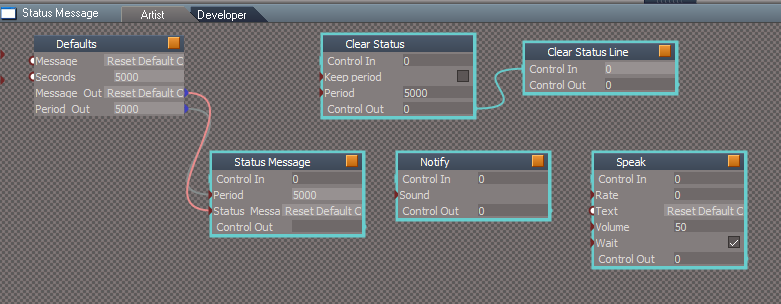
This issue is not just about Status Messages
It was very time consuming going through all of the scripts, CAREFULLY adding RsApp.ClearHistory() in places that did not affect transformations and or other things, so that a user could undo that if wanted. But necessary in areas within the scripts that changed Node.Value(s) and other Node commands. If a user pressed UnDo with some of these changes, it caused problems within the script itself and other areas as well.
For instance, the UnLookAt script got really messed up if you used UnDo a few times!
Could be a figment of my imagination, but it seems that these modifications make the scripts run faster and more efficient!
I am curious about your plugin code and whatever you are doing. Could the same thing be done from script without the plugin?
-
clintonman
- Captain
- Posts: 5659
- Joined: 21 May 2009, 21:08
- Type the number ten into the box: 0
- Location: California
Re: Final trueSpace7.61 Beta 8 Std Unofficial Update
There's plenty of places were it's better to clear the undo history than not. But if something can be undone that shouldn't be taken away.trueBlue wrote: 07 Feb 2021, 18:06
I have not tested it out yet
Clear Status not hooked up to Period Out.png
You have disconnected the Clear Status from the Default's Period Out, so pretty sure that would break previous scripts that use it
This issue is not just about Status Messages
It was very time consuming going through all of the scripts, CAREFULLY adding RsApp.ClearHistory() in places that did not affect transformations and or other things, so that a user could undo that if wanted. But necessary in areas within the scripts that changed Node.Value(s) and other Node commands. If a user pressed UnDo with some of these changes, it caused problems within the script itself and other areas as well.
For instance, the UnLookAt script got really messed up if you used UnDo a few times!
Could be a figment of my imagination, but it seems that these modifications make the scripts run faster and more efficient!
I am curious about your plugin code and whatever you are doing. Could the same thing be done from script without the plugin?
The plugin code is almost a direct translation of your status message scripts.
Scripts add to the undo. I did it in plugin to avoid losing undos via the clear history which happens at every status message display that uses your script code.
-
trueBlue
- Captain
- Posts: 5548
- Joined: 06 Jul 2009, 22:50
- Type the number ten into the box: 10
Re: Final trueSpace7.61 Beta 8 Std Unofficial Update
Okay, I tested this out in Rosetta and it seems that it will be backwards compatible without any changes
Need to test with Model
Nice!
Thank you!
Need to test with Model
Nice!
Thank you!
-
trueBlue
- Captain
- Posts: 5548
- Joined: 06 Jul 2009, 22:50
- Type the number ten into the box: 10
Re: Final trueSpace7.61 Beta 8 Std Unofficial Update
Can this be incorporated into YafaRaytS?
These are the commands being ran presently be just rendering something
If not, I am going to add RsApp.ClearHistory()
These are the commands being ran presently be just rendering something
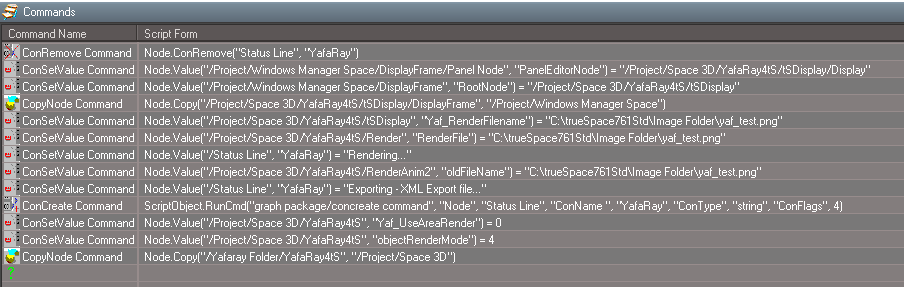
-
clintonman
- Captain
- Posts: 5659
- Joined: 21 May 2009, 21:08
- Type the number ten into the box: 0
- Location: California
Re: Final trueSpace7.61 Beta 8 Std Unofficial Update
That looks like a good candidate for the clear history to me.trueBlue wrote: 07 Feb 2021, 19:41 Can this be incorporated into YafaRaytS?
These are the commands being ran presently be just rendering something
YafaRay4tS.png
If not, I am going to add RsApp.ClearHistory()
-
clintonman
- Captain
- Posts: 5659
- Joined: 21 May 2009, 21:08
- Type the number ten into the box: 0
- Location: California
Re: Final trueSpace7.61 Beta 8 Std Unofficial Update

The centered widgets triangles can be a little hard to see. I plan to change the Highlighter nodes Far transparency value from 0.35 to 0.85.
-
trueBlue
- Captain
- Posts: 5548
- Joined: 06 Jul 2009, 22:50
- Type the number ten into the box: 10
Re: Final trueSpace7.61 Beta 8 Std Unofficial Update
That should be better
BTW...I guess there will be two ways to display status messages, I have not tried the new way yet
This still works from the C3DReset script
var thedate = new Date()
Node.Value("/Status Message", "Seconds") = 5000
Node.Value("/Status Message", "Message") = " Reset Default Context - Unofficial Update v7 - " + thedate
Activity.Run("/Status Message/Status Message")
BTW...I guess there will be two ways to display status messages, I have not tried the new way yet
This still works from the C3DReset script
var thedate = new Date()
Node.Value("/Status Message", "Seconds") = 5000
Node.Value("/Status Message", "Message") = " Reset Default Context - Unofficial Update v7 - " + thedate
Activity.Run("/Status Message/Status Message")
-
clintonman
- Captain
- Posts: 5659
- Joined: 21 May 2009, 21:08
- Type the number ten into the box: 0
- Location: California
Re: Final trueSpace7.61 Beta 8 Std Unofficial Update
Yes, there's the compatible way so nothing breaks and then there's the new direct command.
-
trueBlue
- Captain
- Posts: 5548
- Joined: 06 Jul 2009, 22:50
- Type the number ten into the box: 10
Re: Final trueSpace7.61 Beta 8 Std Unofficial Update
var util = System.CreateDO("Clintons3D Package/Utility functions");
util.SetStatusMessage("Some message here", 20000);
The above clears the Model text too!
Can you suggest what to do with checking for the plugin's state
If not Installed/Loaded
params.SetTerminationFlag()
util.SetStatusMessage("Some message here", 20000);
The above clears the Model text too!
Can you suggest what to do with checking for the plugin's state
If not Installed/Loaded
params.SetTerminationFlag()
-
trueBlue
- Captain
- Posts: 5548
- Joined: 06 Jul 2009, 22:50
- Type the number ten into the box: 10
Re: Final trueSpace7.61 Beta 8 Std Unofficial Update
Remember me asking you about Mouse button shortcuts?
The Left, Right, and Middle are not really feasible in a 3D View but works in FPN mode
The Left, Right, and Middle are not really feasible in a 3D View but works in FPN mode
Code: Select all
// LMB = 0x01
// RMB = 0x02
// MMB = 0x04
// X1  = 0x05
// X2  = 0x06
function Execute(params)
{
if(RsTool.GetAsyncKeyState(0x01)) {
Node.Value("/Status Line", "Model") = ""
return
}
if(RsTool.GetAsyncKeyState(0x05)) {
Node.Value("/Status Line", "Model") = "X1 Button was pressed"
return
}
if(RsTool.GetAsyncKeyState(0x06)) {
Node.Value("/Status Line", "Model") = "X2 Button was pressed"
return
}
if(RsTool.GetAsyncKeyState(0x04)) {
Node.Value("/Status Line", "Model") = "MMB was pressed"
return
}

}
-
clintonman
- Captain
- Posts: 5659
- Joined: 21 May 2009, 21:08
- Type the number ten into the box: 0
- Location: California
Re: Final trueSpace7.61 Beta 8 Std Unofficial Update
It clears Model status to make room for the workspace statustrueBlue wrote: 07 Feb 2021, 20:15 var util = System.CreateDO("Clintons3D Package/Utility functions");
util.SetStatusMessage("Some message here", 20000);
The above clears the Model text too!
Can you suggest what to do with checking for the plugin's state
If not Installed/Loaded
params.SetTerminationFlag()
You can use this to check for the plugin and also add the set termination before the return as needed
Code: Select all
if(typeof(Clintons3dPlugin) == "undefined") return;-
clintonman
- Captain
- Posts: 5659
- Joined: 21 May 2009, 21:08
- Type the number ten into the box: 0
- Location: California
Re: Final trueSpace7.61 Beta 8 Std Unofficial Update
How do you use this sample when you have to exit FPN to run it?trueBlue wrote: 07 Feb 2021, 20:46 Remember me asking you about Mouse button shortcuts?
The Left, Right, and Middle are not really feasible in a 3D View but works in FPN modeCode: Select all
// LMB = 0x01
// RMB = 0x02
// MMB = 0x04
// X1  = 0x05
// X2  = 0x06
function Execute(params)
{
if(RsTool.GetAsyncKeyState(0x01)) {
Node.Value("/Status Line", "Model") = ""
return
}
if(RsTool.GetAsyncKeyState(0x05)) {
Node.Value("/Status Line", "Model") = "X1 Button was pressed"
return
}
if(RsTool.GetAsyncKeyState(0x06)) {
Node.Value("/Status Line", "Model") = "X2 Button was pressed"
return
}
if(RsTool.GetAsyncKeyState(0x04)) {
Node.Value("/Status Line", "Model") = "MMB was pressed"
return
}

}
-
trueBlue
- Captain
- Posts: 5548
- Joined: 06 Jul 2009, 22:50
- Type the number ten into the box: 10
Re: Final trueSpace7.61 Beta 8 Std Unofficial Update
If you want to try it, add a Timer to the scriptclintonman wrote: 07 Feb 2021, 21:02How do you use this sample when you have to exit FPN to run it?trueBlue wrote: 07 Feb 2021, 20:46 Remember me asking you about Mouse button shortcuts?
The Left, Right, and Middle are not really feasible in a 3D View but works in FPN modeCode: Select all
// LMB = 0x01
// RMB = 0x02
// MMB = 0x04
// X1  = 0x05
// X2  = 0x06
function Execute(params)
{
if(RsTool.GetAsyncKeyState(0x01)) {
Node.Value("/Status Line", "Model") = ""
return
}
if(RsTool.GetAsyncKeyState(0x05)) {
Node.Value("/Status Line", "Model") = "X1 Button was pressed"
return
}
if(RsTool.GetAsyncKeyState(0x06)) {
Node.Value("/Status Line", "Model") = "X2 Button was pressed"
return
}
if(RsTool.GetAsyncKeyState(0x04)) {
Node.Value("/Status Line", "Model") = "MMB was pressed"
return
}

}
Run FPN
If you add the Mouse Listener which is not needed, you will see that all of the values will update when the Timer is running with or without the Mouse Button script
Also, when in FPN mode, none of the Workspace's shortcuts run, so you can have any variety of Keyboard and Mouse shortcuts you want without conflict
Warning! Running the Mouse Button script while not in FPN mode can cause conflicts! Like the Background widget's MB click on a selected object.
- Attachments
-

-
clintonman
- Captain
- Posts: 5659
- Joined: 21 May 2009, 21:08
- Type the number ten into the box: 0
- Location: California
Re: Final trueSpace7.61 Beta 8 Std Unofficial Update
Thanks, that did the trick, I see the MMB message.
I think I was asking for the opposite though. A way to send a mouse button via script. Don't remember why I wanted it.
I think I was asking for the opposite though. A way to send a mouse button via script. Don't remember why I wanted it.
-
trueBlue
- Captain
- Posts: 5548
- Joined: 06 Jul 2009, 22:50
- Type the number ten into the box: 10
Re: Final trueSpace7.61 Beta 8 Std Unofficial Update
Okay, tested with a Model view open and it works perfect!clintonman wrote: 07 Feb 2021, 21:01It clears Model status to make room for the workspace statustrueBlue wrote: 07 Feb 2021, 20:15 var util = System.CreateDO("Clintons3D Package/Utility functions");
util.SetStatusMessage("Some message here", 20000);
The above clears the Model text too!
Can you suggest what to do with checking for the plugin's state
If not Installed/Loaded
params.SetTerminationFlag()
You can use this to check for the plugin and also add the set termination before the return as neededCode: Select all
if(typeof(Clintons3dPlugin) == "undefined") return;
Also tested without the Clintons3dPlugin Loaded
This is what I am purposing for the Status Message script
Code: Select all
	var Period = params.ConValue('Period')
	var Status_Message = params.ConValue('Status_Message')
	if(typeof(Clintons3dPlugin) == "undefined") {
	System.Alert("Clintons3dPlugin is not Installed or Loaded");
	return;
	}
	var util = System.CreateDO("Clintons3D Package/Utility functions");
	util.SetStatusMessage(Status_Message, Period);
Code: Select all
	if(typeof(Clintons3dPlugin) == "undefined") {
	System.Alert("Clintons3dPlugin is not Installed or Loaded");
	return;
	}
	var util = System.CreateDO("Clintons3D Package/Utility functions");
	var clearModelStatus = false;
	util.ClearStatusMessage(clearModelStatus)
-
clintonman
- Captain
- Posts: 5659
- Joined: 21 May 2009, 21:08
- Type the number ten into the box: 0
- Location: California
Re: Final trueSpace7.61 Beta 8 Std Unofficial Update
Looks good to me.
-
trueBlue
- Captain
- Posts: 5548
- Joined: 06 Jul 2009, 22:50
- Type the number ten into the box: 10
Re: Final trueSpace7.61 Beta 8 Std Unofficial Update
Test Update 11 for trueSpace7.61 Beta 8 Std Unofficial Update
February 7, 2021
Recommend that you completely Uninstall and Install trueSpace7.61 Beta 8 Standalone to a clean directory before installing this update. If you applied the previous Test Update to a clean directory, you do not need to Uninstall trueSpace7.61 Beta 8 Standalone before applying this new update.
This is a Beta Pre Release for TESTING the below updates and the included previous updates
Unless there is any issues, planning on releasing the UUv7 in a few days
Updates
Widgets
Update
Default object navigation widgetONW4
Toolbars
Update RMB commands
Blue toolbox
Scene Animator FX / Preferences
Animation Panel
Animation Panel / Preferences
Status Message
Update Author - Clinton Reese
Yafaray Folder/YafaRay4tS/ClearStatus Immediate
Add
RsApp.ClearHistory()
Clintons3dPlugin.rsx
Update VERSION= v.1638427
Plugins.xml
February 7, 2021
Recommend that you completely Uninstall and Install trueSpace7.61 Beta 8 Standalone to a clean directory before installing this update. If you applied the previous Test Update to a clean directory, you do not need to Uninstall trueSpace7.61 Beta 8 Standalone before applying this new update.
This is a Beta Pre Release for TESTING the below updates and the included previous updates
Unless there is any issues, planning on releasing the UUv7 in a few days
Updates
Widgets
Update
Default object navigation widgetONW4
Toolbars
Update RMB commands
Blue toolbox
Scene Animator FX / Preferences
Animation Panel
Animation Panel / Preferences
Status Message
Update Author - Clinton Reese
Yafaray Folder/YafaRay4tS/ClearStatus Immediate
Add
RsApp.ClearHistory()
Clintons3dPlugin.rsx
Update VERSION= v.1638427
Plugins.xml
-
trueBlue
- Captain
- Posts: 5548
- Joined: 06 Jul 2009, 22:50
- Type the number ten into the box: 10
Re: Final trueSpace7.61 Beta 8 Std Unofficial Update
Do I have the triangles right?clintonman wrote: 07 Feb 2021, 19:58 CenteredWidgetTriangleTransparency.jpg
Far transparency value from 0.35 left and 0.85 right
The centered widgets triangles can be a little hard to see. I plan to change the Highlighter nodes Far transparency value from 0.35 to 0.85.
Seems pretty bright
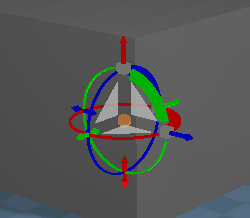
- Widget Triangles.png (8.4 KiB) Viewed 2629 times

- Highlighter.png (7.62 KiB) Viewed 2629 times
-
clintonman
- Captain
- Posts: 5659
- Joined: 21 May 2009, 21:08
- Type the number ten into the box: 0
- Location: California
Re: Final trueSpace7.61 Beta 8 Std Unofficial Update
Yep, that's it. Paint the box a lighter color and you'll see why it's needed.trueBlue wrote: 08 Feb 2021, 02:00Do I have the triangles right?clintonman wrote: 07 Feb 2021, 19:58 CenteredWidgetTriangleTransparency.jpg
Far transparency value from 0.35 left and 0.85 right
The centered widgets triangles can be a little hard to see. I plan to change the Highlighter nodes Far transparency value from 0.35 to 0.85.
Seems pretty bright
Widget Triangles.png
Highlighter.png