Final trueSpace7.61 Beta 8 Std Unofficial Update

User avatar
trueBlue
Captain
Posts: 5548
Joined: 06 Jul 2009, 22:50
Type the number ten into the box: 10

Re: Final trueSpace7.61 Beta 8 Std Unofficial Update

Post by trueBlue »

Yea I did that and I see why
Try changing the Far Color 206x206x206 and see if that might suit you better
Just for grins :mrgreen:
User avatar
trueBlue
Captain
Posts: 5548
Joined: 06 Jul 2009, 22:50
Type the number ten into the box: 10

Re: Final trueSpace7.61 Beta 8 Std Unofficial Update

Post by trueBlue »

Test Update 12 for trueSpace7.61 Beta 8 Std Unofficial Update

February 8, 2021

Recommend that you completely Uninstall and Install trueSpace7.61 Beta 8 Standalone to a clean directory before installing this update. If you applied the previous Test Update to a clean directory, you do not need to Uninstall trueSpace7.61 Beta 8 Standalone before applying this new update.
This is a Beta Pre Release for TESTING the below updates and the included previous updates

Unless there is any issues, planning on releasing the UUv7 today

Updates

Widgets

Object Centered Widget
Update
Sphere - Active Color 255,184,149
TriangleXY - Matrix - tz -0.090

Update
Cube widget
Left Perspective/Ortho - Constant Color 0,55,0
Before
Before.png
Before.png (6.54 KiB) Viewed 3038 times
After
After.png
After.png (6.39 KiB) Viewed 3038 times
User avatar
trueBlue
Captain
Posts: 5548
Joined: 06 Jul 2009, 22:50
Type the number ten into the box: 10

Re: Final trueSpace7.61 Beta 8 Std Unofficial Update

Post by trueBlue »

Test Update 14 for trueSpace7.61 Beta 8 Std Unofficial Update

February 10, 2021

Recommend that you completely Uninstall and Install trueSpace7.61 Beta 8 Standalone to a clean directory before installing this update. If you applied the previous Test Update to a clean directory, you do not need to Uninstall trueSpace7.61 Beta 8 Standalone before applying this new update.
This is a Beta Pre Release for TESTING the below updates and the included previous updates

Updates

Background Image Camera
Background Image Camera.png
Background Image Camera.png (8.99 KiB) Viewed 3021 times
Widgets
Update
Cube widget

Rectangle Zoom - Edge Color 255,55,55
Rectangle Select - Edge Color 255,128,0

Background/Look at selection/getSelType
Fixed Error
Zoom 2 Selection ERROR.png
Zoom 2 Selection ERROR.png (11.18 KiB) Viewed 3021 times
Add

Code: Select all

var sel = Node.Selection()
if(!sel) {
params.SetTerminationFlag()
return;
}
if(!Node.ConExists(sel,"WldMatrix")) {
params.SetTerminationFlag()
return;
}
User avatar
trueBlue
Captain
Posts: 5548
Joined: 06 Jul 2009, 22:50
Type the number ten into the box: 10

Re: Final trueSpace7.61 Beta 8 Std Unofficial Update

Post by trueBlue »

@ Clinton
Here is an updated Background Image Camera
Update
Sequence script
OpenWindow script

Wish it had some restrictions in with which it only loaded supported images, but it seems to be okay (no crash or errors) when you load a recipe for roasted potatoes :mrgreen:
User avatar
clintonman
Captain
Posts: 5659
Joined: 21 May 2009, 21:08
Type the number ten into the box: 0
Location: California

Re: Final trueSpace7.61 Beta 8 Std Unofficial Update

Post by clintonman »

So what's new?
Clinton Reese

http://clintons3d.com
User avatar
trueBlue
Captain
Posts: 5548
Joined: 06 Jul 2009, 22:50
Type the number ten into the box: 10

Re: Final trueSpace7.61 Beta 8 Std Unofficial Update

Post by trueBlue »

Besides what I already mentioned, this version does not have the Loaded image refresh issue
Updates the Image Size values used for opening a Camera Window
Attachments
Screenshot 2021-02-11 202659.png
User avatar
clintonman
Captain
Posts: 5659
Joined: 21 May 2009, 21:08
Type the number ten into the box: 0
Location: California

Re: Final trueSpace7.61 Beta 8 Std Unofficial Update

Post by clintonman »

BGImageCam_800x178_NotFit.jpg
This image is 800 x 178 and the projection plane does not fit the camera view. The plane should have the same aspect ratio to fit the view.
ItFits.jpg
Here the node Exp aspect has been exposed and the X Size and Y Size have been changed from 640, 480 to 800, 178
Clinton Reese

http://clintons3d.com
User avatar
trueBlue
Captain
Posts: 5548
Joined: 06 Jul 2009, 22:50
Type the number ten into the box: 10

Re: Final trueSpace7.61 Beta 8 Std Unofficial Update

Post by trueBlue »

I see but I am not sure how to fix it
I could use your help with that
Also the math in the OpenWindow script for min/max restrictions on the X_Resolutions/Y_Resolutions
There is also an issue when loading image files with numbers at the end of the names
Workaround is you have to scrub the Frames
User avatar
trueBlue
Captain
Posts: 5548
Joined: 06 Jul 2009, 22:50
Type the number ten into the box: 10

Re: Final trueSpace7.61 Beta 8 Std Unofficial Update

Post by trueBlue »

Okay, I think I have it the way you want
Hooked up X_Resolution to X_Size & Y_Resolution to Y_Size
Background Image Camera.png
User avatar
clintonman
Captain
Posts: 5659
Joined: 21 May 2009, 21:08
Type the number ten into the box: 0
Location: California

Re: Final trueSpace7.61 Beta 8 Std Unofficial Update

Post by clintonman »

trueBlue wrote: 12 Feb 2021, 16:38 Okay, I think I have it the way you want
...
and that's the important thing! :lol:

Looks like you solved it. :bananathumb:
Clinton Reese

http://clintons3d.com
User avatar
clintonman
Captain
Posts: 5659
Joined: 21 May 2009, 21:08
Type the number ten into the box: 0
Location: California

Re: Final trueSpace7.61 Beta 8 Std Unofficial Update

Post by clintonman »

trueBlue wrote: 12 Feb 2021, 05:27 ...
There is also an issue when loading image files with numbers at the end of the names
Workaround is you have to scrub the Frames
If the sequence starts with 0 instead of 1 it's not an issue. Frame determines which image to display. If Frame is 0 but the first image ends in 1 it's not going to display.
You can change the default Frame value to 1, but like before if the sequence starts at 10 or 100 then it won't show until the Frame matches that value.
Clinton Reese

http://clintons3d.com
User avatar
clintonman
Captain
Posts: 5659
Joined: 21 May 2009, 21:08
Type the number ten into the box: 0
Location: California

Re: Final trueSpace7.61 Beta 8 Std Unofficial Update

Post by clintonman »

AnimPanelQuestion.jpg
AnimPanelQuestion.jpg (22.79 KiB) Viewed 3198 times
Is this how the animation panel is supposed to look?
Are all those buttons the same in the 2 rows except for "A" and "SP" buttons?

It looks like a recent change since I have an earlier screenshot with the "SP" button all alone on the bottom right.
Clinton Reese

http://clintons3d.com
User avatar
trueBlue
Captain
Posts: 5548
Joined: 06 Jul 2009, 22:50
Type the number ten into the box: 10

Re: Final trueSpace7.61 Beta 8 Std Unofficial Update

Post by trueBlue »

clintonman wrote: 13 Feb 2021, 21:55 AnimPanelQuestion.jpg
Is this how the animation panel is supposed to look?
Are all those buttons the same in the 2 rows except for "A" and "SP" buttons?

It looks like a recent change since I have an earlier screenshot with the "SP" button all alone on the bottom right.
That is the Animation panel for tS761 "Full version"
The top rows are for Workspace
The bottom rows are for Model

The Animation panel for tS761 "Standalone" is not suppose to have the bottom rows
Looks like it snuck back in and I need to fix that because it throws errors!
Try this one for tS761 "Standalone
It is missing the SP button, but I will add that on the next release
SP = Sequence Player
viewtopic.php?p=13777#p13777
User avatar
clintonman
Captain
Posts: 5659
Joined: 21 May 2009, 21:08
Type the number ten into the box: 0
Location: California

Re: Final trueSpace7.61 Beta 8 Std Unofficial Update

Post by clintonman »

Thanks, maybe it should be labeled so it's clear that one is for model and one is for workspace.
Clinton Reese

http://clintons3d.com
User avatar
trueBlue
Captain
Posts: 5548
Joined: 06 Jul 2009, 22:50
Type the number ten into the box: 10

Re: Final trueSpace7.61 Beta 8 Std Unofficial Update

Post by trueBlue »

Test Update 15 for trueSpace7.61 Beta 8 Std Unofficial Update

February 14, 2021

Recommend that you completely Uninstall and Install trueSpace7.61 Beta 8 Standalone to a clean directory before installing this update. If you applied the previous Test Update to a clean directory, you do not need to Uninstall trueSpace7.61 Beta 8 Standalone before applying this new update.
This is a Beta Pre Release for TESTING the below updates and the included previous updates

Updates

Libraries
Background Image Camera

First Person Navigator

Toolbars
WorkspaceMainMenu/File/Save As/Recording

Red toolbox/Background Image Camera

Bluetoolbox/Eye Camera
Eye2Cam.xml

Widgets
Fix Bad Geometry

Scripts
trueBevel

SnappingScripts

Optimize Workspace Scene/Run
User avatar
trueBlue
Captain
Posts: 5548
Joined: 06 Jul 2009, 22:50
Type the number ten into the box: 10

Re: Final trueSpace7.61 Beta 8 Std Unofficial Update

Post by trueBlue »

Test Update 16 for trueSpace7.61 Beta 8 Std Unofficial Update

February 16, 2021

Recommend that you completely Uninstall and Install trueSpace7.61 Beta 8 Standalone to a clean directory before installing this update. If you applied the previous Test Update to a clean directory, you do not need to Uninstall trueSpace7.61 Beta 8 Standalone before applying this new update.
This is a Beta Pre Release for TESTING the below updates and the included previous updates

Updates
Several scripts that open a floating panel use Clinton's 3D Plugin
Screenshot (16).png
Preferences
Add
Record Undo.RsObj Author - Clinton Reese
Record Undo panel.png
Record Undo panel.png (3.4 KiB) Viewed 3173 times
Use
Open the Record Undo panel
1) Press the Start button
2) Do something in 3D Space that you might want to Undo
3) Press the Stop button after you are finished with step 2 to stop the recording!
Undo button will restore the scene back to the point you started the recording
Cancel button Stops and Clears the recording

Toolbars
Main2/Record Toolbar
Add
Record Undo icon
Main2 Record Undo.png
User avatar
trueBlue
Captain
Posts: 5548
Joined: 06 Jul 2009, 22:50
Type the number ten into the box: 10

Re: Final trueSpace7.61 Beta 8 Std Unofficial Update

Post by trueBlue »

@Clinton
Wanting to update a few things in Workspace Layers
I have been debugging the menu Combo Controls using the Command History
Try it first and see all of the activity when using the menu and use the Undo button a few times... :o
Then add

Code: Select all

RsApp.ClearHistory()
to the reconnectwatchdog script
Could be me but the performance seems to be improved too!
Also eliminates problems if a user were to use the Undo button!!!

Additionally, I want to update the Workspace Layers RMB command so that can be used to open the panel in the Stack/Panels

Code: Select all

if(Node.Exists(Space.CurrentScene() + "/workspacelayers3") 
&& !Node.Exists(Space.CurrentScene() + "/workspacelayers3/Pause Activity") 
|| Node.ConExists(Space.CurrentScene() + "/workspacelayers3", "DeepVisibility")) {
System.Alert("A newer version of Workspace Layers is available!");
UserInterface.OpenToolPanelViewEx2("" , "" , "Scripts/CustomCommands/wsLayersGroup", 3, 0, 0);
}else{
UserInterface.OpenToolPanelViewEx2("" , "" ,Space.CurrentScene() + "/workspacelayers3", 3,0,0);
}
And... the Default Empty Color = 131,125,125
Workspace Layers panel.png
User avatar
trueBlue
Captain
Posts: 5548
Joined: 06 Jul 2009, 22:50
Type the number ten into the box: 10

Re: Final trueSpace7.61 Beta 8 Std Unofficial Update

Post by trueBlue »

@Clinton
Steps
Delete the Workspace Layers that has been setup from the scene & add another one.
Do you notice the last used menu is blank?
Refresh blank combo control.png
Refresh blank combo control.png (10.63 KiB) Viewed 3134 times
Not sure of any unknown but if I add the following 2 lines to the refreshlayers script, it seems to correct this issue.
Add

Code: Select all

//Line 136
if(disp_mode[i]==-1) myenum.SetStringAt(0,"menu");
myenum.SetSelectedString("menu");
EDIT: Now the menu H L and menu L are blank

I am experimenting with Workspace Layers help file using HTML code in a HTML View Control
Workspace Layers help floating panel.png
Does this information seem correct to you?
Refresh
Updates the Settings panel and randomizes the empty layer colors,
if Use - Empty Layer Color is unchecked

No layer count
Number of renderable objects that do not belong to any layer
This count includes child nodes of objects that are assigned to a layer

Color controls are for setting the Wireframe color of a layer

Layer fields are for entering layer names

menu combo controls are for setting menu options

Number fields is the number of objects in the layer

Menu options:
Select Selects all the objects in the layer
Add to layer Add selected objects to the layer
Empty Remove objects from the layer
Cameras and lights will move to layer1

*Visible All objects are Visible
Visible All objects are Invisible
*Locked All objects are Locked
Locked All objects are Unlocked
menu H L Hidden and Locked
menu H Hidden
menu L Locked

Layer display modes:
*Global Disables - Enable Object Mode
Global Enables - Enable Object Mode
*Solid Solid color
*Solid Wire Solid wire
*Transp Transparent color
*Transp Wire Transparent Wireframe
*Wireframe Wireframe

Backfaces Show Back faces in Transparent and Transparent Wireframe mode
Hidden Lines Show Hidden lines in Transparent and Transparent Wireframe mode


Initialize Layers
Resets layer names and randomizes all layer colors

Select Control Point Mesh Use for selecting NURBS from the menu
Protect Curve Color Use for protecting NURBS Curve Color
Use - Empty Layer Color Disables random colors for Empty Layers
Color Empty Layers color / Reset default color
? Opens Help / Toggles showing the Settings panel automatically
User avatar
clintonman
Captain
Posts: 5659
Joined: 21 May 2009, 21:08
Type the number ten into the box: 0
Location: California

Re: Final trueSpace7.61 Beta 8 Std Unofficial Update

Post by clintonman »

trueBlue wrote: 19 Feb 2021, 20:03 @Clinton
Steps
Delete the Workspace Layers that has been setup from the scene & add another one.
Do you notice the last used menu is blank?
...
Nope, I don't see that at all. Tried with my web page version on older rosetta UU and on the latest full UU. Don't see any blanks as shown.
Maybe you're missing some steps. When you delete and load a fresh layers it doesn't have names like "Cubes", it has names like "layer7"
Clinton Reese

http://clintons3d.com
User avatar
trueBlue
Captain
Posts: 5548
Joined: 06 Jul 2009, 22:50
Type the number ten into the box: 10

Re: Final trueSpace7.61 Beta 8 Std Unofficial Update

Post by trueBlue »

clintonman wrote: 20 Feb 2021, 01:11
trueBlue wrote: 19 Feb 2021, 20:03 @Clinton
Steps
Delete the Workspace Layers that has been setup from the scene & add another one.
Do you notice the last used menu is blank?
...
Nope, I don't see that at all. Tried with my web page version on older rosetta UU and on the latest full UU. Don't see any blanks as shown.
Maybe you're missing some steps. When you delete and load a fresh layers it doesn't have names like "Cubes", it has names like "layer7"
Is happening for me.
Try saving the scene with Workspace Layers, Load a new scene, and then Load the saved scene
Do not press the Initialize button
User avatar
clintonman
Captain
Posts: 5659
Joined: 21 May 2009, 21:08
Type the number ten into the box: 0
Location: California

Re: Final trueSpace7.61 Beta 8 Std Unofficial Update

Post by clintonman »

trueBlue wrote: 20 Feb 2021, 01:16
clintonman wrote: 20 Feb 2021, 01:11
trueBlue wrote: 19 Feb 2021, 20:03 @Clinton
Steps
Delete the Workspace Layers that has been setup from the scene & add another one.
Do you notice the last used menu is blank?
...
Nope, I don't see that at all. Tried with my web page version on older rosetta UU and on the latest full UU. Don't see any blanks as shown.
Maybe you're missing some steps. When you delete and load a fresh layers it doesn't have names like "Cubes", it has names like "layer7"
Is happening for me.
Try saving the scene with Workspace Layers, Load a new scene, and then Load the saved scene
Do not press the Initialize button
Nope, still nothing.
Clinton Reese

http://clintons3d.com
User avatar
trueBlue
Captain
Posts: 5548
Joined: 06 Jul 2009, 22:50
Type the number ten into the box: 10

Re: Final trueSpace7.61 Beta 8 Std Unofficial Update

Post by trueBlue »

The only way I can get it to work is Copy the refreshlayers script and add the two lines mentioned previously
refreshlayers2 script
Add
//Line 136
if(disp_mode==-1) myenum.SetStringAt(0,"menu");
myenum.SetSelectedString("menu");
Fix.png
Here is a scene from the current Standalone Beta UU.7 with the Workspace Layers' blank menus
Maybe your are testing this different then I am
Note the 3 Torus are in the No layer count
Selecting Refresh does not update the blank menus

Also, if you Export the Control In on the refreshlayers script
refreshlayersExportControl In.png
refreshlayersExportControl In.png (16.88 KiB) Viewed 2960 times
And LMB select the titlebar on the workspacelayers3 script, Select Run automatically
workspacelayers3RunAutomatically.png
workspacelayers3RunAutomatically.png (5.97 KiB) Viewed 2960 times
This will run the refreshlayers script when the scene loads
User avatar
clintonman
Captain
Posts: 5659
Joined: 21 May 2009, 21:08
Type the number ten into the box: 0
Location: California

Re: Final trueSpace7.61 Beta 8 Std Unofficial Update

Post by clintonman »

Maybe this will fix it for you.
My guess is that the error may come from middle mouse scrolling in the dropdown or typing while in the dropdown resulting in invalid values.

refreshlayers line 74

Code: Select all

//catch invalid values from mouse scroll wheel
myenum.SetStringAt(0,"menu");
myenum.SetSelectedString("menu");
line 88 add SetSelectedString - this one just looks like a straight up bug

Code: Select all

myenum.SetSelectedString("menu");
Attachments
workspacelayers3.RsObj
(286.77 KiB) Downloaded 178 times
Clinton Reese

http://clintons3d.com
User avatar
trueBlue
Captain
Posts: 5548
Joined: 06 Jul 2009, 22:50
Type the number ten into the box: 10

Re: Final trueSpace7.61 Beta 8 Std Unofficial Update

Post by trueBlue »

That seems to fix the blank menus :D
What is layer0 for?
The way you have it setup when you first Load > Workspace Layers into your scene, all the objects go into layer1
If you add additional objects and press Refresh, these objects go into layer1
I would suggest that the Refresh script put these objects in layer0
Normally I set up layer1 with the Lights
So when I press Refresh these additional objects get loaded with my Lights
Workaround, I have to select these objects, add them to another layer, and then Empty that layer
If you implemented my suggestion, it would be easier to select these objects using layer0's Select menu, and then add them to another layer
Your probably, going to ask, "Why not add them to a layer first", which makes total sense
Or not use layer1
But this issue is about the Refresh script
I dunno, it seems to me that layer0 and No layer count is a perfect match
User avatar
clintonman
Captain
Posts: 5659
Joined: 21 May 2009, 21:08
Type the number ten into the box: 0
Location: California

Re: Final trueSpace7.61 Beta 8 Std Unofficial Update

Post by clintonman »

trueBlue wrote: 20 Feb 2021, 19:42 That seems to fix the blank menus :D
What is layer0 for?
The way you have it setup when you first Load > Workspace Layers into your scene, all the objects go into layer1
If you add additional objects and press Refresh, these objects go into layer1
I would suggest that the Refresh script put these objects in layer0
Normally I set up layer1 with the Lights
So when I press Refresh these additional objects get loaded with my Lights
Workaround, I have to select these objects, add them to another layer, and then Empty that layer
If you implemented my suggestion, it would be easier to select these objects using layer0's Select menu, and then add them to another layer
Your probably, going to ask, "Why not add them to a layer first", which makes total sense
Or not use layer1
But this issue is about the Refresh script
I dunno, it seems to me that layer0 and No layer count is a perfect match
layer0 is the same as any other layer (layer1 layer2 layer3...) it's all the same.
When you create a new scene, look at the object render attributes advanced tab for the lights or camera, they all say layer1
Add a primitive object - same thing, it says layer1.
I'm not going to fight the trueSpace default
If you want everything in layer0 then change the object defaults to layer0 for all the objects or however you want them divided by default into the different layers.

Couple of notes: for modelspace scenes lights are created in layer 1 as far as workspace is concerned. Objects are created in the active layer. Workspace layers does not have a corresponding active layer.
In modelspace If you change a light to layer 0, workspace still sees it as layer 1
Clinton Reese

http://clintons3d.com
User avatar
trueBlue
Captain
Posts: 5548
Joined: 06 Jul 2009, 22:50
Type the number ten into the box: 10

Re: Final trueSpace7.61 Beta 8 Std Unofficial Update

Post by trueBlue »

I see, I did not know about the Layer index
User avatar
trueBlue
Captain
Posts: 5548
Joined: 06 Jul 2009, 22:50
Type the number ten into the box: 10

Re: Final trueSpace7.61 Beta 8 Std Unofficial Update

Post by trueBlue »

Test Update 17 for trueSpace7.61 Beta 8 Std Unofficial Update

February 20, 2021

Recommend that you completely Uninstall and Install trueSpace7.61 Beta 8 Standalone to a clean directory before installing this update. If you applied the previous Test Update to a clean directory, you do not need to Uninstall trueSpace7.61 Beta 8 Standalone before applying this new update.
This is a Beta Pre Release for TESTING the below updates and the included previous updates

Updates

Workspace Layers 3
Update
Run automatically -> refreshlayers
Changed - Empty Color = 131,125,125
Add
HTML help floating panel


refreshlayers
Add
line 74

Code: Select all

//catch invalid values from mouse scroll wheel
myenum.SetStringAt(0,"menu");
myenum.SetSelectedString("menu");
Exported the Control In to enable "Run automatically"

reconnectwatchdog
Add
RsApp.ClearHistory()

replaceIt/.../open panel script
Update

Code: Select all

//System.Alert("Press the Refresh button to finish the replacement")
Activity.Run(scene + "/workspacelayers3/refreshlayers")
Workspace Layers icon
Update
RMB command

Code: Select all

if(Node.Exists(Space.CurrentScene() + "/workspacelayers3") 
&& !Node.Exists(Space.CurrentScene() + "/workspacelayers3/Pause Activity") 
|| Node.ConExists(Space.CurrentScene() + "/workspacelayers3", "DeepVisibility")) {
System.Alert("A newer version of Workspace Layers is available!");
UserInterface.OpenToolPanelViewEx2("" , "" , "Scripts/CustomCommands/wsLayersGroup", 3, 0, 0);
}else{
UserInterface.OpenToolPanelViewEx2("" , "" ,Space.CurrentScene() + "/workspacelayers3", 3,0,0);
}
User avatar
trueBlue
Captain
Posts: 5548
Joined: 06 Jul 2009, 22:50
Type the number ten into the box: 10

Re: Final trueSpace7.61 Beta 8 Std Unofficial Update

Post by trueBlue »

Test Update 19 for trueSpace7.61 Beta 8 Std Unofficial Update

February 23, 2021

Recommend that you completely Uninstall and Install trueSpace7.61 Beta 8 Standalone to a clean directory before installing this update. If you applied the previous Test Update to a clean directory, you do not need to Uninstall trueSpace7.61 Beta 8 Standalone before applying this new update.
This is a Beta Pre Release for TESTING the below updates and the included previous updates

Updates

Materials - DX9 & Shaders - Alpha Shaders libraries
Update
All UU materials that have an Alpha shader
InputBitmap - Input usage attribute = ALPHAMAP
Disabled Compression
Add
2D Checker Author - Clinton Reese
2D Dots Author - Clinton Reese

Toolbars
Update
trueBevel icon(s)

Code: Select all

LMB command = ScriptObject.Execute("Scripts/Commands/DeSelectNURBS");UserInterface.OpenToolPanelViewEx2("" , "" ,"Scripts/CustomCommands/trueBevel", 4,1,0)
planeLoopSelect
Update
Fixed Restore PE selection mode in cases where the tool was exited prematurely
Add Status help Message if selection is not correct "Select a single Edge or 2 neighboring Vertices"

trueBevel
Update
Fixed Restore PE selection mode in cases where the tool was used with nothing selected
Add Status help Message "Nothing selected..."

NormalMove
Changed from a Model Status Message to Clinton's plugin SetStatusMessage
var util = System.CreateDO("Clintons3D Package/Utility functions");
util.SetStatusMessage("LB drag left or right to move points along Normals... Right click to end tool", 10000);

staticSweepPlusScript
Add Status help Message at the end of the script
Changed from a Model Status Message to Clinton's plugin SetStatusMessage
var util = System.CreateDO("Clintons3D Package/Utility functions");
util.SetStatusMessage("Use the Point Edit widget to move the new swept geometry", 8000);

Mesh Editor Settings/Reset SDS
Add
Remove SDS button
Reset SDS panel.png
Reset SDS panel.png (4.07 KiB) Viewed 2959 times
User avatar
clintonman
Captain
Posts: 5659
Joined: 21 May 2009, 21:08
Type the number ten into the box: 0
Location: California

Re: Final trueSpace7.61 Beta 8 Std Unofficial Update

Post by clintonman »

I would like to make a change to the "Flatten selected UV vertices"

If a mesh is made up of only triangles trueSpace crashes when you try to flatten the UVs.

I would like it to call a script that checks for a triangulated mesh before running the command.
Attachments
UVFlattenf0c2.RsObj
(5.39 KiB) Downloaded 171 times
Clinton Reese

http://clintons3d.com
User avatar
trueBlue
Captain
Posts: 5548
Joined: 06 Jul 2009, 22:50
Type the number ten into the box: 10

Re: Final trueSpace7.61 Beta 8 Std Unofficial Update

Post by trueBlue »

clintonman wrote: 25 Feb 2021, 02:49 I would like to make a change to the "Flatten selected UV vertices"

If a mesh is made up of only triangles trueSpace crashes when you try to flatten the UVs.

I would like it to call a script that checks for a triangulated mesh before running the command.
Added
FlattenVertices.xml
Toolbars/UVEditor/Flatten vertices
LMB = Activity.Run('/Scripts/Commands/FlattenVertices');
User avatar
trueBlue
Captain
Posts: 5548
Joined: 06 Jul 2009, 22:50
Type the number ten into the box: 10

Re: Final trueSpace7.61 Beta 8 Std Unofficial Update

Post by trueBlue »

Test Update 20 for trueSpace7.61 Beta 8 Std Unofficial Update

February 25, 2021

Recommend that you completely Uninstall and Install trueSpace7.61 Beta 8 Standalone to a clean directory before installing this update. If you applied the previous Test Update to a clean directory, you do not need to Uninstall trueSpace7.61 Beta 8 Standalone before applying this new update.
This is a Beta Pre Release for TESTING the below updates and the included previous updates

Updates

Widgets

View Widget
Perspective
Top right Triangle
LB click - Cycle Views
Note: Same gesture. Added all Views
Changed the cycle order so the it cycles clockwise then Top & Bottom

Ortho
Encircle 'Green'
Add
I + Move cursor - Open Help

Top right Triangle
LB click - Cycle Views
Note: Same gesture. Added all Views
Changed the cycle order so the it cycles clockwise then Top & Bottom

Toolbars
UVEditor/FlattenVertices

WorkspaceMain & WorkspaceMain2/Flatten History
RMB = Flatten History + UV Projections & UV Selection

CycleViews.xml
FlattenVertices.xml Author - Clinton Reese

C3DReset.RsObj & reset.js
Load MaterialEditor.RsObj and Reset Active Editor
Note: This fixes a bug in the Material Editor that does not include the Vray Material Editor in the Active Editor combo control when you Reset to Default Context
Also removes it if the Vray plugin is not Loaded when you Reset to Default Context
User avatar
trueBlue
Captain
Posts: 5548
Joined: 06 Jul 2009, 22:50
Type the number ten into the box: 10

Re: Final trueSpace7.61 Beta 8 Std Unofficial Update

Post by trueBlue »

Test Update 21 for trueSpace7.61 Beta 8 Std Unofficial Update

February 27, 2021

Recommend that you completely Uninstall and Install trueSpace7.61 Beta 8 Standalone to a clean directory before installing this update. If you applied the previous Test Update to a clean directory, you do not need to Uninstall trueSpace7.61 Beta 8 Standalone before applying this new update.
This is a Beta Pre Release for TESTING the below updates and the included previous updates

Updates

Widgets

Object Navigation Widget(s)
Enter edit mode
Add
Uneditable script
Note: If a selected object has an Uneditable connector it will not enter into Point Edit mode
Uneditable string.png
Uneditable string.png (9.92 KiB) Viewed 2984 times
There is a Create Uneditable Object script in the Objects - tS7.61 Update objects library that will Create/Remove the Uneditable connector for selected objects
Workspace NURBS/Curves, Lights, Cameras, and None Renderable objects are filtered out of the selection

Camera & Camera1
Updated
FOV
LB - View from Camera
Note: Now works with any 3D View that has focus

Toolbars
CustomToolbarBlue/Eye Camera icon's
Eye Camera toolbar.png
Eye Camera toolbar.png (19.33 KiB) Viewed 2984 times
LB - Eye Camera 'If viewing from a scene camera, this switches to the last used Eye Camera view'
RB - Preferences ' Shows the current Eye Camera panel in the Stack/Panel'
Add EyeCam.xml & EyeCamPref.xml
Note: Now works with any 3D View that has focus

Primitives
Update
Tube UI
Tube.png
Tube.png (6.29 KiB) Viewed 2984 times
Windows.Shortcuts.xml
Update
Ctrl + F1 = Open 3D Window
Ctrl + F2 = Open Link Editor
Note: Now works with any scene
The original only worked with a scene named Space 3D

YafaRay4tS
Update
SaveSettings script
Add

Code: Select all

if(typeof(Clintons3dPlugin) == "undefined") {
System.Alert("Clintons3dPlugin is not Installed or Loaded");
return;
}
User avatar
trueBlue
Captain
Posts: 5548
Joined: 06 Jul 2009, 22:50
Type the number ten into the box: 10

Re: Final trueSpace7.61 Beta 8 Std Unofficial Update

Post by trueBlue »

Test Update 22 for trueSpace7.61 Beta 8 Std Unofficial Update

March 02, 2021

Recommend that you completely Uninstall and Install trueSpace7.61 Beta 8 Standalone to a clean directory before installing this update. If you applied the previous Test Update to a clean directory, you do not need to Uninstall trueSpace7.61 Beta 8 Standalone before applying this new update.
This is a Beta Pre Release for TESTING the below updates and the included previous updates

Updates

CustomCommands
NormalsScripts Author - Clinton Reese
Update
Separated the Normals Selection & Quadrify UI
Each have their own Angle Tolerance

Normals Selection
Normals Selection.png
Normals Selection.png (36.24 KiB) Viewed 2973 times
Update
Status Message(s)
utilityFunctions.SetStatusMessage("Normals selection complete", 2000);
utilityFunctions.SetStatusMessage("Normals select connected complete", 2000)

Quadrify
Quadrify.png
Quadrify.png (34.81 KiB) Viewed 2973 times
Update
Status Message(s)
utilityFunctions.SetStatusMessage("Quadrify process complete", 2000);
utilityFunctions.SetStatusMessage("Quadrify by Normals processing " + percent.toFixed(2) + " %", 0);
User avatar
trueBlue
Captain
Posts: 5548
Joined: 06 Jul 2009, 22:50
Type the number ten into the box: 10

Re: Final trueSpace7.61 Beta 8 Std Unofficial Update

Post by trueBlue »

Test Update 23 for trueSpace7.61 Beta 8 Std Unofficial Update

March 04, 2021

Recommend that you completely Uninstall and Install trueSpace7.61 Beta 8 Standalone to a clean directory before installing this update. If you applied the previous Test Update to a clean directory, you do not need to Uninstall trueSpace7.61 Beta 8 Standalone before applying this new update.
This is a Beta Pre Release for TESTING the below updates and the included previous updates

Updates

Widgets

Point Edit widget(s)
Update
On Operating Visibility On|Off
Add On/Off scripts to each widget
Ctrl + RB click the Sphere to open the preferences panel
Select the On or Off button
Default is On

Default Object Navigation widget(s)
Update
Object Navigation Widgets preferences panel.png
Object Navigation Widgets preferences panel.png (5.47 KiB) Viewed 2950 times
On Operating Visibility On|Off
Add On/Off scripts to each widget
Ctrl + RB click the Sphere to open the preferences panel
Select the On or Off button
Default is On

Update Highlight color = Yellow

PickSelect
Update to newest version Author - Clinton Reese

NURBSScripts
Update Create NURBS circle(s) status messages Author - Clinton Reese

circleCurveScript
startCircle = Select one or more elements to define the Center point of the circle
getCenterLocation = Select one or more elements to define a Second point on the circle's circumference
getStartLocation = Select a Face to define the circle's orientation


circleTwoPointsScript
startCircle = Select one or more elements to define the First point on the circle
getPoint1Location = Select one or more elements to define a Second point on the circle's circumference
getPoint2Location = Select a Face to define the circle's orientation


circleThreePointsScript
startCircle = Select one or more elements to define the First point on the circle
getPoint1Location = Select one or more elements to define a Second point on the circle's circumference
getPoint2Location = Select one or more elements to define a Third point on the circle's circumference
User avatar
trueBlue
Captain
Posts: 5548
Joined: 06 Jul 2009, 22:50
Type the number ten into the box: 10

Re: Final trueSpace7.61 Beta 8 Std Unofficial Update

Post by trueBlue »

Test Update 24 for trueSpace7.61 Beta 8 Std Unofficial Update

March 08, 2021

Recommend that you completely Uninstall and Install trueSpace7.61 Beta 8 Standalone to a clean directory before installing this update. If you applied the previous Test Update to a clean directory, you do not need to Uninstall trueSpace7.61 Beta 8 Standalone before applying this new update.
This is a Beta Pre Release for TESTING the below updates and the included previous updates

Updates

Toolbars
NewViewBar
Update
Move, Rotate, Scale, Move Camera, Rotate Camera, and Camera FOV icons
RMB = Close

New View
Update
Frame Window New View.RsObj
Docks to the top/left main window
New WinID

Preferences
Cameras
Camera Window.png
Update
Camera Window script
Add
NewViewBar aspect toolbar to the Camera Window frame
Note: Script opens a 3D Window using the Width & Height values and closes the WorkspaceNav toolbar
User avatar
clintonman
Captain
Posts: 5659
Joined: 21 May 2009, 21:08
Type the number ten into the box: 0
Location: California

Re: Final trueSpace7.61 Beta 8 Std Unofficial Update

Post by clintonman »

FixBadGeometry_panel.jpg
FixBadGeometry_panel.jpg (39.79 KiB) Viewed 2886 times
FixBadGeometry_separationPlans.jpg
FixBadGeometry_separationPlans.jpg (42.78 KiB) Viewed 2886 times
I think the Fix Bad Geometry panel needs a makeover. All the controls are too close together and it looks like the Random Threshold slider goes with the Random Point Weight checkbox. At least it needs some breathing room around the indicated separations.
Clinton Reese

http://clintons3d.com
User avatar
trueBlue
Captain
Posts: 5548
Joined: 06 Jul 2009, 22:50
Type the number ten into the box: 10

Re: Final trueSpace7.61 Beta 8 Std Unofficial Update

Post by trueBlue »

Fooling around
Does this make sense?
Fix Bad Geometry panel.png
Fix Bad Geometry panel.png (15.35 KiB) Viewed 2885 times
Floating Points button
Does this select or delete Floating Points
User avatar
clintonman
Captain
Posts: 5659
Joined: 21 May 2009, 21:08
Type the number ten into the box: 0
Location: California

Re: Final trueSpace7.61 Beta 8 Std Unofficial Update

Post by clintonman »

trueBlue wrote: 10 Mar 2021, 00:57 Fooling around
Does this make sense?
Fix Bad Geometry panel.png
Floating Points button
Does this select or delete Floating Points
It selects the floating points.

Yes, the layout makes sense. Now it just needs some separation and grouping so the button is close to the value that controls it and further away from everything else. For instance the Zero Length Edges button is closer to the Area Tolerance than it is to it's own Length Tolerance.
Fix Bad Geometry NoGroupingSeparation.jpg
Fix Bad Geometry NoGroupingSeparation.jpg (32.39 KiB) Viewed 2885 times
Here's what I mean. If you remove the labels it's difficult to tell what goes with what based on separation and grouping alone.
Clinton Reese

http://clintons3d.com
User avatar
trueBlue
Captain
Posts: 5548
Joined: 06 Jul 2009, 22:50
Type the number ten into the box: 10

Re: Final trueSpace7.61 Beta 8 Std Unofficial Update

Post by trueBlue »

I am not following
I thought I was grouping by way of color and separating by way of buttons
Probably easier to upload it and you make the changes
User avatar
clintonman
Captain
Posts: 5659
Joined: 21 May 2009, 21:08
Type the number ten into the box: 0
Location: California

Re: Final trueSpace7.61 Beta 8 Std Unofficial Update

Post by clintonman »

FixBadGeoPanelv2.jpg
FixBadGeoPanelv2.jpg (53.06 KiB) Viewed 2890 times
Something along these lines.
Related controls are grouped close together with some space between the groups of controls.
Attachments
Fix Bad Geometry_02.RsObj
(171.84 KiB) Downloaded 159 times
Clinton Reese

http://clintons3d.com
User avatar
clintonman
Captain
Posts: 5659
Joined: 21 May 2009, 21:08
Type the number ten into the box: 0
Location: California

Re: Final trueSpace7.61 Beta 8 Std Unofficial Update

Post by clintonman »

Here is a potential Spot light replacement.

It opens the preferences panel by calling a command script instead of using the command directly.

It also does not store a camera on the inside. Instead it creates it on the fly. You'll want to look at this part to see if it's a good idea or not.
Attachments
Spot.RsObj
(601.23 KiB) Downloaded 158 times
Clinton Reese

http://clintons3d.com
User avatar
clintonman
Captain
Posts: 5659
Joined: 21 May 2009, 21:08
Type the number ten into the box: 0
Location: California

Re: Final trueSpace7.61 Beta 8 Std Unofficial Update

Post by clintonman »

BG_Image_Camera.jpg
BG_Image_Camera.jpg (45.92 KiB) Viewed 3018 times

Here is a potential replacement for the Background Image Camera.

It adds an image scale value so if the image is large it can be reduced so it won't cover the entire trueSpace window when pressing the Open Camera Window button.
Another change to the Open Camera Window button is removing the clear undo history when the image is smaller than 100x100
Attachments
Background Image Camera5b4c.RsObj
(288.92 KiB) Downloaded 153 times
Clinton Reese

http://clintons3d.com
User avatar
trueBlue
Captain
Posts: 5548
Joined: 06 Jul 2009, 22:50
Type the number ten into the box: 10

Re: Final trueSpace7.61 Beta 8 Std Unofficial Update

Post by trueBlue »

Test Update 25 for trueSpace7.61 Beta 8 Std Unofficial Update

March 14, 2021

Recommend that you completely Uninstall and Install trueSpace7.61 Beta 8 Standalone to a clean directory before installing this update. If you applied the previous Test Update to a clean directory, you do not need to Uninstall trueSpace7.61 Beta 8 Standalone before applying this new update.
This is a Beta Pre Release for TESTING the below updates and the included previous updates

Updates

Cameras
View / Previous View
Note: Now works with any 3D View that has focus

Lights
Update
All lights that have a Preferences button updated with an OpenPrefs script
All lights that have a Camera updated by button script

Material Editor/D3D Material Converter/TextureAlpha/InputBitmap
Add
ALPHAMAP to the Input usage attribute

Toolbars
3D Window - Opens a 3D window
LMB - original command
RMB - original command plus adds Scene & Postprocess nodes
Note:Clears History

Link Editor - Opens a Link Editor window
LMB - original command
RMB - original command plus adds Link Editor toolbar that is set as the default
Note:Clears Undo History

Clintons Point Edit toolbar
Quadrify icon
Changed TagAlias = polyh#

NormalsScripts
Update Author - Clinton Reese

ReloadCustomScripts
Add
RsApp.ClearHistory()

Fix Bad Geometry
Update panel Author - Clinton Reese

First Person Navigator
Removed FPN button
Add X = Close button
Use
Select a window so that has focus
LB click the View button
Use the First person naviation tool
RB click in the window that you want to use

Model window use the View From Object
Background Image Camera
Update Author - Clinton Reese
User avatar
trueBlue
Captain
Posts: 5548
Joined: 06 Jul 2009, 22:50
Type the number ten into the box: 10

Re: Final trueSpace7.61 Beta 8 Std Unofficial Update

Post by trueBlue »

Test Update 26 for trueSpace7.61 Beta 8 Std Unofficial Update

March 26, 2021

Recommend that you completely Uninstall and Install trueSpace7.61 Beta 8 Standalone to a clean directory before installing this update. If you applied the previous Test Update to a clean directory, you do not need to Uninstall trueSpace7.61 Beta 8 Standalone before applying this new update.
This is a Beta Pre Release for TESTING the below updates and the included previous updates

Updates

AutokeyWidgets/Automatic Keyframing/Activate button script
Removed processing widgets script

freezeTransforms script
Removed Disconnect commands 'Not needed & adds 4 unnecessary undo entries'
Add RsApp.ClearHistory() 'Needed or you will get duplicated Pivot nodes'

Mesh Origin
Removed RsApp.ClearHistory() from open panel script

MeshObjectCoordinateSystem
Add RsApp.ClearHistory()

NURBSScripts
polycurve/controlPointMesh - Edit button script
polypatch/controlPointMesh - Edit button script
Update
Note: Press the Edit button once or twice until you see the Status message:
"UV Indicators were removed in Point Edit mode"

Character FK Controls
Removed RsApp.ClearHistory() from open panel script
Add RsApp.ClearHistory() to Copy Control script
Add RsApp.ClearHistory() to Expose Contol script

Widgets
Background/Look at selection/Zoom 2 Selection script
Fixed error when a Joint or Bone is selected

Custom Toolbar Preferences
Updates
Add checks before saving Toolbars with Alert

Toolbars

Red, Blue, and Gold
LMB command - Removed RsApp.ClearHistory()

All toolbars with the Copy Window icon
LMB - Run new CopyWindow.xml script
RMB - Original command

All toolbars with the +Morph icon
Add support for Workspace Curves & NURBS

Update
All toolbars with Set the Default Pose icon
LMB - Run ResetPose.xml script

ResetPose.xml
Modal Yes|No Question "Set the Default Pose?"

DeSelectNURBS.xml
Changed message
The " + nrb + " is not supported with this tool and will be unselected
nrb = name of selected Curve or NURBS

CopyWindow.xml
Add to Scripts/Commands

Cameras
Update
View from camera does not work in the Stack/Panel nor the Link Editor
Tip
LMB Ctrl + Drag the selected Camera's panel out from the Stack/Panel, LMB select the View icon
LMB select the selected Camera's widget FOV
RMB select the selected Camera's widget sides to open the Camera's floating panel, LMB select the View icon
All of the above work in the active window

View icon LMB script enables Syncing with Model with a Status message warning:
"Synchronize is Activated, Right click to Deactivate before Rendering to File"
The View icon RMB script disables Syncing with Model with a Status message"
"Synchronize is Deactivated"

Camera Render to File icon LMB script disables syncing with Model

Light(s)
Synchronize button script
Add Status message
"Synchronize is Activated, Select - Deactivate before Rendering to File"

Animation Preferences
Shrink Play Range button script
New script that will Shrink the Play Range & set the Timeline to the first keyframe in the Animation Editor

Postprocess library
Set Postprocess Color Key
Updated
Use
Check - Use Selected Postprocess
Select a 3D Window
Press - Select Active Window Postprocess
User avatar
trueBlue
Captain
Posts: 5548
Joined: 06 Jul 2009, 22:50
Type the number ten into the box: 10

Re: Final trueSpace7.61 Beta 8 Std Unofficial Update

Post by trueBlue »

Test Update 27 for trueSpace7.61 Beta 8 Std Unofficial Update

March 27, 2021

Recommend that you completely Uninstall and Install trueSpace7.61 Beta 8 Standalone to a clean directory before installing this update. If you applied the previous Test Update to a clean directory, you do not need to Uninstall trueSpace7.61 Beta 8 Standalone before applying this new update.
This is a Beta Pre Release for TESTING the below updates and the included previous updates

Update

Cameras
Update
Fixed the Height scrubber 'Expand the size'

NURBSScripts
Update
polycurve & polypatch LODMesh Edit button script

Postprocess library
Set Postprocess Color Key.RsObj
Fixed crash! when active window is not 3D
User avatar
trueBlue
Captain
Posts: 5548
Joined: 06 Jul 2009, 22:50
Type the number ten into the box: 10

Re: Final trueSpace7.61 Beta 8 Std Unofficial Update

Post by trueBlue »

Test Update 28 for trueSpace7.61 Beta 8 Std Unofficial Update

March 28, 2021

Recommend that you completely Uninstall and Install trueSpace7.61 Beta 8 Standalone to a clean directory before installing this update. If you applied the previous Test Update to a clean directory, you do not need to Uninstall trueSpace7.61 Beta 8 Standalone before applying this new update.
This is a Beta Pre Release for TESTING the below updates and the included previous updates

Update

NURBSScripts
Fixed Edit button(s) script

Protect Workspace
Update Author - Clinton Reese

tS761 Workspace Shortcut List.rtf
Fixed ESC shortcut descriptions

UnLookAt.xml
Update - Will not run if selected object does not have Look At applied
if(!Node.ConExists(Node.FirstSelected(), "Target Matrix")) {
params.SetTerminationFlag()
return
}
Add - Status message
var obj = Node.ShortName(Node.FirstSelected())
utilityFunctions = System.CreateDO("Clintons3D Package/Utility functions");
utilityFunctions.ClearStatusMessage(true);
utilityFunctions.SetStatusMessage(" Look At has been removed from the " + obj, 4000);

RotateISO.xml
Update - Now works in active window if in Isometric view and is 3D View
RotatePOV.xml
Update - Now works in active window if in Pespective view and is 3D View

Copy.xml
Update Author - Clinton Reese
User avatar
trueBlue
Captain
Posts: 5548
Joined: 06 Jul 2009, 22:50
Type the number ten into the box: 10

Re: Final trueSpace7.61 Beta 8 Std Unofficial Update

Post by trueBlue »

Test Update 29 for trueSpace7.61 Beta 8 Std Unofficial Update

March 29, 2021

Recommend that you completely Uninstall and Install trueSpace7.61 Beta 8 Standalone to a clean directory before installing this update. If you applied the previous Test Update to a clean directory, you do not need to Uninstall trueSpace7.61 Beta 8 Standalone before applying this new update.
This is a Beta Pre Release for TESTING the below updates and the included previous updates

Update

Toolbars

ClintonsToolbar
Removed clear history from all of the LMB commands that open toolbars

WinGUID_Bar 'Top titlebar toolbar in main view'
Reset View / Perspective RMB command
Removed clear history

staticSweepPlusScript
Removed clear history

SnappingScripts
Removed clear history from the open toolbar script

Cameras
Camera panel
Removed Syncing commands from the View / Previous View icon
Add Synchronize | Deactivate toggle button script
New Camera.png
User avatar
trueBlue
Captain
Posts: 5548
Joined: 06 Jul 2009, 22:50
Type the number ten into the box: 10

Re: Final trueSpace7.61 Beta 8 Std Unofficial Update

Post by trueBlue »

Test Update 30 for trueSpace7.61 Beta 8 Std Unofficial Update

March 30, 2021

Recommend that you completely Uninstall and Install trueSpace7.61 Beta 8 Standalone to a clean directory before installing this update. If you applied the previous Test Update to a clean directory, you do not need to Uninstall trueSpace7.61 Beta 8 Standalone before applying this new update.
This is a Beta Pre Release for TESTING the below updates and the included previous updates

Update

Material Editor

Convert D3D Materials
Update Author - Clinton Reese
Modifications

MaterialInstanceConverterScript/SetMaterialEditorMode
Changed alert message
//System.Alert("Clintons3dView plugin must be Installed and Loaded.");Wrong plugin
System.Alert("Clintons3dPlugin must be Installed and Loaded");

MaterialInstanceConverterScript/ConvertMaterialType
Add
RsApp.ClearHistory()

Changed all Conversion alert text identifying the converted material type
Example:
System.Alert("Converted " + numMaterialsConverted + " D3D Compiled materials"
User avatar
clintonman
Captain
Posts: 5659
Joined: 21 May 2009, 21:08
Type the number ten into the box: 0
Location: California

Re: Final trueSpace7.61 Beta 8 Std Unofficial Update

Post by clintonman »

Mirror Matrix removed clear history

unSelectable scripts removed clear history
unSelectable added clear history to the widget activate and deactivate
unSelectable show autoload script will still clear history - probably not needed, but not tested
unselectable unlock all will erase history only if in script locking mode

maybe need to clear history at every run of the script based unselectable - not tested yet
Attachments
MirrorMatrix01.RsObj
(71.13 KiB) Downloaded 144 times
unSelectable02.RsObj
(112.43 KiB) Downloaded 149 times
Clinton Reese

http://clintons3d.com
User avatar
trueBlue
Captain
Posts: 5548
Joined: 06 Jul 2009, 22:50
Type the number ten into the box: 10

Re: Final trueSpace7.61 Beta 8 Std Unofficial Update

Post by trueBlue »

Test Update 31 for trueSpace7.61 Beta 8 Std Unofficial Update

April 2, 2021

Recommend that you completely Uninstall and Install trueSpace7.61 Beta 8 Standalone to a clean directory before installing this update. If you applied the previous Test Update to a clean directory, you do not need to Uninstall trueSpace7.61 Beta 8 Standalone before applying this new update.
This is a Beta Pre Release for TESTING the below updates and the included previous updates

Update

Material Editor
Convert D3D Materials
Update Author - Clinton Reese

Toolbars
Lock & Unlock icons
Fix for opening the Unselectable panel in Panel
RMB - Unselectable panel

All Encapsulate/Unencapsulate icons
Add
RMB - Panel
Opens - Encapsulate/Unencapsulate panel in Panel
Encaps panel.png
Encaps panel.png (5.46 KiB) Viewed 2825 times
Widgets
View Widget
Fix for the create Camera/EntryPoint scripts
Corrected the 'Ortho' Widget Help

ScriptCommands
Eye2Cam.xml
Cam2Eye.xml
3DEncapsulate.xml
2DEncapsulate.xml
Unglue.xml '3D Unencapsulate'
Unencapsulate.xml '2D Unencapsulate'

CustomScriptsStore
NURBSScripts
MirrorMatrix
unSelectable
User avatar
trueBlue
Captain
Posts: 5548
Joined: 06 Jul 2009, 22:50
Type the number ten into the box: 10

Re: Final trueSpace7.61 Beta 8 Std Unofficial Update

Post by trueBlue »

Test Update 32 for trueSpace7.61 Beta 8 Std Unofficial Update

April 3, 2021

Recommend that you completely Uninstall and Install trueSpace7.61 Beta 8 Standalone to a clean directory before installing this update. If you applied the previous Test Update to a clean directory, you do not need to Uninstall trueSpace7.61 Beta 8 Standalone before applying this new update.
This is a Beta Pre Release for TESTING the below updates and the included previous updates

Update

Lights
All workspace lights
Removed clear history from the Widget open floating panel

Cameras
Camera & EntryPoint
Removed clear history from the Widget open floating panel

Yafaray Camera
Removed clear history from the Widget open floating panel
Update
Set Camera button scripts
Set DOF Distance button scripts
View button scripts
Removed Synchronization
Changed status messages & uses utilityFunctions = System.CreateDO("Clintons3D Package/Utility functions");

Updated YafaRay4tS Setup library Camera(s) & YafaRay4tS.RsScn

Camera Widget(s)
Removed clear history from the Widget open floating panel
User avatar
clintonman
Captain
Posts: 5659
Joined: 21 May 2009, 21:08
Type the number ten into the box: 0
Location: California

Re: Final trueSpace7.61 Beta 8 Std Unofficial Update

Post by clintonman »

freeze.jpg
freeze.jpg (26.76 KiB) Viewed 2919 times
Freeze Transforms script changes

added input for for the hidden flatten axis option
only clear history if using the flatten axis and a pivot node exists in the node
only clear history once at the end of the process
commented out the entire second loop

Edit: Oops, forgot to add the file
Attachments
freezeTransforms04.RsObj
(18.82 KiB) Downloaded 144 times
Last edited by clintonman on 04 Apr 2021, 23:14, edited 1 time in total.
Clinton Reese

http://clintons3d.com
User avatar
trueBlue
Captain
Posts: 5548
Joined: 06 Jul 2009, 22:50
Type the number ten into the box: 10

Re: Final trueSpace7.61 Beta 8 Std Unofficial Update

Post by trueBlue »

Test Update 33 for trueSpace7.61 Beta 8 Std Unofficial Update

April 4, 2021

Recommend that you completely Uninstall and Install trueSpace7.61 Beta 8 Standalone to a clean directory before installing this update. If you applied the previous Test Update to a clean directory, you do not need to Uninstall trueSpace7.61 Beta 8 Standalone before applying this new update.
This is a Beta Pre Release for TESTING the below updates and the included previous updates

Update

Lights
All Spot lights
Fixed a conflict with the View Widget
Spot lights.png
Spot lights.png (24.23 KiB) Viewed 2905 times
With an active Window View, press the View button

Camera Widget(s)
Fixed a conflict with the View Widget
Cameras.png
With an active Window View, LMB select the View icon
User avatar
trueBlue
Captain
Posts: 5548
Joined: 06 Jul 2009, 22:50
Type the number ten into the box: 10

Re: Final trueSpace7.61 Beta 8 Std Unofficial Update

Post by trueBlue »

clintonman wrote: 04 Apr 2021, 04:25 freeze.jpg
Freeze Transforms script changes

added input for for the hidden flatten axis option
only clear history if using the flatten axis and a pivot node exists in the node
only clear history once at the end of the process
commented out the entire second loop

Edit: Oops, forgot to add the file
Question...
Load a Cube...
If after I freeze this cube and answer No to the Warning, there is a Pivot applied
Warning.png
Warning.png (7.81 KiB) Viewed 2904 times
Shouldn't this not apply a Pivot, if a user answers No?

Also if you uncheck all but Flatten Axis, the Axis is not Flattened
User avatar
clintonman
Captain
Posts: 5659
Joined: 21 May 2009, 21:08
Type the number ten into the box: 0
Location: California

Re: Final trueSpace7.61 Beta 8 Std Unofficial Update

Post by clintonman »

trueBlue wrote: 05 Apr 2021, 00:30
clintonman wrote: 04 Apr 2021, 04:25 freeze.jpg
Freeze Transforms script changes
Question...
Load a Cube...
If after I freeze this cube and answer No to the Warning, there is a Pivot applied
Warning.png
Shouldn't this not apply a Pivot, if a user answers No?

Also if you uncheck all but Flatten Axis, the Axis is not Flattened
Fixed uncheck all but flatten axis.

"Shouldn't this not apply a Pivot, if a user answers No?"
The script doesn't know how the user will answer the question so I don't see any way to react to it.
Attachments
freezeTransforms07.RsObj
(19.05 KiB) Downloaded 137 times
Clinton Reese

http://clintons3d.com
User avatar
trueBlue
Captain
Posts: 5548
Joined: 06 Jul 2009, 22:50
Type the number ten into the box: 10

Re: Final trueSpace7.61 Beta 8 Std Unofficial Update

Post by trueBlue »

Test Update 34 for trueSpace7.61 Beta 8 Std Unofficial Update

April 5, 2021

Recommend that you completely Uninstall and Install trueSpace7.61 Beta 8 Standalone to a clean directory before installing this update. If you applied the previous Test Update to a clean directory, you do not need to Uninstall trueSpace7.61 Beta 8 Standalone before applying this new update.
This is a Beta Pre Release for TESTING the below updates and the included previous updates

Update

freezeTransforms
Updated Author - Clinton Reese
Add Status messages

Widgets/Shear/Freeze script
Updated script with new above code
Also flattens the Axis

Copy.xml
Updated Author - Clinton Reese

Toolbars/CustomToolbarBlue/Eye Camera/Camera thru Camera View, 6 icons
LMB - Camera View
Switches the active window to their Camera View
Update RMB commands
RMB - Camera Panel
Opens their floating camera panel
User avatar
clintonman
Captain
Posts: 5659
Joined: 21 May 2009, 21:08
Type the number ten into the box: 0
Location: California

Re: Final trueSpace7.61 Beta 8 Std Unofficial Update

Post by clintonman »

The buttons on the Camera and Spotlight for View ( the blue camera icon and the light View button) are confusing because they work in a floating panel but don't work from the link editor or stack panel.
These are modified versions that give an alert when they are run from the LE or stack view.
Attachments
Camera1559.RsObj
(81.59 KiB) Downloaded 147 times
Spotc6a8.RsObj
(593.68 KiB) Downloaded 144 times
Clinton Reese

http://clintons3d.com
User avatar
trueBlue
Captain
Posts: 5548
Joined: 06 Jul 2009, 22:50
Type the number ten into the box: 10

Re: Final trueSpace7.61 Beta 8 Std Unofficial Update

Post by trueBlue »

clintonman wrote: 06 Apr 2021, 02:58 The buttons on the Camera and Spotlight for View ( the blue camera icon and the light View button) are confusing because they work in a floating panel but don't work from the link editor or stack panel.
These are modified versions that give an alert when they are run from the LE or stack view.
The buttons on the Camera and Spotlight for View ( the blue camera icon and the light View button) do NOT work on the floating panel either, unless you select a 3D Window first!
Should we add this Alert to all of trueSpace's toolbars Set Camera icons too!
Set Camera.png
How about all of the other toolbar icons that have the same problem?
User avatar
clintonman
Captain
Posts: 5659
Joined: 21 May 2009, 21:08
Type the number ten into the box: 0
Location: California

Re: Final trueSpace7.61 Beta 8 Std Unofficial Update

Post by clintonman »

trueBlue wrote: 06 Apr 2021, 11:52
clintonman wrote: 06 Apr 2021, 02:58 The buttons on the Camera and Spotlight for View ( the blue camera icon and the light View button) are confusing because they work in a floating panel but don't work from the link editor or stack panel.
These are modified versions that give an alert when they are run from the LE or stack view.
The buttons on the Camera and Spotlight for View ( the blue camera icon and the light View button) do NOT work on the floating panel either, unless you select a 3D Window first!
Should we add this Alert to all of trueSpace's toolbars Set Camera icons too!
Set Camera.png
How about all of the other toolbar icons that have the same problem?
It doesn't seem necessary. The alert was added to the Camera and Spotlight because the button behavior was inconsistent. "It works here but not over there." The toolbar buttons behave the same no matter where they are.
Clinton Reese

http://clintons3d.com
User avatar
trueBlue
Captain
Posts: 5548
Joined: 06 Jul 2009, 22:50
Type the number ten into the box: 10

Re: Final trueSpace7.61 Beta 8 Std Unofficial Update

Post by trueBlue »

See if this new View icon LMB & RMB scripts works for you
Also check the new Synchronize button to see if Model's View from Object works
Steps
Open a floating Model view
With the main view or another floating 3D View active, press the Synchronize button

If this does not work maybe I need to remove the View icon from the Camera panel.
Or make it work with all opened windows
This would break being able to independently View from floating 3D Views
User avatar
clintonman
Captain
Posts: 5659
Joined: 21 May 2009, 21:08
Type the number ten into the box: 0
Location: California

Re: Final trueSpace7.61 Beta 8 Std Unofficial Update

Post by clintonman »

trueBlue wrote: 06 Apr 2021, 17:12 See if this new View icon LMB & RMB scripts works for you
Also check the new Synchronize button to see if Model's View from Object works
Steps
Open a floating Model view
With the main view or another floating 3D View active, press the Synchronize button

If this does not work maybe I need to remove the View icon from the Camera panel.
Or make it work with all opened windows
This would break being able to independently View from floating 3D Views
Don't see much happening with those steps. Am I supposed to press the View button? Does the view button have something to do with the synchronize.
"If this does not work..." I don't know what I'm supposed to be looking for. Maybe it works and I just don't know it.
Clinton Reese

http://clintons3d.com
User avatar
trueBlue
Captain
Posts: 5548
Joined: 06 Jul 2009, 22:50
Type the number ten into the box: 10

Re: Final trueSpace7.61 Beta 8 Std Unofficial Update

Post by trueBlue »

Maybe why it does not work for you and works for me, is I have my View from Object in Model as a separate icon in my configuration
View from Object.png
User avatar
trueBlue
Captain
Posts: 5548
Joined: 06 Jul 2009, 22:50
Type the number ten into the box: 10

Re: Final trueSpace7.61 Beta 8 Std Unofficial Update

Post by trueBlue »

Test Update 35 for trueSpace7.61 Beta 8 Std Unofficial Update

April 7, 2021

Recommend that you completely Uninstall and Install trueSpace7.61 Beta 8 Standalone to a clean directory before installing this update. If you applied the previous Test Update to a clean directory, you do not need to Uninstall trueSpace7.61 Beta 8 Standalone before applying this new update.
This is a Beta Pre Release for TESTING the below updates and the included previous updates

Update

Desktop
Synchronize & Protect Workspace button script
Add
if(Node.SubObjectCount('/D3DView')==0) return;

Lights
All Spot & Projector lights View button script
Add
D3DView.SetActiveCamera('%THIS_NAME%', '{2C152F81-45A2-4035-8896-9E49D60C8A7A}')

Cameras
All Cameras
Update
View button script
Fix if the active window is not a 3D Window
Remove Camera panel from the Stack/Panel
Open floating Camera panel
Status message "Select a 3D Window"
Workarounds
Use the floating Camera panel and select a 3D Window first
With a Camera and 3D Window selected use trueSpace's Set Camera
Left click the Camera's widget FOV

Synchronize button script
Fix if the active window is not a 3D Window
Remove Camera panel from the Stack/Panel
Open floating Camera panel
Alert "Synchronize is Deactivated Select a 3D Window and then press the Synchronize button"
Workaround
Use the floating Camera panel and select a 3D Window first
Unresolved issues:
On | Off button control does not reset
Workaround
Press Deactivate and then Synchronize
tSbridge command "View from Object" is unreliable at first attempts
Workaround
With the Camera selected, press the View from Object in Model, or LMB click the View icon in the Camera panel

preobjects
PostProcess.RsObj
Update
Edit controls
Removed Update on change

Layouts
All layouts
Update
Postprocess.RsObj
Removed Update on change

Postprocess library
Update
R2TexturePostProcessing.RsObj

Set Postprocess Color Key.RsObj
Updated the Set - Active Window Postprocess button script
Set PostprocessColor panel.png
Set PostprocessColor panel.png (6.28 KiB) Viewed 2773 times
Objects - tS7.61 Update objects library
Background Image Camera.RsObj
Updated
View button script
Removed synchronization
Updated the toolbar button LMB & RMB commands
User avatar
trueBlue
Captain
Posts: 5548
Joined: 06 Jul 2009, 22:50
Type the number ten into the box: 10

Re: Final trueSpace7.61 Beta 8 Std Unofficial Update

Post by trueBlue »

Test Update 36 for trueSpace7.61 Beta 8 Std Unofficial Update

April 21, 2021

Recommend that you completely Uninstall and Install trueSpace7.61 Beta 8 Standalone to a clean directory before installing this update. If you applied the previous Test Update to a clean directory, you do not need to Uninstall trueSpace7.61 Beta 8 Standalone before applying this new update.
This is a Beta Pre Release for TESTING the below updates and the included previous updates

Update

Toolbars
File/Save
If nothing selected, Unselect and put scene name into dialog
If multiple objects selected, select first selected with status message "Saving Cube..."
Cube being the first selected object in this case
File/Save As Scene
Unselect and put scene name into dialog

File/Save As Object
If nothing selected, status message "Select an Object" and do not open Save As Object panel
If multiple objects selected, select first selected with status message "Saving Cube..."
Cube being the first selected object in this case

NURBSScripts
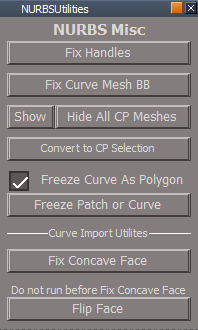
NURBSUtilities/Misc
Add
Show All CP Meshes
NURBS Misc Show all CP Meshes.png
NURBS Misc Show all CP Meshes.png (11.04 KiB) Viewed 2721 times
Constraint Scripts
All Constraint Scripts/unDoIt script(s)
Add
RsApp.ClearHistory()
User avatar
clintonman
Captain
Posts: 5659
Joined: 21 May 2009, 21:08
Type the number ten into the box: 0
Location: California

Re: Final trueSpace7.61 Beta 8 Std Unofficial Update

Post by clintonman »

trueBlue wrote: 21 Apr 2021, 10:40 Toolbars
File/Save
If nothing selected, Unselect and put scene name into dialog
If multiple objects selected, select first selected with status message "Saving Cube..."
Cube being the first selected object in this case
Haven't tested yet but won't that stop saving a selection into .x and .dae files, and stop saving of a set of lights?
Clinton Reese

http://clintons3d.com
User avatar
trueBlue
Captain
Posts: 5548
Joined: 06 Jul 2009, 22:50
Type the number ten into the box: 10

Re: Final trueSpace7.61 Beta 8 Std Unofficial Update

Post by trueBlue »

I just tested saving a selection of lights as RsSLgts which still works
Actually no selection is necessary
Edit: You are right Exporting dae or x files supports multiple selected objects
User avatar
trueBlue
Captain
Posts: 5548
Joined: 06 Jul 2009, 22:50
Type the number ten into the box: 10

Re: Final trueSpace7.61 Beta 8 Std Unofficial Update

Post by trueBlue »

Test Update 37 for trueSpace7.61 Beta 8 Std Unofficial Update

April 21, 2021

Recommend that you completely Uninstall and Install trueSpace7.61 Beta 8 Standalone to a clean directory before installing this update. If you applied the previous Test Update to a clean directory, you do not need to Uninstall trueSpace7.61 Beta 8 Standalone before applying this new update.
This is a Beta Pre Release for TESTING the below updates and the included previous updates

Update

Toolbars

File/Save As Scene
Unselect and put scene name into dialog

File/Save As Object
If nothing selected, status message "Select an Object" and do not open Save As Object panel
If multiple objects selected, select first selected with status message "Saving Cube..."
Cube being the first selected object in this case

NURBSScripts
NURBSUtilities/Misc
Add
Show All CP Meshes
NURBS Misc Show all CP Meshes.png
NURBS Misc Show all CP Meshes.png (11.04 KiB) Viewed 2718 times
Constraint Scripts
All Constraint Scripts/unDoIt script(s)
Add
RsApp.ClearHistory()
User avatar
clintonman
Captain
Posts: 5659
Joined: 21 May 2009, 21:08
Type the number ten into the box: 0
Location: California

Re: Final trueSpace7.61 Beta 8 Std Unofficial Update

Post by clintonman »

Attached are updated HideCameraAndLights and ShowCameraAndLights commands.

They don't change any node connections and only set the visibility once so it should be more compatible with the undo system.
The previous version didn't work with selected cameras or spotlights. Just selecting them or being selected prevents hiding them.
During the hiding it will deselect cameras and spotlights, things that contain the Object hider, so they will behave and become invisible.
Attachments
HideCameraAndLights_16.RsObj
(9.64 KiB) Downloaded 141 times
ShowCameraAndLights_01.RsObj
(6.96 KiB) Downloaded 139 times
Clinton Reese

http://clintons3d.com
User avatar
trueBlue
Captain
Posts: 5548
Joined: 06 Jul 2009, 22:50
Type the number ten into the box: 10

Re: Final trueSpace7.61 Beta 8 Std Unofficial Update

Post by trueBlue »

Awesome!
I like the smart way you are deselecting Spot lights & Cameras :worship:
Thank you
User avatar
trueBlue
Captain
Posts: 5548
Joined: 06 Jul 2009, 22:50
Type the number ten into the box: 10

Re: Final trueSpace7.61 Beta 8 Std Unofficial Update

Post by trueBlue »

Test Update 38 for trueSpace7.61 Beta 8 Std Unofficial Update

April 23, 2021

Recommend that you completely Uninstall and Install trueSpace7.61 Beta 8 Standalone to a clean directory before installing this update. If you applied the previous Test Update to a clean directory, you do not need to Uninstall trueSpace7.61 Beta 8 Standalone before applying this new update.
This is a Beta Pre Release for TESTING the below updates and the included previous updates

Update

Toolbars

Map Displacement
Optimize Triangulation
Soft paint brush
Updated to work with NURBS

NURBSScripts
Freeze Curve

Commands
Hide Camera & Lights
Show Camera & Lights
User avatar
trueBlue
Captain
Posts: 5548
Joined: 06 Jul 2009, 22:50
Type the number ten into the box: 10

Re: Final trueSpace7.61 Beta 8 Std Unofficial Update

Post by trueBlue »

@Clinton
Never knew that the Show script did not work for original lights

Can we add something like this to the Show script?

Code: Select all

if(Node.IsLight(Sel) && !Node.ConExists(Sel, "RenderAttributes")) {
D3DView.ShowRenderAttribsForObject('', Sel);
ORA_was_created = true;
}
Also with the new ShowCameraAndLights & HideCameraAndLights script, I am getting an error when ran on original lights
Source object: /Scripts/Commands/HideCameraAndLights Error: Microsoft JScript runtime error Description: Invalid procedure call or argument Error code: 0x800a0005 - (null) Line: 44, Char: 3 Script text: Node.Value(curNode + "/Object Render Attributes", "Invisible") = true;
User avatar
clintonman
Captain
Posts: 5659
Joined: 21 May 2009, 21:08
Type the number ten into the box: 0
Location: California

Re: Final trueSpace7.61 Beta 8 Std Unofficial Update

Post by clintonman »

These work with old lights.
Attachments
HideCameraAndLights_100.RsObj
(6.88 KiB) Downloaded 141 times
ShowCameraAndLights_100.RsObj
(4.21 KiB) Downloaded 142 times
Clinton Reese

http://clintons3d.com
User avatar
trueBlue
Captain
Posts: 5548
Joined: 06 Jul 2009, 22:50
Type the number ten into the box: 10

Re: Final trueSpace7.61 Beta 8 Std Unofficial Update

Post by trueBlue »

clintonman wrote: 23 Apr 2021, 20:41 These work with old lights.
These new scripts work without error for original lights
But you will get an error, if you 3D Encapsulate original lights and run D3DView.ShowRenderAttribsForObject('', '');
This included scene has the Night Church lights that have been 3D Encapsulated

Any comment on adding the following to the Show script?

Code: Select all

if(Node.IsLight(Sel) && !Node.ConExists(Sel, "RenderAttributes")) {
D3DView.ShowRenderAttribsForObject('', Sel);
ORA_was_created = true;
}
Attachments
Night Church.RsScn
(2.75 MiB) Downloaded 136 times
User avatar
clintonman
Captain
Posts: 5659
Joined: 21 May 2009, 21:08
Type the number ten into the box: 0
Location: California

Re: Final trueSpace7.61 Beta 8 Std Unofficial Update

Post by clintonman »

trueBlue wrote: 24 Apr 2021, 12:48 ...
Any comment on adding the following to the Show script?

Code: Select all

if(Node.IsLight(Sel) && !Node.ConExists(Sel, "RenderAttributes")) {
D3DView.ShowRenderAttribsForObject('', Sel);
ORA_was_created = true;
}
It's not enough. it also needs the FindOrphanORA code and the part of the code that deletes the orphans. Even then it doesn't work. I think the way groups are handled needs to be completely different. I'm also starting to think that the Object hider node inside the camera and spotlights is not doing anything useful.
Clinton Reese

http://clintons3d.com
User avatar
trueBlue
Captain
Posts: 5548
Joined: 06 Jul 2009, 22:50
Type the number ten into the box: 10

Re: Final trueSpace7.61 Beta 8 Std Unofficial Update

Post by trueBlue »

clintonman wrote: 25 Apr 2021, 01:09
trueBlue wrote: 24 Apr 2021, 12:48 ...
Any comment on adding the following to the Show script?

Code: Select all

if(Node.IsLight(Sel) && !Node.ConExists(Sel, "RenderAttributes")) {
D3DView.ShowRenderAttribsForObject('', Sel);
ORA_was_created = true;
}
It's not enough. it also needs the FindOrphanORA code and the part of the code that deletes the orphans. Even then it doesn't work. I think the way groups are handled needs to be completely different. I'm also starting to think that the Object hider node inside the camera and spotlights is not doing anything useful.
This is for the Show script and is added at around line 15
FindOrphanORA is already included in the Show script
User avatar
trueBlue
Captain
Posts: 5548
Joined: 06 Jul 2009, 22:50
Type the number ten into the box: 10

Re: Final trueSpace7.61 Beta 8 Std Unofficial Update

Post by trueBlue »

Test Update 39 for trueSpace7.61 Beta 8 Std Unofficial Update

April 26, 2021

Recommend that you completely Uninstall and Install trueSpace7.61 Beta 8 Standalone to a clean directory before installing this update.
This is a Beta Pre Release for TESTING the below updates and the included previous updates

Update
Removed duplicate files from the preobjects folder

Commands
Show
Hide Camera & Lights
Show Camera & Lights
User avatar
clintonman
Captain
Posts: 5659
Joined: 21 May 2009, 21:08
Type the number ten into the box: 0
Location: California

Re: Final trueSpace7.61 Beta 8 Std Unofficial Update

Post by clintonman »

example problem with current Hide and Show of Cameras and Lights:
group spotlights of default scene
hide cam and lights will hide them and show cam and lights will show them - good
"hide all" will hide them but then show cam and lights will not show them - bad
show all will bring them back - good
now hide cam and light will not hide them - bad

also if use the Show Object Attributes button on a group of lights then the Hide/Show Lights and Cameras doesn't work

The attached fix the problems described above. It uses techniques similar to the workspace layers 4 show and hide.
Attachments
HideCameraAndLights1002.RsObj
(6.59 KiB) Downloaded 133 times
ShowCameraAndLights1002.RsObj
(5.53 KiB) Downloaded 129 times
Clinton Reese

http://clintons3d.com
User avatar
trueBlue
Captain
Posts: 5548
Joined: 06 Jul 2009, 22:50
Type the number ten into the box: 10

Re: Final trueSpace7.61 Beta 8 Std Unofficial Update

Post by trueBlue »

Test Update 40 for trueSpace7.61 Beta 8 Std Unofficial Update

May 5, 2021

Recommend that you completely Uninstall and Install trueSpace7.61 Beta 8 Standalone to a clean directory before installing this update. If you applied the previous Test Update to a clean directory, you do not need to Uninstall trueSpace7.61 Beta 8 Standalone before applying this new update.
This is a Beta Pre Release for TESTING the below updates and the included previous updates

Update

SnappingScripts
jointToObject
jointToPoints

Commands
Hide Camera & Lights
Show Camera & Lights
User avatar
clintonman
Captain
Posts: 5659
Joined: 21 May 2009, 21:08
Type the number ten into the box: 0
Location: California

Re: Final trueSpace7.61 Beta 8 Std Unofficial Update

Post by clintonman »

D3DMatEditTooltipError.jpg
D3DMatEditTooltipError.jpg (47.01 KiB) Viewed 2612 times
The tooltip in the D3D material Editor has an error. It says , "Edit picked material directly", but it should say "Edit DX material in Link Editor". Top image shows the original, bottom is the UU version.
The "Edit picked material directly" is an option in the advanced tab of the material editor.

So it should be "Edit DX material in Link Editor / Current Scene"
Clinton Reese

http://clintons3d.com
User avatar
trueBlue
Captain
Posts: 5548
Joined: 06 Jul 2009, 22:50
Type the number ten into the box: 10

Re: Final trueSpace7.61 Beta 8 Std Unofficial Update

Post by trueBlue »

Test Update 41 for trueSpace7.61 Beta 8 Std Unofficial Update

May 8, 2021

Recommend that you completely Uninstall and Install trueSpace7.61 Beta 8 Standalone to a clean directory before installing this update. If you applied the previous Test Update to a clean directory, you do not need to Uninstall trueSpace7.61 Beta 8 Standalone before applying this new update.
This is a Beta Pre Release for TESTING the below updates and the included previous updates

Update

Material Editor
Changed tooltips to "Edit DX material in Link Editor / Current Scene"

NormalsScripts
Removed RsApp.ClearHistory()

Return to “General Discussion”