Update 92 for trueSpace7.61 Beta 8 Standalone Unofficial Update Version 8
Updated
Material Editor/D3D Material Converter
MaterialInstanceConverterScript [Author - Clinton Reese]
October 15, 2021
viewt ... =55&t=3731
Instructions:
Recommend that you completely Uninstall and Install trueSpace7.61 Standalone to a clean directory
1.) Run the tS7.61B8Std.8.exe
2.) Browse [...] to where you installed C:\trueSpace761Std, select its folder and then the Extract button
3.) Select the Yes to All button
4.) Open trueSpace and select the Reset to Default Context icon
5.) In Workspace select the Default layout tab
The included Plugins.xml file has the Clintons3dPlugin, Clintons3dPluginExt and Clintons3dRsView, Installed and Loaded to the default path: C:\trueSpace761Std
WARNING: These 3 plugins are required to be Installed and Loaded when using trueSpace!
Final trueSpace7.61 Beta 8 Std Unofficial Update
-
trueBlue

- Captain
- Posts: 5548
- Joined: 06 Jul 2009, 22:50
- Type the number ten into the box: 10
Re: Final trueSpace7.61 Beta 8 Std Unofficial Update
-
clintonman

- Captain
- Posts: 5659
- Joined: 21 May 2009, 21:08
- Type the number ten into the box: 0
- Location: California
Re: Final trueSpace7.61 Beta 8 Std Unofficial Update
Updated UU layers script attached
- Attachments
-
- workspacelayers4.RsObj
- (287.54 KiB) Downloaded 129 times
-
trueBlue
- Captain
- Posts: 5548
- Joined: 06 Jul 2009, 22:50
- Type the number ten into the box: 10
Re: Final trueSpace7.61 Beta 8 Std Unofficial Update
Update 93 for trueSpace7.61 Beta 8 Standalone Unofficial Update Version 8
Updated
Workspace Layers 4 [Author - Clinton Reese]
Updated with a Quick Processing mode
Material Editor
Convert D3D materials icon
Add - RMB command to open the DX Material Components toolbar
ScriptCommands/
HideCameraAndLights.xml - Fix for the Object hider with multiple/duplicate connections
ShowCameraAndLights.xml - Fix for the Object hider with multiple/duplicate connections
HideAll.xml - Updated to not run if objects have Object Render Attributes
ShowAll.xml - Updated to not run if objects have Object Render Attributes
UnBlockRsTSEvents.xml - Used with the HideAll & ShowAll scripts
CustomCommands/Quick ORA Scripts [Author - Clinton Reese]
Toolbars/ViewToolbar
Ctrl + Shift + V
Add
Show All - Objects
Hide All - Objects
Hide - Unselected
Hide - Selection
Show - Selection
These buttons use the Quick ORA Scripts which only work for objects that do not have Object Render Attributes and are much faster then the Workspace toolbar's Hide & Show scripts which will create the Object Render Attributes
Objects - tS7.61 Update objects/
Switch Workspace Main toolbar
tS76 tS Keyframe 2 AE Keyframe
November 6, 2021
viewt ... =55&t=3731
Instructions:
Recommend that you completely Uninstall and Install trueSpace7.61 Standalone to a clean directory
1.) Run the tS7.61B8Std.8.exe
2.) Browse [...] to where you installed C:\trueSpace761Std, select its folder and then the Extract button
3.) Select the Yes to All button
4.) Open trueSpace and select the Reset to Default Context icon
5.) In Workspace select the Default layout tab
The included Plugins.xml file has the Clintons3dPlugin, Clintons3dPluginExt and Clintons3dRsView, Installed and Loaded to the default path: C:\trueSpace761Std
WARNING: These 3 plugins are required to be Installed and Loaded when using trueSpace!
Updated
Workspace Layers 4 [Author - Clinton Reese]
Updated with a Quick Processing mode
Material Editor
Convert D3D materials icon
Add - RMB command to open the DX Material Components toolbar
ScriptCommands/
HideCameraAndLights.xml - Fix for the Object hider with multiple/duplicate connections
ShowCameraAndLights.xml - Fix for the Object hider with multiple/duplicate connections
HideAll.xml - Updated to not run if objects have Object Render Attributes
ShowAll.xml - Updated to not run if objects have Object Render Attributes
UnBlockRsTSEvents.xml - Used with the HideAll & ShowAll scripts
CustomCommands/Quick ORA Scripts [Author - Clinton Reese]
Toolbars/ViewToolbar
Ctrl + Shift + V
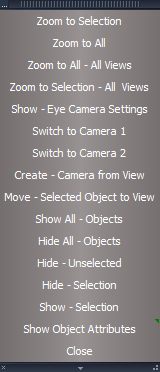
- Popup View toolbar.png (25.8 KiB) Viewed 2106 times
Show All - Objects
Hide All - Objects
Hide - Unselected
Hide - Selection
Show - Selection
These buttons use the Quick ORA Scripts which only work for objects that do not have Object Render Attributes and are much faster then the Workspace toolbar's Hide & Show scripts which will create the Object Render Attributes
Objects - tS7.61 Update objects/
Switch Workspace Main toolbar
tS76 tS Keyframe 2 AE Keyframe
November 6, 2021
viewt ... =55&t=3731
Instructions:
Recommend that you completely Uninstall and Install trueSpace7.61 Standalone to a clean directory
1.) Run the tS7.61B8Std.8.exe
2.) Browse [...] to where you installed C:\trueSpace761Std, select its folder and then the Extract button
3.) Select the Yes to All button
4.) Open trueSpace and select the Reset to Default Context icon
5.) In Workspace select the Default layout tab
The included Plugins.xml file has the Clintons3dPlugin, Clintons3dPluginExt and Clintons3dRsView, Installed and Loaded to the default path: C:\trueSpace761Std
WARNING: These 3 plugins are required to be Installed and Loaded when using trueSpace!
-
clintonman
- Captain
- Posts: 5659
- Joined: 21 May 2009, 21:08
- Type the number ten into the box: 0
- Location: California
Re: Final trueSpace7.61 Beta 8 Std Unofficial Update
Attached is a test scene for the show hide scripts.
Ignore the nurbs cubes that's something else.
Ignore the nurbs cubes that's something else.
- Attachments
-
- ShowHideIssues.RsScn
- (1.32 MiB) Downloaded 131 times
-
trueBlue
- Captain
- Posts: 5548
- Joined: 06 Jul 2009, 22:50
- Type the number ten into the box: 10
Re: Final trueSpace7.61 Beta 8 Std Unofficial Update
I am not seeing any problems with the Tours & Cylinders groups with Quick scripts or XML scripts
The Cubes/Nurbs group are not working with the Quick scripts or Hide All & ShowAll XML scripts, but do work with Hide & Show XML scripts
The Cubes/Nurbs group are not working with the Quick scripts or Hide All & ShowAll XML scripts, but do work with Hide & Show XML scripts
-
clintonman
- Captain
- Posts: 5659
- Joined: 21 May 2009, 21:08
- Type the number ten into the box: 0
- Location: California
Re: Final trueSpace7.61 Beta 8 Std Unofficial Update
Here are some stepstrueBlue wrote: 06 Nov 2021, 23:56 I am not seeing any problems with the Tours & Cylinders groups with Quick scripts or XML scripts
The Cubes/Nurbs group are not working with the Quick scripts or Hide All & ShowAll XML scripts, but do work with Hide & Show XML scripts
load problem scene
show all - looks good
hide all - looks good
show all
select cylinder group
go down arrow to select the group inside
hide selected - nothing happens, not hidden
select cylinder, 2 the direct child cylinder
hide selected - good
show all - hidden cylinder still hidden
show selected - good, hidden cylinder is visible
It failed when trying to hide the group inside the group and failed to show the hidden cylinder inside the group when trying to show all.
-
trueBlue
- Captain
- Posts: 5548
- Joined: 06 Jul 2009, 22:50
- Type the number ten into the box: 10
Re: Final trueSpace7.61 Beta 8 Std Unofficial Update
The Group inside the Parent Group has an ORA node hooked of with the Input Attributes
That is not normal
That is not normal

-
clintonman
- Captain
- Posts: 5659
- Joined: 21 May 2009, 21:08
- Type the number ten into the box: 0
- Location: California
Re: Final trueSpace7.61 Beta 8 Std Unofficial Update
I didn't do anything special to get to that point. Just using the show, showall and hide, hideall buttons.trueBlue wrote: 07 Nov 2021, 00:41 The Group inside the Parent Group has an ORA node hooked of with the Input Attributes
That is not normal
Screenshot 2021-11-06 174018.png
-
trueBlue
- Captain
- Posts: 5548
- Joined: 06 Jul 2009, 22:50
- Type the number ten into the box: 10
Re: Final trueSpace7.61 Beta 8 Std Unofficial Update
I created a Group of two objects
I created another object, selected the above group, and 3D Encapsulated all three
I selected the whole group a used Show.xml
Everything looks good at this point
I selected the group inside the parent group and used Hide.xml
This is where another ORA node was created and hooked up to the Input Attributes
I did not do anything to the Hide & Show xml files
I created another object, selected the above group, and 3D Encapsulated all three
I selected the whole group a used Show.xml
Everything looks good at this point
I selected the group inside the parent group and used Hide.xml
This is where another ORA node was created and hooked up to the Input Attributes
I did not do anything to the Hide & Show xml files
-
clintonman
- Captain
- Posts: 5659
- Joined: 21 May 2009, 21:08
- Type the number ten into the box: 0
- Location: California
Re: Final trueSpace7.61 Beta 8 Std Unofficial Update
That's interesting. Because if you take the problem into the older UU it works in all cases. I'll do a test in old UU to confirm.trueBlue wrote: 07 Nov 2021, 01:08 I created a Group of two objects
I created another object, selected the above group, and 3D Encapsulated all three
I selected the whole group a used Show.xml
Everything looks good at this point
I selected the group inside the parent group and used Hide.xml
This is where another ORA node was created and hooked up to the Input Attributes
I did not do anything to the Hide & Show xml files
Nice, perfect set of steps to show the problem. Hide script has a previously unknown bug.
-
trueBlue
- Captain
- Posts: 5548
- Joined: 06 Jul 2009, 22:50
- Type the number ten into the box: 10
Re: Final trueSpace7.61 Beta 8 Std Unofficial Update
After looking at the Hide & Show xml scripts, it looks like there needs some more code to look for the Input Attributes on a selection and if it exist do not create an ORA
Crossed post
Edit
The Show xml too
Edit2
HideAll & ShowAll xml scripts are not working with your scene's Cubes/NURBS group
Crossed post
Edit
The Show xml too
Edit2
HideAll & ShowAll xml scripts are not working with your scene's Cubes/NURBS group
-
clintonman
- Captain
- Posts: 5659
- Joined: 21 May 2009, 21:08
- Type the number ten into the box: 0
- Location: California
Re: Final trueSpace7.61 Beta 8 Std Unofficial Update
I have the start of a fix for the Show and Hide scripts.
Before running "D3DView.ShowRenderAttribsForObject" it will delete all the child "Object Render Attributes" nodes except for the top one. Then afterward it will remove the disconnected connector to prevent it's memory from interfering with future show hides. ex.) If connector remains with visible it would prevent making it invisible later.
Something similar might be needed for the showall and hideall. I need to install the latest UU on this machine to see.
NURBS are a whole other thing so won't be looking at that until last.
Before running "D3DView.ShowRenderAttribsForObject" it will delete all the child "Object Render Attributes" nodes except for the top one. Then afterward it will remove the disconnected connector to prevent it's memory from interfering with future show hides. ex.) If connector remains with visible it would prevent making it invisible later.
Something similar might be needed for the showall and hideall. I need to install the latest UU on this machine to see.
NURBS are a whole other thing so won't be looking at that until last.
- Attachments
-
- Show.RsObj
- (12.68 KiB) Downloaded 128 times
-
- Hide.RsObj
- (14.27 KiB) Downloaded 127 times
-
trueBlue
- Captain
- Posts: 5548
- Joined: 06 Jul 2009, 22:50
- Type the number ten into the box: 10
Re: Final trueSpace7.61 Beta 8 Std Unofficial Update
So we are on the same page, I removed the BlockRsTSEvents code from the HideAll & ShowAll
-
clintonman
- Captain
- Posts: 5659
- Joined: 21 May 2009, 21:08
- Type the number ten into the box: 0
- Location: California
Re: Final trueSpace7.61 Beta 8 Std Unofficial Update
Thanks, I'll do the same.trueBlue wrote: 07 Nov 2021, 03:43 So we are on the same page, I removed the BlockRsTSEvents code from the HideAll & ShowAll
-
clintonman
- Captain
- Posts: 5659
- Joined: 21 May 2009, 21:08
- Type the number ten into the box: 0
- Location: California
Re: Final trueSpace7.61 Beta 8 Std Unofficial Update
Show All and Hide All
Show All does not create any ORAs and it continues searching down the heirarchy to set all existing ORAs to visible.
Hide All searches all top level objects until an ORA is found and then does the same thing as the Hide selection script when one is found, removes all child ORAs, cleans the connector and sets to invisible.
It seems to all be working, so NURBS are next.
Just tested with NURBS and it looks good. So next is checking/fixing the layers and I think the Hide(All)/Show(All) may interfere with layers.
Show All does not create any ORAs and it continues searching down the heirarchy to set all existing ORAs to visible.
Hide All searches all top level objects until an ORA is found and then does the same thing as the Hide selection script when one is found, removes all child ORAs, cleans the connector and sets to invisible.
It seems to all be working, so NURBS are next.
Just tested with NURBS and it looks good. So next is checking/fixing the layers and I think the Hide(All)/Show(All) may interfere with layers.
- Attachments
-
- ShowAll.RsObj
- (8.11 KiB) Downloaded 147 times
-
- HideAll.RsObj
- (10.53 KiB) Downloaded 126 times
-
trueBlue
- Captain
- Posts: 5548
- Joined: 06 Jul 2009, 22:50
- Type the number ten into the box: 10
Re: Final trueSpace7.61 Beta 8 Std Unofficial Update
Thank you!clintonman wrote: 07 Nov 2021, 03:16 I have the start of a fix for the Show and Hide scripts.
Before running "D3DView.ShowRenderAttribsForObject" it will delete all the child "Object Render Attributes" nodes except for the top one. Then afterward it will remove the disconnected connector to prevent it's memory from interfering with future show hides. ex.) If connector remains with visible it would prevent making it invisible later.
Something similar might be needed for the showall and hideall. I need to install the latest UU on this machine to see.
NURBS are a whole other thing so won't be looking at that until last.
Did some quick test this morning
One thing I notice is the Object_Name is not being updated for the Hide & Show
Suggestion
Change Hide
Code: Select all
if(Node.Exists(Sel + "/Object Render Attributes") && Node.ConExists(Sel + "/Object Render Attributes", "Object_Name")) {
			util.SetNodeValueInt(Sel +  "/Object Render Attributes", "Invisible", -1);
var str = Node.ShortName(Sel)
util.SetNodeValueString(Sel + "/Object Render Attributes", "Object_Name", str)
			if(!Node.Exists(Sel + "/Object hider")) {
				RsStackView.SetPanelExportInfo(Sel + '/Object Render Attributes','Default',1,1);
			}
		}
Here is a replacement
Put it in the preobjects folder
I will not be available until later tonight
- Attachments
-
- ObjectAttributes.RsObj
- (13.62 KiB) Downloaded 123 times
-
trueBlue
- Captain
- Posts: 5548
- Joined: 06 Jul 2009, 22:50
- Type the number ten into the box: 10
Re: Final trueSpace7.61 Beta 8 Std Unofficial Update
Awesome, your new Hide & Show scripts works better then the tS native D3DView.ShowRenderAttribsForObject('', '') command
Applying Hide & Show to a Group inside a Group creates a separate/working ORA panel and no longer works with the Parent Group's ORA
If you use the native command it adds ORA and hooks it up to the InputAttributes connector in with which makes it no longer work from the new ORA or the Parent Group's ORA
Great work Clinton!
Applying Hide & Show to a Group inside a Group creates a separate/working ORA panel and no longer works with the Parent Group's ORA
If you use the native command it adds ORA and hooks it up to the InputAttributes connector in with which makes it no longer work from the new ORA or the Parent Group's ORA
Great work Clinton!
-
clintonman
- Captain
- Posts: 5659
- Joined: 21 May 2009, 21:08
- Type the number ten into the box: 0
- Location: California
Re: Final trueSpace7.61 Beta 8 Std Unofficial Update
layers UU version update
I was going to document what changed but it was such a mass(mess) of changes and errors while fixing that I lost track.
This works better with groups inside of groups. Fixed the new layer mode which was blank instead of "Global".
Remove layer and show layer had some small quick processing bugs. There may be some other changes but there were so many "fix this and that over there breaks" that I just don't recall.
Children of groups can be in different layers, but if the group is assigned to a layer afterward all the children will follow. I found that if you try to preserve the children layers it just kind of breaks all over the place. This isn't a change, just something I noticed/remembered.
Long story short, it should be better than before...I hope...
I was going to document what changed but it was such a mass(mess) of changes and errors while fixing that I lost track.
This works better with groups inside of groups. Fixed the new layer mode which was blank instead of "Global".
Remove layer and show layer had some small quick processing bugs. There may be some other changes but there were so many "fix this and that over there breaks" that I just don't recall.
Children of groups can be in different layers, but if the group is assigned to a layer afterward all the children will follow. I found that if you try to preserve the children layers it just kind of breaks all over the place. This isn't a change, just something I noticed/remembered.
Long story short, it should be better than before...I hope...
- Attachments
-
- workspacelayers4f026.RsObj
- (327.49 KiB) Downloaded 127 times
-
trueBlue
- Captain
- Posts: 5548
- Joined: 06 Jul 2009, 22:50
- Type the number ten into the box: 10
Re: Final trueSpace7.61 Beta 8 Std Unofficial Update
Update 94 for trueSpace7.61 Beta 8 Standalone Unofficial Update Version 8
Updated
Workspace Layers 4 [Author - Clinton Reese]
Updated with a Quick Processing mode
preobjects/
ObjectAttributes
Commands/ [Author - Clinton Reese]
ShowAll
HideAll
Hide
Show
November 8, 2021
viewt ... =55&t=3731
Instructions:
Recommend that you completely Uninstall and Install trueSpace7.61 Standalone to a clean directory
1.) Run the tS7.61B8Std.8.exe
2.) Browse [...] to where you installed C:\trueSpace761Std, select its folder and then the Extract button
3.) Select the Yes to All button
4.) Open trueSpace and select the Reset to Default Context icon
5.) In Workspace select the Default layout tab
The included Plugins.xml file has the Clintons3dPlugin, Clintons3dPluginExt and Clintons3dRsView, Installed and Loaded to the default path: C:\trueSpace761Std
WARNING: These 3 plugins are required to be Installed and Loaded when using trueSpace!
Updated
Workspace Layers 4 [Author - Clinton Reese]
Updated with a Quick Processing mode
preobjects/
ObjectAttributes
Commands/ [Author - Clinton Reese]
ShowAll
HideAll
Hide
Show
November 8, 2021
viewt ... =55&t=3731
Instructions:
Recommend that you completely Uninstall and Install trueSpace7.61 Standalone to a clean directory
1.) Run the tS7.61B8Std.8.exe
2.) Browse [...] to where you installed C:\trueSpace761Std, select its folder and then the Extract button
3.) Select the Yes to All button
4.) Open trueSpace and select the Reset to Default Context icon
5.) In Workspace select the Default layout tab
The included Plugins.xml file has the Clintons3dPlugin, Clintons3dPluginExt and Clintons3dRsView, Installed and Loaded to the default path: C:\trueSpace761Std
WARNING: These 3 plugins are required to be Installed and Loaded when using trueSpace!
-
trueBlue
- Captain
- Posts: 5548
- Joined: 06 Jul 2009, 22:50
- Type the number ten into the box: 10
Re: Final trueSpace7.61 Beta 8 Std Unofficial Update
@Clinton
Just noticed that the HideAll script changes the Curves/LOD Mesh's ORA
These are the corrected values that get changed:
Is there a reason why you are switching to Setting in the Stack with the HideAll & ShowAll scripts?
I also have a fix for the Desktop/Scene's Show Object Attribs button script
Just noticed that the HideAll script changes the Curves/LOD Mesh's ORA
These are the corrected values that get changed:
Code: Select all
	Node.Value(selectedObj_ + "/Object Render Attributes", "Receive shadows") = 0
	Node.Value(selectedObj_ + "/Object Render Attributes", "Cast shadows") = 0
	Node.Value(selectedObj_ + "/Object Render Attributes", "Invisible") = 0
	Node.Value(selectedObj_ + "/Object Render Attributes", "Show backfaces") = -1
	Node.Value(selectedObj_ + "/Object Render Attributes", "Surface Opacity") = 0
	Node.Value(selectedObj_ + "/Object Render Attributes", "Edges opacity") = 1
	Node.Value(selectedObj_ + "/Object Render Attributes", "Ignore layer attributes") = -1

-
trueBlue
- Captain
- Posts: 5548
- Joined: 06 Jul 2009, 22:50
- Type the number ten into the box: 10
Re: Final trueSpace7.61 Beta 8 Std Unofficial Update
@Clinton
HideAll script?
Option1
Make a new HideAll script that selects all objects in the scene and run the Hide script, then Unselect
Option2
Use the Guard script for the D3DView.ShowRenderAttribsForObject('', curNode) command in the HideAll script
HideAll script?
Option1
Make a new HideAll script that selects all objects in the scene and run the Hide script, then Unselect
Option2
Use the Guard script for the D3DView.ShowRenderAttribsForObject('', curNode) command in the HideAll script
-
clintonman
- Captain
- Posts: 5659
- Joined: 21 May 2009, 21:08
- Type the number ten into the box: 0
- Location: California
Re: Final trueSpace7.61 Beta 8 Std Unofficial Update
Just now saw your curves post. I'll get back to you later...
-
clintonman
- Captain
- Posts: 5659
- Joined: 21 May 2009, 21:08
- Type the number ten into the box: 0
- Location: California
Re: Final trueSpace7.61 Beta 8 Std Unofficial Update
A fix for HideAll
Problem was a combination of D3DView.ShowRenderAttribsForObject and GatherChildORAs being run on NURBS objects.
"Is there a reason why you are switching to Setting in the Stack with the HideAll & ShowAll scripts?"
Don't know what you mean and I don't remember making any changes to stack or switching stacks. If something looks wrong remove it and test it. If it still works when it's gone then it's not needed and should be removed.
Problem was a combination of D3DView.ShowRenderAttribsForObject and GatherChildORAs being run on NURBS objects.
"Is there a reason why you are switching to Setting in the Stack with the HideAll & ShowAll scripts?"
Don't know what you mean and I don't remember making any changes to stack or switching stacks. If something looks wrong remove it and test it. If it still works when it's gone then it's not needed and should be removed.
- Attachments
-
- HideAll885e.RsObj
- (10.62 KiB) Downloaded 157 times
-
trueBlue
- Captain
- Posts: 5548
- Joined: 06 Jul 2009, 22:50
- Type the number ten into the box: 10
Re: Final trueSpace7.61 Beta 8 Std Unofficial Update
HideAll & ShowAll both have commands that switches to the Stack/Setting
HT_PREFERENCES = 5
RsStackView.SwitchStackViewAspect(HT_PREFERENCES);
So... I would like to remove these two commands
Show & ShowAll runs Fix NURBS ORA even if the NURBS needs fixing or Not!
Not sure what the results would be if a user selected UnDo
So... I would like to add RsApp.ClearHistory() at the end of the following two scripts
NURBSUtilities/fixRenderAttributes
Commands/Fix NURBS ORA
Everytime you click in a 3D View WHEN a NURBS is selected, the following script runs:
NURBSUtilities/NURBStoCPMeshSelection
I notice that the Undo History no longer WORKS!!!
So... I would like to add RsApp.ClearHistory() at the end of the above script
HT_PREFERENCES = 5
RsStackView.SwitchStackViewAspect(HT_PREFERENCES);
So... I would like to remove these two commands
Show & ShowAll runs Fix NURBS ORA even if the NURBS needs fixing or Not!
Not sure what the results would be if a user selected UnDo
So... I would like to add RsApp.ClearHistory() at the end of the following two scripts
NURBSUtilities/fixRenderAttributes
Commands/Fix NURBS ORA
Everytime you click in a 3D View WHEN a NURBS is selected, the following script runs:
NURBSUtilities/NURBStoCPMeshSelection
I notice that the Undo History no longer WORKS!!!
So... I would like to add RsApp.ClearHistory() at the end of the above script
-
trueBlue
- Captain
- Posts: 5548
- Joined: 06 Jul 2009, 22:50
- Type the number ten into the box: 10
Re: Final trueSpace7.61 Beta 8 Std Unofficial Update
Update 95 for trueSpace7.61 Beta 8 Standalone Unofficial Update Version 8
Updated
preobjects/
ObjectAttributes
Commands/ [Author - Clinton Reese]
HideAll
Show Object Attribs
Fix NURBS ORA - Add RsApp.ClearHistory()
CustomCommands/NURBSScripts/NURBSUtilities/
fixRenderAttributes - Add RsApp.ClearHistory()
Show NURBS Panel With CP Mesh - Add RsApp.ClearHistory()
November 11, 2021
viewt ... =55&t=3731
Instructions:
Recommend that you completely Uninstall and Install trueSpace7.61 Standalone to a clean directory
1.) Run the tS7.61B8Std.8.exe
2.) Browse [...] to where you installed C:\trueSpace761Std, select its folder and then the Extract button
3.) Select the Yes to All button
4.) Open trueSpace and select the Reset to Default Context icon
5.) In Workspace select the Default layout tab
The included Plugins.xml file has the Clintons3dPlugin, Clintons3dPluginExt and Clintons3dRsView, Installed and Loaded to the default path: C:\trueSpace761Std
WARNING: These 3 plugins are required to be Installed and Loaded when using trueSpace!
Updated
preobjects/
ObjectAttributes
Commands/ [Author - Clinton Reese]
HideAll
Show Object Attribs
Fix NURBS ORA - Add RsApp.ClearHistory()
CustomCommands/NURBSScripts/NURBSUtilities/
fixRenderAttributes - Add RsApp.ClearHistory()
Show NURBS Panel With CP Mesh - Add RsApp.ClearHistory()
November 11, 2021
viewt ... =55&t=3731
Instructions:
Recommend that you completely Uninstall and Install trueSpace7.61 Standalone to a clean directory
1.) Run the tS7.61B8Std.8.exe
2.) Browse [...] to where you installed C:\trueSpace761Std, select its folder and then the Extract button
3.) Select the Yes to All button
4.) Open trueSpace and select the Reset to Default Context icon
5.) In Workspace select the Default layout tab
The included Plugins.xml file has the Clintons3dPlugin, Clintons3dPluginExt and Clintons3dRsView, Installed and Loaded to the default path: C:\trueSpace761Std
WARNING: These 3 plugins are required to be Installed and Loaded when using trueSpace!
-
trueBlue
- Captain
- Posts: 5548
- Joined: 06 Jul 2009, 22:50
- Type the number ten into the box: 10
Re: Final trueSpace7.61 Beta 8 Std Unofficial Update
Update 96 for trueSpace7.61 Beta 8 Standalone Unofficial Update Version 8
Updated
Toolbars/
Link Editor Navigator
Ctrl+ icon
Fixed the RMB = Unselect command
November 17, 2021
viewt ... =55&t=3731
Instructions:
Recommend that you completely Uninstall and Install trueSpace7.61 Standalone to a clean directory
1.) Run the tS7.61B8Std.8.exe
2.) Browse [...] to where you installed C:\trueSpace761Std, select its folder and then the Extract button
3.) Select the Yes to All button
4.) Open trueSpace and select the Reset to Default Context icon
5.) In Workspace select the Default layout tab
The included Plugins.xml file has the Clintons3dPlugin, Clintons3dPluginExt and Clintons3dRsView, Installed and Loaded to the default path: C:\trueSpace761Std
WARNING: These 3 plugins are required to be Installed and Loaded when using trueSpace!
Updated
Toolbars/
Link Editor Navigator

Fixed the RMB = Unselect command
November 17, 2021
viewt ... =55&t=3731
Instructions:
Recommend that you completely Uninstall and Install trueSpace7.61 Standalone to a clean directory
1.) Run the tS7.61B8Std.8.exe
2.) Browse [...] to where you installed C:\trueSpace761Std, select its folder and then the Extract button
3.) Select the Yes to All button
4.) Open trueSpace and select the Reset to Default Context icon
5.) In Workspace select the Default layout tab
The included Plugins.xml file has the Clintons3dPlugin, Clintons3dPluginExt and Clintons3dRsView, Installed and Loaded to the default path: C:\trueSpace761Std
WARNING: These 3 plugins are required to be Installed and Loaded when using trueSpace!
-
trueBlue
- Captain
- Posts: 5548
- Joined: 06 Jul 2009, 22:50
- Type the number ten into the box: 10
Re: Final trueSpace7.61 Beta 8 Std Unofficial Update
@Clinton
Found a solution for not having to select the Main View before using the toolbars' switch to Perspective View that works with floating windows too! This can be used with the other views, grid, and scene ORA commands as well
Found a solution for not having to select the Main View before using the toolbars' switch to Perspective View that works with floating windows too!
Code: Select all
if(Node.SubObjectCount("/D3DView")==0) return;
if(Node.SubObjectCount("/D3DView")>>1){D3DView.SwitchEyeCameraType('', '0');}
if(Node.SubObjectCount("/D3DView")==1){D3DView.SwitchEyeCameraType('{2C152F81-45A2-4035-8896-9E49D60C8A7A}', '0');}
-
clintonman
- Captain
- Posts: 5659
- Joined: 21 May 2009, 21:08
- Type the number ten into the box: 0
- Location: California
Re: Final trueSpace7.61 Beta 8 Std Unofficial Update
I look forward to testing it.trueBlue wrote: 22 Nov 2021, 20:29 @Clinton
Found a solution for not having to select the Main View before using the toolbars' switch to Perspective View that works with floating windows too!This can be used with the other views, grid, and scene ORA commands as wellCode: Select all
if(Node.SubObjectCount("/D3DView")==0) return;
if(Node.SubObjectCount("/D3DView")>>1){D3DView.SwitchEyeCameraType('', '0');}
if(Node.SubObjectCount("/D3DView")==1){D3DView.SwitchEyeCameraType('{2C152F81-45A2-4035-8896-9E49D60C8A7A}', '0');}
-
trueBlue
- Captain
- Posts: 5548
- Joined: 06 Jul 2009, 22:50
- Type the number ten into the box: 10
Re: Final trueSpace7.61 Beta 8 Std Unofficial Update
It is only slightly better than the top small toolbar
If there is no floating 3D Windows open, then it works in the main window without needing focus
Otherwise, it needs to have focus
Same for the floating 3D Windows, they need to have focus
If there is no floating 3D Windows open, then it works in the main window without needing focus
Otherwise, it needs to have focus
Same for the floating 3D Windows, they need to have focus
-
trueBlue
- Captain
- Posts: 5548
- Joined: 06 Jul 2009, 22:50
- Type the number ten into the box: 10
Re: Final trueSpace7.61 Beta 8 Std Unofficial Update
Update 97 for trueSpace7.61 Beta 8 Standalone Unofficial Update Version 8
Updated
Show.xml
Hide.xml
Show Object Attribs.xml
ShowCameraAndLights.xml
HideCameraAndLights.xml
Add fix for Model lights for all of the above
UnLookAt.xml
Add Disconnects before Connecting
LoolAt icon(s)
LMB = if(Node.ConExists(Node.FirstSelected(), "Target Matrix")){System.Alert("Object is being used to Look At another object\n\nUse the Unlook At tool first");return;}else{ToolMng.ActivateTool('{17D544A3-3F58-436B-83E7-F8B4D7D4E7C5}','{4E203C6C-A20D-4e32-82B4-FC482F5A0D06}');}
RMB = RsTool.Arrow()
Link Editor Navigator
Ctrl+ icon - RMB = RsTool.Arrow()
Removed - H icon "Hide unselected"
Add
U icon
LMB = Unselect
RMB = Unselect and Close Panels
WinGUID_Bar
Updated LMB & RMB commands to use UUFunctionSet
Infinite lights
Add
Enable Shadow On & Off buttons for VRay only
Rename DirlightShader
Add the modifications to New Scene, Lights, and WS - Default.RsSLgts
Desktop
Display Toolbars button
Updated LMB command to use UUFunctionSet
Widgets
Add
UUFunctionSet
Commands for all floating toolbars, Scene ORA modes, Grid modes, Switch Views, Reset View, Look at Selection, and Zoom to Selection
All toolbar buttons updated to use the UUFunctionSet
These new commands will run without the Main 3D Window needing focus unless there is a floating 3D Window that has focus
Add a Hide unselected icon to Workspace toolbars
November 28, 2021
viewt ... =55&t=3731
Instructions:
Recommend that you completely Uninstall and Install trueSpace7.61 Standalone to a clean directory
1.) Run the tS7.61B8Std.8.exe
2.) Browse [...] to where you installed C:\trueSpace761Std, select its folder and then the Extract button
3.) Select the Yes to All button
4.) Open trueSpace and select the Reset to Default Context icon
5.) In Workspace select the Default layout tab
The included Plugins.xml file has the Clintons3dPlugin, Clintons3dPluginExt and Clintons3dRsView, Installed and Loaded to the default path: C:\trueSpace761Std
WARNING: These 3 plugins are required to be Installed and Loaded when using trueSpace!
Updated
Show.xml
Hide.xml
Show Object Attribs.xml
ShowCameraAndLights.xml
HideCameraAndLights.xml
Add fix for Model lights for all of the above
UnLookAt.xml
Add Disconnects before Connecting
LoolAt icon(s)
LMB = if(Node.ConExists(Node.FirstSelected(), "Target Matrix")){System.Alert("Object is being used to Look At another object\n\nUse the Unlook At tool first");return;}else{ToolMng.ActivateTool('{17D544A3-3F58-436B-83E7-F8B4D7D4E7C5}','{4E203C6C-A20D-4e32-82B4-FC482F5A0D06}');}
RMB = RsTool.Arrow()
Link Editor Navigator
Ctrl+ icon - RMB = RsTool.Arrow()
Removed - H icon "Hide unselected"
Add
U icon
LMB = Unselect
RMB = Unselect and Close Panels
WinGUID_Bar
Updated LMB & RMB commands to use UUFunctionSet
Infinite lights
Add
Enable Shadow On & Off buttons for VRay only
Rename DirlightShader
Add the modifications to New Scene, Lights, and WS - Default.RsSLgts
Desktop
Display Toolbars button
Updated LMB command to use UUFunctionSet
Widgets
Add
UUFunctionSet
Commands for all floating toolbars, Scene ORA modes, Grid modes, Switch Views, Reset View, Look at Selection, and Zoom to Selection
All toolbar buttons updated to use the UUFunctionSet
These new commands will run without the Main 3D Window needing focus unless there is a floating 3D Window that has focus
Add a Hide unselected icon to Workspace toolbars
November 28, 2021
viewt ... =55&t=3731
Instructions:
Recommend that you completely Uninstall and Install trueSpace7.61 Standalone to a clean directory
1.) Run the tS7.61B8Std.8.exe
2.) Browse [...] to where you installed C:\trueSpace761Std, select its folder and then the Extract button
3.) Select the Yes to All button
4.) Open trueSpace and select the Reset to Default Context icon
5.) In Workspace select the Default layout tab
The included Plugins.xml file has the Clintons3dPlugin, Clintons3dPluginExt and Clintons3dRsView, Installed and Loaded to the default path: C:\trueSpace761Std
WARNING: These 3 plugins are required to be Installed and Loaded when using trueSpace!
-
trueBlue
- Captain
- Posts: 5548
- Joined: 06 Jul 2009, 22:50
- Type the number ten into the box: 10
Re: Final trueSpace7.61 Beta 8 Std Unofficial Update
Update 98 for trueSpace7.61 Beta 8 Standalone Unofficial Update Version 8
Widgets
Update
UUFunctionSet
Camera Toolbar
Camera(s)
.
Improved the View from camera script
Will run without the Main 3D Window needing focus unless there is a floating 3D Window that has focus
November 29, 2021
viewt ... =55&t=3731
Instructions:
Recommend that you completely Uninstall and Install trueSpace7.61 Standalone to a clean directory
1.) Run the tS7.61B8Std.8.exe
2.) Browse [...] to where you installed C:\trueSpace761Std, select its folder and then the Extract button
3.) Select the Yes to All button
4.) Open trueSpace and select the Reset to Default Context icon
5.) In Workspace select the Default layout tab
The included Plugins.xml file has the Clintons3dPlugin, Clintons3dPluginExt and Clintons3dRsView, Installed and Loaded to the default path: C:\trueSpace761Std
WARNING: These 3 plugins are required to be Installed and Loaded when using trueSpace!
Widgets
Update
UUFunctionSet
Camera Toolbar
Camera(s)

- Camera View button.png (13.15 KiB) Viewed 2491 times
Improved the View from camera script
Will run without the Main 3D Window needing focus unless there is a floating 3D Window that has focus
November 29, 2021
viewt ... =55&t=3731
Instructions:
Recommend that you completely Uninstall and Install trueSpace7.61 Standalone to a clean directory
1.) Run the tS7.61B8Std.8.exe
2.) Browse [...] to where you installed C:\trueSpace761Std, select its folder and then the Extract button
3.) Select the Yes to All button
4.) Open trueSpace and select the Reset to Default Context icon
5.) In Workspace select the Default layout tab
The included Plugins.xml file has the Clintons3dPlugin, Clintons3dPluginExt and Clintons3dRsView, Installed and Loaded to the default path: C:\trueSpace761Std
WARNING: These 3 plugins are required to be Installed and Loaded when using trueSpace!
-
trueBlue
- Captain
- Posts: 5548
- Joined: 06 Jul 2009, 22:50
- Type the number ten into the box: 10
Re: Final trueSpace7.61 Beta 8 Std Unofficial Update
Update 99 for trueSpace7.61 Beta 8 Standalone Unofficial Update Version 8
Updated
Objects - tS7.61 Update objects library
FPN PIP
tS76 FPN Camera Keyframer
tS761 First Person Navigator
.
View
1.) LMB to view from the FPN camera
Must be viewing from the FPN camera before activating FPN
2.) RMB to Activate FPN
3.) RMB to Deactivate FPN
December 1, 2021
viewt ... =55&t=3731
Instructions:
Recommend that you completely Uninstall and Install trueSpace7.61 Standalone to a clean directory
1.) Run the tS7.61B8Std.8.exe
2.) Browse [...] to where you installed C:\trueSpace761Std, select its folder and then the Extract button
3.) Select the Yes to All button
4.) Open trueSpace and select the Reset to Default Context icon
5.) In Workspace select the Default layout tab
The included Plugins.xml file has the Clintons3dPlugin, Clintons3dPluginExt and Clintons3dRsView, Installed and Loaded to the default path: C:\trueSpace761Std
WARNING: These 3 plugins are required to be Installed and Loaded when using trueSpace!
Updated
Objects - tS7.61 Update objects library
FPN PIP
tS76 FPN Camera Keyframer
tS761 First Person Navigator

- FPN paneel.png (7.58 KiB) Viewed 2480 times
View
1.) LMB to view from the FPN camera
Must be viewing from the FPN camera before activating FPN
2.) RMB to Activate FPN
3.) RMB to Deactivate FPN
December 1, 2021
viewt ... =55&t=3731
Instructions:
Recommend that you completely Uninstall and Install trueSpace7.61 Standalone to a clean directory
1.) Run the tS7.61B8Std.8.exe
2.) Browse [...] to where you installed C:\trueSpace761Std, select its folder and then the Extract button
3.) Select the Yes to All button
4.) Open trueSpace and select the Reset to Default Context icon
5.) In Workspace select the Default layout tab
The included Plugins.xml file has the Clintons3dPlugin, Clintons3dPluginExt and Clintons3dRsView, Installed and Loaded to the default path: C:\trueSpace761Std
WARNING: These 3 plugins are required to be Installed and Loaded when using trueSpace!
-
trueBlue
- Captain
- Posts: 5548
- Joined: 06 Jul 2009, 22:50
- Type the number ten into the box: 10
Re: Final trueSpace7.61 Beta 8 Std Unofficial Update
Update 100 for trueSpace7.61 Beta 8 Standalone Unofficial Update Version 8
Final Updated
Widgets/UUFunctionSet
Set Camera
Reset View
Look At Selection
Reduced the undo(s) to one undo
December 3, 2021
viewt ... =55&t=3731
Instructions:
Recommend that you completely Uninstall and Install trueSpace7.61 Standalone to a clean directory
1.) Run the tS7.61B8Std.8.exe
2.) Browse [...] to where you installed C:\trueSpace761Std, select its folder and then the Extract button
3.) Select the Yes to All button
4.) Open trueSpace and select the Reset to Default Context icon
5.) In Workspace select the Default layout tab
The included Plugins.xml file has the Clintons3dPlugin, Clintons3dPluginExt and Clintons3dRsView, Installed and Loaded to the default path: C:\trueSpace761Std
WARNING: These 3 plugins are required to be Installed and Loaded when using trueSpace!
Final Updated
Widgets/UUFunctionSet
Set Camera
Reset View
Look At Selection
Reduced the undo(s) to one undo
December 3, 2021
viewt ... =55&t=3731
Instructions:
Recommend that you completely Uninstall and Install trueSpace7.61 Standalone to a clean directory
1.) Run the tS7.61B8Std.8.exe
2.) Browse [...] to where you installed C:\trueSpace761Std, select its folder and then the Extract button
3.) Select the Yes to All button
4.) Open trueSpace and select the Reset to Default Context icon
5.) In Workspace select the Default layout tab
The included Plugins.xml file has the Clintons3dPlugin, Clintons3dPluginExt and Clintons3dRsView, Installed and Loaded to the default path: C:\trueSpace761Std
WARNING: These 3 plugins are required to be Installed and Loaded when using trueSpace!
-
trueBlue
- Captain
- Posts: 5548
- Joined: 06 Jul 2009, 22:50
- Type the number ten into the box: 10
Re: Final trueSpace7.61 Beta 8 Std Unofficial Update
@Clinton
Getting an error when using Make Copy of Window and the window does not work
Steps
Make sure the Stack is in Library or Panel
Open a floating 3D Window
Use the Make Copy of Window
This error does not happen when the Stack is in Settings before using Make Copy of Window of a floating 3D Window
I tried putting the RsStackView.SwitchStackViewAspect(HT_PREFERENCES) at the beginning of the script but that does not help
I think there needs to be a delay between RsStackView.SwitchStackViewAspect(HT_PREFERENCES) and making a copy of the window
If that is not possible, maybe we can put the RsStackView.SwitchStackViewAspect(HT_PREFERENCES) in the toolbar button (Untested)
Getting an error when using Make Copy of Window and the window does not work
Steps
Make sure the Stack is in Library or Panel
Open a floating 3D Window
Use the Make Copy of Window
This error does not happen when the Stack is in Settings before using Make Copy of Window of a floating 3D Window
I tried putting the RsStackView.SwitchStackViewAspect(HT_PREFERENCES) at the beginning of the script but that does not help
I think there needs to be a delay between RsStackView.SwitchStackViewAspect(HT_PREFERENCES) and making a copy of the window
If that is not possible, maybe we can put the RsStackView.SwitchStackViewAspect(HT_PREFERENCES) in the toolbar button (Untested)
-
clintonman
- Captain
- Posts: 5659
- Joined: 21 May 2009, 21:08
- Type the number ten into the box: 0
- Location: California
Re: Final trueSpace7.61 Beta 8 Std Unofficial Update
Tried adding a pause but no go.trueBlue wrote: 05 Dec 2021, 00:51 @Clinton
Getting an error when using Make Copy of Window and the window does not work
Steps
Make sure the Stack is in Library or Panel
Open a floating 3D Window
Use the Make Copy of Window
This error does not happen when the Stack is in Settings before using Make Copy of Window of a floating 3D Window
I tried putting the RsStackView.SwitchStackViewAspect(HT_PREFERENCES) at the beginning of the script but that does not help
I think there needs to be a delay between RsStackView.SwitchStackViewAspect(HT_PREFERENCES) and making a copy of the window
If that is not possible, maybe we can put the RsStackView.SwitchStackViewAspect(HT_PREFERENCES) in the toolbar button (Untested)
Changed the connect and disconnect to use Node instead of util seems to work.
Code: Select all
	//cmd += 'util.Disconnect(WIN + "/Scene", "RenderAttributes", WIN + "/D3DSceneLayer, 3", "RenderAttributesLayer");'
	//cmd += 'util.ConnectTo(WIN + "/Scene", "RenderAttributes", WIN + "/D3DSceneLayer", "RenderAttributesLayer");'
	cmd += 'Node.Disconnect(WIN + "/Scene", "RenderAttributes", WIN + "/D3DSceneLayer, 3", "RenderAttributesLayer");'
cmd += 'Node.ConnectTo(WIN + "/Scene", "RenderAttributes", WIN + "/D3DSceneLayer", "RenderAttributesLayer");'-
trueBlue
- Captain
- Posts: 5548
- Joined: 06 Jul 2009, 22:50
- Type the number ten into the box: 10
Re: Final trueSpace7.61 Beta 8 Std Unofficial Update
Got it
Code: Select all
//12/4/2021
function Execute(params)
{
	var cmd = "";
	cmd += "HT_PREFERENCES	= 5;"
	cmd += "RsStackView.SwitchStackViewAspect(HT_PREFERENCES);"
	cmd += "WindowsManager.CopyWindow('');"
	cmd += "var WIN = WindowsManager.GetWorkWindow();"
	cmd += "util = System.CreateDO('Clintons3D Package/Utility functions');"
	cmd += "if(Node.Value(WIN, 'Def3D') == '{17D544A3-3F58-436B-83E7-F8B4D7D4E7C5}') {"
	cmd += "util.Disconnect(WIN + '/Scene', 'RenderAttributes', WIN + '/D3DSceneLayer, 3', 'RenderAttributesLayer');"
	cmd += "util.ConnectTo(WIN + '/Scene', 'RenderAttributes', WIN + '/D3DSceneLayer', 'RenderAttributesLayer');"
	cmd += "if(Node.Exists(WIN+ '/Player - Scene Ground'))"
	cmd += "util.Delete(WIN+ '/Player - Scene Ground');"
	cmd += "if(Node.Exists(WIN+ '/D3DSceneLayer, 3'))"
	cmd += "util.Delete(WIN+ '/D3DSceneLayer, 3');"
	cmd += "if(Node.Exists(WIN+ '/D3DSceneLayer, 4'))"
	cmd += "util.Delete(WIN+ '/D3DSceneLayer, 4');"
	cmd += "if(Node.Exists(WIN+ '/D3DSceneLayer, 5'))"
	cmd += "util.Delete(WIN+ '/D3DSceneLayer, 5');"
//Rosetta does not have Model
//	cmd += "WindowsManager.ChangeFrameWindowViewer(WIN, '{D2AB7FC9-E561-4232-8E8A-35D73D1B020E}');"
//Try the Link Editor
	cmd += "WindowsManager.ChangeFrameWindowViewer(WIN, '{5809AAE7-E342-47A7-86ED-442D44E26674}');"
	cmd += "WindowsManager.ChangeFrameWindowViewer(WIN, '{17D544A3-3F58-436B-83E7-F8B4D7D4E7C5}');"
	cmd += "WindowsManager.Activate();"
	cmd += "WindowsManager.UpdateWindowsStructure();"

	cmd += "} else if(Node.Value(WIN, 'Def2D') == '{5809AAE7-E342-47A7-86ED-442D44E26674}') {"
	cmd += "util.Delete(WIN+ '/D3DSceneLayer, 3');"
	cmd += "util.Delete(WIN+ '/D3DSceneLayer, 4');"
	cmd += "util.Delete(WIN+ '/D3DSceneLayer, 5');"
	cmd += "WindowsManager.Activate();"
	cmd += "WindowsManager.UpdateWindowsStructure();"

	cmd += "}"
	RsApp.RunScriptBuffer(cmd);
}
-
trueBlue
- Captain
- Posts: 5548
- Joined: 06 Jul 2009, 22:50
- Type the number ten into the box: 10
Re: Final trueSpace7.61 Beta 8 Std Unofficial Update
Update 101 for trueSpace7.61 Beta 8 Standalone Unofficial Update Version 8
Final Updated
Toolbars 'All - Reset View & Look at Selection, RMB command, add original command'
Removed the unused BottomBar
Red toolbar/Cut 'Add - Guard command'
Scripts/Commands
UnLookAt
RotateISO
RotatePOV
CopyWindow
Delete
Copy
Eye2Cam
Cam2Eye
EyeCam
Position2Eye
December 5, 2021
viewt ... =55&t=3731
Instructions:
Recommend that you completely Uninstall and Install trueSpace7.61 Standalone to a clean directory
1.) Run the tS7.61B8Std.8.exe
2.) Browse [...] to where you installed C:\trueSpace761Std, select its folder and then the Extract button
3.) Select the Yes to All button
4.) Open trueSpace and select the Reset to Default Context icon
5.) In Workspace select the Default layout tab
The included Plugins.xml file has the Clintons3dPlugin, Clintons3dPluginExt and Clintons3dRsView, Installed and Loaded to the default path: C:\trueSpace761Std
WARNING: These 3 plugins are required to be Installed and Loaded when using trueSpace!
Final Updated
Toolbars 'All - Reset View & Look at Selection, RMB command, add original command'
Removed the unused BottomBar
Red toolbar/Cut 'Add - Guard command'
Scripts/Commands
UnLookAt
RotateISO
RotatePOV
CopyWindow
Delete
Copy
Eye2Cam
Cam2Eye
EyeCam
Position2Eye
December 5, 2021
viewt ... =55&t=3731
Instructions:
Recommend that you completely Uninstall and Install trueSpace7.61 Standalone to a clean directory
1.) Run the tS7.61B8Std.8.exe
2.) Browse [...] to where you installed C:\trueSpace761Std, select its folder and then the Extract button
3.) Select the Yes to All button
4.) Open trueSpace and select the Reset to Default Context icon
5.) In Workspace select the Default layout tab
The included Plugins.xml file has the Clintons3dPlugin, Clintons3dPluginExt and Clintons3dRsView, Installed and Loaded to the default path: C:\trueSpace761Std
WARNING: These 3 plugins are required to be Installed and Loaded when using trueSpace!
-
trueBlue
- Captain
- Posts: 5548
- Joined: 06 Jul 2009, 22:50
- Type the number ten into the box: 10
Re: Final trueSpace7.61 Beta 8 Std Unofficial Update
Update 102 for trueSpace7.61 Beta 8 Standalone Unofficial Update Version 8
Final Update
Toolbars
Camera toolbar
.
Fixed typo in Alert
Add - Entry Point View
December 6, 2021
viewt ... =55&t=3731
Instructions:
Recommend that you completely Uninstall and Install trueSpace7.61 Standalone to a clean directory
1.) Run the tS7.61B8Std.8.exe
2.) Browse [...] to where you installed C:\trueSpace761Std, select its folder and then the Extract button
3.) Select the Yes to All button
4.) Open trueSpace and select the Reset to Default Context icon
5.) In Workspace select the Default layout tab
The included Plugins.xml file has the Clintons3dPlugin, Clintons3dPluginExt and Clintons3dRsView, Installed and Loaded to the default path: C:\trueSpace761Std
WARNING: These 3 plugins are required to be Installed and Loaded when using trueSpace!
Final Update
Toolbars
Camera toolbar

- Camera toolbar.png (29.82 KiB) Viewed 2460 times
Fixed typo in Alert
Add - Entry Point View
December 6, 2021
viewt ... =55&t=3731
Instructions:
Recommend that you completely Uninstall and Install trueSpace7.61 Standalone to a clean directory
1.) Run the tS7.61B8Std.8.exe
2.) Browse [...] to where you installed C:\trueSpace761Std, select its folder and then the Extract button
3.) Select the Yes to All button
4.) Open trueSpace and select the Reset to Default Context icon
5.) In Workspace select the Default layout tab
The included Plugins.xml file has the Clintons3dPlugin, Clintons3dPluginExt and Clintons3dRsView, Installed and Loaded to the default path: C:\trueSpace761Std
WARNING: These 3 plugins are required to be Installed and Loaded when using trueSpace!
-
trueBlue
- Captain
- Posts: 5548
- Joined: 06 Jul 2009, 22:50
- Type the number ten into the box: 10
Re: Final trueSpace7.61 Beta 8 Std Unofficial Update
Update 103 for trueSpace7.61 Beta 8 Standalone Unofficial Update Version 8
Final Update
Toolbars
Removed the PhysMain toolbar that had non-working commands
After using Clinton's awesome trueSpace Button Dump script, I found several inconsistencies and fixed them
December 7, 2021
viewt ... =55&t=3731
Instructions:
Recommend that you completely Uninstall and Install trueSpace7.61 Standalone to a clean directory
1.) Run the tS7.61B8Std.8.exe
2.) Browse [...] to where you installed C:\trueSpace761Std, select its folder and then the Extract button
3.) Select the Yes to All button
4.) Open trueSpace and select the Reset to Default Context icon
5.) In Workspace select the Default layout tab
The included Plugins.xml file has the Clintons3dPlugin, Clintons3dPluginExt and Clintons3dRsView, Installed and Loaded to the default path: C:\trueSpace761Std
WARNING: These 3 plugins are required to be Installed and Loaded when using trueSpace!
Final Update
Toolbars
Removed the PhysMain toolbar that had non-working commands
After using Clinton's awesome trueSpace Button Dump script, I found several inconsistencies and fixed them
December 7, 2021
viewt ... =55&t=3731
Instructions:
Recommend that you completely Uninstall and Install trueSpace7.61 Standalone to a clean directory
1.) Run the tS7.61B8Std.8.exe
2.) Browse [...] to where you installed C:\trueSpace761Std, select its folder and then the Extract button
3.) Select the Yes to All button
4.) Open trueSpace and select the Reset to Default Context icon
5.) In Workspace select the Default layout tab
The included Plugins.xml file has the Clintons3dPlugin, Clintons3dPluginExt and Clintons3dRsView, Installed and Loaded to the default path: C:\trueSpace761Std
WARNING: These 3 plugins are required to be Installed and Loaded when using trueSpace!
-
trueBlue
- Captain
- Posts: 5548
- Joined: 06 Jul 2009, 22:50
- Type the number ten into the box: 10
Re: Final trueSpace7.61 Beta 8 Std Unofficial Update
Update 104 for trueSpace7.61 Beta 8 Standalone Unofficial Update Version 8
Final Update
Material Editor
D3D Material Editor/Inspect icon
Vray Material Editor/Inspect icon
WorkspaceNav/Inspect icon
All of the above, add fix when viewing from a selected Camera
Rs Main Libraries
Vray Materials
Sequence Alpha Mask
Sequence Image
Vray - Animation scripts
VRay Background
VRay DOF
VRay Environment
Scripts/Commands
Show Object Attribs
Show Object Attribs RMB
Add check before running the Fix NURBS ORA script
Preferences/Cameras
preobjects/Camera1
Improved all Camera panel button scripts
December 10, 2021
viewt ... =55&t=3731
Instructions:
Recommend that you completely Uninstall and Install trueSpace7.61 Standalone to a clean directory
1.) Run the tS7.61B8Std.8.exe
2.) Browse [...] to where you installed C:\trueSpace761Std, select its folder and then the Extract button
3.) Select the Yes to All button
4.) Open trueSpace and select the Reset to Default Context icon
5.) In Workspace select the Default layout tab
The included Plugins.xml file has the Clintons3dPlugin, Clintons3dPluginExt and Clintons3dRsView, Installed and Loaded to the default path: C:\trueSpace761Std
WARNING: These 3 plugins are required to be Installed and Loaded when using trueSpace!
Final Update
Material Editor
D3D Material Editor/Inspect icon
Vray Material Editor/Inspect icon
WorkspaceNav/Inspect icon
All of the above, add fix when viewing from a selected Camera
Rs Main Libraries
Vray Materials
Sequence Alpha Mask
Sequence Image
Vray - Animation scripts
VRay Background
VRay DOF
VRay Environment
Scripts/Commands
Show Object Attribs
Show Object Attribs RMB
Add check before running the Fix NURBS ORA script
Preferences/Cameras
preobjects/Camera1
Improved all Camera panel button scripts
December 10, 2021
viewt ... =55&t=3731
Instructions:
Recommend that you completely Uninstall and Install trueSpace7.61 Standalone to a clean directory
1.) Run the tS7.61B8Std.8.exe
2.) Browse [...] to where you installed C:\trueSpace761Std, select its folder and then the Extract button
3.) Select the Yes to All button
4.) Open trueSpace and select the Reset to Default Context icon
5.) In Workspace select the Default layout tab
The included Plugins.xml file has the Clintons3dPlugin, Clintons3dPluginExt and Clintons3dRsView, Installed and Loaded to the default path: C:\trueSpace761Std
WARNING: These 3 plugins are required to be Installed and Loaded when using trueSpace!
-
trueBlue
- Captain
- Posts: 5548
- Joined: 06 Jul 2009, 22:50
- Type the number ten into the box: 10
Re: Final trueSpace7.61 Beta 8 Std Unofficial Update
Update 105 for trueSpace7.61 Beta 8 Standalone Unofficial Update Version 8
Final Update
Clintons3D Package VERSION=v.1638431
Rs Main Libraries/Components - Compositing
Add
Scene Color Picker
December 12, 2021
viewt ... =55&t=3731
Instructions:
Recommend that you completely Uninstall and Install trueSpace7.61 Standalone to a clean directory
1.) Run the tS7.61B8Std.8.exe
2.) Browse [...] to where you installed C:\trueSpace761Std, select its folder and then the Extract button
3.) Select the Yes to All button
4.) Open trueSpace and select the Reset to Default Context icon
5.) In Workspace select the Default layout tab
The included Plugins.xml file has the Clintons3dPlugin, Clintons3dPluginExt and Clintons3dRsView, Installed and Loaded to the default path: C:\trueSpace761Std
WARNING: These 3 plugins are required to be Installed and Loaded when using trueSpace!
Final Update
Clintons3D Package VERSION=v.1638431
Rs Main Libraries/Components - Compositing
Add
Scene Color Picker
December 12, 2021
viewt ... =55&t=3731
Instructions:
Recommend that you completely Uninstall and Install trueSpace7.61 Standalone to a clean directory
1.) Run the tS7.61B8Std.8.exe
2.) Browse [...] to where you installed C:\trueSpace761Std, select its folder and then the Extract button
3.) Select the Yes to All button
4.) Open trueSpace and select the Reset to Default Context icon
5.) In Workspace select the Default layout tab
The included Plugins.xml file has the Clintons3dPlugin, Clintons3dPluginExt and Clintons3dRsView, Installed and Loaded to the default path: C:\trueSpace761Std
WARNING: These 3 plugins are required to be Installed and Loaded when using trueSpace!
-
trueBlue
- Captain
- Posts: 5548
- Joined: 06 Jul 2009, 22:50
- Type the number ten into the box: 10
Re: Final trueSpace7.61 Beta 8 Std Unofficial Update
@ Clinton
I think I have an improved UnGlue script
This is my first attempt at using: util.SetNodeValueMatrix
From what I can tell this works and narrows it down to One Undo
Can you try this out?
I think I have an improved UnGlue script
This is my first attempt at using: util.SetNodeValueMatrix
From what I can tell this works and narrows it down to One Undo
Can you try this out?
Code: Select all
// 3D Unencapsulate
// Author - Clinton Reese 4/1/2021
// Update 12/15/2021
function Execute(params)
{
	var sel = Node.Selection(); //list of selected nodes

	if(!IsValidSelection(sel)) return;

	var numSelected = Node.SelectionLength(sel); // number of selected nodes

	if(numSelected < 1) return;

	for (var i = 0; i < numSelected; i++)
	{
		var currentEncapsed = Node.SelectionGetAt(sel, i);
		if(Node.IsCamera(currentEncapsed)) continue;
		if(Node.IsLight(currentEncapsed)) continue;
		if(Node.SubObjectCount(currentEncapsed) == 0) continue;
		if(Node.IsRenderable(currentEncapsed)) continue;
		if(isaNURBS(currentEncapsed)) continue;

		CleanRenderAttr(currentEncapsed)
		UnEncaps(currentEncapsed);
	}

	var scene = Space.CurrentScene();
	var numTopLevel = Node.SubObjectCount(scene);
		for(var i=0; i< numTopLevel; i++) {
		var item = scene + "/" + Node.SubObject(scene, i);
		AddOwnerName(item)
	}


}

function IsValidSelection(selection)
{
	if(!selection) return false;

	var reWhiteSpace = /^\s/; // whitespace in first character position for cleaning selection text

	var selectionArray = selection.split(";");

	for(var i = 0; i < selectionArray.length; i++) {
		var selClean = selectionArray[i].replace(reWhiteSpace, "");

		if(!Node.Exists(selClean)) {
			return false;
		}
	}

	return true;
}


function CleanRenderAttr(currentEncapsed)
{
	var numberChildren = Node.SubObjectCount(currentEncapsed);
util = System.CreateDO("Clintons3D Package/Utility functions");

	//populate deletion list from unencapsed nodes
	var deleteMeList = [];
	var firstORA = true;

	for(var i = numberChildren - 1 ;i >= 0; i--) {
		var newNode = currentEncapsed + "/" + Node.SubObject(currentEncapsed, i);
		if(Node.IsCamera(newNode)) continue;
		if(Node.IsLight(newNode)) continue;

		if(Node.ConExists(newNode, "Input Attributes")) {
			var oraOriginal = Node.LinkedInputNode(newNode, "Input Attributes", 0);//hope that's right
			util.Delete(newNode + "/Object Render Attributes");
			util.Delete(newNode + "/RenderAttributes");
			util.ConRemove(newNode, "Input Attributes");
			util.ConRemove(newNode, "RenderAttributes");
			var ora = util.Copy(oraOriginal, newNode);
			Node.ExportConnector(ora, "RenderAttributes", "", 1, 1);
			if(firstORA) {
				deleteMeList.push(oraOriginal);
				firstORA = false;
			}
		}
	}

	//delete nodes
	for(var i = 0; i < deleteMeList.length; i++) {
		util.Delete(deleteMeList[i]);
	}

}

function UnEncaps(currentEncapsed)
{
	var parent = Node.Owner(currentEncapsed);

	var originalNumberChildren = Node.SubObjectCount(parent);

util = System.CreateDO("Clintons3D Package/Utility functions");

	LE.Unencapsulate(currentEncapsed);

	var newNumberChildren = Node.SubObjectCount(parent);

	//populate deletion list from unencapsed nodes
	var deleteMeList = [];
	var firstORA = true;

	for(var i = newNumberChildren - 1 ;i >= originalNumberChildren - 1; i--) {
		var newNode = parent + "/" + Node.SubObject(parent, i);

		//arrange in LE
		util.ConRemove(newNode, "LE2Data");

		if(Node.IsCamera(newNode)) continue;
		if(Node.IsLight(newNode)) continue;
		if(Node.IsRenderable(newNode)) continue;

		//if transform node and is parent
		if(Node.ConExists(newNode, "WldMatrix") && Node.LinkedOutputNodeCount(newNode, "WldMatrix") > 0) {
			deleteMeList.push(newNode);
			continue;
		}

		if(Node.ConExists(newNode, "AnimData")) {
			deleteMeList.push(newNode);
		}

		if(Node.ConExists(newNode, "Pivot") && Node.SubObjectCount(newNode) < 1) {
			deleteMeList.push(newNode);
		}

		if(Node.ConExists(newNode, "Input Attributes")) {
			var oraOriginal = Node.LinkedInputNode(newNode, "Input Attributes", 1);//hope that's right
			util.Delete(newNode + "/Object Render Attributes");
			util.Delete(newNode + "/RenderAttributes");
			util.ConRemove(newNode, "Input Attributes");
			util.ConRemove(newNode, "RenderAttributes");
			var ora = util.Copy(oraOriginal, newNode);
			Node.ExportConnector(ora, "RenderAttributes", "", 1, 1);
			if(firstORA) {
				deleteMeList.push(oraOriginal);
				firstORA = false;
			}
		}
	}

	//process unencapsed nodes
	for(var i = newNumberChildren - 1 ;i >= originalNumberChildren - 1; i--) {
		var newNode = parent + "/" + Node.SubObject(parent, i);
		if(Node.IsCamera(newNode)) continue;
		if(Node.IsLight(newNode)) continue;
		if(Node.IsRenderable(newNode)) continue;
		if(isaNURBS(newNode)) continue;

		//if transform node and is parent
		if(Node.ConExists(newNode, "WldMatrix") && Node.LinkedOutputNodeCount(newNode, "WldMatrix") > 0) {
			DisownChildren(newNode);
		}
	}

	//delete nodes
	for(var i = 0; i < deleteMeList.length; i++) {
		util.Delete(deleteMeList[i]);
	}
util.SetStatusMessage("3D Unencapsulate complete", 4000);
}

function DisownChildren(theTransform)
{
	var transformMatrix = System.CreateDO("Math Package/Matrix Float Data");
	var worldMat = System.CreateDO("Math Package/Matrix Float Data");
	var childMatrix = System.CreateDO("Math Package/Matrix Float Data");
	var identityMatrix = System.CreateDO("Math Package/Matrix Float Data");

	var numLinkedChildren = Node.LinkedOutputNodeCount(theTransform, "WldMatrix");

util = System.CreateDO("Clintons3D Package/Utility functions");

	//-> Gather list of child nodes, nodes connected to the transform WldMatrix connector
	var children = [];
	for(var i = 0; i < numLinkedChildren; i++) {
		var child = Node.LinkedOutputNode(theTransform, "WldMatrix", i)
		children.push(child);
	}

	transformMatrix = Node.Value(theTransform, "Matrix");

	var numMatrixParents = Node.LinkedInputNodeCount(theTransform, "OwnerMatrix");

	identityMatrix.LoadIdentity();

	//<-
	for(var i = 0; i < children.length; i++) {

		var currentChild = children[i];

		//disconnect the parent from the child
//		Node.DisconnectAllInputs(currentChild, "OwnerMatrix");
util.DisconnectAll(currentChild + "/OwnerMatrix");

		//merge OwnerMatrix into the Matrix value by
		//multiply child matrix by the parent matrix and clear the OwnerMatrix value

		if(isaNURBS(currentChild)) {
			childMatrix = Node.Value(currentChild + "/controlPointMesh", "Matrix");
		} else {
			childMatrix = Node.Value(currentChild, "Matrix");
		}

		childMatrix.Mult(transformMatrix);

		if(isaNURBS(currentChild)) {
//			Node.Value(currentChild + "/controlPointMesh", "Matrix") = childMatrix;

util.SetNodeValueMatrix(currentChild + "/controlPointMesh", "Matrix",	childMatrix.GetAt(0,0), childMatrix.GetAt(1,0), childMatrix.GetAt(2,0), childMatrix.GetAt(3,0), childMatrix.GetAt(0,1), childMatrix.GetAt(1,1), childMatrix.GetAt(2,1), childMatrix.GetAt(3,1), childMatrix.GetAt(0,2), childMatrix.GetAt(1,2), childMatrix.GetAt(2,2), childMatrix.GetAt(3,2),childMatrix.GetAt(0,3), childMatrix.GetAt(1,3), childMatrix.GetAt(2,3), childMatrix.GetAt(3,3))


		} else {
//			Node.Value(currentChild, "Matrix") = childMatrix;

util.SetNodeValueMatrix(currentChild, "Matrix",	childMatrix.GetAt(0,0), childMatrix.GetAt(1,0), childMatrix.GetAt(2,0), childMatrix.GetAt(3,0), childMatrix.GetAt(0,1), childMatrix.GetAt(1,1), childMatrix.GetAt(2,1), childMatrix.GetAt(3,1), childMatrix.GetAt(0,2), childMatrix.GetAt(1,2), childMatrix.GetAt(2,2), childMatrix.GetAt(3,2),childMatrix.GetAt(0,3), childMatrix.GetAt(1,3), childMatrix.GetAt(2,3), childMatrix.GetAt(3,3))

		}

//		Node.Value(currentChild, "OwnerMatrix") = identityMatrix;

util.SetNodeValueMatrix(currentChild, "OwnerMatrix",	identityMatrix.GetAt(0,0), identityMatrix.GetAt(1,0), identityMatrix.GetAt(2,0), identityMatrix.GetAt(3,0), identityMatrix.GetAt(0,1), identityMatrix.GetAt(1,1), identityMatrix.GetAt(2,1), identityMatrix.GetAt(3,1), identityMatrix.GetAt(0,2), identityMatrix.GetAt(1,2), identityMatrix.GetAt(2,2), identityMatrix.GetAt(3,2),identityMatrix.GetAt(0,3), identityMatrix.GetAt(1,3), identityMatrix.GetAt(2,3), identityMatrix.GetAt(3,3))


		//if still inside a group, connect to transform node
		if(numMatrixParents > 0) {
			var newParentTransform = Node.LinkedInputNode(theTransform, "OwnerMatrix", 0);
			if(Node.ConExists(newParentTransform, "WldMatrix")) {
				//Node.ConnectTo(children[i], "OwnerMatrix", newParentTransform, "WldMatrix");
				util.ConnectTo(newParentTransform, "WldMatrix", currentChild, "OwnerMatrix");
			}
		}
	}
}

function isaNURBS(currentNode)
{
	var nodeOwner = Node.Owner(currentNode);

	//child of nurbs selected
	if(Node.ConExists(nodeOwner, "isaCurve")) return true;
	if(Node.Exists(nodeOwner + "/CP to patch CP")) return true;

	//nurbs direct selected
	if(Node.ConExists(currentNode, "isaCurve")) return true;
	if(Node.Exists(currentNode + "/CP to patch CP")) return true;

	return false;
}

function AddOwnerName(curNode)
{
	var util = System.CreateDO("Clintons3D Package/Utility functions");
		if(Node.Exists(curNode + "/Object Render Attributes") && Node.ConExists(curNode + "/Object Render Attributes", "Object_Name")) {
		var str = Node.ShortName(curNode)
		util.SetNodeValueString(curNode + "/Object Render Attributes", "Object_Name", str)
		return;
	}
			if(Node.IsRenderable(curNode) || Node.IsCamera(curNode) || Node.IsLight(curNode)) return;
			var numChildren = Node.SubObjectCount(curNode);
				for(var i=0; i< numChildren ; i++) {
				var child = curNode+ "/" + Node.SubObject(curNode, i);
				AddOwnerName(child);
	}
}
-
clintonman
- Captain
- Posts: 5659
- Joined: 21 May 2009, 21:08
- Type the number ten into the box: 0
- Location: California
Re: Final trueSpace7.61 Beta 8 Std Unofficial Update
Seems to work. I recommend the following changes
move the SetNodeValueMatrix into a function so there is less typing and code
change format of that command so it's not so wide
define util only once at the start without var so it's available everywhere
recommended changes below
move the SetNodeValueMatrix into a function so there is less typing and code
change format of that command so it's not so wide
define util only once at the start without var so it's available everywhere
recommended changes below
Code: Select all
// 3D Unencapsulate
// Author - Clinton Reese 4/1/2021
// Update 12/15/2021
function Execute(params)
{
	util = System.CreateDO("Clintons3D Package/Utility functions");

	var sel = Node.Selection(); //list of selected nodes

	if(!IsValidSelection(sel)) return;

	var numSelected = Node.SelectionLength(sel); // number of selected nodes

	if(numSelected < 1) return;

	for (var i = 0; i < numSelected; i++)
	{
		var currentEncapsed = Node.SelectionGetAt(sel, i);
		if(Node.IsCamera(currentEncapsed)) continue;
		if(Node.IsLight(currentEncapsed)) continue;
		if(Node.SubObjectCount(currentEncapsed) == 0) continue;
		if(Node.IsRenderable(currentEncapsed)) continue;
		if(isaNURBS(currentEncapsed)) continue;

		CleanRenderAttr(currentEncapsed)
		UnEncaps(currentEncapsed);
	}

	var scene = Space.CurrentScene();
	var numTopLevel = Node.SubObjectCount(scene);
		for(var i=0; i< numTopLevel; i++) {
		var item = scene + "/" + Node.SubObject(scene, i);
		AddOwnerName(item)
	}


}

function IsValidSelection(selection)
{
	if(!selection) return false;

	var reWhiteSpace = /^\s/; // whitespace in first character position for cleaning selection text

	var selectionArray = selection.split(";");

	for(var i = 0; i < selectionArray.length; i++) {
		var selClean = selectionArray[i].replace(reWhiteSpace, "");

		if(!Node.Exists(selClean)) {
			return false;
		}
	}

	return true;
}


function CleanRenderAttr(currentEncapsed)
{
	var numberChildren = Node.SubObjectCount(currentEncapsed);
//util = System.CreateDO("Clintons3D Package/Utility functions");

	//populate deletion list from unencapsed nodes
	var deleteMeList = [];
	var firstORA = true;

	for(var i = numberChildren - 1 ;i >= 0; i--) {
		var newNode = currentEncapsed + "/" + Node.SubObject(currentEncapsed, i);
		if(Node.IsCamera(newNode)) continue;
		if(Node.IsLight(newNode)) continue;

		if(Node.ConExists(newNode, "Input Attributes")) {
			var oraOriginal = Node.LinkedInputNode(newNode, "Input Attributes", 0);//hope that's right
			util.Delete(newNode + "/Object Render Attributes");
			util.Delete(newNode + "/RenderAttributes");
			util.ConRemove(newNode, "Input Attributes");
			util.ConRemove(newNode, "RenderAttributes");
			var ora = util.Copy(oraOriginal, newNode);
			Node.ExportConnector(ora, "RenderAttributes", "", 1, 1);
			if(firstORA) {
				deleteMeList.push(oraOriginal);
				firstORA = false;
			}
		}
	}

	//delete nodes
	for(var i = 0; i < deleteMeList.length; i++) {
		util.Delete(deleteMeList[i]);
	}

}

function UnEncaps(currentEncapsed)
{
	var parent = Node.Owner(currentEncapsed);

	var originalNumberChildren = Node.SubObjectCount(parent);

//util = System.CreateDO("Clintons3D Package/Utility functions");

	LE.Unencapsulate(currentEncapsed);

	var newNumberChildren = Node.SubObjectCount(parent);

	//populate deletion list from unencapsed nodes
	var deleteMeList = [];
	var firstORA = true;

	for(var i = newNumberChildren - 1 ;i >= originalNumberChildren - 1; i--) {
		var newNode = parent + "/" + Node.SubObject(parent, i);

		//arrange in LE
		util.ConRemove(newNode, "LE2Data");

		if(Node.IsCamera(newNode)) continue;
		if(Node.IsLight(newNode)) continue;
		if(Node.IsRenderable(newNode)) continue;

		//if transform node and is parent
		if(Node.ConExists(newNode, "WldMatrix") && Node.LinkedOutputNodeCount(newNode, "WldMatrix") > 0) {
			deleteMeList.push(newNode);
			continue;
		}

		if(Node.ConExists(newNode, "AnimData")) {
			deleteMeList.push(newNode);
		}

		if(Node.ConExists(newNode, "Pivot") && Node.SubObjectCount(newNode) < 1) {
			deleteMeList.push(newNode);
		}

		if(Node.ConExists(newNode, "Input Attributes")) {
			var oraOriginal = Node.LinkedInputNode(newNode, "Input Attributes", 1);//hope that's right
			util.Delete(newNode + "/Object Render Attributes");
			util.Delete(newNode + "/RenderAttributes");
			util.ConRemove(newNode, "Input Attributes");
			util.ConRemove(newNode, "RenderAttributes");
			var ora = util.Copy(oraOriginal, newNode);
			Node.ExportConnector(ora, "RenderAttributes", "", 1, 1);
			if(firstORA) {
				deleteMeList.push(oraOriginal);
				firstORA = false;
			}
		}
	}

	//process unencapsed nodes
	for(var i = newNumberChildren - 1 ;i >= originalNumberChildren - 1; i--) {
		var newNode = parent + "/" + Node.SubObject(parent, i);
		if(Node.IsCamera(newNode)) continue;
		if(Node.IsLight(newNode)) continue;
		if(Node.IsRenderable(newNode)) continue;
		if(isaNURBS(newNode)) continue;

		//if transform node and is parent
		if(Node.ConExists(newNode, "WldMatrix") && Node.LinkedOutputNodeCount(newNode, "WldMatrix") > 0) {
			DisownChildren(newNode);
		}
	}

	//delete nodes
	for(var i = 0; i < deleteMeList.length; i++) {
		util.Delete(deleteMeList[i]);
	}
util.SetStatusMessage("3D Unencapsulate complete", 4000);
}

function DisownChildren(theTransform)
{
	var transformMatrix = System.CreateDO("Math Package/Matrix Float Data");
	var worldMat = System.CreateDO("Math Package/Matrix Float Data");
	var childMatrix = System.CreateDO("Math Package/Matrix Float Data");
	var identityMatrix = System.CreateDO("Math Package/Matrix Float Data");

	var numLinkedChildren = Node.LinkedOutputNodeCount(theTransform, "WldMatrix");

//util = System.CreateDO("Clintons3D Package/Utility functions");

	//-> Gather list of child nodes, nodes connected to the transform WldMatrix connector
	var children = [];
	for(var i = 0; i < numLinkedChildren; i++) {
		var child = Node.LinkedOutputNode(theTransform, "WldMatrix", i)
		children.push(child);
	}

	transformMatrix = Node.Value(theTransform, "Matrix");

	var numMatrixParents = Node.LinkedInputNodeCount(theTransform, "OwnerMatrix");

	identityMatrix.LoadIdentity();

	//<-
	for(var i = 0; i < children.length; i++) {

		var currentChild = children[i];

		//disconnect the parent from the child
//		Node.DisconnectAllInputs(currentChild, "OwnerMatrix");
util.DisconnectAll(currentChild + "/OwnerMatrix");

		//merge OwnerMatrix into the Matrix value by
		//multiply child matrix by the parent matrix and clear the OwnerMatrix value

		if(isaNURBS(currentChild)) {
			childMatrix = Node.Value(currentChild + "/controlPointMesh", "Matrix");
		} else {
			childMatrix = Node.Value(currentChild, "Matrix");
		}

		childMatrix.Mult(transformMatrix);

		if(isaNURBS(currentChild)) {
//			Node.Value(currentChild + "/controlPointMesh", "Matrix") = childMatrix;

//util.SetNodeValueMatrix(currentChild + "/controlPointMesh", "Matrix",	childMatrix.GetAt(0,0), childMatrix.GetAt(1,0), childMatrix.GetAt(2,0), childMatrix.GetAt(3,0), childMatrix.GetAt(0,1), childMatrix.GetAt(1,1), childMatrix.GetAt(2,1), childMatrix.GetAt(3,1), childMatrix.GetAt(0,2), childMatrix.GetAt(1,2), childMatrix.GetAt(2,2), childMatrix.GetAt(3,2),childMatrix.GetAt(0,3), childMatrix.GetAt(1,3), childMatrix.GetAt(2,3), childMatrix.GetAt(3,3))
SetNodeMatrix(currentChild + "/controlPointMesh", "Matrix",	childMatrix);

		} else {
//			Node.Value(currentChild, "Matrix") = childMatrix;

//util.SetNodeValueMatrix(currentChild, "Matrix",	childMatrix.GetAt(0,0), childMatrix.GetAt(1,0), childMatrix.GetAt(2,0), childMatrix.GetAt(3,0), childMatrix.GetAt(0,1), childMatrix.GetAt(1,1), childMatrix.GetAt(2,1), childMatrix.GetAt(3,1), childMatrix.GetAt(0,2), childMatrix.GetAt(1,2), childMatrix.GetAt(2,2), childMatrix.GetAt(3,2),childMatrix.GetAt(0,3), childMatrix.GetAt(1,3), childMatrix.GetAt(2,3), childMatrix.GetAt(3,3))
SetNodeMatrix(currentChild, "Matrix",	childMatrix);
		}

//		Node.Value(currentChild, "OwnerMatrix") = identityMatrix;

//util.SetNodeValueMatrix(currentChild, "OwnerMatrix",	identityMatrix.GetAt(0,0), identityMatrix.GetAt(1,0), identityMatrix.GetAt(2,0), identityMatrix.GetAt(3,0), identityMatrix.GetAt(0,1), identityMatrix.GetAt(1,1), identityMatrix.GetAt(2,1), identityMatrix.GetAt(3,1), identityMatrix.GetAt(0,2), identityMatrix.GetAt(1,2), identityMatrix.GetAt(2,2), identityMatrix.GetAt(3,2),identityMatrix.GetAt(0,3), identityMatrix.GetAt(1,3), identityMatrix.GetAt(2,3), identityMatrix.GetAt(3,3))
SetNodeMatrix(currentChild, "OwnerMatrix",	identityMatrix);


		//if still inside a group, connect to transform node
		if(numMatrixParents > 0) {
			var newParentTransform = Node.LinkedInputNode(theTransform, "OwnerMatrix", 0);
			if(Node.ConExists(newParentTransform, "WldMatrix")) {
				//Node.ConnectTo(children[i], "OwnerMatrix", newParentTransform, "WldMatrix");
				util.ConnectTo(newParentTransform, "WldMatrix", currentChild, "OwnerMatrix");
			}
		}
	}
}

function isaNURBS(currentNode)
{
	var nodeOwner = Node.Owner(currentNode);

	//child of nurbs selected
	if(Node.ConExists(nodeOwner, "isaCurve")) return true;
	if(Node.Exists(nodeOwner + "/CP to patch CP")) return true;

	//nurbs direct selected
	if(Node.ConExists(currentNode, "isaCurve")) return true;
	if(Node.Exists(currentNode + "/CP to patch CP")) return true;

	return false;
}

function AddOwnerName(curNode)
{
	//var util = System.CreateDO("Clintons3D Package/Utility functions");
		if(Node.Exists(curNode + "/Object Render Attributes") && Node.ConExists(curNode + "/Object Render Attributes", "Object_Name")) {
		var str = Node.ShortName(curNode)
		util.SetNodeValueString(curNode + "/Object Render Attributes", "Object_Name", str)
		return;
	}
			if(Node.IsRenderable(curNode) || Node.IsCamera(curNode) || Node.IsLight(curNode)) return;
			var numChildren = Node.SubObjectCount(curNode);
				for(var i=0; i< numChildren ; i++) {
				var child = curNode+ "/" + Node.SubObject(curNode, i);
				AddOwnerName(child);
	}
}

function SetNodeMatrix(node, conn, matrix)
{
	util.SetNodeValueMatrix(node, conn,	matrix.GetAt(0,0), matrix.GetAt(1,0), matrix.GetAt(2,0), matrix.GetAt(3,0),
																		matrix.GetAt(0,1), matrix.GetAt(1,1), matrix.GetAt(2,1), matrix.GetAt(3,1),
																		matrix.GetAt(0,2), matrix.GetAt(1,2), matrix.GetAt(2,2), matrix.GetAt(3,2),
																		matrix.GetAt(0,3), matrix.GetAt(1,3), matrix.GetAt(2,3), matrix.GetAt(3,3));

}
-
trueBlue
- Captain
- Posts: 5548
- Joined: 06 Jul 2009, 22:50
- Type the number ten into the box: 10
Re: Final trueSpace7.61 Beta 8 Std Unofficial Update
Update 106 for trueSpace7.61 Beta 8 Standalone Unofficial Update Version 8
Final Update
NURBSScripts Update: Author - Clinton Reese December 14, 2021
freezeNURBS - Add: RsApp.ClearHistory()
Unglue.xml - Add Utility Function commands
Cut.xml - Add Utility Function command
Show Object Attribs.xml - Fix for NURBS Group
View Widget Transparency
Encircle 'Green' i + Move cursor opens the View Widget Help and View Widget Transparency panel
Before
After
.
December 16, 2021
viewt ... =55&t=3731
Instructions:
Recommend that you completely Uninstall and Install trueSpace7.61 Standalone to a clean directory
1.) Run the tS7.61B8Std.8.exe
2.) Browse [...] to where you installed C:\trueSpace761Std, select its folder and then the Extract button
3.) Select the Yes to All button
4.) Open trueSpace and select the Reset to Default Context icon
5.) In Workspace select the Default layout tab
The included Plugins.xml file has the Clintons3dPlugin, Clintons3dPluginExt and Clintons3dRsView, Installed and Loaded to the default path: C:\trueSpace761Std
WARNING: These 3 plugins are required to be Installed and Loaded when using trueSpace!
Final Update
NURBSScripts Update: Author - Clinton Reese December 14, 2021
freezeNURBS - Add: RsApp.ClearHistory()
Unglue.xml - Add Utility Function commands
Cut.xml - Add Utility Function command
Show Object Attribs.xml - Fix for NURBS Group
View Widget Transparency
Encircle 'Green' i + Move cursor opens the View Widget Help and View Widget Transparency panel
Before

- Before.png (11.53 KiB) Viewed 2642 times

- After.png (11.11 KiB) Viewed 2642 times
December 16, 2021
viewt ... =55&t=3731
Instructions:
Recommend that you completely Uninstall and Install trueSpace7.61 Standalone to a clean directory
1.) Run the tS7.61B8Std.8.exe
2.) Browse [...] to where you installed C:\trueSpace761Std, select its folder and then the Extract button
3.) Select the Yes to All button
4.) Open trueSpace and select the Reset to Default Context icon
5.) In Workspace select the Default layout tab
The included Plugins.xml file has the Clintons3dPlugin, Clintons3dPluginExt and Clintons3dRsView, Installed and Loaded to the default path: C:\trueSpace761Std
WARNING: These 3 plugins are required to be Installed and Loaded when using trueSpace!
-
trueBlue
- Captain
- Posts: 5548
- Joined: 06 Jul 2009, 22:50
- Type the number ten into the box: 10
Re: Final trueSpace7.61 Beta 8 Std Unofficial Update
Update 108 for trueSpace7.61 Beta 8 Standalone Unofficial Update Version 8
Final Update
Removed - D3D Render
Bake Keyframes - Add Shrink Play Range button script
Animation Preferences/Shrink Play Range button script
December 23, 2021
viewt ... =55&t=3731
Instructions:
Recommend that you completely Uninstall and Install trueSpace7.61 Standalone to a clean directory
1.) Run the tS7.61B8Std.8.exe
2.) Browse [...] to where you installed C:\trueSpace761Std, select its folder and then the Extract button
3.) Select the Yes to All button
4.) Open trueSpace and select the Reset to Default Context icon
5.) In Workspace select the Default layout tab
The included Plugins.xml file has the Clintons3dPlugin, Clintons3dPluginExt and Clintons3dRsView, Installed and Loaded to the default path: C:\trueSpace761Std
WARNING: These 3 plugins are required to be Installed and Loaded when using trueSpace!
Final Update
Removed - D3D Render
Bake Keyframes - Add Shrink Play Range button script
Animation Preferences/Shrink Play Range button script
December 23, 2021
viewt ... =55&t=3731
Instructions:
Recommend that you completely Uninstall and Install trueSpace7.61 Standalone to a clean directory
1.) Run the tS7.61B8Std.8.exe
2.) Browse [...] to where you installed C:\trueSpace761Std, select its folder and then the Extract button
3.) Select the Yes to All button
4.) Open trueSpace and select the Reset to Default Context icon
5.) In Workspace select the Default layout tab
The included Plugins.xml file has the Clintons3dPlugin, Clintons3dPluginExt and Clintons3dRsView, Installed and Loaded to the default path: C:\trueSpace761Std
WARNING: These 3 plugins are required to be Installed and Loaded when using trueSpace!
-
trueBlue
- Captain
- Posts: 5548
- Joined: 06 Jul 2009, 22:50
- Type the number ten into the box: 10
Re: Final trueSpace7.61 Beta 8 Std Unofficial Update
Update 109 for trueSpace7.61 Beta 8 Standalone Unofficial Update Version 8
Final Update
Bake Keyframes - Fixed typo in the Help panel
December 25, 2021
viewt ... =55&t=3731
Instructions:
Recommend that you completely Uninstall and Install trueSpace7.61 Standalone to a clean directory
1.) Run the tS7.61B8Std.8.exe
2.) Browse [...] to where you installed C:\trueSpace761Std, select its folder and then the Extract button
3.) Select the Yes to All button
4.) Open trueSpace and select the Reset to Default Context icon
5.) In Workspace select the Default layout tab
The included Plugins.xml file has the Clintons3dPlugin, Clintons3dPluginExt and Clintons3dRsView, Installed and Loaded to the default path: C:\trueSpace761Std
WARNING: These 3 plugins are required to be Installed and Loaded when using trueSpace!
Final Update
Bake Keyframes - Fixed typo in the Help panel
December 25, 2021
viewt ... =55&t=3731
Instructions:
Recommend that you completely Uninstall and Install trueSpace7.61 Standalone to a clean directory
1.) Run the tS7.61B8Std.8.exe
2.) Browse [...] to where you installed C:\trueSpace761Std, select its folder and then the Extract button
3.) Select the Yes to All button
4.) Open trueSpace and select the Reset to Default Context icon
5.) In Workspace select the Default layout tab
The included Plugins.xml file has the Clintons3dPlugin, Clintons3dPluginExt and Clintons3dRsView, Installed and Loaded to the default path: C:\trueSpace761Std
WARNING: These 3 plugins are required to be Installed and Loaded when using trueSpace!
-
trueBlue
- Captain
- Posts: 5548
- Joined: 06 Jul 2009, 22:50
- Type the number ten into the box: 10
Re: Final trueSpace7.61 Beta 8 Std Unofficial Update
Update 110 for trueSpace7.61 Beta 8 Standalone Unofficial Update Version 8
Final Update
Animation Preferences
Add - Play - Plays the Play Range
Add - Stop - Stops and sets the time to the Start of the Play Range
Bake Keyframes
Add checks for the selected object
January 16, 2022
viewt ... =55&t=3731
Instructions:
Recommend that you completely Uninstall and Install trueSpace7.61 Standalone to a clean directory
1.) Run the tS7.61B8Std.8.exe
2.) Browse [...] to where you installed C:\trueSpace761Std, select its folder and then the Extract button
3.) Select the Yes to All button
4.) Open trueSpace and select the Reset to Default Context icon
5.) In Workspace select the Default layout tab
The included Plugins.xml file has the Clintons3dPlugin, Clintons3dPluginExt and Clintons3dRsView, Installed and Loaded to the default path: C:\trueSpace761Std
WARNING: These 3 plugins are required to be Installed and Loaded when using trueSpace!
Final Update
Animation Preferences
Add - Play - Plays the Play Range
Add - Stop - Stops and sets the time to the Start of the Play Range
Bake Keyframes
Add checks for the selected object
January 16, 2022
viewt ... =55&t=3731
Instructions:
Recommend that you completely Uninstall and Install trueSpace7.61 Standalone to a clean directory
1.) Run the tS7.61B8Std.8.exe
2.) Browse [...] to where you installed C:\trueSpace761Std, select its folder and then the Extract button
3.) Select the Yes to All button
4.) Open trueSpace and select the Reset to Default Context icon
5.) In Workspace select the Default layout tab
The included Plugins.xml file has the Clintons3dPlugin, Clintons3dPluginExt and Clintons3dRsView, Installed and Loaded to the default path: C:\trueSpace761Std
WARNING: These 3 plugins are required to be Installed and Loaded when using trueSpace!
-
trueBlue
- Captain
- Posts: 5548
- Joined: 06 Jul 2009, 22:50
- Type the number ten into the box: 10
Re: Final trueSpace7.61 Beta 8 Std Unofficial Update
Update 111 for trueSpace7.61 Beta 8 Standalone Unofficial Update Version 8
Final Update
Widgets
Point Edit widget
Object Navigation widget
Add
XYZ Locks to Scale and Rotate
Alt + LMB On|Off
View widget
Rotate X 'Blue'
Add
Ctrl + LMB - Open Select Cycle
Rotate YZ 'Red'
Ctrl + LMB - Open Animation toolbar
Cube View widget
Changed Active Highlight color from Yellow to White on all meshes
Applied a darker color for Left, Back and Bottom
Add Right click gesture command RsTool.Arrow() where no Right click gesture existed 'Stops Point Edit mode when an object is selected'
Toolbars
Camera toolbar
Add
Cycle Camera Views
CustomAnimToolbar
CustomCommands
Update
Keyframe Interpolation Author - Clinton Reese 2/9/2022
Clintons3dPlugin.rsx v.1638433
Select
Add
Cycle aspect
Commands
Add
CycleCameras.xml Author - Clinton Reese
Animation scripts library
Random Color
Random Number
Random Integer
Counter
Active
Vibrator
My Anim Clips library
100 Vibrations.RsClip
Status Message
Update Author - Clinton Reese
Shortcuts
Anim View
Add
Ctrl + U = Clear Selection
February 10, 2022
viewt ... =55&t=3731
Instructions:
Recommend that you completely Uninstall and Install trueSpace7.61 Standalone to a clean directory
1.) Run the tS7.61B8Std.8.exe
2.) Browse [...] to where you installed C:\trueSpace761Std, select its folder and then the Extract button
3.) Select the Yes to All button
4.) Open trueSpace and select the Reset to Default Context icon
5.) In Workspace select the Default layout tab
The included Plugins.xml file has the Clintons3dPlugin, Clintons3dPluginExt and Clintons3dRsView, Installed and Loaded to the default path: C:\trueSpace761Std
WARNING: These 3 plugins are required to be Installed and Loaded when using trueSpace!
Final Update
Widgets
Point Edit widget
Object Navigation widget
Add
XYZ Locks to Scale and Rotate
Alt + LMB On|Off
View widget
Rotate X 'Blue'
Add
Ctrl + LMB - Open Select Cycle
Rotate YZ 'Red'
Ctrl + LMB - Open Animation toolbar
Cube View widget
Changed Active Highlight color from Yellow to White on all meshes
Applied a darker color for Left, Back and Bottom
Add Right click gesture command RsTool.Arrow() where no Right click gesture existed 'Stops Point Edit mode when an object is selected'
Toolbars
Camera toolbar
Add
Cycle Camera Views

- Cam Toolbar.png (14.52 KiB) Viewed 2313 times

- KI toolbar.png (7.55 KiB) Viewed 2313 times
Update
Keyframe Interpolation Author - Clinton Reese 2/9/2022
Clintons3dPlugin.rsx v.1638433

Add
Cycle aspect

- Select Cycle panel.png (5.15 KiB) Viewed 2313 times
Add
CycleCameras.xml Author - Clinton Reese
Animation scripts library
Random Color
Random Number
Random Integer
Counter
Active
Vibrator
My Anim Clips library
100 Vibrations.RsClip
Status Message
Update Author - Clinton Reese
Shortcuts
Anim View
Add
Ctrl + U = Clear Selection
February 10, 2022
viewt ... =55&t=3731
Instructions:
Recommend that you completely Uninstall and Install trueSpace7.61 Standalone to a clean directory
1.) Run the tS7.61B8Std.8.exe
2.) Browse [...] to where you installed C:\trueSpace761Std, select its folder and then the Extract button
3.) Select the Yes to All button
4.) Open trueSpace and select the Reset to Default Context icon
5.) In Workspace select the Default layout tab
The included Plugins.xml file has the Clintons3dPlugin, Clintons3dPluginExt and Clintons3dRsView, Installed and Loaded to the default path: C:\trueSpace761Std
WARNING: These 3 plugins are required to be Installed and Loaded when using trueSpace!
-
trueBlue
- Captain
- Posts: 5548
- Joined: 06 Jul 2009, 22:50
- Type the number ten into the box: 10
Re: Final trueSpace7.61 Beta 8 Std Unofficial Update
Update 112 for trueSpace7.61 Beta 8 Standalone Unofficial Update Version 8
Final Update
Toolbars
AnimationBar/Flat
CustomAnimToolbar
Update LMB & RMB commands use:
util.SetNodeValueString
CustomCommands
Keyframe Interpolation Author - Clinton Reese 2/9/2022
Update
recordKey & modifyKeys scripts use:
util.SetNodeValueInt
Switch aspect buttons
RMB = Open - Interpolation Toolbar
Add
if(!Node.Exist... Open toolbar
February 11, 2022
viewt ... =55&t=3731
Instructions:
Recommend that you completely Uninstall and Install trueSpace7.61 Standalone to a clean directory
1.) Run the tS7.61B8Std.8.exe
2.) Browse [...] to where you installed C:\trueSpace761Std, select its folder and then the Extract button
3.) Select the Yes to All button
4.) Open trueSpace and select the Reset to Default Context icon
5.) In Workspace select the Default layout tab
The included Plugins.xml file has the Clintons3dPlugin, Clintons3dPluginExt and Clintons3dRsView, Installed and Loaded to the default path: C:\trueSpace761Std
WARNING: These 3 plugins are required to be Installed and Loaded when using trueSpace!
Final Update
Toolbars
AnimationBar/Flat
CustomAnimToolbar
Update LMB & RMB commands use:
util.SetNodeValueString
CustomCommands
Keyframe Interpolation Author - Clinton Reese 2/9/2022
Update
recordKey & modifyKeys scripts use:
util.SetNodeValueInt
Switch aspect buttons
RMB = Open - Interpolation Toolbar
Add
if(!Node.Exist... Open toolbar
February 11, 2022
viewt ... =55&t=3731
Instructions:
Recommend that you completely Uninstall and Install trueSpace7.61 Standalone to a clean directory
1.) Run the tS7.61B8Std.8.exe
2.) Browse [...] to where you installed C:\trueSpace761Std, select its folder and then the Extract button
3.) Select the Yes to All button
4.) Open trueSpace and select the Reset to Default Context icon
5.) In Workspace select the Default layout tab
The included Plugins.xml file has the Clintons3dPlugin, Clintons3dPluginExt and Clintons3dRsView, Installed and Loaded to the default path: C:\trueSpace761Std
WARNING: These 3 plugins are required to be Installed and Loaded when using trueSpace!
-
trueBlue
- Captain
- Posts: 5548
- Joined: 06 Jul 2009, 22:50
- Type the number ten into the box: 10
Re: Final trueSpace7.61 Beta 8 Std Unofficial Update
Update 113 for trueSpace7.61 Beta 8 Standalone Unofficial Update Version 8
Final Update
Widgets/Object Rotate
Ctrl + LB - Rotate selected object +45 degrees
Alt + LB - Rotate selected object -45 degrees
Fixed error with Mutiple selected objects
Use First selected only
Edit
Removed support for Cameras, Spot, & Projector lights
February 13, 2022
viewt ... =55&t=3731
Instructions:
Recommend that you completely Uninstall and Install trueSpace7.61 Standalone to a clean directory
1.) Run the tS7.61B8Std.8.exe
2.) Browse [...] to where you installed C:\trueSpace761Std, select its folder and then the Extract button
3.) Select the Yes to All button
4.) Open trueSpace and select the Reset to Default Context icon
5.) In Workspace select the Default layout tab
The included Plugins.xml file has the Clintons3dPlugin, Clintons3dPluginExt and Clintons3dRsView, Installed and Loaded to the default path: C:\trueSpace761Std
WARNING: These 3 plugins are required to be Installed and Loaded when using trueSpace!
Final Update
Widgets/Object Rotate
Ctrl + LB - Rotate selected object +45 degrees
Alt + LB - Rotate selected object -45 degrees
Fixed error with Mutiple selected objects
Use First selected only
Edit
Removed support for Cameras, Spot, & Projector lights
February 13, 2022
viewt ... =55&t=3731
Instructions:
Recommend that you completely Uninstall and Install trueSpace7.61 Standalone to a clean directory
1.) Run the tS7.61B8Std.8.exe
2.) Browse [...] to where you installed C:\trueSpace761Std, select its folder and then the Extract button
3.) Select the Yes to All button
4.) Open trueSpace and select the Reset to Default Context icon
5.) In Workspace select the Default layout tab
The included Plugins.xml file has the Clintons3dPlugin, Clintons3dPluginExt and Clintons3dRsView, Installed and Loaded to the default path: C:\trueSpace761Std
WARNING: These 3 plugins are required to be Installed and Loaded when using trueSpace!
-
clintonman
- Captain
- Posts: 5659
- Joined: 21 May 2009, 21:08
- Type the number ten into the box: 0
- Location: California
Re: Final trueSpace7.61 Beta 8 Std Unofficial Update
Here is a fix for the ugly point edit widget shown in the UU docs quick guide pg 10. The geometry in the arc meshes was bad.
Replace the object inside "/Widgets/WidgetScripts/PointEditNavigationWidgets/"
Replace the object inside "/Widgets/WidgetScripts/PointEditNavigationWidgets/"
- Attachments
-
- 1.RsObj
- (297.74 KiB) Downloaded 164 times
-
trueBlue
- Captain
- Posts: 5548
- Joined: 06 Jul 2009, 22:50
- Type the number ten into the box: 10
Re: Final trueSpace7.61 Beta 8 Std Unofficial Update
Thanks!
I am not understanding trueSpace's Mirror tool
In your video on your website for the Enhanced Mirror Tool panel, you demo mirroring the object without being in Point Edit mode
It seems to me, unless I am missing something, I have to be in Point Edit mode to get this tool to work
The Copy and Mirror button script works but looks odd to me (else?)
I do want to add:
Node.ConRemove(copy, "LE2Data")
The XYZ Manual buttons uses a lot of Node. Value commands
Maybe use util commands?
I am not understanding trueSpace's Mirror tool
In your video on your website for the Enhanced Mirror Tool panel, you demo mirroring the object without being in Point Edit mode
It seems to me, unless I am missing something, I have to be in Point Edit mode to get this tool to work
The Copy and Mirror button script works but looks odd to me (else?)
I do want to add:
Node.ConRemove(copy, "LE2Data")
The XYZ Manual buttons uses a lot of Node. Value commands
Maybe use util commands?
-
clintonman
- Captain
- Posts: 5659
- Joined: 21 May 2009, 21:08
- Type the number ten into the box: 0
- Location: California
Re: Final trueSpace7.61 Beta 8 Std Unofficial Update
Mirror tool can be used in point edit and object mode or in combination. If you look at chapter 3 page 85 you see select face in pe mode, exit pe mode and then use the mirror tool. Earlier in the same section shows running in pe mode only and running in object mode only.trueBlue wrote: 22 Feb 2022, 16:34 Thanks!
I am not understanding trueSpace's Mirror tool
In your video on your website for the Enhanced Mirror Tool panel, you demo mirroring the object without being in Point Edit mode
It seems to me, unless I am missing something, I have to be in Point Edit mode to get this tool to work
The Copy and Mirror button script works but looks odd to me (else?)
I do want to add:
Node.ConRemove(copy, "LE2Data")
The XYZ Manual buttons uses a lot of Node. Value commands
Maybe use util commands?
Maybe.
-
trueBlue
- Captain
- Posts: 5548
- Joined: 06 Jul 2009, 22:50
- Type the number ten into the box: 10
Re: Final trueSpace7.61 Beta 8 Std Unofficial Update
Okay, I see now thanks
I was not using a very good object
I also see it is not good using this tool on Characters
I was not using a very good object
I also see it is not good using this tool on Characters
- Attachments
-

-
clintonman
- Captain
- Posts: 5659
- Joined: 21 May 2009, 21:08
- Type the number ten into the box: 0
- Location: California
Re: Final trueSpace7.61 Beta 8 Std Unofficial Update
That's for sure.trueBlue wrote: 22 Feb 2022, 21:43 Okay, I see now thanks
I was not using a very good object
I also see it is not good using this tool on Characters
 It's only good with mesh geometry. Mirroring the skeleton would be an entirely different thing.
-
trueBlue
- Captain
- Posts: 5548
- Joined: 06 Jul 2009, 22:50
- Type the number ten into the box: 10
Re: Final trueSpace7.61 Beta 8 Std Unofficial Update
Update 114 for trueSpace7.61 Beta 8 Standalone Unofficial Update Version 8
Final Update
February 22, 2022
viewt ... =55&t=3731
CustomCommands/Select
Cycle Select aspect
Add
Hair button and script
Update
3D Groups script 'Exclude Skeletons and Hair from selection'
Skeletons script 'More robust Skeleton selection'
Widgets/Tools
Add
Bevel and Extrude tool
Offset - Negative numbers = Inset | Postive numbers = Height
ZoomToAll script
Add fix to restore PE Selection
Mirror Modeler
Updated panel settings
Exported Default aspect
Add
Flatten History button
Note: All Toolbars - Mirror Modeler icon's LMB command shows the panel in the Stack
Mesh Editor Settings/Mirror tool aspect
Update panel UI
Manual button scripts use util commands
Note: All Toolbars - Mirror tool icon's LMB command shows the panel in the Stack
Animation Panel
Add
Play Range button script
Play | Stop Range / Shrink Play Range
Scripts folder
tS761 Workspace Shortcut List.rtf
Window.Shortcuts.xml
Animation Editor
Add
Object Move & Rotate command(s)
Objects - tS7.61 Update objects library
Add
Timer Stop Event
Instructions:
Recommend that you completely Uninstall and Install trueSpace7.61 Standalone to a clean directory
1.) Run the tS7.61B8Std.8.exe
2.) Browse [...] to where you installed C:\trueSpace761Std, select its folder and then the Extract button
3.) Select the Yes to All button
4.) Open trueSpace and select the Reset to Default Context icon
5.) In Workspace select the Default layout tab
The included Plugins.xml file has the Clintons3dPlugin, Clintons3dPluginExt and Clintons3dRsView, Installed and Loaded to the default path: C:\trueSpace761Std
WARNING: These 3 plugins are required to be Installed and Loaded when using trueSpace!
Final Update
February 22, 2022
viewt ... =55&t=3731
CustomCommands/Select
Cycle Select aspect

- Cycle Select panel.png (5.78 KiB) Viewed 2274 times
Hair button and script
Update
3D Groups script 'Exclude Skeletons and Hair from selection'
Skeletons script 'More robust Skeleton selection'
Widgets/Tools
Add
Bevel and Extrude tool

ZoomToAll script
Add fix to restore PE Selection
Mirror Modeler

- MirrorModeler panel.png (7.53 KiB) Viewed 2274 times
Exported Default aspect
Add
Flatten History button
Note: All Toolbars - Mirror Modeler icon's LMB command shows the panel in the Stack
Mesh Editor Settings/Mirror tool aspect

- Mirror tool aspect.png (8.58 KiB) Viewed 2274 times
Manual button scripts use util commands
Note: All Toolbars - Mirror tool icon's LMB command shows the panel in the Stack
Animation Panel
Add
Play Range button script
Play | Stop Range / Shrink Play Range
Scripts folder
tS761 Workspace Shortcut List.rtf
Window.Shortcuts.xml
Animation Editor
Add
Object Move & Rotate command(s)
Objects - tS7.61 Update objects library
Add
Timer Stop Event
Instructions:
Recommend that you completely Uninstall and Install trueSpace7.61 Standalone to a clean directory
1.) Run the tS7.61B8Std.8.exe
2.) Browse [...] to where you installed C:\trueSpace761Std, select its folder and then the Extract button
3.) Select the Yes to All button
4.) Open trueSpace and select the Reset to Default Context icon
5.) In Workspace select the Default layout tab
The included Plugins.xml file has the Clintons3dPlugin, Clintons3dPluginExt and Clintons3dRsView, Installed and Loaded to the default path: C:\trueSpace761Std
WARNING: These 3 plugins are required to be Installed and Loaded when using trueSpace!
-
trueBlue
- Captain
- Posts: 5548
- Joined: 06 Jul 2009, 22:50
- Type the number ten into the box: 10
Re: Final trueSpace7.61 Beta 8 Std Unofficial Update
Update 115 for trueSpace7.61 Beta 8 Standalone Unofficial Update Version 8
Final Update
February 23, 2022
viewt ... =55&t=3731
Widgets/Tools
Bevel and Extrude tool
Update to exclude NURBS
Toolbars/PointEdit & PointEdit2
Update LMB commands
Mirror Modeler
Mirror tool
Scripts/CustomCommands
MirrorMatrix
Add
Select Connected script
Update
MirrorStart script
line 123, add:
Node.ConRemove(Node.Owner(sel), "LE2Data"); 'For NURBS'
Instructions:
Recommend that you completely Uninstall and Install trueSpace7.61 Standalone to a clean directory
1.) Run the tS7.61B8Std.8.exe
2.) Browse [...] to where you installed C:\trueSpace761Std, select its folder and then the Extract button
3.) Select the Yes to All button
4.) Open trueSpace and select the Reset to Default Context icon
5.) In Workspace select the Default layout tab
The included Plugins.xml file has the Clintons3dPlugin, Clintons3dPluginExt and Clintons3dRsView, Installed and Loaded to the default path: C:\trueSpace761Std
WARNING: These 3 plugins are required to be Installed and Loaded when using trueSpace!
Final Update
February 23, 2022
viewt ... =55&t=3731
Widgets/Tools
Bevel and Extrude tool
Update to exclude NURBS
Toolbars/PointEdit & PointEdit2
Update LMB commands
Mirror Modeler
Mirror tool
Scripts/CustomCommands
MirrorMatrix
Add
Select Connected script
Update
MirrorStart script
line 123, add:
Node.ConRemove(Node.Owner(sel), "LE2Data"); 'For NURBS'
Instructions:
Recommend that you completely Uninstall and Install trueSpace7.61 Standalone to a clean directory
1.) Run the tS7.61B8Std.8.exe
2.) Browse [...] to where you installed C:\trueSpace761Std, select its folder and then the Extract button
3.) Select the Yes to All button
4.) Open trueSpace and select the Reset to Default Context icon
5.) In Workspace select the Default layout tab
The included Plugins.xml file has the Clintons3dPlugin, Clintons3dPluginExt and Clintons3dRsView, Installed and Loaded to the default path: C:\trueSpace761Std
WARNING: These 3 plugins are required to be Installed and Loaded when using trueSpace!
-
trueBlue
- Captain
- Posts: 5548
- Joined: 06 Jul 2009, 22:50
- Type the number ten into the box: 10
Re: Final trueSpace7.61 Beta 8 Std Unofficial Update
Update 116 for trueSpace7.61 Beta 8 Standalone Unofficial Update Version 8
Final Update
March 3, 2022
viewt ... =55&t=3731
Widgets/Tools
Update
UUFunctionSet scripts
Bevel and Extrude tool
Update 'Add support for more than one object in Point Edit mode'
Add
Boolean - 1 = true | 0 = false
Scripts/CustomCommands
Guard
Update
Replaced util status messgages with old style
Toolbars/Red, Blue, and Gold
Update
LMB command use UUFunctionSet
No longer uses util commands
Gold has a check, if CustomCommands Exist
Instructions:
Recommend that you completely Uninstall and Install trueSpace7.61 Standalone to a clean directory
1.) Run the tS7.61B8Std.8.exe
2.) Browse [...] to where you installed C:\trueSpace761Std, select its folder and then the Extract button
3.) Select the Yes to All button
4.) Open trueSpace and select the Reset to Default Context icon
5.) In Workspace select the Default layout tab
The included Plugins.xml file has the Clintons3dPlugin, Clintons3dPluginExt and Clintons3dRsView, Installed and Loaded to the default path: C:\trueSpace761Std
WARNING: These 3 plugins are required to be Installed and Loaded when using trueSpace!
Final Update
March 3, 2022
viewt ... =55&t=3731
Widgets/Tools
Update
UUFunctionSet scripts
Bevel and Extrude tool
Update 'Add support for more than one object in Point Edit mode'
Add
Boolean - 1 = true | 0 = false
Scripts/CustomCommands
Guard
Update
Replaced util status messgages with old style
Toolbars/Red, Blue, and Gold
Update
LMB command use UUFunctionSet
No longer uses util commands
Gold has a check, if CustomCommands Exist
Instructions:
Recommend that you completely Uninstall and Install trueSpace7.61 Standalone to a clean directory
1.) Run the tS7.61B8Std.8.exe
2.) Browse [...] to where you installed C:\trueSpace761Std, select its folder and then the Extract button
3.) Select the Yes to All button
4.) Open trueSpace and select the Reset to Default Context icon
5.) In Workspace select the Default layout tab
The included Plugins.xml file has the Clintons3dPlugin, Clintons3dPluginExt and Clintons3dRsView, Installed and Loaded to the default path: C:\trueSpace761Std
WARNING: These 3 plugins are required to be Installed and Loaded when using trueSpace!
-
trueBlue
- Captain
- Posts: 5548
- Joined: 06 Jul 2009, 22:50
- Type the number ten into the box: 10
Re: Final trueSpace7.61 Beta 8 Std Unofficial Update
Update 117 for trueSpace7.61 Beta 8 Standalone Unofficial Update Version 8
Final Update
March 5, 2022
viewt ... =55&t=3731
4View layout
Update
All three Ortho top toolbars
Instructions:
Recommend that you completely Uninstall and Install trueSpace7.61 Standalone to a clean directory
1.) Run the tS7.61B8Std.8.exe
2.) Browse [...] to where you installed C:\trueSpace761Std, select its folder and then the Extract button
3.) Select the Yes to All button
4.) Open trueSpace and select the Reset to Default Context icon
5.) In Workspace select the Default layout tab
The included Plugins.xml file has the Clintons3dPlugin, Clintons3dPluginExt and Clintons3dRsView, Installed and Loaded to the default path: C:\trueSpace761Std
WARNING: These 3 plugins are required to be Installed and Loaded when using trueSpace!
Final Update
March 5, 2022
viewt ... =55&t=3731
4View layout
Update
All three Ortho top toolbars
Instructions:
Recommend that you completely Uninstall and Install trueSpace7.61 Standalone to a clean directory
1.) Run the tS7.61B8Std.8.exe
2.) Browse [...] to where you installed C:\trueSpace761Std, select its folder and then the Extract button
3.) Select the Yes to All button
4.) Open trueSpace and select the Reset to Default Context icon
5.) In Workspace select the Default layout tab
The included Plugins.xml file has the Clintons3dPlugin, Clintons3dPluginExt and Clintons3dRsView, Installed and Loaded to the default path: C:\trueSpace761Std
WARNING: These 3 plugins are required to be Installed and Loaded when using trueSpace!
-
trueBlue
- Captain
- Posts: 5548
- Joined: 06 Jul 2009, 22:50
- Type the number ten into the box: 10
Re: Final trueSpace7.61 Beta 8 Std Unofficial Update
Update 117 for trueSpace7.61 Beta 8 Standalone Unofficial Update Version 8
Final Update
March 7, 2022
viewt ... =55&t=3731
AnimationBar
Add RMB commands
Previous Frame / Reverse Frame -30
Next Frame / Advance Frame +30
Link Editor Navigator toolbar
U = Unselect / Close Panels
Update RMB command
Will not run in Point Edit mode
Removed the three OptDetectors libraries
Instructions:
Recommend that you completely Uninstall and Install trueSpace7.61 Standalone to a clean directory
1.) Run the tS7.61B8Std.8.exe
2.) Browse [...] to where you installed C:\trueSpace761Std, select its folder and then the Extract button
3.) Select the Yes to All button
4.) Open trueSpace and select the Reset to Default Context icon
5.) In Workspace select the Default layout tab
The included Plugins.xml file has the Clintons3dPlugin, Clintons3dPluginExt and Clintons3dRsView, Installed and Loaded to the default path: C:\trueSpace761Std
WARNING: These 3 plugins are required to be Installed and Loaded when using trueSpace!
Final Update
March 7, 2022
viewt ... =55&t=3731
AnimationBar
Add RMB commands
Previous Frame / Reverse Frame -30
Next Frame / Advance Frame +30
Link Editor Navigator toolbar
U = Unselect / Close Panels
Update RMB command
Will not run in Point Edit mode
Removed the three OptDetectors libraries
Instructions:
Recommend that you completely Uninstall and Install trueSpace7.61 Standalone to a clean directory
1.) Run the tS7.61B8Std.8.exe
2.) Browse [...] to where you installed C:\trueSpace761Std, select its folder and then the Extract button
3.) Select the Yes to All button
4.) Open trueSpace and select the Reset to Default Context icon
5.) In Workspace select the Default layout tab
The included Plugins.xml file has the Clintons3dPlugin, Clintons3dPluginExt and Clintons3dRsView, Installed and Loaded to the default path: C:\trueSpace761Std
WARNING: These 3 plugins are required to be Installed and Loaded when using trueSpace!
-
trueBlue
- Captain
- Posts: 5548
- Joined: 06 Jul 2009, 22:50
- Type the number ten into the box: 10
Re: Final trueSpace7.61 Beta 8 Std Unofficial Update
Update 118 for trueSpace7.61 Beta 8 Standalone Unofficial Update Version 8
Final Update
March 7, 2022
viewt ... =55&t=3731
Widgets
Booleans
Add
Add Object Render Attributes script
Instructions:
Recommend that you completely Uninstall and Install trueSpace7.61 Standalone to a clean directory
1.) Run the tS7.61B8Std.8.exe
2.) Browse [...] to where you installed C:\trueSpace761Std, select its folder and then the Extract button
3.) Select the Yes to All button
4.) Open trueSpace and select the Reset to Default Context icon
5.) In Workspace select the Default layout tab
The included Plugins.xml file has the Clintons3dPlugin, Clintons3dPluginExt and Clintons3dRsView, Installed and Loaded to the default path: C:\trueSpace761Std
WARNING: These 3 plugins are required to be Installed and Loaded when using trueSpace!
Final Update
March 7, 2022
viewt ... =55&t=3731
Widgets
Booleans
Add
Add Object Render Attributes script
Instructions:
Recommend that you completely Uninstall and Install trueSpace7.61 Standalone to a clean directory
1.) Run the tS7.61B8Std.8.exe
2.) Browse [...] to where you installed C:\trueSpace761Std, select its folder and then the Extract button
3.) Select the Yes to All button
4.) Open trueSpace and select the Reset to Default Context icon
5.) In Workspace select the Default layout tab
The included Plugins.xml file has the Clintons3dPlugin, Clintons3dPluginExt and Clintons3dRsView, Installed and Loaded to the default path: C:\trueSpace761Std
WARNING: These 3 plugins are required to be Installed and Loaded when using trueSpace!
-
trueBlue
- Captain
- Posts: 5548
- Joined: 06 Jul 2009, 22:50
- Type the number ten into the box: 10
Re: Final trueSpace7.61 Beta 8 Std Unofficial Update
Update 119 for trueSpace7.61 Beta 8 Standalone Unofficial Update Version 8
Final Update
March 9, 2022
viewt ... =55&t=3731
Widgets
Booleans
Add
Object Render Attributes
Replace - Add/Replaces the default Object Render Attributes
Note: If you are using Workspace Layers 4, the object will be removed from it's Layer
Recommend you use the Restore option!
Restore - Loads the last saved Object Render Attributes
Note: If your first selected object has Object Render Attributes, it will be saved automatically
Warning! If you object does not have Object Render Attributes, Restore will Load the last saved Object Render Attributes
Widgets/WidgetScripts
ZoomToAll
Fixed error
Special thanks to Clinton Reese for sharing how to run Initialize in Workspace Layers 4
Instructions:
Recommend that you completely Uninstall and Install trueSpace7.61 Standalone to a clean directory
1.) Run the tS7.61B8Std.8.exe
2.) Browse [...] to where you installed C:\trueSpace761Std, select its folder and then the Extract button
3.) Select the Yes to All button
4.) Open trueSpace and select the Reset to Default Context icon
5.) In Workspace select the Default layout tab
The included Plugins.xml file has the Clintons3dPlugin, Clintons3dPluginExt and Clintons3dRsView, Installed and Loaded to the default path: C:\trueSpace761Std
WARNING: These 3 plugins are required to be Installed and Loaded when using trueSpace!
Final Update
March 9, 2022
viewt ... =55&t=3731
Widgets
Booleans

- Booleans panel.png (6.28 KiB) Viewed 2311 times
Object Render Attributes
Replace - Add/Replaces the default Object Render Attributes
Note: If you are using Workspace Layers 4, the object will be removed from it's Layer
Recommend you use the Restore option!
Restore - Loads the last saved Object Render Attributes
Note: If your first selected object has Object Render Attributes, it will be saved automatically
Warning! If you object does not have Object Render Attributes, Restore will Load the last saved Object Render Attributes
Widgets/WidgetScripts
ZoomToAll
Fixed error
Special thanks to Clinton Reese for sharing how to run Initialize in Workspace Layers 4
Instructions:
Recommend that you completely Uninstall and Install trueSpace7.61 Standalone to a clean directory
1.) Run the tS7.61B8Std.8.exe
2.) Browse [...] to where you installed C:\trueSpace761Std, select its folder and then the Extract button
3.) Select the Yes to All button
4.) Open trueSpace and select the Reset to Default Context icon
5.) In Workspace select the Default layout tab
The included Plugins.xml file has the Clintons3dPlugin, Clintons3dPluginExt and Clintons3dRsView, Installed and Loaded to the default path: C:\trueSpace761Std
WARNING: These 3 plugins are required to be Installed and Loaded when using trueSpace!
-
trueBlue
- Captain
- Posts: 5548
- Joined: 06 Jul 2009, 22:50
- Type the number ten into the box: 10
Re: Final trueSpace7.61 Beta 8 Std Unofficial Update
Update 120 for trueSpace7.61 Beta 8 Standalone Unofficial Update Version 8
Final Update
March 10, 2022
viewt ... =55&t=3731
Toolbars
Add
Booleans toolbar
Instructions:
Recommend that you completely Uninstall and Install trueSpace7.61 Standalone to a clean directory
1.) Run the tS7.61B8Std.8.exe
2.) Browse [...] to where you installed C:\trueSpace761Std, select its folder and then the Extract button
3.) Select the Yes to All button
4.) Open trueSpace and select the Reset to Default Context icon
5.) In Workspace select the Default layout tab
The included Plugins.xml file has the Clintons3dPlugin, Clintons3dPluginExt and Clintons3dRsView, Installed and Loaded to the default path: C:\trueSpace761Std
WARNING: These 3 plugins are required to be Installed and Loaded when using trueSpace!
Final Update
March 10, 2022
viewt ... =55&t=3731
Toolbars
Add
Booleans toolbar

- Booleans panel and toolbar.png (27.1 KiB) Viewed 2314 times
Recommend that you completely Uninstall and Install trueSpace7.61 Standalone to a clean directory
1.) Run the tS7.61B8Std.8.exe
2.) Browse [...] to where you installed C:\trueSpace761Std, select its folder and then the Extract button
3.) Select the Yes to All button
4.) Open trueSpace and select the Reset to Default Context icon
5.) In Workspace select the Default layout tab
The included Plugins.xml file has the Clintons3dPlugin, Clintons3dPluginExt and Clintons3dRsView, Installed and Loaded to the default path: C:\trueSpace761Std
WARNING: These 3 plugins are required to be Installed and Loaded when using trueSpace!
-
trueBlue
- Captain
- Posts: 5548
- Joined: 06 Jul 2009, 22:50
- Type the number ten into the box: 10
Re: Final trueSpace7.61 Beta 8 Std Unofficial Update
Update 121 for trueSpace7.61 Beta 8 Standalone Unofficial Update Version 8
Final Update
March 13, 2022
viewt ... =55&t=3731
Toolbars
Update
DX Material Components toolbar
Fixed all of the LMB commands that were loading the Components from C:\trueSpace761Std to System.GetMainDir()
Changed to different type buttons
Instructions:
Recommend that you completely Uninstall and Install trueSpace7.61 Standalone to a clean directory
1.) Run the tS7.61B8Std.8.exe
2.) Browse [...] to where you installed C:\trueSpace761Std, select its folder and then the Extract button
3.) Select the Yes to All button
4.) Open trueSpace and select the Reset to Default Context icon
5.) In Workspace select the Default layout tab
The included Plugins.xml file has the Clintons3dPlugin, Clintons3dPluginExt and Clintons3dRsView, Installed and Loaded to the default path: C:\trueSpace761Std
WARNING: These 3 plugins are required to be Installed and Loaded when using trueSpace!
Final Update
March 13, 2022
viewt ... =55&t=3731
Toolbars
Update
DX Material Components toolbar
Fixed all of the LMB commands that were loading the Components from C:\trueSpace761Std to System.GetMainDir()
Changed to different type buttons
Instructions:
Recommend that you completely Uninstall and Install trueSpace7.61 Standalone to a clean directory
1.) Run the tS7.61B8Std.8.exe
2.) Browse [...] to where you installed C:\trueSpace761Std, select its folder and then the Extract button
3.) Select the Yes to All button
4.) Open trueSpace and select the Reset to Default Context icon
5.) In Workspace select the Default layout tab
The included Plugins.xml file has the Clintons3dPlugin, Clintons3dPluginExt and Clintons3dRsView, Installed and Loaded to the default path: C:\trueSpace761Std
WARNING: These 3 plugins are required to be Installed and Loaded when using trueSpace!
-
trueBlue
- Captain
- Posts: 5548
- Joined: 06 Jul 2009, 22:50
- Type the number ten into the box: 10
Re: Final trueSpace7.61 Beta 8 Std Unofficial Update
Update 122 for trueSpace7.61 Beta 8 Standalone Unofficial Update Version 8
Final Update
March 14, 2022
viewt ... =55&t=3731
Material Editor
Update all internal scripts:
Modified with Clintons3D Package/Utility functions
Recommend that you use the DX Material Components toolbar, pinned/docked to a window
Instructions:
Recommend that you completely Uninstall and Install trueSpace7.61 Standalone to a clean directory
1.) Run the tS7.61B8Std.8.exe
2.) Browse [...] to where you installed C:\trueSpace761Std, select its folder and then the Extract button
3.) Select the Yes to All button
4.) Open trueSpace and select the Reset to Default Context icon
5.) In Workspace select the Default layout tab
The included Plugins.xml file has the Clintons3dPlugin, Clintons3dPluginExt and Clintons3dRsView, Installed and Loaded to the default path: C:\trueSpace761Std
WARNING: These 3 plugins are required to be Installed and Loaded when using trueSpace!
Final Update
March 14, 2022
viewt ... =55&t=3731
Material Editor
Update all internal scripts:
Modified with Clintons3D Package/Utility functions
Recommend that you use the DX Material Components toolbar, pinned/docked to a window

Instructions:
Recommend that you completely Uninstall and Install trueSpace7.61 Standalone to a clean directory
1.) Run the tS7.61B8Std.8.exe
2.) Browse [...] to where you installed C:\trueSpace761Std, select its folder and then the Extract button
3.) Select the Yes to All button
4.) Open trueSpace and select the Reset to Default Context icon
5.) In Workspace select the Default layout tab
The included Plugins.xml file has the Clintons3dPlugin, Clintons3dPluginExt and Clintons3dRsView, Installed and Loaded to the default path: C:\trueSpace761Std
WARNING: These 3 plugins are required to be Installed and Loaded when using trueSpace!
-
clintonman
- Captain
- Posts: 5659
- Joined: 21 May 2009, 21:08
- Type the number ten into the box: 0
- Location: California
Re: Final trueSpace7.61 Beta 8 Std Unofficial Update
Does this work for booleans?
Shows 2 options checkbox and toggle button.
Shows 2 options checkbox and toggle button.
- Attachments
-
- Booleans tool.RsObj
- (80.83 KiB) Downloaded 127 times
-
trueBlue
- Captain
- Posts: 5548
- Joined: 06 Jul 2009, 22:50
- Type the number ten into the box: 10
Re: Final trueSpace7.61 Beta 8 Std Unofficial Update
Nope
Replace works
Restore does not work
Replace works
Restore does not work
-
clintonman
- Captain
- Posts: 5659
- Joined: 21 May 2009, 21:08
- Type the number ten into the box: 0
- Location: California
Re: Final trueSpace7.61 Beta 8 Std Unofficial Update
How about this one?
- Attachments
-
- Booleans tool8676.RsObj
- (65.77 KiB) Downloaded 155 times
-
trueBlue
- Captain
- Posts: 5548
- Joined: 06 Jul 2009, 22:50
- Type the number ten into the box: 10
Re: Final trueSpace7.61 Beta 8 Std Unofficial Update
Nope
But I figured out how to do it by adding the below to the Load ORA script
var Restore_Object_Render_Attributes = Node.Value('/Widgets/Tools/Mesh editor/Booleans tool/Booleans', 'Restore_Object_Render_Attributes')
Question?
Did yours work for you?
But I figured out how to do it by adding the below to the Load ORA script
var Restore_Object_Render_Attributes = Node.Value('/Widgets/Tools/Mesh editor/Booleans tool/Booleans', 'Restore_Object_Render_Attributes')
Question?
Did yours work for you?
-
trueBlue
- Captain
- Posts: 5548
- Joined: 06 Jul 2009, 22:50
- Type the number ten into the box: 10
Re: Final trueSpace7.61 Beta 8 Std Unofficial Update
Update 123 for trueSpace7.61 Beta 8 Standalone Unofficial Update Version 8
Final Update
March 17, 2022
viewt ... =55&t=3731
Widgets
Booleans tool
Update
Restore - Object Render Attributes
Unchecked - Adds the default Object Render Attributes panel
Checked - Loads the last saved Object Render Attributes panel
Note: If the object has an existing Object Render Attributes panel, it will be saved
If the object does not have an existing Object Render Attributes panel, and Restore - Object Render Attributes is Checked, the last saved Object Render Attributes panel will be used
Instructions:
Recommend that you completely Uninstall and Install trueSpace7.61 Standalone to a clean directory
1.) Run the tS7.61B8Std.8.exe
2.) Browse [...] to where you installed C:\trueSpace761Std, select its folder and then the Extract button
3.) Select the Yes to All button
4.) Open trueSpace and select the Reset to Default Context icon
5.) In Workspace select the Default layout tab
The included Plugins.xml file has the Clintons3dPlugin, Clintons3dPluginExt and Clintons3dRsView, Installed and Loaded to the default path: C:\trueSpace761Std
WARNING: These 3 plugins are required to be Installed and Loaded when using trueSpace!
Final Update
March 17, 2022
viewt ... =55&t=3731
Widgets
Booleans tool
Update
Restore - Object Render Attributes
Unchecked - Adds the default Object Render Attributes panel
Checked - Loads the last saved Object Render Attributes panel
Note: If the object has an existing Object Render Attributes panel, it will be saved
If the object does not have an existing Object Render Attributes panel, and Restore - Object Render Attributes is Checked, the last saved Object Render Attributes panel will be used

- Booleans panel.png (6.26 KiB) Viewed 2262 times
Instructions:
Recommend that you completely Uninstall and Install trueSpace7.61 Standalone to a clean directory
1.) Run the tS7.61B8Std.8.exe
2.) Browse [...] to where you installed C:\trueSpace761Std, select its folder and then the Extract button
3.) Select the Yes to All button
4.) Open trueSpace and select the Reset to Default Context icon
5.) In Workspace select the Default layout tab
The included Plugins.xml file has the Clintons3dPlugin, Clintons3dPluginExt and Clintons3dRsView, Installed and Loaded to the default path: C:\trueSpace761Std
WARNING: These 3 plugins are required to be Installed and Loaded when using trueSpace!
-
the_ant

- Chief Petty Officer
- Posts: 155
- Joined: 02 Jun 2009, 09:26
- Type the number ten into the box: 0
- Location: Perugia - Italy
Re: Final trueSpace7.61 Beta 8 Std Unofficial Update
Hi trueBlue 
I've tSp761b8-Full installed in my NB with many settings for a lot of works so decided to not-upgrade it with your UU
(most of all for workspace only).
So I decided to install tSp761b8-StandAl following your hints in the Unoff-Upd topics.
Note that I have OptiDetect and Yafaray already installed in C:\ (just loaded in Full version).
When trying to install Vray for StandAl and start tSp-Std all toolbars are disappeared and can't find the Reset2Default Context icon anywhere..
due to this i must completely Uninstall tSp_Std again and again.
I would try your interesting news in this version but need a todo instuctions-list step by step (another Columbus egg.. )
)
because following the existing i'm little bit confusing about the VRay, Manual and UnoffUpgrade installs.
Hope my poor english is comprehensible...and thanks in advance ...
I've tSp761b8-Full installed in my NB with many settings for a lot of works so decided to not-upgrade it with your UU
(most of all for workspace only).
So I decided to install tSp761b8-StandAl following your hints in the Unoff-Upd topics.
Note that I have OptiDetect and Yafaray already installed in C:\ (just loaded in Full version).
When trying to install Vray for StandAl and start tSp-Std all toolbars are disappeared and can't find the Reset2Default Context icon anywhere..
due to this i must completely Uninstall tSp_Std again and again.
I would try your interesting news in this version but need a todo instuctions-list step by step (another Columbus egg..
)because following the existing i'm little bit confusing about the VRay, Manual and UnoffUpgrade installs.
Hope my poor english is comprehensible...and thanks in advance ...
-
trueBlue
- Captain
- Posts: 5548
- Joined: 06 Jul 2009, 22:50
- Type the number ten into the box: 10
Re: Final trueSpace7.61 Beta 8 Std Unofficial Update
Looks like the Vray for trueSpace 7.61 Standalone does not work with the Unofficial Update Version 8
It used to work with Unofficial Update Version 6
New update
This Vray Update is for the trueSpace7.61 Beta 8 Standalone, version only!
IMPORTANT: This Update should not be used with any other trueSpace versions including the
Unofficial Update Version 8!
viewt ... =55&t=5479
It used to work with Unofficial Update Version 6
New update
This Vray Update is for the trueSpace7.61 Beta 8 Standalone, version only!
IMPORTANT: This Update should not be used with any other trueSpace versions including the
Unofficial Update Version 8!
viewt ... =55&t=5479
-
trueBlue
- Captain
- Posts: 5548
- Joined: 06 Jul 2009, 22:50
- Type the number ten into the box: 10
Re: Final trueSpace7.61 Beta 8 Std Unofficial Update
Update 124 for trueSpace7.61 Beta 8 Standalone Unofficial Update Version 8
Final Update
March 22, 2022
viewt ... =55&t=3731
Rs Main Libraries
Projects - Projects
Add
Default Project Original
Default Project
Remove Material Editor
Note: Due to the use of Watch Dog Events in the Material Editor when loading a Project, the Library floating windows open. Run the Remove Material Editor script before loading a Project to avoid this. The Material Editor will be recreated when you select the Material Editor icon
CustomCommands
D3D_Render
Update - Author Clinton Reese
Preobjects
Update
Model Frame Window
Instructions:
Recommend that you completely Uninstall and Install trueSpace7.61 Standalone to a clean directory
1.) Run the tS7.61B8Std.8.exe
2.) Browse [...] to where you installed C:\trueSpace761Std, select its folder and then the Extract button
3.) Select the Yes to All button
4.) Open trueSpace and select the Reset to Default Context icon
5.) In Workspace select the Default layout tab
The included Plugins.xml file has the Clintons3dPlugin, Clintons3dPluginExt and Clintons3dRsView, Installed and Loaded to the default path: C:\trueSpace761Std
WARNING: These 3 plugins are required to be Installed and Loaded when using trueSpace!
Final Update
March 22, 2022
viewt ... =55&t=3731
Rs Main Libraries
Projects - Projects
Add
Default Project Original
Default Project
Remove Material Editor
Note: Due to the use of Watch Dog Events in the Material Editor when loading a Project, the Library floating windows open. Run the Remove Material Editor script before loading a Project to avoid this. The Material Editor will be recreated when you select the Material Editor icon
CustomCommands
D3D_Render
Update - Author Clinton Reese
Preobjects
Update
Model Frame Window
Instructions:
Recommend that you completely Uninstall and Install trueSpace7.61 Standalone to a clean directory
1.) Run the tS7.61B8Std.8.exe
2.) Browse [...] to where you installed C:\trueSpace761Std, select its folder and then the Extract button
3.) Select the Yes to All button
4.) Open trueSpace and select the Reset to Default Context icon
5.) In Workspace select the Default layout tab
The included Plugins.xml file has the Clintons3dPlugin, Clintons3dPluginExt and Clintons3dRsView, Installed and Loaded to the default path: C:\trueSpace761Std
WARNING: These 3 plugins are required to be Installed and Loaded when using trueSpace!
-
trueBlue
- Captain
- Posts: 5548
- Joined: 06 Jul 2009, 22:50
- Type the number ten into the box: 10
Re: Final trueSpace7.61 Beta 8 Std Unofficial Update
Update 125 for trueSpace7.61 Beta 8 Standalone Unofficial Update Version 8
Final Update
March 24, 2022
viewt ... =55&t=3731
CustomCommands
Guard
Combined two OnDefaultValue functions
Removed the trueSpace6 layout
Instructions:
Recommend that you completely Uninstall and Install trueSpace7.61 Standalone to a clean directory
1.) Run the tS7.61B8Std.8.exe
2.) Browse [...] to where you installed C:\trueSpace761Std, select its folder and then the Extract button
3.) Select the Yes to All button
4.) Open trueSpace and select the Reset to Default Context icon
5.) In Workspace select the Default layout tab
The included Plugins.xml file has the Clintons3dPlugin, Clintons3dPluginExt and Clintons3dRsView, Installed and Loaded to the default path: C:\trueSpace761Std
WARNING: These 3 plugins are required to be Installed and Loaded when using trueSpace!
Final Update
March 24, 2022
viewt ... =55&t=3731
CustomCommands
Guard
Combined two OnDefaultValue functions
Removed the trueSpace6 layout
Instructions:
Recommend that you completely Uninstall and Install trueSpace7.61 Standalone to a clean directory
1.) Run the tS7.61B8Std.8.exe
2.) Browse [...] to where you installed C:\trueSpace761Std, select its folder and then the Extract button
3.) Select the Yes to All button
4.) Open trueSpace and select the Reset to Default Context icon
5.) In Workspace select the Default layout tab
The included Plugins.xml file has the Clintons3dPlugin, Clintons3dPluginExt and Clintons3dRsView, Installed and Loaded to the default path: C:\trueSpace761Std
WARNING: These 3 plugins are required to be Installed and Loaded when using trueSpace!
-
trueBlue
- Captain
- Posts: 5548
- Joined: 06 Jul 2009, 22:50
- Type the number ten into the box: 10
Re: Final trueSpace7.61 Beta 8 Std Unofficial Update
Update 126 for trueSpace7.61 Beta 8 Standalone Unofficial Update Version 8
Final Update
March 28, 2022
viewt ... =55&t=3731
preobjects
Cameras
Camera1
light01
light02
light03
light04
Lights
Yafaray Folder
Material Editor
UV Editor Preferences
Rs Main Libraries
Lights
WS - Default
WS - Black
Widgets
Object Navigation Widgets
Point Edit Widgets
Instructions:
Recommend that you completely Uninstall and Install trueSpace7.61 Standalone to a clean directory
1.) Run the tS7.61B8Std.8.exe
2.) Browse [...] to where you installed C:\trueSpace761Std, select its folder and then the Extract button
3.) Select the Yes to All button
4.) Open trueSpace and select the Reset to Default Context icon
5.) In Workspace select the Default layout tab
The included Plugins.xml file has the Clintons3dPlugin, Clintons3dPluginExt and Clintons3dRsView, Installed and Loaded to the default path: C:\trueSpace761Std
WARNING: These 3 plugins are required to be Installed and Loaded when using trueSpace!
Final Update
March 28, 2022
viewt ... =55&t=3731
preobjects
Cameras
Camera1
light01
light02
light03
light04
Lights
Yafaray Folder
Material Editor
UV Editor Preferences
Rs Main Libraries
Lights
WS - Default
WS - Black
Widgets
Object Navigation Widgets
Point Edit Widgets
Instructions:
Recommend that you completely Uninstall and Install trueSpace7.61 Standalone to a clean directory
1.) Run the tS7.61B8Std.8.exe
2.) Browse [...] to where you installed C:\trueSpace761Std, select its folder and then the Extract button
3.) Select the Yes to All button
4.) Open trueSpace and select the Reset to Default Context icon
5.) In Workspace select the Default layout tab
The included Plugins.xml file has the Clintons3dPlugin, Clintons3dPluginExt and Clintons3dRsView, Installed and Loaded to the default path: C:\trueSpace761Std
WARNING: These 3 plugins are required to be Installed and Loaded when using trueSpace!
-
the_ant
- Chief Petty Officer
- Posts: 155
- Joined: 02 Jun 2009, 09:26
- Type the number ten into the box: 0
- Location: Perugia - Italy
Re: Final trueSpace7.61 Beta 8 Std Unofficial Update
Hi trueBlue
let me know if i understood your instructions about vRay few posts ago:
if i would to use vRay with "tS7.61B8StdVray.3" in StandAl i couldn't install your "tS7.61B8Std.8" UnoffUpdate?
let me know if i understood your instructions about vRay few posts ago:
if i would to use vRay with "tS7.61B8StdVray.3" in StandAl i couldn't install your "tS7.61B8Std.8" UnoffUpdate?
-
trueBlue
- Captain
- Posts: 5548
- Joined: 06 Jul 2009, 22:50
- Type the number ten into the box: 10
Re: Final trueSpace7.61 Beta 8 Std Unofficial Update
Sì.the_ant wrote: 29 Mar 2022, 07:26 Hi trueBlue
let me know if i understood your instructions about vRay few posts ago:
if i would to use vRay with "tS7.61B8StdVray.3" in StandAl i couldn't install your "tS7.61B8Std.8" UnoffUpdate?
Questo aggiornamento Vray è per trueSpace7.61 Beta 8 Standalone, solo versione!
IMPORTANTE: questo aggiornamento non deve essere utilizzato con altre versioni di trueSpace, inclusa la
Aggiornamento non ufficiale versione 8!
Vray for trueSpace 7.61 Standalone Update
Commenti o suggerimenti
viewt ... f=4&t=6002
-
the_ant
- Chief Petty Officer
- Posts: 155
- Joined: 02 Jun 2009, 09:26
- Type the number ten into the box: 0
- Location: Perugia - Italy
Re: Final trueSpace7.61 Beta 8 Std Unofficial Update
Molte Grazie trueBlue
for the answer in italian language too...
for the answer in italian language too...
-
trueBlue
- Captain
- Posts: 5548
- Joined: 06 Jul 2009, 22:50
- Type the number ten into the box: 10
Re: Final trueSpace7.61 Beta 8 Std Unofficial Update
Update 127 for trueSpace7.61 Beta 8 Standalone Unofficial Update Version 8
Final Update
April 3, 2022
viewt ... =55&t=3731
CustomCommands
Update
YafarayScripts/EnumPropertiesPanels 'Fix Show - Lighting Method aspect'
ConvertSpotToIES 'Fix path to IES filename'
preobjects
Update
Yafaray Folder 'Disable Model commands'
Cameras 'Removed Synchronize'
Camera1
Instructions:
Recommend that you completely Uninstall and Install trueSpace7.61 Standalone to a clean directory
1.) Run the tS7.61B8Std.8.exe
2.) Browse [...] to where you installed C:\trueSpace761Std, select its folder and then the Extract button
3.) Select the Yes to All button
4.) Open trueSpace and select the Reset to Default Context icon
5.) In Workspace select the Default layout tab
The included Plugins.xml file has the Clintons3dPlugin, Clintons3dPluginExt and Clintons3dRsView, Installed and Loaded to the default path: C:\trueSpace761Std
WARNING: These 3 plugins are required to be Installed and Loaded when using trueSpace!
Final Update
April 3, 2022
viewt ... =55&t=3731
CustomCommands
Update
YafarayScripts/EnumPropertiesPanels 'Fix Show - Lighting Method aspect'
ConvertSpotToIES 'Fix path to IES filename'
preobjects
Update
Yafaray Folder 'Disable Model commands'
Cameras 'Removed Synchronize'
Camera1
Instructions:
Recommend that you completely Uninstall and Install trueSpace7.61 Standalone to a clean directory
1.) Run the tS7.61B8Std.8.exe
2.) Browse [...] to where you installed C:\trueSpace761Std, select its folder and then the Extract button
3.) Select the Yes to All button
4.) Open trueSpace and select the Reset to Default Context icon
5.) In Workspace select the Default layout tab
The included Plugins.xml file has the Clintons3dPlugin, Clintons3dPluginExt and Clintons3dRsView, Installed and Loaded to the default path: C:\trueSpace761Std
WARNING: These 3 plugins are required to be Installed and Loaded when using trueSpace!
-
trueBlue
- Captain
- Posts: 5548
- Joined: 06 Jul 2009, 22:50
- Type the number ten into the box: 10
Re: Final trueSpace7.61 Beta 8 Std Unofficial Update
Update 128 for trueSpace7.61 Beta 8 Standalone Unofficial Update Version 8
Final Update
April 8, 2022
viewt ... =55&t=3731
Materials - DX9
Update
2D Spots.RsMat Author - Clinton Reese
2D Checker.RsMat Author - Clinton Reese
Add
Water.RsMat Author - David Bokon (noko)
Normal Maps
Timer In X and Y = A, 1 & A, 2 attributes
300 Frame Anim Clip - Water Ripples
viewt ... 8598#p8598
Objects - tS7.61 Update objects
Animation Panel.RsObj
Update 'Removed Synchronize'
Instructions:
Recommend that you completely Uninstall and Install trueSpace7.61 Standalone to a clean directory
1.) Run the tS7.61B8Std.8.exe
2.) Browse [...] to where you installed C:\trueSpace761Std, select its folder and then the Extract button
3.) Select the Yes to All button
4.) Open trueSpace and select the Reset to Default Context icon
5.) In Workspace select the Default layout tab
The included Plugins.xml file has the Clintons3dPlugin, Clintons3dPluginExt and Clintons3dRsView, Installed and Loaded to the default path: C:\trueSpace761Std
WARNING: These 3 plugins are required to be Installed and Loaded when using trueSpace!
Final Update
April 8, 2022
viewt ... =55&t=3731
Materials - DX9
Update
2D Spots.RsMat Author - Clinton Reese
2D Checker.RsMat Author - Clinton Reese
Add
Water.RsMat Author - David Bokon (noko)
Normal Maps
Timer In X and Y = A, 1 & A, 2 attributes
300 Frame Anim Clip - Water Ripples
viewt ... 8598#p8598
Objects - tS7.61 Update objects
Animation Panel.RsObj
Update 'Removed Synchronize'
Instructions:
Recommend that you completely Uninstall and Install trueSpace7.61 Standalone to a clean directory
1.) Run the tS7.61B8Std.8.exe
2.) Browse [...] to where you installed C:\trueSpace761Std, select its folder and then the Extract button
3.) Select the Yes to All button
4.) Open trueSpace and select the Reset to Default Context icon
5.) In Workspace select the Default layout tab
The included Plugins.xml file has the Clintons3dPlugin, Clintons3dPluginExt and Clintons3dRsView, Installed and Loaded to the default path: C:\trueSpace761Std
WARNING: These 3 plugins are required to be Installed and Loaded when using trueSpace!