@Clinton
Any chance you can take a look at the Yafaray Scripts and change how YafaRay4tS switches from VRay?
Currently, when you switch from YafaRay4tS to VRay, you will have the Yafaray scripts and toolbar in the scene
And when you switch from YafaRay4tS to Vray, you will have a Vray and PhotoRender in the scene
I have found that, if you Delete the vray node in Offline renderers, Yafaray will switch automatically
After the switch, you Load the vray node back in from a separate process/script
You can then add/include a cleanup script the removes all of the items that do not belong to the current renderer
I had a working example using YafaRaytS's included LMB command script
Final trueSpace7.61 Beta 8 Std Unofficial Update
-
trueBlue

- Captain
- Posts: 5548
- Joined: 06 Jul 2009, 22:50
- Type the number ten into the box: 10
Re: Final trueSpace7.61 Beta 8 Std Unofficial Update
-
clintonman

- Captain
- Posts: 5659
- Joined: 21 May 2009, 21:08
- Type the number ten into the box: 0
- Location: California
Re: Final trueSpace7.61 Beta 8 Std Unofficial Update
No way I know of.trueBlue wrote: 25 Apr 2022, 03:06 @Clinton
Any chance you can take a look at the Yafaray Scripts and change how YafaRay4tS switches from VRay?
...
-
trueBlue
- Captain
- Posts: 5548
- Joined: 06 Jul 2009, 22:50
- Type the number ten into the box: 10
Re: Final trueSpace7.61 Beta 8 Std Unofficial Update
Update 129 for trueSpace7.61 Beta 8 Standalone Unofficial Update Version 8
Final Update
April 27, 2022
viewt ... =55&t=3731
Material Editor
Image Browser/Save
Fixed error when no libray is opened
Mesh Origin 'Update - Clinton Reese 4/26/2022'
Add
Global Function Set
Instructions:
Recommend that you completely Uninstall and Install trueSpace7.61 Standalone to a clean directory
1.) Run the tS7.61B8Std.8.exe
2.) Browse [...] to where you installed C:\trueSpace761Std, select its folder and then the Extract button
3.) Select the Yes to All button
4.) Open trueSpace and select the Reset to Default Context icon
5.) In Workspace select the Default layout tab
The included Plugins.xml file has the Clintons3dPlugin, Clintons3dPluginExt and Clintons3dRsView, Installed and Loaded to the default path: C:\trueSpace761Std
WARNING: These 3 plugins are required to be Installed and Loaded when using trueSpace!
Final Update
April 27, 2022
viewt ... =55&t=3731
Material Editor
Image Browser/Save
Fixed error when no libray is opened
Mesh Origin 'Update - Clinton Reese 4/26/2022'
Add
Global Function Set
Instructions:
Recommend that you completely Uninstall and Install trueSpace7.61 Standalone to a clean directory
1.) Run the tS7.61B8Std.8.exe
2.) Browse [...] to where you installed C:\trueSpace761Std, select its folder and then the Extract button
3.) Select the Yes to All button
4.) Open trueSpace and select the Reset to Default Context icon
5.) In Workspace select the Default layout tab
The included Plugins.xml file has the Clintons3dPlugin, Clintons3dPluginExt and Clintons3dRsView, Installed and Loaded to the default path: C:\trueSpace761Std
WARNING: These 3 plugins are required to be Installed and Loaded when using trueSpace!
-
trueBlue
- Captain
- Posts: 5548
- Joined: 06 Jul 2009, 22:50
- Type the number ten into the box: 10
Re: Final trueSpace7.61 Beta 8 Std Unofficial Update
Update 130 for trueSpace7.61 Beta 8 Standalone Unofficial Update Version 8
Final Update
May 4, 2022
viewt ... =55&t=3731
Shear
Add Interactive Mode and Set buttons
Unofficial Update Instructions:
Recommend that you completely Uninstall and Install trueSpace7.61 Standalone to a clean directory
Install iOptDetector (Optional)
1.) Run the tS7.61B8Std.8.exe
2.) Browse [...] to where you installed C:\trueSpace761Std, select its folder and then the Extract button
3.) Select the Yes to All button
4.) Open trueSpace and select the Reset to Default Context icon
5.) In Workspace select the Default layout tab
6.) In Workspace, Install/Load iOptDetector plugin from the Package Manager and Exit trueSpace
The included Plugins.xml file has the Clintons3dPlugin, Clintons3dPluginExt and Clintons3dRsView, Installed and Loaded to the default path: C:\trueSpace761Std
WARNING: These 3 plugins are required to be Installed and Loaded when using trueSpace!
Final Update
May 4, 2022
viewt ... =55&t=3731
Shear
Add Interactive Mode and Set buttons
Unofficial Update Instructions:
Recommend that you completely Uninstall and Install trueSpace7.61 Standalone to a clean directory
Install iOptDetector (Optional)
1.) Run the tS7.61B8Std.8.exe
2.) Browse [...] to where you installed C:\trueSpace761Std, select its folder and then the Extract button
3.) Select the Yes to All button
4.) Open trueSpace and select the Reset to Default Context icon
5.) In Workspace select the Default layout tab
6.) In Workspace, Install/Load iOptDetector plugin from the Package Manager and Exit trueSpace
The included Plugins.xml file has the Clintons3dPlugin, Clintons3dPluginExt and Clintons3dRsView, Installed and Loaded to the default path: C:\trueSpace761Std
WARNING: These 3 plugins are required to be Installed and Loaded when using trueSpace!
-
trueBlue
- Captain
- Posts: 5548
- Joined: 06 Jul 2009, 22:50
- Type the number ten into the box: 10
Re: Final trueSpace7.61 Beta 8 Std Unofficial Update
Update 131 for trueSpace7.61 Beta 8 Standalone Unofficial Update Version 8
Final Update
May 18, 2022
viewt ... =55&t=3731
Toolbars
Render Scene, Render Object, Render Animation, Render Area, and Render to File icons
Add
if(Node.SubObjectCount('/D3DView')==0) return;
Removed Run.Activity(...) 'Script added to the Vray panel'
D3D Material Editor
Render Scene, Render Object, and Render Animation icons
Add
if(Node.SubObjectCount('/D3DView')==0) return;
Removed Run.Activity(...) 'Script added to the Vray panel'
Animation scripts libray
Add
Vray Render to File
Unofficial Update Instructions:
Recommend that you completely Uninstall and Install trueSpace7.61 Standalone to a clean directory
Install iOptDetector (Optional)
1.) Run the tS7.61B8Std.8.exe
2.) Browse [...] to where you installed C:\trueSpace761Std, select its folder and then the Extract button
3.) Select the Yes to All button
4.) Open trueSpace and select the Reset to Default Context icon
5.) In Workspace select the Default layout tab
6.) In Workspace, Install/Load iOptDetector plugin from the Package Manager and Exit trueSpace
The included Plugins.xml file has the Clintons3dPlugin, Clintons3dPluginExt and Clintons3dRsView, Installed and Loaded to the default path: C:\trueSpace761Std
WARNING: These 3 plugins are required to be Installed and Loaded when using trueSpace!
Final Update
May 18, 2022
viewt ... =55&t=3731
Toolbars
Render Scene, Render Object, Render Animation, Render Area, and Render to File icons
Add
if(Node.SubObjectCount('/D3DView')==0) return;
Removed Run.Activity(...) 'Script added to the Vray panel'
D3D Material Editor
Render Scene, Render Object, and Render Animation icons
Add
if(Node.SubObjectCount('/D3DView')==0) return;
Removed Run.Activity(...) 'Script added to the Vray panel'
Animation scripts libray
Add
Vray Render to File
Unofficial Update Instructions:
Recommend that you completely Uninstall and Install trueSpace7.61 Standalone to a clean directory
Install iOptDetector (Optional)
1.) Run the tS7.61B8Std.8.exe
2.) Browse [...] to where you installed C:\trueSpace761Std, select its folder and then the Extract button
3.) Select the Yes to All button
4.) Open trueSpace and select the Reset to Default Context icon
5.) In Workspace select the Default layout tab
6.) In Workspace, Install/Load iOptDetector plugin from the Package Manager and Exit trueSpace
The included Plugins.xml file has the Clintons3dPlugin, Clintons3dPluginExt and Clintons3dRsView, Installed and Loaded to the default path: C:\trueSpace761Std
WARNING: These 3 plugins are required to be Installed and Loaded when using trueSpace!
-
trueBlue
- Captain
- Posts: 5548
- Joined: 06 Jul 2009, 22:50
- Type the number ten into the box: 10
Re: Final trueSpace7.61 Beta 8 Std Unofficial Update
@ Clinton
In UU8 Standalone, when you open a new 3D Window, what does the Ground/Grid object look like in the Stack?
Also check the original tS761Std, if you can please
In UU8 Standalone, when you open a new 3D Window, what does the Ground/Grid object look like in the Stack?
Also check the original tS761Std, if you can please
-
clintonman
- Captain
- Posts: 5659
- Joined: 21 May 2009, 21:08
- Type the number ten into the box: 0
- Location: California
Re: Final trueSpace7.61 Beta 8 Std Unofficial Update
trueBlue wrote: 01 Sep 2022, 11:39 @ Clinton
In UU8 Standalone, when you open a new 3D Window, what does the Ground/Grid object look like in the Stack?
Also check the original tS761Std, if you can please

top = beta
bottom = std
-
trueBlue
- Captain
- Posts: 5548
- Joined: 06 Jul 2009, 22:50
- Type the number ten into the box: 10
Re: Final trueSpace7.61 Beta 8 Std Unofficial Update
I noticed in the current UU8Standalone, the Ground looks like your bottom = std picclintonman wrote: 01 Sep 2022, 13:46New3DWindowGridStack.jpgtrueBlue wrote: 01 Sep 2022, 11:39 @ Clinton
In UU8 Standalone, when you open a new 3D Window, what does the Ground/Grid object look like in the Stack?
Also check the original tS761Std, if you can please
top = beta
bottom = std
Here is a replacement D3DGrid.RsObj that should be put in the preobjects folder
- Attachments
-
- D3DGrid.rsobj
- (4.27 KiB) Downloaded 97 times
-
clintonman
- Captain
- Posts: 5659
- Joined: 21 May 2009, 21:08
- Type the number ten into the box: 0
- Location: California
Re: Final trueSpace7.61 Beta 8 Std Unofficial Update
That looks better.
-
trueBlue
- Captain
- Posts: 5548
- Joined: 06 Jul 2009, 22:50
- Type the number ten into the box: 10
Re: Final trueSpace7.61 Beta 8 Std Unofficial Update
trueSpace7.61 Beta 8 Standalone Unofficial Update Version 9
Please test this prerelease
Unofficial Update Instructions:
Recommend that you completely Uninstall and Install trueSpace7.61 Standalone to a clean directory
Install iOptDetector (Optional)
1.) Run the tS7.61B8Std.9.exe
2.) Browse [...] to where you installed C:\trueSpace761Std, select its folder and then the Extract button
3.) Select the Yes to All button
4.) Open trueSpace and select the Reset to Default Context icon
5.) In Workspace select the Default layout tab
6.) In Workspace, Install/Load iOptDetector plugin from the Package Manager and Exit trueSpace
The included Plugins.xml file has the Clintons3dPlugin, Clintons3dPluginExt and Clintons3dRsView, Installed and Loaded to the default path: C:\trueSpace761Std
WARNING: These 3 plugins are required to be Installed and Loaded when using trueSpace!
Commands
Removed discontinued xml scripts
* Cut
* Paste
* Cam2Eye
* Eye2Cam
* Position2Eye
* CycleViews
* RotateISO
* RotatePOV
* ResetPose
* ResetContext
* Unencapsulate
* Unglue
* 3DEncapsulate
* 2DEncapsulate
* UnLookAt
* Copy
* Delete
* ShowAll
* HideAll
* Show
* Hide
* ShowCameraAndLights
* HideCameraAndLights
* DeleteORA
* CloseORASettings
* C3DRestore
* OpenD3DRenderPath
* FlattenVertices
* EyeCam
* EyeCamPref
* CopyWindow
* Fix NURBS ORA
* Show Object Attribs
* Show Object Attribs RMB
Note: All above scripts now use UUCommands/Function Set(s)
CustomCommands
Add plugin check for all scripts
Add new Heirarchy script and Parenting toolbar buttons Author - Clinton Reese
Note:
Heirarchy script and Parenting toolbar commands
Changed the path to the Global Function Set:
Scripts/UUCommands/Global Function Set
Add new Web Server Author - Clinton Reese
Includes new web-based Scene View 2 with Notes for objects
Note:
WebServer/Notes Default aspect
Add button scripts
Enter owner name
Edit Note in Scene View 2
preobjects Updates:
Cameras
Lights
Toolbars
Widgets
UUCommands
Custom Preferences
Scene Lights and Camera
Libraries Updates:
Lights
Layouts - Configurations
Removed due to update
Please test this prerelease
Unofficial Update Instructions:
Recommend that you completely Uninstall and Install trueSpace7.61 Standalone to a clean directory
Install iOptDetector (Optional)
1.) Run the tS7.61B8Std.9.exe
2.) Browse [...] to where you installed C:\trueSpace761Std, select its folder and then the Extract button
3.) Select the Yes to All button
4.) Open trueSpace and select the Reset to Default Context icon
5.) In Workspace select the Default layout tab
6.) In Workspace, Install/Load iOptDetector plugin from the Package Manager and Exit trueSpace
The included Plugins.xml file has the Clintons3dPlugin, Clintons3dPluginExt and Clintons3dRsView, Installed and Loaded to the default path: C:\trueSpace761Std
WARNING: These 3 plugins are required to be Installed and Loaded when using trueSpace!
Commands
Removed discontinued xml scripts
* Cut
* Paste
* Cam2Eye
* Eye2Cam
* Position2Eye
* CycleViews
* RotateISO
* RotatePOV
* ResetPose
* ResetContext
* Unencapsulate
* Unglue
* 3DEncapsulate
* 2DEncapsulate
* UnLookAt
* Copy
* Delete
* ShowAll
* HideAll
* Show
* Hide
* ShowCameraAndLights
* HideCameraAndLights
* DeleteORA
* CloseORASettings
* C3DRestore
* OpenD3DRenderPath
* FlattenVertices
* EyeCam
* EyeCamPref
* CopyWindow
* Fix NURBS ORA
* Show Object Attribs
* Show Object Attribs RMB
Note: All above scripts now use UUCommands/Function Set(s)
CustomCommands
Add plugin check for all scripts
Add new Heirarchy script and Parenting toolbar buttons Author - Clinton Reese
Note:
Heirarchy script and Parenting toolbar commands
Changed the path to the Global Function Set:
Scripts/UUCommands/Global Function Set
Add new Web Server Author - Clinton Reese
Includes new web-based Scene View 2 with Notes for objects
Note:
WebServer/Notes Default aspect
Add button scripts
Enter owner name
Edit Note in Scene View 2
preobjects Updates:
Cameras
Lights
Toolbars
Widgets
UUCommands
Custom Preferences
Scene Lights and Camera
Libraries Updates:
Lights
Layouts - Configurations
Removed due to update
-
clintonman
- Captain
- Posts: 5659
- Joined: 21 May 2009, 21:08
- Type the number ten into the box: 0
- Location: California
Re: Final trueSpace7.61 Beta 8 Std Unofficial Update
I've been testing and making some changes.
I gave you the "Paste" in the last PM. Also attached here is modified "Default context" were cut and paste are replaced with Simple Script Command widgets.
The UUCameraFunctionSet:
alters Cam2Eye so it works with the active 3D window, instead of the first 3D window
made Eye2Cam human readable
alters Position2Eye to work with the active 3D window, instead of the first 3D window
CycleViews had a logic error that was fixed
All the original code is still inside the function set for reference with functions renamed to Cam2Eye_ACTUAL, Eye2Cam_ACTUAL and Position2Eye_ACTUAL.
I gave you the "Paste" in the last PM. Also attached here is modified "Default context" were cut and paste are replaced with Simple Script Command widgets.
The UUCameraFunctionSet:
alters Cam2Eye so it works with the active 3D window, instead of the first 3D window
made Eye2Cam human readable
alters Position2Eye to work with the active 3D window, instead of the first 3D window
CycleViews had a logic error that was fixed
All the original code is still inside the function set for reference with functions renamed to Cam2Eye_ACTUAL, Eye2Cam_ACTUAL and Position2Eye_ACTUAL.
- Attachments
-
- Paste.RsObj
- (5.94 KiB) Downloaded 96 times
-
- UUCameraFunctionSet.RsObj
- (49.01 KiB) Downloaded 89 times
-
- Default contextc476.RsObj
- (58.95 KiB) Downloaded 124 times
-
clintonman
- Captain
- Posts: 5659
- Joined: 21 May 2009, 21:08
- Type the number ten into the box: 0
- Location: California
Re: Final trueSpace7.61 Beta 8 Std Unofficial Update
RotatePOV and RotateISO fixed SwitchEyeCameraType bug, removed try catch blocks and renamed cycles for potential adding to some common function set.
- Attachments
-
- RotatePOV.RsObj
- (11.91 KiB) Downloaded 94 times
-
- RotateISO.RsObj
- (12.13 KiB) Downloaded 97 times
-
trueBlue
- Captain
- Posts: 5548
- Joined: 06 Jul 2009, 22:50
- Type the number ten into the box: 10
Re: Final trueSpace7.61 Beta 8 Std Unofficial Update
Thanks!
Here is an updated Widgets & UUCommands
Put these in the preobjects folder and Reset the Default Context
Updated the Widgets/Tools/ViewWidget (Triangles) and your new Default context
Also, the Encircle/RotatePOV
Updated the UUCommands with your new scripts and CameraFunctionSet (Removed old code)
Removed due to update
Here is an updated Widgets & UUCommands
Put these in the preobjects folder and Reset the Default Context
Updated the Widgets/Tools/ViewWidget (Triangles) and your new Default context
Also, the Encircle/RotatePOV
Updated the UUCommands with your new scripts and CameraFunctionSet (Removed old code)
Removed due to update
-
trueBlue
- Captain
- Posts: 5548
- Joined: 06 Jul 2009, 22:50
- Type the number ten into the box: 10
Re: Final trueSpace7.61 Beta 8 Std Unofficial Update
trueSpace7.61 Beta 8 Standalone Unofficial Update Version 9
Please test this prerelease
Unofficial Update Instructions:
Recommend that you completely Uninstall and Install trueSpace7.61 Standalone to a clean directory
Install iOptDetector (Optional)
1.) Run the tS7.61B8Std.9.exe
2.) Browse [...] to where you installed C:\trueSpace761Std, select its folder and then the Extract button
3.) Select the Yes to All button
4.) Open trueSpace and select the Reset to Default Context icon
5.) In Workspace select the Default layout tab
6.) In Workspace, Install/Load iOptDetector plugin from the Package Manager and Exit trueSpace
The included Plugins.xml file has the Clintons3dPlugin, Clintons3dPluginExt and Clintons3dRsView, Installed and Loaded to the default path: C:\trueSpace761Std
WARNING: These 3 plugins are required to be Installed and Loaded when using trueSpace!
Updates:
CustomCommands
Hierarchy
Changes:
HierarchyPanelFrame
RootNode = /Scripts/CustomCommands/Hierarchy
Title = Parenting - Utilities
Toolbars
ClintonToolbar
UU Parenting icon(s)
Changes
HelpText
Add / Parenting Utilities
to the end
Example parentingButton
Parent selection / Parenting Utilities
Widgets
Updated the Widgets/Tools/ViewWidget (Triangles)
Also, the Encircle/RotatePOV
New - Default context
UUCommands
Changes
Global Function Set - September 3, 2022
CameraFunctionSet - 9/3/2022
Changes
Removed old code
Removed due to update
Please test this prerelease
Unofficial Update Instructions:
Recommend that you completely Uninstall and Install trueSpace7.61 Standalone to a clean directory
Install iOptDetector (Optional)
1.) Run the tS7.61B8Std.9.exe
2.) Browse [...] to where you installed C:\trueSpace761Std, select its folder and then the Extract button
3.) Select the Yes to All button
4.) Open trueSpace and select the Reset to Default Context icon
5.) In Workspace select the Default layout tab
6.) In Workspace, Install/Load iOptDetector plugin from the Package Manager and Exit trueSpace
The included Plugins.xml file has the Clintons3dPlugin, Clintons3dPluginExt and Clintons3dRsView, Installed and Loaded to the default path: C:\trueSpace761Std
WARNING: These 3 plugins are required to be Installed and Loaded when using trueSpace!
Updates:
CustomCommands
Hierarchy
Changes:
HierarchyPanelFrame
RootNode = /Scripts/CustomCommands/Hierarchy
Title = Parenting - Utilities
Toolbars
ClintonToolbar
UU Parenting icon(s)
Changes
HelpText
Add / Parenting Utilities
to the end
Example parentingButton
Parent selection / Parenting Utilities
Widgets
Updated the Widgets/Tools/ViewWidget (Triangles)
Also, the Encircle/RotatePOV
New - Default context
UUCommands
Changes
Global Function Set - September 3, 2022
CameraFunctionSet - 9/3/2022
Changes
Removed old code
Removed due to update
-
clintonman
- Captain
- Posts: 5659
- Joined: 21 May 2009, 21:08
- Type the number ten into the box: 0
- Location: California
Re: Final trueSpace7.61 Beta 8 Std Unofficial Update
Here is the latest Hierarchy scripts. I won't be making an installer until after I test it with the new web ui and new rsx plugin.
Panel Title = Parent and Grouping Utilities
Set panel root node
Add to 3D group will select the 3D group
Add to 2D group will select the new group members
fixed bug - non-copy option: jscript object in scene and move to scene error
fixed bug - noncopy option: object in scene will rename the object
buttons changes
remove polyh# tag from the "G-" button
button help text all end with "/ Parent and Grouping Utilities", see below
Parent selection / Parent and Grouping Utilities
Unparent selection / Parent and Grouping Utilities
Move selection into group, the last selected item / Parent and Grouping Utilities
Move selection into 3D group, the last selected item / Parent and Grouping Utilities
Remove selection from group / Parent and Grouping Utilities
Panel Title = Parent and Grouping Utilities
Set panel root node
Add to 3D group will select the 3D group
Add to 2D group will select the new group members
fixed bug - non-copy option: jscript object in scene and move to scene error
fixed bug - noncopy option: object in scene will rename the object
buttons changes
remove polyh# tag from the "G-" button
button help text all end with "/ Parent and Grouping Utilities", see below
Parent selection / Parent and Grouping Utilities
Unparent selection / Parent and Grouping Utilities
Move selection into group, the last selected item / Parent and Grouping Utilities
Move selection into 3D group, the last selected item / Parent and Grouping Utilities
Remove selection from group / Parent and Grouping Utilities
- Attachments
-
- Hierarchy.RsObj
- (73.08 KiB) Downloaded 109 times
-
trueBlue
- Captain
- Posts: 5548
- Joined: 06 Jul 2009, 22:50
- Type the number ten into the box: 10
Re: Final trueSpace7.61 Beta 8 Std Unofficial Update
So do I need the new web ui and new rsx plugin?Here is the latest Hierarchy scripts. I won't be making an installer until after I test it with the new web ui and new rsx plugin.
Edit: Bug fixes seem to be fixed!
Thanks!
-
trueBlue
- Captain
- Posts: 5548
- Joined: 06 Jul 2009, 22:50
- Type the number ten into the box: 10
Re: Final trueSpace7.61 Beta 8 Std Unofficial Update
trueSpace7.61 Beta 8 Standalone Unofficial Update Version 9
Please test this prerelease
Unofficial Update Instructions:
Recommend that you completely Uninstall and Install trueSpace7.61 Standalone to a clean directory
Install iOptDetector (Optional)
1.) Run the tS7.61B8Std.9.exe
2.) Browse [...] to where you installed C:\trueSpace761Std, select its folder and then the Extract button
3.) Select the Yes to All button
4.) Open trueSpace and select the Reset to Default Context icon
5.) In Workspace select the Default layout tab
6.) In Workspace, Install/Load iOptDetector plugin from the Package Manager and Exit trueSpace
The included Plugins.xml file has the Clintons3dPlugin, Clintons3dPluginExt and Clintons3dRsView, Installed and Loaded to the default path: C:\trueSpace761Std
WARNING: These 3 plugins are required to be Installed and Loaded when using trueSpace!
Updates:
Hierarchy - Mon Sep 05, 2022 1:52 pm
Parent and Grouping Utilities panel
Addition: Add Open - Parenting toolbar
Toolbars
Add - ParentingToolbar
Shortened the 1D names
Fixed - ClintonsToolbar/Parenting button's HelpText and removed the polyh# tag from the "G-" button
Removed due to update
Please test this prerelease
Unofficial Update Instructions:
Recommend that you completely Uninstall and Install trueSpace7.61 Standalone to a clean directory
Install iOptDetector (Optional)
1.) Run the tS7.61B8Std.9.exe
2.) Browse [...] to where you installed C:\trueSpace761Std, select its folder and then the Extract button
3.) Select the Yes to All button
4.) Open trueSpace and select the Reset to Default Context icon
5.) In Workspace select the Default layout tab
6.) In Workspace, Install/Load iOptDetector plugin from the Package Manager and Exit trueSpace
The included Plugins.xml file has the Clintons3dPlugin, Clintons3dPluginExt and Clintons3dRsView, Installed and Loaded to the default path: C:\trueSpace761Std
WARNING: These 3 plugins are required to be Installed and Loaded when using trueSpace!
Updates:
Hierarchy - Mon Sep 05, 2022 1:52 pm
Parent and Grouping Utilities panel
Addition: Add Open - Parenting toolbar

Add - ParentingToolbar
Shortened the 1D names

- ParentingToolbar 1D.png (5.42 KiB) Viewed 1300 times
Removed due to update
-
clintonman
- Captain
- Posts: 5659
- Joined: 21 May 2009, 21:08
- Type the number ten into the box: 0
- Location: California
Re: Final trueSpace7.61 Beta 8 Std Unofficial Update
Not yet. I just got it working properly with the scene view 2, color picker and layers all running at the same time.trueBlue wrote: 05 Sep 2022, 20:59So do I need the new web ui and new rsx plugin?Here is the latest Hierarchy scripts. I won't be making an installer until after I test it with the new web ui and new rsx plugin.
...
Color picker will now update when the scene view2 selection changes.
Trying to get some delete action going. Now if you delete a scene object directly or with the scene view 2 the layers don't update. I also need to make a couple of small(I hope) changes to the rsx plugin.
-
trueBlue
- Captain
- Posts: 5548
- Joined: 06 Jul 2009, 22:50
- Type the number ten into the box: 10
Re: Final trueSpace7.61 Beta 8 Std Unofficial Update
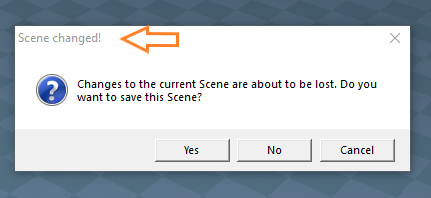
Have you tried Space.SceneHasChanged(false); ?
I have not been able to get the results I was expecting, but maybe you can
I have not been able to get the results I was expecting, but maybe you can
-
clintonman
- Captain
- Posts: 5659
- Joined: 21 May 2009, 21:08
- Type the number ten into the box: 0
- Location: California
Re: Final trueSpace7.61 Beta 8 Std Unofficial Update
never heard of it. where is more info?trueBlue wrote: 06 Sep 2022, 02:54 Have you tried Space.SceneHasChanged(false); ?
I have not been able to get the results I was expecting, but maybe you can
-
trueBlue
- Captain
- Posts: 5548
- Joined: 06 Jul 2009, 22:50
- Type the number ten into the box: 10
Re: Final trueSpace7.61 Beta 8 Std Unofficial Update
It is a bool
I have used it to Load a RsScn without the dialog for Shared Space
I have used it to Load a RsScn without the dialog for Shared Space
-
clintonman
- Captain
- Posts: 5659
- Joined: 21 May 2009, 21:08
- Type the number ten into the box: 0
- Location: California
Re: Final trueSpace7.61 Beta 8 Std Unofficial Update
How did you find out about it?trueBlue wrote: 06 Sep 2022, 02:58 It is a bool
I have used it to Load a RsScn without the dialog for Shared Space
-
clintonman
- Captain
- Posts: 5659
- Joined: 21 May 2009, 21:08
- Type the number ten into the box: 0
- Location: California
Re: Final trueSpace7.61 Beta 8 Std Unofficial Update

-
trueBlue
- Captain
- Posts: 5548
- Joined: 06 Jul 2009, 22:50
- Type the number ten into the box: 10
Re: Final trueSpace7.61 Beta 8 Std Unofficial Update
No, and I just looked in the SDK and RsCmdDoc.xml
No info that I could see
Maybe it is only used internally when using New Scene
No info that I could see
Maybe it is only used internally when using New Scene
-
clintonman
- Captain
- Posts: 5659
- Joined: 21 May 2009, 21:08
- Type the number ten into the box: 0
- Location: California
Re: Final trueSpace7.61 Beta 8 Std Unofficial Update
I did some tests and I don't see it doing anything except setting to false makes it so a new scene or load scene will immediately replace the scene whether it has changes or not. It doesn't look useful at all.
-
trueBlue
- Captain
- Posts: 5548
- Joined: 06 Jul 2009, 22:50
- Type the number ten into the box: 10
Re: Final trueSpace7.61 Beta 8 Std Unofficial Update
trueSpace7.61 Beta 8 Standalone Unofficial Update Version 9
Please test this prerelease
Unofficial Update Instructions:
Recommend that you completely Uninstall and Install trueSpace7.61 Standalone to a clean directory
1.) Run the tS7.61B8Std.9.exe
2.) Browse [...] to where you installed C:\trueSpace761Std, select its folder and then the Extract button
3.) Select the Yes to All button
4.) Open trueSpace and select the Reset to Default Context icon
5.) In Workspace select the Default layout tab
6.) Exit trueSpace
The included Clintons3dPlugin.dll, Clintons3dPluginExt.dll, Clintons3dRsView.dll and OptDetectors.dll, are Installed to the default path: C:\trueSpace761Std
Package Manager shows these plugins in system
WARNING: These 4 plugins are now loaded from the init.js file and should not be Installed & Loaded from the Package Manager
All scripts that checked for these previous plugins with the rsx extension have been removed!
.
Updates:
Toolbars
Fixed - ParentingToolbar & ClintonsToolbar/Parenting button's HelpText, removed the polyh# tag from the "G-" button and changed the AgentID
Plugins
Renamed from rsx to dll:
Clintons3dPlugin.dll
Clintons3dRsView.dll
Clintons3dPluginExt.dll
Add
OptDetectors.dll
Scripts
Update init.js
Loads the above 4 plugins
Removed Plugins.xml
preobjects
Update
Yafaray Folder
MaterialEditor
UUCommands
Widgets
CustomCommands
Update
WebServer
YafarayScripts
wsLayersGroup
Guard
wsLayersGroup4
Copy Attributes
Removed due to update
Please test this prerelease
Unofficial Update Instructions:
Recommend that you completely Uninstall and Install trueSpace7.61 Standalone to a clean directory
1.) Run the tS7.61B8Std.9.exe
2.) Browse [...] to where you installed C:\trueSpace761Std, select its folder and then the Extract button
3.) Select the Yes to All button
4.) Open trueSpace and select the Reset to Default Context icon
5.) In Workspace select the Default layout tab
6.) Exit trueSpace
The included Clintons3dPlugin.dll, Clintons3dPluginExt.dll, Clintons3dRsView.dll and OptDetectors.dll, are Installed to the default path: C:\trueSpace761Std
Package Manager shows these plugins in system
WARNING: These 4 plugins are now loaded from the init.js file and should not be Installed & Loaded from the Package Manager
All scripts that checked for these previous plugins with the rsx extension have been removed!

Updates:
Toolbars
Fixed - ParentingToolbar & ClintonsToolbar/Parenting button's HelpText, removed the polyh# tag from the "G-" button and changed the AgentID
Plugins
Renamed from rsx to dll:
Clintons3dPlugin.dll
Clintons3dRsView.dll
Clintons3dPluginExt.dll
Add
OptDetectors.dll
Scripts
Update init.js
Loads the above 4 plugins
Removed Plugins.xml
preobjects
Update
Yafaray Folder
MaterialEditor
UUCommands
Widgets
CustomCommands
Update
WebServer
YafarayScripts
wsLayersGroup
Guard
wsLayersGroup4
Copy Attributes
Removed due to update
-
trueBlue
- Captain
- Posts: 5548
- Joined: 06 Jul 2009, 22:50
- Type the number ten into the box: 10
Re: Final trueSpace7.61 Beta 8 Std Unofficial Update
trueSpace7.61 Beta 8 Standalone Unofficial Update Version 9
Please test this prerelease
Unofficial Update Instructions:
Recommend that you completely Uninstall and Install trueSpace7.61 Standalone to a clean directory
Exit trueSpace7.61 Standalone
1.) Run the tS7.61B8Std.9.exe
2.) Browse [...] to where you installed C:\trueSpace761Std, select its folder and then the Extract button
3.) Select the Yes to All button
4.) Open trueSpace7.61 Standalone and press the Reset to Default Context icon
5.) In Workspace select the Default layout tab
The included Clintons3dPlugin.dll, Clintons3dPluginExt.dll, Clintons3dRsView.dll and OptDetectors.dll, are in: C:\trueSpace761Std
Package Manager shows these plugins imported into system
WARNING: These 4 plugins should not be Installed & Loaded from the Package Manager!
All scripts that check for these plugins with the rsx extension have been removed!
Updates:
Plugins
Renamed from rsx to dll:
Clintons3dPlugin.dll
Clintons3dRsView.dll
Clintons3dPluginExt.dll
Add
OptDetectors.dll
Scripts
Removed - Plugins.xml
Update - init.js
Loads the above 4 plugins
preobjects
Update
Toolbars
Yafaray Folder
MaterialEditor
UUCommands
Widgets
CustomCommands
Add - JSON Function Set
Update
WebServer
wsLayersGroup4
YafarayScripts
Guard
Copy Attributes
UUCommands
Add - Global Function Set
Update
Cut
Paste
Library
Add
OptDetectors
OptDetectors - Help objects
OptDetectors - Samples
Removed due to update
Please test this prerelease
Unofficial Update Instructions:
Recommend that you completely Uninstall and Install trueSpace7.61 Standalone to a clean directory
Exit trueSpace7.61 Standalone
1.) Run the tS7.61B8Std.9.exe
2.) Browse [...] to where you installed C:\trueSpace761Std, select its folder and then the Extract button
3.) Select the Yes to All button
4.) Open trueSpace7.61 Standalone and press the Reset to Default Context icon
5.) In Workspace select the Default layout tab
The included Clintons3dPlugin.dll, Clintons3dPluginExt.dll, Clintons3dRsView.dll and OptDetectors.dll, are in: C:\trueSpace761Std
Package Manager shows these plugins imported into system
WARNING: These 4 plugins should not be Installed & Loaded from the Package Manager!
All scripts that check for these plugins with the rsx extension have been removed!
Updates:
Plugins
Renamed from rsx to dll:
Clintons3dPlugin.dll
Clintons3dRsView.dll
Clintons3dPluginExt.dll
Add
OptDetectors.dll
Scripts
Removed - Plugins.xml
Update - init.js
Loads the above 4 plugins
preobjects
Update
Toolbars
Yafaray Folder
MaterialEditor
UUCommands
Widgets
CustomCommands
Add - JSON Function Set
Update
WebServer
wsLayersGroup4
YafarayScripts
Guard
Copy Attributes
UUCommands
Add - Global Function Set
Update
Cut
Paste
Library
Add
OptDetectors
OptDetectors - Help objects
OptDetectors - Samples
Removed due to update
-
trueBlue
- Captain
- Posts: 5548
- Joined: 06 Jul 2009, 22:50
- Type the number ten into the box: 10
Re: Final trueSpace7.61 Beta 8 Std Unofficial Update
trueSpace7.61 Beta 8 Standalone Unofficial Update Version 9
Please test this prerelease
Unofficial Update Instructions:
Recommend that you completely Uninstall and Install trueSpace7.61 Standalone to a clean directory
Exit trueSpace7.61 Standalone
1.) Run the tS7.61B8Std.9.exe
2.) Browse [...] to where you installed C:\trueSpace761Std, select its folder and then the Extract button
3.) Select the Yes to All button
4.) Open trueSpace7.61 Standalone and press the Reset to Default Context icon
5.) In Workspace select the Default layout tab
The included Clintons3dPlugin.dll, Clintons3dPluginExt.dll, Clintons3dRsView.dll and OptDetectors.dll, are in: C:\trueSpace761Std
Package Manager shows these plugins imported into system
WARNING: These 4 plugins should not be Installed & Loaded from the Package Manager!
All scripts that check for these plugins with the rsx extension have been removed!
Updates:
Plugins
Renamed from rsx to dll:
Clintons3dPlugin.dll
Clintons3dRsView.dll
Clintons3dPluginExt.dll
Add
OptDetectors.dll
Author - Vladimir Sisolak
http://rs.siprogs.sk/p/iOptDetectorsPage
Scripts
Removed - Plugins.xml
Update - init.js
Loads the above 4 plugins
preobjects
Update
Toolbars
Yafaray Folder
MaterialEditor
UUCommands
Widgets
CustomCommands
Add - JSON Function Set
Update
WebServer Update: Author - Clinton Reese Wed Sep 21, 2022 5:51 pm
wsLayersGroup4
YafarayScripts
Guard
Copy Attributes
UUCommands
Add - Global Function Set
Update
Cut
Paste
Library
Add
OptDetectors
OptDetectors - Help objects
OptDetectors - Samples
Removed due to update
Please test this prerelease
Unofficial Update Instructions:
Recommend that you completely Uninstall and Install trueSpace7.61 Standalone to a clean directory
Exit trueSpace7.61 Standalone
1.) Run the tS7.61B8Std.9.exe
2.) Browse [...] to where you installed C:\trueSpace761Std, select its folder and then the Extract button
3.) Select the Yes to All button
4.) Open trueSpace7.61 Standalone and press the Reset to Default Context icon
5.) In Workspace select the Default layout tab
The included Clintons3dPlugin.dll, Clintons3dPluginExt.dll, Clintons3dRsView.dll and OptDetectors.dll, are in: C:\trueSpace761Std
Package Manager shows these plugins imported into system
WARNING: These 4 plugins should not be Installed & Loaded from the Package Manager!
All scripts that check for these plugins with the rsx extension have been removed!
Updates:
Plugins
Renamed from rsx to dll:
Clintons3dPlugin.dll
Clintons3dRsView.dll
Clintons3dPluginExt.dll
Add
OptDetectors.dll
Author - Vladimir Sisolak
http://rs.siprogs.sk/p/iOptDetectorsPage
Scripts
Removed - Plugins.xml
Update - init.js
Loads the above 4 plugins
preobjects
Update
Toolbars
Yafaray Folder
MaterialEditor
UUCommands
Widgets
CustomCommands
Add - JSON Function Set
Update
WebServer Update: Author - Clinton Reese Wed Sep 21, 2022 5:51 pm
wsLayersGroup4
YafarayScripts
Guard
Copy Attributes
UUCommands
Add - Global Function Set
Update
Cut
Paste
Library
Add
OptDetectors
OptDetectors - Help objects
OptDetectors - Samples
Removed due to update
-
trueBlue
- Captain
- Posts: 5548
- Joined: 06 Jul 2009, 22:50
- Type the number ten into the box: 10
Re: Final trueSpace7.61 Beta 8 Std Unofficial Update
@Clinton
.
I have made a simple change to all 4 Encapsulation scripts and the UI
1) Will not encaps on single select object
2) Status message no longer runs when encaps does not execute
3) Add modal question to 2D Encaps:
WARNING!
2D Unencapsulate will extract all internal objects!
Are you sure you want to continue?
ToDo:
WebServer/Parenting Function Set
Let me know if you approve
Removed due to update

- Encaps panels.png (27.17 KiB) Viewed 1473 times
I have made a simple change to all 4 Encapsulation scripts and the UI
1) Will not encaps on single select object
2) Status message no longer runs when encaps does not execute
3) Add modal question to 2D Encaps:
WARNING!
2D Unencapsulate will extract all internal objects!
Are you sure you want to continue?
ToDo:
WebServer/Parenting Function Set
Code: Select all
function UnGroup(datafromweb, params)
{
ScriptObject.Execute("/Scripts/UUCommands/Encapsulate/2D Unencapsulate");
//	LE.Unencapsulate('');
	RefreshWholeTree(datafromweb, params);
}Removed due to update
-
clintonman
- Captain
- Posts: 5659
- Joined: 21 May 2009, 21:08
- Type the number ten into the box: 0
- Location: California
Re: Final trueSpace7.61 Beta 8 Std Unofficial Update
trueBlue wrote: 24 Sep 2022, 18:24 @Clinton
Encaps panels.png
.
I have made a simple change to all 4 Encapsulation scripts and the UI
1) Will not encaps on single select object
2) Status message no longer runs when encaps does not execute
3) Add modal question to 2D Encaps:
WARNING!
2D Unencapsulate will extract all internal objects!
Are you sure you want to continue?
...
Let me know if you approve

- EncapsulateOptions.jpg (42.82 KiB) Viewed 1460 times
2) add option to turn off unencapsulate question
3) all questions use global fs question
4) if try to encapsulate a single object ask question to enable single object encapsulation
5) defaults setup to not allow single object encapsulation and always ask the unencapsulate question
- Attachments
-
- Encapsulate4062.RsObj
- (79.37 KiB) Downloaded 119 times
-
trueBlue
- Captain
- Posts: 5548
- Joined: 06 Jul 2009, 22:50
- Type the number ten into the box: 10
Re: Final trueSpace7.61 Beta 8 Std Unofficial Update
Options are always good, thanks!
In your opinion, why allow a single selected object to be encapsulated?
Or tell me an example why it would be beneficial
For me, I just see the potential for an overly complicated Hierarchy
In your opinion, why allow a single selected object to be encapsulated?
Or tell me an example why it would be beneficial
For me, I just see the potential for an overly complicated Hierarchy
-
clintonman
- Captain
- Posts: 5659
- Joined: 21 May 2009, 21:08
- Type the number ten into the box: 0
- Location: California
Re: Final trueSpace7.61 Beta 8 Std Unofficial Update
Better to have 1 version of the code that works with and without the UU.trueBlue wrote: 24 Sep 2022, 18:24 @Clinton
...
ToDo:
WebServer/Parenting Function Set
Let me know if you approveCode: Select all
function UnGroup(datafromweb, params)
{
ScriptObject.Execute("/Scripts/UUCommands/Encapsulate/2D Unencapsulate");
//	LE.Unencapsulate('');
	RefreshWholeTree(datafromweb, params);
}
Code: Select all
function UnGroup(datafromweb, params)
{
	if(Node.Exists("/Scripts/UUCommands/Encapsulate/2D Unencapsulate")) {
		ScriptObject.Execute("/Scripts/UUCommands/Encapsulate/2D Unencapsulate");
	} else {
		LE.Unencapsulate('');
	}
	RefreshWholeTree(datafromweb, params);
}-
clintonman
- Captain
- Posts: 5659
- Joined: 21 May 2009, 21:08
- Type the number ten into the box: 0
- Location: California
Re: Final trueSpace7.61 Beta 8 Std Unofficial Update
One sample:trueBlue wrote: 24 Sep 2022, 22:14 Options are always good, thanks!
In your opinion, why allow a single selected object to be encapsulated?
Or tell me an example why it would be beneficial
For me, I just see the potential for an overly complicated Hierarchy
Add a cube somewhere in the scene away from the origin.
Rotate the cube with the widget LMB and RMB both are the same.
3D Group the cube
On group LMB and RMB rotate and it's not the same.
Infinite other samples that I don't even know about...
Every obstacle limits what the user can do. People are capable of thinking way outside the box. It's important not to tie their hands or limit their options.
-
trueBlue
- Captain
- Posts: 5548
- Joined: 06 Jul 2009, 22:50
- Type the number ten into the box: 10
Re: Final trueSpace7.61 Beta 8 Std Unofficial Update
I see, thanks!
Really like how you setup the Single selected Encapsulation code!
Really like how you setup the Single selected Encapsulation code!
-
trueBlue
- Captain
- Posts: 5548
- Joined: 06 Jul 2009, 22:50
- Type the number ten into the box: 10
Re: Final trueSpace7.61 Beta 8 Std Unofficial Update
3D Unencapsulate
Is there a way to not run the status message if there is no encapsulation?
I thought the above committed line was working
Code: Select all
	//if(!numSelected < 1) !numSelected changes to true/false values (0, -1), both are less than 1
	util = System.CreateDO("Clintons3D Package/Utility functions");
	util.SetStatusMessage("3D Unencapsulation complete", 5000);
I thought the above committed line was working
-
clintonman
- Captain
- Posts: 5659
- Joined: 21 May 2009, 21:08
- Type the number ten into the box: 0
- Location: California
Re: Final trueSpace7.61 Beta 8 Std Unofficial Update
Can't use numSelected because if something like a camera is selected it won't unencaps. Below uses "unencapsHappened" variable that's only set if an unencaps runs.trueBlue wrote: 25 Sep 2022, 00:08 3D UnencapsulateIs there a way to not run the status message if there is no encapsulation?Code: Select all
	//if(!numSelected < 1) !numSelected changes to true/false values (0, -1), both are less than 1
	util = System.CreateDO("Clintons3D Package/Utility functions");
	util.SetStatusMessage("3D Unencapsulation complete", 5000);
I thought the above committed line was working
Code: Select all
function Execute(params)
{
	var sel = Node.Selection(); //list of selected nodes

	if(!IsValidSelection(sel)) return;

	var numSelected = Node.SelectionLength(sel); // number of selected nodes

	if(numSelected < 1) return;

	var unencapsHappened = false;

	for (var i = 0; i < numSelected; i++)
	{
		var currentEncapsed = Node.SelectionGetAt(sel, i);
		if(Node.IsCamera(currentEncapsed)) continue;
		if(Node.IsLight(currentEncapsed)) continue;
		if(Node.SubObjectCount(currentEncapsed) == 0) continue;
		if(Node.IsRenderable(currentEncapsed)) continue;
		if(isaNURBS(currentEncapsed)) continue;

		CleanRenderAttr(currentEncapsed)
		UnEncaps(currentEncapsed);
		unencapsHappened = true;
	}

	if(!unencapsHappened) return;

	util = System.CreateDO("Clintons3D Package/Utility functions");
	util.SetStatusMessage("3D Unencapsulation complete", 5000);
}-
trueBlue
- Captain
- Posts: 5548
- Joined: 06 Jul 2009, 22:50
- Type the number ten into the box: 10

-
trueBlue
- Captain
- Posts: 5548
- Joined: 06 Jul 2009, 22:50
- Type the number ten into the box: 10
Re: Final trueSpace7.61 Beta 8 Std Unofficial Update
trueSpace7.61 Beta 8 Standalone Unofficial Update Version 9
Please test this prerelease
New Unofficial Update Instructions:
It is Required that you completely Uninstall and Install trueSpace7.61 Standalone to a clean directory
You can keep your Libraries but all other folders and files should be removed
Install tS761B8Std.exe to C:\trueSpace761Std
If trueSpace is open, Close trueSpace
1.) Install the YafaRay v3.3.0 render engine
2.) Install tS76_Vray1_54B8.exe to C:\trueSpace761Std
3.) Install tS7.61B8Std.9.exe to C:\trueSpace761Std
Browse [...] to where you installed C:\trueSpace761Std, select its folder and then the Extract button
Select the Yes to All button
4.) Open trueSpace
5.) Select the OK button in the OptDetectors plugin Information dialog
.
6.) Press your keyboard's SHIFT CTRL R keys to Reset to Default Context
When trueSpace opens, select one of the layout tabs at the top
7.) Press your keyboard's CTRL + F8 keys to open the Package Manager
Right click in the Package Manager and select Install New...
Open C:\trueSpace761Std\Vray_ts.rsx
Right click in the Package Manager's Vray Package and select Load
Close the Package Manager
8.) Close trueSpace
9.) Delete the tS folder installed by the Vray installer
The included Clintons3dPlugin.dll v.1638433, Clintons3dPluginExt.dll v.1638413, Clintons3dRsView.dll v.1638409 and OptDetectors.dll, are in: C:\trueSpace761Std
WARNING: The init.js file Imports the above 4 plugins and should not be Installed from the Package Manager, including any other plugins with the same name that have the rsx extention
All scripts that check for these plugins with the rsx extension have been removed!
Updates:
Scripts
Update - init.js 'Import the above 4 plugins'
New in this release, Import LwME.dll 'Needed for Vray'
preobjects
Update UUCommands Author - Clinton Reese
UUCommands/Global Function Set 'function OpenPanel_FindFreeSpace' Changed: var maxStandardPanelWidth = 218
UUCommands/Encapsulate 'Updated all scripts and UI'
CustomCommands
Update
WebServer/Parenting Function Set 'function UnGroup' Add: ScriptObject.Execute("/Scripts/UUCommands/Encapsulate/2D Unencapsulate");
Rs Main Libraries
Scenes - Active
Add
Talented Ball Author - Clinton Reese
Scenes - Base
D3D TRT 'Replaced the ugly Head'
OptDetectors
Add
Render to Texture iOpt Camera
Video iOpt Player
Vray Materials
Animation scripts
Vray - Animation scripts
Vray Scenes
Vray Shaders - Color
Vray Shaders - Displacement
Vray Shaders - Reflectance
Vray Shaders - Transparency
Textures
Add all images from the tS761 installation 'Some of them needed for Vray'
Removed due to update
Please test this prerelease
New Unofficial Update Instructions:
It is Required that you completely Uninstall and Install trueSpace7.61 Standalone to a clean directory
You can keep your Libraries but all other folders and files should be removed
Install tS761B8Std.exe to C:\trueSpace761Std
If trueSpace is open, Close trueSpace
1.) Install the YafaRay v3.3.0 render engine
2.) Install tS76_Vray1_54B8.exe to C:\trueSpace761Std
3.) Install tS7.61B8Std.9.exe to C:\trueSpace761Std
Browse [...] to where you installed C:\trueSpace761Std, select its folder and then the Extract button
Select the Yes to All button
4.) Open trueSpace
5.) Select the OK button in the OptDetectors plugin Information dialog

- iOpt plugin Alert.png (7.44 KiB) Viewed 1453 times
6.) Press your keyboard's SHIFT CTRL R keys to Reset to Default Context
When trueSpace opens, select one of the layout tabs at the top
7.) Press your keyboard's CTRL + F8 keys to open the Package Manager
Right click in the Package Manager and select Install New...
Open C:\trueSpace761Std\Vray_ts.rsx
Right click in the Package Manager's Vray Package and select Load
Close the Package Manager
8.) Close trueSpace
9.) Delete the tS folder installed by the Vray installer
The included Clintons3dPlugin.dll v.1638433, Clintons3dPluginExt.dll v.1638413, Clintons3dRsView.dll v.1638409 and OptDetectors.dll, are in: C:\trueSpace761Std
WARNING: The init.js file Imports the above 4 plugins and should not be Installed from the Package Manager, including any other plugins with the same name that have the rsx extention
All scripts that check for these plugins with the rsx extension have been removed!
Updates:
Scripts
Update - init.js 'Import the above 4 plugins'
New in this release, Import LwME.dll 'Needed for Vray'
preobjects
Update UUCommands Author - Clinton Reese
UUCommands/Global Function Set 'function OpenPanel_FindFreeSpace' Changed: var maxStandardPanelWidth = 218
UUCommands/Encapsulate 'Updated all scripts and UI'
CustomCommands
Update
WebServer/Parenting Function Set 'function UnGroup' Add: ScriptObject.Execute("/Scripts/UUCommands/Encapsulate/2D Unencapsulate");
Rs Main Libraries
Scenes - Active
Add
Talented Ball Author - Clinton Reese
Scenes - Base
D3D TRT 'Replaced the ugly Head'
OptDetectors
Add
Render to Texture iOpt Camera
Video iOpt Player
Vray Materials
Animation scripts
Vray - Animation scripts
Vray Scenes
Vray Shaders - Color
Vray Shaders - Displacement
Vray Shaders - Reflectance
Vray Shaders - Transparency
Textures
Add all images from the tS761 installation 'Some of them needed for Vray'
Removed due to update
-
trueBlue
- Captain
- Posts: 5548
- Joined: 06 Jul 2009, 22:50
- Type the number ten into the box: 10
Re: Final trueSpace7.61 Beta 8 Std Unofficial Update
trueSpace7.61 Beta 8 Standalone Unofficial Update Version 9
Please test this prerelease
New Unofficial Update Instructions:
It is Required that you completely Uninstall and Install trueSpace7.61 Standalone to a clean directory
You can keep your Rs Main Libraries folder, but all other folders and files should be removed
Install tS761B8Std.exe to C:\trueSpace761Std
If trueSpace is open, Close trueSpace
1.) Install the YafaRay v3.3.0 render engine
2.) Install tS76_Vray1_54B8.exe to C:\trueSpace761Std [Optional]
3.) Install tS7.61B8Std.9.exe to C:\trueSpace761Std
Browse [...] to where you installed C:\trueSpace761Std, select its folder and then the Extract button
Select the Yes to All button
4.) Open trueSpace
5.) Select the OK button in the OptDetectors plugin Information dialog
6.) Press your keyboard's SHIFT CTRL R keys to Reset to Default Context
When trueSpace opens, select one of the layout tabs at the top
7.) Press your keyboard's CTRL + F8 keys to open the Package Manager [if Vray is installed]
Right click in the Package Manager and select Install New...
Open C:\trueSpace761Std\Vray_ts.rsx
Right click in the Package Manager's Vray Package and select Load
Close the Package Manager
8.) Close trueSpace
9.) Delete the tS folder installed by the Vray installer [If Vray is installed]
The included Clintons3dPlugin.dll v.1638433, Clintons3dPluginExt.dll v.1638413, Clintons3dRsView.dll v.1638409 and OptDetectors.dll, are in: C:\trueSpace761Std
WARNING: The init.js file Imports the above 4 plugins and should not be Installed from the Package Manager, including any other plugins with the same name that have the rsx extention
All scripts that check for these plugins with the rsx extension have been removed!
Updates:
AnimPref panel 'Removed Snapping title'
Rs Main Libraries
Scenes - Active
Talented Ball Author - Clinton Reese 'Updated animation with Sound'
15 Game 'Updated with Sound and add a Settings script
OptDetectors
Render to Texture iOpt Camera
Video iOpt Player
Updates: 'Add code that closes opened frames with a BitmapView node and fixed Pause code'
Postprocess
Rosetta.RsScn 'Add animation and a Reset Settings script'
Sounds
Add:
3D Sound Object
Sounds In Out
Updated misc. library objects
Removed due to update
Please test this prerelease
New Unofficial Update Instructions:
It is Required that you completely Uninstall and Install trueSpace7.61 Standalone to a clean directory
You can keep your Rs Main Libraries folder, but all other folders and files should be removed
Install tS761B8Std.exe to C:\trueSpace761Std
If trueSpace is open, Close trueSpace
1.) Install the YafaRay v3.3.0 render engine
2.) Install tS76_Vray1_54B8.exe to C:\trueSpace761Std [Optional]
3.) Install tS7.61B8Std.9.exe to C:\trueSpace761Std
Browse [...] to where you installed C:\trueSpace761Std, select its folder and then the Extract button
Select the Yes to All button
4.) Open trueSpace
5.) Select the OK button in the OptDetectors plugin Information dialog
6.) Press your keyboard's SHIFT CTRL R keys to Reset to Default Context
When trueSpace opens, select one of the layout tabs at the top
7.) Press your keyboard's CTRL + F8 keys to open the Package Manager [if Vray is installed]
Right click in the Package Manager and select Install New...
Open C:\trueSpace761Std\Vray_ts.rsx
Right click in the Package Manager's Vray Package and select Load
Close the Package Manager
8.) Close trueSpace
9.) Delete the tS folder installed by the Vray installer [If Vray is installed]
The included Clintons3dPlugin.dll v.1638433, Clintons3dPluginExt.dll v.1638413, Clintons3dRsView.dll v.1638409 and OptDetectors.dll, are in: C:\trueSpace761Std
WARNING: The init.js file Imports the above 4 plugins and should not be Installed from the Package Manager, including any other plugins with the same name that have the rsx extention
All scripts that check for these plugins with the rsx extension have been removed!
Updates:
AnimPref panel 'Removed Snapping title'
Rs Main Libraries
Scenes - Active
Talented Ball Author - Clinton Reese 'Updated animation with Sound'
15 Game 'Updated with Sound and add a Settings script
OptDetectors
Render to Texture iOpt Camera
Video iOpt Player
Updates: 'Add code that closes opened frames with a BitmapView node and fixed Pause code'
Postprocess
Rosetta.RsScn 'Add animation and a Reset Settings script'
Sounds
Add:
3D Sound Object
Sounds In Out
Updated misc. library objects
Removed due to update
-
trueBlue
- Captain
- Posts: 5548
- Joined: 06 Jul 2009, 22:50
- Type the number ten into the box: 10
Re: Final trueSpace7.61 Beta 8 Std Unofficial Update
trueSpace7.61 Beta 8 Standalone Unofficial Update Version 9
Please test this prerelease
New Unofficial Update Instructions:
It is Required that you completely Uninstall and Install trueSpace7.61 Standalone to a clean directory
You can keep your Rs Main Libraries folder, but all other folders and files should be removed
Install tS761B8Std.exe to C:\trueSpace761Std
If trueSpace is open, Close trueSpace
1.) Install the YafaRay v3.3.0 render engine
2.) Install tS76_Vray1_54B8.exe to C:\trueSpace761Std [Optional]
3.) Install tS7.61B8Std.9.exe to C:\trueSpace761Std
Browse [...] to where you installed C:\trueSpace761Std, select its folder and then the Extract button
Select the Yes to All button
4.) Open trueSpace
5.) Select the OK button in the OptDetectors plugin Information dialog
6.) Press your keyboard's SHIFT CTRL R keys to Reset to Default Context
When trueSpace opens, select one of the layout tabs at the top
7.) Press your keyboard's CTRL + F8 keys to open the Package Manager [if Vray is installed]
Right click in the Package Manager and select Install New...
Open C:\trueSpace761Std\Vray_ts.rsx
Right click in the Package Manager's Vray Package and select Load
Close the Package Manager
8.) Close trueSpace
9.) Delete the tS folder installed by the Vray installer [If Vray is installed]
The included Clintons3dPlugin.dll v.1638433, Clintons3dPluginExt.dll v.1638413, Clintons3dRsView.dll v.1638409 and OptDetectors.dll, are in: C:\trueSpace761Std
WARNING: The init.js file Imports the above 4 plugins and should not be Installed from the Package Manager, including any other plugins with the same name that have the rsx extention
All scripts that check for these plugins with the rsx extension have been removed!
Updates:
Toolbars
WorkspaceMainMenu/Help
Add
Close All buttons
.
Scripts
UUCommands
Add
Close All Toolbars Windows and Panels
Close All Panels 'Author - Clinton Reese'
Display Toolbars
Restore Toolbars 'Restores the SnappedTo attribute
Desktop
Display Toolbars button
Moved button script to UUCommands
Rs Main Libraries
Animations - Animations
Updated
Jumping Sphere
Living circle
Sim Activity
Removed due to Update
Please test this prerelease
New Unofficial Update Instructions:
It is Required that you completely Uninstall and Install trueSpace7.61 Standalone to a clean directory
You can keep your Rs Main Libraries folder, but all other folders and files should be removed
Install tS761B8Std.exe to C:\trueSpace761Std
If trueSpace is open, Close trueSpace
1.) Install the YafaRay v3.3.0 render engine
2.) Install tS76_Vray1_54B8.exe to C:\trueSpace761Std [Optional]
3.) Install tS7.61B8Std.9.exe to C:\trueSpace761Std
Browse [...] to where you installed C:\trueSpace761Std, select its folder and then the Extract button
Select the Yes to All button
4.) Open trueSpace
5.) Select the OK button in the OptDetectors plugin Information dialog
6.) Press your keyboard's SHIFT CTRL R keys to Reset to Default Context
When trueSpace opens, select one of the layout tabs at the top
7.) Press your keyboard's CTRL + F8 keys to open the Package Manager [if Vray is installed]
Right click in the Package Manager and select Install New...
Open C:\trueSpace761Std\Vray_ts.rsx
Right click in the Package Manager's Vray Package and select Load
Close the Package Manager
8.) Close trueSpace
9.) Delete the tS folder installed by the Vray installer [If Vray is installed]
The included Clintons3dPlugin.dll v.1638433, Clintons3dPluginExt.dll v.1638413, Clintons3dRsView.dll v.1638409 and OptDetectors.dll, are in: C:\trueSpace761Std
WARNING: The init.js file Imports the above 4 plugins and should not be Installed from the Package Manager, including any other plugins with the same name that have the rsx extention
All scripts that check for these plugins with the rsx extension have been removed!
Updates:
Toolbars
WorkspaceMainMenu/Help
Add
Close All buttons

Scripts
UUCommands
Add
Close All Toolbars Windows and Panels
Close All Panels 'Author - Clinton Reese'
Display Toolbars
Restore Toolbars 'Restores the SnappedTo attribute
Desktop
Display Toolbars button
Moved button script to UUCommands
Rs Main Libraries
Animations - Animations
Updated
Jumping Sphere
Living circle
Sim Activity
Removed due to Update
-
trueBlue
- Captain
- Posts: 5548
- Joined: 06 Jul 2009, 22:50
- Type the number ten into the box: 10
Re: Final trueSpace7.61 Beta 8 Std Unofficial Update
trueSpace7.61 Beta 8 Standalone Unofficial Update Version 9
Please test this prerelease
New Unofficial Update Instructions:
It is Required that you completely Uninstall and Install trueSpace7.61 Standalone to a clean directory
You can keep your Rs Main Libraries folder, but all other folders and files should be removed
Install tS761B8Std.exe to C:\trueSpace761Std
If trueSpace is open, Close trueSpace
1.) Install the YafaRay v3.3.0 render engine
2.) Install tS76_Vray1_54B8.exe to C:\trueSpace761Std [Optional]
3.) Install tS7.61B8Std.9.exe to C:\trueSpace761Std
Browse [...] to where you installed C:\trueSpace761Std, select its folder and then the Extract button
Select the Yes to All button
4.) Open trueSpace
5.) Select the OK button in the OptDetectors plugin Information dialog
6.) Press your keyboard's SHIFT CTRL R keys to Reset to Default Context
When trueSpace opens, select one of the layout tabs at the top
7.) Press your keyboard's CTRL + F8 keys to open the Package Manager [if Vray is installed]
Right click in the Package Manager and select Install New...
Open C:\trueSpace761Std\Vray_ts.rsx
Right click in the Package Manager's Vray Package and select Load
Close the Package Manager
8.) Close trueSpace
9.) Delete the tS folder installed by the Vray installer [If Vray is installed]
The included Clintons3dPlugin.dll v.1638433, Clintons3dPluginExt.dll v.1638413, Clintons3dRsView.dll v.1638409 and OptDetectors.dll, are in: C:\trueSpace761Std
WARNING: The init.js file Imports the above 4 plugins and should not be Installed from the Package Manager, including any other plugins with the same name that have the rsx extension
All scripts that check for these plugins with the rsx extension have been removed!
Updates:
Sripts/UUCommands
Update
Global Function Set 'Update 10/6/2022 Author - Clinton Reese'
CustomCommands
Hierarchy 'Update 10/6/2022 Author - Clinton Reese'
MeshOrigin 'Update 10/6/2022 Author - Clinton Reese'
radialArray2Script 'Made the widget Uneditable'
Align and Distribute 'Made the panel horizontal'
.
Update: Open Panel script list:
* Align and Distribute - open panel
* Select - OpenPanel
* Character FK Controls - openPanelFrame
* DeformScripts - openPanelFrame
* MirrorMatrix - openPanelFrame
NURBS
* latheCurveScript - openPanelFrame
* NURBSUtilities - openPanelFrame 'TODO check that the other settings are set on load'
* rebuildNURBSScript - openPanelFrame
UUCommands
* Look At - Utilities - Open floating panel
* Encapsulate - Open floating panel
Widgets/Tools
* Fix Bad Geometry
* Transform Objects & Transform Objects Help
TODO:
Constraint Scripts - OpenPanel 'Did not update due to uncertainty' ConstraintName Use: opens 4 different panels
KeyInterp - openPanel - 'Did not update due to uncertainty'
Removed due to update
Please test this prerelease
New Unofficial Update Instructions:
It is Required that you completely Uninstall and Install trueSpace7.61 Standalone to a clean directory
You can keep your Rs Main Libraries folder, but all other folders and files should be removed
Install tS761B8Std.exe to C:\trueSpace761Std
If trueSpace is open, Close trueSpace
1.) Install the YafaRay v3.3.0 render engine
2.) Install tS76_Vray1_54B8.exe to C:\trueSpace761Std [Optional]
3.) Install tS7.61B8Std.9.exe to C:\trueSpace761Std
Browse [...] to where you installed C:\trueSpace761Std, select its folder and then the Extract button
Select the Yes to All button
4.) Open trueSpace
5.) Select the OK button in the OptDetectors plugin Information dialog
6.) Press your keyboard's SHIFT CTRL R keys to Reset to Default Context
When trueSpace opens, select one of the layout tabs at the top
7.) Press your keyboard's CTRL + F8 keys to open the Package Manager [if Vray is installed]
Right click in the Package Manager and select Install New...
Open C:\trueSpace761Std\Vray_ts.rsx
Right click in the Package Manager's Vray Package and select Load
Close the Package Manager
8.) Close trueSpace
9.) Delete the tS folder installed by the Vray installer [If Vray is installed]
The included Clintons3dPlugin.dll v.1638433, Clintons3dPluginExt.dll v.1638413, Clintons3dRsView.dll v.1638409 and OptDetectors.dll, are in: C:\trueSpace761Std
WARNING: The init.js file Imports the above 4 plugins and should not be Installed from the Package Manager, including any other plugins with the same name that have the rsx extension
All scripts that check for these plugins with the rsx extension have been removed!
Updates:
Sripts/UUCommands
Update
Global Function Set 'Update 10/6/2022 Author - Clinton Reese'
CustomCommands
Hierarchy 'Update 10/6/2022 Author - Clinton Reese'
MeshOrigin 'Update 10/6/2022 Author - Clinton Reese'
radialArray2Script 'Made the widget Uneditable'
Align and Distribute 'Made the panel horizontal'

- Align and Distribute panel.png (35.74 KiB) Viewed 1378 times
Update: Open Panel script list:
* Align and Distribute - open panel
* Select - OpenPanel
* Character FK Controls - openPanelFrame
* DeformScripts - openPanelFrame
* MirrorMatrix - openPanelFrame
NURBS
* latheCurveScript - openPanelFrame
* NURBSUtilities - openPanelFrame 'TODO check that the other settings are set on load'
* rebuildNURBSScript - openPanelFrame
UUCommands
* Look At - Utilities - Open floating panel
* Encapsulate - Open floating panel
Widgets/Tools
* Fix Bad Geometry
* Transform Objects & Transform Objects Help
TODO:
Constraint Scripts - OpenPanel 'Did not update due to uncertainty' ConstraintName Use: opens 4 different panels
KeyInterp - openPanel - 'Did not update due to uncertainty'
Removed due to update
-
clintonman
- Captain
- Posts: 5659
- Joined: 21 May 2009, 21:08
- Type the number ten into the box: 0
- Location: California
Re: Final trueSpace7.61 Beta 8 Std Unofficial Update
Here's the updated KeyInterp and Constraints for opening the panel via global fs.
They still have all the old disabled code, so will need some cleanup.
I didn't see any issue with NURBSUtilities panel
They still have all the old disabled code, so will need some cleanup.
I didn't see any issue with NURBSUtilities panel
- Attachments
-
- KeyInterp417b.RsObj
- (132.63 KiB) Downloaded 88 times
-
- Constraint Scripts.RsObj
- (318.32 KiB) Downloaded 85 times
-
trueBlue
- Captain
- Posts: 5548
- Joined: 06 Jul 2009, 22:50
- Type the number ten into the box: 10
Re: Final trueSpace7.61 Beta 8 Std Unofficial Update
Thanks!clintonman wrote: 08 Oct 2022, 02:23 Here's the updated KeyInterp and Constraints for opening the panel via global fs.
They still have all the old disabled code, so will need some cleanup.
I didn't see any issue with NURBSUtilities panel
There is two other openPanelFrame scripts:
* latheCurveScript - openPanelFrame
* rebuildNURBSScript - openPanelFrame
-
clintonman
- Captain
- Posts: 5659
- Joined: 21 May 2009, 21:08
- Type the number ten into the box: 0
- Location: California
Re: Final trueSpace7.61 Beta 8 Std Unofficial Update
Looks like you already did the latheCurveScript and I don't see any problems.trueBlue wrote: 08 Oct 2022, 02:26Thanks!clintonman wrote: 08 Oct 2022, 02:23 Here's the updated KeyInterp and Constraints for opening the panel via global fs.
They still have all the old disabled code, so will need some cleanup.
I didn't see any issue with NURBSUtilities panel
There is two other openPanelFrame scripts:
* latheCurveScript - openPanelFrame
* rebuildNURBSScript - openPanelFrame
I see rebuildNURBSScript hasn't been touched yet, so here goes...
Edit: OK here's the rebuild update
- Attachments
-
- rebuildNURBSScript.RsObj
- (107.05 KiB) Downloaded 90 times
-
trueBlue
- Captain
- Posts: 5548
- Joined: 06 Jul 2009, 22:50
- Type the number ten into the box: 10
Re: Final trueSpace7.61 Beta 8 Std Unofficial Update
trueSpace7.61 Beta 8 Standalone Unofficial Update Version 9
Please test this prerelease
New Unofficial Update Instructions:
It is Required that you completely Uninstall and Install trueSpace7.61 Standalone to a clean directory
You can keep your Rs Main Libraries folder, but all other folders and files should be removed
Install tS761B8Std.exe to C:\trueSpace761Std
If trueSpace is open, Close trueSpace
1.) Install the YafaRay v3.3.0 render engine
2.) Install tS76_Vray1_54B8.exe to C:\trueSpace761Std [Optional]
3.) Install tS7.61B8Std.9.exe to C:\trueSpace761Std
Browse [...] to where you installed C:\trueSpace761Std, select its folder and then the Extract button
Select the Yes to All button
4.) Open trueSpace
5.) Select the OK button in the OptDetectors plugin Information dialog
6.) Press your keyboard's SHIFT CTRL R keys to Reset to Default Context
When trueSpace opens, select one of the layout tabs at the top
7.) Press your keyboard's CTRL + F8 keys to open the Package Manager [if Vray is installed]
Right click in the Package Manager and select Install New...
Open C:\trueSpace761Std\Vray_ts.rsx
Right click in the Package Manager's Vray Package and select Load
Close the Package Manager
8.) Close trueSpace
9.) Delete the tS folder installed by the Vray installer [If Vray is installed]
The included Clintons3dPlugin.dll v.1638433, Clintons3dPluginExt.dll v.1638413, Clintons3dRsView.dll v.1638409 and OptDetectors.dll, are in: C:\trueSpace761Std
WARNING: The init.js file Imports the above 4 plugins and should not be Installed from the Package Manager, including any other plugins with the same name that have the rsx extension
All scripts that check for these plugins with the rsx extension have been removed!
Updates:
Scripts/UUCommands
Update
Global Function Set
Add
Close Library Frames to the Close All Panels script
CustomCommands
Update: Open Floating Panel script list:
NURBS
* latheCurveScript - openPanelFrame
* NURBSUtilities - openPanelFrame
* rebuildNURBSScript - openPanelFrame
* Constraint Scripts - OpenPanel
* KeyInterp - openPanel
.
* pointCloneScript 'Toolbar LMB command opens the floating panel'
* radialArray2Script - doGrid
* gridArray2Script - doGrid
Thank you, Clinton!
Removed due to update
Please test this prerelease
New Unofficial Update Instructions:
It is Required that you completely Uninstall and Install trueSpace7.61 Standalone to a clean directory
You can keep your Rs Main Libraries folder, but all other folders and files should be removed
Install tS761B8Std.exe to C:\trueSpace761Std
If trueSpace is open, Close trueSpace
1.) Install the YafaRay v3.3.0 render engine
2.) Install tS76_Vray1_54B8.exe to C:\trueSpace761Std [Optional]
3.) Install tS7.61B8Std.9.exe to C:\trueSpace761Std
Browse [...] to where you installed C:\trueSpace761Std, select its folder and then the Extract button
Select the Yes to All button
4.) Open trueSpace
5.) Select the OK button in the OptDetectors plugin Information dialog
6.) Press your keyboard's SHIFT CTRL R keys to Reset to Default Context
When trueSpace opens, select one of the layout tabs at the top
7.) Press your keyboard's CTRL + F8 keys to open the Package Manager [if Vray is installed]
Right click in the Package Manager and select Install New...
Open C:\trueSpace761Std\Vray_ts.rsx
Right click in the Package Manager's Vray Package and select Load
Close the Package Manager
8.) Close trueSpace
9.) Delete the tS folder installed by the Vray installer [If Vray is installed]
The included Clintons3dPlugin.dll v.1638433, Clintons3dPluginExt.dll v.1638413, Clintons3dRsView.dll v.1638409 and OptDetectors.dll, are in: C:\trueSpace761Std
WARNING: The init.js file Imports the above 4 plugins and should not be Installed from the Package Manager, including any other plugins with the same name that have the rsx extension
All scripts that check for these plugins with the rsx extension have been removed!
Updates:
Scripts/UUCommands
Update
Global Function Set
Add
Close Library Frames to the Close All Panels script
CustomCommands
Update: Open Floating Panel script list:
NURBS
* latheCurveScript - openPanelFrame
* NURBSUtilities - openPanelFrame
* rebuildNURBSScript - openPanelFrame
* Constraint Scripts - OpenPanel
* KeyInterp - openPanel
.

* radialArray2Script - doGrid
* gridArray2Script - doGrid
Thank you, Clinton!
Removed due to update
-
clintonman
- Captain
- Posts: 5659
- Joined: 21 May 2009, 21:08
- Type the number ten into the box: 0
- Location: California
Re: Final trueSpace7.61 Beta 8 Std Unofficial Update
Here is a fix for the slowdown bug when many NURBS objects are moved in a 3D view. Every time the NURBS moved it was regenerated. The changes disconnect the matrix changes and only connects them when needed. Patches and curves need it for the UV indicators. The curves also need it for the Position on Curve
polycurve - disconnected LODMesh node OwnerMatrix connector from the internal curveShaper node cpMatrix connector
polypatch - disconnected controlPointMesh node WldMatrix connector from the CP to patch CP node CPMatrix connector
code changes in
NURBSScripts/NURBSUtilities/NURBSInfo/toggleUVIndicators
NURBSScripts/NURBSUtilities/NURBSInfo/uvIndicatorsOff
new command node toggles the matrix - it only needs to be on if the curve moves or is animated - I plan to do a proper write up on this soon
NURBSScripts/NURBSUtilities/togglePositionOnCurveMatrix
button Toggle Position on Curve in the NURBSUtilities Misc aspect
and that's all the changes needed to fix it.
polycurve - disconnected LODMesh node OwnerMatrix connector from the internal curveShaper node cpMatrix connector
polypatch - disconnected controlPointMesh node WldMatrix connector from the CP to patch CP node CPMatrix connector
code changes in
NURBSScripts/NURBSUtilities/NURBSInfo/toggleUVIndicators
NURBSScripts/NURBSUtilities/NURBSInfo/uvIndicatorsOff
new command node toggles the matrix - it only needs to be on if the curve moves or is animated - I plan to do a proper write up on this soon
NURBSScripts/NURBSUtilities/togglePositionOnCurveMatrix
button Toggle Position on Curve in the NURBSUtilities Misc aspect
and that's all the changes needed to fix it.
- Attachments
-
- NURBSScriptsbabd.RsObj
- (2.67 MiB) Downloaded 82 times
-
trueBlue
- Captain
- Posts: 5548
- Joined: 06 Jul 2009, 22:50
- Type the number ten into the box: 10
Re: Final trueSpace7.61 Beta 8 Std Unofficial Update
The NURBSUtilities/NURBSUtilitiesPanelFrame needs to be updatedclintonman wrote: 10 Oct 2022, 05:42 Here is a fix for the slowdown bug when many NURBS objects are moved in a 3D view. Every time the NURBS moved it was regenerated. The changes disconnect the matrix changes and only connects them when needed. Patches and curves need it for the UV indicators. The curves also need it for the Position on Curve
polycurve - disconnected LODMesh node OwnerMatrix connector from the internal curveShaper node cpMatrix connector
polypatch - disconnected controlPointMesh node WldMatrix connector from the CP to patch CP node CPMatrix connector
code changes in
NURBSScripts/NURBSUtilities/NURBSInfo/toggleUVIndicators
NURBSScripts/NURBSUtilities/NURBSInfo/uvIndicatorsOff
new command node toggles the matrix - it only needs to be on if the curve moves or is animated - I plan to do a proper write up on this soon
NURBSScripts/NURBSUtilities/togglePositionOnCurveMatrix
button Toggle Position on Curve in the NURBSUtilities Misc aspect
and that's all the changes needed to fix it.
- Attachments
-
- NURBSUtilitiesPanelFrame.RsObj
- (56.8 KiB) Downloaded 86 times
-
clintonman
- Captain
- Posts: 5659
- Joined: 21 May 2009, 21:08
- Type the number ten into the box: 0
- Location: California
Re: Final trueSpace7.61 Beta 8 Std Unofficial Update
How about a clue, what's the change?trueBlue wrote: 10 Oct 2022, 15:29The NURBSUtilities/NURBSUtilitiesPanelFrame needs to be updatedclintonman wrote: 10 Oct 2022, 05:42 Here is a fix for the slowdown bug when many NURBS objects are moved in a 3D view. Every time the NURBS moved it was regenerated. The changes disconnect the matrix changes and only connects them when needed. Patches and curves need it for the UV indicators. The curves also need it for the Position on Curve
polycurve - disconnected LODMesh node OwnerMatrix connector from the internal curveShaper node cpMatrix connector
polypatch - disconnected controlPointMesh node WldMatrix connector from the CP to patch CP node CPMatrix connector
code changes in
NURBSScripts/NURBSUtilities/NURBSInfo/toggleUVIndicators
NURBSScripts/NURBSUtilities/NURBSInfo/uvIndicatorsOff
new command node toggles the matrix - it only needs to be on if the curve moves or is animated - I plan to do a proper write up on this soon
NURBSScripts/NURBSUtilities/togglePositionOnCurveMatrix
button Toggle Position on Curve in the NURBSUtilities Misc aspect
and that's all the changes needed to fix it.
-
trueBlue
- Captain
- Posts: 5548
- Joined: 06 Jul 2009, 22:50
- Type the number ten into the box: 10
Re: Final trueSpace7.61 Beta 8 Std Unofficial Update
It has the wrong attribute valuesclintonman wrote: 10 Oct 2022, 15:43How about a clue, what's the change?trueBlue wrote: 10 Oct 2022, 15:29The NURBSUtilities/NURBSUtilitiesPanelFrame needs to be updatedclintonman wrote: 10 Oct 2022, 05:42 Here is a fix for the slowdown bug when many NURBS objects are moved in a 3D view. Every time the NURBS moved it was regenerated. The changes disconnect the matrix changes and only connects them when needed. Patches and curves need it for the UV indicators. The curves also need it for the Position on Curve
polycurve - disconnected LODMesh node OwnerMatrix connector from the internal curveShaper node cpMatrix connector
polypatch - disconnected controlPointMesh node WldMatrix connector from the CP to patch CP node CPMatrix connector
code changes in
NURBSScripts/NURBSUtilities/NURBSInfo/toggleUVIndicators
NURBSScripts/NURBSUtilities/NURBSInfo/uvIndicatorsOff
new command node toggles the matrix - it only needs to be on if the curve moves or is animated - I plan to do a proper write up on this soon
NURBSScripts/NURBSUtilities/togglePositionOnCurveMatrix
button Toggle Position on Curve in the NURBSUtilities Misc aspect
and that's all the changes needed to fix it.
When I opened the floating panel, it was not positioned correctly
-
clintonman
- Captain
- Posts: 5659
- Joined: 21 May 2009, 21:08
- Type the number ten into the box: 0
- Location: California
Re: Final trueSpace7.61 Beta 8 Std Unofficial Update
Thanks, swapped it out.trueBlue wrote: 10 Oct 2022, 16:06 ...
It has the wrong attribute values
When I opened the floating panel, it was not positioned correctly
-
clintonman
- Captain
- Posts: 5659
- Joined: 21 May 2009, 21:08
- Type the number ten into the box: 0
- Location: California
Re: Final trueSpace7.61 Beta 8 Std Unofficial Update
I added one more change to the nurbs, button highlighting for the draw curve
tag alias for the drawCurveButton is set to /Scripts/CustomCommands/NURBSScripts/drawCurveScript/ButtonHighlight
new drawCurveScript that uses the highlighting is attached
tag alias for the drawCurveButton is set to /Scripts/CustomCommands/NURBSScripts/drawCurveScript/ButtonHighlight
new drawCurveScript that uses the highlighting is attached
- Attachments
-
- drawCurveScript.RsObj
- (42.67 KiB) Downloaded 94 times
-
trueBlue
- Captain
- Posts: 5548
- Joined: 06 Jul 2009, 22:50
- Type the number ten into the box: 10
Re: Final trueSpace7.61 Beta 8 Std Unofficial Update
Got it, thanksclintonman wrote: 10 Oct 2022, 21:12 I added one more change to the nurbs, button highlighting for the draw curve
tag alias for the drawCurveButton is set to /Scripts/CustomCommands/NURBSScripts/drawCurveScript/ButtonHighlight
new drawCurveScript that uses the highlighting is attached
Almost done moving all of the 3rd party scripts out of Widgets/Tools
-
trueBlue
- Captain
- Posts: 5548
- Joined: 06 Jul 2009, 22:50
- Type the number ten into the box: 10
Re: Final trueSpace7.61 Beta 8 Std Unofficial Update
trueSpace7.61 Beta 8 Standalone Unofficial Update Version 9
Please test this prerelease
New Unofficial Update Instructions:
It is Required that you completely Uninstall and Install trueSpace7.61 Standalone to a clean directory
You can keep your Rs Main Libraries folder, but all other folders and files should be removed
Install tS761B8Std.exe to C:\trueSpace761Std
If trueSpace is open, Close trueSpace
1.) Install the YafaRay v3.3.0 render engine
2.) Install tS76_Vray1_54B8.exe to C:\trueSpace761Std [Optional]
3.) Install tS7.61B8Std.9.exe to C:\trueSpace761Std
Browse [...] to where you installed C:\trueSpace761Std, select its folder and then the Extract button
Select the Yes to All button
4.) Open trueSpace
5.) Select the OK button in the OptDetectors plugin Information dialog
6.) Press your keyboard's SHIFT CTRL R keys to Reset to Default Context
When trueSpace opens, select one of the layout tabs at the top
7.) Press your keyboard's CTRL + F8 keys to open the Package Manager [if Vray is installed]
Right click in the Package Manager and select Install New...
Open C:\trueSpace761Std\Vray_ts.rsx
Right click in the Package Manager's Vray Package and select Load
Close the Package Manager
8.) Close trueSpace
9.) Delete the tS folder installed by the Vray installer [If Vray is installed]
The included Clintons3dPlugin.dll v.1638433, Clintons3dPluginExt.dll v.1638413, Clintons3dRsView.dll v.1638409 and OptDetectors.dll, are in: C:\trueSpace761Std
WARNING: The init.js file Imports the above 4 plugins and should not be Installed from the Package Manager, including any other plugins with the same name that have the rsx extension
All scripts that check for these plugins with the rsx extension have been removed!
Updates:
Widgets
Removed
Transform Objects
Replace Objects
Shear
Bevel
Custom Toolbar Preferences
Fix Bad Geometry
Bake Keyframes
Scripts/UUCommands
Add
Transform Objects
Replace Objects
Shear
Bevel
Custom Toolbar Preferences
Updated the syncPrototype list with all toolbars
Add
Question "Are you sure you want to Reset all Toolbars?"
Cancel
Navigation toolbar
Red icon RMB Opens the Red Custom Toolbar
Blue icon RMB Opens the Blue Custom Toolbar
Gold icon RMB Opens the Clinton Toolbar
CustomCommands
Update
NURBS
Point Clone
Add
Fix Bad Geometry
Bake Keyframes
.
.
Removed due to update
Please test this prerelease
New Unofficial Update Instructions:
It is Required that you completely Uninstall and Install trueSpace7.61 Standalone to a clean directory
You can keep your Rs Main Libraries folder, but all other folders and files should be removed
Install tS761B8Std.exe to C:\trueSpace761Std
If trueSpace is open, Close trueSpace
1.) Install the YafaRay v3.3.0 render engine
2.) Install tS76_Vray1_54B8.exe to C:\trueSpace761Std [Optional]
3.) Install tS7.61B8Std.9.exe to C:\trueSpace761Std
Browse [...] to where you installed C:\trueSpace761Std, select its folder and then the Extract button
Select the Yes to All button
4.) Open trueSpace
5.) Select the OK button in the OptDetectors plugin Information dialog
6.) Press your keyboard's SHIFT CTRL R keys to Reset to Default Context
When trueSpace opens, select one of the layout tabs at the top
7.) Press your keyboard's CTRL + F8 keys to open the Package Manager [if Vray is installed]
Right click in the Package Manager and select Install New...
Open C:\trueSpace761Std\Vray_ts.rsx
Right click in the Package Manager's Vray Package and select Load
Close the Package Manager
8.) Close trueSpace
9.) Delete the tS folder installed by the Vray installer [If Vray is installed]
The included Clintons3dPlugin.dll v.1638433, Clintons3dPluginExt.dll v.1638413, Clintons3dRsView.dll v.1638409 and OptDetectors.dll, are in: C:\trueSpace761Std
WARNING: The init.js file Imports the above 4 plugins and should not be Installed from the Package Manager, including any other plugins with the same name that have the rsx extension
All scripts that check for these plugins with the rsx extension have been removed!
Updates:
Widgets
Removed
Transform Objects
Replace Objects
Shear
Bevel
Custom Toolbar Preferences
Fix Bad Geometry
Bake Keyframes
Scripts/UUCommands
Add
Transform Objects
Replace Objects
Shear
Bevel
Custom Toolbar Preferences
Updated the syncPrototype list with all toolbars
Add
Question "Are you sure you want to Reset all Toolbars?"
Cancel
Navigation toolbar
Red icon RMB Opens the Red Custom Toolbar
Blue icon RMB Opens the Blue Custom Toolbar
Gold icon RMB Opens the Clinton Toolbar
CustomCommands
Update
NURBS
Point Clone
Add
Fix Bad Geometry
Bake Keyframes
.

Removed due to update
-
trueBlue
- Captain
- Posts: 5548
- Joined: 06 Jul 2009, 22:50
- Type the number ten into the box: 10
Re: Final trueSpace7.61 Beta 8 Std Unofficial Update
trueSpace7.61 Beta 8 Standalone Unofficial Update Version 9
Please test this prerelease
New Unofficial Update Instructions:
It is Required that you completely Uninstall and Install trueSpace7.61 Standalone to a clean directory
You can keep your Rs Main Libraries folder, but all other folders and files should be removed
Install tS761B8Std.exe to C:\trueSpace761Std
If trueSpace is open, Close trueSpace
1.) Install the YafaRay v3.3.0 render engine
2.) Install tS76_Vray1_54B8.exe to C:\trueSpace761Std (Optional)
3.) Install tS7.61B8Std.9.exe to C:\trueSpace761Std
Browse [...] to where you installed C:\trueSpace761Std, select its folder and then the [Extract] button
Select the [Yes to All] button
4.) Open trueSpace
5.) Select the [OK] button in the OptDetectors plugin Information dialog
6.) Press your keyboard's SHIFT CTRL R keys to Reset to Default Context
When trueSpace opens, select one of the layout tabs at the top
If Vray is installed,
7.) Press your keyboard's CTRL + F8 keys to open the Package Manager
Right click in the Package Manager and select Install New...
Open C:\trueSpace761Std\Vray_ts.rsx
Right click in the Package Manager's Vray Package and select Load
Close the Package Manager
8.) Close trueSpace
If Vray is installed,
9.) Delete the tS folder installed by the Vray installer
The included Clintons3dPlugin.dll v.1638433, Clintons3dPluginExt.dll v.1638413, Clintons3dRsView.dll v.1638409 and the OptDetectors.dll Author - Vladimir Sisolak, are in: C:\trueSpace761Std
WARNING: The init.js file Imports the above 4 plugins and should not be Installed from the Package Manager, including any other plugins with the same name that have the rsx extension
All scripts that check for these plugins with the rsx extension have been removed!
Updates:
Scripts/UUCommands
Update
Transform Objects - Add util cmds
Replace Objects - Add util cmds
Bevel
Shear - Add Selection Change Event & Get Shear 'If Active, updates the panel's Shear attributes for selected object'
Global Function Set
Update
function OpenFloatingPanel
Add
util.ConRemove(openedFrame, 'LE2Data') commands
Widgets
Removed
Bevel
Removed due to update
Please test this prerelease
New Unofficial Update Instructions:
It is Required that you completely Uninstall and Install trueSpace7.61 Standalone to a clean directory
You can keep your Rs Main Libraries folder, but all other folders and files should be removed
Install tS761B8Std.exe to C:\trueSpace761Std
If trueSpace is open, Close trueSpace
1.) Install the YafaRay v3.3.0 render engine
2.) Install tS76_Vray1_54B8.exe to C:\trueSpace761Std (Optional)
3.) Install tS7.61B8Std.9.exe to C:\trueSpace761Std
Browse [...] to where you installed C:\trueSpace761Std, select its folder and then the [Extract] button
Select the [Yes to All] button
4.) Open trueSpace
5.) Select the [OK] button in the OptDetectors plugin Information dialog
6.) Press your keyboard's SHIFT CTRL R keys to Reset to Default Context
When trueSpace opens, select one of the layout tabs at the top
If Vray is installed,
7.) Press your keyboard's CTRL + F8 keys to open the Package Manager
Right click in the Package Manager and select Install New...
Open C:\trueSpace761Std\Vray_ts.rsx
Right click in the Package Manager's Vray Package and select Load
Close the Package Manager
8.) Close trueSpace
If Vray is installed,
9.) Delete the tS folder installed by the Vray installer
The included Clintons3dPlugin.dll v.1638433, Clintons3dPluginExt.dll v.1638413, Clintons3dRsView.dll v.1638409 and the OptDetectors.dll Author - Vladimir Sisolak, are in: C:\trueSpace761Std
WARNING: The init.js file Imports the above 4 plugins and should not be Installed from the Package Manager, including any other plugins with the same name that have the rsx extension
All scripts that check for these plugins with the rsx extension have been removed!
Updates:
Scripts/UUCommands
Update
Transform Objects - Add util cmds
Replace Objects - Add util cmds
Bevel
Shear - Add Selection Change Event & Get Shear 'If Active, updates the panel's Shear attributes for selected object'
Global Function Set
Update
function OpenFloatingPanel
Add
util.ConRemove(openedFrame, 'LE2Data') commands
Widgets
Removed
Bevel
Removed due to update
-
trueBlue
- Captain
- Posts: 5548
- Joined: 06 Jul 2009, 22:50
- Type the number ten into the box: 10
Re: Final trueSpace7.61 Beta 8 Std Unofficial Update
@Clinton
I would like to include your 3D Icon Maker in the UU9 Postprocess library, if that is okay with you
Lots of changes and additions were made
Removed all of the YafaRay4tS scripts and OptDetector plugin check
Removed Workspace Layers 3
Added an incorporated a Toolbar and ToolbarButton for saving the button to a Library
I think I have eliminated most Postprocess errors when there is no Active 3D View or Filename
I do not understand the Animation code, so left it as is
I have it setup to render to the Image Folder verses the Animation Folder included in the UU9
Removed due to update
I would like to include your 3D Icon Maker in the UU9 Postprocess library, if that is okay with you
Lots of changes and additions were made
Removed all of the YafaRay4tS scripts and OptDetector plugin check
Removed Workspace Layers 3
Added an incorporated a Toolbar and ToolbarButton for saving the button to a Library
I think I have eliminated most Postprocess errors when there is no Active 3D View or Filename
I do not understand the Animation code, so left it as is
I have it setup to render to the Image Folder verses the Animation Folder included in the UU9
-
clintonman
- Captain
- Posts: 5659
- Joined: 21 May 2009, 21:08
- Type the number ten into the box: 0
- Location: California
Re: Final trueSpace7.61 Beta 8 Std Unofficial Update
Tested on not beta tS.trueBlue wrote: 15 Oct 2022, 16:04 @Clinton
I would like to include your 3D Icon Maker in the UU9 Postprocess library, if that is okay with you
Lots of changes and additions were made
Removed all of the YafaRay4tS scripts and OptDetector plugin check
Removed Workspace Layers 3
Added an incorporated a Toolbar and ToolbarButton for saving the button to a Library
I think I have eliminated most Postprocess errors when there is no Active 3D View or Filename
I do not understand the Animation code, so left it as is
I have it setup to render to the Image Folder verses the Animation Folder included in the UU9
3D Icon Maker.png
It's hard coded to save to C:\trueSpace761Std\Image Folder, so it needs adjusting for the different tS versions
Other than that it seems to work.
It's using the old version of the TruePause.
It saves the render to file Sequence and Animation values so they can be restored at the end.
-
trueBlue
- Captain
- Posts: 5548
- Joined: 06 Jul 2009, 22:50
- Type the number ten into the box: 10
Re: Final trueSpace7.61 Beta 8 Std Unofficial Update
Thanks for looking at itclintonman wrote: 15 Oct 2022, 16:57Tested on not beta tS.trueBlue wrote: 15 Oct 2022, 16:04 @Clinton
I would like to include your 3D Icon Maker in the UU9 Postprocess library, if that is okay with you
Lots of changes and additions were made
Removed all of the YafaRay4tS scripts and OptDetector plugin check
Removed Workspace Layers 3
Added an incorporated a Toolbar and ToolbarButton for saving the button to a Library
I think I have eliminated most Postprocess errors when there is no Active 3D View or Filename
I do not understand the Animation code, so left it as is
I have it setup to render to the Image Folder verses the Animation Folder included in the UU9
3D Icon Maker.png
It's hard coded to save to C:\trueSpace761Std\Image Folder, so it needs adjusting for the different tS versions
Other than that it seems to work.
It's using the old version of the TruePause.
It saves the render to file Sequence and Animation values so they can be restored at the end.
I will replace the truePause scripts
This a UU9 standalone version only
The reason I say that, is because there is no OptDetector plugin check, and the Image Folder and Animation Folder are not included in the original tS761 versions
I do not think I changed the hard coded path, if there is one
What I noticed though in the beginning, before making changes, is it was rendering in tS761 full version (Animation Folder) from tS761 UU9 standalone version
There are several requirements:
Clintons3dPlugin
OptDetectors
RsD3DBloomFilter 'GLOW'
Also noticed an issue with the IconFile script //util.FileSaveAsDialog2
If you select Cancel, it removes the file path from the Icon Maker UI
-
clintonman
- Captain
- Posts: 5659
- Joined: 21 May 2009, 21:08
- Type the number ten into the box: 0
- Location: California
Re: Final trueSpace7.61 Beta 8 Std Unofficial Update
Add an if statement before the Node.Value to fix the cancel problem.trueBlue wrote: 15 Oct 2022, 17:40 ...
Thanks for looking at it
I will replace the truePause scripts
This a UU9 standalone version only
The reason I say that, is because there is no OptDetector plugin check, and the Image Folder and Animation Folder are not included in the original tS761 versions
I do not think I changed the hard coded path, if there is one
What I noticed though in the beginning, before making changes, is it was rendering in tS761 full version (Animation Folder) from tS761 UU9 standalone version
There are several requirements:
Clintons3dPlugin
OptDetectors
RsD3DBloomFilter 'GLOW'
Also noticed an issue with the IconFile script //util.FileSaveAsDialog2
If you select Cancel, it removes the file path from the Icon Maker UI
Code: Select all
	if(file) {
		Node.Value(System.ThisOwner(), "IconFilename") = file;

		var shortname = fso.GetFileName(file);

		params.ConValue("IconFileShort") = shortname;
}-
trueBlue
- Captain
- Posts: 5548
- Joined: 06 Jul 2009, 22:50
- Type the number ten into the box: 10
Re: Final trueSpace7.61 Beta 8 Std Unofficial Update
Thanks, that fixes that issue!
Some more tweaks...
Removed more unused attributes and connectors
Add
Get User RTF Settings & Restore RTF Settings scripts 'Used to restore user's Render to File settings
.
Note:
Get User RTF Settings called from the Begin script
Edit: Finally figured out what I think you meant by the hard coded path
IconFile
Add
util.SetNodeValueString(System.ThisOwner() + '/Begin', 'Filename', file)
Removed due to update
Some more tweaks...
Removed more unused attributes and connectors
Add
Get User RTF Settings & Restore RTF Settings scripts 'Used to restore user's Render to File settings

Note:
Get User RTF Settings called from the Begin script
Edit: Finally figured out what I think you meant by the hard coded path
IconFile
Add
util.SetNodeValueString(System.ThisOwner() + '/Begin', 'Filename', file)
Removed due to update
-
trueBlue
- Captain
- Posts: 5548
- Joined: 06 Jul 2009, 22:50
- Type the number ten into the box: 10
Re: Final trueSpace7.61 Beta 8 Std Unofficial Update
Ugh...
The Restore Render to File script is not working
Before
.
After
The Restore Render to File script is not working
Before

- Before.png (10.61 KiB) Viewed 1341 times
After

- After.png (9.98 KiB) Viewed 1341 times
- Attachments
-
- Restore Render to File Settings.RsObj
- (24.49 KiB) Downloaded 89 times
-
clintonman
- Captain
- Posts: 5659
- Joined: 21 May 2009, 21:08
- Type the number ten into the box: 0
- Location: California
Re: Final trueSpace7.61 Beta 8 Std Unofficial Update
Tricky one.trueBlue wrote: 17 Oct 2022, 14:39 Ugh...
The Restore Render to File script is not working
Before
Before.png
.
After
After.png
The problem is it is reading the string values "0" and "1" from the file which translate to 48 and 49, not 0 and 1. So they were both true. On top of that tS only allows one of the 2 to be true, so both were set as true in the file then tS decided which one would be false when you open the render to file dialog.
Change lines 46 and 47 to do the translation from string to boolean values.
Code: Select all
	params.ConValue("Sequence") = (S=="1");
params.ConValue("Animation") = (A=="1");-
trueBlue
- Captain
- Posts: 5548
- Joined: 06 Jul 2009, 22:50
- Type the number ten into the box: 10
Re: Final trueSpace7.61 Beta 8 Std Unofficial Update
Lines 46 & 47 is Height & Widthclintonman wrote: 17 Oct 2022, 21:43Tricky one.trueBlue wrote: 17 Oct 2022, 14:39 Ugh...
The Restore Render to File script is not working
Before
Before.png
.
After
After.png
The problem is it is reading the string values "0" and "1" from the file which translate to 48 and 49, not 0 and 1. So they were both true. On top of that tS only allows one of the 2 to be true, so both were set as true in the file then tS decided which one would be false when you open the render to file dialog.
Change lines 46 and 47 to do the translation from string to boolean values.Also don't forget to reconnect the Sequence connectors.Code: Select all
	params.ConValue("Sequence") = (S=="1");
	params.ConValue("Animation") = (A=="1");
Code: Select all
	var height_re = /HEIGHT="[\d]+"/;  // Line 46
	var width_re = /WIDTH="[\d]+"/;    // Line 47
//	var sequence_re = /SAVEINSEQUENCE="[\d]+"/;
params.ConValue("Sequence") = (S=="1");
//	var animation_re = /SAVEINANIMATION="[\d]+"/;
params.ConValue("Animation") = (A=="1");
Maybe you could upload a working script?
-
clintonman
- Captain
- Posts: 5659
- Joined: 21 May 2009, 21:08
- Type the number ten into the box: 0
- Location: California
Re: Final trueSpace7.61 Beta 8 Std Unofficial Update
Try looking in the other script, "Get User RTF Settings"trueBlue wrote: 17 Oct 2022, 22:25Lines 46 & 47 is Height & Widthclintonman wrote: 17 Oct 2022, 21:43Tricky one.trueBlue wrote: 17 Oct 2022, 14:39 Ugh...
The Restore Render to File script is not working
Before
Before.png
.
After
After.png
The problem is it is reading the string values "0" and "1" from the file which translate to 48 and 49, not 0 and 1. So they were both true. On top of that tS only allows one of the 2 to be true, so both were set as true in the file then tS decided which one would be false when you open the render to file dialog.
Change lines 46 and 47 to do the translation from string to boolean values.Also don't forget to reconnect the Sequence connectors.Code: Select all
params.ConValue("Sequence") = (S=="1"); params.ConValue("Animation") = (A=="1");Changing Lines 48 & 49 gives a 'params' undefined errorCode: Select all
	var height_re = /HEIGHT="[\d]+"/;  // Line 46
	var width_re = /WIDTH="[\d]+"/;    // Line 47
//	var sequence_re = /SAVEINSEQUENCE="[\d]+"/;
params.ConValue("Sequence") = (S=="1");
//	var animation_re = /SAVEINANIMATION="[\d]+"/;
params.ConValue("Animation") = (A=="1");
Maybe you could upload a working script?
-
trueBlue
- Captain
- Posts: 5548
- Joined: 06 Jul 2009, 22:50
- Type the number ten into the box: 10
Re: Final trueSpace7.61 Beta 8 Std Unofficial Update
Got it, thanks!
Tricky is an understatement!
Very unforgiving!
Tried adding ANIMATIONSTART & ANIMATIONEND
It is a NO go
Edit: Now it does not work in your 3D Icon Maker
Edit 2:
I think the problem is the Restore RTF Settings script
I added two lines and comment out the rest
Not sure about the else part
Need to test different RTF configuration scenarios
Tricky is an understatement!
Very unforgiving!
Tried adding ANIMATIONSTART & ANIMATIONEND
It is a NO go
Edit: Now it does not work in your 3D Icon Maker
Edit 2:
I think the problem is the Restore RTF Settings script
I added two lines and comment out the rest
Not sure about the else part
Need to test different RTF configuration scenarios
Code: Select all
		matchArray = curline.match(sequence_re);
		if(matchArray) {
			if(sequence)
				curline = curline.replace(sequence_re,'SAVEINSEQUENCE="1"');
matchArray = curline.match(animation_re);
curline = curline.replace(animation_re,'SAVEINANIMATION="0"')
// Not sure about this next else part ****************************

//			else
//				curline = curline.replace(sequence_re,'SAVEINSEQUENCE="0"');	//System.Trace('Sequence (true or false) = ' + sequence)
		}

//		matchArray = curline.match(animation_re);
//		if(matchArray) {
//			if(animation)
//				curline = curline.replace(animation_re,'SAVEINANIMATION="1"');
//matchArray = curline.match(sequence_re);
//curline = curline.replace(sequence_re,'SAVEINSEQUENCE="0"')
//			else
//				curline = curline.replace(animation_re,'SAVEINANIMATION="0"');	//System.Trace('Animation (true or false) = ' + animation)
//		}
-
trueBlue
- Captain
- Posts: 5548
- Joined: 06 Jul 2009, 22:50
- Type the number ten into the box: 10
Re: Final trueSpace7.61 Beta 8 Std Unofficial Update
trueSpace7.61 Beta 8 Standalone Unofficial Update Version 9
Please test this prerelease
New Unofficial Update Instructions:
It is Required that you completely Uninstall and Install trueSpace7.61 Standalone to a clean directory
You can keep your Rs Main Libraries folder, but all other folders and files should be removed
Install tS761B8Std.exe to C:\trueSpace761Std
If trueSpace is open, Close trueSpace
1.) Install the YafaRay v3.3.0 render engine
2.) Install tS76_Vray1_54B8.exe to C:\trueSpace761Std (Optional)
3.) Install tS7.61B8Std.9.exe to C:\trueSpace761Std
Browse [...] to where you installed C:\trueSpace761Std, select its folder and then the [Extract] button
Select the [Yes to All] button
4.) Open trueSpace
5.) Select the [OK] button in the OptDetectors plugin Information dialog
6.) Press your keyboard's SHIFT CTRL R keys to Reset to Default Context
When trueSpace opens, select one of the layout tabs at the top
If Vray is installed,
7.) Press your keyboard's CTRL + F8 keys to open the Package Manager
Right click in the Package Manager and select Install New...
Open C:\trueSpace761Std\Vray_ts.rsx
Right click in the Package Manager's Vray Package and select Load
Close the Package Manager
8.) Close trueSpace
If Vray is installed,
9.) Delete the tS folder installed by the Vray installer
The included Clintons3dPlugin.dll v.1638433, Clintons3dPluginExt.dll v.1638413, Clintons3dRsView.dll v.1638409 and the OptDetectors.dll Author - Vladimir Sisolak, are in: C:\trueSpace761Std
WARNING: The init.js file Imports the above 4 plugins and should not be Installed from the Package Manager, including any other plugins with the same name that have the rsx extension
All scripts that check for these plugins with the rsx extension have been removed!
Updates:
Rs Main Libraries
Postprocess
Add
3D Icon Maker.RsScn Author - Clinton Reese
Scripts/CustomCommands
Add
Dimensions Author - Clinton Reese Sat Oct 22, 2022 10:44 am
Toolbars
Add
DimensionsToolbar
Right click the Dimensions icon to open the toolbar
.
Thank you, Clinton!
Removed due to update
Please test this prerelease
New Unofficial Update Instructions:
It is Required that you completely Uninstall and Install trueSpace7.61 Standalone to a clean directory
You can keep your Rs Main Libraries folder, but all other folders and files should be removed
Install tS761B8Std.exe to C:\trueSpace761Std
If trueSpace is open, Close trueSpace
1.) Install the YafaRay v3.3.0 render engine
2.) Install tS76_Vray1_54B8.exe to C:\trueSpace761Std (Optional)
3.) Install tS7.61B8Std.9.exe to C:\trueSpace761Std
Browse [...] to where you installed C:\trueSpace761Std, select its folder and then the [Extract] button
Select the [Yes to All] button
4.) Open trueSpace
5.) Select the [OK] button in the OptDetectors plugin Information dialog
6.) Press your keyboard's SHIFT CTRL R keys to Reset to Default Context
When trueSpace opens, select one of the layout tabs at the top
If Vray is installed,
7.) Press your keyboard's CTRL + F8 keys to open the Package Manager
Right click in the Package Manager and select Install New...
Open C:\trueSpace761Std\Vray_ts.rsx
Right click in the Package Manager's Vray Package and select Load
Close the Package Manager
8.) Close trueSpace
If Vray is installed,
9.) Delete the tS folder installed by the Vray installer
The included Clintons3dPlugin.dll v.1638433, Clintons3dPluginExt.dll v.1638413, Clintons3dRsView.dll v.1638409 and the OptDetectors.dll Author - Vladimir Sisolak, are in: C:\trueSpace761Std
WARNING: The init.js file Imports the above 4 plugins and should not be Installed from the Package Manager, including any other plugins with the same name that have the rsx extension
All scripts that check for these plugins with the rsx extension have been removed!
Updates:
Rs Main Libraries
Postprocess
Add
3D Icon Maker.RsScn Author - Clinton Reese
Scripts/CustomCommands
Add
Dimensions Author - Clinton Reese Sat Oct 22, 2022 10:44 am
Toolbars
Add
DimensionsToolbar
Right click the Dimensions icon to open the toolbar

Dimensions
List of updates for UU9 Mon Oct 24, 2022:
DimLinear, DimAngle, and DimText
Add: Uneditable con
Add: Open - Object Render Attributes button
Utility Function Set
function DeleteAll()
Add: Alerts
System.Alert('All Scene Measurements from the Scene have been removed')
System.Alert('All Measurements from the selected object have been removed')

Thank you, Clinton!
Removed due to update
-
clintonman
- Captain
- Posts: 5659
- Joined: 21 May 2009, 21:08
- Type the number ten into the box: 0
- Location: California
Re: Final trueSpace7.61 Beta 8 Std Unofficial Update
I never saw your edits, because they are edits, no notifications. Did you solve it?trueBlue wrote: 18 Oct 2022, 00:04 Got it, thanks!
Tricky is an understatement!
Very unforgiving!
Tried adding ANIMATIONSTART & ANIMATIONEND
It is a NO go
Edit: Now it does not work in your 3D Icon Maker
Edit 2:
I think the problem is the Restore RTF Settings script
I added two lines and comment out the rest
Not sure about the else part
Need to test different RTF configuration scenariosCode: Select all
		matchArray = curline.match(sequence_re);
		if(matchArray) {
			if(sequence)
				curline = curline.replace(sequence_re,'SAVEINSEQUENCE="1"');
matchArray = curline.match(animation_re);
curline = curline.replace(animation_re,'SAVEINANIMATION="0"')
// Not sure about this next else part ****************************

//			else
//				curline = curline.replace(sequence_re,'SAVEINSEQUENCE="0"');	//System.Trace('Sequence (true or false) = ' + sequence)
		}

//		matchArray = curline.match(animation_re);
//		if(matchArray) {
//			if(animation)
//				curline = curline.replace(animation_re,'SAVEINANIMATION="1"');
//matchArray = curline.match(sequence_re);
//curline = curline.replace(sequence_re,'SAVEINSEQUENCE="0"')
//			else
//				curline = curline.replace(animation_re,'SAVEINANIMATION="0"');	//System.Trace('Animation (true or false) = ' + animation)
//		}
-
trueBlue
- Captain
- Posts: 5548
- Joined: 06 Jul 2009, 22:50
- Type the number ten into the box: 10
Re: Final trueSpace7.61 Beta 8 Std Unofficial Update
I think soclintonman wrote: 24 Oct 2022, 20:45I never saw your edits, because they are edits, no notifications. Did you solve it?trueBlue wrote: 18 Oct 2022, 00:04 Got it, thanks!
Tricky is an understatement!
Very unforgiving!
Tried adding ANIMATIONSTART & ANIMATIONEND
It is a NO go
Edit: Now it does not work in your 3D Icon Maker
Edit 2:
I think the problem is the Restore RTF Settings script
I added two lines and comment out the rest
Not sure about the else part
Need to test different RTF configuration scenariosCode: Select all
		matchArray = curline.match(sequence_re);
		if(matchArray) {
			if(sequence)
				curline = curline.replace(sequence_re,'SAVEINSEQUENCE="1"');
matchArray = curline.match(animation_re);
curline = curline.replace(animation_re,'SAVEINANIMATION="0"')
// Not sure about this next else part ****************************

//			else
//				curline = curline.replace(sequence_re,'SAVEINSEQUENCE="0"');	//System.Trace('Sequence (true or false) = ' + sequence)
		}

//		matchArray = curline.match(animation_re);
//		if(matchArray) {
//			if(animation)
//				curline = curline.replace(animation_re,'SAVEINANIMATION="1"');
//matchArray = curline.match(sequence_re);
//curline = curline.replace(sequence_re,'SAVEINSEQUENCE="0"')
//			else
//				curline = curline.replace(animation_re,'SAVEINANIMATION="0"');	//System.Trace('Animation (true or false) = ' + animation)
//		}
You can try it out, it is in the Rs Main Libraries/Postprocess library
-
trueBlue
- Captain
- Posts: 5548
- Joined: 06 Jul 2009, 22:50
- Type the number ten into the box: 10
Re: Final trueSpace7.61 Beta 8 Std Unofficial Update
If anybody is willing to test installing this update to a non-default installation path, please do and let me know if it works
Default installation path is C:\trueSpace761Std
I think the only issue world be the included D3DView.RenderToFile.Settings.xml
Render to File
Default installation path is C:\trueSpace761Std
I think the only issue world be the included D3DView.RenderToFile.Settings.xml
Render to File
-
trueBlue
- Captain
- Posts: 5548
- Joined: 06 Jul 2009, 22:50
- Type the number ten into the box: 10
Re: Final trueSpace7.61 Beta 8 Std Unofficial Update
@ Clinton
Forgot the Flatten History
What would you suggest?
Might add as a function in UUCommands
Option to Flatten a Dimension?
Or no option?
I notice that MeshModifiers.FlattenNodes('') tries to Flatten everything even though it does not work on a lot of nodes
Even when nothing is selected!
Here is an updated Reset Toolbars
Forgot the Flatten History
What would you suggest?
Might add as a function in UUCommands
Option to Flatten a Dimension?
Or no option?
Code: Select all
	if(Node.Exists(Node.FirstSelected() + '/MeasureNode')) {
		System.Alert('Selected object has Dimensions')
		return
	}else{
		MeshModifiers.FlattenNodes('');
}Even when nothing is selected!
Here is an updated Reset Toolbars
Code: Select all
	syncPrototype = [];
	syncPrototype["templates.MainMenu"] = 1;//Model file menu
	syncPrototype["PhysMain"] = 1; //original removed from the UU
	syncPrototype["Record3D"] = 1;
	syncPrototype["MacroRecordjS"] = 1;
	syncPrototype["MacroRecordVB"] = 1;
	syncPrototype["UVEditor"] = 1;
	syncPrototype["DimensionsToolbar"] = 1;
	syncPrototype["WorkspaceMainMenu"] = 1;//Workspace file menu
	syncPrototype["Main"] = 1;
	syncPrototype["WorkspaceMain"] = 1;
	syncPrototype["PointEditToolsBar"] = 1;
	syncPrototype["PointEditSelectionBar"] = 1;
	syncPrototype["CharacterEditorBar"] = 1;
	syncPrototype["PhysicsBar"] = 1;
	syncPrototype["WorkspaceNav"] = 1;
	syncPrototype["Main2"] = 1;
	syncPrototype["WorkspaceMain2"] = 1;
 	syncPrototype["PointEditToolsBar2"] = 1;
	syncPrototype["PointEditSelectionBar2"] = 1;
	syncPrototype["CharacterEditorBar2"] = 1;
	syncPrototype["PhysicsBar2"] = 1;
	syncPrototype["BottomBar2"] = 1
	syncPrototype["DXMaterialComponents"] = 1;
	syncPrototype["LENavigatorBar"] = 1;
	syncPrototype["WorkspaceAnim"] = 1;
	syncPrototype["AnimationBar"] = 1;
	syncPrototype["WinGUID_Bar"] = 1;
	syncPrototype["NewViewBar"] = 1;
	syncPrototype["YafaRayBar"] = 1;
	syncPrototype["Booleans"] = 1;
	syncPrototype["CustomToolbar"] = 1;
	syncPrototype["CustomToolbarBlue"] = 1;
	syncPrototype["ClintonToolbar"] = 1;
	syncPrototype["ClintonsToolbarManagerToolbar"] = 1;
	syncPrototype["NURBSToolbar"] = 1;
	syncPrototype["ClintonsPointEditToolbar"] = 1;
	syncPrototype["ParentingToolbar"] = 1;
	syncPrototype["SnappingToolbar"] = 1;
	syncPrototype["CameraToolbar"] = 1;
	syncPrototype["PEElementToolbar"] = 1;
	syncPrototype["PESnappingToolbar"] = 1;
	syncPrototype["PESelectionToolbar"] = 1;
	syncPrototype["PEModelingToolbar"] = 1;
	syncPrototype["CustomAnimToolbar"] = 1;
	syncPrototype["Q_PEElementToolbar"] = 1;
	syncPrototype["Q_PESnappingToolbar"] = 1
	syncPrototype["Q_PESelectionToolbar"] = 1;
	syncPrototype["Q_PEModelingToolbar"] = 1;
	syncPrototype["PopupButtonsToolbar"] = 1;
	syncPrototype["PointEditToolbar"] = 1;
	syncPrototype["ObjectNavToolbar"] = 1;
	syncPrototype["ViewToolbar"] = 1;
//	syncPrototype["WorkspaceNav2"] = 1;//deprecated
//	syncPrototype["BottomBar"] = 1;//deprecated
//	syncPrototype["Animation"] = 1;//deprecated
//	syncPrototype["FaceSnapBar"] = 1;//deprecated
//	syncPrototype["UnofficialUpdateViewBar"] = 1;//deprecated
//	syncPrototype["NavigationToolbar"] = 1;//deprecated
//	syncPrototype["InterpolationToolbar"] = 1;//deprecated
	WinManagerSync("/Project/Windows Manager Space");
-
clintonman
- Captain
- Posts: 5659
- Joined: 21 May 2009, 21:08
- Type the number ten into the box: 0
- Location: California
Re: Final trueSpace7.61 Beta 8 Std Unofficial Update
I think the existing warning message is good enough.trueBlue wrote: 25 Oct 2022, 01:53 @ Clinton
Forgot the Flatten History
What would you suggest?
Might add as a function in UUCommands
Option to Flatten a Dimension?
Or no option?I notice that MeshModifiers.FlattenNodes('') tries to Flatten everything even though it does not work on a lot of nodesCode: Select all
	if(Node.Exists(Node.FirstSelected() + '/MeasureNode')) {
		System.Alert('Selected object has Dimensions')
		return
	}else{
		MeshModifiers.FlattenNodes('');
	}
Even when nothing is selected!
Here is an updated Reset ToolbarsCode: Select all
	syncPrototype = [];
	syncPrototype["templates.MainMenu"] = 1;//Model file menu
	syncPrototype["PhysMain"] = 1; //original removed from the UU
	syncPrototype["Record3D"] = 1;
	syncPrototype["MacroRecordjS"] = 1;
	syncPrototype["MacroRecordVB"] = 1;
	syncPrototype["UVEditor"] = 1;
	syncPrototype["DimensionsToolbar"] = 1;
	syncPrototype["WorkspaceMainMenu"] = 1;//Workspace file menu
	syncPrototype["Main"] = 1;
	syncPrototype["WorkspaceMain"] = 1;
	syncPrototype["PointEditToolsBar"] = 1;
	syncPrototype["PointEditSelectionBar"] = 1;
	syncPrototype["CharacterEditorBar"] = 1;
	syncPrototype["PhysicsBar"] = 1;
	syncPrototype["WorkspaceNav"] = 1;
	syncPrototype["Main2"] = 1;
	syncPrototype["WorkspaceMain2"] = 1;
 	syncPrototype["PointEditToolsBar2"] = 1;
	syncPrototype["PointEditSelectionBar2"] = 1;
	syncPrototype["CharacterEditorBar2"] = 1;
	syncPrototype["PhysicsBar2"] = 1;
	syncPrototype["BottomBar2"] = 1
	syncPrototype["DXMaterialComponents"] = 1;
	syncPrototype["LENavigatorBar"] = 1;
	syncPrototype["WorkspaceAnim"] = 1;
	syncPrototype["AnimationBar"] = 1;
	syncPrototype["WinGUID_Bar"] = 1;
	syncPrototype["NewViewBar"] = 1;
	syncPrototype["YafaRayBar"] = 1;
	syncPrototype["Booleans"] = 1;
	syncPrototype["CustomToolbar"] = 1;
	syncPrototype["CustomToolbarBlue"] = 1;
	syncPrototype["ClintonToolbar"] = 1;
	syncPrototype["ClintonsToolbarManagerToolbar"] = 1;
	syncPrototype["NURBSToolbar"] = 1;
	syncPrototype["ClintonsPointEditToolbar"] = 1;
	syncPrototype["ParentingToolbar"] = 1;
	syncPrototype["SnappingToolbar"] = 1;
	syncPrototype["CameraToolbar"] = 1;
	syncPrototype["PEElementToolbar"] = 1;
	syncPrototype["PESnappingToolbar"] = 1;
	syncPrototype["PESelectionToolbar"] = 1;
	syncPrototype["PEModelingToolbar"] = 1;
	syncPrototype["CustomAnimToolbar"] = 1;
	syncPrototype["Q_PEElementToolbar"] = 1;
	syncPrototype["Q_PESnappingToolbar"] = 1
	syncPrototype["Q_PESelectionToolbar"] = 1;
	syncPrototype["Q_PEModelingToolbar"] = 1;
	syncPrototype["PopupButtonsToolbar"] = 1;
	syncPrototype["PointEditToolbar"] = 1;
	syncPrototype["ObjectNavToolbar"] = 1;
	syncPrototype["ViewToolbar"] = 1;
//	syncPrototype["WorkspaceNav2"] = 1;//deprecated
//	syncPrototype["BottomBar"] = 1;//deprecated
//	syncPrototype["Animation"] = 1;//deprecated
//	syncPrototype["FaceSnapBar"] = 1;//deprecated
//	syncPrototype["UnofficialUpdateViewBar"] = 1;//deprecated
//	syncPrototype["NavigationToolbar"] = 1;//deprecated
//	syncPrototype["InterpolationToolbar"] = 1;//deprecated
	WinManagerSync("/Project/Windows Manager Space");
-
trueBlue
- Captain
- Posts: 5548
- Joined: 06 Jul 2009, 22:50
- Type the number ten into the box: 10
Re: Final trueSpace7.61 Beta 8 Std Unofficial Update
Not if the Dialog settings 'Flatten objects' is false
How about this?
I do notice that this function and the original tS command are both Undoable, even if it has a MeasureNode
How about this?
Code: Select all
// Use: Flatten History LMB command
//****
function FlattenObjects()
{
	var sel = Node.Selection();
	if(!sel) return;
	if(Node.IsCamera(sel)) return;
	if(Node.IsLight(sel)) return;
	if(Node.ConExists(sel, 'Selection')) return;
	var flatten = Node.Value('Preferences/Dialog settings', 'Flatten objects')
	if(!flatten && IsNURBS(sel)) return;
	if(!flatten && Node.Exists(sel + '/MeasureNode')) return;
	if(Node.ConExists(sel, 'WldMatrix')) {
		MeshModifiers.FlattenNodes(sel);
		util.SetStatusMessage("Selection's File History has been Flattened", 3000)
	}
function IsNURBS(curNode)
{
	var nurbsNode = curNode;
	if(Node.ConExists(curNode, "Matrix"))
		nurbsNode = Node.Owner(curNode);
	if(Node.ConExists(nurbsNode, "isaCurve")) {
		return true;
	}
	if(Node.Exists(nurbsNode + "/CP to patch CP")) {
		return true;
	}
	return false
}

}
//****
-
clintonman
- Captain
- Posts: 5659
- Joined: 21 May 2009, 21:08
- Type the number ten into the box: 0
- Location: California
Re: Final trueSpace7.61 Beta 8 Std Unofficial Update
The fact that it's undoable makes it less necessary. I tried flatten on camera and light and it didn't seem to do anything, so maybe those 2 checks aren't needed.trueBlue wrote: 25 Oct 2022, 12:31 Not if the Dialog settings 'Flatten objects' is false
How about this?I do notice that this function and the original tS command are both Undoable, even if it has a MeasureNodeCode: Select all
// Use: Flatten History LMB command
//****
function FlattenObjects()
{
	var sel = Node.Selection();
	if(!sel) return;
	if(Node.IsCamera(sel)) return;
	if(Node.IsLight(sel)) return;
	if(Node.ConExists(sel, 'Selection')) return;
	var flatten = Node.Value('Preferences/Dialog settings', 'Flatten objects')
	if(!flatten && IsNURBS(sel)) return;
	if(!flatten && Node.Exists(sel + '/MeasureNode')) return;
	if(Node.ConExists(sel, 'WldMatrix')) {
		MeshModifiers.FlattenNodes(sel);
		util.SetStatusMessage("Selection's File History has been Flattened", 3000)
	}
function IsNURBS(curNode)
{
	var nurbsNode = curNode;
	if(Node.ConExists(curNode, "Matrix"))
		nurbsNode = Node.Owner(curNode);
	if(Node.ConExists(nurbsNode, "isaCurve")) {
		return true;
	}
	if(Node.Exists(nurbsNode + "/CP to patch CP")) {
		return true;
	}
	return false
}

}
//****
-
trueBlue
- Captain
- Posts: 5548
- Joined: 06 Jul 2009, 22:50
- Type the number ten into the box: 10
Re: Final trueSpace7.61 Beta 8 Std Unofficial Update
Exactly, MeshModifiers.FlattenNodes(''); does not do anything on Nothing selected, Lights, Cameras, Scripts, and anything that does not have a WldMatrixclintonman wrote: 25 Oct 2022, 15:45The fact that it's undoable makes it less necessary. I tried flatten on camera and light and it didn't seem to do anything, so maybe those 2 checks aren't needed.trueBlue wrote: 25 Oct 2022, 12:31 Not if the Dialog settings 'Flatten objects' is false
How about this?I do notice that this function and the original tS command are both Undoable, even if it has a MeasureNodeCode: Select all
// Use: Flatten History LMB command
//****
function FlattenObjects()
{
	var sel = Node.Selection();
	if(!sel) return;
	if(Node.IsCamera(sel)) return;
	if(Node.IsLight(sel)) return;
	if(Node.ConExists(sel, 'Selection')) return;
	var flatten = Node.Value('Preferences/Dialog settings', 'Flatten objects')
	if(!flatten && IsNURBS(sel)) return;
	if(!flatten && Node.Exists(sel + '/MeasureNode')) return;
	if(Node.ConExists(sel, 'WldMatrix')) {
		MeshModifiers.FlattenNodes(sel);
		util.SetStatusMessage("Selection's File History has been Flattened", 3000)
	}
function IsNURBS(curNode)
{
	var nurbsNode = curNode;
	if(Node.ConExists(curNode, "Matrix"))
		nurbsNode = Node.Owner(curNode);
	if(Node.ConExists(nurbsNode, "isaCurve")) {
		return true;
	}
	if(Node.Exists(nurbsNode + "/CP to patch CP")) {
		return true;
	}
	return false
}

}
//****
The only thing the code above does, is stop the Flatten dialog from running for Nothing selected, Lights, Cameras, Scripts, and anything that does not have a WldMatrix
I added a status message
util.SetStatusMessage("Selection's File History has been Flattened - Press Undo now to undo changes", 5000)
-
trueBlue
- Captain
- Posts: 5548
- Joined: 06 Jul 2009, 22:50
- Type the number ten into the box: 10
Re: Final trueSpace7.61 Beta 8 Std Unofficial Update
trueSpace7.61 Beta 8 Standalone Unofficial Update Version 9
Please test this prerelease
New Unofficial Update Instructions:
It is Required that you completely Uninstall and Install trueSpace7.61 Standalone to a clean directory
You can keep your Rs Main Libraries folder, but all other folders and files should be removed
Install tS761B8Std.exe to C:\trueSpace761Std
If trueSpace is open, Close trueSpace
1.) Install the YafaRay v3.3.0 render engine
2.) Install tS76_Vray1_54B8.exe to C:\trueSpace761Std (Optional)
3.) Install tS7.61B8Std.9.exe to C:\trueSpace761Std
Browse [...] to where you installed C:\trueSpace761Std, select its folder and then the [Extract] button
Select the [Yes to All] button
4.) Open trueSpace
5.) Select the [OK] button in the OptDetectors plugin Information dialog
6.) Press your keyboard's SHIFT CTRL R keys to Reset to Default Context
When trueSpace opens, select one of the layout tabs at the top
If Vray is installed,
7.) Press your keyboard's CTRL + F8 keys to open the Package Manager
Right click in the Package Manager and select Install New...
Open C:\trueSpace761Std\Vray_ts.rsx
Right click in the Package Manager's Vray Package and select Load
Close the Package Manager
8.) Close trueSpace
If Vray is installed,
9.) Delete the tS folder installed by the Vray installer
The included Clintons3dPlugin.dll v.1638433, Clintons3dPluginExt.dll v.1638413, Clintons3dRsView.dll v.1638409 and the OptDetectors.dll Author - Vladimir Sisolak, are in: C:\trueSpace761Std
WARNING: The init.js file Imports the above 4 plugins and should not be Installed from the Package Manager, including any other plugins with the same name that have the rsx extension
All scripts that check for these plugins with the rsx extension have been removed!
Updates:
Scripts/UUCommands
Update
Custom Toolbar Preferences/Reset Toolbars
UUFunctionSet
Toolbars
Update
Flatten button(s)
Scripts/CustomCommands
Dimensions Author - Clinton Reese Sat Oct 22, 2022 10:44 am
.
Thank you, Clinton!
Removed due to update
Please test this prerelease
New Unofficial Update Instructions:
It is Required that you completely Uninstall and Install trueSpace7.61 Standalone to a clean directory
You can keep your Rs Main Libraries folder, but all other folders and files should be removed
Install tS761B8Std.exe to C:\trueSpace761Std
If trueSpace is open, Close trueSpace
1.) Install the YafaRay v3.3.0 render engine
2.) Install tS76_Vray1_54B8.exe to C:\trueSpace761Std (Optional)
3.) Install tS7.61B8Std.9.exe to C:\trueSpace761Std
Browse [...] to where you installed C:\trueSpace761Std, select its folder and then the [Extract] button
Select the [Yes to All] button
4.) Open trueSpace
5.) Select the [OK] button in the OptDetectors plugin Information dialog
6.) Press your keyboard's SHIFT CTRL R keys to Reset to Default Context
When trueSpace opens, select one of the layout tabs at the top
If Vray is installed,
7.) Press your keyboard's CTRL + F8 keys to open the Package Manager
Right click in the Package Manager and select Install New...
Open C:\trueSpace761Std\Vray_ts.rsx
Right click in the Package Manager's Vray Package and select Load
Close the Package Manager
8.) Close trueSpace
If Vray is installed,
9.) Delete the tS folder installed by the Vray installer
The included Clintons3dPlugin.dll v.1638433, Clintons3dPluginExt.dll v.1638413, Clintons3dRsView.dll v.1638409 and the OptDetectors.dll Author - Vladimir Sisolak, are in: C:\trueSpace761Std
WARNING: The init.js file Imports the above 4 plugins and should not be Installed from the Package Manager, including any other plugins with the same name that have the rsx extension
All scripts that check for these plugins with the rsx extension have been removed!
Updates:
Scripts/UUCommands
Update
Custom Toolbar Preferences/Reset Toolbars
UUFunctionSet
Toolbars
Update
Flatten button(s)
Scripts/CustomCommands
Dimensions Author - Clinton Reese Sat Oct 22, 2022 10:44 am

- Dimensions.png (96.42 KiB) Viewed 1491 times
Thank you, Clinton!
Removed due to update
-
trueBlue
- Captain
- Posts: 5548
- Joined: 06 Jul 2009, 22:50
- Type the number ten into the box: 10
Re: Final trueSpace7.61 Beta 8 Std Unofficial Update
trueSpace7.61 Beta 8 Standalone Unofficial Update Version 9
Please test this prerelease
New Unofficial Update Instructions:
It is Required that you completely Uninstall and Install trueSpace7.61 Standalone to a clean directory
You can keep your Rs Main Libraries folder, but all other folders and files should be removed
Install tS761B8Std.exe to C:\trueSpace761Std
Install the tS76_Vray1_54B8.exe (Optional but required before installing the Update)
If trueSpace is open, Close trueSpace
1.) Install the YafaRay v3.3.0 render engine
2.) Install tS76_Vray1_54B8.exe to C:\trueSpace761Std (Optional)
3.) Install tS7.61B8Std.9.exe to C:\trueSpace761Std
Browse [...] to where you installed C:\trueSpace761Std, select its folder and then the [Extract] button
Select the [Yes to All] button
4.) Open trueSpace
5.) Select the [OK] button in the OptDetectors plugin Information dialog
6.) Press your keyboard's SHIFT CTRL R keys to Reset to Default Context
When trueSpace opens, select one of the layout tabs at the top
If Vray is installed,
7.) Press your keyboard's CTRL + F8 keys to open the Package Manager
Right click in the Package Manager and select Install New...
Open C:\trueSpace761Std\Vray_ts.rsx
Right click in the Package Manager's Vray Package and select Load
Close the Package Manager
8.) Close trueSpace
If Vray is installed,
9.) Delete the tS folder installed by the Vray installer
The included Clintons3dPlugin.dll v.1638433, Clintons3dPluginExt.dll v.1638413, Clintons3dRsView.dll v.1638409 and the OptDetectors.dll Author - Vladimir Sisolak, are in: C:\trueSpace761Std
WARNING: The init.js file Imports the above 4 plugins and should not be Installed from the Package Manager, including any other plugins with the same name that have the rsx extension
All scripts that check for these plugins with the rsx extension have been removed!
Updates:
Toolbars
WorkspaceNav/Paint/Selected/Hide
UVEditor/Materials/Hide
PESelectionToolbar/Hide
Q_PESelectionToolbar/Hide
PointEditSelectionBar2/Hide
PointEditSelectionBar/Hide
Update:
Restored original Command and RClickCommand
WorkspaceMain
WorkspaceMain2
BottomBar2
Update:
Renamed Hide to HideObj
Renamed Show to ShowObj
ClintonToolbar
Renamed alignButton to alignButton2
Renamed Layers4Button to Layers4Button2
Scripts/CustomCommands
Dimensions Author - Clinton Reese Sat Oct 22, 2022 10:44 am
.
Thank you, Clinton!
Removed due to Update
Please test this prerelease
New Unofficial Update Instructions:
It is Required that you completely Uninstall and Install trueSpace7.61 Standalone to a clean directory
You can keep your Rs Main Libraries folder, but all other folders and files should be removed
Install tS761B8Std.exe to C:\trueSpace761Std
Install the tS76_Vray1_54B8.exe (Optional but required before installing the Update)
If trueSpace is open, Close trueSpace
1.) Install the YafaRay v3.3.0 render engine
2.) Install tS76_Vray1_54B8.exe to C:\trueSpace761Std (Optional)
3.) Install tS7.61B8Std.9.exe to C:\trueSpace761Std
Browse [...] to where you installed C:\trueSpace761Std, select its folder and then the [Extract] button
Select the [Yes to All] button
4.) Open trueSpace
5.) Select the [OK] button in the OptDetectors plugin Information dialog
6.) Press your keyboard's SHIFT CTRL R keys to Reset to Default Context
When trueSpace opens, select one of the layout tabs at the top
If Vray is installed,
7.) Press your keyboard's CTRL + F8 keys to open the Package Manager
Right click in the Package Manager and select Install New...
Open C:\trueSpace761Std\Vray_ts.rsx
Right click in the Package Manager's Vray Package and select Load
Close the Package Manager
8.) Close trueSpace
If Vray is installed,
9.) Delete the tS folder installed by the Vray installer
The included Clintons3dPlugin.dll v.1638433, Clintons3dPluginExt.dll v.1638413, Clintons3dRsView.dll v.1638409 and the OptDetectors.dll Author - Vladimir Sisolak, are in: C:\trueSpace761Std
WARNING: The init.js file Imports the above 4 plugins and should not be Installed from the Package Manager, including any other plugins with the same name that have the rsx extension
All scripts that check for these plugins with the rsx extension have been removed!
Updates:
Toolbars
WorkspaceNav/Paint/Selected/Hide
UVEditor/Materials/Hide
PESelectionToolbar/Hide
Q_PESelectionToolbar/Hide
PointEditSelectionBar2/Hide
PointEditSelectionBar/Hide
Update:
Restored original Command and RClickCommand
WorkspaceMain
WorkspaceMain2
BottomBar2
Update:
Renamed Hide to HideObj
Renamed Show to ShowObj
ClintonToolbar
Renamed alignButton to alignButton2
Renamed Layers4Button to Layers4Button2
Scripts/CustomCommands
Dimensions Author - Clinton Reese Sat Oct 22, 2022 10:44 am

- Dimensions.png (96.42 KiB) Viewed 1491 times
Thank you, Clinton!
Removed due to Update
-
trueBlue
- Captain
- Posts: 5548
- Joined: 06 Jul 2009, 22:50
- Type the number ten into the box: 10
Re: Final trueSpace7.61 Beta 8 Std Unofficial Update
trueSpace7.61 Beta 8 Standalone Unofficial Update Version 9
Please test this prerelease
New Unofficial Update Instructions:
It is Required that you completely Uninstall and Install trueSpace7.61 Standalone to a clean directory
You can keep your Rs Main Libraries folder, but all other folders and files should be removed
Install tS761B8Std.exe to C:\trueSpace761Std
If trueSpace is open, Close trueSpace
1.) Install the YafaRay v3.3.0 render engine
2.) Install tS76_Vray1_54B8.exe to C:\trueSpace761Std (Optional)
3.) Install tS7.61B8Std.9.exe to C:\trueSpace761Std
Browse [...] to where you installed C:\trueSpace761Std, select its folder and then the [Extract] button
Select the [Yes to All] button
4.) Open trueSpace
5.) Select the [OK] button in the OptDetectors plugin Information dialog
6.) Press your keyboard's SHIFT CTRL R keys to Reset to Default Context
When trueSpace opens, select one of the layout tabs at the top
If Vray is installed,
7.) Press your keyboard's CTRL + F8 keys to open the Package Manager
Right click in the Package Manager and select Install New...
Open C:\trueSpace761Std\Vray_ts.rsx
Right click in the Package Manager's Vray Package and select Load
Close the Package Manager
8.) Close trueSpace
If Vray is installed,
9.) Delete the tS folder installed by the Vray installer
The included Clintons3dPlugin.dll v.1638433, Clintons3dPluginExt.dll v.1638413, Clintons3dRsView.dll v.1638409 and the OptDetectors.dll Author - Vladimir Sisolak, are in: C:\trueSpace761Std
WARNING: The init.js file Imports the above 4 plugins and should not be Installed from the Package Manager, including any other plugins with the same name that have the rsx extension
All scripts that check for these plugins with the rsx extension have been removed!
Updates:
Toolbars
ClintonToolbar
DimensionsToolbar
+ Linear & + Angle
Removed TagAlias
Scripts/CustomCommands
Dimensions Author - Clinton Reese Sat Oct 22, 2022 - 10:44 AM
.
Thank you, Clinton!
Removed due to update
Please test this prerelease
New Unofficial Update Instructions:
It is Required that you completely Uninstall and Install trueSpace7.61 Standalone to a clean directory
You can keep your Rs Main Libraries folder, but all other folders and files should be removed
Install tS761B8Std.exe to C:\trueSpace761Std
If trueSpace is open, Close trueSpace
1.) Install the YafaRay v3.3.0 render engine
2.) Install tS76_Vray1_54B8.exe to C:\trueSpace761Std (Optional)
3.) Install tS7.61B8Std.9.exe to C:\trueSpace761Std
Browse [...] to where you installed C:\trueSpace761Std, select its folder and then the [Extract] button
Select the [Yes to All] button
4.) Open trueSpace
5.) Select the [OK] button in the OptDetectors plugin Information dialog
6.) Press your keyboard's SHIFT CTRL R keys to Reset to Default Context
When trueSpace opens, select one of the layout tabs at the top
If Vray is installed,
7.) Press your keyboard's CTRL + F8 keys to open the Package Manager
Right click in the Package Manager and select Install New...
Open C:\trueSpace761Std\Vray_ts.rsx
Right click in the Package Manager's Vray Package and select Load
Close the Package Manager
8.) Close trueSpace
If Vray is installed,
9.) Delete the tS folder installed by the Vray installer
The included Clintons3dPlugin.dll v.1638433, Clintons3dPluginExt.dll v.1638413, Clintons3dRsView.dll v.1638409 and the OptDetectors.dll Author - Vladimir Sisolak, are in: C:\trueSpace761Std
WARNING: The init.js file Imports the above 4 plugins and should not be Installed from the Package Manager, including any other plugins with the same name that have the rsx extension
All scripts that check for these plugins with the rsx extension have been removed!
Updates:
Toolbars
ClintonToolbar
DimensionsToolbar
+ Linear & + Angle
Removed TagAlias
Scripts/CustomCommands
Dimensions Author - Clinton Reese Sat Oct 22, 2022 - 10:44 AM

- Dimensions.png (96.42 KiB) Viewed 1478 times
Thank you, Clinton!
Removed due to update
-
trueBlue
- Captain
- Posts: 5548
- Joined: 06 Jul 2009, 22:50
- Type the number ten into the box: 10
Re: Final trueSpace7.61 Beta 8 Std Unofficial Update
trueSpace7.61 Beta 8 Standalone Unofficial Update Version 9
Please test this prerelease
New Unofficial Update Instructions:
It is Required that you completely Uninstall and Install trueSpace7.61 Standalone to a clean directory
You can keep your Rs Main Libraries folder, but all other folders and files should be removed
Install tS761B8Std.exe to C:\trueSpace761Std
If trueSpace is open, Close trueSpace
1.) Install the YafaRay v3.3.0 render engine
2.) Install tS76_Vray1_54B8.exe to C:\trueSpace761Std (Optional)
3.) Install tS7.61B8Std.9.exe to C:\trueSpace761Std
Browse [...] to where you installed C:\trueSpace761Std, select its folder and then the [Extract] button
Select the [Yes to All] button
4.) Open trueSpace
5.) Select the [OK] button in the OptDetectors plugin Information dialog
6.) Press your keyboard's SHIFT CTRL R keys to Reset to Default Context
When trueSpace opens, select one of the layout tabs at the top
If Vray is installed,
7.) Press your keyboard's CTRL + F8 keys to open the Package Manager
Right click in the Package Manager and select Install New...
Open C:\trueSpace761Std\Vray_ts.rsx
Right click in the Package Manager's Vray Package and select Load
Close the Package Manager
8.) Close trueSpace
If Vray is installed,
9.) Delete the tS folder installed by the Vray installer
The included Clintons3dPlugin.dll v.1638433, Clintons3dPluginExt.dll v.1638413, Clintons3dRsView.dll v.1638409 and the OptDetectors.dll Author - Vladimir Sisolak, are in: C:\trueSpace761Std
WARNING: The init.js file Imports the above 4 plugins and should not be Installed from the Package Manager, including any other plugins with the same name that have the rsx extension
All scripts that check for these plugins with the rsx extension have been removed!
Updates:
CustomCommands
Bake Keyframes 'Update code'
Add: D3D_Render_Grp 'Script Processing'
Hierarchy/MoveToScene
Add
SnappingScripts
Changed the Status Message(s)
Example:
Select the Destination Object - RMB before selection to Cancel, RMB to Commit, RMB on cube to Cancel
Note: You can also LMB select the Cube to Commit
UUCommands
Removed status message from FlattenObjects() function
Add: Close All Windows, Close All Toolbars, and Reset Toolbars scripts
Add
Snapshot
LMB - Set Render to File
Set - Frames to Render
Render
Uncheck - Reset Start Frame to render from the last Frame rendered
Note: Add addition Frames to Render from the last Frame rendered
Cancel- Stops the Activity and Closes the panel
Press your keyboard Esc key to Stop the Activity while rendering
Add
Vray Render to File
LMB - Set Render to File
Set - Frames to Render
Render
Uncheck - Reset Start Frame to render from the last Frame rendered
Note: Add addition Frames to Render from the last Frame rendered
Cancel- Stops the Activity and Closes the panel
Press your keyboard Esc key to Stop the Activity while rendering
Tip: Recommend that you set your render view's Ground to None
About: Snapshot & Vray Render to File
Allows you to render a sequence if images while Activities, Timers, and Scripts are running that do not interupt this rendering process, like scripts that call Alerts, Dialogs, etc...
Caution: If you do not Set Render to File first before Render, you might end up with images created in the last Saved file from trueSpace's File Menu - File/Save, which is the most Recent File
It is only necessary to Set Render to File on the first run or when you change the place to Render -> Savein: [Folder]
Removed Red(), Blue(), Gold, and Cam() functions
Note: Pressing Undo after running the above functions, opened another duplicate toolbar
For whatever reason it works as expected from script but not from a function
Add Red Toolbar, Blue Toolbar, Clintons Toolbar, and Camera Toolbar scripts
Shear/Freeze
Add Activity.Run(System.ThisOwner + '/Get Shear')
Active = false
Rs Main Libraries/Postprocess
Scene Animator FX
Updated to use incorporated Snapshot 'Render to File'
Rs Main Libraries/Objects - tS7.61 Update objects
Sequence Player 'Update to use iOpti View'
Widgets/Tools
Removed PickFaceWidget & PickVertexWidget
ObjectPickingWidget
Changed widget Sphere to Blue Cube and removed all other widget objects
.
Toolbars/File Menu/Help/About
Replaced Alert with Status Message
Close All
Add: Windows and Toolbars buttons
.
Toolbars/CustomToolbar
Add: Snapshot, Vray Render to File, and D3D Script Processing buttons
Note: Vray Render to File will not open unless you Install and Load the Vray Package
It will not Render unless Vray is the Offline Renderer
.
preobjects
Renderers 'Update code and messaging'
C3DReset 'Updated code'
Note: Reset to Default Context will Load Vray as the Offline Renderer, if Vray exist in the scene
Select a layout from the top Tabs
Main Directory
Add
Microsoft.VC80.CRT.manifest
If the plugins do not Load, Download and Install the Microsoft Visual C++ 2008 Service Pack 1 Redistributable Package
https://www.microsoft.com/en-us/downloa ... x?id=26368
Removed due to update
Please test this prerelease
New Unofficial Update Instructions:
It is Required that you completely Uninstall and Install trueSpace7.61 Standalone to a clean directory
You can keep your Rs Main Libraries folder, but all other folders and files should be removed
Install tS761B8Std.exe to C:\trueSpace761Std
If trueSpace is open, Close trueSpace
1.) Install the YafaRay v3.3.0 render engine
2.) Install tS76_Vray1_54B8.exe to C:\trueSpace761Std (Optional)
3.) Install tS7.61B8Std.9.exe to C:\trueSpace761Std
Browse [...] to where you installed C:\trueSpace761Std, select its folder and then the [Extract] button
Select the [Yes to All] button
4.) Open trueSpace
5.) Select the [OK] button in the OptDetectors plugin Information dialog
6.) Press your keyboard's SHIFT CTRL R keys to Reset to Default Context
When trueSpace opens, select one of the layout tabs at the top
If Vray is installed,
7.) Press your keyboard's CTRL + F8 keys to open the Package Manager
Right click in the Package Manager and select Install New...
Open C:\trueSpace761Std\Vray_ts.rsx
Right click in the Package Manager's Vray Package and select Load
Close the Package Manager
8.) Close trueSpace
If Vray is installed,
9.) Delete the tS folder installed by the Vray installer
The included Clintons3dPlugin.dll v.1638433, Clintons3dPluginExt.dll v.1638413, Clintons3dRsView.dll v.1638409 and the OptDetectors.dll Author - Vladimir Sisolak, are in: C:\trueSpace761Std
WARNING: The init.js file Imports the above 4 plugins and should not be Installed from the Package Manager, including any other plugins with the same name that have the rsx extension
All scripts that check for these plugins with the rsx extension have been removed!
Updates:
CustomCommands
Bake Keyframes 'Update code'
Add: D3D_Render_Grp 'Script Processing'
Hierarchy/MoveToScene
Add
Code: Select all
if(Node.SelectedCount() == 0) {
	//System.Alert("Selection is required")
	return;
}

if(!Node.ConExists(Node.FirstSelected(), 'WldMatrix')) {
	//System.Alert("3D Object is required")
	return;
}Changed the Status Message(s)
Example:
Select the Destination Object - RMB before selection to Cancel, RMB to Commit, RMB on cube to Cancel
Note: You can also LMB select the Cube to Commit
UUCommands
Removed status message from FlattenObjects() function
Add: Close All Windows, Close All Toolbars, and Reset Toolbars scripts
Add
Snapshot
LMB - Set Render to File
Set - Frames to Render
Render
Uncheck - Reset Start Frame to render from the last Frame rendered
Note: Add addition Frames to Render from the last Frame rendered
Cancel- Stops the Activity and Closes the panel
Press your keyboard Esc key to Stop the Activity while rendering
Add
Vray Render to File
LMB - Set Render to File
Set - Frames to Render
Render
Uncheck - Reset Start Frame to render from the last Frame rendered
Note: Add addition Frames to Render from the last Frame rendered
Cancel- Stops the Activity and Closes the panel
Press your keyboard Esc key to Stop the Activity while rendering
Tip: Recommend that you set your render view's Ground to None
About: Snapshot & Vray Render to File
Allows you to render a sequence if images while Activities, Timers, and Scripts are running that do not interupt this rendering process, like scripts that call Alerts, Dialogs, etc...
Caution: If you do not Set Render to File first before Render, you might end up with images created in the last Saved file from trueSpace's File Menu - File/Save, which is the most Recent File
It is only necessary to Set Render to File on the first run or when you change the place to Render -> Savein: [Folder]
Removed Red(), Blue(), Gold, and Cam() functions
Note: Pressing Undo after running the above functions, opened another duplicate toolbar
For whatever reason it works as expected from script but not from a function
Add Red Toolbar, Blue Toolbar, Clintons Toolbar, and Camera Toolbar scripts
Shear/Freeze
Add Activity.Run(System.ThisOwner + '/Get Shear')
Active = false
Rs Main Libraries/Postprocess
Scene Animator FX
Updated to use incorporated Snapshot 'Render to File'
Rs Main Libraries/Objects - tS7.61 Update objects
Sequence Player 'Update to use iOpti View'
Widgets/Tools
Removed PickFaceWidget & PickVertexWidget
ObjectPickingWidget
Changed widget Sphere to Blue Cube and removed all other widget objects

- Object Snapping Widget.png (35.64 KiB) Viewed 1412 times
Toolbars/File Menu/Help/About
Replaced Alert with Status Message
Close All
Add: Windows and Toolbars buttons

Toolbars/CustomToolbar
Add: Snapshot, Vray Render to File, and D3D Script Processing buttons
Note: Vray Render to File will not open unless you Install and Load the Vray Package
It will not Render unless Vray is the Offline Renderer

- CustomToolbar.png (10.02 KiB) Viewed 1412 times
preobjects
Renderers 'Update code and messaging'
C3DReset 'Updated code'
Note: Reset to Default Context will Load Vray as the Offline Renderer, if Vray exist in the scene
Select a layout from the top Tabs
Main Directory
Add
Microsoft.VC80.CRT.manifest
If the plugins do not Load, Download and Install the Microsoft Visual C++ 2008 Service Pack 1 Redistributable Package
https://www.microsoft.com/en-us/downloa ... x?id=26368
Removed due to update
-
trueBlue
- Captain
- Posts: 5548
- Joined: 06 Jul 2009, 22:50
- Type the number ten into the box: 10
Re: Final trueSpace7.61 Beta 8 Std Unofficial Update
trueSpace7.61 Beta 8 Standalone Unofficial Update Version 9
Please test this prerelease
New Unofficial Update Instructions:
It is Required that you completely Uninstall and Install trueSpace7.61 Standalone to a clean directory
You can keep your Rs Main Libraries folder, but all other folders and files should be removed
Install tS761B8Std.exe to C:\trueSpace761Std
If trueSpace is open, Close trueSpace
1.) Install the YafaRay v3.3.0 render engine
2.) Install tS76_Vray1_54B8.exe to C:\trueSpace761Std (Optional)
3.) Install tS7.61B8Std.9.exe to C:\trueSpace761Std
Browse [...] to where you installed C:\trueSpace761Std, select its folder and then the [Extract] button
Select the [Yes to All] button
4.) Open trueSpace
5.) Select the [OK] button in the OptDetectors plugin Information dialog
6.) Press your keyboard's SHIFT CTRL R keys to Reset to Default Context
When trueSpace opens, select one of the layout tabs at the top
If Vray is installed,
7.) Press your keyboard's CTRL + F8 keys to open the Package Manager
Right click in the Package Manager and select Install New...
Open C:\trueSpace761Std\Vray_ts.rsx
Right click in the Package Manager's Vray Package and select Load
Close the Package Manager
8.) Close trueSpace
If Vray is installed,
9.) Delete the tS folder installed by the Vray installer
The included Clintons3dPlugin.dll v.1638433, Clintons3dPluginExt.dll v.1638413, Clintons3dRsView.dll v.1638409 and the OptDetectors.dll Author - Vladimir Sisolak, are in: C:\trueSpace761Std
WARNING: The init.js file Imports the above 4 plugins and should not be Installed from the Package Manager, including any other plugins with the same name that have the rsx extension
All scripts that check for these plugins with the rsx extension have been removed!
Updates:
CustomCommands
Hierarchy
Update panel, OpenPanel, & MoveToScene scripts
Add: Clear buttons to clear selection
UUCommands
Encapsulate
Add: Move 3D Objects to Scene script 'Modified MoveToScene script'
If the plugins do not Load, Download and Install the Microsoft Visual C++ 2008 Service Pack 1 Redistributable Package
https://www.microsoft.com/en-us/downloa ... x?id=26368
Removed due to update
Please test this prerelease
New Unofficial Update Instructions:
It is Required that you completely Uninstall and Install trueSpace7.61 Standalone to a clean directory
You can keep your Rs Main Libraries folder, but all other folders and files should be removed
Install tS761B8Std.exe to C:\trueSpace761Std
If trueSpace is open, Close trueSpace
1.) Install the YafaRay v3.3.0 render engine
2.) Install tS76_Vray1_54B8.exe to C:\trueSpace761Std (Optional)
3.) Install tS7.61B8Std.9.exe to C:\trueSpace761Std
Browse [...] to where you installed C:\trueSpace761Std, select its folder and then the [Extract] button
Select the [Yes to All] button
4.) Open trueSpace
5.) Select the [OK] button in the OptDetectors plugin Information dialog
6.) Press your keyboard's SHIFT CTRL R keys to Reset to Default Context
When trueSpace opens, select one of the layout tabs at the top
If Vray is installed,
7.) Press your keyboard's CTRL + F8 keys to open the Package Manager
Right click in the Package Manager and select Install New...
Open C:\trueSpace761Std\Vray_ts.rsx
Right click in the Package Manager's Vray Package and select Load
Close the Package Manager
8.) Close trueSpace
If Vray is installed,
9.) Delete the tS folder installed by the Vray installer
The included Clintons3dPlugin.dll v.1638433, Clintons3dPluginExt.dll v.1638413, Clintons3dRsView.dll v.1638409 and the OptDetectors.dll Author - Vladimir Sisolak, are in: C:\trueSpace761Std
WARNING: The init.js file Imports the above 4 plugins and should not be Installed from the Package Manager, including any other plugins with the same name that have the rsx extension
All scripts that check for these plugins with the rsx extension have been removed!
Updates:
CustomCommands
Hierarchy
Update panel, OpenPanel, & MoveToScene scripts
Add: Clear buttons to clear selection

- Parenting panel.png (9.02 KiB) Viewed 1390 times
Encapsulate
Add: Move 3D Objects to Scene script 'Modified MoveToScene script'
If the plugins do not Load, Download and Install the Microsoft Visual C++ 2008 Service Pack 1 Redistributable Package
https://www.microsoft.com/en-us/downloa ... x?id=26368
Removed due to update
-
trueBlue
- Captain
- Posts: 5548
- Joined: 06 Jul 2009, 22:50
- Type the number ten into the box: 10
Re: Final trueSpace7.61 Beta 8 Std Unofficial Update
trueSpace7.61 Beta 8 Standalone Unofficial Update Version 9
Please test this prerelease
New Unofficial Update Instructions:
It is Required that you completely Uninstall and Install trueSpace7.61 Standalone to a clean directory
You can keep your Rs Main Libraries folder, but all other folders and files should be removed
Install tS761B8Std.exe to C:\trueSpace761Std
If trueSpace is open, Close trueSpace
1.) Install the YafaRay v3.3.0 render engine
2.) Install tS76_Vray1_54B8.exe to C:\trueSpace761Std (Optional)
3.) Install tS7.61B8Std.9.exe to C:\trueSpace761Std
Browse [...] to where you installed C:\trueSpace761Std, select its folder and then the [Extract] button
Select the [Yes to All] button
4.) Open trueSpace
5.) Select the [OK] button in the OptDetectors plugin Information dialog
6.) Press your keyboard's SHIFT CTRL R keys to Reset to Default Context
When trueSpace opens, select one of the layout tabs at the top
If Vray is installed,
7.) Press your keyboard's CTRL + F8 keys to open the Package Manager
Right click in the Package Manager and select Install New...
Open C:\trueSpace761Std\Vray_ts.rsx
Right click in the Package Manager's Vray Package and select Load
Close the Package Manager
8.) Close trueSpace
If Vray is installed,
9.) Delete the tS folder installed by the Vray installer
The included Clintons3dPlugin.dll v.1638433, Clintons3dPluginExt.dll v.1638413, Clintons3dRsView.dll v.1638409 and the OptDetectors.dll Author - Vladimir Sisolak, are in: C:\trueSpace761Std
WARNING: The init.js file Imports the above 4 plugins and should not be Installed from the Package Manager, including any other plugins with the same name that have the rsx extension
All scripts that check for these plugins with the rsx extension have been removed!
Updates:
CustomCommands
Hierarchy/Hierarchy Function Set
Parent & Unparent functions - Fixed Status message if more than one object is selected
Convert - Node.Delete & Node.Copy to util.Delete & util.Copy
Hierarchy/MoveToScene script
Add
Toolbars/
ClintonToolbar
ParentingToolbar
Changed the Parent & Unparent icon to match the other icons
.
Widgets/Tools/View Widget
Rotate X 'Blue'
RB - Open Link Editor
Open LE script
Add
LE.OpenLocation(Space.CurrentScene())
If the plugins do not Load, Download and Install the Microsoft Visual C++ 2008 Service Pack 1 Redistributable Package
https://www.microsoft.com/en-us/downloa ... x?id=26368
Removed due to update
Please test this prerelease
New Unofficial Update Instructions:
It is Required that you completely Uninstall and Install trueSpace7.61 Standalone to a clean directory
You can keep your Rs Main Libraries folder, but all other folders and files should be removed
Install tS761B8Std.exe to C:\trueSpace761Std
If trueSpace is open, Close trueSpace
1.) Install the YafaRay v3.3.0 render engine
2.) Install tS76_Vray1_54B8.exe to C:\trueSpace761Std (Optional)
3.) Install tS7.61B8Std.9.exe to C:\trueSpace761Std
Browse [...] to where you installed C:\trueSpace761Std, select its folder and then the [Extract] button
Select the [Yes to All] button
4.) Open trueSpace
5.) Select the [OK] button in the OptDetectors plugin Information dialog
6.) Press your keyboard's SHIFT CTRL R keys to Reset to Default Context
When trueSpace opens, select one of the layout tabs at the top
If Vray is installed,
7.) Press your keyboard's CTRL + F8 keys to open the Package Manager
Right click in the Package Manager and select Install New...
Open C:\trueSpace761Std\Vray_ts.rsx
Right click in the Package Manager's Vray Package and select Load
Close the Package Manager
8.) Close trueSpace
If Vray is installed,
9.) Delete the tS folder installed by the Vray installer
The included Clintons3dPlugin.dll v.1638433, Clintons3dPluginExt.dll v.1638413, Clintons3dRsView.dll v.1638409 and the OptDetectors.dll Author - Vladimir Sisolak, are in: C:\trueSpace761Std
WARNING: The init.js file Imports the above 4 plugins and should not be Installed from the Package Manager, including any other plugins with the same name that have the rsx extension
All scripts that check for these plugins with the rsx extension have been removed!
Updates:
CustomCommands
Hierarchy/Hierarchy Function Set
Parent & Unparent functions - Fixed Status message if more than one object is selected
Convert - Node.Delete & Node.Copy to util.Delete & util.Copy
Hierarchy/MoveToScene script
Add
Code: Select all
if(!theNode.match(Space.CurrentScene())) {
util.SetStatusMessage(' Selection is not within the Scene  ', 5000)
return;
}ClintonToolbar
ParentingToolbar
Changed the Parent & Unparent icon to match the other icons

- Parenting toolbar.png (9.31 KiB) Viewed 1377 times
Widgets/Tools/View Widget
Rotate X 'Blue'
RB - Open Link Editor
Open LE script
Add
LE.OpenLocation(Space.CurrentScene())
If the plugins do not Load, Download and Install the Microsoft Visual C++ 2008 Service Pack 1 Redistributable Package
https://www.microsoft.com/en-us/downloa ... x?id=26368
Removed due to update
-
trueBlue
- Captain
- Posts: 5548
- Joined: 06 Jul 2009, 22:50
- Type the number ten into the box: 10
Re: Final trueSpace7.61 Beta 8 Std Unofficial Update
trueSpace7.61 Beta 8 Standalone Unofficial Update Version 9
Please test this prerelease
New Unofficial Update Instructions:
It is Required that you completely Uninstall and Install trueSpace7.61 Standalone to a clean directory
You can keep your Rs Main Libraries folder, but all other folders and files should be removed
Install tS761B8Std.exe to C:\trueSpace761Std
If trueSpace is open, Close trueSpace
1.) Install the YafaRay v3.3.0 render engine
2.) Install tS76_Vray1_54B8.exe to C:\trueSpace761Std (Optional)
3.) Install tS7.61B8Std.9.exe to C:\trueSpace761Std
Browse [...] to where you installed C:\trueSpace761Std, select its folder and then the [Extract] button
Select the [Yes to All] button
4.) Open trueSpace
5.) Select the [OK] button in the OptDetectors plugin Information dialog
6.) Press your keyboard's SHIFT CTRL R keys to Reset to Default Context
When trueSpace opens, select one of the layout tabs at the top
If Vray is installed,
7.) Press your keyboard's CTRL + F8 keys to open the Package Manager
Right click in the Package Manager and select Install New...
Open C:\trueSpace761Std\Vray_ts.rsx
Right click in the Package Manager's Vray Package and select Load
Close the Package Manager
8.) Close trueSpace
If Vray is installed,
9.) Delete the tS folder installed by the Vray installer
The included Clintons3dPlugin.dll v.1638433, Clintons3dPluginExt.dll v.1638413, Clintons3dRsView.dll v.1638409 and the OptDetectors.dll Author - Vladimir Sisolak, are in: C:\trueSpace761Std
WARNING: The init.js file Imports the above 4 plugins and should not be Installed from the Package Manager, including any other plugins with the same name that have the rsx extension
All scripts that check for these plugins with the rsx extension have been removed!
Updates:
UUCommands
Add: Pause to Reset Toolbars
CustomCommands
AutoKey - Add: Status Message "Keyframe recorded for (Selected object's name)"
Hierarchy - Update: Move to Scene script
toolbarScripts - Update: Status Messages
Widgets
Updated all widgets Help panels 'If you accidently delete or change the text, close it and open it again'
If the plugins do not Load, Download and Install the Microsoft Visual C++ 2008 Service Pack 1 Redistributable Package
https://www.microsoft.com/en-us/downloa ... x?id=26368
Removed due to update
Please test this prerelease
New Unofficial Update Instructions:
It is Required that you completely Uninstall and Install trueSpace7.61 Standalone to a clean directory
You can keep your Rs Main Libraries folder, but all other folders and files should be removed
Install tS761B8Std.exe to C:\trueSpace761Std
If trueSpace is open, Close trueSpace
1.) Install the YafaRay v3.3.0 render engine
2.) Install tS76_Vray1_54B8.exe to C:\trueSpace761Std (Optional)
3.) Install tS7.61B8Std.9.exe to C:\trueSpace761Std
Browse [...] to where you installed C:\trueSpace761Std, select its folder and then the [Extract] button
Select the [Yes to All] button
4.) Open trueSpace
5.) Select the [OK] button in the OptDetectors plugin Information dialog
6.) Press your keyboard's SHIFT CTRL R keys to Reset to Default Context
When trueSpace opens, select one of the layout tabs at the top
If Vray is installed,
7.) Press your keyboard's CTRL + F8 keys to open the Package Manager
Right click in the Package Manager and select Install New...
Open C:\trueSpace761Std\Vray_ts.rsx
Right click in the Package Manager's Vray Package and select Load
Close the Package Manager
8.) Close trueSpace
If Vray is installed,
9.) Delete the tS folder installed by the Vray installer
The included Clintons3dPlugin.dll v.1638433, Clintons3dPluginExt.dll v.1638413, Clintons3dRsView.dll v.1638409 and the OptDetectors.dll Author - Vladimir Sisolak, are in: C:\trueSpace761Std
WARNING: The init.js file Imports the above 4 plugins and should not be Installed from the Package Manager, including any other plugins with the same name that have the rsx extension
All scripts that check for these plugins with the rsx extension have been removed!
Updates:
UUCommands
Add: Pause to Reset Toolbars
CustomCommands
AutoKey - Add: Status Message "Keyframe recorded for (Selected object's name)"
Hierarchy - Update: Move to Scene script
toolbarScripts - Update: Status Messages
Widgets
Updated all widgets Help panels 'If you accidently delete or change the text, close it and open it again'
If the plugins do not Load, Download and Install the Microsoft Visual C++ 2008 Service Pack 1 Redistributable Package
https://www.microsoft.com/en-us/downloa ... x?id=26368
Removed due to update