This OpenToolbars script inside Popups will set the owner of the toolbar to the active window.trueBlue wrote: 23 Aug 2021, 23:37 One other thing I forgot to mention, all of the opened Popup toolbars show on the Desktop when trueSpace is minimized
Any chance you can set the toolbar's frame OwnedBy attribute like you do the other toolbars?
frame = WindowsManager.GetWindowsManagerNodeName();
WindowsManager.SetFrameOwnerFrame(frame,WindowsManager.GetWorkWindow());
Final trueSpace7.61 Beta 8 Std Unofficial Update
-
clintonman

- Captain
- Posts: 5659
- Joined: 21 May 2009, 21:08
- Type the number ten into the box: 0
- Location: California
Re: Final trueSpace7.61 Beta 8 Std Unofficial Update
- Attachments
-
- OpenToolbars03.RsObj
- (13.75 KiB) Downloaded 115 times
-
trueBlue

- Captain
- Posts: 5548
- Joined: 06 Jul 2009, 22:50
- Type the number ten into the box: 10
Re: Final trueSpace7.61 Beta 8 Std Unofficial Update
Perfect!clintonman wrote: 25 Aug 2021, 03:29This OpenToolbars script inside Popups will set the owner of the toolbar to the active window.trueBlue wrote: 23 Aug 2021, 23:37 One other thing I forgot to mention, all of the opened Popup toolbars show on the Desktop when trueSpace is minimized
Any chance you can set the toolbar's frame OwnedBy attribute like you do the other toolbars?
frame = WindowsManager.GetWindowsManagerNodeName();
WindowsManager.SetFrameOwnerFrame(frame,WindowsManager.GetWorkWindow());
Thank you!
-
trueBlue
- Captain
- Posts: 5548
- Joined: 06 Jul 2009, 22:50
- Type the number ten into the box: 10
Re: Final trueSpace7.61 Beta 8 Std Unofficial Update
Update 76 for trueSpace7.61 Beta 8 Standalone Unofficial Update Version 8
August 25, 2021
Please test this pre release
Includes all of Clinton's recent updates and new Popup toolbars
Popup toolbar shortcuts:
Point Edit Mode
Spacebar - Opens the Point Edit toolbars at the cursor
Shift + Spacebar - Opens the Point Edit toolbars offset to the right of the cursor
Ctrl = Spacebar - Opens the Point Edit Widget toolbar
Ctrl + Shift + V - Opens the View toolbar
3D Window
Ctrl + O - Opens the Object navigation toolbar
Ctrl + V - Opens the View toolbar
Scene panel
Set - Object Render button sets the selected object(S) Object Render Attributes to Visible and adds the objects name to the panels
No longer switches to Panel
Show - Object Render Attributes icon Shows the selected object's Object Render Attributes panel in Setting
Right click to Close the panel
New ORA panel
The Red, Blue, Gold, and all of Clinton's toolbars no longer need to have the main 3D Window in focus
Floating 3D Windows do need to have focus
Several other improvements and I will try to post them here later
Recommend that you completely Uninstall and Install trueSpace7.61 Standalone to a clean directory
Removed attachment due to changes in the upcoming pre release
August 25, 2021
Please test this pre release
Includes all of Clinton's recent updates and new Popup toolbars
Popup toolbar shortcuts:
Point Edit Mode
Spacebar - Opens the Point Edit toolbars at the cursor
Shift + Spacebar - Opens the Point Edit toolbars offset to the right of the cursor
Ctrl = Spacebar - Opens the Point Edit Widget toolbar
Ctrl + Shift + V - Opens the View toolbar
3D Window
Ctrl + O - Opens the Object navigation toolbar
Ctrl + V - Opens the View toolbar
Scene panel
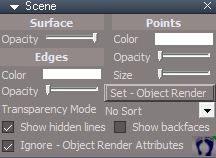
- Scene panel.png (9 KiB) Viewed 2315 times
No longer switches to Panel
Show - Object Render Attributes icon Shows the selected object's Object Render Attributes panel in Setting
Right click to Close the panel
New ORA panel

- ORA panel.png (7.61 KiB) Viewed 2315 times
Floating 3D Windows do need to have focus
Several other improvements and I will try to post them here later
Recommend that you completely Uninstall and Install trueSpace7.61 Standalone to a clean directory
Removed attachment due to changes in the upcoming pre release
-
clintonman
- Captain
- Posts: 5659
- Joined: 21 May 2009, 21:08
- Type the number ten into the box: 0
- Location: California
Re: Final trueSpace7.61 Beta 8 Std Unofficial Update
Set - Object Render I don't see anything happening - correction it makes invisible visible but don't see anything elsetrueBlue wrote: 25 Aug 2021, 23:14 Update 76 for trueSpace7.61 Beta 8 Standalone Unofficial Update Version 8
August 25, 2021
Please test this pre release
...
Scene panel
Scene panel.png
Set - Object Render button sets the selected object(S) Object Render Attributes to Visible and adds the objects name to the panels
No longer switches to Panel
Show - Object Render Attributes icon Shows the selected object's Object Render Attributes panel in Setting
Right click to Close the panel
New ORA panel
ORA panel.png
...
Show - Object Render Attributes icon - seems easier to just close the panel directly, instead of moving away from the panel to right click the button.
The button next to the name"enter owner name" LMB doesn't seem to do anything.
-
trueBlue
- Captain
- Posts: 5548
- Joined: 06 Jul 2009, 22:50
- Type the number ten into the box: 10
Re: Final trueSpace7.61 Beta 8 Std Unofficial Update
Set - Object Render button runs the Show scriptclintonman wrote: 26 Aug 2021, 04:08
Set - Object Render I don't see anything happening - correction it makes invisible visible but don't see anything else
Show - Object Render Attributes icon - seems easier to just close the panel directly, instead of moving away from the panel to right click the button.
The button next to the name"enter owner name" LMB doesn't seem to do anything.
Show - Object Render Attributes icon
You do not need to use the RMB - Close icon
Using the LMB - Show - Object Render Attributes works different if your object already has an ORA panel
If it does, it will show the Settings aspect
If it does not have an ORA panel, it will show the Default aspect
It will also add the ORA owner's name
It only supports one object
It closes the previous panel before showing the panel
It works best if you select your object in the main 3D window when using it IE: Verses selecting objects in the Link Editor
The button next to the Owners_Name attribute updates the Object's name
You can try deleting the Owners_Name first, and then press the button
You can try renaming your object first, and then press the button
Try these new shortcuts
They are the same but different context
Remove PointEdit context and changed the GROUP to VIEW3D
Also add Ctrl + P - Opens the Popup Toolbar
Note: You will see the ButtonHighlight issue due to the change in PointEdit2 script
Removed attachment due to update
-
trueBlue
- Captain
- Posts: 5548
- Joined: 06 Jul 2009, 22:50
- Type the number ten into the box: 10
Re: Final trueSpace7.61 Beta 8 Std Unofficial Update
Set - Object Render button
Show - Object Render Attributes icon
Now that the script in the icon is compatible with NURBS, I think that I can add that script to the button and get rid of the icon
There is one thing I need to fix
I need this to be if selCount is greater than 1
How do you do that?
Edit:Got it
if(selCount > 1) {
Edit:
Upcoming new Scene panel
Show - Object Render Attributes icon
Now that the script in the icon is compatible with NURBS, I think that I can add that script to the button and get rid of the icon
There is one thing I need to fix
Code: Select all
if(selCount == 2) {
PVT_LOCKED = 4
RsStackView.RemovePanelsFromPreferences(PVT_LOCKED, 0);
UserInterface.OpenPreferencesPanelViewExWithFlag('', '','/Preferences/Desktop',3, 1, 0, 8)
System.Alert("Select one object at a time")
return
}
How do you do that?
Edit:Got it
if(selCount > 1) {
Edit:
Upcoming new Scene panel
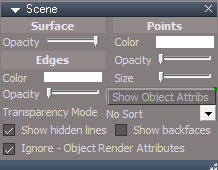
- Scene panel.png (16.98 KiB) Viewed 2257 times
-
trueBlue
- Captain
- Posts: 5548
- Joined: 06 Jul 2009, 22:50
- Type the number ten into the box: 10
Re: Final trueSpace7.61 Beta 8 Std Unofficial Update
Update 77 for trueSpace7.61 Beta 8 Standalone Unofficial Update Version 8
August 29, 2021
Please test this pre release
Includes all of Clinton's recent updates and new Popup toolbars
Popup toolbar shortcuts:
CTRL SHIFT V = View Toolbar
CTRL SHIFT O = Object Navigation Toolbar
SPACE = Point Edit Toolbar
SHIFT SPACE = Point Edit Toolbar 2
CTRL SPACE = Point Edit Widget Toolbar
Popup scripts
Changes
All scripts changed to Utility functions for node values
PE1 & PE2 requires something selected
ObjNavWidget toolbar changes to Obj Nav Widget if in PE mode
PEwidget toolbar changes to PE mode if using the Obj Nav Widget
Widgets/Edit/Default context/Select
Auto Select NURBS script
Add nagging status message if AutoSelectNURBS is disabled
Changed
L + Move cursor = Locks selection
U + Move cursor = Unlocks selection
Note: Removed old NURBS Locking & NURBS Unlocking scripts
Commands call the new updated unSelectable scripts
unSelectable scripts updated 8/29/2021 Author Clinton Reese
Add status messages
Scene panel
Restored the original Show Object Attribs button
Customized button with Left & Right mouse commands and tooltip
LMB = Shows the first selected object's ORA panel in Settings
RMB = Closes any panels opened in Settings
This update restores the way this button originally works
Except it only allows one panel at a time to be displayed
Restricts a selection to only one at a time
It shows the ORA's Setting aspect
It enters the name of the object if it has the new ORA nodes
It is NURBS friendly
Preferred method to show ORA panels in Panels
Simply selecting an object shows the ORA's Default aspect panel if it has a new ORA node
Right click any of these toolbar buttons to show the ORA's Settings aspect
Removed attachment due to update
August 29, 2021
Please test this pre release
Includes all of Clinton's recent updates and new Popup toolbars
Popup toolbar shortcuts:
CTRL SHIFT V = View Toolbar
CTRL SHIFT O = Object Navigation Toolbar
SPACE = Point Edit Toolbar
SHIFT SPACE = Point Edit Toolbar 2
CTRL SPACE = Point Edit Widget Toolbar
Popup scripts
Changes
All scripts changed to Utility functions for node values
PE1 & PE2 requires something selected
ObjNavWidget toolbar changes to Obj Nav Widget if in PE mode
PEwidget toolbar changes to PE mode if using the Obj Nav Widget
Widgets/Edit/Default context/Select
Auto Select NURBS script
Add nagging status message if AutoSelectNURBS is disabled
Changed
L + Move cursor = Locks selection
U + Move cursor = Unlocks selection
Note: Removed old NURBS Locking & NURBS Unlocking scripts
Commands call the new updated unSelectable scripts
unSelectable scripts updated 8/29/2021 Author Clinton Reese
Add status messages
Scene panel

- Scene panel.png (16.98 KiB) Viewed 2223 times
Customized button with Left & Right mouse commands and tooltip
LMB = Shows the first selected object's ORA panel in Settings
RMB = Closes any panels opened in Settings
This update restores the way this button originally works
Except it only allows one panel at a time to be displayed
Restricts a selection to only one at a time
It shows the ORA's Setting aspect
It enters the name of the object if it has the new ORA nodes
It is NURBS friendly
Preferred method to show ORA panels in Panels
Simply selecting an object shows the ORA's Default aspect panel if it has a new ORA node
Right click any of these toolbar buttons to show the ORA's Settings aspect

-
clintonman
- Captain
- Posts: 5659
- Joined: 21 May 2009, 21:08
- Type the number ten into the box: 0
- Location: California
Re: Final trueSpace7.61 Beta 8 Std Unofficial Update
"Widgets/Edit/Default context/Select
Changed
L + Move cursor = Locks selection
U + Move cursor = Unlocks selection"
I would recommend getting rid of the widget shortcuts and just assign shortcuts to the lock and unlock buttons.
"L = Locks selection
U = Unlocks selection"
no need for move cursor, just press the key
Changed
L + Move cursor = Locks selection
U + Move cursor = Unlocks selection"
I would recommend getting rid of the widget shortcuts and just assign shortcuts to the lock and unlock buttons.
"L = Locks selection
U = Unlocks selection"
no need for move cursor, just press the key
-
trueBlue
- Captain
- Posts: 5548
- Joined: 06 Jul 2009, 22:50
- Type the number ten into the box: 10
Re: Final trueSpace7.61 Beta 8 Std Unofficial Update
Both keys are already taken
-
trueBlue
- Captain
- Posts: 5548
- Joined: 06 Jul 2009, 22:50
- Type the number ten into the box: 10
Re: Final trueSpace7.61 Beta 8 Std Unofficial Update
Thank youclintonman wrote: 30 Aug 2021, 04:53 "Widgets/Edit/Default context/Select
Changed
L + Move cursor = Locks selection
U + Move cursor = Unlocks selection"
I would recommend getting rid of the widget shortcuts and just assign shortcuts to the lock and unlock buttons.
"L = Locks selection
U = Unlocks selection"
no need for move cursor, just press the key
Taking your advice
Confirmed that the scripts will not run in PE mode or interfere with PE mode's L & U shortcuts
Next release...
L & U unSelectable shortcuts for the 3DView & LinkEditor
L = Locks selection
U = Unlocks selection
-
clintonman
- Captain
- Posts: 5659
- Joined: 21 May 2009, 21:08
- Type the number ten into the box: 0
- Location: California
Re: Final trueSpace7.61 Beta 8 Std Unofficial Update
The new point edit scale actions need a small change.
"Widgets/Edit/.../Boxes/Linear scale action, 1" - the "Snapping group" needs to be set to "Point edit snapping" so grid snapping works.
"Widgets/Edit/.../Boxes/Linear scale action, 1" - the "Snapping group" needs to be set to "Point edit snapping" so grid snapping works.
-
trueBlue
- Captain
- Posts: 5548
- Joined: 06 Jul 2009, 22:50
- Type the number ten into the box: 10
Re: Final trueSpace7.61 Beta 8 Std Unofficial Update
I am not seeing any difference with PE Snapping enabled with the Boxesclintonman wrote: 30 Aug 2021, 20:22 The new point edit scale actions need a small change.
"Widgets/Edit/.../Boxes/Linear scale action, 1" - the "Snapping group" needs to be set to "Point edit snapping" so grid snapping works.
Can you provide a workflow?
Do you notice the different Precision values?

-
clintonman
- Captain
- Posts: 5659
- Joined: 21 May 2009, 21:08
- Type the number ten into the box: 0
- Location: California
Re: Final trueSpace7.61 Beta 8 Std Unofficial Update
Turn on grid snapping.trueBlue wrote: 30 Aug 2021, 21:02I am not seeing any difference with PE Snapping enabled with the Boxesclintonman wrote: 30 Aug 2021, 20:22 The new point edit scale actions need a small change.
"Widgets/Edit/.../Boxes/Linear scale action, 1" - the "Snapping group" needs to be set to "Point edit snapping" so grid snapping works.
Can you provide a workflow?
Do you notice the different Precision values?
PES.png
Drag a box and it scales from the center with snapping.
Ctrl drag a box and it scales from the origin but does not snap.
Add the snapping group change
Ctrl drag a box and it scales from the origin and now snapping works.
-
trueBlue
- Captain
- Posts: 5548
- Joined: 06 Jul 2009, 22:50
- Type the number ten into the box: 10
Re: Final trueSpace7.61 Beta 8 Std Unofficial Update
Thanks, now I see it
Do you notice the different Precision values? (see previous pic)
Also why are Boxes set up with the Ctrl gesture for snapping when the Bars, Triangles, and Arcs are not?
Do you notice the different Precision values? (see previous pic)
Also why are Boxes set up with the Ctrl gesture for snapping when the Bars, Triangles, and Arcs are not?
-
clintonman
- Captain
- Posts: 5659
- Joined: 21 May 2009, 21:08
- Type the number ten into the box: 0
- Location: California
Re: Final trueSpace7.61 Beta 8 Std Unofficial Update
Yep, they're different all right.trueBlue wrote: 30 Aug 2021, 21:39 Thanks, now I see it
Do you notice the different Precision values? (see previous pic)
Also why are Boxes set up with the Ctrl gesture for snapping when the Bars, Triangles, and Arcs are not?
Ctrl is not for snapping. Ctrl is for scaling at the origin. No ctrl is for normal scaling about the center.
-
trueBlue
- Captain
- Posts: 5548
- Joined: 06 Jul 2009, 22:50
- Type the number ten into the box: 10
Re: Final trueSpace7.61 Beta 8 Std Unofficial Update
Here is an Unreal Grid
Can you do me a favor and record all of the recommended values in the Snapping Grid panel with the jScript Macro toolbar?
Can you do me a favor and record all of the recommended values in the Snapping Grid panel with the jScript Macro toolbar?
- Attachments
-
- Unreal Grid.RsObj
- (5.36 KiB) Downloaded 115 times
-
clintonman
- Captain
- Posts: 5659
- Joined: 21 May 2009, 21:08
- Type the number ten into the box: 0
- Location: California
Re: Final trueSpace7.61 Beta 8 Std Unofficial Update
You're going to have to refresh my memory on this.trueBlue wrote: 30 Aug 2021, 23:08 Here is an Unreal Grid
Can you do me a favor and record all of the recommended values in the Snapping Grid panel with the jScript Macro toolbar?
-
trueBlue
- Captain
- Posts: 5548
- Joined: 06 Jul 2009, 22:50
- Type the number ten into the box: 10
Re: Final trueSpace7.61 Beta 8 Std Unofficial Update
http://clintons3d.com/tutorials/unrealGridForTS.htmclintonman wrote: 30 Aug 2021, 23:29You're going to have to refresh my memory on this.trueBlue wrote: 30 Aug 2021, 23:08 Here is an Unreal Grid
Can you do me a favor and record all of the recommended values in the Snapping Grid panel with the jScript Macro toolbar?
-
clintonman
- Captain
- Posts: 5659
- Joined: 21 May 2009, 21:08
- Type the number ten into the box: 0
- Location: California
Re: Final trueSpace7.61 Beta 8 Std Unofficial Update
That's pretty old. I think it only applies to Unreal Engine before version 3. I'll double check though.trueBlue wrote: 31 Aug 2021, 00:00http://clintons3d.com/tutorials/unrealGridForTS.htmclintonman wrote: 30 Aug 2021, 23:29You're going to have to refresh my memory on this.trueBlue wrote: 30 Aug 2021, 23:08 Here is an Unreal Grid
Can you do me a favor and record all of the recommended values in the Snapping Grid panel with the jScript Macro toolbar?
Edit: Yep, that is old and no longer valid for newer engine versions. Grid spacing is now based on decimal values instead of the binary inspired value of "16".
-
trueBlue
- Captain
- Posts: 5548
- Joined: 06 Jul 2009, 22:50
- Type the number ten into the box: 10
Re: Final trueSpace7.61 Beta 8 Std Unofficial Update
Update 78 for trueSpace7.61 Beta 8 Standalone Unofficial Update Version 8
August 31, 2021
Please test this pre release
Includes all of Clinton's recent updates and new Popup toolbars
Popup toolbar shortcuts:
CTRL SHIFT V = View Toolbar
CTRL SHIFT O = Object Navigation Toolbar
SPACE = Point Edit Toolbar
SHIFT SPACE = Point Edit Toolbar 2
CTRL SPACE = Point Edit Widget Toolbar
UnSelectable shortcuts:
Add
L - Lock selection
U - Unlock selection
3D View & Link Editor
Point Edit Widget(s)
Boxes
Add
Point edit snapping to the Snapping group attribute
Rect select widget/Rectangle Zoom
Exposed the Colors for the Border & Rectangle
Icon - RMB = Preferences 'Shows - Rectangle Zoom panel'
If Zoom to Selection & Keep Active is checked, Shift + move cursor - Resets the View
Mesh Origin
Changed button and script
Toggle Origin Display
Removed attachment due to update
August 31, 2021
Please test this pre release
Includes all of Clinton's recent updates and new Popup toolbars
Popup toolbar shortcuts:
CTRL SHIFT V = View Toolbar
CTRL SHIFT O = Object Navigation Toolbar
SPACE = Point Edit Toolbar
SHIFT SPACE = Point Edit Toolbar 2
CTRL SPACE = Point Edit Widget Toolbar
UnSelectable shortcuts:
Add
L - Lock selection
U - Unlock selection
3D View & Link Editor
Point Edit Widget(s)
Boxes
Add
Point edit snapping to the Snapping group attribute
Rect select widget/Rectangle Zoom

- Rectangle Zoom Visible Preferences.png (10.89 KiB) Viewed 2085 times
Icon - RMB = Preferences 'Shows - Rectangle Zoom panel'
If Zoom to Selection & Keep Active is checked, Shift + move cursor - Resets the View
Mesh Origin
Changed button and script
Toggle Origin Display
Removed attachment due to update
-
trueBlue
- Captain
- Posts: 5548
- Joined: 06 Jul 2009, 22:50
- Type the number ten into the box: 10
Re: Final trueSpace7.61 Beta 8 Std Unofficial Update
@ Clinton
Edit
Woot Woot
I figured out how to make your Invisible Rectangle Select Visible
Using the PE rect select's components
Edit
Woot Woot
I figured out how to make your Invisible Rectangle Select Visible
Using the PE rect select's components

-
clintonman
- Captain
- Posts: 5659
- Joined: 21 May 2009, 21:08
- Type the number ten into the box: 0
- Location: California
Re: Final trueSpace7.61 Beta 8 Std Unofficial Update
Very nicetrueBlue wrote: 31 Aug 2021, 20:25 @ Clinton
Edit
Woot Woot
I figured out how to make your Invisible Rectangle Select Visible
Using the PE rect select's components
Visible Rectangle Select.png

-
clintonman
- Captain
- Posts: 5659
- Joined: 21 May 2009, 21:08
- Type the number ten into the box: 0
- Location: California
Re: Final trueSpace7.61 Beta 8 Std Unofficial Update
Consolidated Object Navigation Widgets
New panel updates the new Icon, Look at Camera and Docking-Bounding Box Center when switching widgets.
On Operating Visibility has no functional changes except it is applied to all widgets. It still clears undo history.
All the others are now undo friendly.
"Default object navigation widget" and "Object Navigation Widgets"(the one with spaces)
go into /Widgets/Select
"CycleObjectNavigationWidget" and "ObjectNavigationWidgets"(no spaces)
go into /Widgets/WidgetScripts
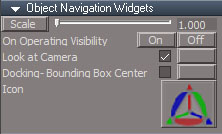
- ObjectNavigationWidgetsPanel.jpg (27.62 KiB) Viewed 2253 times
On Operating Visibility has no functional changes except it is applied to all widgets. It still clears undo history.
All the others are now undo friendly.
"Default object navigation widget" and "Object Navigation Widgets"(the one with spaces)
go into /Widgets/Select
"CycleObjectNavigationWidget" and "ObjectNavigationWidgets"(no spaces)
go into /Widgets/WidgetScripts
- Attachments
-
- ObjectNavigationWidgets.RsObj
- (1.4 MiB) Downloaded 126 times
-
- Object Navigation Widgets.RsObj
- (61.1 KiB) Downloaded 141 times
-
- Default object navigation widget.RsObj
- (485.87 KiB) Downloaded 128 times
-
- CycleObjectNavigationWidget.RsObj
- (15.12 KiB) Downloaded 125 times
-
trueBlue
- Captain
- Posts: 5548
- Joined: 06 Jul 2009, 22:50
- Type the number ten into the box: 10
Re: Final trueSpace7.61 Beta 8 Std Unofficial Update
I get the where the scripts go in WidgetScripts but not sure about the othersclintonman wrote: 01 Sep 2021, 16:18 Consolidated Object Navigation Widgets
ObjectNavigationWidgetsPanel.jpg
New panel updates the new Icon, Look at Camera and Docking-Bounding Box Center when switching widgets.
On Operating Visibility has no functional changes except it is applied to all widgets. It still clears undo history.
All the others are now undo friendly.
"Default object navigation widget" and "Object Navigation Widgets"(the one with spaces)
go into /Widgets/Select
"CycleObjectNavigationWidget" and "ObjectNavigationWidgets"(no spaces)
go into /Widgets/WidgetScripts
Can you give me a screen shot on how Widgets/Select should look like and or what needs to be removed?
Currently

-
clintonman
- Captain
- Posts: 5659
- Joined: 21 May 2009, 21:08
- Type the number ten into the box: 0
- Location: California
Re: Final trueSpace7.61 Beta 8 Std Unofficial Update
You can remove these nodes:trueBlue wrote: 01 Sep 2021, 16:38I get the where the scripts go in WidgetScripts but not sure about the othersclintonman wrote: 01 Sep 2021, 16:18 Consolidated Object Navigation Widgets
ObjectNavigationWidgetsPanel.jpg
New panel updates the new Icon, Look at Camera and Docking-Bounding Box Center when switching widgets.
On Operating Visibility has no functional changes except it is applied to all widgets. It still clears undo history.
All the others are now undo friendly.
"Default object navigation widget" and "Object Navigation Widgets"(the one with spaces)
go into /Widgets/Select
"CycleObjectNavigationWidget" and "ObjectNavigationWidgets"(no spaces)
go into /Widgets/WidgetScripts
Can you give me a screen shot on how Widgets/Select should look like and or what needs to be removed?
Currently
Screenshot 2021-09-01 093431.png

-
trueBlue
- Captain
- Posts: 5548
- Joined: 06 Jul 2009, 22:50
- Type the number ten into the box: 10
Re: Final trueSpace7.61 Beta 8 Std Unofficial Update
Nice work Clinton! 
Still testing...
I am going to change the ONW Preferences gesture to use Ctrl + LB click, also the Widget Help & Widget Help 4 to reflect this change
This will make it consistent with the other gestures for Arcs, Triangles, Bars, Boxes, and Close
Still testing...
I am going to change the ONW Preferences gesture to use Ctrl + LB click, also the Widget Help & Widget Help 4 to reflect this change
This will make it consistent with the other gestures for Arcs, Triangles, Bars, Boxes, and Close
-
clintonman
- Captain
- Posts: 5659
- Joined: 21 May 2009, 21:08
- Type the number ten into the box: 0
- Location: California
Re: Final trueSpace7.61 Beta 8 Std Unofficial Update
Thanks,trueBlue wrote: 01 Sep 2021, 18:22 Nice work Clinton!
Still testing...
I am going to change the ONW Preferences gesture to use Ctrl + LB click, also the Widget Help & Widget Help 4 to reflect this change
This will make it consistent with the other gestures for Arcs, Triangles, Bars, Boxes, and Close
I just found a bug in it.
line 77 of "CycleObjectNavigationWidget" is connecting the arc to the move tool, so remove that line
util.ConnectTo(defObjNav + "/Object Move tool", "Gesture", defObjNav + "/Arcs", "Gestures");
-
trueBlue
- Captain
- Posts: 5548
- Joined: 06 Jul 2009, 22:50
- Type the number ten into the box: 10
Re: Final trueSpace7.61 Beta 8 Std Unofficial Update
I was just going to mention that:clintonman wrote: 01 Sep 2021, 18:31Thanks,trueBlue wrote: 01 Sep 2021, 18:22 Nice work Clinton!
Still testing...
I am going to change the ONW Preferences gesture to use Ctrl + LB click, also the Widget Help & Widget Help 4 to reflect this change
This will make it consistent with the other gestures for Arcs, Triangles, Bars, Boxes, and Close
I just found a bug in it.
line 77 of "CycleObjectNavigationWidget" is connecting the arc to the move tool, so remove that line
util.ConnectTo(defObjNav + "/Object Move tool", "Gesture", defObjNav + "/Arcs", "Gestures");
Alt + MB - Arcs - Activate Object Rotate - On|Off
Actives Object Move
Does the Object Navigation Widgets panel work with your Centered Object Navigation widget?
If so it looks like I can remove the Widget Help 4
Currently it is opening the Widget Help
-
clintonman
- Captain
- Posts: 5659
- Joined: 21 May 2009, 21:08
- Type the number ten into the box: 0
- Location: California
Re: Final trueSpace7.61 Beta 8 Std Unofficial Update
"I was just going to mention that:
Alt + MB - Arcs - Activate Object Rotate - On|Off
Actives Object Move"
Is some change needed?
"Does the Object Navigation Widgets panel work with your Centered Object Navigation widget?
If so it looks like I can remove the Widget Help 4
Currently it is opening the Widget Help"
Yes it does.
Alt + MB - Arcs - Activate Object Rotate - On|Off
Actives Object Move"
Is some change needed?
"Does the Object Navigation Widgets panel work with your Centered Object Navigation widget?
If so it looks like I can remove the Widget Help 4
Currently it is opening the Widget Help"
Yes it does.
-
clintonman
- Captain
- Posts: 5659
- Joined: 21 May 2009, 21:08
- Type the number ten into the box: 0
- Location: California
Re: Final trueSpace7.61 Beta 8 Std Unofficial Update
PE Widgets Consolidated
New panel updates the new Icon and the toggle button has been changed to On and Off buttons.
similar setup to the object nav widgets
"Point edit widget" and "Point Edit Widgets"
go into /Widgets/Edit
"CyclePointEditNavigationWidget" and "PointEditNavigationWidgets"
go into /Widgets/WidgetScripts
I've only tested in non-UU tS.
New panel updates the new Icon and the toggle button has been changed to On and Off buttons.
similar setup to the object nav widgets
"Point edit widget" and "Point Edit Widgets"
go into /Widgets/Edit
"CyclePointEditNavigationWidget" and "PointEditNavigationWidgets"
go into /Widgets/WidgetScripts
I've only tested in non-UU tS.
- Attachments
-
- Point edit widget.RsObj
- (645.41 KiB) Downloaded 125 times
-
- Point Edit Widgets.RsObj
- (271.83 KiB) Downloaded 126 times
-
- PointEditNavigationWidgets.RsObj
- (998.86 KiB) Downloaded 131 times
-
- CyclePointEditNavigationWidget.RsObj
- (12.8 KiB) Downloaded 120 times
-
trueBlue
- Captain
- Posts: 5548
- Joined: 06 Jul 2009, 22:50
- Type the number ten into the box: 10
Re: Final trueSpace7.61 Beta 8 Std Unofficial Update
Nope, removing that line fixed it
Okay, thanks!
Removing Widget Help 4 ...
Okay, thanks!
Removing Widget Help 4 ...
-
clintonman
- Captain
- Posts: 5659
- Joined: 21 May 2009, 21:08
- Type the number ten into the box: 0
- Location: California
Re: Final trueSpace7.61 Beta 8 Std Unofficial Update
I see, missed the colon and thought you were actually mentioning it.
-
trueBlue
- Captain
- Posts: 5548
- Joined: 06 Jul 2009, 22:50
- Type the number ten into the box: 10
Re: Final trueSpace7.61 Beta 8 Std Unofficial Update
Awhile back you suggested a fix for the PEW's Cycle script in with which you saved the object's PE Selectionclintonman wrote: 01 Sep 2021, 20:01 PE Widgets Consolidated
New panel updates the new Icon and the toggle button has been changed to On and Off buttons.
similar setup to the object nav widgets
"Point edit widget" and "Point Edit Widgets"
go into /Widgets/Edit
"CyclePointEditNavigationWidget" and "PointEditNavigationWidgets"
go into /Widgets/WidgetScripts
I've only tested in non-UU tS.
That works perfect and when you cycled PE widgets you did not lose the PE widget
This is not working in your consolidated PE widgets
I copied the code and inserted into your new cycle script, but it is not working. You lose the PE widget
Code: Select all
	var firstSel = Node.FirstSelected();
	var selection = System.CreateDO("Space 3D Package/Selection Data");
	if(Node.ConExists(firstSel, "Selection"))
		selection = Node.Value(firstSel, "Selection");
	if(Node.ConExists(firstSel, "Selection"))
		Node.Value(firstSel, "Selection") = selection

	Widgets.ActivateDefaultWidget();

	MeshModifiers.ActivatePointEditWidget('', '', 'Default');
-
clintonman
- Captain
- Posts: 5659
- Joined: 21 May 2009, 21:08
- Type the number ten into the box: 0
- Location: California
Re: Final trueSpace7.61 Beta 8 Std Unofficial Update
Ok so it did work at some point in time. Wasn't sure if I was remembering it right. I'll see what I can find. Maybe the save and restore need to be inside different nodes.trueBlue wrote: 01 Sep 2021, 22:43Awhile back you suggested a fix for the PEW's Cycle script in with which you saved the object's PE Selectionclintonman wrote: 01 Sep 2021, 20:01 PE Widgets Consolidated
New panel updates the new Icon and the toggle button has been changed to On and Off buttons.
similar setup to the object nav widgets
"Point edit widget" and "Point Edit Widgets"
go into /Widgets/Edit
"CyclePointEditNavigationWidget" and "PointEditNavigationWidgets"
go into /Widgets/WidgetScripts
I've only tested in non-UU tS.
That works perfect and when you cycled PE widgets you did not lose the PE widget
This is not working in your consolidated PE widgets
I copied the code and inserted into your new cycle script, but it is not working. You lose the PE widget
Code: Select all
	var firstSel = Node.FirstSelected();
	var selection = System.CreateDO("Space 3D Package/Selection Data");
	if(Node.ConExists(firstSel, "Selection"))
		selection = Node.Value(firstSel, "Selection");
	if(Node.ConExists(firstSel, "Selection"))
		Node.Value(firstSel, "Selection") = selection

	Widgets.ActivateDefaultWidget();

	MeshModifiers.ActivatePointEditWidget('', '', 'Default');
-
clintonman
- Captain
- Posts: 5659
- Joined: 21 May 2009, 21:08
- Type the number ten into the box: 0
- Location: California
Re: Final trueSpace7.61 Beta 8 Std Unofficial Update

- Attachments
-
- WidgetScripts.RsObj
- (2.2 MiB) Downloaded 135 times
-
trueBlue
- Captain
- Posts: 5548
- Joined: 06 Jul 2009, 22:50
- Type the number ten into the box: 10
Re: Final trueSpace7.61 Beta 8 Std Unofficial Update
Thanks!
A few changes to all PEW(s)
Boxes
Add
Point edit snapping to the Snapping group attribute
Close "Sphere" scale = 0.090, 0.090, 0.090
PEW Preferences
Change
Ctrl + LB - Open Point Edit Widget - Preferences
A few changes to all PEW(s)
Boxes
Add
Point edit snapping to the Snapping group attribute
Close "Sphere" scale = 0.090, 0.090, 0.090
PEW Preferences
Change
Ctrl + LB - Open Point Edit Widget - Preferences
-
trueBlue
- Captain
- Posts: 5548
- Joined: 06 Jul 2009, 22:50
- Type the number ten into the box: 10
Re: Final trueSpace7.61 Beta 8 Std Unofficial Update
Update 79 for trueSpace7.61 Beta 8 Standalone Unofficial Update Version 8
September 2, 2021
Please test this pre release
Includes all of Clinton's recent updates to date
RectSelect script
Add
Rectangle Select icon
LMB = Rectangle Select 'Start - Rectangle Select widget'
RMB = Preferences 'Shows - Rectangle Select panel'
Rect select widget
Add
Visible Rectangle
Exposed the Colors for the Border & Rectangle
Shift + LB click in 3D View - Resets the View
RB click in 3D View to Close widget
Consolidated widgets:
Object Navigation Widgets
PE Widgets
Arranged the panels so that they do not load on top of other panels
Changed the ONW & PEW Preferences panels and shortcuts
Sphere
Ctrl + LB - Open - Object Navigation Widget - Preferences
Ctrl + LB - Open - Point Edit Widget - Preferences
Changed the PEW sphere scale to be a little bit bigger
Add - Point edit snapping to the Snapping group attribute
View Widget
Bottom Left Triangle
RB - Create and Set a Camera to Perspective view
Changed script to run Eye2Cam script
Desktop
Dialog Settings - View button
Changed to show panel in Settings
NURBS Scripts
All panels including preference panels changed to be all uniform in appearance
wsLayersGroup4
SelectLayer script
Add
Activity.Run(nurbsUtils + "/NURBStoCPMeshSelection");
Removed attachment due to update
September 2, 2021
Please test this pre release
Includes all of Clinton's recent updates to date
RectSelect script

- Rectangle Select.png (6.28 KiB) Viewed 2370 times
Rectangle Select icon
LMB = Rectangle Select 'Start - Rectangle Select widget'
RMB = Preferences 'Shows - Rectangle Select panel'
Rect select widget
Add
Visible Rectangle
Exposed the Colors for the Border & Rectangle
Shift + LB click in 3D View - Resets the View
RB click in 3D View to Close widget
Consolidated widgets:
Object Navigation Widgets
PE Widgets
Arranged the panels so that they do not load on top of other panels
Changed the ONW & PEW Preferences panels and shortcuts

- ONW preferences panel.png (10.25 KiB) Viewed 2368 times
Ctrl + LB - Open - Object Navigation Widget - Preferences
Ctrl + LB - Open - Point Edit Widget - Preferences
Changed the PEW sphere scale to be a little bit bigger
Add - Point edit snapping to the Snapping group attribute
View Widget
Bottom Left Triangle
RB - Create and Set a Camera to Perspective view
Changed script to run Eye2Cam script
Desktop
Dialog Settings - View button
Changed to show panel in Settings
NURBS Scripts
All panels including preference panels changed to be all uniform in appearance
wsLayersGroup4
SelectLayer script
Add
Activity.Run(nurbsUtils + "/NURBStoCPMeshSelection");
Removed attachment due to update
-
trueBlue
- Captain
- Posts: 5548
- Joined: 06 Jul 2009, 22:50
- Type the number ten into the box: 10
Re: Final trueSpace7.61 Beta 8 Std Unofficial Update
Update 80 for trueSpace7.61 Beta 8 Standalone Unofficial Update Version 8
September 3, 2021
Please test this pre release
WinGUID_Bar '3D View aspect toolbar'
Updated several LMB & RMB commands
Now works with an active window
If there is no active window, it works in the main window
Rect select widget
Visible Rectangle
Exposed the Colors for the Border & Rectangle
Ctrl + Shift + LB click in 3D View - Resets the View
RB click in 3D View to Close widget
New - Add
Ctrl select object adds to current selection
Shift select object removes from current selection
Select by Rectangle - Point Editing
Add
Visible | All button 'Toggles Visible Geometry | All Geometry'
Cycle button 'Switches Point Edit selection modes'
Update - tS761 Workspace Shortcut List.rtf
Removed attachment due to update
September 3, 2021
Please test this pre release
WinGUID_Bar '3D View aspect toolbar'
Updated several LMB & RMB commands
Now works with an active window
If there is no active window, it works in the main window
Rect select widget
Visible Rectangle
Exposed the Colors for the Border & Rectangle
Ctrl + Shift + LB click in 3D View - Resets the View
RB click in 3D View to Close widget
New - Add
Ctrl select object adds to current selection
Shift select object removes from current selection
Select by Rectangle - Point Editing
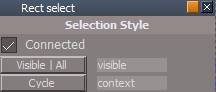
- Select by Rectangle.png (4.52 KiB) Viewed 2343 times
Visible | All button 'Toggles Visible Geometry | All Geometry'
Cycle button 'Switches Point Edit selection modes'
Update - tS761 Workspace Shortcut List.rtf
Removed attachment due to update
-
trueBlue
- Captain
- Posts: 5548
- Joined: 06 Jul 2009, 22:50
- Type the number ten into the box: 10
Re: Final trueSpace7.61 Beta 8 Std Unofficial Update
@ Clinton
If you start Normal Move & then press the keyboard Esc key, the Selection Mode is not Restored and the Status Message is not Cleared
I tried using:
if(RsTool.GetAsyncKeyState(0x1B))
but not having much luck implementing into any of the scripts
If you start Normal Move & then press the keyboard Esc key, the Selection Mode is not Restored and the Status Message is not Cleared
I tried using:
if(RsTool.GetAsyncKeyState(0x1B))
but not having much luck implementing into any of the scripts
-
clintonman
- Captain
- Posts: 5659
- Joined: 21 May 2009, 21:08
- Type the number ten into the box: 0
- Location: California
Re: Final trueSpace7.61 Beta 8 Std Unofficial Update
I see. Looks like cancel just ends the widget.trueBlue wrote: 05 Sep 2021, 20:17 @ Clinton
If you start Normal Move & then press the keyboard Esc key, the Selection Mode is not Restored and the Status Message is not Cleared
I tried using:
if(RsTool.GetAsyncKeyState(0x1B))
but not having much luck implementing into any of the scripts
In StartNormalMove try
Code: Select all
//util.SetNodeValueString("/Preferences/Mesh Editor Settings", "PE selection mode", "vertex")
MeshModifiers.ConvertSelection('','vertex');Code: Select all
//util.SetNodeValueString("/Preferences/Mesh Editor Settings", "PE selection mode", SelectionMode)
MeshModifiers.ConvertSelection('','');-
trueBlue
- Captain
- Posts: 5548
- Joined: 06 Jul 2009, 22:50
- Type the number ten into the box: 10
Re: Final trueSpace7.61 Beta 8 Std Unofficial Update
Thanks, that works coupled with a fix to the widget by saving the Selection Data
Note: The highlighted red connection

- Attachments
-
- sliderReport.RsObj
- (158.05 KiB) Downloaded 138 times
-
trueBlue
- Captain
- Posts: 5548
- Joined: 06 Jul 2009, 22:50
- Type the number ten into the box: 10
Re: Final trueSpace7.61 Beta 8 Std Unofficial Update
Update 81 for trueSpace7.61 Beta 8 Standalone Unofficial Update Version 8
September 8, 2021
Please test this pre release
Rectangle Select widget Update Author - Clinton Reese 9/8/2021
New plugin based frustum selection method
Clintons3dPlugin.rsx version 1638430
Removed - Render Highlite
Created - Cancel encaps
Modified Default aspect
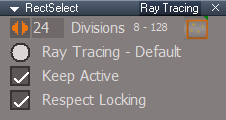
Add - Ray Tracing aspect
Note: When switching to Ray Tracing:
Enable - Ray Tracing - Default
Use - Division scrubber to change to Ray Tracing modes 8 - 128
Recommend closing the panel after setting optional modes
Personally, I only use the Default - Inside Rectangle and never open the panel
This mode is by far the most accurate!
PE Normal Move
Add
Save & Restore PE Selection
Default context widget
Add
Esc + LB click - Unselect
New - Unselect script:
if(!Node.Selection() || Node.ConExists(Node.Selection(), "Selection")) return;var PVT_LOCKED = 2;RsStackView.RemovePanelsFromCurrSelection(PVT_LOCKED, 0);var PVT_LOCKED = 1;RsStackView.RemovePanelsFromCurrSelection(PVT_LOCKED, 1);Space.Unselect()
Removed attachment due to update
September 8, 2021
Please test this pre release
Rectangle Select widget Update Author - Clinton Reese 9/8/2021
New plugin based frustum selection method
Clintons3dPlugin.rsx version 1638430
Removed - Render Highlite
Created - Cancel encaps
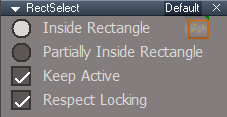
Modified Default aspect
Add - Ray Tracing aspect
Note: When switching to Ray Tracing:
Enable - Ray Tracing - Default
Use - Division scrubber to change to Ray Tracing modes 8 - 128
Recommend closing the panel after setting optional modes
Personally, I only use the Default - Inside Rectangle and never open the panel
This mode is by far the most accurate!
- RectSelect Ray Tracing.png (6.18 KiB) Viewed 2359 times
Add
Save & Restore PE Selection
Default context widget
Add
Esc + LB click - Unselect
New - Unselect script:
if(!Node.Selection() || Node.ConExists(Node.Selection(), "Selection")) return;var PVT_LOCKED = 2;RsStackView.RemovePanelsFromCurrSelection(PVT_LOCKED, 0);var PVT_LOCKED = 1;RsStackView.RemovePanelsFromCurrSelection(PVT_LOCKED, 1);Space.Unselect()
- RectSelect Default.png (5.93 KiB) Viewed 2359 times
-
clintonman
- Captain
- Posts: 5659
- Joined: 21 May 2009, 21:08
- Type the number ten into the box: 0
- Location: California
Re: Final trueSpace7.61 Beta 8 Std Unofficial Update
The 3D display of NURBS objects inside of groups are ruined after being hidden.
Here's a fix for it. it restores their appearance when shown again.
Fix NURBS ORA
DeleteORA
Show
ShowAll
Place all nodes inside /Scripts/Commands
Here's a fix for it. it restores their appearance when shown again.
Fix NURBS ORA
DeleteORA
Show
ShowAll
Place all nodes inside /Scripts/Commands
- Attachments
-
- ShowNURBSFix.zip
- (12.58 KiB) Downloaded 144 times
-
trueBlue
- Captain
- Posts: 5548
- Joined: 06 Jul 2009, 22:50
- Type the number ten into the box: 10
Re: Final trueSpace7.61 Beta 8 Std Unofficial Update
Working really great!clintonman wrote: 09 Sep 2021, 20:02 The 3D display of NURBS objects inside of groups are ruined after being hidden.
Here's a fix for it. it restores their appearance when shown again.
Fix NURBS ORA
DeleteORA
Show
ShowAll
Place all nodes inside /Scripts/Commands
I put the code in the NURBS Utilities Fix Render Attributes script which was not working
Also will call it from the RMB command in the Scene panel's Show Object Attribs button

-
trueBlue
- Captain
- Posts: 5548
- Joined: 06 Jul 2009, 22:50
- Type the number ten into the box: 10
Re: Final trueSpace7.61 Beta 8 Std Unofficial Update
Update 82 for trueSpace7.61 Beta 8 Standalone Unofficial Update Version 8
September 10, 2021
Please test this pre release
Update
Clintons3dPlugin.xml
DeleteORA.xml
Show.xml
ShowAll.xml
Add
Fix NURBS ORA.xml
Show Object Attribs.xml
Show Object Attribs RMB.xml
Removed
DeSelectNURBS.xml
NURBS Utilities
Update
fixRenderAttributes script
PE Rectangle Select
Update
Cycle Element Selection script - Thanks Clinton
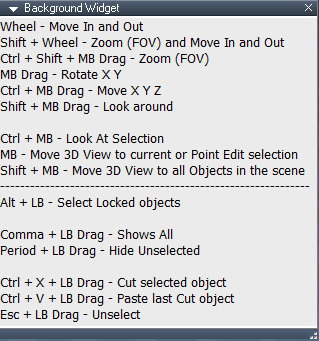
Background Widget Help panel
B + I + Drag - Opens the Background widget Help floating panel
Update
Items below the dotted line are the Default Context widget's shortcuts
Scene panel Show Object Attribs button
LMB command runs Show Object Attribs.xml
RMB command runs Show Object Attribs RMB.xml
Update
LayerProperties.RsObj
LayerProperties2.RsObj
Removed attachment due to update
September 10, 2021
Please test this pre release
Update
Clintons3dPlugin.xml
DeleteORA.xml
Show.xml
ShowAll.xml
Add
Fix NURBS ORA.xml
Show Object Attribs.xml
Show Object Attribs RMB.xml
Removed
DeSelectNURBS.xml
NURBS Utilities
Update
fixRenderAttributes script
PE Rectangle Select
Update
Cycle Element Selection script - Thanks Clinton
Background Widget Help panel
B + I + Drag - Opens the Background widget Help floating panel
Update
Items below the dotted line are the Default Context widget's shortcuts
Scene panel Show Object Attribs button
LMB command runs Show Object Attribs.xml
RMB command runs Show Object Attribs RMB.xml
Update
LayerProperties.RsObj
LayerProperties2.RsObj
Removed attachment due to update
-
trueBlue
- Captain
- Posts: 5548
- Joined: 06 Jul 2009, 22:50
- Type the number ten into the box: 10
Re: Final trueSpace7.61 Beta 8 Std Unofficial Update
Update 83 for trueSpace7.61 Beta 8 Standalone Unofficial Update Version 8
September 11, 2021
Please test this pre release
Rectangle Select
Add
Rectangle Zoom
RB + Drag - Zoom
Undoable
RB + Drag rectangle from top down right - Zooms In
RB + Drag rectangle from bottom up left - Zooms Out
Background Widget Help panel
B + I + Drag - Opens the Background widget Help floating panel
Update
Items below the dotted line are the Default Context widget's shortcuts
Removed attachment due to update
September 11, 2021
Please test this pre release
Rectangle Select

- Rectangle Select and Rectangle Zoom.png (9.2 KiB) Viewed 2312 times
Rectangle Zoom
RB + Drag - Zoom
Undoable
RB + Drag rectangle from top down right - Zooms In
RB + Drag rectangle from bottom up left - Zooms Out
Background Widget Help panel
- Background widget Help panel.png (14.92 KiB) Viewed 2308 times
Update
Items below the dotted line are the Default Context widget's shortcuts
Removed attachment due to update
-
clintonman
- Captain
- Posts: 5659
- Joined: 21 May 2009, 21:08
- Type the number ten into the box: 0
- Location: California
Re: Final trueSpace7.61 Beta 8 Std Unofficial Update
Here are updates to the Zoom To Selection and Zoom To All scripts.
Ortho view zoom is fixed.
Zoom All will center on all objects instead of centering on the selection.
Edit: I just realized I forgot to make it more undo friendly code, so the attached is a preview of the final scripts.
Ortho view zoom is fixed.
Zoom All will center on all objects instead of centering on the selection.
Edit: I just realized I forgot to make it more undo friendly code, so the attached is a preview of the final scripts.
- Attachments
-
- ZoomToSelection02.RsObj
- (18.62 KiB) Downloaded 135 times
-
- ZoomToAll08.RsObj
- (14.13 KiB) Downloaded 130 times
-
clintonman
- Captain
- Posts: 5659
- Joined: 21 May 2009, 21:08
- Type the number ten into the box: 0
- Location: California
Re: Final trueSpace7.61 Beta 8 Std Unofficial Update
I just realized I forgot to make it more undo friendly code, so the previously attached code is a preview of the final scripts.clintonman wrote: 11 Sep 2021, 16:41 Here are updates to the Zoom To Selection and Zoom To All scripts.
Ortho view zoom is fixed.
Zoom All will center on all objects instead of centering on the selection.
Edit: I just realized I forgot to make it more undo friendly code, so the attached is a preview of the final scripts.
-
trueBlue
- Captain
- Posts: 5548
- Joined: 06 Jul 2009, 22:50
- Type the number ten into the box: 10
Re: Final trueSpace7.61 Beta 8 Std Unofficial Update
Very nice update Clinton!clintonman wrote: 11 Sep 2021, 17:20I just realized I forgot to make it more undo friendly code, so the previously attached code is a preview of the final scripts.clintonman wrote: 11 Sep 2021, 16:41 Here are updates to the Zoom To Selection and Zoom To All scripts.
Ortho view zoom is fixed.
Zoom All will center on all objects instead of centering on the selection.
Edit: I just realized I forgot to make it more undo friendly code, so the attached is a preview of the final scripts.
Works great in Ortho views now too!
-
clintonman
- Captain
- Posts: 5659
- Joined: 21 May 2009, 21:08
- Type the number ten into the box: 0
- Location: California
Re: Final trueSpace7.61 Beta 8 Std Unofficial Update
Here's the final more undo friendly versions of the zoom to scripts.
- Attachments
-
- ZoomToSelection04.RsObj
- (19.27 KiB) Downloaded 133 times
-
- ZoomToAll11.RsObj
- (15.3 KiB) Downloaded 124 times
-
trueBlue
- Captain
- Posts: 5548
- Joined: 06 Jul 2009, 22:50
- Type the number ten into the box: 10
Re: Final trueSpace7.61 Beta 8 Std Unofficial Update
Update 84 for trueSpace7.61 Beta 8 Standalone Unofficial Update Version 8
September 11, 2021
Please test this pre release
Widgets/WidgetScripts
Update Author - Clinton Reese
ZoomToSelection
MB click - Zoom to Selection
ZoomToAll
Shift + MB click - Zoom to All
Major improvements!
Now works proper in Ortho Views too
PE Rectangle Select & PE Lasso Select
Changed
Border color 255, 128, 128
Removed attachment due to update
September 11, 2021
Please test this pre release
Widgets/WidgetScripts
Update Author - Clinton Reese
ZoomToSelection
MB click - Zoom to Selection
ZoomToAll
Shift + MB click - Zoom to All
Major improvements!
Now works proper in Ortho Views too
PE Rectangle Select & PE Lasso Select
Changed
Border color 255, 128, 128

-
trueBlue
- Captain
- Posts: 5548
- Joined: 06 Jul 2009, 22:50
- Type the number ten into the box: 10
Re: Final trueSpace7.61 Beta 8 Std Unofficial Update
@ Clinton
Noticed in your UU Docs that the NURBS Curve Shaper panel is not showing when selecting a Curve in the 3D View
First of all, what is the purpose of using the Select LOD Mesh button?
I suspect it is for using the ORA panel?
I added the following to the Show NURBS Panel With CP Mesh script, below Line 45
Can you see if this works for you?
Also add the following to the NURBStoCPMeshSelection script, below Line 15
Noticed in your UU Docs that the NURBS Curve Shaper panel is not showing when selecting a Curve in the 3D View
First of all, what is the purpose of using the Select LOD Mesh button?
I suspect it is for using the ORA panel?
I added the following to the Show NURBS Panel With CP Mesh script, below Line 45
Can you see if this works for you?
Code: Select all
cmd += 'if(Node.ConExists(Node.Owner(Node.FirstSelected()), "isaCurve")) {'
cmd += 'var nurbsCurve = Node.Owner(Node.FirstSelected());'
cmd += 'UserInterface.OpenToolPanelViewEx2WithFlag("", "", nurbsCurve + "/LODMesh/curveShaper",3,1,0,2);'
cmd += '}'
Code: Select all
if(Node.IsRenderable(Node.FirstSelected())) {
var PVT_LOCKED = 1;
RsStackView.RemovePanelsFromCurrSelection(PVT_LOCKED, 1);
}
-
trueBlue
- Captain
- Posts: 5548
- Joined: 06 Jul 2009, 22:50
- Type the number ten into the box: 10
Re: Final trueSpace7.61 Beta 8 Std Unofficial Update
Update 85 for trueSpace7.61 Beta 8 Standalone Unofficial Update Version 8
September 13, 2021
Please test this pre release
Widgets
Update
Background/Background Widget panel
B + I + Move Cursor
Default Context
Ctrl + X + Move Cursor - Cut selected object
Update script for none supported NURBS
NURBS Scripts
Update
polycurve/LODMesh/curveShaper
Add
Select LOD Mesh button
Update
NURBStoCPMeshSelection script
Show NURBS Panel With CP Mesh script
Removed attachment due to update
September 13, 2021
Please test this pre release
Widgets
Update
Background/Background Widget panel
B + I + Move Cursor

- Background widget shortcuts panel.png (14.98 KiB) Viewed 2733 times
Ctrl + X + Move Cursor - Cut selected object
Update script for none supported NURBS
Code: Select all
RsApp.SendCustomEvent("Scripts/CustomCommands/Guard", {Cmd:"Activity.Run('/Scripts/Commands/Cut');;"});Activity.Run("Scripts/CustomCommands/Guard")Update
polycurve/LODMesh/curveShaper
Add
Select LOD Mesh button
Update
NURBStoCPMeshSelection script
Show NURBS Panel With CP Mesh script
Removed attachment due to update
-
clintonman
- Captain
- Posts: 5659
- Joined: 21 May 2009, 21:08
- Type the number ten into the box: 0
- Location: California
Re: Final trueSpace7.61 Beta 8 Std Unofficial Update
Curve Shaper panel is now showing in your sep13 release.trueBlue wrote: 13 Sep 2021, 15:30 @ Clinton
Noticed in your UU Docs that the NURBS Curve Shaper panel is not showing when selecting a Curve in the 3D View
First of all, what is the purpose of using the Select LOD Mesh button?
I suspect it is for using the ORA panel?
...
Your suspicions are correct. It gives access to the ORA for changing the appearance of the curve, the color, make points visible or even make the surface visible for a solid look.
-
trueBlue
- Captain
- Posts: 5548
- Joined: 06 Jul 2009, 22:50
- Type the number ten into the box: 10
Re: Final trueSpace7.61 Beta 8 Std Unofficial Update
@ Clinton
I discovered something today about the Desktop, Display All Toolbars attribute
Somehow the code used to open the Red, Blue, Gold, and other toolbars is setting the Frame's "SnappedTo" attribute
So when you disable the Desktop, Display All Toolbars attribute and switch to Model, these toolbars show in Model
These toolbars should not be showing in Model in this scenario!
Here is an update to the code that opens the Gold toolbar that fixes this issue
Note the last line has been added
The problem with this fix, the toolbars are no longer snapped to the frame 
So I will ask you, which is more important?
Honor Display All Toolbars state or Snap to Frame?
The way I see it with regards to Snap to Frame, is it is only a temporary feature for floating windows
As soon as you close the floating window that feature is lost
Or perhaps you could add code to the Display Toolbars button script that resets the "SnappedTo" attribute for all opened toolbars in Windows Manager Space
I discovered something today about the Desktop, Display All Toolbars attribute
Somehow the code used to open the Red, Blue, Gold, and other toolbars is setting the Frame's "SnappedTo" attribute
So when you disable the Desktop, Display All Toolbars attribute and switch to Model, these toolbars show in Model
These toolbars should not be showing in Model in this scenario!
Here is an update to the code that opens the Gold toolbar that fixes this issue
Note the last line has been added
Code: Select all
if(typeof(Clintons3dPlugin) == "undefined") {System.Alert("Clintons3D Package plugin is Required!\n\nInstall the Clintons3dPlugin.rsx in the Package Manager and \nRestart trueSpace");return;};
var cmd = '';cmd += 'DialogFS = Node.AccessFnSet("Scripts/CustomCommands/UUFunctionSet");DialogFS.Activate3DWindow();';RsApp.RunScriptBuffer(cmd);RsApp.Undo();
Frame=WindowsManager.GetWindowsManagerNodeName();
WindowsManager.CloseToolbar("ClintonToolbar");
WindowsManager.OpenToolbarFromPrototype("ClintonToolbar",32,32,0,0);
util=System.CreateDO("Clintons3D Package/Utility functions");
util.Rename(Frame+"/"+Node.SubObject(Frame,Node.SubObjectCount(Frame)-1),"ClintonToolbarFrame");
WindowsManager.SnapFrameToFrameEx(WindowsManager.GetWorkWindow(),Frame+"/ClintonToolbarFrame",19,10,310,-60);
WindowsManager.SetFrameOwnerFrame(Frame+"/ClintonToolbarFrame",WindowsManager.GetWorkWindow());

//  Add the below line to support Display All Toolbars when unchecked
Node.ConReset(Frame+"/ClintonToolbarFrame", "SnappedTo")
So I will ask you, which is more important?
Honor Display All Toolbars state or Snap to Frame?
The way I see it with regards to Snap to Frame, is it is only a temporary feature for floating windows
As soon as you close the floating window that feature is lost
Or perhaps you could add code to the Display Toolbars button script that resets the "SnappedTo" attribute for all opened toolbars in Windows Manager Space
-
trueBlue
- Captain
- Posts: 5548
- Joined: 06 Jul 2009, 22:50
- Type the number ten into the box: 10
Re: Final trueSpace7.61 Beta 8 Std Unofficial Update
Update 86 for trueSpace7.61 Beta 8 Standalone Unofficial Update Version 8
September 15, 2021
Please test this pre release
Update
Desktop/Display Toolbars button
Display All Toolbars - Off | On / Reset
UUFunctionSet
Add
function DisplayToolbarsFalse()
Note: When using Display Toolbars in the Off state:
This only works for the current opened toolbars
If you open any of these toolbars after running Display Toolbars in the Off state, you will have to run it again
Removed attachment due to update
September 15, 2021
Please test this pre release
Update
Desktop/Display Toolbars button
Display All Toolbars - Off | On / Reset
UUFunctionSet
Add
function DisplayToolbarsFalse()
Note: When using Display Toolbars in the Off state:
This only works for the current opened toolbars
If you open any of these toolbars after running Display Toolbars in the Off state, you will have to run it again

-
trueBlue
- Captain
- Posts: 5548
- Joined: 06 Jul 2009, 22:50
- Type the number ten into the box: 10
Re: Final trueSpace7.61 Beta 8 Std Unofficial Update
Update 87 for trueSpace7.61 Beta 8 Standalone Unofficial Update Version 8
September 17, 2021
Please test this pre release
Update
Fixed a typo in the Scene panel's Show Object Attribs button tool tip
LayerProperties.RsObj
LayerProperties2.RsObj
Layouts - Configurations library
Removed attachment due to update
September 17, 2021
Please test this pre release
Update
Fixed a typo in the Scene panel's Show Object Attribs button tool tip
LayerProperties.RsObj
LayerProperties2.RsObj
Layouts - Configurations library
Removed attachment due to update
-
trueBlue
- Captain
- Posts: 5548
- Joined: 06 Jul 2009, 22:50
- Type the number ten into the box: 10
Re: Final trueSpace7.61 Beta 8 Std Unofficial Update
@ Clinton
Fix Bad Geometry does not play nice with NURBS and can freeze trueSpace
It looks like all the button scripts run the clearSelection script except for Floating Points & Remove SDS
Maybe this script could be setup to run the Guard script
Also it seems that the clearSelection script's first line (shown below) should be moved down so that it does not run on Lights & Cameras
MeshModifiers.ActivatePointEditWidget('','','Default');
Also getting an error on a NURBS Cube that has been frozen with the Quads button script
ERR Source object: /Widgets/Tools/Fix Bad Geometry/selectfaces4 Error: Microsoft JScript runtime error Description: Invalid procedure call or argument Error code: 0x800a0005 - (null) Line: 79, Char: 5 Script text: edgeflags2 = facedges.edges(ijk[0]);
Fix Bad Geometry does not play nice with NURBS and can freeze trueSpace
It looks like all the button scripts run the clearSelection script except for Floating Points & Remove SDS
Maybe this script could be setup to run the Guard script
Also it seems that the clearSelection script's first line (shown below) should be moved down so that it does not run on Lights & Cameras
MeshModifiers.ActivatePointEditWidget('','','Default');
Also getting an error on a NURBS Cube that has been frozen with the Quads button script
ERR Source object: /Widgets/Tools/Fix Bad Geometry/selectfaces4 Error: Microsoft JScript runtime error Description: Invalid procedure call or argument Error code: 0x800a0005 - (null) Line: 79, Char: 5 Script text: edgeflags2 = facedges.edges(ijk[0]);
-
trueBlue
- Captain
- Posts: 5548
- Joined: 06 Jul 2009, 22:50
- Type the number ten into the box: 10
Re: Final trueSpace7.61 Beta 8 Std Unofficial Update
Update 88 for trueSpace7.61 Beta 8 Standalone Unofficial Update Version 8
September 22, 2021
Please test this pre release
Update
Widgets
Fix Bad Geometry
Each button except Remove SDS runs the Guard script
Removed attachment due to update
September 22, 2021
Please test this pre release
Update
Widgets
Fix Bad Geometry
Each button except Remove SDS runs the Guard script
Removed attachment due to update
-
clintonman
- Captain
- Posts: 5659
- Joined: 21 May 2009, 21:08
- Type the number ten into the box: 0
- Location: California
Re: Final trueSpace7.61 Beta 8 Std Unofficial Update
trueBlue wrote: 18 Sep 2021, 14:24 ...
Also getting an error on a NURBS Cube that has been frozen with the Quads button script
ERR Source object: /Widgets/Tools/Fix Bad Geometry/selectfaces4 Error: Microsoft JScript runtime error Description: Invalid procedure call or argument Error code: 0x800a0005 - (null) Line: 79, Char: 5 Script text: edgeflags2 = facedges.edges(ijk[0]);

-
trueBlue
- Captain
- Posts: 5548
- Joined: 06 Jul 2009, 22:50
- Type the number ten into the box: 10
Re: Final trueSpace7.61 Beta 8 Std Unofficial Update
Glad you found the issue!
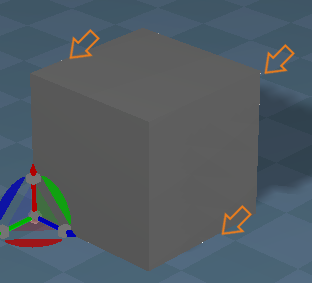
There seems to be other issues with a frozen NURBS cube too
I notice what looks like white vertices showing on the edges
And what looks like a cube inside the cube
Things that seem to help:
Uncheck Double Sided before freezing
Delete floaters
There seems to be other issues with a frozen NURBS cube too
I notice what looks like white vertices showing on the edges
- Frozen NURBS Cube issue.png (21.98 KiB) Viewed 2226 times

Uncheck Double Sided before freezing
Delete floaters
-
clintonman
- Captain
- Posts: 5659
- Joined: 21 May 2009, 21:08
- Type the number ten into the box: 0
- Location: California
Re: Final trueSpace7.61 Beta 8 Std Unofficial Update
Here's a fix for the freeze nurbs patch
It fixes the bad triangle geometry
Removes floating vertices
Gives option to weld vertices for double sided patches
replace the "freezePatch Double Sided" and the "freezePatch2" nodes inside the NURBSUtilities
It fixes the bad triangle geometry
Removes floating vertices
Gives option to weld vertices for double sided patches
replace the "freezePatch Double Sided" and the "freezePatch2" nodes inside the NURBSUtilities
- Attachments
-
- freezePatch Double Sided03.RsObj
- (6.14 KiB) Downloaded 134 times
-
- freezePatch2_07.RsObj
- (13.57 KiB) Downloaded 145 times
-
trueBlue
- Captain
- Posts: 5548
- Joined: 06 Jul 2009, 22:50
- Type the number ten into the box: 10
Re: Final trueSpace7.61 Beta 8 Std Unofficial Update
clintonman wrote: 23 Sep 2021, 16:52 Here's a fix for the freeze nurbs patch
It fixes the bad triangle geometry
Removes floating vertices
Gives option to weld vertices for double sided patches
replace the "freezePatch Double Sided" and the "freezePatch2" nodes inside the NURBSUtilities
I can not see any differences with double side checked or unchecked before freezing
Edit: Oh, I see... Weld Vertices makes it single sided
-
clintonman
- Captain
- Posts: 5659
- Joined: 21 May 2009, 21:08
- Type the number ten into the box: 0
- Location: California
Re: Final trueSpace7.61 Beta 8 Std Unofficial Update
No, "weld vertices" welds the vertices. It's still double sided. It's easier to see on a plane primitive.trueBlue wrote: 23 Sep 2021, 17:51clintonman wrote: 23 Sep 2021, 16:52 Here's a fix for the freeze nurbs patch
It fixes the bad triangle geometry
Removes floating vertices
Gives option to weld vertices for double sided patches
replace the "freezePatch Double Sided" and the "freezePatch2" nodes inside the NURBSUtilities
I can not see any differences with double side checked or unchecked before freezing
Edit: Oh, I see... Weld Vertices makes it single sided
Technically, it actually heals the vertices
-
trueBlue
- Captain
- Posts: 5548
- Joined: 06 Jul 2009, 22:50
- Type the number ten into the box: 10
Re: Final trueSpace7.61 Beta 8 Std Unofficial Update
clintonman wrote: 23 Sep 2021, 18:02No, "weld vertices" welds the vertices. It's still double sided. It's easier to see on a plane primitive.trueBlue wrote: 23 Sep 2021, 17:51clintonman wrote: 23 Sep 2021, 16:52 Here's a fix for the freeze nurbs patch
It fixes the bad triangle geometry
Removes floating vertices
Gives option to weld vertices for double sided patches
replace the "freezePatch Double Sided" and the "freezePatch2" nodes inside the NURBSUtilities
I can not see any differences with double side checked or unchecked before freezing
Edit: Oh, I see... Weld Vertices makes it single sided
Technically, it actually heals the vertices

Cube on left does
I am still a little confused about what is considered Double Sided
-
clintonman
- Captain
- Posts: 5659
- Joined: 21 May 2009, 21:08
- Type the number ten into the box: 0
- Location: California
Re: Final trueSpace7.61 Beta 8 Std Unofficial Update
Try it on a plane instead of a cube. It's easier to see. Welding makes the face double sided, 2 faces sharing the same vertices. Not welding gives 2 single sided faces without any shared vertices.trueBlue wrote: 23 Sep 2021, 18:17Screenshot 2021-09-23 111128.pngclintonman wrote: 23 Sep 2021, 18:02No, "weld vertices" welds the vertices. It's still double sided. It's easier to see on a plane primitive.trueBlue wrote: 23 Sep 2021, 17:51
I can not see any differences with double side checked or unchecked before freezing
Edit: Oh, I see... Weld Vertices makes it single sided
Technically, it actually heals the vertices
Cube on right does not have the Vertices Welded or Healed
Cube on left does
I am still a little confused about what is considered Double Sided
-
trueBlue
- Captain
- Posts: 5548
- Joined: 06 Jul 2009, 22:50
- Type the number ten into the box: 10
Re: Final trueSpace7.61 Beta 8 Std Unofficial Update
Thank you for the explanationWelding makes the face double sided
It seems to me that the Question should be changed to better reflect what Yes or No does with regards to Double Sided

If it is not Double Sided, you will not get this Question
I do not think that it is important to declare the process "Weld Vertices" or "Heal Vertices"
Any suggestions?
Or..
If the NURBS starts out as Double Sided, it should be converted to Double Sided, without the Question?
-
clintonman
- Captain
- Posts: 5659
- Joined: 21 May 2009, 21:08
- Type the number ten into the box: 0
- Location: California
Re: Final trueSpace7.61 Beta 8 Std Unofficial Update
I don't have any suggestions for the dialog.trueBlue wrote: 23 Sep 2021, 19:11Thank you for the explanationWelding makes the face double sided
It seems to me that the Question should be changed to better reflect what Yes or No does with regards to Double Sided
Screenshot 2021-09-23 115627.png
So as I understand this process, if the NURBS starts out as Double Sided before freezing, you will get this Question
If it is not Double Sided, you will not get this Question
I do not think that it is important to declare the process "Weld Vertices" or "Heal Vertices"
Any suggestions?
Or..
If the NURBS starts out as Double Sided, it should be converted to Double Sided, without the Question?
I would rarely be in favor of removing an option and the dialog already defaults to Yes.
-
trueBlue
- Captain
- Posts: 5548
- Joined: 06 Jul 2009, 22:50
- Type the number ten into the box: 10
Re: Final trueSpace7.61 Beta 8 Std Unofficial Update
How about this?
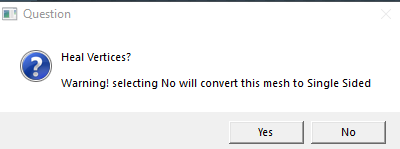
- Screenshot 2021-09-23 130018.png (7.66 KiB) Viewed 2192 times
-
trueBlue
- Captain
- Posts: 5548
- Joined: 06 Jul 2009, 22:50
- Type the number ten into the box: 10
Re: Final trueSpace7.61 Beta 8 Std Unofficial Update
I am comparing a tS Plane that is Single Sided to a frozen NURBS Plane that is Single Sided
The tS Plane is invisible on the backside
The frozen NURBS Plane is visible on all sides regardless if you Heal the Vertices or not
The tS Plane is invisible on the backside
The frozen NURBS Plane is visible on all sides regardless if you Heal the Vertices or not
-
clintonman
- Captain
- Posts: 5659
- Joined: 21 May 2009, 21:08
- Type the number ten into the box: 0
- Location: California
Re: Final trueSpace7.61 Beta 8 Std Unofficial Update
"Not welding gives 2 single sided faces without any shared vertices."trueBlue wrote: 23 Sep 2021, 20:02 How about this?
Screenshot 2021-09-23 130018.png
It does not make it single sided.
-
clintonman
- Captain
- Posts: 5659
- Joined: 21 May 2009, 21:08
- Type the number ten into the box: 0
- Location: California
Re: Final trueSpace7.61 Beta 8 Std Unofficial Update
I have to go out for a while but, Are you sure about that?trueBlue wrote: 23 Sep 2021, 20:17 ...
The frozen NURBS Plane is visible on all sides regardless if you Heal the Vertices or not
-
trueBlue
- Captain
- Posts: 5548
- Joined: 06 Jul 2009, 22:50
- Type the number ten into the box: 10
Re: Final trueSpace7.61 Beta 8 Std Unofficial Update
Yepclintonman wrote: 23 Sep 2021, 20:41I have to go out for a while but, Are you sure about that?trueBlue wrote: 23 Sep 2021, 20:17 ...
The frozen NURBS Plane is visible on all sides regardless if you Heal the Vertices or not
One has 4 Vertices and the other has 8 Vertices, both or visible on all sides
I do not know if this is possible from script and this would only be for a plane, but you can select the back face and hide it, making it one sided
-
clintonman
- Captain
- Posts: 5659
- Joined: 21 May 2009, 21:08
- Type the number ten into the box: 0
- Location: California
Re: Final trueSpace7.61 Beta 8 Std Unofficial Update
trueBlue wrote: 23 Sep 2021, 20:17 I am comparing a tS Plane that is Single Sided to a frozen NURBS Plane that is Single Sided
The tS Plane is invisible on the backside
The frozen NURBS Plane is visible on all sides regardless if you Heal the Vertices or not

I separated the faces of "double sided not welded" just to show it's not welded
If you have a double sided nurbs it will have a double sided look when converted, welded/healed or not.
-
trueBlue
- Captain
- Posts: 5548
- Joined: 06 Jul 2009, 22:50
- Type the number ten into the box: 10
Re: Final trueSpace7.61 Beta 8 Std Unofficial Update
Okay?If you have a double sided nurbs it will have a double sided look when converted, welded/healed or not.
Now it works as you say
Maybe, closing trueSpace and reopening it fixed it
-
clintonman
- Captain
- Posts: 5659
- Joined: 21 May 2009, 21:08
- Type the number ten into the box: 0
- Location: California
Re: Final trueSpace7.61 Beta 8 Std Unofficial Update
Maybe something like this,trueBlue wrote: 23 Sep 2021, 20:02 How about this?
Screenshot 2021-09-23 130018.png
Heal Vertices?
Selecting No will create a mesh with unconnected geometry
or Selecting No will create a mesh with 2 pieces of unconnected geometry.
or Selecting No will create a mesh with 2 identical pieces of unconnected geometry with opposite face normals.
-
trueBlue
- Captain
- Posts: 5548
- Joined: 06 Jul 2009, 22:50
- Type the number ten into the box: 10
Re: Final trueSpace7.61 Beta 8 Std Unofficial Update
That sounds goodHeal Vertices?
Selecting No will create a mesh with unconnected geometry
Thank you!
-
trueBlue
- Captain
- Posts: 5548
- Joined: 06 Jul 2009, 22:50
- Type the number ten into the box: 10
Re: Final trueSpace7.61 Beta 8 Std Unofficial Update
Update 89 for trueSpace7.61 Beta 8 Standalone Unofficial Update Version 8
Updated NURBS scripts
* Fix bad triangle geometry when freezing patches
* Removes floating vertices when freezing patches
* New option to weld vertices for 2 sided NURBS when freezing patches
* Fix to show Curve Shaper panel
Add
Select LOD Mesh button
NURBStoCPMeshSelection script
Show NURBS Panel With CP Mesh script
September 24, 2021
viewt ... =55&t=3731
Instructions:
Recommend that you completely Uninstall and Install trueSpace7.61 Standalone to a clean directory
1.) Run the tS7.61B8Std.8.exe
2.) Browse [...] to where you installed C:\trueSpace761Std, select its folder and then the Extract button
3.) Select the Yes to All button
4.) Open trueSpace and select the Reset to Default Context icon
5.) In Workspace select the Default layout tab
The included Plugins.xml file has the Clintons3dPlugin, Clintons3dPluginExt and Clintons3dRsView, Installed and Loaded to the default path: C:\trueSpace761Std
WARNING: These 3 plugins are required to be Installed and Loaded when using trueSpace!
Updated NURBS scripts
* Fix bad triangle geometry when freezing patches
* Removes floating vertices when freezing patches
* New option to weld vertices for 2 sided NURBS when freezing patches
* Fix to show Curve Shaper panel
Add
Select LOD Mesh button
NURBStoCPMeshSelection script
Show NURBS Panel With CP Mesh script
September 24, 2021
viewt ... =55&t=3731
Instructions:
Recommend that you completely Uninstall and Install trueSpace7.61 Standalone to a clean directory
1.) Run the tS7.61B8Std.8.exe
2.) Browse [...] to where you installed C:\trueSpace761Std, select its folder and then the Extract button
3.) Select the Yes to All button
4.) Open trueSpace and select the Reset to Default Context icon
5.) In Workspace select the Default layout tab
The included Plugins.xml file has the Clintons3dPlugin, Clintons3dPluginExt and Clintons3dRsView, Installed and Loaded to the default path: C:\trueSpace761Std
WARNING: These 3 plugins are required to be Installed and Loaded when using trueSpace!
-
trueBlue
- Captain
- Posts: 5548
- Joined: 06 Jul 2009, 22:50
- Type the number ten into the box: 10
Re: Final trueSpace7.61 Beta 8 Std Unofficial Update
Update 90 for trueSpace7.61 Beta 8 Standalone Unofficial Update Version 8
Updated
CustomCommands/Popups/
ObjectNavWidget
PointEdit
PointEdit2
PointEditWidget
Add support for 3D Encapsulated Objects
Background widget
MB DblClick - Move 3D View to current or Point Edit selection
Changed from MB Click
October 13, 2021
viewt ... =55&t=3731
Instructions:
Recommend that you completely Uninstall and Install trueSpace7.61 Standalone to a clean directory
1.) Run the tS7.61B8Std.8.exe
2.) Browse [...] to where you installed C:\trueSpace761Std, select its folder and then the Extract button
3.) Select the Yes to All button
4.) Open trueSpace and select the Reset to Default Context icon
5.) In Workspace select the Default layout tab
The included Plugins.xml file has the Clintons3dPlugin, Clintons3dPluginExt and Clintons3dRsView, Installed and Loaded to the default path: C:\trueSpace761Std
WARNING: These 3 plugins are required to be Installed and Loaded when using trueSpace!
Updated
CustomCommands/Popups/
ObjectNavWidget
PointEdit
PointEdit2
PointEditWidget
Add support for 3D Encapsulated Objects
Background widget
MB DblClick - Move 3D View to current or Point Edit selection
Changed from MB Click
October 13, 2021
viewt ... =55&t=3731
Instructions:
Recommend that you completely Uninstall and Install trueSpace7.61 Standalone to a clean directory
1.) Run the tS7.61B8Std.8.exe
2.) Browse [...] to where you installed C:\trueSpace761Std, select its folder and then the Extract button
3.) Select the Yes to All button
4.) Open trueSpace and select the Reset to Default Context icon
5.) In Workspace select the Default layout tab
The included Plugins.xml file has the Clintons3dPlugin, Clintons3dPluginExt and Clintons3dRsView, Installed and Loaded to the default path: C:\trueSpace761Std
WARNING: These 3 plugins are required to be Installed and Loaded when using trueSpace!
-
trueBlue
- Captain
- Posts: 5548
- Joined: 06 Jul 2009, 22:50
- Type the number ten into the box: 10
Re: Final trueSpace7.61 Beta 8 Std Unofficial Update
Update 91 for trueSpace7.61 Beta 8 Standalone Unofficial Update Version 8
Updated
CustomCommands/Popups/
OpenToolbars script [Author - Clinton Reese]
CustomToolbar 'Red'
Add
DX Materials Components toolbar [Author - Clinton Reese]
Top Row
LB - Open toolbar components
RB - Open Components library floating panel
Use:
Toolbar
Navigate to your DX Shader in the Link Editor,
with the Link Editor active, select a component from the toolbar
Floating panel
Drag & Drop components
October 15, 2021
viewt ... =55&t=3731
Instructions:
Recommend that you completely Uninstall and Install trueSpace7.61 Standalone to a clean directory
1.) Run the tS7.61B8Std.8.exe
2.) Browse [...] to where you installed C:\trueSpace761Std, select its folder and then the Extract button
3.) Select the Yes to All button
4.) Open trueSpace and select the Reset to Default Context icon
5.) In Workspace select the Default layout tab
The included Plugins.xml file has the Clintons3dPlugin, Clintons3dPluginExt and Clintons3dRsView, Installed and Loaded to the default path: C:\trueSpace761Std
WARNING: These 3 plugins are required to be Installed and Loaded when using trueSpace!
Updated
CustomCommands/Popups/
OpenToolbars script [Author - Clinton Reese]
CustomToolbar 'Red'
Add
DX Materials Components toolbar [Author - Clinton Reese]

LB - Open toolbar components
RB - Open Components library floating panel
Use:
Toolbar
Navigate to your DX Shader in the Link Editor,
with the Link Editor active, select a component from the toolbar
Floating panel
Drag & Drop components
October 15, 2021
viewt ... =55&t=3731
Instructions:
Recommend that you completely Uninstall and Install trueSpace7.61 Standalone to a clean directory
1.) Run the tS7.61B8Std.8.exe
2.) Browse [...] to where you installed C:\trueSpace761Std, select its folder and then the Extract button
3.) Select the Yes to All button
4.) Open trueSpace and select the Reset to Default Context icon
5.) In Workspace select the Default layout tab
The included Plugins.xml file has the Clintons3dPlugin, Clintons3dPluginExt and Clintons3dRsView, Installed and Loaded to the default path: C:\trueSpace761Std
WARNING: These 3 plugins are required to be Installed and Loaded when using trueSpace!