Yafaray4tS v0.9.0
-
clintonman

- Captain
- Posts: 5659
- Joined: 21 May 2009, 21:08
- Type the number ten into the box: 0
- Location: California
Re: Yafaray4tS v0.9.0
Render passes so far. Section on left is the pass channels, right side is the passes available to use in the channels.
Still a few more controls to add for toon effects and edge attributes.
Toon pass effect
edge effects pass

![toon_test [pass toon].jpg](download/file4581.jpg "toon_test [pass toon].jpg (52.2 KiB) Viewed 4532 times")
![toon_test [pass debug-faces-edges].jpg](download/file6a4a.jpg "toon_test [pass debug-faces-edges].jpg (198.5 KiB) Viewed 4532 times")
-
clintonman
- Captain
- Posts: 5659
- Joined: 21 May 2009, 21:08
- Type the number ten into the box: 0
- Location: California
Re: Yafaray4tS v0.9.0
If you want to do it I have no objection.trueBlue wrote: 17 Jul 2018, 20:45 Did not like this idea?
This would give a definite clue how to start and stop itAlso maybe add a On/Off button that sets a minimum amount for the PST = On,
and sets to Zero = Off.
-
trueBlue

- Captain
- Posts: 5548
- Joined: 06 Jul 2009, 22:50
- Type the number ten into the box: 10
Re: Yafaray4tS v0.9.0
Did not like this idea?
This would give a definite clue how to start and stop itAlso maybe add a On/Off button that sets a minimum amount for the PST = On,
and sets to Zero = Off.
-
clintonman
- Captain
- Posts: 5659
- Joined: 21 May 2009, 21:08
- Type the number ten into the box: 0
- Location: California
Re: Yafaray4tS v0.9.0
For me it works with values well below 1 second, so don't want to put an integer limit on it. maybe add a control that uses integer size steps.trueBlue wrote: 17 Jul 2018, 03:54 For me when I had it set at 1 second the Status message, "Rendering..." got stuck and nothing rendered for several minutes.
If possible wouldn't it be better if the PST was an Integer?
That way you would not have the leading zero.
Also maybe add a On/Off button that sets a minimum amount for the PST = On,
and sets to Zero = Off.
-
clintonman
- Captain
- Posts: 5659
- Joined: 21 May 2009, 21:08
- Type the number ten into the box: 0
- Location: California
Re: Yafaray4tS v0.9.0
Got it, will now add new render pass panel and see if it works.trueBlue wrote: 17 Jul 2018, 01:32 Okay thanks!
Save Time 0.100 does not work.
Now that I finally used it, I do not think Preview Setting was a good choice.
Bucket Rendering?
Here is the update:
EDIT: I went ahead and made the change to Bucket Rendering
-
trueBlue
- Captain
- Posts: 5548
- Joined: 06 Jul 2009, 22:50
- Type the number ten into the box: 10
Re: Yafaray4tS v0.9.0
For me when I had it set at 1 second the Status message, "Rendering..." got stuck and nothing rendered for several minutes.
If possible wouldn't it be better if the PST was an Integer?
That way you would not have the leading zero.
Also maybe add a On/Off button that sets a minimum amount for the PST = On,
and sets to Zero = Off.
If possible wouldn't it be better if the PST was an Integer?
That way you would not have the leading zero.
Also maybe add a On/Off button that sets a minimum amount for the PST = On,
and sets to Zero = Off.
-
clintonman
- Captain
- Posts: 5659
- Joined: 21 May 2009, 21:08
- Type the number ten into the box: 0
- Location: California
Re: Yafaray4tS v0.9.0
Need to figure out a good minimum value for the Save Time. It actually starts working with values above 0.1, but that is much too low a value to start. At that value it would be saving 10 times every second while at the same time rendering the whole time.trueBlue wrote: 17 Jul 2018, 01:32 Okay thanks!
Save Time 0.100 does not work.
Now that I finally used it, I do not think Preview Setting was a good choice.
Bucket Rendering?
Here is the update:
For now I recommend nothing less than 1 second.
-
trueBlue
- Captain
- Posts: 5548
- Joined: 06 Jul 2009, 22:50
- Type the number ten into the box: 10
Re: Yafaray4tS v0.9.0
Okay thanks!
Save Time 0.100 does not work.
Now that I finally used it, I do not think Preview Setting was a good choice.
Bucket Rendering?
Here is the update:
EDIT: I went ahead and made the change to Bucket Rendering
Removed due to update
Save Time 0.100 does not work.
Now that I finally used it, I do not think Preview Setting was a good choice.
Bucket Rendering?
Here is the update:
EDIT: I went ahead and made the change to Bucket Rendering
Removed due to update
-
clintonman
- Captain
- Posts: 5659
- Joined: 21 May 2009, 21:08
- Type the number ten into the box: 0
- Location: California
Re: Yafaray4tS v0.9.0
Yes, add time above zero to activate it.trueBlue wrote: 16 Jul 2018, 23:52 Okay what should I name that section?
What timer? To enable it, add seconds?
Default panel.PNG
-
trueBlue
- Captain
- Posts: 5548
- Joined: 06 Jul 2009, 22:50
- Type the number ten into the box: 10
Re: Yafaray4tS v0.9.0
Okay what should I name that section?
What timer? To enable it, add seconds?
What timer? To enable it, add seconds?

-
clintonman
- Captain
- Posts: 5659
- Joined: 21 May 2009, 21:08
- Type the number ten into the box: 0
- Location: California
Re: Yafaray4tS v0.9.0
The only thing on the panel to do with render passes is the render pass button. I would just get rid of the render pass settings section since it doesn't make sense for one button to have it's own section. That or rename that section to something else.trueBlue wrote: 16 Jul 2018, 19:13 Sorry for being dense here, I have not used neither of these features.
Are they for the Render Passes?
If so why is the Open Render Pass Panel button at the top?
Is this the way it should be?
Denoise Settings
Chrominance - Color Noise control
Luminance - Brightness Noise control
Mix - Proportion of Denoise and original image
Draw Parameter
Draw Parameter - Logs render results to an html file
Custom String - Appears in the html file
Render Pass Settings
Tile Order
Centre - Build image from the center
Random - ?
Linear - Build image from top to bottom
Tile Size - Size of the tiles used for rendering
Save Time - Number of seconds between partial render saves
* Can be used to observe a long render to see if things are going well.
* Results during the render can be seen in Windows Explorer and in the optional
Render Pass Panel - Opens the Render Pass panel
Default panel.PNG
The Save time shows the render as it's happening.
Tile order controls how it looks while it's rendering, this can only be seen when save timer is active.
Tile size is the size of the render blocks, but it also effects memory used for a render so it's not just about the look while it's rendering.
-
trueBlue
- Captain
- Posts: 5548
- Joined: 06 Jul 2009, 22:50
- Type the number ten into the box: 10
Re: Yafaray4tS v0.9.0
Sorry for being dense here, I have not used neither of these features.
Are they for the Render Passes?
If so why is the Open Render Pass Panel button at the top?
Is this the way it should be?
Denoise Settings
Chrominance - Color Noise control
Luminance - Brightness Noise control
Mix - Proportion of Denoise and original image
Draw Parameter
Draw Parameter - Logs render results to an html file
Custom String - Appears in the html file
Render Pass Settings
Tile Order
Centre - Build image from the center
Random - ?
Linear - Build image from top to bottom
Tile Size - Size of the tiles used for rendering
Save Time - Number of seconds between partial render saves
* Can be used to observe a long render to see if things are going well.
* Results during the render can be seen in Windows Explorer and in the optional
Render Pass Panel - Opens the Render Pass panel
Are they for the Render Passes?
If so why is the Open Render Pass Panel button at the top?
Is this the way it should be?
Denoise Settings
Chrominance - Color Noise control
Luminance - Brightness Noise control
Mix - Proportion of Denoise and original image
Draw Parameter
Draw Parameter - Logs render results to an html file
Custom String - Appears in the html file
Render Pass Settings
Tile Order
Centre - Build image from the center
Random - ?
Linear - Build image from top to bottom
Tile Size - Size of the tiles used for rendering
Save Time - Number of seconds between partial render saves
* Can be used to observe a long render to see if things are going well.
* Results during the render can be seen in Windows Explorer and in the optional
Render Pass Panel - Opens the Render Pass panel

-
clintonman
- Captain
- Posts: 5659
- Joined: 21 May 2009, 21:08
- Type the number ten into the box: 0
- Location: California
Re: Yafaray4tS v0.9.0

-
trueBlue
- Captain
- Posts: 5548
- Joined: 06 Jul 2009, 22:50
- Type the number ten into the box: 10
Re: Yafaray4tS v0.9.0
Yay!
Are you seeing the light at the end of the tunnel?
I would like to make one last change to the Default and Setup panels
Originaly the Default panel used to be called the Render Settings
As I put together words to describe the YafaRay4tS features and use, I am not so sure that Additional Settings and More Settings is a good choice. I am wanting to define the settings a little better.
Wanting to change Additional Settings to Render Settings and add YafaRay4tS Setup.
And there is nothing defining the Draw Parameter area and the Scene Brightness area.
What do you think about these changes?
Default - Optional Render Settings, Smooth Normals, Denoise, Draw Parameter, and Scene settings
All aspects include settings for a common Output - Render File
Camera - Render settings for the Camera and Camera View
Background - Render settings for the Background
Setup - Setup settings for YafaRay and YafaRay4tS
Anim - Render settings for Animation and Sequence Player
Direct - Default Lighting method
All Lighting Methods include settings for a common Anti-Alising, General, and their relevant settings.
Are you seeing the light at the end of the tunnel?
I would like to make one last change to the Default and Setup panels
Originaly the Default panel used to be called the Render Settings
As I put together words to describe the YafaRay4tS features and use, I am not so sure that Additional Settings and More Settings is a good choice. I am wanting to define the settings a little better.
Wanting to change Additional Settings to Render Settings and add YafaRay4tS Setup.
And there is nothing defining the Draw Parameter area and the Scene Brightness area.
What do you think about these changes?


All aspects include settings for a common Output - Render File
Camera - Render settings for the Camera and Camera View
Background - Render settings for the Background
Setup - Setup settings for YafaRay and YafaRay4tS
Anim - Render settings for Animation and Sequence Player
Direct - Default Lighting method
All Lighting Methods include settings for a common Anti-Alising, General, and their relevant settings.
-
clintonman
- Captain
- Posts: 5659
- Joined: 21 May 2009, 21:08
- Type the number ten into the box: 0
- Location: California
Re: Yafaray4tS v0.9.0
Checking the render passes and found that some of the type in values are more useful than the defaults, so need to try a different approach to make all the choices more handy.
This will likely be the last functional change that I make for this project.
Some notes on Save Alpha option:
tif and tga files will have an alpha channel
png and exr files have transparent pixels
hdr has no alpha information
jpg creates a separate black and white alpha image
This will likely be the last functional change that I make for this project.
Some notes on Save Alpha option:
tif and tga files will have an alpha channel
png and exr files have transparent pixels
hdr has no alpha information
jpg creates a separate black and white alpha image
-
clintonman
- Captain
- Posts: 5659
- Joined: 21 May 2009, 21:08
- Type the number ten into the box: 0
- Location: California
Re: Yafaray4tS v0.9.0
There is no better way without a lot of work. At least none that I know of.trueBlue wrote: 16 Jul 2018, 04:29 Yes it is the same. It's just so the file dialog picks the name "Image" verses "Display".
Sadly though ii comes with the RsScn file type. Image.RsScn Want to explore your plugin and see if there is a better way.
-
trueBlue
- Captain
- Posts: 5548
- Joined: 06 Jul 2009, 22:50
- Type the number ten into the box: 10
Re: Yafaray4tS v0.9.0
Yes it is the same. It's just so the file dialog picks the name "Image" verses "Display".
Sadly though ii comes with the RsScn file type. Image.RsScn Want to explore your plugin and see if there is a better way.
Sadly though ii comes with the RsScn file type. Image.RsScn Want to explore your plugin and see if there is a better way.
-
clintonman
- Captain
- Posts: 5659
- Joined: 21 May 2009, 21:08
- Type the number ten into the box: 0
- Location: California
Re: Yafaray4tS v0.9.0
You're welcome. One comment though, I don't think you need the Image node. From the image above it looks like the same kind of node as the Display node.trueBlue wrote: 16 Jul 2018, 02:08 Beautiful!
You know better about the size limit.
My only goal was to make look good.
This is what I came up with for the LMB command:Copied the Display node, renamed it to 'Image', and hooked it up to the FileNameCode: Select all
Library2.DlgGenericSave('', Space.CurrentScene() + "/YafaRay4tS/tSDisplay/Image", 3)
Thanks again!
Code: Select all
Library2.DlgGenericSave('', Space.CurrentScene() + "/YafaRay4tS/tSDisplay/Display", 3)-
trueBlue
- Captain
- Posts: 5548
- Joined: 06 Jul 2009, 22:50
- Type the number ten into the box: 10
Re: Yafaray4tS v0.9.0
Beautiful!
You know better about the size limit.
My only goal was to make look good.
This is what I came up with for the LMB command:
Copied the Display node, renamed it to 'Image', and hooked it up to the FileName
Thanks again!
You know better about the size limit.
My only goal was to make look good.
This is what I came up with for the LMB command:
Code: Select all
Library2.DlgGenericSave('', Space.CurrentScene() + "/YafaRay4tS/tSDisplay/Image", 3)Thanks again!
- Attachments
-

-
clintonman
- Captain
- Posts: 5659
- Joined: 21 May 2009, 21:08
- Type the number ten into the box: 0
- Location: California
Re: Yafaray4tS v0.9.0
YafaRay4tS node
fixed status display when partial save timer is used with the default internal viewer
fixed optDisplay auto sizing plus added an upper limit of 70% of the screen size
if you don't like the size limit we can add an option to the UI.
fixed status display when partial save timer is used with the default internal viewer
fixed optDisplay auto sizing plus added an upper limit of 70% of the screen size
if you don't like the size limit we can add an option to the UI.
- Attachments
-
- YafaRay4tSf5c7.RsObj
- (813.11 KiB) Downloaded 204 times
-
clintonman
- Captain
- Posts: 5659
- Joined: 21 May 2009, 21:08
- Type the number ten into the box: 0
- Location: California
Re: Yafaray4tS v0.9.0
combination partial save and internal viewer not updating the status is solved
YafaRay4tS/tSDisplayShowdisplayFnSet
move line to the top of the file
add lines inside of first if block
YafaRay4tS/tSDisplayShowdisplayFnSet
move line to the top of the file
Code: Select all
var PST = Node.Value(Space.CurrentScene() + "/YafaRay4tS", 'PST');Code: Select all
if(PST >= 0.1) {
			if(Node.Exists("/Status Line")) {
				if(!Node.ConExists("Status Line", "Model"))
					Node.ConCreate("Status Line", "Model", "string", 4);
				Node.Value("/Status Line","Model") = "";
			}
}-
clintonman
- Captain
- Posts: 5659
- Joined: 21 May 2009, 21:08
- Type the number ten into the box: 0
- Location: California
Re: Yafaray4tS v0.9.0
If you open a new 3d view it will be be "/Project/Windows Manager Space/Frame Window, 1"trueBlue wrote: 15 Jul 2018, 22:26 Not sure what you mean. I know what you mean being path dependent. I did not know how to incorporate into your script.
if you open a new scene view it will be "/Project/Windows Manager Space/Frame Window, 1"
Bottom line, whatever is opened first will be "/Project/Windows Manager Space/Frame Window, 1" so it will get the size changes.
I'll see what I can do with it.
-
trueBlue
- Captain
- Posts: 5548
- Joined: 06 Jul 2009, 22:50
- Type the number ten into the box: 10
Re: Yafaray4tS v0.9.0
Not sure what you mean. I know what you mean being path dependent. I did not know how to incorporate into your script.
-
clintonman
- Captain
- Posts: 5659
- Joined: 21 May 2009, 21:08
- Type the number ten into the box: 0
- Location: California
Re: Yafaray4tS v0.9.0
If the OptDisplay is already open it will not change size.trueBlue wrote: 15 Jul 2018, 17:18 ...
I found some issues with the panels not updating on change, so I fixed that.
And I was able to modify the OptDetector Viewer's Window Frame by adding a toolbar and code to size the viewer by the values entered into the Width and Height. Turns out it was a rather small change to your Show Display and ShowDisplayFnSet scripts by adding:Capture.PNGCode: Select all
var Width = Node.Value(Space.CurrentScene() + "/YafaRay4tS", "Yaf_ResX")
var Height = Node.Value(Space.CurrentScene() + "/YafaRay4tS", "Yaf_ResY")
WindowsManager.MoveWindow("/Project/Windows Manager Space/Frame Window, 1", -1, -1, Width, Height, -1, -1, -1)
Node.Value("/Project/Windows Manager Space/Frame Window, 1", "TabsAsButtons") = -1
Node.Value("/Project/Windows Manager Space/Frame Window, 1", "Title") = Node.ShortName(Space.CurrentScene())
Node.Copy(Space.CurrentScene() + "/YafaRay4tS/tSDisplay/YafaRay4tS_ToolbarFrame", "/Project/Windows Manager Space/Frame Window, 1")
WindowsManager.Activate();
WindowsManager.UpdateWindowsStructure();
...
If a floating window(3dview, scene view, animation view...) is open it will change size.
Problems most likely caused by hard coded window name:
"/Project/Windows Manager Space/Frame Window, 1"
Tested with 4k resolution render, 3840 x 2160, and window limited itself to the size of the screen. So it didn't break anything.
-
clintonman
- Captain
- Posts: 5659
- Joined: 21 May 2009, 21:08
- Type the number ten into the box: 0
- Location: California
Re: Yafaray4tS v0.9.0
This statement is unconfirmed and from memory:trueBlue wrote: 15 Jul 2018, 19:20 Not sure how your Convert Format works with the BMPTransmitter.
I was thinking about doing something like this:
Capture.PNG
Which is just a copy of your Convert Format renamed to Image.
That way it shows in the dialog as an Image
I think you want to place it before the Convert Format. The BMP Transmitter is limited to 8 bit formats so it couldn't read exr or hdr renders. If you place it after you won't be able to save exr or hdr images.
Also be aware that YafaRay can render tif files which trueSpace can't read or write.
-
trueBlue
- Captain
- Posts: 5548
- Joined: 06 Jul 2009, 22:50
- Type the number ten into the box: 10
Re: Yafaray4tS v0.9.0
Not sure how your Convert Format works with the BMPTransmitter.
I was thinking about doing something like this:
Which is just a copy of your Convert Format renamed to Image.
That way it shows in the dialog as an Image
I was thinking about doing something like this:

That way it shows in the dialog as an Image
-
clintonman
- Captain
- Posts: 5659
- Joined: 21 May 2009, 21:08
- Type the number ten into the box: 0
- Location: California
Re: Yafaray4tS v0.9.0
This is the code that was directly on the button on the Display nodetrueBlue wrote: 15 Jul 2018, 18:09 I was thinking that you could use that command that use to be on the Display viewer.
tS Save As dialog ?
Would something like this work?Vray has Render to File on it's viewer.Code: Select all
Activity.Run(Space.CurrentScene() + "/YafaRay4tS/GetRenderFile");
Vray.SaveToFile('')
Vray R2F.PNG
YafaRay4tS/tSDisplay/Display
Code: Select all
Library2.DlgGenericSave("","%THIS_NAME%",3);If you add a button to the optDisplay you may as well add it to the default intenal viewer too.
-
trueBlue
- Captain
- Posts: 5548
- Joined: 06 Jul 2009, 22:50
- Type the number ten into the box: 10
Re: Yafaray4tS v0.9.0
I was thinking that you could use that command that use to be on the Display viewer.
tS Save As dialog ?
Would something like this work?
Vray has Render to File on it's viewer.
Vray.SaveToFile('')
tS Save As dialog ?
Would something like this work?
Code: Select all
Activity.Run(Space.CurrentScene() + "/YafaRay4tS/GetRenderFile");Vray.SaveToFile('')

-
clintonman
- Captain
- Posts: 5659
- Joined: 21 May 2009, 21:08
- Type the number ten into the box: 0
- Location: California
Re: Yafaray4tS v0.9.0
Sounds good.
"The toolbar icon needs a LMB command to save the image." - why is that? It already renders to a file.
What happens if you render an image larger than the screen dimensions and is that a problem?
"The toolbar icon needs a LMB command to save the image." - why is that? It already renders to a file.
What happens if you render an image larger than the screen dimensions and is that a problem?
-
trueBlue
- Captain
- Posts: 5548
- Joined: 06 Jul 2009, 22:50
- Type the number ten into the box: 10
Re: Yafaray4tS v0.9.0
OMG! Last night I found out why I was having so many problems with Rosetta.
In the Task Manager, I had 3 Standalone Runners running, even without having any versions of tS open!
Yeah that YafaRay4tS Help file is messed up!
HTML Help Workshop does not have HTML editor, it's like using Notepad to edit HTML. Ugh!
Thanks for the additional info, that will help a lot!
I have found an easier way to create this help file.
I started using Word 2013 and I was pleasantly surprised that I can compile it using HTML Help Workshop.
All of the images of the panels etc... are now up to date.
I still need more info from you and I will get back to you ASAP.
I found some issues with the panels not updating on change, so I fixed that.
And I was able to modify the OptDetector Viewer's Window Frame by adding a toolbar and code to size the viewer by the values entered into the Width and Height. Turns out it was a rather small change to your Show Display and ShowDisplayFnSet scripts by adding:
The toolbar icon needs a LMB command to save the image.
Here is the Yafaray Folder
Removed due to update
In the Task Manager, I had 3 Standalone Runners running, even without having any versions of tS open!
Yeah that YafaRay4tS Help file is messed up!
HTML Help Workshop does not have HTML editor, it's like using Notepad to edit HTML. Ugh!
Thanks for the additional info, that will help a lot!
I have found an easier way to create this help file.
I started using Word 2013 and I was pleasantly surprised that I can compile it using HTML Help Workshop.
All of the images of the panels etc... are now up to date.
I still need more info from you and I will get back to you ASAP.
I found some issues with the panels not updating on change, so I fixed that.
And I was able to modify the OptDetector Viewer's Window Frame by adding a toolbar and code to size the viewer by the values entered into the Width and Height. Turns out it was a rather small change to your Show Display and ShowDisplayFnSet scripts by adding:
Code: Select all
var Width = Node.Value(Space.CurrentScene() + "/YafaRay4tS", "Yaf_ResX")
var Height = Node.Value(Space.CurrentScene() + "/YafaRay4tS", "Yaf_ResY")
WindowsManager.MoveWindow("/Project/Windows Manager Space/Frame Window, 1", -1, -1, Width, Height, -1, -1, -1)
Node.Value("/Project/Windows Manager Space/Frame Window, 1", "TabsAsButtons") = -1
Node.Value("/Project/Windows Manager Space/Frame Window, 1", "Title") = Node.ShortName(Space.CurrentScene())
Node.Copy(Space.CurrentScene() + "/YafaRay4tS/tSDisplay/YafaRay4tS_ToolbarFrame", "/Project/Windows Manager Space/Frame Window, 1")
WindowsManager.Activate();
WindowsManager.UpdateWindowsStructure();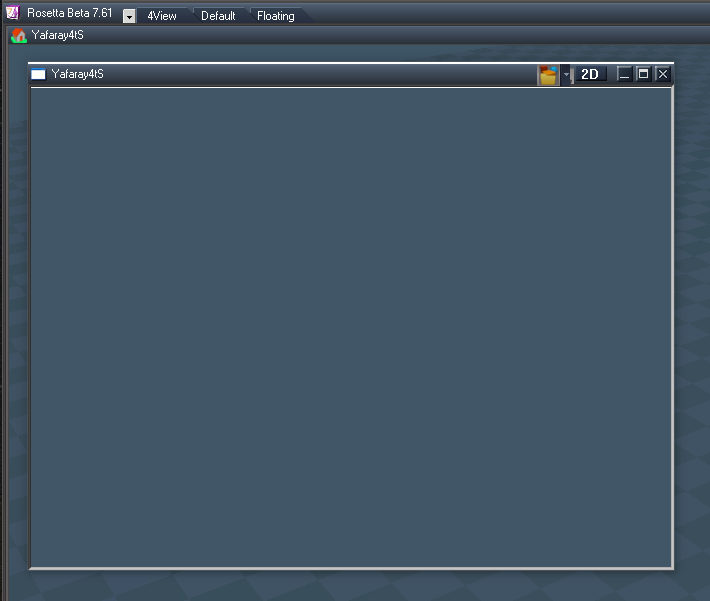
Here is the Yafaray Folder
Removed due to update
-
clintonman
- Captain
- Posts: 5659
- Joined: 21 May 2009, 21:08
- Type the number ten into the box: 0
- Location: California
Re: Yafaray4tS v0.9.0
new bug found - if use Save timer with the internal viewer the status line does not clear. the internal viewer is not compatible with the save timer so that could be a factor.
don't know if this is is also true with the optdetector viewer - need to test
don't know if this is is also true with the optdetector viewer - need to test
-
clintonman
- Captain
- Posts: 5659
- Joined: 21 May 2009, 21:08
- Type the number ten into the box: 0
- Location: California
Re: Yafaray4tS v0.9.0
The documentation looks good. here are some notes:
YafaRay4tS Toolbar page:
remove YafaRay Export and Render
at bottom Restore the toolbar - right click render icons
YafaRay4tS - Default page:
Input Color Space - LinearRGB, sRGB, XYZ - not sure what these do, XYZ is "experimental"
Clay Render - override all materials with a white diffuse material
Normals Smoothing - apply Blender style smoothing to a mesh, everything is hard edged by default in the YafaRay renderer
Reset Default Settings - resets all attributes
Render Pass Panel - opens a popup window of the Render Pass Panel
Denoise Settings - Mix=proportion of denoise and original image, Luminance=brightness noise control, Chrominance=color noise control, do not combine denoise with the Save Timer
Custom String - appears in the log files created by the Draw Parameter
Draw Parameter - logs render results to an html file
Tile Size - size of the boxes used for rendering
Tile Order - centre=build image from the center, random, linear=build image from top to bottom, tile order can be observed by using the Save Time option
Save Time - number of seconds between partial render saves, can be used to observe a long render to see if things are going well. Results during the render can be seen in Windows Explorer and in the optional OpDetector internal viewer. Set to zero to disable. Do not set too low because your machine may not be able to save quickly enough.
Render Object Mode - first dot standard mode, second dot experimental mode
Scene Brightness - used to alter D3D light attenuation to match YafaRay renders
Open Temp Folder - opens the folder containing the xml and command files. Renders will go to the same place by default.
Render - immediate render of the scene
YafaRay4tS - Background
Background type None will export as medium gray color and will remove any background previews generated.
Transparent - render background as transparent
Materials Transparent Refraction - materials refract the transparent background. Transparent background must be selected for this option to work.
Preview button - makes a D3D preview of the background by creating a large sphere and lights if "Use IBL" is active. The sphere and lights exists inside the YafaRay4tS node and are not exported.
Preview scale controls the size of the preview sphere.
remove this line from the Use IBL section - Use background on the "Default" tab must also be checked.
Sun Sky section buttons - "Select"=select the light inside the YafaRay node used to represent the sun. It can be moved but not rotated. It always points to the center of the scene. "# To Sun"=transfer the Sun direction numbers to the position of the preview sun light. "#From Sun"=transfer the sun light position from the preview light to the Sun Direction settings for export. The preview position is not exported.
Fog section remove - Requires Yafaray version 0.1.2 be setup with YafaRay4tSv0.7.5 and the "Yafaray 0.1.2 xml format - beta" checkbox enabled, located in the Setup aspect.
YafaRay4tS - Setup
Leave console open after render is only way to see warnings or errors from the YafaRay renderer.
Use OptDetector Viewer - overrides the default internal viewer in favor of the optional OptDetector Viewer.
remove the Yafaray 0.1.2 xml format - beta notes
File Format - png is the default format. Additional formats are exr, hdr, jpeg, png and tif. Tif files cannot be viewed inside of trueSpace. <- also change for each of the lighting model pages
Looks like the light pages have broken image links
materials - move texture attributes to a new texture mapping page
glossy material image is old
YafaRay4tS Toolbar page:
remove YafaRay Export and Render
at bottom Restore the toolbar - right click render icons
YafaRay4tS - Default page:
Input Color Space - LinearRGB, sRGB, XYZ - not sure what these do, XYZ is "experimental"
Clay Render - override all materials with a white diffuse material
Normals Smoothing - apply Blender style smoothing to a mesh, everything is hard edged by default in the YafaRay renderer
Reset Default Settings - resets all attributes
Render Pass Panel - opens a popup window of the Render Pass Panel
Denoise Settings - Mix=proportion of denoise and original image, Luminance=brightness noise control, Chrominance=color noise control, do not combine denoise with the Save Timer
Custom String - appears in the log files created by the Draw Parameter
Draw Parameter - logs render results to an html file
Tile Size - size of the boxes used for rendering
Tile Order - centre=build image from the center, random, linear=build image from top to bottom, tile order can be observed by using the Save Time option
Save Time - number of seconds between partial render saves, can be used to observe a long render to see if things are going well. Results during the render can be seen in Windows Explorer and in the optional OpDetector internal viewer. Set to zero to disable. Do not set too low because your machine may not be able to save quickly enough.
Render Object Mode - first dot standard mode, second dot experimental mode
Scene Brightness - used to alter D3D light attenuation to match YafaRay renders
Open Temp Folder - opens the folder containing the xml and command files. Renders will go to the same place by default.
Render - immediate render of the scene
YafaRay4tS - Background
Background type None will export as medium gray color and will remove any background previews generated.
Transparent - render background as transparent
Materials Transparent Refraction - materials refract the transparent background. Transparent background must be selected for this option to work.
Preview button - makes a D3D preview of the background by creating a large sphere and lights if "Use IBL" is active. The sphere and lights exists inside the YafaRay4tS node and are not exported.
Preview scale controls the size of the preview sphere.
remove this line from the Use IBL section - Use background on the "Default" tab must also be checked.
Sun Sky section buttons - "Select"=select the light inside the YafaRay node used to represent the sun. It can be moved but not rotated. It always points to the center of the scene. "# To Sun"=transfer the Sun direction numbers to the position of the preview sun light. "#From Sun"=transfer the sun light position from the preview light to the Sun Direction settings for export. The preview position is not exported.
Fog section remove - Requires Yafaray version 0.1.2 be setup with YafaRay4tSv0.7.5 and the "Yafaray 0.1.2 xml format - beta" checkbox enabled, located in the Setup aspect.
YafaRay4tS - Setup
Leave console open after render is only way to see warnings or errors from the YafaRay renderer.
Use OptDetector Viewer - overrides the default internal viewer in favor of the optional OptDetector Viewer.
remove the Yafaray 0.1.2 xml format - beta notes
File Format - png is the default format. Additional formats are exr, hdr, jpeg, png and tif. Tif files cannot be viewed inside of trueSpace. <- also change for each of the lighting model pages
Looks like the light pages have broken image links
materials - move texture attributes to a new texture mapping page
glossy material image is old
-
clintonman
- Captain
- Posts: 5659
- Joined: 21 May 2009, 21:08
- Type the number ten into the box: 0
- Location: California
Re: Yafaray4tS v0.9.0
RC15
new panels
export xml clear status line
new panels
export xml clear status line
- Attachments
-
- YafaRay4tSv090-RC-15.zip
- (6.82 MiB) Downloaded 200 times
-
clintonman
- Captain
- Posts: 5659
- Joined: 21 May 2009, 21:08
- Type the number ten into the box: 0
- Location: California
Re: Yafaray4tS v0.9.0
Yep, don't have it yet, but looking forward to it.trueBlue wrote: 15 Jul 2018, 01:39 ...
Did you noticed that I shared a modified copy of the Yafaray Folder a few post back?
-
trueBlue
- Captain
- Posts: 5548
- Joined: 06 Jul 2009, 22:50
- Type the number ten into the box: 10
Re: Yafaray4tS v0.9.0

I noticed in the C3DReset on line 41 does not work in Rosetta. That's because it is path dependent.
If you change that line with the following it will work with all versions of trueSpace
Code: Select all
WindowsManager.LoadLayout('\\default_layout.rsl');Did you noticed that I shared a modified copy of the Yafaray Folder a few post back?
-
clintonman
- Captain
- Posts: 5659
- Joined: 21 May 2009, 21:08
- Type the number ten into the box: 0
- Location: California
Re: Yafaray4tS v0.9.0
Got it and no, I only know what you decide to share.trueBlue wrote: 14 Jul 2018, 23:53 You do know that the Rosetta reset.js file is different from tS761, right?
These versions are different then the released copies in that I changed to
Activity.Run("Project/Space 3D/C3DReset");
Here are both:
EDIT: Just notice an error in the Rosetta.logandCode: Select all
Error: Unspecified script error Line: 36, Char: 0 Script text: RsFileIO.LoadObject( rosDir + '\\scripts\\preObjects\\Dialog settings.rsobj', '/Preferences/'); 0x80020101 [RsScript.cpp(188)] 14:57:12.554 INFO RsApp.RunScript('reset.js') - 1766 msThis is was why Rosetta would not run the Reset to Default Context.Code: Select all
try {tSBridge.ConnectTSToSpace('/Project/Space 3D');} catch(exception) { } - 16 ms
There was no Dialog settings.rsobj because this version was not updated.
So the take away is that the reset files from the updates should not be copied over the unpatched tS reset files.
-
trueBlue
- Captain
- Posts: 5548
- Joined: 06 Jul 2009, 22:50
- Type the number ten into the box: 10
Re: Yafaray4tS v0.9.0
You do know that the Rosetta reset.js file is different from tS761, right?
These versions are different then the released copies in that I changed to
Activity.Run("Project/Space 3D/C3DReset");
Here are both:
EDIT: Just notice an error in the Rosetta.log
and
This is was why Rosetta would not run the Reset to Default Context.
There was no Dialog settings.rsobj because this version was not updated.
Removed due to update
These versions are different then the released copies in that I changed to
Activity.Run("Project/Space 3D/C3DReset");
Here are both:
EDIT: Just notice an error in the Rosetta.log
Code: Select all
Error: Unspecified script error Line: 36, Char: 0 Script text:  RsFileIO.LoadObject( rosDir + '\\scripts\\preObjects\\Dialog settings.rsobj', '/Preferences/');    0x80020101  [RsScript.cpp(188)]
14:57:12.554 INFO RsApp.RunScript('reset.js') - 1766 ms Code: Select all
try {tSBridge.ConnectTSToSpace('/Project/Space 3D');} catch(exception) { } - 16 msThere was no Dialog settings.rsobj because this version was not updated.
Removed due to update
-
clintonman
- Captain
- Posts: 5659
- Joined: 21 May 2009, 21:08
- Type the number ten into the box: 0
- Location: California
Re: Yafaray4tS v0.9.0
In that case can you share the Update 4 reset.js file ?trueBlue wrote: 14 Jul 2018, 23:18 I replaced the Rosetta reset.js with the Update 4 reset.js file before installing RC-14 to test the new code.
Here is the Yafaray Folder from RC- 14 with modified panels Only.
-
trueBlue
- Captain
- Posts: 5548
- Joined: 06 Jul 2009, 22:50
- Type the number ten into the box: 10
Re: Yafaray4tS v0.9.0
I replaced the Rosetta reset.js with the Update 4 reset.js file before installing RC-14 to test the new code.
Here is the Yafaray Folder from RC- 14 with modified panels Only.
Removed due to update
Here is the Yafaray Folder from RC- 14 with modified panels Only.
Removed due to update
-
clintonman
- Captain
- Posts: 5659
- Joined: 21 May 2009, 21:08
- Type the number ten into the box: 0
- Location: California
Re: Yafaray4tS v0.9.0
So you installed RC14 and then replaced the reset.js file with the Update 4 version? If so then maybe it looks for something that only exists in Update 4 and so it fails to restart.trueBlue wrote: 14 Jul 2018, 22:23 RC 14
Rosetta without update
Replaced Rosetta reset.js with Update 4 reset.js
1.) Export XML button status message does not clear
2.) Reset to Default Context does not work and never reopens Rosetta
Renaming the Backup does not work either
Delete all reset.js files and reset works
Reinstall RC 14 then reset works
IDK?
Access denial, IDK?
Your code to check for different version, IDK?
Conflict with iOptDetectors plugin wanting to reload it's libraries, IDK?
Note: I did install iOptDetectors to my C drive. Wanting to test if you can use different versions of tS.
Before I installed RC 14, I did notice that it never tried to load it's libraries until now.
There are differences in the way the reset.js files are being rewritten but mostly indents missing and spaces between lines.
-
trueBlue
- Captain
- Posts: 5548
- Joined: 06 Jul 2009, 22:50
- Type the number ten into the box: 10
Re: Yafaray4tS v0.9.0
RC 14
Rosetta without update
Replaced Rosetta reset.js with Update 4 reset.js
1.) Export XML button status message does not clear
2.) Reset to Default Context does not work and never reopens Rosetta
Renaming the Backup does not work either
Delete all reset.js files and reset works
Reinstall RC 14 then reset works
IDK?
Access denial, IDK?
Your code to check for different version, IDK?
Conflict with iOptDetectors plugin wanting to reload it's libraries, IDK?
Note: I did install iOptDetectors to my C drive. Wanting to test if you can use different versions of tS.
Before I installed RC 14, I did notice that it never tried to load it's libraries until now.
There are differences in the way the reset.js files are being rewritten but mostly indents missing and spaces between lines.
Rosetta without update
Replaced Rosetta reset.js with Update 4 reset.js
1.) Export XML button status message does not clear
2.) Reset to Default Context does not work and never reopens Rosetta
Renaming the Backup does not work either
Delete all reset.js files and reset works
Reinstall RC 14 then reset works
IDK?
Access denial, IDK?
Your code to check for different version, IDK?
Conflict with iOptDetectors plugin wanting to reload it's libraries, IDK?
Note: I did install iOptDetectors to my C drive. Wanting to test if you can use different versions of tS.
Before I installed RC 14, I did notice that it never tried to load it's libraries until now.
There are differences in the way the reset.js files are being rewritten but mostly indents missing and spaces between lines.
-
clintonman
- Captain
- Posts: 5659
- Joined: 21 May 2009, 21:08
- Type the number ten into the box: 0
- Location: California
Re: Yafaray4tS v0.9.0
RC14
The install shows the Setup aspect
Render Scene button relabeled to Render
Install removes 2 redundant lines from the reset.js file
The install shows the Setup aspect
Render Scene button relabeled to Render
Install removes 2 redundant lines from the reset.js file
- Attachments
-
- YafaRay4tSv090-RC-14.zip
- (6.82 MiB) Downloaded 184 times
-
trueBlue
- Captain
- Posts: 5548
- Joined: 06 Jul 2009, 22:50
- Type the number ten into the box: 10
Re: Yafaray4tS v0.9.0
Hummm… I do not remember the Glass material being an issue before.
The Render Object issue was my fault. Don't remember how but the Rosetta render icons were changed in my installation.
If you could apply XStart, YStart, Height, and Width to the Bounding Box of a selected object, you would have a perfect Render Object.
The Render Object issue was my fault. Don't remember how but the Rosetta render icons were changed in my installation.
If you could apply XStart, YStart, Height, and Width to the Bounding Box of a selected object, you would have a perfect Render Object.
- Attachments
-
![RenderArea[1].jpg](download/file7df7.jpg)
- RenderArea[1].jpg (11.14 KiB) Viewed 4126 times
-
clintonman
- Captain
- Posts: 5659
- Joined: 21 May 2009, 21:08
- Type the number ten into the box: 0
- Location: California
Re: Yafaray4tS v0.9.0
OK glad you figured it out.trueBlue wrote: 14 Jul 2018, 17:49 It is the Glass material (default settings) that is causing that error.
I repainted with Shiny Diffuse and now my image has some bytes
Also the xml file issue is not a problem now
The install not showing Setup aspect is solved
The renaming the Render Scene button is easy
Install removes those 2 redundant lines from the reset.js file
There is no way to get error messages from YafaRay renderer, so no way to automatically solve issues like the "not enough photons to render" issue.
May want to add a note to documentation that some errors can only be seen in the windows console.
-
trueBlue
- Captain
- Posts: 5548
- Joined: 06 Jul 2009, 22:50
- Type the number ten into the box: 10
Re: Yafaray4tS v0.9.0
It is the Glass material (default settings) that is causing that error.
I repainted with Shiny Diffuse and now my image has some bytes
Also the xml file issue is not a problem now
I repainted with Shiny Diffuse and now my image has some bytes
Also the xml file issue is not a problem now
-
clintonman
- Captain
- Posts: 5659
- Joined: 21 May 2009, 21:08
- Type the number ten into the box: 0
- Location: California
Re: Yafaray4tS v0.9.0
I can reproduce by setting photon mapping as the lighting method and reducing the photon counts to 5.trueBlue wrote: 14 Jul 2018, 17:27 Think I found out what's up with the zero bytes issue
Now need to figure your xml file permissions problem.
-
clintonman
- Captain
- Posts: 5659
- Joined: 21 May 2009, 21:08
- Type the number ten into the box: 0
- Location: California
Re: Yafaray4tS v0.9.0
Nope.trueBlue wrote: 14 Jul 2018, 17:06 ...
Shouldn't the Render buttons honor that though?
...
trueBlue wrote: 14 Jul 2018, 17:06 ...
Well except for the panel editing.
...


will changetrueBlue wrote: 14 Jul 2018, 17:06 ...
Also suggest that you change the Render to File's Render Scene button to Render.
...
-
trueBlue
- Captain
- Posts: 5548
- Joined: 06 Jul 2009, 22:50
- Type the number ten into the box: 10
Re: Yafaray4tS v0.9.0
Think I found out what's up with the zero bytes issue
- Attachments
-

-
clintonman
- Captain
- Posts: 5659
- Joined: 21 May 2009, 21:08
- Type the number ten into the box: 0
- Location: California
Re: Yafaray4tS v0.9.0
Not seeing this. Any steps to reproduce the problem?trueBlue wrote: 14 Jul 2018, 16:51
New - If I use Rosetta Render Object nothing renders nor does Render to File if checked.
...
-
trueBlue
- Captain
- Posts: 5548
- Joined: 06 Jul 2009, 22:50
- Type the number ten into the box: 10
Re: Yafaray4tS v0.9.0
Got that. Crossed post!
Shouldn't the Render buttons honor that though?
Great work on the Render Area!
Well except for the panel editing.
Not so sure of the value or use of exposing the Render Area attributes though.
Also suggest that you change the Render to File's Render Scene button to Render.
It is miss leading when you use the different Render icons and that is the way tS Render to File is.
Shouldn't the Render buttons honor that though?
Great work on the Render Area!
Well except for the panel editing.
Not so sure of the value or use of exposing the Render Area attributes though.
Also suggest that you change the Render to File's Render Scene button to Render.
It is miss leading when you use the different Render icons and that is the way tS Render to File is.
-
clintonman
- Captain
- Posts: 5659
- Joined: 21 May 2009, 21:08
- Type the number ten into the box: 0
- Location: California
Re: Yafaray4tS v0.9.0
The YafaRay4tS node render buttons are not set to use the render to file dialog. Only the toolbar buttons have that option.
-
trueBlue
- Captain
- Posts: 5548
- Joined: 06 Jul 2009, 22:50
- Type the number ten into the box: 10
Re: Yafaray4tS v0.9.0
Tested again.clintonman wrote: 14 Jul 2018, 16:11Is this 1 issue or 2 issues?trueBlue wrote: 14 Jul 2018, 15:27This is still true in RC-13trueBlue wrote: 14 Jul 2018, 04:23 I got iOptDetector Viewer to work.
If I enable Internal Display Viewer it works.
If I disable Internal Display Viewer it does not work.
If I use the Rosetta RenderScene icon, I get this error:
The error comes from disable internal viewer?
optdetector is an internal display, so it won't work if internal display is disabled
I am not getting an error this time using Rosetta icons.
If I enable Internal Display Viewer it works.
If I disable Internal Display Viewer it does not work.
New - If I use Rosetta Render Object nothing renders nor does Render to File if checked.
YafaRay Render icons work as expected
All of YafaRay4tS - Render buttons do not honor Use Render to File if checked
-
clintonman
- Captain
- Posts: 5659
- Joined: 21 May 2009, 21:08
- Type the number ten into the box: 0
- Location: California
Re: Yafaray4tS v0.9.0
OK, I see it. It doesn't hurt anything but I will alter the install to remove those lines.trueBlue wrote: 14 Jul 2018, 15:39 In the present released Update 4 reset.js file these 2 lines exist:RC-13 Does not remove these 2 linesCode: Select all
RsFileIO.LoadObject( rosDir + "\\Scripts\\preobjects\\Yafaray Folder.RsObj", "/");
RsFileIO.LoadObject( rosDir + '\\Scripts\\clintonobjects\\ReloadCustomScripts.RsObj', "/Scripts");
So as I understand it, this process is still being run twice!
I can remove these lines in the upcoming release but, for backwards compatibility I would suggest that you address this with your installation script.
-
clintonman
- Captain
- Posts: 5659
- Joined: 21 May 2009, 21:08
- Type the number ten into the box: 0
- Location: California
Re: Yafaray4tS v0.9.0
roger that, will look for a fixtrueBlue wrote: 14 Jul 2018, 15:44 RC - 13
Shows the Direct aspect after installation, instead of the Setup aspect like it did before.
-
clintonman
- Captain
- Posts: 5659
- Joined: 21 May 2009, 21:08
- Type the number ten into the box: 0
- Location: California
Re: Yafaray4tS v0.9.0
The YafaRay4tS node render buttons are not set to use the render to file dialog. Only the toolbar buttons have that option.trueBlue wrote: 14 Jul 2018, 15:51 RC -13
If I Unload OptDectectors Package and reboot Rosetta, Use Render to File Dialog is not honored with the Render buttons.
Render icons work as expected.
-
clintonman
- Captain
- Posts: 5659
- Joined: 21 May 2009, 21:08
- Type the number ten into the box: 0
- Location: California
Re: Yafaray4tS v0.9.0
Is this 1 issue or 2 issues?trueBlue wrote: 14 Jul 2018, 15:27This is still true in RC-13trueBlue wrote: 14 Jul 2018, 04:23 I got iOptDetector Viewer to work.
If I enable Internal Display Viewer it works.
If I disable Internal Display Viewer it does not work.
If I use the Rosetta RenderScene icon, I get this error:
The error comes from disable internal viewer?
optdetector is an internal display, so it won't work if internal display is disabled
-
clintonman
- Captain
- Posts: 5659
- Joined: 21 May 2009, 21:08
- Type the number ten into the box: 0
- Location: California
Re: Yafaray4tS v0.9.0
Still not seeing anything like that here:
rosetta not patched
install rsx plugin
install c3dpersistenceAutoload
reset context
install yaf4ts
uncheck render to file
save settings
render button - success
create c:\Temp
settings reset temp dir, reset custom xml, reset render output - done to try to match your setup
render button - success
I can't even begin to imagine why it's not working for you.
by default xml file is set to be delete after render
try the attached YafaRay4tS with the output console log view open and send me a screen shot
try deleting all the files in your temp folder
try deleting and recreating your temp folder
try rendering to a different location
try a different computer if possible
try disabling your anti virus software
what version of windows are you running? I've only tested on 2 win10 machines - win10 pro and win10 home
on a side note, C:\Temp isn't a part of windows. it's not included with winxp, win7 or win10. maybe it was left over from win98 or the original yaf4ts guys just made it up.
rosetta not patched
install rsx plugin
install c3dpersistenceAutoload
reset context
install yaf4ts
uncheck render to file
save settings
render button - success
create c:\Temp
settings reset temp dir, reset custom xml, reset render output - done to try to match your setup
render button - success
I can't even begin to imagine why it's not working for you.
by default xml file is set to be delete after render
try the attached YafaRay4tS with the output console log view open and send me a screen shot
try deleting all the files in your temp folder
try deleting and recreating your temp folder
try rendering to a different location
try a different computer if possible
try disabling your anti virus software
what version of windows are you running? I've only tested on 2 win10 machines - win10 pro and win10 home
on a side note, C:\Temp isn't a part of windows. it's not included with winxp, win7 or win10. maybe it was left over from win98 or the original yaf4ts guys just made it up.
- Attachments
-
- YafaRay4tS58f8.RsObj
- (794.19 KiB) Downloaded 175 times
-
trueBlue
- Captain
- Posts: 5548
- Joined: 06 Jul 2009, 22:50
- Type the number ten into the box: 10
Re: Yafaray4tS v0.9.0
RC -13
If I Unload OptDectectors Package and reboot Rosetta, Use Render to File Dialog is not honored with the Render buttons.
Render icons work as expected.
If I Unload OptDectectors Package and reboot Rosetta, Use Render to File Dialog is not honored with the Render buttons.
Render icons work as expected.
-
trueBlue
- Captain
- Posts: 5548
- Joined: 06 Jul 2009, 22:50
- Type the number ten into the box: 10
Re: Yafaray4tS v0.9.0
RC - 13
Shows the Direct aspect after installation, instead of the Setup aspect like it did before.
Shows the Direct aspect after installation, instead of the Setup aspect like it did before.
-
trueBlue
- Captain
- Posts: 5548
- Joined: 06 Jul 2009, 22:50
- Type the number ten into the box: 10
Re: Yafaray4tS v0.9.0
In the present released Update 4 reset.js file these 2 lines exist:
RC-13 Does not remove these 2 lines
So as I understand it, this process is still being run twice!
I can remove these lines in the upcoming release but, for backwards compatibility I would suggest that you address this with your installation script.
Code: Select all
RsFileIO.LoadObject( rosDir + "\\Scripts\\preobjects\\Yafaray Folder.RsObj", "/");
RsFileIO.LoadObject( rosDir + '\\Scripts\\clintonobjects\\ReloadCustomScripts.RsObj', "/Scripts");So as I understand it, this process is still being run twice!
I can remove these lines in the upcoming release but, for backwards compatibility I would suggest that you address this with your installation script.
-
trueBlue
- Captain
- Posts: 5548
- Joined: 06 Jul 2009, 22:50
- Type the number ten into the box: 10
Re: Yafaray4tS v0.9.0
This is still true in RC-13trueBlue wrote: 14 Jul 2018, 04:23 I got iOptDetector Viewer to work.
If I enable Internal Display Viewer it works.
If I disable Internal Display Viewer it does not work.
If I use the Rosetta RenderScene icon, I get this error:
-
trueBlue
- Captain
- Posts: 5548
- Joined: 06 Jul 2009, 22:50
- Type the number ten into the box: 10
Re: Yafaray4tS v0.9.0
Installed to Rosetta unpatched
Uncheck Render to File
1.) I'll repeat again, I do not understand why this would be a default setting.
Select the Save Settings button
Select Render button and I get this error:
Select the Output Render File C:\Temp\yaf_test.png (Default from RC-13)
2.) yaf_test.png is zero bytes (Noted that the yaf_temp.xml exist)
Select the Output Render File C:\Temp\yaf_test.jpg (Noted that the jpg was NOT zero bytes)
Select Render and I get the above error
Select the Output Render File C:\Temp\yaf_test.jpg (Noted that the jpg IS zero bytes)
I have reported this before. Any ideas what is wrong here?
Changed to:
Use Custom XML export file (Without using the File Dialog)
C:\Temp\CustomTemp.xml
This works, but now I do not see the CustomTemp.xml file in that path. (It was there previously)
If I uncheck Use Custom XML export file it does not work and the images are zero bytes again
Uncheck Render to File
1.) I'll repeat again, I do not understand why this would be a default setting.
Select the Save Settings button
Select Render button and I get this error:
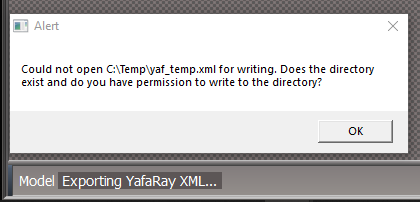
- First render.PNG (9.44 KiB) Viewed 4292 times
2.) yaf_test.png is zero bytes (Noted that the yaf_temp.xml exist)

- First render yaf_test png is 0 Bytes.PNG (16.56 KiB) Viewed 4292 times
Select Render and I get the above error
Select the Output Render File C:\Temp\yaf_test.jpg (Noted that the jpg IS zero bytes)
I have reported this before. Any ideas what is wrong here?
Changed to:
Use Custom XML export file (Without using the File Dialog)
C:\Temp\CustomTemp.xml
This works, but now I do not see the CustomTemp.xml file in that path. (It was there previously)
If I uncheck Use Custom XML export file it does not work and the images are zero bytes again
-
clintonman
- Captain
- Posts: 5659
- Joined: 21 May 2009, 21:08
- Type the number ten into the box: 0
- Location: California
Re: Yafaray4tS v0.9.0
RC13
Lucky 13
changes/notes:
reset file alter so C3DReset is not run with ScriptObject.Execute - only issue for older test installer
also checks for Activity.Run("Project/Space 3D/C3DReset") pre-exist, does nothing if it does
also runs from scene instead of root to match unofficial update
RsFileIO.LoadObject( rosDir + '\\\\scripts\\\\preObjects\\\\C3DReset.RsObj', scene);
Activity.Run(scene + "/C3DReset");
replaced Width and Height on Animation panel to use ResX and ResY
added ResX and ResY to camera aspect, moving width and height to the area render section
Map node default gamma 2.2, fix bug where any texture removal erased the color texture preview
added new yafaray buttons from tB
animation tab script changed
Node.ConReset("%THIS_NAME%Sequence Player//Frame", "Frame")
to
Node.ConReset("%THIS_NAME%/Sequence Player/Frame", "Frame")
ShowDisplayFnSet anim status add start frame and subtract 1
6.) Here is an example where I render from YafaRay4tS/Anim aspect Start Frame 17 and End Frame 17
not possible to render a single frame animation because of the looping nodes
RenderAnim2 updated error message to check for less than 2 frame, was less than 1 before
also set numFrames to 2 instead of 1 because of the "off by one error"
var numFrames = end - start + 1;
if(numFrames < 2) {
Errors.Add("The End frame must be after the Start frame.");
numFrames = 2;
}
RenderFnSet at bottom clear status if internal view is false
Activity.Run(Space.CurrentScene() + "/YafaRay4tS/ClearStatus");
ResetToDefaults bottom - optdetector default adjustment
if(typeof OptDetectors == 'undefined')
Node.Value(yafNode, "useOptDetector") = false;
remove automatic frame range for animation unless start and end are the same frame in which case get start and end from the AnimMng node
Scripts/CustomCommands/YafarayScripts/RenderAnimation
if(Node.Value(Space.CurrentScene()+"/YafaRay4tS", "Start_Frame") == Node.Value(Space.CurrentScene()+"/YafaRay4tS", "End_Frame")) {
Node.Value(Space.CurrentScene()+"/YafaRay4tS", "Start_Frame") = Node.Value("AnimMng", "AnimStart");
Node.Value(Space.CurrentScene()+"/YafaRay4tS", "End_Frame") = Node.Value("AnimMng", "AnimEnd");
}
Note: if tS not installed to "C:\trueSpace761" then auto load of Clintons3DPlugin.rsx will not occur when unofficial patch is installed
during install run full reset, not just 4 connectors
//Node.ConReset(Space.CurrentScene() + "/YafaRay4tS", "Yaf_Path")
//Node.ConReset(Space.CurrentScene() + "/YafaRay4tS", "Yaf_TempDir")
//Node.ConReset(Space.CurrentScene() + "/YafaRay4tS", "Yaf_XMLFilename")
//Node.ConReset(Space.CurrentScene() + "/YafaRay4tS", "Yaf_RenderFilename")
Activity.Run(Space.CurrentScene() + "/YafaRay4tS/ResetToDefaults")
Lucky 13
changes/notes:
reset file alter so C3DReset is not run with ScriptObject.Execute - only issue for older test installer
also checks for Activity.Run("Project/Space 3D/C3DReset") pre-exist, does nothing if it does
also runs from scene instead of root to match unofficial update
RsFileIO.LoadObject( rosDir + '\\\\scripts\\\\preObjects\\\\C3DReset.RsObj', scene);
Activity.Run(scene + "/C3DReset");
replaced Width and Height on Animation panel to use ResX and ResY
added ResX and ResY to camera aspect, moving width and height to the area render section
Map node default gamma 2.2, fix bug where any texture removal erased the color texture preview
added new yafaray buttons from tB
animation tab script changed
Node.ConReset("%THIS_NAME%Sequence Player//Frame", "Frame")
to
Node.ConReset("%THIS_NAME%/Sequence Player/Frame", "Frame")
ShowDisplayFnSet anim status add start frame and subtract 1
6.) Here is an example where I render from YafaRay4tS/Anim aspect Start Frame 17 and End Frame 17
not possible to render a single frame animation because of the looping nodes
RenderAnim2 updated error message to check for less than 2 frame, was less than 1 before
also set numFrames to 2 instead of 1 because of the "off by one error"
var numFrames = end - start + 1;
if(numFrames < 2) {
Errors.Add("The End frame must be after the Start frame.");
numFrames = 2;
}
RenderFnSet at bottom clear status if internal view is false
Activity.Run(Space.CurrentScene() + "/YafaRay4tS/ClearStatus");
ResetToDefaults bottom - optdetector default adjustment
if(typeof OptDetectors == 'undefined')
Node.Value(yafNode, "useOptDetector") = false;
remove automatic frame range for animation unless start and end are the same frame in which case get start and end from the AnimMng node
Scripts/CustomCommands/YafarayScripts/RenderAnimation
if(Node.Value(Space.CurrentScene()+"/YafaRay4tS", "Start_Frame") == Node.Value(Space.CurrentScene()+"/YafaRay4tS", "End_Frame")) {
Node.Value(Space.CurrentScene()+"/YafaRay4tS", "Start_Frame") = Node.Value("AnimMng", "AnimStart");
Node.Value(Space.CurrentScene()+"/YafaRay4tS", "End_Frame") = Node.Value("AnimMng", "AnimEnd");
}
Note: if tS not installed to "C:\trueSpace761" then auto load of Clintons3DPlugin.rsx will not occur when unofficial patch is installed
during install run full reset, not just 4 connectors
//Node.ConReset(Space.CurrentScene() + "/YafaRay4tS", "Yaf_Path")
//Node.ConReset(Space.CurrentScene() + "/YafaRay4tS", "Yaf_TempDir")
//Node.ConReset(Space.CurrentScene() + "/YafaRay4tS", "Yaf_XMLFilename")
//Node.ConReset(Space.CurrentScene() + "/YafaRay4tS", "Yaf_RenderFilename")
Activity.Run(Space.CurrentScene() + "/YafaRay4tS/ResetToDefaults")
- Attachments
-
- YafaRay4tSv090-RC-13.zip
- (6.82 MiB) Downloaded 200 times
-
trueBlue
- Captain
- Posts: 5548
- Joined: 06 Jul 2009, 22:50
- Type the number ten into the box: 10
Re: Yafaray4tS v0.9.0
I got iOptDetector Viewer to work.
If I enable Internal Display Viewer it works.
If I disable Internal Display Viewer it does not work.
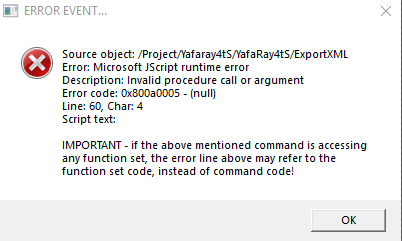
If I use the Rosetta RenderScene icon, I get this error:
If I enable Internal Display Viewer it works.
If I disable Internal Display Viewer it does not work.
If I use the Rosetta RenderScene icon, I get this error:
- Attachments
-
-
trueBlue
- Captain
- Posts: 5548
- Joined: 06 Jul 2009, 22:50
- Type the number ten into the box: 10
Re: Yafaray4tS v0.9.0
Well that explains it.clintonman wrote: 13 Jul 2018, 19:45 I can't explain why it's necessary because I don't think it is necessary.

-
clintonman
- Captain
- Posts: 5659
- Joined: 21 May 2009, 21:08
- Type the number ten into the box: 0
- Location: California
Re: Yafaray4tS v0.9.0
I can't explain why it's necessary because I don't think it is necessary.trueBlue wrote: 13 Jul 2018, 19:18 ...
Also can please explain to me why it is necessary to run the same script twice in two different locations, from the reset.js file?Whatever is decided I will be putting this in the unreleased Update 4.Code: Select all
RsFileIO.LoadObject( rosDir + '\\scripts\\preObjects\\C3DReset.RsObj', scene);
Activity.Run("Project/Space 3D/C3DReset");
RsFileIO.LoadObject( rosDir + '\\scripts\\preObjects\\C3DReset.RsObj', '/');
Activity.Run("/C3DReset");
-
clintonman
- Captain
- Posts: 5659
- Joined: 21 May 2009, 21:08
- Type the number ten into the box: 0
- Location: California
Re: Yafaray4tS v0.9.0
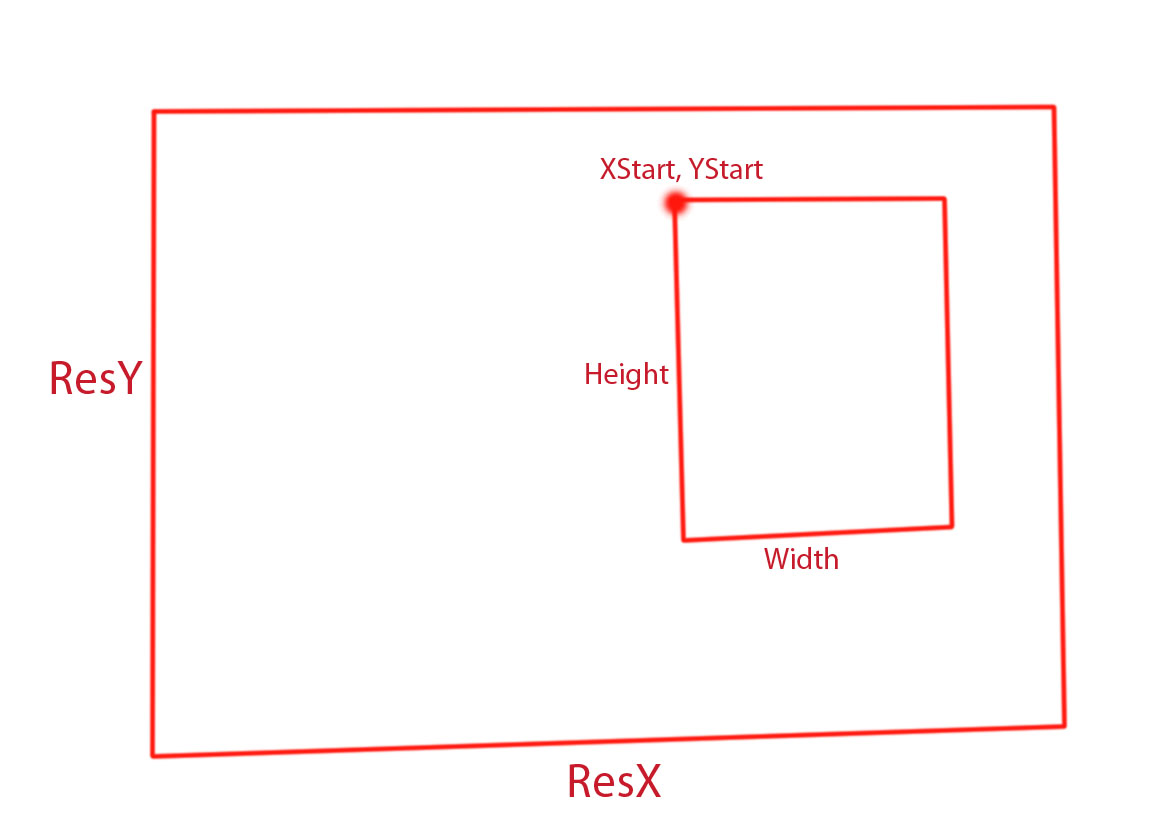
ResX, ResY used for the full render
StartX,y and Width and Height used for render area
-
trueBlue
- Captain
- Posts: 5548
- Joined: 06 Jul 2009, 22:50
- Type the number ten into the box: 10
Re: Yafaray4tS v0.9.0
Oh come on, I know you can do it.
Maybe create another node in YafaRa4tS that stores the current Width & Height.
Then after a Render, restore the previous stored Width & Height
If that is possible, no need to add any Area Render attributes in the user interface, unless for some reason it has value.
This probably is not right but maybe something like this in the RenderArea script:
Also can please explain to me why it is necessary to run the same script twice in two different locations, from the reset.js file?
Whatever is decided I will be putting this in the unreleased Update 4.
Maybe create another node in YafaRa4tS that stores the current Width & Height.
Then after a Render, restore the previous stored Width & Height
If that is possible, no need to add any Area Render attributes in the user interface, unless for some reason it has value.
This probably is not right but maybe something like this in the RenderArea script:
Code: Select all
//Add to RenderArea script
var tmpYaf_Width = Node.Value(Space.CurrentScene()+"/YafaRay4tS", "Yaf_Width")
var tmpYaf_Height = Node.Value(Space.CurrentScene()+"/YafaRay4tS", "Yaf_Height")

Node.Value(Space.CurrentScene()+"/YafaRay4tS", "Yaf_Width") = tmpYaf_Width
Node.Value(Space.CurrentScene()+"/YafaRay4tS", "Yaf_Height") = tmpYaf_Height

		Node.Value(Space.CurrentScene()+"/YafaRay4tS", "Yaf_Width") = dx * renderScale;
		Node.Value(Space.CurrentScene()+"/YafaRay4tS", "Yaf_Height") = dy * renderScale;

// Add into End of RenderArea script
		Activity.Run(Space.CurrentScene()+"/YafaRay4tS/ExportXML");
		Activity.Run(Space.CurrentScene()+"/YafaRay4tS/Render");
		Node.Value(Space.CurrentScene()+"/YafaRay4tS", "Yaf_Width") = tmpYaf_Width
		Node.Value(Space.CurrentScene()+"/YafaRay4tS", "Yaf_Height") = tmpYaf_Height
Also can please explain to me why it is necessary to run the same script twice in two different locations, from the reset.js file?
Code: Select all
RsFileIO.LoadObject( rosDir + '\\scripts\\preObjects\\C3DReset.RsObj', scene);
Activity.Run("Project/Space 3D/C3DReset");
RsFileIO.LoadObject( rosDir + '\\scripts\\preObjects\\C3DReset.RsObj', '/');
Activity.Run("/C3DReset");-
clintonman
- Captain
- Posts: 5659
- Joined: 21 May 2009, 21:08
- Type the number ten into the box: 0
- Location: California
Re: Yafaray4tS v0.9.0
I don't see any way around that. Maybe add the ResX and ResY to the camera aspect so it's clear that the area render Xstart,Ystart,Width and Height is not the same as ResX ResY. Also if you uncheck Area Render it will use the ResX and ResY from the other panels.trueBlue wrote: 13 Jul 2018, 14:171.) In the Camera aspect, Render at 640x480.clintonman wrote: 13 Jul 2018, 13:56 I don't see Width and Height being reset anywhere. What are the steps to see this?
2.) Next use the Render Portion. The Width and Height are changed in the Camera aspect.
3.) Exit Render Portion.
4.) Render again using the Render button
...
The animation tab is also pointing to the area render attributes instead of ResX ResY.
Area render uses the full size information and the box within the full render to produce the area render result.
TODO:
add ResX, ResY to the camera aspect
change animation aspect to use ResX ResY instead of Yaf_Width and Yaf_Height
-
trueBlue
- Captain
- Posts: 5548
- Joined: 06 Jul 2009, 22:50
- Type the number ten into the box: 10
Re: Yafaray4tS v0.9.0
1.) In the Camera aspect, Render at 640x480.clintonman wrote: 13 Jul 2018, 13:56 I don't see Width and Height being reset anywhere. What are the steps to see this?
2.) Next use the Render Portion. The Width and Height are changed in the Camera aspect.
3.) Exit Render Portion.
4.) Render again using the Render button
In Vray the Image - Width and Height does not change after using the Render Portion
With regards to what Jack wrote, can you give me a better example of what to write?
-
clintonman
- Captain
- Posts: 5659
- Joined: 21 May 2009, 21:08
- Type the number ten into the box: 0
- Location: California
Re: Yafaray4tS v0.9.0
You have to choose the batch option to render in the background.trueBlue wrote: 13 Jul 2018, 06:30 ...
Working on the Help file a little bit. Jack writes about YafaRay4tS:
"YafaRay4tS is implemented as an XML exporter that uses batch scripting to interface with YafaRay command line XML interface. This has a significant advantage over direct interfacing with the render engine allowing the user to continue to work on their project while YafaRay renders the spawned request in the background.
The YafaRay4tS user interface handles all these details of interfacing with the render engine transparently for the user so that they can focus on their art and not on setting the renderer up"
Is this true?
I minimized tS in the middle of rendering an animation at frame 15. When I opened it up it had stopped rendering at frame 15.
Is there anyway to stop changing or resetting the Output - Render File's image Width and Height after using the Render Portion? If not I was thinking about adding a script to it's widget.
I don't know what he means by this: "The YafaRay4tS user interface handles all these details of interfacing with the render engine transparently [/color]for the user so that they can focus on their art and not on setting the renderer up"
I don't see Width and Height being reset anywhere. What are the steps to see this?
-
trueBlue
- Captain
- Posts: 5548
- Joined: 06 Jul 2009, 22:50
- Type the number ten into the box: 10
Re: Yafaray4tS v0.9.0
The Yafaray Settings RMB Command node I was referring to resides inside the YafaRa4tS node.clintonman wrote: 13 Jul 2018, 05:38trueBlue wrote: 13 Jul 2018, 05:28 Here is all of the new YafaRay4tS buttons
Does that include the bad "7.) I do not think I wrote the Yafaray Settings RMB Command script right.
Do not think the YafaRay4tS node should be replaced if it Exist in the scene."
The YafaRay4tS Settings icon's RMB calls the Yafaray Settings RMB Command node
Code: Select all
if (Node.Exists("/Yafaray Folder/YafaRay4tS")){Activity.Run("/Yafaray Folder/YafaRay4tS/Yafaray Settings RMB Command")}
"YafaRay4tS is implemented as an XML exporter that uses batch scripting to interface with YafaRay command line XML interface. This has a significant advantage over direct interfacing with the render engine allowing the user to continue to work on their project while YafaRay renders the spawned request in the background.
The YafaRay4tS user interface handles all these details of interfacing with the render engine transparently for the user so that they can focus on their art and not on setting the renderer up"
Is this true?
I minimized tS in the middle of rendering an animation at frame 15. When I opened it up it had stopped rendering at frame 15.
Is there anyway to stop changing or resetting the Output - Render File's image Width and Height after using the Render Portion? If not I was thinking about adding a script to it's widget.
-
clintonman
- Captain
- Posts: 5659
- Joined: 21 May 2009, 21:08
- Type the number ten into the box: 0
- Location: California
Re: Yafaray4tS v0.9.0
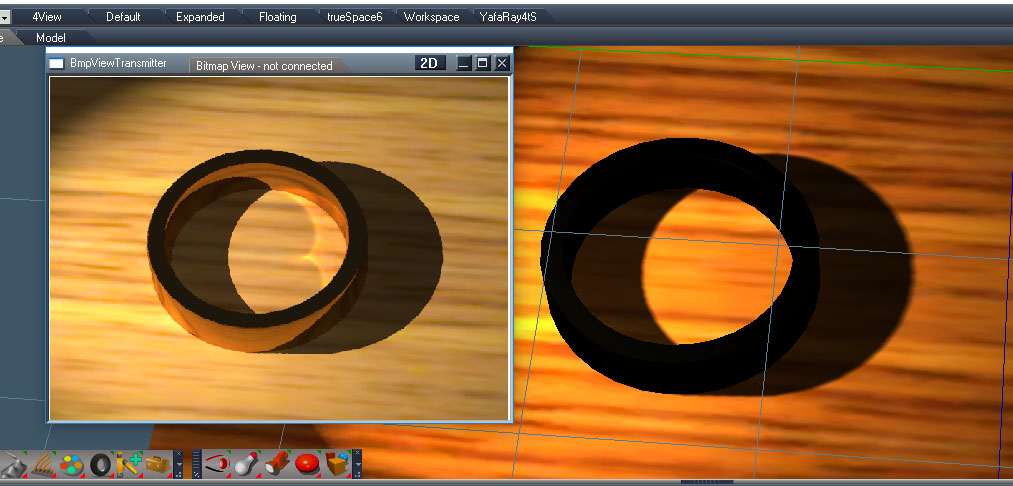
TODO: Map node gamma save at 2.2 gamma default in to the library
I'll plan to make a new RC release tomorrow.
-
clintonman
- Captain
- Posts: 5659
- Joined: 21 May 2009, 21:08
- Type the number ten into the box: 0
- Location: California
Re: Yafaray4tS v0.9.0
trueBlue wrote: 13 Jul 2018, 05:28 Here is all of the new YafaRay4tS buttons
Does that include the bad "7.) I do not think I wrote the Yafaray Settings RMB Command script right.
Do not think the YafaRay4tS node should be replaced if it Exist in the scene."
-
clintonman
- Captain
- Posts: 5659
- Joined: 21 May 2009, 21:08
- Type the number ten into the box: 0
- Location: California
Re: Yafaray4tS v0.9.0
Found a bug in the texture system. When removing any texture the color texture was disabled in the preview. It still rendered ok, but turned white in the viewport.
Map/SwitchImage moved } furthur down so not resetting the "UseDiffuseMap" value
about 3 or 4 places in the code where it happens
Map/SwitchImage moved } furthur down so not resetting the "UseDiffuseMap" value
about 3 or 4 places in the code where it happens
Code: Select all
	//need to disconnect and reset con and delete self if switch to none MapType== -1
	if(MapType == -1) {
		Node.Disconnect(owner, "BitMapOUT", Node.Owner(owner) + "/ImagePreviewData", attributeName + "_img");
		Node.ConReset(Node.Owner(owner) + "/ImagePreviewData", attributeName + "_imgOUT");
		Node.ConReset(Node.Owner(owner) + "/ImagePreviewData", attributeName + "_img");

		//disconnect for diffuse_color - not working but delete will sever links
		if(Node.Exists(textureColorShader)) {
			if(attributeName == "diffuse_color") {
				Node.Disconnect(owner, "BlendOUT", textureColorShader, "DiffuseBlend")
				Node.Disconnect(owner, "DefColorOUT", textureColorShader, "DiffuseDefColor")
				Node.Disconnect(owner, "XOffsetOUT", textureColorShader, "OffsetU")
				Node.Disconnect(owner, "XScaleOUT", textureColorShader, "ScaleU")
				Node.Disconnect(owner, "YOffsetOUT", textureColorShader, "OffsetV")
				Node.Disconnect(owner, "YScaleOUT", textureColorShader, "ScaleV")
			//}

			Node.Value(textureColorShader, "UseDiffuseMap") = false;
			Node.Value(textureColorShader, "DiffuseMapType") = MapType;
			}
}-
trueBlue
- Captain
- Posts: 5548
- Joined: 06 Jul 2009, 22:50
- Type the number ten into the box: 10
Re: Yafaray4tS v0.9.0
Here is all of the new YafaRay4tS buttons
Removed due to update
Removed due to update
-
trueBlue
- Captain
- Posts: 5548
- Joined: 06 Jul 2009, 22:50
- Type the number ten into the box: 10
Re: Yafaray4tS v0.9.0
Hope you find out whats up.
1.) The Sequence Player's BitMap display Script on Right click has a double forward slash
2.) I think your Animation Rendering Status Line message is one frame to fast.
tS Animation Timeline is say on frame 9 (Rendering) and the Message says Frame # 9 Render Complete.
tS Animation Timeline moves to frame 10 and the Message says Frame # 10 Render Complete.
How do you render one keyframe? I do not think that is working either. Even setting the Start Frame to 14 and End Frame to 15 does not render as expected. IE: What I see in the Workspace view at frame 15.
3.) The message says Render # 1 Complete instead of Render # 14 Complete.
4.) When I select the Render Animation button in the above scenario there is no message that it is Rendering... In a long render time, it looks like nothing is happening.
5.) Think you should delete the Yaf_render.cmd after the Render is complete. Render to the Desktop from tS and YafaRay4tS and you will see why.
6.) Here is an example where I render from YafaRay4tS/Anim aspect Start Frame 17 and End Frame 17 to file name yaf_test.png in the first image. The second image is rendered from tS R2F Frame 17 to Frame 17 with the same name..
yaf_test_0000.png - Notice the differences in the naming of the rendered images on Frame 17?
yaf_test_00017.png - Notice the differences in the images on Frame 17?
7.) I do not think I wrote the Yafaray Settings RMB Command script right.
Do not think the YafaRay4tS node should be replaced if it Exist in the scene.
8.) Got an error using ts Render 2 File.
1.) The Sequence Player's BitMap display Script on Right click has a double forward slash
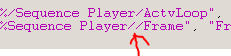
- SeQ Player.PNG (1.75 KiB) Viewed 4493 times
tS Animation Timeline is say on frame 9 (Rendering) and the Message says Frame # 9 Render Complete.
tS Animation Timeline moves to frame 10 and the Message says Frame # 10 Render Complete.
How do you render one keyframe? I do not think that is working either. Even setting the Start Frame to 14 and End Frame to 15 does not render as expected. IE: What I see in the Workspace view at frame 15.
3.) The message says Render # 1 Complete instead of Render # 14 Complete.
4.) When I select the Render Animation button in the above scenario there is no message that it is Rendering... In a long render time, it looks like nothing is happening.
5.) Think you should delete the Yaf_render.cmd after the Render is complete. Render to the Desktop from tS and YafaRay4tS and you will see why.
6.) Here is an example where I render from YafaRay4tS/Anim aspect Start Frame 17 and End Frame 17 to file name yaf_test.png in the first image. The second image is rendered from tS R2F Frame 17 to Frame 17 with the same name..
yaf_test_0000.png - Notice the differences in the naming of the rendered images on Frame 17?


Do not think the YafaRay4tS node should be replaced if it Exist in the scene.
8.) Got an error using ts Render 2 File.
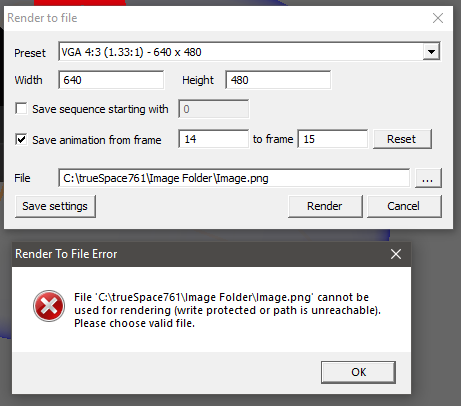
-
clintonman
- Captain
- Posts: 5659
- Joined: 21 May 2009, 21:08
- Type the number ten into the box: 0
- Location: California
Re: Yafaray4tS v0.9.0
I see something now. I opened the scene with patched full version of tS and see it not working.
I just tried a scene render.
It doesn't open the viewer and the status message is stuck "rendering..." but it does render.
One more thing on TODO list:
add to the bottom of YafaRay4tS/RenderFnSet - so render scene with no internal viewer will clear the status
I just tried a scene render.
It doesn't open the viewer and the status message is stuck "rendering..." but it does render.
One more thing on TODO list:
add to the bottom of YafaRay4tS/RenderFnSet - so render scene with no internal viewer will clear the status
Code: Select all
Activity.Run(Space.CurrentScene() + "/YafaRay4tS/ClearStatus");-
clintonman
- Captain
- Posts: 5659
- Joined: 21 May 2009, 21:08
- Type the number ten into the box: 0
- Location: California
Re: Yafaray4tS v0.9.0
Nope, it works here, it seems to be forcing the display on though, need to fix that.trueBlue wrote: 12 Jul 2018, 23:40 Here it is. Hope you can see what is wrong!
Feel free to make some improvements to anything you see in there.
Edit: Not a problem, forgot about the batch render option, which doesn't force the display.
With the weird problems you're having it may be time to restart your computer, truespace does have some kind of sticky memory at times.
-
trueBlue
- Captain
- Posts: 5548
- Joined: 06 Jul 2009, 22:50
- Type the number ten into the box: 10
Re: Yafaray4tS v0.9.0
Here it is. Hope you can see what is wrong!
Feel free to make some improvements to anything you see in there.
Removed due to update
Feel free to make some improvements to anything you see in there.
Removed due to update