YafModelspaceTest06
Getting an error when using this scene in Standalone:
ERR Source object: /Project/YafModelspaceTest06/YafaRay4tS/ExportXML Error: Microsoft JScript runtime error Description: Invalid procedure call or argument Error code: 0x800a0005 - (null) Line: 51, Char: 4 Script text: rams.Param('bHandled') = true;
Does not look like there is any previsions in the code for the Standalone when using tSBridge commands
Edit: Fixed 12/27/2022 UU9
No error in the full version
Need to change the ResetMSDone script's SynchronizeObject
//tSBridge.SynchronizeObject(msdone);
var SCN = Space.CurrentScene()
tSBridge.SynchronizeObject(SCN);
Here is a modified YafModelspaceTest06 scene to test the change above
Also added an EntryPoint camera that you can Synchronize with the Model View
Removed due to update
Yafaray4tS v0.9.0
-
trueBlue

- Captain
- Posts: 5548
- Joined: 06 Jul 2009, 22:50
- Type the number ten into the box: 10
Re: Yafaray4tS v0.9.0
-
trueBlue
- Captain
- Posts: 5548
- Joined: 06 Jul 2009, 22:50
- Type the number ten into the box: 10
Re: Yafaray4tS v0.9.0
Maybe the YafaRay4tS installer does not include itclintonman wrote: 26 Apr 2022, 18:51I didn't even know the YafaRay4tS installer had a ReloadCustomScripts.RsObjtrueBlue wrote: 26 Apr 2022, 18:40Bummer!clintonman wrote: 26 Apr 2022, 17:07 It's been dead for a long time.
I also need to update the link on my website.
BTW...
Your ReloadCustomScripts.RsObj used in the YafaRay4tS installer does not reload the scripts
C3D icons.png
I'll check it out.
Perhaps this does?
http://clintons3d.com/plugins/truespace ... stent.html
-
clintonman

- Captain
- Posts: 5659
- Joined: 21 May 2009, 21:08
- Type the number ten into the box: 0
- Location: California
Re: Yafaray4tS v0.9.0
I didn't even know the YafaRay4tS installer had a ReloadCustomScripts.RsObjtrueBlue wrote: 26 Apr 2022, 18:40Bummer!clintonman wrote: 26 Apr 2022, 17:07 It's been dead for a long time.
I also need to update the link on my website.
BTW...
Your ReloadCustomScripts.RsObj used in the YafaRay4tS installer does not reload the scripts
C3D icons.png
I'll check it out.
-
trueBlue
- Captain
- Posts: 5548
- Joined: 06 Jul 2009, 22:50
- Type the number ten into the box: 10
Re: Yafaray4tS v0.9.0
Bummer!clintonman wrote: 26 Apr 2022, 17:07 It's been dead for a long time.
I also need to update the link on my website.
BTW...
Your ReloadCustomScripts.RsObj used in the YafaRay4tS installer does not reload the scripts

- C3D icons.png (23.31 KiB) Viewed 6499 times
-
clintonman
- Captain
- Posts: 5659
- Joined: 21 May 2009, 21:08
- Type the number ten into the box: 0
- Location: California
Re: Yafaray4tS v0.9.0
It's been dead for a long time.
I also need to update the link on my website.
I also need to update the link on my website.
-
trueBlue
- Captain
- Posts: 5548
- Joined: 06 Jul 2009, 22:50
- Type the number ten into the box: 10
Re: Yafaray4tS v0.9.0
I think the official YafaRay website is gone
http://www.yafaray.org/
This means that the YafaRay4tS Help file's links to the above site no longer work!
After some digging, I found:
http://web.archive.org/web/202006280322 ... faray.org/
http://www.yafaray.org/
This means that the YafaRay4tS Help file's links to the above site no longer work!
After some digging, I found:
http://web.archive.org/web/202006280322 ... faray.org/
-
trueBlue
- Captain
- Posts: 5548
- Joined: 06 Jul 2009, 22:50
- Type the number ten into the box: 10
Re: Yafaray4tS v0.9.0
Thanks!
It started out as a Developers Edition for myself for testing purposes.
Trying to wrap my head around of what is going on behind close doors.
Changing the Trace and Error messages, for one to see the flow and two to make the Error messages user friendly by perhaps leading them to where the problem is and fix it.
Notice some messages and alerts are not being called.
Notice using the Render button and the Offline Render icons are different and the Offline Render icons have to be run twice at times in order for the Error message to show..
Also notice that some of the Error messages with an Abort, do not stop the writing/exporting of the xml files and or the Status messages showing Rendering... which does not happen.
As an example for the Trace and Error message:
Before
After
Images are rendered and XML files are deleted.
Just not in the C:\Temp\ folder
If you can crack that nut, should be good to go!
Unless it is a requirement to change the Output - Render File to the C:\Temp\ folder, it all works as expected.
Try this button script in the Render XML button. Works every time.
And for the Use Custom Temporary Directory maybe you could implement something like this
And then after rendering restore the Yaf_RenderFilename
It started out as a Developers Edition for myself for testing purposes.
Trying to wrap my head around of what is going on behind close doors.
Changing the Trace and Error messages, for one to see the flow and two to make the Error messages user friendly by perhaps leading them to where the problem is and fix it.
Notice some messages and alerts are not being called.
Notice using the Render button and the Offline Render icons are different and the Offline Render icons have to be run twice at times in order for the Error message to show..
Also notice that some of the Error messages with an Abort, do not stop the writing/exporting of the xml files and or the Status messages showing Rendering... which does not happen.
As an example for the Trace and Error message:
Before
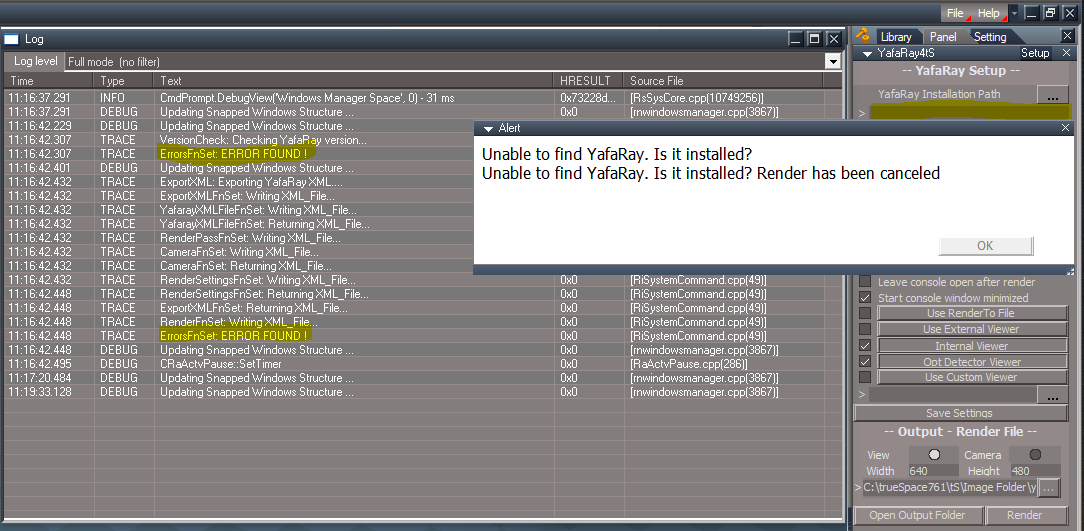

This seems to be working as expected without manually running the Yaf_render.cmdWith no code fixes the workaround is to manually run the Yaf_render.cmd created in the folder
Images are rendered and XML files are deleted.
Just not in the C:\Temp\ folder
If you can crack that nut, should be good to go!
Unless it is a requirement to change the Output - Render File to the C:\Temp\ folder, it all works as expected.
Try this button script in the Render XML button. Works every time.
Code: Select all
var Errors = Node.AccessFnSet("%THIS_NAME%" + '/ErrorsFnSet');
Errors.Clear();
Activity.Run("%THIS_NAME%" + "/VersionCheck");
Activity.Run("%THIS_NAME%" + "/ExportXML");
Node.Value("%THIS_NAME%", "Yaf_DeleteTempFiles") = 0
Activity.Run("%THIS_NAME%" + "/Render");
Node.Value("%THIS_NAME%", "Yaf_DeleteTempFiles") = -1
And for the Use Custom Temporary Directory maybe you could implement something like this
Code: Select all
var Yaf_TempDir = Node.Value(Space.CurrentScene() + "/YafaRay4tS", 'Yaf_TempDir');
var Yaf_UseCustomTempDir = Node.Value(Space.CurrentScene() + "/YafaRay4tS", 'Yaf_UseCustomTempDir');
if (Yaf_UseCustomTempDir == true) {
	Node.Value(Space.CurrentScene() + "/YafaRay4tS", 'Yaf_RenderFilename') = Node.Value(Space.CurrentScene() + "/YafaRay4tS", 'Yaf_TempDir')
}Code: Select all
Node.Value(Space.CurrentScene() + "/YafaRay4tS", "Yaf_RenderFilename") = Node.Value("/Yafaray Folder/YafaRay4tS", "Yaf_RenderFilename")-
clintonman
- Captain
- Posts: 5659
- Joined: 21 May 2009, 21:08
- Type the number ten into the box: 0
- Location: California
Re: Yafaray4tS v0.9.0
I'm only doing bug fixes at this point, so if you're adding/changing things be sure to test it thoroughly before releasing it. I'll come back from time to time to help test your changes.trueBlue wrote: 23 Aug 2018, 06:26 I downloaded your C3D Persistent Install v2 and copied your C3DReset.RsObj
Replaced the one I had with yours. Resetting the Default Context now works without an error.
Made a few changes to make the Render to File be like the trueSpace Render to File
I also applied your changes.
Things to try
Using the Render to File toolbar icon.
Render Animation button - Will not show any viewers. See RenderFrame,RsObj - line 122 and button script
Render button - Will not show any viewers and enables Use Render to File. See button script
Cancel button - Disables all viewers except the Internal & OptiDectector. See button script
-
trueBlue
- Captain
- Posts: 5548
- Joined: 06 Jul 2009, 22:50
- Type the number ten into the box: 10
Re: Yafaray4tS v0.9.0
I downloaded your C3D Persistent Install v2 and copied your C3DReset.RsObj
Replaced the one I had with yours. Resetting the Default Context now works without an error.
Made a few changes to make the Render to File be like the trueSpace Render to File
I also applied your changes.
Things to try
Using the Render to File toolbar icon.
Render Animation button - Will not show any viewers. See RenderFrame,RsObj - line 122 and button script
Render button - Will not show any viewers and enables Use Render to File. See button script
Cancel button - Disables all viewers except the Internal & OptiDectector. See button script
Replaced the one I had with yours. Resetting the Default Context now works without an error.
Made a few changes to make the Render to File be like the trueSpace Render to File
I also applied your changes.
Things to try
Using the Render to File toolbar icon.
Render Animation button - Will not show any viewers. See RenderFrame,RsObj - line 122 and button script
Render button - Will not show any viewers and enables Use Render to File. See button script
Cancel button - Disables all viewers except the Internal & OptiDectector. See button script
- Attachments
-
- Yafaray Folder824f.RsObj
- (870.64 KiB) Downloaded 344 times
-
clintonman
- Captain
- Posts: 5659
- Joined: 21 May 2009, 21:08
- Type the number ten into the box: 0
- Location: California
Re: Yafaray4tS v0.9.0
I see it. Problem is that the "Yaf_render.cmd" never runs, so no real images and no delete xml files. Don't know where the 0 byte images are from.trueBlue wrote: 22 Aug 2018, 21:00 ..
YafaRay4tS/Animation - Create XML files and begin batch render
1.) Creates images with Zero bytes
2.) XML files are not deleted.
Batch Render.PNG
[...
Will check it out and correct. For v0.9.1 bug fix release.
Partial fix.
YafaRay4tS/endAnimation line 30:
Code: Select all
	//var commandstring = '%comspec% /C ' + CMD_File;
var commandstring = '%comspec% /C "' + CMD_File + '"';Second part of fix.
YafaRay4tS/RenderFnSet - comment out code since it seems inappropriete to me to create text files to test for write permissions
Code: Select all
	// check for write priveledges
	//try {
	//	fso.CreateTextFile(Yaf_RenderFilename);
	//} catch (ex) {
		// failed -- so use temp render file directly
	//	Yaf_RenderFilename = Yaf_TempDir + 'yafaray.tga';
//}-
clintonman
- Captain
- Posts: 5659
- Joined: 21 May 2009, 21:08
- Type the number ten into the box: 0
- Location: California
Re: Yafaray4tS v0.9.0
Correct, it can't render a file that doesn't exist. Have to disable Delete XML file after rendertrueBlue wrote: 22 Aug 2018, 21:00 ...
YafaRay4tS/Setup - Render XML button
1.) If you enable Use Custom Temporary Directory, the Yaf_render.cmd does not create the images to that directory.
2.) Can not use it more then one time without an error, unless you enable Delete XML file after render.
...
-
clintonman
- Captain
- Posts: 5659
- Joined: 21 May 2009, 21:08
- Type the number ten into the box: 0
- Location: California
Re: Yafaray4tS v0.9.0
Not seeing it here.trueBlue wrote: 22 Aug 2018, 21:00 Testing in tS7.61B8.4
After successfully rendering scenes and using it, I Reset the Default Context.
C3DResetError1.PNG
...
1. installed
2. did 2 renders
3. reset default context - no error
My version text files has
"trueSpace 7.61 Beta 8 Unofficial Update
Revisions:
July 06, 2009
February 21, 2010
November 01, 2012
July 06, 2018"
-
trueBlue
- Captain
- Posts: 5548
- Joined: 06 Jul 2009, 22:50
- Type the number ten into the box: 10
Re: Yafaray4tS v0.9.0
Testing in tS7.61B8.4
After successfully rendering scenes and using it, I Reset the Default Context.
YafaRay4tS/Setup - Render XML button
1.) If you enable Use Custom Temporary Directory, the Yaf_render.cmd does not create the images to that directory.
2.) Can not use it more then one time without an error, unless you enable Delete XML file after render.
YafaRay4tS/Animation - Create XML files and begin batch render
1.) Creates images with Zero bytes
2.) XML files are not deleted.
Yaf_render.cmd (Images are bad, XML files are not deleted, and not created C:\Temp\ )
cd "C:\trueSpace761\tS\Image Folder\"
"C:\Program Files\yafaray_v3\bin\yafaray-xml.exe" -f "png" -op "C:/trueSpace761/tS/Image Folder/" -ics "sRGB" "C:/trueSpace761/tS/Image Folder/yaf_test_0000.xml" "yaf_test_0000"
Del "C:\trueSpace761\tS\Image Folder\yaf_test_0000.xml"
cd "C:\trueSpace761\tS\Image Folder\"
"C:\Program Files\yafaray_v3\bin\yafaray-xml.exe" -f "png" -op "C:/trueSpace761/tS/Image Folder/" -ics "sRGB" "C:/trueSpace761/tS/Image Folder/yaf_test_0001.xml" "yaf_test_0001"
Del "C:\trueSpace761\tS\Image Folder\yaf_test_0001.xml"
cd "C:\trueSpace761\tS\Image Folder\"
"C:\Program Files\yafaray_v3\bin\yafaray-xml.exe" -f "png" -op "C:/trueSpace761/tS/Image Folder/" -ics "sRGB" "C:/trueSpace761/tS/Image Folder/yaf_test_0002.xml" "yaf_test_0002"
Del "C:\trueSpace761\tS\Image Folder\yaf_test_0002.xml"
cd "C:\trueSpace761\tS\Image Folder\"
"C:\Program Files\yafaray_v3\bin\yafaray-xml.exe" -f "png" -op "C:/trueSpace761/tS/Image Folder/" -ics "sRGB" "C:/trueSpace761/tS/Image Folder/yaf_test_0003.xml" "yaf_test_0003"
Del "C:\trueSpace761\tS\Image Folder\yaf_test_0003.xml"
cd "C:\trueSpace761\tS\Image Folder\"
"C:\Program Files\yafaray_v3\bin\yafaray-xml.exe" -f "png" -op "C:/trueSpace761/tS/Image Folder/" -ics "sRGB" "C:/trueSpace761/tS/Image Folder/yaf_test_0004.xml" "yaf_test_0004"
Del "C:\trueSpace761\tS\Image Folder\yaf_test_0004.xml"
If you enable Use Custom Temporary Directory & Use Custom XML Export file (Images are good but not created C:\Temp\ )
Yaf_render.cmd
"C:\Program Files\yafaray_v3\bin\yafaray-xml.exe" -f "png" -op "C:/trueSpace761/tS/Image Folder/" -ics "sRGB" "C:/Temp/CustomTemp_0000.xml" "yaf_test_0000"
Del "C:\Temp\CustomTemp_0000.xml"
cd "C:\Temp\"
"C:\Program Files\yafaray_v3\bin\yafaray-xml.exe" -f "png" -op "C:/trueSpace761/tS/Image Folder/" -ics "sRGB" "C:/Temp/CustomTemp_0001.xml" "yaf_test_0001"
Del "C:\Temp\CustomTemp_0001.xml"
cd "C:\Temp\"
"C:\Program Files\yafaray_v3\bin\yafaray-xml.exe" -f "png" -op "C:/trueSpace761/tS/Image Folder/" -ics "sRGB" "C:/Temp/CustomTemp_0002.xml" "yaf_test_0002"
Del "C:\Temp\CustomTemp_0002.xml"
cd "C:\Temp\"
"C:\Program Files\yafaray_v3\bin\yafaray-xml.exe" -f "png" -op "C:/trueSpace761/tS/Image Folder/" -ics "sRGB" "C:/Temp/CustomTemp_0003.xml" "yaf_test_0003"
Del "C:\Temp\CustomTemp_0003.xml"
cd "C:\Temp\"
"C:\Program Files\yafaray_v3\bin\yafaray-xml.exe" -f "png" -op "C:/trueSpace761/tS/Image Folder/" -ics "sRGB" "C:/Temp/CustomTemp_0004.xml" "yaf_test_0004"
Del "C:\Temp\CustomTemp_0004.xml"
If you change the Output - Render File to C:\Temp\yaf_test.png (Images are good and created in C:\Temp\ )
Yaf_render.cmd
"C:\Program Files\yafaray_v3\bin\yafaray-xml.exe" -f "png" -op "C:/Temp/" -ics "sRGB" "C:/Temp/CustomTemp_0000.xml" "yaf_test_0000"
Del "C:\Temp\CustomTemp_0000.xml"
cd "C:\Temp\"
"C:\Program Files\yafaray_v3\bin\yafaray-xml.exe" -f "png" -op "C:/Temp/" -ics "sRGB" "C:/Temp/CustomTemp_0001.xml" "yaf_test_0001"
Del "C:\Temp\CustomTemp_0001.xml"
cd "C:\Temp\"
"C:\Program Files\yafaray_v3\bin\yafaray-xml.exe" -f "png" -op "C:/Temp/" -ics "sRGB" "C:/Temp/CustomTemp_0002.xml" "yaf_test_0002"
Del "C:\Temp\CustomTemp_0002.xml"
cd "C:\Temp\"
"C:\Program Files\yafaray_v3\bin\yafaray-xml.exe" -f "png" -op "C:/Temp/" -ics "sRGB" "C:/Temp/CustomTemp_0003.xml" "yaf_test_0003"
Del "C:\Temp\CustomTemp_0003.xml"
cd "C:\Temp\"
"C:\Program Files\yafaray_v3\bin\yafaray-xml.exe" -f "png" -op "C:/Temp/" -ics "sRGB" "C:/Temp/CustomTemp_0004.xml" "yaf_test_0004"
Del "C:\Temp\CustomTemp_0004.xml"
So the real problem here is, simple instructions on how to use it properly.
But there is still a problem with the Delete XML file after render.
1.) If you enable it, the Render XML button does not work as expected.
2.) If you do not enable it when batch rendering the XML files are not deleted.
3.) If you enable Use Custom Temporary Directory, the Yaf_render.cmd does not create the images to that directory. I do not know if this correct or not. I am not sure if I understand it's purpose other then for batch rendering. Meaning if it has other purposes.
I do know this though, if you were to enable Create XML files and begin batch render and not set the other requirements noted above, with a 1000 frame animation, you will have 2000 files to delete!
After successfully rendering scenes and using it, I Reset the Default Context.
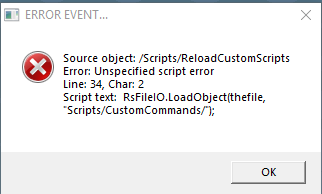
- C3DResetError.PNG (8.6 KiB) Viewed 10275 times
1.) If you enable Use Custom Temporary Directory, the Yaf_render.cmd does not create the images to that directory.
2.) Can not use it more then one time without an error, unless you enable Delete XML file after render.
YafaRay4tS/Animation - Create XML files and begin batch render
1.) Creates images with Zero bytes
2.) XML files are not deleted.
Yaf_render.cmd (Images are bad, XML files are not deleted, and not created C:\Temp\ )
cd "C:\trueSpace761\tS\Image Folder\"
"C:\Program Files\yafaray_v3\bin\yafaray-xml.exe" -f "png" -op "C:/trueSpace761/tS/Image Folder/" -ics "sRGB" "C:/trueSpace761/tS/Image Folder/yaf_test_0000.xml" "yaf_test_0000"
Del "C:\trueSpace761\tS\Image Folder\yaf_test_0000.xml"
cd "C:\trueSpace761\tS\Image Folder\"
"C:\Program Files\yafaray_v3\bin\yafaray-xml.exe" -f "png" -op "C:/trueSpace761/tS/Image Folder/" -ics "sRGB" "C:/trueSpace761/tS/Image Folder/yaf_test_0001.xml" "yaf_test_0001"
Del "C:\trueSpace761\tS\Image Folder\yaf_test_0001.xml"
cd "C:\trueSpace761\tS\Image Folder\"
"C:\Program Files\yafaray_v3\bin\yafaray-xml.exe" -f "png" -op "C:/trueSpace761/tS/Image Folder/" -ics "sRGB" "C:/trueSpace761/tS/Image Folder/yaf_test_0002.xml" "yaf_test_0002"
Del "C:\trueSpace761\tS\Image Folder\yaf_test_0002.xml"
cd "C:\trueSpace761\tS\Image Folder\"
"C:\Program Files\yafaray_v3\bin\yafaray-xml.exe" -f "png" -op "C:/trueSpace761/tS/Image Folder/" -ics "sRGB" "C:/trueSpace761/tS/Image Folder/yaf_test_0003.xml" "yaf_test_0003"
Del "C:\trueSpace761\tS\Image Folder\yaf_test_0003.xml"
cd "C:\trueSpace761\tS\Image Folder\"
"C:\Program Files\yafaray_v3\bin\yafaray-xml.exe" -f "png" -op "C:/trueSpace761/tS/Image Folder/" -ics "sRGB" "C:/trueSpace761/tS/Image Folder/yaf_test_0004.xml" "yaf_test_0004"
Del "C:\trueSpace761\tS\Image Folder\yaf_test_0004.xml"
If you enable Use Custom Temporary Directory & Use Custom XML Export file (Images are good but not created C:\Temp\ )
Yaf_render.cmd
"C:\Program Files\yafaray_v3\bin\yafaray-xml.exe" -f "png" -op "C:/trueSpace761/tS/Image Folder/" -ics "sRGB" "C:/Temp/CustomTemp_0000.xml" "yaf_test_0000"
Del "C:\Temp\CustomTemp_0000.xml"
cd "C:\Temp\"
"C:\Program Files\yafaray_v3\bin\yafaray-xml.exe" -f "png" -op "C:/trueSpace761/tS/Image Folder/" -ics "sRGB" "C:/Temp/CustomTemp_0001.xml" "yaf_test_0001"
Del "C:\Temp\CustomTemp_0001.xml"
cd "C:\Temp\"
"C:\Program Files\yafaray_v3\bin\yafaray-xml.exe" -f "png" -op "C:/trueSpace761/tS/Image Folder/" -ics "sRGB" "C:/Temp/CustomTemp_0002.xml" "yaf_test_0002"
Del "C:\Temp\CustomTemp_0002.xml"
cd "C:\Temp\"
"C:\Program Files\yafaray_v3\bin\yafaray-xml.exe" -f "png" -op "C:/trueSpace761/tS/Image Folder/" -ics "sRGB" "C:/Temp/CustomTemp_0003.xml" "yaf_test_0003"
Del "C:\Temp\CustomTemp_0003.xml"
cd "C:\Temp\"
"C:\Program Files\yafaray_v3\bin\yafaray-xml.exe" -f "png" -op "C:/trueSpace761/tS/Image Folder/" -ics "sRGB" "C:/Temp/CustomTemp_0004.xml" "yaf_test_0004"
Del "C:\Temp\CustomTemp_0004.xml"
If you change the Output - Render File to C:\Temp\yaf_test.png (Images are good and created in C:\Temp\ )
Yaf_render.cmd
"C:\Program Files\yafaray_v3\bin\yafaray-xml.exe" -f "png" -op "C:/Temp/" -ics "sRGB" "C:/Temp/CustomTemp_0000.xml" "yaf_test_0000"
Del "C:\Temp\CustomTemp_0000.xml"
cd "C:\Temp\"
"C:\Program Files\yafaray_v3\bin\yafaray-xml.exe" -f "png" -op "C:/Temp/" -ics "sRGB" "C:/Temp/CustomTemp_0001.xml" "yaf_test_0001"
Del "C:\Temp\CustomTemp_0001.xml"
cd "C:\Temp\"
"C:\Program Files\yafaray_v3\bin\yafaray-xml.exe" -f "png" -op "C:/Temp/" -ics "sRGB" "C:/Temp/CustomTemp_0002.xml" "yaf_test_0002"
Del "C:\Temp\CustomTemp_0002.xml"
cd "C:\Temp\"
"C:\Program Files\yafaray_v3\bin\yafaray-xml.exe" -f "png" -op "C:/Temp/" -ics "sRGB" "C:/Temp/CustomTemp_0003.xml" "yaf_test_0003"
Del "C:\Temp\CustomTemp_0003.xml"
cd "C:\Temp\"
"C:\Program Files\yafaray_v3\bin\yafaray-xml.exe" -f "png" -op "C:/Temp/" -ics "sRGB" "C:/Temp/CustomTemp_0004.xml" "yaf_test_0004"
Del "C:\Temp\CustomTemp_0004.xml"
So the real problem here is, simple instructions on how to use it properly.
But there is still a problem with the Delete XML file after render.
1.) If you enable it, the Render XML button does not work as expected.
2.) If you do not enable it when batch rendering the XML files are not deleted.
3.) If you enable Use Custom Temporary Directory, the Yaf_render.cmd does not create the images to that directory. I do not know if this correct or not. I am not sure if I understand it's purpose other then for batch rendering. Meaning if it has other purposes.
I do know this though, if you were to enable Create XML files and begin batch render and not set the other requirements noted above, with a 1000 frame animation, you will have 2000 files to delete!
- Attachments
-
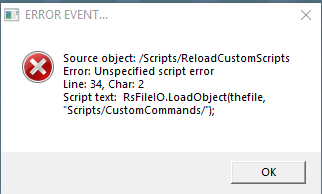
- C3DResetError.PNG (8.6 KiB) Viewed 10411 times
-
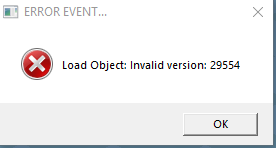
- C3DResetError1.PNG (6.17 KiB) Viewed 10411 times
-

- C3DResetError.PNG (8.6 KiB) Viewed 10411 times
-
FHembree

- Master Chief Petty Officer
- Posts: 337
- Joined: 21 Feb 2011, 17:43
- Type the number ten into the box: 9
Re: Yafaray4tS v0.9.0
Downloaded and installed per your directions and did not encounter any problems. 
-
clintonman
- Captain
- Posts: 5659
- Joined: 21 May 2009, 21:08
- Type the number ten into the box: 0
- Location: California
Re: Yafaray4tS v0.9.0
YafaRay4tS Gold
final version unless some major error or oversight occurs.
final version unless some major error or oversight occurs.
- Attachments
-
- YafaRay4tSv090-Gold.zip
- (14.74 MiB) Downloaded 334 times
-
clintonman
- Captain
- Posts: 5659
- Joined: 21 May 2009, 21:08
- Type the number ten into the box: 0
- Location: California
Re: Yafaray4tS v0.9.0
The CameraFnSet was altered and is the reason for the failure of the "scanning the scene for a Camera to use".trueBlue wrote: 21 Aug 2018, 01:47 Here is a scene with the new CameraFnSet, Cam Name, YafaRay Camera renamed to Camera, empty Yaf_CamPath.
It does not use the included Camera for the Camera View
As I understand you are scanning the scene for a Camera to use
It does not work in this scene.
BTW none of the scripting was changed, just the messages
-
trueBlue
- Captain
- Posts: 5548
- Joined: 06 Jul 2009, 22:50
- Type the number ten into the box: 10
Re: Yafaray4tS v0.9.0
Yes that is the only way it works. But it is not rendering to C:\Temp even though there is cmd file generated to C:\Temp.clintonman wrote: 21 Aug 2018, 00:05 2.) Maybe I do not understand it's purpose. When you select the Render XML button I do not see a previously generated XML file render from that directory as mentioned in Jack's Setup help.
"Use Custom XML export file - Use a custom filename and directory for the generated XML file. This is useful when generating multiple XML files for batch rendering or for rendering a previously generated XML file."
I think it only works if you don't use the "delete xml after render" option or you press the export xml button then press the render xml button.
That cmd file is rendering to the Output - Render File path. I went back to RC 15 to see if it was any different and it is the same.
-
trueBlue
- Captain
- Posts: 5548
- Joined: 06 Jul 2009, 22:50
- Type the number ten into the box: 10
Re: Yafaray4tS v0.9.0
Here is a scene with the new CameraFnSet, Cam Name, YafaRay Camera renamed to Camera, empty Yaf_CamPath.
It does not use the included Camera for the Camera View
As I understand you are scanning the scene for a Camera to use
It does not work in this scene.
BTW none of the scripting was changed, just the messages
It does not use the included Camera for the Camera View
As I understand you are scanning the scene for a Camera to use
It does not work in this scene.
BTW none of the scripting was changed, just the messages
-
trueBlue
- Captain
- Posts: 5548
- Joined: 06 Jul 2009, 22:50
- Type the number ten into the box: 10
Re: Yafaray4tS v0.9.0
I was referring to the messages being misleading with regards about selection.
Here is what I am suggesting.
Still do not understand why the CamaraFnSet does not recognize a YafaRay Camera as a Camera though.
Still need to add a correct message and additional script with regards to an empty Yaf_CamPath string.
Also found and fixed another issue when no 3D View is present. The Status Line message was stuck on Rendering...
Here is what I am suggesting.
Still do not understand why the CamaraFnSet does not recognize a YafaRay Camera as a Camera though.
Still need to add a correct message and additional script with regards to an empty Yaf_CamPath string.
Also found and fixed another issue when no 3D View is present. The Status Line message was stuck on Rendering...
-
clintonman
- Captain
- Posts: 5659
- Joined: 21 May 2009, 21:08
- Type the number ten into the box: 0
- Location: California
Re: Yafaray4tS v0.9.0
The renderer does not look at the camera selected in the scene, it only looks at the camera set in the YafaRay4tS node. Are you saying it should look at the selected camera during render?
I ask again how do you expect this to work aka what would you write in the manual? Sounds like you are asking for behavior that was never there to begin with, that's why I need to know how you expect it to work. Assume it's working perfectly and tell my how it should be changed or better yet just write instructions for how it should work - completely ignoring that it even exists.
"Selected camera is not valid, using scene camera instead. <--- This is misleading in the above scenario. " Are you saying the message should be reworded or that it should have a completely different behavior?
I ask again how do you expect this to work aka what would you write in the manual? Sounds like you are asking for behavior that was never there to begin with, that's why I need to know how you expect it to work. Assume it's working perfectly and tell my how it should be changed or better yet just write instructions for how it should work - completely ignoring that it even exists.
"Selected camera is not valid, using scene camera instead. <--- This is misleading in the above scenario. " Are you saying the message should be reworded or that it should have a completely different behavior?
-
clintonman
- Captain
- Posts: 5659
- Joined: 21 May 2009, 21:08
- Type the number ten into the box: 0
- Location: California
Re: Yafaray4tS v0.9.0
2.) Maybe I do not understand it's purpose. When you select the Render XML button I do not see a previously generated XML file render from that directory as mentioned in Jack's Setup help.
"Use Custom XML export file - Use a custom filename and directory for the generated XML file. This is useful when generating multiple XML files for batch rendering or for rendering a previously generated XML file."
I think it only works if you don't use the "delete xml after render" option or you press the export xml button then press the render xml button.
"Use Custom XML export file - Use a custom filename and directory for the generated XML file. This is useful when generating multiple XML files for batch rendering or for rendering a previously generated XML file."
I think it only works if you don't use the "delete xml after render" option or you press the export xml button then press the render xml button.
-
clintonman
- Captain
- Posts: 5659
- Joined: 21 May 2009, 21:08
- Type the number ten into the box: 0
- Location: California
Re: Yafaray4tS v0.9.0
"Use Custom temporary directory - Directory for storing generated XML file and temporary YafaRay output image.
I think the temporary image is no more, so you only get the final image in the image path and the xml file in the xml path.
I think the temporary image is no more, so you only get the final image in the image path and the xml file in the xml path.
-
trueBlue
- Captain
- Posts: 5548
- Joined: 06 Jul 2009, 22:50
- Type the number ten into the box: 10
Re: Yafaray4tS v0.9.0
1.) It's not rendering an image for me as shown. There should be a rendered image of the orange cube.clintonman wrote: 20 Aug 2018, 21:204.) fixedtrueBlue wrote: 20 Aug 2018, 18:48 Testing in unpatched Rosetta
Monday, August 20, 2018 RC-29v4
ToDo
Add - Yaf_CamPath = "Camera" to ExportXML - OnDefaultValue
Add - "Camera" in the Yaf_CamPath to the YafaRay4tS.RsObj in the YafaRay4tS_Installer.RsObj
Add - Node.Value(Space.CurrentScene() + "/YafaRay4tS", "Yaf_CamChoice") = "0" (Line 190) in CameraFnSet
Note: (Line 76) does not work but the above does.
1.) This is not working:
"Use Custom temporary directory - Directory for storing generated XML file and temporary YafaRay output image. Default working directory is the same as the output image directory. Use this option if you want to use a different directory from the final image output directory."
2.) Is this working as expected?
"Use Custom XML export file - Use a custom filename and directory for the generated XML file. This is useful when generating multiple XML files for batch rendering or for rendering a previously generated XML file."
3.) Rendering an animation with empty string in the YafaRay Installation Path throws an error.
Render Animation test with an empty YafaRay Installation Path .PNG
4.) Output Render File with unsupported image format. Creates Yaf_render.cmd, yaf_temp.xml, and a file with zero bytes.yaf_test bmp zero bytes.PNG
3.) fixed
2.) looks ok to me
1.) looks like it's working to me
camera default set to "Camera"
CameraFnSet behaving as it should - please define the behavior you want to change or describe how it should work
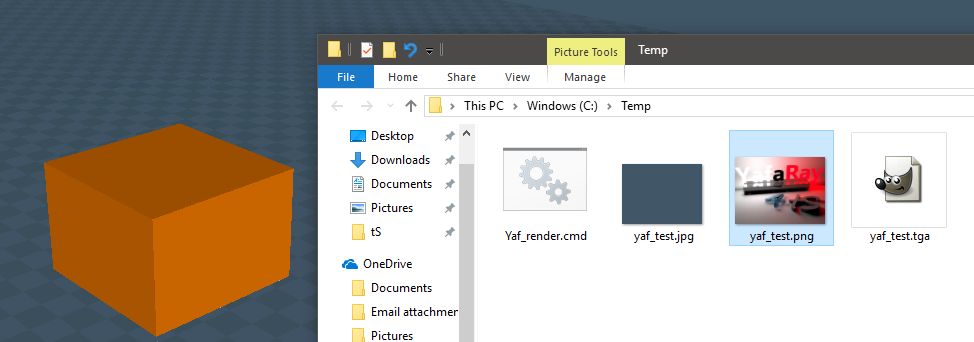
The Yaf_render.cmd is being created but no Yaf_Temp.xml or rendered image.
What is being rendered is going to C:\trueSpace761Std\Image Folder\yaf_test.png
Maybe I do not understand it's purpose. Shouldn't there be a rendered image?
2.) Maybe I do not understand it's purpose. When you select the Render XML button I do not see a previously generated XML file render from that directory as mentioned in Jack's Setup help.
"Use Custom XML export file - Use a custom filename and directory for the generated XML file. This is useful when generating multiple XML files for batch rendering or for rendering a previously generated XML file."
3.) Yay! Solved the error but the cmd and xml files are still being created.
4.) Yay! Solved but the xml file is still being created.
Camera View is being switched to View when there is no Camera in the scene. Alert "No camera selected, using 3d view instead" <- This is misleading.
But not when the Yaf_CamPath is empty or the Yaf_CamPath has a different Camera that does not exist in the scene.
Also if you have something selected other then a Camera and a (YafaRay Camera) you'll get an alert "Selected camera is not valid, using scene camera instead. <--- This is misleading in the above scenario.
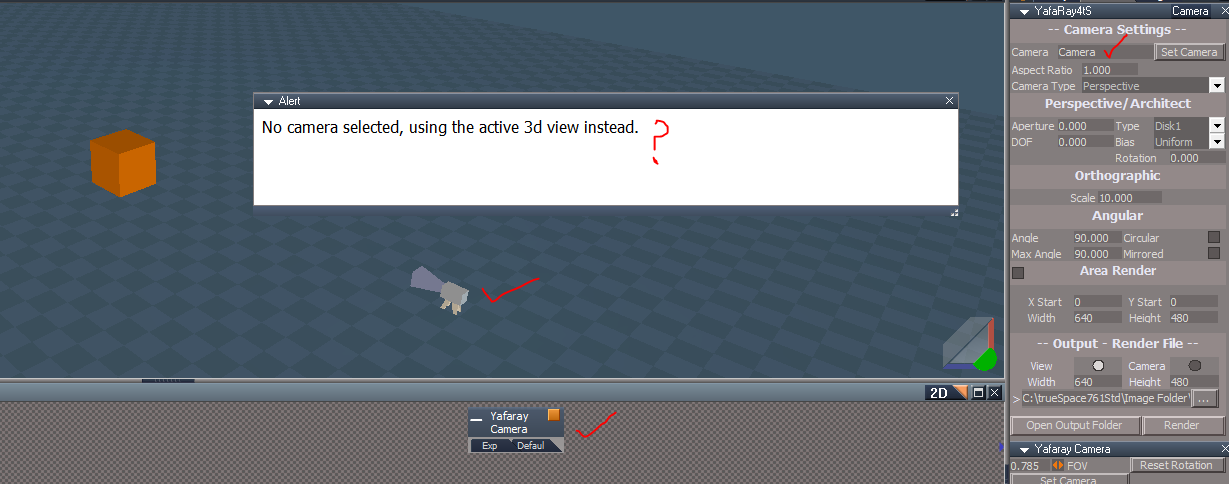
CameraFnSet
Code: Select all
	for(var i=0;i<numChildren;i++) {
		var childNode = curNode + "/" + Node.SubObject(curNode, i);
		camera = FindSceneCamera(childNode);
		if( camera != "")
Line 187  Node.Value(Space.CurrentScene() + "/YafaRay4tS", "Yaf_CamChoice") = "0" <- Add  Switch to View
			return camera;
}With the Camera selected as View
1.) Select an object (not camera), Render, and read message. Camera does not switch to View
2.) Select a YafaRay Camera, Render, and read message. Camera does not switch to View
3.) With nothing selected and no camera in the scene, Render, and read message. Camera switches to View
3.) With nothing selected, no camera in the scene, and empty Yaf_CamPath, Render, and read message. Camera switches to View
Add the code above to CameraFnSet and repeat steps.
-
clintonman
- Captain
- Posts: 5659
- Joined: 21 May 2009, 21:08
- Type the number ten into the box: 0
- Location: California
Re: Yafaray4tS v0.9.0
4.) fixedtrueBlue wrote: 20 Aug 2018, 18:48 Testing in unpatched Rosetta
Monday, August 20, 2018 RC-29v4
ToDo
Add - Yaf_CamPath = "Camera" to ExportXML - OnDefaultValue
Add - "Camera" in the Yaf_CamPath to the YafaRay4tS.RsObj in the YafaRay4tS_Installer.RsObj
Add - Node.Value(Space.CurrentScene() + "/YafaRay4tS", "Yaf_CamChoice") = "0" (Line 190) in CameraFnSet
Note: (Line 76) does not work but the above does.
1.) This is not working:
"Use Custom temporary directory - Directory for storing generated XML file and temporary YafaRay output image. Default working directory is the same as the output image directory. Use this option if you want to use a different directory from the final image output directory."
2.) Is this working as expected?
"Use Custom XML export file - Use a custom filename and directory for the generated XML file. This is useful when generating multiple XML files for batch rendering or for rendering a previously generated XML file."
3.) Rendering an animation with empty string in the YafaRay Installation Path throws an error.
Render Animation test with an empty YafaRay Installation Path .PNG
4.) Output Render File with unsupported image format. Creates Yaf_render.cmd, yaf_temp.xml, and a file with zero bytes.yaf_test bmp zero bytes.PNG
3.) fixed
2.) looks ok to me
1.) looks like it's working to me
camera default set to "Camera"
CameraFnSet behaving as it should - please define the behavior you want to change or describe how it should work
- Attachments
-
- YafaRay4tSd46a.RsObj
- (877.24 KiB) Downloaded 337 times
-
trueBlue
- Captain
- Posts: 5548
- Joined: 06 Jul 2009, 22:50
- Type the number ten into the box: 10
Re: Yafaray4tS v0.9.0
Testing in unpatched Rosetta
Monday, August 20, 2018 RC-29v4
ToDo
Add - Yaf_CamPath = "Camera" to ExportXML - OnDefaultValue
Add - "Camera" in the Yaf_CamPath to the YafaRay4tS.RsObj in the YafaRay4tS_Installer.RsObj
Add - Node.Value(Space.CurrentScene() + "/YafaRay4tS", "Yaf_CamChoice") = "0" (Line 190) in CameraFnSet
Note: (Line 76) does not work but the above does.
1.) This is not working:
"Use Custom temporary directory - Directory for storing generated XML file and temporary YafaRay output image. Default working directory is the same as the output image directory. Use this option if you want to use a different directory from the final image output directory."
2.) Is this working as expected?
"Use Custom XML export file - Use a custom filename and directory for the generated XML file. This is useful when generating multiple XML files for batch rendering or for rendering a previously generated XML file."
3.) Rendering an animation with empty string in the YafaRay Installation Path throws an error.
4.) Output Render File with unsupported image format. Creates Yaf_render.cmd, yaf_temp.xml, and a file with zero bytes.
Monday, August 20, 2018 RC-29v4
ToDo
Add - Yaf_CamPath = "Camera" to ExportXML - OnDefaultValue
Add - "Camera" in the Yaf_CamPath to the YafaRay4tS.RsObj in the YafaRay4tS_Installer.RsObj
Add - Node.Value(Space.CurrentScene() + "/YafaRay4tS", "Yaf_CamChoice") = "0" (Line 190) in CameraFnSet
Note: (Line 76) does not work but the above does.
1.) This is not working:
"Use Custom temporary directory - Directory for storing generated XML file and temporary YafaRay output image. Default working directory is the same as the output image directory. Use this option if you want to use a different directory from the final image output directory."
2.) Is this working as expected?
"Use Custom XML export file - Use a custom filename and directory for the generated XML file. This is useful when generating multiple XML files for batch rendering or for rendering a previously generated XML file."
3.) Rendering an animation with empty string in the YafaRay Installation Path throws an error.


-
trueBlue
- Captain
- Posts: 5548
- Joined: 06 Jul 2009, 22:50
- Type the number ten into the box: 10
Re: Yafaray4tS v0.9.0
Using your code I think I found a way to delete the Yaf_render.cmd file by hooking up this script to the Render script.
Need to add a params.SetTerminationFlag() to the Render script and or anything else you think it might need.
Testing in unpatched Rosetta, it works so far except when rendering an animation. Not a big deal, my only goal was deleting the Yaf_render.cmd for when you wanted to render an image to the Desktop. Can not image a user rendering an animation to the Desktop.
Well that was short lived. Ugh!
Rendering an animation with empty string in the YafaRay Installation Path throws an error.
Edit: Nope, this ERROR exist with or with out the Delete CMD script
Code: Select all
function StripPath(Str) {
	var pos = Str.lastIndexOf('\\');
	if (pos > 0)
		return Str.substring(0, pos + 1);
	return Str;
}

function Execute(params)
{
	var fso = new ActiveXObject("Scripting.FileSystemObject");
	var Yaf_TempDir = Node.Value(System.ThisOwner() + '/Render', 'Yaf_TempDir');
	var CMD_Filename = Yaf_TempDir + 'Yaf_render.cmd';

	if (fso.FileExists(CMD_Filename)) {
		fso.DeleteFile(CMD_Filename, true);
	}

	var Yaf_RenderFilename = Node.Value(System.ThisOwner() + '/Render', 'Yaf_RenderFilename');
	var Yaf_RenderPath = StripPath(Yaf_RenderFilename);
	var Yaf_RenderPath = Yaf_RenderPath + 'Yaf_render.cmd';

	if (fso.FileExists(Yaf_RenderPath)) {
		fso.DeleteFile(Yaf_RenderPath, true);
	}

}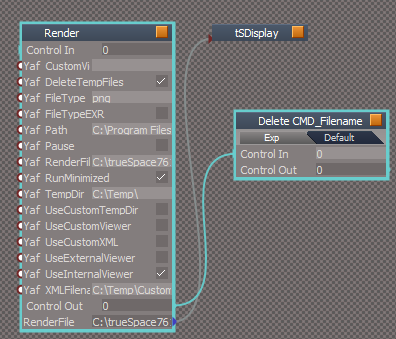
- Delete CMD file.PNG (22.02 KiB) Viewed 10121 times

- Render script.PNG (6.53 KiB) Viewed 10119 times
Well that was short lived. Ugh!
Rendering an animation with empty string in the YafaRay Installation Path throws an error.

Edit: Nope, this ERROR exist with or with out the Delete CMD script
-
clintonman
- Captain
- Posts: 5659
- Joined: 21 May 2009, 21:08
- Type the number ten into the box: 0
- Location: California
Re: Yafaray4tS v0.9.0
YafaRay4tS node
fixed export xml button
fixed render xml button
added magic number to console frame owner attribute
fixed export xml button
fixed render xml button
added magic number to console frame owner attribute
- Attachments
-
- YafaRay4tSd804.RsObj
- (875.09 KiB) Downloaded 320 times
-
clintonman
- Captain
- Posts: 5659
- Joined: 21 May 2009, 21:08
- Type the number ten into the box: 0
- Location: California
Re: Yafaray4tS v0.9.0
The default can be whatever you like.trueBlue wrote: 19 Aug 2018, 18:32 ...Also the Yaf_CamPath default setup use to have Camera as the default.
...
Unpatched tS new scene default is "Camera1"
Patched tS new scene default is "Camera"
YafaRay scene file has "Camera"
loading Yafaray Camera from the toolbar gives "YafaRay Camera"
-
clintonman
- Captain
- Posts: 5659
- Joined: 21 May 2009, 21:08
- Type the number ten into the box: 0
- Location: California
Re: Yafaray4tS v0.9.0
Some fixes for the Export XML and Render XML buttons.
Export XML Button:
Render XML Button:
Export XML Button:
Code: Select all
var Errors = Node.AccessFnSet("%THIS_NAME%" + '/ErrorsFnSet');
Errors.Clear();
Activity.Run("%THIS_NAME%" + "/VersionCheck");
Activity.Run("%THIS_NAME%" + "/ExportXML");Code: Select all
var Errors = Node.AccessFnSet("%THIS_NAME%" + '/ErrorsFnSet');
Errors.Clear();
Activity.Run("%THIS_NAME%" + "/Render");-
clintonman
- Captain
- Posts: 5659
- Joined: 21 May 2009, 21:08
- Type the number ten into the box: 0
- Location: California
Re: Yafaray4tS v0.9.0
And that issue is it doesn't work properly if run more than once? Are there any other factors like is the XML file valid or is the field blank?trueBlue wrote: 19 Aug 2018, 18:53 ...
This all evolved from trying to figure out the Export XML issue.
...
-
trueBlue
- Captain
- Posts: 5548
- Joined: 06 Jul 2009, 22:50
- Type the number ten into the box: 10
Re: Yafaray4tS v0.9.0
Kinda figured you would say that. No problemo!clintonman wrote: 19 Aug 2018, 18:46I don't like the idea of closing a dialog automatically. It should be closed by the user after it has been read.trueBlue wrote: 19 Aug 2018, 15:56 Yay!
Think there is a problem with the Render XML button.
At first it works but second attempts the ConsoleObject does not show and the ConsoleObject's htmlcode attribute is not Reset.
ConsoleObject Render XML.PNG
Steps
Open Render XML button.RsScn
Select the Render XML button and wait for 10 seconds until the ConsoleObject's Alert closes automatically. (See ClearAlert below)
Select the Render XML button several times and look at the YafaRay4tS/ConsoleObject
Also included in this scene is a ClearAlert that is similar to your ClearStatus.
Clear Alert in 10 seconds.PNG
Not fully tested with your new updates yet.
I commented out the con reset so you could see the above.
//Node.ConReset(Space.CurrentScene() + "/YafaRay4tS/ConsoleObject", "htmlcode")
However for testing purposes I wonder whatever you do where it works you should do where it does not work.
Example where it does work is with the empty YafaRay path. So whatever you do there with your code, maybe do the same thing where it does not work. This all evolved from trying to figure out the Export XML issue.
Thinking ahead and NOT saying you should do this but it looks like you would be able to establish an YafaRay4ts User Preferences much like tS has.

- ConsoleObject UI.PNG (7.26 KiB) Viewed 10133 times

- Yaf user preferences.PNG (9.29 KiB) Viewed 10133 times
-
clintonman
- Captain
- Posts: 5659
- Joined: 21 May 2009, 21:08
- Type the number ten into the box: 0
- Location: California
Re: Yafaray4tS v0.9.0
I don't like the idea of closing a dialog automatically. It should be closed by the user after it has been read.trueBlue wrote: 19 Aug 2018, 15:56 Yay!
Think there is a problem with the Render XML button.
At first it works but second attempts the ConsoleObject does not show and the ConsoleObject's htmlcode attribute is not Reset.
ConsoleObject Render XML.PNG
Steps
Open Render XML button.RsScn
Select the Render XML button and wait for 10 seconds until the ConsoleObject's Alert closes automatically. (See ClearAlert below)
Select the Render XML button several times and look at the YafaRay4tS/ConsoleObject
Also included in this scene is a ClearAlert that is similar to your ClearStatus.
Clear Alert in 10 seconds.PNG
Not fully tested with your new updates yet.
I commented out the con reset so you could see the above.
//Node.ConReset(Space.CurrentScene() + "/YafaRay4tS/ConsoleObject", "htmlcode")
-
trueBlue
- Captain
- Posts: 5548
- Joined: 06 Jul 2009, 22:50
- Type the number ten into the box: 10
Re: Yafaray4tS v0.9.0
Testing in unpatched Rosetta
Sunday, August 19, 2018 RC-29v3
ToDo - Set ConsoleFrame's OwnedBy = {2C152F81-45A2-4035-8896-9E49D60C8A7A}
Invaild file name - Does not run ClearStatus. Add "Render aborted"
Invalid File extension - Does not run ClearStatus and creates zero byte file. Add "Render aborted"
Use Custom XML Export file's File Dialog does not allow you to save the CustomTemp.xml if it does not exist. Uses tS Open dialog. Needs to be a Save As dialog if possible.
Other possible fix not related to the above, would be add (Export XML button code):
Activity.Run("%THIS_NAME%" + "/VersionCheck");
Activity.Run("%THIS_NAME%" + "/ExportXML");
to the Render XML button?
"External Viewer only works with TGA format files. Render aborted." Works but does not run ClearStatus.
If Yaf_CamPath is empty and a node (not Camera) is selected works as expected but does not change the Output - Render File to -> View. Also the Yaf_CamPath default setup use to have Camera as the default.
Use Custom Temporary Directory (enabled) does not render to C:\Temp\
Note: Does not run ClearStatus
In testing the ClearAlert mentioned in the previous post, I notice that it does not work where noted above. Mostly it works on other ConsoleObject alerts. (Closes the ConsoleFrame in 10 seconds)
Sunday, August 19, 2018 RC-29v3
ToDo - Set ConsoleFrame's OwnedBy = {2C152F81-45A2-4035-8896-9E49D60C8A7A}
Invaild file name - Does not run ClearStatus. Add "Render aborted"
Invalid File extension - Does not run ClearStatus and creates zero byte file. Add "Render aborted"
Use Custom XML Export file's File Dialog does not allow you to save the CustomTemp.xml if it does not exist. Uses tS Open dialog. Needs to be a Save As dialog if possible.
Other possible fix not related to the above, would be add (Export XML button code):
Activity.Run("%THIS_NAME%" + "/VersionCheck");
Activity.Run("%THIS_NAME%" + "/ExportXML");
to the Render XML button?
"External Viewer only works with TGA format files. Render aborted." Works but does not run ClearStatus.
If Yaf_CamPath is empty and a node (not Camera) is selected works as expected but does not change the Output - Render File to -> View. Also the Yaf_CamPath default setup use to have Camera as the default.
Use Custom Temporary Directory (enabled) does not render to C:\Temp\
Note: Does not run ClearStatus
In testing the ClearAlert mentioned in the previous post, I notice that it does not work where noted above. Mostly it works on other ConsoleObject alerts. (Closes the ConsoleFrame in 10 seconds)
-
trueBlue
- Captain
- Posts: 5548
- Joined: 06 Jul 2009, 22:50
- Type the number ten into the box: 10
Re: Yafaray4tS v0.9.0
Yay!
Think there is a problem with the Render XML button.
At first it works but second attempts the ConsoleObject does not show and the ConsoleObject's htmlcode attribute is not Reset.
Steps
Open Render XML button.RsScn
Select the Render XML button and wait for 10 seconds until the ConsoleObject's Alert closes automatically. (See ClearAlert below)
Select the Render XML button several times and look at the YafaRay4tS/ConsoleObject
Also included in this scene is a ClearAlert that is similar to your ClearStatus. Not fully tested with your new updates yet.
I commented out the con reset so you could see the above.
//Node.ConReset(Space.CurrentScene() + "/YafaRay4tS/ConsoleObject", "htmlcode")
Think there is a problem with the Render XML button.
At first it works but second attempts the ConsoleObject does not show and the ConsoleObject's htmlcode attribute is not Reset.

Open Render XML button.RsScn
Select the Render XML button and wait for 10 seconds until the ConsoleObject's Alert closes automatically. (See ClearAlert below)
Select the Render XML button several times and look at the YafaRay4tS/ConsoleObject
Also included in this scene is a ClearAlert that is similar to your ClearStatus. Not fully tested with your new updates yet.
I commented out the con reset so you could see the above.
//Node.ConReset(Space.CurrentScene() + "/YafaRay4tS/ConsoleObject", "htmlcode")
- Attachments
-

- ConsoleObject Render XML.PNG (10.37 KiB) Viewed 9964 times
-
clintonman
- Captain
- Posts: 5659
- Joined: 21 May 2009, 21:08
- Type the number ten into the box: 0
- Location: California
Re: Yafaray4tS v0.9.0
Errors with true abort of the rendering process.
A lot of little changes all over the place. Working, but could also be broken in a lot of places.
A lot of little changes all over the place. Working, but could also be broken in a lot of places.
- Attachments
-
- YafaRay4tS8303.RsObj
- (874.85 KiB) Downloaded 315 times
-
- YafarayScripts0fbd.RsObj
- (48.6 KiB) Downloaded 328 times
-
trueBlue
- Captain
- Posts: 5548
- Joined: 06 Jul 2009, 22:50
- Type the number ten into the box: 10
Re: Yafaray4tS v0.9.0
LOLtrueBlue wrote: 18 Aug 2018, 20:15 So I figured out why RC - 28 did not work with unpatched trueSpace versions.
The Status Line was missing.
What is different from the patched versions is the included onnewscene.xml file.
I added this to onnewscene.xml fileThis gets installed to the Scripts\ScriptCommands folder.Code: Select all
if(!Node.Exists("Status Line"))
return;
if(!Node.ConExists("Status Line", "Model"))
Node.ConCreate("Status Line", "Model", "string", 4);
Node.Value("Status Line", "Model") = "";
}
It gets called every time a new scene is generated and the reset.js file also generates new scene.
I fixed the installer, if interested.
I am not sure how to include your new updates to the YafaRay4tS.RsObj though.
 Quoting myself.
Further testing, the only thing that seems not to work is Animation.
Looking at the lying FnSet error and trying to find the line in the script which is causing the error, it looks like what I have been reporting with the exporting/deleting/missing xml file.
Line 26 System.Trace("YafarayXMLFileFnSet Error: try catch error fix - close tS, delete xml file, open tS");
Just a huge guess on my part though.
-
clintonman
- Captain
- Posts: 5659
- Joined: 21 May 2009, 21:08
- Type the number ten into the box: 0
- Location: California
Re: Yafaray4tS v0.9.0
I'll see what I can do, but it's no where near as simple as a SetTerminationFlag(), which only works with connected nodes. Maybe it can be done through the new Errors system otherwise it might require extensive rewrites.
-
trueBlue
- Captain
- Posts: 5548
- Joined: 06 Jul 2009, 22:50
- Type the number ten into the box: 10
Re: Yafaray4tS v0.9.0
Testing in unpatched Rosetta
YafaRay Installation Path - With empty string and using the Render button
2 Alerts and Status Line shows Rendering... (clears)
YafaRay Installation Path - With empty string and using the Offline Render icons
1 Alert and Status Line shows Rendering... (clears)
1.) Any way to abort the Render or stop the process? -> SetTerminationFlag()
Output Render File with BMP and DDS format. ConsoleObject/Alert "Error: Invalid file extension", (Yay it works) creates a file with zero bytes, and the last succesful render displays.
2.) Any way to abort the Render or stop the process? -> SetTerminationFlag()
Output Render File with no filename 'C:\trueSpace761\tS\Image Folder\'
ConsoleObject/Alert "Error: Invalid file name & extension", Status Line shows "Frame# -1 - Render complete" (Does NOT clear) and viewer displays the last succesful rendered image.
3.) Any way to abort the Render or stop the process? -> SetTerminationFlag()
Render XML button - Alert "XML file does not exist. Render aborted" and Status Line shows Rendering... (clears)
Render XML button script = Activity.Run("%THIS_NAME%" + "/Render");
Uncheck "Delete XML Export file" and select Export XML button
Render XML button - Renders without above Alert until you enable "Delete XML Export file"
You can repeat this over and over again with the same results.
4.) Any way to stop the Status Line message since the Alert says it has been aborted?
Not sure it's use but the Render button does not have this issue.
Render button script = Activity.Run("%THIS_NAME%" + "/DoFrameRender");
They both seem to use the the same Output - Render File path, but the Render button does NOT have a problem like the Render XML button has.
Thinking this is related, in a common way, to the issue within the YafarayXMLFileFnSet
Line 26 System.Trace("YafarayXMLFileFnSet Error: try catch error fix - close tS, delete xml file, open tS");
Edit: Cross post... I noticed one time that the help file did not show but its working for me.
YafaRay Installation Path - With empty string and using the Render button
2 Alerts and Status Line shows Rendering... (clears)
YafaRay Installation Path - With empty string and using the Offline Render icons
1 Alert and Status Line shows Rendering... (clears)
1.) Any way to abort the Render or stop the process? -> SetTerminationFlag()
Output Render File with BMP and DDS format. ConsoleObject/Alert "Error: Invalid file extension", (Yay it works) creates a file with zero bytes, and the last succesful render displays.
2.) Any way to abort the Render or stop the process? -> SetTerminationFlag()
Output Render File with no filename 'C:\trueSpace761\tS\Image Folder\'
ConsoleObject/Alert "Error: Invalid file name & extension", Status Line shows "Frame# -1 - Render complete" (Does NOT clear) and viewer displays the last succesful rendered image.
3.) Any way to abort the Render or stop the process? -> SetTerminationFlag()
Render XML button - Alert "XML file does not exist. Render aborted" and Status Line shows Rendering... (clears)
Render XML button script = Activity.Run("%THIS_NAME%" + "/Render");
Uncheck "Delete XML Export file" and select Export XML button
Render XML button - Renders without above Alert until you enable "Delete XML Export file"
You can repeat this over and over again with the same results.
4.) Any way to stop the Status Line message since the Alert says it has been aborted?
Not sure it's use but the Render button does not have this issue.
Render button script = Activity.Run("%THIS_NAME%" + "/DoFrameRender");
They both seem to use the the same Output - Render File path, but the Render button does NOT have a problem like the Render XML button has.
Thinking this is related, in a common way, to the issue within the YafarayXMLFileFnSet
Line 26 System.Trace("YafarayXMLFileFnSet Error: try catch error fix - close tS, delete xml file, open tS");
Edit: Cross post... I noticed one time that the help file did not show but its working for me.
-
clintonman
- Captain
- Posts: 5659
- Joined: 21 May 2009, 21:08
- Type the number ten into the box: 0
- Location: California
Re: Yafaray4tS v0.9.0
fix for chm help
was not working because my truespace path had a space in it
HelpHTML
was not working because my truespace path had a space in it
HelpHTML
Code: Select all
function Execute(params)
{
	WshShell = new ActiveXObject("WScript.Shell");
	//help = 'file:///' + System.GetMainDir() + '\/YafaRay4tS%20Help.chm';
	//change all \ to /
	//var re;
	//re = /\\/g;
	//help2 = help.replace(re,"\/");
	help2 = '"' +  System.GetMainDir() + '\\YafaRay4tS Help.chm"';
	WshShell.Run(help2);
}-
clintonman
- Captain
- Posts: 5659
- Joined: 21 May 2009, 21:08
- Type the number ten into the box: 0
- Location: California
Re: Yafaray4tS v0.9.0
RC29 so far:
tested on unpatched tS std
added disable button to the Render to File popup
bug: YafaRay4tS help not working - just opens windows explorer
Added error checks for blank files and invalid file extensions to RenderFnSet and the OpenView in Yafaray Scripts
Fixed bug in ErrorsFnSet where it would only work if called from a script inside of the YafaRay4tS node. That was a tough one to find since function sets always lie about where the error is.
tested on unpatched tS std
added disable button to the Render to File popup
bug: YafaRay4tS help not working - just opens windows explorer
Added error checks for blank files and invalid file extensions to RenderFnSet and the OpenView in Yafaray Scripts
Fixed bug in ErrorsFnSet where it would only work if called from a script inside of the YafaRay4tS node. That was a tough one to find since function sets always lie about where the error is.
- Attachments
-
- YafarayScriptsfdf0.RsObj
- (47.43 KiB) Downloaded 366 times
-
- YafaRay4tSbb28.RsObj
- (871.77 KiB) Downloaded 317 times
-
trueBlue
- Captain
- Posts: 5548
- Joined: 06 Jul 2009, 22:50
- Type the number ten into the box: 10
Re: Yafaray4tS v0.9.0
So I figured out why RC - 28 did not work with unpatched trueSpace versions.
The Status Line was missing.
What is different from the patched versions is the included onnewscene.xml file.
I added this to onnewscene.xml file
This gets installed to the Scripts\ScriptCommands folder.
It gets called every time a new scene is generated and the reset.js file also generates new scene.
I fixed the installer, if interested.
I am not sure how to include your new updates to the YafaRay4tS.RsObj though.
The Status Line was missing.
What is different from the patched versions is the included onnewscene.xml file.
I added this to onnewscene.xml file
Code: Select all
if(!Node.Exists("Status Line"))
return;
if(!Node.ConExists("Status Line", "Model"))
Node.ConCreate("Status Line", "Model", "string", 4);
Node.Value("Status Line", "Model") = "";
}It gets called every time a new scene is generated and the reset.js file also generates new scene.
I fixed the installer, if interested.
I am not sure how to include your new updates to the YafaRay4tS.RsObj though.
-
trueBlue
- Captain
- Posts: 5548
- Joined: 06 Jul 2009, 22:50
- Type the number ten into the box: 10
Re: Yafaray4tS v0.9.0
YafaRay4tSv090-RC-29
RC-27 YafaRay4tS_Installer
Includes updates:
YafaRay4tS node Fri Aug 17, 2018
YafaRay Materials library Fri Aug 17, 2018
YafaRay4tS Scene Utilities Fri Aug 17, 2018
Sat Aug 18, 201
Changes:
Removed Yaf_temp.xml file from the installation distribution folder.
New YafaRay4tS Help.chm
YafaRay4tS Setup library
New YafaRay4tS.RsScn - Previous scene had a Vray node and did not show the 'YafaRay4tS Settings' Default aspect.
YafaRay4tS.RsObj
Setup aspect - Changed all of the Viewer attributes to On/Off buttons.
* Use Render to File button - On, disables all other viewers. Off, enables the 'default' Internal and Opt Detector Viewers.
* Use External Viewer button - On, disables all other viewers. Off, enables the 'default' Internal and Opt Detector Viewers.
* Use Internal Viewer button - On, disables all other viewers. Off, disables Internal Viewer
* Use Opt Detector Viewer button - On, disables all other viewers except the required Internal Viewer.
* Use Custom Viewer button - On, disables all other viewers. Off, enables the 'default' Internal and Opt Detector Viewers.
Render to File aspect - Removed 'Use Render to File' On/Off button
GetRenderFile script - Added descriptions of the different image formats
RC-27 YafaRay4tS_Installer
Includes updates:
YafaRay4tS node Fri Aug 17, 2018
YafaRay Materials library Fri Aug 17, 2018
YafaRay4tS Scene Utilities Fri Aug 17, 2018
Sat Aug 18, 201
Changes:
Removed Yaf_temp.xml file from the installation distribution folder.
New YafaRay4tS Help.chm
YafaRay4tS Setup library
New YafaRay4tS.RsScn - Previous scene had a Vray node and did not show the 'YafaRay4tS Settings' Default aspect.
YafaRay4tS.RsObj
Setup aspect - Changed all of the Viewer attributes to On/Off buttons.
* Use Render to File button - On, disables all other viewers. Off, enables the 'default' Internal and Opt Detector Viewers.
* Use External Viewer button - On, disables all other viewers. Off, enables the 'default' Internal and Opt Detector Viewers.
* Use Internal Viewer button - On, disables all other viewers. Off, disables Internal Viewer
* Use Opt Detector Viewer button - On, disables all other viewers except the required Internal Viewer.
* Use Custom Viewer button - On, disables all other viewers. Off, enables the 'default' Internal and Opt Detector Viewers.
Render to File aspect - Removed 'Use Render to File' On/Off button
GetRenderFile script - Added descriptions of the different image formats
-
trueBlue
- Captain
- Posts: 5548
- Joined: 06 Jul 2009, 22:50
- Type the number ten into the box: 10
Re: Yafaray4tS v0.9.0
Testing your new ConsoleObject
I have not been able to see it so far.
Use External Viewer - Without setting the Output - Render File to TGA format
YafaRay Installation Path - With empty string and using the Render button
2 Alerts and Status Line shows Rendering... (clears)
YafaRay Installation Path - With empty string and using the Offline Render icons
1 Alert and Status Line shows Rendering... (clears)
Output Render File with BMP and DDS format. No Alert or Warning and renders a file with zero bytes.
Output Render File with no filename 'C:\trueSpace761\tS\Image Folder\'
No Alert or Warning and Status Line shows Frame# -1 - Render complete (Does NOT clear) and viewer displays the last succesful rendered image.
I have not been able to see it so far.
Use External Viewer - Without setting the Output - Render File to TGA format
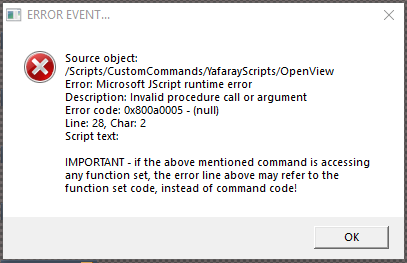

- Use External Viewer Alert.PNG (3.67 KiB) Viewed 9981 times
2 Alerts and Status Line shows Rendering... (clears)
YafaRay Installation Path - With empty string and using the Offline Render icons
1 Alert and Status Line shows Rendering... (clears)
Output Render File with BMP and DDS format. No Alert or Warning and renders a file with zero bytes.
Output Render File with no filename 'C:\trueSpace761\tS\Image Folder\'
No Alert or Warning and Status Line shows Frame# -1 - Render complete (Does NOT clear) and viewer displays the last succesful rendered image.
-
clintonman
- Captain
- Posts: 5659
- Joined: 21 May 2009, 21:08
- Type the number ten into the box: 0
- Location: California
Re: Yafaray4tS v0.9.0
YafaRay4tS Scene Utilities
fixed bug - Process Imported Scene - UpdateRenderPaths function was not being called.
removed extra alert dialog
fixed bug - Process Imported Scene - UpdateRenderPaths function was not being called.
removed extra alert dialog
- Attachments
-
- YafaRay4tS Scene Utilities901e.RsObj
- (125.92 KiB) Downloaded 273 times
-
clintonman
- Captain
- Posts: 5659
- Joined: 21 May 2009, 21:08
- Type the number ten into the box: 0
- Location: California
Re: Yafaray4tS v0.9.0
YafaRay Materials library based on "New YafaRay Materials library" with
Map node color fixed with Blender purple default and
Blend Material Update list that does not destroy previous user selection.
Map node color fixed with Blender purple default and
Blend Material Update list that does not destroy previous user selection.
- Attachments
-
- YafaRay Materialsa562.zip
- (691.27 KiB) Downloaded 295 times
-
clintonman
- Captain
- Posts: 5659
- Joined: 21 May 2009, 21:08
- Type the number ten into the box: 0
- Location: California
Re: Yafaray4tS v0.9.0
YafaRay4tS node with non-blocking error messages based in html display. Based on RC27.
with fix for System.Trace("ExportXMLFnSet Error: XML_file does not exist!" + File);
with fix for System.Trace("ExportXMLFnSet Error: XML_file does not exist!" + File);
- Attachments
-
- YafaRay4tSa3bf.RsObj
- (864.18 KiB) Downloaded 319 times
Last edited by clintonman on 18 Aug 2018, 04:21, edited 1 time in total.
-
clintonman
- Captain
- Posts: 5659
- Joined: 21 May 2009, 21:08
- Type the number ten into the box: 0
- Location: California
Re: Yafaray4tS v0.9.0
OK, will abandon RC28 completely.trueBlue wrote: 18 Aug 2018, 02:23I would be concerned that you may miss something with the changes to the Status Line. I went thorough every node and changed even the Clear Status lines. The Buttons for the Viewers would be easy to recreate.clintonman wrote: 18 Aug 2018, 01:47Too late, already spent the time fixing it and rc27 didn't have your setup buttons on the YafaRay4tS node.trueBlue wrote: 18 Aug 2018, 01:15 Oh Bummer
Wonder why it did not work.
Same old Status Line.
Just revert back to RC - 27
The installer had changes to the Status Line too.
I will delete RC 28
To answer questions on the deleted post:
Thought about it and going to keep the Render to File default.
Spent over half hour trying to figure way to delete the "Yaf_render.cmd" file with no luck.
Thanks for trying to fix deleting the "Yaf_render.cmd" file.
-
trueBlue
- Captain
- Posts: 5548
- Joined: 06 Jul 2009, 22:50
- Type the number ten into the box: 10
Re: Yafaray4tS v0.9.0
Yep, it stops the ME from switching. It seems to work better. Not 100% sure the same goes for the Blend Material Collection, but from what I can tell it seems to work the same as before.clintonman wrote: 18 Aug 2018, 02:07Only seems to work for image maps. Procedural maps not working. Looks like these changes were in RC28 as well. Are you planning to spend more time on the materials? If not I'll revert to RC27 materials.trueBlue wrote: 17 Aug 2018, 18:47 Got an idea from one of Marcel's material for the YafaRay Materials
Instead of switching the user interface he just selects the panel.
Please try and see if you like it.
...
Edit: Hold on, looks like RC27 is bad too - checking...
Edit: Good news, it was my error. In Blender the Texture Mapping color defaults to a hot pink color so you see the results of procedurals by default. In truespace it got changed to white so it was invisible by default. Either that or it was never set to begin with.
Testing shows it looks like it keeps the material editor open? I'm not sure all you said was "try it" so I don't know what it's supposed to do.
The changes were simple as shown, I commented out your line and replaced with the node.Select/UnSelect
//UserInterface.OpenToolPanelViewEx2("" , "" ,owner + "/DiffuseCloud", 3,true,true);
Node.Select(owner + "/DiffuseCloud");Space.Unselect()
-
trueBlue
- Captain
- Posts: 5548
- Joined: 06 Jul 2009, 22:50
- Type the number ten into the box: 10
Re: Yafaray4tS v0.9.0
I would be concerned that you may miss something with the changes to the Status Line. I went thorough every node and changed even the Clear Status lines. The Buttons for the Viewers would be easy to recreate.clintonman wrote: 18 Aug 2018, 01:47Too late, already spent the time fixing it and rc27 didn't have your setup buttons on the YafaRay4tS node.trueBlue wrote: 18 Aug 2018, 01:15 Oh Bummer
Wonder why it did not work.
Same old Status Line.
Just revert back to RC - 27
The installer had changes to the Status Line too.
I will delete RC 28
To answer questions on the deleted post:
Thought about it and going to keep the Render to File default.
Spent over half hour trying to figure way to delete the "Yaf_render.cmd" file with no luck.
Thanks for trying to fix deleting the "Yaf_render.cmd" file.
-
clintonman
- Captain
- Posts: 5659
- Joined: 21 May 2009, 21:08
- Type the number ten into the box: 0
- Location: California
Re: Yafaray4tS v0.9.0
Only seems to work for image maps. Procedural maps not working. Looks like these changes were in RC28 as well. Are you planning to spend more time on the materials? If not I'll revert to RC27 materials.trueBlue wrote: 17 Aug 2018, 18:47 Got an idea from one of Marcel's material for the YafaRay Materials
Instead of switching the user interface he just selects the panel.
Please try and see if you like it.
...
Edit: Hold on, looks like RC27 is bad too - checking...
Edit: Good news, it was my error. In Blender the Texture Mapping color defaults to a hot pink color so you see the results of procedurals by default. In truespace it got changed to white so it was invisible by default. Either that or it was never set to begin with.
Testing shows it looks like it keeps the material editor open? I'm not sure all you said was "try it" so I don't know what it's supposed to do.
-
clintonman
- Captain
- Posts: 5659
- Joined: 21 May 2009, 21:08
- Type the number ten into the box: 0
- Location: California
Re: Yafaray4tS v0.9.0
Too late, already spent the time fixing it and rc27 didn't have your setup buttons on the YafaRay4tS node.trueBlue wrote: 18 Aug 2018, 01:15 Oh Bummer
Wonder why it did not work.
Same old Status Line.
Just revert back to RC - 27
The installer had changes to the Status Line too.
I will delete RC 28
To answer questions on the deleted post:
Thought about it and going to keep the Render to File default.
Spent over half hour trying to figure way to delete the "Yaf_render.cmd" file with no luck.
-
trueBlue
- Captain
- Posts: 5548
- Joined: 06 Jul 2009, 22:50
- Type the number ten into the box: 10
Re: Yafaray4tS v0.9.0
Oh Bummer
Wonder why it did not work.
Same old Status Line.
Just revert back to RC - 27
The installer had changes to the Status Line too.
I will delete RC 28
Wonder why it did not work.
Same old Status Line.
Just revert back to RC - 27
The installer had changes to the Status Line too.
I will delete RC 28
-
clintonman
- Captain
- Posts: 5659
- Joined: 21 May 2009, 21:08
- Type the number ten into the box: 0
- Location: California
Re: Yafaray4tS v0.9.0
YafaRay Blend Material
bug - user choices erased when updating the material lists
new code for Populate Material List inside the YafaRay Blend node:
bug - user choices erased when updating the material lists
new code for Populate Material List inside the YafaRay Blend node:
Code: Select all
// Execute
// Called to execute the command
function Execute(params)
{
	var MaterialList1 = params.ConValue('MaterialList1');
	var MaterialList2 = params.ConValue('MaterialList2');

	var oldMatListSel1 = MaterialList1.GetSelectedString();
	var oldMatListSel2 = MaterialList2.GetSelectedString();

	var newMaterialList1 = System.CreateDO("Common Data Package/String Enum Data");
	var newMaterialList2 = System.CreateDO("Common Data Package/String Enum Data");

	newMaterialList1.Clear();
	scene = Space.CurrentScene();
	bmc = scene + "/Blend Material Collection";

	if(!Node.Exists(bmc)) return;


	var numMaterials = Node.Value(bmc, "NumMaterials");

	for(var i=0;i<numMaterials;i++) {
		newMaterialList1.SetStringAt(i, "BlendMaterial" + (i+1));
		newMaterialList2.SetStringAt(i, "BlendMaterial" + (i+1));
	}

	//newMaterialList1.SetSelectedString("BlendMaterial" + (i-1));
	newMaterialList1.SetSelectedString(oldMatListSel1);

	Node.Value(System.ThisOwner(), "MaterialList1") = newMaterialList1;

	params.ConValue('MaterialList1') = newMaterialList1;


	//newMaterialList2.SetSelectedString("BlendMaterial" + (i));
	newMaterialList2.SetSelectedString(oldMatListSel2);

	Node.Value(System.ThisOwner(), "MaterialList2") = newMaterialList2;

	params.ConValue('MaterialList2') = newMaterialList2;

}
-
clintonman
- Captain
- Posts: 5659
- Joined: 21 May 2009, 21:08
- Type the number ten into the box: 0
- Location: California
Re: Yafaray4tS v0.9.0
Testing Rc28:
testing on standalone unpatched + optdetector
install failed with error after answering the question dialog - fix: change model status code back to original
Edit: animation rendering causing errors - fix: change ShowDisplayFnSet back to RC27 version
will need to replace all nodes where status line was changed, guess change must only work in patched tS versions
Edit: List of replacements
ShowDisplayFnSet
update Opti display
YafarayXMLFileFnSet
RenderFnSet
SaveSettings
Render
ExportXML
remove Node.ConRemove("/Status Line", "YafaRay4tS"); from ExportXMLFnSet
testing on standalone unpatched + optdetector
install failed with error after answering the question dialog - fix: change model status code back to original
Edit: animation rendering causing errors - fix: change ShowDisplayFnSet back to RC27 version
will need to replace all nodes where status line was changed, guess change must only work in patched tS versions
Edit: List of replacements
ShowDisplayFnSet
update Opti display
YafarayXMLFileFnSet
RenderFnSet
SaveSettings
Render
ExportXML
remove Node.ConRemove("/Status Line", "YafaRay4tS"); from ExportXMLFnSet
-
trueBlue
- Captain
- Posts: 5548
- Joined: 06 Jul 2009, 22:50
- Type the number ten into the box: 10
Re: Yafaray4tS v0.9.0
Got an idea from one of Marcel's material for the YafaRay Materials
Instead of switching the user interface he just selects the panel.
Please try and see if you like it.
YafaRay Materials library
Changed all material's OpenMap.RsObj
OpenMap.RsObj
Changed to Node.Select/Unselect
//UserInterface.OpenToolPanelViewEx2("" , "" ,owner + "/" + MapAttribute, 3,true,false);
Node.Select(owner + "/" + MapAttribute);Space.Unselect()
SwitchImage.RsObj
Changed to Node.Select/Unselect
//UserInterface.OpenToolPanelViewEx2("" , "" ,owner + "/Cloud", 3,true,false);
Node.Select(owner + "/Cloud");Space.Unselect()
etc...
Map.RsObj
SwitchImage.RsObj
Changed to Node.Select/Unselect
//UserInterface.OpenToolPanelViewEx2("" , "" ,owner + "/Cloud", 3,true,false);
Node.Select(owner + "/Cloud");Space.Unselect()
etc...
Blend Material Collection
Changed the Spheres to new YafaRay Shiny_Diffuse material
YafaRay Blend
SwitchDiffuseImage.RsObj
Changed to Node.Select/Unselect
//UserInterface.OpenToolPanelViewEx2("" , "" ,owner + "/DiffuseCloud", 3,true,true);
Node.Select(owner + "/DiffuseCloud");Space.Unselect()
etc...
Previous way
New way
Instead of switching the user interface he just selects the panel.
Please try and see if you like it.
YafaRay Materials library
Changed all material's OpenMap.RsObj
OpenMap.RsObj
Changed to Node.Select/Unselect
//UserInterface.OpenToolPanelViewEx2("" , "" ,owner + "/" + MapAttribute, 3,true,false);
Node.Select(owner + "/" + MapAttribute);Space.Unselect()
SwitchImage.RsObj
Changed to Node.Select/Unselect
//UserInterface.OpenToolPanelViewEx2("" , "" ,owner + "/Cloud", 3,true,false);
Node.Select(owner + "/Cloud");Space.Unselect()
etc...
Map.RsObj
SwitchImage.RsObj
Changed to Node.Select/Unselect
//UserInterface.OpenToolPanelViewEx2("" , "" ,owner + "/Cloud", 3,true,false);
Node.Select(owner + "/Cloud");Space.Unselect()
etc...
Blend Material Collection
Changed the Spheres to new YafaRay Shiny_Diffuse material
YafaRay Blend
SwitchDiffuseImage.RsObj
Changed to Node.Select/Unselect
//UserInterface.OpenToolPanelViewEx2("" , "" ,owner + "/DiffuseCloud", 3,true,true);
Node.Select(owner + "/DiffuseCloud");Space.Unselect()
etc...
Previous way

- New_Switch.PNG (68.3 KiB) Viewed 5062 times
- Attachments
-

- Old_Switch.PNG (61.78 KiB) Viewed 5062 times
-
clintonman
- Captain
- Posts: 5659
- Joined: 21 May 2009, 21:08
- Type the number ten into the box: 0
- Location: California
Re: Yafaray4tS v0.9.0
Yes, uses html code embedded in a string and the errors function set controls the error messages and panel display.trueBlue wrote: 13 Aug 2018, 13:17 Oh cool!
I was working on the same thing.
I hit a brick wall on how to send the message from script.
The Edit Control does not have Word Wrap.
It does have Multiple lines.
I do not know how to use a Carriage Return in the string, like you can in an Alert string. /n
Capture.PNG
Looks like you went a different route,
Are you creating and displaying an html file from the Console messages?
I don't know if it works but you can try /r/n for the carriage return.
-
trueBlue
- Captain
- Posts: 5548
- Joined: 06 Jul 2009, 22:50
- Type the number ten into the box: 10
Re: Yafaray4tS v0.9.0
Oh cool!
I was working on the same thing.
I hit a brick wall on how to send the message from script.
The Edit Control does not have Word Wrap.
It does have Multiple lines.
I do not know how to use a Carriage Return in the string, like you can in an Alert string. /n
Looks like you went a different route,
Are you creating and displaying an html file from the Console messages?
I was working on the same thing.
I hit a brick wall on how to send the message from script.
The Edit Control does not have Word Wrap.
It does have Multiple lines.
I do not know how to use a Carriage Return in the string, like you can in an Alert string. /n

Are you creating and displaying an html file from the Console messages?
-
clintonman
- Captain
- Posts: 5659
- Joined: 21 May 2009, 21:08
- Type the number ten into the box: 0
- Location: California
Re: Yafaray4tS v0.9.0

Errors shown in image shows reverse animation range, blank texture map, no blend material collection and invalid camera selection.
-
clintonman
- Captain
- Posts: 5659
- Joined: 21 May 2009, 21:08
- Type the number ten into the box: 0
- Location: California
Re: Yafaray4tS v0.9.0
bug
line 127 ExportXMLFnSet
"+ XMLFile" should be "+ File"
line 127 ExportXMLFnSet
"+ XMLFile" should be "+ File"
Code: Select all
System.Trace("ExportXMLFnSet Error: XML_file does not exist!" + File);-
clintonman
- Captain
- Posts: 5659
- Joined: 21 May 2009, 21:08
- Type the number ten into the box: 0
- Location: California
Re: Yafaray4tS v0.9.0
Yep, same thing.trueBlue wrote: 11 Aug 2018, 22:01 This may be the same thing but you can create your own Control Outputs checking Control flow
-
trueBlue
- Captain
- Posts: 5548
- Joined: 06 Jul 2009, 22:50
- Type the number ten into the box: 10
Re: Yafaray4tS v0.9.0
This may be the same thing but you can create your own Control Outputs checking Control flow
- Attachments
-

-
clintonman
- Captain
- Posts: 5659
- Joined: 21 May 2009, 21:08
- Type the number ten into the box: 0
- Location: California
Re: Yafaray4tS v0.9.0
Glad to see you're investigating the SetTerminationFlag.trueBlue wrote: 11 Aug 2018, 19:21 ...
FYI...Interesting observation this morning testing the SetTerminationFlag.
First as shown in Test 2, setting the script to -> if true -> SetTerminationFlag -> return, changes Control Out to 2
Test 3 script was setup to -> if false -> SetTerminationFlag -> return
With that script it does (as you say) not let a linked script run.
Other observation, it matters how you hook up the linked scripts.
If you hook up Test 2 first it runs first. If you hook Test 3 next it runs second. If you hook Test 1 next it runs third.
SetTerminationFlag changes Control Out to 2.PNG
Would have been nice if connected scripts ran in parallel.
I found a couple of other useful methods attached to the params.
params.GetControlIn() gets the name of the control input that runs the script, so can have several input controls and make code decisions based on which input was used
params.SetControlOut(str) does the opposite and lets you choose which output control will fire off

Code: Select all
function Execute(params)
{
	var controlIn1 = params.ConValue('controlIn1');
	var controlIn2 = params.ConValue('controlIn2');

	var scriptFrom = params.GetControlIn();

	System.Trace(scriptFrom);

	if(scriptFrom == "controlIn2")
		params.SetControlOut("ControlOut2")
	else
		params.SetControlOut("ControlOut1")

	// params.ConValue("controlOut1") = ...
	// params.ConValue("ControlOut2") = ...
}-
trueBlue
- Captain
- Posts: 5548
- Joined: 06 Jul 2009, 22:50
- Type the number ten into the box: 10
Re: Yafaray4tS v0.9.0
Whack a Mole? 
At first, I added the button scripts to the Render to File attribute.
Goal was to disable all other viewers.
Then I thought that since the Internal Viewer needed to be enabled when using the Opt Dectector, I would do that one too.
The rest of the viewers was two fold, to keep the UI uniform and disable all other viewers.
FYI...Interesting observation this morning testing the SetTerminationFlag.
First as shown in Test 2, setting the script to -> if true -> SetTerminationFlag -> return, changes Control Out to 2
Test 3 script was setup to -> if false -> SetTerminationFlag -> return
With that script it does (as you say) not let a linked script run.
Other observation, it matters how you hook up the linked scripts.
If you hook up Test 2 first it runs first. If you hook Test 3 next it runs second. If you hook Test 1 next it runs third.
At first, I added the button scripts to the Render to File attribute.
Goal was to disable all other viewers.
Then I thought that since the Internal Viewer needed to be enabled when using the Opt Dectector, I would do that one too.
The rest of the viewers was two fold, to keep the UI uniform and disable all other viewers.
FYI...Interesting observation this morning testing the SetTerminationFlag.
First as shown in Test 2, setting the script to -> if true -> SetTerminationFlag -> return, changes Control Out to 2
Test 3 script was setup to -> if false -> SetTerminationFlag -> return
With that script it does (as you say) not let a linked script run.
Other observation, it matters how you hook up the linked scripts.
If you hook up Test 2 first it runs first. If you hook Test 3 next it runs second. If you hook Test 1 next it runs third.
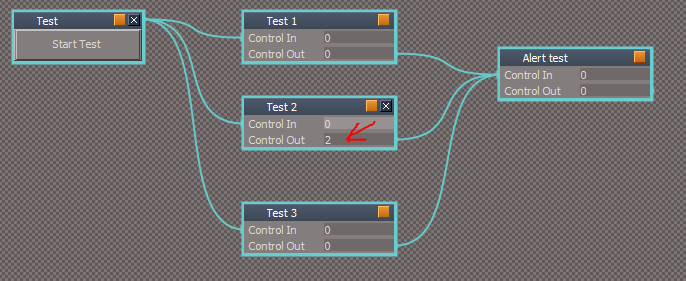
-
clintonman
- Captain
- Posts: 5659
- Joined: 21 May 2009, 21:08
- Type the number ten into the box: 0
- Location: California
Re: Yafaray4tS v0.9.0
Changing user preferences on the popup panel without any visible feedback is unacceptable and doesn't respect user choices. The only setup button I like is the optdetector activating the internal render. The other buttons are like playing whack a mole.
If you like the buttons keep them, but get rid of the popup panel change.
If you like the buttons keep them, but get rid of the popup panel change.
-
trueBlue
- Captain
- Posts: 5548
- Joined: 06 Jul 2009, 22:50
- Type the number ten into the box: 10
Re: Yafaray4tS v0.9.0
Gotcha!
Gonna test this further to see if I can find out it's use and how to use it properly.
Will you test this scene and let me know what you think?
Modified YafaRay4tS.RsObj
New Viewer buttons
New Render to File
Things to try:
The new viewer button's scripts
Render to File button scripts
Note: You can still use the viewer Check Boxes if you wanted to enable a viewer along with the Render to File.
Gonna test this further to see if I can find out it's use and how to use it properly.
Will you test this scene and let me know what you think?
Modified YafaRay4tS.RsObj
New Viewer buttons

- New RTF.PNG (10.97 KiB) Viewed 4813 times
The new viewer button's scripts
Render to File button scripts
Note: You can still use the viewer Check Boxes if you wanted to enable a viewer along with the Render to File.
- Attachments
-

- New Viewer buttons.PNG (4.31 KiB) Viewed 4813 times
-
clintonman
- Captain
- Posts: 5659
- Joined: 21 May 2009, 21:08
- Type the number ten into the box: 0
- Location: California
Re: Yafaray4tS v0.9.0
"after" never prints, the return ends the script
placing params.SetTerminationFlag(); before the return doesn't change the fact that the return statement ends a function execution
placing params.SetTerminationFlag(); before the return doesn't change the fact that the return statement ends a function execution
Code: Select all
// Execute
// Called to execute the command
function Execute(params)
{
	System.Trace("before");
	if(true) {
		return;
	}
	System.Trace("after")
}-
trueBlue
- Captain
- Posts: 5548
- Joined: 06 Jul 2009, 22:50
- Type the number ten into the box: 10
Re: Yafaray4tS v0.9.0
The changes I made and was talking about were to different scripts that are not chained together.
Again, I am not so sure that your are entirely correct.
I believe that you setup this SetTreminationFlag at the beginning of a block of if statements with a return
If any of the if statements are incorrect then the script stops here.
If correct then from here you can process any of the above attributes.
My thought is, if you have more code from here in the same script with different attributes, you would need to setup another SetTreminationFlag with a return, etc..
This would include separate functions as well.
Again, I am not so sure that your are entirely correct.
I believe that you setup this SetTreminationFlag at the beginning of a block of if statements with a return
Code: Select all
	// check if new object selection has been made and if it is object with matrix
	currentSelected = Node.FirstSelected();
	if ((lastSelected == currentSelected) || (currentSelected == "") || !Node.ConExists(currentSelected, 'ObjMatrix'))
	{
		params.SetTerminationFlag();
		return; //-->
	}

	// check replacement object
	if (replacName == "") {
		System.Alert("No replacement object selected !");
		return; //-->
	}
	if (!Node.Exists(replacName)) {
		System.Alert("Invalid replacement object selected !");
		return; //-->
	}
	if (!Node.ConExists(replacName, 'ObjMatrix')) {
		System.Alert("Replacement object does't have transform matrix attribute!");
		return; //-->
	}
If correct then from here you can process any of the above attributes.
Code: Select all
	// get target matrix
	matrixT = Node.Value(currentSelected, 'ObjMatrix')

	// get replacement matrix
	matrixR = Node.Value(replacName, 'ObjMatrix')

	// copy object
	pureCurrName = Node.ShortName(currentSelected);
	Node.Delete(currentSelected);
	newName = Node.Copy(replacName, Space.CurrentScene());
	Node.Rename(newName, pureCurrName);

	// update target matrix
	if (!keepOrient)
	{
		matrixT.SetRoll(matrixR.GetRoll());
		matrixT.SetYaw(matrixR.GetYaw());
		matrixT.SetPitch(matrixR.GetPitch());
	}
	if (!keepScale)
	{
		matrixT.SetScaleX(matrixR.GetScaleX());
		matrixT.SetScaleY(matrixR.GetScaleY());
		matrixT.SetScaleZ(matrixR.GetScaleZ());
	}
	Node.Value(currentSelected, 'Matrix') = matrixT;

params.Param("lastSelectedObject") = currentSelected;This would include separate functions as well.
-
clintonman
- Captain
- Posts: 5659
- Joined: 21 May 2009, 21:08
- Type the number ten into the box: 0
- Location: California
Re: Yafaray4tS v0.9.0
My understanding is that it is only needed in the one place because of the command link between the 2 nodes.trueBlue wrote: 11 Aug 2018, 02:25 YafaRay4tS Scene Utilities
Noticed that you did not use the SetTermimanationFlag (s)
on the other Update YafaRay Render Node.RsObj and the other scripts where your plugin is required.
I made those changes and is included here:
YafaRay4tS Scene Utilities.RsObj
Let me know if this works for you.
From an earlier post, " Experiment shows it stops the trailing scripts from running."
-
trueBlue
- Captain
- Posts: 5548
- Joined: 06 Jul 2009, 22:50
- Type the number ten into the box: 10
Re: Yafaray4tS v0.9.0
YafaRay4tS Scene Utilities
Noticed that you did not use the SetTermimanationFlag (s)
on the other Update YafaRay Render Node.RsObj and the other scripts where your plugin is required.
I made those changes and is included here: Let me know if this works for you.
Noticed that you did not use the SetTermimanationFlag (s)
on the other Update YafaRay Render Node.RsObj and the other scripts where your plugin is required.
I made those changes and is included here: Let me know if this works for you.
-
clintonman
- Captain
- Posts: 5659
- Joined: 21 May 2009, 21:08
- Type the number ten into the box: 0
- Location: California
Re: Yafaray4tS v0.9.0
RC27 Changes
The big change is the new installer
cleaned out non-functional camera code
cleaned unused connectors and code from the Update Yafaray Material
OK it's all yours.
The big change is the new installer
Process Imported Scene on the Yaf Scene Utilities - added SetTerminationFlag to stop executionclintonman wrote: 09 Aug 2018, 04:32 New Installer:
Checks for prerequisites earlier
Removed most of the Activity.Run statements - makes it difficult to run things in order
Uses the newly discovered params.SetTerminationFlag()
Install YafaRay4tSv0.9.0 node is now directly connected to the Integrated Button Install node
Removed YafaRay4tS scene loading - prevents the change to the Setup tab during installation
...
cleaned out non-functional camera code
cleaned unused connectors and code from the Update Yafaray Material
OK it's all yours.
- Attachments
-
- YafaRay4tSv090-RC-27.zip
- (14.74 MiB) Downloaded 257 times
-
clintonman
- Captain
- Posts: 5659
- Joined: 21 May 2009, 21:08
- Type the number ten into the box: 0
- Location: California
Re: Yafaray4tS v0.9.0
I hear you, maybe in a future version that's been rewritten from the ground up can add truespace style options to not show various error messages(checkbox with, "Do not show this message again") and a preferences section to turn it on again.trueBlue wrote: 10 Aug 2018, 08:16 ...
You know best. I just hate nagging window messages.
Have you thought about using the Status line, instead of the Alerts?
...
Errors can take up several lines that would not fit well in the status line. Also the need to clear the status line makes it less than ideal.
I've reached a stopping point where I can send the changes back to you. Will upload RC27 soon.
-
trueBlue
- Captain
- Posts: 5548
- Joined: 06 Jul 2009, 22:50
- Type the number ten into the box: 10
Re: Yafaray4tS v0.9.0
Understand.clintonman wrote: 10 Aug 2018, 21:42Too late, I already did a bunch of tests and changes.trueBlue wrote: 10 Aug 2018, 20:57There is still a mistake, I need to update to the newest installer. I will fix it and re upload itclintonman wrote: 10 Aug 2018, 20:34
Cross post!
Edit: It's fixed
Also added an Alert.
Yafaray Settings LMB Command.RsObj
Add :
Space.LoadScene(System.GetMainDir() + "/Rs Main Libraries/YafaRay4tS Setup/YafaRay4tS.RsScn")
System.Alert("Right click to change to YafaRay4tS")
Edit2: If your last download installer shows the Setup aspect after installation and you have the Alert then it is the same.
Replaced the installer nodes with the new ones.
added SetTermination Code to the Yaf scene Utilities
cleanup non functioning code
I'm not going to download it a 3rd time, you can have control back when I'm finished with the changes I already started.
If you can with your utility script, capture, select and set the old Camera and transfer to the new YafaRay4tS node, that would be awesome. Noticed with your demo scenes it being an issue.
-
clintonman
- Captain
- Posts: 5659
- Joined: 21 May 2009, 21:08
- Type the number ten into the box: 0
- Location: California
Re: Yafaray4tS v0.9.0
Too late, I already did a bunch of tests and changes.trueBlue wrote: 10 Aug 2018, 20:57There is still a mistake, I need to update to the newest installer. I will fix it and re upload itclintonman wrote: 10 Aug 2018, 20:34Cross post!trueBlue wrote: 10 Aug 2018, 20:33 Whoever downloaded YafaRay4tSv090-RC-26
There was a mistake!
Fixed and re uploaded in the previous post.
Edit: It's fixed
Also added an Alert.
Yafaray Settings LMB Command.RsObj
Add :
Space.LoadScene(System.GetMainDir() + "/Rs Main Libraries/YafaRay4tS Setup/YafaRay4tS.RsScn")
System.Alert("Right click to change to YafaRay4tS")
Edit2: If your last download installer shows the Setup aspect after installation and you have the Alert then it is the same.
Replaced the installer nodes with the new ones.
added SetTermination Code to the Yaf scene Utilities
cleanup non functioning code
I'm not going to download it a 3rd time, you can have control back when I'm finished with the changes I already started.
-
trueBlue
- Captain
- Posts: 5548
- Joined: 06 Jul 2009, 22:50
- Type the number ten into the box: 10
Re: Yafaray4tS v0.9.0
There is still a mistake, I need to update to the newest installer. I will fix it and re upload itclintonman wrote: 10 Aug 2018, 20:34Cross post!trueBlue wrote: 10 Aug 2018, 20:33 Whoever downloaded YafaRay4tSv090-RC-26
There was a mistake!
Fixed and re uploaded in the previous post.
Edit: It's fixed
Also added an Alert.
Yafaray Settings LMB Command.RsObj
Add :
Space.LoadScene(System.GetMainDir() + "/Rs Main Libraries/YafaRay4tS Setup/YafaRay4tS.RsScn")
System.Alert("Right click to change to YafaRay4tS")
Edit2: If your last download installer shows the Setup aspect after installation and you have the Alert then it is the same.
-
clintonman
- Captain
- Posts: 5659
- Joined: 21 May 2009, 21:08
- Type the number ten into the box: 0
- Location: California
Re: Yafaray4tS v0.9.0
Cross post!trueBlue wrote: 10 Aug 2018, 20:33 Whoever downloaded YafaRay4tSv090-RC-26
There was a mistake!
Fixed and re uploaded in the previous post.
That was me.-
clintonman
- Captain
- Posts: 5659
- Joined: 21 May 2009, 21:08
- Type the number ten into the box: 0
- Location: California
Re: Yafaray4tS v0.9.0
The installer is missing from the rc26.
YafaRay4tS_Installer.RsObj is really just the YafaRay4tS node.
YafaRay4tS_Installer.RsObj is really just the YafaRay4tS node.
-
trueBlue
- Captain
- Posts: 5548
- Joined: 06 Jul 2009, 22:50
- Type the number ten into the box: 10
Re: Yafaray4tS v0.9.0
Whoever downloaded YafaRay4tSv090-RC-26
There was a mistake!
Fixed and re uploaded in the previous post.
There was a mistake!
Fixed and re uploaded in the previous post.
-
trueBlue
- Captain
- Posts: 5548
- Joined: 06 Jul 2009, 22:50
- Type the number ten into the box: 10
Re: Yafaray4tS v0.9.0
YafaRay4tSv090-RC-26
Includes new YafaRay4tS_Installer.RsObj
YafaRay4tS Setup library
Fixed D3D Preview Background objects icons and descriptions
Replaced YafaRay4tS.RsScn
YafarayScripts
Changed Intergrated Buttons to version to 5
Changed Console and Alert messages
Object Render - Removed (experimental mode)
YafaRay4tS
Removed Object Mode from the Default aspect
Yafaray Settings LMB Command.RsObj
Add :
Space.LoadScene(System.GetMainDir() + "/Rs Main Libraries/YafaRay4tS Setup/YafaRay4tS.RsScn")
System.Alert("Right click to change to YafaRay4tS")
Yafaray Settings RMB Command.RsObj
Add:
Space.SceneHasChanged(false)
Space.LoadScene(System.GetMainDir() + "/Rs Main Libraries/YafaRay4tS Setup/YafaRay4tS.RsScn")
CameraFnSet
Add to line 20 - Node.Value(System.ThisOwner(), 'Yaf_CamChoice') = 0;
Includes new YafaRay4tS_Installer.RsObj
YafaRay4tS Setup library
Fixed D3D Preview Background objects icons and descriptions
Replaced YafaRay4tS.RsScn
YafarayScripts
Changed Intergrated Buttons to version to 5
Changed Console and Alert messages
Object Render - Removed (experimental mode)
YafaRay4tS
Removed Object Mode from the Default aspect
Yafaray Settings LMB Command.RsObj
Add :
Space.LoadScene(System.GetMainDir() + "/Rs Main Libraries/YafaRay4tS Setup/YafaRay4tS.RsScn")
System.Alert("Right click to change to YafaRay4tS")
Yafaray Settings RMB Command.RsObj
Add:
Space.SceneHasChanged(false)
Space.LoadScene(System.GetMainDir() + "/Rs Main Libraries/YafaRay4tS Setup/YafaRay4tS.RsScn")
CameraFnSet
Add to line 20 - Node.Value(System.ThisOwner(), 'Yaf_CamChoice') = 0;
-
trueBlue
- Captain
- Posts: 5548
- Joined: 06 Jul 2009, 22:50
- Type the number ten into the box: 10
Re: Yafaray4tS v0.9.0
You know best. I just hate nagging window messages.clintonman wrote: 10 Aug 2018, 04:39If user has invalid input they should know about it.trueBlue wrote: 09 Aug 2018, 06:32
...
It works much better if you eliminate the Errors Add
And in the case of no camera in the scene, switch to View
...
Not sure what to say about the Open View and Render completed before the XML file is created. But it does seem to be reversed.
Also the Render Object would work better (in my opinion) if there was no Alert, if nothing was selected or an invalid selection. That's the way Vray works. If you do not select an object with a mesh it does not render.
In the Default/Render Mode, after using the experimental mode, both Radio Buttons are disabled. So you do not know which mode you are using.
Plan make non-blocking error display so it's not out of order.
Lack of feedback in vray is a flaw, if a program is making decisions for the user the user should know about it.
Can simplify the programs decision to render view instead trying a camera first - still user needs to know.
Combination of the 2 object modes plus scene render mode was a pain in the ass to get working, so I won't be touching it. Other option is to get rid of the experimental mode and have no choice visible on the ui. All the code would still be there(like I said not touching it) it's just the option for the user would be removed.
Have you thought about using the Status line, instead of the Alerts?
I have given up on the Object Render experimental mood. Do not like the window switching.
Tried Vray again and it renders the selected object just like yours.
Nevertheless in the new Update 4 there will be an additional option in the Background widget.
Comma key + LMB drag = Zoom 2 Object, Hide All except selected.
Period key + LMB drag = Show All
-
clintonman
- Captain
- Posts: 5659
- Joined: 21 May 2009, 21:08
- Type the number ten into the box: 0
- Location: California
Re: Yafaray4tS v0.9.0
If user has invalid input they should know about it.trueBlue wrote: 09 Aug 2018, 06:32
...
It works much better if you eliminate the Errors Add
And in the case of no camera in the scene, switch to View
...
Not sure what to say about the Open View and Render completed before the XML file is created. But it does seem to be reversed.
Also the Render Object would work better (in my opinion) if there was no Alert, if nothing was selected or an invalid selection. That's the way Vray works. If you do not select an object with a mesh it does not render.
In the Default/Render Mode, after using the experimental mode, both Radio Buttons are disabled. So you do not know which mode you are using.
Plan make non-blocking error display so it's not out of order.
Lack of feedback in vray is a flaw, if a program is making decisions for the user the user should know about it.
Can simplify the programs decision to render view instead trying a camera first - still user needs to know.
Combination of the 2 object modes plus scene render mode was a pain in the ass to get working, so I won't be touching it. Other option is to get rid of the experimental mode and have no choice visible on the ui. All the code would still be there(like I said not touching it) it's just the option for the user would be removed.