Yafaray4tS v0.9.0

LightWorks, VRay, Dribble, YafaRay and more..
User avatar
clintonman
Captain
Posts: 5659
Joined: 21 May 2009, 21:08
Type the number ten into the box: 0
Location: California

Re: Yafaray4tS v0.9.0

Post by clintonman »

trueBlue wrote: 09 Jun 2018, 21:43
clintonman wrote: 09 Jun 2018, 21:37 Thanks for the heads up. Need to make it survive context reset.
Another issue is the toolbars. Need to Reset the toolbar prototypes.
If you decide to include your reset toolbars script, please add

Code: Select all

syncPrototype["WinGUID_Bar"] = 1;
Ok gotcha.

Along with the change you mention above the plan for Reset survival uses this:

At the end of reset.js:

Code: Select all

// Execute 
// Called to execute the command 
function Execute(params)
{
	var fso = new ActiveXObject("Scripting.FileSystemObject");

	//
	//Restore Yafaray toolbar
	//
	var name=WindowsManager.GetWindowsManagerNodeName();
	if(Node.Exists("Toolbar Prototypes Encapsulator/YafaRayBar"))
		WindowsManager.OpenToolbarFromPrototype("YafaRayBar",32,32,0,0);
	Node.Rename(name+"/"+Node.SubObject(name,Node.SubObjectCount(name)-1),"YafaRayBar");
	WindowsManager.SnapFrameToFrameEx(WindowsManager.GetWorkWindow(),name+"/YafaRayBar",19,10,310,-120);
	WindowsManager.SetFrameOwnerFrame(name+"/YafaRayBar",WindowsManager.GetWorkWindow());

	//
	//Restore Yafaray Scripts
	//
	if(fso.FileExists(System.GetMainDir()+ "\\Scripts\\clintonobjects\\CustomScriptsStore\\YafarayScripts.RsObj"))
		RsFileIO.LoadObject(System.GetMainDir()+ "\\Scripts\\clintonobjects\\CustomScriptsStore\\YafarayScripts.RsObj", "/Scripts/CustomCommands");

	if(fso.FileExists(System.GetMainDir()+ "\\Scripts\\preobjects\\Yafaray Folder.RsObj"))
		RsFileIO.LoadObject(System.GetMainDir()+ "\\Scripts\\preobjects\\Yafaray Folder.RsObj", "/");

	//
	//Add Yafaray to offline renderers
	//
	try {
		Node.Create("Clintons3D Package/Yafaray", "/Offline renderers");
	} catch (err) {
		System.Trace("Error: Clintons3D Package plugin should be installed first");
	}

	//
	//Restore Clintons Scripts
	//
	if(fso.FileExists(System.GetMainDir()+ "\\Scripts\\clintonobjects\\ReloadCustomScripts.RsObj")) {
		RsFileIO.LoadObject(System.GetMainDir() + '\\Scripts\\clintonobjects\\ReloadCustomScripts.RsObj', "Scripts");
		Activity.Run("Scripts/ReloadCustomScripts");
	}

	//
	//Restore Clintons toolbar
	//
	if(Node.Exists("Toolbar Prototypes Encapsulator/ClintonToolbar"))
		if(!Node.SubObjectCount("Toolbar Prototypes Encapsulator/ClintonToolbar") ==0){
			var name=WindowsManager.GetWindowsManagerNodeName();
			WindowsManager.CloseToolbar("ClintonToolbar");
			WindowsManager.OpenToolbarFromPrototype("ClintonToolbar",32,32,0,0);
			Node.Rename(name+"/"+Node.SubObject(name,Node.SubObjectCount(name)-1),"ClintonToolbarFrame");
			WindowsManager.SnapFrameToFrameEx(WindowsManager.GetWorkWindow(),name+"/ClintonToolbarFrame",19,10,310,-60);
			WindowsManager.SetFrameOwnerFrame(name+"/ClintonToolbarFrame",WindowsManager.GetWorkWindow());
		}
}
Clinton Reese

http://clintons3d.com
User avatar
trueBlue
Captain
Posts: 5548
Joined: 06 Jul 2009, 22:50
Type the number ten into the box: 10

Re: Yafaray4tS v0.9.0

Post by trueBlue »

clintonman wrote: 09 Jun 2018, 21:37 Thanks for the heads up. Need to make it survive context reset.
Another issue is the toolbars. Need to Reset the toolbar prototypes.
If you decide to include your reset toolbars script, please add

Code: Select all

syncPrototype["WinGUID_Bar"] = 1;
User avatar
clintonman
Captain
Posts: 5659
Joined: 21 May 2009, 21:08
Type the number ten into the box: 0
Location: California

Re: Yafaray4tS v0.9.0

Post by clintonman »

Attached new material converter can be used with the new yafaray4ts

notes for previous version are here:
http://clintons3d.com/plugins/truespace ... erter.html
Attachments
D3DmaterialConverter.RsObj
(1.67 MiB) Downloaded 210 times
Clinton Reese

http://clintons3d.com
User avatar
clintonman
Captain
Posts: 5659
Joined: 21 May 2009, 21:08
Type the number ten into the box: 0
Location: California

Re: Yafaray4tS v0.9.0

Post by clintonman »

Thanks for the heads up. Need to make it survive context reset.
Clinton Reese

http://clintons3d.com
User avatar
trueBlue
Captain
Posts: 5548
Joined: 06 Jul 2009, 22:50
Type the number ten into the box: 10

Re: Yafaray4tS v0.9.0

Post by trueBlue »

Here is some observations I notice. Not saying you should make any modifications.
Tested in tS761B84 with Vray.

After the Yafaray4tS installation completes the Offline Renderers and Vray panel shows in the Stack with Vray photo renderer selected as the Renderer.
Not a big deal just change from Vray to Yafaray.
I Reset to Default Context and the Yafaray render node is deleted.
Not sure what can be done about that.
Edit: This works.
Have to have an empty Offline renderers.rsobj in the preobjects folder.

Code: Select all

if (!Node.Exists("/Offline renderers")) {
RsFileIO.LoadObject(System.GetMainDir() + '\\scripts\\preObjects\\Offline renderers.rsobj', '/');
try {
Node.Create("Clintons3D Package/Yafaray", "/Offline renderers");
} catch (err) {
System.Trace("Error: Clintons3D Package plugin should be installed first");
}
}
if (!Node.Exists("/Offline renderers/Yafaray")) {
try {
Node.Create("Clintons3D Package/Yafaray", "/Offline renderers");
} catch (err) {
System.Trace("Error: Clintons3D Package plugin should be installed first");
}
}
As a test, I unloaded and uninstalled Vray from the Package Manager, then rebooted tS.
The Vray photo renderer node is still present but outlined in red.
I Reset to Default Context and the Offline Renderers node is deleted from System.
I intall Vray from the Package Manager and as soon as I Load Vray it creates the Offline Renderers node and adds the Vray photo renderer node inside.

Have not tested this but I wonder if the Offline Renderers node is not present, does your plugin create it?
Edit: Tested by running the installer and it does work, but the plugin does not.


The Yafaray4tS Uninstall script does not delete the Yafaray render node.
User avatar
clintonman
Captain
Posts: 5659
Joined: 21 May 2009, 21:08
Type the number ten into the box: 0
Location: California

Re: Yafaray4tS v0.9.0

Post by clintonman »

New beta-3 installer based on beta (2)

Save settings saves the "Yafaray Folder" node to the preobjects folder
Blend Material has better error message when Blend Material Collection is not in the scene
Moved Blend Material Collection into the Yaf materials library
Cleaned up the default tab a little bit
Removed extra files Yafaray4tS.RsObj, GenerateIESprofileScript.RsObj, Yafaray Render Buttons Autoload.RsObj

Installation changes
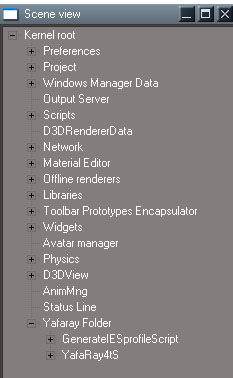
Replaced empty "Yafaray Folder" node with one that contains Yafaray4tS and GenerateIESprofileScript nodes
Added integrated button installation
Save "Yafaray Folder" to preobjects instead of Yafaray4tS and GenerateIESprofileScript nodes
Attachments
YafaRay4tSv090-beta-3.zip
(1.96 MiB) Downloaded 220 times
Clinton Reese

http://clintons3d.com
User avatar
clintonman
Captain
Posts: 5659
Joined: 21 May 2009, 21:08
Type the number ten into the box: 0
Location: California

Re: Yafaray4tS v0.9.0

Post by clintonman »

trueBlue wrote: 09 Jun 2018, 13:51 Think I going to need some instructions on how to use the materials.
Simple scene with a sphere painted with the blend material.
Does not seem to be working and the preview throws two errors.
The blend material has 2 parts, the second part is the Blend Material Collection found in the Yafaray4tS Setup library.
1. Setup 2 materials in the collection
2. Apply the Blend material to something
3. Press the preview button

I will move the Blend Material Collection to the Yaf materials library
Clinton Reese

http://clintons3d.com
User avatar
trueBlue
Captain
Posts: 5548
Joined: 06 Jul 2009, 22:50
Type the number ten into the box: 10

Re: Yafaray4tS v0.9.0

Post by trueBlue »

Think I going to need some instructions on how to use the materials.
Simple scene with a sphere painted with the blend material.
Does not seem to be working and the preview throws two errors.
Attachments
Space 3D3afe.RsScn
(1.42 MiB) Downloaded 204 times
User avatar
trueBlue
Captain
Posts: 5548
Joined: 06 Jul 2009, 22:50
Type the number ten into the box: 10

Re: Yafaray4tS v0.9.0

Post by trueBlue »

Combine the Misc aspect with the Default aspect and delete the Misc aspect?

Or are you referring to Panel Properties?
Solid Background
Attachments
Capture.PNG
User avatar
clintonman
Captain
Posts: 5659
Joined: 21 May 2009, 21:08
Type the number ten into the box: 0
Location: California

Re: Yafaray4tS v0.9.0

Post by clintonman »

trueBlue wrote: 08 Jun 2018, 23:00 ...
Okay it works but you will have to eliminate deleting the Yafaray Folder in the Uninstall script.

...
Ok, will do.
Clinton Reese

http://clintons3d.com
User avatar
clintonman
Captain
Posts: 5659
Joined: 21 May 2009, 21:08
Type the number ten into the box: 0
Location: California

Re: Yafaray4tS v0.9.0

Post by clintonman »

trueBlue wrote: 08 Jun 2018, 23:00 ...

You know better which aspect should show better then I. What I was talking about is the left click (Yafaray Settings) goes to the Direct aspect. Where as the Default aspect has the Render Settings. I was thinking that the Render Settings would be a better choice?


Forgot to mention that I made a few modifications in that last attchment I up loaded.

YafaRay4tS panel
I removed the (Asp) Tab on the Display.

Lights library
Added icons to the lights

Setup library
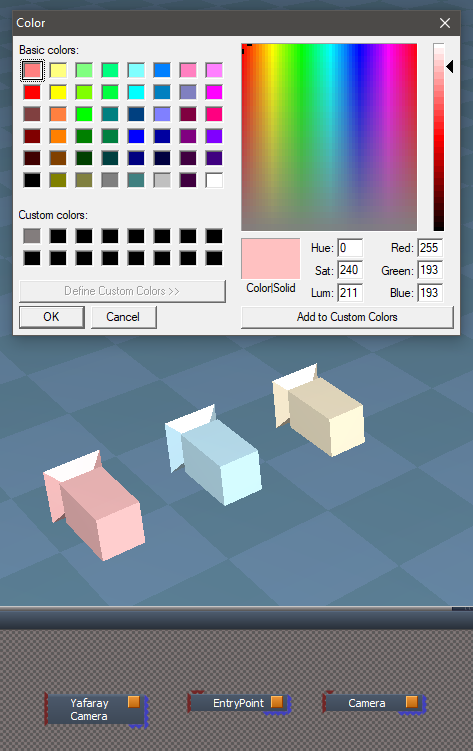
Did a little panel editing and changed the color of the Yafary Camera's mesh.

Most of the icons were blank.
Got it, that does look better.

Now I see what you mean. The default tab does say "Render Settings". Most of those settings have been moved to the lighting methods. It was confusing to me because all the settings were together even though several are only valid with certain lighting methods.
CleanDefault.jpg
CleanDefault.jpg (48.46 KiB) Viewed 4613 times
Here I removed the repeat items. The input color space and denoise items will be moved to the individual lighting method panels and No recursion will be removed, it belongs only in the path tracing panel.
So default will be almost empty. Any ideas to fill the space?
Clinton Reese

http://clintons3d.com
User avatar
trueBlue
Captain
Posts: 5548
Joined: 06 Jul 2009, 22:50
Type the number ten into the box: 10

Re: Yafaray4tS v0.9.0

Post by trueBlue »

Cool! The end goal was when a user resets the context, they would not have to save their settings again. So thanks for that!

The new code you have shown for the reset.js will not work either.

We need to have code that checks for it's existence in the main directory for those users that do not install Yafaray4tS.
When I first tried loading the YafaRay4tS.RsObj when it was not present in the main directory, the reset.js file did not run. When I put the check it did. We do not need to check if it exist in System because when you reset, it is deleted.
I guess we can try your

Code: Select all

fso = new ActiveXObject("Scripting.FileSystemObject");
Edit: Nevermind, I will just include the Yafaray Folder with the update. Testng...
Okay it works but you will have to eliminate deleting the Yafaray Folder in the Uninstall script.

You know better which aspect should show better then I. What I was talking about is the left click (Yafaray Settings) goes to the Direct aspect. Where as the Default aspect has the Render Settings. I was thinking that the Render Settings would be a better choice?


Forgot to mention that I made a few modifications in that last attchment I up loaded.

YafaRay4tS panel
I removed the (Asp) Tab on the Display.

Lights library
Added icons to the lights

Setup library
Did a little panel editing and changed the color of the Yafary Camera's mesh.

Most of the icons were blank.
Attachments
Yafaray setup library.PNG
User avatar
clintonman
Captain
Posts: 5659
Joined: 21 May 2009, 21:08
Type the number ten into the box: 0
Location: California

Re: Yafaray4tS v0.9.0

Post by clintonman »

I just looked at the original yafaray right click button and it goes to the Setup tab. Most of the render settings are in other tabs.
I'm going to keep the new button right click to the render settings under the different lighting models.
Clinton Reese

http://clintons3d.com
User avatar
clintonman
Captain
Posts: 5659
Joined: 21 May 2009, 21:08
Type the number ten into the box: 0
Location: California

Re: Yafaray4tS v0.9.0

Post by clintonman »

trueBlue wrote: 08 Jun 2018, 20:15 ...
For whatever reason the above code does not work.

The only way I could get it to work is as follows:
...


Also have to add both objects to the updates.

Changed the Install/Uninstall scripts to accommodate the above. (See attachment)

Let me know if this works for you and I will add it to the updates.

Suggestions:
YafaRay4tS panel
Save Settings button - Add save YafaRay4tS.RsObj to the preobjects folder?

Yafaray4tS toolbar
Yafaray Settings - Opens Direct Lighting and not Render Settings?

Add Yafaray Render Buttons Autoload to installer?
Good ideas.

Will save the Yafaray Folder to preobjects when the save settings button is pressed

The right click button goes to the active lighting model. There is no "Render Settings" tab. Which tab do you think it should go?

I completely forgot about the Render Buttons until the last second. Ideally the resulting nodes would live inside the Yafaray4tS node, but it's a little bit of a pain to recompile the plugin code so I'll leave them in the Custom Commands and will include it in the Yafaray installer instead of having it separate.
Clinton Reese

http://clintons3d.com
User avatar
clintonman
Captain
Posts: 5659
Joined: 21 May 2009, 21:08
Type the number ten into the box: 0
Location: California

Re: Yafaray4tS v0.9.0

Post by clintonman »

Original code was

Code: Select all

if(Node.Exists(rosDir + '\\scripts\\preObjects\\Yafaray4tS.rsobj')) {
RsFileIO.LoadObject( rosDir + '\\scripts\\preObjects\\Yafaray4tS.rsobj', '/');
}
My change without really looking at it was

Code: Select all

if(Node.Exists(rosDir + '\\scripts\\preObjects\\Yafaray Folder.rsobj')) {
RsFileIO.LoadObject( rosDir + '\\scripts\\preObjects\\Yafaray Folder.rsobj', '/');
}
It should have been

Code: Select all

if(!Node.Exists('/Yafaray Folder')) {
RsFileIO.LoadObject( rosDir + '\\scripts\\preObjects\\Yafaray Folder.rsobj', '/');
}
Here I'm assuming that it is supposed to load if the node doesn't already exist inside truespace.
Clinton Reese

http://clintons3d.com
User avatar
trueBlue
Captain
Posts: 5548
Joined: 06 Jul 2009, 22:50
Type the number ten into the box: 10

Re: Yafaray4tS v0.9.0

Post by trueBlue »

clintonman wrote: 08 Jun 2018, 00:24
trueBlue wrote: 06 Jun 2018, 17:13 With regards to Yafaray4tS to with stand a Reset to Default Context, I was wanting to add the following lines to the reset,js file to the Update 4:

Code: Select all

if(Node.Exists(rosDir + '\\scripts\\preObjects\\Yafaray4tS.rsobj')) {
RsFileIO.LoadObject( rosDir + '\\scripts\\preObjects\\Yafaray4tS.rsobj', '/');
}

Is that the correct spelling ( Yafaray4tS ) and with your installation will you be adding the Yafaray4tS.rsobj to the preobjects folder?
YafarayNodeLocation.jpg
The Yafaray4tS will continue to live inside the Yafaray Folder node and I'll have the installer place it in the preobjects folder. So the code will be:

Code: Select all

if(Node.Exists(rosDir + '\\scripts\\preObjects\\Yafaray Folder.rsobj')) {
RsFileIO.LoadObject( rosDir + '\\scripts\\preObjects\\Yafaray Folder.rsobj', '/');
}
For whatever reason the above code does not work.

The only way I could get it to work is as follows:

Code: Select all

Node.Create("Kernel Package/Object","/");
Node.Rename("/Object","Yafaray Folder")
RsFileIO.LoadObject( rosDir + '\\scripts\\preObjects\\YafaRay4tS.rsobj', '/Yafaray Folder/');
RsFileIO.LoadObject( rosDir + '\\scripts\\preObjects\\GenerateIESprofileScript.rsobj', '/Yafaray Folder/');

Also have to add both objects to the updates.

Changed the Install/Uninstall scripts to accommodate the above. (See attachment)

Let me know if this works for you and I will add it to the updates.

Suggestions:
YafaRay4tS panel
Save Settings button - Add save YafaRay4tS.RsObj to the preobjects folder?

Yafaray4tS toolbar
Yafaray Settings - Opens Direct Lighting and not Render Settings?

Add Yafaray Render Buttons Autoload to installer?
Attachments
YafaRay4tSv090-beta (2).zip
(2.17 MiB) Downloaded 203 times
User avatar
bitkar
Captain
Posts: 2089
Joined: 16 Mar 2010, 07:14
Type the number ten into the box: 0
Location: Czech Republic

Re: Yafaray4tS v0.9.0

Post by bitkar »

i have had no time recently, so iam not sure if i will test it out. But if someone does, can you make a video of how the workflow looks like now? Setting up materials, lights, render... or even the installation process.

Definatly BIG thanks to Clinton
Michal aka bitkar
tS freak since tS2 (1998) and forever (tS7.61 modeler)
User avatar
clintonman
Captain
Posts: 5659
Joined: 21 May 2009, 21:08
Type the number ten into the box: 0
Location: California

Re: Yafaray4tS v0.9.0

Post by clintonman »

First Beta ready for early adopters. See the zip file below.

Requires Clintons3dplugin which is included in the new unofficial updates or direct link.
viewtopic.php?t=5411
http://clintons3d.com/plugins/downloads ... Plugin.rsx

Latest Yafaray v3.3.0 can be found here: https://github.com/YafaRay/Blender-Exporter/releases
and here: https://github.com/YafaRay/Core/releases
One is made to work with Blender and the other is standalone, either one will work.

zip archive includes a script installer to integrate with the built in render buttons, "Yafaray Render Buttons Autoload.RsObj". This requires the persistent install on truespace - http://clintons3d.com/plugins/truespace ... stent.html

The help file is very much out of date. More support for texture maps comes with more awkward workflow.

Updated instructions/information coming in the near future...

Change notes:

lights for the background lighting previews.
light preview values
added a render shadow option to each light
procedural textures - clouds, marble,voronoi and wood
added blend values for texture maps
Fixed the draw parameters which changed with the new Yafaray 3 version
Added the standard render buttons for scene, area render and animation
render area needs right click to exit the area selection mode
progressive image saving updated for Yafaray v3
new blend material
updated material previews
Several redundant items were removed from the Render Settings panel
New option for the internal display based on iOptDetectors

http://rs.siprogs.sk/p/iOptDetectorsPage

will use trueSpace (non-Yafaray) lights in the render
Added new option to turn off caustic photons and diffuse photons for each light source.
Added new background cast shadows option and background sun shadow option.
Added smart blur value for image based lighting
Added photon map saving and loading
Additional rays on materials
Russian roulette for path tracing
Camera settings are on a new Yafaray camera which includes a button for setting the depth of field distance by choosing a scene item. Removed the zoom input which was not being used. Camera is found in the YafaRay4tS Setup library.
Added a "set frame range" button to set the animation range from the time line.
Found that the Pathtracing and Photon mapping "Use background" is not used anymore, adjusted to use the "Use IBL" option in the background panel instead.

includes script installer to integrate the built in render buttons, "Yafaray Render Buttons Autoload.RsObj"

added denoise option - note works poorly with the partial save timer, denoises with each file save=slow
photon mapping save and reuse

requires plugin
http://clintons3d.com/plugins/downloads ... Plugin.rsx
plugin is included in the new unofficial updates
viewtopic.php?t=5411
Attachments
YafaRay4tSv090-beta.zip
(1.93 MiB) Downloaded 220 times
Clinton Reese

http://clintons3d.com
User avatar
clintonman
Captain
Posts: 5659
Joined: 21 May 2009, 21:08
Type the number ten into the box: 0
Location: California

Re: Yafaray4tS v0.9.0

Post by clintonman »

trueBlue wrote: 06 Jun 2018, 17:13 With regards to Yafaray4tS to with stand a Reset to Default Context, I was wanting to add the following lines to the reset,js file to the Update 4:

Code: Select all

if(Node.Exists(rosDir + '\\scripts\\preObjects\\Yafaray4tS.rsobj')) {
RsFileIO.LoadObject( rosDir + '\\scripts\\preObjects\\Yafaray4tS.rsobj', '/');
}

Is that the correct spelling ( Yafaray4tS ) and with your installation will you be adding the Yafaray4tS.rsobj to the preobjects folder?
YafarayNodeLocation.jpg
YafarayNodeLocation.jpg (34.75 KiB) Viewed 4723 times
The Yafaray4tS will continue to live inside the Yafaray Folder node and I'll have the installer place it in the preobjects folder. So the code will be:

Code: Select all

if(Node.Exists(rosDir + '\\scripts\\preObjects\\Yafaray Folder.rsobj')) {
RsFileIO.LoadObject( rosDir + '\\scripts\\preObjects\\Yafaray Folder.rsobj', '/');
}
Clinton Reese

http://clintons3d.com
User avatar
trueBlue
Captain
Posts: 5548
Joined: 06 Jul 2009, 22:50
Type the number ten into the box: 10

Re: Yafaray4tS v0.9.0

Post by trueBlue »

Awesome! :D
User avatar
clintonman
Captain
Posts: 5659
Joined: 21 May 2009, 21:08
Type the number ten into the box: 0
Location: California

Re: Yafaray4tS v0.9.0

Post by clintonman »

mappingSPECglossy.jpg
OK, after 100 million bugs it's back to working again.
All the previous renders work and added this new one showing glossy reflection texture map which wasn't possible before.
Clinton Reese

http://clintons3d.com
User avatar
clintonman
Captain
Posts: 5659
Joined: 21 May 2009, 21:08
Type the number ten into the box: 0
Location: California

Re: Yafaray4tS v0.9.0

Post by clintonman »

YafaRay4tS is the correct spelling. I would hold off adding it for now. The YafaRay4tS node exists inside a Yafaray Folder along with a GenerateIESprofileScript node. I might move that second script into the IES light or into the YafaRay4tS node.
Clinton Reese

http://clintons3d.com
User avatar
trueBlue
Captain
Posts: 5548
Joined: 06 Jul 2009, 22:50
Type the number ten into the box: 10

Re: Yafaray4tS v0.9.0

Post by trueBlue »

With regards to Yafaray4tS to with stand a Reset to Default Context, I was wanting to add the following lines to the reset,js file to the Update 4:

Code: Select all

if(Node.Exists(rosDir + '\\scripts\\preObjects\\Yafaray4tS.rsobj')) {
RsFileIO.LoadObject( rosDir + '\\scripts\\preObjects\\Yafaray4tS.rsobj', '/');
}

Is that the correct spelling ( Yafaray4tS ) and with your installation will you be adding the Yafaray4tS.rsobj to the preobjects folder?
User avatar
bitkar
Captain
Posts: 2089
Joined: 16 Mar 2010, 07:14
Type the number ten into the box: 0
Location: Czech Republic

Re: Yafaray4tS v0.9.0

Post by bitkar »

lol... goddamn EU bureaucracy... I think they are overacting a bit maybe. What kind of personal data they had???
But everyone fears it, not only them.

Thats how we live in EU. God bless other non-EU countries. Maybe once i will move to USA. EU is worse and worse.
Michal aka bitkar
tS freak since tS2 (1998) and forever (tS7.61 modeler)
User avatar
clintonman
Captain
Posts: 5659
Joined: 21 May 2009, 21:08
Type the number ten into the box: 0
Location: California

Re: Yafaray4tS v0.9.0

Post by clintonman »

The bump map and the Blend material got broke by the changes. Bump maps for all the materials are fixed. The Blend material will export/render properly, but it's d3d preview is still broken.

I went to the Yafaray facebook page and this was posted, "Hi We are looking for a system administrator with a good grasp of the GDPR legislation to take care of the YafaRay site."

Sounds like they may be down for a while. :( Not as bad as it sounds though, their stuff is up on Github and the yafaray.org is available on the internet archive site.
Clinton Reese

http://clintons3d.com
User avatar
clintonman
Captain
Posts: 5659
Joined: 21 May 2009, 21:08
Type the number ten into the box: 0
Location: California

Re: Yafaray4tS v0.9.0

Post by clintonman »

Cleaned the material ui (sortof) for shiny difuse, glass, rough glass, glossy and coated glossy materials and set defaults to mostly match Blender defaults. Ready to start another set of render tests. The bump map portion remains unchanged. The blend material has no changes. These 2 will need to be tested to see if they need to be altered to work with the new mapping system.

On a side note the Yafaray website is down. The internet archive capture from May 30 shows the last page as "Sorry!
We are making changes to YafaRay.org. Sorry for the inconveniences...."
Clinton Reese

http://clintons3d.com
User avatar
clintonman
Captain
Posts: 5659
Joined: 21 May 2009, 21:08
Type the number ten into the box: 0
Location: California

Re: Yafaray4tS v0.9.0

Post by clintonman »

MapsForAll1.jpg
MapsForAll2.jpg
MapsForAll2.jpg (41.68 KiB) Viewed 4788 times
One more round of changes. The original plan was to have the procedural textures only for the diffuse channel. Now everyone gets procedural texture maps. On top of that there were some mappings that were missing. All the settings have been moved into a separate node/panel and simplified/standardized so it will be straight forward to do all the other materials.

Images show the Specular Exponent value of the Glossy material mapped to an image. The other new map input for this material is the Glossy Reflect Map.
Clinton Reese

http://clintons3d.com
User avatar
bitkar
Captain
Posts: 2089
Joined: 16 Mar 2010, 07:14
Type the number ten into the box: 0
Location: Czech Republic

Re: Yafaray4tS v0.9.0

Post by bitkar »

god, i love the light emitting materials!
Michal aka bitkar
tS freak since tS2 (1998) and forever (tS7.61 modeler)
User avatar
clintonman
Captain
Posts: 5659
Joined: 21 May 2009, 21:08
Type the number ten into the box: 0
Location: California

Re: Yafaray4tS v0.9.0

Post by clintonman »

Did a bunch of renders and didn't find any new bugs. Only thing is the Glossy material doesn't have Glossy Strength or Diffuse Strength map inputs.
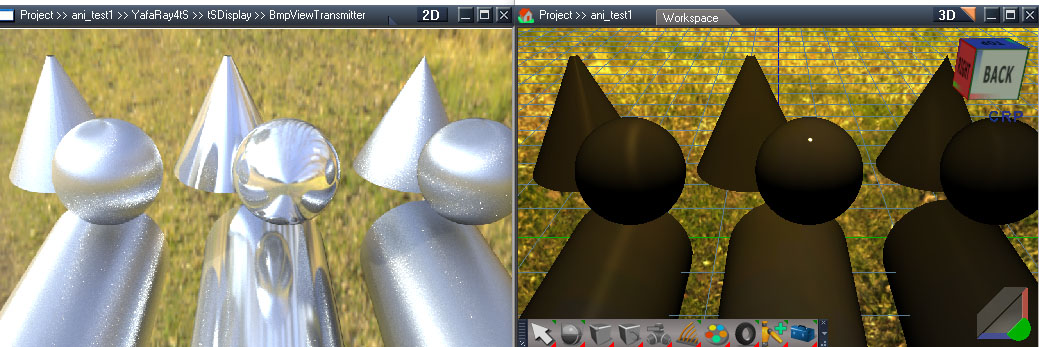
ani_test1.jpg
glossy reflection test
emitPT.jpg
emit material test
mappingCmir.jpg
mappingCSPglossy.jpg
mappingRAYmir.jpg
specular mapping tests
translucency.jpg
translucency
transparency.jpg
transparency

I looked at noise based volumetrics but the results don't look good or useful. Also looked at displacement map. In that case you have to feed it a high density mesh which doesn't seem like a good thing.

Time for final cleanup.
Clinton Reese

http://clintons3d.com
User avatar
trueBlue
Captain
Posts: 5548
Joined: 06 Jul 2009, 22:50
Type the number ten into the box: 10

Re: Yafaray4tS v0.9.0

Post by trueBlue »

The lights use the given color of the lights.

So if a users selects a Red color for the light, the Light's Shape turns Red.

Only thing you could do is change the Shape.
User avatar
clintonman
Captain
Posts: 5659
Joined: 21 May 2009, 21:08
Type the number ten into the box: 0
Location: California

Re: Yafaray4tS v0.9.0

Post by clintonman »

That's a good idea, maybe for the lights too. What colors are you already using? or do you have a color suggestion for me?

I'll be switching back to iopti soon.
Clinton Reese

http://clintons3d.com
User avatar
trueBlue
Captain
Posts: 5548
Joined: 06 Jul 2009, 22:50
Type the number ten into the box: 10

Re: Yafaray4tS v0.9.0

Post by trueBlue »

Looking good!
You sure are finding a lot of things that did not work previously.
Well done!
Are you still using iOptic?
Suggestion:
Keeping with the theme with the new update and or give the user a visual clue, change the color of your Yafaray4tS camera.
YafarayCam.PNG
User avatar
clintonman
Captain
Posts: 5659
Joined: 21 May 2009, 21:08
Type the number ten into the box: 0
Location: California

Re: Yafaray4tS v0.9.0

Post by clintonman »

AlphaMapping.jpg
alphaint_mapping02.png
Rendered image and internal render window and tS preview along with the fully populated material for the leaf.

Testing and bug fixes. The scene was copied from Blender. Test showed that the preview transparency map values were the opposite of what is needed. Fixed by adding a Image Invert node from the compositing nodes.
Fixed diffuse map not fully clearing on the Shiny Diffuse material.
Found that the Pathtracing and Photon mapping "Use background" is not used anymore, adjusted to use the "Use IBL" option in the background panel instead.

I may replace the infinite light of the sunlight with a directional light so the preview will have shadows.
Clinton Reese

http://clintons3d.com
User avatar
seppgirty
Master Chief Petty Officer
Posts: 354
Joined: 22 May 2009, 03:34
Type the number ten into the box: 0
Location: pittsburgh Pa.

Re: Yafaray4tS v0.9.0

Post by seppgirty »

I don't know, sharing a virgin seems to kind of defeat the purpose of having a virgin...
:bananadevil:
truespace 3.2, 5.2, 6.6, ani-pack, flash plugin,........ you can check out my films athttp://www.chaosbrosfilms.com
User avatar
trueBlue
Captain
Posts: 5548
Joined: 06 Jul 2009, 22:50
Type the number ten into the box: 10

Re: Yafaray4tS v0.9.0

Post by trueBlue »

Yay!
User avatar
clintonman
Captain
Posts: 5659
Joined: 21 May 2009, 21:08
Type the number ten into the box: 0
Location: California

Re: Yafaray4tS v0.9.0

Post by clintonman »

YafaRayAndVRay.jpg
YafaRay and VRay coexisting and sharing the same render buttons.

Rendered with plain non-yafaray truespace materials and lights.

Fixed bug where would not render to a file path that had spaces.
Fixed new bug to use plain tS lights. Bug was caused from rearranging the code.

Testing on trueSpace7.61 std unofficial update v4.
Clinton Reese

http://clintons3d.com
User avatar
clintonman
Captain
Posts: 5659
Joined: 21 May 2009, 21:08
Type the number ten into the box: 0
Location: California

Re: Yafaray4tS v0.9.0

Post by clintonman »

trueBlue wrote: 22 May 2018, 15:57 Not sure if you are aware of this and or if it is of concern.
If you have Vray installed and loaded, and you right click any of the Offline Render icons, this is what is shown.
The Vray panel is from an invisible Vray node that resides within the present scene.
HTH
I don't think there will be a conflict and I think I may be able to tell for sure soon :D
Clinton Reese

http://clintons3d.com
User avatar
clintonman
Captain
Posts: 5659
Joined: 21 May 2009, 21:08
Type the number ten into the box: 0
Location: California

Re: Yafaray4tS v0.9.0

Post by clintonman »

trueBlue wrote: 22 May 2018, 12:28 Wow...HUGE update!
Can you share the Virgin? ;)
I don't know, sharing a virgin seems to kind of defeat the purpose of having a virgin... :P
Clinton Reese

http://clintons3d.com
User avatar
trueBlue
Captain
Posts: 5548
Joined: 06 Jul 2009, 22:50
Type the number ten into the box: 10

Re: Yafaray4tS v0.9.0

Post by trueBlue »

Not sure if you are aware of this and or if it is of concern.
If you have Vray installed and loaded, and you right click any of the Offline Render icons, this is what is shown.
The Vray panel and PhotoRender panel is from an invisible Vray node and PhotoRender node that resides within the present scene.
HTH
Vray.PNG
VrayPhotoRenderNodes.PNG
VrayPhotoRenderNodes.PNG (4.03 KiB) Viewed 5771 times
User avatar
trueBlue
Captain
Posts: 5548
Joined: 06 Jul 2009, 22:50
Type the number ten into the box: 10

Re: Yafaray4tS v0.9.0

Post by trueBlue »

Wow...HUGE update!
Can you share the Virgin? ;)
User avatar
clintonman
Captain
Posts: 5659
Joined: 21 May 2009, 21:08
Type the number ten into the box: 0
Location: California

Re: Yafaray4tS v0.9.0

Post by clintonman »

Found a problem with batch animation and fixed it. Added a "set frame range" button to set the animation range from the time line. Cleaned up the code.

Plan:
1. make virgin truespace install and add the newest unofficial updates to it
2. batch install my plugins and scripts
3. install yafaray v08 and overwrite with the new v09 files(renderer, materials, lights and camera)
4. test renders and bug fixes
Clinton Reese

http://clintons3d.com
User avatar
bitkar
Captain
Posts: 2089
Joined: 16 Mar 2010, 07:14
Type the number ten into the box: 0
Location: Czech Republic

Re: Yafaray4tS v0.9.0

Post by bitkar »

wow, this is gonna be BIG!
Michal aka bitkar
tS freak since tS2 (1998) and forever (tS7.61 modeler)
User avatar
clintonman
Captain
Posts: 5659
Joined: 21 May 2009, 21:08
Type the number ten into the box: 0
Location: California

Re: Yafaray4tS v0.9.0

Post by clintonman »

Camera settings are on a new Yafaray camera which includes a button for setting the depth of field distance by choosing a scene item. Removed the zoom input which was not being used.
Integrated the iOptiDevice rendering window.
fixed procedural texture orientation for the glossy materials

Testing and bug squashing time.
Clinton Reese

http://clintons3d.com
User avatar
clintonman
Captain
Posts: 5659
Joined: 21 May 2009, 21:08
Type the number ten into the box: 0
Location: California

Re: Yafaray4tS v0.9.0

Post by clintonman »

Added photon map saving and loading
Additional rays on materials
Denoise
Russian roulette for path tracing

Todo list:
integrate the iOpti for render display
move camera settings to the camera and maybe add a dof indicator
fix procedural texture orientation for glossy materials
check background preview
test and release :)
Clinton Reese

http://clintons3d.com
User avatar
clintonman
Captain
Posts: 5659
Joined: 21 May 2009, 21:08
Type the number ten into the box: 0
Location: California

Re: Yafaray4tS v0.9.0

Post by clintonman »

Added new option to turn off caustic photons and diffuse photons for each light source.
Added new background cast shadows option and background sun shadow option.
Added smart blur value for image based lighting
Clinton Reese

http://clintons3d.com
User avatar
trueBlue
Captain
Posts: 5548
Joined: 06 Jul 2009, 22:50
Type the number ten into the box: 10

Re: Yafaray4tS v0.9.0

Post by trueBlue »

Oh, I did not know you could do that.
I got the Caption to work on the Tab, but it is not pretty.
Capture.PNG
Capture.PNG (17.16 KiB) Viewed 4878 times
First script

Code: Select all

OptDetectors.OpenBitmapView(Space.CurrentScene() + "/BmpViewTransmitter");
Node.Value("/Project/Windows Manager Space/Frame Window, 1", "DispTitleText") = 0
Node.Value("/Project/Windows Manager Space/Frame Window, 1", "SmallerTabs") = -1
Node.Value(Space.CurrentScene() + "/BmpViewTransmitter", "Caption") = Node.ShortName(Space.CurrentScene())
Second script 'Linked'

Code: Select all

WindowsManager.SetWindowAspect('/Project/Windows Manager Space/Frame Window, 1', 1)

Third script 'Linked'

Code: Select all

WindowsManager.SetWindowAspect('/Project/Windows Manager Space/Frame Window, 1', 2)
They have to run separately in order to work properly.
If you combine them into one script, it has to run twice.
User avatar
clintonman
Captain
Posts: 5659
Joined: 21 May 2009, 21:08
Type the number ten into the box: 0
Location: California

Re: Yafaray4tS v0.9.0

Post by clintonman »

trueBlue wrote: 18 May 2018, 15:28 ...
Are you using the BMPViewTransmitter without a Camera?
Yes, only using it to display the yafaray rendered result.
Clinton Reese

http://clintons3d.com
User avatar
trueBlue
Captain
Posts: 5548
Joined: 06 Jul 2009, 22:50
Type the number ten into the box: 10

Re: Yafaray4tS v0.9.0

Post by trueBlue »

It is the same BitmapCamera found in the iOptiDectectors library with modifications and renamed to YafaRay4tS Camera.
The modifications are with the D3D Texture render target's Camera attribute.
I disconnected it from the Camera's Object Name attribute.
The buttons on the panel changes the path to the D3D Texture render target's Camera attribute to the Eye Camera and or to the Camera from within.

Here is the scene with the included toolbar that hides the none working Tab.

If you notice lag in the default BMPViewTransmitter it is because the Refresh is set to 300

I set it to 1
Are you using the BMPViewTransmitter without a Camera?
Attachments
Yafaray4tS.RsScn
(406.34 KiB) Downloaded 235 times
User avatar
clintonman
Captain
Posts: 5659
Joined: 21 May 2009, 21:08
Type the number ten into the box: 0
Location: California

Re: Yafaray4tS v0.9.0

Post by clintonman »

Are you making a YafaRay4tS Camera?
Clinton Reese

http://clintons3d.com
User avatar
trueBlue
Captain
Posts: 5548
Joined: 06 Jul 2009, 22:50
Type the number ten into the box: 10

Re: Yafaray4tS v0.9.0

Post by trueBlue »

I figured out how to call the BMPViewTransmitter.

Code: Select all

Width = Node.Value(Space.CurrentScene() + "/YafaRay4tS Camera", "Width")
Height = Node.Value(Space.CurrentScene() + "/YafaRay4tS Camera", "Height")

OptDetectors.OpenBitmapView(Space.CurrentScene() + "/BmpViewTransmitter");

if (Node.Exists("/Project/Windows Manager Space/Frame Window, 1/BitmapView"))
{
WindowsManager.MoveWindow("/Project/Windows Manager Space/Frame Window, 1", -1, -1, Width, Height, -1, -1, -1)
Node.Value("/Project/Windows Manager Space/Frame Window, 1", "TabsAsButtons") = -1
Node.Value("/Project/Windows Manager Space/Frame Window, 1", "Title") = Node.ShortName(Space.CurrentScene())
Node.Copy(Space.CurrentScene() + "/YafaRay4tS_ToolbarFrame", "/Project/Windows Manager Space/Frame Window, 1")
WindowsManager.Activate()
WindowsManager.UpdateWindowsStructure()
Widgets.Move("/D3DView/EyeCamera_{2C152F81-45A2-4035-8896-9E49D60C8A7A}",-0.000,-0.000,0.001);
}
if (Node.Exists("/Project/Windows Manager Space/Frame Window, 2/BitmapView"))
{
WindowsManager.MoveWindow("/Project/Windows Manager Space/Frame Window, 2", -1, -1, Width, Height, -1, -1, -1)
Node.Value("/Project/Windows Manager Space/Frame Window, 2", "TabsAsButtons") = -1
Node.Value("/Project/Windows Manager Space/Frame Window, 2", "Title") = Node.ShortName(Space.CurrentScene())
Node.Copy(Space.CurrentScene() + "/YafaRay4tS_ToolbarFrame", "/Project/Windows Manager Space/Frame Window, 2")
WindowsManager.Activate()
WindowsManager.UpdateWindowsStructure()
Widgets.Move("/D3DView/EyeCamera_{2C152F81-45A2-4035-8896-9E49D60C8A7A}",-0.000,-0.000,0.001);
}
if (Node.Exists("/Project/Windows Manager Space/Frame Window, 3/BitmapView"))
{
WindowsManager.MoveWindow("/Project/Windows Manager Space/Frame Window, 3", -1, -1, Width, Height, -1, -1, -1)
Node.Value("/Project/Windows Manager Space/Frame Window, 3", "TabsAsButtons") = -1
Node.Value("/Project/Windows Manager Space/Frame Window, 3", "Title") = Node.ShortName(Space.CurrentScene())
Node.Copy(Space.CurrentScene() + "/YafaRay4tS_ToolbarFrame", "/Project/Windows Manager Space/Frame Window, 3")
WindowsManager.Activate()
WindowsManager.UpdateWindowsStructure()
Widgets.Move("/D3DView/EyeCamera_{2C152F81-45A2-4035-8896-9E49D60C8A7A}",-0.000,-0.000,0.001);
}
if (Node.Exists("/Project/Windows Manager Space/Frame Window, 4/BitmapView"))
{
WindowsManager.MoveWindow("/Project/Windows Manager Space/Frame Window, 4", -1, -1, Width, Height, -1, -1, -1)
Node.Value("/Project/Windows Manager Space/Frame Window, 4", "TabsAsButtons") = -1
Node.Value("/Project/Windows Manager Space/Frame Window, 4", "Title") = Node.ShortName(Space.CurrentScene())
Node.Copy(Space.CurrentScene() + "/YafaRay4tS_ToolbarFrame", "/Project/Windows Manager Space/Frame Window, 4")
WindowsManager.Activate()
WindowsManager.UpdateWindowsStructure()
Widgets.Move("/D3DView/EyeCamera_{2C152F81-45A2-4035-8896-9E49D60C8A7A}",-0.000,-0.000,0.001);
}
User avatar
clintonman
Captain
Posts: 5659
Joined: 21 May 2009, 21:08
Type the number ten into the box: 0
Location: California

Re: Yafaray4tS v0.9.0

Post by clintonman »

Did some cleanup of the material ui and set all texture gamma values to 2.2 having the values set properly is a new requirement of the renderer.
next steps are to add the optidetector render view, it's in testing mode now. and then to start adding some of the new options like smart IBL blur, denoise and a few others.

Edit: forgot, also made default tS lights export to the renderer
Clinton Reese

http://clintons3d.com
User avatar
trueBlue
Captain
Posts: 5548
Joined: 06 Jul 2009, 22:50
Type the number ten into the box: 10

Re: Yafaray4tS v0.9.0

Post by trueBlue »

Yes, I took the code from the Window Settings panel button and changed the path as shown below.

With the Window Settings panel open from the YafaRaytSv9 window frame, run this script:

Code: Select all

FrameWindow = Node.Value('/Project/Windows Manager Space/Window Settings', 'FrameWindow');
Width = Node.Value('/Project/Windows Manager Space/Window Settings', 'Width');
Height = Node.Value('/Project/Windows Manager Space/Window Settings', 'Height');
WorkAreaSize = Node.Value('/Project/Windows Manager Space/Window Settings', 'InsideSize');

WindowsManager.MoveWindow(FrameWindow, -1, -1, Width, Height, WorkAreaSize, -1, -1);
Command History

Code: Select all

ScriptObject.RunCmd("windows manager package/movewindow", "FrameNode", "/Project/Windows Manager Space/Yafaray4tS_FrameWindow", "Left", -1, "Top", -1, "Width", 320, "Height", 240, "WorkAreaSize", 1, "LockWifth", -1, "LockHeight", -1)

This could be that I have iOptDetector installed without the libraries. After Reseting the Default Context this runs everytime.
Capture.PNG
Capture.PNG (7.7 KiB) Viewed 4928 times
User avatar
clintonman
Captain
Posts: 5659
Joined: 21 May 2009, 21:08
Type the number ten into the box: 0
Location: California

Re: Yafaray4tS v0.9.0

Post by clintonman »

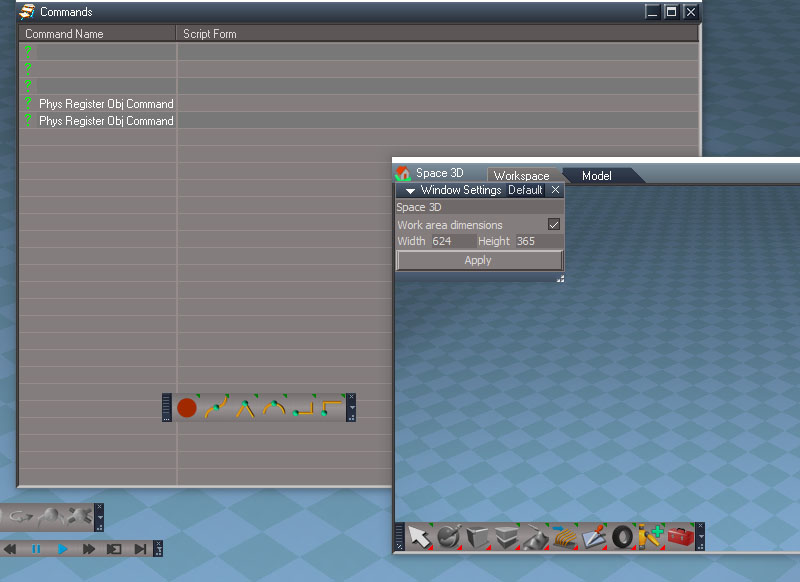
BlankCommands.jpg
Is there a trick to it? All I get is blank lines when I make changes with the windows settings.
Clinton Reese

http://clintons3d.com
User avatar
trueBlue
Captain
Posts: 5548
Joined: 06 Jul 2009, 22:50
Type the number ten into the box: 10

Re: Yafaray4tS v0.9.0

Post by trueBlue »

clintonman wrote: 16 May 2018, 04:37 How did you find the command to size the window?

looks like a typo in the script "... "LockWifth", -1, "LockHeight", -1)" should be "LockWidth"
In the Command History when using the Window settings. When you change it to LockWidth, it does not work. LOL
It uses the Inside Dimensions to size the window.
User avatar
clintonman
Captain
Posts: 5659
Joined: 21 May 2009, 21:08
Type the number ten into the box: 0
Location: California

Re: Yafaray4tS v0.9.0

Post by clintonman »

Changed so it will use trueSpace (non-Yafaray) lights in the render and adjusted some values for both trueSpace and Yafaray lights to match the render more closely.
Clinton Reese

http://clintons3d.com
User avatar
clintonman
Captain
Posts: 5659
Joined: 21 May 2009, 21:08
Type the number ten into the box: 0
Location: California

Re: Yafaray4tS v0.9.0

Post by clintonman »

How did you find the command to size the window?

looks like a typo in the script "... "LockWifth", -1, "LockHeight", -1)" should be "LockWidth"
Clinton Reese

http://clintons3d.com
User avatar
trueBlue
Captain
Posts: 5548
Joined: 06 Jul 2009, 22:50
Type the number ten into the box: 10

Re: Yafaray4tS v0.9.0

Post by trueBlue »

As mentioned earlier here is a copy of My OptDetectors library that includes a scene and frame window.
Example using the Scene camera and Eye camera and changing the window's heigth/width.
Also note using the Antialiasing levels. Also possible to use PostProcessing's Smooth Sampling.
Still a WIP.
Capture.PNG
Capture.PNG (28.82 KiB) Viewed 9504 times
Attachments
My OptDetectors.zip
(207.97 KiB) Downloaded 314 times
User avatar
clintonman
Captain
Posts: 5659
Joined: 21 May 2009, 21:08
Type the number ten into the box: 0
Location: California

Re: Yafaray4tS v0.9.0

Post by clintonman »

yeah, phrases like "death lock" is a bit worrisome. I'll definitely keep an eye out. Thanks for the heads up.
Clinton Reese

http://clintons3d.com
User avatar
trueBlue
Captain
Posts: 5548
Joined: 06 Jul 2009, 22:50
Type the number ten into the box: 10

Re: Yafaray4tS v0.9.0

Post by trueBlue »

clintonman wrote: 15 May 2018, 05:09 So are you recommending distributing the installed files and avoid using the installer for iOptDetectors?
NO not at all given the License Agreement!
clintonman wrote: 15 May 2018, 05:09 Did you get the "death lock" mentioned in the iICStage manual?
No not yet but I have not tested it.

Just sharing in case you did not know.
User avatar
clintonman
Captain
Posts: 5659
Joined: 21 May 2009, 21:08
Type the number ten into the box: 0
Location: California

Re: Yafaray4tS v0.9.0

Post by clintonman »

I did some tests and the installer will add a new line to the Plugins.xml file every time it is run. I did not experience any locking with 3 duplicate lines in the file.
Clinton Reese

http://clintons3d.com
User avatar
clintonman
Captain
Posts: 5659
Joined: 21 May 2009, 21:08
Type the number ten into the box: 0
Location: California

Re: Yafaray4tS v0.9.0

Post by clintonman »

trueBlue wrote: 15 May 2018, 02:25 I notice that the Plugins.xml file still had references to the iOptDetectors.dll after uninstalling it. When I reinstalled it, there was a duplicated entry. This was by the Add and Remove program in Control Panel.

...

Without using the installer, adding the OptDetectors.dll to the tS7 directory and Install/Load it from the Package Manager does work. There is a toolbar and several other MS dll (s) installed, but searching Win10 all of them already exist.
So are you recommending distributing the installed files and avoid using the installer for iOptDetectors?
Did you get the "death lock" mentioned in the iICStage manual?
Clinton Reese

http://clintons3d.com
User avatar
trueBlue
Captain
Posts: 5548
Joined: 06 Jul 2009, 22:50
Type the number ten into the box: 10

Re: Yafaray4tS v0.9.0

Post by trueBlue »

I notice that the Plugins.xml file still had references to the iOptDetectors.dll after uninstalling it. When I reinstalled it, there was a duplicated entry. This was by the Add and Remove program in Control Panel.

Code: Select all

    </RS_PLUGIN>
    <RS_PLUGIN RS_GUID="{40D0FB8D-15DA-4802-A52F-165FDDA788C6}">
        <RS_DATA STATUS="LOADED" NAME="OptDetectors Package" VERSION="v.1638401" DESC="Optical detectors" PATH="C:\trueSpace761Std\OptDetectors.dll"/>
    </RS_PLUGIN>

From the iICStage.pdf

Check .\trueSpace761\tS\Scripts\Plugins.xml file for the ICStage.dll registration. In some cases may happen you will find here more than just one instance of the ICStage.dll. This will cause death-lock of the script engine. To fix this problem leave here only one reference for the ICStage.dll. The proper registration should looks like this:
<RS_PLUGIN RS_GUID="{6150C203-9349-4EB2-AF58-13085ECF0045}">
<RS_DATA STATUS="LOADED" NAME="ICStage Package" VERSION="v.1638401" DESC="WEB server support" PATH="C:\trueSpace761\ICStage.dll"/>
</RS_PLUGIN>
The registration may vary only in the installation path.


Without using the installer, adding the OptDetectors.dll to the tS7 directory and Install/Load it from the Package Manager does work. There is a toolbar and several other MS dll (s) installed, but searching Win10 all of them already exist.
User avatar
clintonman
Captain
Posts: 5659
Joined: 21 May 2009, 21:08
Type the number ten into the box: 0
Location: California

Re: Yafaray4tS v0.9.0

Post by clintonman »


Video update - no audio, just a quick render test
Shows render via built in render button
New internal display using the OptiDetector plugin
File saves during partial render to update the display.
Clinton Reese

http://clintons3d.com
User avatar
trueBlue
Captain
Posts: 5548
Joined: 06 Jul 2009, 22:50
Type the number ten into the box: 10

Re: Yafaray4tS v0.9.0

Post by trueBlue »

clintonman wrote: 13 May 2018, 16:15 I meant to say it may be used to scrub a video file so it could be synced to the truespace timeline.
from the manual: "PlayFrom - Specify from which frame the video should be played(started). The frame is changed
immediately so if you are changing this connector continuously, you can manually play your video."
Not sure what you are thinking or how you are going to use it.
I just recorded an Avi from a Camera in 3D Space using the VideoRecorder.
Fun stuff!
User avatar
clintonman
Captain
Posts: 5659
Joined: 21 May 2009, 21:08
Type the number ten into the box: 0
Location: California

Re: Yafaray4tS v0.9.0

Post by clintonman »

I meant to say it may be used to scrub a video file so it could be synced to the truespace timeline.
from the manual: "PlayFrom - Specify from which frame the video should be played(started). The frame is changed
immediately so if you are changing this connector continuously, you can manually play your video."
Clinton Reese

http://clintons3d.com
User avatar
trueBlue
Captain
Posts: 5548
Joined: 06 Jul 2009, 22:50
Type the number ten into the box: 10

Re: Yafaray4tS v0.9.0

Post by trueBlue »

I think you would be better off creating your own 2D Frame Window with the BmpViewTransmitter.
Here I checked TabAsButton and changed the Height and Width to match the Render to Texture Camera
Capture.PNG
Capture.PNG (13.72 KiB) Viewed 9057 times
Also you can change the Camera attribute to the Eye Camera
/D3DView/EyeCamera_{2C152F81-45A2-4035-8896-9E49D60C8A7A}
Refresh to 1
User avatar
clintonman
Captain
Posts: 5659
Joined: 21 May 2009, 21:08
Type the number ten into the box: 0
Location: California

Re: Yafaray4tS v0.9.0

Post by clintonman »

Yep, version 1.1
On a side note the docs seem to say that it may be possible scrub frames with the video player node. This won't do anything for the yafaray render, but it does have possibilities in other areas.
Clinton Reese

http://clintons3d.com
User avatar
trueBlue
Captain
Posts: 5548
Joined: 06 Jul 2009, 22:50
Type the number ten into the box: 10

Re: Yafaray4tS v0.9.0

Post by trueBlue »

Are you using version 1.1?
New in version 1.1 - Added Object Tracer node, new demo scenes and help objects
- Fixed Night Filter
- Fixed plugin registration
- Fixed BmpTitle object
- Switched to trueSpace 7.61 SDK
The installer added the dll to the Package Manager.
Attachments
Capture.PNG
Capture.PNG (4.24 KiB) Viewed 9033 times
User avatar
clintonman
Captain
Posts: 5659
Joined: 21 May 2009, 21:08
Type the number ten into the box: 0
Location: California

Re: Yafaray4tS v0.9.0

Post by clintonman »

NewRenderDisplay.jpg
New internal display based on iOptDetectors from some of the original tS developers,
"Vladimir Sisolak
founder".

3D Preview on left, optdetector window on the right.
The window can be resized and the image will maintain it's aspect ratio. The old window could not be resized and the image was distorted if the render did not match it's aspect ratio.
The only bad news is that it will not display exr or tif files. It may be possible to make a translator.

The only tricky part in the installation is that the plugin is a dll file instead of an rsx file.

http://rs.siprogs.sk/p/iOptDetectorsPage
Clinton Reese

http://clintons3d.com
User avatar
clintonman
Captain
Posts: 5659
Joined: 21 May 2009, 21:08
Type the number ten into the box: 0
Location: California

Re: Yafaray4tS v0.9.0

Post by clintonman »

NoColorHackNeeded.jpg
I found a real solution to the color problem. In the render settings must set color space to "sRGB" and gamma in to "1" and textures need a gamma of 2.2 unless they are exr or hdr images.
Image also shows some of the cleanup. Several redundant items were removed from the Render Settings panel and only exist in the appropriate Lighting Method panel. There's a couple of settings at the bottom that may be removed. haven't figured it out yet.
Clinton Reese

http://clintons3d.com
User avatar
clintonman
Captain
Posts: 5659
Joined: 21 May 2009, 21:08
Type the number ten into the box: 0
Location: California

Re: Yafaray4tS v0.9.0

Post by clintonman »

BlendMaterialByTexture.jpg
Blend 2 materials with a texture to control blending is working ,also started working on the awkwardness of the UI.
Clinton Reese

http://clintons3d.com
User avatar
clintonman
Captain
Posts: 5659
Joined: 21 May 2009, 21:08
Type the number ten into the box: 0
Location: California

Re: Yafaray4tS v0.9.0

Post by clintonman »

Good news, blending materials with a texture does work in blender, so this option is back on the table. I must have been doing something wrong when trying it out in blender.
Clinton Reese

http://clintons3d.com
User avatar
clintonman
Captain
Posts: 5659
Joined: 21 May 2009, 21:08
Type the number ten into the box: 0
Location: California

Re: Yafaray4tS v0.9.0

Post by clintonman »

ColorTestEXRformat.jpg
Rendered as LinearRGB and gamma set to 1.0, loaded into Fusion and added a gamut color correction and it looks good, so do need the ability to turn off the color fix hack. As always more testing needed to see what really works.
Clinton Reese

http://clintons3d.com
User avatar
clintonman
Captain
Posts: 5659
Joined: 21 May 2009, 21:08
Type the number ten into the box: 0
Location: California

Re: Yafaray4tS v0.9.0

Post by clintonman »

BadColor.jpg
HackedColor.jpg
It looks like the yafaray renderer has a bug. Some colors can get messed up even when rendering from blender.
Images shows the problem as shift from red to orange color. The image on the bottom is from a hack to make it look better.

I was planning to add a blend material that is controlled by a texture, but it doesn't even work in blender, so that's cancelled. :(

Good news is that the blend material is done and exporting, colors have all been fixed to output the same as blenders exporter, the exporter won't crash if old yafaray materials are in a scene, plain and gradient background color previews match the renders more closely. Found that the scene needed another option to get "good" colors. LinearRGB is the default. When I switch to sRGB suddenly most of the color problems disappeared.

Next step is make it easier to use. There's a lot of awkwardness in the ui that came from all the changes. And I need to make the hack an actual option in the ui so it can be turned off. My guess at the moment is that a linear exported image may work better with the LinearRGB option and no hacked colors. Testing is needed...
Clinton Reese

http://clintons3d.com
User avatar
trueBlue
Captain
Posts: 5548
Joined: 06 Jul 2009, 22:50
Type the number ten into the box: 10

Re: Yafaray4tS v0.9.0

Post by trueBlue »

Awesome! Looking forward to seeing all of your hard work!
User avatar
clintonman
Captain
Posts: 5659
Joined: 21 May 2009, 21:08
Type the number ten into the box: 0
Location: California

Re: Yafaray4tS v0.9.0

Post by clintonman »

BlendMaterialsTestRender.jpg
Blend Material first render on the left.
Large shape has the blend material combining 50% of 2 materials in the blend material collection. The 2 materials were copied to 2 smaller objects to show in the render. The 3d viewport preview on the right does not show transparency for blend material, only simplified color information goes into the preview.
Another step closer to "done" :)
Clinton Reese

http://clintons3d.com
User avatar
clintonman
Captain
Posts: 5659
Joined: 21 May 2009, 21:08
Type the number ten into the box: 0
Location: California

Re: Yafaray4tS v0.9.0

Post by clintonman »

BlendMaterialsPreview.jpg
Image shows a procedural wood bands made of purple and green stripes combined with an image using the wood rings procedural.
Blend material preview starting to come together. materials can also be blended with a single value instead of a texture. Still a few items to add and coordinate before the blend preview is done. Then comes adding the blend material to the render code. I'm starting to see a light at the end of the tunnel.
Clinton Reese

http://clintons3d.com
User avatar
clintonman
Captain
Posts: 5659
Joined: 21 May 2009, 21:08
Type the number ten into the box: 0
Location: California

Re: Yafaray4tS v0.9.0

Post by clintonman »

All base materials are done. They all have improved previews and procedural texture options for the main color. I discovered that the coated glossy material was missing the mirror attributes that give it the shiny reflection coating. The mirror won't change the realtime preview because of laziness, maybe later.

Next is to make the blend material.
Clinton Reese

http://clintons3d.com
User avatar
clintonman
Captain
Posts: 5659
Joined: 21 May 2009, 21:08
Type the number ten into the box: 0
Location: California

Re: Yafaray4tS v0.9.0

Post by clintonman »

YafRoughGlass.jpg
Rough glass preview. Added a noise texture to represent the exponent value for the roughness in the preview.

next up will make adjustments to the 2 glossy material previews and then make the blend materials.
Clinton Reese

http://clintons3d.com
User avatar
bitkar
Captain
Posts: 2089
Joined: 16 Mar 2010, 07:14
Type the number ten into the box: 0
Location: Czech Republic

Re: Yafaray4tS v0.9.0

Post by bitkar »

Clintonman: all the node programing... looks like from a scifi movie :D
Michal aka bitkar
tS freak since tS2 (1998) and forever (tS7.61 modeler)

Return to “Rendering”