I changed both light so that when switching the UpdateFromRGB script is run.
Activity.Run(System.ThisOwner() + "/UpdateFromRGB");
added to the bottom of the Bitmap2, Execute script
also found that the right click reset was not working. fixed by disconnecting and then exporting the connectors and then relinking them to the controls
Sun light didn't have script in the slider so copied the code from the spotlight slider
The light power settings are ok in most files, but I found one that was way off so I'll be going through the power settings for all lights again.
Yafaray4tS v0.9.0
-
clintonman

- Captain
- Posts: 5659
- Joined: 21 May 2009, 21:08
- Type the number ten into the box: 0
- Location: California
Re: Yafaray4tS v0.9.0
- Attachments
-
- YafaRay Sun_Dev5.RsObj
- (481.83 KiB) Downloaded 249 times
-
- YafaRay Spot_Dev5.RsObj
- (549.18 KiB) Downloaded 272 times
-
trueBlue

- Captain
- Posts: 5548
- Joined: 06 Jul 2009, 22:50
- Type the number ten into the box: 10
Re: Yafaray4tS v0.9.0
Presently the Sun does not have anything for Shadows, it is a SunlightShader. 
Whenever I see this, I make that the default
I see Blender's Power is all 1.0
But you have also said anything under 5 is not good either.
Mostly I set them up as you have then in the library.
I will do the best I can and you can check it out.
Here is the YafaRay Sun and your YafaRay Spot_Dev4 that has been fixed.
The previous Bitmaps were being used and hooked up to the new ones in the middle.
Whenever I see this, I make that the default
Code: Select all
Power = Power * 1.75;//match render 2018But you have also said anything under 5 is not good either.
Mostly I set them up as you have then in the library.
I will do the best I can and you can check it out.
Here is the YafaRay Sun and your YafaRay Spot_Dev4 that has been fixed.
The previous Bitmaps were being used and hooked up to the new ones in the middle.

- Missing atributes.PNG (11.02 KiB) Viewed 4675 times
-
clintonman
- Captain
- Posts: 5659
- Joined: 21 May 2009, 21:08
- Type the number ten into the box: 0
- Location: California
Re: Yafaray4tS v0.9.0
I see the leak. It won't effect the render so not the end of the world.trueBlue wrote: 24 Jun 2018, 19:29 ...
Capture.PNG
Edit: I have them updated and seems to be okay.
Except for the IES Spot. Ran into this issue when I was trying to condense the Number 2 Interger and the Color Format.
Notice the light leaking?
Capture2.PNG
-
clintonman
- Captain
- Posts: 5659
- Joined: 21 May 2009, 21:08
- Type the number ten into the box: 0
- Location: California
Re: Yafaray4tS v0.9.0
trueBlue wrote: 24 Jun 2018, 22:22 Can you look at these lights in your library and tell me what you want?
Some have Samples, yet no Soft Shadows.
Some have special Power/Size.
Sun has not no shadow.
Blank areas are for Photon Only.
I have the Defaults for Caustic, Diffuse, and Photon Only.
Need the Defaults if any for the other ones.

- BlenderSunLight.jpg (39.01 KiB) Viewed 4543 times

- BlenderSphereLight2.jpg (41.5 KiB) Viewed 4543 times

- BlenderDirectionalLight.jpg (39.34 KiB) Viewed 4543 times

- BlenderAreaLight.jpg (41.3 KiB) Viewed 4543 times
Do not change the default value for power to 1.0, way too low and a bad default even inside blender

- BlenderSpotLight.jpg (43.93 KiB) Viewed 4543 times

- BlenderIESLight.jpg (40.8 KiB) Viewed 4543 times
Again don't make the power default a value of 1
-
trueBlue
- Captain
- Posts: 5548
- Joined: 06 Jul 2009, 22:50
- Type the number ten into the box: 10
Re: Yafaray4tS v0.9.0
Can you look at these lights in your library and tell me what you want?
Some have Samples, yet no Soft Shadows.
Some have special Power/Size.
Sun has not no shadow.
Blank areas are for Photon Only.
I have the Defaults for Caustic, Diffuse, and Photon Only.
Need the Defaults if any for the other ones.
Some have Samples, yet no Soft Shadows.
Some have special Power/Size.
Sun has not no shadow.
Blank areas are for Photon Only.
I have the Defaults for Caustic, Diffuse, and Photon Only.
Need the Defaults if any for the other ones.
- Attachments
-

-
trueBlue
- Captain
- Posts: 5548
- Joined: 06 Jul 2009, 22:50
- Type the number ten into the box: 10
Re: Yafaray4tS v0.9.0
I have already updated 4 YafaRay lights with the previous updated light.
Is it safe to say that if I,
1.) Remove the LumBitmap and hookup the idColorData
2.) Add the UpdateFromRGB script
3.) Change the Enter button command to call the UpdateFromRGB script
4.) Copy and replace all code from the UpdateValue and UpdateColor
5.) Copy and replace code in both lum color pickers.
I would be good to go?
New Spot lights:
Edit: I have them updated and seems to be okay.
Except for the IES Spot. Ran into this issue when I was trying to condense the Number 2 Interger and the Color Format.
Notice the light leaking?
Is it safe to say that if I,
1.) Remove the LumBitmap and hookup the idColorData
2.) Add the UpdateFromRGB script
3.) Change the Enter button command to call the UpdateFromRGB script
4.) Copy and replace all code from the UpdateValue and UpdateColor
5.) Copy and replace code in both lum color pickers.
I would be good to go?
New Spot lights:

Except for the IES Spot. Ran into this issue when I was trying to condense the Number 2 Interger and the Color Format.
Notice the light leaking?

-
clintonman
- Captain
- Posts: 5659
- Joined: 21 May 2009, 21:08
- Type the number ten into the box: 0
- Location: California
Re: Yafaray4tS v0.9.0
Lum updates nowtrueBlue wrote: 24 Jun 2018, 15:31 Yah! Almost perfect.
Can you do the same thing with the Lum?
What are your thoughts about eliminating the two Bitmaps?
Now that I see how you have done it, not sure if they have any value.
Swapped position of Lum and Sat buttons
Removed 1 bitmap for slider
- Attachments
-
- YafaRay Spot_Dev4.RsObj
- (543.52 KiB) Downloaded 208 times
-
trueBlue
- Captain
- Posts: 5548
- Joined: 06 Jul 2009, 22:50
- Type the number ten into the box: 10
Re: Yafaray4tS v0.9.0
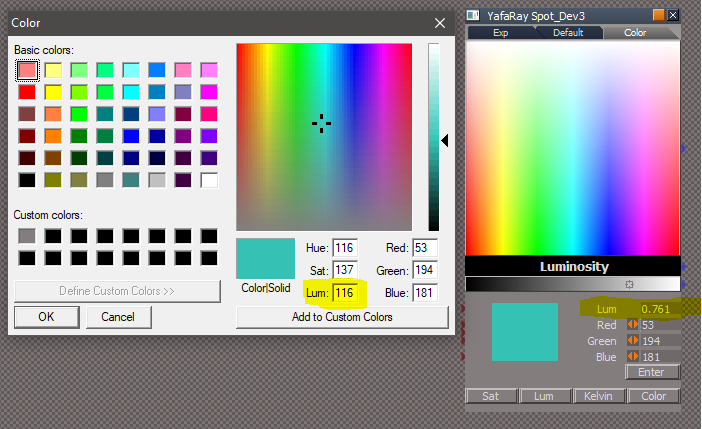
Yah! Almost perfect.
Can you do the same thing with the Lum?
What are your thoughts about eliminating the two Bitmaps?
Now that I see how you have done it, not sure if they have any value.
Can you do the same thing with the Lum?
What are your thoughts about eliminating the two Bitmaps?
Now that I see how you have done it, not sure if they have any value.
- Attachments
-
-
clintonman
- Captain
- Posts: 5659
- Joined: 21 May 2009, 21:08
- Type the number ten into the box: 0
- Location: California
Re: Yafaray4tS v0.9.0
Looks real good.
I attached the 3 color values update. Code change is at the bottom of UpdateColor and UpdateValue nodes.
I attached the 3 color values update. Code change is at the bottom of UpdateColor and UpdateValue nodes.
- Attachments
-
- YafaRay Spot_Dev3.RsObj
- (546.98 KiB) Downloaded 235 times
-
trueBlue
- Captain
- Posts: 5548
- Joined: 06 Jul 2009, 22:50
- Type the number ten into the box: 10
Re: Yafaray4tS v0.9.0
Testing your recent update.clintonman wrote: 23 Jun 2018, 21:46 I copied the timeline code from the Anim tab, so I don't have the code here to alter the frame range based on keyframes.
Not sure what you saying here.
Discovered something else with the Animation.
Your RenderAnimation in the YafarayScripts has these two lines:
Code: Select all
Node.Value(Space.CurrentScene()+"/YafaRay4tS", "Start_Frame") = RsAnimPref.PlayRangeStart;
Node.Value(Space.CurrentScene()+"/YafaRay4tS", "End_Frame") = RsAnimPref.PlayRangeEnd;I mentioned earlier that I thought that the code in the Set Timeline Range button could be used in the Render Animation button. This works if there is Keyframes but what I just discovered is it does not if there is no Keyframes.
Not sure what you purpose to do if anything.
just wanted to point out that whatever you do you should include:
1.) Render Animation icon
2.) Render Animmation button in the Anim aspect AND the Render to File - Render Animmation button
Also when you abort the Animation Rendering with the Escape key, there is a Status message left in the Status Line. IE: "Frame# 5 - Render complete"
Learning how to use your new tool...

Code: Select all
if(UserCancel()) {
System.Trace("DO CANCEL STUFF HERE");
Node.Value(owner + "/ActvLoop", "Current iteration") = Node.Value(owner + "/ActvLoop", "Iteration count") + 1;
Node.Value("/Status Line","Model") = "Render Aborted";
Activity.Run(Space.CurrentScene() + "/YafaRay4tS/ClearStatus");
return;
}
Also discovered some issues with the Render to File.
I will post about that later.
-
trueBlue
- Captain
- Posts: 5548
- Joined: 06 Jul 2009, 22:50
- Type the number ten into the box: 10
Re: Yafaray4tS v0.9.0
Thanks that was it.clintonman wrote: 24 Jun 2018, 05:31try something like thistrueBlue wrote: 24 Jun 2018, 00:59 ...So owner isn't working in my version because it is out one more layer. How do you get the owner's owner?[/b]
Not an easy thing to do.
...
parent = System.ThisOwner()
grandParent = Node.Owner(parent)
Here is what I have.
Wanted to update the separate RGB inputs from the Color Pickers but there is an issue with converting to an Integer.
Code: Select all
Node.Value("%THIS_NAME%", "Red") =%COLOR_R%
Node.Value("%THIS_NAME%", "Green") =%COLOR_G%
Node.Value("%THIS_NAME%", "Blue") =%COLOR_B%If you eliminate the 2 Bitmaps that I started out with, could cut the file size down by half.

Let me know if it is okay, and thanks again!


-
clintonman
- Captain
- Posts: 5659
- Joined: 21 May 2009, 21:08
- Type the number ten into the box: 0
- Location: California
Re: Yafaray4tS v0.9.0
try something like thistrueBlue wrote: 24 Jun 2018, 00:59 ...So owner isn't working in my version because it is out one more layer. How do you get the owner's owner?[/b]
Not an easy thing to do.
...
parent = System.ThisOwner()
grandParent = Node.Owner(parent)
-
trueBlue
- Captain
- Posts: 5548
- Joined: 06 Jul 2009, 22:50
- Type the number ten into the box: 10
Re: Yafaray4tS v0.9.0
Same problem I had with the Render to File
I have already started.
Deleted the Color aspect and renamed Color2 to Color.
Completed all the path changes except the Color Pickers for Color Picker2
Something is broken with that.
Seems right but have not figured out what it is.
Edit: I see the color picker updating the values, but still broken.
Has to be in the 3 scripts. Just realized that you created these bitmaps from script. Amazing!
Edit2: Think I know what the problem is comparing my version with your version. Thinking it is the path to the lum which is exported out to the front panel. So owner isn't working in my version because it is out one more layer. How do you get the owner's owner?
Not an easy thing to do.
I have everything inside the Color Picker
I have already started.
Deleted the Color aspect and renamed Color2 to Color.
Completed all the path changes except the Color Pickers for Color Picker2
Something is broken with that.
Code: Select all
Node.Value("%THIS_NAME%/Color Picker/UpdateColor", "c_red") = %COLOR_R%;
Node.Value("%THIS_NAME%/Color Picker/UpdateColor", "c_green") = %COLOR_G%;
Node.Value("%THIS_NAME%/Color Picker/UpdateColor", "c_blue") = %COLOR_B%;
Activity.Run("%THIS_NAME%/Color Picker/UpdateColor");Edit: I see the color picker updating the values, but still broken.
Has to be in the 3 scripts. Just realized that you created these bitmaps from script. Amazing!
Edit2: Think I know what the problem is comparing my version with your version. Thinking it is the path to the lum which is exported out to the front panel. So owner isn't working in my version because it is out one more layer. How do you get the owner's owner?
Not an easy thing to do.
I have everything inside the Color Picker
- Attachments
-

-
clintonman
- Captain
- Posts: 5659
- Joined: 21 May 2009, 21:08
- Type the number ten into the box: 0
- Location: California
Re: Yafaray4tS v0.9.0
I'll see about cleaning it up so it's easier to add to other lights.trueBlue wrote: 23 Jun 2018, 23:13OMG!!!clintonman wrote: 23 Jun 2018, 21:19 ColorPickerModes.jpg
spot light color picker new aspect and switching modes.
First image, Luminosity, operates like modelspace color picker
Second image, Saturation, looks like workspace color picker but works differently
Third image is kelvin scale
Fourth is the trueBlue color picker
Awesome Clinton, well except fot the trueBlue part.
Could this be more DRY like and condensed into one node?
Want to use this for tS lights too.
For YafaRay lights just need the Color Modifier and the Yafaray attributes in one script that could be exported out.
Super like how you moved the code out of the color picker to scripts.
I am all for removing my measely contributions.
What should be the Default bitmap for the Default aspect?
Can the Color aspect be removed? Meaning make Color2 into Color.
The only name I can come up with for the 24 bit png is "trueColor".
Not sure this is true or not given that it is inserted into a tS Bitmap Control.
I tried condensing the separate R G B script into one but got strange results.
Not a big deal but can the Color aspect Bitmap Control be square 216x216?
Luminosity will be the default
Will make 216x216. originally had it at 256x256 and popup panel. it worked in that the color changed but the panel itself refused to update. this was not an issue if the panel was dragged out of the panel view, so limitations on the simple copy for panels.
-
trueBlue
- Captain
- Posts: 5548
- Joined: 06 Jul 2009, 22:50
- Type the number ten into the box: 10
Re: Yafaray4tS v0.9.0
OMG!!!clintonman wrote: 23 Jun 2018, 21:19 ColorPickerModes.jpg
spot light color picker new aspect and switching modes.
First image, Luminosity, operates like modelspace color picker
Second image, Saturation, looks like workspace color picker but works differently
Third image is kelvin scale
Fourth is the trueBlue color picker
Awesome Clinton, well except fot the trueBlue part.
Could this be more DRY like and condensed into one node?
Want to use this for tS lights too.
For YafaRay lights just need the Color Modifier and the Yafaray attributes in one script that could be exported out.
Super like how you moved the code out of the color picker to scripts.
I am all for removing my measely contributions.
What should be the Default bitmap for the Default aspect?
Can the Color aspect be removed? Meaning make Color2 into Color.
The only name I can come up with for the 24 bit png is "trueColor".
Not sure this is true or not given that it is inserted into a tS Bitmap Control.
I tried condensing the separate R G B script into one but got strange results.
Not a big deal but can the Color aspect Bitmap Control be square 216x216?
-
clintonman
- Captain
- Posts: 5659
- Joined: 21 May 2009, 21:08
- Type the number ten into the box: 0
- Location: California
Re: Yafaray4tS v0.9.0
fixed error - yafaray4ts node not in scene
render default set to png on file filter
I copied the timeline code from the Anim tab, so I don't have the code here to alter the frame range based on keyframes.
render default set to png on file filter
I copied the timeline code from the Anim tab, so I don't have the code here to alter the frame range based on keyframes.
- Attachments
-
- YafaRay4tS.RsObj
- (756.57 KiB) Downloaded 187 times
-
- YafarayScripts.RsObj
- (50.42 KiB) Downloaded 196 times
-
clintonman
- Captain
- Posts: 5659
- Joined: 21 May 2009, 21:08
- Type the number ten into the box: 0
- Location: California
Re: Yafaray4tS v0.9.0
I wouldn't use it for everything. For instance if you do an animation and each frame takes a minute you only have those 2 seconds out of the minute to see what is happening, the other 58 seconds the status would be blank.trueBlue wrote: 23 Jun 2018, 15:47 ...
Have wanted to do this for tS for a long time.
Experimented with several ideas, none that was as simple as this.
Never really understood the Pause Activity until now.
Guess the name eluded my understanding of it's use.
Do you think something like this would be usefull for tS, and would you use it if it was incorporated?
Was thinking about putting it into System.
Could be useful for widgets, buttons, help test, and scripts.
-
clintonman
- Captain
- Posts: 5659
- Joined: 21 May 2009, 21:08
- Type the number ten into the box: 0
- Location: California
Re: Yafaray4tS v0.9.0

First image, Luminosity, operates like modelspace color picker
Second image, Saturation, looks like workspace color picker but works differently
Third image is kelvin scale
Fourth is the trueBlue color picker
- Attachments
-
- YafaRay Spot_Dev.RsObj
- (553.48 KiB) Downloaded 208 times
-
trueBlue
- Captain
- Posts: 5548
- Joined: 06 Jul 2009, 22:50
- Type the number ten into the box: 10
Re: Yafaray4tS v0.9.0
Render Animation
Suggesting that you add the Set Timeline Range code to the Render Animation code.
Just do not understand why rendering beyond the last keyframe has any value, and as is, can produce potentially hundreds of unwanted still images.
If not maybe put a Status message about the Escape key
Suggesting that you add the Set Timeline Range code to the Render Animation code.
Just do not understand why rendering beyond the last keyframe has any value, and as is, can produce potentially hundreds of unwanted still images.
If not maybe put a Status message about the Escape key
-
trueBlue
- Captain
- Posts: 5548
- Joined: 06 Jul 2009, 22:50
- Type the number ten into the box: 10
Re: Yafaray4tS v0.9.0
GetRenderFile script
Default file name is 'yaf_test.png'
Yet the script uses Save as type: TGA
Suggesting that make PNG the first choice in your script.
Not sure what
var defExt = "tga"
does but does not do anything when changing it to "png"
Before
After
Default file name is 'yaf_test.png'
Yet the script uses Save as type: TGA
Suggesting that make PNG the first choice in your script.
Not sure what
var defExt = "tga"
does but does not do anything when changing it to "png"
Code: Select all
//	var filter = "TGA (*.tga)~*.tga~EXR (*.exr)~*.exr~HDR (*.hdr)~*.hdr~Jpeg (*.jpg)~*.jpg~PNG (*.png)~*.png~TIF (*.tif)~*.tif~All Files (*.*)~*.*~~";
	var filter = "PNG (*.png)~*.png~TGA (*.tga)~*.tga~EXR (*.exr)~*.exr~HDR (*.hdr)~*.hdr~Jpeg (*.jpg)~*.jpg~TIF (*.tif)~*.tif~All Files (*.*)~*.*~~";

-
trueBlue
- Captain
- Posts: 5548
- Joined: 06 Jul 2009, 22:50
- Type the number ten into the box: 10
Re: Yafaray4tS v0.9.0
I found an improvement to the Render Object by adding these commands to the top of the Zoom 2 Selection script.
Think if you add code for nothing selected/return and code for not object/return, it will much better.
Also got an error when using the Render Object icon when there is no YafaRaytS.RsObj in the scene.
Code: Select all
//Default layout
WindowsManager.ActivateWorkWindow('/Project/Windows Manager Space/Frame Window/Border Docking Place/Frame Window, 1/Split Docking Place/Frame Window, 1/Split Docking Place/Frame Window, 1/Split Docking Place/Frame Window, 2');
//Workspace layout
WindowsManager.ActivateWorkWindow('/Project/Windows Manager Space/Frame Window/Border Docking Place/Frame Window, 1/Split Docking Place/Frame Window, 1/Split Docking Place/Frame Window, 1/Split Docking Place/Frame Window, 1/Split Docking Place/Frame Window, 1');
//Expanded layout
WindowsManager.ActivateWorkWindow('/Project/Windows Manager Space/Frame Window/Border Docking Place/Frame Window, 1/Split Docking Place/Frame Window, 2/Split Docking Place/Frame Window, 3/Split Docking Place/Frame Window, 1/Split Docking Place/Frame Window, 1');
//4View layout
WindowsManager.ActivateWorkWindow('/Project/Windows Manager Space/Frame Window/Border Docking Place/Frame Window, 1/Split Docking Place/Frame Window, 1/Split Docking Place/Frame Window, 1/Split Docking Place/Frame Window, 2/Split Docking Place/Frame Window, 2/Split Docking Place/Frame Window, 2');

RsTool.ResetView('{2C152F81-45A2-4035-8896-9E49D60C8A7A}')
RsTool.LookAtSelection('{2C152F81-45A2-4035-8896-9E49D60C8A7A}')Also got an error when using the Render Object icon when there is no YafaRaytS.RsObj in the scene.

- Render Object Error.PNG (10.28 KiB) Viewed 4385 times
-
trueBlue
- Captain
- Posts: 5548
- Joined: 06 Jul 2009, 22:50
- Type the number ten into the box: 10
Re: Yafaray4tS v0.9.0
Congratulations!clintonman wrote: 23 Jun 2018, 05:57 I'm done. Should be fully functional now.
Awesome update for YafaRay4tS!

Brilliant!clintonman wrote: 23 Jun 2018, 05:57 more status line updates with 2 second delay before clearing
Have wanted to do this for tS for a long time.
Experimented with several ideas, none that was as simple as this.
Never really understood the Pause Activity until now.
Guess the name eluded my understanding of it's use.
Do you think something like this would be usefull for tS, and would you use it if it was incorporated?
Was thinking about putting it into System.
Could be useful for widgets, buttons, help test, and scripts.
-
clintonman
- Captain
- Posts: 5659
- Joined: 21 May 2009, 21:08
- Type the number ten into the box: 0
- Location: California
Re: Yafaray4tS v0.9.0
I'm done. Should be fully functional now.
Changes:
more status line updates with 2 second delay before clearing
changed default animation name padding from 0 to 3
Render to file dialog
fixed crash bug - jscript file system object method was not returning a pure string, something else was added causing the plugin to crash if the filename was empty
TODO:
add other color picker options for lights
make yafaray sample scenes sharable - texture files are the issue
documentation
Changes:
more status line updates with 2 second delay before clearing
changed default animation name padding from 0 to 3
Render to file dialog
fixed crash bug - jscript file system object method was not returning a pure string, something else was added causing the plugin to crash if the filename was empty
TODO:
add other color picker options for lights
make yafaray sample scenes sharable - texture files are the issue
documentation
- Attachments
-
- YafarayScriptsd788.RsObj
- (50.38 KiB) Downloaded 182 times
-
- YafaRay4tS8660.RsObj
- (756.76 KiB) Downloaded 213 times
-
clintonman
- Captain
- Posts: 5659
- Joined: 21 May 2009, 21:08
- Type the number ten into the box: 0
- Location: California
Re: Yafaray4tS v0.9.0
Roger that.trueBlue wrote: 23 Jun 2018, 03:52 The name was just meant to identify as different version.
The HDR was used just for color
I think that I only have 1 more thing to do on the YafaRay4tS node before it's done.
Edit: Doh, make that 2 more things. Just found a bug in the file dialog that causes tS crash.
-
trueBlue
- Captain
- Posts: 5548
- Joined: 06 Jul 2009, 22:50
- Type the number ten into the box: 10
Re: Yafaray4tS v0.9.0
The name was just meant to identify as different version.
The HDR was used just for color
The HDR was used just for color
-
clintonman
- Captain
- Posts: 5659
- Joined: 21 May 2009, 21:08
- Type the number ten into the box: 0
- Location: California
Re: Yafaray4tS v0.9.0
The HDR name is misleading since the image is not high dynamic range. To get a hdr image the image would have to be exr or hdr format. Feeding into the HDRColor node doesn't convert it.trueBlue wrote: 22 Jun 2018, 17:41 ...
As I understand it you need a 24 bit png to get true color. This is the most reliable one I could find:
https://www.cambridgeincolour.com/tutor ... -depth.htm
Also you will find a compiled HDRColor.RsObj in the DX-View library.
Wondering if that would be better (faster) verses Color Format script?
Here is a YafaRaySpot using the HDRColor.
Used the Color Format and Interger2Number objects for individual RGB inputs.
YafaRay Spot_HDR.PNG
...
-
trueBlue
- Captain
- Posts: 5548
- Joined: 06 Jul 2009, 22:50
- Type the number ten into the box: 10
Re: Yafaray4tS v0.9.0
Thanks!clintonman wrote: 22 Jun 2018, 20:31 Ok, here is the latest.
Changes:
if not tga and using the external viewer then will abort with error message
fixed render to file popup by adding window close code
added render passes popup and made it wider
Sequence Viewer
Exported the Count, so now you can set how ever many images you want.
Updated the Tab order.
Render Pass panel snaps to the Stack now and set the OwnedBy.
Also updated the YafaRay Spot light in the previous post.
-
clintonman
- Captain
- Posts: 5659
- Joined: 21 May 2009, 21:08
- Type the number ten into the box: 0
- Location: California
Re: Yafaray4tS v0.9.0
YafaRay website is back.
Yesterday on Facebook, "A dedicated team of people are working to bring back an updated GDPR compliant YafaRay web site since is not possible to do it with the current one. We will post more information and screenshots as soon as possible. Sorry for the inconvenience. Regards."
the site looks the same so I guess it's temporary until the new site goes up.
Yesterday on Facebook, "A dedicated team of people are working to bring back an updated GDPR compliant YafaRay web site since is not possible to do it with the current one. We will post more information and screenshots as soon as possible. Sorry for the inconvenience. Regards."
the site looks the same so I guess it's temporary until the new site goes up.
-
clintonman
- Captain
- Posts: 5659
- Joined: 21 May 2009, 21:08
- Type the number ten into the box: 0
- Location: California
Re: Yafaray4tS v0.9.0
Ok, here is the latest.
Changes:
if not tga and using the external viewer then will abort with error message
fixed render to file popup by adding window close code
added render passes popup and made it wider
Changes:
if not tga and using the external viewer then will abort with error message
fixed render to file popup by adding window close code
added render passes popup and made it wider
- Attachments
-
- YafaRay4tSebd7.RsObj
- (745.76 KiB) Downloaded 163 times
-
trueBlue
- Captain
- Posts: 5548
- Joined: 06 Jul 2009, 22:50
- Type the number ten into the box: 10
Re: Yafaray4tS v0.9.0
With the first example it was quick and dirty with including the Display Bitmap.
What I discovered after further test, was the conflict with the settings for Displays.
In the end it came to me that the Render to FIle should not be rendering.
Which is why I changed to Saving instead of Rendering.
Are you doing anything else with the Light's Color picker?
I would like to finish that project, but more importantly be in sync with what you want.
As I understand it you need a 24 bit png to get true color. This is the most reliable one I could find:
https://www.cambridgeincolour.com/tutor ... -depth.htm
Also you will find a compiled HDRColor.RsObj in the DX-View library.
Wondering if that would be better (faster) verses Color Format script?
Here is a YafaRaySpot using the HDRColor.
Used the Color Format and Interger2Number objects for individual RGB inputs.
I also need to update the Sequence Viewer but I would need to the save it as an YafaRay4tS.RsObj
If you could share your present version, I could make the few changes, and upload it.
What I discovered after further test, was the conflict with the settings for Displays.
In the end it came to me that the Render to FIle should not be rendering.
Which is why I changed to Saving instead of Rendering.
Are you doing anything else with the Light's Color picker?
I would like to finish that project, but more importantly be in sync with what you want.
As I understand it you need a 24 bit png to get true color. This is the most reliable one I could find:
https://www.cambridgeincolour.com/tutor ... -depth.htm
Also you will find a compiled HDRColor.RsObj in the DX-View library.
Wondering if that would be better (faster) verses Color Format script?
Here is a YafaRaySpot using the HDRColor.
Used the Color Format and Interger2Number objects for individual RGB inputs.

- YafaRay Spot_HDR.PNG (68.94 KiB) Viewed 4031 times
If you could share your present version, I could make the few changes, and upload it.
-
clintonman
- Captain
- Posts: 5659
- Joined: 21 May 2009, 21:08
- Type the number ten into the box: 0
- Location: California
Re: Yafaray4tS v0.9.0
Got it, thanks.trueBlue wrote: 22 Jun 2018, 17:17 While I was giving you examples of the Render to File panel, I started looking into the Render Passes.
I created a floating panel for it.
RP floating panel.PNG
Included is RenderPasses, RP_PanelFrame, and Open RenderPasses script.
You would need to change the Open Render Pass Panel button in the Misc aspect to:Code: Select all
Activity.Run(Space.CurrentScene() + "/YafaRay4tS/Open RenderPasses")
Also noticed in your open panel script that you were not closing the frame before opening it.Not sure if it is needed, but I ran into that issue with the above.Code: Select all
WindowsManager.CloseWindow("Project/Windows Manager Space/R2F_PanelFrame")
-
clintonman
- Captain
- Posts: 5659
- Joined: 21 May 2009, 21:08
- Type the number ten into the box: 0
- Location: California
Re: Yafaray4tS v0.9.0
Thanks for the suggestions. I 'll go with some combination of the first and last images to start.trueBlue wrote: 22 Jun 2018, 02:06
What was your idea?
I see that when Render to File Dialog is checked, the Render Object, Render Scene, and Render Animation icons calls this aspect. Interesting how you are setting the aspect 2+6+7, how did you figure that one out?
Vray renders an image and has a toolbar button to save the image on the viewer.
If your idea is to render without the Displays, then they would need to be unchecked.
Or include those options on the panel?
In this quick mock up, I exported the Bitmap out from the Display. I mage shows the last rendered image. When you select Render Image the image shown on the panel does not update.
Most likely need to add close window frame to each button.
Capture.PNG
Or using the Bitmap 'Icon/Logo'
R2Ficon.PNG
Or no bitmap.
R2F.PNG
Or no Rendering options
R2F Save.PNG
Then there is the
-
trueBlue
- Captain
- Posts: 5548
- Joined: 06 Jul 2009, 22:50
- Type the number ten into the box: 10
Re: Yafaray4tS v0.9.0
While I was giving you examples of the Render to File panel, I started looking into the Render Passes.
I created a floating panel for it.
Included is RenderPasses, RP_PanelFrame, and Open RenderPasses script.
You would need to change the Open Render Pass Panel button in the Misc aspect to:
Also noticed in your open panel script that you were not closing the frame before opening it.
Not sure if it is needed, but I ran into that issue with the above.
I created a floating panel for it.

You would need to change the Open Render Pass Panel button in the Misc aspect to:
Code: Select all
Activity.Run(Space.CurrentScene() + "/YafaRay4tS/Open RenderPasses")Also noticed in your open panel script that you were not closing the frame before opening it.
Code: Select all
WindowsManager.CloseWindow("Project/Windows Manager Space/R2F_PanelFrame")-
trueBlue
- Captain
- Posts: 5548
- Joined: 06 Jul 2009, 22:50
- Type the number ten into the box: 10
Re: Yafaray4tS v0.9.0
This was with regards to the YafaRay Spot3_B.RsObj.clintonman wrote: 22 Jun 2018, 02:18That's why I changed it to 1.0.trueBlue wrote: 20 Jun 2018, 22:26 ...
Shouldn't the LumBitmap's lum attribute's Default be 1.000 ?
..
I should have not said Default and I forget now why.
Edit: Now I remember after looking at it, the LumBitmap's lum attribute's Default was set at 0.500,
and the parameter was set at 1.000
Note that the LumBitmap's lum attribute was not being used to Reset the default from the front of the panel.
Then you changed the Bitmap's lum default to 1.000, that is when the top panel stopped working.
- Attachments
-

-
trueBlue
- Captain
- Posts: 5548
- Joined: 06 Jul 2009, 22:50
- Type the number ten into the box: 10
Re: Yafaray4tS v0.9.0
Updated the previous Render to File post.clintonman wrote: 22 Jun 2018, 02:24The idea was to have a Render to File dialog.trueBlue wrote: 22 Jun 2018, 02:06 ...
What was your idea?
I see that when Render to File Dialog is checked, the Render Object, Render Scene, and Render Animation icons calls this aspect. Interesting how you are setting the aspect 2+6+7, how did you figure that one out?
Vray renders an image and has a toolbar button to save the image on the viewer.
If your idea is to render without the Displays, then they would need to be unchecked.
Or include those options on the panel?
Aspect number was from trial and error.
-
clintonman
- Captain
- Posts: 5659
- Joined: 21 May 2009, 21:08
- Type the number ten into the box: 0
- Location: California
Re: Yafaray4tS v0.9.0
The idea was to have a Render to File dialog.trueBlue wrote: 22 Jun 2018, 02:06 ...
What was your idea?
I see that when Render to File Dialog is checked, the Render Object, Render Scene, and Render Animation icons calls this aspect. Interesting how you are setting the aspect 2+6+7, how did you figure that one out?
Vray renders an image and has a toolbar button to save the image on the viewer.
If your idea is to render without the Displays, then they would need to be unchecked.
Or include those options on the panel?
Aspect number was from trial and error.
-
clintonman
- Captain
- Posts: 5659
- Joined: 21 May 2009, 21:08
- Type the number ten into the box: 0
- Location: California
Re: Yafaray4tS v0.9.0
That's why I changed it to 1.0.trueBlue wrote: 20 Jun 2018, 22:26 ...
Shouldn't the LumBitmap's lum attribute's Default be 1.000 ?
..
-
trueBlue
- Captain
- Posts: 5548
- Joined: 06 Jul 2009, 22:50
- Type the number ten into the box: 10
Re: Yafaray4tS v0.9.0
What was your idea?clintonman wrote: 21 Jun 2018, 23:44RednerToFileDraft1.jpgtrueBlue wrote: 21 Jun 2018, 16:17 ...
Render to File Dialog
Suggesting that you add a status message that the file was saved.
...
Is that the prototype panel you're talking about? If so, nothing has been done on that. It's just a copy of the animation tab in a floating window without the playback elements. I wanted to get your feedback on what should go there since you had a panel design from earlier.
I see that when Render to File Dialog is checked, the Render Object, Render Scene, and Render Animation icons calls this aspect. Interesting how you are setting the aspect 2+6+7, how did you figure that one out?

Vray renders an image and has a toolbar button to save the image on the viewer.
If your idea is to render without the Displays, then they would need to be unchecked.
Or include those options on the panel?
In this quick mock up, I exported the Bitmap out from the Display. I mage shows the last rendered image. When you select Render Image the image shown on the panel does not update.
Most likely need to add close window frame to each button.


- R2F.PNG (10.72 KiB) Viewed 4064 times

- R2F Save.PNG (9.25 KiB) Viewed 4059 times
Render Passes...-
trueBlue
- Captain
- Posts: 5548
- Joined: 06 Jul 2009, 22:50
- Type the number ten into the box: 10
Re: Yafaray4tS v0.9.0
The second one from the top I read about saying it was used for Saturation.clintonman wrote: 22 Jun 2018, 00:12 These are the only options for color pickers I've ever heard of all from an old product called Jovian.
Jovian_Saturation.jpg
Saturation based = truespace workspace color picker / default windows color picker.
Bottom is black.
---
---
Jovian_Value.jpg
Value based = truespace modelspace color picker but spread out instead of in a circle / same color picker as in Blender
Bottom is white.
---
---
Jovian_Hue.jpg
Hue based.
---
---
Jovian_Kelvin.jpg
Kelvin based which only gives colors from things that produce light from heat, like various light bulbs. This one is really 1D, the color only changes from left to right.
My thoughts are to add these color pickers and your special color picker as different tabs on the lights.
Instead of creating several aspects and Color pickers, you could make a Bitmap Switcher.
Check out Dele's Auto Scale Bump material in the DX9 library
-
clintonman
- Captain
- Posts: 5659
- Joined: 21 May 2009, 21:08
- Type the number ten into the box: 0
- Location: California
Re: Yafaray4tS v0.9.0
These are the only options for color pickers I've ever heard of all from an old product called Jovian.
Saturation based = truespace workspace color picker / default windows color picker.
Bottom is black.
---
---
Value based = truespace modelspace color picker but spread out instead of in a circle / same color picker as in Blender
Bottom is white.
---
---
Hue based.
---
---
Kelvin based which only gives colors from things that produce light from heat, like various light bulbs. This one is really 1D, the color only changes from left to right.
My thoughts are to add these color pickers and your special color picker as different tabs on the lights.

- Jovian_Saturation.jpg (50.59 KiB) Viewed 4081 times
Bottom is black.
---
---

Bottom is white.
---
---

- Jovian_Hue.jpg (48.14 KiB) Viewed 4081 times
---
---

- Jovian_Kelvin.jpg (47.63 KiB) Viewed 4081 times
My thoughts are to add these color pickers and your special color picker as different tabs on the lights.
-
trueBlue
- Captain
- Posts: 5548
- Joined: 06 Jul 2009, 22:50
- Type the number ten into the box: 10
Re: Yafaray4tS v0.9.0
In my limited testing this morning, I noticed that panel one time. When I tested it there after, I just see a Window/panel flash. As I recall it did save the image. I'll test it so more.clintonman wrote: 21 Jun 2018, 23:44RednerToFileDraft1.jpgtrueBlue wrote: 21 Jun 2018, 16:17 ...
Render to File Dialog
Suggesting that you add a status message that the file was saved.
...
Is that the prototype panel you're talking about? If so, nothing has been done on that. It's just a copy of the animation tab in a floating window without the playback elements. I wanted to get your feedback on what should go there since you had a panel design from earlier.
-
trueBlue
- Captain
- Posts: 5548
- Joined: 06 Jul 2009, 22:50
- Type the number ten into the box: 10
Re: Yafaray4tS v0.9.0
I did not request that change, nor did I change the Default from 0.5 to 1.0 in the script. You did this when I came up with the idea to reset it in the top picker. When that change happened is when the top picker would not work.clintonman wrote: 21 Jun 2018, 23:37So why not use the original default lum of 0.5? I changed it to 1.0 at your request.trueBlue wrote: 21 Jun 2018, 16:17
You last post:
Been searching for image to use that is better, so far no luck.
Just do not like that the Top Color Picker does not work when the 'lum' default is set to 1.
That is not good!
Presently we do not have a LUM channel that shows the picked color changing from light to dark, like it is in the tS Color picker.
...
-
clintonman
- Captain
- Posts: 5659
- Joined: 21 May 2009, 21:08
- Type the number ten into the box: 0
- Location: California
Re: Yafaray4tS v0.9.0
trueBlue wrote: 21 Jun 2018, 16:17 ...
Render to File Dialog
Suggesting that you add a status message that the file was saved.
...

-
clintonman
- Captain
- Posts: 5659
- Joined: 21 May 2009, 21:08
- Type the number ten into the box: 0
- Location: California
Re: Yafaray4tS v0.9.0
So why not use the original default lum of 0.5? I changed it to 1.0 at your request.trueBlue wrote: 21 Jun 2018, 16:17
You last post:
Been searching for image to use that is better, so far no luck.
Just do not like that the Top Color Picker does not work when the 'lum' default is set to 1.
That is not good!
Presently we do not have a LUM channel that shows the picked color changing from light to dark, like it is in the tS Color picker.
...
-
clintonman
- Captain
- Posts: 5659
- Joined: 21 May 2009, 21:08
- Type the number ten into the box: 0
- Location: California
Re: Yafaray4tS v0.9.0
When I push the Restore All Defaults button in the Misc tab, those items are already in place.trueBlue wrote: 21 Jun 2018, 16:17 Testing your new update.
Default Setup settings
I think View should be the default.
'Start console window minimized'
I am not a fan of having the console window showing. But that is just me, so take no offense!
'Delete XML file after render'
Do not understand why you would want to have these files. Especialy when rendering Animations! Could potionaly have thousands of XML files!
For me these options are for Advance users, and should be checked as defaults.
...
-
trueBlue
- Captain
- Posts: 5548
- Joined: 06 Jul 2009, 22:50
- Type the number ten into the box: 10
Re: Yafaray4tS v0.9.0
Testing your new update.
Default Setup settings
I think View should be the default.
'Start console window minimized'
I am not a fan of having the console window showing. But that is just me, so take no offense!
'Delete XML file after render'
Do not understand why you would want to have these files. Especialy when rendering Animations! Could potionaly have thousands of XML files!
For me these options are for Advance users, and should be checked as defaults.
TGA Viewer
Suggestions when using the TGA Viewer:
Is there anyway to add code to Uncheck 'Use Internal Viewer' ?
Is there anyway to change the Render File type being used to tga, so you do not get that error?
Or an Alert/return; "Need to change the Render file type to TGA"
If not I would suggest to make TGA the default image type.
///////////////////////////////////////////////////////////////
First Render
For what ever reason the first render takes a long time to show the Display.
You get the impression nothing is happening. Mind you this is a simple scene with a Plan and Sphere.
Have not rendered any complex scenes, but I imagine that it takes longer to render.
After the first render, there is no delay.
Suggesting that you add a Status message that "YafaRay4tS is rendering..." and then remove it after showing the Display.
Render to File Dialog
Suggesting that you add a status message that the file was saved.
Area Render works much better!
Render Animation
Without changing any of the default settings, and without having any Keyframes set, the Display updates as if it is rendering and the tS Animation Editor starts running how ever many frames are entered into the Timeline, but there is no images being created.
Wonder if you could use this command to check if there is no Keyframes.
If there is no Keyframes then do not render?
An object needs to be selected or you get an error!
Next test, added some Keyframes, selected Render Animation button. Display shows the different images in the animation. No images were created.
Update: Just went to the Temp folder and now the animation images are showing.
You last post:
Been searching for image to use that is better, so far no luck.
Just do not like that the Top Color Picker does not work when the 'lum' default is set to 1.
That is not good!
Presently we do not have a LUM channel that shows the picked color changing from light to dark, like it is in the tS Color picker.
Here is another image I found:
https://www.cambridgeincolour.com/tutor ... -depth.htm
This one looks like tS Color picker
https://blogs.windows.com/buildingapps/ ... Mi4S8Wt.97
And for your a unique color picker image
https://allrgb.com/
Default Setup settings
I think View should be the default.
'Start console window minimized'
I am not a fan of having the console window showing. But that is just me, so take no offense!
'Delete XML file after render'
Do not understand why you would want to have these files. Especialy when rendering Animations! Could potionaly have thousands of XML files!
For me these options are for Advance users, and should be checked as defaults.
TGA Viewer
Suggestions when using the TGA Viewer:
Is there anyway to add code to Uncheck 'Use Internal Viewer' ?
Is there anyway to change the Render File type being used to tga, so you do not get that error?
Or an Alert/return; "Need to change the Render file type to TGA"
If not I would suggest to make TGA the default image type.

- Defaults TGA.PNG (3.93 KiB) Viewed 4293 times
First Render
For what ever reason the first render takes a long time to show the Display.
You get the impression nothing is happening. Mind you this is a simple scene with a Plan and Sphere.
Have not rendered any complex scenes, but I imagine that it takes longer to render.
After the first render, there is no delay.
Suggesting that you add a Status message that "YafaRay4tS is rendering..." and then remove it after showing the Display.
Render to File Dialog
Suggesting that you add a status message that the file was saved.
Area Render works much better!
Render Animation
Without changing any of the default settings, and without having any Keyframes set, the Display updates as if it is rendering and the tS Animation Editor starts running how ever many frames are entered into the Timeline, but there is no images being created.
Wonder if you could use this command to check if there is no Keyframes.
If there is no Keyframes then do not render?
An object needs to be selected or you get an error!
Code: Select all
RsAnim.SelectAll('')Update: Just went to the Temp folder and now the animation images are showing.
You last post:
Been searching for image to use that is better, so far no luck.
Just do not like that the Top Color Picker does not work when the 'lum' default is set to 1.
That is not good!
Presently we do not have a LUM channel that shows the picked color changing from light to dark, like it is in the tS Color picker.
Here is another image I found:
https://www.cambridgeincolour.com/tutor ... -depth.htm
This one looks like tS Color picker
https://blogs.windows.com/buildingapps/ ... Mi4S8Wt.97
And for your a unique color picker image
https://allrgb.com/
-
clintonman
- Captain
- Posts: 5659
- Joined: 21 May 2009, 21:08
- Type the number ten into the box: 0
- Location: California
Re: Yafaray4tS v0.9.0
Haven't downloaded yet, but quick note: If you want access to all colors available you have to have the slider. Color is 3D (red, green, blue) so having only a 2D shape would limit the colors available.
256 * 256 = 65,536 colors,
256 * 256 * 256 = 16,777,216 colors
The thing about this new one, based on the picture, I haven't tried it yet, is that it goes from black to color to white, so all 3 axis are together which might make it difficult to have a meaningful slider. The modelside goes from color to white then the intensity is the slider.
I'll download and give a better answer later.
There's no reason we can't have more than one color picker. So yeah...
256 * 256 = 65,536 colors,
256 * 256 * 256 = 16,777,216 colors
The thing about this new one, based on the picture, I haven't tried it yet, is that it goes from black to color to white, so all 3 axis are together which might make it difficult to have a meaningful slider. The modelside goes from color to white then the intensity is the slider.
I'll download and give a better answer later.
There's no reason we can't have more than one color picker. So yeah...
-
trueBlue
- Captain
- Posts: 5548
- Joined: 06 Jul 2009, 22:50
- Type the number ten into the box: 10
Re: Yafaray4tS v0.9.0
Lots of great improvements! Can't wait to try it out, most likely tomorrow.
With regards to the light's Color Picker.
When I started this I was studying Model side lights, settings, and Light Material Editor.
Thought it would very handy to have something simple that you could easy breezy pick a color built into the lights.
Instead of Double clicking the Color, move Mouse way over the left of the screen, pick color, select Ok.
Very cumbersome.
Do you remember me asking if Intensity would work in a previous post?
I am pretty sure, along with a few other settings is how the Model's Light Material Editor works.
Pick a color and adjust the Intensity to lighten or darken the picked color.
Check it out.
My thought is to have one Color Picker and a Scrubber for Intensity (0 -2) (1 = No Intensity) for all of the tS Lights and YafaRay Lights. You still can use tS Color for more advance options. My thought is to have a Bitmap that has all of the colors 256x256 pixels and at the bottom have a smaller band with 256 pixels with white to black. Or scratch the white and black band and just use the Intensity settings? Think it would be easier to just pick white to black from the Color Picker.
If you agree, it would be awesome if you can help me with the Intensity.
tS lights already have Intensity but does not effect the Color attribute, but that is okay given that it is real time.
Don't get me wrong, it is awesome what you created with the Lum addition. But I think that should be for a Material Editor, not a Light Material Editor. The Model's Light Material editor only has one color picker.
Or for the Yaf lights maybe a simple Color Picker with Intensity on the front panel and your more advance one for the Color aspect?
Not sure if this is possible but if you could transfer the code from the bottom color picker to the LumBimap object and make it into a Slider instead of a color picker?
Here are some various images for the Color Picker.
The Color picker image has White at the top and Black at the bottom. If you pick from the top and drag straight down it goes from White to Black with the picked color. Seems to me that you would need Intensity with this one. It also works well with your Lum picker, IF your add the Reset 'lum' to 0.500 in the top color picker.
Here is a scene with your latest version and mine using the above.
With regards to the light's Color Picker.
When I started this I was studying Model side lights, settings, and Light Material Editor.
Thought it would very handy to have something simple that you could easy breezy pick a color built into the lights.
Instead of Double clicking the Color, move Mouse way over the left of the screen, pick color, select Ok.
Very cumbersome.
Do you remember me asking if Intensity would work in a previous post?
I am pretty sure, along with a few other settings is how the Model's Light Material Editor works.
Pick a color and adjust the Intensity to lighten or darken the picked color.
Check it out.
My thought is to have one Color Picker and a Scrubber for Intensity (0 -2) (1 = No Intensity) for all of the tS Lights and YafaRay Lights. You still can use tS Color for more advance options. My thought is to have a Bitmap that has all of the colors 256x256 pixels and at the bottom have a smaller band with 256 pixels with white to black. Or scratch the white and black band and just use the Intensity settings? Think it would be easier to just pick white to black from the Color Picker.
If you agree, it would be awesome if you can help me with the Intensity.
tS lights already have Intensity but does not effect the Color attribute, but that is okay given that it is real time.
Don't get me wrong, it is awesome what you created with the Lum addition. But I think that should be for a Material Editor, not a Light Material Editor. The Model's Light Material editor only has one color picker.
Or for the Yaf lights maybe a simple Color Picker with Intensity on the front panel and your more advance one for the Color aspect?
Not sure if this is possible but if you could transfer the code from the bottom color picker to the LumBimap object and make it into a Slider instead of a color picker?
Here are some various images for the Color Picker.
The Color picker image has White at the top and Black at the bottom. If you pick from the top and drag straight down it goes from White to Black with the picked color. Seems to me that you would need Intensity with this one. It also works well with your Lum picker, IF your add the Reset 'lum' to 0.500 in the top color picker.

- Color Picker Image with Lum.PNG (72.58 KiB) Viewed 4300 times
-
clintonman
- Captain
- Posts: 5659
- Joined: 21 May 2009, 21:08
- Type the number ten into the box: 0
- Location: California
Re: Yafaray4tS v0.9.0
Update of changes since last upload.
"Use Render To File Dialog" - opens a new floating panel instead of just rendering. panel is very rough proof of concept
"Use OptiDetector Viewer" - option so optidetector does not automatically override the older internal display
--
added a "Save Image" button to the intenal viewer, just ordinary tS file dialog, no button for optdetector display
render area - fixed. it only works in camera view with camera render or perspective view with view render
checked the default render file location and it already falls back to a temp folder if Image Folder does not exist
changes that were included in the scene file that was previously shared:
fixed normalmap export
uses default Image folder in tS folder- don't see easy way to have Animation folder as well except maybe as a special reset button
fixed blank file name error
added bforartists as one of the defaults for yafaray xml
was rendering to the temp path instead of the render file path
one section of code was ignoring the selected custom temp folder
full file path defaults into the render file dialogs on win7 and up, already worked on winxp

"Use OptiDetector Viewer" - option so optidetector does not automatically override the older internal display
--

- DisplaySaveButton.jpg (30.61 KiB) Viewed 4350 times
render area - fixed. it only works in camera view with camera render or perspective view with view render
checked the default render file location and it already falls back to a temp folder if Image Folder does not exist
changes that were included in the scene file that was previously shared:
fixed normalmap export
uses default Image folder in tS folder- don't see easy way to have Animation folder as well except maybe as a special reset button
fixed blank file name error
added bforartists as one of the defaults for yafaray xml
was rendering to the temp path instead of the render file path
one section of code was ignoring the selected custom temp folder
full file path defaults into the render file dialogs on win7 and up, already worked on winxp
- Attachments
-
- YafarayScripts3b3e.RsObj
- (47.47 KiB) Downloaded 181 times
-
- YafaRay4tSb3ae.RsObj
- (738.34 KiB) Downloaded 200 times
-
clintonman
- Captain
- Posts: 5659
- Joined: 21 May 2009, 21:08
- Type the number ten into the box: 0
- Location: California
Re: Yafaray4tS v0.9.0
Right, that's the way the built in color picker works to. If color is white you have to change the lum to a lower value to see color. If you want to see color change without first changing the lum it's default needs to be less than 1 with 0.5 giving maximum saturation.trueBlue wrote: 21 Jun 2018, 02:14 This one does not work unless you select the Lum first, when it's set at 1.
-
trueBlue
- Captain
- Posts: 5548
- Joined: 06 Jul 2009, 22:50
- Type the number ten into the box: 10
Re: Yafaray4tS v0.9.0
This one does not work unless you select the Lum first, when it's set at 1.
-
clintonman
- Captain
- Posts: 5659
- Joined: 21 May 2009, 21:08
- Type the number ten into the box: 0
- Location: California
Re: Yafaray4tS v0.9.0
If you add that code then any time you choose a color the lum will reset.trueBlue wrote: 20 Jun 2018, 22:26 Only problem with this is Resetting the Lum. It resets okay, but does not update the Color.
You have to repick a color after you reset, to get say a trueBlue color, 0 0 255 RGB
Edit: Got it. Add this to the Top Color Picker to the beginning of the script.Also put a tiny bit of separation between the two Color Pickers.Code: Select all
Node.ConReset("%THIS_NAME%", "lum")
Shouldn't the LumBitmap's lum attribute's Default be 1.000 ?
Infinite and Point lights do not have any Soft Shadows and Fuzzy Love?
Changed lum default to 1.0, white color.
Changed power default from 1.0 to 5.0 because 1.0 is to low for anything useful.
Caustic and Diffuse checked by default.
Probably need to change these values for all the lights. Think no defaults were ever set.
The two color pickers need more separation. It's too easy to stray into the other messing up your color choice. Generally, now that we have immediate color feedback the user would probably be looking in the 3D view while adjusting.
Put more space between them.
The color portion never makes it to gray at the bottom. It gets close but still see color. All the values at the bottom of the color portion should produce gray.
No soft shadows or fuzzy for infinite and point lights.
- Attachments
-
- YafaRay Spot3_C.RsObj
- (147.21 KiB) Downloaded 181 times
-
trueBlue
- Captain
- Posts: 5548
- Joined: 06 Jul 2009, 22:50
- Type the number ten into the box: 10
Re: Yafaray4tS v0.9.0
Only problem with this is Resetting the Lum. It resets okay, but does not update the Color.
You have to repick a color after you reset, to get say a trueBlue color, 0 0 255 RGB
Edit: Got it. Add this to the Top Color Picker to the beginning of the script.
Also put a tiny bit of separation between the two Color Pickers.
Shouldn't the LumBitmap's lum attribute's Default be 1.000 ?
Infinite and Point lights do not have any Soft Shadows and Fuzzy Love?
You have to repick a color after you reset, to get say a trueBlue color, 0 0 255 RGB
Edit: Got it. Add this to the Top Color Picker to the beginning of the script.
Code: Select all
Node.ConReset("%THIS_NAME%", "lum")Shouldn't the LumBitmap's lum attribute's Default be 1.000 ?
Infinite and Point lights do not have any Soft Shadows and Fuzzy Love?
-
clintonman
- Captain
- Posts: 5659
- Joined: 21 May 2009, 21:08
- Type the number ten into the box: 0
- Location: California
Re: Yafaray4tS v0.9.0
clintonman wrote: 20 Jun 2018, 21:15Correct, because I didn't change the original image I just copied it. So it needs the color portion removed and the black and white reversed.trueBlue wrote: 20 Jun 2018, 21:06 ...
From the picture you have black on the right.
-
clintonman
- Captain
- Posts: 5659
- Joined: 21 May 2009, 21:08
- Type the number ten into the box: 0
- Location: California
Re: Yafaray4tS v0.9.0
Correct, because I didn't change the original image I just copied it.trueBlue wrote: 20 Jun 2018, 21:06 ...
From the picture you have black on the right.
-
trueBlue
- Captain
- Posts: 5548
- Joined: 06 Jul 2009, 22:50
- Type the number ten into the box: 10
Re: Yafaray4tS v0.9.0
Ah cool! But I just finished the IGS Spot. Ugh!
Hopefully I can just add the Bitmap and LUM to what I have.
From the picture you have black on the right.
Hopefully I can just add the Bitmap and LUM to what I have.
From the picture you have black on the right.
-
clintonman
- Captain
- Posts: 5659
- Joined: 21 May 2009, 21:08
- Type the number ten into the box: 0
- Location: California
Re: Yafaray4tS v0.9.0

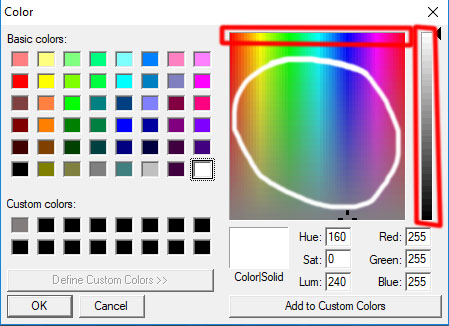
The areas indicated in white are the valid areas to use.
It needs the top portion to be color only.
The bottom portion to be black and white bar without color. Black and white needs to be reversed as well. Black on left white on the right.
- Attachments
-
- YafaRay Spot3_B.RsObj
- (146.89 KiB) Downloaded 173 times
-
clintonman
- Captain
- Posts: 5659
- Joined: 21 May 2009, 21:08
- Type the number ten into the box: 0
- Location: California
Re: Yafaray4tS v0.9.0
All lights have photon only, caustic photons, diffuse photons.trueBlue wrote: 20 Jun 2018, 19:05 Thanks!
Give me a list of what lights support what and see what I can do.
IES lights don't have shadow fuzziness. Probably built into the ies data. Do move the samples below the soft shadows checkbox because it is only used when soft shadows are enabled.
-
trueBlue
- Captain
- Posts: 5548
- Joined: 06 Jul 2009, 22:50
- Type the number ten into the box: 10
Re: Yafaray4tS v0.9.0
Thanks!
Give me a list of what lights support what and see what I can do.
Give me a list of what lights support what and see what I can do.
-
clintonman
- Captain
- Posts: 5659
- Joined: 21 May 2009, 21:08
- Type the number ten into the box: 0
- Location: California
Re: Yafaray4tS v0.9.0
Wow, very nice.
Yes, it needs to be bigger I think each direction corresponds to 256 values so the central color portion needs to be at least 256 x 256 to get all the values.
I'll see what I can find out about the gray linear control. It seems to blend from black through the chosen color to white.
Good catch on the missing light attributes.
Yes, it needs to be bigger I think each direction corresponds to 256 values so the central color portion needs to be at least 256 x 256 to get all the values.
I'll see what I can find out about the gray linear control. It seems to blend from black through the chosen color to white.
Good catch on the missing light attributes.
-
trueBlue
- Captain
- Posts: 5548
- Joined: 06 Jul 2009, 22:50
- Type the number ten into the box: 10
Re: Yafaray4tS v0.9.0
Thanks Clinton,clintonman wrote: 20 Jun 2018, 14:38 The only thing missing is a button to copy the color from your color picker into the original color so it can be picked up by the render.
Did not realize that the above was necessary. I was able to update the Color Picker to copy it's picked color into the Color attribute. Thanks for the advice, do not need the Switch button now! I made another Bitmap as you suggested. I would not know how to create that Lum channel from the picked color. Wouldn't the Intensity do the same thing?
Hummm… there is not Intensity on the Yafaray Spot light.
I'll be darn, flipped over to the Model side to check out the Light Material Editor and it's color picker changes the color on tS lights. Never knew.
Not to sure if the Picker can pickup all of the colors with it so small in the Bitmap Control. The image is 175x176.
If it does not work maybe I could create another aspect and make it bigger as shown, not included in this attachment.

- YS3.PNG (18.25 KiB) Viewed 4057 times

- Color aspect.PNG (18.78 KiB) Viewed 4064 times
I noticed that your Yafaray IES Spot does not have:
Photon Only
Shadow Fuzziness
Infinite and Point lights only have Difuse and Caustic
-
clintonman
- Captain
- Posts: 5659
- Joined: 21 May 2009, 21:08
- Type the number ten into the box: 0
- Location: California
Re: Yafaray4tS v0.9.0
Yes, I did notice it.trueBlue wrote: 20 Jun 2018, 12:18 ...
Did you notice the Color button? LMB = Color / RMB = Color Picker
RMB = Color Picker
...
Could you give me an example, like say a pictue?
-
trueBlue
- Captain
- Posts: 5548
- Joined: 06 Jul 2009, 22:50
- Type the number ten into the box: 10
Re: Yafaray4tS v0.9.0
Did you notice the Color button? LMB = Color / RMB = Color Pickerclintonman wrote: 20 Jun 2018, 03:31 Impressive, but limiting.
RMB = Color Picker

- RMB Color Picker.PNG (42.13 KiB) Viewed 4078 times

Could you give me an example, like say a pictue?clintonman wrote: 20 Jun 2018, 03:31 I think if you can make the color selection 2 dimensional like the regular color picker it would be a good replacement for it.
-
bitkar

- Captain
- Posts: 2089
- Joined: 16 Mar 2010, 07:14
- Type the number ten into the box: 0
- Location: Czech Republic
Re: Yafaray4tS v0.9.0
small Q: is it possible to make sliders for some basic number ranges in such panels as they are in model side material editor? Its especially very handy for ranges of 0-1 ... you visually know where you are in the given/usuall range.
Michal aka bitkar
tS freak since tS2 (1998) and forever (tS7.61 modeler)
tS freak since tS2 (1998) and forever (tS7.61 modeler)
-
clintonman
- Captain
- Posts: 5659
- Joined: 21 May 2009, 21:08
- Type the number ten into the box: 0
- Location: California
Re: Yafaray4tS v0.9.0
Impressive, but limiting. I think if you can make the color selection 2 dimensional like the regular color picker it would be a good replacement for it. The interactive color change is way better than the built in color picker.trueBlue wrote: 20 Jun 2018, 00:39 Check this out and see if you like it.
Condensed the UI by half vertically in the Link Editor.
Color Picker or you can switch to the Color Dialog.
New YafaRay Spot light with color picker.PNG
-
trueBlue
- Captain
- Posts: 5548
- Joined: 06 Jul 2009, 22:50
- Type the number ten into the box: 10
Re: Yafaray4tS v0.9.0
Check this out and see if you like it.
Condensed the UI by half vertically in the Link Editor.
Color Picker or you can switch to the Color Dialog.
Condensed the UI by half vertically in the Link Editor.
Color Picker or you can switch to the Color Dialog.
- Attachments
-
- YafaRay Spot.RsObj
- (136.63 KiB) Downloaded 179 times
-
clintonman
- Captain
- Posts: 5659
- Joined: 21 May 2009, 21:08
- Type the number ten into the box: 0
- Location: California
Re: Yafaray4tS v0.9.0
It's optional in that if you want to you can type in the render filename manually. If you want to use the file dialog you have to use the latest plugin.trueBlue wrote: 19 Jun 2018, 18:09Still not sure from your reply. Optional?clintonman wrote: 19 Jun 2018, 17:18 I made changes to the YafaRay4tS
Not all the changes are related to the plugin
Exchanges of the YafaRay4tS may be optional. Only thing that will not work will be the render file dialog.
You can try deleting the files from that screen where they are visible. Select and press the delete key. Where are the visible? can't tell from cropped screenshot is it in open or save dialog?
Is the YafaRay4tS in your scene the updated one?
If so does the Render File Dialog work with it, if I update your new plugin?
The screen shot was from using the File Dialog button on the Output Render File that runs:Using me Delete key worked.Code: Select all
Activity.Run("%THIS_NAME%" + "/GetRenderFile");
Duh, how simple was that?
Thank you.
You can also share your scene file for me to look at.
-
trueBlue
- Captain
- Posts: 5548
- Joined: 06 Jul 2009, 22:50
- Type the number ten into the box: 10
Re: Yafaray4tS v0.9.0
Still not sure from your reply. Optional?clintonman wrote: 19 Jun 2018, 17:18 I made changes to the YafaRay4tS
Not all the changes are related to the plugin
Exchanges of the YafaRay4tS may be optional. Only thing that will not work will be the render file dialog.
You can try deleting the files from that screen where they are visible. Select and press the delete key. Where are the visible? can't tell from cropped screenshot is it in open or save dialog?
Is the YafaRay4tS in your scene the updated one?
If so does the Render File Dialog work with it, if I update your new plugin?
The screen shot was from using the File Dialog button on the Output Render File that runs:
Code: Select all
Activity.Run("%THIS_NAME%" + "/GetRenderFile");Duh, how simple was that?
Thank you.
-
clintonman
- Captain
- Posts: 5659
- Joined: 21 May 2009, 21:08
- Type the number ten into the box: 0
- Location: California
Re: Yafaray4tS v0.9.0
I made changes to the YafaRay4tS
Not all the changes are related to the plugin
Exchanges of the YafaRay4tS may be optional. Only thing that will not work will be the render file dialog.
You can try deleting the files from that screen where they are visible. Select and press the delete key. Where are the visible? can't tell from cropped screenshot is it in open or save dialog?
Not all the changes are related to the plugin
Exchanges of the YafaRay4tS may be optional. Only thing that will not work will be the render file dialog.
You can try deleting the files from that screen where they are visible. Select and press the delete key. Where are the visible? can't tell from cropped screenshot is it in open or save dialog?
-
trueBlue
- Captain
- Posts: 5548
- Joined: 06 Jul 2009, 22:50
- Type the number ten into the box: 10
Re: Yafaray4tS v0.9.0
It is not a requirement that you have to Reset your view in order for the Render Object to work.clintonman wrote: 19 Jun 2018, 04:24 Light has an adjustable cone, so yep, it's a spotlight.
Object Render does not zoom or do anything special, but I didn't know about reseting the view to make it work.
attached is my scene file and the new plugin file that's required for render file selection dialog
changes so far:
fixed normalmap export
uses default Image folder in tS folder- don't see easy way to have Animation folder as well except maybe as a special reset button
fixed blank file name error
added bforartists as one of the defaults for yafaray xml
was rendering to the temp path instead of the render file path
one section of code was ignoring the selected custom temp folder
full file path defaults into the render file dialogs on win7 and up, already worked on winxp
Question, in those senarios that your modified Zoom 2 Selection script in the RenderObject did not do anything special, does your tS Background Zoom 2 Selection (Ctrl = MMB Double Click) or (Shift + LMB Drag) work any different?
If you are viewing from a Camera when using the Render Object, you will not see anything special, but the render will be different. But only if you have YafaRay4ts set to render from View.
Also it does not work unless the window has focus in typical tS7 fashion.
Are you sure you want the defaults to point to the Image Folder?
Just a thought...
What about a user that does not have the Update 4 ?
I will try your scene after your reply to the following:
Have you made any changes to your YafaRay4tS.RsObj?
Are all the changes related to your Plugin?
Do I need to exchange my YafaRay4tS.RsObj in System with the YafaRay4tS.RsObj in your SpotShadow.RsScn?
These files shown in the screen shot are invisible in my File Explorer, no way to delete them.
First three were created from YafaRay4tS Beta4 last week, the Example.RsObj and InpitBitmap.png were created from tS761B8.
Can you create a script for me that I can use to delete these files. If so you can write it so it deletes one of these files, and I can change that file in your script to delete the others one at a time. Just to make it simple.

- Invisible files.PNG (8.27 KiB) Viewed 4278 times
Updates from me:
tS7.61B8.4_YafaRay4tS9_7 'This is the lastest yafaray update for the Update 4 Beta posted in this thread'
That included your Clintons3dPlugin.rsx v.1638412
YafaRay4tS9_8 'This is not an update for the Update 4 Beta' Deleted from this thread
YafaRay4tS9_9 'This is the latest update and is not an update for the Update 4 Beta posted in this thread'
-
clintonman
- Captain
- Posts: 5659
- Joined: 21 May 2009, 21:08
- Type the number ten into the box: 0
- Location: California
Re: Yafaray4tS v0.9.0
Light has an adjustable cone, so yep, it's a spotlight.trueBlue wrote: 19 Jun 2018, 01:31 Are you sure it is not an Infinite light that is giving you the Shadow?
For whatever reason, Infinite lights work but not Spot lights.
Can you share your scene?
On another note, the Render Object script could use a little love.
I did not work on much as it was just a proof of concept.
Few things that would be better.
If no selection, do not render.
If selection is Light, or Camera, do not render.
IE: Only objects.
I hooked up a tS Reset View commad and got an error because the Window was not selected.
Other then that it worked good but only in a View that had been reset.
What would be awesome is if you could capture the view before running the Zoom 2 Selection, then restore it.
And also add Camera Views to the Zoom 2 Selection.
Object Render does not zoom or do anything special, but I didn't know about reseting the view to make it work.
attached is my scene file and the new plugin file that's required for render file selection dialog
changes so far:
fixed normalmap export
uses default Image folder in tS folder- don't see easy way to have Animation folder as well except maybe as a special reset button
fixed blank file name error
added bforartists as one of the defaults for yafaray xml
was rendering to the temp path instead of the render file path
one section of code was ignoring the selected custom temp folder
full file path defaults into the render file dialogs on win7 and up, already worked on winxp
- Attachments
-
- SpotShadow.RsScn
- (2.26 MiB) Downloaded 195 times
-
- Clintons3dPlugin.zip
- (1.22 MiB) Downloaded 177 times
-
trueBlue
- Captain
- Posts: 5548
- Joined: 06 Jul 2009, 22:50
- Type the number ten into the box: 10
Re: Yafaray4tS v0.9.0
Are you sure it is not an Infinite light that is giving you the Shadow?
For whatever reason, Infinite lights work but not Spot lights.
Can you share your scene?
On another note, the Render Object script could use a little love.
I did not work on much as it was just a proof of concept.
Few things that would be better.
If no selection, do not render.
If selection is Light, or Camera, do not render.
IE: Only objects.
I hooked up a tS Reset View commad and got an error because the Window was not selected.
This command works though;
Other then that it worked good but only in a View that had been reset.
What would be awesome is if you could capture the view before running the Zoom 2 Selection, then restore it.
And also add Camera Views to the Zoom 2 Selection.
For whatever reason, Infinite lights work but not Spot lights.
Can you share your scene?
On another note, the Render Object script could use a little love.
I did not work on much as it was just a proof of concept.
Few things that would be better.
If no selection, do not render.
If selection is Light, or Camera, do not render.
IE: Only objects.
I hooked up a tS Reset View commad and got an error because the Window was not selected.
This command works though;
Code: Select all
RsTool.ResetView('{2C152F81-45A2-4035-8896-9E49D60C8A7A}')What would be awesome is if you could capture the view before running the Zoom 2 Selection, then restore it.
And also add Camera Views to the Zoom 2 Selection.
-
clintonman
- Captain
- Posts: 5659
- Joined: 21 May 2009, 21:08
- Type the number ten into the box: 0
- Location: California
Re: Yafaray4tS v0.9.0
Did a quick test and the render shadow works here.trueBlue wrote: 18 Jun 2018, 12:15 Hope everything is going good with your update!
I am back to Version 8 and the Offline Render icon's RMB commands works as expected.
Just noticed that the Yafaray Spot light's Shadow does not work in the render.
-
trueBlue
- Captain
- Posts: 5548
- Joined: 06 Jul 2009, 22:50
- Type the number ten into the box: 10
Re: Yafaray4tS v0.9.0
Yes those are correct.
That's assuming that the OfflineRender.OpenPreferencesPanel() is the RMB command.
That's assuming that the OfflineRender.OpenPreferencesPanel() is the RMB command.
-
clintonman
- Captain
- Posts: 5659
- Joined: 21 May 2009, 21:08
- Type the number ten into the box: 0
- Location: California
Re: Yafaray4tS v0.9.0
Very nice.
I wanted to verify that I have the latest buttons and vray scripts. Does this look correct?
Render Animation:
OfflineRender.OpenView('',0,0);Activity.Run('/Scripts/Commands/RenderAnimation');
OfflineRender.OpenPreferencesPanel()
Render Object:
OfflineRender.OpenView('',0,0);Activity.Run('/Scripts/Commands/RenderObject');
OfflineRender.OpenPreferencesPanel()
Render Area:
Widgets.ReplaceWidget('{88839603-7F98-41f0-96AC-BE94E801CFF3}','/Widgets/Tools/Offline render/Area scene render','Default','','dummy')
OfflineRender.OpenPreferencesPanel()
Render Scene
OfflineRender.OpenView('',0,0);Activity.Run('/Scripts/Commands/RenderScene');
OfflineRender.OpenPreferencesPanel()
I wanted to verify that I have the latest buttons and vray scripts. Does this look correct?
Render Animation:
OfflineRender.OpenView('',0,0);Activity.Run('/Scripts/Commands/RenderAnimation');
OfflineRender.OpenPreferencesPanel()
Code: Select all
function Execute(params)
{
if (Node.Exists(Space.CurrentScene() + "/Vray"))
{
Width = Node.Value(Space.CurrentScene() + "/Vray", "Image Width")
Height = Node.Value(Space.CurrentScene() + "/Vray", "Image Height")
}
if (Node.Exists("/Project/Windows Manager Space/Frame Window, 1/VrayView Node"))
{
WindowsManager.MoveWindow("/Project/Windows Manager Space/Frame Window, 1", -1, -1, Width, Height, -1, -1, -1)
}
if (Node.Exists("/Project/Windows Manager Space/Frame Window, 2/VrayView Node"))
{
WindowsManager.MoveWindow("/Project/Windows Manager Space/Frame Window, 2", -1, -1, Width, Height, -1, -1, -1)
}
if (Node.Exists("/Project/Windows Manager Space/Frame Window, 3/VrayView Node"))
{
WindowsManager.MoveWindow("/Project/Windows Manager Space/Frame Window, 3", -1, -1, Width, Height, -1, -1, -1)
}
if (Node.Exists("/Project/Windows Manager Space/Frame Window, 4/VrayView Node"))
{
WindowsManager.MoveWindow("/Project/Windows Manager Space/Frame Window, 4", -1, -1, Width, Height, -1, -1, -1)
}
OfflineRender.RenderAnimation('')
}
OfflineRender.OpenView('',0,0);Activity.Run('/Scripts/Commands/RenderObject');
OfflineRender.OpenPreferencesPanel()
Code: Select all
function Execute(params)
{
if (Node.Exists(Space.CurrentScene() + "/Vray"))
{
Width = Node.Value(Space.CurrentScene() + "/Vray", "Image Width")
Height = Node.Value(Space.CurrentScene() + "/Vray", "Image Height")
}
if (Node.Exists("/Project/Windows Manager Space/Frame Window, 1/VrayView Node"))
{
WindowsManager.MoveWindow("/Project/Windows Manager Space/Frame Window, 1", -1, -1, Width, Height, -1, -1, -1)
}
if (Node.Exists("/Project/Windows Manager Space/Frame Window, 2/VrayView Node"))
{
WindowsManager.MoveWindow("/Project/Windows Manager Space/Frame Window, 2", -1, -1, Width, Height, -1, -1, -1)
}
if (Node.Exists("/Project/Windows Manager Space/Frame Window, 3/VrayView Node"))
{
WindowsManager.MoveWindow("/Project/Windows Manager Space/Frame Window, 3", -1, -1, Width, Height, -1, -1, -1)
}
if (Node.Exists("/Project/Windows Manager Space/Frame Window, 4/VrayView Node"))
{
WindowsManager.MoveWindow("/Project/Windows Manager Space/Frame Window, 4", -1, -1, Width, Height, -1, -1, -1)
}
OfflineRender.RenderObject('')
}
Widgets.ReplaceWidget('{88839603-7F98-41f0-96AC-BE94E801CFF3}','/Widgets/Tools/Offline render/Area scene render','Default','','dummy')
OfflineRender.OpenPreferencesPanel()
Code: Select all
no vray stuff for render areaOfflineRender.OpenView('',0,0);Activity.Run('/Scripts/Commands/RenderScene');
OfflineRender.OpenPreferencesPanel()
Code: Select all
function Execute(params)
{
if (Node.Exists(Space.CurrentScene() + "/Vray"))
{
Width = Node.Value(Space.CurrentScene() + "/Vray", "Image Width")
Height = Node.Value(Space.CurrentScene() + "/Vray", "Image Height")
}
if (Node.Exists("/Project/Windows Manager Space/Frame Window, 1/VrayView Node"))
{
WindowsManager.MoveWindow("/Project/Windows Manager Space/Frame Window, 1", -1, -1, Width, Height, -1, -1, -1)
}
if (Node.Exists("/Project/Windows Manager Space/Frame Window, 2/VrayView Node"))
{
WindowsManager.MoveWindow("/Project/Windows Manager Space/Frame Window, 2", -1, -1, Width, Height, -1, -1, -1)
}
if (Node.Exists("/Project/Windows Manager Space/Frame Window, 3/VrayView Node"))
{
WindowsManager.MoveWindow("/Project/Windows Manager Space/Frame Window, 3", -1, -1, Width, Height, -1, -1, -1)
}
if (Node.Exists("/Project/Windows Manager Space/Frame Window, 4/VrayView Node"))
{
WindowsManager.MoveWindow("/Project/Windows Manager Space/Frame Window, 4", -1, -1, Width, Height, -1, -1, -1)
}
OfflineRender.RenderScene('')
} -
trueBlue
- Captain
- Posts: 5548
- Joined: 06 Jul 2009, 22:50
- Type the number ten into the box: 10
Re: Yafaray4tS v0.9.0
Okay here you go.
New - Yafaray Folder and YafarayScripts
Hope that you will be pleased.
I was not planning on updating the Update 4 until you are finish with your plugin.
YafaRay4tS9_9
YafaRay4tS panel
Panel edited all of the Lighting Methods aspects. Note: On first use, Select one in the Combo Ctrl and your Enter key.
I suspect that the Watch Dog are not the problem, it's the Combo Ctrls and how you use them, as well as the Tab Order.
tSDisplay - Set Bitmap Control to 320x240
Animation aspect - New Sequence Viewer
YafarayScripts/Render Object - Add Zoom 2 Selection and Render Scene code
New - Yafaray Folder and YafarayScripts
Hope that you will be pleased.
I was not planning on updating the Update 4 until you are finish with your plugin.
YafaRay4tS9_9
YafaRay4tS panel
Panel edited all of the Lighting Methods aspects. Note: On first use, Select one in the Combo Ctrl and your Enter key.
I suspect that the Watch Dog are not the problem, it's the Combo Ctrls and how you use them, as well as the Tab Order.
tSDisplay - Set Bitmap Control to 320x240
Animation aspect - New Sequence Viewer
YafarayScripts/Render Object - Add Zoom 2 Selection and Render Scene code

-
clintonman
- Captain
- Posts: 5659
- Joined: 21 May 2009, 21:08
- Type the number ten into the box: 0
- Location: California
Re: Yafaray4tS v0.9.0
Several posts back you said you were going to do a new release, but then it got delayed as you fixed stuff and I assume added new stuff. I have a mixture of old stuff, new stuff, individual items that came in over the days. It would be better if we were both working from the same base. Yours is the master since that is what will be delivered to the users. If you don't want to make a new release I would request to have your latest - YafaRay4tS node, Yafaray Folder, the offline render buttons and the YafarayScripts.trueBlue wrote: 18 Jun 2018, 14:57I have understood that you needed to make changes to your plugin and the YafaRay4tS.RsObj.clintonman wrote: 18 Jun 2018, 14:36I have a small list. Not doing anything until after your next release. We can't both be changing the Yaf4tS node and buttons at the same time without turning into a mess.trueBlue wrote: 18 Jun 2018, 12:15 Hope everything is going good with your update!
I am back to Version 8 and the Offline Render icon's RMB commands works as expected.
Just noticed that the Yafaray Spot light's Shadow does not work in the render.
I have not been trying to update the YafaRay4tS.RsObj since Friday.
Not sure what you mean by, "Not doing anything until your next release."
Are you talking about the tS7.61B8.4_YafaRay4tS9_8?
Just been testing tS7.61B8.4_YafaRay4tS9_8 mostly with Vray.
And tinkering with the RenderObject and Display as posted.
I do have an update for the tS Update 4 which I will share after you are done with your next release.
I was able to incorporate Components - Compositing and YafaRay Materials into the Material Editor Library/D3D Materials library place. Meaning you do not have to Right click the Library Places to populate the two above libraries now.
Also moved the Image Folder to the tS folder as requested.
-
trueBlue
- Captain
- Posts: 5548
- Joined: 06 Jul 2009, 22:50
- Type the number ten into the box: 10
Re: Yafaray4tS v0.9.0
I have understood that you needed to make changes to your plugin and the YafaRay4tS.RsObj.clintonman wrote: 18 Jun 2018, 14:36I have a small list. Not doing anything until after your next release. We can't both be changing the Yaf4tS node and buttons at the same time without turning into a mess.trueBlue wrote: 18 Jun 2018, 12:15 Hope everything is going good with your update!
I am back to Version 8 and the Offline Render icon's RMB commands works as expected.
Just noticed that the Yafaray Spot light's Shadow does not work in the render.
I have not been trying to update the YafaRay4tS.RsObj since Friday.
Not sure what you mean by, "Not doing anything until your next release."
Are you talking about the YafaRay4tS9_8?
Just been testing YafaRay4tS9_8 mostly with Vray.
And tinkering with the RenderObject and Display as posted.
I do have an update for the tS Update 4 which I will share after you are done with your next release.
I was able to incorporate Components - Compositing and YafaRay Materials into the Material Editor Library/D3D Materials library place. Meaning you do not have to Right click the Library Places to populate the two above libraries now.
Also moved the Image Folder to the tS folder as requested.
-
clintonman
- Captain
- Posts: 5659
- Joined: 21 May 2009, 21:08
- Type the number ten into the box: 0
- Location: California
Re: Yafaray4tS v0.9.0
I have a small list. Not doing anything until after your next release. We can't both be changing the Yaf4tS node and buttons at the same time without turning into a mess.trueBlue wrote: 18 Jun 2018, 12:15 Hope everything is going good with your update!
I am back to Version 8 and the Offline Render icon's RMB commands works as expected.
Just noticed that the Yafaray Spot light's Shadow does not work in the render.
-
trueBlue
- Captain
- Posts: 5548
- Joined: 06 Jul 2009, 22:50
- Type the number ten into the box: 10
Re: Yafaray4tS v0.9.0
Hope everything is going good with your update!
I am back to Version 8 and the Offline Render icon's RMB commands works as expected.
Just noticed that the Yafaray Spot light's Shadow does not work in the render.
I am back to Version 8 and the Offline Render icon's RMB commands works as expected.
Just noticed that the Yafaray Spot light's Shadow does not work in the render.
- Attachments
-
