No, after looking around I finally found the bug. It only works if the filename has a number at the end.trueBlue wrote: 11 Mar 2024, 20:59 I do not see any code opening the Open External Viewer script
Is the Open External Viewer script suppose to be hooked up as shown:
Open External Viewer.png
YafaRay4tS v1.0.0
-
clintonman

- Captain
- Posts: 5659
- Joined: 21 May 2009, 21:08
- Type the number ten into the box: 0
- Location: California
Re: YafaRay4tS v1.0.0
-
clintonman
- Captain
- Posts: 5659
- Joined: 21 May 2009, 21:08
- Type the number ten into the box: 0
- Location: California
Re: YafaRay4tS v1.0.0
Here is the current test version with the external viewer file number bug fixed.
RenderFnSet around line 215
RenderFnSet around line 215
Code: Select all
			// var seqnumregx = /(\d*)\.\D{3}$/ ; //get sequence number
var seqnumregx = /(\d+)\.\D{3}$/ ; //get sequence number- Attachments
-
- YafaRay4tSaa10.RsObj
- (1.63 MiB) Downloaded 69 times
-
trueBlue

- Captain
- Posts: 5548
- Joined: 06 Jul 2009, 22:50
- Type the number ten into the box: 10
Re: YafaRay4tS v1.0.0
It is working now 
There seems to be an initial bug
When you first Render with the default Internal Viewer set to iOptDetector, the DJV opens
Second Render open the iOptDetector
All aspects fixed
Edit: Fixed
Steps:
Load into the scene without rendering
Go inside and run the Open External Viewer script
Resave YafaRay4tS in the Yafaray Folder
Removed due to several non working items
There seems to be an initial bug
When you first Render with the default Internal Viewer set to iOptDetector, the DJV opens
Second Render open the iOptDetector
All aspects fixed
Edit: Fixed
Steps:
Load into the scene without rendering
Go inside and run the Open External Viewer script
Resave YafaRay4tS in the Yafaray Folder
Removed due to several non working items
-
clintonman
- Captain
- Posts: 5659
- Joined: 21 May 2009, 21:08
- Type the number ten into the box: 0
- Location: California
Re: YafaRay4tS v1.0.0
Requested SunSkyObject included inside
- Attachments
-
- YafaRay4tS414e.zip
- (15.94 MiB) Downloaded 43 times
-
trueBlue
- Captain
- Posts: 5548
- Joined: 06 Jul 2009, 22:50
- Type the number ten into the box: 10
Re: YafaRay4tS v1.0.0
I noticed the YafaRay4tS.RsScn Spotlights Power are set very low
If you remove the two Infinite lights, the Spotlights do not produce any Shadows
So, I reset the Power default = 5.000
Here is a new YafaRay4tS.RsScn
The YafaRay Spot2 is not producing a Rendered Shadow that matches the quality of the D3D View.
It appears that the infinite lights are washing out the shadow of YafaRay Spot2.
If you remove the two Infinite lights, the Spotlights do not produce any Shadows
So, I reset the Power default = 5.000
Here is a new YafaRay4tS.RsScn
The YafaRay Spot2 is not producing a Rendered Shadow that matches the quality of the D3D View.
It appears that the infinite lights are washing out the shadow of YafaRay Spot2.
- Attachments
-
- YafaRay4tS6023.RsScn
- (3.05 MiB) Downloaded 42 times
-
clintonman
- Captain
- Posts: 5659
- Joined: 21 May 2009, 21:08
- Type the number ten into the box: 0
- Location: California
Re: YafaRay4tS v1.0.0
got it.trueBlue wrote: 13 Mar 2024, 19:38 I noticed the YafaRay4tS.RsScn Spotlights Power are set very low
If you remove the two Infinite lights, the Spotlights do not produce any Shadows
So, I reset the Power default = 5.000
Here is a new YafaRay4tS.RsScn
The YafaRay Spot2 is not producing a Rendered Shadow that matches the quality of the D3D View.
It appears that the infinite lights are washing out the shadow of YafaRay Spot2.
-
trueBlue
- Captain
- Posts: 5548
- Joined: 06 Jul 2009, 22:50
- Type the number ten into the box: 10
Re: YafaRay4tS v1.0.0
This is not a replacement scene for the library because it includes the YafaRay4tS panel and scene objects
Just pointing out some observations that do not seem right
Just pointing out some observations that do not seem right
-
clintonman
- Captain
- Posts: 5659
- Joined: 21 May 2009, 21:08
- Type the number ten into the box: 0
- Location: California
Re: YafaRay4tS v1.0.0

I've started looking at making the sun sky light controls more intuitive. This is only a test so its possible it may not work at all in the end.
Select the ring to rotate left and right/ horizontally.
Select the arrow null to rotate up and down/vertically
Select the directional light to move it in and out.
It works best in object coord system mode with Z for the horizontal rotation and X for vertical rotation.
- Attachments
-
- Sun Control Dev.RsObj
- (458.16 KiB) Downloaded 42 times
-
trueBlue
- Captain
- Posts: 5548
- Joined: 06 Jul 2009, 22:50
- Type the number ten into the box: 10
Re: YafaRay4tS v1.0.0
How about using controls instead of widgets?
.
The Angle(Null) has a Min -88 and Max +88 to stay above the Grid
Removed due to update

The Angle(Null) has a Min -88 and Max +88 to stay above the Grid
Removed due to update
-
clintonman
- Captain
- Posts: 5659
- Joined: 21 May 2009, 21:08
- Type the number ten into the box: 0
- Location: California
Re: YafaRay4tS v1.0.0

Changes are inside the SunSky object now.
It uses panel controls as suggested.
The control indicator is shown in it's visible state and has a size control. Default is invisible since it's prettier than it is useful.
The Background panel XYZ Light Direction updates automatically.
Has a button to select the sun light light and the background light collection.
It is much easier to set the light direction with the new controls.
Next steps are to see how the different panels - YafaRay Background, SunSkyObject, Background Skylight and the Directional Light used as the sun
can work together without being too awkward.
Re-label and clean out the controls.
Lock the various geometry parts of the 3d indicators.
-
trueBlue
- Captain
- Posts: 5548
- Joined: 06 Jul 2009, 22:50
- Type the number ten into the box: 10
Re: YafaRay4tS v1.0.0
Awesome, looks kind of like a Sun Dial!
Can not wait to try it out
Looks like you solved the Sun Sky washing out the colors of the scene objects
What is the Background Skylight and how or when would you use it?
Is it related to the Sun Sky and or Darktide?
-
clintonman
- Captain
- Posts: 5659
- Joined: 21 May 2009, 21:08
- Type the number ten into the box: 0
- Location: California
Re: YafaRay4tS v1.0.0
I never saw the Sun Sky washing out the colors, so you may still have the problem when you get it.trueBlue wrote: 17 Mar 2024, 13:16
Awesome, looks kind of like a Sun Dial!
Can not wait to try it out
Looks like you solved the Sun Sky washing out the colors of the scene objects
What is the Background Skylight and how or when would you use it?
Is it related to the Sun Sky and or Darktide?
Background Skylight is the YafaRayLightRig used for lighting from the background and is used in both Sunsky and Darktide.
-
trueBlue
- Captain
- Posts: 5548
- Joined: 06 Jul 2009, 22:50
- Type the number ten into the box: 10
Re: YafaRay4tS v1.0.0
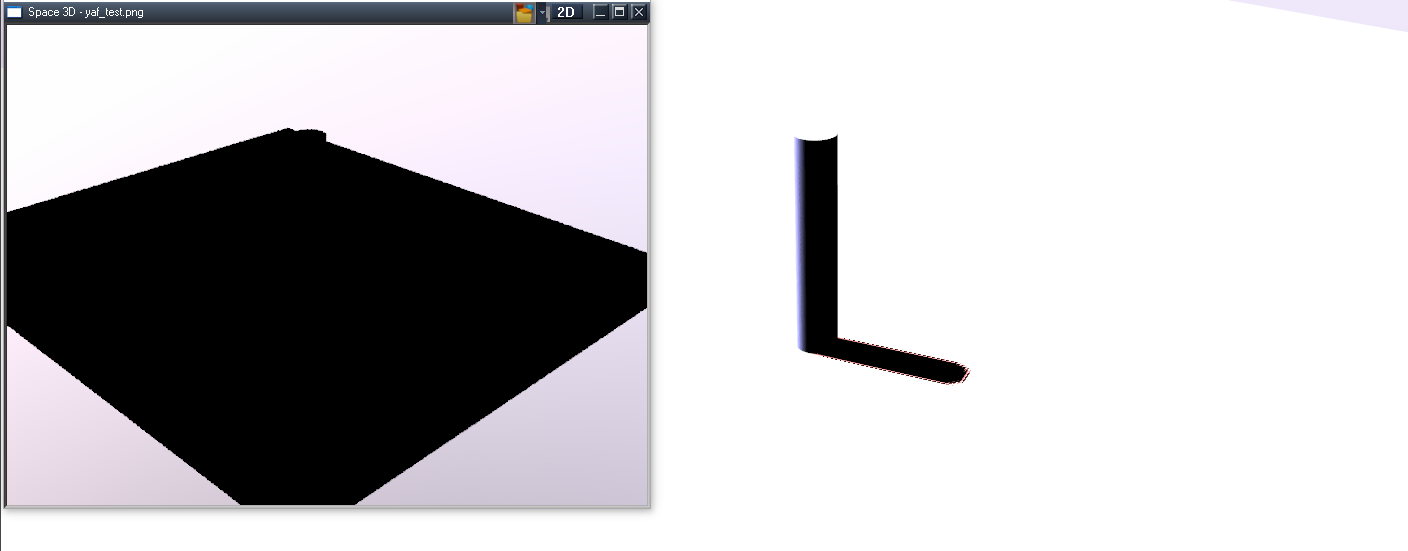
It is just the Sun Sky Preview not the rendered image where the scene objects get washed out to white
.
If I delete all of the SunSkyObject lights except the first one, the preview does not wash out the scene objects
Just did a test with no scene lights using Sun Sky as a Background type
If I do not enable the Background Skylight, it renders Black

If I delete all of the SunSkyObject lights except the first one, the preview does not wash out the scene objects
Just did a test with no scene lights using Sun Sky as a Background type
If I do not enable the Background Skylight, it renders Black
-
trueBlue
- Captain
- Posts: 5548
- Joined: 06 Jul 2009, 22:50
- Type the number ten into the box: 10
Re: YafaRay4tS v1.0.0
This works better for me even with all of the Lights
InputConversion
InputConversion
Code: Select all
// OnComputeOutputs
// Called to compute values of all output connectors
function OnComputeOutputs(params)
{
	var Turbidity = params.ConValue('Turbidity');
	var PreviewScale = params.ConValue('PreviewScale');
	var SunPower = params.ConValue('SunPower');
	var Power = params.ConValue('Power');

	var BackgroundType = params.ConValue('BackgroundType');
	var Night = params.ConValue('Night');

	var SunColorOut = System.CreateDO('Common Data Package/Color Data');

	SunColorOut.SetColorRGB8(218, 217, 216);

//	var nightPower = 1.000
	var nightPower = 0.01

	if(BackgroundType == "Darktide SunSky" && Night) {
//		nightPower = 0.500;
//Use same nightPower as Sun Sky
nightPower = 0.1;
		//SunColorOut.SetColorRGB8(186, 181, 253);
		//SunColorOut.SetColorRGB8(215, 209, 237);
//Use same color as Sun Sky
SunColorOut.SetColorRGB8(218, 217, 216);
	}

	params.ConValue('TurbidityOut') = Turbidity
	params.ConValue('PreviewScaleOut') = PreviewScale
	params.ConValue('SunPowerOut') = SunPower * 1.85 * nightPower
	params.ConValue('PowerOut') = Power
	params.ConValue('SunColorOut') = SunColorOut
}


-
clintonman
- Captain
- Posts: 5659
- Joined: 21 May 2009, 21:08
- Type the number ten into the box: 0
- Location: California
Re: YafaRay4tS v1.0.0
Pre-update release March 17 2024
fix yafaray camera name - camera from the library is NOT the yafaray camera
dont use clipboard when animating with modelspace
anim panel opens floating for easier render cancel when modelspace is included
new open camera 3d view button
new backgrounds
sunlight select, selects the directional light, not the sun sphere
new light direction controls
change select sunsphere to open panel for sunskyobject
show/hide for sunsky and yaflightrig nodes
fix external render frame # bug
both yaf bg and hdri will check each other for pre-existing previews/background spheres
removed moonsky sphere and light
fix light count in bg preview
general sunsky preview improvements - limited by many crashes during material edit
opt viewer and image viewer will not close each others windows
darktide night colors for sunsky nodes
can move background lights closer than background sphere for improved shadow preview quality
background changed default diffuse and caustic photons to true to match blender
The bulk of planned changes are in place, the next release should be bug fixes and ui enhancements. Outside of that some of the sample scenes need some minor fixes and notes.
There is no documentation for these changes yet.
http://clintons3d.com/plugins/truespace ... faray.html
fix yafaray camera name - camera from the library is NOT the yafaray camera
dont use clipboard when animating with modelspace
anim panel opens floating for easier render cancel when modelspace is included
new open camera 3d view button
new backgrounds
sunlight select, selects the directional light, not the sun sphere
new light direction controls
change select sunsphere to open panel for sunskyobject
show/hide for sunsky and yaflightrig nodes
fix external render frame # bug
both yaf bg and hdri will check each other for pre-existing previews/background spheres
removed moonsky sphere and light
fix light count in bg preview
general sunsky preview improvements - limited by many crashes during material edit
opt viewer and image viewer will not close each others windows
darktide night colors for sunsky nodes
can move background lights closer than background sphere for improved shadow preview quality
background changed default diffuse and caustic photons to true to match blender
The bulk of planned changes are in place, the next release should be bug fixes and ui enhancements. Outside of that some of the sample scenes need some minor fixes and notes.
There is no documentation for these changes yet.
http://clintons3d.com/plugins/truespace ... faray.html
-
clintonman
- Captain
- Posts: 5659
- Joined: 21 May 2009, 21:08
- Type the number ten into the box: 0
- Location: California
Re: YafaRay4tS v1.0.0
I added the text of the changes to the pdf documentation. So there is at least a description of the new panels and controls.
- Attachments
-
- YafaRay4tS Help_21.zip
- (1.37 MiB) Downloaded 78 times
-
trueBlue
- Captain
- Posts: 5548
- Joined: 06 Jul 2009, 22:50
- Type the number ten into the box: 10
Re: YafaRay4tS v1.0.0
Before running the YafaRay4tS Installer
All plugins must be Installed and Loaded using trueSpace's Package Manager
Restart trueSpace is required to complete the installation of these plugins
Clintons3dPlugin.dll
OptDetectors.dll
Clintons3dPluginExt.dll
jpeg62.dll
libtiff3.dll
Copy the jpeg62.dll and libtiff3.dll to the same folder as the Clintons3dPluginExt.dll file for the optional TIFF Loader
The above files are included in the YafaRay4tSv100 folder
YafaRay4tS Installer
Updates:
YafaRay4tS panel UI
Removed 2 of 3 Image Viewer(s)
ResetToDefaults script
ExternalViewerButton script
AboutBitmap script "v 1.0.0 - March 17, 2024" Note: Also shows in the About aspect
Background - Sun Sky
Select, # To Light, and # From Light "Changed Alert"
Preview script(s) "Changed Alert to Status Message"
YafaRay4tS Setup library
Updates:
SunSkyObject panel UI and add Default settings
DirectionalSun panel UI
YafaRayLightRig12 panel UI
YafaRayLightRig42 panel UI
YafaRay4tS.RsScn
Yafaray Camera
EntryPoint
YafaRay Lights library
YafaRay4tS.RsSLgts
All lights set to not Cast Shadow
YafaRay Spot & YafaRay IES Spot "Power set to 15.000"
Preferences/Lights
All lights set to not Cast Shadow
YafaRay Spot & YafaRay IES Spot "Power set to 15.000"
Current YafaRay4tS Help.pdf
Update: Installation_Instructions.odt "Still needs improvement"
Edit: Update 3/19/2024
Add:
Global Function Set
HDRI to Lights
OpenFloatingPanel
Status Message
Edit: Update 3/20/2024
Fixed: Background - Select button
Fixed: YafaRayReset.RsObj
Add: New Status Message scripts
Edit: Update 3/21/2024
Add: D3D Material Converter to the Material Editor to the Non-UU Install
Create: clintonobjects/CustomScriptsStore folders in the installation update
Fixed: Components - Compositing installation update
Removed due to update
All plugins must be Installed and Loaded using trueSpace's Package Manager
Restart trueSpace is required to complete the installation of these plugins
Clintons3dPlugin.dll
OptDetectors.dll
Clintons3dPluginExt.dll
jpeg62.dll
libtiff3.dll
Copy the jpeg62.dll and libtiff3.dll to the same folder as the Clintons3dPluginExt.dll file for the optional TIFF Loader
The above files are included in the YafaRay4tSv100 folder
YafaRay4tS Installer
Updates:
YafaRay4tS panel UI
Removed 2 of 3 Image Viewer(s)
ResetToDefaults script
ExternalViewerButton script
AboutBitmap script "v 1.0.0 - March 17, 2024" Note: Also shows in the About aspect
Background - Sun Sky
Select, # To Light, and # From Light "Changed Alert"
Preview script(s) "Changed Alert to Status Message"
YafaRay4tS Setup library
Updates:
SunSkyObject panel UI and add Default settings
DirectionalSun panel UI
YafaRayLightRig12 panel UI
YafaRayLightRig42 panel UI
YafaRay4tS.RsScn
Yafaray Camera
EntryPoint
YafaRay Lights library
YafaRay4tS.RsSLgts
All lights set to not Cast Shadow
YafaRay Spot & YafaRay IES Spot "Power set to 15.000"
Preferences/Lights
All lights set to not Cast Shadow
YafaRay Spot & YafaRay IES Spot "Power set to 15.000"
Current YafaRay4tS Help.pdf
Update: Installation_Instructions.odt "Still needs improvement"
Edit: Update 3/19/2024
Add:
Global Function Set
HDRI to Lights
OpenFloatingPanel
Status Message
Edit: Update 3/20/2024
Fixed: Background - Select button
Fixed: YafaRayReset.RsObj
Add: New Status Message scripts
Edit: Update 3/21/2024
Add: D3D Material Converter to the Material Editor to the Non-UU Install
Create: clintonobjects/CustomScriptsStore folders in the installation update
Fixed: Components - Compositing installation update
Removed due to update
-
clintonman
- Captain
- Posts: 5659
- Joined: 21 May 2009, 21:08
- Type the number ten into the box: 0
- Location: California
Re: YafaRay4tS v1.0.0
Update March 23 2024
Getting close to done on this project. The main thing going forward will be to refine the documentation.
new camera view button - open 3d view from camera
easier animation cancel via a panel button
fix yafaray camera naming bugs
ui cleanup by trueBlue
sun sky preview enhancements
brighter spotlights by default - increased power from 5 to 15
improved area light
new YafaRay4tS.RsSLgts from tB
add boxtest.png to textures for orco sample scene
image viewer from trueBlue
background light rigs use fewer undos
updated to latest pdf manual preview
http://clintons3d.com/plugins/truespace ... faray.html
added the orco_mapping scene and some notes for using the sample scenes
http://clintons3d.com/plugins/truespace ... mples.html
Getting close to done on this project. The main thing going forward will be to refine the documentation.
new camera view button - open 3d view from camera
easier animation cancel via a panel button
fix yafaray camera naming bugs
ui cleanup by trueBlue
sun sky preview enhancements
brighter spotlights by default - increased power from 5 to 15
improved area light
new YafaRay4tS.RsSLgts from tB
add boxtest.png to textures for orco sample scene
image viewer from trueBlue
background light rigs use fewer undos
updated to latest pdf manual preview
http://clintons3d.com/plugins/truespace ... faray.html
added the orco_mapping scene and some notes for using the sample scenes
http://clintons3d.com/plugins/truespace ... mples.html
-
trueBlue
- Captain
- Posts: 5548
- Joined: 06 Jul 2009, 22:50
- Type the number ten into the box: 10
Re: YafaRay4tS v1.0.0
Use Sun & Night should be enabled by default
Example:
No lights in the scene and add Sun Sky Preview with Use Sun disabled, renders BLACK and does not match the Preview
SunSkyObject panel - Directional Sun Light button does not work
Not able to adjust the shadow, because the scene is Black
tS761 non-UU installation
Removed due to update
Example:
No lights in the scene and add Sun Sky Preview with Use Sun disabled, renders BLACK and does not match the Preview
SunSkyObject panel - Directional Sun Light button does not work
Not able to adjust the shadow, because the scene is Black
tS761 non-UU installation
Removed due to update
-
clintonman
- Captain
- Posts: 5659
- Joined: 21 May 2009, 21:08
- Type the number ten into the box: 0
- Location: California
Re: YafaRay4tS v1.0.0
trueBlue wrote: 24 Mar 2024, 01:56 Use Sun & Night should be enabled by default
Example:
No lights in the scene and add Sun Sky Preview with Use Sun disabled, renders BLACK and does not match the Preview
SunSkyObject panel - Directional Sun Light button does not work
Not able to adjust the shadow, because the scene is Black
tS761 non-UU installation

Not happening here. Get the background of SunSky, mostly white.
Side note: Tried your scene and it doesn't have any yafaray materials.
-
trueBlue
- Captain
- Posts: 5548
- Joined: 06 Jul 2009, 22:50
- Type the number ten into the box: 10
Re: YafaRay4tS v1.0.0
Your image does not match the scene that I posted, so you are not seeing what I posted aboutclintonman wrote: 24 Mar 2024, 02:10SunSkyDefaults.jpgtrueBlue wrote: 24 Mar 2024, 01:56 Use Sun & Night should be enabled by default
Example:
No lights in the scene and add Sun Sky Preview with Use Sun disabled, renders BLACK and does not match the Preview
SunSkyObject panel - Directional Sun Light button does not work
Not able to adjust the shadow, because the scene is Black
tS761 non-UU installation
Use Sun & Night should not be enabled by default
Not happening here. Get the background of SunSky, mostly white.
Side note: Tried your scene and it doesn't have any yafaray materials.
Added YafaRay materials to the two objects
Convert Materials destroys the SunSkyObject
Workaround: Use Selected Object ONLY
SunSkyObject panel - Directional Sun Light button does not work
Show and Hide gives errors
Removed due to update
-
clintonman
- Captain
- Posts: 5659
- Joined: 21 May 2009, 21:08
- Type the number ten into the box: 0
- Location: California
Re: YafaRay4tS v1.0.0
Don't forget to install the prerequisites:trueBlue wrote: 24 Mar 2024, 02:39Your image does not match the scene that I posted, so you are not seeing what I posted aboutclintonman wrote: 24 Mar 2024, 02:10SunSkyDefaults.jpgtrueBlue wrote: 24 Mar 2024, 01:56 Use Sun & Night should be enabled by default
Example:
No lights in the scene and add Sun Sky Preview with Use Sun disabled, renders BLACK and does not match the Preview
SunSkyObject panel - Directional Sun Light button does not work
Not able to adjust the shadow, because the scene is Black
tS761 non-UU installation
Use Sun & Night should not be enabled by default
Not happening here. Get the background of SunSky, mostly white.
Side note: Tried your scene and it doesn't have any yafaray materials.
Added YafaRay materials to the two objects
Convert Materials destroys the SunSkyObject
Workaround: Use Selected Object ONLY
SunSkyObject panel - Directional Sun Light button does not work
Show and Hide gives errors
install the updated global function set
install the updated status message
install floating panels
install hdri to lights
and if installing to non-UU tS
also install the compositing library
When you put a checkmark on use sun it does not automatically load in the directional light. You have to push the Create button if you change Use Sun, change the number of divisions for the background light or some other place I can't remember. But simplest to say if the background does not update with ui changes or is completely off from the render use Create button to recreate it fresh.
Sounds like convert material needs a guard against changing the inside of the YafaRay4tS node.
-
clintonman
- Captain
- Posts: 5659
- Joined: 21 May 2009, 21:08
- Type the number ten into the box: 0
- Location: California
Re: YafaRay4tS v1.0.0
march 24 2024
New bug fixes
sun sky background panel show/hide error fixed
reset defaults includes the scene utiltites texture source folder
full yaf node reset during install - thought I did this a while ago but nope
camera will install for UU
New bug fixes
sun sky background panel show/hide error fixed
reset defaults includes the scene utiltites texture source folder
full yaf node reset during install - thought I did this a while ago but nope
camera will install for UU
-
trueBlue
- Captain
- Posts: 5548
- Joined: 06 Jul 2009, 22:50
- Type the number ten into the box: 10
Re: YafaRay4tS v1.0.0
The yaf cam 'scene camera' in your installer for the UU is wrong
Here is the YafaRay4tS Setup folder with the correct camera, plus all other items have the correct icons
In your installer's YafaRay4tS Setup folder, most of the icons are blank
Removed due to update
Here is the YafaRay4tS Setup folder with the correct camera, plus all other items have the correct icons
In your installer's YafaRay4tS Setup folder, most of the icons are blank
Removed due to update
-
trueBlue
- Captain
- Posts: 5548
- Joined: 06 Jul 2009, 22:50
- Type the number ten into the box: 10
Re: YafaRay4tS v1.0.0
@Clinton
Here are two scenes, both have the same modified Background aspect
Moved the top Cast Shadows to the Sun Sky section
Constant Color - Default changed
Removed due to update
Here are two scenes, both have the same modified Background aspect
Moved the top Cast Shadows to the Sun Sky section
Constant Color - Default changed
Removed due to update
-
clintonman
- Captain
- Posts: 5659
- Joined: 21 May 2009, 21:08
- Type the number ten into the box: 0
- Location: California
Re: YafaRay4tS v1.0.0
Now it looks like only Sun Sky/Darktide will cast shadows. The change totally ignores all the other background types.trueBlue wrote: 25 Mar 2024, 21:17 @Clinton
Here are two scenes, both have the same modified Background aspect
Moved the top Cast Shadows to the Sun Sky section
Constant Color - Default changed
-
trueBlue
- Captain
- Posts: 5548
- Joined: 06 Jul 2009, 22:50
- Type the number ten into the box: 10
Re: YafaRay4tS v1.0.0
Not following your responseclintonman wrote: 25 Mar 2024, 21:37Now it looks like only Sun Sky/Darktide will cast shadows. The change totally ignores all the other background types.trueBlue wrote: 25 Mar 2024, 21:17 @Clinton
Here are two scenes, both have the same modified Background aspect
Moved the top Cast Shadows to the Sun Sky section
Constant Color - Default changed
The Sun Sky/Darktide has its own Cast Shadows
The BG Light uses all of the Sun Sky and Darktide attributes
I do not see how that somehow ignores all of the other Background Types
If for instance, you were to use the BG Light for other Background Types, how would you adjust the BG Light?
That has not changed before or after the modifications
The only difference with the modifications, is the BG Cast Shadows is closer to where it works
-
clintonman
- Captain
- Posts: 5659
- Joined: 21 May 2009, 21:08
- Type the number ten into the box: 0
- Location: California
Re: YafaRay4tS v1.0.0

No lights in the scene. Constant type background. IBL enabled. Cast Shadows Enabled.
The cylinder is casting a shadow.
Gradient also casts shadows.
Image also casts shadows.
Having shadow control in the Sun Sky does not reflect how this works.
-
trueBlue
- Captain
- Posts: 5548
- Joined: 06 Jul 2009, 22:50
- Type the number ten into the box: 10
Re: YafaRay4tS v1.0.0
Okay, your example is not using the BG Lightclintonman wrote: 26 Mar 2024, 01:16 YafConstantShadows.jpg
No lights in the scene. Constant type background. IBL enabled. Cast Shadows Enabled.
The cylinder is casting a shadow.
Gradient also casts shadows.
Image also casts shadows.
Having shadow control in the Sun Sky does not reflect how this works.
If I remember correctly, IBL is something you added in Y4tS1.00
This is why I suggested naming Cast Shadows to IBL Cast Shadows
I will assume that BG Cast Shadows and IBL Cast Shadows are the same attribute
It would be easy to add a copy to the top
-
clintonman
- Captain
- Posts: 5659
- Joined: 21 May 2009, 21:08
- Type the number ten into the box: 0
- Location: California
Re: YafaRay4tS v1.0.0

- YafIBL_Section.jpg (58.5 KiB) Viewed 1591 times
IBL applies to not just Cast Shadows. Also applies to Diffuse Photons, Caustic Photons and Samples.
As it is now the Transparent and Materials Transparent Refraction are in the middle of those controls that belong together.
-
trueBlue
- Captain
- Posts: 5548
- Joined: 06 Jul 2009, 22:50
- Type the number ten into the box: 10
Re: YafaRay4tS v1.0.0
Here is an updated YafaRay4tS Setup library, Primitive Yafaray Camera, YafaRayBar Yafaray Camera toolbar button, and Yafaray Folder with an updated Background aspect
Hope you like it!
Removed
Also made a Sun Sky.RsSLgts light setup that could be included in the lights library
It is basically a light setup that does not affect an outdoor Sunky / Darktide scene that alleviates a total black D3D View
No Shadows
Removed due to update
Hope you like it!
Removed
Also made a Sun Sky.RsSLgts light setup that could be included in the lights library
It is basically a light setup that does not affect an outdoor Sunky / Darktide scene that alleviates a total black D3D View
No Shadows
Removed due to update
-
clintonman
- Captain
- Posts: 5659
- Joined: 21 May 2009, 21:08
- Type the number ten into the box: 0
- Location: California
Re: YafaRay4tS v1.0.0
Can you move the Diffuse Photons and Caustic Photons down to the IBL section? These are IBL controls.trueBlue wrote: 26 Mar 2024, 16:17 This is what I did with the Background aspect
Background.png
.
Here is an updated YafaRay4tS Setup library, Yafaray Camera toolbar button, and Yafaray Folder with an updated Background aspect
Added IBL Cast Shadows to the top section
Hope you like it!
Also made a Sun Sky.RsSLgts light setup that could be included in the lights library
-
trueBlue
- Captain
- Posts: 5548
- Joined: 06 Jul 2009, 22:50
- Type the number ten into the box: 10
Re: YafaRay4tS v1.0.0
How is this?
I think the Default Yafaray Smooth = 30.000, should be bumped up to at least 90.000
30.000
.
90.000
I updated the previous post with the change

- IBL settings.png (11.05 KiB) Viewed 1778 times
30.000

90.000

-
clintonman
- Captain
- Posts: 5659
- Joined: 21 May 2009, 21:08
- Type the number ten into the box: 0
- Location: California
Re: YafaRay4tS v1.0.0
Those 2 depend on the IBL checkbox. It's weird for them to be above it.trueBlue wrote: 26 Mar 2024, 17:58 How is this?
IBL settings.png
I think the Default Yafaray Smooth = 30.000, should be bumped up to at least 90.000
30.000
yaf smooth default 30.png
.
90.000
yaf smooth default 90.png
I updated the previous post with the change

-
trueBlue
- Captain
- Posts: 5548
- Joined: 06 Jul 2009, 22:50
- Type the number ten into the box: 10
Re: YafaRay4tS v1.0.0
What two are you referring to?Those 2 depend on the IBL checkbox. It's weird for them to be above it.
-
clintonman
- Captain
- Posts: 5659
- Joined: 21 May 2009, 21:08
- Type the number ten into the box: 0
- Location: California
Re: YafaRay4tS v1.0.0
Diffuse Photons and Caustic Photons don't do anything without IBL enabled. So it's odd that they come before it. They should probably also be renamed to IBL Diffuse Photons and IBL Caustic Photons to match all the other IBL controls or make an IBL heading and remove all the IBL prefixes.trueBlue wrote: 26 Mar 2024, 18:30What two are you referring to?Those 2 depend on the IBL checkbox. It's weird for them to be above it.
-
trueBlue
- Captain
- Posts: 5548
- Joined: 06 Jul 2009, 22:50
- Type the number ten into the box: 10
Re: YafaRay4tS v1.0.0

- IBL settings.png (11.88 KiB) Viewed 1782 times
-
clintonman
- Captain
- Posts: 5659
- Joined: 21 May 2009, 21:08
- Type the number ten into the box: 0
- Location: California
Re: YafaRay4tS v1.0.0
Everything in the IBL section applies to Gradient and Constant and Image.trueBlue wrote: 26 Mar 2024, 18:55 IBL settings.png
Probably should move the Image section above the IBL section
Some IBL controls apply to the Sun Sky/Darktide sections.
So if you're going to move IBL section it would go near the bottom of the panel.
IBL is not just for images.
-
trueBlue
- Captain
- Posts: 5548
- Joined: 06 Jul 2009, 22:50
- Type the number ten into the box: 10
Re: YafaRay4tS v1.0.0
What IBL controls apply to the Sun Sky/Darktide sections?
Thats a new one I did not know about
Can you give an example?
Finally, after several attempts, I was able to move the Constant Color back to the upper area like it was before
Not easy to do!
I could make the Use IBL Constant - Gradient - Image different, like bigger and a different color
Thats a new one I did not know about
Can you give an example?
Finally, after several attempts, I was able to move the Constant Color back to the upper area like it was before
Not easy to do!
I could make the Use IBL Constant - Gradient - Image different, like bigger and a different color

-
clintonman
- Captain
- Posts: 5659
- Joined: 21 May 2009, 21:08
- Type the number ten into the box: 0
- Location: California
Re: YafaRay4tS v1.0.0
You have the IBL enable near the top and all the IBL controls in the Image section.trueBlue wrote: 26 Mar 2024, 20:01 What IBL controls apply to the Sun Sky/Darktide sections?
Thats a new one I did not know about
Can you give an example?
Finally, after several attempts, I was able to move the Constant Color back to the upper area like it was before
Not easy to do!
I could make the Use IBL Constant - Gradient - Image different, like bigger and a different color
Background.png
-
trueBlue
- Captain
- Posts: 5548
- Joined: 06 Jul 2009, 22:50
- Type the number ten into the box: 10
Re: YafaRay4tS v1.0.0
So, if I move all of the IBL controls to the top, you approve?
-
trueBlue
- Captain
- Posts: 5548
- Joined: 06 Jul 2009, 22:50
- Type the number ten into the box: 10

-
trueBlue
- Captain
- Posts: 5548
- Joined: 06 Jul 2009, 22:50
- Type the number ten into the box: 10
Re: YafaRay4tS v1.0.0
Now, I guess, I am not understanding the BG Light (alias BG Sky Light)
Without using Previews, it seems the BG Light is dependent on Use IBL and it has its own Samples (Not IBL Samples), and can be used with other BG types
So, why is being called BG Sky Light and why is it in the Sun Sky section?
If it is being used with the Sun Sky, why would you want both?
Does it use any of the Sun Sky settings?
Edit:
Use IBL can be used with all Background types and the Background Light
Without using Previews, it seems the BG Light is dependent on Use IBL and it has its own Samples (Not IBL Samples), and can be used with other BG types
So, why is being called BG Sky Light and why is it in the Sun Sky section?
If it is being used with the Sun Sky, why would you want both?
Does it use any of the Sun Sky settings?
Edit:
Use IBL can be used with all Background types and the Background Light
-
clintonman
- Captain
- Posts: 5659
- Joined: 21 May 2009, 21:08
- Type the number ten into the box: 0
- Location: California
Re: YafaRay4tS v1.0.0
"Without using Previews"trueBlue wrote: 27 Mar 2024, 13:47 Now, I guess, I am not understanding the BG Light (alias BG Sky Light)
Without using Previews, it seems the BG Light is dependent on Use IBL and it has its own Samples (Not IBL Samples), and can be used with other BG types
So, why is being called BG Sky Light and why is it in the Sun Sky section?
If it is being used with the Sun Sky, why would you want both?
Does it use any of the Sun Sky settings?
Edit:
Use IBL can be used with all Background types and the Background Light
Previews have no effect on the render. They are only for looking at. The render only sees the background settings, not the preview.
"it seems the BG Light is dependent on Use IBL"
I don't see that happening at all. Maybe you can share a scene.

These are all the Blender background panels. In YafaRay4tS it's all one giant panel.
Format below is ControlLabel(behind the scenes name)
Sunsky2 is Darktide Sunsky
Some controls are shared by all the panels like Diffuse photons, Caustic photons and Background casts shadows.
The Power(bg_power) control in the first panel is the same as the Skylight power(bg_power) control in all the other panels.
Use IBL(bg_use_ibl) is found in the first 3 panels Single Color, Gradient, Texture. The Sunsky1/Sunsky2 have a similar control Add skylight(bg_background_light).
IBL Samples(bg_ibl_samples) are in the first 3 panels. Sunsky1/Sunsky2 have Samples(bg_light_samples)
Add sun(bg_add_sun)
Sunlight power(bg_sun_power)
The Blender is easier to understand because it is multiple panels instead of one.
-
trueBlue
- Captain
- Posts: 5548
- Joined: 06 Jul 2009, 22:50
- Type the number ten into the box: 10
Re: YafaRay4tS v1.0.0
Updated Background aspect: Moved the BG Light, Shadows, and Samples from Sun Sky section to IBL section
Background is set to Contant with Use IBL Disabled
BG Light and BGL Shadows are Enabled
Render
Notice NO BG Shadows
Enable Use IBL
Render
Notice BG Shadows
Switch Background types and repeat steps
Edit: Noticed I needed to remove duplicated bg cast shadows
Removed due to update
Background is set to Contant with Use IBL Disabled
BG Light and BGL Shadows are Enabled
Render
Notice NO BG Shadows
Enable Use IBL
Render
Notice BG Shadows
Switch Background types and repeat steps
Edit: Noticed I needed to remove duplicated bg cast shadows

- Background new settings.png (12.69 KiB) Viewed 1643 times
-
clintonman
- Captain
- Posts: 5659
- Joined: 21 May 2009, 21:08
- Type the number ten into the box: 0
- Location: California
Re: YafaRay4tS v1.0.0
trueBlue wrote: 27 Mar 2024, 16:43 Updated Background aspect: Moved the BG Light, Shadows, and Samples from Sun Sky section to IBL section
Background is set to Contant with Use IBL Disabled
BG Light and BGL Shadows are Enabled
Render
Notice NO BG Shadows
Enable Use IBL
Render
Notice BG Shadows
Switch Background types and repeat steps

- YafBgPoorGrouping.jpg (50.44 KiB) Viewed 1656 times
Background Light not belong in the IBL section. Second Samples not belong in the IBL section. They are for SunSky, not Constant, Gradient or Image.
"Use IBL Constant - Gradient - Image" does not have any effect on Background Light/BGL - Shadows or Sun Sky Samples.
-
trueBlue
- Captain
- Posts: 5548
- Joined: 06 Jul 2009, 22:50
- Type the number ten into the box: 10
Re: YafaRay4tS v1.0.0
Use IBL Disabled - Constant
.
Use IBL Enabled - Constant
This is the only way I can get BG Light Shadows
BG Light Shadows a very faint
Using Gradient, shadows can get washed out from IBL
Using Image, shadows get washed out from IBL
Using Sun Sky, shadows get enhanced (Lighter)
Using Darktide, shadows get enhanced (Lighter)

Use IBL Enabled - Constant
This is the only way I can get BG Light Shadows

BG Light Shadows a very faint
Using Gradient, shadows can get washed out from IBL
Using Image, shadows get washed out from IBL
Using Sun Sky, shadows get enhanced (Lighter)
Using Darktide, shadows get enhanced (Lighter)
-
clintonman
- Captain
- Posts: 5659
- Joined: 21 May 2009, 21:08
- Type the number ten into the box: 0
- Location: California
Re: YafaRay4tS v1.0.0
You can't have shadows from the IBL in Constant, Gradient and Image without IBL Enabled.trueBlue wrote: 27 Mar 2024, 17:50 Use IBL Disabled - Constant
Before.png
.
Use IBL Enabled - Constant
This is the only way I can get BG Light Shadows
After.png
BG Light Shadows a very faint
Using Gradient, shadows can get washed out from IBL
Using Image, shadows get washed out from IBL
Using Sun Sky, shadows get enhanced (Lighter)
Using Darktide, shadows get enhanced (Lighter)
BG Light Shadows are faint because the light is coming from ALL directions, not one direction.
-
trueBlue
- Captain
- Posts: 5548
- Joined: 06 Jul 2009, 22:50
- Type the number ten into the box: 10

-
clintonman
- Captain
- Posts: 5659
- Joined: 21 May 2009, 21:08
- Type the number ten into the box: 0
- Location: California
Re: YafaRay4tS v1.0.0
Works for me.trueBlue wrote: 27 Mar 2024, 19:19 Okie dockey
How about this?
New Background aspect.png
-
trueBlue
- Captain
- Posts: 5548
- Joined: 06 Jul 2009, 22:50
- Type the number ten into the box: 10
Re: YafaRay4tS v1.0.0
Hurray!
Couple of small tweaks
Sun Sky - Select button renamed to Sun Light and moved the buttons down one row
Add titles to the Sun Sky Preview, Background Light, and Sun Light panels
Couple of small tweaks
Sun Sky - Select button renamed to Sun Light and moved the buttons down one row
Add titles to the Sun Sky Preview, Background Light, and Sun Light panels

-
trueBlue
- Captain
- Posts: 5548
- Joined: 06 Jul 2009, 22:50
- Type the number ten into the box: 10
Re: YafaRay4tS v1.0.0
Edit
Background Type: Sun Sky
With Sun Sky - Disabled
Create Preview
Creates a Sun Sky Object without a DirectionalSun light
Same for Darktide
Is there a use for this preview setup?
Edit: If I understand correctly, it looks like its use is for a BG Light Only light setup
So, you have to uncheck Sun Sky, Night, and enable BG Light when using Sun Sky or Darktide BG types
Unfortunately, if you do not set it up correctly, you get a Preview with no light except the Ambient light
Then there is the unfortunate Sun Sky or Darktide setup that can include the BG Light which totally wrecks the setup because it is so bright!
Seems like an impossible scripting task to control all three light setups
Also, the sun dial does not honor the Scene ORA
Edit: Added Background setup buttons
Night, Day, Background, and Constant
Makes it easier to setup the different types of light setups
.
Exported the Ignore layer attributes from the indicator objects
Disabled by default
Enable to show objects Edges
Background Type: Sun Sky
With Sun Sky - Disabled
Create Preview
Creates a Sun Sky Object without a DirectionalSun light
Same for Darktide
Is there a use for this preview setup?
Edit: If I understand correctly, it looks like its use is for a BG Light Only light setup
So, you have to uncheck Sun Sky, Night, and enable BG Light when using Sun Sky or Darktide BG types
Unfortunately, if you do not set it up correctly, you get a Preview with no light except the Ambient light
Then there is the unfortunate Sun Sky or Darktide setup that can include the BG Light which totally wrecks the setup because it is so bright!
Seems like an impossible scripting task to control all three light setups
Also, the sun dial does not honor the Scene ORA
Edit: Added Background setup buttons
Night, Day, Background, and Constant
Makes it easier to setup the different types of light setups
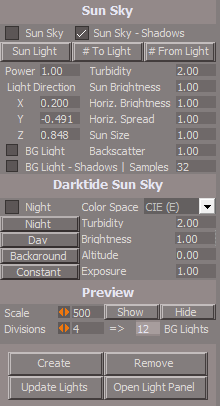
Exported the Ignore layer attributes from the indicator objects
Disabled by default
Enable to show objects Edges

-
trueBlue
- Captain
- Posts: 5548
- Joined: 06 Jul 2009, 22:50
- Type the number ten into the box: 10
Re: YafaRay4tS v1.0.0
@Clinton
Here is all of the updated YafaRay4tS items
.
Cameras - primitive Yafaray Camera 'new button code'
CustomCommands - YafarayScripts v8 'update EnumPropertiesPanels script for yaf toolbar placement'
Lights - primitive yaf lights 'your updated Area light, IES Spot light 'Generate IES Preview script'
Toolbar Prototypes Encapsulator - YafaRayBar 'update Volume LMB command to load only one'
Yafaray Camera 'LMB command'
YafaRay Lights - library 'update (See above)'
YafaRay Materials - library
YafaRay4tS Setup - library
Updates:
YafaRay4tS toolbar.RsObj 'toolbar placement and remove after load (not just the scene)'
YafaRay4tS.RsScn 'scene cam'
Yafaray Camera
EntryPoint
Preview objects
Edit: Updated Yafaray Folder.RsObj
Changed Light Setup buttons from utility commands to Node.Value commands
Removed due to update
Here is all of the updated YafaRay4tS items

- Folders.png (6.17 KiB) Viewed 2072 times
Cameras - primitive Yafaray Camera 'new button code'
CustomCommands - YafarayScripts v8 'update EnumPropertiesPanels script for yaf toolbar placement'
Lights - primitive yaf lights 'your updated Area light, IES Spot light 'Generate IES Preview script'
Toolbar Prototypes Encapsulator - YafaRayBar 'update Volume LMB command to load only one'
Yafaray Camera 'LMB command'
YafaRay Lights - library 'update (See above)'
YafaRay Materials - library
YafaRay4tS Setup - library
Updates:
YafaRay4tS toolbar.RsObj 'toolbar placement and remove after load (not just the scene)'
YafaRay4tS.RsScn 'scene cam'
Yafaray Camera
EntryPoint
Preview objects
Edit: Updated Yafaray Folder.RsObj
Changed Light Setup buttons from utility commands to Node.Value commands
Removed due to update
-
clintonman
- Captain
- Posts: 5659
- Joined: 21 May 2009, 21:08
- Type the number ten into the box: 0
- Location: California
Re: YafaRay4tS v1.0.0
Attached is a YafaRay4tS Utilities node with the copy animation
Copies animations for cameras, lights, volumes and the YafaRay4tS node.
The camera panel convert button was already copying the animations.
Copies animations for cameras, lights, volumes and the YafaRay4tS node.
The camera panel convert button was already copying the animations.
- Attachments
-
- YafaRay4tS Scene Utilities2bda.RsObj
- (132.21 KiB) Downloaded 61 times
-
trueBlue
- Captain
- Posts: 5548
- Joined: 06 Jul 2009, 22:50
- Type the number ten into the box: 10
Re: YafaRay4tS v1.0.0
Thanks, I will add and test it
Here is what I came up with for the D3D Material Converter that checks for Background Spheres when converting to YafaRay Materials
Here is what I came up with for the D3D Material Converter that checks for Background Spheres when converting to YafaRay Materials
- Attachments
-
- D3D Material Converterb048.RsObj
- (855.81 KiB) Downloaded 84 times
-
clintonman
- Captain
- Posts: 5659
- Joined: 21 May 2009, 21:08
- Type the number ten into the box: 0
- Location: California
Re: YafaRay4tS v1.0.0
Update April 8 2024
Final Pre-Release version
updated documentation - pre-release final
trueBlue - fix camera toolbar button
trueBlue - fix camera panel view button - works with non-UU
trueBlue - IES code break out if invalid file
scene utilities will copy animation nodes
shiny diffuse material added a flat material option
removed extra items from installer libraries
trueBlue - YafaRay4tS scene updated
new portal light material
"Set Camera" button on Yaf Camera panel fix so opens clean with no grid
fixed defaults so bg shadows is on by default
The portal light was never documented by the YafaRay team. Information in this link is how I believe it is supposed to work.
https://radeon-pro.github.io/RadeonProR ... light.html
Final Pre-Release version
updated documentation - pre-release final
trueBlue - fix camera toolbar button
trueBlue - fix camera panel view button - works with non-UU
trueBlue - IES code break out if invalid file
scene utilities will copy animation nodes
shiny diffuse material added a flat material option
removed extra items from installer libraries
trueBlue - YafaRay4tS scene updated
new portal light material
"Set Camera" button on Yaf Camera panel fix so opens clean with no grid
fixed defaults so bg shadows is on by default
The portal light was never documented by the YafaRay team. Information in this link is how I believe it is supposed to work.
https://radeon-pro.github.io/RadeonProR ... light.html
-
clintonman
- Captain
- Posts: 5659
- Joined: 21 May 2009, 21:08
- Type the number ten into the box: 0
- Location: California
Re: YafaRay4tS v1.0.0
Preview Update, July 8
installer attached
installer removed, July 10
The final version has been released in the Unofficial Updates and an updated manual is pending. A standalone installer will be published after the documentation is complete.
installer attached
installer removed, July 10
The final version has been released in the Unofficial Updates and an updated manual is pending. A standalone installer will be published after the documentation is complete.
Last edited by clintonman on 11 Jul 2024, 02:43, edited 1 time in total.
-
bitkar

- Captain
- Posts: 2089
- Joined: 16 Mar 2010, 07:14
- Type the number ten into the box: 0
- Location: Czech Republic
Re: YafaRay4tS v1.0.0
i might try this out! if i figure out how to install everything... i hope its easy. Thanks!
I take it back, there is so much to install, i give up.
I take it back, there is so much to install, i give up.
Michal aka bitkar
tS freak since tS2 (1998) and forever (tS7.61 modeler)
tS freak since tS2 (1998) and forever (tS7.61 modeler)
-
clintonman
- Captain
- Posts: 5659
- Joined: 21 May 2009, 21:08
- Type the number ten into the box: 0
- Location: California
Re: YafaRay4tS v1.0.0
If you have the latest Unofficial Updates there is nothing extra the needs to be install.bitkar wrote: 09 Jul 2024, 15:09 i might try this out! if i figure out how to install everything... i hope its easy. Thanks!
I take it back, there is so much to install, i give up.
-
trueBlue
- Captain
- Posts: 5548
- Joined: 06 Jul 2009, 22:50
- Type the number ten into the box: 10
Re: YafaRay4tS v1.0.0
The Unofficial Update version 10 does not include the YafaRay render engineclintonman wrote: 09 Jul 2024, 21:11If you have the latest Unofficial Updates there is nothing extra the needs to be install.bitkar wrote: 09 Jul 2024, 15:09 i might try this out! if i figure out how to install everything... i hope its easy. Thanks!
I take it back, there is so much to install, i give up.
You have to install it:
YafaRay v3.3.0
YafaRay is a free open-source montecarlo raytracing engine released under the LGPL 2.1 license. Raytracing is a rendering technique for generating realistic images by tracing the path of light through a 3D scene
There are two different types of YafaRay Releases:
Releases for Blender: Include the Blender-Exporter code and the YafaRay Core files, in a package ready to be installed in Blender
Standalone Core Releases: Are intended to be used by 3rd party software and *not* to be used with Blender
Download the YafaRay v3.3.0 render engine from:
https://github.com/YafaRay/Core/releases
Unzip the file and copy the ‘yafaray_v3’ folder
YafaRay Standalone:
C:\Program Files\yafaray_v3
Note: If you install the YafaRay v3.3.0 render engine after installing this update:
From Workspace in the Stack/Panel - YafaRay4tS/Setup aspect
Set the 'YafaRay Installation Path' to the yafaray-xml.exe file where you have installed YafaRay v3.3.0
Select the [Save Settings] button
In Workspace, open the YafaRay4tS layout.
Open the YafaRay4tS scene from the YafaRay4tS Setup library
-
clintonman
- Captain
- Posts: 5659
- Joined: 21 May 2009, 21:08
- Type the number ten into the box: 0
- Location: California
Re: YafaRay4tS v1.0.0
The latest release can be found included in the Unofficial Updates. The website version will be released after the documentation is complete.
Attached is the work done so far on the manual.
Attached is the work done so far on the manual.
- Attachments
-
- YafaRay4tS Help_27.zip
- (1.49 MiB) Downloaded 90 times
-
bitkar
- Captain
- Posts: 2089
- Joined: 16 Mar 2010, 07:14
- Type the number ten into the box: 0
- Location: Czech Republic
Re: YafaRay4tS v1.0.0
thats the thing... i run the original pure caligari 7.61 mostly in model space.
Michal aka bitkar
tS freak since tS2 (1998) and forever (tS7.61 modeler)
tS freak since tS2 (1998) and forever (tS7.61 modeler)
-
trueBlue
- Captain
- Posts: 5548
- Joined: 06 Jul 2009, 22:50
- Type the number ten into the box: 10
Re: YafaRay4tS v1.0.0
@Clinton
Here is a YafaRay4tS "Portal Material" scene
Take a look at the Portal Material Plane material
I added a TextureAlphaShader that makes the Portal Material transparent
You can still display the color by enabling Alpha Test = As Opaque
I am proposing that you add the TextureAlphaShader to your Portal Material
Here is a YafaRay4tS "Portal Material" scene
Take a look at the Portal Material Plane material
I added a TextureAlphaShader that makes the Portal Material transparent
You can still display the color by enabling Alpha Test = As Opaque
I am proposing that you add the TextureAlphaShader to your Portal Material
- Attachments
-
- Portal Material.RsScn
- (2 MiB) Downloaded 75 times
-
clintonman
- Captain
- Posts: 5659
- Joined: 21 May 2009, 21:08
- Type the number ten into the box: 0
- Location: California
Re: YafaRay4tS v1.0.0
Transparency without using a blank texture.trueBlue wrote: 12 Jul 2024, 19:00 @Clinton
Here is a YafaRay4tS "Portal Material" scene
Take a look at the Portal Material Plane material
I added a TextureAlphaShader that makes the Portal Material transparent
You can still display the color by enabling Alpha Test = As Opaque
I am proposing that you add the TextureAlphaShader to your Portal Material
Clearly marked as "D3D Preview" since it does not affect the render.
- Attachments
-
- D3D material.RsMat
- (23.24 KiB) Downloaded 73 times
-
trueBlue
- Captain
- Posts: 5548
- Joined: 06 Jul 2009, 22:50
- Type the number ten into the box: 10
Re: YafaRay4tS v1.0.0
Got it, thank youclintonman wrote: 12 Jul 2024, 21:55Transparency without using a blank texture.trueBlue wrote: 12 Jul 2024, 19:00 @Clinton
Here is a YafaRay4tS "Portal Material" scene
Take a look at the Portal Material Plane material
I added a TextureAlphaShader that makes the Portal Material transparent
You can still display the color by enabling Alpha Test = As Opaque
I am proposing that you add the TextureAlphaShader to your Portal Material
Clearly marked as "D3D Preview" since it does not affect the render.
I removed the "Export aspect" from the ConstantAlphaShader Default aspect since the transparency value is already available on the D3D material panel
Add Library Description
Y4tSv.0.9.9
Cast light from object Normals
Samples lighting color from the
Background light
Does this material Cast Shadows?
-
clintonman
- Captain
- Posts: 5659
- Joined: 21 May 2009, 21:08
- Type the number ten into the box: 0
- Location: California
Re: YafaRay4tS v1.0.0
It should have the same characteristics as whatever light it lets in. The material is not a light. It's more like a window for existing lighting.trueBlue wrote: 12 Jul 2024, 22:33Got it, thank youclintonman wrote: 12 Jul 2024, 21:55Transparency without using a blank texture.trueBlue wrote: 12 Jul 2024, 19:00 @Clinton
Here is a YafaRay4tS "Portal Material" scene
Take a look at the Portal Material Plane material
I added a TextureAlphaShader that makes the Portal Material transparent
You can still display the color by enabling Alpha Test = As Opaque
I am proposing that you add the TextureAlphaShader to your Portal Material
Clearly marked as "D3D Preview" since it does not affect the render.
I removed the "Export aspect" from the ConstantAlphaShader Default aspect since the transparency value is already available on the D3D material panel
Add Library Description
Y4tSv.0.9.9
Cast light from object Normals
Samples lighting color from the
Background light
Does this material Cast Shadows?