Updated second time today
fixed moon sky sphere file written over sun sky sphere file
night option preview - make darktides only
background previews copy no undo versions from tB
YafaRay4tS v1.0.0
-
clintonman

- Captain
- Posts: 5659
- Joined: 21 May 2009, 21:08
- Type the number ten into the box: 0
- Location: California
Re: YafaRay4tS v1.0.0
-
clintonman
- Captain
- Posts: 5659
- Joined: 21 May 2009, 21:08
- Type the number ten into the box: 0
- Location: California
Re: YafaRay4tS v1.0.0
Only did instructions up to the first image. The edits added later were not seen until just now.trueBlue wrote: 29 Jan 2024, 01:02 Here is a scene with a modified YafaRay4tS and all of the Preview objects and lights from the 1/28/2024 release
They are positioned how they will land in the scene when loaded
Steps to save the Preview objects and lights to the YafaRay4tS Setup library
With the object selected, RClick the object in the library and select Replace
Then RClick - Change Thumbnail to Icon
Note: This is necessary because trueSpace does not always create a Thumbnail
Add or change the Description:I will put together a list of changes, if neededY4tSv.1.0.0
D3D Preview Background Object
WARNING!
DO NOT REMOVE
Used with YafaRay4tS
YafaRay4tS Setup.png
.
Steps to replace the YafaRay4tS object
With the YafaRay4tS object selected, save it to a library
Navigate to System/Yafaray Folder/
Right click in the top left area in the Link Editor
Select and Move the YafaRay4tS object
Rename it to BAKYafaRay4tS
With the BAKYafaRay4tS selected, Load the YafaRay4tS object from the library
Delete the BAKYafaRay4tS object
Save the System/Yafaray Folder to the preobjects folder
Example:
C:\trueSpace761Std\Scripts\preobjects
This is the saved state when Loaded into the scene:
YafaRay4tS loaded state.png
-
clintonman
- Captain
- Posts: 5659
- Joined: 21 May 2009, 21:08
- Type the number ten into the box: 0
- Location: California
Re: YafaRay4tS v1.0.0
Update January 28 2024 third and last update for today
complete revamp of gamma handling
Gamma Out is the only valid control for lighting methods panels, Gamma In has no effect and will be removed later
updated lights, backgrounds and materials gamma processing - light gamma hard coded to 2.2 others no gamma
preview spheres removed nodes for gamma
sky sphere preview fixed cloud texture and now matches sun sky more closely, does not match darktides sunsky at all
darktide sunsky defaults exposure and brightness values to 1.0
sun sky turbidity default set to 2.0
complete revamp of gamma handling
Gamma Out is the only valid control for lighting methods panels, Gamma In has no effect and will be removed later
updated lights, backgrounds and materials gamma processing - light gamma hard coded to 2.2 others no gamma
preview spheres removed nodes for gamma
sky sphere preview fixed cloud texture and now matches sun sky more closely, does not match darktides sunsky at all
darktide sunsky defaults exposure and brightness values to 1.0
sun sky turbidity default set to 2.0
-
trueBlue

- Captain
- Posts: 5548
- Joined: 06 Jul 2009, 22:50
- Type the number ten into the box: 10
Re: YafaRay4tS v1.0.0
Here is a tS761 Std Yafaray Folder
YafaRa4tS
Removed Gamma In from all lighting methods and connector
Removed Z Channel from all lighting methods and connector
Fixed the SaveSequence label
ToDo:
add equirectangular camera - no real ui update needed, just add to the list of camera types and export it
render pass relabel MultiLayer to MultiLayer EXR
MoonSkyLight
Add: Shadow On and Shadow Off buttons
Sets the light's shadow and Sun cast shadows in the Background aspect
SunSkyLight
Add: Shadow On and Shadow Off buttons
Sets the light's shadow and Sun cast shadows in the Background aspect
.
YafaRa4tS
Removed Gamma In from all lighting methods and connector
Removed Z Channel from all lighting methods and connector
Fixed the SaveSequence label
ToDo:
add equirectangular camera - no real ui update needed, just add to the list of camera types and export it
render pass relabel MultiLayer to MultiLayer EXR
MoonSkyLight
Add: Shadow On and Shadow Off buttons
Sets the light's shadow and Sun cast shadows in the Background aspect
SunSkyLight
Add: Shadow On and Shadow Off buttons
Sets the light's shadow and Sun cast shadows in the Background aspect

- Attachments
-
- Yafaray Folder.RsObj
- (1.44 MiB) Downloaded 93 times
-
- SunSkyLight.RsObj
- (111.82 KiB) Downloaded 80 times
-
- MoonSkyLight.RsObj
- (144.66 KiB) Downloaded 95 times
-
clintonman
- Captain
- Posts: 5659
- Joined: 21 May 2009, 21:08
- Type the number ten into the box: 0
- Location: California
Re: YafaRay4tS v1.0.0
Thanks, got it.trueBlue wrote: 30 Jan 2024, 14:19 Here is a tS761 Std Yafaray Folder
YafaRa4tS
Removed Gamma In from all lighting methods and connector
Removed Z Channel from all lighting methods and connector
Fixed the SaveSequence label
ToDo:
add equirectangular camera - no real ui update needed, just add to the list of camera types and export it
render pass relabel MultiLayer to MultiLayer EXR
MoonSkyLight
Add: Shadow On and Shadow Off buttons
Sets the light's shadow and Sun cast shadows in the Background aspect
SunSkyLight
Add: Shadow On and Shadow Off buttons
Sets the light's shadow and Sun cast shadows in the Background aspect
Sun Sky light.png
.
-
clintonman
- Captain
- Posts: 5659
- Joined: 21 May 2009, 21:08
- Type the number ten into the box: 0
- Location: California
Re: YafaRay4tS v1.0.0

Left is the view from tS. Right is the render.
None of the objects has UV maps assigned to them.
Shows that the Generated texture coordinates are working.
I think orco stands for "object relative coordinates"
quote from the yafaray manual:
"The image above is an example of Orco mapping and object coordinates. Notice how the
texture adapts to the objects position and size. Besides, each object is using a suitable
projection mode, so each surface is perpendicularly mapped."
Edit:
Oops forgot to attach the texture files. Use Scene Utilities "Process Import Scene" with the images in the Texture Source Folder.
For the UU only the boxtest.png file is missing.
- Attachments
-
-
-

- boxtext.png (8.93 KiB) Viewed 891 times
-
- orco_mapping.RsScn
- (5.61 MiB) Downloaded 87 times


Last edited by clintonman on 06 Feb 2024, 17:37, edited 1 time in total.
-
trueBlue
- Captain
- Posts: 5548
- Joined: 06 Jul 2009, 22:50
- Type the number ten into the box: 10
Re: YafaRay4tS v1.0.0
Load - orco_mapping.RsScnclintonman wrote: 05 Feb 2024, 03:15 OrcoMappingTest.jpg
Blender sample file for texture object coordinate system converted to tS.
Left is the view from tS. Right is the render.
None of the objects has UV maps assigned to them.
Shows that the Generated texture coordinates are working.
I think orco stands for "object relative coordinates"
quote from the yafaray manual:
"The image above is an example of Orco mapping and object coordinates. Notice how the
texture adapts to the objects position and size. Besides, each object is using a suitable
projection mode, so each surface is perpendicularly mapped."
Open - YafaRay4tS Scene Utilities
YafaRat4tS Panel
Ok
Gather Textures for Sharing
ERR Source object: /Yafaray Folder/YafaRay4tS/YafaRay4tS Scene Utilities/Collect Scene Textures Error: Microsoft JScript runtime error Description: Invalid procedure call or argument Error code: 0x800a0005 - (null) Line: 77, Char: 1 Script text: bitmap = Node.Value(currentNode, "BitMapOUT");
Process Imported Scene
Alert
boxtext.png does not exist
YafaRay Alert
C:\Temp\yaftests\Texture_Input\orcomapping\ftexture50.jpg Image file does not exist.
C:\Temp\yaftests\Texture_Input\orcomapping\wtexture50.jpg Image file does not exist.
YafaRay Materials
Converts all materials to white
-
trueBlue
- Captain
- Posts: 5548
- Joined: 06 Jul 2009, 22:50
- Type the number ten into the box: 10
Re: YafaRay4tS v1.0.0
I have an idea for the YafaRay4tS Map material, but it is going to require more scripting to implement it
The InputBitmap stores the image even if the image does not exist
Connecting from the BitMapOut to the InputBitmap's Bitmap is not going to work
It would have to be copied from the BitMapOut to the InputBitmap's Bitmap by scripting
Not even sure how you could use the InputBitmap as a backup, when the BitMapOut is empty by scripting
The InputBitmap stores the image even if the image does not exist
Connecting from the BitMapOut to the InputBitmap's Bitmap is not going to work
It would have to be copied from the BitMapOut to the InputBitmap's Bitmap by scripting
Not even sure how you could use the InputBitmap as a backup, when the BitMapOut is empty by scripting

-
clintonman
- Captain
- Posts: 5659
- Joined: 21 May 2009, 21:08
- Type the number ten into the box: 0
- Location: California
Re: YafaRay4tS v1.0.0
I forgot to add the texture files. Added to the original post above.trueBlue wrote: 06 Feb 2024, 02:22Load - orco_mapping.RsScnclintonman wrote: 05 Feb 2024, 03:15 OrcoMappingTest.jpg
Blender sample file for texture object coordinate system converted to tS.
Left is the view from tS. Right is the render.
None of the objects has UV maps assigned to them.
Shows that the Generated texture coordinates are working.
I think orco stands for "object relative coordinates"
quote from the yafaray manual:
"The image above is an example of Orco mapping and object coordinates. Notice how the
texture adapts to the objects position and size. Besides, each object is using a suitable
projection mode, so each surface is perpendicularly mapped."
Open - YafaRay4tS Scene Utilities
YafaRat4tS Panel
Ok
Gather Textures for Sharing
ERR Source object: /Yafaray Folder/YafaRay4tS/YafaRay4tS Scene Utilities/Collect Scene Textures Error: Microsoft JScript runtime error Description: Invalid procedure call or argument Error code: 0x800a0005 - (null) Line: 77, Char: 1 Script text: bitmap = Node.Value(currentNode, "BitMapOUT");
Process Imported Scene
Alert
boxtext.png does not exist
YafaRay Alert
C:\Temp\yaftests\Texture_Input\orcomapping\ftexture50.jpg Image file does not exist.
C:\Temp\yaftests\Texture_Input\orcomapping\wtexture50.jpg Image file does not exist.
YafaRay Materials
Converts all materials to white
You want to use Process Imported Scene. Gather Textures for Sharing is if you want to move the scene file and textures to another computer or share them on the internet.
-
trueBlue
- Captain
- Posts: 5548
- Joined: 06 Jul 2009, 22:50
- Type the number ten into the box: 10
Re: YafaRay4tS v1.0.0
Thanks!
Trying to get the 3D View to match the render by applying UV projections
Got the Cube and Plane
Looks like YafaRay4ts math for Spheres and Cylinders is off
Trying to get the 3D View to match the render by applying UV projections
Got the Cube and Plane
Looks like YafaRay4ts math for Spheres and Cylinders is off

-
clintonman
- Captain
- Posts: 5659
- Joined: 21 May 2009, 21:08
- Type the number ten into the box: 0
- Location: California
Re: YafaRay4tS v1.0.0
texture object coordinate system is not the same as uvs. totally different concept, like 3D procedural texture it ignores uv values.trueBlue wrote: 06 Feb 2024, 18:38 Thanks!
Trying to get the 3D View to match the render by applying UV projections
Got the Cube and Plane
Looks like YafaRay4ts math for Spheres and Cylinders is off
Sphere and Cylinder UV projections are off.png
-
clintonman
- Captain
- Posts: 5659
- Joined: 21 May 2009, 21:08
- Type the number ten into the box: 0
- Location: California
Re: YafaRay4tS v1.0.0
My latest manual. As before no where near complete. Still finding and adding new information or refining old information.
- Attachments
-
- YafaRay4tS Help_20.zip
- (1.36 MiB) Downloaded 53 times
-
trueBlue
- Captain
- Posts: 5548
- Joined: 06 Jul 2009, 22:50
- Type the number ten into the box: 10
Re: YafaRay4tS v1.0.0
In this orco_mapping.RsScn, the objects' material has a ProceduralTexturePanelFrame node
How is this being used?
So far, not seeing any floating panels being opened
Also, with Texture Mapping, is there a secret how to change the X Offset, Y Offset, and Z Offset?
Also. RClicking the T button "Settings" does not do anything
How is this being used?
So far, not seeing any floating panels being opened
Also, with Texture Mapping, is there a secret how to change the X Offset, Y Offset, and Z Offset?
Also. RClicking the T button "Settings" does not do anything
-
clintonman
- Captain
- Posts: 5659
- Joined: 21 May 2009, 21:08
- Type the number ten into the box: 0
- Location: California
Re: YafaRay4tS v1.0.0
ProceduralTexturePanelFrame node is used for procedural materials and comes in with the map node that defines the texture. The RClick T button uses it to open floating panel if the texture is a procedural texture. Does not do anything for None or Image type textures. Where None is no texture at all and the map node would be removed.trueBlue wrote: 07 Feb 2024, 19:08 In this orco_mapping.RsScn, the objects' material has a ProceduralTexturePanelFrame node
How is this being used?
So far, not seeing any floating panels being opened
Also, with Texture Mapping, is there a secret how to change the X Offset, Y Offset, and Z Offset?
Also. RClicking the T button "Settings" does not do anything
I think for Generated Texture Coordinates only X and Y Offset have an effect. Also remember that they are not UV mapped so you will only see the change in the render, not in the 3d viewport.
-
trueBlue
- Captain
- Posts: 5548
- Joined: 06 Jul 2009, 22:50
- Type the number ten into the box: 10
Re: YafaRay4tS v1.0.0
Thanks, I will give that a try
Yesterday, I was fooling around with changing the XYZ Offsets and managed to screw the material up whereas I could not unfix it
Also, the Camera's View button throws an error
Both cameras in the YafaRay Setup library have the same problem
In the UU, the primitive Yafaray Camera was fixed
Yesterday, I was fooling around with changing the XYZ Offsets and managed to screw the material up whereas I could not unfix it
Also, the Camera's View button throws an error
Both cameras in the YafaRay Setup library have the same problem
In the UU, the primitive Yafaray Camera was fixed
-
trueBlue
- Captain
- Posts: 5548
- Joined: 06 Jul 2009, 22:50
- Type the number ten into the box: 10
Re: YafaRay4tS v1.0.0
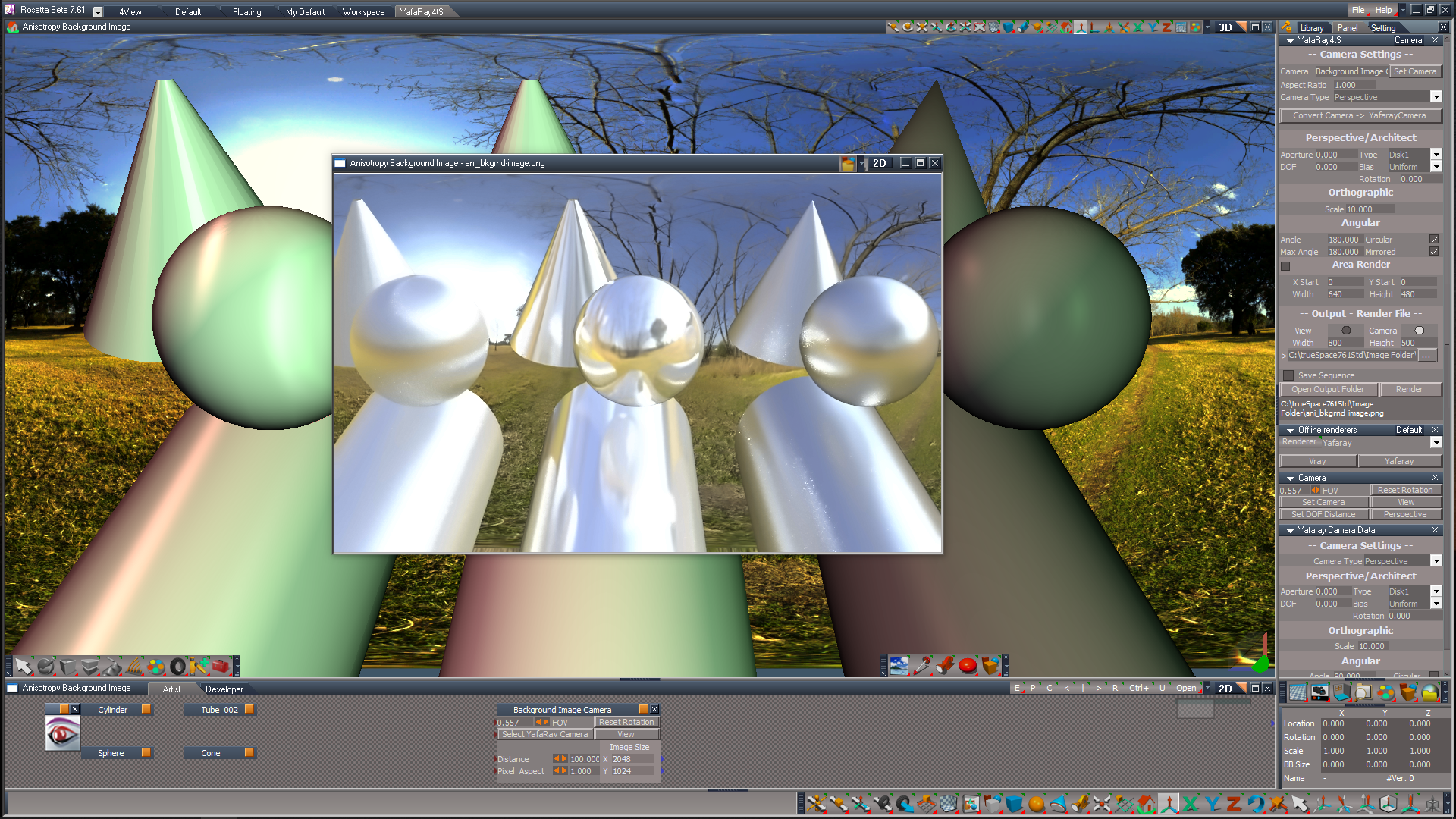
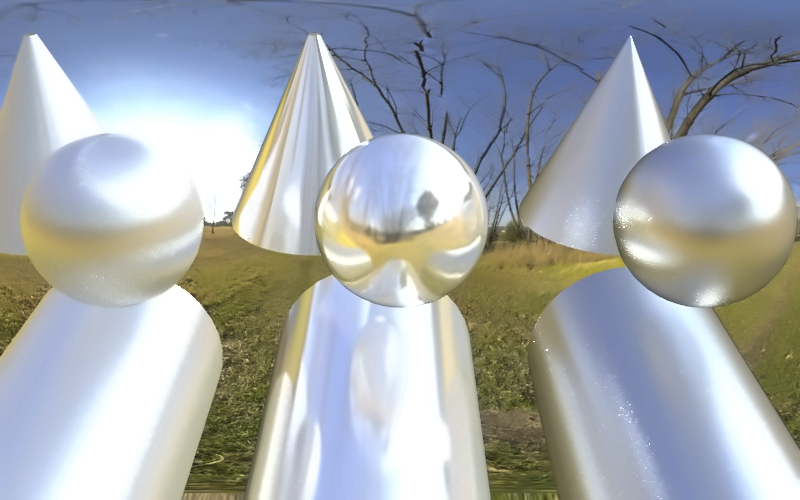
Here is an Anisotropy Background Image.RsScn that demonstrates using a Background Image Plane that includes a YafaRay Camera
The Camera is not necessarily needed but is being used in the YafaRay4tS Camera View
It could also be used as an Image in a scene
The Image Plane's material is a YafaRay Material
.
This is also a proof of concept use in lieu of the Image Preview Sphere, which does not have the Primitive Tool(s) issue
Rendered image
.
The Camera is not necessarily needed but is being used in the YafaRay4tS Camera View
It could also be used as an Image in a scene
The Image Plane's material is a YafaRay Material
This is also a proof of concept use in lieu of the Image Preview Sphere, which does not have the Primitive Tool(s) issue
Rendered image
- Attachments
-
- Anisotropy Background Image.RsScn
- (4.88 MiB) Downloaded 53 times
-
trueBlue
- Captain
- Posts: 5548
- Joined: 06 Jul 2009, 22:50
- Type the number ten into the box: 10
Re: YafaRay4tS v1.0.0
Does DOF work?
Does the YafaRay Camera's Yafaray Camera Data need to have the new Equirectangular Camera Type and or any special settings added?
Here is a YafaRay4tS DOF scene
DOF = 9.069
Edit: It looks like there is a disconnect between the Yafaray Camera Data and YafaaRay4tS Camera aspect
The Yafaray Camera Data does not seem to matter, whereas the YafaaRay4tS Camera aspect does
Looks like there needs to be a Sync button
Your Copy Attributes script works great for this
Maybe the Set Camera button on the Camera aspect could do this
And or a Set Camera Settings on the Yafaray Camera Data panel
Also include an Anti-Aliasing Settigs; Inc. Sample attribute on the Yafaray Camera Data panel, Default value = 20
The Blender doc mentions other options that YafaRay4tS does not have:
Does not seem to work in YafaRay4tS
Edit2: Updated the scene with a new Yafaray Camera
List:
Button code
Yafaray Camera Data
DOF Distance script
Camera Settings script
Does the YafaRay Camera's Yafaray Camera Data need to have the new Equirectangular Camera Type and or any special settings added?
Here is a YafaRay4tS DOF scene
DOF = 9.069
Edit: It looks like there is a disconnect between the Yafaray Camera Data and YafaaRay4tS Camera aspect
The Yafaray Camera Data does not seem to matter, whereas the YafaaRay4tS Camera aspect does
Looks like there needs to be a Sync button
Your Copy Attributes script works great for this
Maybe the Set Camera button on the Camera aspect could do this
And or a Set Camera Settings on the Yafaray Camera Data panel
Also include an Anti-Aliasing Settigs; Inc. Sample attribute on the Yafaray Camera Data panel, Default value = 20
The Blender doc mentions other options that YafaRay4tS does not have:
Edit: Supposedly, the Architect camera type supports DOFThe DOF effect depends also on the render anti aliasing settings to get a nice blurred effect. First of all it is recommended to lower AA threshold a bit, but not set it to totally zero. Setting a high number of AA passes is also not really going to make all that much difference, the main smoothness factor that makes the most difference is really the amount of AA samples. A single pass with a high number of samples may be sufficient.
Camera Shift.
Technically speaking, this feature shifts the image plane with respect to the focal point so the former is not longer centered. Useful for camera matching work.
Camera Clipping.
Sets the camera clipping limits. Only objects within the limits are rendered. If Limits in the Display panel is enabled, the clip bounds will be visible as two yellow connected dots on the camera line of sight. Useful to make focal lengths compatible with scenes, as explained here,
Does not seem to work in YafaRay4tS
Edit2: Updated the scene with a new Yafaray Camera
List:
Button code
Yafaray Camera Data
DOF Distance script
Camera Settings script
- Attachments
-
- YafaRay4tS DOF.RsScn
- (3.26 MiB) Downloaded 50 times
-
clintonman
- Captain
- Posts: 5659
- Joined: 21 May 2009, 21:08
- Type the number ten into the box: 0
- Location: California
Re: YafaRay4tS v1.0.0
The camera controls need to be on the yafaray cameras with the yaf camera panel for perspective and non-yafaray cameras.trueBlue wrote: 09 Feb 2024, 22:51 Does DOF work?
Does the YafaRay Camera's Yafaray Camera Data need to have the new Equirectangular Camera Type and or any special settings added?
Here is a YafaRay4tS DOF scene
DOF = 9.069
Edit: It looks like there is a disconnect between the Yafaray Camera Data and YafaaRay4tS Camera aspect
The Yafaray Camera Data does not seem to matter, whereas the YafaaRay4tS Camera aspect does
Looks like there needs to be a Sync button
Your Copy Attributes script works great for this
Maybe the Set Camera button on the Camera aspect could do this
And or a Set Camera Settings on the Yafaray Camera Data panel
Also include an Anti-Aliasing Settigs; Inc. Sample attribute on the Yafaray Camera Data panel, Default value = 20
The Blender doc mentions other options that YafaRay4tS does not have:The DOF effect depends also on the render anti aliasing settings to get a nice blurred effect. First of all it is recommended to lower AA threshold a bit, but not set it to totally zero. Setting a high number of AA passes is also not really going to make all that much difference, the main smoothness factor that makes the most difference is really the amount of AA samples. A single pass with a high number of samples may be sufficient.
Camera Shift.
Technically speaking, this feature shifts the image plane with respect to the focal point so the former is not longer centered. Useful for camera matching work.
Camera Clipping.
Sets the camera clipping limits. Only objects within the limits are rendered. If Limits in the Display panel is enabled, the clip bounds will be visible as two yellow connected dots on the camera line of sight. Useful to make focal lengths compatible with scenes, as explained here,
-
trueBlue
- Captain
- Posts: 5548
- Joined: 06 Jul 2009, 22:50
- Type the number ten into the box: 10
Re: YafaRay4tS v1.0.0
In this screenshot, YafaRay4tS is set to Render from a tS CameraThe camera controls need to be on the yafaray cameras with the yaf camera panel for perspective and non-yafaray cameras.
The Yafaray Camera/Yafaray Camera Data and the tS Camera do not have the vaules shown in the YafaRay4tS/Camera aspect
As you can see, it still renders the DOF

-
clintonman
- Captain
- Posts: 5659
- Joined: 21 May 2009, 21:08
- Type the number ten into the box: 0
- Location: California
Re: YafaRay4tS v1.0.0
The code to read camera data from the camera was broken when then name of a node was changed from "Yaf Camera Data" to "Yafaray Camera Data"trueBlue wrote: 09 Feb 2024, 22:51 Does DOF work?
...
Fix is shown here
CameraFnSet line 74
Code: Select all
	//read from actual camera
	// if (Node.Exists(Yaf_CamPath + "/Yaf Camera Data")) {
	// 	var cameraData = Yaf_CamPath + "/Yaf Camera Data"
	if (Node.Exists(Yaf_CamPath + "/Yafaray Camera Data")) {
var cameraData = Yaf_CamPath + "/Yafaray Camera Data"-
clintonman
- Captain
- Posts: 5659
- Joined: 21 May 2009, 21:08
- Type the number ten into the box: 0
- Location: California
Re: YafaRay4tS v1.0.0
...trueBlue wrote: 09 Feb 2024, 22:51 Does DOF work?
...
Camera Shift.
Technically speaking, this feature shifts the image plane with respect to the focal point so the former is not longer centered. Useful for camera matching work.
Camera Clipping.
Sets the camera clipping limits. Only objects within the limits are rendered. If Limits in the Display panel is enabled, the clip bounds will be visible as two yellow connected dots on the camera line of sight. Useful to make focal lengths compatible with scenes, as explained here,
[/quote]

DOF from camera settings works now
Can't find or generate any camera shift information for the export, so skipping the shift and the clipping options.
-
trueBlue
- Captain
- Posts: 5548
- Joined: 06 Jul 2009, 22:50
- Type the number ten into the box: 10
Re: YafaRay4tS v1.0.0
Would it be better if it was backwards compatible?clintonman wrote: 11 Feb 2024, 18:09The code to read camera data from the camera was broken when then name of a node was changed from "Yaf Camera Data" to "Yafaray Camera Data"trueBlue wrote: 09 Feb 2024, 22:51 Does DOF work?
...
Fix is shown here
CameraFnSet line 74Code: Select all
	//read from actual camera
	// if (Node.Exists(Yaf_CamPath + "/Yaf Camera Data")) {
	// 	var cameraData = Yaf_CamPath + "/Yaf Camera Data"
	if (Node.Exists(Yaf_CamPath + "/Yafaray Camera Data")) {
		var cameraData = Yaf_CamPath + "/Yafaray Camera Data"
Code: Select all
	//read from actual camera
	if (Node.Exists(Yaf_CamPath + "/Yaf Camera Data")) {
		var cameraData = Yaf_CamPath + "/Yaf Camera Data"
	if (Node.Exists(Yaf_CamPath + "/Yafaray Camera Data"))
		var cameraData = Yaf_CamPath + "/Yafaray Camera Data"
-
clintonman
- Captain
- Posts: 5659
- Joined: 21 May 2009, 21:08
- Type the number ten into the box: 0
- Location: California
Re: YafaRay4tS v1.0.0
The scene utilities need to be updated to copy the old panel information also taking the name change into accounttrueBlue wrote: 11 Feb 2024, 19:56Would it be better if it was backwards compatible?clintonman wrote: 11 Feb 2024, 18:09The code to read camera data from the camera was broken when then name of a node was changed from "Yaf Camera Data" to "Yafaray Camera Data"trueBlue wrote: 09 Feb 2024, 22:51 Does DOF work?
...
Fix is shown here
CameraFnSet line 74Code: Select all
	//read from actual camera
	// if (Node.Exists(Yaf_CamPath + "/Yaf Camera Data")) {
	// 	var cameraData = Yaf_CamPath + "/Yaf Camera Data"
	if (Node.Exists(Yaf_CamPath + "/Yafaray Camera Data")) {
		var cameraData = Yaf_CamPath + "/Yafaray Camera Data"
Code: Select all
	//read from actual camera
	if (Node.Exists(Yaf_CamPath + "/Yaf Camera Data")) {
		var cameraData = Yaf_CamPath + "/Yaf Camera Data"
	if (Node.Exists(Yaf_CamPath + "/Yafaray Camera Data"))
		var cameraData = Yaf_CamPath + "/Yafaray Camera Data"
-
trueBlue
- Captain
- Posts: 5548
- Joined: 06 Jul 2009, 22:50
- Type the number ten into the box: 10
Re: YafaRay4tS v1.0.0
It still is not working for me because the Aperture and DOF Distance values are not transferred to the Camera aspect
Also, the Default value for the YafaRay Camera's Aperture = 0.000, which cancels DOF
Also, the Default value for the YafaRay Camera's Aperture = 0.000, which cancels DOF

-
clintonman
- Captain
- Posts: 5659
- Joined: 21 May 2009, 21:08
- Type the number ten into the box: 0
- Location: California
Re: YafaRay4tS v1.0.0
After the CameraFnSet is fixed there is nothing to transfer. The information is read from the Camera not the YafaRay4tS Camera aspect. The YafaRay4tS Camera aspect values are used if the View option is used or the chosen camera is not a YafaRay camera..trueBlue wrote: 11 Feb 2024, 20:22 It still is not working for me because the Aperture and DOF Distance values are not transferred to the Camera aspect
Also, the Default value for the YafaRay Camera's Aperture = 0.000, which cancels DOF
Transfer DOF.png
-
trueBlue
- Captain
- Posts: 5548
- Joined: 06 Jul 2009, 22:50
- Type the number ten into the box: 10
Re: YafaRay4tS v1.0.0
As said, not working for me unless I add those values to the Camera aspectclintonman wrote: 11 Feb 2024, 20:42After the CameraFnSet is fixed there is nothing to transfer. The information is read from the Camera not the YafaRay4tS Camera aspect. The YafaRay4tS Camera aspect values are used if the View option is used or the chosen camera is not a YafaRay camera..trueBlue wrote: 11 Feb 2024, 20:22 It still is not working for me because the Aperture and DOF Distance values are not transferred to the Camera aspect
Also, the Default value for the YafaRay Camera's Aperture = 0.000, which cancels DOF
Transfer DOF.png
CameraFnSet is updated
Also, the Architect camera type does not work with DOF
-
clintonman
- Captain
- Posts: 5659
- Joined: 21 May 2009, 21:08
- Type the number ten into the box: 0
- Location: California
Re: YafaRay4tS v1.0.0
If you updated with the backwards compatible code it won't work. That code still only looks for the old name.trueBlue wrote: 11 Feb 2024, 19:56Would it be better if it was backwards compatible?clintonman wrote: 11 Feb 2024, 18:09The code to read camera data from the camera was broken when then name of a node was changed from "Yaf Camera Data" to "Yafaray Camera Data"trueBlue wrote: 09 Feb 2024, 22:51 Does DOF work?
...
Fix is shown here
CameraFnSet line 74Code: Select all
	//read from actual camera
	// if (Node.Exists(Yaf_CamPath + "/Yaf Camera Data")) {
	// 	var cameraData = Yaf_CamPath + "/Yaf Camera Data"
	if (Node.Exists(Yaf_CamPath + "/Yafaray Camera Data")) {
		var cameraData = Yaf_CamPath + "/Yafaray Camera Data"
Code: Select all
	//read from actual camera
	if (Node.Exists(Yaf_CamPath + "/Yaf Camera Data")) {
		var cameraData = Yaf_CamPath + "/Yaf Camera Data"
	if (Node.Exists(Yaf_CamPath + "/Yafaray Camera Data"))
		var cameraData = Yaf_CamPath + "/Yafaray Camera Data"
This is the code reformatted for clarity, it will never get past the first if statement:
Code: Select all
	//read from actual camera
	if (Node.Exists(Yaf_CamPath + "/Yaf Camera Data")) {
		var cameraData = Yaf_CamPath + "/Yaf Camera Data"
		if (Node.Exists(Yaf_CamPath + "/Yafaray Camera Data"))
			var cameraData = Yaf_CamPath + "/Yafaray Camera Data"
-
trueBlue
- Captain
- Posts: 5548
- Joined: 06 Jul 2009, 22:50
- Type the number ten into the box: 10
Re: YafaRay4tS v1.0.0
Got the CameraFnSet updated with the correct code and it works, Yeah!clintonman wrote: 11 Feb 2024, 20:14The scene utilities need to be updated to copy the old panel information also taking the name change into accounttrueBlue wrote: 11 Feb 2024, 19:56Would it be better if it was backwards compatible?clintonman wrote: 11 Feb 2024, 18:09
The code to read camera data from the camera was broken when then name of a node was changed from "Yaf Camera Data" to "Yafaray Camera Data"
Fix is shown here
CameraFnSet line 74Code: Select all
	//read from actual camera
	// if (Node.Exists(Yaf_CamPath + "/Yaf Camera Data")) {
	// 	var cameraData = Yaf_CamPath + "/Yaf Camera Data"
	if (Node.Exists(Yaf_CamPath + "/Yafaray Camera Data")) {
		var cameraData = Yaf_CamPath + "/Yafaray Camera Data"
Code: Select all
	//read from actual camera
	if (Node.Exists(Yaf_CamPath + "/Yaf Camera Data")) {
		var cameraData = Yaf_CamPath + "/Yaf Camera Data"
	if (Node.Exists(Yaf_CamPath + "/Yafaray Camera Data"))
		var cameraData = Yaf_CamPath + "/Yafaray Camera Data"
Not seeing what needs to be changed in the Scene Utilities script or scripts
-
clintonman
- Captain
- Posts: 5659
- Joined: 21 May 2009, 21:08
- Type the number ten into the box: 0
- Location: California
Re: YafaRay4tS v1.0.0
Since you mention it here is the updated scripts to show how it was changed. Convert Cameras has it.trueBlue wrote: 11 Feb 2024, 21:45 ...
Not seeing what needs to be changed in the Scene Utilities script or scripts
Other changes:
Removed the clear history node
Also made the Map node undo friendly since it is called during the conversions - Map node goes in Yaf materials library
All commands use no-history versions of commands
Process Imported Scene - only clear history if bitmap value is assigned to a conn
Gather Textures for Sharing - same
Added a new "Finish Conversion" so running the "Process Imported Scene" will update all the needed nodes in one step.
- Attachments
-
- Map4a17.RsObj
- (138.02 KiB) Downloaded 51 times
-
- YafaRay4tS Scene Utilitiesd5d7.RsObj
- (124.74 KiB) Downloaded 76 times
-
trueBlue
- Captain
- Posts: 5548
- Joined: 06 Jul 2009, 22:50
- Type the number ten into the box: 10
Re: YafaRay4tS v1.0.0
Got it, Thanks!clintonman wrote: 12 Feb 2024, 03:16Since you mention it here is the updated scripts to show how it was changed. Convert Cameras has it.trueBlue wrote: 11 Feb 2024, 21:45 ...
Not seeing what needs to be changed in the Scene Utilities script or scripts
Other changes:
Removed the clear history node
Also made the Map node undo friendly since it is called during the conversions - Map node goes in Yaf materials library
All commands use no-history versions of commands
Process Imported Scene - only clear history if bitmap value is assigned to a conn
Gather Textures for Sharing - same
Added a new "Finish Conversion" so running the "Process Imported Scene" will update all the needed nodes in one step.
-
trueBlue
- Captain
- Posts: 5548
- Joined: 06 Jul 2009, 22:50
- Type the number ten into the box: 10
Re: YafaRay4tS v1.0.0
YafaRay Camera
Set Camera
This button code does not work if Vray is the current Offline Renderer
If Yafaray is the current Offline Renderer and YafaRay4tS does not exist in the scene, this button code does not work
Set DOF Distance
This button code does not work if Vray is the current Offline Renderer
If Yafaray is the current Offline Renderer and YafaRay4tS does not exist in the scene, this button code does not work
Also, the Set DOF Distance button code does not set the YafaRay Camera to the Output Render File = Camera
So, Camera DOF does not work
It would be a great if both of these buttons could utilize:
ScriptObject.Execute('Scripts/CustomCommands/YafarayScripts/CameraSettings')
Also, there is no way to set DOF Distance when the Output Render File = View
Set Camera
This button code does not work if Vray is the current Offline Renderer
If Yafaray is the current Offline Renderer and YafaRay4tS does not exist in the scene, this button code does not work
Set DOF Distance
This button code does not work if Vray is the current Offline Renderer
If Yafaray is the current Offline Renderer and YafaRay4tS does not exist in the scene, this button code does not work
Also, the Set DOF Distance button code does not set the YafaRay Camera to the Output Render File = Camera
So, Camera DOF does not work
It would be a great if both of these buttons could utilize:
ScriptObject.Execute('Scripts/CustomCommands/YafarayScripts/CameraSettings')
Also, there is no way to set DOF Distance when the Output Render File = View
-
trueBlue
- Captain
- Posts: 5548
- Joined: 06 Jul 2009, 22:50
- Type the number ten into the box: 10
Re: YafaRay4tS v1.0.0
@Clinton
Here is modified Yafaray Camera that resides in the YafaRay4tS Setup library
Updated list:
Yafaray Camera Data 'Aperture default = 0.200 and add Equirectangular camera type'
dof distance dev script ' Sets camera type to Perspective'
Set Camera button code
Set DOF Distance button code 'Sets Camera Settings - Camera and Output Render File to Camera'
Here is modified Yafaray Camera that resides in the YafaRay4tS Setup library
Updated list:
Yafaray Camera Data 'Aperture default = 0.200 and add Equirectangular camera type'
dof distance dev script ' Sets camera type to Perspective'
Set Camera button code
Set DOF Distance button code 'Sets Camera Settings - Camera and Output Render File to Camera'
- Attachments
-
- Yafaray Camera.RsObj
- (57.94 KiB) Downloaded 44 times
-
trueBlue
- Captain
- Posts: 5548
- Joined: 06 Jul 2009, 22:50
- Type the number ten into the box: 10
Re: YafaRay4tS v1.0.0
Tried the new Process Imported Scene on this sceneclintonman wrote: 12 Feb 2024, 03:16Since you mention it here is the updated scripts to show how it was changed. Convert Cameras has it.trueBlue wrote: 11 Feb 2024, 21:45 ...
Not seeing what needs to be changed in the Scene Utilities script or scripts
Other changes:
Removed the clear history node
Also made the Map node undo friendly since it is called during the conversions - Map node goes in Yaf materials library
All commands use no-history versions of commands
Process Imported Scene - only clear history if bitmap value is assigned to a conn
Gather Textures for Sharing - same
Added a new "Finish Conversion" so running the "Process Imported Scene" will update all the needed nodes in one step.
The Plane material renders White
- Attachments
-
- YafaRay4tS, 1.RsScn
- (3.8 MiB) Downloaded 96 times
-
trueBlue
- Captain
- Posts: 5548
- Joined: 06 Jul 2009, 22:50
- Type the number ten into the box: 10
Re: YafaRay4tS v1.0.0
I added -- Anti-Aliasing Settings -- to the Camera aspect
- Attachments
-
- Yafaray Folder1850.RsObj
- (1.44 MiB) Downloaded 54 times
-
clintonman
- Captain
- Posts: 5659
- Joined: 21 May 2009, 21:08
- Type the number ten into the box: 0
- Location: California
Re: YafaRay4tS v1.0.0
Not rendering white here. Renders plane with forest image"trueBlue wrote: 12 Feb 2024, 19:06Tried the new Process Imported Scene on this sceneclintonman wrote: 12 Feb 2024, 03:16Since you mention it here is the updated scripts to show how it was changed. Convert Cameras has it.trueBlue wrote: 11 Feb 2024, 21:45 ...
Not seeing what needs to be changed in the Scene Utilities script or scripts
Other changes:
Removed the clear history node
Also made the Map node undo friendly since it is called during the conversions - Map node goes in Yaf materials library
All commands use no-history versions of commands
Process Imported Scene - only clear history if bitmap value is assigned to a conn
Gather Textures for Sharing - same
Added a new "Finish Conversion" so running the "Process Imported Scene" will update all the needed nodes in one step.
The Plane material renders White
-
trueBlue
- Captain
- Posts: 5548
- Joined: 06 Jul 2009, 22:50
- Type the number ten into the box: 10
Re: YafaRay4tS v1.0.0
Did you use the YafaRay4tS Scene Utilities; Process Imported Scene?
Before
.
Results
Before

Results

-
clintonman
- Captain
- Posts: 5659
- Joined: 21 May 2009, 21:08
- Type the number ten into the box: 0
- Location: California
Re: YafaRay4tS v1.0.0
YestrueBlue wrote: 14 Feb 2024, 13:52 Did you use the YafaRay4tS Scene Utilities; Process Imported Scene?
Before
Process Imported Scene.png
.
Results
Results.png
-
trueBlue
- Captain
- Posts: 5548
- Joined: 06 Jul 2009, 22:50
- Type the number ten into the box: 10
Re: YafaRay4tS v1.0.0
Works for you but not  me
me
ProcessedPlane on the right
Original Plane on the left
I cannot even fix the ProcessedPlane using the Material Editor
It is corrupted
Oddly, the Inspect Material shows the material, but renders White
me ProcessedPlane on the right
Original Plane on the left

It is corrupted
Oddly, the Inspect Material shows the material, but renders White
- Attachments
-
- YafaRay4tS, 2.RsScn
- (3.38 MiB) Downloaded 102 times
-
clintonman
- Captain
- Posts: 5659
- Joined: 21 May 2009, 21:08
- Type the number ten into the box: 0
- Location: California
Re: YafaRay4tS v1.0.0
trueBlue wrote: 14 Feb 2024, 18:06 Works for you but not
ProcessedPlane on the right
Original Plane on the left
ProcessedPlane.png
I cannot even fix the ProcessedPlane using the Material Editor
It is corrupted
Oddly, the Inspect Material shows the material, but renders White

- YafMaterialNameBad.jpg (39.18 KiB) Viewed 881 times
After running utility conversion the name is "D3D material" and it renders properly.
Maybe your /YafaRay Folder/YafaRay4tS does not have the updated YafaRay4tS Scene Utilities?
-
trueBlue
- Captain
- Posts: 5548
- Joined: 06 Jul 2009, 22:50
- Type the number ten into the box: 10
Re: YafaRay4tS v1.0.0
It was updatedclintonman wrote: 14 Feb 2024, 18:55YafMaterialNameBad.jpgtrueBlue wrote: 14 Feb 2024, 18:06 Works for you but not
ProcessedPlane on the right
Original Plane on the left
ProcessedPlane.png
I cannot even fix the ProcessedPlane using the Material Editor
It is corrupted
Oddly, the Inspect Material shows the material, but renders White
One of the materials is named "YafaRay Shiny_Diffuse"
After running utility conversion the name is "D3D material" and it renders properly.
Maybe your /YafaRay Folder/YafaRay4tS does not have the updated YafaRay4tS Scene Utilities?
Updated again
New scene
Before

Same results
This time, I ran the Update YafaRay Materials script

After, the material name is YafaRay Shiny_Diffuse
-
clintonman
- Captain
- Posts: 5659
- Joined: 21 May 2009, 21:08
- Type the number ten into the box: 0
- Location: California
Re: YafaRay4tS v1.0.0
When you load the shiny diffuse material from the library into tS does it have the name YafaRay Shiny_Diffuse ? If so then there's yer problem.trueBlue wrote: 14 Feb 2024, 20:58It was updatedclintonman wrote: 14 Feb 2024, 18:55YafMaterialNameBad.jpgtrueBlue wrote: 14 Feb 2024, 18:06 Works for you but not
ProcessedPlane on the right
Original Plane on the left
ProcessedPlane.png
I cannot even fix the ProcessedPlane using the Material Editor
It is corrupted
Oddly, the Inspect Material shows the material, but renders White
One of the materials is named "YafaRay Shiny_Diffuse"
After running utility conversion the name is "D3D material" and it renders properly.
Maybe your /YafaRay Folder/YafaRay4tS does not have the updated YafaRay4tS Scene Utilities?
Updated again
New scene
Before
Before.png
.
Same results
This time, I ran the Update YafaRay Materials script
After.png
As you can see, before, the material name is D3D material
After, the material name is YafaRay Shiny_Diffuse
-
trueBlue
- Captain
- Posts: 5548
- Joined: 06 Jul 2009, 22:50
- Type the number ten into the box: 10
Re: YafaRay4tS v1.0.0
Nope, all materials Load as D3D material
That was the first thing I checked before replying
Thats why I posted the Before image
Edit: Maybe this will help
.
There is only ONE object in this scene
Why does the Trace run three times?
That was the first thing I checked before replying
Thats why I posted the Before image
Edit: Maybe this will help

- Convert 3x.png (2.42 KiB) Viewed 1096 times
There is only ONE object in this scene
Why does the Trace run three times?
-
trueBlue
- Captain
- Posts: 5548
- Joined: 06 Jul 2009, 22:50
- Type the number ten into the box: 10
Re: YafaRay4tS v1.0.0
Put a Trace here:
function FindOldYafaray(currentNode)
{
System.Trace("FindOldYafaray " + currentNode);
You will see that it is searching the YafaRay4tS node in the Scene
Is there a way to Avoid searching the YafaRay4tS node in the Scene?
Over all, it seems to me, that there should be NO conversation, if the material is not the Old "Yaf_" material
function FindOldYafaray(currentNode)
{
System.Trace("FindOldYafaray " + currentNode);
You will see that it is searching the YafaRay4tS node in the Scene
Is there a way to Avoid searching the YafaRay4tS node in the Scene?
Over all, it seems to me, that there should be NO conversation, if the material is not the Old "Yaf_" material
-
clintonman
- Captain
- Posts: 5659
- Joined: 21 May 2009, 21:08
- Type the number ten into the box: 0
- Location: California
Re: YafaRay4tS v1.0.0
Add if(Node.ShortName(currentNode) == "YafaRay4tS") return;trueBlue wrote: 14 Feb 2024, 22:24 Put a Trace here:
function FindOldYafaray(currentNode)
{
System.Trace("FindOldYafaray " + currentNode);
You will see that it is searching the YafaRay4tS node in the Scene
Is there a way to Avoid searching the YafaRay4tS node in the Scene?
Over all, it seems to me, that there should be NO conversation, if the material is not the Old "Yaf_" material
Also the ms_flags_object object has a yafaray material, so I reset it to the default tS material
Code: Select all
function FindOldYafaray(currentNode)
{
	//System.Trace(currentNode);
	var child;
	var numChildren = Node.SubObjectCount(currentNode);

	if(numChildren < 1) return;

	if(Node.ShortName(currentNode) == "YafaRay4tS") return;

	if(isIndigo(currentNode)) return;

	if(Node.IsCamera(currentNode)) return;

	if(Node.IsLight(currentNode)) return;

	if(isOldYafaray(currentNode)) {
		ConvertToNewYafaray(currentNode)
		return;
	}

	for(var i=0;i<numChildren;i++) {
		var child = currentNode + "/" + Node.SubObject(currentNode, i);
		FindOldYafaray(child);
	}
}-
clintonman
- Captain
- Posts: 5659
- Joined: 21 May 2009, 21:08
- Type the number ten into the box: 0
- Location: California
Re: YafaRay4tS v1.0.0
I'm out of ideas then. There is no code in the conversion that renames the material.trueBlue wrote: 14 Feb 2024, 21:31 Nope, all materials Load as D3D material
...
-
trueBlue
- Captain
- Posts: 5548
- Joined: 06 Jul 2009, 22:50
- Type the number ten into the box: 10
Re: YafaRay4tS v1.0.0
There has to be something wrongclintonman wrote: 15 Feb 2024, 01:31I'm out of ideas then. There is no code in the conversion that renames the material.trueBlue wrote: 14 Feb 2024, 21:31 Nope, all materials Load as D3D material
...
Ran Process Imported Scene on the orco_mapping scene
It rendered fine before using this new YafaRay4tS Scene Utilities

-
trueBlue
- Captain
- Posts: 5548
- Joined: 06 Jul 2009, 22:50
- Type the number ten into the box: 10
Re: YafaRay4tS v1.0.0
I think I found the issue
Currently all the YafaRay Materials have a Helper node
The name of the nodes starts with "Yaf_"
Example:
YafaRay Shiny_Diffuse has:
Yaf_Shiny_Diffuse_Helper
Rename it to YafaRay_Shiny_Diffuse_Helper
This stops the material from being converted
Note:
I have no idea if you are referring to the Helper nodes by name in your scripts
I have no idea if this resolves the Renaming issue
It is not being converted, so no renaming is happening
Instead of renaming the Helper nodes, maybe you can change the Update YafaRay Materials script to not search inside the materials
Edit:
Additionally, the function LoadTextureNode(MapAttribute, owner )
is using owner
At the top of the script you have:
owner = System.ThisOwner();
This seems to me, to imply that owner is YafaRay4tS Scene Utilities
Edit2:
It looks like you should also take in account your new materials that have the SamplingFactor connector
Currently all the YafaRay Materials have a Helper node
The name of the nodes starts with "Yaf_"
Example:
YafaRay Shiny_Diffuse has:
Yaf_Shiny_Diffuse_Helper
Rename it to YafaRay_Shiny_Diffuse_Helper
This stops the material from being converted
Note:
I have no idea if you are referring to the Helper nodes by name in your scripts
I have no idea if this resolves the Renaming issue
It is not being converted, so no renaming is happening
Instead of renaming the Helper nodes, maybe you can change the Update YafaRay Materials script to not search inside the materials
Edit:
Additionally, the function LoadTextureNode(MapAttribute, owner )
is using owner
At the top of the script you have:
owner = System.ThisOwner();
This seems to me, to imply that owner is YafaRay4tS Scene Utilities
Edit2:
It looks like you should also take in account your new materials that have the SamplingFactor connector
-
clintonman
- Captain
- Posts: 5659
- Joined: 21 May 2009, 21:08
- Type the number ten into the box: 0
- Location: California
Re: YafaRay4tS v1.0.0
"I have no idea if you are referring to the Helper nodes by name in your scripts"trueBlue wrote: 15 Feb 2024, 13:39 I think I found the issue
Currently all the YafaRay Materials have a Helper node
The name of the nodes starts with "Yaf_"
Example:
YafaRay Shiny_Diffuse has:
Yaf_Shiny_Diffuse_Helper
Rename it to YafaRay_Shiny_Diffuse_Helper
This stops the material from being converted
Note:
I have no idea if you are referring to the Helper nodes by name in your scripts
I have no idea if this resolves the Renaming issue
It is not being converted, so no renaming is happening
Instead of renaming the Helper nodes, maybe you can change the Update YafaRay Materials script to not search inside the materials
Yes it is.
"I have no idea if this resolves the Renaming issue
It is not being converted, so no renaming is happening"
I doubt it. There is no renaming of materials. Only the texture nodes are renamed, not materials.
Sounds like that change will stop all material conversions.
I tried your test scene with UU plus the last Yafaray folder you provided. It converted and rendered good. Reset UU default context loaded and converted the scene and it rendered good. So the last UU and the latest Yafaray folder all work here.
If you can share all the yafaray related scripts and libraries maybe I can see what you're seeing.
-
trueBlue
- Captain
- Posts: 5548
- Joined: 06 Jul 2009, 22:50
- Type the number ten into the box: 10
Re: YafaRay4tS v1.0.0
Here is all my current YafaRay libraries and Yafaray Folder
The YafaRay4tS Scene Utilities does not have the latest fixes to avoid the YafaRay4tS node in the scene
The YafaRay4tS Scene Utilities does not have the latest fixes to avoid the YafaRay4tS node in the scene
- Attachments
-
- YafaRay Files.zip
- (22.72 MiB) Downloaded 56 times
-
clintonman
- Captain
- Posts: 5659
- Joined: 21 May 2009, 21:08
- Type the number ten into the box: 0
- Location: California
Re: YafaRay4tS v1.0.0
trueBlue wrote: 15 Feb 2024, 16:24 Here is all my current YafaRay libraries and Yafaray Folder
The YafaRay4tS Scene Utilities does not have the latest fixes to avoid the YafaRay4tS node in the scene

Left is loaded from your material library
Right is loaded from the latest UU
New materials are loading with Yafaray names. They are not loading with the "D3D material" name.
When you load the new shiny diffuse material from the library into tS it has the name YafaRay Shiny_Diffuse
-
trueBlue
- Captain
- Posts: 5548
- Joined: 06 Jul 2009, 22:50
- Type the number ten into the box: 10
Re: YafaRay4tS v1.0.0
If I RClick Load any of these materials from the library, the Material Editor shows the material as D3D material
If I RDrag any of these materials from the library on top of objects, the Material Editor shows the material as D3D material
If I use the Material Editor's Inspect tool on any of these objects the Material Editor shows the material as D3D material
The only time any of these material do not show as D3D material, is when I LDrag a material into the Link Editor
My process for saving any material to a library, is to save it from a Loaded state, Insert As "D3D material" and then rename it in the library
Please upload a working YafaRay Materials library and I will test and see if it makes any difference with this renaming issue, I am having with the YafaRay4tS Scene Utilities
If I RDrag any of these materials from the library on top of objects, the Material Editor shows the material as D3D material
If I use the Material Editor's Inspect tool on any of these objects the Material Editor shows the material as D3D material
The only time any of these material do not show as D3D material, is when I LDrag a material into the Link Editor
My process for saving any material to a library, is to save it from a Loaded state, Insert As "D3D material" and then rename it in the library
Please upload a working YafaRay Materials library and I will test and see if it makes any difference with this renaming issue, I am having with the YafaRay4tS Scene Utilities
-
clintonman
- Captain
- Posts: 5659
- Joined: 21 May 2009, 21:08
- Type the number ten into the box: 0
- Location: California
Re: YafaRay4tS v1.0.0
The script does not load material using the Material Editor and it does not load by drag and drop.trueBlue wrote: 15 Feb 2024, 17:18 If I RClick Load any of these materials from the library, the Material Editor shows the material as D3D material
If I RDrag any of these materials from the library on top of objects, the Material Editor shows the material as D3D material
If I use the Material Editor's Inspect tool on any of these objects the Material Editor shows the material as D3D material
The only time any of these material do not show as D3D material, is when I LDrag a material into the Link Editor
My process for saving any material to a library, is to save it from a Loaded state "D3D material" and then rename it in the library
Please upload a working YafaRay Materials library and I will test and see if it makes any difference with this renaming issue, I am having with the YafaRay4tS Scene Utilities
YafaRay Materials from the UU attached.
- Attachments
-
- YafaRay Materials9ff5.zip
- (716.56 KiB) Downloaded 82 times
-
trueBlue
- Captain
- Posts: 5548
- Joined: 06 Jul 2009, 22:50
- Type the number ten into the box: 10
Re: YafaRay4tS v1.0.0
Sucess, no renaming with the YafaRay4tS Scene Utilities - YafaRay Materials!
Render before and after, good
However, when I ran Process Imported Scene, the render is blank of objects
Edit: This was a defualt workspace scene lights and camera
I suspect it was the Lights script that caused the problem
Because the YafaRay4tS Scene did not have the above problem
Render before and after, good
However, when I ran Process Imported Scene, the render is blank of objects

- yaf_test.png (2.8 KiB) Viewed 890 times
Edit: This was a defualt workspace scene lights and camera
I suspect it was the Lights script that caused the problem
Because the YafaRay4tS Scene did not have the above problem
-
trueBlue
- Captain
- Posts: 5548
- Joined: 06 Jul 2009, 22:50
- Type the number ten into the box: 10
Re: YafaRay4tS v1.0.0
Load the Bobby character and Render
Error:
Error:
ERR Source object: /Project/Space 3D/YafaRay4tS/ExportXML Error: Microsoft JScript runtime error Description: Invalid procedure call or argument Error code: 0x800a0005 - (null) Line: 41, Char: 3 Script text: arams.Param('bHandled') = true;
-
clintonman
- Captain
- Posts: 5659
- Joined: 21 May 2009, 21:08
- Type the number ten into the box: 0
- Location: California
Re: YafaRay4tS v1.0.0
trueBlue wrote: 18 Feb 2024, 16:53 Load the Bobby character and Render
Error:ERR Source object: /Project/Space 3D/YafaRay4tS/ExportXML Error: Microsoft JScript runtime error Description: Invalid procedure call or argument Error code: 0x800a0005 - (null) Line: 41, Char: 3 Script text: arams.Param('bHandled') = true;

Fixed. Problem was an invalid checkbox state on the actor. Also fixed actor rendering in general. Before had to add SDS or a morph before actors would render.
The materials were converted from base materials to compound materials. The hair material was trickier. For that had to save the bitmap for the hair as an image file and load it back in before YafaRay would see it. Yaf needs bitmap files and hair bitmap is generated inside tS.
MeshFnSet around line 41
Code: Select all
	// Check for Object Render Attributes node
	if (Node.Exists(CurrentNode + "/Object Render Attributes")) {

		// Obtain Invisible value
		var Invisible = false;
		if (Node.ConExists(CurrentNode + "/Object Render Attributes", "Invisible")) {
			//invalid checkbox state
			try {
				Invisible = Node.Value(CurrentNode + "/Object Render Attributes", "Invisible");
			} catch(err) {
				Node.Value(CurrentNode + "/Object Render Attributes", "Invisible") = false;
			}
		}

		// if Invisible is checked, return
		if (Invisible)
			return false;
}Code: Select all
	// Get vertices from current mesh
	var dV = System.CreateDO('Space 3D Package/Vertex Stream Data');
	//dV = CurMesh.GetVerticesStreamByName('Vertex Stream Data');
dV = CurMesh.GetVertices();-
trueBlue
- Captain
- Posts: 5548
- Joined: 06 Jul 2009, 22:50
- Type the number ten into the box: 10
Re: YafaRay4tS v1.0.0
Great!  .
.
Takes a long time to render, but you can change the Hair's Strand Profile to Circle or Star and maybe Realtime to 100%
.
Any thoughts on changing the MeshFnSet to always apply smoothing?

Takes a long time to render, but you can change the Hair's Strand Profile to Circle or Star and maybe Realtime to 100%

Any thoughts on changing the MeshFnSet to always apply smoothing?
Code: Select all
File.Write('<smooth ID="' + MeshID + '" angle="30"/>\r\n') -
clintonman
- Captain
- Posts: 5659
- Joined: 21 May 2009, 21:08
- Type the number ten into the box: 0
- Location: California
Re: YafaRay4tS v1.0.0
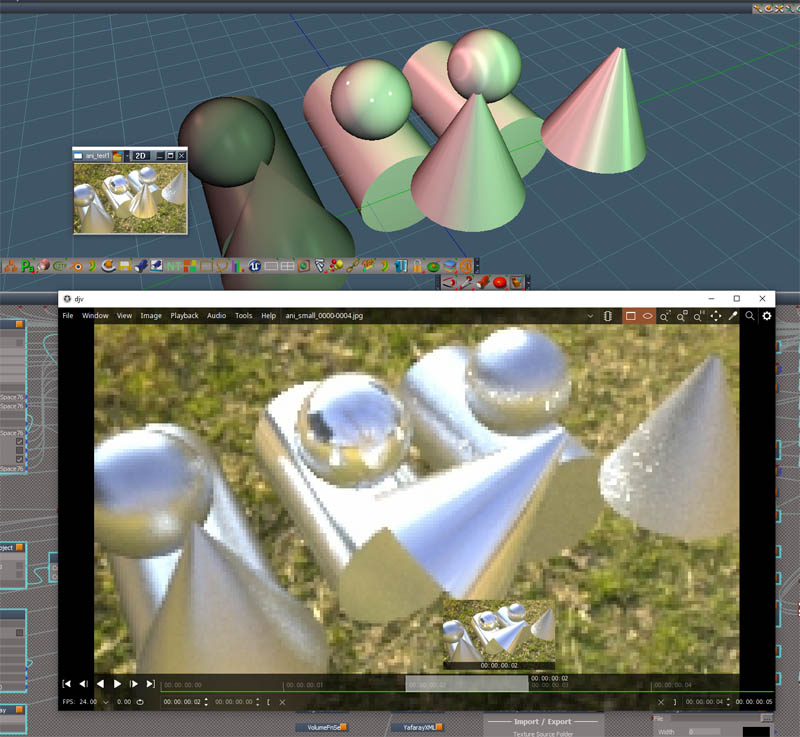
Doing the final big changes. Image shows a rendered animation in the DJV viewer. All the YafaRay rendering has been changed to a non-blocking run style. So you can continue to use tS while it renders. While rendering an animation there will be a button that can be pressed to open DJV with all the frames that have been completed ready to review. I think aborting an animation render should be easier than before. It is possible to use the external viewer during an animation like the internal viewer. It would work but I'm not so sure how practical it would be.
Think I have the bugs worked out for the hdr image previews, so a new HDRI to Lights version that supports YafaRay will come out at the same time this whole thing is done.
-
clintonman
- Captain
- Posts: 5659
- Joined: 21 May 2009, 21:08
- Type the number ten into the box: 0
- Location: California
Re: YafaRay4tS v1.0.0

Top previous render and d3d view preview
Bottom new render and new d3d view preview

Top previous render and d3d view preview
Bottom new render and new d3d view preview
The new previews use a collection of shadow casting lights to simulate the background lighting. They are arranged on the points of a modelspace geosphere with options for 12 or 42 lights. Only the top half of the lights cast shadows to keep it from looking too weird when the scene has something like a ground that objects are resting on.
-
clintonman
- Captain
- Posts: 5659
- Joined: 21 May 2009, 21:08
- Type the number ten into the box: 0
- Location: California
Re: YafaRay4tS v1.0.0

Top previous render and d3d view preview
Bottom new render and new d3d view preview
This yafaray preview uses the HDRI to Lights script to generate shadow casting lights. This sample has 32 lights for the preview.
-
trueBlue
- Captain
- Posts: 5548
- Joined: 06 Jul 2009, 22:50
- Type the number ten into the box: 10
Re: YafaRay4tS v1.0.0
New Previews look really good, minus the Shadows
Have you tried No Shadows?
Have you tried No Shadows?
-
clintonman
- Captain
- Posts: 5659
- Joined: 21 May 2009, 21:08
- Type the number ten into the box: 0
- Location: California
Re: YafaRay4tS v1.0.0
Shadows could look better but I don't plan to spend the time to make previews perfect. They only exist to help plan the render.trueBlue wrote: 26 Feb 2024, 15:24 New Previews look really good, minus the Shadows
Have you tried No Shadows?
Background panel don't check cast shadows to not have shadows.
-
trueBlue
- Captain
- Posts: 5548
- Joined: 06 Jul 2009, 22:50
- Type the number ten into the box: 10
Re: YafaRay4tS v1.0.0
I think the YafaRay4tS Background UI should be changed for better clarity
"Sunlight and moonlight are very similar. Sunlight comes to earth directly from the sun. Moonlight, on the other hand, is a reflection of sunlight"
New Background
.
IBL Image - Gradient - Constant Color "Default = Enabled"
Use Sun "Default = Enabled"
Changed # To Sun "# To Light"
Changed # From Sun "# From Light"
Changed Sun Direction to "Light Direction"
Change Darktide SunSky to "Moon Sky"
Change Night to "Use Moon"
Use Moon "Default = Enabled"
Note: Enabling Use Sun and Use Moon ensures that both work when changing the Background Type to Sun Sky or Moon Sky
Also does not interfere with other Background Types
It looks like Use Sun and Use Moon could be enabled and removed from the Background panel
Also, IBL Image - Gradient - Constant Color "Default = Enabled"
Moon Sky name changes:
RenderSettingsFnSet
SunSkyPreview
YafaRay4tS Scene Utilities
Process Imported Scene
Background Create button
Add: Show Preview Warning
Modified Alert:
ConstantPreview
GradientPreview
ImagePreview
SunSkyPreview
if(PreviewWarning) {
globalFS.Alert("WARNING: Primitive tools are not compatible with the Background Preview\n\nUse Preview - Hide before adding any primitives");
}
Note: A similar PrimitiveWarning could be added to the HDRI to Lights
"Sunlight and moonlight are very similar. Sunlight comes to earth directly from the sun. Moonlight, on the other hand, is a reflection of sunlight"
New Background

IBL Image - Gradient - Constant Color "Default = Enabled"
Use Sun "Default = Enabled"
Changed # To Sun "# To Light"
Changed # From Sun "# From Light"
Changed Sun Direction to "Light Direction"
Change Darktide SunSky to "Moon Sky"
Change Night to "Use Moon"
Use Moon "Default = Enabled"
Note: Enabling Use Sun and Use Moon ensures that both work when changing the Background Type to Sun Sky or Moon Sky
Also does not interfere with other Background Types
It looks like Use Sun and Use Moon could be enabled and removed from the Background panel
Also, IBL Image - Gradient - Constant Color "Default = Enabled"
Moon Sky name changes:
RenderSettingsFnSet
SunSkyPreview
YafaRay4tS Scene Utilities
Process Imported Scene
Background Create button
Add: Show Preview Warning
Modified Alert:
ConstantPreview
GradientPreview
ImagePreview
SunSkyPreview
if(PreviewWarning) {
globalFS.Alert("WARNING: Primitive tools are not compatible with the Background Preview\n\nUse Preview - Hide before adding any primitives");
}
Note: A similar PrimitiveWarning could be added to the HDRI to Lights
-
clintonman
- Captain
- Posts: 5659
- Joined: 21 May 2009, 21:08
- Type the number ten into the box: 0
- Location: California
Re: YafaRay4tS v1.0.0
This is what the UI looks like in Blender. There are 2 versions of sun sky, not a sun sky and a moon sky. The people who wrote the renderer have the defaults for the lights and night all set to off.
"Darktide Sunsky
Sunsky is a background type that approximates the full spectrum of daylight..."
then after a few pages of how to setup sun sky
"Night
This feature renders the scene at night, with the Sun acting as the Moon"
"Sunky is a similar concept to Darktide Sunsky, albeit simpler and handling colors in a
different way."
Here they changed the name of Darktide to Sunsky2. Night is a single checkbox option, not the point of the whole thing. I can understand wanting to change the lights to on, but don't get changing the sun to the moon by default.
Sunsky name changed to Sunsky1
Not shown is the Texture background. IBL is off by default in Blender. But l can understand wanting to turn it on by default.
"Darktide Sunsky
Sunsky is a background type that approximates the full spectrum of daylight..."
then after a few pages of how to setup sun sky
"Night
This feature renders the scene at night, with the Sun acting as the Moon"
"Sunky is a similar concept to Darktide Sunsky, albeit simpler and handling colors in a
different way."


Not shown is the Texture background. IBL is off by default in Blender. But l can understand wanting to turn it on by default.
-
clintonman
- Captain
- Posts: 5659
- Joined: 21 May 2009, 21:08
- Type the number ten into the box: 0
- Location: California
Re: YafaRay4tS v1.0.0
Maybe should change the "Image HDRI" to "Texture" since it does not have to be a source of light.
Also Blender has Caustic Photons and Diffuse Photons checked by default.
The "Background Light" and "Samples" was for sunsky so they don't belong at the top with the common controls. Unless they are relabeled as "Sunsky Background Light" and "Sunsky Samples"
Maybe "Show Preview Warning" should be in the Defaults panel.
Also Blender has Caustic Photons and Diffuse Photons checked by default.
The "Background Light" and "Samples" was for sunsky so they don't belong at the top with the common controls. Unless they are relabeled as "Sunsky Background Light" and "Sunsky Samples"
Maybe "Show Preview Warning" should be in the Defaults panel.
-
trueBlue
- Captain
- Posts: 5548
- Joined: 06 Jul 2009, 22:50
- Type the number ten into the box: 10
Re: YafaRay4tS v1.0.0
The "Background Light", "Casts Shadows", and "Samples" seem to be independentclintonman wrote: 29 Feb 2024, 16:20 Maybe should change the "Image HDRI" to "Texture" since it does not have to be a source of light.
Also Blender has Caustic Photons and Diffuse Photons checked by default.
The "Background Light" and "Samples" was for sunsky so they don't belong at the top with the common controls. Unless they are relabeled as "Sunsky Background Light" and "Sunsky Samples"
Maybe "Show Preview Warning" should be in the Defaults panel.
Their attribute names imply they are for the Background
I can use them to Render with no lights in the scene using Constant, Gradient, and Image Backgound types
Sun Sky has its own Casts Shadows
Shown in your Blender UI, they have both
I do not know about Blender and their naming conventions, but their words used sound odd to me
Anyway, YafaRay4tS is for trueSpace, not Blender
In YafaRay4tS, you are not selecting a Sun, you are selecting a trueSpace Directional Light
The Light Directions are used for both the Sun and Moon, yet they use a common UI that is in the Sun Sky area
When you select Sun Sky as a Background type, it does not work unless Use Sun is checked
Same as with the Moon that have so many alias names: DarkTide SunSky, Darktide SunSky, and Night
LOL, DarkTide is a game
Which is why I am suggesting the Sun and Moon be enabled
Then it is simple as selecting which one you want to use from the Background type
Just trying to make the UI for Sun Sky easier to understand and use
In even simpler terms, Sun Sky should be Sunlight and Moon Sky should be Moonlight
-
clintonman
- Captain
- Posts: 5659
- Joined: 21 May 2009, 21:08
- Type the number ten into the box: 0
- Location: California
Re: YafaRay4tS v1.0.0

Sun Sky Preview update
Could only get so far with this preview. Got the background material to follow the sun location. tS doesn't like it so much though. I had to stop because of non-stop crashes while editing. It doesn't crash with use and it is much closer to the render than before, so that's a win.
Also added some controls to make the sun light placement easier.
The front looks a little funny because I was testing to see what a dimension object would look in the render.
-
trueBlue
- Captain
- Posts: 5548
- Joined: 06 Jul 2009, 22:50
- Type the number ten into the box: 10
Re: YafaRay4tS v1.0.0
Looks much better!
Here is a replacement Image Viewer for inside YafaRay4tS to try out
Make any changes you see appropriate and let me know what you think
Things to try...
Load a file that is not a bitmap or an image that is not supported, and try to Open it
Look at and try the modified filter, "All Supported files"
Load and Open large, supported images, IE 2048x1024
Compare the same size image, by Rendering with YafaRay4tS using the iOptDetector
Something not right with both, when the image Height is greater than the Width
Edit: Update 3/9/2024
Here is a replacement Image Viewer for inside YafaRay4tS to try out
Make any changes you see appropriate and let me know what you think
Things to try...
Load a file that is not a bitmap or an image that is not supported, and try to Open it
Look at and try the modified filter, "All Supported files"
Load and Open large, supported images, IE 2048x1024
Compare the same size image, by Rendering with YafaRay4tS using the iOptDetector
Something not right with both, when the image Height is greater than the Width
Edit: Update 3/9/2024
- Attachments
-
- MoonSkySphere.RsObj
- (131.84 KiB) Downloaded 45 times
-
- Moonlight.RsScn
- (4.54 MiB) Downloaded 44 times
-
- Image Viewer.RsObj
- (48.71 KiB) Downloaded 47 times
-
clintonman
- Captain
- Posts: 5659
- Joined: 21 May 2009, 21:08
- Type the number ten into the box: 0
- Location: California
Re: YafaRay4tS v1.0.0
Image Viewer Changes:
does not close the opt render window
opens view after selecting the file - because I don't know why it's 2 steps to open the image
I also don't know what Refresh is for
fixed the window resize code
resize works with 4k and 8k images
resize uses tS "Frame Window" size instead of the screen size from Windows Manager Space
commented out a lot of code since didn't know what it was for
added status message - large files are slow to load
check the file extension is valid
found that the initial size doesn't matter since the image resizes to fit inside while manually changing the window size
does not close the opt render window
opens view after selecting the file - because I don't know why it's 2 steps to open the image
I also don't know what Refresh is for
fixed the window resize code
resize works with 4k and 8k images
resize uses tS "Frame Window" size instead of the screen size from Windows Manager Space
commented out a lot of code since didn't know what it was for
added status message - large files are slow to load
check the file extension is valid
found that the initial size doesn't matter since the image resizes to fit inside while manually changing the window size
- Attachments
-
- Image Viewerc470.RsObj
- (52.51 KiB) Downloaded 88 times
-
trueBlue
- Captain
- Posts: 5548
- Joined: 06 Jul 2009, 22:50
- Type the number ten into the box: 10
Re: YafaRay4tS v1.0.0
Way more professional!clintonman wrote: 08 Mar 2024, 05:48 Image Viewer Changes:
does not close the opt render window
opens view after selecting the file - because I don't know why it's 2 steps to open the image
I also don't know what Refresh is for
fixed the window resize code
resize works with 4k and 8k images
resize uses tS "Frame Window" size instead of the screen size from Windows Manager Space
commented out a lot of code since didn't know what it was for
added status message - large files are slow to load
check the file extension is valid
found that the initial size doesn't matter since the image resizes to fit inside while manually changing the window size
This YafaRay4tS Image Viewer was created mostly for viewing Render Pass images
The Refresh button is used to update the Rendered image
Observations:
Not closing other opened iOptViewers is problematic, especially the YafaRay4tS iOptDetector Internal Viewer
There needs to be a minimum Width & Height. IE: 128x128(?) or maybe use the "Frame Window" min/max values
When the image Height is greater than the Width, it does not work as expected
-
clintonman
- Captain
- Posts: 5659
- Joined: 21 May 2009, 21:08
- Type the number ten into the box: 0
- Location: California
Re: YafaRay4tS v1.0.0
Still don't know what Refresh is. Why would the rendered image need to be updated? or when does it get out of date? Is it because you want the image viewer to close the iopt render window?trueBlue wrote: 08 Mar 2024, 15:55 ...
Way more professional!
This YafaRay4tS Image Viewer was created mostly for viewing Render Pass images
The Refresh button is used to update the Rendered image
Observations:
Not closing other opened iOptViewers is problematic, especially the YafaRay4tS iOptDetector Internal Viewer
There needs to be a minimum Width & Height. IE: 128x128(?) or maybe use the "Frame Window" min/max values
When the image Height is greater than the Width, it does not work as expected
Don't see the issue with not closing the rendered iopt. Rendered iopt closes other render iopts and image viewer iopt closes other image viewer iopts. I don't see why one should close the other.
Minimum size, yup.
"Height is greater than the Width, it does not work as expected", no fix with no sample image. If it's a case of the image exif in a jpg changing the orientation then it won't be fixed since there's nothing in tS to read that.
-
trueBlue
- Captain
- Posts: 5548
- Joined: 06 Jul 2009, 22:50
- Type the number ten into the box: 10
Re: YafaRay4tS v1.0.0
Render something in YafaRay4tS
Open the Image Viewer and open the above image
Change something and Render
Press the Refresh button in the Image Viewer
.
I updated the Image Viewer in the previous post with your changes and made a few adjustments with Reset and the panel
Open the Image Viewer and open the above image
Change something and Render
Press the Refresh button in the Image Viewer

I updated the Image Viewer in the previous post with your changes and made a few adjustments with Reset and the panel
-
clintonman
- Captain
- Posts: 5659
- Joined: 21 May 2009, 21:08
- Type the number ten into the box: 0
- Location: California
Re: YafaRay4tS v1.0.0
Here are changes to OptDetectorFrame2 inside the tSDisplay to fix the problem.trueBlue wrote: 08 Mar 2024, 16:32 Render something in YafaRay4tS
Open the Image Viewer and open the above image
Change something and Render
Press the Refresh button in the Image Viewer
Refresh.png
.
I updated the Image Viewer in the previous post with your changes and made a few adjustments with Reset and the panel
OptDetectorFrame2
Code: Select all
// Execute
// Called to execute the command
function Execute(params)
{
	util = System.CreateDO("Clintons3D Package/Utility functions");

	var Yaf_UseInternalViewer = Node.Value(Space.CurrentScene() + "/YafaRay4tS" + '/UIstate', 'Yaf_UseInternalViewer');
	var Yaf_UseCustomViewer = Node.Value(Space.CurrentScene() + "/YafaRay4tS" + '/UIstate', 'Yaf_UseCustomViewer');
	var InternalViewer = Node.Value(Space.CurrentScene() + "/YafaRay4tS" + '/UIstate', "InternalViewer");
	if (!Yaf_UseInternalViewer && !Yaf_UseCustomViewer && InternalViewer != "iOptDetector") {
		return;
	}

	var Yaf_RenderFilename = Node.Value(System.ThisOwner(), 'Yaf_RenderFilename');
	var fso = new ActiveXObject("Scripting.FileSystemObject");

	var bmpViewNode = Space.CurrentScene() + "/YafaRay4tS/tSDisplay/BmpViewTransmitter";
	var numFrames = Node.SubObjectCount("/Project/Windows Manager Space");
	var windowFrames = [];
	var numOptiViews = 0;

	for (var i = 0; i < numFrames; i++) {
		var curnode = "/Project/Windows Manager Space/" + Node.SubObject("/Project/Windows Manager Space", i);
		windowFrames.push(curnode);
		if (Node.ConExists(curnode, "RootNode") && Node.Value(curnode, "RootNode") == bmpViewNode) {
			numOptiViews++;
			OptDetectorFrame = curnode;
		}
	}

	// zero found, open opti window for the render
	if (numOptiViews == 0) {
		OptDetectors.OpenBitmapView(Space.CurrentScene() + "/YafaRay4tS/tSDisplay/BmpViewTransmitter");
		OptDetectorFrame = FindRenderOptWindow();
	}

	//close all open opti windows except for 1
	//more than one found - should never happen safety net
	else if (numOptiViews > 1) {
		for (var i = 0; i < numFrames; i++) {
			if (!Node.ConExists(windowFrames[i], "RootNode")) continue;
			// if (Node.Value(windowFrames[i], "RootNode") == bmpViewNode && numOptiViews > 1) {
			// 	WindowsManager.CloseWindow(windowFrames[i]);
			// 	numOptiViews--;
			// }
			if (Node.Value(windowFrames[i], "RootNode") == bmpViewNode) {
				if (numOptiViews > 1) {
					WindowsManager.CloseWindow(windowFrames[i]);
					numOptiViews--;
				} else {
					OptDetectorFrame = windowFrames[i];
				}
			}
		}

	// } else if (numOptiViews != 1) {
	}

	// OptDetectorFrame = FindRenderOptWindow();

	if (OptDetectorFrame != "") {
		// Add toolbar and size viewer to Output Render File's Width and Height
		var Yaf_UseAreaRender = Node.Value(Space.CurrentScene() + '/YafaRay4tS/ExportXML', 'Yaf_UseAreaRender');
		if(Yaf_UseAreaRender) {
			var Yaf_Width = Node.Value(Space.CurrentScene() + '/YafaRay4tS/ExportXML', 'Yaf_Width');
			var Yaf_Height = Node.Value(Space.CurrentScene() + '/YafaRay4tS/ExportXML', 'Yaf_Height');
			WindowsManager.MoveWindow(OptDetectorFrame, -1, -1, Yaf_Width, Yaf_Height, -1, -1, -1)
		} else {
			var size = GetHeightWidth();
			WindowsManager.MoveWindow(OptDetectorFrame, -1, -1, size.Width, size.Height, -1, -1, -1)
		}

		Node.Value(OptDetectorFrame, "TabsAsButtons") = -1;//util version does not work

		var fileSN = fso.GetBaseName(Yaf_RenderFilename) + "." + fso.GetExtensionName(Yaf_RenderFilename)
		// Node.Value(OptDetectorFrame, "Title") = Node.ShortName(Space.CurrentScene()) + " - " + fileSN;
		util.SetNodeValueString(OptDetectorFrame, "Title", Node.ShortName(Space.CurrentScene()) + " - " + fileSN);

		if (!Node.Exists(OptDetectorFrame + "/YafaRay4tS_ToolbarFrame")) {
			// Node.Copy(Space.CurrentScene() + "/YafaRay4tS/tSDisplay/YafaRay4tS_ToolbarFrame", OptDetectorFrame)
			util.Copy(Space.CurrentScene() + "/YafaRay4tS/tSDisplay/YafaRay4tS_ToolbarFrame", OptDetectorFrame)
			WindowsManager.Activate();
			WindowsManager.UpdateWindowsStructure();
		} else {
			//rewrite RootNode to force title update
			// Node.Value(OptDetectorFrame, "RootNode") = Space.CurrentScene() + "/YafaRay4tS/tSDisplay/BmpViewTransmitter";
			util.SetNodeValueString(OptDetectorFrame, "RootNode", Space.CurrentScene() + "/YafaRay4tS/tSDisplay/BmpViewTransmitter");
		}
	}

	//reset connector so image shows in the frame
	// Node.ConReset(Space.CurrentScene() + "/YafaRay4tS/tSDisplay/BmpViewTransmitter", "Bitmap");
	util.ConReset(Space.CurrentScene() + "/YafaRay4tS/tSDisplay/BmpViewTransmitter", "Bitmap", Space.CurrentScene() + "/YafaRay4tS/tSDisplay/BmpViewTransmitter", "Bitmap");

	CMD = Node.Value(Space.CurrentScene() + "/YafaRay4tS/ClearHistory", "ClearCommandHistory")

	if(CMD){RsApp.ClearHistory();}

}

function GetHeightWidth()
{
	// var size = {};
	var Width = Node.Value(Space.CurrentScene() + "/YafaRay4tS", "Yaf_ResX")
	var Height = Node.Value(Space.CurrentScene() + "/YafaRay4tS", "Yaf_ResY")

	// var maxWidth = Math.floor(Node.Value("/Project/Windows Manager Space", "LayoutWidth") * 0.7);
	// var maxHeight = Math.floor(Node.Value("/Project/Windows Manager Space", "LayoutHeight") * 0.7);
	var maxWidth = Math.floor(Node.Value("/Project/Windows Manager Space/Frame Window", "Width") * 0.7);
	var maxHeight = Math.floor(Node.Value("/Project/Windows Manager Space/Frame Window", "Height") * 0.7);

	if (Height > maxHeight) {
		Width = Math.floor(Width * maxHeight / Height);
		Height = maxHeight;
	}
	if (Width > maxWidth) {
		Height = Math.floor(Height * maxWidth / Width);
		Width = maxWidth;
	}

	return {
		"Width": Width,
		"Height": Height
	}
}

function FindRenderOptWindow()
{
	var childNode, OptWindow = "";
	var wms = "/Project/Windows Manager Space";
	var numChildren = Node.SubObjectCount(wms);
	var childNode
	for (var i = 0; i < numChildren; i++) {
		childNode = wms + "/" + Node.SubObject(wms, i);
		if (Node.Exists(childNode + "/BitmapView") && !Node.Exists(childNode + "/Ground")) {
			OptWindow = childNode;
			// break;
		}
	}

	return OptWindow;
}-
clintonman
- Captain
- Posts: 5659
- Joined: 21 May 2009, 21:08
- Type the number ten into the box: 0
- Location: California
Re: YafaRay4tS v1.0.0

- Attachments
-
- Image Viewer TB.RsObj
- (47.61 KiB) Downloaded 42 times
-
trueBlue
- Captain
- Posts: 5548
- Joined: 06 Jul 2009, 22:50
- Type the number ten into the box: 10
-
clintonman
- Captain
- Posts: 5659
- Joined: 21 May 2009, 21:08
- Type the number ten into the box: 0
- Location: California
Re: YafaRay4tS v1.0.0

Darktide night preview
has the same unfixable limitations as the day light, but it looks good with the sun/moon in some locations. moon/sun behind the camera seems to give the best previews
-
bitkar

- Captain
- Posts: 2089
- Joined: 16 Mar 2010, 07:14
- Type the number ten into the box: 0
- Location: Czech Republic
Re: YafaRay4tS v1.0.0
omg guys... it seems there will be yafaray4ts v2 soon :D keep it up!
Michal aka bitkar
tS freak since tS2 (1998) and forever (tS7.61 modeler)
tS freak since tS2 (1998) and forever (tS7.61 modeler)
-
the_ant

- Chief Petty Officer
- Posts: 155
- Joined: 02 Jun 2009, 09:26
- Type the number ten into the box: 0
- Location: Perugia - Italy
Re: YafaRay4tS v1.0.0
Happy to browse through quasi-daily news in this amazing forum...
My "simple" question is: What are Pros and Cons in YafaRay versus VRay or Lightworks in TSp?
Hi all the gurues that keep this software still alive 15 years from its dismission...
My "simple" question is: What are Pros and Cons in YafaRay versus VRay or Lightworks in TSp?
Hi all the gurues that keep this software still alive 15 years from its dismission...
-
bitkar
- Captain
- Posts: 2089
- Joined: 16 Mar 2010, 07:14
- Type the number ten into the box: 0
- Location: Czech Republic
Re: YafaRay4tS v1.0.0
Vray has some minor bugs. Yafaray work a bit different when it comes to light sources. It uses objects and surfaces to emit lights as a primary (only?) method. This is very interesting way to do it. It also worked relatively fast, as I remember.
Michal aka bitkar
tS freak since tS2 (1998) and forever (tS7.61 modeler)
tS freak since tS2 (1998) and forever (tS7.61 modeler)
-
trueBlue
- Captain
- Posts: 5548
- Joined: 06 Jul 2009, 22:50
- Type the number ten into the box: 10
Re: YafaRay4tS v1.0.0
@Clinton
External Viewer Active does not Show/Display the Rendered image using the TGA Viewer or the djv program
C:\Program Files\DJV2\bin\djv.exe
The YafaRay4tS/UIstate node never seems to change even though the YafaRay4tS scripts and the CustomCommands/YafarayScripts scripts seem to change the values
Here is a scene with a new(today)/current downloaded YafaRay4tS panel
Note: The View button does open the djv program on my pc
External Viewer Active does not Show/Display the Rendered image using the TGA Viewer or the djv program
C:\Program Files\DJV2\bin\djv.exe
The YafaRay4tS/UIstate node never seems to change even though the YafaRay4tS scripts and the CustomCommands/YafarayScripts scripts seem to change the values
Here is a scene with a new(today)/current downloaded YafaRay4tS panel
Note: The View button does open the djv program on my pc
- Attachments
-
- YafaRay4tS External Viewer.RsScn
- (1.9 MiB) Downloaded 88 times
-
trueBlue
- Captain
- Posts: 5548
- Joined: 06 Jul 2009, 22:50
- Type the number ten into the box: 10
Re: YafaRay4tS v1.0.0
I do not see any code opening the Open External Viewer script
Is the Open External Viewer script suppose to be hooked up as shown:
Is the Open External Viewer script suppose to be hooked up as shown:
