Update. I got an email from a user who was getting crashes. He made a video demoing the crashes and that lead to the crash fixes mentioned below.
rsx file version v.1638415
fix crash bug - animation only option when wavefront obj import
add pivots to imported meshes
new control for null size with a smaller default value
fix yaw 180 option to add an additional 180 degrees in the z axis
normalize the mesh normal vectors exported
fix crash - installer in scene, added "DoNotProcess" boolean value
fix crash - character mesh is grouped and mesh is grouped error message
legacy character library crash fixes
- bad mesh normals
- no mesh normals
- horse skeleton error
Still not compatible with old charaters, but doesn't crash when exporting them.
The ue4cinematic export mode is now obsolete. Epic fixed most of the non-standard cinematic mode fbx stuff.
FBX 2 import export
-
clintonman

- Captain
- Posts: 5659
- Joined: 21 May 2009, 21:08
- Type the number ten into the box: 0
- Location: California
Re: FBX 2 import export
-
Draise

- Captain
- Posts: 3200
- Joined: 21 Sep 2009, 19:33
- Type the number ten into the box: 0
- Location: Bogota, Colombia
Re: FBX 2 import export
This is probably the most important addon that keeps trueSpace relevant even today. I'm glad you got the normals issues fixed. I usually reset the normals on import in other software. Forgot to report it!
-
clintonman
- Captain
- Posts: 5659
- Joined: 21 May 2009, 21:08
- Type the number ten into the box: 0
- Location: California
Re: FBX 2 import export
Yeah, I found the normals because of the old mesh normal crashes. I did a fbx text export and that's when I noticed the crazy normal values. They were something like 100 times bigger than they should have been.  As I write this I realize that the cause is that they are being multiplied by the export scale. It won't make any difference now, it normalizes before export, but I'm going to fix it in the code and get rid of that scale multiplier. Just for the sake of it.
As I write this I realize that the cause is that they are being multiplied by the export scale. It won't make any difference now, it normalizes before export, but I'm going to fix it in the code and get rid of that scale multiplier. Just for the sake of it.-
clintonman
- Captain
- Posts: 5659
- Joined: 21 May 2009, 21:08
- Type the number ten into the box: 0
- Location: California
Re: FBX 2 import export
Update July 13 2020
Now uses FBX v2019.5, the last 32bit version of the FBX SDK
Option to import/export scene instanced materials
Can save to earlier FBX versions
File size is smaller - just a happy accident, I guess, or Autodesk cleaned out a bunch of unneeded stuff.
Removed some old obsolete Unreal Engine export modes.
Installer clears the most recent files lists.
Motivation was that I had an FBX file that was too new to be read by the FBX v2015. Autodesk broke backward compatibility with version 2016. v2019 is the last FBX version that works in 32bit, so it's the last version that will work with trueSpace.
http://clintons3d.com/plugins/truespace ... inout.html
Now uses FBX v2019.5, the last 32bit version of the FBX SDK
Option to import/export scene instanced materials
Can save to earlier FBX versions
File size is smaller - just a happy accident, I guess, or Autodesk cleaned out a bunch of unneeded stuff.
Removed some old obsolete Unreal Engine export modes.
Installer clears the most recent files lists.
Motivation was that I had an FBX file that was too new to be read by the FBX v2015. Autodesk broke backward compatibility with version 2016. v2019 is the last FBX version that works in 32bit, so it's the last version that will work with trueSpace.
http://clintons3d.com/plugins/truespace ... inout.html
-
clintonman
- Captain
- Posts: 5659
- Joined: 21 May 2009, 21:08
- Type the number ten into the box: 0
- Location: California
Re: FBX 2 import export
July 14, 2020
One day later found a minor issue in the plugin - then found other issues to fix
Now uses a default texture for when the original file texture image is not found
fixed an emission value import problem I didn't even know was there
made import of emission and alpha values more efficient
the new instanced material export was using the material name attribute if it was available, otherwise using the material node name. Added this to the non-instanced material export which only looked at the material node name
One thing I found about tS scene instanced materials is that if 2 materials have identical output then the extra will be deleted. This is good for the case of an fbx file I got from from cad that had unique material names for everything even though it was the same material. In this case something like 60 materials got distilled down to just 1 material.
One day later found a minor issue in the plugin - then found other issues to fix
Now uses a default texture for when the original file texture image is not found
fixed an emission value import problem I didn't even know was there
made import of emission and alpha values more efficient
the new instanced material export was using the material name attribute if it was available, otherwise using the material node name. Added this to the non-instanced material export which only looked at the material node name
One thing I found about tS scene instanced materials is that if 2 materials have identical output then the extra will be deleted. This is good for the case of an fbx file I got from from cad that had unique material names for everything even though it was the same material. In this case something like 60 materials got distilled down to just 1 material.
-
clintonman
- Captain
- Posts: 5659
- Joined: 21 May 2009, 21:08
- Type the number ten into the box: 0
- Location: California
Re: FBX 2 import export
Update January 2021
Autodesk updated their FBX to version 2020. It added strict format checking and the file from tS was not passing the test, resulting in entire sections of the file being ignored by software using the 2020 standard. This update fixes that problem by removing extraneous indices for the uv values and normals.
Also added the option to triangulate meshes in the exported file, which also fixed the 2020 strict problem.
Fixed a crash bug caused by export material instancing when no material instancing exists in the scene and the case where the export material instancing was not active but scene items had material instancing.
Autodesk updated their FBX to version 2020. It added strict format checking and the file from tS was not passing the test, resulting in entire sections of the file being ignored by software using the 2020 standard. This update fixes that problem by removing extraneous indices for the uv values and normals.
Also added the option to triangulate meshes in the exported file, which also fixed the 2020 strict problem.
Fixed a crash bug caused by export material instancing when no material instancing exists in the scene and the case where the export material instancing was not active but scene items had material instancing.
-
clintonman
- Captain
- Posts: 5659
- Joined: 21 May 2009, 21:08
- Type the number ten into the box: 0
- Location: California
Re: FBX 2 import export
Update February 2022
Fixed 2 crash bugs from animation and materials
Now exports parenting structures
only the rsx plugin was updated, no script changes
http://clintons3d.com/plugins/truespace ... inout.html
Fixed 2 crash bugs from animation and materials
Now exports parenting structures
only the rsx plugin was updated, no script changes
http://clintons3d.com/plugins/truespace ... inout.html
-
clintonman
- Captain
- Posts: 5659
- Joined: 21 May 2009, 21:08
- Type the number ten into the box: 0
- Location: California
Re: FBX 2 import export
Update Aug 19 2023
support for vertex colors
can import more than one actor at a time
can import actors made with multiple meshes
can import into a full scene - does not need to be empty for actor import
if exporting selected and using instanced materials, the Materials node will be automatically selected
no longer adds a pivot to mesh imports
camera import option - before it always imported cameras
imports using standard tS lights and cameras instead of the custom fbx versions
plugin version 1638424
status line feedback for import and export
fixed animation range import - was using the current scene range, so if it was 300 frames a 10 frame animation would import as 300 frames
randomize materials import option - if different materials have identical appearance tS would combine them when scene instancing is used, this prevents losing the materials, unreal editor does this - exports identical materials with different names
defaultmodeltextureshader turn on bitmap compression
texture alpha add ALPHAMAP usage
list animation takes in the file to the log view - so can choose the animation if needed
improved error feedback
remove scene Materials from exporting as nulls in the fbx file
fixed crash caused by importing a mesh that has no geometry - no vertices, edges or faces
improved texture detection import for specular, bump and alpha maps
One thing I discovered is that the FBX SDK won't read all the texture maps from 3DS and OBJ files. It only reads the color maps. Looks like a bug that will never get a fix. Even the Autodesk FBX Converter only sees the color maps.
I also played with adding support for light animations(color, intensity, cone angle), but discovered that I don't have anything that would read or write it. The only thing I have that does is the old XSI Mod Tool. The Unreal Engine will export light animations in an invalid format that even it can't read back in.
There is still a few changes to make and a lot of testing to do.
support for vertex colors
can import more than one actor at a time
can import actors made with multiple meshes
can import into a full scene - does not need to be empty for actor import
if exporting selected and using instanced materials, the Materials node will be automatically selected
no longer adds a pivot to mesh imports
camera import option - before it always imported cameras
imports using standard tS lights and cameras instead of the custom fbx versions
plugin version 1638424
status line feedback for import and export
fixed animation range import - was using the current scene range, so if it was 300 frames a 10 frame animation would import as 300 frames
randomize materials import option - if different materials have identical appearance tS would combine them when scene instancing is used, this prevents losing the materials, unreal editor does this - exports identical materials with different names
defaultmodeltextureshader turn on bitmap compression
texture alpha add ALPHAMAP usage
list animation takes in the file to the log view - so can choose the animation if needed
improved error feedback
remove scene Materials from exporting as nulls in the fbx file
fixed crash caused by importing a mesh that has no geometry - no vertices, edges or faces
improved texture detection import for specular, bump and alpha maps
One thing I discovered is that the FBX SDK won't read all the texture maps from 3DS and OBJ files. It only reads the color maps. Looks like a bug that will never get a fix. Even the Autodesk FBX Converter only sees the color maps.
I also played with adding support for light animations(color, intensity, cone angle), but discovered that I don't have anything that would read or write it. The only thing I have that does is the old XSI Mod Tool. The Unreal Engine will export light animations in an invalid format that even it can't read back in.
There is still a few changes to make and a lot of testing to do.
-
clintonman
- Captain
- Posts: 5659
- Joined: 21 May 2009, 21:08
- Type the number ten into the box: 0
- Location: California
Re: FBX 2 import export
Update August 22
import fix for skeleton chains that end with nulls
split the oversized import UI panels - new anim panel and options panel
can run transfer bind more than once(needed in some cases) and fixed bug where the bind root joint position did not transfer to the animated fake skeleton root joint
plugin version 1638425
export - mesh errors report only once per mesh
import - remove single animation key that was added to all objects, fixes inconsistent orientations
fixed bug that should have messed up many imports - dont know how I got away with it but it's fixed now
import - allow for root joint parent transforms - positioning was off when the skeleton root had a parent item
directional light make the size bigger after import, default size was too small
import rsx Only Animation working again, script xfer only anim done and working
clear scene - ask about vray and layers nodes
new import cleanup script
external script - started FixBitmapsForExport - good for fbx and gltf export
I don't anticipate making a lot of updates any time soon.
http://clintons3d.com/plugins/truespace ... inout.html
The FixBitmapsForExport script is needed for embedded textures inside trueSpace. The exporter needs the image files to exist on the local file system. This script will report on the state of the bitmaps and provide a tool to recreate the texture files so the fbx exporter can see them. This is also a replacement for an older script called "TextureFileReport"
http://clintons3d.com/plugins/truespace ... texturefix
import fix for skeleton chains that end with nulls
split the oversized import UI panels - new anim panel and options panel
can run transfer bind more than once(needed in some cases) and fixed bug where the bind root joint position did not transfer to the animated fake skeleton root joint
plugin version 1638425
export - mesh errors report only once per mesh
import - remove single animation key that was added to all objects, fixes inconsistent orientations
fixed bug that should have messed up many imports - dont know how I got away with it but it's fixed now
import - allow for root joint parent transforms - positioning was off when the skeleton root had a parent item
directional light make the size bigger after import, default size was too small
import rsx Only Animation working again, script xfer only anim done and working
clear scene - ask about vray and layers nodes
new import cleanup script
external script - started FixBitmapsForExport - good for fbx and gltf export
I don't anticipate making a lot of updates any time soon.
http://clintons3d.com/plugins/truespace ... inout.html
The FixBitmapsForExport script is needed for embedded textures inside trueSpace. The exporter needs the image files to exist on the local file system. This script will report on the state of the bitmaps and provide a tool to recreate the texture files so the fbx exporter can see them. This is also a replacement for an older script called "TextureFileReport"
http://clintons3d.com/plugins/truespace ... texturefix
-
clintonman
- Captain
- Posts: 5659
- Joined: 21 May 2009, 21:08
- Type the number ten into the box: 0
- Location: California
Re: FBX 2 import export
That was weird, had to re-upload almost all the files from yesterday.
Files are now all updated.
Files are now all updated.
-
clintonman
- Captain
- Posts: 5659
- Joined: 21 May 2009, 21:08
- Type the number ten into the box: 0
- Location: California
Re: FBX 2 import export
One more small update to the plugin
imports fbx directional lights as truespace infinite lights
imports fbx directional lights as truespace infinite lights
-
trueBlue

- Captain
- Posts: 5548
- Joined: 06 Jul 2009, 22:50
- Type the number ten into the box: 10
Re: FBX 2 import export
Tried these two Wolf fbx files
Error:
Error:
Code: Select all
ERR Source object: /Scripts/CustomCommands/fbxgroup2/callimport2 Error: Unspecified script error Line: 40, Char: 1 Script text: ClintonsFBX2019Plugin.FBXimport();
- Attachments
-
- Wolf_fbx.zip
- (1.62 MiB) Downloaded 161 times
-
clintonman
- Captain
- Posts: 5659
- Joined: 21 May 2009, 21:08
- Type the number ten into the box: 0
- Location: California
Re: FBX 2 import export
I'm not seeing that error. The only time I can make it happen is if I rename the SkeletonStart2.RsSkel file to SkeletonStart2.RsObjtrueBlue wrote: 23 Aug 2023, 18:27 Tried these two Wolf fbx files
Error:Code: Select all
ERR Source object: /Scripts/CustomCommands/fbxgroup2/callimport2 Error: Unspecified script error Line: 40, Char: 1 Script text: ClintonsFBX2019Plugin.FBXimport();
Does the log view show any other errors?
-
trueBlue
- Captain
- Posts: 5548
- Joined: 06 Jul 2009, 22:50
- Type the number ten into the box: 10
Re: FBX 2 import export
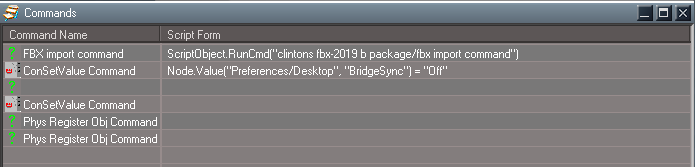
Nope
Status Message is stuck "CreateJoint-Becken"
Command History
Status Message is stuck "CreateJoint-Becken"
Command History
- Command History.png (8.2 KiB) Viewed 2464 times
-
clintonman
- Captain
- Posts: 5659
- Joined: 21 May 2009, 21:08
- Type the number ten into the box: 0
- Location: California
Re: FBX 2 import export
Need to see the log view, not the command history.trueBlue wrote: 23 Aug 2023, 19:14 Nope
Status Message is stuck "CreateJoint-Becken"
Command History
Command History.png
-
trueBlue
- Captain
- Posts: 5548
- Joined: 06 Jul 2009, 22:50
- Type the number ten into the box: 10
Re: FBX 2 import export
clintonman: Does the log view show any other errors?clintonman wrote: 23 Aug 2023, 19:17Need to see the log view, not the command history.trueBlue wrote: 23 Aug 2023, 19:14 Nope
Status Message is stuck "CreateJoint-Becken"
Command History
Command History.png
trueBlue: Nope
clintonman: Need to see the log view, not the command history.
trueBlue: Nothing in the Log View
-
trueBlue
- Captain
- Posts: 5548
- Joined: 06 Jul 2009, 22:50
- Type the number ten into the box: 10
Re: FBX 2 import export
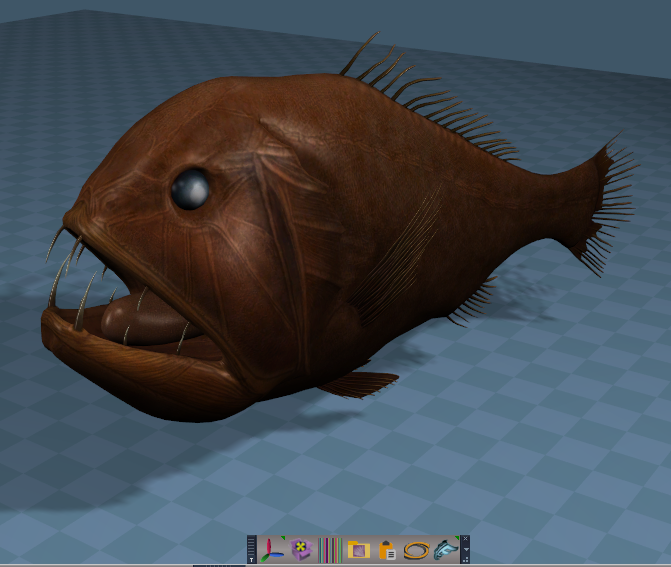
I exported a fish from 3D Paint as a fbx
FBX Import
The Status Message is stuck "ProcessFakeBindPose"
Imported fine with textures
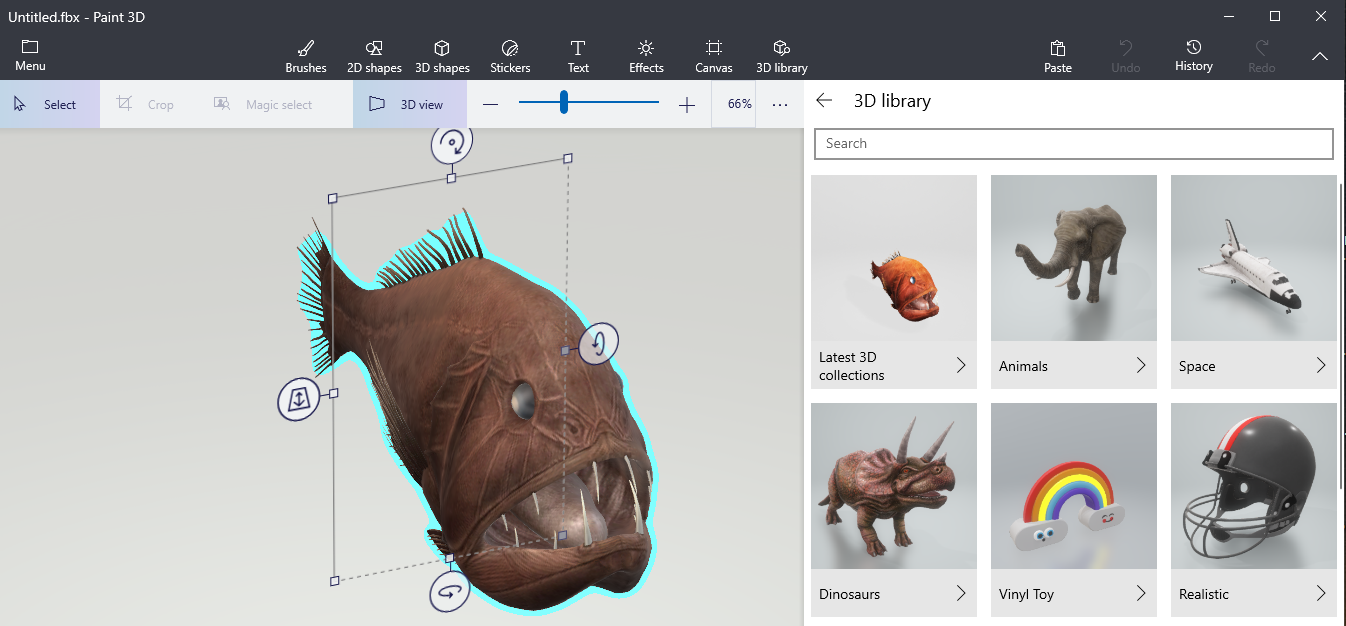
The Status Message is stuck "ProcessFakeBindPose"
Imported fine with textures
-
trueBlue
- Captain
- Posts: 5548
- Joined: 06 Jul 2009, 22:50
- Type the number ten into the box: 10
Re: FBX 2 import export
Imported several 3D Paint fbx objects
Every time the Status Message gets stuck "ProcessFakeBindPose"
I looked at all of your scripts and I do not see this Status Message, so I am guessing it comes from the plugin
Also noticed a 3 MB difference with the FBX Importer and the Collada Importer with the same object
The FBX is larger and uses a different image for the Model shader
The DAE uses the same color image for both
Both export color and model images
The DAE has two duplicate color and one model image
This object does not have any animation and unchecking the animation options does not make any difference.
.
.
The UV map is great!
Every time the Status Message gets stuck "ProcessFakeBindPose"
I looked at all of your scripts and I do not see this Status Message, so I am guessing it comes from the plugin
Also noticed a 3 MB difference with the FBX Importer and the Collada Importer with the same object
The FBX is larger and uses a different image for the Model shader
The DAE uses the same color image for both
Both export color and model images
The DAE has two duplicate color and one model image
This object does not have any animation and unchecking the animation options does not make any difference.
.

The UV map is great!

-
clintonman
- Captain
- Posts: 5659
- Joined: 21 May 2009, 21:08
- Type the number ten into the box: 0
- Location: California
Re: FBX 2 import export
I'm not able to recreate the problem. I did find a new problem. I installed on a win10 machine that has never seen the fbx and the plugin failed to run properly. It just crahsed tS before even opening the file dialog. I built the plugin with Visual Studio 2022 and it worked, but this version won't work with older windows so I'll have two versions of the rsx on the website. You can try the second one to see if it makes any difference. I'll post here when it's up.trueBlue wrote: 23 Aug 2023, 19:27clintonman: Does the log view show any other errors?clintonman wrote: 23 Aug 2023, 19:17Need to see the log view, not the command history.trueBlue wrote: 23 Aug 2023, 19:14 Nope
Status Message is stuck "CreateJoint-Becken"
Command History
Command History.png
trueBlue: Nope
clintonman: Need to see the log view, not the command history.
trueBlue: Nothing in the Log View
Edit:
Alternative version of the plugin is up. Direct link:
http://clintons3d.com/plugins/downloads ... X2019B.rsx
-
clintonman
- Captain
- Posts: 5659
- Joined: 21 May 2009, 21:08
- Type the number ten into the box: 0
- Location: California
Re: FBX 2 import export
The Status Message is stuck "ProcessFakeBindPose" is fixed for the next release.trueBlue wrote: 23 Aug 2023, 19:32 I exported a fish from 3D Paint as a fbx
Paint 3D Library exported as FBX.png
FBX Import
The Status Message is stuck "ProcessFakeBindPose"
Imported fine with textures
Status Message gets stuck.png
-
clintonman
- Captain
- Posts: 5659
- Joined: 21 May 2009, 21:08
- Type the number ten into the box: 0
- Location: California
Re: FBX 2 import export
The wolf has a few issues even when it does successfully import.trueBlue wrote: 23 Aug 2023, 18:27 Tried these two Wolf fbx files
Error:Code: Select all
ERR Source object: /Scripts/CustomCommands/fbxgroup2/callimport2 Error: Unspecified script error Line: 40, Char: 1 Script text: ClintonsFBX2019Plugin.FBXimport();
The skeleton joints all have a scale of 100, making them huge. - this needs a plugin code change
The skeleton has more than 1 root so there are skinning issues. The errors caused by this are fixed, but it still requires manually renaming the animation object to match the actor.
-
clintonman
- Captain
- Posts: 5659
- Joined: 21 May 2009, 21:08
- Type the number ten into the box: 0
- Location: California
Re: FBX 2 import export
Update on wolf testing. Got rsx code in place to not allow scaling joints.
Downloaded the fbx wolf from the source, https://free3d.com/3d-model/wolf-rigged ... 42808.html
One of the samples, Wolf_with_Animations.fbx, caused a crash - crash bug was fixed and retested. this one didn't have the scale=100 from the other sample. In fact after fixing the crash everything worked like it should. Except, like the authors collada samples, the textures aren't linked to the files.
Downloaded the fbx wolf from the source, https://free3d.com/3d-model/wolf-rigged ... 42808.html
One of the samples, Wolf_with_Animations.fbx, caused a crash - crash bug was fixed and retested. this one didn't have the scale=100 from the other sample. In fact after fixing the crash everything worked like it should. Except, like the authors collada samples, the textures aren't linked to the files.
-
clintonman
- Captain
- Posts: 5659
- Joined: 21 May 2009, 21:08
- Type the number ten into the box: 0
- Location: California
Re: FBX 2 import export
Update August 25
plugin ver 1638426
message boxes to select the take(animation clip) from the fbx file
script rename truespace animation clip to the fbx take name when transferring animation to actors
new Scale Unity option to force skeleton joints to a scale of 1.0 - not good for animation import, only good for skinning the mesh
fix crash bug having to do with actor bind poses
script stop multiple skeleton roots errors
clear status message
new utility script to convert light types. this is useful for fbx import to convert infinite lights to shadow casting directional lights
http://clintons3d.com/plugins/truespace ... elighttype
plugin ver 1638426
message boxes to select the take(animation clip) from the fbx file
script rename truespace animation clip to the fbx take name when transferring animation to actors
new Scale Unity option to force skeleton joints to a scale of 1.0 - not good for animation import, only good for skinning the mesh
fix crash bug having to do with actor bind poses
script stop multiple skeleton roots errors
clear status message
new utility script to convert light types. this is useful for fbx import to convert infinite lights to shadow casting directional lights
http://clintons3d.com/plugins/truespace ... elighttype
-
clintonman
- Captain
- Posts: 5659
- Joined: 21 May 2009, 21:08
- Type the number ten into the box: 0
- Location: California
Re: FBX 2 import export
Discovered a bug.
Normals are not importing properly.
For now, use the "Autofacet" checkbox in the Import Options aspect to get decent mesh normals.
Normals are not importing properly.
For now, use the "Autofacet" checkbox in the Import Options aspect to get decent mesh normals.
-
trueBlue
- Captain
- Posts: 5548
- Joined: 06 Jul 2009, 22:50
- Type the number ten into the box: 10
Re: FBX 2 import export
Niceclintonman wrote: 25 Aug 2023, 21:41 Update August 25
new utility script to convert light types. this is useful for fbx import to convert infinite lights to shadow casting directional lights
http://clintons3d.com/plugins/truespace ... elighttype
Rename idea
//Node.Rename(newLights, delSN);
Node.SafeRename(newLights, newLight);
-
clintonman
- Captain
- Posts: 5659
- Joined: 21 May 2009, 21:08
- Type the number ten into the box: 0
- Location: California
Re: FBX 2 import export
trueBlue wrote: 26 Aug 2023, 00:23Niceclintonman wrote: 25 Aug 2023, 21:41 Update August 25
new utility script to convert light types. this is useful for fbx import to convert infinite lights to shadow casting directional lights
http://clintons3d.com/plugins/truespace ... elighttype
Rename idea
//Node.Rename(newLights, delSN);
Node.SafeRename(newLights, newLight);
Thanks.
I want the replacement lights to have the same exact name as the original lights.
weird, quoted your post and got the italics style
-
trueBlue
- Captain
- Posts: 5548
- Joined: 06 Jul 2009, 22:50
- Type the number ten into the box: 10
Re: FBX 2 import export
I do not know if this is because the way the fbx is written or the FBX Importer creates the shaders correctly
The DefaultModelTextureShader is correct for the troll
.
The Collada Importer's DefaultModelTextureShader always creates a shinny object
So, whatever you are doing with the FBX Importer, it would be great if you could do the same for the Collada Importer
The Status Message is stuck
The DefaultModelTextureShader is correct for the troll
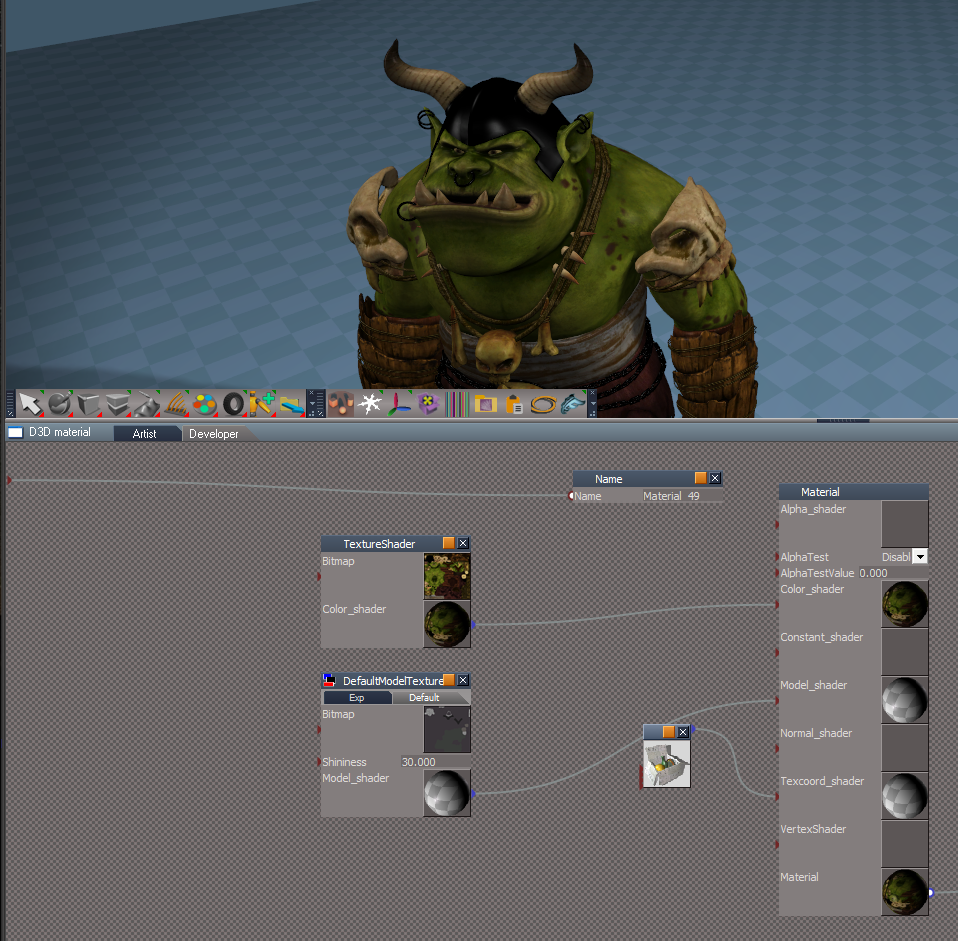
The Collada Importer's DefaultModelTextureShader always creates a shinny object
So, whatever you are doing with the FBX Importer, it would be great if you could do the same for the Collada Importer
The Status Message is stuck
- Status message is stuck.png (1.72 KiB) Viewed 2334 times
-
clintonman
- Captain
- Posts: 5659
- Joined: 21 May 2009, 21:08
- Type the number ten into the box: 0
- Location: California
Re: FBX 2 import export
Update August 26
removed mesh normals import - not working and no easy fix
script get non-actor animations clip name from the fbx take name
rsx plugin updated but no version change
"Skeleton Nodes as Joints" default checked - better too many than too few, if the skeleton imports with too many joints uncheck and re-import
"Scale Unity" false by default - to prevent hiding any actor scale problems
removed mesh normals import - not working and no easy fix
script get non-actor animations clip name from the fbx take name
rsx plugin updated but no version change
"Skeleton Nodes as Joints" default checked - better too many than too few, if the skeleton imports with too many joints uncheck and re-import
"Scale Unity" false by default - to prevent hiding any actor scale problems
-
clintonman
- Captain
- Posts: 5659
- Joined: 21 May 2009, 21:08
- Type the number ten into the box: 0
- Location: California
Re: FBX 2 import export

Imported Wolf sample has a scale of 100, tS only works properly with scale of 1

Imported with Scale Unity option checked. This can be skinned to a full actor after some work. Animation import will not work.

Good Wolf. Skeleton scale is 1. Image is from before Transfer Bind Pose and Skin were run
Wolf fbx samples from:
https://free3d.com/3d-model/wolf-rigged ... 42808.html
-
clintonman
- Captain
- Posts: 5659
- Joined: 21 May 2009, 21:08
- Type the number ten into the box: 0
- Location: California
Re: FBX 2 import export

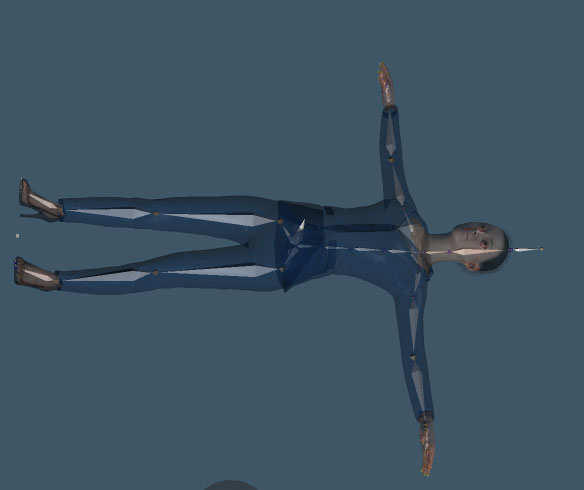
The skeleton is close, but not correct.

First run result is bad.
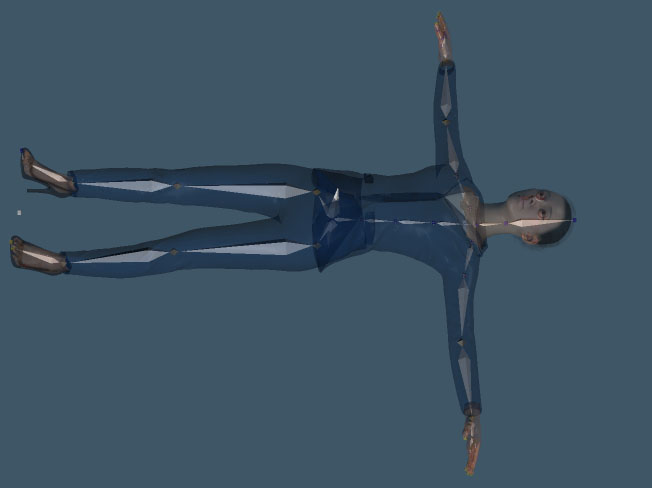
Now it looks good.
This shows why the Transfer Bind Pose may need to be run more than once to get a good bind pose.
It also shows how some fbx files will generate extra unneeded joints. The head has an extra bone sticking out.
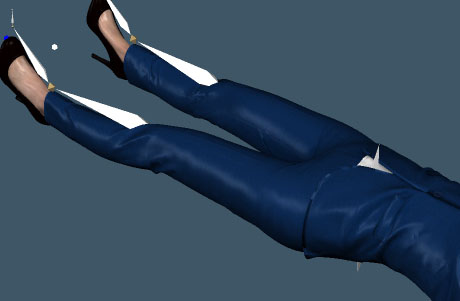
No extra bones
-
clintonman
- Captain
- Posts: 5659
- Joined: 21 May 2009, 21:08
- Type the number ten into the box: 0
- Location: California
Re: FBX 2 import export
trueBlue wrote: 26 Aug 2023, 02:55 I do not know if this is because the way the fbx is written or the FBX Importer creates the shaders correctly
The DefaultModelTextureShader is correct for the troll
DefaultModelTextureShader.png
.
The Collada Importer's DefaultModelTextureShader always creates a shinny object
So, whatever you are doing with the FBX Importer, it would be great if you could do the same for the Collada Importer
The Status Message is stuck
Status message is stuck.png

Has the same shininess.
If import the collada file with FBX importer, still the same shininess.
Status message is stuck, but not saying anything. So good enough for me.
-
trueBlue
- Captain
- Posts: 5548
- Joined: 06 Jul 2009, 22:50
- Type the number ten into the box: 10
Re: FBX 2 import export
Revisiting the trueSpace Horse character using Rosetta
Both FBX Import (DAE) and Collada Import give errors
On another note, with regards to the callimport script:
fbxgroup2/callimport
Rosetta does not have the Project/TSScene node
.
EDIT:
It also looks like you are not restoring the Matarial Editor's Material instancing
Node.Value("/Material Editor/Material Editor", "Material instancing")
Both FBX Import (DAE) and Collada Import give errors
Code: Select all
ERR   Source object: /Scripts/CustomCommands/colladagroup/callplugin Error: Unspecified script error Line: 13, Char: 1 Script text:  Clintons3dDAE.ImportDAE();

ERR   Source object: /Scripts/CustomCommands/fbxgroup2/callimport2 Error: Unspecified script error Line: 46, Char: 1 Script text:  ClintonsFBX2019Plugin.FBXimport();
fbxgroup2/callimport
Code: Select all
	try {
		var mode = Node.Value("Preferences/Desktop","BridgeSync");

		Node.Value("Preferences/Desktop","BridgeSync") = "Off";
		tSBridge.SetBridgeSyncStatus(0);//0 = off

		params.ConValue("bridgemode") = mode;
	}
	catch (err) {
		System.Trace("bridge ignored for Rosetta version.");
	}
Code: Select all
util = System.CreateDO("Clintons3D Package/Utility functions")
if(Node.Exists('Project/TSScene')) {
var mode = Node.Value('Preferences/Desktop','BridgeSync')
if(Node.ConExists(mode))
util.SetNodeValueString('Preferences/Desktop','BridgeSync', 'Off')
//Not Necessary:The above command sets this ->  util.SetNodeValueInt('/Project/TSScene', 'Scene sync', 0); //(0 = Off) (1 = On) (2 = Auto)
params.ConValue("bridgemode") = mode
}
//	try {
//		var mode = Node.Value("Preferences/Desktop","BridgeSync");

//		Node.Value("Preferences/Desktop","BridgeSync") = "Off";
//		tSBridge.SetBridgeSyncStatus(0);//0 = off

//		params.ConValue("bridgemode") = mode;
//	}
//	catch (err) {
//		System.Trace("bridge ignored for Rosetta version.");
//	}
It also looks like you are not restoring the Matarial Editor's Material instancing
Node.Value("/Material Editor/Material Editor", "Material instancing")
- Attachments
-
- Horse.RsScn
- (1.76 MiB) Downloaded 125 times
-
clintonman
- Captain
- Posts: 5659
- Joined: 21 May 2009, 21:08
- Type the number ten into the box: 0
- Location: California
Re: FBX 2 import export
Not seeing any errors here.trueBlue wrote: 27 Aug 2023, 13:48 Revisiting the trueSpace Horse character using Rosetta
Both FBX Import (DAE) and Collada Import give errorsOn another note, with regards to the callimport script:Code: Select all
ERR   Source object: /Scripts/CustomCommands/colladagroup/callplugin Error: Unspecified script error Line: 13, Char: 1 Script text:  Clintons3dDAE.ImportDAE();

ERR   Source object: /Scripts/CustomCommands/fbxgroup2/callimport2 Error: Unspecified script error Line: 46, Char: 1 Script text:  ClintonsFBX2019Plugin.FBXimport();
fbxgroup2/callimport
Rosetta does not have the Project/TSScene nodeCode: Select all
	try {
		var mode = Node.Value("Preferences/Desktop","BridgeSync");

		Node.Value("Preferences/Desktop","BridgeSync") = "Off";
		tSBridge.SetBridgeSyncStatus(0);//0 = off

		params.ConValue("bridgemode") = mode;
	}
	catch (err) {
		System.Trace("bridge ignored for Rosetta version.");
	}
TSScene.png
.EDIT:Code: Select all
util = System.CreateDO("Clintons3D Package/Utility functions")
if(Node.Exists('Project/TSScene')) {
var mode = Node.Value('Preferences/Desktop','BridgeSync')
if(Node.ConExists(mode))
util.SetNodeValueString('Preferences/Desktop','BridgeSync', 'Off')
//Not Necessary:The above command sets this ->  util.SetNodeValueInt('/Project/TSScene', 'Scene sync', 0); //(0 = Off) (1 = On) (2 = Auto)
params.ConValue("bridgemode") = mode
}
//	try {
//		var mode = Node.Value("Preferences/Desktop","BridgeSync");

//		Node.Value("Preferences/Desktop","BridgeSync") = "Off";
//		tSBridge.SetBridgeSyncStatus(0);//0 = off

//		params.ConValue("bridgemode") = mode;
//	}
//	catch (err) {
//		System.Trace("bridge ignored for Rosetta version.");
//	}
It also looks like you are not restoring the Matarial Editor's Material instancing
Node.Value("/Material Editor/Material Editor", "Material instancing")
Fixed actor material export for the Enhanced Collada based on your horse.
"Rosetta does not have the Project/TSScene node"
Does that mean something?
-
trueBlue
- Captain
- Posts: 5548
- Joined: 06 Jul 2009, 22:50
- Type the number ten into the box: 10
Re: FBX 2 import export
trueBlue: "Rosetta does not have the Project/TSScene node"
Does that mean something?
Yes, it means the "Rosetta does not have the Project/TSScene node"
It means that the Try&Catch is not necessary.
Also, using tSBridge.SetBridgeSyncStatus(0) is not necessary.
Simply setting the util.SetNodeValueString('Preferences/Desktop','BridgeSync', 'Off'), sets the BridgeSyncStatus to 0
Thought maybe my error had something to do with these Try&Catch
Does that mean something?
Yes, it means the "Rosetta does not have the Project/TSScene node"
It means that the Try&Catch is not necessary.
Also, using tSBridge.SetBridgeSyncStatus(0) is not necessary.
Simply setting the util.SetNodeValueString('Preferences/Desktop','BridgeSync', 'Off'), sets the BridgeSyncStatus to 0
Thought maybe my error had something to do with these Try&Catch
-
clintonman
- Captain
- Posts: 5659
- Joined: 21 May 2009, 21:08
- Type the number ten into the box: 0
- Location: California
Re: FBX 2 import export
Did a fresh download and install of fbx and collada importer on a separate machine and got no errors.trueBlue wrote: 27 Aug 2023, 13:48 Revisiting the trueSpace Horse character using Rosetta
Both FBX Import (DAE) and Collada Import give errors
...
Both of the rsx are generated on different machines using different versions of visual studio. So they basically have nothing in common codewise.
The fact that both are failing makes me think the problem is unique to your machine. Do either of them report any errors in the Log view?
Side note, the vs2013 version of the rsx failed to work on that same machine. I had to build a vs2022 version to get it to work. The computer just finished a system update and now the vs2013 build suddenly started working.
-
trueBlue
- Captain
- Posts: 5548
- Joined: 06 Jul 2009, 22:50
- Type the number ten into the box: 10
Re: FBX 2 import export
Just looked at my current Rostta log file that started this morning at 6:53 AM and ended at 11:05AM
[NEW_LOG_SESSION]-[08/27/23 06:53:19]
...
...
11:05:56.551 INFO Shuting down ...
It shows the errors that I shared with you and nothing else out of the ordinary
I also imported a ColladaBox.DAE several times without any issues during this time
I have only installed:
Clintons3DFBX2019.rsx
Clintons3dDAE.rsx
I did not try the other Clintons3DFBX2019B.rsx (Spelling?)
Which one are you using?
[NEW_LOG_SESSION]-[08/27/23 06:53:19]
...
...
11:05:56.551 INFO Shuting down ...
It shows the errors that I shared with you and nothing else out of the ordinary
I also imported a ColladaBox.DAE several times without any issues during this time
I have only installed:
Clintons3DFBX2019.rsx
Clintons3dDAE.rsx
I did not try the other Clintons3DFBX2019B.rsx (Spelling?)
Which one are you using?
-
clintonman
- Captain
- Posts: 5659
- Joined: 21 May 2009, 21:08
- Type the number ten into the box: 0
- Location: California
Re: FBX 2 import export
The error may be in the form of a Trace. Those don't show in the Rosetta log file. You should try looking at the Log view for any errors instead.trueBlue wrote: 27 Aug 2023, 21:32 Just looked at my current Rostta log file that started this morning at 6:53 AM and ended at 11:05AM
[NEW_LOG_SESSION]-[08/27/23 06:53:19]
...
...
11:05:56.551 INFO Shuting down ...
It shows the errors that I shared with you and nothing else out of the ordinary
I also imported a ColladaBox.DAE several times without any issues during this time
I have only installed:
Clintons3DFBX2019.rsx
Clintons3dDAE.rsx
I did not try the other Clintons3DFBX2019B.rsx (Spelling?)
Which one are you using?
I'm using Clintons3DFBX2019.rsx no B
Clintons3DFBX2019.rsx was built with vs2013
Clintons3DFBX2019B.rsx was built with vs2022 and will not work with winXP
You can always share the DAE file and a context(ctx) file.
-
trueBlue
- Captain
- Posts: 5548
- Joined: 06 Jul 2009, 22:50
- Type the number ten into the box: 10
Re: FBX 2 import export
From the Rosetta log file
Activity.Run('/Scripts/CustomCommands/colladagroup/OpenPanel')
Topology example command5
System.Trace('C:\Users\trueBlue\Desktop\ColladaBox.dae');
System.Alert('Import complete.')
Activity.Run('/Scripts/CustomCommands/colladagroup/OpenPanel')
Topology example command5
System.Trace('C:\Users\trueBlue\Desktop\ColladaBox.dae');
System.Alert('Import complete.')
-
clintonman
- Captain
- Posts: 5659
- Joined: 21 May 2009, 21:08
- Type the number ten into the box: 0
- Location: California
Re: FBX 2 import export
You should probably try it with something that doesn't work. Testing on something that already works wont show much.trueBlue wrote: 27 Aug 2023, 21:45 From the log file
Activity.Run('/Scripts/CustomCommands/colladagroup/OpenPanel')
Topology example command5
System.Trace('C:\Users\trueBlue\Desktop\ColladaBox.dae');
System.Alert('Import complete.')
-
trueBlue
- Captain
- Posts: 5548
- Joined: 06 Jul 2009, 22:50
- Type the number ten into the box: 10
Re: FBX 2 import export
I am just showing that the plugin seems to be working without an error
FBX Import
.
It is the Horse scene that throws an error
FBX Import
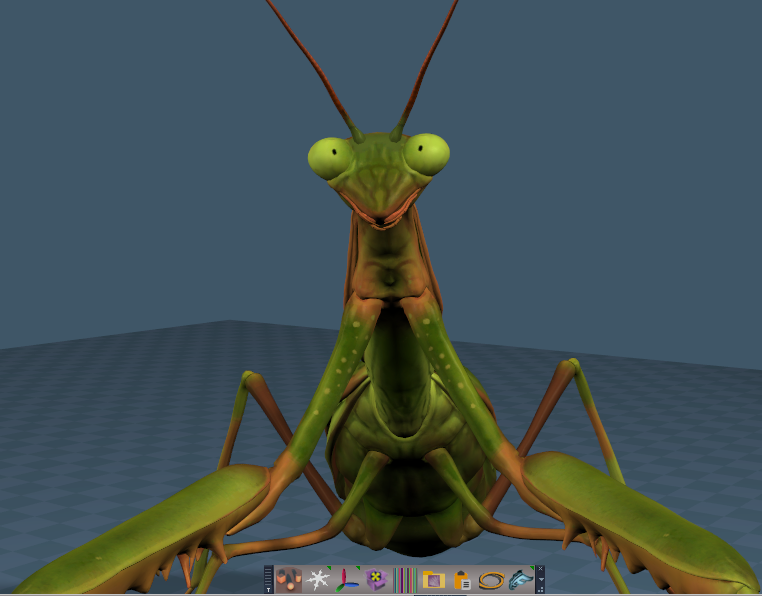
It is the Horse scene that throws an error
-
clintonman
- Captain
- Posts: 5659
- Joined: 21 May 2009, 21:08
- Type the number ten into the box: 0
- Location: California
Re: FBX 2 import export
If you share your horse dae file I can try it.trueBlue wrote: 27 Aug 2023, 22:00 I am just showing that the plugin seems to be working without an error
FBX Import
FBX Import and plugin is working.png
.
It is the Horse scene that throws an error
-
trueBlue
- Captain
- Posts: 5548
- Joined: 06 Jul 2009, 22:50
- Type the number ten into the box: 10
Re: FBX 2 import export
The Output Console does not run when there is an error
The Horse and Skeleton are just TempNull
Nothing else
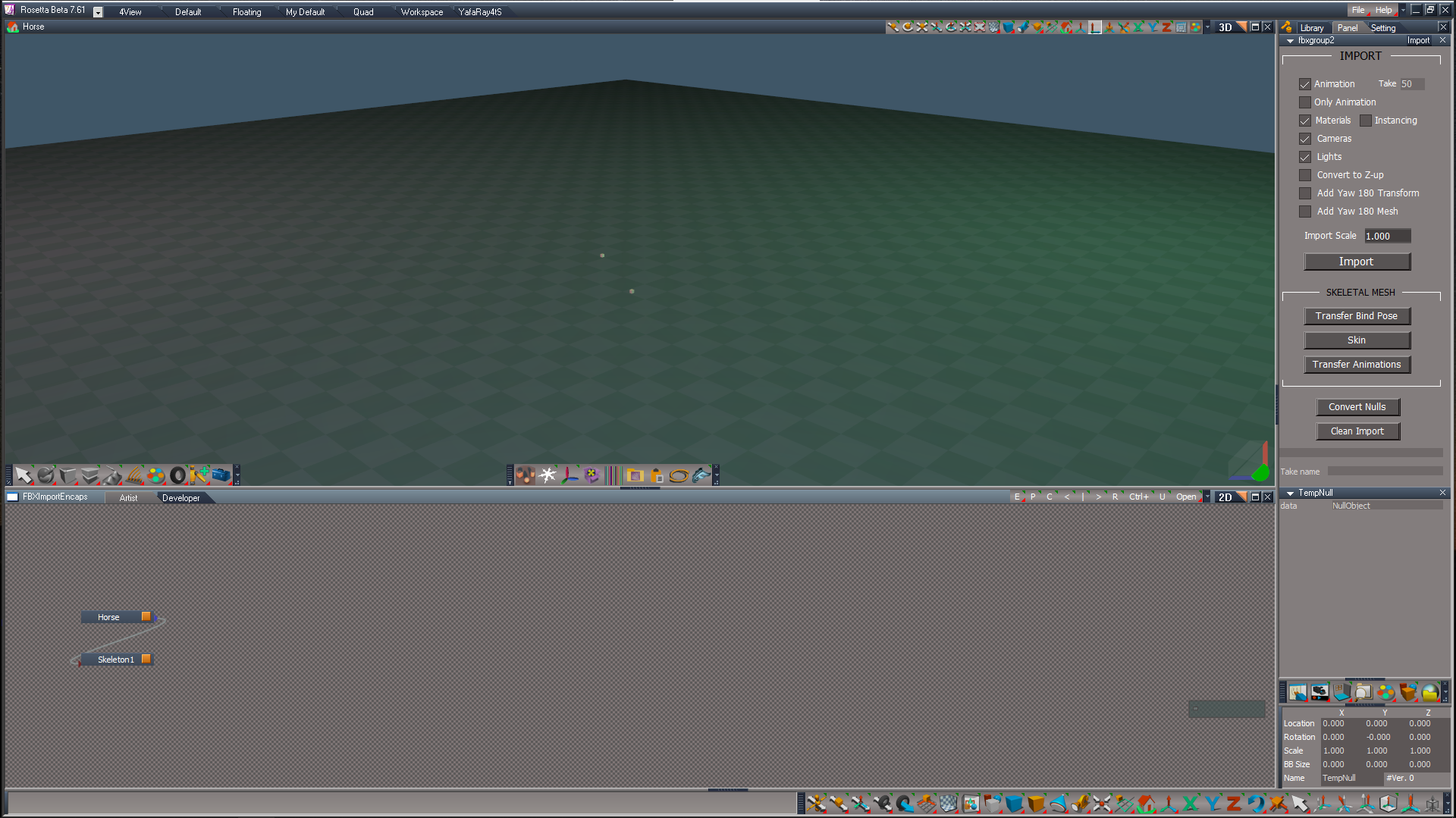
Nothing else
- Attachments
-
- Horse.zip
- (498.3 KiB) Downloaded 149 times
-
clintonman
- Captain
- Posts: 5659
- Joined: 21 May 2009, 21:08
- Type the number ten into the box: 0
- Location: California
Re: FBX 2 import export
No errors or problems with the dae file. It loads, no problem.trueBlue wrote: 27 Aug 2023, 22:12 The Output Console does not run when there is an error
Horse FBX Import.png
The Horse and Skeleton are just TempNull
Nothing else
Try opening the Log view first then importing. If there are errors they will not show if you open the Log view after importing.
-
trueBlue
- Captain
- Posts: 5548
- Joined: 06 Jul 2009, 22:50
- Type the number ten into the box: 10

-
clintonman
- Captain
- Posts: 5659
- Joined: 21 May 2009, 21:08
- Type the number ten into the box: 0
- Location: California
Re: FBX 2 import export
The error says you are missing a file
\Rs Main Libraries\Biped Limbs\SkeletonStart2.RsSkel
\Rs Main Libraries\Biped Limbs\SkeletonStart2.RsSkel
-
trueBlue
- Captain
- Posts: 5548
- Joined: 06 Jul 2009, 22:50
- Type the number ten into the box: 10
Re: FBX 2 import export
Ugh, I did miss putting the SkeletonStart2 in the UU9
I added the missing SkeletonStart2 to the Biped Limbs library
Started over by saving a new Horse.DAE
FBX Import
Same problem with the error
Note: Biped Limbs library shows the SkeletonStart2 as Skeleton
I added the missing SkeletonStart2 to the Biped Limbs library
Started over by saving a new Horse.DAE
FBX Import
Same problem with the error
Note: Biped Limbs library shows the SkeletonStart2 as Skeleton
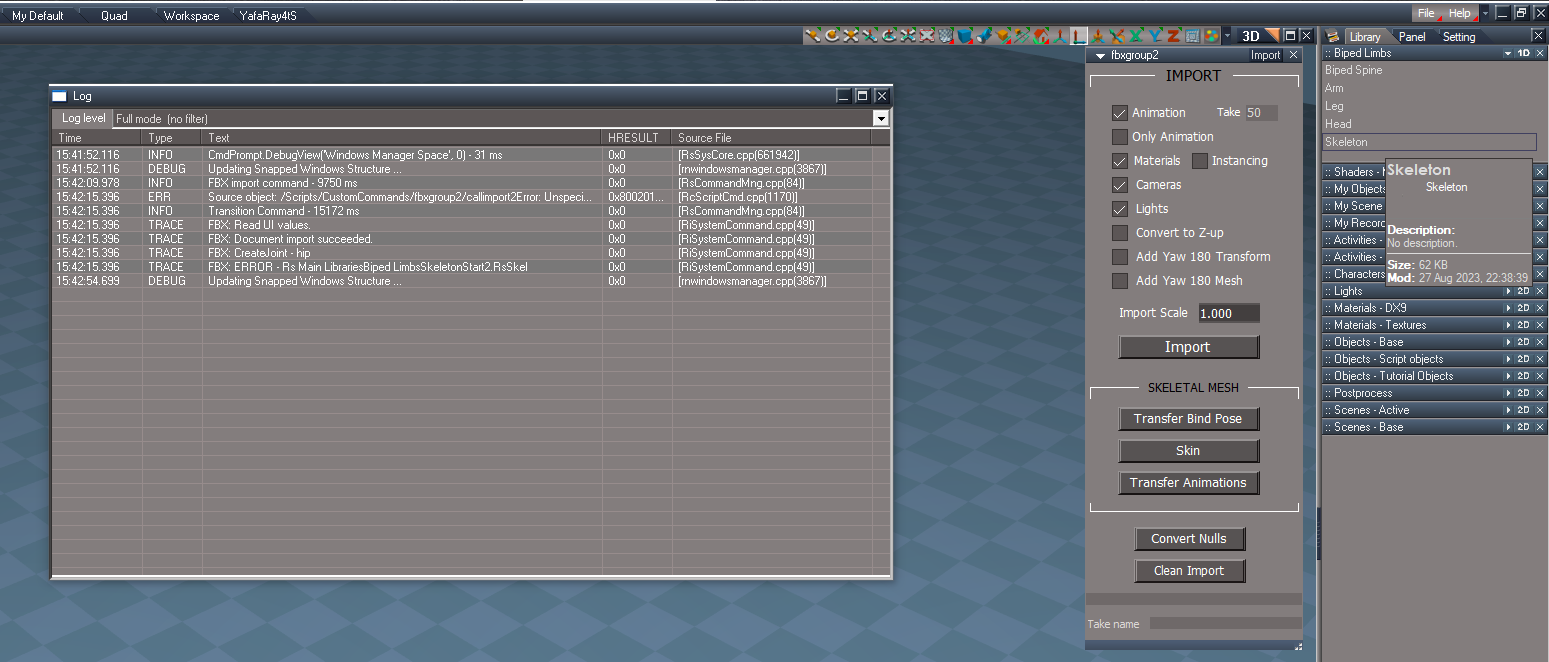
-
clintonman
- Captain
- Posts: 5659
- Joined: 21 May 2009, 21:08
- Type the number ten into the box: 0
- Location: California
Re: FBX 2 import export
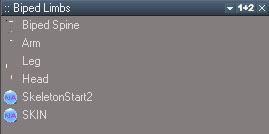
- BipedLimbs.jpg (18.23 KiB) Viewed 2657 times

- BipedLimbsFS.jpg (41.52 KiB) Viewed 2657 times
Also be sure to save as RsSkel not RsObj
-
trueBlue
- Captain
- Posts: 5548
- Joined: 06 Jul 2009, 22:50
- Type the number ten into the box: 10
Re: FBX 2 import export
Okay thanks for your help sorting out what was wrong
Here is the Imported Horse scene
Picture shows the Steps performed
What should I do next?
Here is the Imported Horse scene
Picture shows the Steps performed

- Attachments
-
- Imported Horse.RsScn
- (2.35 MiB) Downloaded 132 times
-
clintonman
- Captain
- Posts: 5659
- Joined: 21 May 2009, 21:08
- Type the number ten into the box: 0
- Location: California
Re: FBX 2 import export
You didn't run "Transfer Bind Pose" enough times. Keep running it until the skeleton looks good.trueBlue wrote: 27 Aug 2023, 23:27 Okay thanks for your help sorting out what was wrong
Here is the Imported Horse scene
Picture shows the Steps performed
FBX Import.png
What should I do next?
The next step after clean is get rid of anything you don't want.
Also you will get better results using the collada importer for collada files.
-
trueBlue
- Captain
- Posts: 5548
- Joined: 06 Jul 2009, 22:50
- Type the number ten into the box: 10
Re: FBX 2 import export
I see, thanks!clintonman wrote: 28 Aug 2023, 02:05You didn't run "Transfer Bind Pose" enough times. Keep running it until the skeleton looks good.trueBlue wrote: 27 Aug 2023, 23:27 Okay thanks for your help sorting out what was wrong
Here is the Imported Horse scene
Picture shows the Steps performed
FBX Import.png
What should I do next?
The next step after clean is get rid of anything you don't want.
Also you will get better results using the collada importer for collada files.
Collada Import worked great!
FBX Import DAE not very well at all

-
garcia
- Chief Petty Officer
- Posts: 80
- Joined: 23 Jan 2023, 02:51
- Type the number ten into the box: 10
Re: FBX 2 import export
Thought it would be better to post here, as it's related to FBX importing.
"Did you restart tS after Loading the rsx?"
Yes several times, and rebooted just in case.
"Did you restart tS after Loading the rsx?"
Yes several times, and rebooted just in case.

-
clintonman
- Captain
- Posts: 5659
- Joined: 21 May 2009, 21:08
- Type the number ten into the box: 0
- Location: California
Re: FBX 2 import export
Update Sept 30
new plugin version v1638427
new option to export UV set #2 to the diffuse channel, found that Blender and Godot require this
toolbar button lmb opens export panel floating, rmb opens export panel in the stack, switch to other aspects as needed
update UU fbx button
The main reason for the update was a missing uv set 2 when importing to Blender and Godot.
new plugin version v1638427
new option to export UV set #2 to the diffuse channel, found that Blender and Godot require this
toolbar button lmb opens export panel floating, rmb opens export panel in the stack, switch to other aspects as needed
update UU fbx button
The main reason for the update was a missing uv set 2 when importing to Blender and Godot.
-
clintonman
- Captain
- Posts: 5659
- Joined: 21 May 2009, 21:08
- Type the number ten into the box: 0
- Location: California
Re: FBX 2 import export
Update November 18, 2024
new plugin and script
When choosing the option "Export Selected Only" and the selection is a single 2D encapsulation, the exporter will treat the 2D encapsulation as if it was the whole scene.
Before the change the 2D encaps would export as the parent of it's sub-objects. After the change the 2D encaps node is not included in the export and any parenting relationships of it's sub-objects are maintained.
One limitation does remain. Export Selected Only will only work with scene level objects, not objects inside other objects. The new exception is that a single 2D encapsulation selection can be at any level in the scene.
https://clintons3d.com/plugins/truespac ... inout.html
EDIT
darn, just checked my notes and needed to add a restriction on selecting objects not at the root level of the scene...
EDIT
added the missing script installer
broke the too big export panel into export and batch export panels
added error message if try to export selected and not at the scene root level
new plugin and script
When choosing the option "Export Selected Only" and the selection is a single 2D encapsulation, the exporter will treat the 2D encapsulation as if it was the whole scene.
Before the change the 2D encaps would export as the parent of it's sub-objects. After the change the 2D encaps node is not included in the export and any parenting relationships of it's sub-objects are maintained.
One limitation does remain. Export Selected Only will only work with scene level objects, not objects inside other objects. The new exception is that a single 2D encapsulation selection can be at any level in the scene.
https://clintons3d.com/plugins/truespac ... inout.html
EDIT
darn, just checked my notes and needed to add a restriction on selecting objects not at the root level of the scene...
EDIT
added the missing script installer
broke the too big export panel into export and batch export panels
added error message if try to export selected and not at the scene root level
-
clintonman
- Captain
- Posts: 5659
- Joined: 21 May 2009, 21:08
- Type the number ten into the box: 0
- Location: California
Re: FBX 2 import export
Update Feb 25
Added an option to ignore the matrix values when exporting meshes. This is useful for Unreal which will set the imported meshes origin to the scene origin.
Edit: while doing the same for gltf discovered that the plugin does not work properly when parent-child objects are directly selected for export, added error message in that case. To export parent child with direct selection, they must be 2d encapsulated and the encapsulation will be the selection instead.
Added an option to ignore the matrix values when exporting meshes. This is useful for Unreal which will set the imported meshes origin to the scene origin.
Edit: while doing the same for gltf discovered that the plugin does not work properly when parent-child objects are directly selected for export, added error message in that case. To export parent child with direct selection, they must be 2d encapsulated and the encapsulation will be the selection instead.