Yafaray4tS v0.9.0

LightWorks, VRay, Dribble, YafaRay and more..
User avatar
trueBlue
Captain
Posts: 5548
Joined: 06 Jul 2009, 22:50
Type the number ten into the box: 10

Re: Yafaray4tS v0.9.0

Post by trueBlue »

With regards to Yafaray4tS to with stand a Reset to Default Context, I was wanting to add the following lines to the reset,js file to the Update 4:

Code: Select all

if(Node.Exists(rosDir + '\\scripts\\preObjects\\Yafaray4tS.rsobj')) {
RsFileIO.LoadObject( rosDir + '\\scripts\\preObjects\\Yafaray4tS.rsobj', '/');
}

Is that the correct spelling ( Yafaray4tS ) and with your installation will you be adding the Yafaray4tS.rsobj to the preobjects folder?
User avatar
clintonman
Captain
Posts: 5659
Joined: 21 May 2009, 21:08
Type the number ten into the box: 0
Location: California

Re: Yafaray4tS v0.9.0

Post by clintonman »

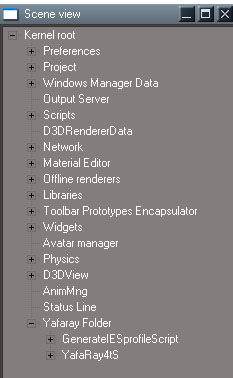
YafaRay4tS is the correct spelling. I would hold off adding it for now. The YafaRay4tS node exists inside a Yafaray Folder along with a GenerateIESprofileScript node. I might move that second script into the IES light or into the YafaRay4tS node.
Clinton Reese

http://clintons3d.com
User avatar
clintonman
Captain
Posts: 5659
Joined: 21 May 2009, 21:08
Type the number ten into the box: 0
Location: California

Re: Yafaray4tS v0.9.0

Post by clintonman »

mappingSPECglossy.jpg
OK, after 100 million bugs it's back to working again.
All the previous renders work and added this new one showing glossy reflection texture map which wasn't possible before.
Clinton Reese

http://clintons3d.com
User avatar
trueBlue
Captain
Posts: 5548
Joined: 06 Jul 2009, 22:50
Type the number ten into the box: 10

Re: Yafaray4tS v0.9.0

Post by trueBlue »

Awesome! :D
User avatar
clintonman
Captain
Posts: 5659
Joined: 21 May 2009, 21:08
Type the number ten into the box: 0
Location: California

Re: Yafaray4tS v0.9.0

Post by clintonman »

trueBlue wrote: 06 Jun 2018, 17:13 With regards to Yafaray4tS to with stand a Reset to Default Context, I was wanting to add the following lines to the reset,js file to the Update 4:

Code: Select all

if(Node.Exists(rosDir + '\\scripts\\preObjects\\Yafaray4tS.rsobj')) {
RsFileIO.LoadObject( rosDir + '\\scripts\\preObjects\\Yafaray4tS.rsobj', '/');
}

Is that the correct spelling ( Yafaray4tS ) and with your installation will you be adding the Yafaray4tS.rsobj to the preobjects folder?
YafarayNodeLocation.jpg
YafarayNodeLocation.jpg (34.75 KiB) Viewed 4721 times
The Yafaray4tS will continue to live inside the Yafaray Folder node and I'll have the installer place it in the preobjects folder. So the code will be:

Code: Select all

if(Node.Exists(rosDir + '\\scripts\\preObjects\\Yafaray Folder.rsobj')) {
RsFileIO.LoadObject( rosDir + '\\scripts\\preObjects\\Yafaray Folder.rsobj', '/');
}
Clinton Reese

http://clintons3d.com
User avatar
clintonman
Captain
Posts: 5659
Joined: 21 May 2009, 21:08
Type the number ten into the box: 0
Location: California

Re: Yafaray4tS v0.9.0

Post by clintonman »

First Beta ready for early adopters. See the zip file below.

Requires Clintons3dplugin which is included in the new unofficial updates or direct link.
viewtopic.php?t=5411
http://clintons3d.com/plugins/downloads ... Plugin.rsx

Latest Yafaray v3.3.0 can be found here: https://github.com/YafaRay/Blender-Exporter/releases
and here: https://github.com/YafaRay/Core/releases
One is made to work with Blender and the other is standalone, either one will work.

zip archive includes a script installer to integrate with the built in render buttons, "Yafaray Render Buttons Autoload.RsObj". This requires the persistent install on truespace - http://clintons3d.com/plugins/truespace ... stent.html

The help file is very much out of date. More support for texture maps comes with more awkward workflow.

Updated instructions/information coming in the near future...

Change notes:

lights for the background lighting previews.
light preview values
added a render shadow option to each light
procedural textures - clouds, marble,voronoi and wood
added blend values for texture maps
Fixed the draw parameters which changed with the new Yafaray 3 version
Added the standard render buttons for scene, area render and animation
render area needs right click to exit the area selection mode
progressive image saving updated for Yafaray v3
new blend material
updated material previews
Several redundant items were removed from the Render Settings panel
New option for the internal display based on iOptDetectors

http://rs.siprogs.sk/p/iOptDetectorsPage

will use trueSpace (non-Yafaray) lights in the render
Added new option to turn off caustic photons and diffuse photons for each light source.
Added new background cast shadows option and background sun shadow option.
Added smart blur value for image based lighting
Added photon map saving and loading
Additional rays on materials
Russian roulette for path tracing
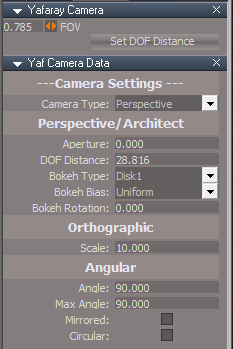
Camera settings are on a new Yafaray camera which includes a button for setting the depth of field distance by choosing a scene item. Removed the zoom input which was not being used. Camera is found in the YafaRay4tS Setup library.
Added a "set frame range" button to set the animation range from the time line.
Found that the Pathtracing and Photon mapping "Use background" is not used anymore, adjusted to use the "Use IBL" option in the background panel instead.

includes script installer to integrate the built in render buttons, "Yafaray Render Buttons Autoload.RsObj"

added denoise option - note works poorly with the partial save timer, denoises with each file save=slow
photon mapping save and reuse

requires plugin
http://clintons3d.com/plugins/downloads ... Plugin.rsx
plugin is included in the new unofficial updates
viewtopic.php?t=5411
Attachments
YafaRay4tSv090-beta.zip
(1.93 MiB) Downloaded 219 times
Clinton Reese

http://clintons3d.com
User avatar
bitkar
Captain
Posts: 2089
Joined: 16 Mar 2010, 07:14
Type the number ten into the box: 0
Location: Czech Republic

Re: Yafaray4tS v0.9.0

Post by bitkar »

i have had no time recently, so iam not sure if i will test it out. But if someone does, can you make a video of how the workflow looks like now? Setting up materials, lights, render... or even the installation process.

Definatly BIG thanks to Clinton
Michal aka bitkar
tS freak since tS2 (1998) and forever (tS7.61 modeler)
User avatar
trueBlue
Captain
Posts: 5548
Joined: 06 Jul 2009, 22:50
Type the number ten into the box: 10

Re: Yafaray4tS v0.9.0

Post by trueBlue »

clintonman wrote: 08 Jun 2018, 00:24
trueBlue wrote: 06 Jun 2018, 17:13 With regards to Yafaray4tS to with stand a Reset to Default Context, I was wanting to add the following lines to the reset,js file to the Update 4:

Code: Select all

if(Node.Exists(rosDir + '\\scripts\\preObjects\\Yafaray4tS.rsobj')) {
RsFileIO.LoadObject( rosDir + '\\scripts\\preObjects\\Yafaray4tS.rsobj', '/');
}

Is that the correct spelling ( Yafaray4tS ) and with your installation will you be adding the Yafaray4tS.rsobj to the preobjects folder?
YafarayNodeLocation.jpg
The Yafaray4tS will continue to live inside the Yafaray Folder node and I'll have the installer place it in the preobjects folder. So the code will be:

Code: Select all

if(Node.Exists(rosDir + '\\scripts\\preObjects\\Yafaray Folder.rsobj')) {
RsFileIO.LoadObject( rosDir + '\\scripts\\preObjects\\Yafaray Folder.rsobj', '/');
}
For whatever reason the above code does not work.

The only way I could get it to work is as follows:

Code: Select all

Node.Create("Kernel Package/Object","/");
Node.Rename("/Object","Yafaray Folder")
RsFileIO.LoadObject( rosDir + '\\scripts\\preObjects\\YafaRay4tS.rsobj', '/Yafaray Folder/');
RsFileIO.LoadObject( rosDir + '\\scripts\\preObjects\\GenerateIESprofileScript.rsobj', '/Yafaray Folder/');

Also have to add both objects to the updates.

Changed the Install/Uninstall scripts to accommodate the above. (See attachment)

Let me know if this works for you and I will add it to the updates.

Suggestions:
YafaRay4tS panel
Save Settings button - Add save YafaRay4tS.RsObj to the preobjects folder?

Yafaray4tS toolbar
Yafaray Settings - Opens Direct Lighting and not Render Settings?

Add Yafaray Render Buttons Autoload to installer?
Attachments
YafaRay4tSv090-beta (2).zip
(2.17 MiB) Downloaded 202 times
User avatar
clintonman
Captain
Posts: 5659
Joined: 21 May 2009, 21:08
Type the number ten into the box: 0
Location: California

Re: Yafaray4tS v0.9.0

Post by clintonman »

Original code was

Code: Select all

if(Node.Exists(rosDir + '\\scripts\\preObjects\\Yafaray4tS.rsobj')) {
RsFileIO.LoadObject( rosDir + '\\scripts\\preObjects\\Yafaray4tS.rsobj', '/');
}
My change without really looking at it was

Code: Select all

if(Node.Exists(rosDir + '\\scripts\\preObjects\\Yafaray Folder.rsobj')) {
RsFileIO.LoadObject( rosDir + '\\scripts\\preObjects\\Yafaray Folder.rsobj', '/');
}
It should have been

Code: Select all

if(!Node.Exists('/Yafaray Folder')) {
RsFileIO.LoadObject( rosDir + '\\scripts\\preObjects\\Yafaray Folder.rsobj', '/');
}
Here I'm assuming that it is supposed to load if the node doesn't already exist inside truespace.
Clinton Reese

http://clintons3d.com
User avatar
clintonman
Captain
Posts: 5659
Joined: 21 May 2009, 21:08
Type the number ten into the box: 0
Location: California

Re: Yafaray4tS v0.9.0

Post by clintonman »

trueBlue wrote: 08 Jun 2018, 20:15 ...
For whatever reason the above code does not work.

The only way I could get it to work is as follows:
...


Also have to add both objects to the updates.

Changed the Install/Uninstall scripts to accommodate the above. (See attachment)

Let me know if this works for you and I will add it to the updates.

Suggestions:
YafaRay4tS panel
Save Settings button - Add save YafaRay4tS.RsObj to the preobjects folder?

Yafaray4tS toolbar
Yafaray Settings - Opens Direct Lighting and not Render Settings?

Add Yafaray Render Buttons Autoload to installer?
Good ideas.

Will save the Yafaray Folder to preobjects when the save settings button is pressed

The right click button goes to the active lighting model. There is no "Render Settings" tab. Which tab do you think it should go?

I completely forgot about the Render Buttons until the last second. Ideally the resulting nodes would live inside the Yafaray4tS node, but it's a little bit of a pain to recompile the plugin code so I'll leave them in the Custom Commands and will include it in the Yafaray installer instead of having it separate.
Clinton Reese

http://clintons3d.com
User avatar
clintonman
Captain
Posts: 5659
Joined: 21 May 2009, 21:08
Type the number ten into the box: 0
Location: California

Re: Yafaray4tS v0.9.0

Post by clintonman »

I just looked at the original yafaray right click button and it goes to the Setup tab. Most of the render settings are in other tabs.
I'm going to keep the new button right click to the render settings under the different lighting models.
Clinton Reese

http://clintons3d.com
User avatar
trueBlue
Captain
Posts: 5548
Joined: 06 Jul 2009, 22:50
Type the number ten into the box: 10

Re: Yafaray4tS v0.9.0

Post by trueBlue »

Cool! The end goal was when a user resets the context, they would not have to save their settings again. So thanks for that!

The new code you have shown for the reset.js will not work either.

We need to have code that checks for it's existence in the main directory for those users that do not install Yafaray4tS.
When I first tried loading the YafaRay4tS.RsObj when it was not present in the main directory, the reset.js file did not run. When I put the check it did. We do not need to check if it exist in System because when you reset, it is deleted.
I guess we can try your

Code: Select all

fso = new ActiveXObject("Scripting.FileSystemObject");
Edit: Nevermind, I will just include the Yafaray Folder with the update. Testng...
Okay it works but you will have to eliminate deleting the Yafaray Folder in the Uninstall script.

You know better which aspect should show better then I. What I was talking about is the left click (Yafaray Settings) goes to the Direct aspect. Where as the Default aspect has the Render Settings. I was thinking that the Render Settings would be a better choice?


Forgot to mention that I made a few modifications in that last attchment I up loaded.

YafaRay4tS panel
I removed the (Asp) Tab on the Display.

Lights library
Added icons to the lights

Setup library
Did a little panel editing and changed the color of the Yafary Camera's mesh.

Most of the icons were blank.
Attachments
Yafaray setup library.PNG
User avatar
clintonman
Captain
Posts: 5659
Joined: 21 May 2009, 21:08
Type the number ten into the box: 0
Location: California

Re: Yafaray4tS v0.9.0

Post by clintonman »

trueBlue wrote: 08 Jun 2018, 23:00 ...

You know better which aspect should show better then I. What I was talking about is the left click (Yafaray Settings) goes to the Direct aspect. Where as the Default aspect has the Render Settings. I was thinking that the Render Settings would be a better choice?


Forgot to mention that I made a few modifications in that last attchment I up loaded.

YafaRay4tS panel
I removed the (Asp) Tab on the Display.

Lights library
Added icons to the lights

Setup library
Did a little panel editing and changed the color of the Yafary Camera's mesh.

Most of the icons were blank.
Got it, that does look better.

Now I see what you mean. The default tab does say "Render Settings". Most of those settings have been moved to the lighting methods. It was confusing to me because all the settings were together even though several are only valid with certain lighting methods.
CleanDefault.jpg
CleanDefault.jpg (48.46 KiB) Viewed 4612 times
Here I removed the repeat items. The input color space and denoise items will be moved to the individual lighting method panels and No recursion will be removed, it belongs only in the path tracing panel.
So default will be almost empty. Any ideas to fill the space?
Clinton Reese

http://clintons3d.com
User avatar
clintonman
Captain
Posts: 5659
Joined: 21 May 2009, 21:08
Type the number ten into the box: 0
Location: California

Re: Yafaray4tS v0.9.0

Post by clintonman »

trueBlue wrote: 08 Jun 2018, 23:00 ...
Okay it works but you will have to eliminate deleting the Yafaray Folder in the Uninstall script.

...
Ok, will do.
Clinton Reese

http://clintons3d.com
User avatar
trueBlue
Captain
Posts: 5548
Joined: 06 Jul 2009, 22:50
Type the number ten into the box: 10

Re: Yafaray4tS v0.9.0

Post by trueBlue »

Combine the Misc aspect with the Default aspect and delete the Misc aspect?

Or are you referring to Panel Properties?
Solid Background
Attachments
Capture.PNG
User avatar
trueBlue
Captain
Posts: 5548
Joined: 06 Jul 2009, 22:50
Type the number ten into the box: 10

Re: Yafaray4tS v0.9.0

Post by trueBlue »

Think I going to need some instructions on how to use the materials.
Simple scene with a sphere painted with the blend material.
Does not seem to be working and the preview throws two errors.
Attachments
Space 3D3afe.RsScn
(1.42 MiB) Downloaded 203 times
User avatar
clintonman
Captain
Posts: 5659
Joined: 21 May 2009, 21:08
Type the number ten into the box: 0
Location: California

Re: Yafaray4tS v0.9.0

Post by clintonman »

trueBlue wrote: 09 Jun 2018, 13:51 Think I going to need some instructions on how to use the materials.
Simple scene with a sphere painted with the blend material.
Does not seem to be working and the preview throws two errors.
The blend material has 2 parts, the second part is the Blend Material Collection found in the Yafaray4tS Setup library.
1. Setup 2 materials in the collection
2. Apply the Blend material to something
3. Press the preview button

I will move the Blend Material Collection to the Yaf materials library
Clinton Reese

http://clintons3d.com
User avatar
clintonman
Captain
Posts: 5659
Joined: 21 May 2009, 21:08
Type the number ten into the box: 0
Location: California

Re: Yafaray4tS v0.9.0

Post by clintonman »

New beta-3 installer based on beta (2)

Save settings saves the "Yafaray Folder" node to the preobjects folder
Blend Material has better error message when Blend Material Collection is not in the scene
Moved Blend Material Collection into the Yaf materials library
Cleaned up the default tab a little bit
Removed extra files Yafaray4tS.RsObj, GenerateIESprofileScript.RsObj, Yafaray Render Buttons Autoload.RsObj

Installation changes
Replaced empty "Yafaray Folder" node with one that contains Yafaray4tS and GenerateIESprofileScript nodes
Added integrated button installation
Save "Yafaray Folder" to preobjects instead of Yafaray4tS and GenerateIESprofileScript nodes
Attachments
YafaRay4tSv090-beta-3.zip
(1.96 MiB) Downloaded 219 times
Clinton Reese

http://clintons3d.com
User avatar
trueBlue
Captain
Posts: 5548
Joined: 06 Jul 2009, 22:50
Type the number ten into the box: 10

Re: Yafaray4tS v0.9.0

Post by trueBlue »

Here is some observations I notice. Not saying you should make any modifications.
Tested in tS761B84 with Vray.

After the Yafaray4tS installation completes the Offline Renderers and Vray panel shows in the Stack with Vray photo renderer selected as the Renderer.
Not a big deal just change from Vray to Yafaray.
I Reset to Default Context and the Yafaray render node is deleted.
Not sure what can be done about that.
Edit: This works.
Have to have an empty Offline renderers.rsobj in the preobjects folder.

Code: Select all

if (!Node.Exists("/Offline renderers")) {
RsFileIO.LoadObject(System.GetMainDir() + '\\scripts\\preObjects\\Offline renderers.rsobj', '/');
try {
Node.Create("Clintons3D Package/Yafaray", "/Offline renderers");
} catch (err) {
System.Trace("Error: Clintons3D Package plugin should be installed first");
}
}
if (!Node.Exists("/Offline renderers/Yafaray")) {
try {
Node.Create("Clintons3D Package/Yafaray", "/Offline renderers");
} catch (err) {
System.Trace("Error: Clintons3D Package plugin should be installed first");
}
}
As a test, I unloaded and uninstalled Vray from the Package Manager, then rebooted tS.
The Vray photo renderer node is still present but outlined in red.
I Reset to Default Context and the Offline Renderers node is deleted from System.
I intall Vray from the Package Manager and as soon as I Load Vray it creates the Offline Renderers node and adds the Vray photo renderer node inside.

Have not tested this but I wonder if the Offline Renderers node is not present, does your plugin create it?
Edit: Tested by running the installer and it does work, but the plugin does not.


The Yafaray4tS Uninstall script does not delete the Yafaray render node.
User avatar
clintonman
Captain
Posts: 5659
Joined: 21 May 2009, 21:08
Type the number ten into the box: 0
Location: California

Re: Yafaray4tS v0.9.0

Post by clintonman »

Thanks for the heads up. Need to make it survive context reset.
Clinton Reese

http://clintons3d.com
User avatar
clintonman
Captain
Posts: 5659
Joined: 21 May 2009, 21:08
Type the number ten into the box: 0
Location: California

Re: Yafaray4tS v0.9.0

Post by clintonman »

Attached new material converter can be used with the new yafaray4ts

notes for previous version are here:
http://clintons3d.com/plugins/truespace ... erter.html
Attachments
D3DmaterialConverter.RsObj
(1.67 MiB) Downloaded 209 times
Clinton Reese

http://clintons3d.com
User avatar
trueBlue
Captain
Posts: 5548
Joined: 06 Jul 2009, 22:50
Type the number ten into the box: 10

Re: Yafaray4tS v0.9.0

Post by trueBlue »

clintonman wrote: 09 Jun 2018, 21:37 Thanks for the heads up. Need to make it survive context reset.
Another issue is the toolbars. Need to Reset the toolbar prototypes.
If you decide to include your reset toolbars script, please add

Code: Select all

syncPrototype["WinGUID_Bar"] = 1;
User avatar
clintonman
Captain
Posts: 5659
Joined: 21 May 2009, 21:08
Type the number ten into the box: 0
Location: California

Re: Yafaray4tS v0.9.0

Post by clintonman »

trueBlue wrote: 09 Jun 2018, 21:43
clintonman wrote: 09 Jun 2018, 21:37 Thanks for the heads up. Need to make it survive context reset.
Another issue is the toolbars. Need to Reset the toolbar prototypes.
If you decide to include your reset toolbars script, please add

Code: Select all

syncPrototype["WinGUID_Bar"] = 1;
Ok gotcha.

Along with the change you mention above the plan for Reset survival uses this:

At the end of reset.js:

Code: Select all

// Execute 
// Called to execute the command 
function Execute(params)
{
	var fso = new ActiveXObject("Scripting.FileSystemObject");

	//
	//Restore Yafaray toolbar
	//
	var name=WindowsManager.GetWindowsManagerNodeName();
	if(Node.Exists("Toolbar Prototypes Encapsulator/YafaRayBar"))
		WindowsManager.OpenToolbarFromPrototype("YafaRayBar",32,32,0,0);
	Node.Rename(name+"/"+Node.SubObject(name,Node.SubObjectCount(name)-1),"YafaRayBar");
	WindowsManager.SnapFrameToFrameEx(WindowsManager.GetWorkWindow(),name+"/YafaRayBar",19,10,310,-120);
	WindowsManager.SetFrameOwnerFrame(name+"/YafaRayBar",WindowsManager.GetWorkWindow());

	//
	//Restore Yafaray Scripts
	//
	if(fso.FileExists(System.GetMainDir()+ "\\Scripts\\clintonobjects\\CustomScriptsStore\\YafarayScripts.RsObj"))
		RsFileIO.LoadObject(System.GetMainDir()+ "\\Scripts\\clintonobjects\\CustomScriptsStore\\YafarayScripts.RsObj", "/Scripts/CustomCommands");

	if(fso.FileExists(System.GetMainDir()+ "\\Scripts\\preobjects\\Yafaray Folder.RsObj"))
		RsFileIO.LoadObject(System.GetMainDir()+ "\\Scripts\\preobjects\\Yafaray Folder.RsObj", "/");

	//
	//Add Yafaray to offline renderers
	//
	try {
		Node.Create("Clintons3D Package/Yafaray", "/Offline renderers");
	} catch (err) {
		System.Trace("Error: Clintons3D Package plugin should be installed first");
	}

	//
	//Restore Clintons Scripts
	//
	if(fso.FileExists(System.GetMainDir()+ "\\Scripts\\clintonobjects\\ReloadCustomScripts.RsObj")) {
		RsFileIO.LoadObject(System.GetMainDir() + '\\Scripts\\clintonobjects\\ReloadCustomScripts.RsObj', "Scripts");
		Activity.Run("Scripts/ReloadCustomScripts");
	}

	//
	//Restore Clintons toolbar
	//
	if(Node.Exists("Toolbar Prototypes Encapsulator/ClintonToolbar"))
		if(!Node.SubObjectCount("Toolbar Prototypes Encapsulator/ClintonToolbar") ==0){
			var name=WindowsManager.GetWindowsManagerNodeName();
			WindowsManager.CloseToolbar("ClintonToolbar");
			WindowsManager.OpenToolbarFromPrototype("ClintonToolbar",32,32,0,0);
			Node.Rename(name+"/"+Node.SubObject(name,Node.SubObjectCount(name)-1),"ClintonToolbarFrame");
			WindowsManager.SnapFrameToFrameEx(WindowsManager.GetWorkWindow(),name+"/ClintonToolbarFrame",19,10,310,-60);
			WindowsManager.SetFrameOwnerFrame(name+"/ClintonToolbarFrame",WindowsManager.GetWorkWindow());
		}
}
Clinton Reese

http://clintons3d.com
User avatar
trueBlue
Captain
Posts: 5548
Joined: 06 Jul 2009, 22:50
Type the number ten into the box: 10

Re: Yafaray4tS v0.9.0

Post by trueBlue »

Have you tested this in your reset.js file?
If so maybe you can share your reset.js file
Have not tried this yet. See the 3 comments
Not sure how to insert this code into the reset.js file as it is different then a normal script.

Code: Select all

function Execute(params)
{
[b]// tB -  Are you saying to include the above lines in the reset,js file?[/b]


	var fso = new ActiveXObject("Scripting.FileSystemObject");

	//
	//Restore Yafaray toolbar
	//
	var name=WindowsManager.GetWindowsManagerNodeName();
	if(Node.Exists("Toolbar Prototypes Encapsulator/YafaRayBar"))
		WindowsManager.OpenToolbarFromPrototype("YafaRayBar",32,32,0,0);
	Node.Rename(name+"/"+Node.SubObject(name,Node.SubObjectCount(name)-1),"YafaRayBar");
	WindowsManager.SnapFrameToFrameEx(WindowsManager.GetWorkWindow(),name+"/YafaRayBar",19,10,310,-120);
	WindowsManager.SetFrameOwnerFrame(name+"/YafaRayBar",WindowsManager.GetWorkWindow());

	//
	//Restore Yafaray Scripts
	//
	if(fso.FileExists(System.GetMainDir()+ "\\Scripts\\clintonobjects\\CustomScriptsStore\\YafarayScripts.RsObj"))
		RsFileIO.LoadObject(System.GetMainDir()+ "\\Scripts\\clintonobjects\\CustomScriptsStore\\YafarayScripts.RsObj", "/Scripts/CustomCommands");

	if(fso.FileExists(System.GetMainDir()+ "\\Scripts\\preobjects\\Yafaray Folder.RsObj"))
		RsFileIO.LoadObject(System.GetMainDir()+ "\\Scripts\\preobjects\\Yafaray Folder.RsObj", "/");

	//
	//Add Yafaray to offline renderers
	//
[b]//tB - This could be a problem given the different stages tS can be in with and without vray -> See the script I shared earlier.[/b]
	try {
		Node.Create("Clintons3D Package/Yafaray", "/Offline renderers");
	} catch (err) {
		System.Trace("Error: Clintons3D Package plugin should be installed first");
	}

	//
	//Restore Clintons Scripts
	//
	if(fso.FileExists(System.GetMainDir()+ "\\Scripts\\clintonobjects\\ReloadCustomScripts.RsObj")) {
		RsFileIO.LoadObject(System.GetMainDir() + '\\Scripts\\clintonobjects\\ReloadCustomScripts.RsObj', "Scripts");
		Activity.Run("Scripts/ReloadCustomScripts");
	}

	//
	//Restore Clintons toolbar
	//
	if(Node.Exists("Toolbar Prototypes Encapsulator/ClintonToolbar"))
		if(!Node.SubObjectCount("Toolbar Prototypes Encapsulator/ClintonToolbar") ==0){
			var name=WindowsManager.GetWindowsManagerNodeName();
			WindowsManager.CloseToolbar("ClintonToolbar");
			WindowsManager.OpenToolbarFromPrototype("ClintonToolbar",32,32,0,0);
			Node.Rename(name+"/"+Node.SubObject(name,Node.SubObjectCount(name)-1),"ClintonToolbarFrame");
			WindowsManager.SnapFrameToFrameEx(WindowsManager.GetWorkWindow(),name+"/ClintonToolbarFrame",19,10,310,-60);
			WindowsManager.SetFrameOwnerFrame(name+"/ClintonToolbarFrame",WindowsManager.GetWorkWindow());
		}

[b]// tB -  Are you saying to include the next line in the reset,js file?[/b]
}
User avatar
clintonman
Captain
Posts: 5659
Joined: 21 May 2009, 21:08
Type the number ten into the box: 0
Location: California

Re: Yafaray4tS v0.9.0

Post by clintonman »

Oops, post got messed up. the change to reset.js is 2 lines at the end:

Code: Select all

RsFileIO.LoadObject( rosDir + '\\scripts\\preObjects\\PostReset.RsObj', scene);
ScriptObject.Execute("Project/Space 3D/PostReset");
attached is the node that it loads and runs.
Attachments
PostReset.RsObj
(8.68 KiB) Downloaded 258 times
Clinton Reese

http://clintons3d.com
User avatar
trueBlue
Captain
Posts: 5548
Joined: 06 Jul 2009, 22:50
Type the number ten into the box: 10

Re: Yafaray4tS v0.9.0

Post by trueBlue »

LOL, could have sworn that I saw the mention of the PostReset before the post got messed up. :D
Often wondered if one could load a script with the reset.js file. Very Cool!
Still testing the PostReset, the only thing I see is when Yafaray4tS is uninstalled, the PostReset adds the Yafaray render node.
Not to crazy about loading the toolbars, but that is just my opinion.
Could you live without that?
Also in the final release, will need to delete that script upon completion.

With the YafaraytS installation, if you run the installation after it is installed it throws an error.
Yafaray4tS Reinstall.PNG
To fix that, if you add a check for the file version on the AboutBitmap's attribute 'YafaRay4tS_Version', and create a Question Yes/No/Cancel
Yes = "Would you like to run the Uninstall?"
No = Delete the script
Cancel = Delete the script

Also not to crazy about including the GenerateIESprofileScript.RsObj in the Yafaray Folder with the installation, but again just my opinion. LOL, I am trying to get over my OCD(S) ;)
I get why you are doing that, it makes it simple.
Also not a big deal with the Yafaray installation when Vray is present, the installation opens the the Offline renderers, PhotoRender, and the Vray panels. I have seen you change the Combo Control's selection somewhere in your other scripts. Would be cool if you could change the Offline renderers to Yafaray.
And delete the Yafaray render node with the Uninstall.
Since I included the YafaRayBar prototype with the update, would you eliminate deleting it in the Uninstall script?
It is included in my Open trueSpace Toolbars within the Red Toolbox, which causes an error if it is not present.

Off topic, I do not remember this being an issue, when you use the TGA viewer, you need use a TGA image.
When you use the Internal Viewer you have to change the file image type, and does not support a TGA image?
This causes a problem with the default Setup - C:\Temp\yaf_test.tga, the MS DOS window hangs.
User avatar
clintonman
Captain
Posts: 5659
Joined: 21 May 2009, 21:08
Type the number ten into the box: 0
Location: California

Re: Yafaray4tS v0.9.0

Post by clintonman »

trueBlue wrote: 10 Jun 2018, 15:11 ...
Not to crazy about loading the toolbars, but that is just my opinion.
Could you live without that?
...
Explain. I don't see how to live without it. How get the toolbars back if they disappear with reset?

Edit: Ok I see you have a toolbar loader. I prefer a one step process instead of reset and load one by one. The right click reset default context doesn't do anything, maybe we can do something with that: right click to reset and load all toolbars.

The button on your load toolbars is really small. I couldn't even tell it was a button at first. I think it needs something to help it stick out from the background, different color, bigger, a label.
Last edited by clintonman on 10 Jun 2018, 17:20, edited 1 time in total.
Clinton Reese

http://clintons3d.com
User avatar
clintonman
Captain
Posts: 5659
Joined: 21 May 2009, 21:08
Type the number ten into the box: 0
Location: California

Re: Yafaray4tS v0.9.0

Post by clintonman »

trueBlue wrote: 10 Jun 2018, 15:11 ...
Off topic, I do not remember this being an issue, when you use the TGA viewer, you need use a TGA image.
When you use the Internal Viewer you have to change the file image type, and does not support a TGA image?
This causes a problem with the default Setup - C:\Temp\yaf_test.tga, the MS DOS window hangs.
That may have been something I did, not knowing the limitations of the TGA viewer. I'll load up an old version and see what's up.
Clinton Reese

http://clintons3d.com
User avatar
clintonman
Captain
Posts: 5659
Joined: 21 May 2009, 21:08
Type the number ten into the box: 0
Location: California

Re: Yafaray4tS v0.9.0

Post by clintonman »

trueBlue wrote: 10 Jun 2018, 15:11 ...
Also not to crazy about including the GenerateIESprofileScript.RsObj in the Yafaray Folder with the installation, but again just my opinion. LOL, I am trying to get over my OCD(S) ;)
I get why you are doing that, it makes it simple.
...
Yep, you're gonna see a lot of that in the stuff I do. In programming there's a concept called DRY - Don't Repeat Yourself
My programmers OCD won't let me have something in 3 different places when it can live in one place. ;) The Material Converter update posted a little while ago isn't so dry, so that will be dried up and much shorter in the final release.
Clinton Reese

http://clintons3d.com
User avatar
trueBlue
Captain
Posts: 5548
Joined: 06 Jul 2009, 22:50
Type the number ten into the box: 10

Re: Yafaray4tS v0.9.0

Post by trueBlue »

Before the PostReset came into play, the reset.js in the present update 4 included reloading your scripts (that are included in the update, some not all) and all of your toolbars are included in the update as well.
So they were Not lost with a reset.
Maybe you missed that part of the update. It is included in the release notes.

The only caveat is the update only included some not all of your scripts.
With your PostRest it loads all of your scripts that are present in the CustomScriptsStore, so that is even better.

Not a big deal, but it is not necessary to open the C3D toolbar with the PostReset script, thats all.
User avatar
trueBlue
Captain
Posts: 5548
Joined: 06 Jul 2009, 22:50
Type the number ten into the box: 10

Re: Yafaray4tS v0.9.0

Post by trueBlue »

clintonman wrote: 10 Jun 2018, 17:01 Edit: Ok I see you have a toolbar loader. I prefer a one step process instead of reset and load one by one. The right click reset default context doesn't do anything, maybe we can do something with that: right click to reset and load all toolbars.
Not sure I am following you here. It is only an aditional tool to open tS761 toolbars.
The RMB command for the reset is as shown. That is the original command before adding the Question a long time ago per request from Tiles. Not sure why it does not work for you.
Attachments
Capture.PNG
Capture.PNG (9.58 KiB) Viewed 4654 times
User avatar
trueBlue
Captain
Posts: 5548
Joined: 06 Jul 2009, 22:50
Type the number ten into the box: 10

Re: Yafaray4tS v0.9.0

Post by trueBlue »

clintonman wrote: 10 Jun 2018, 17:12
trueBlue wrote: 10 Jun 2018, 15:11 ...
Off topic, I do not remember this being an issue, when you use the TGA viewer, you need use a TGA image.
When you use the Internal Viewer you have to change the file image type, and does not support a TGA image?
This causes a problem with the default Setup - C:\Temp\yaf_test.tga, the MS DOS window hangs.
That may have been something I did, not knowing the limitations of the TGA viewer. I'll load up an old version and see what's up.
It is the Internal Display that I am referring to. I could be wrong but I do not remember it not supporting TGA.

From what I can tell from your code and release notes it has to do with the limitation of the BMP Transmitter?
User avatar
trueBlue
Captain
Posts: 5548
Joined: 06 Jul 2009, 22:50
Type the number ten into the box: 10

Re: Yafaray4tS v0.9.0

Post by trueBlue »

clintonman wrote: 10 Jun 2018, 17:19
trueBlue wrote: 10 Jun 2018, 15:11 ...
Also not to crazy about including the GenerateIESprofileScript.RsObj in the Yafaray Folder with the installation, but again just my opinion. LOL, I am trying to get over my OCD(S) ;)
I get why you are doing that, it makes it simple.
...
Yep, you're gonna see a lot of that in the stuff I do. In programming there's a concept called DRY - Don't Repeat Yourself
My programmers OCD won't let me have something in 3 different places when it can live in one place. ;) The Material Converter update posted a little while ago isn't so dry, so that will be dried up and much shorter in the final release.
Been meaning to ask you, is the convert d3d to yafaray script the only thing that changed?
The one that is included with the Material Editor update 4 is changed a little bit. I noticed that the file size of that update was bigger, and the culpert was your included Constant Shader. That image that is included in that shader is 1.5 MB. And it did not look like it was being used by any of your scripts. So I deleted ALL of the included shaders and loaded them from trueSpace instead, as an example:

Code: Select all

//tB
	shader = RsFileIO.LoadObject(System.GetMainDir() + "\\RS Main Libraries\\Shaders - Alpha Shaders\\TextureAlpha.RsMat", d3dmat);
//	shader = Node.Copy(owner + "/TextureAlpha", d3dmat);
I am pretty sure there is a different (Better) way to load them verses from the Library.
User avatar
trueBlue
Captain
Posts: 5548
Joined: 06 Jul 2009, 22:50
Type the number ten into the box: 10

Re: Yafaray4tS v0.9.0

Post by trueBlue »

If it makes easier, was contemplating making YafaRay4tS a permanent part of trueSpace. Maybe even including a YafaRay layout. First need to iron out any installation or uninstall issues.
User avatar
clintonman
Captain
Posts: 5659
Joined: 21 May 2009, 21:08
Type the number ten into the box: 0
Location: California

Re: Yafaray4tS v0.9.0

Post by clintonman »

trueBlue wrote: 10 Jun 2018, 17:54
clintonman wrote: 10 Jun 2018, 17:01 Edit: Ok I see you have a toolbar loader. I prefer a one step process instead of reset and load one by one. The right click reset default context doesn't do anything, maybe we can do something with that: right click to reset and load all toolbars.
Not sure I am following you here. It is only an aditional tool to open tS761 toolbars.
The RMB command for the reset is as shown. That is the original command before adding the Question a long time ago per request from Tiles. Not sure why it does not work for you.
I don't have that here. Maybe that's in a later update? Will get the latest and see.
Clinton Reese

http://clintons3d.com
User avatar
clintonman
Captain
Posts: 5659
Joined: 21 May 2009, 21:08
Type the number ten into the box: 0
Location: California

Re: Yafaray4tS v0.9.0

Post by clintonman »

trueBlue wrote: 10 Jun 2018, 17:59
clintonman wrote: 10 Jun 2018, 17:12
trueBlue wrote: 10 Jun 2018, 15:11 ...
Off topic, I do not remember this being an issue, when you use the TGA viewer, you need use a TGA image.
When you use the Internal Viewer you have to change the file image type, and does not support a TGA image?
This causes a problem with the default Setup - C:\Temp\yaf_test.tga, the MS DOS window hangs.
That may have been something I did, not knowing the limitations of the TGA viewer. I'll load up an old version and see what's up.
It is the Internal Display that I am referring to. I could be wrong but I do not remember it not supporting TGA.

From what I can tell from your code and release notes it has to do with the limitation of the BMP Transmitter?
The TGA viewer and the Optidetctors are separate. If opti is installed it uses that, if not it uses TGA viewer. Opti can display any format truespace can read. TGA I guess is limited to TGA format
Clinton Reese

http://clintons3d.com
User avatar
clintonman
Captain
Posts: 5659
Joined: 21 May 2009, 21:08
Type the number ten into the box: 0
Location: California

Re: Yafaray4tS v0.9.0

Post by clintonman »

trueBlue wrote: 10 Jun 2018, 18:14
clintonman wrote: 10 Jun 2018, 17:19
trueBlue wrote: 10 Jun 2018, 15:11 ...
Also not to crazy about including the GenerateIESprofileScript.RsObj in the Yafaray Folder with the installation, but again just my opinion. LOL, I am trying to get over my OCD(S) ;)
I get why you are doing that, it makes it simple.
...
Yep, you're gonna see a lot of that in the stuff I do. In programming there's a concept called DRY - Don't Repeat Yourself
My programmers OCD won't let me have something in 3 different places when it can live in one place. ;) The Material Converter update posted a little while ago isn't so dry, so that will be dried up and much shorter in the final release.
Been meaning to ask you, is the convert d3d to yafaray script the only thing that changed?
The one that is included with the Material Editor update 4 is changed a little bit. I noticed that the file size of that update was bigger, and the culpert was your included Constant Shader. That image that is included in that shader is 1.5 MB. And it did not look like it was being used by any of your scripts. So I deleted ALL of the included shaders and loaded them from trueSpace instead, as an example:

Code: Select all

//tB
	shader = RsFileIO.LoadObject(System.GetMainDir() + "\\RS Main Libraries\\Shaders - Alpha Shaders\\TextureAlpha.RsMat", d3dmat);
//	shader = Node.Copy(owner + "/TextureAlpha", d3dmat);
I am pretty sure there is a different (Better) way to load them verses from the Library.
Yep, that's the only change and yesp I agree it is better to load in from disk as needed.
Clinton Reese

http://clintons3d.com
User avatar
clintonman
Captain
Posts: 5659
Joined: 21 May 2009, 21:08
Type the number ten into the box: 0
Location: California

Re: Yafaray4tS v0.9.0

Post by clintonman »

trueBlue wrote: 10 Jun 2018, 19:33 If it makes easier, was contemplating making YafaRay4tS a permanent part of trueSpace. Maybe even including a YafaRay layout. First need to iron out any installation or uninstall issues.
Let me know what you come up with and I'll conform to it.
Clinton Reese

http://clintons3d.com
User avatar
trueBlue
Captain
Posts: 5548
Joined: 06 Jul 2009, 22:50
Type the number ten into the box: 10

Re: Yafaray4tS v0.9.0

Post by trueBlue »

The issue so far that I can see was mentioned here:
viewtopic.php?t=5446&start=10#p52454

With the YafaraytS installation, if you run the installation after it is installed it throws an error.
To fix that, if you add a check for the file version on the AboutBitmap's attribute 'YafaRay4tS_Version', and create a Question Yes/No/Cancel
Yes = "Would you like to run the Uninstall?"
No = Delete the script
Cancel = Delete the script


And resetting the toolbars.
User avatar
clintonman
Captain
Posts: 5659
Joined: 21 May 2009, 21:08
Type the number ten into the box: 0
Location: California

Re: Yafaray4tS v0.9.0

Post by clintonman »

I got the latest unofficial and the right click for default reset is in there.
In any case I'll just add a question to the PostReset script, "Do you want to reload the toolbars?"
Clinton Reese

http://clintons3d.com
User avatar
trueBlue
Captain
Posts: 5548
Joined: 06 Jul 2009, 22:50
Type the number ten into the box: 10

Re: Yafaray4tS v0.9.0

Post by trueBlue »

clintonman wrote: 10 Jun 2018, 20:15 I got the latest unofficial and the right click for default reset is in there.
In any case I'll just add a question to the PostReset script, "Do you want to reload the toolbars?"
Clinton, please try this first.

1.) Install the present Update 4.
2.) Important that you Reset the Default Context.
3.) Open your toolbars and try your scripts without running your Batch Installer for trueSpace7.61


Your Persistent install v2 for trueSpace7.61 IS part of the Update 4 for tS761B8 and tS761B8Std
As mentioned earlier some not all of your scripts and ALL of your toolbars are included.
It has been this way for several months now.
Is this not working for you, with regards to your toolbars?
User avatar
clintonman
Captain
Posts: 5659
Joined: 21 May 2009, 21:08
Type the number ten into the box: 0
Location: California

Re: Yafaray4tS v0.9.0

Post by clintonman »

Yep, steps are:
Reset default
Push Gold Toolbar - get clintons3d toolbar
Push Red Toolbar
Push Red Toolbar inside the new toolbar
Choose YaRayToolbar from the list and push the button - get yafaray toolbar

I still prefer one step
reset default - get clintons3d toolbar and get yafaray toolbar

BTW I think there's a bug. When I close the tS761Toolbars, it won't open again unless I reset default.
Edit: It's the top x that makes it unload permanently. If you use the bottom x it will work again after closing
Clinton Reese

http://clintons3d.com
User avatar
trueBlue
Captain
Posts: 5548
Joined: 06 Jul 2009, 22:50
Type the number ten into the box: 10

Re: Yafaray4tS v0.9.0

Post by trueBlue »

Totally confused here. The tS761Toolbars and the Yafaray toolbar has nothing to do with my last post.
User avatar
clintonman
Captain
Posts: 5659
Joined: 21 May 2009, 21:08
Type the number ten into the box: 0
Location: California

Re: Yafaray4tS v0.9.0

Post by clintonman »

tS761Toolbars.jpg
If I push the red, it wont open anymore without default reset
Push green and can reopen.
Clinton Reese

http://clintons3d.com
User avatar
clintonman
Captain
Posts: 5659
Joined: 21 May 2009, 21:08
Type the number ten into the box: 0
Location: California

Re: Yafaray4tS v0.9.0

Post by clintonman »

Ok, let's start over.

I do
1.) Install the present Update 4.
2.) Important that you Reset the Default Context.
3.) Open your toolbars and try your scripts without running your Batch Installer for trueSpace7.61

I get the toolbar and the scripts.
what is supposed to happen?
Clinton Reese

http://clintons3d.com
User avatar
trueBlue
Captain
Posts: 5548
Joined: 06 Jul 2009, 22:50
Type the number ten into the box: 10

Re: Yafaray4tS v0.9.0

Post by trueBlue »

Yes this is true.
The top X closes the popup window in Windows Manager.
The bottom X deletes the object in the scene.
It is not necessary to have to reset the default context.
You can delete it in the scene or open a new scene.

Never the less I will add a command that deletes it first before opening it from the library.

Thanks for the heads up.
User avatar
trueBlue
Captain
Posts: 5548
Joined: 06 Jul 2009, 22:50
Type the number ten into the box: 10

Re: Yafaray4tS v0.9.0

Post by trueBlue »

clintonman wrote: 10 Jun 2018, 21:22 Ok, let's start over.

I do
1.) Install the present Update 4.
2.) Important that you Reset the Default Context.
3.) Open your toolbars and try your scripts without running your Batch Installer for trueSpace7.61

I get the toolbar and the scripts.
what is supposed to happen?
Clinton quote "Explain. I don't see how to live without it. How get the toolbars back if they disappear with reset?"

I guess the confusion for you and myself is if the toolbars should be opened after a reset.
It has always been since day one that the Yafaray toolbar could be saved with a layout or load it from the library.
Also was not sure if you understood if your scripts were being reloaded.
For me with the update, I am trying to respect that maybe some users may not want to install Yafaray4tS and or your C3D toolbar.

So with that said even though they will be included, installed, and availible with the update, the toolbars do not have to be opened when a user Resets the Default Context. The user has a fresh slate and can decide whatever they want to do.

So here is what I was thinking about doing with regards to the Yafaray toolbar.
Create a YafaRay4tS layout that includes the libraries and toolbar.

Your toolbars are already covered as you just have to open them from the Gold toolbox.
And you could certainly save a layout with your toolbars opened where ever you want.
With your PostReset ALL of you scripts will reload the scripts that are available in your CustomScriptsStore folder.
User avatar
trueBlue
Captain
Posts: 5548
Joined: 06 Jul 2009, 22:50
Type the number ten into the box: 10

Re: Yafaray4tS v0.9.0

Post by trueBlue »

clintonman wrote: 10 Jun 2018, 19:39
trueBlue wrote: 10 Jun 2018, 17:59
clintonman wrote: 10 Jun 2018, 17:12
That may have been something I did, not knowing the limitations of the TGA viewer. I'll load up an old version and see what's up.
It is the Internal Display that I am referring to. I could be wrong but I do not remember it not supporting TGA.

From what I can tell from your code and release notes it has to do with the limitation of the BMP Transmitter?
The TGA viewer and the Optidetctors are separate. If opti is installed it uses that, if not it uses TGA viewer. Opti can display any format truespace can read. TGA I guess is limited to TGA format
Copied from the Replace Thumbnail.RsObj found in the Objects - Tutorial Objects library

Code: Select all

	// RdBitmap flags
	BFILEFMT_BMP = 0 // Save as bitmap file
	BFILEFMT_JPG = 1 // Save as jpeg
	BFILEFMT_TGA = 2 // TGA is not supported
	BFILEFMT_PNG = 3 // Save as PNG
	BFILEFMT_DDS = 4 // Save as DirectX DDS file
	BFILEFMT_PPM = 5 // PPM is not supported
	BFILEFMT_DIB = 6 // Save as Windows DIB
	BFILEFMT_HDR = 7 // Save in HDR format
	BFILEFMT_PFM = 8 // Save in Portable Pixmap format
Does Yafaray support DDS?
User avatar
clintonman
Captain
Posts: 5659
Joined: 21 May 2009, 21:08
Type the number ten into the box: 0
Location: California

Re: Yafaray4tS v0.9.0

Post by clintonman »

trueBlue wrote: 10 Jun 2018, 21:46 ...

Does Yafaray support DDS?
No. If you use the "..." file button on the Yafaray4tS you can expand the extensions section to see the options.
Clinton Reese

http://clintons3d.com
User avatar
clintonman
Captain
Posts: 5659
Joined: 21 May 2009, 21:08
Type the number ten into the box: 0
Location: California

Re: Yafaray4tS v0.9.0

Post by clintonman »

tgaviewerlimitation.jpg
"Off topic, I do not remember this being an issue, when you use the TGA viewer, you need use a TGA image."

This is verified. Manual run from the command window shows error message from TGA Viewer. It can open other formats but only accepts tga on the command line.

As it is now there is code in truespace is stopping it from even attempting to start TGA viewer.

Possible solution:
We can add a warning for this case, something like "TGA Viewer will only open tga files. You will have to open the file manually, do you wish to continue?"
If they say yes, they will get the error from the TGA Viewer, then theTGA Viewer will open without any open file.
Clinton Reese

http://clintons3d.com
User avatar
trueBlue
Captain
Posts: 5548
Joined: 06 Jul 2009, 22:50
Type the number ten into the box: 10

Re: Yafaray4tS v0.9.0

Post by trueBlue »

Up to you. And change the default Setup - C:\Temp\yaf_test.tga to PNG? As that is the biggest problem because the Internal Display is the default presently.
User avatar
clintonman
Captain
Posts: 5659
Joined: 21 May 2009, 21:08
Type the number ten into the box: 0
Location: California

Re: Yafaray4tS v0.9.0

Post by clintonman »

"When you use the Internal Viewer you have to change the file image type, and does not support a TGA image?
This causes a problem with the default Setup - C:\Temp\yaf_test.tga, the MS DOS window hangs. "

Internal viewer supports formats other than tga so not seeing the first sentence.

Had to do a bunch of testing to see second part. If external renderer is selected, then the Dos windows hangs. Internal Viewer had no hanging DOS windows.
Clinton Reese

http://clintons3d.com
User avatar
clintonman
Captain
Posts: 5659
Joined: 21 May 2009, 21:08
Type the number ten into the box: 0
Location: California

Re: Yafaray4tS v0.9.0

Post by clintonman »

trueBlue wrote: 10 Jun 2018, 23:53 Up to you. And change the default Setup - C:\Temp\yaf_test.tga to PNG? As that is the biggest problem because the Internal Display is the default presently.
I'm not seeing any problems with the internal viewer at all.
Does the window not display?
Does it open then not show anything?
Do yo have external view also selected when doing internal view?
Clinton Reese

http://clintons3d.com
User avatar
trueBlue
Captain
Posts: 5548
Joined: 06 Jul 2009, 22:50
Type the number ten into the box: 10

Re: Yafaray4tS v0.9.0

Post by trueBlue »

Hummm… just tested the default setup.

First run, the MS DOS opened (Even though it was suppose to be minimized) took a while but finally displayed the TGA in the Display. Second run no MS DOS window and displayed the TGA.

Now that I remember, it was when I first installed Beta1 and used an existing TGA file in my Temp directory that was from a previous install.
User avatar
clintonman
Captain
Posts: 5659
Joined: 21 May 2009, 21:08
Type the number ten into the box: 0
Location: California

Re: Yafaray4tS v0.9.0

Post by clintonman »

Found a fix for the DOS window not closing. Inside RenderFnSet node is code to run the TGA viewer. Adding "start" to the beginning of the command makes the window close after starting the TGA_Viewer.exe file.

Code: Select all

	if (Yaf_UseExternalViewer == true) {
		if (Yaf_FileType == 'tga')
			//File.WriteLine(System.GetMainDir() + '\\TGA_Viewer.exe "' + Yaf_RenderFilename + '"');
			File.WriteLine('start ' + System.GetMainDir() + '\\TGA_Viewer.exe "' + Yaf_RenderFilename + '"');
	}
Clinton Reese

http://clintons3d.com
User avatar
clintonman
Captain
Posts: 5659
Joined: 21 May 2009, 21:08
Type the number ten into the box: 0
Location: California

Re: Yafaray4tS v0.9.0

Post by clintonman »

trueBlue wrote: 10 Jun 2018, 15:11 ...

With the YafaraytS installation, if you run the installation after it is installed it throws an error.
Yafaray4tS Reinstall.PNG
To fix that, if you add a check for the file version on the AboutBitmap's attribute 'YafaRay4tS_Version', and create a Question Yes/No/Cancel
Yes = "Would you like to run the Uninstall?"
No = Delete the script
Cancel = Delete the script

...
Not seeing that here. That error usually happens if a file or folder is active and open.
I ran installer 3 times without any file permission errors.
Clinton Reese

http://clintons3d.com
User avatar
clintonman
Captain
Posts: 5659
Joined: 21 May 2009, 21:08
Type the number ten into the box: 0
Location: California

Re: Yafaray4tS v0.9.0

Post by clintonman »

Updated installer:
Fixed DOS window stuck open
Unhides error message about tga files that comes from the TGA_Viewer executable
Selects Yafaray as the offline renderer during the install
Does not delete Yaf toolbar when uninstalling
after setup opens to the setup tab

ContextSurvival script:
copies PostReset script to the preobjects and alters the reset.js file to use it

PostReset script:
option to open extra toolbars during context reset
deletes itself if loaded to "/"
Attachments
ContextSurvival.RsObj
(21.67 KiB) Downloaded 226 times
YafaRay4tSv090-beta-4.zip
(1.96 MiB) Downloaded 245 times
Clinton Reese

http://clintons3d.com
User avatar
trueBlue
Captain
Posts: 5548
Joined: 06 Jul 2009, 22:50
Type the number ten into the box: 10

Re: Yafaray4tS v0.9.0

Post by trueBlue »

Here is the update for trueSpace 7.61
Yafaray4tS B4 included
Added a YafaRay4tS scene and layout
Updated the D3D to Yafaray script in the Material Editor
Updated the tS761 Toolbars.RsObj
Updated the Toolbars.RsObj
Changed the PostReset to C3DReset and moved some of the commands to the reset.js file

C3DReset is as follows

Code: Select all

function Execute(params)
{
Activity.Run("Scripts/ReloadCustomScripts");
if (!Node.Exists("/Offline renderers")) {
RsFileIO.LoadObject(System.GetMainDir() + '\\scripts\\preObjects\\Offline renderers.RsObj', '/');
try {
Node.Create("Clintons3D Package/Yafaray", "/Offline renderers");
} catch (err) {
System.Trace("Error: Clintons3D Package plugin should be installed first");
}
}
if (!Node.Exists("/Offline renderers/Yafaray")) {
try {
Node.Create("Clintons3D Package/Yafaray", "/Offline renderers");
} catch (err) {
System.Trace("Error: Clintons3D Package plugin should be installed first");
}
}
Node.Delete(System.ThisName())
}
The above changes were made because several times the Yafaray render node was being created in System without the Offline renderers node using the PostReset script.

Edit: Added Yafaray Materials to the Material Editor
Right click the Library Place to enable Yafaray Materials and Components - Compositing in the D3D Materials library place
Added New Yafaray toolbar buttons

Edit4: All lights have been modified in primitives and the library
Yafaray Camera is a primitive now
Scene, and Light setup has the new lights

Edit5: Fixed the Lights again.

Edit6:
tS7.61B8.4_YafaRay4tS9_6

YafaRay4tS panel
Animation - Added Width and Height

Libraries
Added version "Y4tSv.0.9.0" to the library Discriptions for all nodes.
YafaRay4tS scene and light setup - Changed the Spot light's color to 140 140 140

Update YafaRay Render Node script
Changed the Alert to "Conversion to YafaRay4tS v0.9.0 complete."
Incorporated it into a Popup.

Render node
Changed defauts:
params.Param('vtData') = "C:" + "\\" + "Program Files" + "\\" + "yafaray_v3" + "\\" + "bin" + "\\" + "yafaray-xml.exe";
params.Param('vtData') = "C:" + "\\" + "Temp" + "\\" + "yaf_test.png";

Lighting Method Switch
Disconnecting/Reset the 'Change detect'/Reconnecting the Watch Dog before saving the Yafaray Folder seems to help.
Update4:
Add Render Scene icon to the Material Editor.
Changed loading the Tube object to a primitive. Only for loading, does not work like other widgets.

Edt7:
tS7.61B8.4_YafaRay4tS9_7
Updated Clintons3dPlugin.rsx v.1638412
Image Folder and Animation Folder added to the main directory for rendering images, both include an Image.png.
D3DView.RenderToFile.Settings.xml added that is set to the Image Folder
YafaRay4tS panel updated 6/15/2018
Attachments
tS7.61B8.4_YafaRay4tS9_7.zip
(26.15 MiB) Downloaded 223 times
User avatar
clintonman
Captain
Posts: 5659
Joined: 21 May 2009, 21:08
Type the number ten into the box: 0
Location: California

Re: Yafaray4tS v0.9.0

Post by clintonman »

Got it.
Does the C3DReset work with Vray installed?
Clinton Reese

http://clintons3d.com
User avatar
clintonman
Captain
Posts: 5659
Joined: 21 May 2009, 21:08
Type the number ten into the box: 0
Location: California

Re: Yafaray4tS v0.9.0

Post by clintonman »

trueBlue wrote: 11 Jun 2018, 08:06 Here is the update for trueSpace 7.61
Yafaray4tS B4 included
...
I think something is missing. I see the libraries and toolbar but no actual yafaray4ts. The only yafaray buttons that work are the yafara lights.

Edit:
Nevermind, forgot to reset to default context
Clinton Reese

http://clintons3d.com
User avatar
clintonman
Captain
Posts: 5659
Joined: 21 May 2009, 21:08
Type the number ten into the box: 0
Location: California

Re: Yafaray4tS v0.9.0

Post by clintonman »

clintonman wrote: 08 Jun 2018, 03:37 ...
Latest Yafaray v3.3.0 can be found here: https://github.com/YafaRay/Blender-Exporter/releases
and here: https://github.com/YafaRay/Core/releases
One is made to work with Blender and the other is standalone, either one will work.
...
This was several pages back so decided to repost these links.
Clinton Reese

http://clintons3d.com
User avatar
clintonman
Captain
Posts: 5659
Joined: 21 May 2009, 21:08
Type the number ten into the box: 0
Location: California

Re: Yafaray4tS v0.9.0

Post by clintonman »

Did some quick tests and it's looking good.
Clinton Reese

http://clintons3d.com
User avatar
trueBlue
Captain
Posts: 5548
Joined: 06 Jul 2009, 22:50
Type the number ten into the box: 10

Re: Yafaray4tS v0.9.0

Post by trueBlue »

clintonman wrote: 11 Jun 2018, 14:33 Got it.
Does the C3DReset work with Vray installed?
Yes. So far I have only tested installing this update to a fresh tS761 installation and then just now installed Vray and Reset the Default Context. Switched back and forth rendering from YafaRay4tS and Vray. Not seeing any problems so far.

Off topic, Rendering a Sphere from either Camera or View looks squashed in the internal Display. The image opened in a Photo Editor looks fine. 500x500
User avatar
clintonman
Captain
Posts: 5659
Joined: 21 May 2009, 21:08
Type the number ten into the box: 0
Location: California

Re: Yafaray4tS v0.9.0

Post by clintonman »

trueBlue wrote: 11 Jun 2018, 15:02
clintonman wrote: 11 Jun 2018, 14:33 Got it.
Does the C3DReset work with Vray installed?
Yes. So far I have only tested installing this update to a fresh tS761 installation and then just now installed Vray and Reset the Default Context. Switched back and forth rendering from YafaRay4tS and Vray. Not seeing any problems so far.

Off topic, Rendering a Sphere from either Camera or View looks squashed in the internal Display. The image opened in a Photo Editor looks fine. 500x500
Internal viewer isn't square so square picture will be squashed. iopti viewer doesn't have that problem. that's reason support was added for it.
Clinton Reese

http://clintons3d.com
User avatar
trueBlue
Captain
Posts: 5548
Joined: 06 Jul 2009, 22:50
Type the number ten into the box: 10

Re: Yafaray4tS v0.9.0

Post by trueBlue »

Here is my contribution to all your hard work. Thank YOU!
YafaRay toolbar buttons
Added OfflineRender.OpenPreferencesPanel() commands where appropriate.
Added Apply/Remove Smooth Normals button.
Capture.PNG
Capture.PNG (4 KiB) Viewed 4246 times
Has not been fully tested and no safe guard code is included. IE if node.exist etc...
Seems to work thus far without errors.


Edit: Changed the Render Setting buttons.
Added Activity.Run("/Yafaray Folder/YafaRay4tS/Switch2Yafaray");OfflineRender.OpenPreferencesPanel()
Added the Switch2Yafaray script to the included Yafaray Folder.

Edit2: Added Yafaray Camera and Yafaray Volume buttons
Edited the YafaRay4tS panel, mostly the bottom portion Output - Render File to be consistent on all aspects.
YafToolbar.PNG
YafToolbar.PNG (3.92 KiB) Viewed 4231 times
User avatar
clintonman
Captain
Posts: 5659
Joined: 21 May 2009, 21:08
Type the number ten into the box: 0
Location: California

Re: Yafaray4tS v0.9.0

Post by clintonman »

trueBlue wrote: 11 Jun 2018, 18:13 Here is my contribution to all your hard work. Thank YOU!
YafaRay toolbar buttons
Added OfflineRender.OpenPreferencesPanel() commands where appropriate.
Added Apply/Remove Smooth Normals button.
Capture.PNG
Has not been fully tested and no safe guard code is included. IE if node.exist etc...
Seems to work thus far without errors.


Edit: Changed the Render Setting buttons.

Added Activity.Run("/Yafaray Folder/YafaRay4tS/Switch2Yafaray");OfflineRender.OpenPreferencesPanel()

Added the Switch2Yafaray script to the included Yafaray Folder.
Looks good. Don't see any issues here.

I do have a request. How about buttons for the yafaray camera and the volume object. They exist in the YafaRay4tS Setup library. Also would it be possible to add the Yaf materials library to the material editor list?
Clinton Reese

http://clintons3d.com
User avatar
trueBlue
Captain
Posts: 5548
Joined: 06 Jul 2009, 22:50
Type the number ten into the box: 10

Re: Yafaray4tS v0.9.0

Post by trueBlue »

I uploaded the changes you requested.
If you right click the Library Place in the Material Editor the Yafaray Materials become available in the RS Main Library place.
Or are you wanting them to be in the D3D Materials library place? Edit: Included in both places

Edit: Updated the update 4 to include all recent changes.
Right click the Library Place to enable Yafaray Materials and Components - Compositing in the D3D Materials library place.
Also put links to download Yafaray v3.3.0 in the About aspect
User avatar
clintonman
Captain
Posts: 5659
Joined: 21 May 2009, 21:08
Type the number ten into the box: 0
Location: California

Re: Yafaray4tS v0.9.0

Post by clintonman »

Sounds good. I have one more request. Can you version your uploads until the final release? Something like "tS7.61B8.4.Preview9" and then just remove the "Preview" postfix when it's done. It would be easier to see the updates, especially at the rate you are making changes.
Did you udate the main post or just the post a couple of pages back from this post?
I'll download both.
Clinton Reese

http://clintons3d.com
User avatar
trueBlue
Captain
Posts: 5548
Joined: 06 Jul 2009, 22:50
Type the number ten into the box: 10

Re: Yafaray4tS v0.9.0

Post by trueBlue »

Will do. Just posting here as any updates pertain to Yafaray4tS only/ I am done with any further updates other then Yafaray4tS.
User avatar
clintonman
Captain
Posts: 5659
Joined: 21 May 2009, 21:08
Type the number ten into the box: 0
Location: California

Re: Yafaray4tS v0.9.0

Post by clintonman »

trueBlue wrote: 12 Jun 2018, 01:13 Will do. Just posting here as any updates pertain to Yafaray4tS only/ I am done with any further updates other then Yafaray4tS.
Thanks, 3rd time was the charm. I tried the update page version and it was too old, then the download a couple of pages back and it was a bad download. Downloaded again and all is good now.
Next I'm going to clean up the sample scenes and post them. A lot of them have oldish versions of the Yaf node and materials. Then comes documentation.
Clinton Reese

http://clintons3d.com
User avatar
trueBlue
Captain
Posts: 5548
Joined: 06 Jul 2009, 22:50
Type the number ten into the box: 10

Re: Yafaray4tS v0.9.0

Post by trueBlue »

Not really happy with how the Yaf Camera loads into trueSpace.
Thought I would remove it from the Yafaray Library and include it in the Camera Primitives.

Code: Select all

RsTool.AddPrimitive('/Widgets/Tools/Primitives/Primitive tool','{B1D12AD1-47D4-4e6c-8227-DC80FF55D7BB}{A46795D3-0DE2-4ed8-9FB6-91D84FB9F1EB}(/Preferences/Cameras/Factory preferences){/Preferences/Lights/Preferences}','/Preferences/Cameras/Yafaray Camera');
Does renaming it from Yaf Camera to Yafaray Camera a problem?
Also if you do not mind I was practicing your DRY method. ;)

Is it okay if I move your Start selection script to a button?
Yafaray Camera.PNG
Yafaray Camera.PNG (11.46 KiB) Viewed 4287 times
User avatar
clintonman
Captain
Posts: 5659
Joined: 21 May 2009, 21:08
Type the number ten into the box: 0
Location: California

Re: Yafaray4tS v0.9.0

Post by clintonman »

trueBlue wrote: 12 Jun 2018, 14:12 Not really happy with how the Yaf Camera loads into trueSpace.
Thought I would remove it from the Yafaray Library and include it in the Camera Primitives.

Code: Select all

RsTool.AddPrimitive('/Widgets/Tools/Primitives/Primitive tool','{B1D12AD1-47D4-4e6c-8227-DC80FF55D7BB}{A46795D3-0DE2-4ed8-9FB6-91D84FB9F1EB}(/Preferences/Cameras/Factory preferences){/Preferences/Lights/Preferences}','/Preferences/Cameras/Yafaray Camera');
Does renaming it from Yaf Camera to Yafaray Camera a problem?
Also if you do not mind I was practicing your DRY method. ;)
...
Cute. :P , nope, renaming has no effect and I like the idea off "keeping it dry" ;) and moving it to be with the other camera(s).
trueBlue wrote: 12 Jun 2018, 14:12 ...
Is it okay if I move your Start selection script to a button?
Yafaray Camera.PNG
What is the Start selection script?
Clinton Reese

http://clintons3d.com
User avatar
trueBlue
Captain
Posts: 5548
Joined: 06 Jul 2009, 22:50
Type the number ten into the box: 10

Re: Yafaray4tS v0.9.0

Post by trueBlue »

The one that sets the DOF Distance
Capture.PNG
Capture.PNG (11.53 KiB) Viewed 4288 times
Here is the new one
User avatar
clintonman
Captain
Posts: 5659
Joined: 21 May 2009, 21:08
Type the number ten into the box: 0
Location: California

Re: Yafaray4tS v0.9.0

Post by clintonman »

Can you get rid of the horizontal highlight. It's hard to read and the button doesn't even look like a button.
Clinton Reese

http://clintons3d.com
User avatar
trueBlue
Captain
Posts: 5548
Joined: 06 Jul 2009, 22:50
Type the number ten into the box: 10

Re: Yafaray4tS v0.9.0

Post by trueBlue »

Fixed the button.
YafaRay4tS Scene Lights light setup
Just notced that the Lights were different using the newest installation B4.
It loads the Lights from the Setup library.
So I am in the process of fixing that. When I exchanged the lights with the new lights, the scene became extremely bright.
The only thing I can see that is different from the old spot lights using the Spot Preferences is the Spot light's Constant was changed from 5 to 8. Changing them back to 5 makes it even brighter.

Yafaray Lights in the libray and primitives
Also noticed that the lights in the primitives and libray had their matrix values all different.
Meaning that when you load them with the widget, some point up. etc...
I fixed all of them so they match tS lights. So now the primitives and library lights all match.
Thinking now that we do not even need the Yafaray Lights library except for the installation.
May be use the Yafaray Lights library for some light setups?
User avatar
clintonman
Captain
Posts: 5659
Joined: 21 May 2009, 21:08
Type the number ten into the box: 0
Location: California

Re: Yafaray4tS v0.9.0

Post by clintonman »

trueBlue wrote: 12 Jun 2018, 22:33 Fixed the button.
YafaRay4tS Scene Lights light setup
Just notced that the Lights were different using the newest installation B4.
It loads the Lights from the Setup library.
So I am in the process of fixing that. When I exchanged the lights with the new lights, the scene became extremely bright.
The only thing I can see that is different from the old spot lights using the Spot Preferences is the Spot light's Constant was changed from 5 to 8. Changing them back to 5 makes it even brighter.

Yafaray Lights in the libray and primitives
Also noticed that the lights in the primitives and libray had their matrix values all different.
Meaning that when you load them with the widget, some point up. etc...
I fixed all of them so they match tS lights. So now the primitives and library lights all match.
Thinking now that we do not even need the Yafaray Lights library except for the installation.
May be use the Yafaray Lights library for some light setups?
Sounds good.

The lights need to match the renders.
Be sure to do test renders when changing the light attributes, otherwise it'll look good in tS and not so good when you render. There's plenty of room for variation, since I couldn't find settings that really matched up closely. Radical changes will break it though.

I noticed that you used a bitmap control for the button to get nice highlighting. It was made for the big square buttons with icons, so if you made some kind of image and applied it to the button that might make it readable and highlightable. Just a thought...
Last edited by clintonman on 12 Jun 2018, 23:19, edited 1 time in total.
Clinton Reese

http://clintons3d.com
User avatar
trueBlue
Captain
Posts: 5548
Joined: 06 Jul 2009, 22:50
Type the number ten into the box: 10

Re: Yafaray4tS v0.9.0

Post by trueBlue »

I am not changing anything except the matrix values.
User avatar
clintonman
Captain
Posts: 5659
Joined: 21 May 2009, 21:08
Type the number ten into the box: 0
Location: California

Re: Yafaray4tS v0.9.0

Post by clintonman »

trueBlue wrote: 12 Jun 2018, 22:33 ...
The only thing I can see that is different from the old spot lights using the Spot Preferences is the Spot light's Constant was changed from 5 to 8. Changing them back to 5 makes it even brighter.

...
Sounds like you're changing the lights, did you change them back?
Clinton Reese

http://clintons3d.com
User avatar
trueBlue
Captain
Posts: 5548
Joined: 06 Jul 2009, 22:50
Type the number ten into the box: 10

Re: Yafaray4tS v0.9.0

Post by trueBlue »

That was just a test.
All the lights have the same light attributes that are in your last installation B4 except the matrix values.

I saved the lights in the library from the primitives so they are in sync. Also did a little panel editing with the lights.
I will upload what I have in the present Update 4.
I guess you will be able to harvest what you need for your installer from that. OR?
User avatar
trueBlue
Captain
Posts: 5548
Joined: 06 Jul 2009, 22:50
Type the number ten into the box: 10

Re: Yafaray4tS v0.9.0

Post by trueBlue »

clintonman wrote: 12 Jun 2018, 23:15
trueBlue wrote: 12 Jun 2018, 22:33 Fixed the button.
YafaRay4tS Scene Lights light setup
Just notced that the Lights were different using the newest installation B4.
It loads the Lights from the Setup library.
So I am in the process of fixing that. When I exchanged the lights with the new lights, the scene became extremely bright.
The only thing I can see that is different from the old spot lights using the Spot Preferences is the Spot light's Constant was changed from 5 to 8. Changing them back to 5 makes it even brighter.

Yafaray Lights in the libray and primitives
Also noticed that the lights in the primitives and libray had their matrix values all different.
Meaning that when you load them with the widget, some point up. etc...
I fixed all of them so they match tS lights. So now the primitives and library lights all match.
Thinking now that we do not even need the Yafaray Lights library except for the installation.
May be use the Yafaray Lights library for some light setups?
Sounds good.

The lights need to match the renders.
Be sure to do test renders when changing the light attributes, otherwise it'll look good in tS and not so good when you render. There's plenty of room for variation, since I couldn't find settings that really matched up closely. Radical changes will break it though.

I noticed that you used a bitmap control for the button to get nice highlighting. It was made for the big square buttons with icons, so if you made some kind of image and applied it to the button that might make it readable and highlightable. Just a thought...
I have used this image before for the Bitmap Button Control as well as icons.
Button.PNG
Button.PNG (217 Bytes) Viewed 4262 times
I like that control because you can have a tooltip, left, and right commands. But I am with you, do not like that is not 3D and that hiduous horzontal what ever you want to call it.

Return to “Rendering”