I'm done. Should be fully functional now.
Changes:
more status line updates with 2 second delay before clearing
changed default animation name padding from 0 to 3
Render to file dialog
fixed crash bug - jscript file system object method was not returning a pure string, something else was added causing the plugin to crash if the filename was empty
TODO:
add other color picker options for lights
make yafaray sample scenes sharable - texture files are the issue
documentation
Yafaray4tS v0.9.0
-
clintonman

- Captain
- Posts: 5659
- Joined: 21 May 2009, 21:08
- Type the number ten into the box: 0
- Location: California
Re: Yafaray4tS v0.9.0
- Attachments
-
- YafarayScriptsd788.RsObj
- (50.38 KiB) Downloaded 181 times
-
- YafaRay4tS8660.RsObj
- (756.76 KiB) Downloaded 212 times
-
trueBlue

- Captain
- Posts: 5548
- Joined: 06 Jul 2009, 22:50
- Type the number ten into the box: 10
Re: Yafaray4tS v0.9.0
Congratulations!clintonman wrote: 23 Jun 2018, 05:57 I'm done. Should be fully functional now.
Awesome update for YafaRay4tS!

Brilliant!clintonman wrote: 23 Jun 2018, 05:57 more status line updates with 2 second delay before clearing
Have wanted to do this for tS for a long time.
Experimented with several ideas, none that was as simple as this.
Never really understood the Pause Activity until now.
Guess the name eluded my understanding of it's use.
Do you think something like this would be usefull for tS, and would you use it if it was incorporated?
Was thinking about putting it into System.
Could be useful for widgets, buttons, help test, and scripts.
-
trueBlue
- Captain
- Posts: 5548
- Joined: 06 Jul 2009, 22:50
- Type the number ten into the box: 10
Re: Yafaray4tS v0.9.0
I found an improvement to the Render Object by adding these commands to the top of the Zoom 2 Selection script.
Think if you add code for nothing selected/return and code for not object/return, it will much better.
Also got an error when using the Render Object icon when there is no YafaRaytS.RsObj in the scene.
Code: Select all
//Default layout
WindowsManager.ActivateWorkWindow('/Project/Windows Manager Space/Frame Window/Border Docking Place/Frame Window, 1/Split Docking Place/Frame Window, 1/Split Docking Place/Frame Window, 1/Split Docking Place/Frame Window, 2');
//Workspace layout
WindowsManager.ActivateWorkWindow('/Project/Windows Manager Space/Frame Window/Border Docking Place/Frame Window, 1/Split Docking Place/Frame Window, 1/Split Docking Place/Frame Window, 1/Split Docking Place/Frame Window, 1/Split Docking Place/Frame Window, 1');
//Expanded layout
WindowsManager.ActivateWorkWindow('/Project/Windows Manager Space/Frame Window/Border Docking Place/Frame Window, 1/Split Docking Place/Frame Window, 2/Split Docking Place/Frame Window, 3/Split Docking Place/Frame Window, 1/Split Docking Place/Frame Window, 1');
//4View layout
WindowsManager.ActivateWorkWindow('/Project/Windows Manager Space/Frame Window/Border Docking Place/Frame Window, 1/Split Docking Place/Frame Window, 1/Split Docking Place/Frame Window, 1/Split Docking Place/Frame Window, 2/Split Docking Place/Frame Window, 2/Split Docking Place/Frame Window, 2');

RsTool.ResetView('{2C152F81-45A2-4035-8896-9E49D60C8A7A}')
RsTool.LookAtSelection('{2C152F81-45A2-4035-8896-9E49D60C8A7A}')Also got an error when using the Render Object icon when there is no YafaRaytS.RsObj in the scene.

- Render Object Error.PNG (10.28 KiB) Viewed 4385 times
-
trueBlue
- Captain
- Posts: 5548
- Joined: 06 Jul 2009, 22:50
- Type the number ten into the box: 10
Re: Yafaray4tS v0.9.0
GetRenderFile script
Default file name is 'yaf_test.png'
Yet the script uses Save as type: TGA
Suggesting that make PNG the first choice in your script.
Not sure what
var defExt = "tga"
does but does not do anything when changing it to "png"
Before
After
Default file name is 'yaf_test.png'
Yet the script uses Save as type: TGA
Suggesting that make PNG the first choice in your script.
Not sure what
var defExt = "tga"
does but does not do anything when changing it to "png"
Code: Select all
//	var filter = "TGA (*.tga)~*.tga~EXR (*.exr)~*.exr~HDR (*.hdr)~*.hdr~Jpeg (*.jpg)~*.jpg~PNG (*.png)~*.png~TIF (*.tif)~*.tif~All Files (*.*)~*.*~~";
	var filter = "PNG (*.png)~*.png~TGA (*.tga)~*.tga~EXR (*.exr)~*.exr~HDR (*.hdr)~*.hdr~Jpeg (*.jpg)~*.jpg~TIF (*.tif)~*.tif~All Files (*.*)~*.*~~";

-
trueBlue
- Captain
- Posts: 5548
- Joined: 06 Jul 2009, 22:50
- Type the number ten into the box: 10
Re: Yafaray4tS v0.9.0
Render Animation
Suggesting that you add the Set Timeline Range code to the Render Animation code.
Just do not understand why rendering beyond the last keyframe has any value, and as is, can produce potentially hundreds of unwanted still images.
If not maybe put a Status message about the Escape key
Suggesting that you add the Set Timeline Range code to the Render Animation code.
Just do not understand why rendering beyond the last keyframe has any value, and as is, can produce potentially hundreds of unwanted still images.
If not maybe put a Status message about the Escape key
-
clintonman
- Captain
- Posts: 5659
- Joined: 21 May 2009, 21:08
- Type the number ten into the box: 0
- Location: California
Re: Yafaray4tS v0.9.0

First image, Luminosity, operates like modelspace color picker
Second image, Saturation, looks like workspace color picker but works differently
Third image is kelvin scale
Fourth is the trueBlue color picker
- Attachments
-
- YafaRay Spot_Dev.RsObj
- (553.48 KiB) Downloaded 207 times
-
clintonman
- Captain
- Posts: 5659
- Joined: 21 May 2009, 21:08
- Type the number ten into the box: 0
- Location: California
Re: Yafaray4tS v0.9.0
I wouldn't use it for everything. For instance if you do an animation and each frame takes a minute you only have those 2 seconds out of the minute to see what is happening, the other 58 seconds the status would be blank.trueBlue wrote: 23 Jun 2018, 15:47 ...
Have wanted to do this for tS for a long time.
Experimented with several ideas, none that was as simple as this.
Never really understood the Pause Activity until now.
Guess the name eluded my understanding of it's use.
Do you think something like this would be usefull for tS, and would you use it if it was incorporated?
Was thinking about putting it into System.
Could be useful for widgets, buttons, help test, and scripts.
-
clintonman
- Captain
- Posts: 5659
- Joined: 21 May 2009, 21:08
- Type the number ten into the box: 0
- Location: California
Re: Yafaray4tS v0.9.0
fixed error - yafaray4ts node not in scene
render default set to png on file filter
I copied the timeline code from the Anim tab, so I don't have the code here to alter the frame range based on keyframes.
render default set to png on file filter
I copied the timeline code from the Anim tab, so I don't have the code here to alter the frame range based on keyframes.
- Attachments
-
- YafaRay4tS.RsObj
- (756.57 KiB) Downloaded 186 times
-
- YafarayScripts.RsObj
- (50.42 KiB) Downloaded 195 times
-
trueBlue
- Captain
- Posts: 5548
- Joined: 06 Jul 2009, 22:50
- Type the number ten into the box: 10
Re: Yafaray4tS v0.9.0
OMG!!!clintonman wrote: 23 Jun 2018, 21:19 ColorPickerModes.jpg
spot light color picker new aspect and switching modes.
First image, Luminosity, operates like modelspace color picker
Second image, Saturation, looks like workspace color picker but works differently
Third image is kelvin scale
Fourth is the trueBlue color picker
Awesome Clinton, well except fot the trueBlue part.

Could this be more DRY like and condensed into one node?
Want to use this for tS lights too.
For YafaRay lights just need the Color Modifier and the Yafaray attributes in one script that could be exported out.
Super like how you moved the code out of the color picker to scripts.
I am all for removing my measely contributions.
What should be the Default bitmap for the Default aspect?
Can the Color aspect be removed? Meaning make Color2 into Color.
The only name I can come up with for the 24 bit png is "trueColor".
Not sure this is true or not given that it is inserted into a tS Bitmap Control.
I tried condensing the separate R G B script into one but got strange results.
Not a big deal but can the Color aspect Bitmap Control be square 216x216?
-
clintonman
- Captain
- Posts: 5659
- Joined: 21 May 2009, 21:08
- Type the number ten into the box: 0
- Location: California
Re: Yafaray4tS v0.9.0
I'll see about cleaning it up so it's easier to add to other lights.trueBlue wrote: 23 Jun 2018, 23:13OMG!!!clintonman wrote: 23 Jun 2018, 21:19 ColorPickerModes.jpg
spot light color picker new aspect and switching modes.
First image, Luminosity, operates like modelspace color picker
Second image, Saturation, looks like workspace color picker but works differently
Third image is kelvin scale
Fourth is the trueBlue color picker
Awesome Clinton, well except fot the trueBlue part.
Could this be more DRY like and condensed into one node?
Want to use this for tS lights too.
For YafaRay lights just need the Color Modifier and the Yafaray attributes in one script that could be exported out.
Super like how you moved the code out of the color picker to scripts.
I am all for removing my measely contributions.
What should be the Default bitmap for the Default aspect?
Can the Color aspect be removed? Meaning make Color2 into Color.
The only name I can come up with for the 24 bit png is "trueColor".
Not sure this is true or not given that it is inserted into a tS Bitmap Control.
I tried condensing the separate R G B script into one but got strange results.
Not a big deal but can the Color aspect Bitmap Control be square 216x216?
Luminosity will be the default
Will make 216x216. originally had it at 256x256 and popup panel. it worked in that the color changed but the panel itself refused to update. this was not an issue if the panel was dragged out of the panel view, so limitations on the simple copy for panels.
-
trueBlue
- Captain
- Posts: 5548
- Joined: 06 Jul 2009, 22:50
- Type the number ten into the box: 10
Re: Yafaray4tS v0.9.0
Same problem I had with the Render to File
I have already started.
Deleted the Color aspect and renamed Color2 to Color.
Completed all the path changes except the Color Pickers for Color Picker2
Something is broken with that.
Seems right but have not figured out what it is.
Edit: I see the color picker updating the values, but still broken.
Has to be in the 3 scripts. Just realized that you created these bitmaps from script. Amazing!
Edit2: Think I know what the problem is comparing my version with your version. Thinking it is the path to the lum which is exported out to the front panel. So owner isn't working in my version because it is out one more layer. How do you get the owner's owner?
Not an easy thing to do.
I have everything inside the Color Picker
I have already started.
Deleted the Color aspect and renamed Color2 to Color.
Completed all the path changes except the Color Pickers for Color Picker2
Something is broken with that.
Code: Select all
Node.Value("%THIS_NAME%/Color Picker/UpdateColor", "c_red") = %COLOR_R%;
Node.Value("%THIS_NAME%/Color Picker/UpdateColor", "c_green") = %COLOR_G%;
Node.Value("%THIS_NAME%/Color Picker/UpdateColor", "c_blue") = %COLOR_B%;
Activity.Run("%THIS_NAME%/Color Picker/UpdateColor");Edit: I see the color picker updating the values, but still broken.
Has to be in the 3 scripts. Just realized that you created these bitmaps from script. Amazing!
Edit2: Think I know what the problem is comparing my version with your version. Thinking it is the path to the lum which is exported out to the front panel. So owner isn't working in my version because it is out one more layer. How do you get the owner's owner?
Not an easy thing to do.
I have everything inside the Color Picker
- Attachments
-

-
clintonman
- Captain
- Posts: 5659
- Joined: 21 May 2009, 21:08
- Type the number ten into the box: 0
- Location: California
Re: Yafaray4tS v0.9.0
try something like thistrueBlue wrote: 24 Jun 2018, 00:59 ...So owner isn't working in my version because it is out one more layer. How do you get the owner's owner?[/b]
Not an easy thing to do.
...
parent = System.ThisOwner()
grandParent = Node.Owner(parent)
-
trueBlue
- Captain
- Posts: 5548
- Joined: 06 Jul 2009, 22:50
- Type the number ten into the box: 10
Re: Yafaray4tS v0.9.0
Thanks that was it.clintonman wrote: 24 Jun 2018, 05:31try something like thistrueBlue wrote: 24 Jun 2018, 00:59 ...So owner isn't working in my version because it is out one more layer. How do you get the owner's owner?[/b]
Not an easy thing to do.
...
parent = System.ThisOwner()
grandParent = Node.Owner(parent)
Here is what I have.
Wanted to update the separate RGB inputs from the Color Pickers but there is an issue with converting to an Integer.
Code: Select all
Node.Value("%THIS_NAME%", "Red") =%COLOR_R%
Node.Value("%THIS_NAME%", "Green") =%COLOR_G%
Node.Value("%THIS_NAME%", "Blue") =%COLOR_B%If you eliminate the 2 Bitmaps that I started out with, could cut the file size down by half.

Let me know if it is okay, and thanks again!


-
trueBlue
- Captain
- Posts: 5548
- Joined: 06 Jul 2009, 22:50
- Type the number ten into the box: 10
Re: Yafaray4tS v0.9.0
Testing your recent update.clintonman wrote: 23 Jun 2018, 21:46 I copied the timeline code from the Anim tab, so I don't have the code here to alter the frame range based on keyframes.
Not sure what you saying here.
Discovered something else with the Animation.
Your RenderAnimation in the YafarayScripts has these two lines:
Code: Select all
Node.Value(Space.CurrentScene()+"/YafaRay4tS", "Start_Frame") = RsAnimPref.PlayRangeStart;
Node.Value(Space.CurrentScene()+"/YafaRay4tS", "End_Frame") = RsAnimPref.PlayRangeEnd;I mentioned earlier that I thought that the code in the Set Timeline Range button could be used in the Render Animation button. This works if there is Keyframes but what I just discovered is it does not if there is no Keyframes.
Not sure what you purpose to do if anything.
just wanted to point out that whatever you do you should include:
1.) Render Animation icon
2.) Render Animmation button in the Anim aspect AND the Render to File - Render Animmation button
Also when you abort the Animation Rendering with the Escape key, there is a Status message left in the Status Line. IE: "Frame# 5 - Render complete"
Learning how to use your new tool...
Code: Select all
if(UserCancel()) {
System.Trace("DO CANCEL STUFF HERE");
Node.Value(owner + "/ActvLoop", "Current iteration") = Node.Value(owner + "/ActvLoop", "Iteration count") + 1;
Node.Value("/Status Line","Model") = "Render Aborted";
Activity.Run(Space.CurrentScene() + "/YafaRay4tS/ClearStatus");
return;
}
Also discovered some issues with the Render to File.
I will post about that later.
-
clintonman
- Captain
- Posts: 5659
- Joined: 21 May 2009, 21:08
- Type the number ten into the box: 0
- Location: California
Re: Yafaray4tS v0.9.0
Looks real good.
I attached the 3 color values update. Code change is at the bottom of UpdateColor and UpdateValue nodes.
I attached the 3 color values update. Code change is at the bottom of UpdateColor and UpdateValue nodes.
- Attachments
-
- YafaRay Spot_Dev3.RsObj
- (546.98 KiB) Downloaded 234 times
-
trueBlue
- Captain
- Posts: 5548
- Joined: 06 Jul 2009, 22:50
- Type the number ten into the box: 10
Re: Yafaray4tS v0.9.0
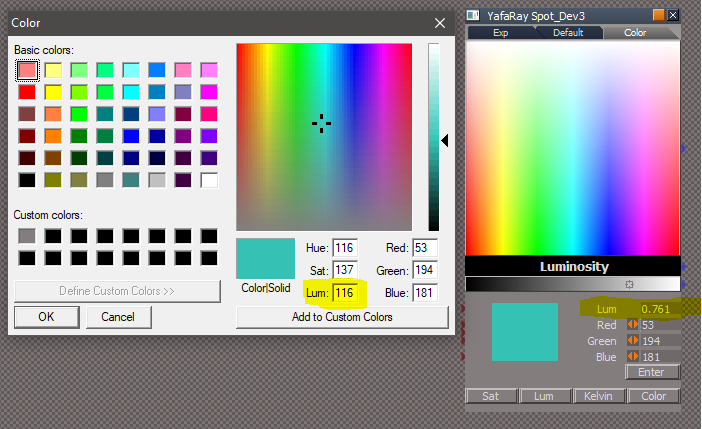
Yah! Almost perfect.
Can you do the same thing with the Lum?
What are your thoughts about eliminating the two Bitmaps?
Now that I see how you have done it, not sure if they have any value.
Can you do the same thing with the Lum?
What are your thoughts about eliminating the two Bitmaps?
Now that I see how you have done it, not sure if they have any value.
- Attachments
-
-
clintonman
- Captain
- Posts: 5659
- Joined: 21 May 2009, 21:08
- Type the number ten into the box: 0
- Location: California
Re: Yafaray4tS v0.9.0
Lum updates nowtrueBlue wrote: 24 Jun 2018, 15:31 Yah! Almost perfect.
Can you do the same thing with the Lum?
What are your thoughts about eliminating the two Bitmaps?
Now that I see how you have done it, not sure if they have any value.
Swapped position of Lum and Sat buttons
Removed 1 bitmap for slider
- Attachments
-
- YafaRay Spot_Dev4.RsObj
- (543.52 KiB) Downloaded 207 times
-
trueBlue
- Captain
- Posts: 5548
- Joined: 06 Jul 2009, 22:50
- Type the number ten into the box: 10
Re: Yafaray4tS v0.9.0
I have already updated 4 YafaRay lights with the previous updated light.
Is it safe to say that if I,
1.) Remove the LumBitmap and hookup the idColorData
2.) Add the UpdateFromRGB script
3.) Change the Enter button command to call the UpdateFromRGB script
4.) Copy and replace all code from the UpdateValue and UpdateColor
5.) Copy and replace code in both lum color pickers.
I would be good to go?
New Spot lights:
Edit: I have them updated and seems to be okay.
Except for the IES Spot. Ran into this issue when I was trying to condense the Number 2 Interger and the Color Format.
Notice the light leaking?
Is it safe to say that if I,
1.) Remove the LumBitmap and hookup the idColorData
2.) Add the UpdateFromRGB script
3.) Change the Enter button command to call the UpdateFromRGB script
4.) Copy and replace all code from the UpdateValue and UpdateColor
5.) Copy and replace code in both lum color pickers.
I would be good to go?
New Spot lights:

Except for the IES Spot. Ran into this issue when I was trying to condense the Number 2 Interger and the Color Format.
Notice the light leaking?

-
trueBlue
- Captain
- Posts: 5548
- Joined: 06 Jul 2009, 22:50
- Type the number ten into the box: 10
Re: Yafaray4tS v0.9.0
Can you look at these lights in your library and tell me what you want?
Some have Samples, yet no Soft Shadows.
Some have special Power/Size.
Sun has not no shadow.
Blank areas are for Photon Only.
I have the Defaults for Caustic, Diffuse, and Photon Only.
Need the Defaults if any for the other ones.
Some have Samples, yet no Soft Shadows.
Some have special Power/Size.
Sun has not no shadow.
Blank areas are for Photon Only.
I have the Defaults for Caustic, Diffuse, and Photon Only.
Need the Defaults if any for the other ones.
- Attachments
-

-
clintonman
- Captain
- Posts: 5659
- Joined: 21 May 2009, 21:08
- Type the number ten into the box: 0
- Location: California
Re: Yafaray4tS v0.9.0
trueBlue wrote: 24 Jun 2018, 22:22 Can you look at these lights in your library and tell me what you want?
Some have Samples, yet no Soft Shadows.
Some have special Power/Size.
Sun has not no shadow.
Blank areas are for Photon Only.
I have the Defaults for Caustic, Diffuse, and Photon Only.
Need the Defaults if any for the other ones.

- BlenderSunLight.jpg (39.01 KiB) Viewed 4543 times

- BlenderSphereLight2.jpg (41.5 KiB) Viewed 4543 times

- BlenderDirectionalLight.jpg (39.34 KiB) Viewed 4543 times

- BlenderAreaLight.jpg (41.3 KiB) Viewed 4543 times
Do not change the default value for power to 1.0, way too low and a bad default even inside blender

- BlenderSpotLight.jpg (43.93 KiB) Viewed 4543 times

- BlenderIESLight.jpg (40.8 KiB) Viewed 4543 times
Again don't make the power default a value of 1
-
clintonman
- Captain
- Posts: 5659
- Joined: 21 May 2009, 21:08
- Type the number ten into the box: 0
- Location: California
Re: Yafaray4tS v0.9.0
I see the leak. It won't effect the render so not the end of the world.trueBlue wrote: 24 Jun 2018, 19:29 ...
Capture.PNG
Edit: I have them updated and seems to be okay.
Except for the IES Spot. Ran into this issue when I was trying to condense the Number 2 Interger and the Color Format.
Notice the light leaking?
Capture2.PNG
-
trueBlue
- Captain
- Posts: 5548
- Joined: 06 Jul 2009, 22:50
- Type the number ten into the box: 10
Re: Yafaray4tS v0.9.0
Presently the Sun does not have anything for Shadows, it is a SunlightShader. 
Whenever I see this, I make that the default
I see Blender's Power is all 1.0
But you have also said anything under 5 is not good either.
Mostly I set them up as you have then in the library.
I will do the best I can and you can check it out.
Here is the YafaRay Sun and your YafaRay Spot_Dev4 that has been fixed.
The previous Bitmaps were being used and hooked up to the new ones in the middle.
Whenever I see this, I make that the default
Code: Select all
Power = Power * 1.75;//match render 2018But you have also said anything under 5 is not good either.
Mostly I set them up as you have then in the library.
I will do the best I can and you can check it out.
Here is the YafaRay Sun and your YafaRay Spot_Dev4 that has been fixed.
The previous Bitmaps were being used and hooked up to the new ones in the middle.

- Missing atributes.PNG (11.02 KiB) Viewed 4675 times
-
clintonman
- Captain
- Posts: 5659
- Joined: 21 May 2009, 21:08
- Type the number ten into the box: 0
- Location: California
Re: Yafaray4tS v0.9.0
I changed both light so that when switching the UpdateFromRGB script is run.
Activity.Run(System.ThisOwner() + "/UpdateFromRGB");
added to the bottom of the Bitmap2, Execute script
also found that the right click reset was not working. fixed by disconnecting and then exporting the connectors and then relinking them to the controls
Sun light didn't have script in the slider so copied the code from the spotlight slider
The light power settings are ok in most files, but I found one that was way off so I'll be going through the power settings for all lights again.
Activity.Run(System.ThisOwner() + "/UpdateFromRGB");
added to the bottom of the Bitmap2, Execute script
also found that the right click reset was not working. fixed by disconnecting and then exporting the connectors and then relinking them to the controls
Sun light didn't have script in the slider so copied the code from the spotlight slider
The light power settings are ok in most files, but I found one that was way off so I'll be going through the power settings for all lights again.
- Attachments
-
- YafaRay Sun_Dev5.RsObj
- (481.83 KiB) Downloaded 248 times
-
- YafaRay Spot_Dev5.RsObj
- (549.18 KiB) Downloaded 271 times
-
trueBlue
- Captain
- Posts: 5548
- Joined: 06 Jul 2009, 22:50
- Type the number ten into the box: 10
Re: Yafaray4tS v0.9.0
Edit: I will upload the lights with their defaults fixed, as soon as I am done.
Fixed the defaults and added Activity.Run(System.ThisOwner() + "/UpdateFromRGB"); to Bitmap2
End Edit
Wonder why that happened, I basically created the Yafaray Helper from scratch and exported everything.
Edit2: Just tested the changes and they did not work! Saved the Lights.RsObj to the preobjects folder and Reset the Default Context. Now they worked. Updated the below to reflect this observation
Edit3: Just discovered the Spot lights did not have a required camera object in order for the View from light to work. Fixed and reuploaded.
Here is all of the YafaRay lights from System/Preferences/Lights.RsObj
I only updated the above.
I did not update the YafaRay Sun light at all. Given the changes that I do not understand and that there is no shadows.
I have made the Lum Color Picker a tad larger, vertically in the Default aspect
Word of caution, I edit the lights from the above path.
They are minimized just like the tS lights.
This makes them come in the Link Editor minimized.
They have been set to land on the grid just like the tS lights, so you should not change their Matrix and or ObjectMatrix.
I save the Light.RsObj to the preobjects folder and Reset the Default Context.
I test any changes using the YafaRay4tS toolbar.
You should save them to the YafaRay Lights library from the above path.
Also included is a scene with tS Spot lights with your color picker. I would appreciate it if you could take a peak at it with regards to the Color aspect. Trying to incorporate Intensity. Ugh, I can not come up with anything that looks good. Your opinion would be greatly appreciated. The one on the far right is a YafaRay light used for No Intensity.
Fixed the defaults and added Activity.Run(System.ThisOwner() + "/UpdateFromRGB"); to Bitmap2
End Edit
Wonder why that happened, I basically created the Yafaray Helper from scratch and exported everything.
Edit2: Just tested the changes and they did not work! Saved the Lights.RsObj to the preobjects folder and Reset the Default Context. Now they worked. Updated the below to reflect this observation
Edit3: Just discovered the Spot lights did not have a required camera object in order for the View from light to work. Fixed and reuploaded.
Here is all of the YafaRay lights from System/Preferences/Lights.RsObj
I only updated the above.
I did not update the YafaRay Sun light at all. Given the changes that I do not understand and that there is no shadows.
I have made the Lum Color Picker a tad larger, vertically in the Default aspect
Word of caution, I edit the lights from the above path.
They are minimized just like the tS lights.
This makes them come in the Link Editor minimized.
They have been set to land on the grid just like the tS lights, so you should not change their Matrix and or ObjectMatrix.
I save the Light.RsObj to the preobjects folder and Reset the Default Context.
I test any changes using the YafaRay4tS toolbar.
You should save them to the YafaRay Lights library from the above path.
Also included is a scene with tS Spot lights with your color picker. I would appreciate it if you could take a peak at it with regards to the Color aspect. Trying to incorporate Intensity. Ugh, I can not come up with anything that looks good. Your opinion would be greatly appreciated. The one on the far right is a YafaRay light used for No Intensity.

-
clintonman
- Captain
- Posts: 5659
- Joined: 21 May 2009, 21:08
- Type the number ten into the box: 0
- Location: California
Re: Yafaray4tS v0.9.0
"Intensity at Top" makes the most sense to me.trueBlue wrote: 25 Jun 2018, 22:03 ...
Also included is a scene with tS Spot lights with your color picker. I would appreciate it if you could take a peak at it with regards to the Color aspect. Trying to incorporate Intensity. Ugh, I can not come up with anything that looks good. Your opinion would be greatly appreciated. The one on the far right is a YafaRay light used for No Intensity.
tS Spot lights.PNG
"Intensity at Bottom" and "Intensity at Side w Scubbers2" separates the enter button from the red green blue values it uses.
"Intensity at Top w Scubbers" and "Intensity at Side w Scubbers" have 3 scrubber controls for 1 thing
-
trueBlue
- Captain
- Posts: 5548
- Joined: 06 Jul 2009, 22:50
- Type the number ten into the box: 10
Re: Yafaray4tS v0.9.0
The thing I do not like about the one on the Left is it is distracting when choosing a color.
It also seems out of place being in between the Luminance and RGB.
The reason for two scrubbers is to make it easier to get back to No Intensity = 1.000.
The present way it is with one scrubber is 0.000 - 20.000 and you have right click Reset to get No Intensity.
Not very fluid nor obvious.
Narrowed it down to two Intensity scrubbers, the one the left is set at 1.000 - 20.000 (No Intensity - Higher) and the one on the right is set at 0.000 - 1.000 (No Intensity - Lower).
I kind of like the new one on the Right.
BTW... I think you misunderstood me about the update for the Lum values.
The Lum in the tS Color is 0 - 240 verses 0.000 - 1.000
I was wonder if you could have match the tS Color.
No biggie what you have done is outstanding!
It also seems out of place being in between the Luminance and RGB.
The reason for two scrubbers is to make it easier to get back to No Intensity = 1.000.
The present way it is with one scrubber is 0.000 - 20.000 and you have right click Reset to get No Intensity.
Not very fluid nor obvious.
Narrowed it down to two Intensity scrubbers, the one the left is set at 1.000 - 20.000 (No Intensity - Higher) and the one on the right is set at 0.000 - 1.000 (No Intensity - Lower).
I kind of like the new one on the Right.

The Lum in the tS Color is 0 - 240 verses 0.000 - 1.000
I was wonder if you could have match the tS Color.
No biggie what you have done is outstanding!
-
trueBlue
- Captain
- Posts: 5548
- Joined: 06 Jul 2009, 22:50
- Type the number ten into the box: 10
Re: Yafaray4tS v0.9.0
Does YafaRay recognize these attributes?
If not we should at least not show them and remove the aspects.
For the YafaRay Sphere adjust the size to Lat/Long = 20x20 and the Render attributes.
Could also do this for the other light shapes to differentiate from tS lights.
Also did a make over on the light icons.
Also I still have these uncompiled help files if that would help.
I did a trial run with the HTML Help Workshop by making pictures of the new YafaRay4tS, Lights, and Light icons panels. Added them to the project's Images folder and edited the htm files for the new widths and heights. Compiled it. Still works in Win10.
If not we should at least not show them and remove the aspects.

- Attenuation.PNG (6.62 KiB) Viewed 4621 times


- Yaf lights Toolbar.PNG (15.05 KiB) Viewed 4595 times


-
clintonman
- Captain
- Posts: 5659
- Joined: 21 May 2009, 21:08
- Type the number ten into the box: 0
- Location: California
Re: Yafaray4tS v0.9.0
No, yaf does not see those.trueBlue wrote: 26 Jun 2018, 06:52 Does YafaRay recognize these attributes?
If not we should at least not show them and remove the aspects.
Attenuation.PNG
...
I don't understand.trueBlue wrote: 26 Jun 2018, 06:52 ...
For the YafaRay Sphere adjust the size to Lat/Long = 20x20 and the Render attributes.
...
-
clintonman
- Captain
- Posts: 5659
- Joined: 21 May 2009, 21:08
- Type the number ten into the box: 0
- Location: California
Re: Yafaray4tS v0.9.0
When you make edits to old posts I only see the changes by accident. I was looking back through old posts and stumbled across "Edit3".trueBlue wrote: 25 Jun 2018, 22:03 Edit: I will upload the lights with their defaults fixed, as soon as I am done.
Fixed the defaults and added Activity.Run(System.ThisOwner() + "/UpdateFromRGB"); to Bitmap2
End Edit
Wonder why that happened, I basically created the Yafaray Helper from scratch and exported everything.
Edit2: Just tested the changes and they did not work! Saved the Lights.RsObj to the preobjects folder and Reset the Default Context. Now they worked. Updated the below to reflect this observation
Edit3: Just discovered the Spot lights did not have a required camera object in order for the View from light to work. Fixed and reuploaded.
...
If you make a change you should make a new post.
-
trueBlue
- Captain
- Posts: 5548
- Joined: 06 Jul 2009, 22:50
- Type the number ten into the box: 10
Re: Yafaray4tS v0.9.0
Understood.clintonman wrote: 26 Jun 2018, 22:23 When you make edits to old posts I only see the changes by accident. I was looking back through old posts and stumbled across "Edit3".
If you make a change you should make a new post.
That post was edited all within 20 minutes. Figured that if you did not reply it was all good.
I would like to finish the YafaRay lights for you if that is what you want.
Per your post you mentioned that you need to adjust the Power settings, so I was trying to finalize the lights for you.
I have made the changes to the Sun light per your last update.
I am at a lost with regards to the Shadow which I posted about previously.
This is what I would like to do if you agree:
You need to post the Sun light first and or any other lights that you have changed, hopefully saved from the Lights.RsObj.
I would like to change the Render attributes for the shapes as shown previously. Red Edges.
I have already fixed the default reset problem for all of the lights as previously posted.
There is an issue with the Samples not updating in the Link Editor, but updates in the Stack.
There is nothing I can do about that.
Save the Lights.RsObj properly as previously posted.
Upload the changes.
You adjust the defaults in the Yafaray Helper and the Power settings for each light.
You upload the Lights.RsObj properly as previously posted.
I will then then save the lights from your Lights.RsObj to the YafaRay Lights library with the new icons.
I will then upload all of the above including the new toolbar.
Sound good?
I am shooting for July 4 2018 to release the FINAL Unofficial Update 4
-
clintonman
- Captain
- Posts: 5659
- Joined: 21 May 2009, 21:08
- Type the number ten into the box: 0
- Location: California
Re: Yafaray4tS v0.9.0
I haven't made any changes since the "Edit2" upload, so you can just continue and finish of what you are doing and upload again when you're finished. It may take some time to figure out the lights, maybe a d3d problem, not sure yet. Then if I make changes I'll upload and you finalize it all.trueBlue wrote: 26 Jun 2018, 23:45 ...
This is what I would like to do if you agree:
You need to post the Sun light first and or any other lights that you have changed, hopefully saved from the Lights.RsObj.
I would like to change the Render attributes for the shapes as shown previously. Red Edges.
I have already fixed the default reset problem for all of the lights as previously posted.
There is an issue with the Samples not updating in the Link Editor, but updates in the Stack.
There is nothing I can do about that.
Save the Lights.RsObj properly as previously posted.
Upload the changes.
You adjust the defaults in the Yafaray Helper and the Power settings for each light.
You upload the Lights.RsObj properly as previously posted.
I will then then save the lights from your Lights.RsObj to the YafaRay Lights library with the new icons.
I will then upload all of the above including the new toolbar.
Sound good?
I am shooting for July 4 2018 to release the FINAL Unofficial Update 4
-
trueBlue
- Captain
- Posts: 5548
- Joined: 06 Jul 2009, 22:50
- Type the number ten into the box: 10
Re: Yafaray4tS v0.9.0
Here you go.
Changes:
Add Samples to Point and Infinite.
Note: Change Sample to 32, press Enter, put cursor in Power, and then Reset Samples. IDK?
Stopped tS light preferences from showing in the Stack or Aspects on all lights.
Changed Enable Shadows to Cast Shadows on all lights.
Added Cast Shadows to Sun on the front panel.
Added Red Edges, Opacity 0.200 to all light shape's Render Attributes except Area.
Added Red color to parts of Area light's geometry. Changed Size from 1 to 0.5
Changed IES Soft Shadows default from 32 to 16
All of the above changes to match Blender.
Removed due to update
Changes:
Add Samples to Point and Infinite.
Note: Change Sample to 32, press Enter, put cursor in Power, and then Reset Samples. IDK?
Stopped tS light preferences from showing in the Stack or Aspects on all lights.
Changed Enable Shadows to Cast Shadows on all lights.
Added Cast Shadows to Sun on the front panel.
Added Red Edges, Opacity 0.200 to all light shape's Render Attributes except Area.
Added Red color to parts of Area light's geometry. Changed Size from 1 to 0.5
Changed IES Soft Shadows default from 32 to 16
All of the above changes to match Blender.
Removed due to update
-
clintonman
- Captain
- Posts: 5659
- Joined: 21 May 2009, 21:08
- Type the number ten into the box: 0
- Location: California
Re: Yafaray4tS v0.9.0
trueBlue wrote: 25 Jun 2018, 22:03 ...
Here is all of the YafaRay lights from System/Preferences/Lights.RsObj
I only updated the above.
I did not update the YafaRay Sun light at all. Given the changes that I do not understand and that there is no shadows.
I have made the Lum Color Picker a tad larger, vertically in the Default aspect
Word of caution, I edit the lights from the above path.
They are minimized just like the tS lights.
This makes them come in the Link Editor minimized.
They have been set to land on the grid just like the tS lights, so you should not change their Matrix and or ObjectMatrix.
I save the Light.RsObj to the preobjects folder and Reset the Default Context.
I test any changes using the YafaRay4tS toolbar.
You should save them to the YafaRay Lights library from the above path.
...
So edit steps are...
1. save Light.RsObj to preobjects folder
2. reset default context
3. load from the YafaRay4tS toolbar <- this doesn't make sense to me since the Matrix will change
4. make changes to a light
5. minimize the node in the link editor
6. save to /System/Preferences/Lights
repeat steps 3 to 6 until done
be careful not to change the Matrix or ObjectMatrix(OwnerMatrix?)
when finished save the /Preferences/Lights node and send it to you
For step 3 do I copy the node from the /System/Preferences/Lights instead of using the toolbar ?
-
trueBlue
- Captain
- Posts: 5548
- Joined: 06 Jul 2009, 22:50
- Type the number ten into the box: 10
Re: Yafaray4tS v0.9.0
When loading the lights from the toolbar they are coming from System/Preferences/Lights.
This is only for testing changes AFTER Saving/Reset.
You can have a window open in System/Preferences/Lights for making permeant changes.
You can have another window open in the scene for testing loading them from the toolbar.
I just recently discovered that the changes made to the default settings in the Yafaray Helper script were not being saved unless you follow the steps below. This seems to be the only thing that does not work, as I have made several changes to the lights without Saving/Reset. IDK?
1.) Save the Lights.RsObj to the preobjects folder
2.) Reset the Default Context.
In the YafaRay4tS layout, try out the lights from the toolbar.
3.) Make changes to the lights in System/Preferences/Lights
Word of caution, I edit the lights from the above path.
They are minimized just like the tS lights.
This makes them come in the Link Editor minimized.
They have been set to land on the grid just like the tS lights, so you should not change their Matrix and or ObjectMatrix.
4.) Save the Lights.RsObj to the preobjects folder
5.) Reset the Default Context.
Steps 4 and 5 are important before doing the next steps 6 and 7.
6.) When done with all changes, save them to the YafaRay Lights library FROM System/Preferences/Lights.
7.) You then need to Manually change the icons in the library.
This is only for testing changes AFTER Saving/Reset.
You can have a window open in System/Preferences/Lights for making permeant changes.
You can have another window open in the scene for testing loading them from the toolbar.
I just recently discovered that the changes made to the default settings in the Yafaray Helper script were not being saved unless you follow the steps below. This seems to be the only thing that does not work, as I have made several changes to the lights without Saving/Reset. IDK?
1.) Save the Lights.RsObj to the preobjects folder
2.) Reset the Default Context.
In the YafaRay4tS layout, try out the lights from the toolbar.
3.) Make changes to the lights in System/Preferences/Lights
Word of caution, I edit the lights from the above path.
They are minimized just like the tS lights.
This makes them come in the Link Editor minimized.
They have been set to land on the grid just like the tS lights, so you should not change their Matrix and or ObjectMatrix.
4.) Save the Lights.RsObj to the preobjects folder
5.) Reset the Default Context.
Steps 4 and 5 are important before doing the next steps 6 and 7.
6.) When done with all changes, save them to the YafaRay Lights library FROM System/Preferences/Lights.
7.) You then need to Manually change the icons in the library.
-
clintonman
- Captain
- Posts: 5659
- Joined: 21 May 2009, 21:08
- Type the number ten into the box: 0
- Location: California
Re: Yafaray4tS v0.9.0
Is there supposed to be an attachment here? I don't see it.trueBlue wrote: 27 Jun 2018, 03:27 Here you go.
Changes:
Add Samples to Point and Infinite.
Note: Change Sample to 32, press Enter, put cursor in Power, and then Reset Samples. IDK?
Stopped tS light preferences from showing in the Stack or Aspects on all lights.
Changed Enable Shadows to Cast Shadows on all lights.
Added Cast Shadows to Sun on the front panel.
Added Red Edges, Opacity 0.200 to all light shape's Render Attributes except Area.
Added Red color to parts of Area light's geometry. Changed Size from 1 to 0.5
Changed IES Soft Shadows default from 32 to 16
All of the above changes to match Blender.
-
trueBlue
- Captain
- Posts: 5548
- Joined: 06 Jul 2009, 22:50
- Type the number ten into the box: 10
Re: Yafaray4tS v0.9.0
Thought you already downloaded it?
Let me know when you do.
Thanks!
Let me know when you do.
Thanks!
-
trueBlue
- Captain
- Posts: 5548
- Joined: 06 Jul 2009, 22:50
- Type the number ten into the box: 10
Re: Yafaray4tS v0.9.0
Here is a scene, hopefully you can figure our what's wrong.
I have the Blend Material set in the Material Editor.
I Switched and applied a texture.
Used the Area Render.
I get this error.
I noticed that the Use OptDector Viewer gets checked somehow, can not figure out how so far.
I do not have iOptidetectors installed.
Not saying the above caused it.
After I uncheck it and render again, I get this error.
I looked in the Misc - Restore All Defaults and there is this attribute that does not even exist.
Theses next two attributes are set to true (Checked) when you Reset them:
useOptDetector
useRenderToFile
I could not find where they are.
Edit:
I have Restored All Defaults and Saved the Settings.
I have Reset the Default Context
I am still stuck with the Error2, and can no longer render with YafaRay4tS.
I have the Blend Material set in the Material Editor.
I Switched and applied a texture.
Used the Area Render.
I get this error.

- Error1.PNG (11.99 KiB) Viewed 4576 times
I do not have iOptidetectors installed.
Not saying the above caused it.
After I uncheck it and render again, I get this error.

- Error2.PNG (4.7 KiB) Viewed 4576 times
Code: Select all
Yaf_Yaf_CustomViewer")Theses next two attributes are set to true (Checked) when you Reset them:
useOptDetector
useRenderToFile
I could not find where they are.
Edit:
I have Restored All Defaults and Saved the Settings.
I have Reset the Default Context
I am still stuck with the Error2, and can no longer render with YafaRay4tS.
-
clintonman
- Captain
- Posts: 5659
- Joined: 21 May 2009, 21:08
- Type the number ten into the box: 0
- Location: California
Re: Yafaray4tS v0.9.0
Re-upload your scene with the YafaRay4tS node included. That's where all the errors are coming from, but it's not in the file, so no way to tell.
-
trueBlue
- Captain
- Posts: 5548
- Joined: 06 Jul 2009, 22:50
- Type the number ten into the box: 10
Re: Yafaray4tS v0.9.0
clintonman wrote: 28 Jun 2018, 06:35 Is there supposed to be an attachment here? I don't see it
Okay I uploaded both request. I performed the same steps as posted. I got error1 but this time Use OptDectector was not checked.clintonman wrote: 28 Jun 2018, 06:35 Re-upload your scene with the YafaRay4tS node included. That's where all the errors are coming from, but it's not in the file, so no way to tell.
-
clintonman
- Captain
- Posts: 5659
- Joined: 21 May 2009, 21:08
- Type the number ten into the box: 0
- Location: California
Re: Yafaray4tS v0.9.0
Fixed a bug in the YafaRayScripts nodes
Fixed bug in the blend materials export
Added a blend material collection to the scene
Fixed bug in the blend materials export
Added a blend material collection to the scene
- Attachments
-
- TB Blend Scene.RsScn
- (1.93 MiB) Downloaded 243 times
-
- YafarayScripts2e5f.RsObj
- (50.5 KiB) Downloaded 200 times
-
trueBlue
- Captain
- Posts: 5548
- Joined: 06 Jul 2009, 22:50
- Type the number ten into the box: 10
Re: Yafaray4tS v0.9.0
What do you think about eliminating the Misc aspect and moving those settings to the Default aspect?
I have saved a scene with this change.
Also added Activity.Run("%THIS_NAME%" + "/Watch Dog Event"); to the Reset Default Settings button.
I have saved a scene with this change.
Also added Activity.Run("%THIS_NAME%" + "/Watch Dog Event"); to the Reset Default Settings button.
- Attachments
-

-
clintonman
- Captain
- Posts: 5659
- Joined: 21 May 2009, 21:08
- Type the number ten into the box: 0
- Location: California
Re: Yafaray4tS v0.9.0
I'm ok with it.trueBlue wrote: 28 Jun 2018, 16:19 What do you think about eliminating the Misc aspect and moving those settings to the Default aspect?
The render pass button is the only thing in the render pass section that has anything to do with render passes.
custom string should be with the draw params checkbox
Attached is the latest YafaRay4tS, do changes on it and upload when done.
- Attachments
-
- YafaRay4tSed96.RsObj
- (756.6 KiB) Downloaded 281 times
-
trueBlue
- Captain
- Posts: 5548
- Joined: 06 Jul 2009, 22:50
- Type the number ten into the box: 10
Re: Yafaray4tS v0.9.0
Has anything changed with the YafaRay4tS.RsObj since your last uploaded version?clintonman wrote: 28 Jun 2018, 16:30I'm ok with it.trueBlue wrote: 28 Jun 2018, 16:19 What do you think about eliminating the Misc aspect and moving those settings to the Default aspect?
The render pass button is the only thing in the render pass section that has anything to do with render passes.
custom string should be with the draw params checkbox
Attached is the latest YafaRay4tS, do changes on it and upload when done.
If so can the changes (Code copied and pasted) be applied to my modified YafaRay4tS.RsObj which is the above version?
What should the Draw Params settings title be called? IE: --Draw Parameters Settings--
You did not mention the other attributes so I am assuming it should be:
--Draw Parameters Settings--
Draw Params
Custom String
some stuff
Tile Order
Tile Size
Save Time Seconds
I have updated the YafaRay4tS Help
Updated the new panel images and icons
Very little changes to the text
Tried to upload it but getting the HTTP Error again.
-
clintonman
- Captain
- Posts: 5659
- Joined: 21 May 2009, 21:08
- Type the number ten into the box: 0
- Location: California
Re: Yafaray4tS v0.9.0
In that case make the changes to your version of YafaRay4tS, upload and I'll figure out the differences.trueBlue wrote: 28 Jun 2018, 17:10Has anything changed with the YafaRay4tS.RsObj since your last uploaded version?clintonman wrote: 28 Jun 2018, 16:30I'm ok with it.trueBlue wrote: 28 Jun 2018, 16:19 What do you think about eliminating the Misc aspect and moving those settings to the Default aspect?
The render pass button is the only thing in the render pass section that has anything to do with render passes.
custom string should be with the draw params checkbox
Attached is the latest YafaRay4tS, do changes on it and upload when done.
If so can the changes (Code copied and pasted) be applied to my modified YafaRay4tS.RsObj which is the above version?
What should the Draw Params settings title be called? IE: --Draw Parameters Settings--
You did not mention the other attributes so I am assuming it should be:
--Draw Parameters Settings--
Draw Params
Custom String
some stuff
Tile Order
Tile Size
Save Time Seconds
I have updated the YafaRay4tS Help
Updated the new panel images and icons
Very little changes to the text
Tried to upload it but getting the HTTP Error again.
-
trueBlue
- Captain
- Posts: 5548
- Joined: 06 Jul 2009, 22:50
- Type the number ten into the box: 10
Re: Yafaray4tS v0.9.0
Cool! That was a bit of work to have to do again.clintonman wrote: 28 Jun 2018, 16:30 In that case make the changes to your version of YafaRay4tS, upload and I'll figure out the differences.

Render to File
Added backgound color
Added Title name to it's Frame
Changed the button text to match Render icons.
---> Still To Do: Clear Rendering... from the Status Line?
Moved the Misc settings to Default
Deleted the Misc aspect
Default
Set the Tab order
Reset Default Settings button script
Added - Activity.Run("%THIS_NAME%" + "/Watch Dog Event");
---> Still To Do: Remove : Node.ConReset('%THIS_NAME%', "Yaf_Yaf_CustomViewer") ?
Removed due to update
-
trueBlue
- Captain
- Posts: 5548
- Joined: 06 Jul 2009, 22:50
- Type the number ten into the box: 10
Re: Yafaray4tS v0.9.0
IDK if this is important to you or not but I just noticed that the Render buttons on the YafaRay4ts panel does not call the Render to File if Use Render to File Dialog is checked.
Edit: After using it more maybe it is good to have it separate, not sure.
Edit: After using it more maybe it is good to have it separate, not sure.
-
trueBlue
- Captain
- Posts: 5548
- Joined: 06 Jul 2009, 22:50
- Type the number ten into the box: 10
Re: Yafaray4tS v0.9.0
When using Render to File with the Area Render the Width and Height changes to what you would expect.
When you change to say Render Scene the Width and Height still has the Area Render's Width and Height, as shown.
The rendered scene is correct, it does render the Width and Height entered in the Output - Render File, and the Area Render is unchecked. This seems misleading.
Anyway to set the Render to File's Width and Height to the Output - Render File's Width and Height, after using the Render Area?
If not maybe you could have Output - Render File's Width and Height and the Area Render's Width and Height with it's check box, in the Render to File?
When you change to say Render Scene the Width and Height still has the Area Render's Width and Height, as shown.
The rendered scene is correct, it does render the Width and Height entered in the Output - Render File, and the Area Render is unchecked. This seems misleading.

- Render to File Render Area changed the Width and Height.PNG (7.86 KiB) Viewed 4876 times
If not maybe you could have Output - Render File's Width and Height and the Area Render's Width and Height with it's check box, in the Render to File?
-
trueBlue
- Captain
- Posts: 5548
- Joined: 06 Jul 2009, 22:50
- Type the number ten into the box: 10
Re: Yafaray4tS v0.9.0
Added a button to the YafaRay Camera that sets it as the camera in use in the YafaRay4tS panel.
Want to add a RMB command for the toolbar that opens the Camera aspect in the Stack too.
Questions about the YafaRay Camera/Camera Data:
Shouldn't the Set DOF Distance script be updating all of the Camera Data in the YafaRay4tS/Camera aspect?
Shouldn't the Camera Data's defaults be the same as the YafaRay4tS/Camera aspect?
Want to add a RMB command for the toolbar that opens the Camera aspect in the Stack too.
Questions about the YafaRay Camera/Camera Data:
Shouldn't the Set DOF Distance script be updating all of the Camera Data in the YafaRay4tS/Camera aspect?
Shouldn't the Camera Data's defaults be the same as the YafaRay4tS/Camera aspect?
-
clintonman
- Captain
- Posts: 5659
- Joined: 21 May 2009, 21:08
- Type the number ten into the box: 0
- Location: California
Re: Yafaray4tS v0.9.0
These are the changes so far:
Merged from my version of YafaRay4tS:
MaterialFnSet - blend material scene value was not set
RendertoFile tab - changed width and height which were coming from the render area instead of render size
Reset Defaults Button - changed to general reset code
defaults for input color space=sRGB, yaf gamma in=1.0
defaults from Render node -png file format, run minimized...
update opti display node - add line to clear status
added open temp folder button
ShowDisplayFnSet - partial save timer(PST) update and fix status display
CameraFnSet - if invalid camera try last camera added to scene before defaulting to view mode
New items:
Reset defaults - added Watchdog run
renamed "Draw Settings Parameter" heading to "More Settings"
LightsFnSet - export tS default infinite light
MaterialFnSet - check for invalid map nodes created when user adds a map then does not press the switch button to activate it
cleaned code - removed debugging System.Trace from various nodes
Todo:
verify light export power
add light attenuation control - light previews are not valid when lighting models depend on bounced light
make sample scene with a blend material - all other sample scenes are done
download new lights and set power values and brightness based on:
0.5*power^2 for point and spot lights,
just plain power for area,directional,ies and sun lights and
0.5*power^2/radius^2 for sphere light
check area light - may be upside down relative to the render
Edit: match YafaRay node camera defaults to yafaray camera defaults
Edit: check for unsupported file formats
stress test - try to break it and patch the holes
Merged from my version of YafaRay4tS:
MaterialFnSet - blend material scene value was not set
RendertoFile tab - changed width and height which were coming from the render area instead of render size
Reset Defaults Button - changed to general reset code
defaults for input color space=sRGB, yaf gamma in=1.0
defaults from Render node -png file format, run minimized...
update opti display node - add line to clear status
added open temp folder button
ShowDisplayFnSet - partial save timer(PST) update and fix status display
CameraFnSet - if invalid camera try last camera added to scene before defaulting to view mode
New items:
Reset defaults - added Watchdog run
renamed "Draw Settings Parameter" heading to "More Settings"
LightsFnSet - export tS default infinite light
MaterialFnSet - check for invalid map nodes created when user adds a map then does not press the switch button to activate it
cleaned code - removed debugging System.Trace from various nodes
Todo:
verify light export power
add light attenuation control - light previews are not valid when lighting models depend on bounced light
make sample scene with a blend material - all other sample scenes are done
download new lights and set power values and brightness based on:
0.5*power^2 for point and spot lights,
just plain power for area,directional,ies and sun lights and
0.5*power^2/radius^2 for sphere light
check area light - may be upside down relative to the render
Edit: match YafaRay node camera defaults to yafaray camera defaults
Edit: check for unsupported file formats
stress test - try to break it and patch the holes
Last edited by clintonman on 29 Jun 2018, 23:21, edited 2 times in total.
-
clintonman
- Captain
- Posts: 5659
- Joined: 21 May 2009, 21:08
- Type the number ten into the box: 0
- Location: California
Re: Yafaray4tS v0.9.0
That is the desired behavior. So no worries.trueBlue wrote: 28 Jun 2018, 21:06 IDK if this is important to you or not but I just noticed that the Render buttons on the YafaRay4ts panel does not call the Render to File if Use Render to File Dialog is checked.
Edit: After using it more maybe it is good to have it separate, not sure.
-
clintonman
- Captain
- Posts: 5659
- Joined: 21 May 2009, 21:08
- Type the number ten into the box: 0
- Location: California
Re: Yafaray4tS v0.9.0
When a yafaray camera is used the corresponding values on the YafaRay4tS camera aspect are ignored by the exporter.trueBlue wrote: 29 Jun 2018, 17:35 Added a button to the YafaRay Camera that sets it as the camera in use in the YafaRay4tS panel.
Want to add a RMB command for the toolbar that opens the Camera aspect in the Stack too.
Questions about the YafaRay Camera/Camera Data:
Shouldn't the Set DOF Distance script be updating all of the Camera Data in the YafaRay4tS/Camera aspect?
Shouldn't the Camera Data's defaults be the same as the YafaRay4tS/Camera aspect?
The yafaray camera is newer, so the yafary4tS node will need to copy it's defaults, will add this one to my todo list.
-
trueBlue
- Captain
- Posts: 5548
- Joined: 06 Jul 2009, 22:50
- Type the number ten into the box: 10
Re: Yafaray4tS v0.9.0
Great! Looks like some great changes!
Can you share the new updates to test?
Wanting to make a simple image Yafaray material. Picture on a Plane.
Here is a scene with a blend material with an image.
The image does not render.
Removed
It was not ME!MaterialFnSet - check for invalid map nodes created when user adds a map then does not press the switch button to activate it
Can you share the new updates to test?
Wanting to make a simple image Yafaray material. Picture on a Plane.
Here is a scene with a blend material with an image.
The image does not render.
Removed
-
clintonman
- Captain
- Posts: 5659
- Joined: 21 May 2009, 21:08
- Type the number ten into the box: 0
- Location: California
Re: Yafaray4tS v0.9.0
That is a shiny diffuse material, not a blend material.trueBlue wrote: 29 Jun 2018, 19:28 Great! Looks like some great changes!It was not ME!MaterialFnSet - check for invalid map nodes created when user adds a map then does not press the switch button to activate it
Can you share the new updates to test?
Wanting to make a simple image Yafaray material. Picture on a Plane.
Here is a scene with a blend material with an image.
The image does not render.
YafaRay can't use bmp format image files. - will add to my todo list to check for unsupported file formats
Attached is the latest YafaRay4tS. Do not make any changes to it.
- Attachments
-
- YafaRay4tSae97.RsObj
- (750.35 KiB) Downloaded 254 times
-
clintonman
- Captain
- Posts: 5659
- Joined: 21 May 2009, 21:08
- Type the number ten into the box: 0
- Location: California
Re: Yafaray4tS v0.9.0
I have the new lights now so don't make any changes to lights.
-
trueBlue
- Captain
- Posts: 5548
- Joined: 06 Jul 2009, 22:50
- Type the number ten into the box: 10
Re: Yafaray4tS v0.9.0
Okay no problem.
Here is another stab at the Render Object
Concept is to include an encapsulated Camera 'Cam'.
Copy the Eye Camera values to an Object script 'EyeView'
Copy those values to the Cam
Using the Camera to Zoom 2 Object and Render
Copy the EyeView values back to the Eye Camera
It works pretty good and better then the present one.
The Render Object Camera is WIP and does not work.
Edit:
Just notice that when using Render to File it does not render the object, it renders the scene.
The solution is to add a Render Object button on the Render to File using this code:
Or even better would be to save the image without the Library2.DlgGenericSave.
Edit2:
Was able to combine Yafaray View and Camera - Render Object into one.
Zoom 2 Object from Yafaray Camera view is not Zooming in like Yafaray View does
Here is another stab at the Render Object
Concept is to include an encapsulated Camera 'Cam'.
Copy the Eye Camera values to an Object script 'EyeView'
Copy those values to the Cam
Using the Camera to Zoom 2 Object and Render
Copy the EyeView values back to the Eye Camera
It works pretty good and better then the present one.
The Render Object Camera is WIP and does not work.
Edit:
Just notice that when using Render to File it does not render the object, it renders the scene.
The solution is to add a Render Object button on the Render to File using this code:
Code: Select all
Library2.DlgGenericSave("",Space.CurrentScene() + "/YafaRay4tS/tSDisplay/Display",3);
WindowsManager.CloseWindow("Project/Windows Manager Space/R2F_PanelFrame")
- R2F.PNG (10.45 KiB) Viewed 4471 times
Was able to combine Yafaray View and Camera - Render Object into one.
Zoom 2 Object from Yafaray Camera view is not Zooming in like Yafaray View does
-
trueBlue
- Captain
- Posts: 5548
- Joined: 06 Jul 2009, 22:50
- Type the number ten into the box: 10
Re: Yafaray4tS v0.9.0
New toolbar that makes it a little easier with the UI
Moved the Camera out of lights, RMB opens the Camera aspect
Smooth Normals - LMB applies Smooth Normal and opens the Default aspect
Render icons changes:
These are modified copies of the Offline Render icons, no changes to the originals.
Render Animation - RMB opens the Animation aspect
Render Area - RMB opens the Camera aspect
All others RMB opens the Current Lighting Method in use

- New toolbar.PNG (9.02 KiB) Viewed 4452 times
Smooth Normals - LMB applies Smooth Normal and opens the Default aspect
Render icons changes:
These are modified copies of the Offline Render icons, no changes to the originals.
Render Animation - RMB opens the Animation aspect
Render Area - RMB opens the Camera aspect
All others RMB opens the Current Lighting Method in use
-
trueBlue
- Captain
- Posts: 5548
- Joined: 06 Jul 2009, 22:50
- Type the number ten into the box: 10
Re: Yafaray4tS v0.9.0
For those of us that like to play in the Link Editor with no 3D Window open.
First an Alert.
Then an error.
First an Alert.

- No 3D Window.PNG (2.8 KiB) Viewed 4441 times

-
trueBlue
- Captain
- Posts: 5548
- Joined: 06 Jul 2009, 22:50
- Type the number ten into the box: 10
Re: Yafaray4tS v0.9.0
This not a good one as it deletes the YafaRay4tS node in the Yafaray Folder.
This happens when you press the Save Settings button when there is no YafaRay4tS node in the scene.
This happens when you press the Save Settings button when there is no YafaRay4tS node in the scene.

- Save Settings button error.PNG (9.62 KiB) Viewed 4439 times
-
clintonman
- Captain
- Posts: 5659
- Joined: 21 May 2009, 21:08
- Type the number ten into the box: 0
- Location: California
Re: Yafaray4tS v0.9.0

Almost done with light work. The preview brightness matches the render more closely.
IES lights preview is improved and is compatible with more ies light files. On a side note, tests show that the YafaRay renderer does not render all ies lights properly.
-
clintonman
- Captain
- Posts: 5659
- Joined: 21 May 2009, 21:08
- Type the number ten into the box: 0
- Location: California
Re: Yafaray4tS v0.9.0
I'm guessing you ran this from the YafaRay Folder in the Link editor?trueBlue wrote: 02 Jul 2018, 02:32 This not a good one as it deletes the YafaRay4tS node in the Yafaray Folder.
This happens when you press the Save Settings button when there is no YafaRay4tS node in the scene.
Save Settings button error.PNG
-
trueBlue
- Captain
- Posts: 5548
- Joined: 06 Jul 2009, 22:50
- Type the number ten into the box: 10
Re: Yafaray4tS v0.9.0
I think I had it selected in the Yafaray Folder when I pressed the Save Settings button from the Stack.
-
trueBlue
- Captain
- Posts: 5548
- Joined: 06 Jul 2009, 22:50
- Type the number ten into the box: 10
Re: Yafaray4tS v0.9.0
So is it just me or does your version render black too?
Edit: This is a rendered image and not a screen shot of the Display.
Edit: This is a rendered image and not a screen shot of the Display.
- Attachments
-

- Display.png (302 Bytes) Viewed 5539 times
-
clintonman
- Captain
- Posts: 5659
- Joined: 21 May 2009, 21:08
- Type the number ten into the box: 0
- Location: California
Re: Yafaray4tS v0.9.0
Just you, I guess. If you have anything to share I'll look at it.trueBlue wrote: 02 Jul 2018, 17:56 So is it just me or does your version render black too?
-
trueBlue
- Captain
- Posts: 5548
- Joined: 06 Jul 2009, 22:50
- Type the number ten into the box: 10
Re: Yafaray4tS v0.9.0
This is your unmodified YafaRay4tS.RsObj from your latest upload.
Just downloaded it again to be sure.
Except for Restoring the Defaults
Just downloaded it again to be sure.
Except for Restoring the Defaults
-
clintonman
- Captain
- Posts: 5659
- Joined: 21 May 2009, 21:08
- Type the number ten into the box: 0
- Location: California
Re: Yafaray4tS v0.9.0
works here. orange cube is rendered.trueBlue wrote: 02 Jul 2018, 19:17 This is your unmodified YafaRay4tS.RsObj from your latest upload.
Just downloaded it again to be sure.
Except for Restoring the Defaults
You can try change settings to 1)not minimizing the console and 2)leave console open after render to see any yafaray errors.
-
trueBlue
- Captain
- Posts: 5548
- Joined: 06 Jul 2009, 22:50
- Type the number ten into the box: 10
Re: Yafaray4tS v0.9.0
Do you see any error?
Maybe the last update that you uploaded is corrupted?

-
clintonman
- Captain
- Posts: 5659
- Joined: 21 May 2009, 21:08
- Type the number ten into the box: 0
- Location: California
Re: Yafaray4tS v0.9.0
I see an orange cube in your render. Previous was a back render. So the problem is...?trueBlue wrote: 02 Jul 2018, 21:28 Do you see any error?
Console.PNG
Maybe the last update that you uploaded is corrupted?
-
trueBlue
- Captain
- Posts: 5548
- Joined: 06 Jul 2009, 22:50
- Type the number ten into the box: 10
Re: Yafaray4tS v0.9.0
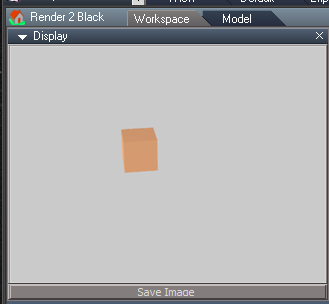
Seriously?clintonman wrote: 02 Jul 2018, 22:31 I see an orange cube in your render. Previous was a back render. So the problem is...?
Downloaded the previous YafaRay4tS.RSObj, same scene.
White background like has been since the very begining until this last update.
- Attachments
-
- White Background.PNG (7.58 KiB) Viewed 5519 times
-
clintonman
- Captain
- Posts: 5659
- Joined: 21 May 2009, 21:08
- Type the number ten into the box: 0
- Location: California
Re: Yafaray4tS v0.9.0
I think I understand what you're saying. The background is an unexpected black color.trueBlue wrote: 02 Jul 2018, 23:14Seriously?clintonman wrote: 02 Jul 2018, 22:31 I see an orange cube in your render. Previous was a back render. So the problem is...?
Downloaded the previous YafaRay4tS.RSObj, same scene.
White background like has been since the very begining until this last update.
Try using the background settings "Trans bg" and "Mat trans refr", but know that I think there may be a bug with the 2 checkboxes being reversed in the export. Also the "Mat trans refr" should have no effect unless "Trans bg" is also selected, but it does.
-
trueBlue
- Captain
- Posts: 5548
- Joined: 06 Jul 2009, 22:50
- Type the number ten into the box: 10
Re: Yafaray4tS v0.9.0
I have already tried the Background settings before I originally posted about this thinking that maybe the defaults were changed. I am guessing that your last update may be corrupted. Are you saying that in your version, with the default settings, default lights, and rendering a simple cube produces a White background?
If so how about you upload the present version?
If you are done with the Yaf lights in the Lights.RsObj, could you upload those as well?
Wanting to finalize all of the lights for the Update 4, and it would be easier if I had the Yaf lights.
If so how about you upload the present version?
If you are done with the Yaf lights in the Lights.RsObj, could you upload those as well?
Wanting to finalize all of the lights for the Update 4, and it would be easier if I had the Yaf lights.
-
clintonman
- Captain
- Posts: 5659
- Joined: 21 May 2009, 21:08
- Type the number ten into the box: 0
- Location: California
Re: Yafaray4tS v0.9.0
Attached is the latest version of the YafaRay4tS node.
List of changes here is updated from a previous post.
MaterialFnSet - blend material scene value was not set
RendertoFile tab - changed width and height which were coming from the render area instead of render size
Reset Defaults Button - changed to general reset code
defaults for input color space=sRGB, yaf gamma in=1.0
defaults from Render node -png file format, run minimized...
update opti display node - add line to clear status
added open temp folder button
ShowDisplayFnSet - partial save timer(PST) update and fix status display
CameraFnSet - if invalid camera try last camera added to scene before defaulting to view mode
background transparent - default false
background mat transp refract set to false when exporting if transparent background is set to false
Reset defaults - added Watchdog run
renamed "Draw Settings Parameter" heading to "More Settings"
LightsFnSet - export tS default infinite light
MaterialFnSet - check for invalid map nodes created when user adds a map then does not press the switch button to activate it
cleaned code - removed debugging System.Trace from various nodes
background defaults color gray and power 1.0
Lights:
got attenuation values and color multiply math to match renders better
flipped exported geometry of area light - was upside down in the render
Todo:
add light attenuation control - light previews are not valid when lighting models depend on bounced light
make sample scene with a blend material - all other sample scenes are done
finish new ies light preview
sphere light needs size attribute on the default tab
area light needs render checkbox on the default tab
match YafaRay node camera defaults to yafaray camera defaults
check for unsupported image file formats
stress test - try to break it and patch the holes
List of changes here is updated from a previous post.
MaterialFnSet - blend material scene value was not set
RendertoFile tab - changed width and height which were coming from the render area instead of render size
Reset Defaults Button - changed to general reset code
defaults for input color space=sRGB, yaf gamma in=1.0
defaults from Render node -png file format, run minimized...
update opti display node - add line to clear status
added open temp folder button
ShowDisplayFnSet - partial save timer(PST) update and fix status display
CameraFnSet - if invalid camera try last camera added to scene before defaulting to view mode
background transparent - default false
background mat transp refract set to false when exporting if transparent background is set to false
Reset defaults - added Watchdog run
renamed "Draw Settings Parameter" heading to "More Settings"
LightsFnSet - export tS default infinite light
MaterialFnSet - check for invalid map nodes created when user adds a map then does not press the switch button to activate it
cleaned code - removed debugging System.Trace from various nodes
background defaults color gray and power 1.0
Lights:
got attenuation values and color multiply math to match renders better
flipped exported geometry of area light - was upside down in the render
Todo:
add light attenuation control - light previews are not valid when lighting models depend on bounced light
make sample scene with a blend material - all other sample scenes are done
finish new ies light preview
sphere light needs size attribute on the default tab
area light needs render checkbox on the default tab
match YafaRay node camera defaults to yafaray camera defaults
check for unsupported image file formats
stress test - try to break it and patch the holes
- Attachments
-
- YafaRay4tSb5ef.RsObj
- (759.01 KiB) Downloaded 319 times
-
clintonman
- Captain
- Posts: 5659
- Joined: 21 May 2009, 21:08
- Type the number ten into the box: 0
- Location: California
Re: Yafaray4tS v0.9.0
Not done with the lights yet.trueBlue wrote: 02 Jul 2018, 23:52 ...
If you are done with the Yaf lights in the Lights.RsObj, could you upload those as well?
Wanting to finalize all of the lights for the Update 4, and it would be easier if I had the Yaf lights.
-
trueBlue
- Captain
- Posts: 5548
- Joined: 06 Jul 2009, 22:50
- Type the number ten into the box: 10
Re: Yafaray4tS v0.9.0
FYI..I fooled around with the "Mat trans refr" with the previous update with the White background.clintonman wrote: 02 Jul 2018, 23:41 Try using the background settings "Trans bg" and "Mat trans refr", but know that I think there may be a bug with the 2 checkboxes being reversed in the export. Also the "Mat trans refr" should have no effect unless "Trans bg" is also selected, but it does.
Not understanding why there would be a problem with the exported wires. They just export to the front of the panel as I understand it. They were Linked right on the Background aspect and I checked to see if there were mutiple wires hooked up. All seemed okay. What I did notice though as soon as I checked "Mat trans refr", the backgound render turned black.
Also experimented with trying to match the default Workspace background color. Just an idea but was thinking the default Yaf Background Type should be None, with a blue background color like Workspace? Power not sure. Did not succeed in color that rendered the same as Workspace. It looks washed out or lighter if you will.
Off to try your new update. Thank You!
-
clintonman
- Captain
- Posts: 5659
- Joined: 21 May 2009, 21:08
- Type the number ten into the box: 0
- Location: California
Re: Yafaray4tS v0.9.0
Not wires but the actual export with the 2 values switched in code. Ends up my theory was wrong, had nothing to do with reversed values but with the fact the tS could export transparent as false and mat transparent refraction as true. That combination isn't possible from Blender. I still need to check that it's working properly.trueBlue wrote: 03 Jul 2018, 01:03FYI..I fooled around with the "Mat trans refr" with the previous update with the White background.clintonman wrote: 02 Jul 2018, 23:41 Try using the background settings "Trans bg" and "Mat trans refr", but know that I think there may be a bug with the 2 checkboxes being reversed in the export. Also the "Mat trans refr" should have no effect unless "Trans bg" is also selected, but it does.
Not understanding why there would be a problem with the exported wires. They just export to the front of the panel as I understand it. They were Linked right on the Background aspect and I checked to see if there were mutiple wires hooked up. All seemed okay. What I did notice though as soon as I checked "Mat trans refr", the backgound render turned black.
Also experimented with trying to match the default Workspace background color. Just an idea but was thinking the default Yaf Background Type should be None, with a blue background color like Workspace? Power not sure. Did not succeed in color that rendered the same as Workspace. It looks washed out or lighter if you will.
Off to try your new update. Thank You!
The settings for gamma and color space have a big impact on color output. I think the newest update above may have better default values. gamma in of 1.0, gamma out of 2.2 and srgb color space are the current default values.
-
trueBlue
- Captain
- Posts: 5548
- Joined: 06 Jul 2009, 22:50
- Type the number ten into the box: 10
Re: Yafaray4tS v0.9.0
BIG TIME difference!
The colors match much better.
Here is the Background color I was referring to.
So far no black background problem.
Thank you!
Here is a couple of materials I made.
Can you look at them and make sure they are right?
They are using images from the tS Texture folder so they should transfer over.
Can the Blend be made into a Material?
The colors match much better.
Here is the Background color I was referring to.
So far no black background problem.
Thank you!

- Background.PNG (6.74 KiB) Viewed 5723 times
Can you look at them and make sure they are right?
They are using images from the tS Texture folder so they should transfer over.

-
clintonman
- Captain
- Posts: 5659
- Joined: 21 May 2009, 21:08
- Type the number ten into the box: 0
- Location: California
Re: Yafaray4tS v0.9.0
Lights are ready.
Changes:
Changed attenuation values for ies light, spotlight, point light, sphere light and area light
changed default power for some lights
Changed the power multiplier in the preview:
ies light = 4 * sqrt(power)
spotlight = 4 * power
pointlight = 2 * power
spherelight = 2 * power * scale
arealight = power * (scaleX + scaleY)/2
sphere size exports the scale value instead of the size attribute
new integrated ies light generator - GenerateIESprofileScript node in YafaRayFolder not used anymore
Changes:
Changed attenuation values for ies light, spotlight, point light, sphere light and area light
changed default power for some lights
Changed the power multiplier in the preview:
ies light = 4 * sqrt(power)
spotlight = 4 * power
pointlight = 2 * power
spherelight = 2 * power * scale
arealight = power * (scaleX + scaleY)/2
sphere size exports the scale value instead of the size attribute
new integrated ies light generator - GenerateIESprofileScript node in YafaRayFolder not used anymore
- Attachments
-
- Lights.RsObj
- (1.94 MiB) Downloaded 296 times
-
clintonman
- Captain
- Posts: 5659
- Joined: 21 May 2009, 21:08
- Type the number ten into the box: 0
- Location: California
Re: Yafaray4tS v0.9.0
Got a HTTP error when posting with an attachment.
I think you have to wait for the upload to finish before you can push the submit button
I think you have to wait for the upload to finish before you can push the submit button
-
trueBlue
- Captain
- Posts: 5548
- Joined: 06 Jul 2009, 22:50
- Type the number ten into the box: 10
Re: Yafaray4tS v0.9.0
Testing the Resetsclintonman wrote: 03 Jul 2018, 07:18 Lights are ready.
Changes:
Changed attenuation values for ies light, spotlight, point light, sphere light and area light
changed default power for some lights
Changed the power multiplier in the preview:
ies light = 4 * sqrt(power)
spotlight = 4 * power
pointlight = 2 * power
spherelight = 2 * power * scale
arealight = power * (scaleX + scaleY)/2
sphere size exports the scale value instead of the size attribute
new integrated ies light generator - GenerateIESprofileScript node in YafaRayFolder not used anymore
Want to confirm that this is correct or not.
Infinite, Point, and Area 'Cast Shadow' - Reset is unchecked?
Sun and Sphere 'Cast Shadow' - Reset does not Reset checked or unchecked?
Directional, Spot, and IES Spot 'Cast Shadow' - Reset is checked?
Directional 'Size' Reset is 0.785
-
clintonman
- Captain
- Posts: 5659
- Joined: 21 May 2009, 21:08
- Type the number ten into the box: 0
- Location: California
Re: Yafaray4tS v0.9.0
I didn't do anything with those. I looked at one and it was controlled by a closed node so I ignored all of them.trueBlue wrote: 03 Jul 2018, 16:36Testing the Resetsclintonman wrote: 03 Jul 2018, 07:18 Lights are ready.
Changes:
Changed attenuation values for ies light, spotlight, point light, sphere light and area light
changed default power for some lights
Changed the power multiplier in the preview:
ies light = 4 * sqrt(power)
spotlight = 4 * power
pointlight = 2 * power
spherelight = 2 * power * scale
arealight = power * (scaleX + scaleY)/2
sphere size exports the scale value instead of the size attribute
new integrated ies light generator - GenerateIESprofileScript node in YafaRayFolder not used anymore
Want to confirm that this is correct or not.
Infinite, Point, and Area 'Cast Shadow' - Reset is unchecked?
Sun and Sphere 'Cast Shadow' - Reset does not Reset checked or unchecked?
Directional, Spot, and IES Spot 'Cast Shadow' - Reset is checked?
Directional 'Size' Reset is 0.785
-
clintonman
- Captain
- Posts: 5659
- Joined: 21 May 2009, 21:08
- Type the number ten into the box: 0
- Location: California
Re: Yafaray4tS v0.9.0
I don't knwo what you mean by "right", so I guess you're trying to make basic material. In that case you dont need the diffuse reflection map and basic transparency doesn't need a translucency map. Maybe the material and material modulation sections of the yafaray docs can help: http://www.yafaray.org/documentation/userguidetrueBlue wrote: 03 Jul 2018, 02:05 ..
Here is a couple of materials I made.
Can you look at them and make sure they are right?
They are using images from the tS Texture folder so they should transfer over.
Yafaray Materials.png
Can the Blend be made into a Material?