Well, I decided to add all the stuff on my Anipak, Depak, FxPak and some stuff from my Raypak into my fresh install of Truespace. While I believe nothing in those paks should have done any damage, I think when I tried to load stuff from my older Pluspak 2, I started to get this error in the picture below during startup. Trouble is I just kept on loading things and not checking to see which program made it occur.
Now...what happens is that I click on truespace, it brings me into the truespace splash screen and then windows 8.1 detects an error and tries to solve it. If I let it, it crashes and boots me right out.
If I cancel windows solving process, then I get the error screen as shown below and things appear to work fine.
Since I'm not feeling comfortable working in a program that had an error on start up, I'd like to know if in fact it was probably pluspak 2 that did me in because of compatibility issues.
I'm sure I will have to do a fresh install of 6.6 which is fine, but am I safe to reload the 4 previously mentioned paks and then maybe not pluspak 2?
Does anyone know which older program gives ts6.6 headaches?
Dummy ME!
-
Rhino169

- Senior Chief Petty Officer
- Posts: 201
- Joined: 29 Nov 2009, 03:15
Dummy ME!
- Attachments
-
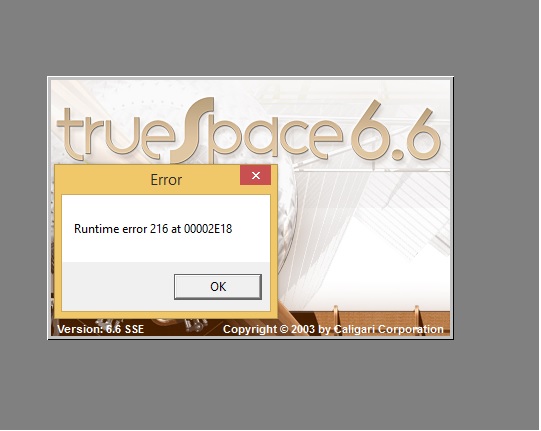
-
Fenerit

- Senior Chief Petty Officer
- Posts: 173
- Joined: 21 Nov 2011, 19:19
- Type the number ten into the box: 9
Re: Dummy ME!
As far as I know error 216 concerns tsxapi.dll memblock and spans lot of things. Maybe you must run through exclusion, by removing the plugs one by one unless it desappears. Once the start is good, then the last plugin removed was the problem.
-
Rhino169
- Senior Chief Petty Officer
- Posts: 201
- Joined: 29 Nov 2009, 03:15
Re: Dummy ME!
Fenerit, Thanks...the error is gone, but I got impatient removing things with add/remove program one-by-one and then reopening ts after each....so I am not sure whether it was a shader or shader program such as dark simbiot or shader magic or shader lab2.....or whether it was a .tsx file.
I will reload them one-by-one now and reopen ts after each to verify.
You saved me a bunch of time!
I will reload them one-by-one now and reopen ts after each to verify.
You saved me a bunch of time!
-
Rhino169
- Senior Chief Petty Officer
- Posts: 201
- Joined: 29 Nov 2009, 03:15
Re: Dummy ME!
The culprit appears to be Shader Magic.
Oddly I had given up because everything worked fine.
I loaded it last and then opened trueSpace and Hello error message!
Removed it with its uninstall file and error gone.
Must be that it is good up to a lesser version.
Thanks for the help!
Oddly I had given up because everything worked fine.
I loaded it last and then opened trueSpace and Hello error message!
Removed it with its uninstall file and error gone.
Must be that it is good up to a lesser version.
Thanks for the help!
-
Fenerit
- Senior Chief Petty Officer
- Posts: 173
- Joined: 21 Nov 2011, 19:19
- Type the number ten into the box: 9
Re: Dummy ME!
I'd problems with Darktree within "..\tsx" folder. When I moved it within the main tS root the problem with the simbiont plugin is wanished. Being a .tss, its calls must "looks" before on the main root. tS still behave like on Windows 3.11. 
-
Fenerit
- Senior Chief Petty Officer
- Posts: 173
- Joined: 21 Nov 2011, 19:19
- Type the number ten into the box: 9
Re: Dummy ME!
OOps. Crossposting. Happy you have solved the issue. Is shadermagic installed within "..\material" folder?
-
Rhino169
- Senior Chief Petty Officer
- Posts: 201
- Joined: 29 Nov 2009, 03:15
Re: Dummy ME!
Yes that is where the direction said to put it.
In fact, to make sure, I reinstalled it again and the error was there again.
Uninstalled and no error.
In fact, to make sure, I reinstalled it again and the error was there again.
Uninstalled and no error.
-
Cellulo

- Lieutenant
- Posts: 927
- Joined: 27 Sep 2012, 07:48
- Type the number ten into the box: 9
- Location: France
Re: Dummy ME!
For fixing the memory leak (shadermagic) you must download and apply this patch ( 1.03 ) for shadermagic, normally the memory leak dialog box under windows 8 is gone and other windows version.
http://web.archive.org/web/200308040511 ... /index.htm
http://web.archive.org/web/200308040511 ... /index.htm