I just discovered that the Unlookat does not work for lights. Attached is a fix for the 7.61 Unofficial Update version of truespace.
On a side note I also discovered that when you use lookat with a light it may not work if it is a new light with the default orientation. Rotate it a little bit before lookat and it works.
Fix for Unofficial UnLookAt function
-
clintonman

- Captain
- Posts: 5659
- Joined: 21 May 2009, 21:08
- Type the number ten into the box: 0
- Location: California
Fix for Unofficial UnLookAt function
- Attachments
-
- UnLookAt Fix.zip
- (8.14 KiB) Downloaded 417 times
-
trueBlue

- Captain
- Posts: 5548
- Joined: 06 Jul 2009, 22:50
- Type the number ten into the box: 10
Re: Fix for Unofficial UnLookAt function
Thanks Clinton! I guess nobody has used the LookAt tool on lights since hummmmm...2009?
Would you mind using your script that is created in tS76 so that it is compatible with tS76 too?
Also it is necessary to include the xml file so that when you reset the default context the script is rebuilt.
You can overwrite it in:
C:\trueSpace76\tS\Scripts\ScriptCommands\UnLookAt.xml
Both files created in tS76 included here and are compatible with tS761.
One way a user could install this would be to replace the UnLookAt.xml file in tS76 or tS761 and then reset the default context. No need to replace the UnLookAt.RsObj in System/Scripts/Commands
Would you mind using your script that is created in tS76 so that it is compatible with tS76 too?
Also it is necessary to include the xml file so that when you reset the default context the script is rebuilt.
You can overwrite it in:
C:\trueSpace76\tS\Scripts\ScriptCommands\UnLookAt.xml
Both files created in tS76 included here and are compatible with tS761.
One way a user could install this would be to replace the UnLookAt.xml file in tS76 or tS761 and then reset the default context. No need to replace the UnLookAt.RsObj in System/Scripts/Commands
- Attachments
-
- UnLookAt_tS76.zip
- (2.97 KiB) Downloaded 407 times
-
Draise

- Captain
- Posts: 3200
- Joined: 21 Sep 2009, 19:33
- Type the number ten into the box: 0
- Location: Bogota, Colombia
Re: Fix for Unofficial UnLookAt function
I've used it before... wondered why they didn't' work quite as expected!!!
-
clintonman
- Captain
- Posts: 5659
- Joined: 21 May 2009, 21:08
- Type the number ten into the box: 0
- Location: California
Re: Fix for Unofficial UnLookAt function
I stuck an installer script on my utilities page:
http://www.clintons3d.com/plugins/trues ... index.html"
Installation steps:
unzip the file
load the rsobj script and run it
the script will install and the xml file will copy to the scripts folder
http://www.clintons3d.com/plugins/trues ... index.html"
Installation steps:
unzip the file
load the rsobj script and run it
the script will install and the xml file will copy to the scripts folder
-
trueBlue
- Captain
- Posts: 5548
- Joined: 06 Jul 2009, 22:50
- Type the number ten into the box: 10
Re: Fix for Unofficial UnLookAt function
Added Model lights
Code: Select all
function Execute(params)
{
if (Node.ConExists(Node.FirstSelected(), "WldMatrix"))
{
Node.Value(Node.FirstSelected(),"Matrix") = Node.Value(Node.FirstSelected(),"WldMatrix");
Node.ConRemove(Node.Selection(), "Target Matrix");
Node.ConnectTo(Node.Selection() + "/Transform", "WldMatrix", Node.Selection(), "WldMatrix");
Node.ConnectTo(Node.Selection() + "/Transform", "ObjMatrix", Node.Selection(), "ObjMatrix");
Node.Delete(Node.Selection() + "/LookAt2");
Node.Delete(Node.Selection() + "/LookAt2");
Node.Delete(Node.Selection() + "/LookAt2, 1");
Node.Delete(Node.Selection() + "/LookAt2, 2");
Node.Delete(Node.Selection() + "/LookAt2, 3");
Node.Delete(Node.Selection() + "/LookAt2, 4");
if(Node.Exists(Node.FirstSelected() + "/DirlightShader"))
	Node.ConnectTo(Node.FirstSelected() + "/Transform", "WldMatrix", Node.FirstSelected() + "/DirlightShader", "Input_position");
else if(Node.Exists(Node.FirstSelected() + "/Infinite Preferences"))
	Node.ConnectTo(Node.FirstSelected() + "/Transform", "WldMatrix", Node.FirstSelected() + "/Infinite Preferences", "Input_position");
else if(Node.Exists(Node.FirstSelected() + "/Spot Preferences"))
	Node.ConnectTo(Node.FirstSelected() + "/Transform", "WldMatrix", Node.FirstSelected() + "/Spot Preferences", "In Matrix");
else if(Node.Exists(Node.FirstSelected() + "/SpotlightShader"))
	Node.ConnectTo(Node.FirstSelected() + "/Transform", "WldMatrix", Node.FirstSelected() + "/SpotlightShader", "In Matrix");
else if(Node.Exists(Node.FirstSelected() + "/Projector Preferences"))
	Node.ConnectTo(Node.FirstSelected() + "/Transform", "WldMatrix", Node.FirstSelected() + "/Projector Preferences", "In Matrix");
else if(Node.Exists(Node.FirstSelected() + "/SpotlightShader"))
	Node.ConnectTo(Node.FirstSelected() + "/Transform", "WldMatrix", Node.FirstSelected() + "/SpotlightShader", "In Matrix");
else if(Node.Exists(Node.FirstSelected() + "/Directional Preferences"))
	Node.ConnectTo(Node.FirstSelected() + "/Transform", "WldMatrix", Node.FirstSelected() + "/Directional Preferences", "In Matrix");
else if(Node.Exists(Node.FirstSelected() + "/Area Preferences"))
	Node.ConnectTo(Node.FirstSelected() + "/Transform", "WldMatrix", Node.FirstSelected() + "/Area Preferences", "In Matrix");
else if(Node.Exists(Node.FirstSelected() + "/AreaLight"))
	Node.ConnectTo(Node.FirstSelected() + "/Transform", "WldMatrix", Node.FirstSelected() + "/AreaLight", "In Matrix");
else if(Node.Exists(Node.FirstSelected() + "/LocalLight"))
	Node.ConnectTo(Node.FirstSelected() + "/Transform", "WldMatrix", Node.FirstSelected() + "/LocalLight", "In Matrix");
else if(Node.Exists(Node.FirstSelected() + "/Omni Preferences"))
	Node.ConnectTo(Node.FirstSelected() + "/Transform", "WldMatrix", Node.FirstSelected() + "/Omni Preferences", "In Matrix");
}
}-
clintonman
- Captain
- Posts: 5659
- Joined: 21 May 2009, 21:08
- Type the number ten into the box: 0
- Location: California
Re: Fix for Unofficial UnLookAt function
Nice.trueBlue wrote: 12 Aug 2019, 13:52 Added Model lights
...
I did some tests and workspace look at doesn't work properly for modelspace lights. They point in the opposite direction.
Attached is an updated installer for your convenience.
The original installer was moved to the obsolete section of my site.
http://www.clintons3d.com/plugins/trues ... index.html
"Unzip and load the script from the file menu and run it from the link editor. If the script is not loaded from the file menu then the change will be lost on the next reset to the default context."
- Attachments
-
- UnlookAtInstall.zip
- (9.66 KiB) Downloaded 340 times
-
trueBlue
- Captain
- Posts: 5548
- Joined: 06 Jul 2009, 22:50
- Type the number ten into the box: 10
Re: Fix for Unofficial UnLookAt function
UnLookAt
Add Command at the start to check for the Target Matrix connector, if it exists, return (Do not run the script)
Add Disconnects before Connecting
Add Command at the start to check for the Target Matrix connector, if it exists, return (Do not run the script)
Add Disconnects before Connecting
Code: Select all
//	UnLookAt Update: 11/22/2021
function Execute(params)
{
if(!Node.ConExists(Node.FirstSelected(), "Target Matrix")) {
System.Alert("Object is not using UnLook At");
params.SetTerminationFlag()
return;
}
Node.Value(Node.FirstSelected(),"Matrix") = Node.Value(Node.FirstSelected(),"WldMatrix");
Node.ConRemove(Node.Selection(), "Target Matrix");

Node.Disconnect(Node.Selection() + "/Transform", "WldMatrix", Node.Selection(), "WldMatrix");
Node.ConnectTo(Node.Selection() + "/Transform", "WldMatrix", Node.Selection(), "WldMatrix");

Node.Disconnect(Node.Selection() + "/Transform", "ObjMatrix", Node.Selection(), "ObjMatrix");
Node.ConnectTo(Node.Selection() + "/Transform", "ObjMatrix", Node.Selection(), "ObjMatrix");

Node.Delete(Node.Selection() + "/LookAt2");
Node.Delete(Node.Selection() + "/LookAt2, 1");
Node.Delete(Node.Selection() + "/LookAt2, 2");
Node.Delete(Node.Selection() + "/LookAt2, 3");
Node.Delete(Node.Selection() + "/LookAt2, 4");
Node.Delete(Node.Selection() + "/LookAt2, 5");
Node.Delete(Node.Selection() + "/LookAt2, 6");
Node.Delete(Node.Selection() + "/LookAt2, 7");
Node.Delete(Node.Selection() + "/LookAt2, 8");
Node.Delete(Node.Selection() + "/LookAt2, 9");
Node.Delete(Node.Selection() + "/LookAt2, 10");

if(Node.Exists(Node.FirstSelected() + "/DirlightShader"))
Node.Disconnect(Node.FirstSelected() + "/Transform", "WldMatrix", Node.FirstSelected() + "/DirlightShader", "Input_position");
else if(Node.Exists(Node.FirstSelected() + "/DirlightShader"))
Node.ConnectTo(Node.FirstSelected() + "/Transform", "WldMatrix", Node.FirstSelected() + "/DirlightShader", "Input_position");

else if(Node.Exists(Node.FirstSelected() + "/Infinite Preferences"))
Node.Disconnect(Node.FirstSelected() + "/Transform", "WldMatrix", Node.FirstSelected() + "/Infinite Preferences", "Input_position");
else if(Node.Exists(Node.FirstSelected() + "/Infinite Preferences"))
Node.ConnectTo(Node.FirstSelected() + "/Transform", "WldMatrix", Node.FirstSelected() + "/Infinite Preferences", "Input_position");

else if(Node.Exists(Node.FirstSelected() + "/Spot Preferences"))
Node.Disconnect(Node.FirstSelected() + "/Transform", "WldMatrix", Node.FirstSelected() + "/Spot Preferences", "In Matrix");
else if(Node.Exists(Node.FirstSelected() + "/Spot Preferences"))
Node.ConnectTo(Node.FirstSelected() + "/Transform", "WldMatrix", Node.FirstSelected() + "/Spot Preferences", "In Matrix");

else if(Node.Exists(Node.FirstSelected() + "/SpotlightShader"))
Node.Disconnect(Node.FirstSelected() + "/Transform", "WldMatrix", Node.FirstSelected() + "/SpotlightShader", "In Matrix");
else if(Node.Exists(Node.FirstSelected() + "/SpotlightShader"))
Node.ConnectTo(Node.FirstSelected() + "/Transform", "WldMatrix", Node.FirstSelected() + "/SpotlightShader", "In Matrix");

else if(Node.Exists(Node.FirstSelected() + "/Projector Preferences"))
Node.Disconnect(Node.FirstSelected() + "/Transform", "WldMatrix", Node.FirstSelected() + "/Projector Preferences", "In Matrix");
else if(Node.Exists(Node.FirstSelected() + "/Projector Preferences"))
Node.ConnectTo(Node.FirstSelected() + "/Transform", "WldMatrix", Node.FirstSelected() + "/Projector Preferences", "In Matrix");

//Duplicate???
else if(Node.Exists(Node.FirstSelected() + "/SpotlightShader"))
Node.Disconnect(Node.FirstSelected() + "/Transform", "WldMatrix", Node.FirstSelected() + "/SpotlightShader", "In Matrix");
else if(Node.Exists(Node.FirstSelected() + "/SpotlightShader"))
Node.ConnectTo(Node.FirstSelected() + "/Transform", "WldMatrix", Node.FirstSelected() + "/SpotlightShader", "In Matrix");

else if(Node.Exists(Node.FirstSelected() + "/Directional Preferences"))
Node.Disconnect(Node.FirstSelected() + "/Transform", "WldMatrix", Node.FirstSelected() + "/Directional Preferences", "In Matrix");
else if(Node.Exists(Node.FirstSelected() + "/Directional Preferences"))
Node.ConnectTo(Node.FirstSelected() + "/Transform", "WldMatrix", Node.FirstSelected() + "/Directional Preferences", "In Matrix");

else if(Node.Exists(Node.FirstSelected() + "/Area Preferences"))
Node.Disconnect(Node.FirstSelected() + "/Transform", "WldMatrix", Node.FirstSelected() + "/Area Preferences", "In Matrix");
else if(Node.Exists(Node.FirstSelected() + "/Area Preferences"))
Node.ConnectTo(Node.FirstSelected() + "/Transform", "WldMatrix", Node.FirstSelected() + "/Area Preferences", "In Matrix");

else if(Node.Exists(Node.FirstSelected() + "/AreaLight"))
Node.Disconnect(Node.FirstSelected() + "/Transform", "WldMatrix", Node.FirstSelected() + "/AreaLight", "In Matrix");
else if(Node.Exists(Node.FirstSelected() + "/AreaLight"))
Node.ConnectTo(Node.FirstSelected() + "/Transform", "WldMatrix", Node.FirstSelected() + "/AreaLight", "In Matrix");

else if(Node.Exists(Node.FirstSelected() + "/LocalLight"))
Node.Disconnect(Node.FirstSelected() + "/Transform", "WldMatrix", Node.FirstSelected() + "/LocalLight", "In Matrix");
else if(Node.Exists(Node.FirstSelected() + "/LocalLight"))
Node.ConnectTo(Node.FirstSelected() + "/Transform", "WldMatrix", Node.FirstSelected() + "/LocalLight", "In Matrix");

else if(Node.Exists(Node.FirstSelected() + "/Omni Preferences"))
Node.Disconnect(Node.FirstSelected() + "/Transform", "WldMatrix", Node.FirstSelected() + "/Omni Preferences", "In Matrix");
else if(Node.Exists(Node.FirstSelected() + "/Omni Preferences"))
Node.ConnectTo(Node.FirstSelected() + "/Transform", "WldMatrix", Node.FirstSelected() + "/Omni Preferences", "In Matrix");
}
RsApp.ClearHistory()
}
Last edited by trueBlue on 22 Nov 2021, 18:15, edited 1 time in total.
-
clintonman
- Captain
- Posts: 5659
- Joined: 21 May 2009, 21:08
- Type the number ten into the box: 0
- Location: California
Re: Fix for Unofficial UnLookAt function
The UU version already checks for the target matrix and it uses RsApp.RunScriptBuffer and it doesn't clear history. Are you modifying an old version of the script?trueBlue wrote: 22 Nov 2021, 18:07 UnLookAt
Add Command at the start to check for the Target Matrix connector, if it exists, return (Do not run the script)
Add Disconnects before Connecting
Code: Select all
//	UnLookAt Update: 11/22/2021
function Execute(params)
{
if(!Node.ConExists(Node.FirstSelected(), "Target Matrix")){System.Alert("Object is not using UnLook At");return;}else{Activity.Run("/Scripts/Commands/UnLookAt");}
if (Node.ConExists(Node.FirstSelected(), "WldMatrix"))
{
Node.Value(Node.FirstSelected(),"Matrix") = Node.Value(Node.FirstSelected(),"WldMatrix");
Node.ConRemove(Node.Selection(), "Target Matrix");

Node.Disconnect(Node.Selection() + "/Transform", "WldMatrix", Node.Selection(), "WldMatrix");
Node.ConnectTo(Node.Selection() + "/Transform", "WldMatrix", Node.Selection(), "WldMatrix");

Node.Disconnect(Node.Selection() + "/Transform", "ObjMatrix", Node.Selection(), "ObjMatrix");
Node.ConnectTo(Node.Selection() + "/Transform", "ObjMatrix", Node.Selection(), "ObjMatrix");

Node.Delete(Node.Selection() + "/LookAt2");
Node.Delete(Node.Selection() + "/LookAt2, 1");
Node.Delete(Node.Selection() + "/LookAt2, 2");
Node.Delete(Node.Selection() + "/LookAt2, 3");
Node.Delete(Node.Selection() + "/LookAt2, 4");
Node.Delete(Node.Selection() + "/LookAt2, 5");
Node.Delete(Node.Selection() + "/LookAt2, 6");
Node.Delete(Node.Selection() + "/LookAt2, 7");
Node.Delete(Node.Selection() + "/LookAt2, 8");
Node.Delete(Node.Selection() + "/LookAt2, 9");
Node.Delete(Node.Selection() + "/LookAt2, 10");

if(Node.Exists(Node.FirstSelected() + "/DirlightShader"))
Node.Disconnect(Node.FirstSelected() + "/Transform", "WldMatrix", Node.FirstSelected() + "/DirlightShader", "Input_position");
else if(Node.Exists(Node.FirstSelected() + "/DirlightShader"))
Node.ConnectTo(Node.FirstSelected() + "/Transform", "WldMatrix", Node.FirstSelected() + "/DirlightShader", "Input_position");

else if(Node.Exists(Node.FirstSelected() + "/Infinite Preferences"))
Node.Disconnect(Node.FirstSelected() + "/Transform", "WldMatrix", Node.FirstSelected() + "/Infinite Preferences", "Input_position");
else if(Node.Exists(Node.FirstSelected() + "/Infinite Preferences"))
Node.ConnectTo(Node.FirstSelected() + "/Transform", "WldMatrix", Node.FirstSelected() + "/Infinite Preferences", "Input_position");

else if(Node.Exists(Node.FirstSelected() + "/Spot Preferences"))
Node.Disconnect(Node.FirstSelected() + "/Transform", "WldMatrix", Node.FirstSelected() + "/Spot Preferences", "In Matrix");
else if(Node.Exists(Node.FirstSelected() + "/Spot Preferences"))
Node.ConnectTo(Node.FirstSelected() + "/Transform", "WldMatrix", Node.FirstSelected() + "/Spot Preferences", "In Matrix");

else if(Node.Exists(Node.FirstSelected() + "/SpotlightShader"))
Node.Disconnect(Node.FirstSelected() + "/Transform", "WldMatrix", Node.FirstSelected() + "/SpotlightShader", "In Matrix");
else if(Node.Exists(Node.FirstSelected() + "/SpotlightShader"))
Node.ConnectTo(Node.FirstSelected() + "/Transform", "WldMatrix", Node.FirstSelected() + "/SpotlightShader", "In Matrix");

else if(Node.Exists(Node.FirstSelected() + "/Projector Preferences"))
Node.Disconnect(Node.FirstSelected() + "/Transform", "WldMatrix", Node.FirstSelected() + "/Projector Preferences", "In Matrix");
else if(Node.Exists(Node.FirstSelected() + "/Projector Preferences"))
Node.ConnectTo(Node.FirstSelected() + "/Transform", "WldMatrix", Node.FirstSelected() + "/Projector Preferences", "In Matrix");

//Duplicate???
else if(Node.Exists(Node.FirstSelected() + "/SpotlightShader"))
Node.Disconnect(Node.FirstSelected() + "/Transform", "WldMatrix", Node.FirstSelected() + "/SpotlightShader", "In Matrix");
else if(Node.Exists(Node.FirstSelected() + "/SpotlightShader"))
Node.ConnectTo(Node.FirstSelected() + "/Transform", "WldMatrix", Node.FirstSelected() + "/SpotlightShader", "In Matrix");

else if(Node.Exists(Node.FirstSelected() + "/Directional Preferences"))
Node.Disconnect(Node.FirstSelected() + "/Transform", "WldMatrix", Node.FirstSelected() + "/Directional Preferences", "In Matrix");
else if(Node.Exists(Node.FirstSelected() + "/Directional Preferences"))
Node.ConnectTo(Node.FirstSelected() + "/Transform", "WldMatrix", Node.FirstSelected() + "/Directional Preferences", "In Matrix");

else if(Node.Exists(Node.FirstSelected() + "/Area Preferences"))
Node.Disconnect(Node.FirstSelected() + "/Transform", "WldMatrix", Node.FirstSelected() + "/Area Preferences", "In Matrix");
else if(Node.Exists(Node.FirstSelected() + "/Area Preferences"))
Node.ConnectTo(Node.FirstSelected() + "/Transform", "WldMatrix", Node.FirstSelected() + "/Area Preferences", "In Matrix");

else if(Node.Exists(Node.FirstSelected() + "/AreaLight"))
Node.Disconnect(Node.FirstSelected() + "/Transform", "WldMatrix", Node.FirstSelected() + "/AreaLight", "In Matrix");
else if(Node.Exists(Node.FirstSelected() + "/AreaLight"))
Node.ConnectTo(Node.FirstSelected() + "/Transform", "WldMatrix", Node.FirstSelected() + "/AreaLight", "In Matrix");

else if(Node.Exists(Node.FirstSelected() + "/LocalLight"))
Node.Disconnect(Node.FirstSelected() + "/Transform", "WldMatrix", Node.FirstSelected() + "/LocalLight", "In Matrix");
else if(Node.Exists(Node.FirstSelected() + "/LocalLight"))
Node.ConnectTo(Node.FirstSelected() + "/Transform", "WldMatrix", Node.FirstSelected() + "/LocalLight", "In Matrix");

else if(Node.Exists(Node.FirstSelected() + "/Omni Preferences"))
Node.Disconnect(Node.FirstSelected() + "/Transform", "WldMatrix", Node.FirstSelected() + "/Omni Preferences", "In Matrix");
else if(Node.Exists(Node.FirstSelected() + "/Omni Preferences"))
Node.ConnectTo(Node.FirstSelected() + "/Transform", "WldMatrix", Node.FirstSelected() + "/Omni Preferences", "In Matrix");
}
RsApp.ClearHistory()
}
-
trueBlue
- Captain
- Posts: 5548
- Joined: 06 Jul 2009, 22:50
- Type the number ten into the box: 10
Re: Fix for Unofficial UnLookAt function
Actually, I was working in tS7.6 when I modified the script
You are correct, in the UUv8, it does check for the Target Matrix, but the Disconnects do not exist
I'll check and see if RsApp.RunScriptBuffer runs in tS7.6
Edit: Yep, looks like it is available.
But they are hard to write!
You are correct, in the UUv8, it does check for the Target Matrix, but the Disconnects do not exist
I'll check and see if RsApp.RunScriptBuffer runs in tS7.6
Edit: Yep, looks like it is available.
But they are hard to write!
-
trueBlue
- Captain
- Posts: 5548
- Joined: 06 Jul 2009, 22:50
- Type the number ten into the box: 10
Re: Fix for Unofficial UnLookAt function
Wow! This slipped by me and just confirmed thisclintonman wrote: 12 Aug 2019, 16:22I did some tests and workspace look at doesn't work properly for modelspace lights. They point in the opposite direction.trueBlue wrote: 12 Aug 2019, 13:52 Added Model lights
...
As an example, using an InfLight from Model and Workspace
Looks like the differences is the Roll values being completely opposite (-180)
If you Normalize the Rotation, Workspace's Look At works correctly with the Model's InfLight
I wonder if Workspace's Look At could be modified for Model Lights using something similar to:
Space.NodeMatrixElement('%THIS_NAME%','roll') = 180;
-
trueBlue
- Captain
- Posts: 5548
- Joined: 06 Jul 2009, 22:50
- Type the number ten into the box: 10
Re: Fix for Unofficial UnLookAt function
This looks promising:
Code: Select all
	if(Node.SubObjectCount('/D3DView')==0) return;

	var sel = Node.Selection();if(!sel){return;};
	var selCount = Node.SelectedCount();

	if(selCount > 1) {
		System.Alert("Select one object at a time")
		return
	}

	if(Node.ConExists(Node.FirstSelected(), "Target Matrix"))
	{
		System.Alert("Object is being used to Look At another object\n\nUse the Unlook At tool first");
	return;
	}else{
	RsTool.NormalizeRotation('');
	ToolMng.ActivateTool('{17D544A3-3F58-436B-83E7-F8B4D7D4E7C5}','{4E203C6C-A20D-4e32-82B4-FC482F5A0D06}');
	}
-
clintonman
- Captain
- Posts: 5659
- Joined: 21 May 2009, 21:08
- Type the number ten into the box: 0
- Location: California
Re: Fix for Unofficial UnLookAt function
Looks good to me. You don't need the else when using a returntrueBlue wrote: 23 Aug 2022, 15:17 This looks promising:Code: Select all
	if(Node.SubObjectCount('/D3DView')==0) return;

	var sel = Node.Selection();if(!sel){return;};
	var selCount = Node.SelectedCount();

	if(selCount > 1) {
		System.Alert("Select one object at a time")
		return
	}

	if(Node.ConExists(Node.FirstSelected(), "Target Matrix"))
	{
		System.Alert("Object is being used to Look At another object\n\nUse the Unlook At tool first");
	return;
	}else{
	RsTool.NormalizeRotation('');
	ToolMng.ActivateTool('{17D544A3-3F58-436B-83E7-F8B4D7D4E7C5}','{4E203C6C-A20D-4e32-82B4-FC482F5A0D06}');
	}
Code: Select all
	if(Node.SubObjectCount('/D3DView')==0) return;

	var sel = Node.Selection();if(!sel){return;};
	var selCount = Node.SelectedCount();

	if(selCount > 1) {
		System.Alert("Select one object at a time")
		return
	}

	if(Node.ConExists(Node.FirstSelected(), "Target Matrix"))
	{
		System.Alert("Object is being used to Look At another object\n\nUse the Unlook At tool first");
		return;
	}
	RsTool.NormalizeRotation('');
	ToolMng.ActivateTool('{17D544A3-3F58-436B-83E7-F8B4D7D4E7C5}','{4E203C6C-A20D-4e32-82B4-FC482F5A0D06}');
-
trueBlue
- Captain
- Posts: 5548
- Joined: 06 Jul 2009, 22:50
- Type the number ten into the box: 10
Re: Fix for Unofficial UnLookAt function
It looks like RsTool.NormalizeRotation(''); is only needed for Lights
How would you write that?
How would you write that?
-
clintonman
- Captain
- Posts: 5659
- Joined: 21 May 2009, 21:08
- Type the number ten into the box: 0
- Location: California
Re: Fix for Unofficial UnLookAt function
It doesn't matter since the rotations are taken over by the lookat anyway.trueBlue wrote: 23 Aug 2022, 15:54 It looks like RsTool.NormalizeRotation(''); is only needed for Lights
How would you write that?
-
trueBlue
- Captain
- Posts: 5548
- Joined: 06 Jul 2009, 22:50
- Type the number ten into the box: 10
Re: Fix for Unofficial UnLookAt function
Yeah, but it is kind of funky normalizing the rotation on everything before the Look At command is ran and it is only for Model Lightsclintonman wrote: 23 Aug 2022, 16:14It doesn't matter since the rotations are taken over by the lookat anyway.trueBlue wrote: 23 Aug 2022, 15:54 It looks like RsTool.NormalizeRotation(''); is only needed for Lights
How would you write that?
I would go even further, isolating the Workspace Lights by looking for the "Intensity" connector
Code: Select all
	if(Node.SubObjectCount('/D3DView')==0) return;

	var sel = Node.Selection();
	var selCount = Node.SelectedCount();
	var fsel = Node.FirstSelected();

	if(!sel){return;}
	if(selCount > 1) {	System.Alert('Select one object at a time');return;}
	if(Node.ConExists(fsel, 'Target Matrix'))	{	System.Alert('Object is being used to Look At another object\n\nUse the Unlook At tool first');return;}
	if(Node.IsLight(fsel) && !Node.ConExists(fsel, 'Intensity')) {	RsTool.NormalizeRotation(fsel);}

	ToolMng.ActivateTool('{17D544A3-3F58-436B-83E7-F8B4D7D4E7C5}','{4E203C6C-A20D-4e32-82B4-FC482F5A0D06}');
-
clintonman
- Captain
- Posts: 5659
- Joined: 21 May 2009, 21:08
- Type the number ten into the box: 0
- Location: California
Re: Fix for Unofficial UnLookAt function
I tried a model infinite light and it didn't have the problem, so you'll want to check the model light types to see which ones need the normalize rotation.trueBlue wrote: 23 Aug 2022, 16:31Yeah, but it is kind of funky normalizing the rotation on everything before the Look At command is ran and it is only for Model Lightsclintonman wrote: 23 Aug 2022, 16:14It doesn't matter since the rotations are taken over by the lookat anyway.trueBlue wrote: 23 Aug 2022, 15:54 It looks like RsTool.NormalizeRotation(''); is only needed for Lights
How would you write that?
I would go even further, isolating the Workspace Lights by looking for the "Intensity" connector
Code: Select all
	if(Node.SubObjectCount('/D3DView')==0) return;

	var sel = Node.Selection();
	var selCount = Node.SelectedCount();
	var fsel = Node.FirstSelected();

	if(!sel){return;}
	if(selCount > 1) {	System.Alert('Select one object at a time');return;}
	if(Node.ConExists(fsel, 'Target Matrix'))	{	System.Alert('Object is being used to Look At another object\n\nUse the Unlook At tool first');return;}
	if(Node.IsLight(fsel) && !Node.ConExists(fsel, 'Intensity')) {	RsTool.NormalizeRotation(fsel);}

	ToolMng.ActivateTool('{17D544A3-3F58-436B-83E7-F8B4D7D4E7C5}','{4E203C6C-A20D-4e32-82B4-FC482F5A0D06}');
-
trueBlue
- Captain
- Posts: 5548
- Joined: 06 Jul 2009, 22:50
- Type the number ten into the box: 10
Re: Fix for Unofficial UnLookAt function
What?
For me the Model Infinite light points in the opposite direction using Workspace's original Look At command
.
Have not tested any other Model lights yet
For me the Model Infinite light points in the opposite direction using Workspace's original Look At command

Have not tested any other Model lights yet
-
clintonman
- Captain
- Posts: 5659
- Joined: 21 May 2009, 21:08
- Type the number ten into the box: 0
- Location: California
Re: Fix for Unofficial UnLookAt function
I'll double check, maybe I accidentally did a workspace light.trueBlue wrote: 23 Aug 2022, 17:11 What?
For me the Model Infinite light points in the opposite direction using Workspace's original Look At command
Model Infinte light used in Workspace's original Look At command.png
.
Have not tested any other Model lights yet
Yep, checks out.
new scene in model
lookat for infinite light is correct
-
trueBlue
- Captain
- Posts: 5548
- Joined: 06 Jul 2009, 22:50
- Type the number ten into the box: 10
Re: Fix for Unofficial UnLookAt function
Confirm you are correct in your exampleclintonman wrote: 23 Aug 2022, 17:44I'll double check, maybe I accidentally did a workspace light.trueBlue wrote: 23 Aug 2022, 17:11 What?
For me the Model Infinite light points in the opposite direction using Workspace's original Look At command
Model Infinte light used in Workspace's original Look At command.png
.
Have not tested any other Model lights yet
Yep, checks out.
new scene in model
lookat for infinite light is correct
Try adding a Model infinite light, switch to Workspace and run Look At
Model infinite light is in opposite direction
Then try Un Look At
Model infinite light is not restored correctly
-
trueBlue
- Captain
- Posts: 5548
- Joined: 06 Jul 2009, 22:50
- Type the number ten into the box: 10
Re: Fix for Unofficial UnLookAt function
What is your util command equivalent to:
Node.Value(fsel,"Matrix") = Node.Value(fsel,"WldMatrix");
Node.Value(fsel,"Matrix") = Node.Value(fsel,"WldMatrix");
-
clintonman
- Captain
- Posts: 5659
- Joined: 21 May 2009, 21:08
- Type the number ten into the box: 0
- Location: California
Re: Fix for Unofficial UnLookAt function
trueBlue wrote: 23 Aug 2022, 19:37 What is your util command equivalent to:
Node.Value(fsel,"Matrix") = Node.Value(fsel,"WldMatrix");
SetNodeValueMatrix(fsel, "Matrix", Node.Value(fsel,"WldMatrix"));
Code: Select all
function SetNodeValueMatrix(node, conn, matrix)
{
	util.SetNodeValueMatrix(node, conn,
			matrix.GetAt(0,0), matrix.GetAt(1,0), matrix.GetAt(2,0), matrix.GetAt(3,0),
			matrix.GetAt(0,1), matrix.GetAt(1,1), matrix.GetAt(2,1), matrix.GetAt(3,1),
			matrix.GetAt(0,2), matrix.GetAt(1,2), matrix.GetAt(2,2), matrix.GetAt(3,2),
			matrix.GetAt(0,3), matrix.GetAt(1,3), matrix.GetAt(2,3), matrix.GetAt(3,3)
	);
}-
trueBlue
- Captain
- Posts: 5548
- Joined: 06 Jul 2009, 22:50
- Type the number ten into the box: 10
Re: Fix for Unofficial UnLookAt function
Thanks, this was working until I tried it on a Workspace Sky light
Turns out, the Workspace Sky light's Widget is the culprit
ERR Source object: /Project/Space 3D, 1/UnLook At Error: Microsoft JScript runtime error Description: Invalid procedure call or argument Error code: 0x800a0005 - (null) Line: 15, Char: 1 Script text: SetNodeValueMatrix(fsel, "Matrix", Node.Value(fsel,"WldMatrix"));
Code: Select all
function SetNodeValueMatrix(node, conn, matrix)
{
	var util = System.CreateDO("Clintons3D Package/Utility functions")
	util.SetNodeValueMatrix(node, conn,
			matrix.GetAt(0,0), matrix.GetAt(1,0), matrix.GetAt(2,0), matrix.GetAt(3,0),
			matrix.GetAt(0,1), matrix.GetAt(1,1), matrix.GetAt(2,1), matrix.GetAt(3,1),
			matrix.GetAt(0,2), matrix.GetAt(1,2), matrix.GetAt(2,2), matrix.GetAt(3,2),
			matrix.GetAt(0,3), matrix.GetAt(1,3), matrix.GetAt(2,3), matrix.GetAt(3,3)
	);
}
-
clintonman
- Captain
- Posts: 5659
- Joined: 21 May 2009, 21:08
- Type the number ten into the box: 0
- Location: California
Re: Fix for Unofficial UnLookAt function
Looks like look at doesn't work with the widget node. Remove and look at works. Probably your new look at works if there is no widget node inside the sky light.trueBlue wrote: 23 Aug 2022, 20:24 Thanks, this was working until I tried it on a Workspace Sky lightERR Source object: /Project/Space 3D, 1/UnLook At Error: Microsoft JScript runtime error Description: Invalid procedure call or argument Error code: 0x800a0005 - (null) Line: 15, Char: 1 Script text: SetNodeValueMatrix(fsel, "Matrix", Node.Value(fsel,"WldMatrix"));Code: Select all
function SetNodeValueMatrix(node, conn, matrix)
{
	var util = System.CreateDO("Clintons3D Package/Utility functions")
	util.SetNodeValueMatrix(node, conn,
			matrix.GetAt(0,0), matrix.GetAt(1,0), matrix.GetAt(2,0), matrix.GetAt(3,0),
			matrix.GetAt(0,1), matrix.GetAt(1,1), matrix.GetAt(2,1), matrix.GetAt(3,1),
			matrix.GetAt(0,2), matrix.GetAt(1,2), matrix.GetAt(2,2), matrix.GetAt(3,2),
			matrix.GetAt(0,3), matrix.GetAt(1,3), matrix.GetAt(2,3), matrix.GetAt(3,3)
	);
}
edit
spotlight has widget node, but it doesn't contain any matrix inputs
-
trueBlue
- Captain
- Posts: 5548
- Joined: 06 Jul 2009, 22:50
- Type the number ten into the box: 10
Re: Fix for Unofficial UnLookAt function
Running the original ts command:
ToolMng.ActivateTool('{17D544A3-3F58-436B-83E7-F8B4D7D4E7C5}','{4E203C6C-A20D-4e32-82B4-FC482F5A0D06}');
on the workspace Sky light, hooks up the Widget's Matrix to the LookAt2 node
WTH
Edit: This is true with all of the UU lights, so with UU9 there will be no floating panel Widget
ToolMng.ActivateTool('{17D544A3-3F58-436B-83E7-F8B4D7D4E7C5}','{4E203C6C-A20D-4e32-82B4-FC482F5A0D06}');
on the workspace Sky light, hooks up the Widget's Matrix to the LookAt2 node
WTH
Edit: This is true with all of the UU lights, so with UU9 there will be no floating panel Widget
-
trueBlue
- Captain
- Posts: 5548
- Joined: 06 Jul 2009, 22:50
- Type the number ten into the box: 10
Re: Fix for Unofficial UnLookAt function
Here is what have for Look At & UnLook At
I am contemplating making an UI like you did with Delete & Copy
The main reason is to add a script that selects all the objects in the scene that have a TargetMatrix
Is it possible to create a list of objects that have a TargetMatrix in a panel?
I am contemplating making an UI like you did with Delete & Copy
The main reason is to add a script that selects all the objects in the scene that have a TargetMatrix
Is it possible to create a list of objects that have a TargetMatrix in a panel?
- Attachments
-
- UnLook At.RsObj
- (9.92 KiB) Downloaded 120 times
-
- Look At.RsObj
- (5.35 KiB) Downloaded 123 times
-
clintonman
- Captain
- Posts: 5659
- Joined: 21 May 2009, 21:08
- Type the number ten into the box: 0
- Location: California
Re: Fix for Unofficial UnLookAt function
Why NodeMatrixElement?
I changed unlook at so it doesn't have a function inside another function
Also changed the alert to "is not using Look At" instead of "is not using UnLook At"
Code: Select all
	//why 3 instead of 1, is undo thing?
	//RsTool.NormalizeRotation('');
	Space.NodeMatrixElement(fsel,'roll') = 0;
	Space.NodeMatrixElement(fsel,'pitch') = 0;
Space.NodeMatrixElement(fsel,'yaw') = 0;Also changed the alert to "is not using Look At" instead of "is not using UnLook At"
Why? What would you do if all those objects are selected?trueBlue wrote: 23 Aug 2022, 23:36 ...
The main reason is to add a script that selects all the objects in the scene that have a TargetMatrix
...
Maybe...trueBlue wrote: 23 Aug 2022, 23:36 ...
Is it possible to create a list of objects that have a TargetMatrix in a panel?
- Attachments
-
- UnLook At6da6.RsObj
- (10.22 KiB) Downloaded 119 times
-
trueBlue
- Captain
- Posts: 5548
- Joined: 06 Jul 2009, 22:50
- Type the number ten into the box: 10
Re: Fix for Unofficial UnLookAt function
NodeMatrixElement does not add an undoclintonman wrote: 24 Aug 2022, 01:14 Why NodeMatrixElement?I changed unlook at so it doesn't have a function inside another functionCode: Select all
	//why 3 instead of 1, is undo thing?
	//RsTool.NormalizeRotation('');
	Space.NodeMatrixElement(fsel,'roll') = 0;
	Space.NodeMatrixElement(fsel,'pitch') = 0;
	Space.NodeMatrixElement(fsel,'yaw') = 0;
Also changed the alert to "is not using Look At" instead of "is not using UnLook At"
Why? What would you do if all those objects are selected?trueBlue wrote: 23 Aug 2022, 23:36 ...
The main reason is to add a script that selects all the objects in the scene that have a TargetMatrix
...
Maybe...trueBlue wrote: 23 Aug 2022, 23:36 ...
Is it possible to create a list of objects that have a TargetMatrix in a panel?
I would like to be able to select one of the objects in the list
There could be another script that selects all of the Targets and run on each one
-
clintonman
- Captain
- Posts: 5659
- Joined: 21 May 2009, 21:08
- Type the number ten into the box: 0
- Location: California
Re: Fix for Unofficial UnLookAt function
No undo means you can't get back to where you were before the look at.trueBlue wrote: 24 Aug 2022, 02:14NodeMatrixElement does not add an undoclintonman wrote: 24 Aug 2022, 01:14 Why NodeMatrixElement?I changed unlook at so it doesn't have a function inside another functionCode: Select all
	//why 3 instead of 1, is undo thing?
	//RsTool.NormalizeRotation('');
	Space.NodeMatrixElement(fsel,'roll') = 0;
	Space.NodeMatrixElement(fsel,'pitch') = 0;
	Space.NodeMatrixElement(fsel,'yaw') = 0;
Also changed the alert to "is not using Look At" instead of "is not using UnLook At"
Why? What would you do if all those objects are selected?trueBlue wrote: 23 Aug 2022, 23:36 ...
The main reason is to add a script that selects all the objects in the scene that have a TargetMatrix
...
Maybe...trueBlue wrote: 23 Aug 2022, 23:36 ...
Is it possible to create a list of objects that have a TargetMatrix in a panel?
I would like to be able to select one of the objects in the list
There could be another script that selects all of the Targets and run on each one
LookAtStuff - 1. Build List, 2. make a selection in the list, 3. Select to select 3D object
- Attachments
-
- LookAtStuff.RsObj
- (14.82 KiB) Downloaded 168 times
-
trueBlue
- Captain
- Posts: 5548
- Joined: 06 Jul 2009, 22:50
- Type the number ten into the box: 10
Re: Fix for Unofficial UnLookAt function
Thank you, this is great!
You can reapply it though
Found a bug with objects that have a Look At applied
Normalizing the Location is destructive
Edit: I am testing setting the roll, pitch, and yaw for lights only
I do not think you can undo itNo undo means you can't get back to where you were before the look at.
You can reapply it though
Found a bug with objects that have a Look At applied
Normalizing the Location is destructive
Edit: I am testing setting the roll, pitch, and yaw for lights only
-
trueBlue
- Captain
- Posts: 5548
- Joined: 06 Jul 2009, 22:50
- Type the number ten into the box: 10
Re: Fix for Unofficial UnLookAt function
Is there a way, within your Make LookAt List script, to clear the list, if there are no objects in the scene that do not have Look At applied?
I have added a UnLook At button to the panel
Activity.Run("%THIS_NAME%" + "/UnLook At");
Activity.Run("%THIS_NAME%" + "/Make LookAt List");
I have added a UnLook At button to the panel
Activity.Run("%THIS_NAME%" + "/UnLook At");
Activity.Run("%THIS_NAME%" + "/Make LookAt List");
-
clintonman
- Captain
- Posts: 5659
- Joined: 21 May 2009, 21:08
- Type the number ten into the box: 0
- Location: California
Re: Fix for Unofficial UnLookAt function
This should do it.trueBlue wrote: 25 Aug 2022, 00:36 Is there a way, within your Make LookAt List script, to clear the list, if there are no objects in the scene that do not have Look At applied?
I have added a UnLook At button to the panel
Activity.Run("%THIS_NAME%" + "/UnLook At");
Activity.Run("%THIS_NAME%" + "/Make LookAt List");
Code: Select all
// Execute
// Called to execute the command
function Execute(params)
{
	var LookAtEnum = params.ConValue('LookAtEnum');

	lookatList = [];

	FindAllLookAts(Space.CurrentScene());

	var nodeEnum = System.CreateDO('Common Data Package/String Enum Data');
	nodeEnum.Clear();

	if(lookatList.length == 0) {
		Node.Value(System.ThisOwner(), "LookAtEnum") = nodeEnum;
		return;
	}

	for(var i=0;i<lookatList.length;i++) {
		nodeEnum.SetStringAt(i,lookatList[i]);
	}

	nodeEnum.SetSelectedString(lookatList[0])
	//params.ConValue("LookAtEnum") = nodeEnum;
	Node.Value(System.ThisOwner(), "LookAtEnum") = nodeEnum;

}

function FindAllLookAts(curNode)
{
	if(Node.Exists(curNode + "/LookAt2")) {
		lookatList.push(curNode);
		return;
	}

	var numChildren = Node.SubObjectCount(curNode);

	if(numChildren == 0) return;

	for(var i=0; i<numChildren; i++) {
		var childNode = curNode + "/" + Node.SubObject(curNode, i);
		FindAllLookAts(childNode)
	}
}
-
trueBlue
- Captain
- Posts: 5548
- Joined: 06 Jul 2009, 22:50
- Type the number ten into the box: 10
Re: Fix for Unofficial UnLookAt function
Thanks, that works great!
Here is an update...
Not sure with the current UI, maybe a little confusing by adding the Look At button
Wish the Select script did not run if the list is empty because it creates an Undo in the Command History and it Unselects any selected items
Made some changes to the Look At script...
It will only run Space.NodeMatrixElement(fsel,'roll') = 0; if the selected item is a model light
Also, the Status message only runs for 5 seconds
Is there a way to clear the Status message after the script runs and after the user selects the target object?
Still needs further testing
Let me know if you have any critiques or further suggestions
Here is an update...
Not sure with the current UI, maybe a little confusing by adding the Look At button
Wish the Select script did not run if the list is empty because it creates an Undo in the Command History and it Unselects any selected items
Made some changes to the Look At script...
It will only run Space.NodeMatrixElement(fsel,'roll') = 0; if the selected item is a model light
Also, the Status message only runs for 5 seconds
Is there a way to clear the Status message after the script runs and after the user selects the target object?
Still needs further testing
Let me know if you have any critiques or further suggestions
- Attachments
-
- Look At utilities.RsObj
- (26.64 KiB) Downloaded 122 times
-
clintonman
- Captain
- Posts: 5659
- Joined: 21 May 2009, 21:08
- Type the number ten into the box: 0
- Location: California
Re: Fix for Unofficial UnLookAt function
Nope, don't see any way to know when it's done or if it's aborted either.trueBlue wrote: 25 Aug 2022, 15:51 ..
Also, the Status message only runs for 5 seconds
Is there a way to clear the Status message after the script runs and after the user selects the target object?
...
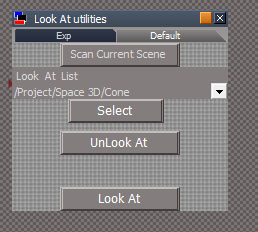
Attached will return from select if list is empty.trueBlue wrote: 25 Aug 2022, 15:51 Thanks, that works great!
Here is an update...
Not sure with the current UI, maybe a little confusing by adding the Look At button
Wish the Select script did not run if the list is empty because it creates an Undo in the Command History and it Unselects any selected items
Made some changes to the Look At script...
It will only run Space.NodeMatrixElement(fsel,'roll') = 0; if the selected item is a model light
Also, the Status message only runs for 5 seconds
Is there a way to clear the Status message after the script runs and after the user selects the target object?
Still needs further testing
Let me know if you have any critiques or further suggestions
- LookAtUtil.jpg (41.51 KiB) Viewed 1754 times
recommend vertical arrangement so it looks like a process, currently select and unlookat buttons look like 2 equal choices
1. scan the scene
2. choose a list item
3. select it
4. unlookat
space separation
look at, not part of the process
- Attachments
-
- Look At utilities142e.RsObj
- (26.83 KiB) Downloaded 115 times
-
trueBlue
- Captain
- Posts: 5548
- Joined: 06 Jul 2009, 22:50
- Type the number ten into the box: 10
Re: Fix for Unofficial UnLookAt function
Is this, okay?
I added a panel frame to Encaps... & Look At, scripts included verses calling them from the UUFunctionSet
I added a panel frame to Encaps... & Look At, scripts included verses calling them from the UUFunctionSet

-
clintonman
- Captain
- Posts: 5659
- Joined: 21 May 2009, 21:08
- Type the number ten into the box: 0
- Location: California
Re: Fix for Unofficial UnLookAt function
Looks good to me. Don't know anything about the encaps.trueBlue wrote: 26 Aug 2022, 02:12 Is this, okay?
I added a panel frame to Encaps... & Look At, scripts included verses calling them from the UUFunctionSet
Floating panels.png
-
trueBlue
- Captain
- Posts: 5548
- Joined: 06 Jul 2009, 22:50
- Type the number ten into the box: 10
Re: Fix for Unofficial UnLookAt function
clintonman wrote: 26 Aug 2022, 02:17Looks good to me. Don't know anything about the encaps.trueBlue wrote: 26 Aug 2022, 02:12 Is this, okay?
I added a panel frame to Encaps... & Look At, scripts included verses calling them from the UUFunctionSet
Floating panels.png

tS761_UU_Artists_Guide.pdf
Chapter2 User Interface| 50