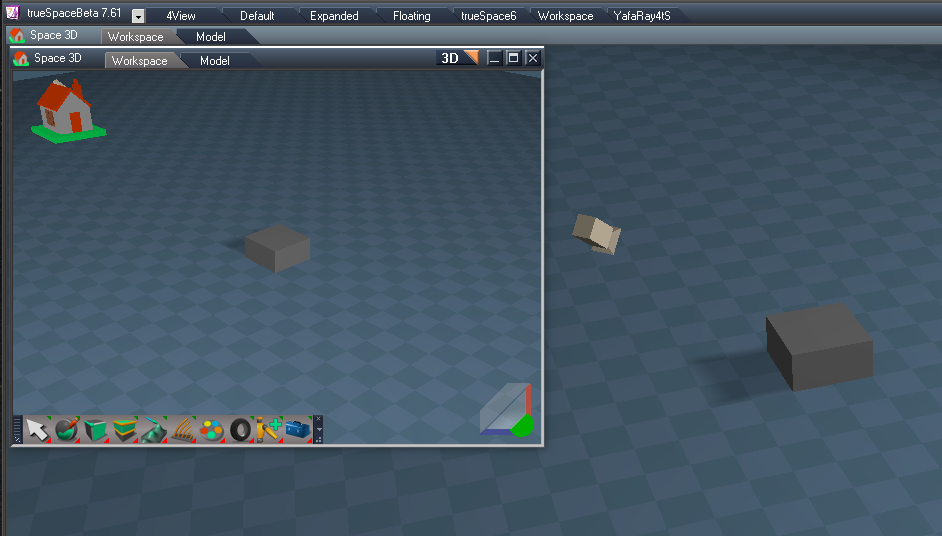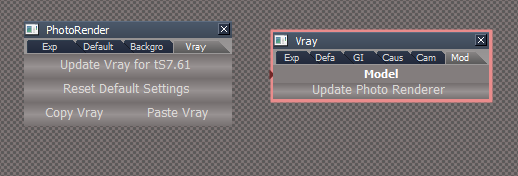
- Capture.PNG (10.6 KiB) Viewed 4147 times
Final trueSpace 7.61 Beta 8 Unofficial Update
-
trueBlue

- Captain
- Posts: 5548
- Joined: 06 Jul 2009, 22:50
- Type the number ten into the box: 10
Re: Final trueSpace 7.61 Beta 8 Unofficial Update
You will find a new aspect in each with button scripts that update, help and fix a few issues with Vray and tS761
-
trueBlue
- Captain
- Posts: 5548
- Joined: 06 Jul 2009, 22:50
- Type the number ten into the box: 10
Re: Final trueSpace 7.61 Beta 8 Unofficial Update
New update:
viewtopic.php?t=3732
Radial Array2/cleanIt
Node.ConRemove(owner, 'maintainOrientation');
YafarayScripts
Update 10/06/2019
YafaRay4tS/tSDisplay/DisplayFrame
SnappedTo = {2C152F81-45A2-4035-8896-9E49D60C8A7A}
YafaRay4tS/Anim
UI modifications
About
version = 0.9.7
Toolbars/Main2
Model View
Toolbars/File/Save As/Optimize
Optimize Workspace Scene
My Scene/My Recordings
Automatically save Workspace scenes as a Recording with compression
Vray
Model aspect
Update Photo Renderer
PhotoRenderer
Vray aspect
Update scripts
default_layout
Saved the LE View location to top left
Default.rsl
Saved the LE View location to top left
viewtopic.php?t=3732
Radial Array2/cleanIt
Node.ConRemove(owner, 'maintainOrientation');
YafarayScripts
Update 10/06/2019
YafaRay4tS/tSDisplay/DisplayFrame
SnappedTo = {2C152F81-45A2-4035-8896-9E49D60C8A7A}
YafaRay4tS/Anim
UI modifications
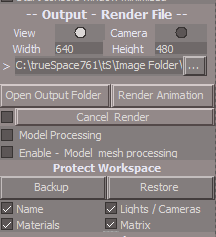
- Anim aspect.PNG (8.2 KiB) Viewed 4135 times
version = 0.9.7
Toolbars/Main2
Model View
Toolbars/File/Save As/Optimize
Optimize Workspace Scene
My Scene/My Recordings
Automatically save Workspace scenes as a Recording with compression
Vray
Model aspect
Update Photo Renderer
PhotoRenderer
Vray aspect
Update scripts
default_layout
Saved the LE View location to top left
Default.rsl
Saved the LE View location to top left
-
clintonman

- Captain
- Posts: 5659
- Joined: 21 May 2009, 21:08
- Type the number ten into the box: 0
- Location: California
Re: Final trueSpace 7.61 Beta 8 Unofficial Update
I see the Vray tab of the PhotoRender, but I don't see Model tab on the Vray.trueBlue wrote: 04 Oct 2019, 16:55 Capture.PNG
You will find a new aspect in each with button scripts that update, help and fix a few issues with Vray and tS761
-
trueBlue
- Captain
- Posts: 5548
- Joined: 06 Jul 2009, 22:50
- Type the number ten into the box: 10
Re: Final trueSpace 7.61 Beta 8 Unofficial Update
Try a new scene with Vray Loaded
-
trueBlue
- Captain
- Posts: 5548
- Joined: 06 Jul 2009, 22:50
- Type the number ten into the box: 10
Re: Final trueSpace 7.61 Beta 8 Unofficial Update
New update:
viewtopic.php?t=3732
Gold toolbar icon
RMB = Custom Toolbar Preferences
C3D toolbar icon
RMB = Replaced the Question command with floating panel
YafaRay4tS
Add
Python_file 'attribute'
CreatePythonSync
Add
Amim - Backup button command
Add
D3D_Render
CreatePythonSync
Add
Lathe Sweep 'Updated 10/08/2019'
Nurbs toolbar 'Updated 10/08/2019'
viewtopic.php?t=3732
Gold toolbar icon
RMB = Custom Toolbar Preferences
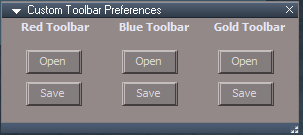
- Gold toolbar preferences.PNG (3.56 KiB) Viewed 4088 times
RMB = Replaced the Question command with floating panel

- C3D Restore.PNG (9.45 KiB) Viewed 4088 times
Add
Python_file 'attribute'
CreatePythonSync
Add
Code: Select all
var thedate = new Date()
Node.Value("/Yafaray Folder/YafaRay4tS", "Python_file") = "File Created - "  + thedate
Node.Value(System.ThisOwner(), "Python_file") = "File Created - " + thedateAdd
Code: Select all
Activity.Run( "Scripts/CustomCommands/ProtectWorkspace/Popup Panel/OpenPanelFrame")CreatePythonSync
Add
Code: Select all
var alertText = "1. Model Python file was created and only needs to be created once.\n\n"
alertText += "2. In Model open the Script Editor for the Scene object and...\n\n"
alertText += "3. Select the Assign button and choose the file 'special_mesh_synch.py', located in 'C:\\trueSpace761\\tS\\PythonScripts'\n"
alertText += "While rendering the animation, the script will run and update the shape animations.\n\n"
alertText += "4. IMPORTANT! Remove the Assigned python script when your are finish with the animation before closing Model."
System.Alert(alertText)Nurbs toolbar 'Updated 10/08/2019'
-
clintonman
- Captain
- Posts: 5659
- Joined: 21 May 2009, 21:08
- Type the number ten into the box: 0
- Location: California
Re: Final trueSpace 7.61 Beta 8 Unofficial Update


-
trueBlue
- Captain
- Posts: 5548
- Joined: 06 Jul 2009, 22:50
- Type the number ten into the box: 10
Re: Final trueSpace 7.61 Beta 8 Unofficial Update
clintonman wrote: 09 Oct 2019, 02:30 trueblue.jpg
I wanna cash in on my 25% more trueBlue points.
 I'll give you my 2 cents!
-
trueBlue
- Captain
- Posts: 5548
- Joined: 06 Jul 2009, 22:50
- Type the number ten into the box: 10
Re: Final trueSpace 7.61 Beta 8 Unofficial Update
New update 10/15/2019:
viewtopic.php?t=3732
YafaRay4tS/Anim aspect
Fixed the UI for the Sequence Player and reset the Frame #
viewtopic.php?t=3732
YafaRay4tS/Anim aspect
Fixed the UI for the Sequence Player and reset the Frame #
-
trueBlue
- Captain
- Posts: 5548
- Joined: 06 Jul 2009, 22:50
- Type the number ten into the box: 10
Re: Final trueSpace 7.61 Beta 8 Unofficial Update
New update 10/16/2019:
viewtopic.php?t=3732
I discovered that the Protect Workspace floating panel can disappear when switching views, so I made the following changes:
Protect Workspace
WP_PanelFrame
Add
{2C152F81-45A2-4035-8896-9E49D60C8A7A} to the OwnedBy attribute
Synchronize
SyncPanelFrame
Add
{2C152F81-45A2-4035-8896-9E49D60C8A7A} to the OwnedBy attribute
D3D_Render_Grp
D3D_Render_PanelFrame
Add
{2C152F81-45A2-4035-8896-9E49D60C8A7A} to the OwnedBy attribute
Objects - tS7.61 Update objects library
Model Workspace Animation.RsObj
Records Model and Workspace keyframes
Scrubber for Model and Workspace time line
Controls for Model and Workspace time line
M - Opens Model view and Protect Workspace
Use the Model view for object transformations
Bridge set to On or Auto
viewtopic.php?t=3732
I discovered that the Protect Workspace floating panel can disappear when switching views, so I made the following changes:
Protect Workspace
WP_PanelFrame
Add
{2C152F81-45A2-4035-8896-9E49D60C8A7A} to the OwnedBy attribute
Synchronize
SyncPanelFrame
Add
{2C152F81-45A2-4035-8896-9E49D60C8A7A} to the OwnedBy attribute
D3D_Render_Grp
D3D_Render_PanelFrame
Add
{2C152F81-45A2-4035-8896-9E49D60C8A7A} to the OwnedBy attribute
Objects - tS7.61 Update objects library
Model Workspace Animation.RsObj
Records Model and Workspace keyframes
Scrubber for Model and Workspace time line
Controls for Model and Workspace time line
M - Opens Model view and Protect Workspace
Use the Model view for object transformations
Bridge set to On or Auto
-
trueBlue
- Captain
- Posts: 5548
- Joined: 06 Jul 2009, 22:50
- Type the number ten into the box: 10
Re: Final trueSpace 7.61 Beta 8 Unofficial Update
New Update for the trueSpace7.61 Beta 8 Unofficial Update
viewtopic.php?t=3732
New - YafaRay4tSv0.9.7
viewtopic.php?t=5686#p56121
viewtopic.php?t=3732
New - YafaRay4tSv0.9.7
viewtopic.php?t=5686#p56121
-
trueBlue
- Captain
- Posts: 5548
- Joined: 06 Jul 2009, 22:50
- Type the number ten into the box: 10
Re: Final trueSpace 7.61 Beta 8 Unofficial Update
New Update for the trueSpace7.61 Beta 8 Unofficial Update
viewtopic.php?t=3732
YafaRay4tS Setup library
All of the preview lights and Volume object's placement in the scene were changed so they were not stacked on top of each other.
YafaRayBar
YafarayVolume button
RsFileIO.LoadObject(System.GetMainDir() + '\\Rs Main Libraries\\YafaRay4tS Setup\\YafarayVolume.RsObj', Space.CurrentScene())
YafaRay4tS
Reset the Default settings
Python_file attribute
Removed File created time stamp
Anim aspect
Changed 'Enable - Model mesh processing' to 'Model Mesh Processing'
RenderAnim2
Changed the ActiveX Question to match the name on the UI
Model Mesh Processing is unstable and trueSpace must be closed immediately after rendering. \n\nDo you wish to continue?
endAnimation
Changed the ActiveX Question to match the Create Python Script - Alert
Would you like to remove the Assigned python script from the Model scene?
Added 'Save your scene' to the Alert
IMPORTANT! Save you scene and close trueSpace now to avoid crashing!
UpdateStatus
Added 'Rendering Frame'
DoFrameRender
Changed 'External Viewer' to 'Custom Viewer" to match the UI
Note:
YafaRay4tS Scene Utilities
Does not take in account if 'Disable All Viewers' is checked.
Results, all viewers including the above are unchecked.
Restore Default Settings
Does not clear the Python_file attribute
ToDO:
YafaRay4tS
About
Change link to 'YafaRay Scenes for trueSpace7.61' or unknown History document?
YafaRay4tS Help
Decomplie add info to History and steps for Model Mesh Processing
Change above link
viewtopic.php?t=3732
YafaRay4tS Setup library
All of the preview lights and Volume object's placement in the scene were changed so they were not stacked on top of each other.
YafaRayBar
YafarayVolume button
RsFileIO.LoadObject(System.GetMainDir() + '\\Rs Main Libraries\\YafaRay4tS Setup\\YafarayVolume.RsObj', Space.CurrentScene())
YafaRay4tS
Reset the Default settings
Python_file attribute
Removed File created time stamp
Anim aspect
Changed 'Enable - Model mesh processing' to 'Model Mesh Processing'
RenderAnim2
Changed the ActiveX Question to match the name on the UI
Model Mesh Processing is unstable and trueSpace must be closed immediately after rendering. \n\nDo you wish to continue?
endAnimation
Changed the ActiveX Question to match the Create Python Script - Alert
Would you like to remove the Assigned python script from the Model scene?
Added 'Save your scene' to the Alert
IMPORTANT! Save you scene and close trueSpace now to avoid crashing!
UpdateStatus
Added 'Rendering Frame'
DoFrameRender
Changed 'External Viewer' to 'Custom Viewer" to match the UI
Note:
YafaRay4tS Scene Utilities
Does not take in account if 'Disable All Viewers' is checked.
Results, all viewers including the above are unchecked.
Restore Default Settings
Does not clear the Python_file attribute
ToDO:
YafaRay4tS
About
Change link to 'YafaRay Scenes for trueSpace7.61' or unknown History document?
YafaRay4tS Help
Decomplie add info to History and steps for Model Mesh Processing
Change above link
-
clintonman
- Captain
- Posts: 5659
- Joined: 21 May 2009, 21:08
- Type the number ten into the box: 0
- Location: California
Re: Final trueSpace 7.61 Beta 8 Unofficial Update
Added 'Save your scene' to the Alert
IMPORTANT! Save you scene and close trueSpace now to avoid crashing!
That doesn't look good to me. trueSpace is at it's most unstable after the render, so you don't want to save it and potentially save the scene in a bad state. Any file save should happen before the render not afterward.
IMPORTANT! Save you scene and close trueSpace now to avoid crashing!
That doesn't look good to me. trueSpace is at it's most unstable after the render, so you don't want to save it and potentially save the scene in a bad state. Any file save should happen before the render not afterward.
-
trueBlue
- Captain
- Posts: 5548
- Joined: 06 Jul 2009, 22:50
- Type the number ten into the box: 10
Re: Final trueSpace 7.61 Beta 8 Unofficial Update
Okay. I will change that. But I have been continually making tweaks to Model and Workspace animation and saving the scene. When I reload the scene trueSpace does not crash.
Using your ActiveX Question you could offer to Shut Down trueSpace
RsApp.ShutDown()
Using your ActiveX Question you could offer to Shut Down trueSpace
RsApp.ShutDown()
-
clintonman
- Captain
- Posts: 5659
- Joined: 21 May 2009, 21:08
- Type the number ten into the box: 0
- Location: California
Re: Final trueSpace 7.61 Beta 8 Unofficial Update
Can't do that because the python is cleared by an outside process and tS would likely shutdown before it had a chance to clear it out.trueBlue wrote: 25 Oct 2019, 23:33 Okay. I will change that. But I have been continually making tweaks to Model and Workspace animation and saving the scene. When I reload the scene trueSpace does not crash.
Using your ActiveX Question you could offer to Shut Down trueSpace
RsApp.ShutDown()
-
trueBlue
- Captain
- Posts: 5548
- Joined: 06 Jul 2009, 22:50
- Type the number ten into the box: 10
Re: Final trueSpace 7.61 Beta 8 Unofficial Update
New Update for the trueSpace7.61 Beta 8 Unofficial Update
viewtopic.php?t=3732
YafaRay4tS 'Updated 10/26/2019'
* When rendering d3d materials will look for node named "D3D material, 1" as well as "D3D material"
Changed:
Reset the Default settings
YafaRay4tS Scene Utilities 'Updated 10/26/2019'
* Incorporated into the YafaRay4tS panel
* Button for gathering textures was broken - fixed
* Process d3d shaders to copy embedded textures out to disk so the render can see them
if bitmap has no associated file, one will be created so the render can see it during the "gathering textures for sharing"
D3d Material Converter 'Updated 10/26/2019'
* Added a global rename to the convert d3d compiled to shader for old items using an old naming scheme
* Changed status message to use "Workspace" instead of "YafaRay"
* Was hard coded to find the material connected to a specific connector, "Mat Item 0", fixed by general search for "Mat Item X" - this gives better compatibility with lightworks materials which can be plugged into any of the Mat Item connectors
ToDO:
YafaRay4tS
About
Change link to 'YafaRay Scenes for trueSpace7.61' or unknown History document?
YafaRay4tS Help
Decomplie add info to History and steps for Model Mesh Processing
Change above link
viewtopic.php?t=3732
YafaRay4tS 'Updated 10/26/2019'
* When rendering d3d materials will look for node named "D3D material, 1" as well as "D3D material"
Changed:
Reset the Default settings
YafaRay4tS Scene Utilities 'Updated 10/26/2019'
* Incorporated into the YafaRay4tS panel
* Button for gathering textures was broken - fixed
* Process d3d shaders to copy embedded textures out to disk so the render can see them
if bitmap has no associated file, one will be created so the render can see it during the "gathering textures for sharing"
D3d Material Converter 'Updated 10/26/2019'
* Added a global rename to the convert d3d compiled to shader for old items using an old naming scheme
* Changed status message to use "Workspace" instead of "YafaRay"
* Was hard coded to find the material connected to a specific connector, "Mat Item 0", fixed by general search for "Mat Item X" - this gives better compatibility with lightworks materials which can be plugged into any of the Mat Item connectors
ToDO:
YafaRay4tS
About
Change link to 'YafaRay Scenes for trueSpace7.61' or unknown History document?
YafaRay4tS Help
Decomplie add info to History and steps for Model Mesh Processing
Change above link
-
trueBlue
- Captain
- Posts: 5548
- Joined: 06 Jul 2009, 22:50
- Type the number ten into the box: 10
Re: Final trueSpace 7.61 Beta 8 Unofficial Update
New Update for the trueSpace7.61 Beta 8 Unofficial Update
viewtopic.php?t=3732
YafaRay4tSv0.9.7
Added
Clintons3dPluginExt.rsx, jpeg62.dll, and libtiff3.dll
Plugins.xml includes the Clintons3dPluginExt.rsx Installed and Loaded.
This enables you to render images in the Tiff file format in YafaRay4tS.
YafaRay4tS Setup library
Added
Tiff Loader.RsObj
This object is not necessary to render images in the Tiff file format but is included here for the sole purpose of importing and displaying tiff images in trueSpace.
Window.Shortcuts.xml
Added
<RS_ACC KEY="ESC" DESC="Pause" GROUP="GLOBAL" COMMAND="RsTime.Stop();" />
viewtopic.php?t=3732
YafaRay4tSv0.9.7
Added
Clintons3dPluginExt.rsx, jpeg62.dll, and libtiff3.dll
Plugins.xml includes the Clintons3dPluginExt.rsx Installed and Loaded.
This enables you to render images in the Tiff file format in YafaRay4tS.
YafaRay4tS Setup library
Added
Tiff Loader.RsObj
This object is not necessary to render images in the Tiff file format but is included here for the sole purpose of importing and displaying tiff images in trueSpace.
Window.Shortcuts.xml
Added
<RS_ACC KEY="ESC" DESC="Pause" GROUP="GLOBAL" COMMAND="RsTime.Stop();" />
-
clintonman
- Captain
- Posts: 5659
- Joined: 21 May 2009, 21:08
- Type the number ten into the box: 0
- Location: California
Re: Final trueSpace 7.61 Beta 8 Unofficial Update
I see that synchronize is opening and closing windows. I plan to add the option to opt out of that behavior.
-
trueBlue
- Captain
- Posts: 5548
- Joined: 06 Jul 2009, 22:50
- Type the number ten into the box: 10
Re: Final trueSpace 7.61 Beta 8 Unofficial Update
Been meaning to tell you.
The other day I used Synchronize, opened it.
Opened the Script Editor and closed it. No scripts were loaded nor ran.
Switched to Workspace and tS crashed.
Seems to be intermittent.
The other day I used Synchronize, opened it.
Opened the Script Editor and closed it. No scripts were loaded nor ran.
Switched to Workspace and tS crashed.
Seems to be intermittent.
-
clintonman
- Captain
- Posts: 5659
- Joined: 21 May 2009, 21:08
- Type the number ten into the box: 0
- Location: California
Re: Final trueSpace 7.61 Beta 8 Unofficial Update

- modelviewError.jpg (53.25 KiB) Viewed 4164 times
-
clintonman
- Captain
- Posts: 5659
- Joined: 21 May 2009, 21:08
- Type the number ten into the box: 0
- Location: California
Re: Final trueSpace 7.61 Beta 8 Unofficial Update
Is there a reason the model view is closed? If it's just a convenience thing it will save me having to read through a million posts to determine if it was added for some other reason..
-
trueBlue
- Captain
- Posts: 5548
- Joined: 06 Jul 2009, 22:50
- Type the number ten into the box: 10
Re: Final trueSpace 7.61 Beta 8 Unofficial Update
This project started out as a Synchronized Camera that syncs with a Model and Workspace view which also synchronizes the Workspace scene.clintonman wrote: 01 Nov 2019, 16:53 I see that synchronize is opening and closing windows. I plan to add the option to opt out of that behavior.
Not sure why you are wanting to change it. Is there a problem?
-
clintonman
- Captain
- Posts: 5659
- Joined: 21 May 2009, 21:08
- Type the number ten into the box: 0
- Location: California
Re: Final trueSpace 7.61 Beta 8 Unofficial Update
I don't like scripts that close windows for me, when I want them to stay open. Like I said I'm adding it as an option instead of forcing one workflow.trueBlue wrote: 01 Nov 2019, 17:44This project started out as a Synchronized Camera that syncs with a Model and Workspace view which also synchronizes the Workspace scene.clintonman wrote: 01 Nov 2019, 16:53 I see that synchronize is opening and closing windows. I plan to add the option to opt out of that behavior.
Not sure why you are wanting to change it. Is there a problem?
-
trueBlue
- Captain
- Posts: 5548
- Joined: 06 Jul 2009, 22:50
- Type the number ten into the box: 10
Re: Final trueSpace 7.61 Beta 8 Unofficial Update
Okay then why are you Deactivating it?clintonman wrote: 01 Nov 2019, 17:49I don't like scripts that close windows for me, when I want them to stay open. Like I said I'm adding it as an option instead of forcing one workflow.trueBlue wrote: 01 Nov 2019, 17:44This project started out as a Synchronized Camera that syncs with a Model and Workspace view which also synchronizes the Workspace scene.clintonman wrote: 01 Nov 2019, 16:53 I see that synchronize is opening and closing windows. I plan to add the option to opt out of that behavior.
Not sure why you are wanting to change it. Is there a problem?
-
clintonman
- Captain
- Posts: 5659
- Joined: 21 May 2009, 21:08
- Type the number ten into the box: 0
- Location: California
Re: Final trueSpace 7.61 Beta 8 Unofficial Update
"... add the option to opt out of that behavior"trueBlue wrote: 01 Nov 2019, 17:55Okay then why are you Deactivating it?clintonman wrote: 01 Nov 2019, 17:49I don't like scripts that close windows for me, when I want them to stay open. Like I said I'm adding it as an option instead of forcing one workflow.trueBlue wrote: 01 Nov 2019, 17:44
This project started out as a Synchronized Camera that syncs with a Model and Workspace view which also synchronizes the Workspace scene.
Not sure why you are wanting to change it. Is there a problem?
Isn't the same thing as deactivating it. It means having the option of not closing windows automatically. So if you want your windows to disappear you still have that option.
-
clintonman
- Captain
- Posts: 5659
- Joined: 21 May 2009, 21:08
- Type the number ten into the box: 0
- Location: California
Re: Final trueSpace 7.61 Beta 8 Unofficial Update

- synchronizeModelCloseOption.jpg (50.18 KiB) Viewed 5615 times
Automatically closing the model view breaks the Restore View option, so to use Restore View you have to uncheck Close Model View on Deactivation
- Attachments
-
- Synchronizea7d1.RsObj
- (234.03 KiB) Downloaded 348 times
-
trueBlue
- Captain
- Posts: 5548
- Joined: 06 Jul 2009, 22:50
- Type the number ten into the box: 10
Re: Final trueSpace 7.61 Beta 8 Unofficial Update
New Update for the trueSpace7.61 Beta 8 Unofficial Update
viewtopic.php?t=3732
YafaRay4tS Help.chm 'Updated 11/01/2019'
D3D Render - Author Clinton Reese 'Updated 10/31/2019'
Synchronize - Author Clinton Reese 'Updated 11/01/2019'
Added a Save Settings button
Changed Restore View check box to a toggle button that unchecks Close Model on Deactivate
viewtopic.php?t=3732
YafaRay4tS Help.chm 'Updated 11/01/2019'
D3D Render - Author Clinton Reese 'Updated 10/31/2019'
Synchronize - Author Clinton Reese 'Updated 11/01/2019'
Added a Save Settings button
Changed Restore View check box to a toggle button that unchecks Close Model on Deactivate

- Capture.PNG (10 KiB) Viewed 5408 times
-
trueBlue
- Captain
- Posts: 5548
- Joined: 06 Jul 2009, 22:50
- Type the number ten into the box: 10
Re: Final trueSpace 7.61 Beta 8 Unofficial Update
New Update for the trueSpace7.61 Beta 8 Unofficial Update
viewtopic.php?t=3732
Fixed an issue with the Optimize script 'Updated 11/02/2019'
Synchronize - Author Clinton Reese 'Updated 11/02/2019'
Added status message to the Save Settings button
Added a YafaRay4tS Scene Utilities icon
viewtopic.php?t=3732
Fixed an issue with the Optimize script 'Updated 11/02/2019'
Synchronize - Author Clinton Reese 'Updated 11/02/2019'
Added status message to the Save Settings button
Added a YafaRay4tS Scene Utilities icon

- tempsnip.png (21.43 KiB) Viewed 5606 times
-
trueBlue
- Captain
- Posts: 5548
- Joined: 06 Jul 2009, 22:50
- Type the number ten into the box: 10
Re: Final trueSpace 7.61 Beta 8 Unofficial Update
New Update for the trueSpace7.61 Beta 8 Unofficial Update
viewtopic.php?t=3732
D3D Render 'Updated 11/04/2019'
YafaRay4tS0.9.7 'Updated 11/05/2019'
YafaRay4tS Setup 'Updated 11/05/2019'
YafaRay4tS Help 'Updated 11/05/2019'
viewtopic.php?t=3732
D3D Render 'Updated 11/04/2019'
YafaRay4tS0.9.7 'Updated 11/05/2019'
YafaRay4tS Setup 'Updated 11/05/2019'
YafaRay4tS Help 'Updated 11/05/2019'
-
trueBlue
- Captain
- Posts: 5548
- Joined: 06 Jul 2009, 22:50
- Type the number ten into the box: 10
Re: Final trueSpace 7.61 Beta 8 Unofficial Update
New Update for the trueSpace7.61 Beta 8 Unofficial Update
viewtopic.php?t=3732
viewtopic.php?t=3732
-
trueBlue
- Captain
- Posts: 5548
- Joined: 06 Jul 2009, 22:50
- Type the number ten into the box: 10
Re: Final trueSpace 7.61 Beta 8 Unofficial Update
New Update for the trueSpace7.61 Beta 8 Unofficial Update
viewtopic.php?t=3732
viewtopic.php?t=3732
-
trueBlue
- Captain
- Posts: 5548
- Joined: 06 Jul 2009, 22:50
- Type the number ten into the box: 10
Re: Final trueSpace 7.61 Beta 8 Unofficial Update
This version of Synchronize is broken!clintonman wrote: 01 Nov 2019, 21:45 synchronizeModelCloseOption.jpg
Close Model View on Deactivation - unchecking gives user control over their own windows and fixes the Restore View option
Automatically closing the model view breaks the Restore View option, so to use Restore View you have to uncheck Close Model View on Deactivation
Example:
Workspace > New Scene
Add > Cube
Activate > Synchronize
Move > Cube
Deactivate > Synchronize
Cube goes back to it's original position before activating Synchronize.
Kind of defeats Synchronization!
Protect Workspace is no longer supported in Synchronize.
The only thing I can think of is maybe incorporating the Protect Workspace (Options) into Synchronize and an option to not automatically switch to Model. Or let the user switch to Model.
Also, I might be wrong about this but I think the default behavior should be, that when you deactivates Synchronize, the Backup data nodes should be deleted.
/////////
Also with Protect Workspace, I think that if a user modifies any of the options, Backup should honor those changes.
Example:
Backup with all of the options checked.
Disable the Matrix option and run Backup again.
The Backup data for the Matrix is still present in the scene from the original Backup.
My thought is, the Backup data for the Matrix should have been deleted in the above example.
I do note that Remove Backup Scene Data does remedy the above example. But I still think that Backup should also take in consideration of the options checked or unchecked.
I tested deleting the backup data nodes before running Backup again and it seems to work except for Names.
It seems that Names need to be restored first before deleting the backup data.
-
trueBlue
- Captain
- Posts: 5548
- Joined: 06 Jul 2009, 22:50
- Type the number ten into the box: 10
Re: Final trueSpace 7.61 Beta 8 Unofficial Update
New Update for the trueSpace7.61 Beta 8 Unofficial Update
viewtopic.php?t=3732
11/26/2019
Synchronize scripts for Workspace Lights and Cameras updated to be compatible with trueSpace7.61 Beta 8 Standalone
Synchronize
Removed Desktop > Synchronize button toggle On/Off code
Added a Save Settings button
Changed Restore View check box to a toggle button that unchecks Close Model on Deactivate
Desktop
Removed On/Off and On/Off2 attributes
Replaced Synchronize and Protect Workspace toggle buttons with buttons
Protect Workspace
Change DoDelete Default to true
Main2 toolbar
Model View icon
LMB 'Runs Protect Workspace - Backup with status message, opens a new Link Editor view, and switches to Model'
RMB 'Closes the Model view, runs Protect Workspace - Restore with status message, and closes the Protect Workspace's floating panel'
Materials - DX9 library
Add
Gradient Texture.RsMat 'Create & Save a Gradient Texture'
Window.Shortcuts.xml
Link Editor - Ctrl + Left = Animation Editor
Animation Editor - Ctrl + Left = Link Editor
Note: The above two windows need to be selected in order to switch views and is not supported in all layouts.
New YafaRay4tS posted from Clinton
Mon Nov 11, 2019 6:26 pm
First draft of "no tgaviwer version"
YafarayScripts
Changed
Version 8
AnimationRender
Changed
//UserInterface.OpenToolPanelViewEx2("" , "" ,Space.CurrentScene()+"/YafaRay4tS", 8, 1, 0);
OfflineRender.OpenPreferencesPanel()
Activity.Run(Space.CurrentScene() + "/YafaRay4tS/open panel");
//////////
YafaRa4tS
RenderAnim2
Changed End_Frame Default from 0
case 'End_Frame'
params.Param('vtData') = 1;
Note: Fixed the Defaults by re exporting and re applying the LINKS to the Anim and Render to File aspects
Changed
Errors.Add("End Frame must be greater then the Start Frame. Rendering Animation has been canceled");
Changed
if(!Question(numFrames + " - XML files will be created because\nDelete XML files after render\nis not Enabled\n\nWould you like to continue?")) {
Changed
if(Node.Exists("/Status Line"))
if(!Node.ConExists("/Status Line", "YafaRay"))
Node.ConCreate("Status Line", "YafaRay", "string", 4);
Node.Value("/Status Line", "YafaRay") = "Model Processing is not supported and has been disabled"
Activity.Run(Space.CurrentScene() + "/YafaRay4tS/ClearStatus")
System.Alert("Batch Render will start now...");
About
Changed
Version 0.9.8
AboutBitmap
Changed
Version 0.9.8
Date 11/26/2019
Render
Changed 'Adds a little more time to the status message'
//Node.ConRemove("/Status Line", "YafaRay")
Activity.Run(Space.CurrentScene() + "/YafaRay4tS/ClearStatus")
endAniamtion
Changed 'Adds a little more time to the status message'
//Node.ConRemove("/Status Line", "YafaRay")
Activity.Run(Space.CurrentScene() + "/YafaRay4tS/ClearStatus")
Changed
System.Alert("Model Mesh Processing - Render complete\nWARNING!\nSwitching layouts will crash trueSpace if you do not Exit trueSpace first")
Anim
Backup button
Changed
var protectNode = "Scripts/CustomCommands/ProtectWorkspace";
if(Node.Exists(protectNode))
{
Activity.Run("Scripts/CustomCommands/ProtectWorkspace/BackupButton")
Activity.Run("Scripts/CustomCommands/ProtectWorkspace/Popup Panel/OpenPanelFrame")
}
Restore buttton
Changed
var protectNode = "Scripts/CustomCommands/ProtectWorkspace";
if(Node.Exists(protectNode))
{
Activity.Run("Scripts/CustomCommands/ProtectWorkspace/RestoreButton")
}
Cancel Render button 'changed to an On/Off button'
Create XML files and start Batch Render 'changed to capitol letters'
Sequence Player
Add
Period Slider Control 'Controls the speed of the Sequence playback'
Setup
Changed the viewer(s) check boxes to On/Off buttons
Note: Changed the Disable All Viewers button to a On/Off button and linked it to the useRendertoFile attribute.
So if you enable the Disable All Viewers button when using Render to File, no viewers will spawn.
Set from Keyframe 'If there is no animation, the End Frame is set to 0, which causes an error!'
Changed Line 29 = animEnd = 0;
Line 29 animEnd = 1;
ExportXMLFnSet
Comment
//System.SetBusyCursor(true);
//System.SetBusyCursor(false);
ExportXML
Changed
function Execute(params)
{
System.Trace("ExportXML: Exporting YafaRay XML...");
if(Node.Exists("/Status Line")) {
if(!Node.ConExists("Status Line", "YafaRay"))
Node.ConCreate("Status Line", "YafaRay", "string", 4);
Node.Value("/Status Line","YafaRay") = "Exporting - XML Export file...";
}
var MatFnSet = Node.AccessFnSet(System.ThisOwner() + '/MaterialsFnSet');
var ExportFn = Node.AccessFnSet(System.ThisOwner() + '/ExportXMLFnSet');
ExportFn.ExportXML(params);
Activity.Run(Space.CurrentScene() + "/YafaRay4tS/ClearStatus")
}
RenderFrame
Add var to:
Yaf_UseInternalViewer = Node.Value(System.ThisOwner() + '/UIstate', "Yaf_UseInternalViewer") ;
Yaf_UseCustomViewer = Node.Value(System.ThisOwner() + '/UIstate', "Yaf_UseCustomViewer");
Yaf_UseCustomViewer = Node.Value(System.ThisOwner() + '/UIstate', "Yaf_CustomViewer");
Note: Batch Render error undefined line 145
ClearStatus
Change from 2000
ClearStatus", "Period") = 3000
ConsoleObject
Add YafaRay4tS Bitmap
/////// Model Mesh Processing (Only) 'hides the Object widget'
doPython
Add
Node.Value("/Preferences/Desktop", "_Widgets_Select_Default object navigation widget") = 0
endAnimation
Add
Node.Value("/Preferences/Desktop", "_Widgets_Select_Default object navigation widget") = -1
ms_flags_object
Removed all attributes from the Default aspect
///////
YafaRay4tS Scene Utilities
Update YafaRay Render Node
Add
Node.Value(Destination, "useRenderToFile") = true;
UserInterface.OpenToolPanelViewEx2("" , "" ,Space.CurrentScene()+"/YafaRay4tS", 6, 1, 0);
Space.Select(Space.CurrentScene()+"/YafaRay4tS")
Process Imported Scene
Add
UserInterface.OpenToolPanelViewEx2("" , "" ,Space.CurrentScene()+"/YafaRay4tS", 6, 1, 0);
Space.Select(Space.CurrentScene()+"/YafaRay4tS")
///////////
YafaRay4tS Setup library
Add
SynchronizeWorkspace.RsObj
Description:
Synchronize Workspace with Model
Yafaray EntryPoint Camera
When the scene loads the view will switch
to this Camera's view.
In the YafaRay4tS/Camera aspect,
with this camera selected,
select the Set Camera button when
rendering from a Camera View.
In Model select View From Object.
///////////
YafaRay Materials library
Map
Switch button 'clears the panel from the stack'
Add
Space.Select('%THIS_OWNER_NAME%')
Space.Unselect()
Blend Material Collection
Change
both tSQuestions to ClintonQuestions
Add
YafaRay Hair.RsHair 'with YafaRay Glossy material'
Gradient Texture.RsObj 'can be used with the YafaRay Hair object'
///////////
YafaRayBar toolbar
Add
Protect Workspace icon
LMB 'Runs Protect Workspace - Backup with status message
RMB 'Runs Protect Workspace - Restore with status message, and closes the Protect Workspace's floating panel
Render to File icon
Changed
LMB
if (!Node.Exists(Space.CurrentScene()+"/YafaRay4tS")){if(Node.Exists("/Yafaray Folder")){Node.Copy("/Yafaray Folder/YafaRay4tS", Space.CurrentScene());}}Activity.Run(Space.CurrentScene() + "/YafaRay4tS/open panel");
RMB
OfflineRender.OpenPreferencesPanel()
viewtopic.php?t=3732
11/26/2019
Synchronize scripts for Workspace Lights and Cameras updated to be compatible with trueSpace7.61 Beta 8 Standalone
Synchronize
Removed Desktop > Synchronize button toggle On/Off code
Added a Save Settings button
Changed Restore View check box to a toggle button that unchecks Close Model on Deactivate
Desktop
Removed On/Off and On/Off2 attributes
Replaced Synchronize and Protect Workspace toggle buttons with buttons
Protect Workspace
Change DoDelete Default to true
Main2 toolbar
Model View icon
LMB 'Runs Protect Workspace - Backup with status message, opens a new Link Editor view, and switches to Model'
RMB 'Closes the Model view, runs Protect Workspace - Restore with status message, and closes the Protect Workspace's floating panel'
Materials - DX9 library
Add
Gradient Texture.RsMat 'Create & Save a Gradient Texture'
Window.Shortcuts.xml
Link Editor - Ctrl + Left = Animation Editor
Animation Editor - Ctrl + Left = Link Editor
Note: The above two windows need to be selected in order to switch views and is not supported in all layouts.
New YafaRay4tS posted from Clinton
Mon Nov 11, 2019 6:26 pm
First draft of "no tgaviwer version"
Updates 11/26/2019:The TGA_Viewer is the default external viewer and not a special stand alone viewer.
The render viewer toggle buttons have been replaced by push buttons.
Disable All Views changed from checkbox to a push button.
"Custom Viewer" changed to "External Viewer" to show that it is the opposite of the "Internal Viewer".
Invalid viewer options will be adjusted at render time to the most sensible values. The visible values do not change. An altered copy of the options is used at render time. If the External Viewer is not valid then an error message.
TODO: add question dialogs for some of the adjustments
Scene Utilities "update yafaray node" updated for the new "no tga"/"disable all views" logic.
There was a lot of changes so there may be some bad behavior here and there or we may be lucky and it works almost perfectly.
YafarayScripts
Changed
Version 8
AnimationRender
Changed
//UserInterface.OpenToolPanelViewEx2("" , "" ,Space.CurrentScene()+"/YafaRay4tS", 8, 1, 0);
OfflineRender.OpenPreferencesPanel()
Activity.Run(Space.CurrentScene() + "/YafaRay4tS/open panel");
//////////
YafaRa4tS
RenderAnim2
Changed End_Frame Default from 0
case 'End_Frame'
params.Param('vtData') = 1;
Note: Fixed the Defaults by re exporting and re applying the LINKS to the Anim and Render to File aspects
Changed
Errors.Add("End Frame must be greater then the Start Frame. Rendering Animation has been canceled");
Changed
if(!Question(numFrames + " - XML files will be created because\nDelete XML files after render\nis not Enabled\n\nWould you like to continue?")) {
Changed
if(Node.Exists("/Status Line"))
if(!Node.ConExists("/Status Line", "YafaRay"))
Node.ConCreate("Status Line", "YafaRay", "string", 4);
Node.Value("/Status Line", "YafaRay") = "Model Processing is not supported and has been disabled"
Activity.Run(Space.CurrentScene() + "/YafaRay4tS/ClearStatus")
System.Alert("Batch Render will start now...");
About
Changed
Version 0.9.8
AboutBitmap
Changed
Version 0.9.8
Date 11/26/2019
Render
Changed 'Adds a little more time to the status message'
//Node.ConRemove("/Status Line", "YafaRay")
Activity.Run(Space.CurrentScene() + "/YafaRay4tS/ClearStatus")
endAniamtion
Changed 'Adds a little more time to the status message'
//Node.ConRemove("/Status Line", "YafaRay")
Activity.Run(Space.CurrentScene() + "/YafaRay4tS/ClearStatus")
Changed
System.Alert("Model Mesh Processing - Render complete\nWARNING!\nSwitching layouts will crash trueSpace if you do not Exit trueSpace first")
Anim
Backup button
Changed
var protectNode = "Scripts/CustomCommands/ProtectWorkspace";
if(Node.Exists(protectNode))
{
Activity.Run("Scripts/CustomCommands/ProtectWorkspace/BackupButton")
Activity.Run("Scripts/CustomCommands/ProtectWorkspace/Popup Panel/OpenPanelFrame")
}
Restore buttton
Changed
var protectNode = "Scripts/CustomCommands/ProtectWorkspace";
if(Node.Exists(protectNode))
{
Activity.Run("Scripts/CustomCommands/ProtectWorkspace/RestoreButton")
}
Cancel Render button 'changed to an On/Off button'
Create XML files and start Batch Render 'changed to capitol letters'
Sequence Player
Add
Period Slider Control 'Controls the speed of the Sequence playback'
Setup
Changed the viewer(s) check boxes to On/Off buttons
Note: Changed the Disable All Viewers button to a On/Off button and linked it to the useRendertoFile attribute.
So if you enable the Disable All Viewers button when using Render to File, no viewers will spawn.
Set from Keyframe 'If there is no animation, the End Frame is set to 0, which causes an error!'
Changed Line 29 = animEnd = 0;
Line 29 animEnd = 1;
ExportXMLFnSet
Comment
//System.SetBusyCursor(true);
//System.SetBusyCursor(false);
ExportXML
Changed
function Execute(params)
{
System.Trace("ExportXML: Exporting YafaRay XML...");
if(Node.Exists("/Status Line")) {
if(!Node.ConExists("Status Line", "YafaRay"))
Node.ConCreate("Status Line", "YafaRay", "string", 4);
Node.Value("/Status Line","YafaRay") = "Exporting - XML Export file...";
}
var MatFnSet = Node.AccessFnSet(System.ThisOwner() + '/MaterialsFnSet');
var ExportFn = Node.AccessFnSet(System.ThisOwner() + '/ExportXMLFnSet');
ExportFn.ExportXML(params);
Activity.Run(Space.CurrentScene() + "/YafaRay4tS/ClearStatus")
}
RenderFrame
Add var to:
Yaf_UseInternalViewer = Node.Value(System.ThisOwner() + '/UIstate', "Yaf_UseInternalViewer") ;
Yaf_UseCustomViewer = Node.Value(System.ThisOwner() + '/UIstate', "Yaf_UseCustomViewer");
Yaf_UseCustomViewer = Node.Value(System.ThisOwner() + '/UIstate', "Yaf_CustomViewer");
Note: Batch Render error undefined line 145
ClearStatus
Change from 2000
ClearStatus", "Period") = 3000
ConsoleObject
Add YafaRay4tS Bitmap
/////// Model Mesh Processing (Only) 'hides the Object widget'
doPython
Add
Node.Value("/Preferences/Desktop", "_Widgets_Select_Default object navigation widget") = 0
endAnimation
Add
Node.Value("/Preferences/Desktop", "_Widgets_Select_Default object navigation widget") = -1
ms_flags_object
Removed all attributes from the Default aspect
///////
YafaRay4tS Scene Utilities
Update YafaRay Render Node
Add
Node.Value(Destination, "useRenderToFile") = true;
UserInterface.OpenToolPanelViewEx2("" , "" ,Space.CurrentScene()+"/YafaRay4tS", 6, 1, 0);
Space.Select(Space.CurrentScene()+"/YafaRay4tS")
Process Imported Scene
Add
UserInterface.OpenToolPanelViewEx2("" , "" ,Space.CurrentScene()+"/YafaRay4tS", 6, 1, 0);
Space.Select(Space.CurrentScene()+"/YafaRay4tS")
///////////
YafaRay4tS Setup library
Add
SynchronizeWorkspace.RsObj
Description:
Synchronize Workspace with Model
Yafaray EntryPoint Camera
When the scene loads the view will switch
to this Camera's view.
In the YafaRay4tS/Camera aspect,
with this camera selected,
select the Set Camera button when
rendering from a Camera View.
In Model select View From Object.
///////////
YafaRay Materials library
Map
Switch button 'clears the panel from the stack'
Add
Space.Select('%THIS_OWNER_NAME%')
Space.Unselect()
Blend Material Collection
Change
both tSQuestions to ClintonQuestions
Add
YafaRay Hair.RsHair 'with YafaRay Glossy material'
Gradient Texture.RsObj 'can be used with the YafaRay Hair object'
///////////
YafaRayBar toolbar
Add
Protect Workspace icon
LMB 'Runs Protect Workspace - Backup with status message
RMB 'Runs Protect Workspace - Restore with status message, and closes the Protect Workspace's floating panel
Render to File icon
Changed
LMB
if (!Node.Exists(Space.CurrentScene()+"/YafaRay4tS")){if(Node.Exists("/Yafaray Folder")){Node.Copy("/Yafaray Folder/YafaRay4tS", Space.CurrentScene());}}Activity.Run(Space.CurrentScene() + "/YafaRay4tS/open panel");
RMB
OfflineRender.OpenPreferencesPanel()
-
clintonman
- Captain
- Posts: 5659
- Joined: 21 May 2009, 21:08
- Type the number ten into the box: 0
- Location: California
Re: Final trueSpace 7.61 Beta 8 Unofficial Update
I found an error in a material editor label.
Material Editor - Advanced tab
it has "Edit material in Link Editor" which is not the same as "Edit picked material directly"
It chooses between editing a copy or editing the material directly in the scene object.
Also as a side note, if you have a floating animation view active and you try to change a setting the AnimPref settings panel for the first time it will sometimes close itself. If you make the AnimPref the active panel it doesn't.
steps:
open new animation window
change a value in the animpref settings and the animpref settings close
reselect animation view
change value in the animpref settings and the animpref stays open
steps:
open new animation window
click animpref title
change value in the animpref settings and the animpref stays open
Material Editor - Advanced tab
it has "Edit material in Link Editor" which is not the same as "Edit picked material directly"
It chooses between editing a copy or editing the material directly in the scene object.
Also as a side note, if you have a floating animation view active and you try to change a setting the AnimPref settings panel for the first time it will sometimes close itself. If you make the AnimPref the active panel it doesn't.
steps:
open new animation window
change a value in the animpref settings and the animpref settings close
reselect animation view
change value in the animpref settings and the animpref stays open
steps:
open new animation window
click animpref title
change value in the animpref settings and the animpref stays open
-
trueBlue
- Captain
- Posts: 5548
- Joined: 06 Jul 2009, 22:50
- Type the number ten into the box: 10
Re: Final trueSpace 7.61 Beta 8 Unofficial Update
Actually unless you use the Inspect tool first, it navigates to the Active Material.clintonman wrote: 29 Nov 2019, 06:55 I found an error in a material editor label.
Material Editor - Advanced tab
it has "Edit material in Link Editor" which is not the same as "Edit picked material directly"
It chooses between editing a copy or editing the material directly in the scene object.
-
clintonman
- Captain
- Posts: 5659
- Joined: 21 May 2009, 21:08
- Type the number ten into the box: 0
- Location: California
Re: Final trueSpace 7.61 Beta 8 Unofficial Update
Inspect: Starts a tool to acquire material from object and make it the active material in Material Editor.trueBlue wrote: 29 Nov 2019, 18:11Actually unless you use the Inspect tool first, it navigates to the Active Material.clintonman wrote: 29 Nov 2019, 06:55 I found an error in a material editor label.
Material Editor - Advanced tab
it has "Edit material in Link Editor" which is not the same as "Edit picked material directly"
It chooses between editing a copy or editing the material directly in the scene object.
Edit picked material directly:
Unchecked : the material being edited will need to be repainted on an object
Checked: the material being edited will show the edits directly on the surface of the object, no need to repaint
-
trueBlue
- Captain
- Posts: 5548
- Joined: 06 Jul 2009, 22:50
- Type the number ten into the box: 10
Re: Final trueSpace 7.61 Beta 8 Unofficial Update
Gotcha! I'll change it.clintonman wrote: 29 Nov 2019, 18:57Inspect: Starts a tool to acquire material from object and make it the active material in Material Editor.trueBlue wrote: 29 Nov 2019, 18:11Actually unless you use the Inspect tool first, it navigates to the Active Material.clintonman wrote: 29 Nov 2019, 06:55 I found an error in a material editor label.
Material Editor - Advanced tab
it has "Edit material in Link Editor" which is not the same as "Edit picked material directly"
It chooses between editing a copy or editing the material directly in the scene object.
Edit picked material directly:
Unchecked : the material being edited will need to be repainted on an object
Checked: the material being edited will show the edits directly on the surface of the object, no need to repaint
-
trueBlue
- Captain
- Posts: 5548
- Joined: 06 Jul 2009, 22:50
- Type the number ten into the box: 10
Re: Final trueSpace 7.61 Beta 8 Unofficial Update
New Update for the trueSpace7.61 Beta 8 Unofficial Update
viewtopic.php?t=3732
12/03/2019
Material Editor
Advanced aspect
Changed label
Edit picked material directly
YafaRay4tS toolbar
Removed the Protect Workspace icon
Add OfflineRender.OpenView('',0,0); to the beginning of the LMB command for the Render to File
YafaRay4tS Help 'Updated 12/02/2019'
YafaRayScripts 'Updated 12/03/2019'
OpenView
Changed
Protect Workspace 'Updated 11/30/2019'
Synchronize 'Updated 11/30/2019'
Workspace aspect
Activate button
Add
Node.Value("%THIS_NAME%", "AutoCloseModelView") = true
YafaRay Materials 'Updated 12/03/2019'
YafaRay4tS 'Updated 12/02/2019'
Export XML button
Changed
AboutBitmap
Changed date
December 02, 2019
Render to File panel
Changed
Model Mesh Processing and Protect Workspace attributes
viewtopic.php?t=3732
12/03/2019
Material Editor
Advanced aspect
Changed label
Edit picked material directly
YafaRay4tS toolbar
Removed the Protect Workspace icon
Add OfflineRender.OpenView('',0,0); to the beginning of the LMB command for the Render to File
YafaRay4tS Help 'Updated 12/02/2019'
YafaRayScripts 'Updated 12/03/2019'
OpenView
Changed
Code: Select all
Node.Value(yafNode + "/tSDisplay", "Yaf_RenderFilename") = System.GetMainDir() + "/Image Folder/YafaRay4tS.png";
Synchronize 'Updated 11/30/2019'
Workspace aspect
Activate button
Add
Node.Value("%THIS_NAME%", "AutoCloseModelView") = true
YafaRay Materials 'Updated 12/03/2019'
YafaRay4tS 'Updated 12/02/2019'
Export XML button
Changed
Code: Select all
var Errors = Node.AccessFnSet("%THIS_NAME%" + '/ErrorsFnSet');
Errors.Clear();
if(Node.Exists("/Status Line")) {
if(!Node.ConExists("Status Line", "YafaRay"))
Node.ConCreate("Status Line", "YafaRay", "string", 4);
Node.Value("/Status Line","YafaRay") = "Exporting - XML Export file...";
}
Activity.Run("%THIS_NAME%" + "/VersionCheck");
Activity.Run("%THIS_NAME%" + "/ExportXML");Changed date
December 02, 2019
Render to File panel
Changed
Model Mesh Processing and Protect Workspace attributes
-
clintonman
- Captain
- Posts: 5659
- Joined: 21 May 2009, 21:08
- Type the number ten into the box: 0
- Location: California
Re: Final trueSpace 7.61 Beta 8 Unofficial Update
"Rendering..." on the image, nice touch.
-
trueBlue
- Captain
- Posts: 5548
- Joined: 06 Jul 2009, 22:50
- Type the number ten into the box: 10
Re: Final trueSpace 7.61 Beta 8 Unofficial Update
Thanks. Putting that image in the Image Folder was a bad choice on my part.
I tend to delete everything in that folder after rendering an animation.
Next update, I'll put it in the Texture folder and change the YafaRayScripts/OpenView.
I tend to delete everything in that folder after rendering an animation.
Next update, I'll put it in the Texture folder and change the YafaRayScripts/OpenView.
-
the_ant

- Chief Petty Officer
- Posts: 155
- Joined: 02 Jun 2009, 09:26
- Type the number ten into the box: 0
- Location: Perugia - Italy
Re: Final trueSpace 7.61 Beta 8 Unofficial Update
Question about UnoffUpdates...in Nov 18th installed tSp761b8 from scratch following instructions of the download post...could you suggest a guidline to maintain updated it with newest versions of UnoffUpdate? (maybe i missing it somewhere in the forum)...Thanks again for your precious job... 
-
trueBlue
- Captain
- Posts: 5548
- Joined: 06 Jul 2009, 22:50
- Type the number ten into the box: 10
Re: Final trueSpace 7.61 Beta 8 Unofficial Update
Not sure what your asking.
When you do the Update/extract the files, there is a trueSpace Beta 7.61 Unofficial Update.txt file included in
C:\trueSpace761\tS
That file includes the last Revision date it was created.
viewtopic.php?t=3732
When you do the Update/extract the files, there is a trueSpace Beta 7.61 Unofficial Update.txt file included in
C:\trueSpace761\tS
That file includes the last Revision date it was created.
So you could open that file on your computer and check the date and compare it with the date heretrueSpace 7.61 Beta 8 Unofficial Update
Revisions:
July 06, 2009
February 21, 2010
November 01, 2012
May 23, 2019
December 03, 2019 <------
viewtopic.php?t=3732
-
clintonman
- Captain
- Posts: 5659
- Joined: 21 May 2009, 21:08
- Type the number ten into the box: 0
- Location: California
Re: Final trueSpace 7.61 Beta 8 Unofficial Update
Maybe he's asking what is the best way to update from an older unofficial update to a newer unofficial update.
-
trueBlue
- Captain
- Posts: 5548
- Joined: 06 Jul 2009, 22:50
- Type the number ten into the box: 10
Re: Final trueSpace 7.61 Beta 8 Unofficial Update
If that is the case, you can run the new update without uninstalling trueSpace.clintonman wrote: 08 Dec 2019, 15:00 Maybe he's asking what is the best way to update from an older unofficial update to a newer unofficial update.
That is what I do.
-
clintonman
- Captain
- Posts: 5659
- Joined: 21 May 2009, 21:08
- Type the number ten into the box: 0
- Location: California
Re: Final trueSpace 7.61 Beta 8 Unofficial Update
Maybe you should add that to the instructions if it's not there already. I've been installing from scratch every time.trueBlue wrote: 08 Dec 2019, 15:17If that is the case, you can run the new update without uninstalling trueSpace.clintonman wrote: 08 Dec 2019, 15:00 Maybe he's asking what is the best way to update from an older unofficial update to a newer unofficial update.
That is what I do.
-
trueBlue
- Captain
- Posts: 5548
- Joined: 06 Jul 2009, 22:50
- Type the number ten into the box: 10
Re: Final trueSpace 7.61 Beta 8 Unofficial Update
Because that is the only sure way that the update can be installed correctly.clintonman wrote: 08 Dec 2019, 15:27Maybe you should add that to the instructions if it's not there already. I've been installing from scratch every time.trueBlue wrote: 08 Dec 2019, 15:17If that is the case, you can run the new update without uninstalling trueSpace.clintonman wrote: 08 Dec 2019, 15:00 Maybe he's asking what is the best way to update from an older unofficial update to a newer unofficial update.
That is what I do.
I have removed files from previous updates, if a user just over writes the previous update, those files are not removed.
So if you do over write the previous update, you do so at your own risk!
-
the_ant
- Chief Petty Officer
- Posts: 155
- Joined: 02 Jun 2009, 09:26
- Type the number ten into the box: 0
- Location: Perugia - Italy
Re: Final trueSpace 7.61 Beta 8 Unofficial Update
Clintonman was right about my post...only want to know if there is a short procedure in case one want upgrade with the last unofficial upgrade you release..without reinstalling all from scratch...
-
trueBlue
- Captain
- Posts: 5548
- Joined: 06 Jul 2009, 22:50
- Type the number ten into the box: 10
Re: Final trueSpace 7.61 Beta 8 Unofficial Update
New Update for the trueSpace7.61 Beta 8 Unofficial Update
viewtopic.php?t=3732
12/09/2019
YafaRay4tS[/b] - Author Clinton Reese
Removed
ProtectWorkspaceManual and RestoreWorkspaceManual scripts
AboutBitmap
Changed
YafaRay4tS_Version = 0.9.9
December 09, 2019
About aspect
Changed
-- YafaRay4tS v0.9.9 --
Anim aspect
Protect Workspace button
Changed
Render to File aspect
Protect Workspace button
Changed
endAnimation
Changed
YafaRay Materials
Blend Material Collection
Add
Viewer
Unselect
Modal Question to Reset and Remove Collection
YafaRay4tS Help.chm 'Updated 12/09/2019'
YafarayScripts 'Updated 12/08/2019' - Author Clinton Reese
Changed to version 9
YafaRay4tS toolbar 'Updated 12/09/2019'
Removed the Render to File icon
Protect Workspace 'Updated 12/08/2019' - Author Clinton Reese
Add
Version script
Changed to version 9
Note:
Matrix protection should not be used if model space has motion animation since it would reset to it's workspace position before the render. In this case a manual keyframe can be set for matrix to protect workspace position.
Synchronize 'Updated 12/08/2019' - Author Clinton Reese
Workspace aspect
Add
Cancel button
Desktop panel
Rename scene Enter button
Changed
Main, Main2, and WorkspaceMain toolbars
Record toolbar
jScript Macro Recored toolbar
VB Macro Recored toolbar
Changed
LMB command that includes setting the OwnedBy attribute
Model
Included My_Default config file "Default config file slightly modified that exposes the View From Object and Reset View" and a Camera config file
My_Default.tsc
Camera.tsc
Configuration Library = Right click select [Import]
C:\trueSpace761\tS\Configs
viewtopic.php?t=3732
12/09/2019
YafaRay4tS[/b] - Author Clinton Reese
Removed
ProtectWorkspaceManual and RestoreWorkspaceManual scripts
AboutBitmap
Changed
YafaRay4tS_Version = 0.9.9
December 09, 2019
About aspect
Changed
-- YafaRay4tS v0.9.9 --
Anim aspect
Protect Workspace button
Changed
Code: Select all
if(Node.Exists("Scripts/CustomCommands/ProtectWorkspace")){Activity.Run("Scripts/CustomCommands/ProtectWorkspace/Popup Panel/OpenPanelFrame")};Protect Workspace button
Changed
Code: Select all
if(Node.Exists("Scripts/CustomCommands/ProtectWorkspace")){Activity.Run("Scripts/CustomCommands/ProtectWorkspace/Popup Panel/OpenPanelFrame")};Changed
Code: Select all
	if(modelProcess && modelSpecial) {

		//stop script slightly more stable - stops immediate crash when switch from modelspace
		tSBridge.SuggestTSStateByAlias("StopScriptButton");
		Node.Value("/Preferences/Desktop", "_Widgets_Select_Default object navigation widget") = -1
startFrame = Node.Value(owner, "Start_Frame");
RsTime.SetTime(startFrame);
		System.Alert("Model Mesh Processing - Render complete\nWARNING!\nSwitching layouts will crash trueSpace if you do not Exit trueSpace first")
}Blend Material Collection
Add
Viewer
Unselect
Modal Question to Reset and Remove Collection
YafaRay4tS Help.chm 'Updated 12/09/2019'
YafarayScripts 'Updated 12/08/2019' - Author Clinton Reese
Changed to version 9
YafaRay4tS toolbar 'Updated 12/09/2019'
Removed the Render to File icon
Protect Workspace 'Updated 12/08/2019' - Author Clinton Reese
Add
Version script
Changed to version 9
Note:
Matrix protection should not be used if model space has motion animation since it would reset to it's workspace position before the render. In this case a manual keyframe can be set for matrix to protect workspace position.
Synchronize 'Updated 12/08/2019' - Author Clinton Reese
Workspace aspect
Add
Cancel button
Desktop panel
Rename scene Enter button
Changed
Code: Select all
var Frame2 = Node.Value('%THIS_NAME%', 'Scene Name');
if(Node.Value('%THIS_NAME%', 'Scene Name') == "") {
System.Alert("Enter a new name")
return;
}
Node.Rename(Space.CurrentScene(), Frame2);Record toolbar
jScript Macro Recored toolbar
VB Macro Recored toolbar
Changed
LMB command that includes setting the OwnedBy attribute
Model
Included My_Default config file "Default config file slightly modified that exposes the View From Object and Reset View" and a Camera config file
My_Default.tsc
Camera.tsc
Configuration Library = Right click select [Import]
C:\trueSpace761\tS\Configs
-
trueBlue
- Captain
- Posts: 5548
- Joined: 06 Jul 2009, 22:50
- Type the number ten into the box: 10
Re: Final trueSpace 7.61 Beta 8 Unofficial Update
New Update for the trueSpace7.61 Beta 8 Unofficial Update
viewtopic.php?t=3732
12/11/2019
Special thanks to Clinton Reese for all his help and contributions in this update.
YafaRay Materials
Blend Material Collection
Removed
D3dMaterialEditor.SetDefaultD3dMaterial() from the Popup Panel/Script
Add
Camera view of the collection
This camera is locked down and can not be moved.
Tip...with the Inspect tool, LMB + Drag selects a Sphere, LMB select again makes it the active material.
RMB + Drag navigates to the material in the Link Editor.
C - LMB = camera view RMB = Previous view
X - LMB = Modal Question
Add
Unselect script for the Blend Material Grid
Changed
Modal Question for the Reset and Remove Collection
YafaRay Blend
Add
Blend Material Collection button that loads it into the scene
YafaRay4tS Help 'Updated 12/11/2019'
viewtopic.php?t=3732
12/11/2019
Special thanks to Clinton Reese for all his help and contributions in this update.
YafaRay Materials
Blend Material Collection
- image002.png (3.83 KiB) Viewed 4378 times
D3dMaterialEditor.SetDefaultD3dMaterial() from the Popup Panel/Script
Add
Camera view of the collection
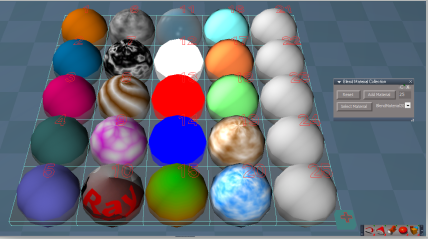
Tip...with the Inspect tool, LMB + Drag selects a Sphere, LMB select again makes it the active material.
RMB + Drag navigates to the material in the Link Editor.
C - LMB = camera view RMB = Previous view
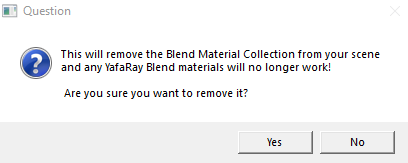
X - LMB = Modal Question
- Question.PNG (7.71 KiB) Viewed 4377 times
Unselect script for the Blend Material Grid
Changed
Modal Question for the Reset and Remove Collection
YafaRay Blend
Add
Blend Material Collection button that loads it into the scene
YafaRay4tS Help 'Updated 12/11/2019'
-
Saul
- Senior Chief Petty Officer
- Posts: 308
- Joined: 22 May 2009, 16:50
Re: Final trueSpace 7.61 Beta 8 Unofficial Update
How do i turn off the bounding box widget's widget?
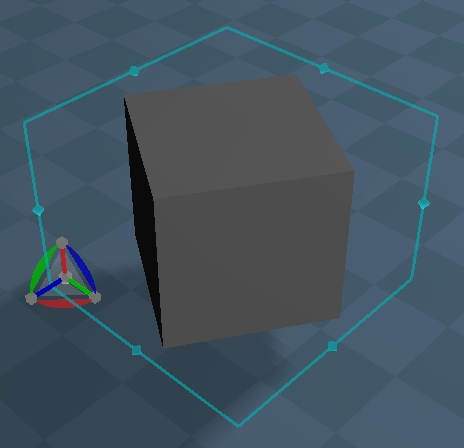

- ScreenHunter 53.jpg (39.97 KiB) Viewed 4375 times
-
trueBlue
- Captain
- Posts: 5548
- Joined: 06 Jul 2009, 22:50
- Type the number ten into the box: 10
Re: Final trueSpace 7.61 Beta 8 Unofficial Update
Shift + LMB select the widget to change to the 1 of 6 Object Navigation widgets.
Ctrl + RMB select the widget switches to the Selector Cage widget / Object Navigation widget (Toggles)
Point Edit widgets has three
Camera has two
I + LMB select widgets for additional widget shortcuts
I + LMB select in 3D Space for additional Background widget shortcuts
The included trueSpace Beta 7.61 Unofficial Update.txt file list most of the updates
Ctrl + RMB select the widget switches to the Selector Cage widget / Object Navigation widget (Toggles)
Point Edit widgets has three
Camera has two
I + LMB select widgets for additional widget shortcuts
I + LMB select in 3D Space for additional Background widget shortcuts
The included trueSpace Beta 7.61 Unofficial Update.txt file list most of the updates
-
Saul
- Senior Chief Petty Officer
- Posts: 308
- Joined: 22 May 2009, 16:50
Re: Final trueSpace 7.61 Beta 8 Unofficial Update
Hmmmm,
I reset to default context
load cube
shift+LMB give this
The object nav widget now acting as a widget for the selector cage widget?
I reset to default context
load cube
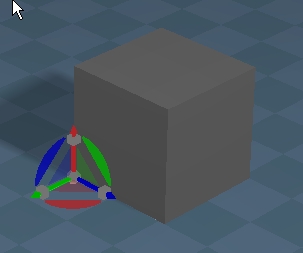
- ScreenHunter 57.jpg (23.78 KiB) Viewed 4010 times

- ScreenHunter 58.jpg (30.56 KiB) Viewed 4010 times
-
trueBlue
- Captain
- Posts: 5548
- Joined: 06 Jul 2009, 22:50
- Type the number ten into the box: 10
Re: Final trueSpace 7.61 Beta 8 Unofficial Update
Shift + LMB select the widget to change to the 1 of 6 Object Navigation widgets.
Keep selecting until you find the widget that you like
Keep selecting until you find the widget that you like
No, that is a combo widget developed by Clinton. All the controls on both widgets work independently.The object nav widget now acting as a widget for the selector cage widget?
-
Saul
- Senior Chief Petty Officer
- Posts: 308
- Joined: 22 May 2009, 16:50
Re: Final trueSpace 7.61 Beta 8 Unofficial Update
Have you tried it?
I cannot get the bounding box alone only the 2 of them together.
Also the bounding box doesnt stay true to the object, it distorts....
I cannot get the bounding box alone only the 2 of them together.
Also the bounding box doesnt stay true to the object, it distorts....
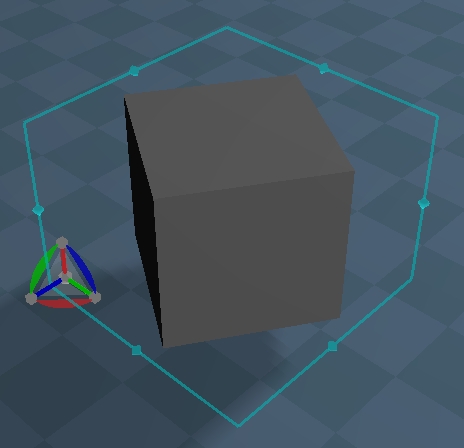
-
trueBlue
- Captain
- Posts: 5548
- Joined: 06 Jul 2009, 22:50
- Type the number ten into the box: 10
Re: Final trueSpace 7.61 Beta 8 Unofficial Update
Yes!Saul wrote: 12 Dec 2019, 16:46 Have you tried it?
I cannot get the bounding box alone only the 2 of them together.
Also the bounding box doesnt stay true to the object, it distorts....
ScreenHunter 54.jpg
If you want the Selector Cage widget, Ctrl + RMB select the widget switches to the Selector Cage widget / Object Navigation widget (Toggles)
It is not distorting, that is the bounding box when rotating. Try the Normalize Rotation.
Your killing me Saul!

Again...
Shift + LMB select the widget to change to the 1 of 6 Object Navigation widgets.
Keep selecting (Shift + LMB) until you find the widget that you like
Clinton made a video:
https://youtu.be/9KGM8jwh200
You do not need to install it, they are already installed in the update
-
Saul
- Senior Chief Petty Officer
- Posts: 308
- Joined: 22 May 2009, 16:50
Re: Final trueSpace 7.61 Beta 8 Unofficial Update
Ok, gotcha.
Ctrl + RMB, thank you.
And just to keep killing you, normalise rotation
returns the object to its 'normal' position not the bounding box.
I am sure the bounding box used to conform to the object however it was rotated. Perhaps there is a way to normalise the widget rotation?
Ctrl + RMB, thank you.
And just to keep killing you, normalise rotation

- ScreenHunter 59.jpg (1.83 KiB) Viewed 4001 times
I am sure the bounding box used to conform to the object however it was rotated. Perhaps there is a way to normalise the widget rotation?
-
trueBlue
- Captain
- Posts: 5548
- Joined: 06 Jul 2009, 22:50
- Type the number ten into the box: 10
Re: Final trueSpace 7.61 Beta 8 Unofficial Update
In your picture, the bounding box is encircling the cube's corners in a perspective view.
That is the way it works, including Model. The Selector Cage widget was developed by Caligari and is not modified in the unofficial update at all.
I was suggesting that you try the Normalize Rotation so that you could see the difference.
This a Front view.
Bounding box encircles the rotated cube
Model perspective view
That is the way it works, including Model. The Selector Cage widget was developed by Caligari and is not modified in the unofficial update at all.
I was suggesting that you try the Normalize Rotation so that you could see the difference.
This a Front view.

- Capture.PNG (7.74 KiB) Viewed 4003 times

- Capture2.PNG (7.84 KiB) Viewed 4002 times
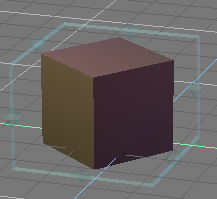
- Model.PNG (11.62 KiB) Viewed 3997 times
-
stan
- Master Chief Petty Officer
- Posts: 584
- Joined: 21 May 2009, 17:20
Re: Final trueSpace 7.61 Beta 8 Unofficial Update
Just a thought is the coordinate system set to object or world. It should follow the cube if in object coords.

-
trueBlue
- Captain
- Posts: 5548
- Joined: 06 Jul 2009, 22:50
- Type the number ten into the box: 10
Re: Final trueSpace 7.61 Beta 8 Unofficial Update
Bingo!stan wrote: 12 Dec 2019, 18:40 Just a thought is the coordinate system set to object or world. It should follow the cube if in object coords.
coords.jpg
Thanks Stan!
-
clintonman
- Captain
- Posts: 5659
- Joined: 21 May 2009, 21:08
- Type the number ten into the box: 0
- Location: California
Re: Final trueSpace 7.61 Beta 8 Unofficial Update
this seems bad to me.trueBlue wrote: 11 Dec 2019, 23:50 ...
Add
Unselect script for the Blend Material Grid
...
Code: Select all
if (Node.ConExists('', "UnSelectable")) {
Space.Unselect()
}
Code: Select all
Activity.KillAll()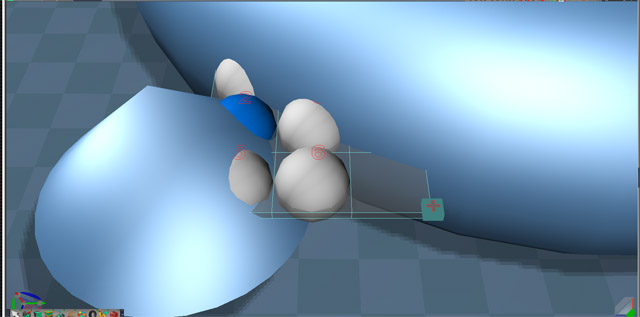
-
trueBlue
- Captain
- Posts: 5548
- Joined: 06 Jul 2009, 22:50
- Type the number ten into the box: 10
Re: Final trueSpace 7.61 Beta 8 Unofficial Update
Fixed and uploaded to both updates
-
clintonman
- Captain
- Posts: 5659
- Joined: 21 May 2009, 21:08
- Type the number ten into the box: 0
- Location: California
Re: Final trueSpace 7.61 Beta 8 Unofficial Update
One more thing.
If you move the grid the camera does not follow.
The Viewer node OwnerMatrix needs to connect to the Blend Material Grid node WldMatrix so the camera follows the grid.
If you move the grid the camera does not follow.
The Viewer node OwnerMatrix needs to connect to the Blend Material Grid node WldMatrix so the camera follows the grid.

-
trueBlue
- Captain
- Posts: 5548
- Joined: 06 Jul 2009, 22:50
- Type the number ten into the box: 10
Re: Final trueSpace 7.61 Beta 8 Unofficial Update
Thanks, that was fixed too.
-
trueBlue
- Captain
- Posts: 5548
- Joined: 06 Jul 2009, 22:50
- Type the number ten into the box: 10
Re: Final trueSpace 7.61 Beta 8 Unofficial Update
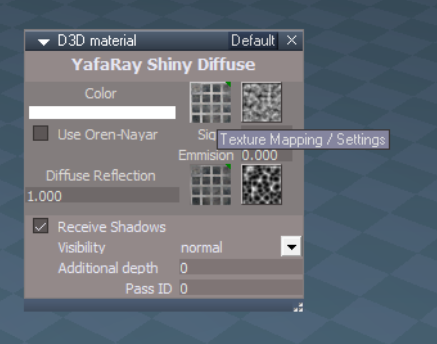
I would like to propose a change to the YafaRay Materials.
As it is now, whenever you want to make a change to, say a Texture Map with the Cloud, you basically have to regenerate it by Switching each time you want to make a change
So I made your T button into a Bitmap Control.
LMB command is the same.
RMB calls the Cloud panel in this example
Activity.Run("%THIS_NAME%/color/SwitchImage")
This way you can make changes in real time.
As it is now, whenever you want to make a change to, say a Texture Map with the Cloud, you basically have to regenerate it by Switching each time you want to make a change
So I made your T button into a Bitmap Control.
LMB command is the same.
RMB calls the Cloud panel in this example
Activity.Run("%THIS_NAME%/color/SwitchImage")
-
clintonman
- Captain
- Posts: 5659
- Joined: 21 May 2009, 21:08
- Type the number ten into the box: 0
- Location: California
Re: Final trueSpace 7.61 Beta 8 Unofficial Update
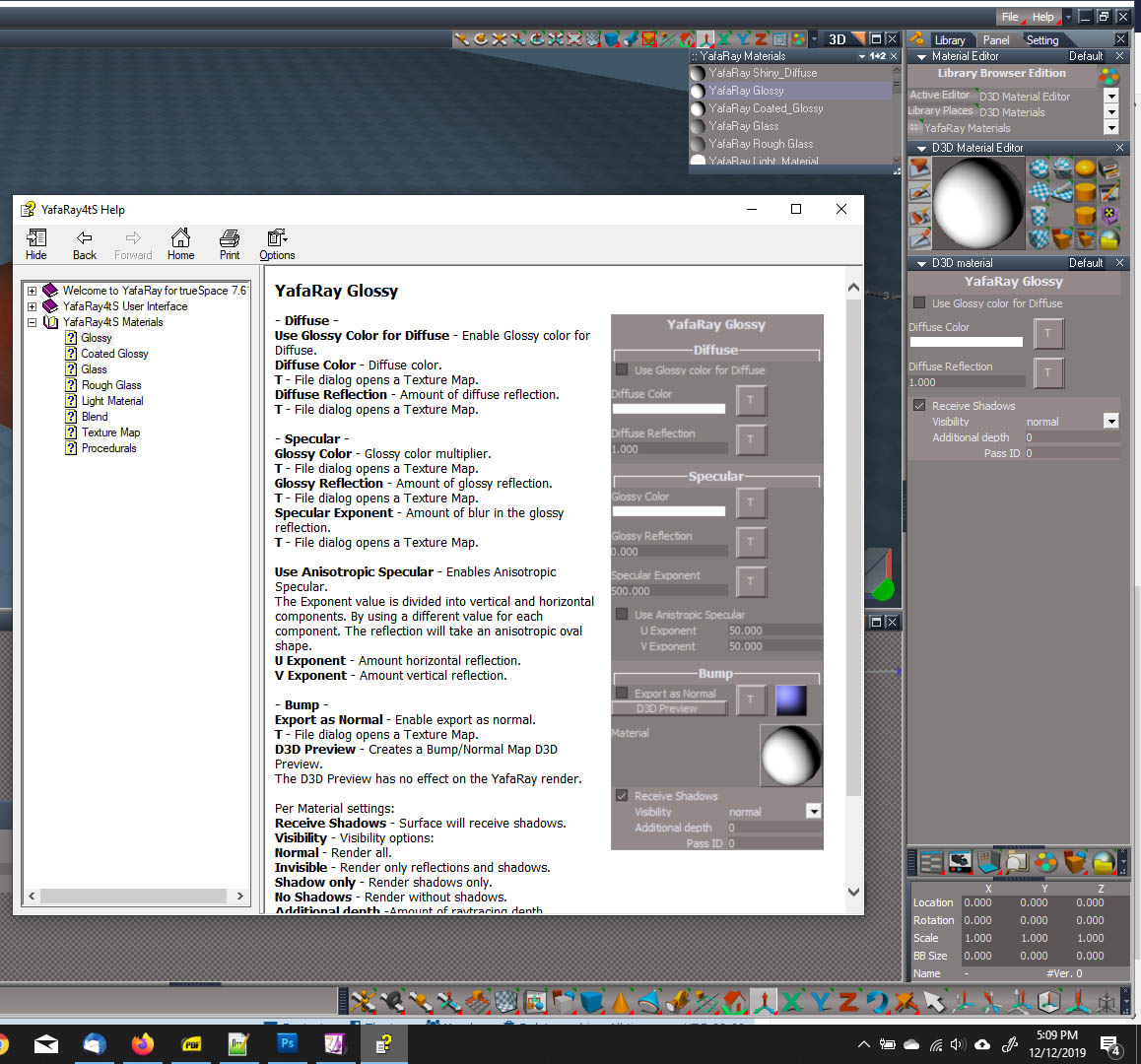
Looks like the help is using old material images.
-
clintonman
- Captain
- Posts: 5659
- Joined: 21 May 2009, 21:08
- Type the number ten into the box: 0
- Location: California
Re: Final trueSpace 7.61 Beta 8 Unofficial Update
Good work, it works better. The previous way did not regenerate the texture map. It was just confusing because of the way it worked, one way if the texture already existed and another way if it did not already exist.trueBlue wrote: 13 Dec 2019, 00:22 I would like to propose a change to the YafaRay Materials.
As it is now, whenever you want to make a change to, say a Texture Map with the Cloud, you basically have to regenerate it by Switching each time you want to make a change
So I made your T button into a Bitmap Control.
LMB command is the same.
RMB calls the Cloud panel in this example
Activity.Run("%THIS_NAME%/color/SwitchImage")
Capture.PNG
This way you can make changes in real time.
The button needs improved appearance. It looks like some confusing bitmap, not like a button.
Sigma and Use Oren-Nayer are related, but the space between them says otherwise. They should be close together.
-
trueBlue
- Captain
- Posts: 5548
- Joined: 06 Jul 2009, 22:50
- Type the number ten into the box: 10
Re: Final trueSpace 7.61 Beta 8 Unofficial Update
Are you talking about the panel (previously not changed), or the help file?clintonman wrote: 13 Dec 2019, 01:34 Sigma and Use Oren-Nayer are related, but the space between them says otherwise. They should be close together.
Here is an updated version.
Are you okay with removing the Expanded aspect for all of the YafaRay Materials?
BTW... with regards to your previous post, that is a picture of the current YafaRay Shiny Diffuse
/ Expanded aspect
-
clintonman
- Captain
- Posts: 5659
- Joined: 21 May 2009, 21:08
- Type the number ten into the box: 0
- Location: California
Re: Final trueSpace 7.61 Beta 8 Unofficial Update
Referring to the panel. Related items need to be near each other.trueBlue wrote: 13 Dec 2019, 04:42Are you talking about the panel (previously not changed), or the help file?clintonman wrote: 13 Dec 2019, 01:34 Sigma and Use Oren-Nayer are related, but the space between them says otherwise. They should be close together.
Here is an updated version.
Are you okay with removing the Expanded aspect for all of the YafaRay Materials?
BTW... with regards to your previous post, that is a picture of the current YafaRay Shiny Diffuse
/ Expanded aspect
Didn't know the expanded panel was there. Probably thought it was the Exp panel so ignored it.
-
clintonman
- Captain
- Posts: 5659
- Joined: 21 May 2009, 21:08
- Type the number ten into the box: 0
- Location: California
Re: Final trueSpace 7.61 Beta 8 Unofficial Update
Button looks like a button now, so I'm happy.
Can you make it more symmetrical? It looks like the right side of the button is cut off and the T looks above the center line. Maybe can't be helped since the T is text over.
Edit: Never mind about the button. It looks like tS does weird things. It won't center the text perfectly and the right and bottom of the button image is cutoff for some reason.
Can you make it more symmetrical? It looks like the right side of the button is cut off and the T looks above the center line. Maybe can't be helped since the T is text over.
Edit: Never mind about the button. It looks like tS does weird things. It won't center the text perfectly and the right and bottom of the button image is cutoff for some reason.
-
trueBlue
- Captain
- Posts: 5548
- Joined: 06 Jul 2009, 22:50
- Type the number ten into the box: 10
Re: Final trueSpace 7.61 Beta 8 Unofficial Update
Not sure what you mean, the Sigma is inline to the right of Use Oren-Nayarclintonman wrote: 13 Dec 2019, 05:42 Referring to the panel. Related items need to be near each other.
This was not changed and your original Expanded aspect is the same as well.
Is Emission related to Use Oren-Nayar?
Current UI

- Current.PNG (6.82 KiB) Viewed 3921 times
Pros: Looks better (Not Black)
Cons: Clicking it opens the Bitmaps :: Base "Drag & Drop into the Bitmap does not work with YafaRay4tS and Double clicking inserts unwanted Bitmap nodes into the scene"
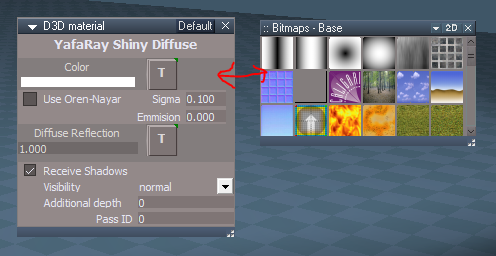
Pros: Does not open the Bitmaps :: Base
Cons: Is Black when None is used

- Clickable.PNG (7.24 KiB) Viewed 3903 times
Or maybe you can post a picture of what you would like
Actually the Expanded aspect is your original UI without the other aspects.clintonman wrote: 13 Dec 2019, 05:42 Didn't know the expanded panel was there. Probably thought it was the Exp panel so ignored it.
I added the separate aspects because when you added a Texture Map from the Expanded aspect, you had to scroll in the Stack to find it. I'll remove it in the update as it would create a bunch of extra work with the changes.
-
Saul
- Senior Chief Petty Officer
- Posts: 308
- Joined: 22 May 2009, 16:50
Re: Final trueSpace 7.61 Beta 8 Unofficial Update
Stan ecrit:
'Just a thought is the coordinate system set to object or world. It should follow the cube if in object coords.'
Doh! Thanks Stan.
'Just a thought is the coordinate system set to object or world. It should follow the cube if in object coords.'
Doh! Thanks Stan.
-
clintonman
- Captain
- Posts: 5659
- Joined: 21 May 2009, 21:08
- Type the number ten into the box: 0
- Location: California
Re: Final trueSpace 7.61 Beta 8 Unofficial Update
No, emission isn't related to Oren-Nayar. It just looks like it is because they're closer together than the Oren-Nayar and Sigma.trueBlue wrote: 13 Dec 2019, 13:23 ...
Not sure what you mean, the Sigma is inline to the right of Use Oren-Nayar
This was not changed and your original Expanded aspect is the same as well.
Is Emission related to Use Oren-Nayar?
...
-
clintonman
- Captain
- Posts: 5659
- Joined: 21 May 2009, 21:08
- Type the number ten into the box: 0
- Location: California
Re: Final trueSpace 7.61 Beta 8 Unofficial Update
Never mind about the button, it's a truespace limitation. It won't center the text and the actual image is cutoff on the right and bottom.trueBlue wrote: 13 Dec 2019, 13:23 ...
Changed the button image from 32x16 to 32x32
Or maybe you can post a picture of what you would like
...
-
trueBlue
- Captain
- Posts: 5548
- Joined: 06 Jul 2009, 22:50
- Type the number ten into the box: 10
Re: Final trueSpace 7.61 Beta 8 Unofficial Update
New Update for the trueSpace7.61 Beta 8 Unofficial Update
viewtopic.php?t=3732
12/14/2019
YafaRay Materials 'Updated 12/14/2019'
YafaRay4tS Help 'Updated 12/14/2019'
D3D Material Editor
Add
Render Object icon
Render Animation
Changed
RMB - Opens the YafaRay4tS/Anim aspect if the YafaRay4tS panel exist in the scene
Same RMB command as the YafaRay4tS/Render Animation icon
Special thanks to Clinton Reese for all his help and contributions in this update.
viewtopic.php?t=3732
12/14/2019
YafaRay Materials 'Updated 12/14/2019'
YafaRay4tS Help 'Updated 12/14/2019'
D3D Material Editor
Add
Render Object icon
Render Animation
Changed
RMB - Opens the YafaRay4tS/Anim aspect if the YafaRay4tS panel exist in the scene
Same RMB command as the YafaRay4tS/Render Animation icon
Special thanks to Clinton Reese for all his help and contributions in this update.
-
trueBlue
- Captain
- Posts: 5548
- Joined: 06 Jul 2009, 22:50
- Type the number ten into the box: 10
Re: Final trueSpace 7.61 Beta 8 Unofficial Update
New Update for the trueSpace7.61 Beta 8 Unofficial Update
viewtopic.php?t=3732
12/15/2019
YafaRay Materials 'Updated 12/15/2019'
YafaRay4tS Help 'Updated 12/15/2019'
Special thanks to Clinton Reese for all his help and contributions in this update.
viewtopic.php?t=3732
12/15/2019
YafaRay Materials 'Updated 12/15/2019'
YafaRay4tS Help 'Updated 12/15/2019'
Special thanks to Clinton Reese for all his help and contributions in this update.
-
trueBlue
- Captain
- Posts: 5548
- Joined: 06 Jul 2009, 22:50
- Type the number ten into the box: 10
Re: Final trueSpace 7.61 Beta 8 Unofficial Update
New Update for the trueSpace7.61 Beta 8 Unofficial Update
viewtopic.php?t=3732
12/17/2019
Special thanks to Clinton Reese for all his help and contributions in this update.
YafaRay4tS
AboutBitmap
Change
December 16, 2019
DoFrameRender
Change
Anim
bBatchRender Check Box control "Create XML files and start Batch Render"
Change
Toggle Button control "Start - Batch Render" / "Rendering..."
endAnimation
Add
Render Animation button command
Change
Render to File
Render Animation button command
Change
YafaRay4tS toolbar
Add
Render to File icon
YafaRay4tS Help 'Updated 12/17/2019'
Synchronize
Activate buttons
Add
viewtopic.php?t=3732
12/17/2019
Special thanks to Clinton Reese for all his help and contributions in this update.
YafaRay4tS
AboutBitmap
Change
December 16, 2019
DoFrameRender
Change
Code: Select all
if(Node.Exists("/Offline renderers/Yafaray")) {
		var myenum = System.CreateDO("Common Data Package/String Enum Data");
		myenum = Node.Value("/Offline renderers", "Renderer");
		var str = myenum.GetSelectedString();
		myenum.SetSelectedString("Yafaray");
		Node.Value("/Offline renderers", "Renderer") = myenum;
}bBatchRender Check Box control "Create XML files and start Batch Render"
Change
Toggle Button control "Start - Batch Render" / "Rendering..."
Code: Select all
Node.Value(Space.CurrentScene() + "/YafaRay4tS", "Yaf_DeleteTempFiles") = true
if(Node.Exists("/Offline renderers/Yafaray")) {
var myenum = System.CreateDO("Common Data Package/String Enum Data");
myenum = Node.Value("/Offline renderers", "Renderer");
var str = myenum.GetSelectedString();
myenum.SetSelectedString("Yafaray");
Node.Value("/Offline renderers", "Renderer") = myenum;
}
Activity.Run('%THIS_NAME%/RenderAnim2')Add
Code: Select all
Node.Value(Space.CurrentScene() + "/YafaRay4tS", "bBatchRender") = false Change
Code: Select all
if(Node.Exists("/Offline renderers/Yafaray")) {
var myenum = System.CreateDO("Common Data Package/String Enum Data");
myenum = Node.Value("/Offline renderers", "Renderer");
var str = myenum.GetSelectedString();
myenum.SetSelectedString("Yafaray");
Node.Value("/Offline renderers", "Renderer") = myenum;
}
Activity.Run('%THIS_NAME%/RenderAnim2')
Render Animation button command
Change
Code: Select all
if(Node.Exists("/Offline renderers/Yafaray")) {
var myenum = System.CreateDO("Common Data Package/String Enum Data");
myenum = Node.Value("/Offline renderers", "Renderer");
var str = myenum.GetSelectedString();
myenum.SetSelectedString("Yafaray");
Node.Value("/Offline renderers", "Renderer") = myenum;
}
Activity.Run('%THIS_NAME%/RenderAnim2')Add
Render to File icon
YafaRay4tS Help 'Updated 12/17/2019'
Synchronize
Activate buttons
Add
Code: Select all
if(Node.SubObjectCount("/D3DView")==0)return;-
trueBlue
- Captain
- Posts: 5548
- Joined: 06 Jul 2009, 22:50
- Type the number ten into the box: 10
Re: Final trueSpace 7.61 Beta 8 Unofficial Update
New Update for the trueSpace7.61 Beta 8 Unofficial Update
viewtopic.php?t=3732
12/18/2019
Last version did not honor Disable All Viewers
YafaRay4tS
AboutBitmap
Add date to YafaRay4tS_Version
version 0.9.9 - December 18, 2019
DoFrameRender
Add
OfflineRender.OpenView('',0,0)
Anim
Render Animation button
Add
OfflineRender.OpenView('',0,0)
Start - Batch Render toggle button
Add
Script Down
Node.Value("%THIS_NAME%", "bBatchRender") = false;
Render to File
Render Animation button
Add
OfflineRender.OpenView('',0,0)
YafaRay4tS Help 'Updated 12/18/2019'
viewtopic.php?t=3732
12/18/2019
Last version did not honor Disable All Viewers
YafaRay4tS
AboutBitmap
Add date to YafaRay4tS_Version
version 0.9.9 - December 18, 2019
DoFrameRender
Add
OfflineRender.OpenView('',0,0)
Anim
Render Animation button
Add
OfflineRender.OpenView('',0,0)
Start - Batch Render toggle button
Add
Script Down
Node.Value("%THIS_NAME%", "bBatchRender") = false;
Render to File
Render Animation button
Add
OfflineRender.OpenView('',0,0)
YafaRay4tS Help 'Updated 12/18/2019'
-
trueBlue
- Captain
- Posts: 5548
- Joined: 06 Jul 2009, 22:50
- Type the number ten into the box: 10
Re: Final trueSpace 7.61 Beta 8 Unofficial Update
New Update for the trueSpace7.61 Beta 8 Unofficial Update
viewtopic.php?t=3732
12/18/2019
YafaRay4tS
Setup
External Viewer button
Add Alert
Start - Batch Render button alert
YafaRay4tS Help 'Updated 12/18/2019'
viewtopic.php?t=3732
12/18/2019
YafaRay4tS
Setup
External Viewer button
Add Alert
Code: Select all
WARNING!

Output Render File image format must be Truevision Targa (*tga)
when using the TGA Viewer!

External Viewers should not be used when rendering an Animation!Code: Select all
Batch Rendering will start now...
Select [Cancel Render] to cancel the rendering process

WARNING!
Do not select the [Rendering...] button during the rendering process!-
trueBlue
- Captain
- Posts: 5548
- Joined: 06 Jul 2009, 22:50
- Type the number ten into the box: 10
Re: Final trueSpace 7.61 Beta 8 Unofficial Update
New Update for the trueSpace7.61 Beta 8 Unofficial Update
viewtopic.php?t=3732
12/20/2019
Unless somebody reports any issues with this final release, I am not planning any further updates!
View Widget
Encircle 'Green'
Perspective
* Ctrl + LMB click Rotates the Perspective view in 90 degrees increments 'Updated 12/20/2019'
Ortho
* Ctrl + LMB click Rotates the Isometric view in 90 degrees increments 'Updated 12/20/2019'
Script Commands
* RotateISO.xml 'Updated 12/20/2019
* RotatePOV.xml 'Updated 12/20/2019
Note: These two scripts are for the WinGUID_Bar's
* Perspective icon - RMB Rotates the View in 90 degrees increments.
* Isometric icon - RMB Rotates the View in 90 degrees increments.
All of the above now works in any 3D View that has focus.
YafaRay4tS Help 'Updated 12/20/2019'
viewtopic.php?t=3732
12/20/2019
Unless somebody reports any issues with this final release, I am not planning any further updates!
View Widget
Encircle 'Green'
Perspective
* Ctrl + LMB click Rotates the Perspective view in 90 degrees increments 'Updated 12/20/2019'
Ortho
* Ctrl + LMB click Rotates the Isometric view in 90 degrees increments 'Updated 12/20/2019'
Script Commands
* RotateISO.xml 'Updated 12/20/2019
* RotatePOV.xml 'Updated 12/20/2019
Note: These two scripts are for the WinGUID_Bar's
* Perspective icon - RMB Rotates the View in 90 degrees increments.
* Isometric icon - RMB Rotates the View in 90 degrees increments.
All of the above now works in any 3D View that has focus.
YafaRay4tS Help 'Updated 12/20/2019'
-
clintonman
- Captain
- Posts: 5659
- Joined: 21 May 2009, 21:08
- Type the number ten into the box: 0
- Location: California
Re: Final trueSpace 7.61 Beta 8 Unofficial Update
I don't understand what this does. I thought LMB on green already rotates the view.trueBlue wrote: 20 Dec 2019, 22:11 ...
View Widget
Encircle 'Green'
Perspective
* Ctrl + LMB click Rotates the Perspective view 'Updated 12/20/2019'
Ortho
* Ctrl + LMB click Rotates the Isometric view 'Updated 12/20/2019'
...
-
trueBlue
- Captain
- Posts: 5548
- Joined: 06 Jul 2009, 22:50
- Type the number ten into the box: 10
Re: Final trueSpace 7.61 Beta 8 Unofficial Update
Rotates the view in 90 degrees incrementsclintonman wrote: 21 Dec 2019, 16:51I don't understand what this does. I thought LMB on green already rotates the view.trueBlue wrote: 20 Dec 2019, 22:11 ...
View Widget
Encircle 'Green'
Perspective
* Ctrl + LMB click Rotates the Perspective view 'Updated 12/20/2019'
Ortho
* Ctrl + LMB click Rotates the Isometric view 'Updated 12/20/2019'
...