I had asked a similar question before about moving a texture from a high poly to low poly model.
This next question is very specific and I have been struggling for the right answer.
Case:
ZBrush or Sculptris dense model which is made up with tri's and has been textured (painted using Sculptris).
The model is brought into another application (in this case 3DCoat) and retopolized. I now have a low poly made of quads.
Question:
How do I get the texture from the dense model onto the low poly model?
Remember the dense model is tris and the low poly is quads.
I have been racking my head with this one.
Question---Help!
-
Steinie

- Captain
- Posts: 2958
- Joined: 21 May 2009, 17:38
- Type the number ten into the box: 10
Question---Help!
-
pugman 1
- Captain
- Posts: 1555
- Joined: 21 May 2009, 19:26
- Type the number ten into the box: 0
- Location: Germany
Re: Question---Help!
Hi steinie ,in zbrush its possible when you havea hi poly model retro it in 3d coat then
Bring it back to zbrush there you have alo poly model made with quads you can then subdivide it
And then you have a higher polymesh you can paint the model how you want
Reduce the subdivision again export it to theapp of your choice and there subdivide it again.
I think this works from what i remember
Good luck Ralph
Bring it back to zbrush there you have alo poly model made with quads you can then subdivide it
And then you have a higher polymesh you can paint the model how you want
Reduce the subdivision again export it to theapp of your choice and there subdivide it again.
I think this works from what i remember
Good luck Ralph
-
Steinie
- Captain
- Posts: 2958
- Joined: 21 May 2009, 17:38
- Type the number ten into the box: 10
Re: Question---Help!
Thanks Pugman.
However what I like is the painting capabilities of Sculptris. I really want to capture that
on my retopo low poly model. Do you or anyone else have an idea?
However what I like is the painting capabilities of Sculptris. I really want to capture that
on my retopo low poly model. Do you or anyone else have an idea?
-
MikomDude

- Captain
- Posts: 1930
- Joined: 04 Oct 2010, 11:12
- Type the number ten into the box: 0
- Location: The Hague, Netherlands
Re: Question---Help!
I'm not very good at these things but can't you just import the high-poly model into your application, with texture, and then reduce the poly count? I should imagine the program reconfigures the texture coordinates for you. Or just use the polygon reduction tool in sculptris before you paint the model 
-
Steinie
- Captain
- Posts: 2958
- Joined: 21 May 2009, 17:38
- Type the number ten into the box: 10
Re: Question---Help!
The problem with the method you mention is that the Sculptris Model is made of triangles which are not prefered in an animation. Retopo creates a new modelMikomDude wrote:I'm not very good at these things but can't you just import the high-poly model into your application, with texture, and then reduce the poly count? I should imagine the program reconfigures the texture coordinates for you. Or just use the polygon reduction tool in sculptris before you paint the model
made of quads. Unfortunately you also loose the uv map too. It sounds like a simple problem until you try it.
-
Finis

- Captain
- Posts: 5410
- Joined: 21 May 2009, 18:26
- Type the number ten into the box: 0
- Location: America!
Re: Question---Help!
I don't have any of those programs yet but just thinking about it:
Can you do what Pugman1 said but with Sculptris? That is, export from Sculptris, prior to painting, to 3D coat for retopology. Then import the retopo'ed model to Sculptris to paint it.
Can you retopo in Sculptris and then paint?
If Zbrush is so great why doesn't it do retopology and painting well enough?
Can you do what Pugman1 said but with Sculptris? That is, export from Sculptris, prior to painting, to 3D coat for retopology. Then import the retopo'ed model to Sculptris to paint it.
Can you retopo in Sculptris and then paint?
If Zbrush is so great why doesn't it do retopology and painting well enough?
I prefer dangerous freedom over peaceful servitude. -- Thomas Jefferson/Jean Jacques Rousseau
-
Steinie
- Captain
- Posts: 2958
- Joined: 21 May 2009, 17:38
- Type the number ten into the box: 10
Re: Question---Help!
Finis, "Can you do what Pugman1 said but with Sculptris? That is, export from Sculptris, prior to painting, to 3D coat for retopology. Then import the retopo'ed model to Sculptris to paint it.
Can you retopo in Sculptris and then paint?"
When I send the Sculptris model to 3D Coat it takes a triangle mesh and I convert it to quads by retopology.
However sending it back to Sculptris would then convert it back to triangles.
Can you retopo in Sculptris and then paint?"
When I send the Sculptris model to 3D Coat it takes a triangle mesh and I convert it to quads by retopology.
However sending it back to Sculptris would then convert it back to triangles.
-
jamesmc
- Captain
- Posts: 1776
- Joined: 08 Jul 2009, 15:35
Re: Question---Help!
If you have 3DCoat, why would you want to export the quad mesh back out to Sculptris for painting?
The painting in 3DCoat is far superior and besides, once it has proper UVs, you can open up photoshop at the same time to get highly, super accurate if ya need.
The painting in 3DCoat is far superior and besides, once it has proper UVs, you can open up photoshop at the same time to get highly, super accurate if ya need.
Walk by faith, not by sight.
-
trueBlue

- Captain
- Posts: 5548
- Joined: 06 Jul 2009, 22:50
- Type the number ten into the box: 10
Re: Question---Help!
Maybe... Bake the textures before you retopo it in 3D Coat?
-
Steinie
- Captain
- Posts: 2958
- Joined: 21 May 2009, 17:38
- Type the number ten into the box: 10
Re: Question---Help!
Thanks for all your suggestions because I tested all of them! Each suggestion got me closer to a solution I can use.
Actually I have been trying to solve this for quite some time.
I found that one of my statements I made before was not correct. (Imagine that?!)
My original goal was to Model in Sculptris, Paint, Save as Obj, Convert to Quads in 3D-Coat, Apply high resolution texture to the low poly.
I don't believe this can be done, and still don't. The problem is the UV Map created on a Tri Model and using it on a Quad Model.
After exhaustive testing I found lots of issues. NGons being created, reversed polys, scaling problems, converter issues, poly flow corruption etc etc.
I originally believed that Scuptris would only work on quads but after trying out trueBlue's suggestion I was proven wrong.
Also each member here has different taste and workflows so this is not a knock on James suggestion, but 3DCoat sucks for my style of painting and NGons. It is fantastic for modeling and UV creation.
Froo's Importer/Exporter also threw a wrench in my testing. I didn't realize it converts quads to triangles. No problem for modeling but not good for animation. 3DCoat also isn't perfect when reporting ngons. A model from 3DCoat Object imported back into Sculptris kept alerting that "There were faces with more then 4 side".
I needed to use Silo to fix that problem.
(There is a fantastic feature in Silo 2 that shows Ngons in your model so that you can fix it)
Selection/Select Special Geometry/Use the "opt"/Type set to "Faces with Sides > 4"
Here is my new current work-flow for anyone interested:
High density modeling using Sculptris.
Import Sculptris Obj into 3D Coat, with "create new UV Map"
Retopology in 3D Coat.
Using Silo2 find and fix all NGons.
Load Low-Poly model into Sculptris to "Paint"
Object is now ready for Animation or other processes.
To import into trueSpace
Load into trueSpace on Model Side using Luuv/ switch to workSpace side.
I'll update above if I find other issues.
Thanks again for giving me ideas to test.
Actually I have been trying to solve this for quite some time.
I found that one of my statements I made before was not correct. (Imagine that?!)
My original goal was to Model in Sculptris, Paint, Save as Obj, Convert to Quads in 3D-Coat, Apply high resolution texture to the low poly.
I don't believe this can be done, and still don't. The problem is the UV Map created on a Tri Model and using it on a Quad Model.
After exhaustive testing I found lots of issues. NGons being created, reversed polys, scaling problems, converter issues, poly flow corruption etc etc.
I originally believed that Scuptris would only work on quads but after trying out trueBlue's suggestion I was proven wrong.
Also each member here has different taste and workflows so this is not a knock on James suggestion, but 3DCoat sucks for my style of painting and NGons. It is fantastic for modeling and UV creation.
Froo's Importer/Exporter also threw a wrench in my testing. I didn't realize it converts quads to triangles. No problem for modeling but not good for animation. 3DCoat also isn't perfect when reporting ngons. A model from 3DCoat Object imported back into Sculptris kept alerting that "There were faces with more then 4 side".
I needed to use Silo to fix that problem.
(There is a fantastic feature in Silo 2 that shows Ngons in your model so that you can fix it)
Selection/Select Special Geometry/Use the "opt"/Type set to "Faces with Sides > 4"
Here is my new current work-flow for anyone interested:
High density modeling using Sculptris.
Import Sculptris Obj into 3D Coat, with "create new UV Map"
Retopology in 3D Coat.
Using Silo2 find and fix all NGons.
Load Low-Poly model into Sculptris to "Paint"
Object is now ready for Animation or other processes.
To import into trueSpace
Load into trueSpace on Model Side using Luuv/ switch to workSpace side.
I'll update above if I find other issues.
Thanks again for giving me ideas to test.
- Attachments
-
-
Finis
- Captain
- Posts: 5410
- Joined: 21 May 2009, 18:26
- Type the number ten into the box: 0
- Location: America!
Re: Question---Help!
Why is it so horrible to have triangles for animation? I'm bringing this up because you could save time and avoid some of the complicated multi-program process if tri's are ok. I can see how mixing tri's and quads creates "poles" (as SDS people call them) that cause animation trouble. Some use poles to advantage too. But, is a 100% triangle mesh really bad for animation? Is it worse than a quad mesh with bad flow compared to a hand made one?
We hear that tri's are bad and go to great trouble to avoid them. What if that is wasted effort in some cases? Tests are called for to see if all-tri meshes animate well.
Professionals use these sculpting programs for cinema and art quality animation. What do they do to get their final animatable meshes?
Sooo ... you're thinking about animating your characters?
We hear that tri's are bad and go to great trouble to avoid them. What if that is wasted effort in some cases? Tests are called for to see if all-tri meshes animate well.
Professionals use these sculpting programs for cinema and art quality animation. What do they do to get their final animatable meshes?
Sooo ... you're thinking about animating your characters?
I prefer dangerous freedom over peaceful servitude. -- Thomas Jefferson/Jean Jacques Rousseau
-
jamesmc
- Captain
- Posts: 1776
- Joined: 08 Jul 2009, 15:35
Re: Question---Help!
Depends on what you want to do and what programs you are doing it in.
For instance, in gaming software, triangles may be a good thing because collision detection and other "physics tricks" are needed to add realism. The low poly mesh of game objects can then use triangles.
If you are using a software that utilizes subdivision modelling, then it is better to have quads. Why? Because you need good edge flow to create good topology and there are less rendering artifacts. A triangle tends to interrupt edgeflow because it terminates on an edge.
The reason for good edgeflow is that movement of joints or morphs need good edge flow so there are no motion artifacts. Triangles interrupt good edge flow and thus cause odd effects in software that uses quad divided meshes for animation.
Here's a video on Subdivision surfaces, which cannot properly be used in Catmull-Clark SubD software with triangles. (re- the abrupt stop of edgeflow using triangles)
http://vimeo.com/2450612"
Note on the image below that I have identified 3 types of edge flow. Not entirely correct, but you get the idea of it when making models. Those three types are circular, cylindrical and transitional.
In order for render engines in most popular 3D software to not given rendering or animation artificats, quads are desired to go along with the catmull-clark subdivision surfacing.
Hope that wasn't too fuzzy over overbearing on my part.
Edit: On areas not seen, inside of mouths or bottom of foot or something not in camera view, sometimes triangles are okay.
Edit 2: Notice the model in the image has triangles, look above the eyes. These may cause problems in animation, morphs or rendering.

For instance, in gaming software, triangles may be a good thing because collision detection and other "physics tricks" are needed to add realism. The low poly mesh of game objects can then use triangles.
If you are using a software that utilizes subdivision modelling, then it is better to have quads. Why? Because you need good edge flow to create good topology and there are less rendering artifacts. A triangle tends to interrupt edgeflow because it terminates on an edge.
The reason for good edgeflow is that movement of joints or morphs need good edge flow so there are no motion artifacts. Triangles interrupt good edge flow and thus cause odd effects in software that uses quad divided meshes for animation.
Here's a video on Subdivision surfaces, which cannot properly be used in Catmull-Clark SubD software with triangles. (re- the abrupt stop of edgeflow using triangles)
http://vimeo.com/2450612"
Note on the image below that I have identified 3 types of edge flow. Not entirely correct, but you get the idea of it when making models. Those three types are circular, cylindrical and transitional.
In order for render engines in most popular 3D software to not given rendering or animation artificats, quads are desired to go along with the catmull-clark subdivision surfacing.
Hope that wasn't too fuzzy over overbearing on my part.
Edit: On areas not seen, inside of mouths or bottom of foot or something not in camera view, sometimes triangles are okay.
Edit 2: Notice the model in the image has triangles, look above the eyes. These may cause problems in animation, morphs or rendering.
Walk by faith, not by sight.
-
froo
- Captain
- Posts: 2554
- Joined: 22 May 2009, 12:13
Re: Question---Help!
Damn james. Very impressive description!
Say, isn't there a quadrify tool in Workspace? If not there should be. And if not,
maybe one of the plugin guys (or myself) can make one, either a plugin or script.
Sounds like the OBJ package needs that option anyway.
Say, isn't there a quadrify tool in Workspace? If not there should be. And if not,
maybe one of the plugin guys (or myself) can make one, either a plugin or script.
Sounds like the OBJ package needs that option anyway.
-
Steinie
- Captain
- Posts: 2958
- Joined: 21 May 2009, 17:38
- Type the number ten into the box: 10
Re: Question---Help!
Can someone make a plugin that will highlight ngons in trueSpace?
-
froo
- Captain
- Posts: 2554
- Joined: 22 May 2009, 12:13
Re: Question---Help!
yes; that should be possible.
In the nurbs tool I was doing that (highlighting the selected vertices), but I commented out the code
since I got it into a really bad state.
But yes that can be done.
BTW; there is a quadrify tool but, unless I am using it wrong, it looks like
it does not work.
If someone knows how to do it can you explain it please?
If we can quadrify selected faces, or the entire mesh, that should solve
the problem for export; at least, get us halfway there.
In the nurbs tool I was doing that (highlighting the selected vertices), but I commented out the code
since I got it into a really bad state.
But yes that can be done.
BTW; there is a quadrify tool but, unless I am using it wrong, it looks like
it does not work.
If someone knows how to do it can you explain it please?
If we can quadrify selected faces, or the entire mesh, that should solve
the problem for export; at least, get us halfway there.
-
jamesmc
- Captain
- Posts: 1776
- Joined: 08 Jul 2009, 15:35
Re: Question---Help!
Cool!
See what a good topic does to start productive conversation and possible program improvements!

See what a good topic does to start productive conversation and possible program improvements!
Walk by faith, not by sight.
-
trueBlue
- Captain
- Posts: 5548
- Joined: 06 Jul 2009, 22:50
- Type the number ten into the box: 10
Re: Question---Help!
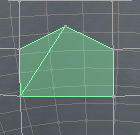
Before and After using the Quadrify tool on selected element.
Notice 5 vertices before using the Quadrify tool.
There is no trueSpace feedback.
What I usualy do is enter Edit mode, select a face, Select Connected, and then select the Quadrify tool.
Notice 5 vertices before using the Quadrify tool.

- before.PNG (10.17 KiB) Viewed 4263 times
- after.PNG (10.33 KiB) Viewed 4262 times
What I usualy do is enter Edit mode, select a face, Select Connected, and then select the Quadrify tool.
-
RAYMAN

- Captain
- Posts: 2547
- Joined: 21 May 2009, 18:56
Re: Question---Help!
May I tell you guys that the best figures that were made comercially are
and were made from tris rather then quads....
michael and victoria and the new genesis generation are all made from
tris.....
They all work very well in most animational applications as well as
games..
It all boils down to a good mesh versus a bad mesh the amount of poles
and so on....
If you want to subdivide your model then yes tris arent as good as quads
but i doubt that its as easy as using a quadrify tool on it .. its a question of flow like James said especially in the face region around the eyes and the mouth...
Peter
and were made from tris rather then quads....
michael and victoria and the new genesis generation are all made from
tris.....
They all work very well in most animational applications as well as
games..
It all boils down to a good mesh versus a bad mesh the amount of poles
and so on....
If you want to subdivide your model then yes tris arent as good as quads
but i doubt that its as easy as using a quadrify tool on it .. its a question of flow like James said especially in the face region around the eyes and the mouth...
Peter
-
Finis
- Captain
- Posts: 5410
- Joined: 21 May 2009, 18:26
- Type the number ten into the box: 0
- Location: America!
Re: Question---Help!
Catmull-Clark isn't the only subdivision algorithm but I'd bet none of them react well to mixed tri-quad meshes or n-gons. Users probably don't have choice in most software either.
Subdivison is useful to smooth and kind of clean up a simpler, often hand crafted, mesh and produce enough polys for the animation to work on. Maybe a megapoly 100% tri Sculptris model doesn't need subdivision. Just bone it, weight it, and animate it. Maybe polygon reduction or not making so many to start is needed. It might work fine, or maybe not, I don't know ... just pondering possibilities.
An all-tri model wouldn't give the ability to use the "pole" artifacts to your advantage.
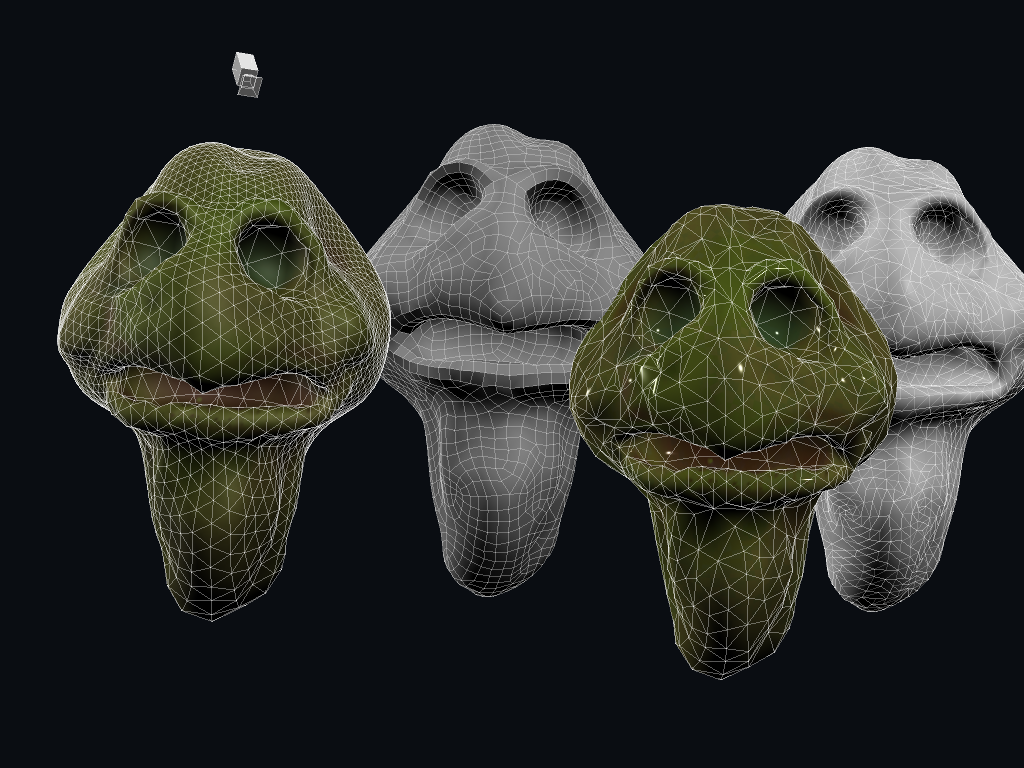
If you look at Steinie's example turtles earlier in this thread the one on the left, all tris, has the most organized pattern, the best flow, and not too many polys. The others have irregular patterns.
Does anyone know about workflows that professionals animators/studios use when working with ZBrush, etc.? How do they get their quad models from tri models?
(Side note: I tried subdivision on my mold SMC model which was nearly all tris from the plastiform tool. It made an interesting pattern that I tried to show with faceted textures.)
Subdivison is useful to smooth and kind of clean up a simpler, often hand crafted, mesh and produce enough polys for the animation to work on. Maybe a megapoly 100% tri Sculptris model doesn't need subdivision. Just bone it, weight it, and animate it. Maybe polygon reduction or not making so many to start is needed. It might work fine, or maybe not, I don't know ... just pondering possibilities.
An all-tri model wouldn't give the ability to use the "pole" artifacts to your advantage.
If you look at Steinie's example turtles earlier in this thread the one on the left, all tris, has the most organized pattern, the best flow, and not too many polys. The others have irregular patterns.
Does anyone know about workflows that professionals animators/studios use when working with ZBrush, etc.? How do they get their quad models from tri models?
(Side note: I tried subdivision on my mold SMC model which was nearly all tris from the plastiform tool. It made an interesting pattern that I tried to show with faceted textures.)
I prefer dangerous freedom over peaceful servitude. -- Thomas Jefferson/Jean Jacques Rousseau
-
RAYMAN
- Captain
- Posts: 2547
- Joined: 21 May 2009, 18:56
Re: Question---Help!
sure they mostly dont use sculptris .. they model the base meshes with quads inFinis wrote:Catmull-Clark isn't the only subdivision algorithm but I'd bet none of them react well to mixed tri-quad meshes or n-gons. Users probably don't have choice in most software either.
Subdivison is useful to smooth and kind of clean up a simpler, often hand crafted, mesh and produce enough polys for the animation to work on. Maybe a megapoly 100% tri Sculptris model doesn't need subdivision. Just bone it, weight it, and animate it. Maybe polygon reduction or not making so many to start is needed. It might work fine, or maybe not, I don't know ... just pondering possibilities.
An all-tri model wouldn't give the ability to use the "pole" artifacts to your advantage.
If you look at Steinie's example turtles earlier in this thread the one on the left, all tris, has the most organized pattern, the best flow, and not too many polys. The others have irregular patterns.
Does anyone know about workflows that professionals animators/studios use when working with ZBrush, etc.? How do they get their quad models from tri models?
(Side note: I tried subdivision on my mold SMC model which was nearly all tris from the plastiform tool. It made an interesting pattern that I tried to show with faceted textures.)
an external normal modeler and either subdevide inside zbrush and use the refined
model from there or go back the steps to the base mesh quality and use the
information from subdeviding and molding to export a displacement map that
they use on the base mesh
-
jamesmc
- Captain
- Posts: 1776
- Joined: 08 Jul 2009, 15:35
Re: Question---Help!
I dunno about that - this models is from DAZ 4 and it is all quads.RAYMAN wrote:May I tell you guys that the best figures that were made comercially are
and were made from tris rather then quads....
michael and victoria and the new genesis generation are all made from
tris.....
They all work very well in most animational applications as well as
games..
It all boils down to a good mesh versus a bad mesh the amount of poles
and so on....
If you want to subdivide your model then yes tris arent as good as quads
but i doubt that its as easy as using a quadrify tool on it .. its a question of flow like James said especially in the face region around the eyes and the mouth...
Peter
Walk by faith, not by sight.
-
RAYMAN
- Captain
- Posts: 2547
- Joined: 21 May 2009, 18:56
Re: Question---Help!
the older models were tris and also many of the Poser models but possibly the generation 4 has been changed to quads so that they better subdivide inside daz studio itself...
Peter
Peter
-
Steinie
- Captain
- Posts: 2958
- Joined: 21 May 2009, 17:38
- Type the number ten into the box: 10
Re: Question---Help!
trueBlue, Quadrify Polygons would work but it doesn't find them on the model.
Can someone design a plugin that can highlight the polys when a user chooses
"Faces having > 4 edges" for example.
Can someone design a plugin that can highlight the polys when a user chooses
"Faces having > 4 edges" for example.
-
jamesmc
- Captain
- Posts: 1776
- Joined: 08 Jul 2009, 15:35
Re: Question---Help!
A statistics panel like Lightwave3D has might be helpful for identifying polygons. Also works on identifying vertices and edges that have problems.Steinie wrote:trueBlue, Quadrify Polygons would work but it doesn't find them on the model.
Can someone design a plugin that can highlight the polys when a user chooses
"Faces having > 4 edges" for example.
Also highlights it on the model, the nonplanar is chosen and it shows on the model (light yellow)
Walk by faith, not by sight.
-
RAYMAN
- Captain
- Posts: 2547
- Joined: 21 May 2009, 18:56
Re: Question---Help!
The best way of handling it is how Silo does it you can highlight next to any type of geometry..... also one of the reasons why I like to work
with it for SDS models........as good or even nicer because more parameters then Lightwave...
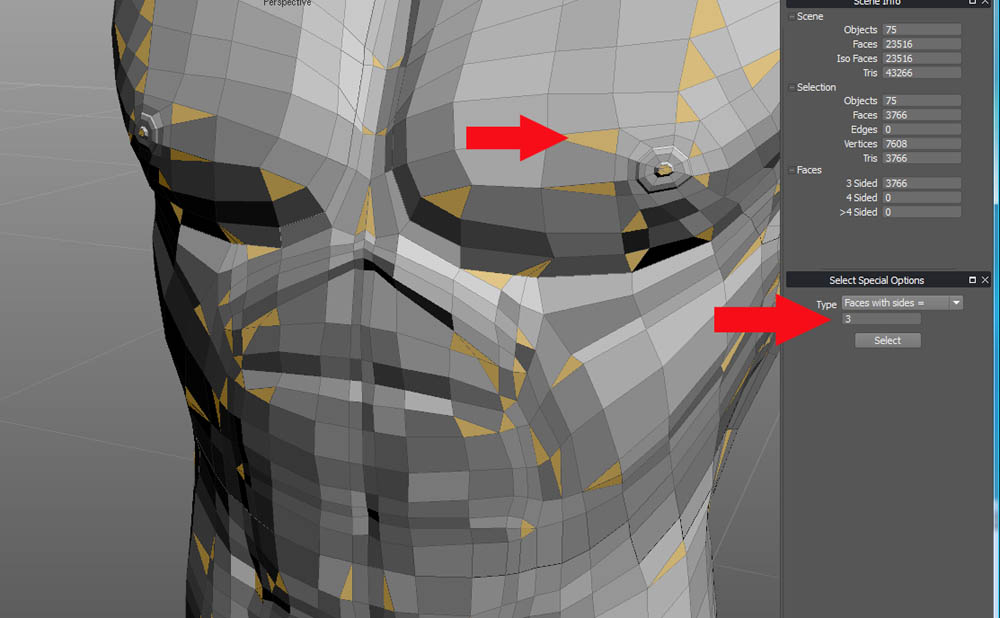
Note: This is a Poser model from Poser 5 and it has triangles as well as quads but NO NGONS
but that model has always animated well....
PLUS YOU DONT HAVE TO OWN THE FULL VERSION OF SILO FOR THAT FUNCTION YOU CAN LET THE GEOMETRY BE HIGHLIGHTED EVEN IF THE TRIAL DOESNT SAVE ANYMORE I THINK ! HAVENT TRIED IT BUT SINCE THE COPY IS GOOD ENOUGH FOR FILECONVERSION IT SHOULD BE OK FOR HIGHLIGHTING
HINT ! HINT !
Its the options panel under select by special geometry....
with it for SDS models........as good or even nicer because more parameters then Lightwave...
Note: This is a Poser model from Poser 5 and it has triangles as well as quads but NO NGONS
but that model has always animated well....
PLUS YOU DONT HAVE TO OWN THE FULL VERSION OF SILO FOR THAT FUNCTION YOU CAN LET THE GEOMETRY BE HIGHLIGHTED EVEN IF THE TRIAL DOESNT SAVE ANYMORE I THINK ! HAVENT TRIED IT BUT SINCE THE COPY IS GOOD ENOUGH FOR FILECONVERSION IT SHOULD BE OK FOR HIGHLIGHTING
HINT ! HINT !
Its the options panel under select by special geometry....
- Attachments
-
Last edited by RAYMAN on 15 Aug 2011, 13:34, edited 1 time in total.
-
jamesmc
- Captain
- Posts: 1776
- Joined: 08 Jul 2009, 15:35
Re: Question---Help!
PLUS YOU DONT HAVE TO OWN THE FULL VERSION OF SILO FOR THAT FUNCTION
hmmmm
Walk by faith, not by sight.
-
Steinie
- Captain
- Posts: 2958
- Joined: 21 May 2009, 17:38
- Type the number ten into the box: 10
Re: Question---Help!
Yes, that is the Silo Function I was hoping we could get as a plugin in trueSpace. It would be a big help if it contained within trueSpace. It is another feature on my wish list and a possible challenge to the plug-in makers here.
Of course I'm not sure if this is even possible.
Of course I'm not sure if this is even possible.
-
RAYMAN
- Captain
- Posts: 2547
- Joined: 21 May 2009, 18:56
Re: Question---Help!
Since you said in another thread that you own a copy of Silo why dont you retopologys in Silo rather then in Truespace..Steinie wrote:Yes, that is the Silo Function I was hoping we could get as a plugin in trueSpace. It would be a big help if it contained within trueSpace. It is another feature on my wish list and a possible challenge to the plug-in makers here.
Of course I'm not sure if this is even possible.
Silo has got one of the finest retopology toolsets and surface snapping and is very stable and swallows a lot bigger meshes then Truespace.....
Sometimes we dont have to invent the wheel but just use the one that we have......
Peter
-
froo
- Captain
- Posts: 2554
- Joined: 22 May 2009, 12:13
Re: Question---Help!
I think that could be done as well Rayman; but not everyone owns a copy of silo.
It should be possible to do what Steinie is asking for. Norm made a sample scene
involving physics with a hockey puck type object bouncing inside an arena; with
every collision the vertex visualization stream was enabled/disabled, for example.
And that puck was not in 'edit' mode.
I had the visualization stream working with the nurbs tool at one point; if no one
else wants to do this I can give it a go.
It should be possible to do what Steinie is asking for. Norm made a sample scene
involving physics with a hockey puck type object bouncing inside an arena; with
every collision the vertex visualization stream was enabled/disabled, for example.
And that puck was not in 'edit' mode.
I had the visualization stream working with the nurbs tool at one point; if no one
else wants to do this I can give it a go.
-
RAYMAN
- Captain
- Posts: 2547
- Joined: 21 May 2009, 18:56
Re: Question---Help!
Sounds great ! If you need help for testing I can try to look into it.... !froo wrote:I think that could be done as well Rayman; but not everyone owns a copy of silo.
It should be possible to do what Steinie is asking for. Norm made a sample scene
involving physics with a hockey puck type object bouncing inside an arena; with
every collision the vertex visualization stream was enabled/disabled, for example.
And that puck was not in 'edit' mode.
I had the visualization stream working with the nurbs tool at one point; if no one
else wants to do this I can give it a go.
Silo is a good starter to look at what options one can possibly introduce... there is a trial that doesnt
end it only lets you work on low poly count after the period is over....
Peter