Script/plugin for sharing mesh data between 3D applications by "copy" and "paste" to a temporary file.
https://heimlich1024.github.io/OD_CopyPasteExternal/"
page also has some video demos near the bottom
works among Modo, Lightwave, Blender, Maya, Houdini, XSI and others
http://clintons3d.com/plugins/truespace ... index.html"
OD_CopyPaste
-
clintonman
- Captain
- Posts: 5659
- Joined: 21 May 2009, 21:08
- Type the number ten into the box: 0
- Location: California
OD_CopyPaste
Last edited by clintonman on 09 Jul 2017, 18:51, edited 2 times in total.
-
Draise
- Captain
- Posts: 3200
- Joined: 21 Sep 2009, 19:33
- Type the number ten into the box: 0
- Location: Bogota, Colombia
Re: OD_CopyPaste
I have to give this one a try.
-
clintonman
- Captain
- Posts: 5659
- Joined: 21 May 2009, 21:08
- Type the number ten into the box: 0
- Location: California
Re: OD_CopyPaste
Update:
paste has increased speed and status line feedback
http://clintons3d.com/plugins/truespace ... paste.html
paste has increased speed and status line feedback
http://clintons3d.com/plugins/truespace ... paste.html
-
clintonman
- Captain
- Posts: 5659
- Joined: 21 May 2009, 21:08
- Type the number ten into the box: 0
- Location: California
Re: OD_CopyPaste
Update October 2024
Purpose of this update is to bring the website version up to date with the Unofficial Updates version and to add limits to the morph imports. I imported a series of vertex animation frames into Blenders shape keys so I could use this tool to transfer the animation. The object had more than 300 shape keys and was taking a long time. I only needed about 10 frames of the animation.
changes:
load on demand style installer
update UI from the UU
new icon design
pick range of morph indices to load in
status bar indicator for morph imports
opens in a floating panel
installer updates the uu button command and icon
warning question if try to import more than 99 morph targets
improve appearance while importing morph targets
Purpose of this update is to bring the website version up to date with the Unofficial Updates version and to add limits to the morph imports. I imported a series of vertex animation frames into Blenders shape keys so I could use this tool to transfer the animation. The object had more than 300 shape keys and was taking a long time. I only needed about 10 frames of the animation.
changes:
load on demand style installer
update UI from the UU
new icon design
pick range of morph indices to load in
status bar indicator for morph imports
opens in a floating panel
installer updates the uu button command and icon
warning question if try to import more than 99 morph targets
improve appearance while importing morph targets
-
clintonman
- Captain
- Posts: 5659
- Joined: 21 May 2009, 21:08
- Type the number ten into the box: 0
- Location: California
Re: OD_CopyPaste
Update November 2024
fix bug - can now import morphs to an object that already has morphs
split the ui into 3 panels so it's easier to understand
new advanced range input option for morph imports
animation now creates a new track/clip so it can be run more than once on the same object
fix bug - can now import morphs to an object that already has morphs
split the ui into 3 panels so it's easier to understand
new advanced range input option for morph imports
animation now creates a new track/clip so it can be run more than once on the same object
-
clintonman
- Captain
- Posts: 5659
- Joined: 21 May 2009, 21:08
- Type the number ten into the box: 0
- Location: California
Re: OD_CopyPaste
April Update 2025
fixed a uv import/paste which also fixed a crash limit.
anything over 30000 vertices might have given a crash, now will load 100000 vertices or more
while testing a 98306 vertex mesh it took a very very long time to load when uv was enabled
fixed no uv option for the paste function
fixed a uv import/paste which also fixed a crash limit.
anything over 30000 vertices might have given a crash, now will load 100000 vertices or more
while testing a 98306 vertex mesh it took a very very long time to load when uv was enabled
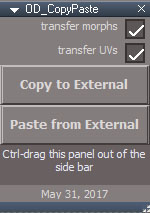
fixed no uv option for the paste function
