I used to be a big time user of trueSpace. I first bought v4 and then kept up with updates as soon as Roman came out with them. Caligari for sure got a lot of my $$. But it was worth it. For me trueSpace was a perfect match for what I wanted to do. When I upgraded to Windows 7 I noticed my now tS 7.61 did not run as well. This was also the time that tS was sold to M$. So there were no more updates to make it compatible with Windows 7. But that was not a problem as I set up my PC as a dual boot between Windows 7 or XP I would boot in XP anytime I wanted to use tS, which was most of the time. However after about a year for some reason my PC would not boot under XP and I never could fix it. My use of tS soon died off too.
Now I have a new and so so much faster PC with the Ryzen 1700x CPU and now on Windows 10. I wanted to try tS again or see if it was possible. I downloaded Caligari trueSpace 7.6 Modelside Edition V2.0 which says that it is Windows 10 compatible. I never really could get it to work. The 3D screen stays a blank white, the pop-out icons around the side do not really work. And in the libraries in the far right of the screen are all empty. I then tried to install my old tS76.exe install file and vray 1.5 It barely works and when I go to render with the default renderer or vray (yes multithreading on) it is painfully slooooow just to render a simple cube. Not only that but where it has rendered the scene it is flickering at a very high rate. For both of these versions I even tried to set the compatibility to Windows XP SP3. That helped some but not much.
So the question is - Should I just consider trueSPace as dead and cannot work under Windows 10. Or is there someway I can get it to work again?
trueSpace 7.6x under Windows 10?
-
MikeNTX

- Petty Officer Second Class
- Posts: 24
- Joined: 22 May 2009, 00:09
- Type the number ten into the box: 0
- Location: Texas
trueSpace 7.6x under Windows 10?
-
BNG

- Chief Warrant Officer
- Posts: 684
- Joined: 16 Oct 2009, 03:26
- Type the number ten into the box: 0
- Location: Texas
Re: trueSpace 7.6x under Windows 10?
Did you try installing it using the compatibility settings for XP service pack 3? I had Win-10 installed briefly and really did not like the way it is configured compared to previous versions. My understanding is that 7.6x should run under win-10 but I really don't know for sure?
Casual Truespace 3D modeling hobbyist. My Truespace blog and simple 3d Modeling Tutorials for Casual Model Makers.
-
Steinie

- Captain
- Posts: 2958
- Joined: 21 May 2009, 17:38
- Type the number ten into the box: 10
Re: trueSpace 7.6x under Windows 10?
I really don't know what your problem is with running trueSpace/Vray and Win10.
I have no issues at all. My feeling is you shouldn't need to change anything in WIN10 I would look at video settings.
Some of the more technical users here could certainly figure this out.
I have no issues at all. My feeling is you shouldn't need to change anything in WIN10 I would look at video settings.
Some of the more technical users here could certainly figure this out.
-
FHembree

- Master Chief Petty Officer
- Posts: 337
- Joined: 21 Feb 2011, 17:43
- Type the number ten into the box: 9
Re: trueSpace 7.6x under Windows 10?
I know this may seem a little strange since you just downloaded and installed TS, but I would rename the default.ctx file to defaultBACK.ctx and restart TS.
Truespace will create a new clean default.ctx file automatically. It's been my experience that the default.crtx file can get corrupted and causes most
of the strange problems with TS.
Truespace will create a new clean default.ctx file automatically. It's been my experience that the default.crtx file can get corrupted and causes most
of the strange problems with TS.
-
Draise

- Captain
- Posts: 3200
- Joined: 21 Sep 2009, 19:33
- Type the number ten into the box: 0
- Location: Bogota, Colombia
Re: trueSpace 7.6x under Windows 10?
Also make sure the installation installed the correct Microsoft distributables. I skipped it once in the instalation process and got that problem on a clean install of Windows
Example.. I just copied the TS files and the distributibles were not installed. Similar issue.
Also install the unofficial updates. There is a Windows ui visual big it fixes.
I have used TS with W10 for a while with no problem. In fact it runs faster in my opinion.
Example.. I just copied the TS files and the distributibles were not installed. Similar issue.
Also install the unofficial updates. There is a Windows ui visual big it fixes.
I have used TS with W10 for a while with no problem. In fact it runs faster in my opinion.
-
jamesmc
- Captain
- Posts: 1776
- Joined: 08 Jul 2009, 15:35
Re: trueSpace 7.6x under Windows 10?
There's a new SDK out for Windows 10. One of the features is that WIN32 software may be more accessible. Have no idea of cost, if any. May be a good insight for the coders here, seeking to improve access to TS.
"Improvements to the Desktop Bridge to make it easier than ever to bring Win32 apps to Windows 10 and the Windows Store
https://blogs.windows.com/buildingapps/ ... YgjuJJl.97"
"Improvements to the Desktop Bridge to make it easier than ever to bring Win32 apps to Windows 10 and the Windows Store
https://blogs.windows.com/buildingapps/ ... YgjuJJl.97"
Walk by faith, not by sight.
-
MikeNTX
- Petty Officer Second Class
- Posts: 24
- Joined: 22 May 2009, 00:09
- Type the number ten into the box: 0
- Location: Texas
Re: trueSpace 7.6x under Windows 10?
Thanks for the replies. I did try to rename the file default.cfg, let tS rebuild it. I did that but that did not help.
I did do installs from the install files, not just copy over the trueSpace folder from my old PC. Draise, when you say, "Also install the unofficial updates. There is a Windows ui visual big it fixes.". Where are these and exactly the names ?
I did do installs from the install files, not just copy over the trueSpace folder from my old PC. Draise, when you say, "Also install the unofficial updates. There is a Windows ui visual big it fixes.". Where are these and exactly the names ?
-
Draise
- Captain
- Posts: 3200
- Joined: 21 Sep 2009, 19:33
- Type the number ten into the box: 0
- Location: Bogota, Colombia
Re: trueSpace 7.6x under Windows 10?
I think Cellulo may have already applied them, but you can search in this forum for the unofficial updates.
My troubleshooting breakdown is uninstall everything, make sure registry is clean, even uninstall the Microsoft Visual C++ Redistributible - from 2005 I think - and install again. Go with the original version only. Then try the patches from this forum. Then try Cellulos complete version, which is like the biggest update.
Second, try the Direct3D settings. In the Modelside, switch to DirectX or different versions of OpenGL, one works over the other on newer cards, as some DLL's are depricated over time. In the Workspace side, lower your graphics settings. Sometimes truespace on first use will ask you how you want your system to draw.
Also, be aware that maybe you just have a bad video driver. Roll back to older versions of the video driver as a last measure. Or better, update to latest.
Last, also patch the *.exe with the 4gig RAM x64bit hack system.. also mentioned in this forum. It makes trueSpace twice as fast, literally. I think Cellulos version already is patched for that.
And sometimes.. after all is said and done, don't forget to reboot your system after driver installs, software install before opening. Sometimes this will fix the issue on some systems.
Here is a good resource for the original download.
http://truespace.kabrite.com/
Unofficial Updates
viewforum.php?f=55
My troubleshooting breakdown is uninstall everything, make sure registry is clean, even uninstall the Microsoft Visual C++ Redistributible - from 2005 I think - and install again. Go with the original version only. Then try the patches from this forum. Then try Cellulos complete version, which is like the biggest update.
Second, try the Direct3D settings. In the Modelside, switch to DirectX or different versions of OpenGL, one works over the other on newer cards, as some DLL's are depricated over time. In the Workspace side, lower your graphics settings. Sometimes truespace on first use will ask you how you want your system to draw.
Also, be aware that maybe you just have a bad video driver. Roll back to older versions of the video driver as a last measure. Or better, update to latest.
Last, also patch the *.exe with the 4gig RAM x64bit hack system.. also mentioned in this forum. It makes trueSpace twice as fast, literally. I think Cellulos version already is patched for that.
And sometimes.. after all is said and done, don't forget to reboot your system after driver installs, software install before opening. Sometimes this will fix the issue on some systems.
Here is a good resource for the original download.
http://truespace.kabrite.com/
Unofficial Updates
viewforum.php?f=55
-
Steinie
- Captain
- Posts: 2958
- Joined: 21 May 2009, 17:38
- Type the number ten into the box: 10
Re: trueSpace 7.6x under Windows 10?
"And in the libraries in the far right of the screen are all empty."
Did you install trueSpace in the default directory?
I would only do one thing at a time until I was sure it worked correctly. Don't install VRay yet for example. Don't install the larger trueSpace with all the plugins.
Like Draise suggested "switch to DirectX or different versions of OpenGL" in the Model side.
Keep to basics. Narrow down the problem. Don't give up!
trueSpace DOES work with Windows 10 that is a fact.
Did you install trueSpace in the default directory?
I would only do one thing at a time until I was sure it worked correctly. Don't install VRay yet for example. Don't install the larger trueSpace with all the plugins.
Like Draise suggested "switch to DirectX or different versions of OpenGL" in the Model side.
Keep to basics. Narrow down the problem. Don't give up!
trueSpace DOES work with Windows 10 that is a fact.
-
BNG
- Chief Warrant Officer
- Posts: 684
- Joined: 16 Oct 2009, 03:26
- Type the number ten into the box: 0
- Location: Texas
Re: trueSpace 7.6x under Windows 10?
default.cfg? He said default.ctx<MikeNTX wrote:Thanks for the replies. I did try to rename the file default.cfg, let tS rebuild it. I did that but that did not help.
I did do installs from the install files, not just copy over the trueSpace folder from my old PC. Draise, when you say, "Also install the unofficial updates. There is a Windows ui visual big it fixes.". Where are these and exactly the names ?
Casual Truespace 3D modeling hobbyist. My Truespace blog and simple 3d Modeling Tutorials for Casual Model Makers.
-
bitkar

- Captain
- Posts: 2089
- Joined: 16 Mar 2010, 07:14
- Type the number ten into the box: 0
- Location: Czech Republic
Re: trueSpace 7.6x under Windows 10?
Hey just run the regular installer, it will install the C++ runtime libraries. No need to set special compatibility mode.
BTW: congrats bro!
I just bougth the RYZEN 1700X too... its brutal! I love it, great AMD is back in action... more of MAD than AMD :)
Also updated to Win10 and so far it runs well... I tried some rendering and it was finished before i switched a task manager to see the ryzen work at 100% :D
BTW: congrats bro!
I just bougth the RYZEN 1700X too... its brutal! I love it, great AMD is back in action... more of MAD than AMD :)
Also updated to Win10 and so far it runs well... I tried some rendering and it was finished before i switched a task manager to see the ryzen work at 100% :D
Michal aka bitkar
tS freak since tS2 (1998) and forever (tS7.61 modeler)
tS freak since tS2 (1998) and forever (tS7.61 modeler)
-
bitkar
- Captain
- Posts: 2089
- Joined: 16 Mar 2010, 07:14
- Type the number ten into the box: 0
- Location: Czech Republic
Re: trueSpace 7.6x under Windows 10?
a little prob here... I ran tS after some time and seems like i cannot make VRay run at 100% CPU usage, maybe problem with multithreading?? does it work for you in win10? i think i did work a while back, now the CPU is half sleepying with only about 20 % utilization.
EDIT1: OK, i saw it made 50% utilization, but that was peak, more it was like 10 or 20... can someone pls check the behaviour of Vray in tS7.61 in Win10? Render some complex object. Thank you.
I remember that usually it peaked right after start of render at 100% and kept it till its done. now it looks like this:
EDIT1: OK, i saw it made 50% utilization, but that was peak, more it was like 10 or 20... can someone pls check the behaviour of Vray in tS7.61 in Win10? Render some complex object. Thank you.
I remember that usually it peaked right after start of render at 100% and kept it till its done. now it looks like this:

Michal aka bitkar
tS freak since tS2 (1998) and forever (tS7.61 modeler)
tS freak since tS2 (1998) and forever (tS7.61 modeler)
-
bitkar
- Captain
- Posts: 2089
- Joined: 16 Mar 2010, 07:14
- Type the number ten into the box: 0
- Location: Czech Republic
Re: trueSpace 7.6x under Windows 10?
hm, i worked on something and it came to 100% CPU usage, so i guess its ok. I wonder why it doesnt use the CPU to its fullest all the time tho. But i think its normal behaviour.
Michal aka bitkar
tS freak since tS2 (1998) and forever (tS7.61 modeler)
tS freak since tS2 (1998) and forever (tS7.61 modeler)
-
Draise
- Captain
- Posts: 3200
- Joined: 21 Sep 2009, 19:33
- Type the number ten into the box: 0
- Location: Bogota, Colombia
Re: trueSpace 7.6x under Windows 10?
I have some theories: Windows 10 tries to handle threads on the CPU to always keep the OS working, from what I know. Unlike older versions of Windows, where 100% use would freeze your machine till it dropped back down - annoying in my opinion.
Another theory is the idea that older software does not have multithreaded capacity and will probably not use all threads to full capacity due to their older programming.
Another theory is the idea that older software does not have multithreaded capacity and will probably not use all threads to full capacity due to their older programming.
-
RAYMAN

- Captain
- Posts: 2547
- Joined: 21 May 2009, 18:56
Re: trueSpace 7.6x under Windows 10?
Which is not what TD 7.6 does... Roman was always proud to say its one of the few programs to use all cores that you throw at it! Its probably even 64 bit code mostly..!
-
Emmanuel

- Chief Warrant Officer
- Posts: 670
- Joined: 14 Jun 2009, 06:47
Re: trueSpace 7.6x under Windows 10?
I just upgrade my computer to Windows 10 and notice that trueSpace is rendering 2 times slower. Same results in VEGAS, my video editor : rendering is slower.
Checking the ressources, I see that CPU is not fully in use. It only reach 30-40% of its potential.
It seems Windows 10 keeps CPU ressources for its own, no matter priority strategies I apply to my rendering softwares.
Does anyone know the trick to make it behave like Windows 8.1 or Windows 7 ?
Checking the ressources, I see that CPU is not fully in use. It only reach 30-40% of its potential.
It seems Windows 10 keeps CPU ressources for its own, no matter priority strategies I apply to my rendering softwares.
Does anyone know the trick to make it behave like Windows 8.1 or Windows 7 ?
-
RAYMAN
- Captain
- Posts: 2547
- Joined: 21 May 2009, 18:56
Re: trueSpace 7.6x under Windows 10?
Run it in compatibility mode! Take Windows XP that should work!
Try it..if not..I dont know!
Try it..if not..I dont know!
-
trueBlue

- Captain
- Posts: 5548
- Joined: 06 Jul 2009, 22:50
- Type the number ten into the box: 10
Re: trueSpace 7.6x under Windows 10?
I run it in Windows Vista (Service Pack 2) because that was the OS used when it was released.
At least tS761 was, not sure about tS76
At least tS761 was, not sure about tS76
-
Emmanuel
- Chief Warrant Officer
- Posts: 670
- Joined: 14 Jun 2009, 06:47
Re: trueSpace 7.6x under Windows 10?
Thanks for the replies.
I tried to change compatibility modes and a ton of other options. The only way to accelerate is to overclock the CPU !
Reading forums of other apps (Max, Blender, Premiere, etc.) I see a lot of complaints about how Windows 10 behaves with programs that require the maximum of CPU ressources available. And there is no solution yet. It seems Microsoft policy is to make sure there is NO SLOW DOWN IN WINDOWS ; so it preventes demanding apps from using too much CPU ressources.
This is good for home/general use of a computer, but that's not what we are looking for when we are at work with productivity software !
I waisted two days but understood why so many professionals still stick with Windows 7...
I will return my Windows 10 copy and go back to the fast and reliable Windows 8.1. I didn't liked Windows 10 themes anyway.
I tried to change compatibility modes and a ton of other options. The only way to accelerate is to overclock the CPU !
Reading forums of other apps (Max, Blender, Premiere, etc.) I see a lot of complaints about how Windows 10 behaves with programs that require the maximum of CPU ressources available. And there is no solution yet. It seems Microsoft policy is to make sure there is NO SLOW DOWN IN WINDOWS ; so it preventes demanding apps from using too much CPU ressources.
This is good for home/general use of a computer, but that's not what we are looking for when we are at work with productivity software !
I waisted two days but understood why so many professionals still stick with Windows 7...
I will return my Windows 10 copy and go back to the fast and reliable Windows 8.1. I didn't liked Windows 10 themes anyway.
-
bitkar
- Captain
- Posts: 2089
- Joined: 16 Mar 2010, 07:14
- Type the number ten into the box: 0
- Location: Czech Republic
Re: trueSpace 7.6x under Windows 10?
iam using win10 and dont have that issue. Maybe try to fiddle with "power plans", maybe you have set the maximum CPU speed to save energy. Make sure you run a plan that allows to run 100% CPU speeds.
I use tS and Vegas and both are pretty fast. Also make sure you have all the updates and drivers.
I use tS and Vegas and both are pretty fast. Also make sure you have all the updates and drivers.
Michal aka bitkar
tS freak since tS2 (1998) and forever (tS7.61 modeler)
tS freak since tS2 (1998) and forever (tS7.61 modeler)
-
Emmanuel
- Chief Warrant Officer
- Posts: 670
- Joined: 14 Jun 2009, 06:47
Re: trueSpace 7.6x under Windows 10?
I've checked the power plans. No issue here.
At screen resolution (1920x1080), a simple cube rendered with Vray with Global Illumination mode ON (all default settings) takes 14 seconds to render on my WIndows 8.1 system, and 25 seconds with Windows 10.
Both are fast and some people may not notice the difference.
But when rendering an animation, that makes a big difference.
I've noticed the difference because I've changed the OS version on the same system, and I know how VRay or Vegas behaves on the projects I am currently working on. But most people building new computers with new OS may not realize that the CPU is not at its full rendering potential in Windows 10, because they don't have elements to compare.
At screen resolution (1920x1080), a simple cube rendered with Vray with Global Illumination mode ON (all default settings) takes 14 seconds to render on my WIndows 8.1 system, and 25 seconds with Windows 10.
Both are fast and some people may not notice the difference.
But when rendering an animation, that makes a big difference.
I've noticed the difference because I've changed the OS version on the same system, and I know how VRay or Vegas behaves on the projects I am currently working on. But most people building new computers with new OS may not realize that the CPU is not at its full rendering potential in Windows 10, because they don't have elements to compare.
-
bitkar
- Captain
- Posts: 2089
- Joined: 16 Mar 2010, 07:14
- Type the number ten into the box: 0
- Location: Czech Republic
Re: trueSpace 7.6x under Windows 10?
I changed OS on the same PC too, few yrs ago. Did not notice anything. Do you have multithreading on in tS?? that is really strange. I doubt its the OS itself. Does the CPU come to 100% utilization (all cores) during vray render (more than simple cube)? When i get home i will try not to forget and make you a screenshot that my PC renders in 100% CPU (mine is Ryzen7 8C/16T).
I think there will be another solution than just reverting to years old OS.
I think there will be another solution than just reverting to years old OS.
Michal aka bitkar
tS freak since tS2 (1998) and forever (tS7.61 modeler)
tS freak since tS2 (1998) and forever (tS7.61 modeler)
-
Cellulo

- Lieutenant
- Posts: 927
- Joined: 27 Sep 2012, 07:48
- Type the number ten into the box: 9
- Location: France
Re: trueSpace 7.6x under Windows 10?
Hi Emmanuel, you can check this page : https://www.malekal.com/optimisation-bo ... agner-fps/, see if "performances élévées" is checked in Win 10 like in the screenshot under the Optimisation CPU title on the page, maybe this page will help you.

And this activate game mode:
https://www.pcastuces.com/pratique/astuces/5075.htm
And this activate game mode:
https://www.pcastuces.com/pratique/astuces/5075.htm
-
bitkar
- Captain
- Posts: 2089
- Joined: 16 Mar 2010, 07:14
- Type the number ten into the box: 0
- Location: Czech Republic
Re: trueSpace 7.6x under Windows 10?
finally... here is that my Win10 and tS7.6b8 render vray in 100%
- Attachments
-

Michal aka bitkar
tS freak since tS2 (1998) and forever (tS7.61 modeler)
tS freak since tS2 (1998) and forever (tS7.61 modeler)
-
Emmanuel
- Chief Warrant Officer
- Posts: 670
- Joined: 14 Jun 2009, 06:47
Re: trueSpace 7.6x under Windows 10?
Thanks for the info Bitkar.
My issue could be driver-relative.
I also wonder if it may depends on CPU feature. I am currently running an i7-5820K and its multithreading does not behave like my previous CPUs on some apps.
However, I returned to my Windows 8.1 installation so I can't investigate Win10 oddies farther.
Ryzen 7 behavior may be more compatible with tS7.6 than Intel CPUs.
My issue could be driver-relative.
I also wonder if it may depends on CPU feature. I am currently running an i7-5820K and its multithreading does not behave like my previous CPUs on some apps.
However, I returned to my Windows 8.1 installation so I can't investigate Win10 oddies farther.
Ryzen 7 behavior may be more compatible with tS7.6 than Intel CPUs.
-
Emmanuel
- Chief Warrant Officer
- Posts: 670
- Joined: 14 Jun 2009, 06:47
Re: trueSpace 7.6x under Windows 10?
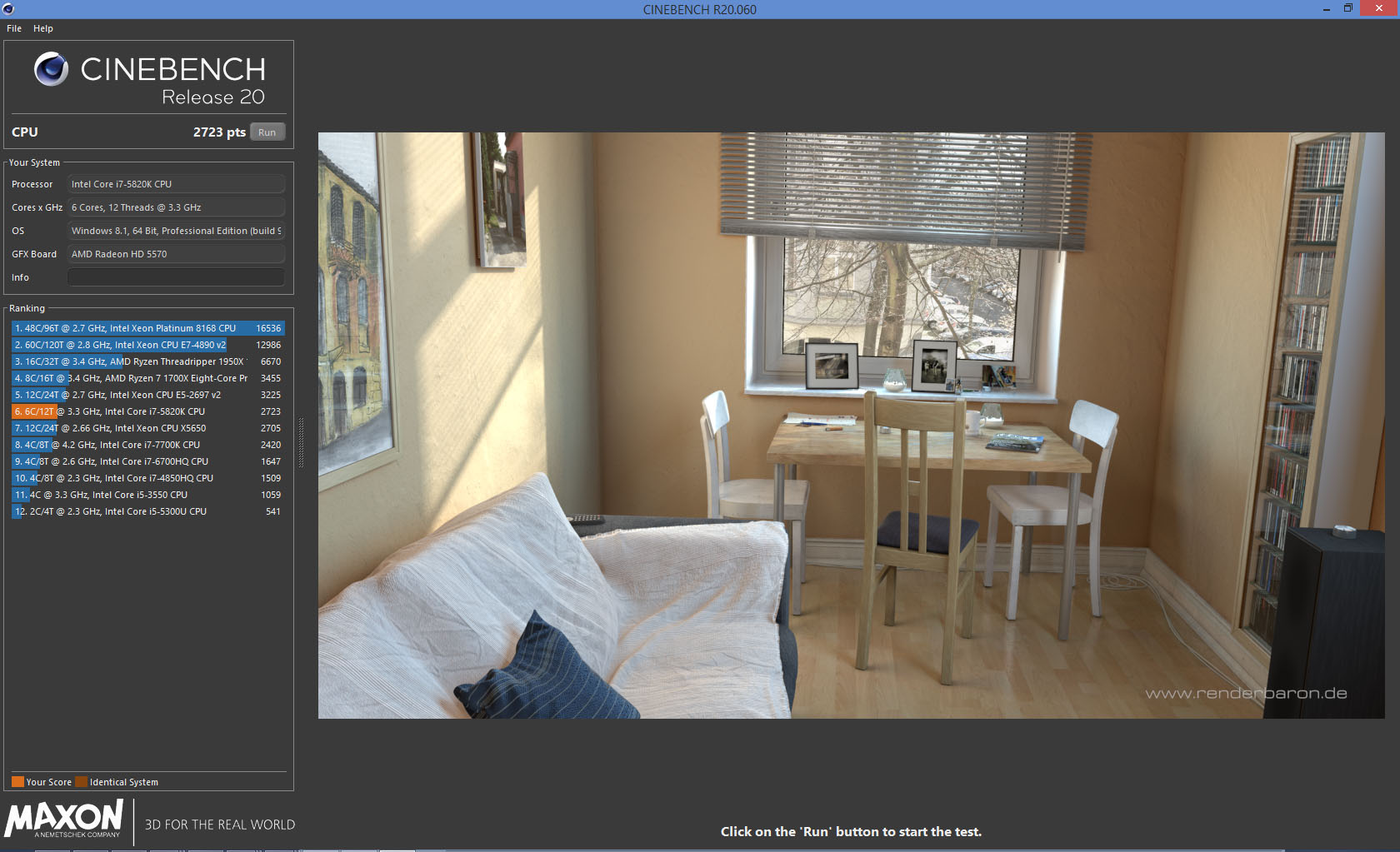
Testing Cinebench 20 on the same hardware, here is what I get :
Windows 8.1 : 2723
Windows 10 : 2396
So it looks like even on a recent 3D app, Windows 10 is a performance killer !
Windows 8.1 : 2723
Windows 10 : 2396
So it looks like even on a recent 3D app, Windows 10 is a performance killer !

-
trueBlue
- Captain
- Posts: 5548
- Joined: 06 Jul 2009, 22:50
- Type the number ten into the box: 10
Re: trueSpace 7.6x under Windows 10?
Has anybody tried these settings in Win10?trueBlue wrote: 04 Aug 2019, 18:39 I run it in Windows Vista (Service Pack 2) because that was the OS used when it was released.
At least tS761 was, not sure about tS76

-
bitkar
- Captain
- Posts: 2089
- Joined: 16 Mar 2010, 07:14
- Type the number ten into the box: 0
- Location: Czech Republic
Re: trueSpace 7.6x under Windows 10?
i see this for the first time, but you dont really need extra GPU for tS as it does not use OpenCL or anything and with DX7 and DX9 workspaces its not a factor aswell. But CPU is needed to work at max power. Obviously it doesnt work well in Win10.
Michal aka bitkar
tS freak since tS2 (1998) and forever (tS7.61 modeler)
tS freak since tS2 (1998) and forever (tS7.61 modeler)
-
trueBlue
- Captain
- Posts: 5548
- Joined: 06 Jul 2009, 22:50
- Type the number ten into the box: 10
Re: trueSpace 7.6x under Windows 10?
I tried it and it caused major problems with tS76 and tS761. Never the less they both use max CPU without it.
Also fiddled with my video card settings without much luck. trueSpace does not seem to be using my GPU at all.
Also fiddled with my video card settings without much luck. trueSpace does not seem to be using my GPU at all.
-
bitkar
- Captain
- Posts: 2089
- Joined: 16 Mar 2010, 07:14
- Type the number ten into the box: 0
- Location: Czech Republic
Re: trueSpace 7.6x under Windows 10?
btw: 100% CPU usage doesnt mean Win10 uses full CPU potential! It in fact does not!
By cooperation with Emmanuel we found out that 100% CPU used in Win10 can be still slower than less CPU usage in Win8.1 even tho I have faster CPU by hardware parameters. He rendered the same scene almost twice as fast with older CPU than me with faster newer CPU. I used 10, he used 8.1.
By cooperation with Emmanuel we found out that 100% CPU used in Win10 can be still slower than less CPU usage in Win8.1 even tho I have faster CPU by hardware parameters. He rendered the same scene almost twice as fast with older CPU than me with faster newer CPU. I used 10, he used 8.1.
Michal aka bitkar
tS freak since tS2 (1998) and forever (tS7.61 modeler)
tS freak since tS2 (1998) and forever (tS7.61 modeler)