Desk Tidy
-
Breech Block

- Master Chief Petty Officer
- Posts: 482
- Joined: 13 Jun 2009, 20:31
Desk Tidy
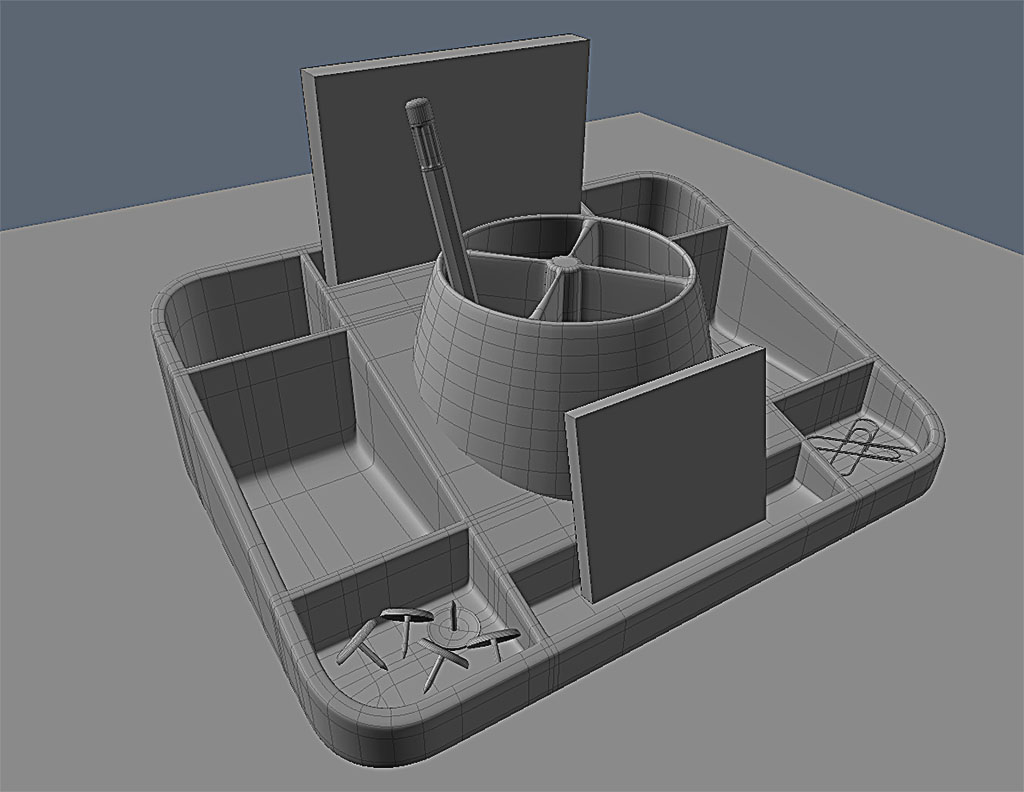
Some of you may remember this Desk Tidy I made for the SMC a while a go. Well, free of the time constraints of the competition I have been slowly adding bits and bobs. Mainly as a modelling and material/shader exercise, with an end view to try and get as perfect render as I can. Here is the scene so far. The pencil is a complete remodel as opposed to just a textured cylinder I used before. I'll be adding a couple of highlighter pens in the next day or two and will post a full colour render as well. Dunno what I will put in the empty slots. Obviously the pencil is looking a little bit lonely. I was perhaps thinking of perhaps a small stapler. I'd be interested in the communities thoughts.

-
spacekdet

- Captain
- Posts: 1810
- Joined: 27 May 2009, 15:00
- Type the number ten into the box: 10
- Location: On the day shift at the Utility Muffin Research Kitchen
Re: Desk Tidy
staple remover
a roll of postage stamps.
small scissors.
pink rubber eraser.
spring clips
letter opener
colored pencil(s)
metal body pen
plastic body pen
mini flashlight
'novelty' item- extra large pen, pom-pom pencil topper, keychain fob, desk toy, etc
coins
USB stick
Sharpie /magic marker
Also, a radius where the center circular cup meets the base, so it looks more like it's molded from one piece.
a roll of postage stamps.
small scissors.
pink rubber eraser.
spring clips
letter opener
colored pencil(s)
metal body pen
plastic body pen
mini flashlight
'novelty' item- extra large pen, pom-pom pencil topper, keychain fob, desk toy, etc
coins
USB stick
Sharpie /magic marker
Also, a radius where the center circular cup meets the base, so it looks more like it's molded from one piece.
-
Steinie

- Captain
- Posts: 2958
- Joined: 21 May 2009, 17:38
- Type the number ten into the box: 10
Re: Desk Tidy
A single hole punch, a glue stick, scotch tape, wooden ruler, a plastic ruler, mechanical pencil...
a Tootsie Roll...
a Tootsie Roll...
-
Finis

- Captain
- Posts: 5410
- Joined: 21 May 2009, 18:26
- Type the number ten into the box: 0
- Location: America!
Re: Desk Tidy
Keys. Erasers. Post-It note pad. Nail file/cosmetics. Debris like paper wads, dust, bits of mechanical pencil lead.
I always notice how clean your meshes are and the flow of the mesh lines. On this one the lines are not evenly distributed on the main body. Is there a reason for that?
I always notice how clean your meshes are and the flow of the mesh lines. On this one the lines are not evenly distributed on the main body. Is there a reason for that?
I prefer dangerous freedom over peaceful servitude. -- Thomas Jefferson/Jean Jacques Rousseau
-
Breech Block
- Master Chief Petty Officer
- Posts: 482
- Joined: 13 Jun 2009, 20:31
Re: Desk Tidy
WOW! Thanks for all the suggestions guys. I think I'm gonna need a bigger desk. 
I shall take a good hard look at the list and pick out a few of the things that are going to provide a lot of variety to the image in terms of both colour and materials. Then I'll post a render for comment before picking a few more. I think this one might be quite tricky finding the right balance of how many objects the scene will need to make it look interesting rather than cluttered. I do think some kind of technical drawing/mechanical pencil is going to be a must. Be good to try and show the inner workings using a transparent body somehow.
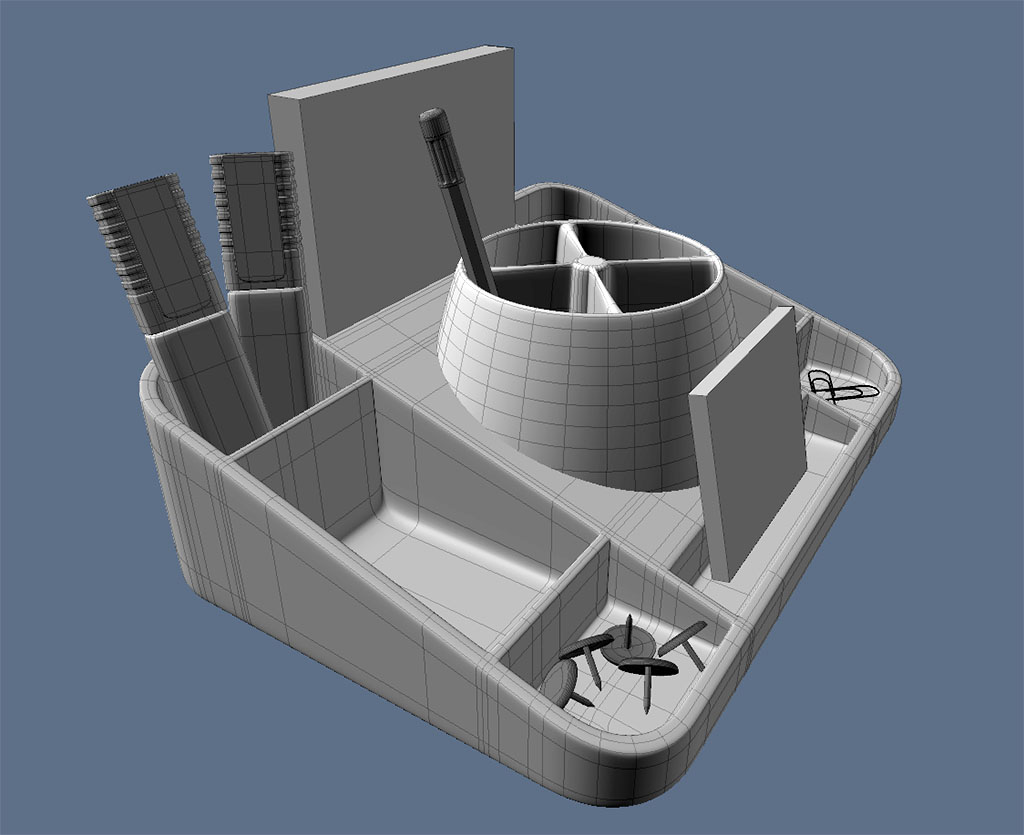
Anyhow's here are the marker/highligt pens in situ.
I shall take a good hard look at the list and pick out a few of the things that are going to provide a lot of variety to the image in terms of both colour and materials. Then I'll post a render for comment before picking a few more. I think this one might be quite tricky finding the right balance of how many objects the scene will need to make it look interesting rather than cluttered. I do think some kind of technical drawing/mechanical pencil is going to be a must. Be good to try and show the inner workings using a transparent body somehow.
Thanks for the compliment, Finis. I think it is just the SDS lines putting you off. I have posted an image of just the tray prior to SDS and if you look at the lines there, you'll see a lot of them either stem from the inner walls of the tray, or the corners. I ended up putting quite a few tri's into those corners, but the mesh smoothed off a lot better that way. If anybody else has a better method/topology i would be fascinated to see it.Finis wrote:I always notice how clean your meshes are and the flow of the mesh lines. On this one the lines are not evenly distributed on the main body. Is there a reason for that?
Anyhow's here are the marker/highligt pens in situ.

-
Breech Block
- Master Chief Petty Officer
- Posts: 482
- Joined: 13 Jun 2009, 20:31
Re: Desk Tidy
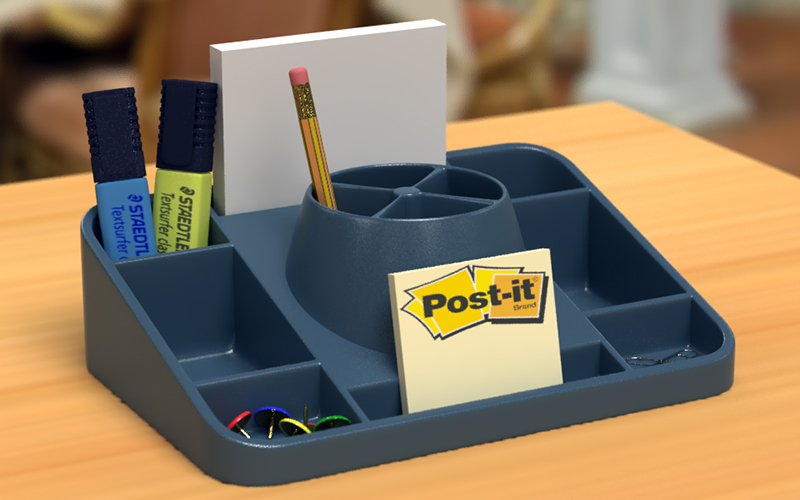
Here is how the scene is looking at the moment regarding composition\lighting\materials. The large, white block at the rear of the tray is just a place holder for a CD/floppy disk but i needed to place something there right now in order to judge how close I could get away with zooming in the camera. From the suggestions listed previously, I'm currently thinking of adding a metalic pen, a self-propelled pencil, a pritt/glue stick, a pair of scissors and a ruler\protractor of some kind.
-
bitkar

- Captain
- Posts: 2089
- Joined: 16 Mar 2010, 07:14
- Type the number ten into the box: 0
- Location: Czech Republic
Re: Desk Tidy
so far so goood.... very!
Michal aka bitkar
tS freak since tS2 (1998) and forever (tS7.61 modeler)
tS freak since tS2 (1998) and forever (tS7.61 modeler)
-
Steinie
- Captain
- Posts: 2958
- Joined: 21 May 2009, 17:38
- Type the number ten into the box: 10
Re: Desk Tidy
You could modernize it and add an Ipod instead of a disk.
-
Breech Block
- Master Chief Petty Officer
- Posts: 482
- Joined: 13 Jun 2009, 20:31
Re: Desk Tidy
Thanks bitkar, thanks Steinie. I think the ipod idea is quite good. I certainly wouldn't have thought of it. The only trouble is, it might unbalance the scene. By that I mean that when I was searching around for piccies of scissors the other day, when you start looking at them in detail, you begin to realize that there are hundreds of different types and designs. I also noticed that some instinctively looked cheap and cheerful whilst others looked more professional and sharp as hell. That led me to thinking that the contents of the desk tidy must conform to some kind of commonality. In other words if you have a 20 pence plastic ruler, it would probably not be sat next to some kind of expensive, gold-plated fountain pen. So I have no idea what kind of objects would sit next to an ipod. perhaps it is a bit upmarket for what I am aiming at.
-
theuns
- Lieutenant Junior Grade
- Posts: 868
- Joined: 10 Jun 2009, 11:21
- Type the number ten into the box: 0
- Location: South Africa
Re: Desk Tidy
Lookw great Breech, well done...
theuns - tSer since 2000
. http://theunsfvo.cgarena.com/" onclick="window.open(this.href);return false; |:.
. http://bluestarcreations.wordpress.com/" onclick="window.open(this.href);return false; |:.
.
http://theunsfvo.cgarena.com/" onclick="window.open(this.href);return false; |:..
http://bluestarcreations.wordpress.com/" onclick="window.open(this.href);return false; |:.-
bitkar
- Captain
- Posts: 2089
- Joined: 16 Mar 2010, 07:14
- Type the number ten into the box: 0
- Location: Czech Republic
Re: Desk Tidy
imho: i would better avoid some "product placement" = no ipod, iphone, iwhatever. Just normal things... and why not to make it a little oldschool with the 3.5 inch. Maybe a 5.25 inch could lay on the table aswell :)
Michal aka bitkar
tS freak since tS2 (1998) and forever (tS7.61 modeler)
tS freak since tS2 (1998) and forever (tS7.61 modeler)
-
Breech Block
- Master Chief Petty Officer
- Posts: 482
- Joined: 13 Jun 2009, 20:31
Re: Desk Tidy
I hear what your saying bitkar. Dunno even if they had desk tidys back in the days of 5.25 inch disks and if they did, they probably looked nothing like this. Anyhows, working on a pair of scissors at the mo.

-
jamesmc
- Captain
- Posts: 1776
- Joined: 08 Jul 2009, 15:35
Re: Desk Tidy
Breech Block wrote:I hear what your saying bitkar. Dunno even if they had desk tidys back in the days of 5.25 inch disks and if they did, they probably looked nothing like this. Anyhows, working on a pair of scissors at the mo.
Yeah, we had desk tidy's back in the day. They were made of wood and mostly box shaped and compartmentalized. Although, I did have a very niced mahogany set in an office once, that included matching Cross pen and mechanical pencil.
Walk by faith, not by sight.
-
Breech Block
- Master Chief Petty Officer
- Posts: 482
- Joined: 13 Jun 2009, 20:31
Re: Desk Tidy
Yeah, I think that would be another scene entirely. It would be a good project though, trying to capture that whole eighties look.
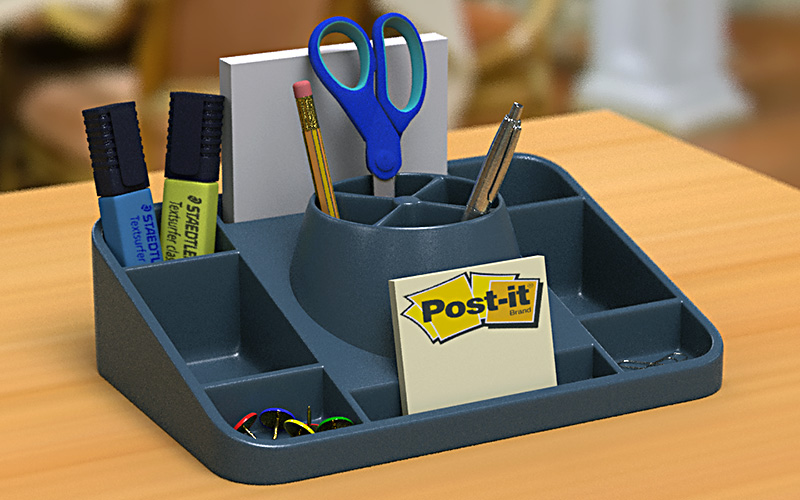
Anyhows, here is an update:
Anyhows, here is an update:
-
bitkar
- Captain
- Posts: 2089
- Joined: 16 Mar 2010, 07:14
- Type the number ten into the box: 0
- Location: Czech Republic
Re: Desk Tidy
looking very realistic and smooth.
btw: in 80s there were plastics. I remember from my childhood, that we had such things even in czech rep. ;)
btw: in 80s there were plastics. I remember from my childhood, that we had such things even in czech rep. ;)
Michal aka bitkar
tS freak since tS2 (1998) and forever (tS7.61 modeler)
tS freak since tS2 (1998) and forever (tS7.61 modeler)
-
Steve

- Master Chief Petty Officer
- Posts: 394
- Joined: 29 Jun 2009, 10:20
- Type the number ten into the box: 0
- Location: Hiding (Like a ninja)
Re: Desk Tidy
I'm always exceedingly envious of how you get your meshes so clean and the right lighting/texture effects
Show us how?
Show us how?
-
bitkar
- Captain
- Posts: 2089
- Joined: 16 Mar 2010, 07:14
- Type the number ten into the box: 0
- Location: Czech Republic
Re: Desk Tidy
this is obviously HDRi lighting and plastic is usually high diffusion material. Am I right?
Michal aka bitkar
tS freak since tS2 (1998) and forever (tS7.61 modeler)
tS freak since tS2 (1998) and forever (tS7.61 modeler)
-
Tommy

- Master Chief Petty Officer
- Posts: 403
- Joined: 28 Jun 2009, 14:05
- Type the number ten into the box: 0
- Location: Sweden, Göteborg
Re: Desk Tidy
Looks great. The only opion I have is the light. I miss some shadows from a nearby lightsource. This is just a little remark on a excelent work.
"Carpe diem"
-
Breech Block
- Master Chief Petty Officer
- Posts: 482
- Joined: 13 Jun 2009, 20:31
Re: Desk Tidy
Thanks guys.
bitkar - correct on both accounts.
Tommy - yeah, I had an issue with a strange blocky/artefact shadow underneath the tray that I just couldn't resolve now how much I changed the render settings and position of the models. So I ended up having to dial the shadows right down.
Steve - High praise indeed, Sir. But the thing is, I learnt all my modelling skills by staring enviously at, and religiously studying, all the fantastic entries you and Nez entered into the old forums' SMC.
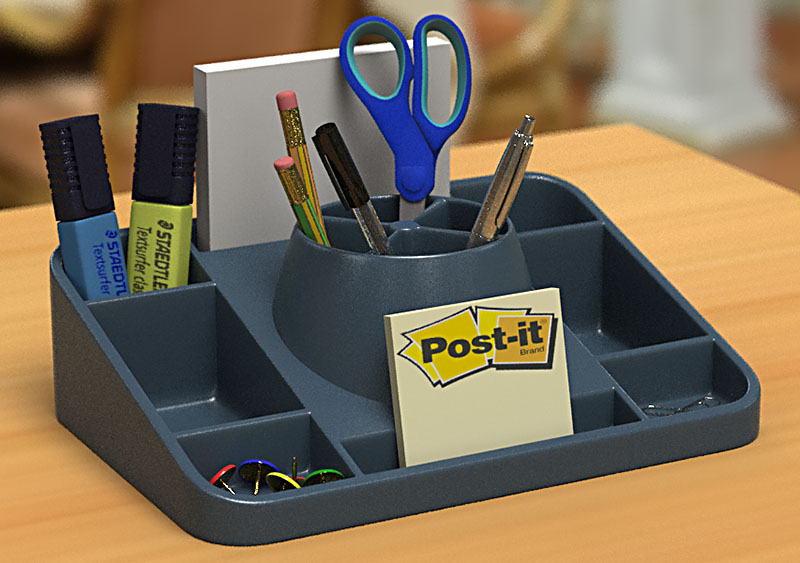
But for anyone interested, my modeling process is about as simple as it gets: I get a great reference image, place it on a plane inside my work area, make a cube and then just point edit/bevel/extrude it till it matches the reference image using the minimum amount of geometry. Throw in a few edge loops and apply SDS. That's it. Materials and lighting are mainly from pre-existing shaders and HDRI images. Then I render a deliberately underexposed image and bring out the correct colours/highlights in Photoshop.
Anyhows, here is another slight update.
bitkar - correct on both accounts.
Tommy - yeah, I had an issue with a strange blocky/artefact shadow underneath the tray that I just couldn't resolve now how much I changed the render settings and position of the models. So I ended up having to dial the shadows right down.
Steve - High praise indeed, Sir. But the thing is, I learnt all my modelling skills by staring enviously at, and religiously studying, all the fantastic entries you and Nez entered into the old forums' SMC.
But for anyone interested, my modeling process is about as simple as it gets: I get a great reference image, place it on a plane inside my work area, make a cube and then just point edit/bevel/extrude it till it matches the reference image using the minimum amount of geometry. Throw in a few edge loops and apply SDS. That's it. Materials and lighting are mainly from pre-existing shaders and HDRI images. Then I render a deliberately underexposed image and bring out the correct colours/highlights in Photoshop.
Anyhows, here is another slight update.
-
Finis
- Captain
- Posts: 5410
- Joined: 21 May 2009, 18:26
- Type the number ten into the box: 0
- Location: America!
Re: Desk Tidy
Hmm, where is that pen, there it is! (Smashes fingers into screen.)
How do you render it under exposed?
How do you render it under exposed?
I prefer dangerous freedom over peaceful servitude. -- Thomas Jefferson/Jean Jacques Rousseau
-
spacekdet
- Captain
- Posts: 1810
- Joined: 27 May 2009, 15:00
- Type the number ten into the box: 10
- Location: On the day shift at the Utility Muffin Research Kitchen
Re: Desk Tidy
Perhaps try subdividing the 'desktop' surface several times?Breech Block wrote: I had an issue with a strange blocky/artefact shadow underneath the tray that I just couldn't resolve now how much I changed the render settings and position of the models. So I ended up having to dial the shadows right down.
-
bitkar
- Captain
- Posts: 2089
- Joined: 16 Mar 2010, 07:14
- Type the number ten into the box: 0
- Location: Czech Republic
Re: Desk Tidy
i have similar question.... WHY do you render it underexposed. You can have good options to tweek it using material and hdri settings.Finis wrote:Hmm, where is that pen, there it is! (Smashes fingers into screen.)
How do you render it under exposed?
Michal aka bitkar
tS freak since tS2 (1998) and forever (tS7.61 modeler)
tS freak since tS2 (1998) and forever (tS7.61 modeler)
-
Breech Block
- Master Chief Petty Officer
- Posts: 482
- Joined: 13 Jun 2009, 20:31
Re: Desk Tidy
Finis - LOL. Re: underexposure, either by adjusting the scenes "Tone Mapping" or by adjusting the "Light Intensity" of the HDR Image.
Spacekdet - I think I tried that. Or maybe that should be I hope I tried that. Doh! I'll have to look at the issue again when I do my final render but if memory serves, I think I might have narrowed the issue down to photon sizes. Sorry, the old grey matter ain't as sharp as it used to be.
Bitkar - Primarily becuse as soon as the modeling aspect of a project is complete I get very bored very quickly. So rather than spending hours tweaking loads of material settings and adjusting light parameters and doing tons of test renders, I have discovered I can acheive the same effect in Photoshop in about 30 mins. plus it gives me far greater control and I can do stuff that would take forever to render out for real. My Get Bond! project really opened my eyes as to the joys of Photoshop. A more recent example would be the SPECTRE HQ image below. The top one is as rendered and the bottom one is about half an hours work in PS. I actually saw an interview with Peter Jackson's cinematographer (bonus Material in the King Kong: Special Edition DVD) where he desribed that is how the famed director worked. So if it works for Peter and WETA, then who am I to argue. HTH
Spacekdet - I think I tried that. Or maybe that should be I hope I tried that. Doh!
I'll have to look at the issue again when I do my final render but if memory serves, I think I might have narrowed the issue down to photon sizes. Sorry, the old grey matter ain't as sharp as it used to be.Bitkar - Primarily becuse as soon as the modeling aspect of a project is complete I get very bored very quickly. So rather than spending hours tweaking loads of material settings and adjusting light parameters and doing tons of test renders, I have discovered I can acheive the same effect in Photoshop in about 30 mins. plus it gives me far greater control and I can do stuff that would take forever to render out for real. My Get Bond! project really opened my eyes as to the joys of Photoshop. A more recent example would be the SPECTRE HQ image below. The top one is as rendered and the bottom one is about half an hours work in PS. I actually saw an interview with Peter Jackson's cinematographer (bonus Material in the King Kong: Special Edition DVD) where he desribed that is how the famed director worked. So if it works for Peter and WETA, then who am I to argue. HTH

-
bitkar
- Captain
- Posts: 2089
- Joined: 16 Mar 2010, 07:14
- Type the number ten into the box: 0
- Location: Czech Republic
Re: Desk Tidy
i still dont get the benifits of it. The internal mechanism. You use less colors, less range, which must result in less quality. In worst cases things like color bending (on smooth untextured objects) or alot of photoshop work.
But "your" idea let me to my idea. Maybe it would be great to render 3 images - under*, medium* and over*exposed. Then merge them in photoshop to create HDR image. That would be pretty cool and fast to tweek with a great quality.
But "your" idea let me to my idea. Maybe it would be great to render 3 images - under*, medium* and over*exposed. Then merge them in photoshop to create HDR image. That would be pretty cool and fast to tweek with a great quality.
Michal aka bitkar
tS freak since tS2 (1998) and forever (tS7.61 modeler)
tS freak since tS2 (1998) and forever (tS7.61 modeler)
-
Breech Block
- Master Chief Petty Officer
- Posts: 482
- Joined: 13 Jun 2009, 20:31
Re: Desk Tidy
Well, I only said it was a time saver, I never said it produced better quality results. However, that said, I do prefer the slightly rougher look nowadays, as opposed to that too crispy, overtly CGI look that most renders tend to have these days.bitkar wrote:i still dont get the benifits of it....
-
bitkar
- Captain
- Posts: 2089
- Joined: 16 Mar 2010, 07:14
- Type the number ten into the box: 0
- Location: Czech Republic
Re: Desk Tidy
ok, i get it now :) not a bad trick for saving some time... and you are right about the crips images. Sometimes adding noise and some slight blur can make pics more believable.
Michal aka bitkar
tS freak since tS2 (1998) and forever (tS7.61 modeler)
tS freak since tS2 (1998) and forever (tS7.61 modeler)
-
Breech Block
- Master Chief Petty Officer
- Posts: 482
- Joined: 13 Jun 2009, 20:31
Re: Desk Tidy
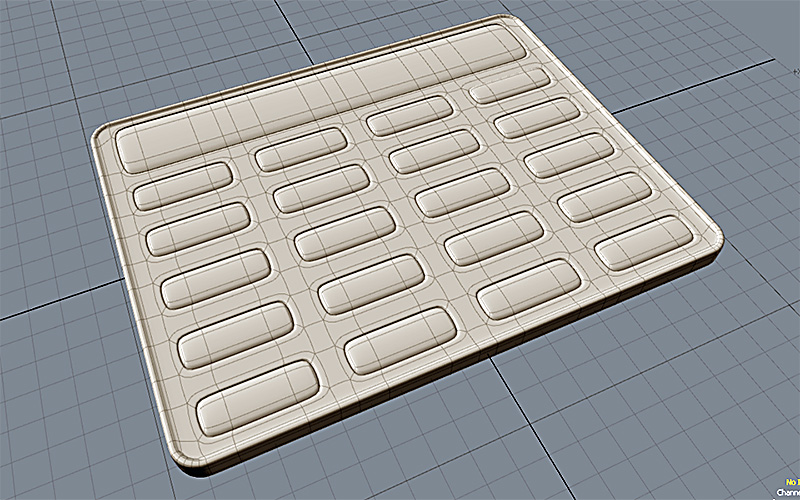
Some experimental models I've made as possible additions to the desk tidy. Plus playing about with getting the shadows to look better.

-
bitkar
- Captain
- Posts: 2089
- Joined: 16 Mar 2010, 07:14
- Type the number ten into the box: 0
- Location: Czech Republic
Re: Desk Tidy
seems like only textur on the calculator and maybe i would make it a little thinner. On the other hand, the coins seem very thick to me, but i dont know them :) Must be heavy to have it in a wallet.
Michal aka bitkar
tS freak since tS2 (1998) and forever (tS7.61 modeler)
tS freak since tS2 (1998) and forever (tS7.61 modeler)
-
Breech Block
- Master Chief Petty Officer
- Posts: 482
- Joined: 13 Jun 2009, 20:31
Re: Desk Tidy
Well the calculator is a full model, but yes, for some reason it does look kinda flat. As for the coins, they are British £1 coins and yes, they really are that clunky at 2.5 mm. Unfortunately, the £1 note has gone the way of the dodo in the UK and even £5 notes are a rarity these days as ATMs don't dispense them. You get seven or eight of them in your change and you certainly feel the weight of them trying to bring your trousers down to your ankles.
-
Steve
- Master Chief Petty Officer
- Posts: 394
- Joined: 29 Jun 2009, 10:20
- Type the number ten into the box: 0
- Location: Hiding (Like a ninja)
Re: Desk Tidy
You've got the weight of the coins right but I don't remember the levitating properties I can see in this image! Maybe that's why they seem heavier
Although my ATM deliberately only dispenses £5 notes. Huzzah
Although my ATM deliberately only dispenses £5 notes. Huzzah
-
Breech Block
- Master Chief Petty Officer
- Posts: 482
- Joined: 13 Jun 2009, 20:31
Re: Desk Tidy
LOL - Didn't you realize they're now made of unobtanium; by those hippy blue cats on Pandora.Steve wrote:You've got the weight of the coins right but I don't remember the levitating properties...
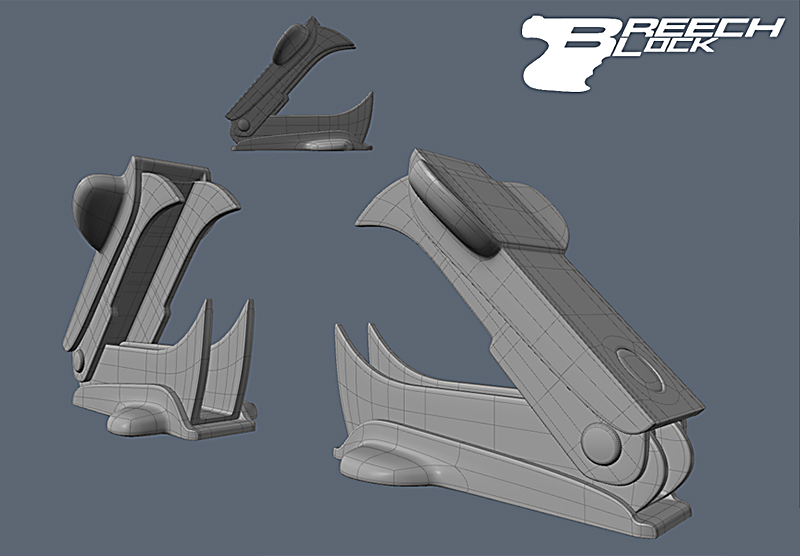
Anyhows, this model will probably be the last edition to the scene. Or maybe not.

-
Breech Block
- Master Chief Petty Officer
- Posts: 482
- Joined: 13 Jun 2009, 20:31
Re: Desk Tidy
Well, here is a test render with all the recent objects I made inserted into the scene. I'm not too sure on the transparent plastic for the stapler remover. But, seeing as this whole project is an exercise in shader use, I thought I'd try something a bit different. The render is a bit noisy/grainy due to it being relativly low-res. It still takes 40 mins to render it out though. As well as the new items, I have done a whole load of tweaking things, like position scale and material settings. Once I'm sure the scene is finaly complete, I will quadruple the res and let it render overnight and see how much it improves. At the moment, I dunno if this project is finished or still needs another item (or two) added. I think its going to be a fine line between looking okay and being too cluttered.

-
jamesmc
- Captain
- Posts: 1776
- Joined: 08 Jul 2009, 15:35
Re: Desk Tidy
Ah! The last editon made it complete. We used to call those "goesintas." Whatever goes in ta something, gots to come out. 
Last edited by jamesmc on 25 Sep 2011, 03:47, edited 1 time in total.
Walk by faith, not by sight.
-
Finis
- Captain
- Posts: 5410
- Joined: 21 May 2009, 18:26
- Type the number ten into the box: 0
- Location: America!
Re: Desk Tidy
I think the desk needs stuff. Let's see. Old receipts, a bit of old bacon, papers with phone numbers and no names, screwdriver, several old to do lists ... wait that's my desk.
I prefer dangerous freedom over peaceful servitude. -- Thomas Jefferson/Jean Jacques Rousseau
-
bitkar
- Captain
- Posts: 2089
- Joined: 16 Mar 2010, 07:14
- Type the number ten into the box: 0
- Location: Czech Republic
Re: Desk Tidy
the flattnes is usually made by lighting. Or maybe you could make it more glossy, maybe only the buttons. That could help.
Michal aka bitkar
tS freak since tS2 (1998) and forever (tS7.61 modeler)
tS freak since tS2 (1998) and forever (tS7.61 modeler)
-
Dragneye

- Lieutenant
- Posts: 906
- Joined: 02 Sep 2009, 22:09
Re: Desk Tidy
VERY nice work Breech.
I think the translucent part of the staple remover is just right. Adds to the realism.
I think the translucent part of the staple remover is just right. Adds to the realism.
-
MikomDude

- Captain
- Posts: 1930
- Joined: 04 Oct 2010, 11:12
- Type the number ten into the box: 0
- Location: The Hague, Netherlands
Re: Desk Tidy
Once again, good progress.  Though if there were something I had to comment on, it would be that the staple remover looks slightly to big. :/
Though if there were something I had to comment on, it would be that the staple remover looks slightly to big. :/-
Breech Block
- Master Chief Petty Officer
- Posts: 482
- Joined: 13 Jun 2009, 20:31
Re: Desk Tidy
Thanks for the C&C everyone. 
Dragneye - LOL - Y'know, I have re-rendered that staple remover in every colour you can imagine over the last few days and in quite a variety of different materials too. And guess what? Your spot on. I haven't found anything to beat it.
MikomDude - I think you just might be right. Good spot. Perhaps that is why every render (see above) that I have done over the last few days, the item just seemed to call too much attention to itself.
Dragneye - LOL - Y'know, I have re-rendered that staple remover in every colour you can imagine over the last few days and in quite a variety of different materials too. And guess what? Your spot on. I haven't found anything to beat it.
MikomDude - I think you just might be right. Good spot. Perhaps that is why every render (see above) that I have done over the last few days, the item just seemed to call too much attention to itself.
-
spacekdet
- Captain
- Posts: 1810
- Joined: 27 May 2009, 15:00
- Type the number ten into the box: 10
- Location: On the day shift at the Utility Muffin Research Kitchen
Re: Desk Tidy
I think the lighting would be better if you changed the angle.
With the lights behind the camera you really can't appreciated the shadowing.
With the lights behind the camera you really can't appreciated the shadowing.
-
Breech Block
- Master Chief Petty Officer
- Posts: 482
- Joined: 13 Jun 2009, 20:31
Re: Desk Tidy
Your quite right, spacekdet, it would indeed. But this is where my preferrence for using HDRI inflicts limitations on my work. 
-
Breech Block
- Master Chief Petty Officer
- Posts: 482
- Joined: 13 Jun 2009, 20:31
Re: Desk Tidy
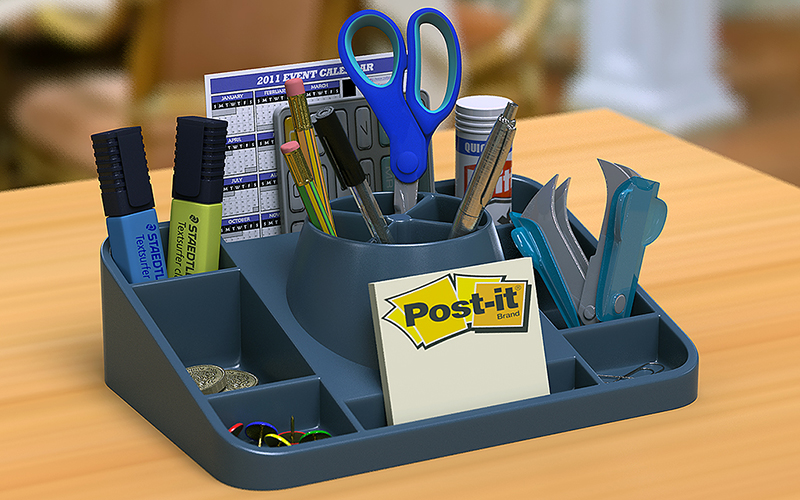
Well, this is it, my final render on this project (Phew). A few more material tweaks and a re-scaling of the staple remover among the many improvements. Once again, a big thanks to all those who took the time to post C&C. Time to move on to another project methinks.
-
bitkar
- Captain
- Posts: 2089
- Joined: 16 Mar 2010, 07:14
- Type the number ten into the box: 0
- Location: Czech Republic
Re: Desk Tidy
awesoem work!
Michal aka bitkar
tS freak since tS2 (1998) and forever (tS7.61 modeler)
tS freak since tS2 (1998) and forever (tS7.61 modeler)
-
Breech Block
- Master Chief Petty Officer
- Posts: 482
- Joined: 13 Jun 2009, 20:31
Re: Desk Tidy
Thanks, man. Much appreciated and glad you likes. 