Hi all i have just got win vista ultimate.
At the moment have win 7 on my pc ,i was told in the shop
i can install vista as well so i have both at the same time on pc.
Does anyone know of problems with this ,i have not yet instaled vista.
If there are probs then i will delete win 7 fisrt
Hope someone can help here
Thanks Ralph
Ps I hate win 7
nigec
Master Chief Petty Officer
Posts:561
Joined: 21 May 2009, 18:46
Re: Win 7 and vista
Postby nigec »
Its not that easy, never gone from Win7 to Vista but installing XP on a Vista machine messed up the boot loader the system loses Vista's boot record also the factory partition so you can't run the bootup tools, you have to get a tool to fix the boot.ini from XP
You would need to get the drivers for Vista, specially the network ones as you will be knackered if you can't get online to find them.
pugman 1
Captain
Posts:1555
Joined: 21 May 2009, 19:26
Type the number ten into the box: 0
Location: Germany
Re: Win 7 and vista
Postby pugman 1 »
Ok i have just spoken to my pc expert ,he told me this is
NOT possible, one or the other ,he said they both need to boot from
partion c and together messes up the kernal system ,good to know.
So now its time to back up things and get rid of win 7
Ihope this works
Thanks
pugman 1
Captain
Posts:1555
Joined: 21 May 2009, 19:26
Type the number ten into the box: 0
Location: Germany
Re: Win 7 and vista
Postby pugman 1 »
Hi all vista ultimate is now installed win 7 no more.
internet good ,just have to find my graffic card
at the moment on basics
hope to get my programms back in ,still allot to do
froo
Captain
Posts:2554
Joined: 22 May 2009, 12:13
Re: Win 7 and vista
Postby froo »
just out of curiosity pugman, how did you come to decide to install Vista, instead of keeping Win7?
nigec
Master Chief Petty Officer
Posts:561
Joined: 21 May 2009, 18:46
Re: Win 7 and vista
Postby nigec »
Must admit Vista is the last thing I would install, I had nothing but trouble with from day one, BUT mine was pre service pack one, even so for over 6 months you couldn't do much more than use it as an office pc, now its not so bad but runs a insane amount of MS services
pugman 1
Captain
Posts:1555
Joined: 21 May 2009, 19:26
Type the number ten into the box: 0
Location: Germany
Re: Win 7 and vista
Postby pugman 1 »
Hi Froo win 7 does not agree with TS or games
now i have vista ultimate 64 bit up and running all software back in
and they all work quiker and better .
my graffic card and ram now do what they should
this is so much better than win 7
ts is now perfect
marcel
Captain
Posts:2247
Joined: 21 May 2009, 19:52
Type the number ten into the box: 0
Location: paris - France
Re: Win 7 and vista
Postby marcel »
I am curious to know how many people can't use TS with win7 (not the knowing SE problem). Is it some little bug or serious crash? XP mode is not a good solution (it is better to keep a pc with XP when you can). The first version of an OS is never mature. Driver too. I prefer to wait some update of win7 before buy a new pc to use TS on win7.
You can dual boot Win 7 and Vista. What you must do is to setup a separate partition for each of the OSs. There are links on the Internet that will walk you through like TechSpot. On ocassion, I have done it with success with the older Windows. It used to be that you took the latest Window, load, then the next older version, load and so on. But with Vista, the way it loads is different, hence the need for a separate partition.
Mike
scapino
Petty Officer Second Class
Posts:32
Joined: 22 May 2009, 02:51
Type the number ten into the box: 0
Location: Portland, Oregon
Re: Win 7 and vista
Postby scapino »
I'm using TS 7 fine in win7. There is the LE problem, but that was more or less fixed with a addon.
Im running win 7 home premium 64 bit, btw.
Kurt
compPanda
Senior Chief Petty Officer
Posts:275
Joined: 21 May 2009, 21:15
Type the number ten into the box: 0
Re: Win 7 and vista
Postby compPanda »
marcel wrote:I am curious to know how many people can't use TS with win7 (not the knowing SE problem). Is it some little bug or serious crash? XP mode is not a good solution (it is better to keep a pc with XP when you can). The first version of an OS is never mature. Driver too. I prefer to wait some update of win7 before buy a new pc to use TS on win7.
I am curios - why isn't XP mode a solution?
myeakey
Petty Officer Third Class
Posts:13
Joined: 22 Jul 2009, 19:07
Re: Win 7 and vista
Postby myeakey »
When I use TrueSpace in XP mode, I could not render an object or scene. Further review into it, I found that the video card that is emulated in XP mode is the problem. You do not have a choice of video cards in XP. When I run TrueSpace in Win 7, I have to change the setup on the Model side to wireframe. I am not sure why, but when I change views from perspective to top, for example, the screen takes forever to update and it doesn't completely refresh until I start moving the object or view around.
Mike
compPanda
Senior Chief Petty Officer
Posts:275
Joined: 21 May 2009, 21:15
Type the number ten into the box: 0
Re: Win 7 and vista
Postby compPanda »
myeakey wrote:When I use TrueSpace in XP mode, I could not render an object or scene. Further review into it, I found that the video card that is emulated in XP mode is the problem. You do not have a choice of video cards in XP. When I run TrueSpace in Win 7, I have to change the setup on the Model side to wireframe. I am not sure why, but when I change views from perspective to top, for example, the screen takes forever to update and it doesn't completely refresh until I start moving the object or view around.
Mike
Bummer.
I blame Caligari for not using strange programming techniques. For instance, if they hadn't used these stupid menus that goes upwards instead of down when you click on them, then you could have used TS 6x (and previous generations) in Wine because the other things works...
nigec
Master Chief Petty Officer
Posts:561
Joined: 21 May 2009, 18:46
Re: Win 7 and vista
Postby nigec »
that was a problem with Vista too with some Nvidia cards, I can only use wireframe with Vista, also multithread crashes TS even when the texture veiw updates
marcel
Captain
Posts:2247
Joined: 21 May 2009, 19:52
Type the number ten into the box: 0
Location: paris - France
Re: Win 7 and vista
Postby marcel »
I have the same problem with vista and my nvidia card. Only wireframe refresh the windows correctly. It is a problem of driver without update on notebook. Everything is going so fast that neither the software nor the material will not be stable. Today we have computers that crash a lot faster than before (maybe it is that we call "progress"). It is the only business where it is legal to sell something that does not work.
spyfrog wrote:I am curios - why isn't XP mode a solution?
3d need power and XP mode simulate an old vga trio card. Is ridiculous especially if you have a good video card. An incomprehensible shit, although XP mode is only an argumentation to sell Seven.
sory for jumping back in here.
I thought along time about the change back to vista
befor i did it i made some tests, my pc with win7 and my sons pc with vista
he likes to play stonghold the game ,so i set the graffics to low on both
pcs and we played online agaist each other ,after 15 mins i could no longer control
the mouse pointer and my screen jumped all over the place, his pc vith vista
was still perfect with allot going on ,i had to quit. it was the same for all games
my pc was shit, my sons pc intell quad core ati card 3 gig, my pc intell quad core nvidia gt230 8 gig.
truspace works perfect with vista ultimate64 bit on my machine
I new ihad a good pc but not with win 7,
now my pc runs better than before , i am glad i made this change
truspace ,poser, vue, daz, all good and very quick now.
pugman 1
Captain
Posts:1555
Joined: 21 May 2009, 19:26
Type the number ten into the box: 0
Location: Germany
Re: Win 7 and vista
Postby pugman 1 »
And one more thing i notised the speed in useing the pc for normal
stuff is quicker with vista
myeakey
Petty Officer Third Class
Posts:13
Joined: 22 Jul 2009, 19:07
Re: Win 7 and vista
Postby myeakey »
I found that Sun has a free product called Virtualbox. It has experimental support for 3D OpenGL and DirectX9. But it is only available with XP or Vista. I am downloading the software now and will try XP. I have both. Then I'll load Truespace and see what happens and report back.
marcel
Captain
Posts:2247
Joined: 21 May 2009, 19:52
Type the number ten into the box: 0
Location: paris - France
Re: Win 7 and vista
Postby marcel »
It seem that a lot of people have problem with a gt230 and seven. Don't forget a 2XX serie is an old serie renamed by nvidia to believe that innovates. How to make something new from something old: the new concept of nvidia. 2XX = GT9XXX = gt8XXX. The new nvidia product (4XX Fermi), presented as a revolution a few month ago, has a speed equivalent to an Ati 5870 (+ or - 5%)
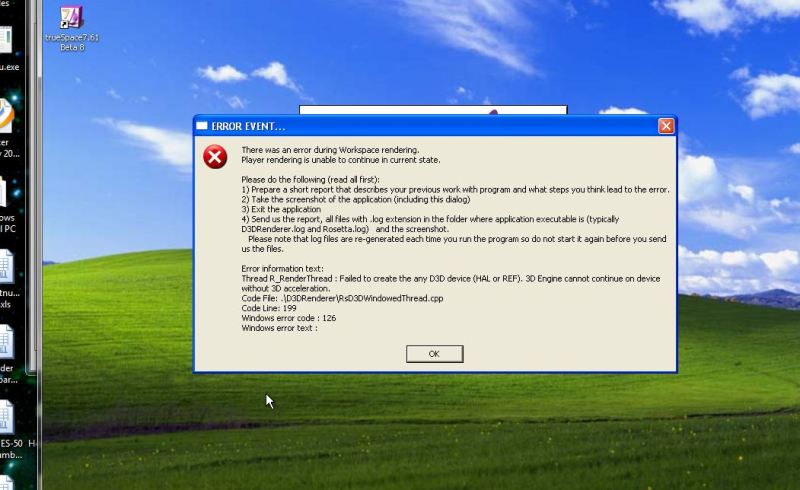
I tried the Virtual Box from Sun on my Win 7. I loaded both XP Pro and Vista Pro. The end result is that the model side appears to work fine on a couple of simple objects. On the Workspace side I get an error message stating the rendering is temporarily disabled. This coincide with the a major error message on the splash screen. Once you click OK, Truespace will open but you must be in the model side. I have attached the Event error. Maybe someone may have an idea.
Attachments
Cayenne
Chief Petty Officer
Posts:119
Joined: 03 Jun 2009, 20:05
Type the number ten into the box: 0
Location: U.K.
Re: Win 7 and vista
Postby Cayenne »
I suspect this is because virtual box is using a software emulation of hardware for the graphics, modelside can run in an emulated hardware environment as it meets and exceeds what it requires to run (although it will not run too good , it will work).
workspace needs direct access to accelerated GPU hardware layer in order to work and run in directx9, and not an emulated version , the emulated version I suspect wouldnt even meet the lowest requirements to run Workspace side of tS7.xx.
marcel
Captain
Posts:2247
Joined: 21 May 2009, 19:52
Type the number ten into the box: 0
Location: paris - France
Re: Win 7 and vista
Postby marcel »
A soft to emulate an accelerated GPU hardware have no interest because the goal is to NOT use a software to win speed.
It is only for a better compatibility but XP mode will never be effective if you need an accelerated GPU hardware. Use XP mode Only for office work.
I"ve run my tS6.6 (Model Side) very, very occasionaly for a short amount of
time.... Just to test. I don't yet have lots of access to a Win7 system. I'm using XP still. From what I've seem so far tS6.6 works with Win7. Plug-ins too !
There are problems with the bounding box render ( render portion of the
screen). Also, sometimes modeling layout freezes a bit. Change view angle
go right back and it's fine. When I finally get a new system, I'll post a FULL
compatability review.
pugman 1
Captain
Posts:1555
Joined: 21 May 2009, 19:26
Type the number ten into the box: 0
Location: Germany
Re: Win 7 and vista
Postby pugman 1 »
I personly will never install win 7 on my pc again
as long as i use truespace, untill now i have not one prob
with vista . i would recomend vista for all ts users , not win7
marcel
Captain
Posts:2247
Joined: 21 May 2009, 19:52
Type the number ten into the box: 0
Location: paris - France
Re: Win 7 and vista
Postby marcel »
All the comments since a few month confirm what i thought: my next pc will be with win7 but i keep my old pc with XP (better than vista for me because i use only modelside). Sell an old pc is not interesting and i could use win7 without the risk to see my TS dead. I could follow the progress of new software. It is a non sense to avoid the progress just to keep TS. Without 2 pc, i am sure most of people will not be able to keep TS in a few years.
Hi marcel, i also like to move forward with new teck and software,
i buy a new pc every three years ,the old one i keep,
my next pc will have win seven or somthing else on it, who knows.
maybe they have improoved win7 by then and programs run
how they should.untill then i have this one and its perfect for all my
needs
pugman 1
Captain
Posts:1555
Joined: 21 May 2009, 19:26
Type the number ten into the box: 0
Location: Germany
Re: Win 7 and vista
Postby pugman 1 »
Hi all ,sorry for keep plugin this ,but anyone who does not
like vista will not like win 7. the diference is minimal .
vista i think is more mature and has no prob with software
Win 7 is a cut down version of vista with software probs.I
am no expert ,but i have tryed both
compPanda
Senior Chief Petty Officer
Posts:275
Joined: 21 May 2009, 21:15
Type the number ten into the box: 0
Re: Win 7 and vista
Postby compPanda »
pugman 1 wrote:I personly will never install win 7 on my pc again
as long as i use truespace, untill now i have not one prob
with vista . i would recomend vista for all ts users , not win7
This is simply not possible for most people - most computers that are sold now sells with Win7.
This was something that I warned about when Microsoft decided to ax Truespace - that we would rather soon need to switch to another software because it wouldn't work with new versions of the OS. But I didn't thought this would happen so fast actually.
brotherx
Petty Officer Second Class
Posts:29
Joined: 10 Jun 2009, 12:50
Type the number ten into the box: 0
Location: Galway, Ireland
Re: Win 7 and vista
Postby brotherx »
pugman 1 wrote:Hi Froo win 7 does not agree with TS or games
now i have vista ultimate 64 bit up and running all software back in
and they all work quiker and better .
my graffic card and ram now do what they should
this is so much better than win 7
ts is now perfect
Sorry to jump in here so late but I thought there was a fix for Windows 7 and TS so it works just fine. Also, most games seem to work better on W7 than they ever did on Vista for me but to be fair I've not bought a PC game since I got an Xbox.
As it happens, I've not experienced any issues with games or anything really since I upgraded to an ATI card.
myeakey
Petty Officer Third Class
Posts:13
Joined: 22 Jul 2009, 19:07
Re: Win 7 and vista
Postby myeakey »
After all the other options have failed, I have setup my Win 7 to dual boot with XP. I have a couple of programs that will run better under XP than Win 7. I have loaded TS in and what a difference it makes. One of the things I did notice with a Nvidia 9600 GT card is that TS would not run very well with the latest Win 7 drivers that I have as I have posted earlier. But it seems that I have full functionality using the XP drivers. On the Truespace6 tab workspace side, the rendering screen is now available when it wasn't under Win 7. If anybody like, I can post the steps I used to setup the dual boot. I am using a boot manager to accomplish this.
bkjernisted
Chief Petty Officer
Posts:114
Joined: 23 May 2009, 06:10
Re: Win 7 and vista
Postby bkjernisted »
Myeakey do you use 32 bit or 64 bit xp windows?
bkjernisted
Chief Petty Officer
Posts:114
Joined: 23 May 2009, 06:10
Re: Win 7 and vista
Postby bkjernisted »
myeakey I just bought 32 bit XP and the shop I am getting it from told me it would cost 40 dollars to have it installed. What would you recommend. How much does dualboot software cost and is it worth my time. Thanks!