Flatten points to a custom plane after sreen mods

What do you need?
User avatar
the_ant
Chief Petty Officer
Posts: 155
Joined: 02 Jun 2009, 09:26
Type the number ten into the box: 0
Location: Perugia - Italy

Flatten points to a custom plane after sreen mods

Post by the_ant »

Hi all trueSpacers :bananahi:

i have a "plugin-dream" for both model and work sides.

Sometimes i must move (in a selected object) some (selected or newer-created) points handsfree in the screen.

You know that these sreen-movements are impossible to realize planarly by a specific plane (other then the system's planes XY XZ YZ).

So my question is:

is it possible (after handsfree screen-modifications) to re-flatten all that modified points to a "three points-selected plain" or a "selected object's face"?

Thanks in advance (hope all wrote above was understandable) :roll:
User avatar
clintonman
Captain
Posts: 5659
Joined: 21 May 2009, 21:08
Type the number ten into the box: 0
Location: California

Re: Flatten points to a custom plane after sreen mods

Post by clintonman »

I think the workspace point edit snapping combined with screen coordinate system might what you need. In point edit snapping options, Vertex tab, check 2D snap on. And maybe set Edge points to 0. And snap distance down to 8.
This works for moving single points along edges. Moving single points in the middle of a face is more finicky.
Does not work for edge or face movements.
Clinton Reese

http://clintons3d.com
User avatar
trueBlue
Captain
Posts: 5548
Joined: 06 Jul 2009, 22:50
Type the number ten into the box: 10

Re: Flatten points to a custom plane after sreen mods

Post by trueBlue »

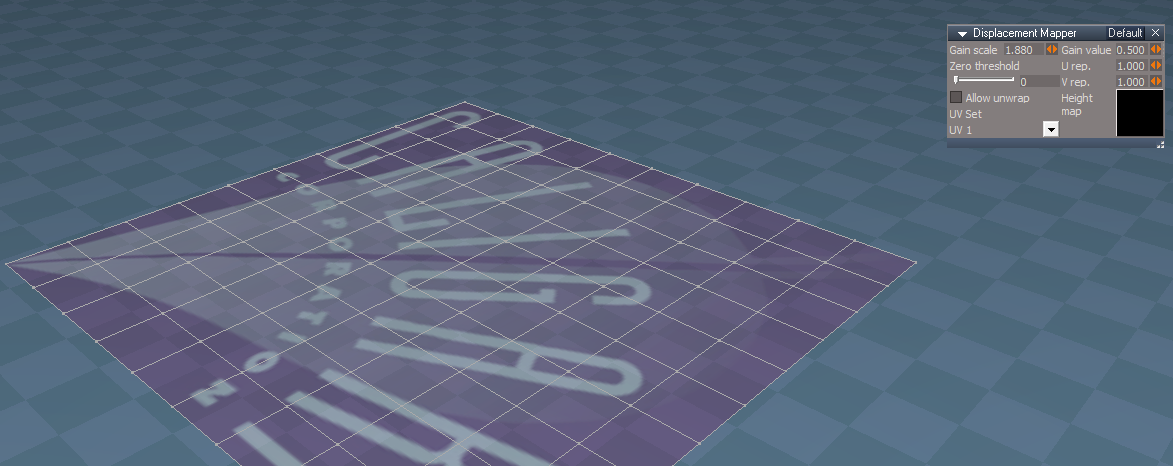
If I am understanding this correctly, you might try Workspace's Displacement Mapper with a pure Black Image
Before
Before.png
.

After
After.png
User avatar
the_ant
Chief Petty Officer
Posts: 155
Joined: 02 Jun 2009, 09:26
Type the number ten into the box: 0
Location: Perugia - Italy

Re: Flatten points to a custom plane after sreen mods

Post by the_ant »

Hi ... and thanks for the answer

it seems i found my way to solve the problem in Modelside (see attached) ...perheps too much complicated but hope it could explain the question.

1-a Original Object (one face selected)
1-b Create an object with normal orientation (world xyz)
1-c Glue to an 1-b horizontal face a copy of 1-a by the hi-lighted face

2-- Draw a casual poligon on selected face

3-- Modify position points on screen (handsfree and not co-planar to selected face)

4-- Copy 1-c orientation onto the object (by SJ-Cut n Paste)

5-- Flatten (by LUP 1.0.0) all selected internal points

6-- Restore the original orientation of the object
Attachments
Flatten1.jpg
User avatar
clintonman
Captain
Posts: 5659
Joined: 21 May 2009, 21:08
Type the number ten into the box: 0
Location: California

Re: Flatten points to a custom plane after sreen mods

Post by clintonman »

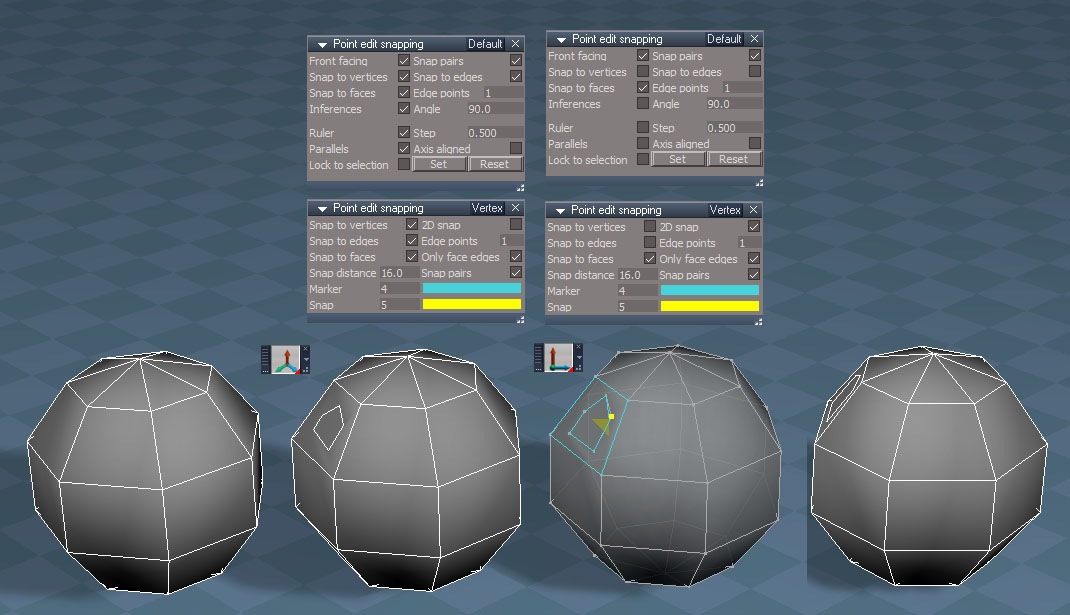
MovePointsAlongFaceWorkspace.jpg

Here is the workspace way to do it.

From left to right:

Original object

snapping is off and any coordinate system, world coordinate is shown, default point edit snapping options shown
Draw polygon on a face

Switch to screen coordinates
Turn on and setup Point edit snapping
Snap to vertices - off
Snap to edges - off
2D snap - on
Inferences, Ruler and Parallels - all off to remove clutter

Move points of the polygon - blue outlines show snapping

Final image rotated to show changes are in the plane of the original face
Clinton Reese

http://clintons3d.com

Return to “Forum Requests”