A... serious issue with WS and MS over the bridge is that translations don't sync from the WS (workspace side) to MS (modelside or TS6.6), unless I turn off the bridge, turn it on again and sync from WS.
I would like to make a button that syncs the MS with the WS with a click (turn bridge off then on, from WS to MS) but I'm not sure where to begin.
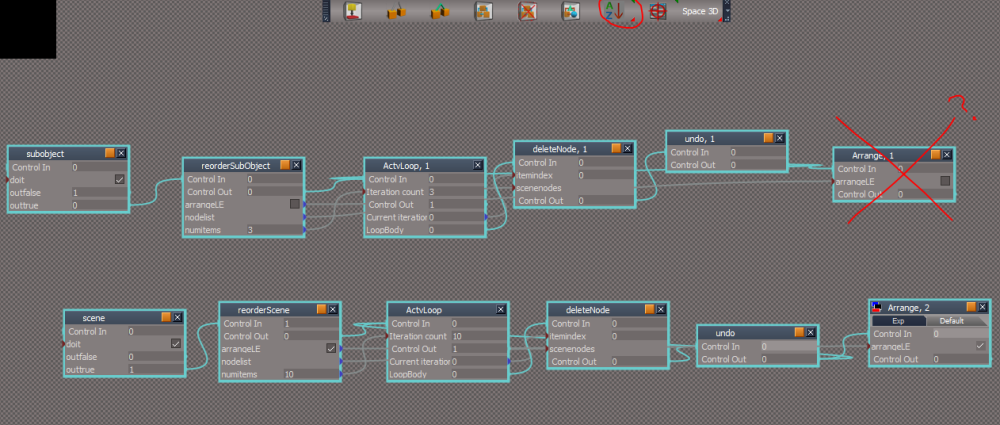
I found that the MS side updates translations and everything else when I delete and undo in the WS. I know a LE alphabetizer script and button Clinton made that organizes.
It does this by deleting then undoing the delete to reorganize the LE nodes (thus syncing the MS nicely in the process). But I don't want to reorganize the LE (cause I have it all organized my way! lol).
If I can't make a button that would turn the bridge on/off, then a "refresh MS sync" button would be nice, something that will kindly delete and undelete everything to re-sync the MS to the WS, including scale, translate and rotate + textures and any PE changes.
Q. Script/button to turn on/off TS bridge
-
Draise
- Captain
- Posts: 3200
- Joined: 21 Sep 2009, 19:33
- Type the number ten into the box: 0
- Location: Bogota, Colombia
Q. Script/button to turn on/off TS bridge
-
trueBlue
- Captain
- Posts: 5548
- Joined: 06 Jul 2009, 22:50
- Type the number ten into the box: 10
Re: Q. Script/button to turn on/off TS bridge
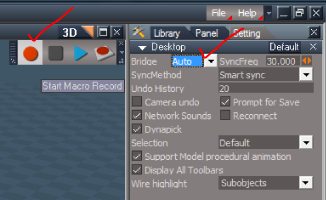
Try the jScript Macro Recorder.
With nothing selected select the Start Macro Record button and change the Desktop's Bridge settings (OFF/ON) then Stop Macro Record. A script will be created in the Link Editor. If you want to put more then one command in a Button's Command attribute you have to seperate them with the ; character as such:
Code: Select all
Node.Value("/Preferences/Desktop", "BridgeSync") = "Off";Node.Value("/Preferences/Desktop", "BridgeSync") = "On"- Attachments
-

- Capture.PNG (35.06 KiB) Viewed 4310 times
-
BNG
- Chief Warrant Officer
- Posts: 684
- Joined: 16 Oct 2009, 03:26
- Type the number ten into the box: 0
- Location: Texas
Re: Q. Script/button to turn on/off TS bridge
Very cool tip trueBlue. Thank you.trueBlue wrote:Try the jScript Macro Recorder.
With nothing selected select the Start Macro Record button and change the Desktop's Bridge settings (OFF/ON) then Stop Macro Record. A script will be created in the Link Editor. If you want to put more then one command in a Button's Command attribute you have to seperate them with the ; character as such:Code: Select all
Node.Value("/Preferences/Desktop", "BridgeSync") = "Off";Node.Value("/Preferences/Desktop", "BridgeSync") = "On"
Casual Truespace 3D modeling hobbyist. My Truespace blog and simple 3d Modeling Tutorials for Casual Model Makers.
-
Draise
- Captain
- Posts: 3200
- Joined: 21 Sep 2009, 19:33
- Type the number ten into the box: 0
- Location: Bogota, Colombia
Re: Q. Script/button to turn on/off TS bridge
@trueBlue
Oooo! Thanks for the code! By the time you replied I had modified Clintons delete and undo script and made button to do the refresh. Unfortunately it also flattens the history and freezes the object in the process (also it is memory consuming.
So I followed your bits of code and made a little button with LMB to turn bridge on then RMB to turn it off - thus giving more bridge control without having to switch to settings.
I had trouble playing with multiple commands, as I couldn't get it to refresh the bridge once it was already on.
Load button to a toolbar, enjoy! This works great with the "protect WS materials" script+button!!
I also tried to do an "if" command. This worked!!.... Just.......... not twice.
I could not get two if's to work (like if on, turn off, and if off, turn on) in the same click. The code provided before worked, only if the bridge was already off, strangely enough. When the bridge was already on, it didn't want to turn it off and back on again.
I could usually get one if to work, so if it was off, it would turn it on and vice versa. But I could not run both commands through the one click. Is it simpler than I think or is there something else? I tried multi commands with the ";" , but didn't succeed. How does TS know which one to do first?
But thanks trueBlue!
Oooo! Thanks for the code! By the time you replied I had modified Clintons delete and undo script and made button to do the refresh. Unfortunately it also flattens the history and freezes the object in the process (also it is memory consuming.
So I followed your bits of code and made a little button with LMB to turn bridge on then RMB to turn it off - thus giving more bridge control without having to switch to settings.
I had trouble playing with multiple commands, as I couldn't get it to refresh the bridge once it was already on.
Load button to a toolbar, enjoy! This works great with the "protect WS materials" script+button!!
I also tried to do an "if" command. This worked!!.... Just.......... not twice.
Code: Select all
if(Node.Value("/Preferences/Desktop", "BridgeSync") = "Off")Node.Value("/Preferences/Desktop", "BridgeSync") = "On"I could usually get one if to work, so if it was off, it would turn it on and vice versa. But I could not run both commands through the one click. Is it simpler than I think or is there something else? I tried multi commands with the ";" , but didn't succeed. How does TS know which one to do first?
But thanks trueBlue!
-
trueBlue
- Captain
- Posts: 5548
- Joined: 06 Jul 2009, 22:50
- Type the number ten into the box: 10
Re: Q. Script/button to turn on/off TS bridge
Not sure why this is needed, I have the Bridge set to Auto and it works fine for me.
Nevertheless the only time the Bridge Syncs, is when a Model View is opened.
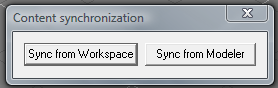
If the Bridge is Off, open a Model View, and then set the Bridge to On, tS will ask you which way you want to Syncronize. I do not know of any commands for this. Seems easy enough to control the Bridge from the Desktop.
Nevertheless the only time the Bridge Syncs, is when a Model View is opened.
If the Bridge is Off, open a Model View, and then set the Bridge to On, tS will ask you which way you want to Syncronize. I do not know of any commands for this. Seems easy enough to control the Bridge from the Desktop.
- Attachments
-

- Capture.PNG (13.02 KiB) Viewed 4289 times
-
Draise
- Captain
- Posts: 3200
- Joined: 21 Sep 2009, 19:33
- Type the number ten into the box: 0
- Location: Bogota, Colombia
Re: Q. Script/button to turn on/off TS bridge
Ah, yeah I guess a "sync update" or "sync refresh" may not be needed with the "on/off" button.
When you use the on/off button I made, the option to sync from whichever side automatically pops up whenever you turn it on.
I wanted a "sync" button to aid work, as translation and many things don't easily go to MS from the WS. I work mostly in WS so I need the MS to follow the WS, and not the other way around. Syncing fixes those issues, like translation/rotation/scale from WS to MS.
-
trueBlue
- Captain
- Posts: 5548
- Joined: 06 Jul 2009, 22:50
- Type the number ten into the box: 10
Re: Q. Script/button to turn on/off TS bridge
I suggest you read "Appendix A Seal of Good Modeling" in the tS76 Manual
-
Draise
- Captain
- Posts: 3200
- Joined: 21 Sep 2009, 19:33
- Type the number ten into the box: 0
- Location: Bogota, Colombia
Re: Q. Script/button to turn on/off TS bridge
Read it! It was a bit crazy to understand, but I think I simplified what I needed it to do. Thanks for the help!