Hi when i bring a model into modo i canot edit the mesh it
tells me there are no active layers but i can still render the model
any ideas what is wrong here
Edit in modo
-
pugman 1
- Captain
- Posts: 1555
- Joined: 21 May 2009, 19:26
- Type the number ten into the box: 0
- Location: Germany
Edit in modo
-
jamesmc
- Captain
- Posts: 1776
- Joined: 08 Jul 2009, 15:35
Re: Edit in modo
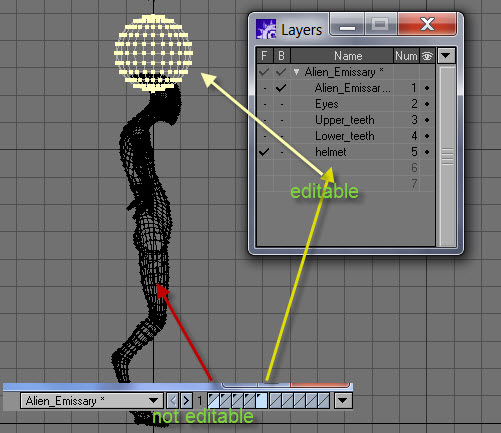
Don't know how Modo works, but in Lightwave3D, you must be in the current layer and not the background layer which is inactive.
Made a screenshot to illustrate the effect. The layers panel on the bottom shows the alien in the background layer (black) and the "to be" modified helmet in the foreground layer (white.) Of course, not knowing what Modo layers look like, this may be confusing, but I'm sure the premise might be the same.
- Attachments
-
Walk by faith, not by sight.
-
RAYMAN

- Captain
- Posts: 2547
- Joined: 21 May 2009, 18:56
Re: Edit in modo
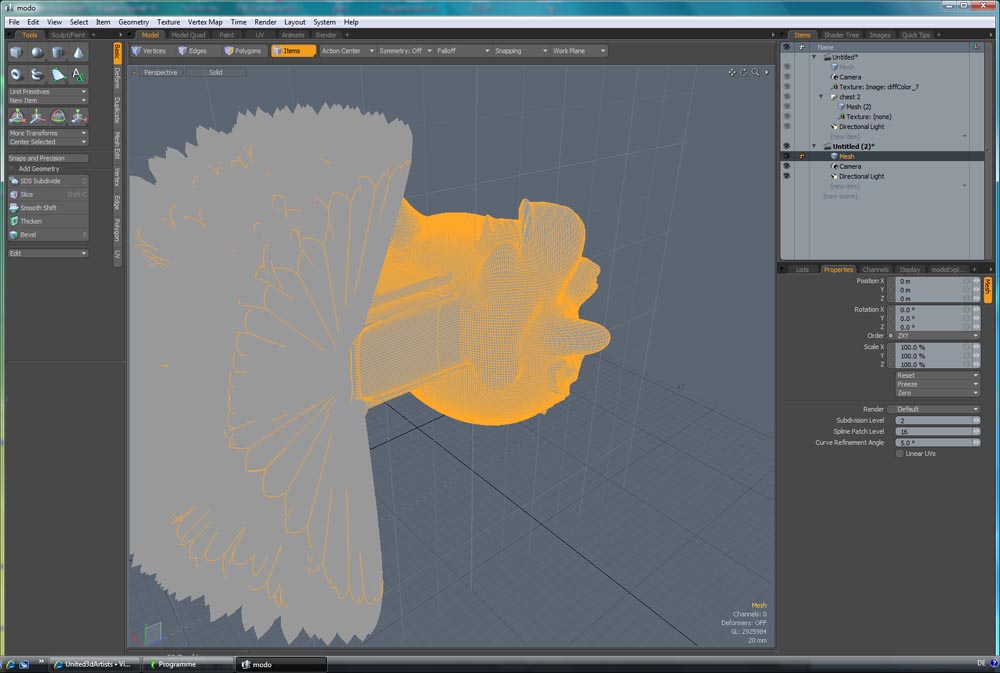
James is right you got to have the mesh selected in the stack....
here you go...
peter
- Attachments
-
-
pugman 1
- Captain
- Posts: 1555
- Joined: 21 May 2009, 19:26
- Type the number ten into the box: 0
- Location: Germany
Re: Edit in modo
Thanks you both for the help, but that i have already done it its the same in every app.
my prob was when selected it would not let me edit .I have searched all the tools nothing found
then i right clicked the model in the stack and a popup window came up , there it says change type i had to change it to mesh
now i can edit the mesh .
Thanks again Ralph