Has anyone even heard of this? And have they tried it?
It also died not long after trueSpace, but had a very cool viewport. It's free now, and available on Cnet.
What is your opinion?
(Realtime DOF, AO, GI, SSS and a NLE animation editor!)
MachStudio Pro 2
-
Draise

- Captain
- Posts: 3200
- Joined: 21 Sep 2009, 19:33
- Type the number ten into the box: 0
- Location: Bogota, Colombia
-
clintonman

- Captain
- Posts: 5659
- Joined: 21 May 2009, 21:08
- Type the number ten into the box: 0
- Location: California
Re: MachStudio Pro 2
I think I remember it. Looked at it and lost interest when I saw how closely tied to Maya it was.
-
FHembree

- Master Chief Petty Officer
- Posts: 337
- Joined: 21 Feb 2011, 17:43
- Type the number ten into the box: 9
Re: MachStudio Pro 2
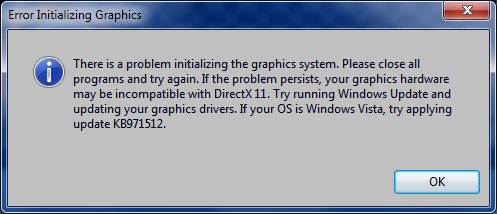
I downloaded in 2012 and I don't remember much about it probably because I could not get it to run.
I still have download and tried it again just now and I get this error message.
I still have download and tried it again just now and I get this error message.
- Attachments
-
-
Draise
- Captain
- Posts: 3200
- Joined: 21 Sep 2009, 19:33
- Type the number ten into the box: 0
- Location: Bogota, Colombia
Re: MachStudio Pro 2
I guess it still needs quite a beefy video card to work. I played with it today actually. I couldn't see much as to how it's tied into Maya, mainly you have to import your files and animations into the software to use it. It's like a standalone animation and render engine. Kinda nice.
-
Cellulo

- Lieutenant
- Posts: 927
- Joined: 27 Sep 2012, 07:48
- Type the number ten into the box: 9
- Location: France
Re: MachStudio Pro 2
I have save all files of machstudio pro on my external disk but i can't use it with my old PC , there is examples assets files with pdf tutorials, here the original page features that say it's optimized for ATI card, need directx 11 and Windows 7,Vista minimum:
Features:
http://web.archive.org/web/201108060832 ... o/features
Specs:
http://web.archive.org/web/201108070144 ... udio/specs
Some videos on youtube:
https://www.youtube.com/user/machstudiopro/videos
Features:
http://web.archive.org/web/201108060832 ... o/features
Specs:
http://web.archive.org/web/201108070144 ... udio/specs
Some videos on youtube:
https://www.youtube.com/user/machstudiopro/videos
-
clintonman
- Captain
- Posts: 5659
- Joined: 21 May 2009, 21:08
- Type the number ten into the box: 0
- Location: California
Re: MachStudio Pro 2
Oops, you're right. It had nothing to do with Maya. My problem was that I didn't have a DX11 card when I looked at it years ago.
-
Draise
- Captain
- Posts: 3200
- Joined: 21 Sep 2009, 19:33
- Type the number ten into the box: 0
- Location: Bogota, Colombia
Re: MachStudio Pro 2

Yeah.. anything to do with Maya.. I kinda refrain from.. prefer "Dead" or opensource software!
Cellulo, I would LOVE to have that tutorial material and the example material. LOVE IT! I was searching online to find it, but realized I'm probably too late. Thanks for the links on the way back! Some are working still!
I am so happy trueSpace somehow has a strong community revolving around it still.
-
Cellulo
- Lieutenant
- Posts: 927
- Joined: 27 Sep 2012, 07:48
- Type the number ten into the box: 9
- Location: France
Re: MachStudio Pro 2
I will try to recompress examples files in more compressed size files and upload them on my homepage if i have luck with filezilla, because sometime it fail to send files  . Normally i have all examples files founded in the page tutorial.
EDIT: Hey Draise, here the material tutorial with files and pdf: MSP-TutorialAssets-Materials-v1.4.rar.
. Normally i have all examples files founded in the page tutorial.EDIT: Hey Draise, here the material tutorial with files and pdf: MSP-TutorialAssets-Materials-v1.4.rar.
-
Draise
- Captain
- Posts: 3200
- Joined: 21 Sep 2009, 19:33
- Type the number ten into the box: 0
- Location: Bogota, Colombia
Re: MachStudio Pro 2
Hey! I've been playing with it, very cool.
I've had trouble installing it on my computer, but it worked like a charm on my Nvidia work machine, even with an old card. Very nice, like a super viewport, unlike anything I've seen, except maybe in Unreal or something. Not bad for 5 years dead...
Man, I love Zombies.
I've had trouble installing it on my computer, but it worked like a charm on my Nvidia work machine, even with an old card. Very nice, like a super viewport, unlike anything I've seen, except maybe in Unreal or something. Not bad for 5 years dead...
Man, I love Zombies.
-
v3rd3
- Lieutenant Commander
- Posts: 1191
- Joined: 21 May 2009, 20:04
Re: MachStudio Pro 2
I downloaded all of the documentation I could get my hands on after they closed shop... here is a link to a pic of the index of what I have...
Let me know if any of you are interested.
http://prntscr.com/69fpbf
Let me know if any of you are interested.
http://prntscr.com/69fpbf
-
Cellulo
- Lieutenant
- Posts: 927
- Joined: 27 Sep 2012, 07:48
- Type the number ten into the box: 9
- Location: France
Re: MachStudio Pro 2
Two wrong things with Machstudio pro, there is no motion blur and particles.
-
Draise
- Captain
- Posts: 3200
- Joined: 21 Sep 2009, 19:33
- Type the number ten into the box: 0
- Location: Bogota, Colombia
Re: MachStudio Pro 2
Yeah...... it is lacking and you can see the age. I just found out Unreal Engine is now free, so.. will probably jump on that wagon instead of this one! Though, this is very nice for some quick things!
-
Draise
- Captain
- Posts: 3200
- Joined: 21 Sep 2009, 19:33
- Type the number ten into the box: 0
- Location: Bogota, Colombia
Re: MachStudio Pro 2
Wow, found out that the shaders in MachStudio compiles A LOT faster than Unreal. My lowly dual core machine spent minutes, if not up to the 20 to 30 minutes compiling shaders in Unreal. They tell me an SSD optimized system install, 16 gigs of ram and the latest CPU will drop it to mere seconds.. but I do not have that kind of machine, even at work. .. making editing and previewing materials and shaders utterly irritating. (though, when compiled, works like a charm!)
Mach is immediate. And I still get the GI and AO that unreal gives me. Only thing missing is bloom and lens flares and motion blur and particles - but that can be added in post if needed.
Mach is immediate. And I still get the GI and AO that unreal gives me. Only thing missing is bloom and lens flares and motion blur and particles - but that can be added in post if needed.
-
Draise
- Captain
- Posts: 3200
- Joined: 21 Sep 2009, 19:33
- Type the number ten into the box: 0
- Location: Bogota, Colombia
Re: MachStudio Pro 2
Wahoo! Found out that the 2011 addon for Softimage to export directly to Machstudio works like a charm. Now.. I can animate and make my assets in another dead software to this dead software to use modern tech with zombies!
I don't know... what the legalities of it all is.. but.. I assume here it won't be an issue to use EOL'd software.
EDIT: Abandonware is what the term would be officially. I don't know about using Softimage more, after April 2016, or if they will change their terms and conditions for it, or even leave it free (here's hoping!)... but it's good to know that if a company shut down, the copyright still stands, but usually isn't enforced - specially if they left it free - in Caligari's or StudioGPU's case.
Now.. Autodesk, hopefully they won't stay as Autodicks with Softimage.
I don't know... what the legalities of it all is.. but.. I assume here it won't be an issue to use EOL'd software.
EDIT: Abandonware is what the term would be officially. I don't know about using Softimage more, after April 2016, or if they will change their terms and conditions for it, or even leave it free (here's hoping!)... but it's good to know that if a company shut down, the copyright still stands, but usually isn't enforced - specially if they left it free - in Caligari's or StudioGPU's case.
Now.. Autodesk, hopefully they won't stay as Autodicks with Softimage.
-
RAYMAN

- Captain
- Posts: 2547
- Joined: 21 May 2009, 18:56
Re: MachStudio Pro 2
You use Softimage and Machstudio Pro 2 and Truespace... all abandonware... I hope you dont get charged of necrophilia ! LOL !!Draise wrote:Wahoo! Found out that the 2011 addon for Softimage to export directly to Machstudio works like a charm. Now.. I can animate and make my assets in another dead software to this dead software to use modern tech with zombies!
I don't know... what the legalities of it all is.. but.. I assume here it won't be an issue to use EOL'd software.
EDIT: Abandonware is what the term would be officially. I don't know about using Softimage more, after April 2016, or if they will change their terms and conditions for it, or even leave it free (here's hoping!)... but it's good to know that if a company shut down, the copyright still stands, but usually isn't enforced - specially if they left it free - in Caligari's or StudioGPU's case.
Now.. Autodesk, hopefully they won't stay as Autodicks with Softimage.

-
Draise
- Captain
- Posts: 3200
- Joined: 21 Sep 2009, 19:33
- Type the number ten into the box: 0
- Location: Bogota, Colombia
Re: MachStudio Pro 2
Heh, necrophilia. 
I have played a little with Machstudio Pro 2 now, having fun. Not full on scenes.. but I've learnt how to export animation and things from Softimage to the software. The graphics cards at work are not so good, but my home one can export the full HD at quite a high quality. I can imagine getting a Titan X or Quadro 6000 and this would fly and be.. quite nice. Or even just a GTX 980 or something.
I played a lot with the voxel GI and screen space GI and it's great. The screenspace AO is pretty good. It's great to see light bouncing and bleeding all over the place in realtime. Or.. near realtime (my computer is slow).
The animation exports flawlessly. The camera effects are great, being in HDR and all, the DOF is not that intuitive, but it's nice also. if not you can export the Depth pass and DOF pass to get the camera lens effects in post if needed (Blender is great for that).
I am still upping and upping and testing and testing. I think I will build a large heavy scene and see how far up can I make the quality and the like. But first I'm trying to find the optimum quality for small things, basic animations, etc. I think it will all depend on each computer or graphics card, but it's still nice for long animations. Once you've done all the fiddling, a few seconds per HD frame is certainly a winner over minutes for similar quality using traditional render engines.
Here is my test scene:

I have played a little with Machstudio Pro 2 now, having fun. Not full on scenes.. but I've learnt how to export animation and things from Softimage to the software. The graphics cards at work are not so good, but my home one can export the full HD at quite a high quality. I can imagine getting a Titan X or Quadro 6000 and this would fly and be.. quite nice. Or even just a GTX 980 or something.
I played a lot with the voxel GI and screen space GI and it's great. The screenspace AO is pretty good. It's great to see light bouncing and bleeding all over the place in realtime. Or.. near realtime (my computer is slow).
The animation exports flawlessly. The camera effects are great, being in HDR and all, the DOF is not that intuitive, but it's nice also. if not you can export the Depth pass and DOF pass to get the camera lens effects in post if needed (Blender is great for that).
I am still upping and upping and testing and testing. I think I will build a large heavy scene and see how far up can I make the quality and the like. But first I'm trying to find the optimum quality for small things, basic animations, etc. I think it will all depend on each computer or graphics card, but it's still nice for long animations. Once you've done all the fiddling, a few seconds per HD frame is certainly a winner over minutes for similar quality using traditional render engines.
Here is my test scene:
-
Draise
- Captain
- Posts: 3200
- Joined: 21 Sep 2009, 19:33
- Type the number ten into the box: 0
- Location: Bogota, Colombia
Re: MachStudio Pro 2
HAH!
Found a free legal way of using Mach Studio Pro 2 - using the XSI 7.5 export plugin in XSI Mod Tool 7.5 (free). All legal - and you get all the awesome animation tools of Softimage - just.. no ICE or all the awesome stuff of the more modern SI systems. But still, it's a great tool combination, free, and powerful - and zombified and timeless.
Found a free legal way of using Mach Studio Pro 2 - using the XSI 7.5 export plugin in XSI Mod Tool 7.5 (free). All legal - and you get all the awesome animation tools of Softimage - just.. no ICE or all the awesome stuff of the more modern SI systems. But still, it's a great tool combination, free, and powerful - and zombified and timeless.
-
Draise
- Captain
- Posts: 3200
- Joined: 21 Sep 2009, 19:33
- Type the number ten into the box: 0
- Location: Bogota, Colombia
Re: MachStudio Pro 2
Though.. I can't get XSI Mod Tool to work on Windows 8.
-
Cellulo
- Lieutenant
- Posts: 927
- Joined: 27 Sep 2012, 07:48
- Type the number ten into the box: 9
- Location: France
Re: MachStudio Pro 2
Have you try in compatibility mode windows XP ?
-
Draise
- Captain
- Posts: 3200
- Joined: 21 Sep 2009, 19:33
- Type the number ten into the box: 0
- Location: Bogota, Colombia
Re: MachStudio Pro 2
I have tried, but I think the directX drivers are too new or something.
Motion Blur:
I did find out how to export a Velocity 8bit image with a render from Mach Studio Pro, then using Blender and some clever multiplication and RB and GA channel hookup, create motion blur in Blender Composite. Took me a few days trying to find a way....I feel like I've wasted my life, but happy I found it.
I could then motion blur the shadows in another pass with MFlowBlur, the Avisynth way of doing it. Composite that in later...
Motion Blur:
I did find out how to export a Velocity 8bit image with a render from Mach Studio Pro, then using Blender and some clever multiplication and RB and GA channel hookup, create motion blur in Blender Composite. Took me a few days trying to find a way....I feel like I've wasted my life, but happy I found it.
I could then motion blur the shadows in another pass with MFlowBlur, the Avisynth way of doing it. Composite that in later...