workspaceLayers2 script works without the need for modelside and is more stable and has better control than the previous version(which did required modelside).
It is limited to 8 layers at this time.
Works with the unselectable script to lock and unlock objects
It's faster and has better wireframe color control.
http://www.clintons3d.com/plugins/trues ... index.html"
look for it in the "layers(2) for truespace7.61" section
Workspace Only Layers System
-
clintonman

- Captain
- Posts: 5659
- Joined: 21 May 2009, 21:08
- Type the number ten into the box: 0
- Location: California
Workspace Only Layers System
-
Saul
- Senior Chief Petty Officer
- Posts: 308
- Joined: 22 May 2009, 16:50
Re: Workspace Only Layers System
Hi Clintonman
Cant get this to load! Drag from library into LE/workSpace? Double click? Neither show a button in UI.
How to make it work?
TIA
Cant get this to load! Drag from library into LE/workSpace? Double click? Neither show a button in UI.
How to make it work?
TIA
-
clintonman
- Captain
- Posts: 5659
- Joined: 21 May 2009, 21:08
- Type the number ten into the box: 0
- Location: California
Re: Workspace Only Layers System
It was a bug with the installer.Saul wrote:Hi Clintonman
Cant get this to load! Drag from library into LE/workSpace? Double click? Neither show a button in UI.
How to make it work?
TIA
 It's fixed now.
  You can load from file menu or drag and drop into LE or 3d window.
-
Peter
- Senior Chief Petty Officer
- Posts: 170
- Joined: 18 Apr 2010, 15:18
- Type the number ten into the box: 0
- Location: Texas
Re: Workspace Only Layers System
Thanks Clintonman.
It works great and it is fast. I will put it to good use. It's great that you can do all this neat stuff without changing the TS source code. I use many of your plugins in my workflow.
It works great and it is fast. I will put it to good use. It's great that you can do all this neat stuff without changing the TS source code. I use many of your plugins in my workflow.
a day without orange juice is like... a day without orange juice
-
Saul
- Senior Chief Petty Officer
- Posts: 308
- Joined: 22 May 2009, 16:50
Re: Workspace Only Layers System
Hi clintonMan
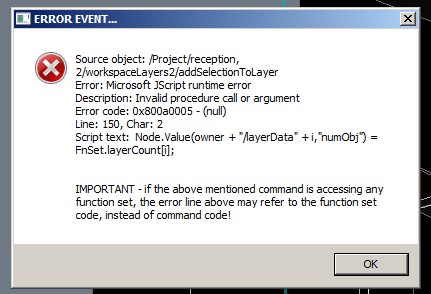
I am getting following error when trying to open the workspace layers plug-in.
It seems to work fine in simple scene, few cubes for instance, this scene is not much more complicated.
I am getting following error when trying to open the workspace layers plug-in.
It seems to work fine in simple scene, few cubes for instance, this scene is not much more complicated.
- Attachments
-
-
clintonman
- Captain
- Posts: 5659
- Joined: 21 May 2009, 21:08
- Type the number ten into the box: 0
- Location: California
Re: Workspace Only Layers System
I think the problem is too many layers to start with. The code needs a check to be sure there are 8 layers or less when it runs that function. I'll see about fixing it tonight.Saul wrote:Hi clintonMan
I am getting following error when trying to open the workspace layers plug-in.
It seems to work fine in simple scene, few cubes for instance, this scene is not much more complicated.
-
clintonman
- Captain
- Posts: 5659
- Joined: 21 May 2009, 21:08
- Type the number ten into the box: 0
- Location: California
Re: Workspace Only Layers System
here's a quick fix:
This should solve the script crashing. There are a few more changes I want to make before making an official new release.
This should solve the script crashing. There are a few more changes I want to make before making an official new release.
- Attachments
-
- Workspace Layers 2 auto-installer.zip
- (72.94 KiB) Downloaded 256 times
-
Saul
- Senior Chief Petty Officer
- Posts: 308
- Joined: 22 May 2009, 16:50
Re: Workspace Only Layers System
Hi Clintonman
I am getting very strange results with this!
I am having objects jump between layers......i think it may be to do with 3d encapsulated objects and/or copied objects, i will investigate further.
I am getting very strange results with this!
I am having objects jump between layers......i think it may be to do with 3d encapsulated objects and/or copied objects, i will investigate further.