New Vray Glass Bug Workarround

User avatar
Prodigy
Site Admin
Posts: 957
Joined: 21 May 2009, 14:46
Type the number ten into the box: 0
Location: Uruguay

New Vray Glass Bug Workarround

Post by Prodigy »

Ok guys! finally yesterday i found another workaround for the glass~GI bug.. :bananamouse:

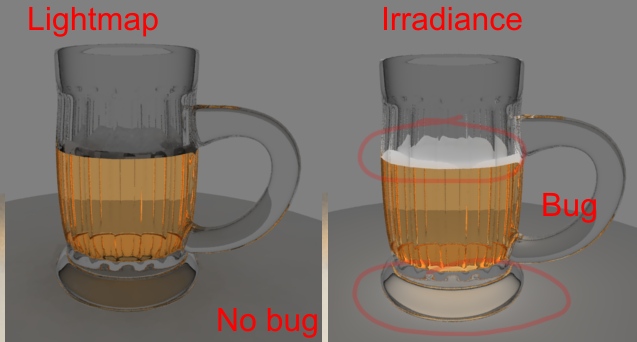
This is more simple than the other i found.. just go to your vray panel, inside your GI settings change your primary GI set Lightmap to Irradiance. Secondry Gi also to Lightmap.. *you can leave the second bounce to direct cos the second bounce has less intensity than the first bounce.

I know is another kind of gi calculation but at least if you need to render glass in a realistic way you can try to use this method...

Cheers! :)

:bananacheers:
testet.jpg
๑۩۞۩๑ prodigy ๑۩۞۩๑
User avatar
Johny
Petty Officer First Class
Posts: 53
Joined: 21 May 2009, 17:14

Re: New Vray Glass Bug Workarround

Post by Johny »

Thanks for the hint Prodigy! :bananacheers:

How about try to make tS Vray render glass as shown on this link http://blender.bevice.ru/forum/viewtopic.php?t=209"

You can donwload scene file on Blend format and then import it to tS via OBJ format. :worship:
Image
User avatar
spacekdet
Captain
Posts: 1810
Joined: 27 May 2009, 15:00
Type the number ten into the box: 10
Location: On the day shift at the Utility Muffin Research Kitchen

Re: New Vray Glass Bug Workarround

Post by spacekdet »

I don't get it.
The one you have marked 'bug' looks better than the one marked 'no bug'.

Who wants black foam on their beer? bleech!

Sure they aren't mixed up?
User avatar
Prodigy
Site Admin
Posts: 957
Joined: 21 May 2009, 14:46
Type the number ten into the box: 0
Location: Uruguay

Re: New Vray Glass Bug Workarround

Post by Prodigy »

If you ask about the Right foam compared with the left one, yes im agree that looks better.

But you know what? that is a bug. The foam on the right is white cos the glass emit light and makes the foam brighten.

Here is another problem. Ts Vray has no option to exclude objects from the GI calculation. So for Vray, the Glass is equal to a Solid Rock that blocks the gi light.. That's why the left foam is dark. cos there's no light that make the foam brighten and cos i use glass you can see through the material..

There's just 1 solution for this..

Make the Glass invisible, Save the Gi calculation, make visible again the glass and load the GI calculation.
Tricky but is the ONLY way to solve this riddle..

Sad, cos i request exclude Gi calc since 7.11

Another good example of this problem is.
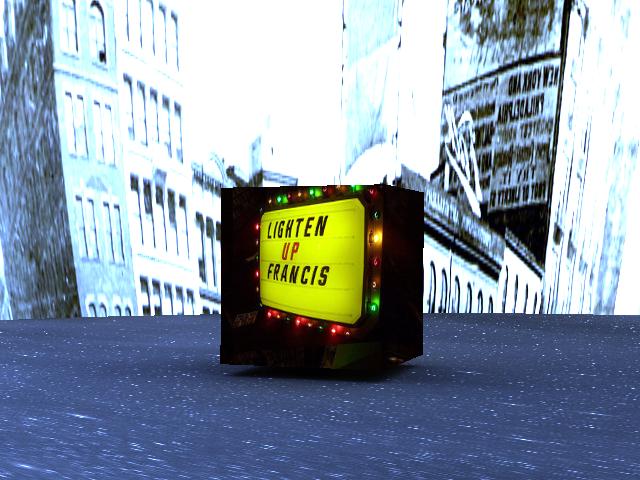
Add a Skydome over your Vray scene. ?You will see how there's no GI.. Cos is blocked by the skydome object..
๑۩۞۩๑ prodigy ๑۩۞۩๑
User avatar
Johny
Petty Officer First Class
Posts: 53
Joined: 21 May 2009, 17:14

Re: New Vray Glass Bug Workarround

Post by Johny »

Thanks for the hint again Prodigy! :)

Here is my render testing

(irradiance no caustics ; 1st bounce = 0.5)
Image


(irradiance plus caustics ; 1st bounce = 0.5)
Image


(lightmap no caustics ; 1st bounce = 1.0)
Image

(lightmap plus caustics ; 1st bounce = 1.0)
Image

test scene can download on below link (required tS7.6 with Vray)
http://rapidshare.com/files/238982530/glass.zip.html"

Thanks!
Image
User avatar
spacekdet
Captain
Posts: 1810
Joined: 27 May 2009, 15:00
Type the number ten into the box: 10
Location: On the day shift at the Utility Muffin Research Kitchen

Re: New Vray Glass Bug Workarround

Post by spacekdet »

Prodigy wrote:Add a Skydome over your Vray scene. ?You will see how there's no GI.. Cos is blocked by the skydome object..
Hmm, you sure about that?
... just running some tests tonight...
I get GI if I turn off shadowcasting on the dome object.
It couldn't be that simple, could it?
Attachments
gi_under_dome.jpg
User avatar
Prodigy
Site Admin
Posts: 957
Joined: 21 May 2009, 14:46
Type the number ten into the box: 0
Location: Uruguay

Re: New Vray Glass Bug Workarround

Post by Prodigy »

Yes, but that's because you increased the size of a sphere and then you can see only that the internal faces that are flipped..

That's why the light pass.. but try to do that flipping all the faces, or subtracting one sphere on other..

Do that also with a glass shader..

mmm i have an idea.. :lol:
๑۩۞۩๑ prodigy ๑۩۞۩๑
User avatar
spacekdet
Captain
Posts: 1810
Joined: 27 May 2009, 15:00
Type the number ten into the box: 10
Location: On the day shift at the Utility Muffin Research Kitchen

Re: New Vray Glass Bug Workarround

Post by spacekdet »

Sorry to continue in an off-topic direction...but as far as i know, I didn't do any face-flipping at all.
I ticked 'backside' so that the inside faces would also render.
Wouldn't that in effect make it double-sided?
Not that it would matter if the outside of the dome rendered since you'd never see it anyway.

Hope your idea works out.
User avatar
Prodigy
Site Admin
Posts: 957
Joined: 21 May 2009, 14:46
Type the number ten into the box: 0
Location: Uruguay

Re: New Vray Glass Bug Workarround

Post by Prodigy »

Imagine you made a small sphere.. the faces are looking to its normal right? ok if you watch from the interior of that sphere, the faces still pointing to its normal instead to you that are in the "center" of the sphere.. i mean, from your point of view the faces are flipped..

If you flip the faces to the interior? the GI doesn't pass through the sphere..

So that was interesting cos i never tried that before :) so there's a solution for skydomes hehehehe

Knowing that, i thought this.. if gi pass through inverted faces, what about invert the faces of a glass material? in theory should work..

I still need todo some tests..
๑۩۞۩๑ prodigy ๑۩۞۩๑
User avatar
spacekdet
Captain
Posts: 1810
Joined: 27 May 2009, 15:00
Type the number ten into the box: 10
Location: On the day shift at the Utility Muffin Research Kitchen

Re: New Vray Glass Bug Workarround

Post by spacekdet »

I turned on backfaces so that in effect it's now two sided... if I'm inside or outside it doesnt matter, I can still see the rendered sphere.
I think what's allowing the GI to pass thru the sphere is that I've turned off 'cast shadows' for the sphere.

Which wouldn't really work for glass, since you would want it to cast shadows.
User avatar
Prodigy
Site Admin
Posts: 957
Joined: 21 May 2009, 14:46
Type the number ten into the box: 0
Location: Uruguay

Re: New Vray Glass Bug Workarround

Post by Prodigy »

We are not understanding..

Inside the Rar, there is 2 scenes..
The 1.
Is a skydome sphere with GI enabled..check the sphere has the faces looking to the outside.. so from the interior those faces are transparent..

In this case..yes seems the GI pass through to the interior. cast shadows or receive shadows doesn't affect the GI.. just work if you use local lights for example..ray traced lights.

Now case 2
I flipped all the skydome face.Now you can see the texture or color from the sphere in real time.. See GI is enabled also, try to render..

You will see a black scene.. that's because now the global illumination cant pass through the sphere.. in other words is blocked by the skydome

So what we found here is the GI can pass through the faces but it's blocked if the face are flipped..
๑۩۞۩๑ prodigy ๑۩۞۩๑
User avatar
spacekdet
Captain
Posts: 1810
Joined: 27 May 2009, 15:00
Type the number ten into the box: 10
Location: On the day shift at the Utility Muffin Research Kitchen

Re: New Vray Glass Bug Workarround

Post by spacekdet »

It's not whether the faces are flipped ... it's because I turned off shadowcasting on the skydome that allows the GI to work.

Just like using an infinite light and a skydome. If the dome is casting shadows it will block the light.
Whether it is single sided or double sided doesn't matter.
User avatar
Prodigy
Site Admin
Posts: 957
Joined: 21 May 2009, 14:46
Type the number ten into the box: 0
Location: Uruguay

Re: New Vray Glass Bug Workarround

Post by Prodigy »

LOL Space! :lol:

If you add any Raytraced light like infinite, spot or anything else.. you will not see GI (Global Illumination) you will see just the light from your light and the bounces from these rays..

The way to test if GI pass through an object is use no lights on your scene.

There's no way to make GI transparent for objects..

Also i found the GI doesn't pass through an object with faces flipped.. the color came from the color of the sphere and not from the GI Color.. Create a red sphere, and use a yellow GI Color.. the color from the GI Will be RED and non Yellow..

So we are screwed it.. or use the Save GI Load GI workaround.. :(
๑۩۞۩๑ prodigy ๑۩۞۩๑
User avatar
spacekdet
Captain
Posts: 1810
Joined: 27 May 2009, 15:00
Type the number ten into the box: 10
Location: On the day shift at the Utility Muffin Research Kitchen

Re: New Vray Glass Bug Workarround

Post by spacekdet »

User avatar
Prodigy
Site Admin
Posts: 957
Joined: 21 May 2009, 14:46
Type the number ten into the box: 0
Location: Uruguay

Re: New Vray Glass Bug Workarround

Post by Prodigy »

Ok SK :P

Using your scene. Now change the color of the GI to RED. and try again..
The result will be the same Grayed render..

If you change the texture for a red or for example a panoramic night texture you will see how the GI turn to a more darker gI or to RED :bananadevil:

The point is the sphere IS emitting the GI , if you add a texture acts like hdri and if you add color acts like GI color but is NOT the GI color or the HDRI from Vray's panel.

Try that and let me if it works for you.
๑۩۞۩๑ prodigy ๑۩۞۩๑
User avatar
Prodigy
Site Admin
Posts: 957
Joined: 21 May 2009, 14:46
Type the number ten into the box: 0
Location: Uruguay

Re: New Vray Glass Bug Workarround

Post by Prodigy »

ha and i miss to explain the HDRI orange tone.

I think the HDRI colored the sphere, if you delete the sphere you should see a more "orange" effect.
Ill try your scene.. Thanks
๑۩۞۩๑ prodigy ๑۩۞۩๑
Benji
Senior Chief Petty Officer
Posts: 280
Joined: 22 May 2009, 01:23

Re: New Vray Glass Bug Workarround

Post by Benji »

Great work as usual, Prodigy. Thanks for the tips. :bananaclaus:
User avatar
trueBlue
Captain
Posts: 5548
Joined: 06 Jul 2009, 22:50
Type the number ten into the box: 10

Re: New Vray Glass Bug Workarround

Post by trueBlue »

Can somebody post the example glass scene from Johny here?

Test Scene Post:
vi ... p=609#p609"

Also is this workaround for Vray1.53 for tS7.6 or Vray1.54 for tsS7.61B8?

Return to “Bugs and Workarounds”