
http://www.clintons3d.com/plugins/trues ... index.html"
Workspace Layers version 3
-
clintonman

- Captain
- Posts: 5659
- Joined: 21 May 2009, 21:08
- Type the number ten into the box: 0
- Location: California
Workspace Layers version 3
This is an improved layers for workspace. It has 24 layers instead of 8, uses menus instead of buttons and has a few other improvements. You can get it on this page about 3/4 the way down the page below the model/workspace and the older workspace versions.
http://www.clintons3d.com/plugins/trues ... index.html"
http://www.clintons3d.com/plugins/trues ... index.html"
-
Draise

- Captain
- Posts: 3200
- Joined: 21 Sep 2009, 19:33
- Type the number ten into the box: 0
- Location: Bogota, Colombia
Re: Workspace Layers version 3
IT'S CHRISTMAS! Thanks Clinton!!!!!!!!!!!!
-
Steinie

- Captain
- Posts: 2958
- Joined: 21 May 2009, 17:38
- Type the number ten into the box: 10
Re: Workspace Layers version 3
Fan-tastic! 
-
Peter
- Senior Chief Petty Officer
- Posts: 170
- Joined: 18 Apr 2010, 15:18
- Type the number ten into the box: 0
- Location: Texas
Re: Workspace Layers version 3
Thank you!
Grabbing it now...
Grabbing it now...
a day without orange juice is like... a day without orange juice
-
Draise
- Captain
- Posts: 3200
- Joined: 21 Sep 2009, 19:33
- Type the number ten into the box: 0
- Location: Bogota, Colombia
Re: Workspace Layers version 3
Found it doesn't automatically assign encapsulated objects to a layer, so you need to assign each encapusalted object inside the root encapusalted object to the layer before the layer plugin works.
-
clintonman
- Captain
- Posts: 5659
- Joined: 21 May 2009, 21:08
- Type the number ten into the box: 0
- Location: California
Re: Workspace Layers version 3
Update Dec 10 2011:
Works with grouped(3d encapsulated) nodes
I found out that if you group lights that start with the same layer there will be spare Object Render Attribute nodes inside them. A button was added "clean ORA nodes" to delete them in the scene. They don't hurt anything but they do throw the counts off and stops the lights from respecting the layer colors etc.
The encapsulator will add to the count, so if you group 2 cubes together it will count the 2 cubes and the group.
Works with grouped(3d encapsulated) nodes
I found out that if you group lights that start with the same layer there will be spare Object Render Attribute nodes inside them. A button was added "clean ORA nodes" to delete them in the scene. They don't hurt anything but they do throw the counts off and stops the lights from respecting the layer colors etc.
The encapsulator will add to the count, so if you group 2 cubes together it will count the 2 cubes and the group.
-
Draise
- Captain
- Posts: 3200
- Joined: 21 Sep 2009, 19:33
- Type the number ten into the box: 0
- Location: Bogota, Colombia
Re: Workspace Layers version 3
SWEEEEEEEEET. I'll check it out. Thanks again Clinton!

-
Draise
- Captain
- Posts: 3200
- Joined: 21 Sep 2009, 19:33
- Type the number ten into the box: 0
- Location: Bogota, Colombia
Re: Workspace Layers version 3
Hi! Clinton.. I have a question. When I have a hidden layer in a scene, and then hit refresh (like in a load), the layer remains hidden, but in the menu it says it's visible. I have to switch it to "hidden" then "visible" to toggle it's visibility again.
Is that normal?
Is that normal?
-
clintonman
- Captain
- Posts: 5659
- Joined: 21 May 2009, 21:08
- Type the number ten into the box: 0
- Location: California
Re: Workspace Layers version 3
Probably a bug. I'll take a look in a few days. This weekend I need to fix a problem with my after effects plugin installer.Draise wrote:Hi! Clinton.. I have a question. When I have a hidden layer in a scene, and then hit refresh (like in a load), the layer remains hidden, but in the menu it says it's visible. I have to switch it to "hidden" then "visible" to toggle it's visibility again.
Is that normal?
-
clintonman
- Captain
- Posts: 5659
- Joined: 21 May 2009, 21:08
- Type the number ten into the box: 0
- Location: California
Re: Workspace Layers version 3
It's fixed.
February 4, 2012
Fixed display mode indicators in the drop down menus for each layer.
Near the bottom of the page past the modelspace linked and older versions:
http://www.clintons3d.com/plugins/trues ... index.html"
February 4, 2012
Fixed display mode indicators in the drop down menus for each layer.
Near the bottom of the page past the modelspace linked and older versions:
http://www.clintons3d.com/plugins/trues ... index.html"
-
Draise
- Captain
- Posts: 3200
- Joined: 21 Sep 2009, 19:33
- Type the number ten into the box: 0
- Location: Bogota, Colombia
Re: Workspace Layers version 3
You're my hero. Thanks. I will use it immediately.
-
Draise
- Captain
- Posts: 3200
- Joined: 21 Sep 2009, 19:33
- Type the number ten into the box: 0
- Location: Bogota, Colombia
Re: Workspace Layers version 3
Sorry Clinton, but I've bumped into a number of errors similar to this one with some scenes. One save it's working fine, then the next time I open the scene, there is this error upon trying to use the layers.

I was thinking to upload the scene file, but apparently it's above 60 MB.
I was thinking to upload the scene file, but apparently it's above 60 MB.
-
clintonman
- Captain
- Posts: 5659
- Joined: 21 May 2009, 21:08
- Type the number ten into the box: 0
- Location: California
Re: Workspace Layers version 3
This must be the weekend where everyone finds bugs in my scripts.Draise wrote:Sorry Clinton, but I've bumped into a number of errors similar to this one with some scenes. One save it's working fine, then the next time I open the scene, there is this error upon trying to use the layers.
I was thinking to upload the scene file, but apparently it's above 60 MB.

I made a fix and it's up for download.
-
Draise
- Captain
- Posts: 3200
- Joined: 21 Sep 2009, 19:33
- Type the number ten into the box: 0
- Location: Bogota, Colombia
Re: Workspace Layers version 3
I still use your layers like mad! But I am finding a small inconsistency with Encapusalted objects. The layer will only register one object child within the encapsulated family. The other children within the parent have to be selected and "add to layer" for it to register in the layer system.
This is also true of 3D encapsulated objects.
I'm using the version from April, 2014
Sorry for pushing you to make this that much better!
This is also true of 3D encapsulated objects.
I'm using the version from April, 2014
Sorry for pushing you to make this that much better!
-
clintonman
- Captain
- Posts: 5659
- Joined: 21 May 2009, 21:08
- Type the number ten into the box: 0
- Location: California
Re: Workspace Layers version 3
Update: Feb 2015
Works with grouped items
Replacement for Show selected object script that preserves the layer number when a hidden object is shown
Ignores the incompatible hair render attributes node
Works with grouped items
Replacement for Show selected object script that preserves the layer number when a hidden object is shown
Ignores the incompatible hair render attributes node
-
Draise
- Captain
- Posts: 3200
- Joined: 21 Sep 2009, 19:33
- Type the number ten into the box: 0
- Location: Bogota, Colombia
Re: Workspace Layers version 3
Beautiful. I'll update now. Thanks Clinton.
-
clintonman
- Captain
- Posts: 5659
- Joined: 21 May 2009, 21:08
- Type the number ten into the box: 0
- Location: California
Re: Workspace Layers version 3
Updates March 2020:
fixed bug with 2d encapsulated objects
forgotten update from nov 2017:
visibility and locking status shown
uses webui script based selection locking
removed "enableLocking" option - lives in webui scripts
replaced 3 mutually exlusive states visible, hidden and locked with just visible and locked so object can be both invisible and locked
fix camera and spotlight visibility
cameras and lights move to layer 1 when removed from other layers
count of objects no(t?) in a layer fixed
selection locking works with the marque selection scripts
fixed bug with 2d encapsulated objects
forgotten update from nov 2017:
visibility and locking status shown
uses webui script based selection locking
removed "enableLocking" option - lives in webui scripts
replaced 3 mutually exlusive states visible, hidden and locked with just visible and locked so object can be both invisible and locked
fix camera and spotlight visibility
cameras and lights move to layer 1 when removed from other layers
count of objects no(t?) in a layer fixed
selection locking works with the marque selection scripts
-
trueBlue

- Captain
- Posts: 5548
- Joined: 06 Jul 2009, 22:50
- Type the number ten into the box: 10
Re: Workspace Layers version 3
Think there may be a couple of issues with your Workspace Layers
1.) Replacing the modified Show script inside tS will not survive a Context Reset, unless you also install the Show.xml in the tS directory.
Move the Model status inside the Copy Show statement
Is this for the Standalone version only?
2.) The Show script needs to be updated. Hopefully to the one that does not disconnect the Object hider.
I propose to include this updated Show script in the Updates.
1.) Replacing the modified Show script inside tS will not survive a Context Reset, unless you also install the Show.xml in the tS directory.
Move the Model status inside the Copy Show statement
Is this for the Standalone version only?
2.) The Show script needs to be updated. Hopefully to the one that does not disconnect the Object hider.
I propose to include this updated Show script in the Updates.
-
clintonman
- Captain
- Posts: 5659
- Joined: 21 May 2009, 21:08
- Type the number ten into the box: 0
- Location: California
Re: Workspace Layers version 3
1. Doesn't matter if it survives context reset or not since it takes care of itself.trueBlue wrote: 24 Jun 2020, 12:50 Think there may be a couple of issues with your Workspace Layers
1.) Replacing the modified Show script inside tS will not survive a Context Reset, unless you also install the Show.xml in the tS directory.
Move the Model status inside the Copy Show statement
Is this for the Standalone version only?
2.) The Show script needs to be updated. Hopefully to the one that does not disconnect the Object hider.
I propose to include this updated Show script in the Updates.
"Move the Model status inside the Copy Show statement" - I don't know what that means.
From website, "This version does not connect to modelside and is limited to 24 layers total." It is workspace only as far as layers are concerned, meaning layer information does not pass through the bridge.
2. Yep, it will need to be updated to work with your new Show/Hide system and maybe it would be a good idea to include the updated Show but then it has the disadvantage of having 2 different versions of the show script, one for std and one for full version. The changes to the show are not for the full version of trueSpace.
The functions in the Visibility Function Set also need to be changed to be compatible with the new changes.
-
trueBlue
- Captain
- Posts: 5548
- Joined: 06 Jul 2009, 22:50
- Type the number ten into the box: 10
Re: Workspace Layers version 3
Like this:clintonman wrote: 24 Jun 2020, 15:151. Doesn't matter if it survives context reset or not since it takes care of itself.trueBlue wrote: 24 Jun 2020, 12:50 Think there may be a couple of issues with your Workspace Layers
1.) Replacing the modified Show script inside tS will not survive a Context Reset, unless you also install the Show.xml in the tS directory.
Move the Model status inside the Copy Show statement
Is this for the Standalone version only?
2.) The Show script needs to be updated. Hopefully to the one that does not disconnect the Object hider.
I propose to include this updated Show script in the Updates.
"Move the Model status inside the Copy Show statement" - I don't know what that means.
From website, "This version does not connect to modelside and is limited to 24 layers total." It is workspace only as far as layers are concerned, meaning layer information does not pass through the bridge.
2. Yep, it will need to be updated to work with your new Show/Hide system and maybe it would be a good idea to include the updated Show but then it has the disadvantage of having 2 different versions of the show script, one for std and one for full version. The changes to the show are not for the full version of trueSpace.
The functions in the Visibility Function Set also need to be changed to be compatible with the new changes.
Code: Select all
	//fix show command for standalone version so layer numbers are preserved
	if(Node.Exists("/Scripts/Commands/Show") && !Node.Exists("/Project/TSScene")) {
		Node.Delete("/Scripts/Commands/Show");
		Node.Copy(owner + "/Show","/Scripts/Commands");
	if(!Node.Exists("Status Line"))
		return;
	if(!Node.ConExists("Status Line", "Model"))
		Node.ConCreate("Status Line", "Model", "string", 4);
	Node.Value("Status Line", "Model") = "Show script overwritten for proper layer number handling.";
	}
Wonder if you could include the Hide and Show scripts inside the workspacelayers3.RsObj and just run from within?
I could be wrong but it looks like the having the layerIndex in the Show/Hide scripts, would not cause any issues
-
clintonman
- Captain
- Posts: 5659
- Joined: 21 May 2009, 21:08
- Type the number ten into the box: 0
- Location: California
Re: Workspace Layers version 3
I see, already done, noticed the bug earlier.trueBlue wrote: 24 Jun 2020, 16:19 ...
Like this:So the Status messages does not run in tS761Code: Select all
	//fix show command for standalone version so layer numbers are preserved
	if(Node.Exists("/Scripts/Commands/Show") && !Node.Exists("/Project/TSScene")) {
		Node.Delete("/Scripts/Commands/Show");
		Node.Copy(owner + "/Show","/Scripts/Commands");
	if(!Node.Exists("Status Line"))
		return;
	if(!Node.ConExists("Status Line", "Model"))
		Node.ConCreate("Status Line", "Model", "string", 4);
	Node.Value("Status Line", "Model") = "Show script overwritten for proper layer number handling.";
	}
Wonder if you could include the Hide and Show scripts inside the workspacelayers3.RsObj and just run from within?
I could be wrong but it looks like the having the layerIndex in the Show/Hide scripts, would not cause any issues
The workspace layers does already have a copy of show and hide inside it. The problem is outside the workspace layers scripts the layer number gets messed up, that's why the need to replace the Show script in Commands for standalone.
-
trueBlue
- Captain
- Posts: 5548
- Joined: 06 Jul 2009, 22:50
- Type the number ten into the box: 10
Re: Workspace Layers version 3
I want to incorporate your Layers into the updates.
Along as Locking/Unlocking would not be an issue if your web plugin was not Installed/Loaded
It does not seem to be an issue.
I have a suggestion:
Make the Default aspect smaller with 4 layers.
Create a Layers aspect with all of the Layers.
Add an Auto Panel Popup on load that shows the Default aspect top left.
Toolbar button calls the Layer aspect in the Stack.
This way when you install and or load a scene with the layers it opens up the panel
Along as Locking/Unlocking would not be an issue if your web plugin was not Installed/Loaded
It does not seem to be an issue.
I have a suggestion:
Make the Default aspect smaller with 4 layers.
Create a Layers aspect with all of the Layers.
Add an Auto Panel Popup on load that shows the Default aspect top left.
Toolbar button calls the Layer aspect in the Stack.
This way when you install and or load a scene with the layers it opens up the panel

-
clintonman
- Captain
- Posts: 5659
- Joined: 21 May 2009, 21:08
- Type the number ten into the box: 0
- Location: California
Re: Workspace Layers version 3
Locking/Unlocking is optional, so not an issue.trueBlue wrote: 25 Jun 2020, 02:04 I want to incorporate your Layers into the updates.
Along as Locking/Unlocking would not be an issue if your web plugin was not Installed/Loaded
It does not seem to be an issue.
I have a suggestion:
Make the Default aspect smaller with 4 layers.
Create a Layers aspect with all of the Layers.
Add an Auto Panel Popup on load that shows the Default aspect top left.
Toolbar button calls the Layer aspect in the Stack.
This way when you install and or load a scene with the layers it opens up the panel
Layers.png
4 layers - no, when I use layers if I use layers I need way more than 4, when I made this I was concerned that 24 wouldn't be enough
No need for an automatic popup. Layers don't need to always be open. No automatic popups.
There is no right click action on the button, you can add a popup and little 4 layer aspect there if you like, but don't make it popup uninvited.
I'll be releasing soon.
-
clintonman
- Captain
- Posts: 5659
- Joined: 21 May 2009, 21:08
- Type the number ten into the box: 0
- Location: California
Re: Workspace Layers version 3
New Version June 2020
Now compatible with the new Unofficial Updates Show and Hide methods.
Installer will clear the recent files lists before saving the setup to disk.
http://clintons3d.com/plugins/truespace ... ayers.html
Now compatible with the new Unofficial Updates Show and Hide methods.
Installer will clear the recent files lists before saving the setup to disk.
http://clintons3d.com/plugins/truespace ... ayers.html
-
clintonman
- Captain
- Posts: 5659
- Joined: 21 May 2009, 21:08
- Type the number ten into the box: 0
- Location: California
Re: Workspace Layers version 3
"The included Show script for the Standalone version has an error layerIndex is undefined", trueBlue.
While investigating I found that the custom Show for standalone is no longer required. Removed from this version and error is fixed and new version is uploaded. Thanks.
While investigating I found that the custom Show for standalone is no longer required. Removed from this version and error is fixed and new version is uploaded. Thanks.
-
clintonman
- Captain
- Posts: 5659
- Joined: 21 May 2009, 21:08
- Type the number ten into the box: 0
- Location: California
Re: Workspace Layers version 3
"Found another undefined error by selecting Empty in the menus", trueBlue.
Fixed and uploaded, thanks again.
Fixed and uploaded, thanks again.
-
clintonman
- Captain
- Posts: 5659
- Joined: 21 May 2009, 21:08
- Type the number ten into the box: 0
- Location: California
Re: Workspace Layers version 3
Update June 29
ignore actors with hair - instead of all actors
when unlocking delete the data node that contains the locking state
various compatibility fixes for use with the unofficial updates
ignore actors with hair - instead of all actors
when unlocking delete the data node that contains the locking state
various compatibility fixes for use with the unofficial updates
-
clintonman
- Captain
- Posts: 5659
- Joined: 21 May 2009, 21:08
- Type the number ten into the box: 0
- Location: California
Re: Workspace Layers version 3
Update July
(that trueBlue guy just keeps finding problems )
)
Does not ignore actors with hair. Hair problem was from old tS version character.
Added a warning for old actors with hair.
On loading into the scene will check for the unSelectable script and the Clintons3dView plugin.
Works with hair objects.
Old tS characters may be used if the hair profile is not of the "line" type.
(that trueBlue guy just keeps finding problems
)Does not ignore actors with hair. Hair problem was from old tS version character.
Added a warning for old actors with hair.
On loading into the scene will check for the unSelectable script and the Clintons3dView plugin.
Works with hair objects.
Old tS characters may be used if the hair profile is not of the "line" type.
-
clintonman
- Captain
- Posts: 5659
- Joined: 21 May 2009, 21:08
- Type the number ten into the box: 0
- Location: California
Re: Workspace Layers version 3
Doing some more tests and using it shows that the system is more consistent but slower. Too slow. One thing that should speed it up is a test for ignoring materials. If that doesn't do the job then some kind of shortcuts or options for deferring some processing are going to be needed with some manual cleanup procedure provided.
Also plan to add a button to open the Clintons3dView plugin used for locking selections.
Also plan to add a button to open the Clintons3dView plugin used for locking selections.
-
clintonman
- Captain
- Posts: 5659
- Joined: 21 May 2009, 21:08
- Type the number ten into the box: 0
- Location: California
Re: Workspace Layers version 3
Update released.
Fix for the sluggish performance - before tested at 30sec to add to layer, down to about 8 sec in slow mode and maybe 2 sec in fast mode.
Added a button to start the web server needed for the web server based locking mechanism.
New option "Deep visibility processing"
When on it behaves the same as before the performance update. It will fully process items to be sure child items are properly setup.
When off it skips the child processing and only sets the visibility parameters that are already setup. If an object added to a layer has no previous layer setup it will still be processed fully.
The default value is on, but it may be better to turn it off in most cases. Further testing is needed.
Fix for the sluggish performance - before tested at 30sec to add to layer, down to about 8 sec in slow mode and maybe 2 sec in fast mode.
Added a button to start the web server needed for the web server based locking mechanism.
New option "Deep visibility processing"
When on it behaves the same as before the performance update. It will fully process items to be sure child items are properly setup.
When off it skips the child processing and only sets the visibility parameters that are already setup. If an object added to a layer has no previous layer setup it will still be processed fully.
The default value is on, but it may be better to turn it off in most cases. Further testing is needed.
-
clintonman
- Captain
- Posts: 5659
- Joined: 21 May 2009, 21:08
- Type the number ten into the box: 0
- Location: California
Re: Workspace Layers version 3
Update September 2020
works with the new unSelectable scripts
installer makes sure the toolbar is open before installation
the web ui based selection locking may be removed in the future
http://clintons3d.com/plugins/truespace ... ayers.html
works with the new unSelectable scripts
installer makes sure the toolbar is open before installation
the web ui based selection locking may be removed in the future
http://clintons3d.com/plugins/truespace ... ayers.html
-
clintonman
- Captain
- Posts: 5659
- Joined: 21 May 2009, 21:08
- Type the number ten into the box: 0
- Location: California
Re: Workspace Layers version 3
Update October 2020
fixed an infinite loop bug caused by slow connector updates
removed web server button - new locking widget replaces the web ui based locking
added the option to replace the scene workspace layers node if it is an older version, question is asked when the toolbar button is pressed and an old version is found in the scene.
fixed an infinite loop bug caused by slow connector updates
removed web server button - new locking widget replaces the web ui based locking
added the option to replace the scene workspace layers node if it is an older version, question is asked when the toolbar button is pressed and an old version is found in the scene.
-
clintonman
- Captain
- Posts: 5659
- Joined: 21 May 2009, 21:08
- Type the number ten into the box: 0
- Location: California
Re: Workspace Layers version 3
Got PM from trueBlue telling me that I forgot to remove the webui plugin warning message and that the question dialog is hiding behind the main tS window.
Fixed and thanks .
Fixed and thanks .
-
clintonman
- Captain
- Posts: 5659
- Joined: 21 May 2009, 21:08
- Type the number ten into the box: 0
- Location: California
Re: Workspace Layers version 3
Update Oct 25 2020
fixed: double connector links on grandchildren when child node is added to a different layer than its parent node. this was trying to put the nodes into 2 different layers at one time
fix: visibility now changes with layer assignment of object so if the layer is marked as invisible when you add an item it also becomes invisible
changed the way items are counted. groups are ignored for layer counts. better correlation between what you see and what gets counted
added a button for manually updating a scenes layer node to the latest version installed
fixed: double connector links on grandchildren when child node is added to a different layer than its parent node. this was trying to put the nodes into 2 different layers at one time
fix: visibility now changes with layer assignment of object so if the layer is marked as invisible when you add an item it also becomes invisible
changed the way items are counted. groups are ignored for layer counts. better correlation between what you see and what gets counted
added a button for manually updating a scenes layer node to the latest version installed
-
clintonman
- Captain
- Posts: 5659
- Joined: 21 May 2009, 21:08
- Type the number ten into the box: 0
- Location: California
Re: Workspace Layers version 3
Update Jan 12 2021
works with new NURBS objects
removed "deep visibility" processing
option to select the control point mesh of NURBS objects when using Select from the menus
option to protect the color of curves from layer changes
Just Found a locking BUG, stand by for update
works with new NURBS objects
removed "deep visibility" processing
option to select the control point mesh of NURBS objects when using Select from the menus
option to protect the color of curves from layer changes
Just Found a locking BUG, stand by for update
Last edited by clintonman on 12 Jan 2021, 22:49, edited 1 time in total.
-
clintonman
- Captain
- Posts: 5659
- Joined: 21 May 2009, 21:08
- Type the number ten into the box: 0
- Location: California
Re: Workspace Layers version 3
Fixed the locking and unlocking bug. It was placing the locking node in the wrong place
Also increased the efficiency overall. There was a lot of unnecessary recursion so this may make the whole thing run faster.
Also increased the efficiency overall. There was a lot of unnecessary recursion so this may make the whole thing run faster.
-
clintonman
- Captain
- Posts: 5659
- Joined: 21 May 2009, 21:08
- Type the number ten into the box: 0
- Location: California
Re: Workspace Layers version 3
Ugh, just found a new problem. It's not working with groups properly.
Edit: No, my mistake, it never worked. So it's not a new problem caused by the update.
Edit: No, my mistake, it never worked. So it's not a new problem caused by the update.
-
trueBlue
- Captain
- Posts: 5548
- Joined: 06 Jul 2009, 22:50
- Type the number ten into the box: 10
Re: Workspace Layers version 3
1.) The Replace Layers Node script does not work with the menu
IE: I set a Layer named Camera and Locked it - menu L
Ran the Replace Layers Node script
Changes the layer menu to Camera - menu
The Camera is still locked
Didn't your last version replace the existing Workspace Layers 3 only if it was an older version?
Seems this should also work with the toolbar LMB command with a modal Question
2.) Refresh does the same thing to the menu
3.) Initialize Layers removes the saved layer name and colors
Your Copy Attributes script works great for this
IE: I set a Layer named Camera and Locked it - menu L
Ran the Replace Layers Node script
Changes the layer menu to Camera - menu
The Camera is still locked
Didn't your last version replace the existing Workspace Layers 3 only if it was an older version?
Seems this should also work with the toolbar LMB command with a modal Question
2.) Refresh does the same thing to the menu
3.) Initialize Layers removes the saved layer name and colors
Your Copy Attributes script works great for this
-
trueBlue
- Captain
- Posts: 5548
- Joined: 06 Jul 2009, 22:50
- Type the number ten into the box: 10
Re: Workspace Layers version 3
UT Oh!
Got an error that would not close
Had to Ctrl + Alt + Delete, End Rosetta

Had to Ctrl + Alt + Delete, End Rosetta
-
clintonman
- Captain
- Posts: 5659
- Joined: 21 May 2009, 21:08
- Type the number ten into the box: 0
- Location: California
Re: Workspace Layers version 3
If it finds the old style of workspace layers it will ask a question, do you want to replace.trueBlue wrote: 13 Jan 2021, 00:30 ...
Didn't your last version replace the existing Workspace Layers 3 only if it was an older version?
...
The button is just for replacing whether old or new.
-
clintonman
- Captain
- Posts: 5659
- Joined: 21 May 2009, 21:08
- Type the number ten into the box: 0
- Location: California
Re: Workspace Layers version 3
Too bad. The error doesn't help because everything goes through the watchdog. If it happens again try to keep track of how you got to the point of error.trueBlue wrote: 13 Jan 2021, 00:47 UT Oh!
Persistent ERROR.png
Got an error that would not close
Had to Ctrl + Alt + Delete, End Rosetta
-
trueBlue
- Captain
- Posts: 5548
- Joined: 06 Jul 2009, 22:50
- Type the number ten into the box: 10
Re: Workspace Layers version 3
Nope, I have a previous version loaded and I do not get the questionclintonman wrote: 13 Jan 2021, 01:01If it finds the old style of workspace layers it will ask a question, do you want to replace.trueBlue wrote: 13 Jan 2021, 00:30 ...
Didn't your last version replace the existing Workspace Layers 3 only if it was an older version?
...
The button is just for replacing whether old or new.
Are you checking for the DeepVisibility attribute too?
-
clintonman
- Captain
- Posts: 5659
- Joined: 21 May 2009, 21:08
- Type the number ten into the box: 0
- Location: California
Re: Workspace Layers version 3
Old style, not old version. It doesn't keep track of every version. It only checks for the old version that was so different that they are not compatible and don't operate the same way..trueBlue wrote: 13 Jan 2021, 01:09Nope, I have a previous version loaded and I do not get the questionclintonman wrote: 13 Jan 2021, 01:01If it finds the old style of workspace layers it will ask a question, do you want to replace.trueBlue wrote: 13 Jan 2021, 00:30 ...
Didn't your last version replace the existing Workspace Layers 3 only if it was an older version?
...
The button is just for replacing whether old or new.
Are you checking for the DeepVisibility attribute too?
-
trueBlue
- Captain
- Posts: 5548
- Joined: 06 Jul 2009, 22:50
- Type the number ten into the box: 10
Re: Workspace Layers version 3
I confirmed this issue is/was my use of the Copy Attributes script and has nothing to do with your new Workspace Layers versionclintonman wrote: 13 Jan 2021, 01:03Too bad. The error doesn't help because everything goes through the watchdog. If it happens again try to keep track of how you got to the point of error.trueBlue wrote: 13 Jan 2021, 00:47 UT Oh!
Persistent ERROR.png
Got an error that would not close
Had to Ctrl + Alt + Delete, End Rosetta
I did a test in tS761 with the previous Workspace Layers version
First run was successful, second run tS becomes unresponsive.
I did a System Trace inside the Try & Catch Error on the first run and the connectors copied correctly, but there was some Debug info

- SystemTraceCopyAttributes.png (9.11 KiB) Viewed 3490 times
-
clintonman
- Captain
- Posts: 5659
- Joined: 21 May 2009, 21:08
- Type the number ten into the box: 0
- Location: California
Re: Workspace Layers version 3
Update Jan 13, 2021
works with groups
fix bad performance caused by new show and hide methods
fix infinite loop when running the replace script
fix replace script layer menu status to update properly
empty layer updates appearance of objects
works with groups
fix bad performance caused by new show and hide methods
fix infinite loop when running the replace script
fix replace script layer menu status to update properly
empty layer updates appearance of objects
-
trueBlue
- Captain
- Posts: 5548
- Joined: 06 Jul 2009, 22:50
- Type the number ten into the box: 10
Re: Workspace Layers version 3
Looks like the Refresh button no longer changes the Colors
I am getting mixed results when refreshing the menu(s)
It seems that only Visible (menu H) works when refreshing
For instance when I change it to menu H L and Refresh it, it changes to menu H, even though the item is Locked
Would it be possible, with the Refresh script, to Reset all of the Colors (White) for the Empty Layers?
Would it also be possible to add an option to Not change the user's layer names in the Initialize Layers script?
I added a Shift + L shortcut for Workspace Layers which is really handy for showing the panel and or adding it to the scene
Workspace 3D Window
I am getting mixed results when refreshing the menu(s)
It seems that only Visible (menu H) works when refreshing
For instance when I change it to menu H L and Refresh it, it changes to menu H, even though the item is Locked
Would it be possible, with the Refresh script, to Reset all of the Colors (White) for the Empty Layers?

- Empty Layers.png (6.68 KiB) Viewed 3484 times
I added a Shift + L shortcut for Workspace Layers which is really handy for showing the panel and or adding it to the scene
Workspace 3D Window
Code: Select all
<RS_ACC KEY="SHIFT L" GROUP="CLINTONTOOLBAR" CONTEXT="" DESC="Layers - Workspace Layers / Replace Workspace Layers 3 " COMMAND="Activity.Run("Scripts/CustomCommands/wsLayersGroup/loadIt")" />-
clintonman
- Captain
- Posts: 5659
- Joined: 21 May 2009, 21:08
- Type the number ten into the box: 0
- Location: California
Re: Workspace Layers version 3
Thanks, I see a problem with the Refresh layers, similar to the infinite loop problem from the replace script.
Edit: Problem wasn't the Refresh layers, but the replace layer node. The disconnect/reconnect of the watchdog has to be alone in their own nodes.
The lock unlock is because the code for refresh was never updated to use the new locking node style.
Edit: Problem wasn't the Refresh layers, but the replace layer node. The disconnect/reconnect of the watchdog has to be alone in their own nodes.
The lock unlock is because the code for refresh was never updated to use the new locking node style.
Last edited by clintonman on 14 Jan 2021, 16:26, edited 1 time in total.
-
trueBlue
- Captain
- Posts: 5548
- Joined: 06 Jul 2009, 22:50
- Type the number ten into the box: 10
Re: Workspace Layers version 3
I found an additional (optional) way to update the last Workspace Layers version and includes more checks for your plugins
I would really prefer to add an option to not show this Alert. Gets old after awhile!
loadIt script
I would really prefer to add an option to not show this Alert. Gets old after awhile!
loadIt script
Code: Select all
function Execute(params)
{
	var owner = System.ThisOwner();
	var scene = Space.CurrentScene();

RsTool.Arrow();var PVT_LOCKED = 2;RsStackView.RemovePanelsFromCurrSelection(PVT_LOCKED, 0);Space.Unselect()

	//replace older version - before infinite loop fix
	if(Node.Exists(scene + "/workspacelayers3") && !Node.Exists(scene + "/workspacelayers3/Pause Activity")) {
		if(Question("An older Workspace Layers 3 version was found in your scene\n\nWould you like to update it to the current version?")) {
			var colors = [];
			var names = [];
			for(var i=0;i<24;i++) {
				var color = Node.Value(scene + "/workspacelayers3", "color" + i);
				colors.push(color);
				var name = Node.Value(scene + "/workspacelayers3", "name" + i);
				names.push(name);
			}

			Node.Delete(scene + "/workspacelayers3");

			Node.Copy(owner + "/workspacelayers3", scene);

			for(i=0;i<24;i++) {
				Node.Value(scene + "/workspacelayers3", "color" + i) = colors.shift();
				Node.Value(scene + "/workspacelayers3", "name" + i) = names.shift();
			}

			Activity.Run(scene + "/workspacelayers3/refreshlayers");

//Needed or all warnings are ignored
var warnings = preLoadWarnings()
System.Alert(warnings);
		}
	}

	//replace previous version - with DeepVisibility
	if(Node.Exists(scene + "/workspacelayers3") && Node.ConExists(scene + "/workspacelayers3", "DeepVisibility")) {
		if(Question("A previous Workspace Layers 3 version was found in your scene\n\nWould you like to update it to the current version?")) {
			var colors = [];
			var names = [];
			for(var i=0;i<24;i++) {
				var color = Node.Value(scene + "/workspacelayers3", "color" + i);
				colors.push(color);
				var name = Node.Value(scene + "/workspacelayers3", "name" + i);
				names.push(name);
			}

			Node.Delete(scene + "/workspacelayers3");

			Node.Copy(owner + "/workspacelayers3", scene);

			for(i=0;i<24;i++) {
				Node.Value(scene + "/workspacelayers3", "color" + i) = colors.shift();
				Node.Value(scene + "/workspacelayers3", "name" + i) = names.shift();
			}

			Activity.Run(scene + "/workspacelayers3/refreshlayers");

//Needed or all warnings are ignored
var warnings = preLoadWarnings()
System.Alert(warnings);
		}
	}

	if(Node.Exists(scene + "/unSelectable"))
	{
		System.Alert("WARNING !\nThe unSelectable script is present in your scene!\n\nWorkspace Layers 3 has it's own Locking and Unlocking system and you should not use it with Workspace Layers 3")
	}

	if(!Node.Exists(scene + "/workspacelayers3"))
	{

		var warnings = preLoadWarnings()

		System.Alert(warnings);

		Node.Copy(owner + "/workspacelayers3", scene);

		Activity.Run(scene + "/workspacelayers3/initializelayers");
	}

	UserInterface.OpenToolPanelViewEx2("" , "" ,scene + "/workspacelayers3", 3,0,0);

}

function preLoadWarnings()
{
	var warnings = "Workspace Layers 3 is not compatible with old Characters that have hair applied, like Bobby from the Characters library.\nHair can be adjusted by changing the hair profile from Line to Star or Circle\n\nAlt + LMB select 3D objects in the 3D View to temporarily select Locked objects";

	var clintons3dview = false;
	var clintons3d = false;

	if(!Node.Exists("Scripts/CustomCommands/unSelectable")) {
		warnings += "\n\nWARNING !\nThe UnSelectable script is not Installed and is Required!. Widget based layer locking behavior is disabled.";
	}

	// check that plugin is installed and loaded
	var xmldoc = new ActiveXObject("Msxml2.DOMDocument.6.0");
	xmldoc.load(System.GetMainDir() + "\\Scripts\\Plugins.xml");

	var doc = xmldoc.documentElement;

	for(var i=0;i<doc.childNodes.length;i++) {

		var child = doc.childNodes.item(i);
		var grandchild = child.childNodes.item(0);
		var NAME = grandchild.getAttribute("NAME");

		if(NAME == "Clintons3d ViewPlugin Package") {
			var STATUS = grandchild.getAttribute("STATUS");
			if(STATUS != "LOADED") {
				//warnings += "\n\nClintons3dView plugin installed, but not loaded. Web UI based layer locking is disabled until the plugin is loaded.";
			}

			clintons3dview = true;
		}

		if(NAME == "Clintons3D Package") {
			STATUS = grandchild.getAttribute("STATUS");
			if(STATUS != "LOADED") {
				warnings += "\n\nClintons3dPlugin is Installed, but not Loaded. Widget based layer locking is disabled until the plugin is Loaded.";
			}

			VERSION = grandchild.getAttribute("VERSION");
			var verArr = VERSION.split(".")
			var vernum = parseInt(verArr[1]);
			if(vernum < 1638419) {
				warnings += "\n\nWARNING !\nClintons3D plugin v.1638419 or higher is Required. Widget based locking is disabled until the plugin is Updated.";
			}

			clintons3d = true;
		}

	}

	if(clintons3dview)
		warnings += "\n\nThis Workspace Layers 3 version does not use Web UI based layer locking and is disabled";

	if(!clintons3d)
		warnings += "\n\nWARNING !\nClintons3D plugin is not Installed. Widget based layer locking is disabled until the plugin is Installed and Loaded.";

	return warnings;
}

function Question(strText)
{
	var nSecondsToWait = -1;
	var strTitle = "Question";
	// values are hexadecimal
	var MB_YESNO = 4;
	var MB_SYSTEMMODAL = 4096;
	var MB_ICONQUESTION = 32;


	var nType = MB_YESNO+MB_SYSTEMMODAL+MB_ICONQUESTION;
	var IDYES = 6;
	var IDNO = 7;

	var shell = new ActiveXObject("WScript.shell");
	var button = shell.Popup (strText, nSecondsToWait, strTitle, nType);

	if(button == IDYES) return true;
	return false;
}
-
clintonman
- Captain
- Posts: 5659
- Joined: 21 May 2009, 21:08
- Type the number ten into the box: 0
- Location: California
Re: Workspace Layers version 3
Fixes the replace layers connect/disconnect issue
Fixes the locking/unlocking menu update
Randomizes the colors of empty layers
Option to not randomize the color
Fixes the locking/unlocking menu update
Randomizes the colors of empty layers
Option to not randomize the color
- Attachments
-
- wsLayersGroup.RsObj
- (274.22 KiB) Downloaded 182 times
-
trueBlue
- Captain
- Posts: 5548
- Joined: 06 Jul 2009, 22:50
- Type the number ten into the box: 10
Re: Workspace Layers version 3
Great update!!!
There might be an issue with NURBS when refreshing, the menus go Blank
Also the Protect Curve Color is not working, unless I misunderstanding it's use.
If checked, it should not use the Layer Color?
Line 709 maybe?
Or maybe you need to add Protect Curve Color to the colorchangeprocessor script?
There might be an issue with NURBS when refreshing, the menus go Blank
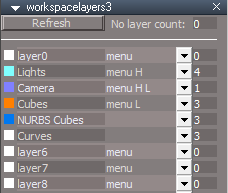
- NURBS Patches and Curves' menu blank.png (7.57 KiB) Viewed 3477 times
If checked, it should not use the Layer Color?
Line 709 maybe?
Or maybe you need to add Protect Curve Color to the colorchangeprocessor script?
-
clintonman
- Captain
- Posts: 5659
- Joined: 21 May 2009, 21:08
- Type the number ten into the box: 0
- Location: California
Re: Workspace Layers version 3
I don't see blank menu here. Can you share a scene that has the problem?trueBlue wrote: 14 Jan 2021, 19:36 Great update!!!
There might be an issue with NURBS when refreshing, the menus go Blank
NURBS Patches and Curves' menu blank.png
Also the Protect Curve Color is not working, unless I misunderstanding it's use.
If checked, it should not use the Layer Color?
Line 709 maybe?
Right on the 709 logic
-
trueBlue
- Captain
- Posts: 5548
- Joined: 06 Jul 2009, 22:50
- Type the number ten into the box: 10
Re: Workspace Layers version 3
With the Protect Curve Color checked, change the Layer Color
Maybe you need to add Protect Curve Color to the colorchangeprocessor script?
Maybe you need to add Protect Curve Color to the colorchangeprocessor script?
-
clintonman
- Captain
- Posts: 5659
- Joined: 21 May 2009, 21:08
- Type the number ten into the box: 0
- Location: California
Re: Workspace Layers version 3
Correct line 709 wasn't the problem.trueBlue wrote: 14 Jan 2021, 20:41 With the Protect Curve Color checked, change the Layer Color
Maybe you need to add Protect Curve Color to the colorchangeprocessor script?
Still no blank menu items though.
Edit: Ok protect curve color is fixed and added some optimizations to the colorchangeprocessor.
- Attachments
-
- workspacelayers363ce.RsObj
- (249.38 KiB) Downloaded 198 times
-
trueBlue
- Captain
- Posts: 5548
- Joined: 06 Jul 2009, 22:50
- Type the number ten into the box: 10
Re: Workspace Layers version 3
Is the colorchangeprocessor script the only thing that changed?clintonman wrote: 14 Jan 2021, 20:43Correct line 709 wasn't the problem.trueBlue wrote: 14 Jan 2021, 20:41 With the Protect Curve Color checked, change the Layer Color
Maybe you need to add Protect Curve Color to the colorchangeprocessor script?
Still no blank menu items though.
Edit: Ok protect curve color is fixed and added some optimizations to the colorchangeprocessor.
Found a perfect setting for the CloseORASettings
Changed PVT_LOCKED, 0 to PVT_LOCKED, 7
And NO SWITCHING in the Stack!!!

White font for the object count
Tab order set starting with menu0 to menu23 then to layer0 to layer23
Everything changed to Update On Change
- Attachments
-
- Workspace Layers 14.RsScn
- (1.72 MiB) Downloaded 203 times
-
trueBlue
- Captain
- Posts: 5548
- Joined: 06 Jul 2009, 22:50
- Type the number ten into the box: 10
Re: Workspace Layers version 3
Clock scene from Model
92 ORA panels in Settings
With the new CloseORASettings added, I did not see any performance issues! 
92 ORA panels in Settings

-
clintonman
- Captain
- Posts: 5659
- Joined: 21 May 2009, 21:08
- Type the number ten into the box: 0
- Location: California
Re: Workspace Layers version 3
I don't see any performance issues without it. Maybe it's not doing anything.trueBlue wrote: 15 Jan 2021, 00:20 Clock scene from Model
92 ORA panels in Settings
Clock scene ORA.png
With the new CloseORASettings added, I did not see any performance issues!
Edit: OK, now I see it.
Edit: There is already a CloseORA happening in the code, so remove the extra CloseORA node and change the same node inside the wsLayersGroup. As a side note the 7 used in RsStackView.RemovePanelsFromPreferences(PVT_LOCKED, 7); is a boolean, true/false so any number outside of 0 will work to make it true with 0 being false.
Edit: Scratch the remove node comment. It looks like that has to run all by itself to work properly.
Edit: Instead of remove node, remove the line 185 of menuprocessor
Code: Select all
//Activity.Run("Scripts/CustomCommands/wsLayersGroup/CloseORASettings");Yep, that was the only place it was being used, so I removed the wsLayersGroup/CloseORASettings node.
-
trueBlue
- Captain
- Posts: 5548
- Joined: 06 Jul 2009, 22:50
- Type the number ten into the box: 10
Re: Workspace Layers version 3
Thanks, got it implemented
Changed PVT_LOCKED, 7 to PVT_LOCKED, 1
What does this mean and why does it equal 4? PVT_LOCKED = 4
Or should that also equal 1?
Changed PVT_LOCKED, 7 to PVT_LOCKED, 1
What does this mean and why does it equal 4? PVT_LOCKED = 4
Or should that also equal 1?
-
clintonman
- Captain
- Posts: 5659
- Joined: 21 May 2009, 21:08
- Type the number ten into the box: 0
- Location: California
Re: Workspace Layers version 3
This is the comment from the CloseORASettings node. In english enum translates astrueBlue wrote: 15 Jan 2021, 13:19 Thanks, got it implemented
Changed PVT_LOCKED, 7 to PVT_LOCKED, 1
What does this mean and why does it equal 4? PVT_LOCKED = 4
Or should that also equal 1?
Code: Select all
//enum  	RtPanelViewType {
//  PVT_UNKNOWN = 0, PVT_TOOL, PVT_OBJECT, PVT_PREFERENCES,
//  PVT_LOCKED, PVT_PHYSIC
//}
PVT_TOOL = 1
PVT_OBJECT = 2
PVT_PREFERENCES = 3
PVT_LOCKED = 4
PVT_PHYSIC = 5
and paraphrased from the docs
RemovePanelsFromPreferences ( RtPanelViewType , bSwitchStackViewAspect )
so 1 would be remove a "PVT_TOOL" type from the panel.
-
trueBlue
- Captain
- Posts: 5548
- Joined: 06 Jul 2009, 22:50
- Type the number ten into the box: 10
Re: Workspace Layers version 3
Thank you!
I put together a legend and examples of what works for me so far
I added the numbers for the PanelViewType(s) and I am not sure if that is correct
Still can not find how to switch to Library
I put together a legend and examples of what works for me so far
I added the numbers for the PanelViewType(s) and I am not sure if that is correct
Still can not find how to switch to Library
Code: Select all
/*
HistoryType
HT_NONE = 0,
HT_LIBRARIES = 1,
HT_TOOLS = 2,
HT_OBJECTS = 3,
HT_COMMANDS	= 4,
HT_PREFERENCES 	= 5,
HT_CURR_SELECTION = 6,
HT_AUTOPANELS = 7

PanelViewType
PVT_UNKNOWN = 0	//I added the below numbers Is this correct?
PVT_TOOL = 1
PVT_OBJECT = 2
PVT_PREFERENCES = 3
PVT_LOCKED = 4
PVT_PHYSIC = 5
 */
function Execute(params)
{
//Open Settings
HT_PREFERENCES	= 5
RsStackView.SwitchStackViewAspect(HT_PREFERENCES);

/*
//Open Panel
HT_CURR_SELECTION = 6
RsStackView.SwitchStackViewAspect(HT_CURR_SELECTION)

//Remove current selected from Panel
var PVT_LOCKED = 2;
RsStackView.RemovePanelsFromCurrSelection(PVT_LOCKED, 0);
//Unselect and remove the widget
Space.Unselect()

//TODO - Open Library
*/
}
-
clintonman
- Captain
- Posts: 5659
- Joined: 21 May 2009, 21:08
- Type the number ten into the box: 0
- Location: California
Re: Workspace Layers version 3
Update January 15, 2021
trueBlue CloseORASettings performance enhancement - fixes many Object Render Attributes panels showing in the stack view
Fix the replace layers connect/disconnect issue
Fix the locking/unlocking menu update
Randomizes the colors of empty layers
New option to not randomize the layer color
protect curve color is bug fixed and added some optimizations to the colorchangeprocessor
trueBlue CloseORASettings performance enhancement - fixes many Object Render Attributes panels showing in the stack view
Fix the replace layers connect/disconnect issue
Fix the locking/unlocking menu update
Randomizes the colors of empty layers
New option to not randomize the layer color
protect curve color is bug fixed and added some optimizations to the colorchangeprocessor