AreStudios - Screen Stand_02, 03 and 04 - WIP

User avatar
Draise
Captain
Posts: 3200
Joined: 21 Sep 2009, 19:33
Type the number ten into the box: 0
Location: Bogota, Colombia

AreStudios - Screen Stand_02, 03 and 04 - WIP

Post by Draise »

A month back, I got another contract for 3 more screen stand animations.

Pugman has been awesome and modeled the majority of this stand. I did the rest of the modeling. He is REALLY FAST, and did a good job.

I will rig these with bones this time around, I think it will be more efficient animating it... and I want to do some experiments.

Image
User avatar
Draise
Captain
Posts: 3200
Joined: 21 Sep 2009, 19:33
Type the number ten into the box: 0
Location: Bogota, Colombia

Re: AreStudios - Screen Stand_02, 03 and 04 - WIP

Post by Draise »

Slow progress today.

Image

You wouldn’t believe how hard it is to fill out a flat polygon in TS. I have to copy, invert, move a tiny bit, extrude then boolean then heal vertices to fill it out! In Blender there is 1 operator that does it for you…. with a slider and a click of a button. I was very tempted to jump ship and work in Blender from this point on..but then… there are the benefits of TS still, and I’m not profficient in Blender’s workflow just yet.. still would take me too long to model in Blender.

I think I’d have to customize it heavily, like I did with TS actually..
pugman 1
Captain
Posts: 1555
Joined: 21 May 2009, 19:26
Type the number ten into the box: 0
Location: Germany

Re: AreStudios - Screen Stand_02, 03 and 04 - WIP

Post by pugman 1 »

HI man i thinkk you should change the way you go about modeling these .
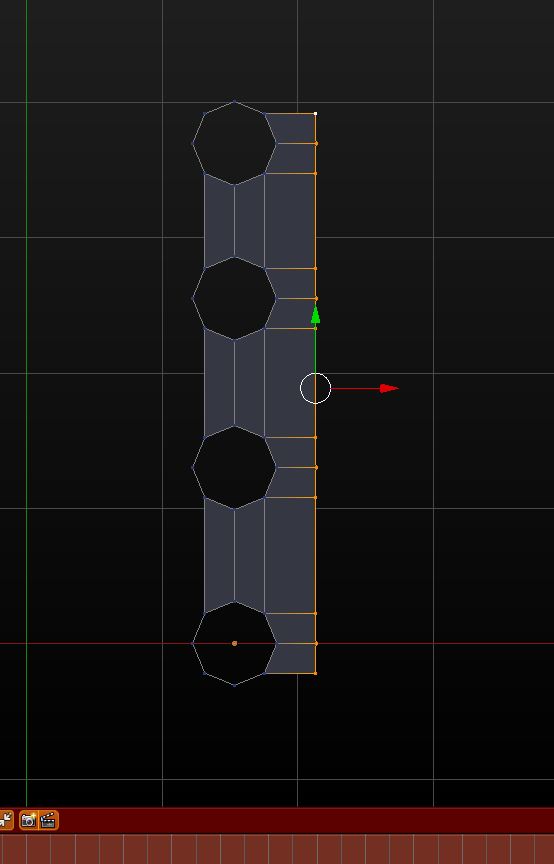
here i the screen grab i added first a circle with 8 verts duplicated it for more holes then add faces
it saves a lot of time this way and no boulion work.
when you have half model done just mirror the other half
Attachments
Unbenannt.JPG
User avatar
Draise
Captain
Posts: 3200
Joined: 21 Sep 2009, 19:33
Type the number ten into the box: 0
Location: Bogota, Colombia

Re: AreStudios - Screen Stand_02, 03 and 04 - WIP

Post by Draise »

Wow, that's cool Blender can do that. TS can also extrude edges, but not vertices. How did you "bridge" between the circles?
pugman 1
Captain
Posts: 1555
Joined: 21 May 2009, 19:26
Type the number ten into the box: 0
Location: Germany

Re: AreStudios - Screen Stand_02, 03 and 04 - WIP

Post by pugman 1 »

Just mark the four verts an d hit f
User avatar
Draise
Captain
Posts: 3200
Joined: 21 Sep 2009, 19:33
Type the number ten into the box: 0
Location: Bogota, Colombia

Re: AreStudios - Screen Stand_02, 03 and 04 - WIP

Post by Draise »

Perfect!

I did do one thing correct, mirrored a corner also in TS. I find the mirror geometry tools intuitive there, still haven't figured it out in Blender yet. I think it's a modifier, am I correct?
pugman 1
Captain
Posts: 1555
Joined: 21 May 2009, 19:26
Type the number ten into the box: 0
Location: Germany

Re: AreStudios - Screen Stand_02, 03 and 04 - WIP

Post by pugman 1 »

Yep its a modifier, when you hav half the model done mke sure the edge is on the center line
then set the curser to center and the origen to the curser then add the modifier ,somtimes you
might have to ajust the 2 halfs tomatch and make sure clipping is on
User avatar
Draise
Captain
Posts: 3200
Joined: 21 Sep 2009, 19:33
Type the number ten into the box: 0
Location: Bogota, Colombia

Re: AreStudios - Screen Stand_02, 03 and 04 - WIP

Post by Draise »

Image

Here is my latest piece! Had fun doing it, learning more on TS modeling, not as nifty as Blenders, but it works for now! One thing I do like of the SDS in TS is the ability to change faces or edges "sharpness" with the SDS with a click and a drag.

I have to send you some of the reference images Pugman! There a really awkward hinge setup coming up.
User avatar
Draise
Captain
Posts: 3200
Joined: 21 Sep 2009, 19:33
Type the number ten into the box: 0
Location: Bogota, Colombia

Re: AreStudios - Screen Stand_02, 03 and 04 - WIP

Post by Draise »

Image


Image

Progress.

Looks like Pugman may be out of action for a bit, so I am carrying on. Thanks Pugman for all the help, it was stellar.

I have also started the third stand.. I feel I may have a crunch time on this project, though my deadline is April 14.
User avatar
Draise
Captain
Posts: 3200
Joined: 21 Sep 2009, 19:33
Type the number ten into the box: 0
Location: Bogota, Colombia

Re: AreStudios - Screen Stand_02, 03 and 04 - WIP

Post by Draise »

Image

Ok, did the hinge, now just needs one small silver part and the nuts, bolts and screws.

Took me longer than I had hoped. Now I'm late for animating my short film.

Was fun doing these.. again in trueSpace. I feel like a baby in Blender, and I'm under pressure at the moment.. so have to soldier on.

Thinking.. about doing the image for the competition somehow between all this!
User avatar
Draise
Captain
Posts: 3200
Joined: 21 Sep 2009, 19:33
Type the number ten into the box: 0
Location: Bogota, Colombia

Re: AreStudios - Screen Stand_02, 03 and 04 - WIP

Post by Draise »

Wahoo! Took me a day or two of playing around (well two sessions at home) and figured out how Prodigy did his pistons and things!

Using Binary Op's and Expanded Matrix values, and Stan's group addon (really awesome) - I got this working.

And.. I learnt how to do some videos with trueSpace. This will come in handy when I want to share things with you guys.

User avatar
Draise
Captain
Posts: 3200
Joined: 21 Sep 2009, 19:33
Type the number ten into the box: 0
Location: Bogota, Colombia

Re: AreStudios - Screen Stand_02, 03 and 04 - WIP

Post by Draise »

Image

Progress yesterday and today. All WS modeling. I use Clintons Geometry fixer, to update the SDS every now and then, and I use the quadrify and loop tool a lot, same as mirror, boolean subtract, and add edge draw.
User avatar
Draise
Captain
Posts: 3200
Joined: 21 Sep 2009, 19:33
Type the number ten into the box: 0
Location: Bogota, Colombia

Re: AreStudios - Screen Stand_02, 03 and 04 - WIP

Post by Draise »

Image

Finished modeling, now it's just the rigging.

I think I'll use a slider based approach this time.. one to "blow" it up, and the other to control it's joints.

Does anyone know how or where you'd find a "Rescale" node interpolate? (Input scalar value, define Min, Max - and then rescale to the new Min Max scalar value)

0.000 - 1.000 input = 0.000 - 5.000 output, for e.g..
User avatar
Draise
Captain
Posts: 3200
Joined: 21 Sep 2009, 19:33
Type the number ten into the box: 0
Location: Bogota, Colombia

Re: AreStudios - Screen Stand_02, 03 and 04 - WIP

Post by Draise »

Organizing objects, parenting, and getting them sorted, working on rigging too. Found out another cool way to rig using the BinaryOp node and the Min_Max node. I found out that the Min_Max node also scales, and that you can scale things with a multiply, silly me. (I was looking for a rescale)

You can see a rough example with my messy node tree in the following video.

I have a driving scalar float that drives a translate matrix and a rotation matrix. I used one with a min-max value that drives the translation, then at certain point (where I want to start the rotation), I cancel it out (minus it's value at that point), then drive a rescale node with a min-max limit onto the rotation. I invert (multiply by -1) it when needed to change directions.


EDIT: As you can see, sometimes I'm very disorganized. I accidentally did and "arrange" all nodes, and it makes my setups a huge mess. I'm usually more tidy..
User avatar
Draise
Captain
Posts: 3200
Joined: 21 Sep 2009, 19:33
Type the number ten into the box: 0
Location: Bogota, Colombia

Re: AreStudios - Screen Stand_02, 03 and 04 - WIP

Post by Draise »

Image

Finally finished rigging this one. And I finished rigging the first. My little MATRIX control scripts are really handy. They have speed up the workflow by 200% I think.

I'm about to rig the hard one now, but I'm confident it's all possible.
User avatar
Draise
Captain
Posts: 3200
Joined: 21 Sep 2009, 19:33
Type the number ten into the box: 0
Location: Bogota, Colombia

Re: AreStudios - Screen Stand_02, 03 and 04 - WIP

Post by Draise »

Finally finished the rigging. I did one with bones, the others with scripts that I created. I tried to do the bone one with scripts once, but it just got increasingly complicated in an exponential way.. so.. went with bones. The riggin in TS can be weird, but learning to restricl and control the IK handles, everything can work out fine. The rest will be up to... animation.

Now.. I'll plan the storyboards, and get to the animation!

Oh.. and texture the boxes.

I have... less than 3 or 4 weeks to do the rest... meh, I should have charged more for this job!
User avatar
Draise
Captain
Posts: 3200
Joined: 21 Sep 2009, 19:33
Type the number ten into the box: 0
Location: Bogota, Colombia

Re: AreStudios - Screen Stand_02, 03 and 04 - WIP

Post by Draise »

Image

DONE THE MODELING AND RIGGIN! YEAHAAAAA! So that means... :mrgreen: :mrgreen: :mrgreen: :mrgreen:

Animation!

I'm thinking of storyboards. One good thing with this projects is, for a low price, I could take my time and they would only be 1 minute animations. So they will have to be very simple animations.

It costs for more done efficiently!


So above is an image with the three stands. I think.. I could start building robots with Pugman any day soon now! Thanks Pugman for all the help modeling.
User avatar
Draise
Captain
Posts: 3200
Joined: 21 Sep 2009, 19:33
Type the number ten into the box: 0
Location: Bogota, Colombia

Re: AreStudios - Screen Stand_02, 03 and 04 - WIP

Post by Draise »


First animation done, now it just needs final render and the motionblur done in Virtual Studio.

Animated in trueSpace.

Animation is simple enough. It's hard to get ease in and outs, but I'm getting the hand of it.

The last screen rotation is not comfortable, but oh well.

I sent this with the greasepencil of Blender so my mate can do the motiongraphics with the info.
User avatar
trueBlue
Captain
Posts: 5548
Joined: 06 Jul 2009, 22:50
Type the number ten into the box: 10

Re: AreStudios - Screen Stand_02, 03 and 04 - WIP

Post by trueBlue »

Awesome work!
User avatar
clintonman
Captain
Posts: 5659
Joined: 21 May 2009, 21:08
Type the number ten into the box: 0
Location: California

Re: AreStudios - Screen Stand_02, 03 and 04 - WIP

Post by clintonman »

Looks good! What is Virtual Studio? Some kind of video editor?
Clinton Reese

http://clintons3d.com
User avatar
Draise
Captain
Posts: 3200
Joined: 21 Sep 2009, 19:33
Type the number ten into the box: 0
Location: Bogota, Colombia

Re: AreStudios - Screen Stand_02, 03 and 04 - WIP

Post by Draise »

Thanks guys, means a lot to me.

Ah, I wrote Virtual Dub wrong, hehe. Virtual Studio is Virtual Dub, a free opensource video codec and filter system, that can work hand in hand with AviSynth and MV tools to do the motionblur.

You can find out more here: Blog Post
User avatar
Draise
Captain
Posts: 3200
Joined: 21 Sep 2009, 19:33
Type the number ten into the box: 0
Location: Bogota, Colombia

Re: AreStudios - Screen Stand_02, 03 and 04 - WIP

Post by Draise »

Random rigging tip for trueSpace.

This is for Anchored Loop branches.

Image

!
If you don't set the default animation keyframe track (single matrix keyframe, non-additive, pass through off), then nor animate in additive: it will EXPLODE your mesh, parts flying everywhere (ones that are attached to bones).
It's a terrible mess.

Image

!
If you have an anchored loop of bones (anchor one end, then the other with free joints in the middle), the IK handles will EFF things up and make them pop when animating. Best to make the handles in FK (logically).
User avatar
Draise
Captain
Posts: 3200
Joined: 21 Sep 2009, 19:33
Type the number ten into the box: 0
Location: Bogota, Colombia

Re: AreStudios - Screen Stand_02, 03 and 04 - WIP

Post by Draise »

Finished them, view the videos HERE
User avatar
Finis
Captain
Posts: 5410
Joined: 21 May 2009, 18:26
Type the number ten into the box: 0
Location: America!

Re: AreStudios - Screen Stand_02, 03 and 04 - WIP

Post by Finis »

Great! I like the transparent/line drawing view of the screen. The videos do a good job of illustrating how to assemble the products and the abilities. About how many hours per month did you work on this?
I prefer dangerous freedom over peaceful servitude. -- Thomas Jefferson/Jean Jacques Rousseau
User avatar
Draise
Captain
Posts: 3200
Joined: 21 Sep 2009, 19:33
Type the number ten into the box: 0
Location: Bogota, Colombia

Re: AreStudios - Screen Stand_02, 03 and 04 - WIP

Post by Draise »

Maybe 45 hours a month? I worked on it only part time. I could only do about 2 to 3 hours a day. 5 hours max on a good day. Eventually near the end I was doing 8 to 14 hours a day to catch up. I was too casual. But pugman really got me ahead. He modeled nearly the whole model of the first stand. They were only paying a minimum wage for it, so the pay off was time. I could charge triple and do them in a week... but they didn't have that cash. (Or didnt want to invest it)

I did spend too much time rigging one though, took me 4 days trying to script it with nodes. ...then 2 hours with trueSpace bones (after I gave up on the nodes) I found a better way.

They were happy with them. I was going to render in HD 1080p... charge more for that. ..but then opted to a 16:9 480p for youtube so they could afford it. It made my life easier since I did the work at home on my dual core.

The funny thing was that they even wanted the videos for whatsapp. Really that was what they washed out for...showing them on the phone or internet.
User avatar
Finis
Captain
Posts: 5410
Joined: 21 May 2009, 18:26
Type the number ten into the box: 0
Location: America!

Re: AreStudios - Screen Stand_02, 03 and 04 - WIP

Post by Finis »

Draise wrote:I did spend too much time rigging one though, took me 4 days trying to script it with nodes. ...then 2 hours with trueSpace bones (after I gave up on the nodes) I found a better way.
Yep. When working use tried and true methods and tools unless some innovation is needed. Experimenting with new or better things is great and a driver toward more profit, better product, happier customer but experiment and invent on your own time unless the time or effort needed is trivial.

Bones: on TS model side you can link objects together with IK without bones. That is good for machines and doesn't crash or mess up a lot like bones do.
I prefer dangerous freedom over peaceful servitude. -- Thomas Jefferson/Jean Jacques Rousseau
User avatar
Draise
Captain
Posts: 3200
Joined: 21 Sep 2009, 19:33
Type the number ten into the box: 0
Location: Bogota, Colombia

Re: AreStudios - Screen Stand_02, 03 and 04 - WIP

Post by Draise »

MS.. yeah, that side wasn't running my meshes well (heavy) so I couldn't use the MS for rigging or animation. I too figured out how to do rigs with nodes only in the LE of the WS - was nice. My Matrix Control script was made for that - boneless FK rigs. Not really IK ones though. Two of the rigs had that system.

Finding the better looking more efficient way does make things better for the client, yes.
User avatar
Draise
Captain
Posts: 3200
Joined: 21 Sep 2009, 19:33
Type the number ten into the box: 0
Location: Bogota, Colombia

Re: AreStudios - Screen Stand_02, 03 and 04 - WIP

Post by Draise »

I got a bit more work on these stands, and last night they requested that I also do some new animations but in less time (meaning I can charge more!)

SUCCESS.
User avatar
Draise
Captain
Posts: 3200
Joined: 21 Sep 2009, 19:33
Type the number ten into the box: 0
Location: Bogota, Colombia

Re: AreStudios - Screen Stand_02, 03 and 04 - WIP

Post by Draise »

Managed to solve a major headache. Some times my objects would taper on rotation with my rigs, I had no idea why. I tried flattening axis, resetting axis, working on way to make sure everything was ok, flat, no tapering (for some reason it exists in trueSpace).

Only recently, only now have I found that the reason this was happening was because I exported Matrix on objects that were attached to bones, to then modify them with my Matrix Offset things.

SO! On your rigs, parent to your attached objects in your rig - then modify their expanded Matrices. Don't modify the matrices of an attached object to any bone - any bone movement will shear and taper your modified matrix object.

6 different rigs with this issue, somehow worked around it.. and now I know.

Hah!

I'm working on a 7th stand.
User avatar
Draise
Captain
Posts: 3200
Joined: 21 Sep 2009, 19:33
Type the number ten into the box: 0
Location: Bogota, Colombia

Re: AreStudios - Screen Stand_02, 03 and 04 - WIP

Post by Draise »

Oh.... well maybe that wasn't the fix exactly. Well here is another fix, DO NOT USE MIRRORED OBJECTS ON YOUR RIG.

Return to “Work in Progress”