This is my entry for SMC #47. I haven't done an SMC before. I'll make flowers and work on the scene more later.
Modeling: 1 hour 57 minutes
Texturing: 36 minutes
Rendering: 44 minutes
Make and texture room and background: about 2 hours
TS 7.6 Modelside
16790 vertices
273120 polygons
The globular forms started as metaballs. Then I clicked deform object to convert them into regular meshes.
I made one flower holding tube by sweeping a ring outline. The ring was a circle boolean subtracted from another circle so the tube would be hollow.
Then I used the geometry paint tool to scatter copies around the upper surfaces of the globular forms.
I used the middle of two tubes to connect the two globular forms.
I did not have time to model flowers.
The vase texture is a green color with wrapped anisotropic reflectance. The base, also made from metaballs, is textured as wood.
Rendering is Lightworks with 2X antilaiasing, scanline raytracing, full quality.
Lighting is one infinite light, two locals, and HDRI for general brightening.
Flower Vase
-
Finis

- Captain
- Posts: 5410
- Joined: 21 May 2009, 18:26
- Type the number ten into the box: 0
- Location: America!
Flower Vase
I prefer dangerous freedom over peaceful servitude. -- Thomas Jefferson/Jean Jacques Rousseau
-
Mr. 3d
Re: Flower Vase
I LIKES it Finis !!! Where can I get one! 
-
Finis
- Captain
- Posts: 5410
- Joined: 21 May 2009, 18:26
- Type the number ten into the box: 0
- Location: America!
Re: Flower Vase
Maybe on 3DFrog's place and Turbosquid someday.
I'll rework it to have fewer polygons and add flowers from Plant Studio.
I'll rework it to have fewer polygons and add flowers from Plant Studio.
I prefer dangerous freedom over peaceful servitude. -- Thomas Jefferson/Jean Jacques Rousseau
-
marcel

- Captain
- Posts: 2247
- Joined: 21 May 2009, 19:52
- Type the number ten into the box: 0
- Location: paris - France
Re: Flower Vase
"I did not have time to model flowers."
This vase don't need flowers and water. It is a vase with a flower look.
This vase don't need flowers and water. It is a vase with a flower look.
Design - illustration - Animation
http://www.crea-vision.fr
http://www.crea-vision.fr
-
Mr. 3d
Re: Flower Vase
I'd like one sitting in my house !!!
-
Finis
- Captain
- Posts: 5410
- Joined: 21 May 2009, 18:26
- Type the number ten into the box: 0
- Location: America!
Re: Flower Vase
Note: This continuing work is to improve the vase. My SMC entry is from the original model.
I rebuilt the tube so now it has about 2000 polygons. The original had about 8000. That is why it took so long to render the picture for the SMC.
For the original tube I made an outline using the ellipse by center and point tool. Then I copied it and scaled it slightly smaller than the first. Boolean subtraction produced a ring. I swept the ring, adjusting the size and location in front and side views, to make the original tube.
Mistake 1: The ellipse tool makes a shape with many more vertices than needed.
Mistake 2: The whole tube is hollow so there are unneeded polygons on the inside surface.
For the new tube I made a 24 sided circle with the regular polygon tool. Then I swept it with bend and 6 segments. I placed and sized each control segment to give it the same shape as the original. It has a hollow part only at the flower end where needed. The ends on the bottom and inside were sealed with the quad divide tool in point edit.
The picture shows the original on the left and the new on the right.
Now to place and scale copies of the new tube to match the first ones.
I rebuilt the tube so now it has about 2000 polygons. The original had about 8000. That is why it took so long to render the picture for the SMC.
For the original tube I made an outline using the ellipse by center and point tool. Then I copied it and scaled it slightly smaller than the first. Boolean subtraction produced a ring. I swept the ring, adjusting the size and location in front and side views, to make the original tube.
Mistake 1: The ellipse tool makes a shape with many more vertices than needed.
Mistake 2: The whole tube is hollow so there are unneeded polygons on the inside surface.
For the new tube I made a 24 sided circle with the regular polygon tool. Then I swept it with bend and 6 segments. I placed and sized each control segment to give it the same shape as the original. It has a hollow part only at the flower end where needed. The ends on the bottom and inside were sealed with the quad divide tool in point edit.
The picture shows the original on the left and the new on the right.
Now to place and scale copies of the new tube to match the first ones.
- Attachments
-

Last edited by Finis on 25 Jul 2009, 19:35, edited 1 time in total.
I prefer dangerous freedom over peaceful servitude. -- Thomas Jefferson/Jean Jacques Rousseau
-
Mr. 3d
Re: Flower Vase
By the way, I couldn't resist with the title! What would you rather it be called?
-
Finis
- Captain
- Posts: 5410
- Joined: 21 May 2009, 18:26
- Type the number ten into the box: 0
- Location: America!
Re: Flower Vase
I didn't think of a name for it. I appreciate your humor and think your title is fine.
I prefer dangerous freedom over peaceful servitude. -- Thomas Jefferson/Jean Jacques Rousseau
-
Finis
- Captain
- Posts: 5410
- Joined: 21 May 2009, 18:26
- Type the number ten into the box: 0
- Location: America!
Re: Flower Vase
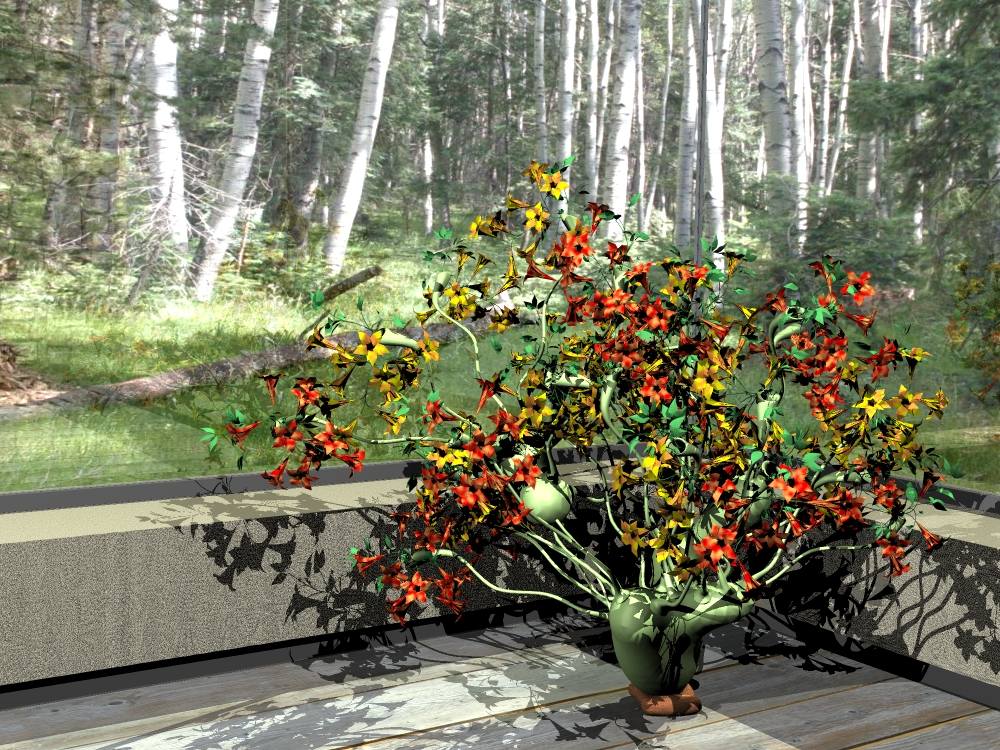
Here's a big picture with flowers. 18 minutes render time on a dual core 2.6GHz.
I constructed the new tube so the axis is oriented like the original, near the bottom, but with the axis slightly above the bottom to insure it intersects well with the main body. I also put a small cube in the flower end of the tube with the Z axis pointing out to use for flower placement and glued them.
I replaced the old high polygon tubes with the new ones by using the global replace tool with keep target orientation and size on. I also removed two tubes. That reduced the polygons for the vase to 77108. It renders much faster now.
The flowers have 105546 polygons. I made the flowers with Plant Studio. They have the Axion spots shader (custom shader on LW color material panel). I used the global replace tool to place the flowers by replacing the cubes mentioned above with keep target orientation on. To randomly use the orange and yellow flowers I selected both as the source by control-clicking them.
Hint for the replace tool: unglue all target objects before you use it. The split hierarchy into polyhedra and IK linked branches tool is good for that.
I made a more complete room with four walls and and a ceiling for reflections. This picture has an infinite light for the Sun and two local lights.
I constructed the new tube so the axis is oriented like the original, near the bottom, but with the axis slightly above the bottom to insure it intersects well with the main body. I also put a small cube in the flower end of the tube with the Z axis pointing out to use for flower placement and glued them.
I replaced the old high polygon tubes with the new ones by using the global replace tool with keep target orientation and size on. I also removed two tubes. That reduced the polygons for the vase to 77108. It renders much faster now.
The flowers have 105546 polygons. I made the flowers with Plant Studio. They have the Axion spots shader (custom shader on LW color material panel). I used the global replace tool to place the flowers by replacing the cubes mentioned above with keep target orientation on. To randomly use the orange and yellow flowers I selected both as the source by control-clicking them.
Hint for the replace tool: unglue all target objects before you use it. The split hierarchy into polyhedra and IK linked branches tool is good for that.
I made a more complete room with four walls and and a ceiling for reflections. This picture has an infinite light for the Sun and two local lights.
- Attachments
-
Last edited by Finis on 27 Jul 2009, 00:52, edited 2 times in total.
I prefer dangerous freedom over peaceful servitude. -- Thomas Jefferson/Jean Jacques Rousseau
-
Finis
- Captain
- Posts: 5410
- Joined: 21 May 2009, 18:26
- Type the number ten into the box: 0
- Location: America!
Re: Flower Vase
Here are the flowers. 4239 polygons. Plant Studio will export the plants in various formats. I use DXF. It is all one object when opened in TS but each type of part has a different color. Useful for texturing. One layer of SDS works well for closeups.
- Attachments
-

I prefer dangerous freedom over peaceful servitude. -- Thomas Jefferson/Jean Jacques Rousseau
-
Finis
- Captain
- Posts: 5410
- Joined: 21 May 2009, 18:26
- Type the number ten into the box: 0
- Location: America!
Re: Flower Vase
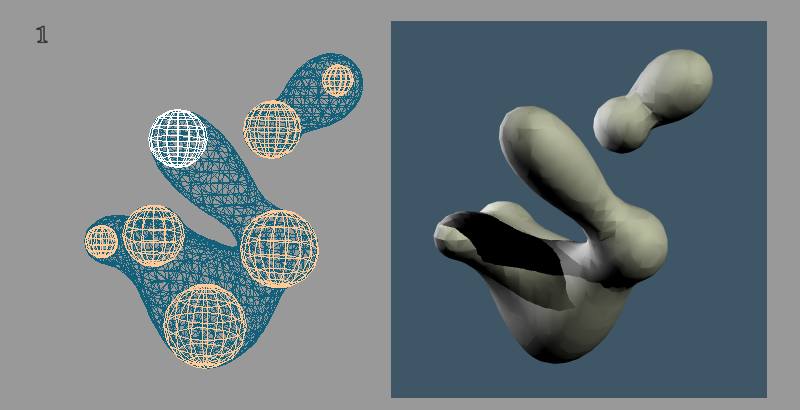
Now for the main body of the vase. It began as a metaball object. It looks like two but it is one metaball object. When I had the shape I activated the deform object tool on it to convert to a polygonal object. Fig. 1 shows the metaball subobjects and the resulting shape. It has some lumpiness. That is fine for this item but I wondered how I could make it smooth.
First I tried setting the render resolution to high levels. That produced a smoother shape but it had rings on it. At 16000 polys it still had rings.
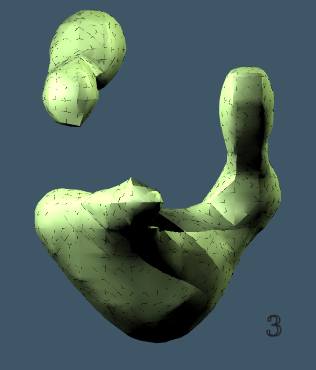
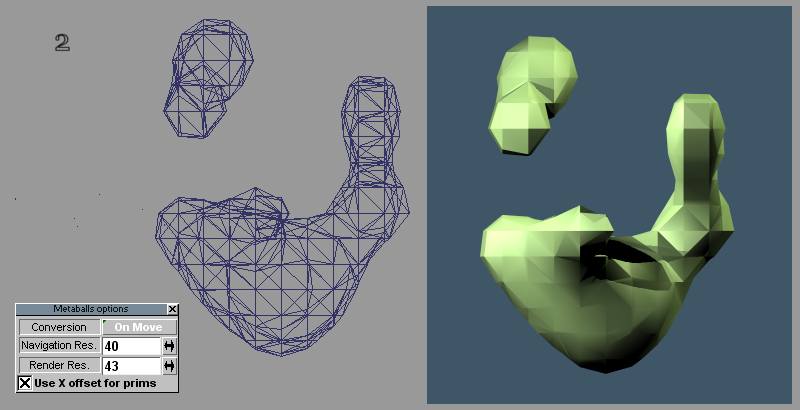
Then I tried setting the render resolution to a low value, converting to polygonal mesh. This produced Fig. 2. A layer of SDS made a bumpy surface and more SDS smoothed the sharper edges. However, when rendered there were artifacts shown in Fig. 3. This happened with various textures.
I tried different things such as converting metaball to poly mesh with smooth quad divide, using smooth quad divide instead of SDS on a poly converted mesh, and starting with various render resolutions for the metaball. The same artifacts appeared.
Any suggestons on how to convert a metaball shape into a smooth shape?
Hint: When setting the render resolution to a lower value than the current one move one of the subobjects to apply the new resolution. Then click undo to move the ball back. The resolution stays.
First I tried setting the render resolution to high levels. That produced a smoother shape but it had rings on it. At 16000 polys it still had rings.
Then I tried setting the render resolution to a low value, converting to polygonal mesh. This produced Fig. 2. A layer of SDS made a bumpy surface and more SDS smoothed the sharper edges. However, when rendered there were artifacts shown in Fig. 3. This happened with various textures.
I tried different things such as converting metaball to poly mesh with smooth quad divide, using smooth quad divide instead of SDS on a poly converted mesh, and starting with various render resolutions for the metaball. The same artifacts appeared.
Any suggestons on how to convert a metaball shape into a smooth shape?
Hint: When setting the render resolution to a lower value than the current one move one of the subobjects to apply the new resolution. Then click undo to move the ball back. The resolution stays.
- Attachments
-
-
-
- Metaball_Fig3.jpg (9.94 KiB) Viewed 4657 times
I prefer dangerous freedom over peaceful servitude. -- Thomas Jefferson/Jean Jacques Rousseau
-
Finis
- Captain
- Posts: 5410
- Joined: 21 May 2009, 18:26
- Type the number ten into the box: 0
- Location: America!
Re: Flower Vase
Ahem ... any ideas about how to convert metaballs into quad meshes or smooth ones that don't make the render artifacts?
I prefer dangerous freedom over peaceful servitude. -- Thomas Jefferson/Jean Jacques Rousseau
-
Prodigy

- Site Admin
- Posts: 957
- Joined: 21 May 2009, 14:46
- Type the number ten into the box: 0
- Location: Uruguay
Re: Flower Vase
Few tips..
1) Try to increase the Navigation Res.
2) Get a Mid~Low mesh, click over the Boolean tool that will ask you to convert the metaball to a mesh, and then click over the SDS to make it smooth.
HTH:
1) Try to increase the Navigation Res.
2) Get a Mid~Low mesh, click over the Boolean tool that will ask you to convert the metaball to a mesh, and then click over the SDS to make it smooth.
HTH:
๑۩۞۩๑ prodigy ๑۩۞۩๑
-
Finis
- Captain
- Posts: 5410
- Joined: 21 May 2009, 18:26
- Type the number ten into the box: 0
- Location: America!
Re: Flower Vase
Thanks Prodigy,
I found that the render res, not the nav res, makes the mesh when you click boolean. That mesh renders well but is lumpy or has blocky shapes in some areas. Smoothing with SDS or smooth quad divide produces a strange looking mesh that has the artifacts.
I discovered this: after SDS or SQD triangulating the mesh or turning on the triangulate render option makes a clean render.
That is not acceptable since what I want is a mesh that renders like any other mesh and for it not to be triangulated. At least not much. I want to un-triangulate the mesh. I think that using SDS and not meta balls for these organic shapes is the answer but it is so easy to make irregular shapes and experiment with them with meta balls.
For this one it looks like if I want a nice mesh I'll have to fit an SDS control mesh to this shape. Unless anyone knows of tools that can smooth it.
This is model side.
Edit: I'll try making the nav and render res the same.
I found that the render res, not the nav res, makes the mesh when you click boolean. That mesh renders well but is lumpy or has blocky shapes in some areas. Smoothing with SDS or smooth quad divide produces a strange looking mesh that has the artifacts.
I discovered this: after SDS or SQD triangulating the mesh or turning on the triangulate render option makes a clean render.
That is not acceptable since what I want is a mesh that renders like any other mesh and for it not to be triangulated. At least not much. I want to un-triangulate the mesh. I think that using SDS and not meta balls for these organic shapes is the answer but it is so easy to make irregular shapes and experiment with them with meta balls.
For this one it looks like if I want a nice mesh I'll have to fit an SDS control mesh to this shape. Unless anyone knows of tools that can smooth it.
This is model side.
Edit: I'll try making the nav and render res the same.
I prefer dangerous freedom over peaceful servitude. -- Thomas Jefferson/Jean Jacques Rousseau
-
Finis
- Captain
- Posts: 5410
- Joined: 21 May 2009, 18:26
- Type the number ten into the box: 0
- Location: America!
Re: Flower Vase
Tried making the nav and render res of the metaball object the same. Same result: convert to mesh (with boolean tool) and the mesh renders fine. Do anything to smooth the mesh and the artifacts appear. This happened with TS 5 too.
Things that fix or improve it:
- Using a high render res on the metaball object before converting makes a mostly smooth surface. This is the closest to what I want but it takes many polygons to smooth it this way and it is mostly triangulated.
- Triangulate the mesh. Not the neatest mesh but this is the only thing I found that makes it render like any other object. Doing this after smooth quad divide makes zillions of polygons.
- Use the triangulate render option. This only fixes it in TS. I want an exportable mesh to sell.
- Mapped shadows don't show as many artifacts.
- Raycast render method shows less artifacts.
When no lights have shadows it renders fine!
Polygon reduction tool makes an unusual mesh and still has artifacts.
I tried saving the object as a TS6.6 object and loading that. Same artifacts.
Conclusion:
Use metaballs for work that will remain in TS and leave it a metaball object.
Use SDS or other method for organic shapes to export from TS.
Since I want to sell this vase model I will build an SDS version of the organic globular parts.
Things that fix or improve it:
- Using a high render res on the metaball object before converting makes a mostly smooth surface. This is the closest to what I want but it takes many polygons to smooth it this way and it is mostly triangulated.
- Triangulate the mesh. Not the neatest mesh but this is the only thing I found that makes it render like any other object. Doing this after smooth quad divide makes zillions of polygons.
- Use the triangulate render option. This only fixes it in TS. I want an exportable mesh to sell.
- Mapped shadows don't show as many artifacts.
- Raycast render method shows less artifacts.
When no lights have shadows it renders fine!
Polygon reduction tool makes an unusual mesh and still has artifacts.
I tried saving the object as a TS6.6 object and loading that. Same artifacts.
Conclusion:
Use metaballs for work that will remain in TS and leave it a metaball object.
Use SDS or other method for organic shapes to export from TS.
Since I want to sell this vase model I will build an SDS version of the organic globular parts.
I prefer dangerous freedom over peaceful servitude. -- Thomas Jefferson/Jean Jacques Rousseau
-
Finis
- Captain
- Posts: 5410
- Joined: 21 May 2009, 18:26
- Type the number ten into the box: 0
- Location: America!
Re: Flower Vase
How did Spacekdet put it? Whiskey Tango Foxtrot?
Alright I went to TS 5 because I like the SDS system better there. I built an SDS object like the metaball base of the vase. It has the render artifacts too! The artifacts appear when the object is loaded and rendered in TS 7 model side too.
I attached the control mesh and SDS object files (TS 5 cob files). If anyone would like to see what results you get then let me know what happens.
You may have to click the picture to see the big one to see the artifacts.
Here's how I made the SDS object to approximate the metaball shape. I made a simple torus. Moved it onto the metaball mesh and point edited until it outlined the major features. Then I used SDS and the DX display mode to adjust the control mesh to fit the SDS shape to the metaball shape and got the mesh second from the left. Two SDS layers shown on the left. This produced the smooth shape I wanted but the render problem is still there.
SDS on the original torus: no artifacts, and with minor point edit of the torus: no artifacts.
I rendered a sphere with the same texture and it had no artifacts.
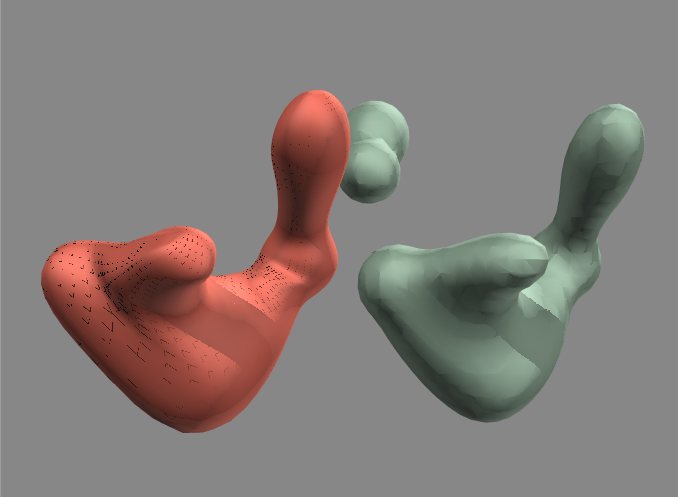
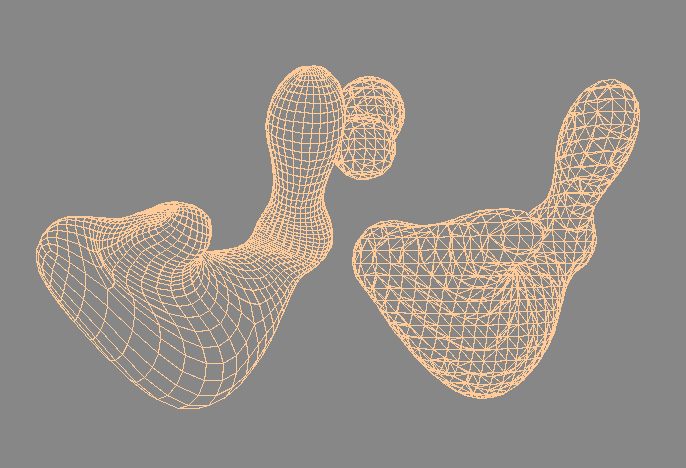
The red object is SDS with its mesh above it. Green is the metaball and its mesh.
Alright I went to TS 5 because I like the SDS system better there. I built an SDS object like the metaball base of the vase. It has the render artifacts too! The artifacts appear when the object is loaded and rendered in TS 7 model side too.
I attached the control mesh and SDS object files (TS 5 cob files). If anyone would like to see what results you get then let me know what happens.
You may have to click the picture to see the big one to see the artifacts.
Here's how I made the SDS object to approximate the metaball shape. I made a simple torus. Moved it onto the metaball mesh and point edited until it outlined the major features. Then I used SDS and the DX display mode to adjust the control mesh to fit the SDS shape to the metaball shape and got the mesh second from the left. Two SDS layers shown on the left. This produced the smooth shape I wanted but the render problem is still there.
SDS on the original torus: no artifacts, and with minor point edit of the torus: no artifacts.
I rendered a sphere with the same texture and it had no artifacts.
The red object is SDS with its mesh above it. Green is the metaball and its mesh.
Last edited by Finis on 17 Aug 2009, 03:28, edited 1 time in total.
I prefer dangerous freedom over peaceful servitude. -- Thomas Jefferson/Jean Jacques Rousseau
-
Finis
- Captain
- Posts: 5410
- Joined: 21 May 2009, 18:26
- Type the number ten into the box: 0
- Location: America!
Re: Flower Vase
I made an SDS version of part of the main body of the vase. It too has the render artifacts in TS 5 and TS 7.6 model side. The red object is SDS. The green one is the metaball.
The .cob file for the base is in a previous post. You are welcome to download the .cob and see if you get the artifacts.
If anyone has ideas why this happens and how to avoid or fix it let me know.
The .cob file for the base is in a previous post. You are welcome to download the .cob and see if you get the artifacts.
If anyone has ideas why this happens and how to avoid or fix it let me know.
- Attachments
-
-
Last edited by Finis on 17 Aug 2009, 03:18, edited 2 times in total.
I prefer dangerous freedom over peaceful servitude. -- Thomas Jefferson/Jean Jacques Rousseau
-
Finis
- Captain
- Posts: 5410
- Joined: 21 May 2009, 18:26
- Type the number ten into the box: 0
- Location: America!
Re: Flower Vase
I extracted the final SDS mesh. Still artifacts.
I saved it as an obj (with LUUV) and loaded that. Tried that with 3ds and dxf. Still artifacts but better with dxf. 3ds triangulated the mesh.
Various things will make it render correctly like the render triangulation option, triangulating the mesh, and using all mapped shadow lights. Raycast renders it well in TS 5.
The thing is it should render without special lights or anything. It should render the same as any other object under the same conditions. I haven't had this trouble before. Anyone else encountered this?
How can I try to sell models I make in TS if I can't be sure the mesh is OK?
Here's a dxf version of it. Someone who has a non-TS program import this, or the cob file above, and see if it renders with artifacts please.
I saved it as an obj (with LUUV) and loaded that. Tried that with 3ds and dxf. Still artifacts but better with dxf. 3ds triangulated the mesh.
Various things will make it render correctly like the render triangulation option, triangulating the mesh, and using all mapped shadow lights. Raycast renders it well in TS 5.
The thing is it should render without special lights or anything. It should render the same as any other object under the same conditions. I haven't had this trouble before. Anyone else encountered this?
How can I try to sell models I make in TS if I can't be sure the mesh is OK?
Here's a dxf version of it. Someone who has a non-TS program import this, or the cob file above, and see if it renders with artifacts please.
- Attachments
-
- Vase_ts5_dxf.zip
- (61.56 KiB) Downloaded 253 times
I prefer dangerous freedom over peaceful servitude. -- Thomas Jefferson/Jean Jacques Rousseau