Major changes to the NURBS toolset for workspace.
New Tools:
Stitching patches
Skin curves to patch
Rail and BiRail curves to patch
Lathe curve to patch
Welding tool for curves and patches
Split tool for curves and patches
Sharp and Smooth handles script
Rebuild NURBS for curves and patches
Extract curve from patch
The ability to freehand draw a curve on existing mesh surfaces.
Changes/additions:
new curve and patch node structure
improved freeze patch script gives quad mesh instead of triangles
file dialog for export improved
adding items don't overlap in link editor
nurbs direction indicator display code moved out of the scene nurbs nodes and it's positioning improved
removed fix concave and flip polygon buttons from the toolbar, buttons found in nurbs utility panel
moved freeze curve/patch code out of the scene nurbs nodes
selection modes are preserved
* polygon to curve uses edge list for proper ordering of curve segments
Needs more documentation and several existing tools need to be updated to work with the NURBS objects.
The workflow may need a little work too. They look like NURBS but they edit like polygons which is a bit awkward.
New rsx plugin v.1638425 is required for the new curve drawing tool.
http://clintons3d.com/plugins/truespace ... nurbs.html
Updated Workspace NURBS Tools
-
clintonman

- Captain
- Posts: 5659
- Joined: 21 May 2009, 21:08
- Type the number ten into the box: 0
- Location: California
Updated Workspace NURBS Tools
-
clintonman
- Captain
- Posts: 5659
- Joined: 21 May 2009, 21:08
- Type the number ten into the box: 0
- Location: California
Re: Updated Workspace NURBS Tools
I just finished documenting the tools with more explanations and images.
I also added an important note,
"Turn Super Sampling off"
When turned on the curves and handles get a very fine and difficult to see appearance.
I also added an important note,
"Turn Super Sampling off"
When turned on the curves and handles get a very fine and difficult to see appearance.
-
clintonman
- Captain
- Posts: 5659
- Joined: 21 May 2009, 21:08
- Type the number ten into the box: 0
- Location: California
Re: Updated Workspace NURBS Tools
Update Dec 15
Some small changes and bug fixes
changed default color of curves to white
incorporated UI changes by trueBlue
removed select curve and select patch buttons from the NURBS nodes
removed owner name node used for the render attributes - deprecated years ago
locked the Matrix of the LODMesh(visible NURBS) so it can't move independent of the control mesh
export the render attributes so the NURBS mesh visibility can be controlled
freeze nurbs - remove left over name node (trueBlue contrib), replace the render attribute node
Some small changes and bug fixes
changed default color of curves to white
incorporated UI changes by trueBlue
removed select curve and select patch buttons from the NURBS nodes
removed owner name node used for the render attributes - deprecated years ago
locked the Matrix of the LODMesh(visible NURBS) so it can't move independent of the control mesh
export the render attributes so the NURBS mesh visibility can be controlled
freeze nurbs - remove left over name node (trueBlue contrib), replace the render attribute node
-
clintonman
- Captain
- Posts: 5659
- Joined: 21 May 2009, 21:08
- Type the number ten into the box: 0
- Location: California
Re: Updated Workspace NURBS Tools
Update Jan 3 2021
added enhancements and fixes from trueBlue's Unofficial Updates for trueSpace
new freeze curve as polygon option
fix triangulation tool renamed to fix handles - enhanced to work when any element of the curve node is selected
sweep curve changes from trueBlue plus
name curve from circle scripts - NURBS Circle
name patch from primitive type - NURBS Plane, NURBS Torus etc.
fix all cases (I hope) where pe selection mode is altered by the tools
extend curve - increase curve resolution and don't extend so far
move patch and curve file buttons to the file menu
requires new plugin version 1638426 for the file menu export options
control point meshes added new button to select the nurbs nodes = trueBlue "Exit" button
Changing the file menu is a first for me. I've always tried to keep my changes seperate from the built in trueSpace stuff. In this case I wanted to remove a couple of buttons from the toolbar and that was the best place to put them.
The new nurbs patch and curve file buttons require the new rsx plugin file v1638426
added enhancements and fixes from trueBlue's Unofficial Updates for trueSpace
new freeze curve as polygon option
fix triangulation tool renamed to fix handles - enhanced to work when any element of the curve node is selected
sweep curve changes from trueBlue plus
name curve from circle scripts - NURBS Circle
name patch from primitive type - NURBS Plane, NURBS Torus etc.
fix all cases (I hope) where pe selection mode is altered by the tools
extend curve - increase curve resolution and don't extend so far
move patch and curve file buttons to the file menu
requires new plugin version 1638426 for the file menu export options
control point meshes added new button to select the nurbs nodes = trueBlue "Exit" button
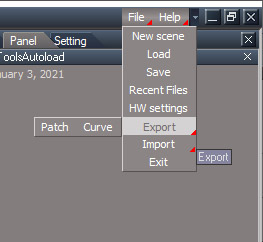
- NURBS_ImportExport_Menu.jpg (39.63 KiB) Viewed 5102 times
The new nurbs patch and curve file buttons require the new rsx plugin file v1638426
-
clintonman
- Captain
- Posts: 5659
- Joined: 21 May 2009, 21:08
- Type the number ten into the box: 0
- Location: California
Re: Updated Workspace NURBS Tools
Update Jan 6 2021
mostly bug fixes to do with svg import and animation export plus a few other things
move curve utilities into nurbs utilities
recombine curve import and settings panels
css animation export: fix bugs, make sample file and remove greensock javascript animation
curve import remove expose extra attributes, replace with panel export for color and opacity
curve import fix so svg color imported to non-constant material
curve import fix svg convert to polygon option
fix incompatible nurbs name when loading exported workspace nurbs into modelspace - prevented proper node behavior
nurbs patch import get proper naming via parent polyhedron
patch import proper assignment of the matrix values
fix bug in the fix handles scripts so works no matter which element of the nurbs is selected
all floating panels open side by side and takes side panel into consideration
mostly bug fixes to do with svg import and animation export plus a few other things
move curve utilities into nurbs utilities
recombine curve import and settings panels
css animation export: fix bugs, make sample file and remove greensock javascript animation
curve import remove expose extra attributes, replace with panel export for color and opacity
curve import fix so svg color imported to non-constant material
curve import fix svg convert to polygon option
fix incompatible nurbs name when loading exported workspace nurbs into modelspace - prevented proper node behavior
nurbs patch import get proper naming via parent polyhedron
patch import proper assignment of the matrix values
fix bug in the fix handles scripts so works no matter which element of the nurbs is selected
all floating panels open side by side and takes side panel into consideration
-
clintonman
- Captain
- Posts: 5659
- Joined: 21 May 2009, 21:08
- Type the number ten into the box: 0
- Location: California
Re: Updated Workspace NURBS Tools
Update August 29, 2021
Many changes from the previous release
Many changes from the previous release
-
clintonman
- Captain
- Posts: 5659
- Joined: 21 May 2009, 21:08
- Type the number ten into the box: 0
- Location: California
Re: Updated Workspace NURBS Tools
Previous update Sept 2021 - improved freezing patches
Dec 14, 2021
fix invisible import when svg stroke and fill are not defined
add check to make sure bridge isn't "On" - stops model copy errors
add curve path resolution control so complex shapes can have a simpler less detailed appearance - maybe useful for importing as polygons and the curves are too detailed
option to use stroke color when fill color is missing
thickness option for importing polygons as full 3D extrusion instead of as a single polygon
The altered command is attached for convenience.
Dec 14, 2021
fix invisible import when svg stroke and fill are not defined
add check to make sure bridge isn't "On" - stops model copy errors
add curve path resolution control so complex shapes can have a simpler less detailed appearance - maybe useful for importing as polygons and the curves are too detailed
option to use stroke color when fill color is missing
thickness option for importing polygons as full 3D extrusion instead of as a single polygon
The altered command is attached for convenience.
- Attachments
-
- loadCurveScript22f2.RsObj
- (560.31 KiB) Downloaded 148 times
-
clintonman
- Captain
- Posts: 5659
- Joined: 21 May 2009, 21:08
- Type the number ten into the box: 0
- Location: California
Re: Updated Workspace NURBS Tools
Update: Oct 10 2022
fixed a bug where if you move a large or medium number of nurbs objects tS would run slowly
this makes nurbs more compatible with point clone script when nurbs are the cloned items
http://clintons3d.com/plugins/truespace ... nurbs.html
fixed a bug where if you move a large or medium number of nurbs objects tS would run slowly
this makes nurbs more compatible with point clone script when nurbs are the cloned items
http://clintons3d.com/plugins/truespace ... nurbs.html
-
clintonman
- Captain
- Posts: 5659
- Joined: 21 May 2009, 21:08
- Type the number ten into the box: 0
- Location: California
Re: Updated Workspace NURBS Tools
Update June 2024
New Draw Curve widget that enables snapping to points when pressing Ctrl + LClick
No changes to the NURBS installer.
New Clintons3dPlugin.rsx file v1638452 and a new GetPointsWidget.
The new rsx file can be found at the top of the page in the links below.
Installer for the new GetPointsWidget
http://clintons3d.com/plugins/truespace ... idgettools
2 differences from the Unofficial Updates version of the widget node are a "Ctrl" key was attached to the "Add" connector and the ESC cancel command was altered so extra nodes could be removed.
The new GetPointswidget can be downloaded without an installer just below the link above. So it can be used for testing without permanent changes.
http://clintons3d.com/plugins/truespace ... pickwidget
New Draw Curve widget that enables snapping to points when pressing Ctrl + LClick
No changes to the NURBS installer.
New Clintons3dPlugin.rsx file v1638452 and a new GetPointsWidget.
The new rsx file can be found at the top of the page in the links below.
Installer for the new GetPointsWidget
http://clintons3d.com/plugins/truespace ... idgettools
2 differences from the Unofficial Updates version of the widget node are a "Ctrl" key was attached to the "Add" connector and the ESC cancel command was altered so extra nodes could be removed.
The new GetPointswidget can be downloaded without an installer just below the link above. So it can be used for testing without permanent changes.
http://clintons3d.com/plugins/truespace ... pickwidget
-
clintonman
- Captain
- Posts: 5659
- Joined: 21 May 2009, 21:08
- Type the number ten into the box: 0
- Location: California
Re: Updated Workspace NURBS Tools
Update July 4 2024
new draw plane for the draw curve tool, and new non-pe mode circle tool
removed some dead nodes - primitivePatchScript,railSurfaceScript,birailSurfaceScript,latheCurveScript,skinSurfaceScript
fixed rare "for in" error in skinSurfaceScript
open floating panels using the "standard" floating panel script
added select cp mesh button to the nurbs nodes
circle tools can run outside of pe mode
increased the invisible "thickness" of curves so straight curves are easier to select
fix bug in polygon to curve when more than 1 polygon is selected
some panels have bigger brighter fonts
new draw plane for the draw curve tool, and new non-pe mode circle tool
removed some dead nodes - primitivePatchScript,railSurfaceScript,birailSurfaceScript,latheCurveScript,skinSurfaceScript
fixed rare "for in" error in skinSurfaceScript
open floating panels using the "standard" floating panel script
added select cp mesh button to the nurbs nodes
circle tools can run outside of pe mode
increased the invisible "thickness" of curves so straight curves are easier to select
fix bug in polygon to curve when more than 1 polygon is selected
some panels have bigger brighter fonts
-
clintonman
- Captain
- Posts: 5659
- Joined: 21 May 2009, 21:08
- Type the number ten into the box: 0
- Location: California
Re: Updated Workspace NURBS Tools
Update July 5 2024
fix bug where the nurbs draw plane had to be in the scene for circles and draw curve to work
added missing steps to status message help - mostly rclick to commit a selection
selection markers were not clearing properly between steps
button highlight was not clearing when cancel
new: open the draw plane options as a floating panel - requires new open floating panel script install
fix bug where the nurbs draw plane had to be in the scene for circles and draw curve to work
added missing steps to status message help - mostly rclick to commit a selection
selection markers were not clearing properly between steps
button highlight was not clearing when cancel
new: open the draw plane options as a floating panel - requires new open floating panel script install
-
clintonman
- Captain
- Posts: 5659
- Joined: 21 May 2009, 21:08
- Type the number ten into the box: 0
- Location: California
Re: Updated Workspace NURBS Tools
Update July 14
added point color control to the draw panel
the draw panel node places itself nicely in the link editor
draw panel edge default color hue shifted 180 degrees(128 tS color picker) for higher contrast with default tS colors
draw curve, circle, points to curve and polygon to curve scripts will return a reference to the created curve - needed for a personal project
http://clintons3d.com/plugins/truespace ... nurbs.html
added point color control to the draw panel
the draw panel node places itself nicely in the link editor
draw panel edge default color hue shifted 180 degrees(128 tS color picker) for higher contrast with default tS colors
draw curve, circle, points to curve and polygon to curve scripts will return a reference to the created curve - needed for a personal project
http://clintons3d.com/plugins/truespace ... nurbs.html
-
clintonman
- Captain
- Posts: 5659
- Joined: 21 May 2009, 21:08
- Type the number ten into the box: 0
- Location: California
Re: Updated Workspace NURBS Tools
Update August 7
Image shows new features and a bug in the circle creation tools.
new dimension the length of a curve
new curve thickness mesh
fixed NURBS freezing curves and patches to maintain group and parenting relationships
The bug I found is that the circle data does not create perfect circles. They have slightly bigger squarish shape. The new dimension tool was used and got a length of 25.372 shown in the right circle. The actual value should be 25.1327
The left circle got a measurement of 25.1324 after a modeling workaround. Much closer to ideal.
first set of handles selected for scaling
The workaround is for the top, left, bottom and right sides of the controlPointMesh select the 2 handles and rmb uniform scale to 0.942 using the widget while looking at the Info panel.

Image shows new features and a bug in the circle creation tools.
new dimension the length of a curve
new curve thickness mesh
fixed NURBS freezing curves and patches to maintain group and parenting relationships
The bug I found is that the circle data does not create perfect circles. They have slightly bigger squarish shape. The new dimension tool was used and got a length of 25.372 shown in the right circle. The actual value should be 25.1327
The left circle got a measurement of 25.1324 after a modeling workaround. Much closer to ideal.

- CircleIssue4Handles.jpg (23.45 KiB) Viewed 786 times
The workaround is for the top, left, bottom and right sides of the controlPointMesh select the 2 handles and rmb uniform scale to 0.942 using the widget while looking at the Info panel.
-
trueBlue

- Captain
- Posts: 5548
- Joined: 06 Jul 2009, 22:50
- Type the number ten into the box: 10
Re: Updated Workspace NURBS Tools
I tried adding Thickness to a Curve
System.Question does not show 9 out of 10 times
The Cylinder is pinched
Looks like it has a normal issue at the end
System.Question does not show 9 out of 10 times
The Cylinder is pinched
Looks like it has a normal issue at the end

- Pinched.png (65.77 KiB) Viewed 774 times
- Attachments
-
- Curve9f7e.RsObj
- (129.57 KiB) Downloaded 38 times
-
clintonman
- Captain
- Posts: 5659
- Joined: 21 May 2009, 21:08
- Type the number ten into the box: 0
- Location: California
Re: Updated Workspace NURBS Tools
I'll replace with the function set questiontrueBlue wrote: 08 Aug 2024, 17:12 I tried adding Thickness to a Curve
System.Question does not show 9 out of 10 times
The Cylinder is pinched
Looks like it has a normal issue at the end
Pinched.png
I found a way to fix the extreme form of pinching. There can still be some pinching though.
I'll add a Mesh Normal node to it. This only partially fixes the normals issue. The pinch areas look worse but ends look better.
Also found one other change I want to make so another update is in the works...
-
trueBlue
- Captain
- Posts: 5548
- Joined: 06 Jul 2009, 22:50
- Type the number ten into the box: 10
Re: Updated Workspace NURBS Tools
So far, the pinching just happens to the circlesclintonman wrote: 08 Aug 2024, 20:15I'll replace with the function set questiontrueBlue wrote: 08 Aug 2024, 17:12 I tried adding Thickness to a Curve
System.Question does not show 9 out of 10 times
The Cylinder is pinched
Looks like it has a normal issue at the end
Pinched.png
I found a way to fix the extreme form of pinching. There can still be some pinching though.
I'll add a Mesh Normal node to it. This only partially fixes the normals issue. The pinch areas look worse but ends look better.
Also found one other change I want to make so another update is in the works...
I added a Question function to the NURBS Function
If you can, could you just upload the changed items here?
Edit: Since the ThicknessCylinder is a Cylinder, I would think the X Segments should be greater than 16
Currently, it is set at 6 and the Default is 32
-
clintonman
- Captain
- Posts: 5659
- Joined: 21 May 2009, 21:08
- Type the number ten into the box: 0
- Location: California
Re: Updated Workspace NURBS Tools
Update August 8
stop hidden question and alert dialogs issue for the thickness buttons
new grow selection behavior for curves - by default selects the whole handle
thickness cylinder - improved shape and added some mesh normals
Changed items:
NURBS Function Set
grow Selection
ThicknessCylinder - new Mesh Normals node, updated Conform to Curve script
growSelectionButton - new RClickCommand
stop hidden question and alert dialogs issue for the thickness buttons
new grow selection behavior for curves - by default selects the whole handle
thickness cylinder - improved shape and added some mesh normals
Changed items:
NURBS Function Set
grow Selection
ThicknessCylinder - new Mesh Normals node, updated Conform to Curve script
growSelectionButton - new RClickCommand
-
clintonman
- Captain
- Posts: 5659
- Joined: 21 May 2009, 21:08
- Type the number ten into the box: 0
- Location: California
Re: Updated Workspace NURBS Tools
That sounds like it would make editing with the thickness active even slower than it already is.trueBlue wrote: 08 Aug 2024, 20:26So far, the pinching just happens to the circlesclintonman wrote: 08 Aug 2024, 20:15I'll replace with the function set questiontrueBlue wrote: 08 Aug 2024, 17:12 I tried adding Thickness to a Curve
System.Question does not show 9 out of 10 times
The Cylinder is pinched
Looks like it has a normal issue at the end
Pinched.png
I found a way to fix the extreme form of pinching. There can still be some pinching though.
I'll add a Mesh Normal node to it. This only partially fixes the normals issue. The pinch areas look worse but ends look better.
Also found one other change I want to make so another update is in the works...
I added a Question function to the NURBS Function
If you can, could you just upload the changed items here?
Edit: Since the ThicknessCylinder is a Cylinder, I would think the X Segments should be greater than 16
Currently, it is set at 6 and the Default is 32
-
clintonman
- Captain
- Posts: 5659
- Joined: 21 May 2009, 21:08
- Type the number ten into the box: 0
- Location: California
Re: Updated Workspace NURBS Tools
August 9 Update
found and fixed a bug in the curve thickness deactivate code - the thickness node was not fully disconnected
relaxed the selection requirements when extending a curve - no longer have to specifically select the end point of the curve. selecting any part of an end handle will work
relaxed the selection requirements when deleting a control point from a curve - no longer have to select the root point of a handle. selecting any part of the handle will work
when inserting a new control point the resulting handle will be selected
changed items:
NURBS Function Set
extendCurveScript
deleteControlPointScript
insertControlPointScript
found and fixed a bug in the curve thickness deactivate code - the thickness node was not fully disconnected
relaxed the selection requirements when extending a curve - no longer have to specifically select the end point of the curve. selecting any part of an end handle will work
relaxed the selection requirements when deleting a control point from a curve - no longer have to select the root point of a handle. selecting any part of the handle will work
when inserting a new control point the resulting handle will be selected
changed items:
NURBS Function Set
extendCurveScript
deleteControlPointScript
insertControlPointScript