Browser based Color Picker, Layers and Scene View Update
-
clintonman
- Captain
- Posts: 5659
- Joined: 21 May 2009, 21:08
- Type the number ten into the box: 0
- Location: California
Browser based Color Picker, Layers and Scene View Update
This update has improved performance and does not mess up the undo stack like the old version.
It updates the object statistics node to give mesh information like face counts.
The new system is based on a windows timer instead of script nodes running in a loop.
http://clintons3d.com/plugins/truespace ... webui.html
The new system is based on a windows timer instead of script nodes running in a loop.
http://clintons3d.com/plugins/truespace ... webui.html
Last edited by clintonman on 19 Apr 2021, 06:35, edited 1 time in total.
-
clintonman
- Captain
- Posts: 5659
- Joined: 21 May 2009, 21:08
- Type the number ten into the box: 0
- Location: California
Re: Browser based Color Picker and Scene View Update
Update July 2020
The www button checks that the plugin is installed and loaded. This prevents bad window that can't be closed.
Also installer clears the recent files list.
From previous updates - persistent installer, opens window only once, update object and object selection counts in the statistics node.
The www button checks that the plugin is installed and loaded. This prevents bad window that can't be closed.
Also installer clears the recent files list.
From previous updates - persistent installer, opens window only once, update object and object selection counts in the statistics node.
-
clintonman
- Captain
- Posts: 5659
- Joined: 21 May 2009, 21:08
- Type the number ten into the box: 0
- Location: California
Re: Browser based Color Picker and Scene View Update
Updated the Show and Hide scripts to be more compatible with a recent Unofficial Update release.
-
clintonman
- Captain
- Posts: 5659
- Joined: 21 May 2009, 21:08
- Type the number ten into the box: 0
- Location: California
Re: Browser based Color Picker and Scene View Update
Update September 2020
works with the new unSelectable script style and plugin widget
no internal locking node, now requires installation of the unSelectable script to lock nodes
unlocking removes the locking node - an old change that was applied to all other locking scripts
http://clintons3d.com/plugins/truespace ... webui.html
the web ui based locking will likely be removed in the future, it's obsolete because of the new widget based plugin locking
works with the new unSelectable script style and plugin widget
no internal locking node, now requires installation of the unSelectable script to lock nodes
unlocking removes the locking node - an old change that was applied to all other locking scripts
http://clintons3d.com/plugins/truespace ... webui.html
the web ui based locking will likely be removed in the future, it's obsolete because of the new widget based plugin locking
-
clintonman
- Captain
- Posts: 5659
- Joined: 21 May 2009, 21:08
- Type the number ten into the box: 0
- Location: California
Re: Browser based Color Picker and Scene View Update
Update January 2021
works with new NURBS objects
-
clintonman
- Captain
- Posts: 5659
- Joined: 21 May 2009, 21:08
- Type the number ten into the box: 0
- Location: California
Re: Browser based Color Picker and Scene View Update
Update April 18, 2021
Added Workspace Layers v4 to the WebUI installer
The version 4 layers can have more than 24 layers.
Does not require that the undo history is cleared.
Can sort the layers by number or name.
Requires a modern version of windows with internet explorer to have the control panel live inside the trueSpace window.
Untested but may run under winXP via external browser chrome or firefox
http://clintons3d.com/plugins/truespace ... yers4.html
Note to self: just remembered when running the first time it may ask about opening the firewall. You can answer in any way you like since it does not need to use the network local or public.
Added Workspace Layers v4 to the WebUI installer
The version 4 layers can have more than 24 layers.
Does not require that the undo history is cleared.
Can sort the layers by number or name.
Requires a modern version of windows with internet explorer to have the control panel live inside the trueSpace window.
Untested but may run under winXP via external browser chrome or firefox
http://clintons3d.com/plugins/truespace ... yers4.html
Note to self: just remembered when running the first time it may ask about opening the firewall. You can answer in any way you like since it does not need to use the network local or public.
-
clintonman
- Captain
- Posts: 5659
- Joined: 21 May 2009, 21:08
- Type the number ten into the box: 0
- Location: California
Re: Browser based Color Picker, Layers and Scene View Update
Update for the layers window.
small aspect is taller to fit the color picker properly
fixed hiding of selected cameras and spotlights
added option to deselect items when locking, default is to deselect them
updated the color picker - removed the buttons, added text input and before/after swatches
added hover tool tips
web server checks to see if the port it uses is in use - gives a warning if so
web server window opens in a smaller window
small aspect is taller to fit the color picker properly
fixed hiding of selected cameras and spotlights
added option to deselect items when locking, default is to deselect them
updated the color picker - removed the buttons, added text input and before/after swatches
added hover tool tips
web server checks to see if the port it uses is in use - gives a warning if so
web server window opens in a smaller window
-
clintonman
- Captain
- Posts: 5659
- Joined: 21 May 2009, 21:08
- Type the number ten into the box: 0
- Location: California
Re: Browser based Color Picker, Layers and Scene View Update
Just found an error in the release.
All the changes to the color picker were lost. So it still has the old color picker and the small aspect is still too short to use it properly.
Back to the drawing board. Gotta recreate it from scratch.
Edit:
Good news!
The changes were not lost. It looks like the html control browser cache was stuck with old information. Pressing the Reload button fixed it. Boy, that was close. It was a lot of work getting that part to work. I was not looking forward to doing it again.
All the changes to the color picker were lost. So it still has the old color picker and the small aspect is still too short to use it properly.
Back to the drawing board. Gotta recreate it from scratch.
Edit:
Good news!
-
clintonman
- Captain
- Posts: 5659
- Joined: 21 May 2009, 21:08
- Type the number ten into the box: 0
- Location: California
Re: Browser based Color Picker, Layers and Scene View Update
Update May 3
refactored to work with groups in a more generic way - also full support for deeply nested groups
layer 0 and 1 always appear in the list of layers now
disconnect object hider if present in cameras and lights - can be reconnected from the new RMB panel button
fixed to work with lights that do not have render attributes
fixed a remove layer bug
add to layer - bug: backfaces and hidden lines not used - fixed
capture websocket errors - stops mysterious failures from security errors
auto convert hair option - convert Line type to Circle to make it compatible with the layers system
auto open small aspect option - complements of trueBlue
fixed NURBS processing
Overall this is better than the previous release. The code is cleaner, so changes are easier and it does not ignore deeply nested groups. The only downside is that complex group relationships can make the group counts more difficult to understand.
refactored to work with groups in a more generic way - also full support for deeply nested groups
layer 0 and 1 always appear in the list of layers now
disconnect object hider if present in cameras and lights - can be reconnected from the new RMB panel button
fixed to work with lights that do not have render attributes
fixed a remove layer bug
add to layer - bug: backfaces and hidden lines not used - fixed
capture websocket errors - stops mysterious failures from security errors
auto convert hair option - convert Line type to Circle to make it compatible with the layers system
auto open small aspect option - complements of trueBlue
fixed NURBS processing
Overall this is better than the previous release. The code is cleaner, so changes are easier and it does not ignore deeply nested groups. The only downside is that complex group relationships can make the group counts more difficult to understand.
-
clintonman
- Captain
- Posts: 5659
- Joined: 21 May 2009, 21:08
- Type the number ten into the box: 0
- Location: California
Re: Browser based Color Picker, Layers and Scene View Update
Update May 8
fix multiple reconnect object hider node bug
fixed color display on small aspect
fixed backfaces and hidden lines being set when adding to a layer
fixed ora visible in stack view after adding to the layer
remove layer all objects go to layer 0 - with no change in appearance to match layer 0
add button to hide camera and light ora panel
Edit: unpublished bug fix for ORA showing when remove from layer,
add this line above the return statement on line 173 of the WebServer/compute node
Activity.Run("Scripts/CustomCommands/wsLayersGroup4/CloseORASettings");
fix multiple reconnect object hider node bug
fixed color display on small aspect
fixed backfaces and hidden lines being set when adding to a layer
fixed ora visible in stack view after adding to the layer
remove layer all objects go to layer 0 - with no change in appearance to match layer 0
add button to hide camera and light ora panel
Edit: unpublished bug fix for ORA showing when remove from layer,
add this line above the return statement on line 173 of the WebServer/compute node
Activity.Run("Scripts/CustomCommands/wsLayersGroup4/CloseORASettings");
-
clintonman
- Captain
- Posts: 5659
- Joined: 21 May 2009, 21:08
- Type the number ten into the box: 0
- Location: California
Re: Browser based Color Picker, Layers and Scene View Update
Update May 28
fixed the unpublished ora bug mentioned in the previous post
added a bunch of changes from the Unofficial Update version of the tool, mostly a large reduction in undo usage and some ui changes - trueBlue
added a confirmation dialog to the remove layer button - press the refresh button if this change does not show itself
fixed the unpublished ora bug mentioned in the previous post
added a bunch of changes from the Unofficial Update version of the tool, mostly a large reduction in undo usage and some ui changes - trueBlue
added a confirmation dialog to the remove layer button - press the refresh button if this change does not show itself
-
clintonman
- Captain
- Posts: 5659
- Joined: 21 May 2009, 21:08
- Type the number ten into the box: 0
- Location: California
Re: Browser based Color Picker, Layers and Scene View Update
Update Nov 2, 2021
Added a Quick Processing mode to the layers panel.
I was working with a scene that had about 160 objects in it and layers was slow. Adding an item to a layer took about 15 seconds. The quick processing cuts some corners and bypasses group support. When active it can add to a layer in 2 seconds. Not super fast but at least it's reasonable. The same problem showed when hiding and showing layers. The initial run of the layers is still slow because it fully processes the scene without cutting any corners.
http://clintons3d.com/plugins/truespace ... webui.html
Added a Quick Processing mode to the layers panel.
I was working with a scene that had about 160 objects in it and layers was slow. Adding an item to a layer took about 15 seconds. The quick processing cuts some corners and bypasses group support. When active it can add to a layer in 2 seconds. Not super fast but at least it's reasonable. The same problem showed when hiding and showing layers. The initial run of the layers is still slow because it fully processes the scene without cutting any corners.
http://clintons3d.com/plugins/truespace ... webui.html
-
clintonman
- Captain
- Posts: 5659
- Joined: 21 May 2009, 21:08
- Type the number ten into the box: 0
- Location: California
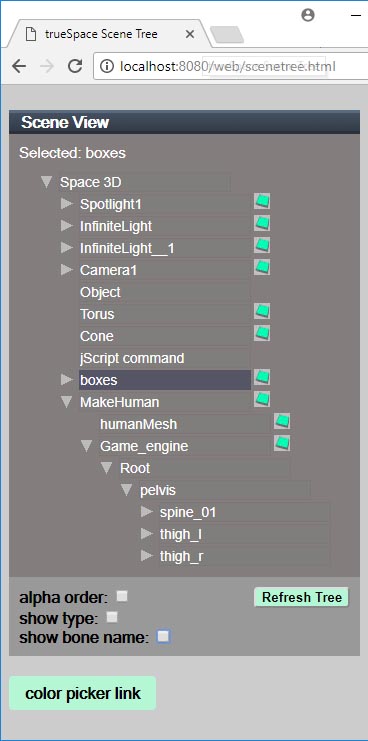
Re: Browser based Color Picker, Layers and Scene View Update
Sept 4 2022
New Scene View version 2 - does not work in winXP
scripts released but not yet documented
http://clintons3d.com/plugins/truespace ... webui.html
New Scene View version 2 - does not work in winXP
scripts released but not yet documented
http://clintons3d.com/plugins/truespace ... webui.html
-
clintonman
- Captain
- Posts: 5659
- Joined: 21 May 2009, 21:08
- Type the number ten into the box: 0
- Location: California
Re: Browser based Color Picker, Layers and Scene View Update
Sept 7 2022
Found a major bug in the Web UI. The last loaded page would take over and make any other open UIs inert.
new rsx plugin version v1638409
web ui's don't interfere with each other
delete node in tS updates the layers and scene view 2
delete in scene view 2 updates the layers
select in layers updates the scene view 2
hide/show/lock/unlock in layers updates the scene view 2
start with pre-existing layers node in scene will update it's data instead of just reading it - this only works in web page view, panel display would require manual refresh button press, this catches any changes during the time the layer ui was inactive
add object to layer will update the scene view 2 to catch visibility and locking changes
new WatchdogController node - for the future
no enhancements for scene view 1
improved error for conflicting port numbers - shows the program that is using the port
fixed scene view 2 options button to not show the hover tip
Big TODO is finally document the changes, was put off because of the "there can only be one" UI bug
Edit:
Darn! Found a new problem with the Scene View 2. Expanding child nodes not working properly. Need to figure it out and fix it.
Workaround is the press the Scene button if the list does not expand.
Found a major bug in the Web UI. The last loaded page would take over and make any other open UIs inert.
new rsx plugin version v1638409
web ui's don't interfere with each other
delete node in tS updates the layers and scene view 2
delete in scene view 2 updates the layers
select in layers updates the scene view 2
hide/show/lock/unlock in layers updates the scene view 2
start with pre-existing layers node in scene will update it's data instead of just reading it - this only works in web page view, panel display would require manual refresh button press, this catches any changes during the time the layer ui was inactive
add object to layer will update the scene view 2 to catch visibility and locking changes
new WatchdogController node - for the future
no enhancements for scene view 1
improved error for conflicting port numbers - shows the program that is using the port
fixed scene view 2 options button to not show the hover tip
Big TODO is finally document the changes, was put off because of the "there can only be one" UI bug
Edit:
Darn! Found a new problem with the Scene View 2. Expanding child nodes not working properly. Need to figure it out and fix it.
Workaround is the press the Scene button if the list does not expand.
-
clintonman
- Captain
- Posts: 5659
- Joined: 21 May 2009, 21:08
- Type the number ten into the box: 0
- Location: California
Re: Browser based Color Picker, Layers and Scene View Update
Sept 8 2022
Fixed the Scene View 2, Expanding child nodes not working properly. The new changes are in the web.zip file - no changes to the installer or the rsx plugin file.
Now back to documentation...
Fixed the Scene View 2, Expanding child nodes not working properly. The new changes are in the web.zip file - no changes to the installer or the rsx plugin file.
Now back to documentation...
-
clintonman
- Captain
- Posts: 5659
- Joined: 21 May 2009, 21:08
- Type the number ten into the box: 0
- Location: California
Re: Browser based Color Picker, Layers and Scene View Update
Sept 10 2022
found some bugs while documenting the scene view
all fixes are in the web.zip file, no changes to the installer or rsx plugin
some note links dialogs were overlapping the save, cancel, delete buttons
added a timeout so can run the same command twice if a set time has run out - before was too strict and was unable to run anything 2 or more times in a row
options - made Parent-Child and Joint Hierarchy options update the tree when changed - this also stopped errors
fixed random problem with drag and drop were a refresh message was sent instead of the do drop message
found some bugs while documenting the scene view
all fixes are in the web.zip file, no changes to the installer or rsx plugin
some note links dialogs were overlapping the save, cancel, delete buttons
added a timeout so can run the same command twice if a set time has run out - before was too strict and was unable to run anything 2 or more times in a row
options - made Parent-Child and Joint Hierarchy options update the tree when changed - this also stopped errors
fixed random problem with drag and drop were a refresh message was sent instead of the do drop message
-
clintonman
- Captain
- Posts: 5659
- Joined: 21 May 2009, 21:08
- Type the number ten into the box: 0
- Location: California
Re: Browser based Color Picker, Layers and Scene View Update
Sep 11 2022
updated web ui panel shows the users IP address that can be used to run the ui from an external pc or tablet/cell phone
added an index page so external devices have a list of ui pages
first documentation pass is mostly done
updated web ui panel shows the users IP address that can be used to run the ui from an external pc or tablet/cell phone
added an index page so external devices have a list of ui pages
first documentation pass is mostly done
-
clintonman
- Captain
- Posts: 5659
- Joined: 21 May 2009, 21:08
- Type the number ten into the box: 0
- Location: California
Re: Browser based Color Picker, Layers and Scene View Update
Sept 20 2022 Update
more strict check for busy port number
fixed for UU9 bug
default port 8090
open buttons will only work if the web server is running (if answer "no" to port in use won't open)
more strict check for busy port number
fixed for UU9 bug
default port 8090
open buttons will only work if the web server is running (if answer "no" to port in use won't open)
-
clintonman
- Captain
- Posts: 5659
- Joined: 21 May 2009, 21:08
- Type the number ten into the box: 0
- Location: California
Re: Browser based Color Picker, Layers and Scene View Update
Jan 6 2023 Update
Fix a bug that stopped spotlights and cameras from showing / hiding properly
Updated to work with the Dimensions scripts
http://clintons3d.com/plugins/truespace ... webui.html
Fix a bug that stopped spotlights and cameras from showing / hiding properly
Updated to work with the Dimensions scripts
http://clintons3d.com/plugins/truespace ... webui.html
-
clintonman
- Captain
- Posts: 5659
- Joined: 21 May 2009, 21:08
- Type the number ten into the box: 0
- Location: California
Re: Browser based Color Picker, Layers and Scene View Update
Jan 8 2022
Minor Update
removed "Re-Hide Camera and Light ORA" from the layers options panel
will not attempt to load the layers panel if there is no valid active web server window
Minor Update
removed "Re-Hide Camera and Light ORA" from the layers options panel
will not attempt to load the layers panel if there is no valid active web server window
-
clintonman
- Captain
- Posts: 5659
- Joined: 21 May 2009, 21:08
- Type the number ten into the box: 0
- Location: California
Re: Browser based Color Picker, Layers and Scene View Update
Jan 8 2023
Bug fix
The Scene View 2 page was not connected to the trueSpace rename event and once connected wasn't working for the scene node.
@trueBlue
2 nodes changed "compute" and "SceneView2FunctionSet"
for the "compute" node only added one line, 309, for the TSRenameEvent
Bug fix
The Scene View 2 page was not connected to the trueSpace rename event and once connected wasn't working for the scene node.
@trueBlue
2 nodes changed "compute" and "SceneView2FunctionSet"
for the "compute" node only added one line, 309, for the TSRenameEvent
Code: Select all
if(SceneViewVersion == 2) {
if(datafromweb.command == "TSSelectionChange") { SceneView2FS.TSSelectionChange(params); return;} // same v1 above and v2
if(datafromweb.command == "TSRenameEvent") { SceneView2FS.RefreshWholeTree(params); return; }
if(datafromweb.command == "RenameItem") { SceneView2FS.RenameItem(datafromweb, params); return; }-
clintonman
- Captain
- Posts: 5659
- Joined: 21 May 2009, 21:08
- Type the number ten into the box: 0
- Location: California
Re: Browser based Color Picker, Layers and Scene View Update
Update December 22 2023
Added Null icons to the Scene View 2 page
copied wslayersgroup4 from the UU version which had a fix in AddToLayer function
to update replace the web folder and run the script installer
http://clintons3d.com/plugins/truespace ... webui.html
Added Null icons to the Scene View 2 page
copied wslayersgroup4 from the UU version which had a fix in AddToLayer function
to update replace the web folder and run the script installer
http://clintons3d.com/plugins/truespace ... webui.html
-
clintonman
- Captain
- Posts: 5659
- Joined: 21 May 2009, 21:08
- Type the number ten into the box: 0
- Location: California
Re: Browser based Color Picker, Layers and Scene View Update
In answer to a question "Is there a way to Run the Scene View2 'Update Tree' from a jScript?"
There is no direct way to update from script. The attached updates in a round about way spread out over 3 command nodes.
It runs the following steps:
1. save current selection
2. copy a new temporary object into the scene and select it
3. delete the object - this updates the Scene View 2
4. restore the selection or Space.Unselect if there was no selection
There is no direct way to update from script. The attached updates in a round about way spread out over 3 command nodes.
It runs the following steps:
1. save current selection
2. copy a new temporary object into the scene and select it
3. delete the object - this updates the Scene View 2
4. restore the selection or Space.Unselect if there was no selection
- Attachments
-
- Force Scene View 2 Update.RsObj
- (16.22 KiB) Downloaded 45 times
-
trueBlue
- Captain
- Posts: 5548
- Joined: 06 Jul 2009, 22:50
- Type the number ten into the box: 10
Re: Browser based Color Picker, Layers and Scene View Update
Scene View 2
How do you use:
Move into Group - move selected nodes onto another node
Move into Group 3D - move into group for 3D objects with matrix connections
How do you use:
Move into Group - move selected nodes onto another node
Move into Group 3D - move into group for 3D objects with matrix connections
-
clintonman
- Captain
- Posts: 5659
- Joined: 21 May 2009, 21:08
- Type the number ten into the box: 0
- Location: California
Re: Browser based Color Picker, Layers and Scene View Update
check the boxes of the items to move then right click on the target item box and choose Move into Group/Move into Group 3DtrueBlue wrote: 10 Oct 2024, 16:17 Scene View 2
How do you use:
Move into Group - move selected nodes onto another node
Move into Group 3D - move into group for 3D objects with matrix connections
I'll write a not to myself to update those instructions
-
trueBlue
- Captain
- Posts: 5548
- Joined: 06 Jul 2009, 22:50
- Type the number ten into the box: 10
Re: Browser based Color Picker, Layers and Scene View Update
Thanks!clintonman wrote: 10 Oct 2024, 19:00check the boxes of the items to move then right click on the target item box and choose Move into Group/Move into Group 3DtrueBlue wrote: 10 Oct 2024, 16:17 Scene View 2
How do you use:
Move into Group - move selected nodes onto another node
Move into Group 3D - move into group for 3D objects with matrix connections
I'll write a not to myself to update those instructions
Just realized I posted in the wrong thread
viewtopic.php?p=66071#p66071