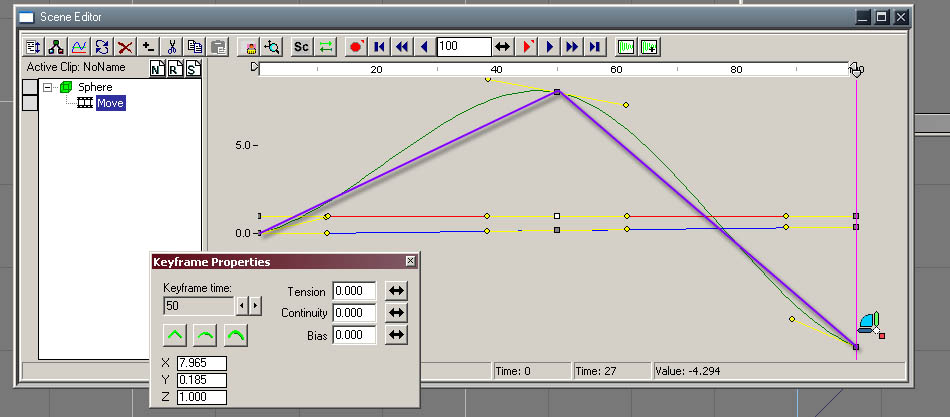
I use Motion Studio to animate my models, and have noticed it does some "funny" things to the model side Scene Editor attributes.
It Wont always erase keys in both, and it seems to add quite a few of its own attributes to the scene editor [to name a few]. Thats fine, i can adapt to it.
but my question is, .....
what does the :stiff attrib control? [see attached picture]
Also, is there a listing of attributes that explains the role of each one?
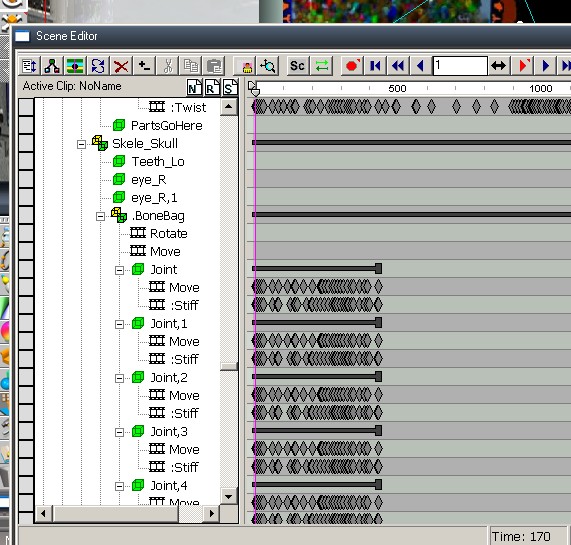
Scene editor atributes?
-
leevviiJ
- Petty Officer First Class
- Posts: 52
- Joined: 05 Sep 2009, 05:11
Scene editor atributes?
-
DesignDevil
- Master Chief Petty Officer
- Posts: 500
- Joined: 22 May 2009, 08:52
- Type the number ten into the box: 0
- Location: Neuruppin, Germany, Earth.
Re: Scene editor atributes?
What the :stiff attribute does? I have also no idea but i could imagine that motionStudio needs a bit of extra informations for every created keyframe, maybe that this is the place where ms stores the NAIL information for the joints - so if they are nailed or not. But i'm not sure.
The attributes ":stiff" and "move" should be the only attributes for motion studio because the animation is just the interpolation of the joint movement. It is not possible to animate in motionstudio thrue joint rotation (as example). There is a forward kinematic build in but this functionality is just "emulated" thrue inverse kinematic - which means in this case - thrue moving a joint.
i hope this helps a bit
The attributes ":stiff" and "move" should be the only attributes for motion studio because the animation is just the interpolation of the joint movement. It is not possible to animate in motionstudio thrue joint rotation (as example). There is a forward kinematic build in but this functionality is just "emulated" thrue inverse kinematic - which means in this case - thrue moving a joint.
i hope this helps a bit
I still use TrueSpace 6.6
Link: My Youtube Channel
Link: www.DesignDevil.de - Plugins, Tutorials and more about TrueSpace 6.6
Link: My Youtube Channel
Link: www.DesignDevil.de - Plugins, Tutorials and more about TrueSpace 6.6
-
leevviiJ
- Petty Officer First Class
- Posts: 52
- Joined: 05 Sep 2009, 05:11
Re: Scene editor atributes?
Thanks DD, it might be the one, i will try to check on the nailed theory, though there seems to be more :stiff's than nails, i'll let ya know.
-
DesignDevil
- Master Chief Petty Officer
- Posts: 500
- Joined: 22 May 2009, 08:52
- Type the number ten into the box: 0
- Location: Neuruppin, Germany, Earth.
Re: Scene editor atributes?
Yes that's true - there are more keyframes as nail informations.
MS stores the informations for all joint in the actual selected skeleton if you click on record in MS. If you have a skeleton with subskeletons and you have not especialy selekted one of them then MS records the positions for all joints in all skeletons!!!
That's a "missed option" in MS to store just the manipulated joint and not always all. That makes the edition of the attributes in the SE so difficult. It would be cool if it would work in a bit different way but it doesn't.
It is also bad that you can not erase or record keyframes with TS for the MS joints. Well you could, no problem to click on the record button or mark and erase the keyframes. But in this case MS goes crazy - what's normal because it has it's own way to handle his joints etc.
So, you have to be very carefull if you edit the attributes of MS joints in the SE.
We have to live with it until anybody write a new plugin and i don't believe that this would be happen.
MS stores the informations for all joint in the actual selected skeleton if you click on record in MS. If you have a skeleton with subskeletons and you have not especialy selekted one of them then MS records the positions for all joints in all skeletons!!!
That's a "missed option" in MS to store just the manipulated joint and not always all. That makes the edition of the attributes in the SE so difficult. It would be cool if it would work in a bit different way but it doesn't.
It is also bad that you can not erase or record keyframes with TS for the MS joints. Well you could, no problem to click on the record button or mark and erase the keyframes. But in this case MS goes crazy - what's normal because it has it's own way to handle his joints etc.
So, you have to be very carefull if you edit the attributes of MS joints in the SE.
We have to live with it until anybody write a new plugin and i don't believe that this would be happen.
I still use TrueSpace 6.6
Link: My Youtube Channel
Link: www.DesignDevil.de - Plugins, Tutorials and more about TrueSpace 6.6
Link: My Youtube Channel
Link: www.DesignDevil.de - Plugins, Tutorials and more about TrueSpace 6.6
-
Emmanuel
- Chief Warrant Officer
- Posts: 670
- Joined: 14 Jun 2009, 06:47
Re: Scene editor atributes?
DD, would you have, by chance, a trick to set a straight angle for all keyframes at once ?
By default, tS settings are : -0.666 Tension, 0.000 Continuity, and 0.000 Bias.
A straight angle is : 0.000 Tension, -1.000 Continuity, and 0.000 Bias.
To animate an object with straight angles, we must select each keyframe, one by one, and in the Keyframe properties clic the icon on the left of the panel.
I would love to find a way to use that setting for all keyframes at a clic on a button !
By default, tS settings are : -0.666 Tension, 0.000 Continuity, and 0.000 Bias.
A straight angle is : 0.000 Tension, -1.000 Continuity, and 0.000 Bias.
To animate an object with straight angles, we must select each keyframe, one by one, and in the Keyframe properties clic the icon on the left of the panel.
I would love to find a way to use that setting for all keyframes at a clic on a button !
-
DesignDevil
- Master Chief Petty Officer
- Posts: 500
- Joined: 22 May 2009, 08:52
- Type the number ten into the box: 0
- Location: Neuruppin, Germany, Earth.
Re: Scene editor atributes?
no, sadly, not. I also missed this feature to change the angle attrib of more than one keyframe 
maybe a good point for a plugin
I still use TrueSpace 6.6
Link: My Youtube Channel
Link: www.DesignDevil.de - Plugins, Tutorials and more about TrueSpace 6.6
Link: My Youtube Channel
Link: www.DesignDevil.de - Plugins, Tutorials and more about TrueSpace 6.6