First release of the Vertex Color Paint and Fill tools used for the creation of vertex colors for D3D materials for workspace.
http://clintons3d.com/plugins/truespace ... color.html
One usage note is that the easiest path to see vertex colors is to use the default tS material and set the VertexColorStrength to 1. Get the default by RMB click on the material editor preview sphere.
Vertex Color Paint and Fill
-
clintonman

- Captain
- Posts: 5659
- Joined: 21 May 2009, 21:08
- Type the number ten into the box: 0
- Location: California
Vertex Color Paint and Fill
-
clintonman
- Captain
- Posts: 5659
- Joined: 21 May 2009, 21:08
- Type the number ten into the box: 0
- Location: California
Re: Vertex Color Paint and Fill
Update:
The rsx plugin had a crash bug. The crash is fixed and the plugin version required has been raised to v1638439.
The rsx plugin had a crash bug. The crash is fixed and the plugin version required has been raised to v1638439.
-
trueBlue

- Captain
- Posts: 5548
- Joined: 06 Jul 2009, 22:50
- Type the number ten into the box: 10
Re: Vertex Color Paint and Fill
Wow!
You have out done yourself!
Took me awhile before I found out this does not work on tS Primitives. .
.
There is other compiled D3D Materials that have VertexColorStrength that work too other than the Default Material.
SolidTransparency
You have out done yourself!
Took me awhile before I found out this does not work on tS Primitives.
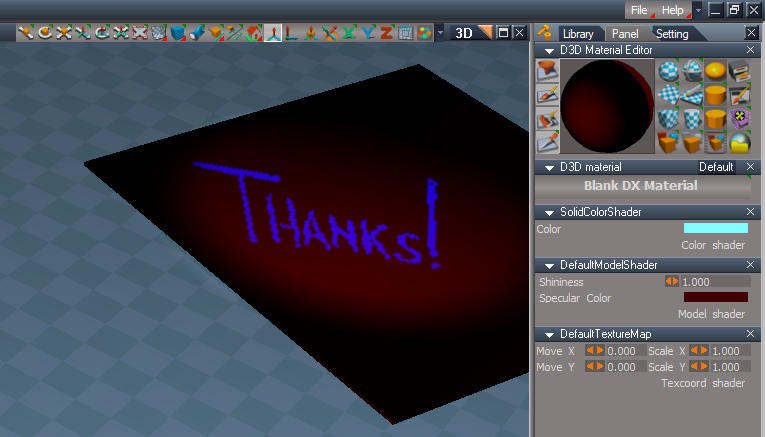
There is other compiled D3D Materials that have VertexColorStrength that work too other than the Default Material.
SolidTransparency
-
trueBlue
- Captain
- Posts: 5548
- Joined: 06 Jul 2009, 22:50
- Type the number ten into the box: 10
Re: Vertex Color Paint and Fill
Here are three materials for use with the Vertex Color Paint and Fill
- Attachments
-
- Solid Transparency Vertex.RsMat
- (10.02 KiB) Downloaded 93 times
-
- DX9 Vertex Constant Color.RsMat
- (25.73 KiB) Downloaded 144 times
-
- DX9 Vertex Color.RsMat
- (25.96 KiB) Downloaded 97 times
-
clintonman
- Captain
- Posts: 5659
- Joined: 21 May 2009, 21:08
- Type the number ten into the box: 0
- Location: California
Re: Vertex Color Paint and Fill
I'll check them the out.trueBlue wrote: 12 Feb 2023, 03:26 Here are three materials for use with the Vertex Color Paint and Fill


Another use for vertex colors is for masking. Here I combined 2 materials using a painted red vertex color. Actually, it''s not really combining 2 materials, but combining the color shader and the normal shader. It's not possible to combine actual materials in trueSpace. We can still get the same result with some work though. You can get even more complex combinations using more textures with the green and blue channels.
-
Saul
- Senior Chief Petty Officer
- Posts: 308
- Joined: 22 May 2009, 16:50
Re: Vertex Color Paint and Fill
I'd like to try this but i can't get beyond the install of the Clintons3D Package v.1638439, i have tried uninstalling Clintons3D Package v.1638433 and then load new v.1638439 but it does not appear in the package manager. Also, what to do with the global function set and status message .rsobj?
-
clintonman
- Captain
- Posts: 5659
- Joined: 21 May 2009, 21:08
- Type the number ten into the box: 0
- Location: California
Re: Vertex Color Paint and Fill
I guess it depends on what version of tS you're running. If you're running the latest work in progress unofficial updates you don't need to install the global function set or status message. You would find the Clintons3dPlugin.dll, maybe rename it to Clintons3dPluginOLD.dll, copy in the new Clintons3dPlugin.rsx and rename it to the dll extension.Saul wrote: 12 Feb 2023, 04:17 I'd like to try this but i can't get beyond the install of the Clintons3D Package v.1638439, i have tried uninstalling Clintons3D Package v.1638433 and then load new v.1638439 but it does not appear in the package manager. Also, what to do with the global function set and status message .rsobj?
If your'e running the unofficial updates v8 you need to install the global function set by dragging it into the link editor and pressing the install button.
Also replace the Clintons3dPlugin.rsx file.
If you're running trueSpace original then you need to install several things.
Some instructions here: http://clintons3d.com/plugins/truespace ... color.html
and looks like I forgot to add the persistent install requirement, that can be found here: http://clintons3d.com/plugins/truespace ... stent.html
I would think the new plugin would load if you had the older version working. If the plugin refuses to load try installing the vc++ redistributable package from microsoft.
https://www.microsoft.com/en-us/downloa ... x?id=26368
Be sure to choose the 32 bit version, because tS is a 32 bit app.
-
Saul
- Senior Chief Petty Officer
- Posts: 308
- Joined: 22 May 2009, 16:50
Re: Vertex Color Paint and Fill
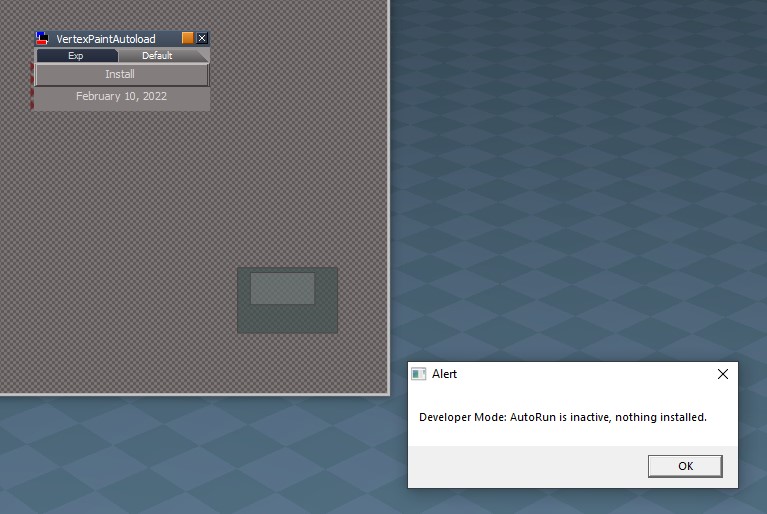
Thank you, the rename .dll seems to have worked. I get this Alert on dragging node to LE but it installs OK.
- Attachments
-
-
clintonman
- Captain
- Posts: 5659
- Joined: 21 May 2009, 21:08
- Type the number ten into the box: 0
- Location: California
Re: Vertex Color Paint and Fill
That's great, and yes that alert can be ignored. So many things need to be documented...Saul wrote: 12 Feb 2023, 05:19 Thank you, the rename .dll seems to have worked. I get this Alert on dragging node to LE but it installs OK.
-
trueBlue
- Captain
- Posts: 5548
- Joined: 06 Jul 2009, 22:50
- Type the number ten into the box: 10
Re: Vertex Color Paint and Fill
How do you combine the color shader and the normal shader?clintonman wrote: 12 Feb 2023, 04:12I'll check them the out.trueBlue wrote: 12 Feb 2023, 03:26 Here are three materials for use with the Vertex Color Paint and Fill
VertexPaintMasking.jpg
Another use for vertex colors is for masking. Here I combined 2 materials using a painted red vertex color. Actually, it''s not really combining 2 materials, but combining the color shader and the normal shader. It's not possible to combine actual materials in trueSpace. We can still get the same result with some work though. You can get even more complex combinations using more textures with the green and blue channels.
Please do share!
Wait...what!?
Are you actually Subtracting to show the Caligari image using Vertex Color Paint?
-
clintonman
- Captain
- Posts: 5659
- Joined: 21 May 2009, 21:08
- Type the number ten into the box: 0
- Location: California
Re: Vertex Color Paint and Fill
It uses interpolation driven by the vertex color. Attached is geometry from the image.trueBlue wrote: 12 Feb 2023, 12:49How do you combine the color shader and the normal shader?clintonman wrote: 12 Feb 2023, 04:12I'll check them the out.trueBlue wrote: 12 Feb 2023, 03:26 Here are three materials for use with the Vertex Color Paint and Fill
VertexPaintMasking.jpg
Another use for vertex colors is for masking. Here I combined 2 materials using a painted red vertex color. Actually, it''s not really combining 2 materials, but combining the color shader and the normal shader. It's not possible to combine actual materials in trueSpace. We can still get the same result with some work though. You can get even more complex combinations using more textures with the green and blue channels.
Please do share!
Wait...what!?
Are you actually Subtracting to show the Caligari image using Vertex Color Paint?
- Attachments
-
- MixMaterialPlane.RsObj
- (2.13 MiB) Downloaded 142 times
-
trueBlue
- Captain
- Posts: 5548
- Joined: 06 Jul 2009, 22:50
- Type the number ten into the box: 10
Re: Vertex Color Paint and Fill
Neat!
What does the InputFloat = 3 do?
Thanks for sharing!
Now I understand what Subtract can do.
What does the InputFloat = 3 do?
Thanks for sharing!
Now I understand what Subtract can do.
-
clintonman
- Captain
- Posts: 5659
- Joined: 21 May 2009, 21:08
- Type the number ten into the box: 0
- Location: California
Re: Vertex Color Paint and Fill
You must mean "Interpolate", there is no SubtracttrueBlue wrote: 13 Feb 2023, 03:30 Neat!
What does the InputFloat = 3 do?
Thanks for sharing!
Now I understand what Subtract can do.
The value 3 is multiply the texture coordinates, so it's like setting scale of 3 in the DefaultTextureMap shader. To see it properly you have to change the value in the texture shader and in the normal shader.
-
trueBlue
- Captain
- Posts: 5548
- Joined: 06 Jul 2009, 22:50
- Type the number ten into the box: 10
Re: Vertex Color Paint and Fill
I meant using Subtract in your Vertex Color tool.clintonman wrote: 13 Feb 2023, 03:54You must mean "Interpolate", there is no SubtracttrueBlue wrote: 13 Feb 2023, 03:30 Neat!
What does the InputFloat = 3 do?
Thanks for sharing!
Now I understand what Subtract can do.
The value 3 is multiply the texture coordinates, so it's like setting scale of 3 in the DefaultTextureMap shader. To see it properly you have to change the value in the texture shader and in the normal shader.
-
clintonman
- Captain
- Posts: 5659
- Joined: 21 May 2009, 21:08
- Type the number ten into the box: 0
- Location: California
Re: Vertex Color Paint and Fill
Update: Oct 13, 2023
fixed a crash bug in the plugin
also does not attempt to paint on an object with the "Input Mesh" connector exported
http://clintons3d.com/plugins/downloads ... Plugin.rsx
also added checks for lights and cameras
plugin will give warning if the material will not show the vertex color
if the material has a "VertexColorStrength" it will ensure that the painted colors will show. If 0 it will be set to 1.
It will see compound materials that have the "Color" connector of the ShaderInput node connected to some other node. If it's not connected it will give a warning message.
fixed a crash bug in the plugin
also does not attempt to paint on an object with the "Input Mesh" connector exported
http://clintons3d.com/plugins/downloads ... Plugin.rsx
also added checks for lights and cameras
plugin will give warning if the material will not show the vertex color
if the material has a "VertexColorStrength" it will ensure that the painted colors will show. If 0 it will be set to 1.
It will see compound materials that have the "Color" connector of the ShaderInput node connected to some other node. If it's not connected it will give a warning message.