About Materials-DX9
-
Hicks
- Petty Officer First Class
- Posts: 48
- Joined: 24 Apr 2010, 14:17
About Materials-DX9
How to change the color and bump mapping in the Materials-DX9 of TS7.51 ?

-
Steinie

- Captain
- Posts: 2958
- Joined: 21 May 2009, 17:38
- Type the number ten into the box: 10
Re: About Materials-DX9
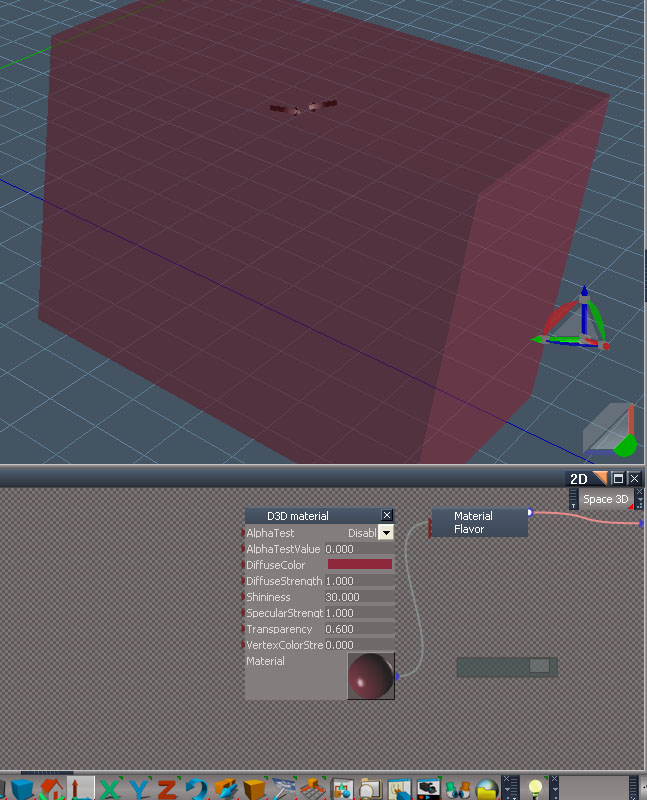
See on the bottom of your screen grab where it says "4D" ? Well change it to 2D (which will be
a LE window) (LE stands for Link Editor) as in my example. This shows the guts (components) behind the scene which are needed
so that you see all that lovely realistic 3D stuff in Real time. If you click on the orange triangle on the panel
labeled "Cube" you will drop down into it's components (guts). You should now see a panel labeled "Material List"
now again click the orange triangle on the Material List panel...
Now again click on the orange triangle labeled "Material 0". You should now see a panel labeled D3D Material and it should
look similar to my screen grab. Double click on the color bar labeled "diffuse color" to bring up the color selection panel.
The rest should be obvious.
p.s. to go back up a level just click the orange triangle next to "2D"
a LE window) (LE stands for Link Editor) as in my example. This shows the guts (components) behind the scene which are needed
so that you see all that lovely realistic 3D stuff in Real time. If you click on the orange triangle on the panel
labeled "Cube" you will drop down into it's components (guts). You should now see a panel labeled "Material List"
now again click the orange triangle on the Material List panel...
Now again click on the orange triangle labeled "Material 0". You should now see a panel labeled D3D Material and it should
look similar to my screen grab. Double click on the color bar labeled "diffuse color" to bring up the color selection panel.
The rest should be obvious.
p.s. to go back up a level just click the orange triangle next to "2D"
- Attachments
-
-
Hicks
- Petty Officer First Class
- Posts: 48
- Joined: 24 Apr 2010, 14:17
Re: About Materials-DX9
I see, thank you!