Looking for an old plugin
-
marcel

- Captain
- Posts: 2247
- Joined: 21 May 2009, 19:52
- Type the number ten into the box: 0
- Location: paris - France
Looking for an old plugin
I had a plugin for an old version of TS. It was interesting for the interface. It create a folder to put all the icon of the other plugins inside. In this way I had only one icon on the interface to open the folder and choose a plugin. I don't remember the name of the plugin and where i can find it. Maybe now it is uncompatible with 7.6 model side or there is an update or another plugin to do that. Thank to help me to find what i search.
Design - illustration - Animation
http://www.crea-vision.fr
http://www.crea-vision.fr
-
clintonman

- Captain
- Posts: 5659
- Joined: 21 May 2009, 21:08
- Type the number ten into the box: 0
- Location: California
Re: Looking for an old plugin
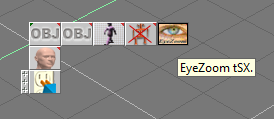
I think you mean the tSX Extender plugin. I think it was for truespace version 3 or 4.
-
Tiles

- Master Chief Petty Officer
- Posts: 401
- Joined: 27 May 2009, 08:34
Re: Looking for an old plugin
The plugin you mean was most probably called Extender. It was a freeware tS3 plugin from Primitive Itch. Well, it loads in Modeler, and you can load your plugins to it. But i am not sure if it is really fully functional. I remember i had some issues with it in tS 6.6. But cannot remember what kind of. Too long ago. I find it more handy to create a toolbar anyways 
Free Gamegraphics, Freeware Games http://reinerstilesets.de
-
Emmanuel

- Chief Warrant Officer
- Posts: 670
- Joined: 14 Jun 2009, 06:47
Re: Looking for an old plugin
Tiles is right : tSX Extender is obsolete since we can create custom toolbars.
-
Jimmer
- Chief Petty Officer
- Posts: 122
- Joined: 22 May 2009, 11:54
Re: Looking for an old plugin
Speaking of "Tool Bars" how do you make your own ?
I have no problem moving my plug-in ICONS to pre-existing tool bars.
Adding and or deleting them.
But how do you create your own ICON STACK, that expands out when
holding down the mouse button. Never figured it out.... I like my interface
just the way I have it.... but have several plugins that really should
be tool bar'd together.
I have no problem moving my plug-in ICONS to pre-existing tool bars.
Adding and or deleting them.
But how do you create your own ICON STACK, that expands out when
holding down the mouse button. Never figured it out.... I like my interface
just the way I have it.... but have several plugins that really should
be tool bar'd together.
-
marcel
- Captain
- Posts: 2247
- Joined: 21 May 2009, 19:52
- Type the number ten into the box: 0
- Location: paris - France
Re: Looking for an old plugin
Ok i remember now. Sure it is not necessary to have it. Old memories are sometimes misleading.Emmanuel wrote:Tiles is right : tSX Extender is obsolete since we can create custom toolbars.

Design - illustration - Animation
http://www.crea-vision.fr
http://www.crea-vision.fr
-
Tiles
- Master Chief Petty Officer
- Posts: 401
- Joined: 27 May 2009, 08:34
Re: Looking for an old plugin
Creating your own toolbar in Modeler is as easy as holding down CTRL, click at your plugin you want to separate, and pull it out of the current toolbar. Adding to that new toolbar is the same action. Just hover with the icon above the location where you want to place it at your new toolbar. Or you drag the "Install new Extensions" icon into your new toolbar. Then you can load plugins directly into that new one.Speaking of "Tool Bars" how do you make your own ?
Deleting icons from a toolbar is holding down CTRL, then click and drag your icon above the trashcan downleft.
Workspace is equal. Except that there is no trashcan downleft. But you can drag out your icon, then simply close the new created toolbar by a click at the x button.
Free Gamegraphics, Freeware Games http://reinerstilesets.de
-
spacekdet

- Captain
- Posts: 1810
- Joined: 27 May 2009, 15:00
- Type the number ten into the box: 10
- Location: On the day shift at the Utility Muffin Research Kitchen
Re: Looking for an old plugin
Tiny Tip: In Modeler, Shift-Drag moves the icon, Control-Drag copies the icon.
-
Jimmer
- Chief Petty Officer
- Posts: 122
- Joined: 22 May 2009, 11:54
Re: Looking for an old plugin
I probably should have been more clear. I know how to make a basic toolbar. Can you make an expanding toolbar like the default bars.
Example : I have CoolPowers 2,3 and 4. I would like
to have just the icon of CoolPowers2 visible in the interface. When I hover/
click the mouse over that single icon and hold, the CoolPowers 3 and 4
icons appear on top. After selecting one of them that stack collapses back
into a single icon again. The way it is now ALL the icons are visible in
my CoolPowers toolbar.
Example : I have CoolPowers 2,3 and 4. I would like
to have just the icon of CoolPowers2 visible in the interface. When I hover/
click the mouse over that single icon and hold, the CoolPowers 3 and 4
icons appear on top. After selecting one of them that stack collapses back
into a single icon again. The way it is now ALL the icons are visible in
my CoolPowers toolbar.
-
trueBlue

- Captain
- Posts: 5548
- Joined: 06 Jul 2009, 22:50
- Type the number ten into the box: 10
Re: Looking for an old plugin
I did a quick test and it seems possible to create an Expandable Toolbar in tS761B8 Model.
Ctrl + Drag out an existing row of icons that has multiple icons.
Expand it by clicking on the handle.
Shift + Ctrl + Drag YOUR icons to this expanded toolbar.
Delete the Existing ones you do not want. IE: Shift + Ctrl + Drag to Trash can.
Note: It is possible to create icons that flyout to the side as well as long as you start with an existing one.
Ctrl + Drag out an existing row of icons that has multiple icons.
Expand it by clicking on the handle.
Shift + Ctrl + Drag YOUR icons to this expanded toolbar.
Delete the Existing ones you do not want. IE: Shift + Ctrl + Drag to Trash can.

- Capture.PNG (8.67 KiB) Viewed 4627 times
- Capture2.PNG (13.03 KiB) Viewed 4611 times