Custom Object Library on startup

What do you need?
User avatar
the_ant
Chief Petty Officer
Posts: 155
Joined: 02 Jun 2009, 09:26
Type the number ten into the box: 0
Location: Perugia - Italy

Custom Object Library on startup

Post by the_ant »

Hi all
is it possible to set a specific Object library at startup in the ModelSide (tSp6.6)?

Every time restart tSp (usually ModelSide ver. 2.1 by Cellulo is actually my favourite) must browsing in search of a specific obj-library
...this is a simple action but it starts to become very tedious.... :bananasad:
User avatar
trueBlue
Captain
Posts: 5548
Joined: 06 Jul 2009, 22:50
Type the number ten into the box: 10

Re: Custom Object Library on startup

Post by trueBlue »

I could not find a way to do this using tS to do it.
Using File Explorer, I navigated to C:\trueSpace761\tS\Library
I renamed the original objects.obl to objects.oblBAK
I named the myObjects.obl to objects.obl
HackIt.png
User avatar
the_ant
Chief Petty Officer
Posts: 155
Joined: 02 Jun 2009, 09:26
Type the number ten into the box: 0
Location: Perugia - Italy

Re: Custom Object Library on startup

Post by the_ant »

Just known this trick ...only Hope could have an option inside truespace or via some plugin...thanks Trueblue
stan
Master Chief Petty Officer
Posts: 584
Joined: 21 May 2009, 17:20

Re: Custom Object Library on startup

Post by stan »

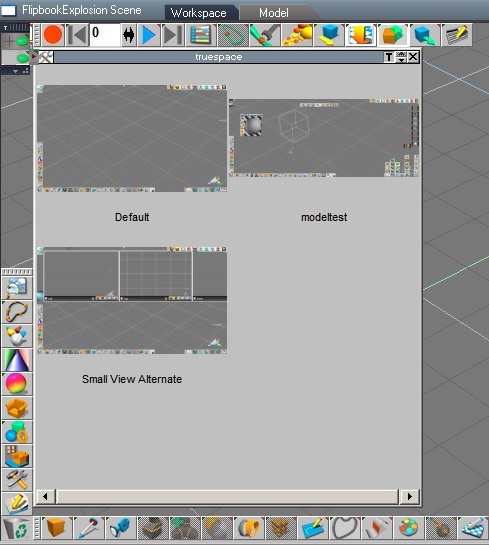
Hi the_ant, try creating a new configuration saved to config library(hammer & wrench icon). This lets me open an object library of my choosing. It will work for the scene library too. Of course make sure to have the ones you want loaded before saving . It works like you want.

You can also setup some plugins in one configuration and others in another to keep truespace from having too many plugins that might conflict or are not needed for some projects.
stan
Master Chief Petty Officer
Posts: 584
Joined: 21 May 2009, 17:20

Re: Custom Object Library on startup

Post by stan »

Here is a config I quickly created with my own library for scene and objects. You must load this configuration for it to work.
modeltest.rar
(41.26 KiB) Downloaded 7 times
Place these two libraries into the Library folder first.
Modeltestlibs.rar
(4.91 KiB) Downloaded 7 times
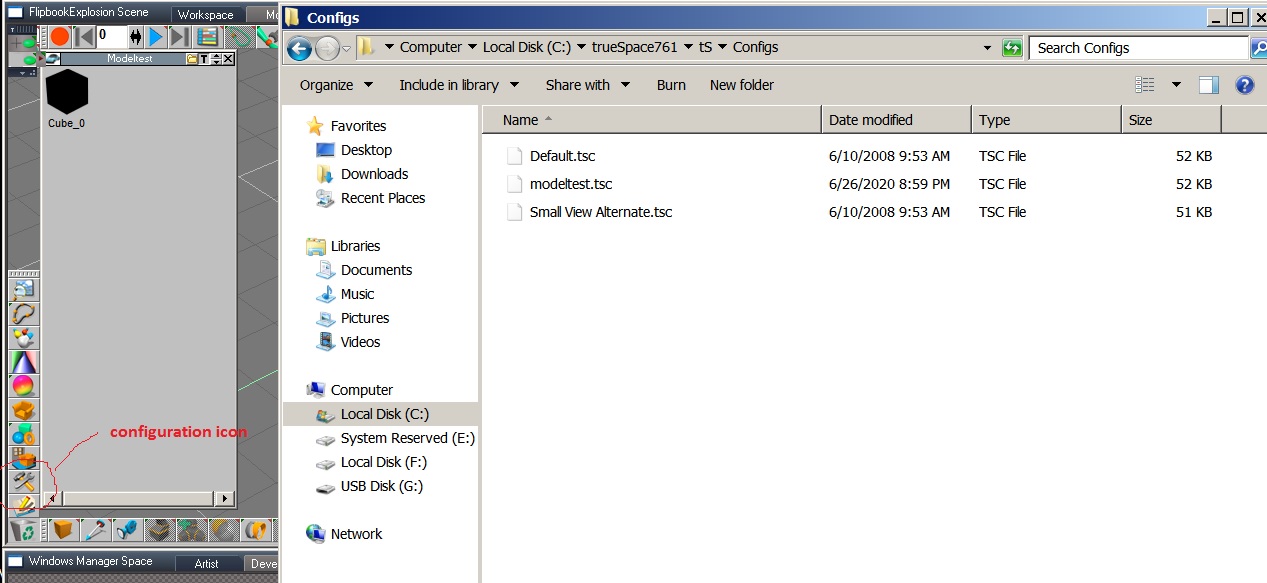
Unzip the moidelest.tsc. Place the modeltest.tsc into the Configs folder as shown on image, then go to the configurations icon open it. Note the configs icon shown circled in red(hammer and wrench icon).
config.jpg
The new config should now be in the proper place when you open config library. Go to the modeltest.tsc and load it. You will find the modeltest object and scene libraries there when you open object or scene libraries.If not it's because you forgot to put them into the Library folder first.
load.jpg
So in conclusion, you have your personal libraries in the loaded position for them to be saved into a new config, when creating a new config or overwriting the one I created. Keep the default.tsc untouched as it is like going to the reset in workspace, going back to original state..
Load position means when you click on the icon it's the library that opens first.
User avatar
the_ant
Chief Petty Officer
Posts: 155
Joined: 02 Jun 2009, 09:26
Type the number ten into the box: 0
Location: Perugia - Italy

Re: Custom Object Library on startup

Post by the_ant »

Hi Stan
tried to use your config and obj libraries but tSp start searching a lot of plugins without succes (seeing that in stauts bar) then return to previous status with no-changes...may be due to differences from your and mine loaded plugins? :oops:
stan
Master Chief Petty Officer
Posts: 584
Joined: 21 May 2009, 17:20

Re: Custom Object Library on startup

Post by stan »

I only had two plugins loaded. I will create on with no plugins
stan
Master Chief Petty Officer
Posts: 584
Joined: 21 May 2009, 17:20

Re: Custom Object Library on startup

Post by stan »

modeltestnoplugins.rar
(40.55 KiB) Downloaded 6 times
here it tsc with no plugins..replace this with the first tsc I uploaded.
stan
Master Chief Petty Officer
Posts: 584
Joined: 21 May 2009, 17:20

Re: Custom Object Library on startup

Post by stan »

Let's start again..
With the object library open that you want to open when you click the object library. Then open the config library ( that closes the object library).. click on insert. That will create a new config. It's that simple.


I'm not sure why there is an issue with plugins because that's one of the things you can do with configs as I mention before. Load some plugins in one config ( modelling ones) some in another, say animation ones. Then you can switch between configs..
User avatar
the_ant
Chief Petty Officer
Posts: 155
Joined: 02 Jun 2009, 09:26
Type the number ten into the box: 0
Location: Perugia - Italy

Re: Custom Object Library on startup

Post by the_ant »

Sorry Stan
when restart tSp and recall the custom config the default library is "always and only" the original object library... :oops: :roll: :bananasad:
stan
Master Chief Petty Officer
Posts: 584
Joined: 21 May 2009, 17:20

Re: Custom Object Library on startup

Post by stan »

You need to load the custom config and keep it loaded. That seems to break the hold on the library I have the last library I used loading every time.
User avatar
the_ant
Chief Petty Officer
Posts: 155
Joined: 02 Jun 2009, 09:26
Type the number ten into the box: 0
Location: Perugia - Italy

Re: Custom Object Library on startup

Post by the_ant »

following your instructions (it seems to me) but same result...1)keep my config and 2)my lib ...3)shoot off tSp...

when restart the config is ok but always old default tSp "object" lib (like a nightmare) appear again and again... :bananasad:
User avatar
trueBlue
Captain
Posts: 5548
Joined: 06 Jul 2009, 22:50
Type the number ten into the box: 10

Re: Custom Object Library on startup

Post by trueBlue »

It is not working for me either Stan with the config on restart.
Btw... tS761 files are not backwards compatible, including configuration files
I was able to use and save a Project with my Object and Scene libraries though and it loads on restart

Little Ant :)
Try this...
Open the Project Library, right click and select Browse
Browse to Project/Tutorials and Open the tutorials.tsp file
Exit Model and Restart trueSpace
User avatar
the_ant
Chief Petty Officer
Posts: 155
Joined: 02 Jun 2009, 09:26
Type the number ten into the box: 0
Location: Perugia - Italy

Re: Custom Object Library on startup

Post by the_ant »

Thanks TrueBlue
will try your method on my tSp 7.6 MS-Cellulo 2.1version ...in the meantime found a partial solution for my troubles...

1)load my library from main menu of tSp...it add a library icon (sofa) on the top of the left icons stack...

2)when restart tSp the top icon disappear but... :bananamouse: ..if i go to load library in the main menu...can load directly my library without browsing through all the libraries (tSp reposition it to the top of the stack) and have both the "sofas" (default object and my lib) availables... :bananamad:
User avatar
the_ant
Chief Petty Officer
Posts: 155
Joined: 02 Jun 2009, 09:26
Type the number ten into the box: 0
Location: Perugia - Italy

Re: Custom Object Library on startup

Post by the_ant »

Hi TrueBlue
loaded tutorials project...and my library...when restart tSp only the default project library (in tutorials folder) is available...
i dont want try to create a new project with my works because tSp seems to create a folder with libs and scenes where it wants (in the projects tSp folder) instead i prefer load my scenes from a backupped folder (by googleDrive) that contains all my works... :roll:
User avatar
trueBlue
Captain
Posts: 5548
Joined: 06 Jul 2009, 22:50
Type the number ten into the box: 10

Re: Custom Object Library on startup

Post by trueBlue »

Configuration Library
The configuration library stores toolbar arrangements, open panels, view windows and their positions, and real time render settings. This is useful for customizing your interface for the task at hand. An animation scene may have one layout, and a static image scene may have a completely different layout.

File: New: Project

This will present you with a dialog where you can name your new project. Once you have named it and clicked OK, trueSpace will create a new project folder for you in the \project subdirectory. A project will store all your settings from your trueSpace session.

File: Load: Library

Use this menu option to open and share a library from another project. Because the library is shared and not duplicated, any changes you make to a library loaded this way will affect the other projects that use the same library. They will be attached to the library toolbar by default.

Project Library
In real life you often work on a project basis. Projects in trueSpace consist of your workplace configuration, several libraries including artwork either imported or created, and your current scene. Your workspace state is automatically saved so that you find it the way you last left it when you start trueSpace again.

It is also very convenient to create new libraries while working on a project and drag objects, materials, etc. into them right from workplace. trueSpace will automatically name them for you so that you can continue working without interruption.

When you create a new project, trueSpace will create a new directory of the name that you specify under the \projects directory and store all information belonging to this project in subdirectories of that folder. You are also given the option to import the default libraries. As mentioned above, importing will create a copy of the library in the new project directory. This takes a bit more hard disk space than sharing, but greatly simplifies the maintenance of the artwork for your current project.

trueSpace has a default project that is used as the working project if a new one is not created. This is called \truespac.tsp and is located in the root directory of the trueSpace installation.
stan
Master Chief Petty Officer
Posts: 584
Joined: 21 May 2009, 17:20

Re: Custom Object Library on startup

Post by stan »

That's odd that it doesn't work fo you either Trueblue.. I notice I have the bridge set to off. save state on preferences is checked on. I think that is original state as my ts is a new install on a new hard drive. My last win7 ssd died. I'm also using the original ts7.61b from caligari. I'll try on my win 10 ..I don't normally use it as I don't like win 10..
stan
Master Chief Petty Officer
Posts: 584
Joined: 21 May 2009, 17:20

Re: Custom Object Library on startup

Post by stan »

I had to reinstall my windows..I found on a brand new truespace it was as simple as turning the bridge off to open my own libraries after opening ..turn the bridge back to auto and gone, back to default libraries..
User avatar
the_ant
Chief Petty Officer
Posts: 155
Joined: 02 Jun 2009, 09:26
Type the number ten into the box: 0
Location: Perugia - Italy

Re: Custom Object Library on startup

Post by the_ant »

Sorry Stan for tedious reinstalling Windows...

...now it's all clear...i have the Bridge set ON (Auto) because time to time need workspace-side booleans...(less problems with semi- or coincidents points)..
User avatar
trueBlue
Captain
Posts: 5548
Joined: 06 Jul 2009, 22:50
Type the number ten into the box: 10

Re: Custom Object Library on startup

Post by trueBlue »

stan wrote: 05 Jul 2020, 13:28 I had to reinstall my windows..I found on a brand new truespace it was as simple as turning the bridge off to open my own libraries after opening ..turn the bridge back to auto and gone, back to default libraries..
Bug in tS761Beta?
According to the tS6.5 Help, unless it has changed, it looks like the Configuration Library is not suppose to save Libraries.
Not sure what is meant by "open panels".
Configuration Library
The configuration library stores toolbar arrangements, open panels, view windows and their positions, and real time render settings. This is useful for customizing your interface for the task at hand. An animation scene may have one layout, and a static image scene may have a completely different layout.
However maybe this is the part that is not working when Save State is enabled.
trueSpace has a default project that is used as the working project if a new one is not created. This is called \truespac.tsp and is located in the root directory of the trueSpace installation
stan
Master Chief Petty Officer
Posts: 584
Joined: 21 May 2009, 17:20

Re: Custom Object Library on startup

Post by stan »

trueBlue, no I was booting up to my win10 which it didn't do but in the process it wiped my boot records on both drives. No problem now win10 can't be repaired as I didn't get a disk with my pc so it is unplugged. Back to single boot. I'm going to create a backup for win7 now though.

It did give me a virgin trueSpace, so first thing I did was create my own object and scene libraries, loaded them. Bridge on auto they reverted to default ones on startup. Turned the bridge off and my libraries stay loaded. I didn't use a configuration.
Not sure what is meant by "open panels".
When I save a config it can save open panels like the material editor or preferences, object panel but not library panels. I normally use it to save plugins in different configs. It just seemed to be able to save the library panels I chose because I had the bridge off.
However maybe this is the part that is not working when Save State is enabled.
You can create a new project with save state on. It just creates a new library system in the new project. I didn't play around with it to see, but I guess the default libraries are still there just new empty ones..I'm sure the same issue would happen with bridge on just with the new libraries.
Save state just saves the state the configuration is in like having dual monitor checked. .Uncheck save state, reopen and dual monitor will be unchecked.
stan
Master Chief Petty Officer
Posts: 584
Joined: 21 May 2009, 17:20

Re: Custom Object Library on startup

Post by stan »

I found a solution for this that works with the bridge on..a simple name change. I changed the names of objects to old_objects and named mine objects. Same with Scenes. Scenes to old_Scenes and mine to Scenes.. If you need the bridge on.
User avatar
the_ant
Chief Petty Officer
Posts: 155
Joined: 02 Jun 2009, 09:26
Type the number ten into the box: 0
Location: Perugia - Italy

Re: Custom Object Library on startup

Post by the_ant »

Thanks Stan and TrueBlue for your attention...

i will rename the libraries as you suggested when need Bridge ON (waiting for a dedicated plugin or script .. :mrgreen:)

:bananahi:
User avatar
the_ant
Chief Petty Officer
Posts: 155
Joined: 02 Jun 2009, 09:26
Type the number ten into the box: 0
Location: Perugia - Italy

Re: Custom Object Library on startup

Post by the_ant »

Good news...after installed and go on Legacy Cellulo Ver.1.1 all seems to be right...the config and ( :bananacool2: tadà!) the 2nd sofà icon with custom library...that remain there after restart the program!
pratically abandoned 7.6 ModelSide Cellulo Ver. 2.1 and migrate to Legacy 1.1 :worship: :worship:
User avatar
the_ant
Chief Petty Officer
Posts: 155
Joined: 02 Jun 2009, 09:26
Type the number ten into the box: 0
Location: Perugia - Italy

Re: Custom Object Library on startup

Post by the_ant »

Ops ...noted right now that Bridge was Off...With Bridge set On all return like MS ver.2.1 and my custom "sofa" disappear again... :bananasad:
stan
Master Chief Petty Officer
Posts: 584
Joined: 21 May 2009, 17:20

Re: Custom Object Library on startup

Post by stan »

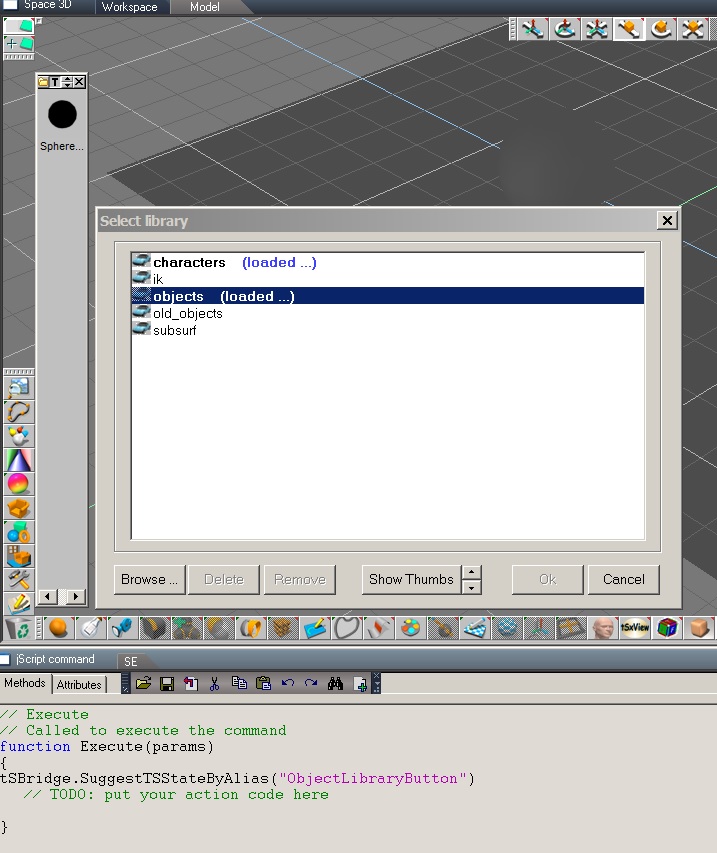
Something I noticed with libraries is you can have two loaded with only one icon..must be a bug. I took the only call you could use to open an object library : tSBridge.SuggestTSStateByAlias("ObjectLibraryButton") a call from 7.11. I could load two different libraries, one with the sofa icon and one with the script command. The one from script was the original obj library. It stops working like that when you turn bridge on and restart truespace. So there will never be a plugin or script to do this for you. So the best thing is to rename libraries, then that library named objects will open bridge on or off.
objlib.jpg
User avatar
the_ant
Chief Petty Officer
Posts: 155
Joined: 02 Jun 2009, 09:26
Type the number ten into the box: 0
Location: Perugia - Italy

Re: Custom Object Library on startup

Post by the_ant »

Thanks Stan...
but at that time i think this "bug of the sofas" is usefull to me because with the "default sofa on" i can recall also the custom library simply with the menu command Load-->Library (that remain on the custom library folder after restart tSp)... :mrgreen:
User avatar
trueBlue
Captain
Posts: 5548
Joined: 06 Jul 2009, 22:50
Type the number ten into the box: 10

Re: Custom Object Library on startup

Post by trueBlue »

Unless I am missing something, you should create a Project
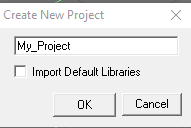
Model File Menu
File/New/Project
Uncheck "Import Default Libraries"
CreateNewProject.png
CreateNewProject.png (2.52 KiB) Viewed 49 times
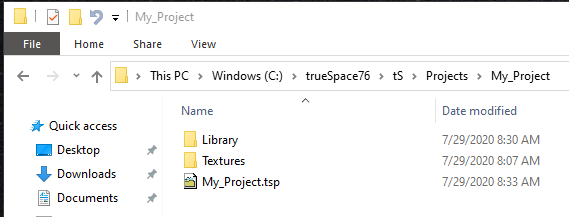
This creates folders and the tsp file in C:\trueSpace76\tS\Projects
My_Project.png
Library folder includes:
objects.obl
scenes.scl
materials.mtl

Textures folder for storing images

For me, it does not matter if the Bridge is set to ON, Auto, or OFF
The Material, Object, and Scene libraries always show in the above folders

Once you setup your project the way you want, you could save a copy of the truespace.prl file incase it gets corrupted.

Return to “Forum Requests”