TSX MagicBox - Release
-
LeonRegis

- Captain
- Posts: 1946
- Joined: 18 Aug 2009, 17:36
- Type the number ten into the box: 0
- Location: Brazil/Earth/Orion Arm/Milky Way/4th Dimension/This Universe/Multiverse???/Singularity???
Re: TSX MagicBox - Release
Don't worry DD, it don't makes the plugin bad... just a complement
Be the change you want to see in the world. - Mohandas Gandhi
-
LeonRegis
- Captain
- Posts: 1946
- Joined: 18 Aug 2009, 17:36
- Type the number ten into the box: 0
- Location: Brazil/Earth/Orion Arm/Milky Way/4th Dimension/This Universe/Multiverse???/Singularity???
Re: TSX MagicBox - Release
DD I found a bug in your MB, small bug and don't make any problem... Just that in opengl mode he gets a bit weird, I don't use opengl was just testing... Maybe it's something in my PC with opengl, try to check it out..
Thanks
Thanks
Be the change you want to see in the world. - Mohandas Gandhi
-
DesignDevil

- Master Chief Petty Officer
- Posts: 500
- Joined: 22 May 2009, 08:52
- Type the number ten into the box: 0
- Location: Neuruppin, Germany, Earth.
Re: TSX MagicBox - Release
uhh...yes, i can see this. Strange thing - thanks for the reply. Seems to be a problem with the widget geometry in OpenGL. I will see if i can do anything. I also don't use OpenGL (like the most i think) - i never testet this.
I still use TrueSpace 6.6
Link: My Youtube Channel
Link: www.DesignDevil.de - Plugins, Tutorials and more about TrueSpace 6.6
Link: My Youtube Channel
Link: www.DesignDevil.de - Plugins, Tutorials and more about TrueSpace 6.6
-
Johny

- Petty Officer First Class
- Posts: 53
- Joined: 21 May 2009, 17:14
Re: TSX MagicBox - Release
Thanks for the plugin DD! 
MB plugin work well on 6 sides view and perspective view, but not on "view from object" view.
MB plugin work well on 6 sides view and perspective view, but not on "view from object" view.
-
DesignDevil
- Master Chief Petty Officer
- Posts: 500
- Joined: 22 May 2009, 08:52
- Type the number ten into the box: 0
- Location: Neuruppin, Germany, Earth.
Re: TSX MagicBox - Release
Yep, Johny ... you are right. Maybe this could be implemented - THX
I still use TrueSpace 6.6
Link: My Youtube Channel
Link: www.DesignDevil.de - Plugins, Tutorials and more about TrueSpace 6.6
Link: My Youtube Channel
Link: www.DesignDevil.de - Plugins, Tutorials and more about TrueSpace 6.6
-
DesignDevil
- Master Chief Petty Officer
- Posts: 500
- Joined: 22 May 2009, 08:52
- Type the number ten into the box: 0
- Location: Neuruppin, Germany, Earth.
Re: TSX MagicBox - Release
UPDATE:
I fixed the "view from object" issue.
The OpenGL issue is strange and i could figure out why OpenGL has a problem with the widget geometry. I checked the polygon object but could not find any failure. Maybe later - sorry.
See the first post for the download adress and simply overwrite the TSX.
I fixed the "view from object" issue.
The OpenGL issue is strange and i could figure out why OpenGL has a problem with the widget geometry. I checked the polygon object but could not find any failure. Maybe later - sorry.
See the first post for the download adress and simply overwrite the TSX.
I still use TrueSpace 6.6
Link: My Youtube Channel
Link: www.DesignDevil.de - Plugins, Tutorials and more about TrueSpace 6.6
Link: My Youtube Channel
Link: www.DesignDevil.de - Plugins, Tutorials and more about TrueSpace 6.6
-
LeonRegis
- Captain
- Posts: 1946
- Joined: 18 Aug 2009, 17:36
- Type the number ten into the box: 0
- Location: Brazil/Earth/Orion Arm/Milky Way/4th Dimension/This Universe/Multiverse???/Singularity???
Re: TSX MagicBox - Release
Many thanks DD! Don't worry about the OpenGL problem, even if I use it I can play just with a little difficulty...
Thanks
Thanks
Be the change you want to see in the world. - Mohandas Gandhi
-
Johny
- Petty Officer First Class
- Posts: 53
- Joined: 21 May 2009, 17:14
Re: TSX MagicBox - Release
Thanks for update DD! 
-
the_ant

- Chief Petty Officer
- Posts: 155
- Joined: 02 Jun 2009, 09:26
- Type the number ten into the box: 0
- Location: Perugia - Italy
Re: TSX MagicBox - Release
Hi DD
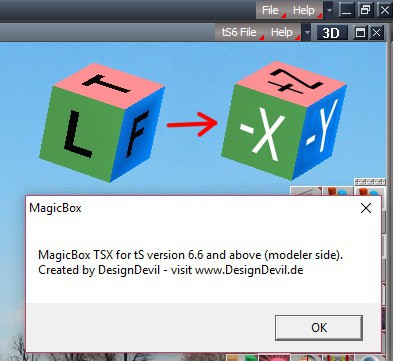
is it possible change label on your magicBox like attached image?...it would be much useful and intuitive for me.
PS. I would like standard colors on the cube also (x=red / y=green / z=bleu)

is it possible change label on your magicBox like attached image?...it would be much useful and intuitive for me.
PS. I would like standard colors on the cube also (x=red / y=green / z=bleu)
- Attachments
-
- Clip01_MagicBox_xyz.jpg (44.86 KiB) Viewed 185 times
-
DesignDevil
- Master Chief Petty Officer
- Posts: 500
- Joined: 22 May 2009, 08:52
- Type the number ten into the box: 0
- Location: Neuruppin, Germany, Earth.
Re: TSX MagicBox - Release
Well, long time ago since i wrote this plugin. I knw that it was tricky to get the letters on the cube, because they are no textures, they are coordinates with colors. Anyway. At the moment i have no time to do it.
But one word to the colors. In my trueSpace (6.6) the colors are x=green, y=blue and z=red - i never noticed that this is different in trueSpace versions above or isnt???
But one word to the colors. In my trueSpace (6.6) the colors are x=green, y=blue and z=red - i never noticed that this is different in trueSpace versions above or isnt???
I still use TrueSpace 6.6
Link: My Youtube Channel
Link: www.DesignDevil.de - Plugins, Tutorials and more about TrueSpace 6.6
Link: My Youtube Channel
Link: www.DesignDevil.de - Plugins, Tutorials and more about TrueSpace 6.6
-
the_ant
- Chief Petty Officer
- Posts: 155
- Joined: 02 Jun 2009, 09:26
- Type the number ten into the box: 0
- Location: Perugia - Italy
Re: TSX MagicBox - Release
Hello DD and thanks for your fast answer
My new colors request is due to standard Autocad axis (like Intellicad i own).
In the meantime i wrote a sticky-note aside my monitor with axis-letters ...
My new colors request is due to standard Autocad axis (like Intellicad i own).
In the meantime i wrote a sticky-note aside my monitor with axis-letters ...
-
clintonman

- Captain
- Posts: 5659
- Joined: 21 May 2009, 21:08
- Type the number ten into the box: 0
- Location: California
Re: TSX MagicBox - Release
trueSpace colors have always been non-standard. All 3D programs outside tS use RGB to represent XYZ.DesignDevil wrote:...
But one word to the colors. In my trueSpace (6.6) the colors are x=green, y=blue and z=red - i never noticed that this is different in trueSpace versions above or isnt???