YafaRay for trueSpace 2019

LightWorks, VRay, Dribble, YafaRay and more..
User avatar
clintonman
Captain
Posts: 5659
Joined: 21 May 2009, 21:08
Type the number ten into the box: 0
Location: California

Re: YafaRay for trueSpace 2019

Post by clintonman »

trueBlue wrote: 06 Dec 2019, 06:18
Base trueSpace rendering buttons - not Unofficial Update rendering buttons
They are not the same?
What should happen with RMB?
I would think
OfflineRender.OpenPreferencesPanel()
which opens the current lighting method


The YafaRay4tS toolbar can be different commands, right?
Current RMB commands
//Scene
OfflineRender.OpenPreferencesPanel()
//Area
UserInterface.OpenToolPanelViewEx2("" , "" ,Space.CurrentScene()+"/YafaRay4tS", 4, 1, 0)
//Object
OfflineRender.OpenPreferencesPanel()
//Animation
UserInterface.OpenToolPanelViewEx2("" , "" ,Space.CurrentScene()+"/YafaRay4tS", 8, 1, 0)
//File
OfflineRender.OpenPreferencesPanel()
UnOfficial render buttons have commands like:

render scene
OfflineRender.OpenView('',0,0);
Activity.Run('/Scripts/Commands/RenderScene');

base button has
OfflineRender.OpenView('',0,0);OfflineRender.RenderScene('')

"/Scripts/Commands/RenderScene" is only in the Unofficial Update, not inside base truespace

Yes, YafaRay4tS toolbar commands can be anything, but the overall code still has to work with the base render buttons. If not YafaRay4tS will only work with the Unofficial Updates.

OK so RMB will open the current lighting method.

For the base animation button - what will the LMB do?
Run the render directly? No, already rejected.
Open the Anim aspect?
Open the Render to File?
Clinton Reese

http://clintons3d.com
User avatar
trueBlue
Captain
Posts: 5548
Joined: 06 Jul 2009, 22:50
Type the number ten into the box: 10

Re: YafaRay for trueSpace 2019

Post by trueBlue »

Okay, now I see the problem!
Have not been testing the Offline Render icons with Vray Loaded, since the change to the YafaRay4tS viewers.
Currently, there is a problem with YafaRay4tS toolbar's Render to File LMB command when Vray is the selected Renderer.
Using some of your code this seems to work for a YafaRay4tS toolbar's Render to File LMB command:

Code: Select all

	var strEnum = System.CreateDO("Common Data Package/String Enum Data");
	try 
	{
		strEnum = Node.Value("/Offline renderers", "Renderer");
	}
	catch(e)
	{

	}
	var selString = strEnum.GetSelectedString();
	if(selString == "Vray photo renderer")
	{
System.Alert("Right click and change the Offline renderers to Yafaray")
		return;
	}
OfflineRender.OpenView('',0,0);
if (!Node.Exists(Space.CurrentScene()+"/YafaRay4tS")){if(Node.Exists("/Yafaray Folder")){Node.Copy("/Yafaray Folder/YafaRay4tS", Space.CurrentScene());}}
Activity.Run(Space.CurrentScene() + "/YafaRay4tS/open panel");
OfflineRender.OpenPreferencesPanel()
Edit: The above works from a script but not from a icon command. Or at least I have not been able to create it correctly.

Code: Select all

var strEnum = System.CreateDO("Common Data Package/String Enum Data");try{	strEnum = Node.Value("/Offline renderers", "Renderer");}catch(e){}var selString = strEnum.GetSelectedString();if(selString == "Vray photo renderer"){System.Alert("Right click and change the Offline renderers to Yafaray");return;};OfflineRender.OpenView('',0,0);if (!Node.Exists(Space.CurrentScene()+"/YafaRay4tS")){if(Node.Exists("/Yafaray Folder")){Node.Copy("/Yafaray Folder/YafaRay4tS", Space.CurrentScene());}}Activity.Run(Space.CurrentScene() + "/YafaRay4tS/open panel");OfflineRender.OpenPreferencesPanel();
And if you agree (Not Rejected but Suggested :mrgreen: ) the same could be used for the YafaRay4tS toolbar's Render Animation LMB command?
I guess the Offline Render Animation will have to run the animation directly unless you can do something with the code.

I would also suggest that you change:

Code: Select all

Errors.Add("Error: Custom External Viewer not found. Render has been canceled", "abort");
in the YafarayScripts to:

Code: Select all

Errors.Add("Error: External Viewer not found. Render has been canceled", "abort");
to match the new UI

And...
YafaRay4tS
Yafaray Settings LMB Command
Change
System.Alert("Right click and change the Offline renderers to Yafaray")
User avatar
clintonman
Captain
Posts: 5659
Joined: 21 May 2009, 21:08
Type the number ten into the box: 0
Location: California

Re: YafaRay for trueSpace 2019

Post by clintonman »

trueBlue wrote: 06 Dec 2019, 13:51 Okay, now I see the problem!
Have not been testing the Offline Render icons with Vray Loaded, since the change to the YafaRay4tS viewers.
Currently, there is a problem with YafaRay4tS toolbar's Render to File LMB command when Vray is the selected Renderer.
Using some of your code this seems to work for a YafaRay4tS toolbar's Render to File LMB command:

Code: Select all

	var strEnum = System.CreateDO("Common Data Package/String Enum Data");
	try 
	{
		strEnum = Node.Value("/Offline renderers", "Renderer");
	}
	catch(e)
	{

	}
	var selString = strEnum.GetSelectedString();
	if(selString == "Vray photo renderer")
	{
System.Alert("Right click and change the Offline renderers to Yafaray")
		return;
	}
OfflineRender.OpenView('',0,0);
if (!Node.Exists(Space.CurrentScene()+"/YafaRay4tS")){if(Node.Exists("/Yafaray Folder")){Node.Copy("/Yafaray Folder/YafaRay4tS", Space.CurrentScene());}}
Activity.Run(Space.CurrentScene() + "/YafaRay4tS/open panel");
OfflineRender.OpenPreferencesPanel()
Edit: The above works from a script but not from a icon command. Or at least I have not been able to create it correctly.

Code: Select all

var strEnum = System.CreateDO("Common Data Package/String Enum Data");try{	strEnum = Node.Value("/Offline renderers", "Renderer");}catch(e){}var selString = strEnum.GetSelectedString();if(selString == "Vray photo renderer"){System.Alert("Right click and change the Offline renderers to Yafaray");return;};OfflineRender.OpenView('',0,0);if (!Node.Exists(Space.CurrentScene()+"/YafaRay4tS")){if(Node.Exists("/Yafaray Folder")){Node.Copy("/Yafaray Folder/YafaRay4tS", Space.CurrentScene());}}Activity.Run(Space.CurrentScene() + "/YafaRay4tS/open panel");OfflineRender.OpenPreferencesPanel();
And if you agree (Not Rejected but Suggested :mrgreen: ) the same could be used for the YafaRay4tS toolbar's Render Animation LMB command?
I guess the Offline Render Animation will have to run the animation directly unless you can do something with the code.

I would also suggest that you change:

Code: Select all

Errors.Add("Error: Custom External Viewer not found. Render has been canceled", "abort");
in the YafarayScripts to:

Code: Select all

Errors.Add("Error: External Viewer not found. Render has been canceled", "abort");
to match the new UI

And...
YafaRay4tS
Yafaray Settings LMB Command
Change
System.Alert("Right click and change the Offline renderers to Yafaray")
Seems like a lot of talk about Render to File.
Is the answer to the question somewhere in all that?

For the base animation button - what will the LMB do?
Run the render directly? No, already rejected.
Open the Anim aspect?
Open the Render to File?

Please answer in English, not code.
Clinton Reese

http://clintons3d.com
User avatar
trueBlue
Captain
Posts: 5548
Joined: 06 Jul 2009, 22:50
Type the number ten into the box: 10

Re: YafaRay for trueSpace 2019

Post by trueBlue »

I guess the Offline Render Animation will have to run the animation directly unless you can do something with the code.
User avatar
clintonman
Captain
Posts: 5659
Joined: 21 May 2009, 21:08
Type the number ten into the box: 0
Location: California

Re: YafaRay for trueSpace 2019

Post by clintonman »

trueBlue wrote: 06 Dec 2019, 16:49
I guess the Offline Render Animation will have to run the animation directly unless you can do something with the code.
Thanks, it was lost in all the extras.
I assume Offline Render Animation is LMB press of the base animation button?
Does this mean pushing the button just starts the render process? Because I thought that was a rejected option.
Clinton Reese

http://clintons3d.com
User avatar
trueBlue
Captain
Posts: 5548
Joined: 06 Jul 2009, 22:50
Type the number ten into the box: 10

Re: YafaRay for trueSpace 2019

Post by trueBlue »

I am suggesting that the YafaRay4tS toolbar Render Animation's LMB command opens the YafaRay4tS/Render to File floating panel.

If the Offline Render Animation's LMB command can open the YafaRay4tS/Render to File floating panel, that would be my suggestion as well. If not, second choice would be that it opens the YafaRay4tS/Aim aspect. If neither of these two options are doable and can not coexist with Vray, then it will have to start the animation render directly. This would be different in the way Vray and Workspace works.

Not a show stopper, in my opinion, if the YafaRay4tS toolbar Render Animation's LMB command opens the YafaRay4tS/Render to File floating panel. Personally, I do not use the Offline Render icons when rendering with YafaRay4tS, but know that they need to be compatible with both rendering packages.
User avatar
clintonman
Captain
Posts: 5659
Joined: 21 May 2009, 21:08
Type the number ten into the box: 0
Location: California

Re: YafaRay for trueSpace 2019

Post by clintonman »

trueBlue wrote: 06 Dec 2019, 19:09 I am suggesting that the YafaRay4tS toolbar Render Animation's LMB command opens the YafaRay4tS/Render to File floating panel.

If the Offline Render Animation's LMB command can open the YafaRay4tS/Render to File floating panel, that would be my suggestion as well. If not, second choice would be that it opens the YafaRay4tS/Aim aspect. If neither of these two options are doable and can not coexist with Vray, then it will have to start the animation render directly. This would be different in the way Vray and Workspace works.

Not a show stopper, in my opinion, if the YafaRay4tS toolbar Render Animation's LMB command opens the YafaRay4tS/Render to File floating panel. Personally, I do not use the Offline Render icons when rendering with YafaRay4tS, but know that they need to be compatible with both rendering packages.
I read that as saying both the Offline Render Animation's LMB command and the YafaRay4tS toolbar Render Animation's LMB should open the YafaRay4tS/Render to File floating panel.
If that's true then is there any reason to keep the render to file button?
Clinton Reese

http://clintons3d.com
User avatar
trueBlue
Captain
Posts: 5548
Joined: 06 Jul 2009, 22:50
Type the number ten into the box: 10

Re: YafaRay for trueSpace 2019

Post by trueBlue »

I suppose not!
Been reading several of your previous post, and testing Model Mesh Processing this morning.
Given the awkwardness of restoring Protect Workspace,
I like your idea about opening Protect Workspace better.
Sorry for changing again. :oops:
Attachments
RTF.PNG
Anim.PNG
User avatar
clintonman
Captain
Posts: 5659
Joined: 21 May 2009, 21:08
Type the number ten into the box: 0
Location: California

Re: YafaRay for trueSpace 2019

Post by clintonman »

trueBlue wrote: 06 Dec 2019, 21:37 I suppose not!
Been reading several of your previous post, and testing Model Mesh Processing this morning.
Given the awkwardness of restoring Protect Workspace,
I like your idea about opening Protect Workspace better.
Sorry for changing again. :oops:
Not a problem.
TODO: remove any extra code that copies the protect settings from the yafaray4ts node.

I'll make a summary of all the render buttons to verify we're on the same page.
Clinton Reese

http://clintons3d.com
User avatar
trueBlue
Captain
Posts: 5548
Joined: 06 Jul 2009, 22:50
Type the number ten into the box: 10

Re: YafaRay for trueSpace 2019

Post by trueBlue »

Yay!
Do you want this modified YafaRay4tS panel?
User avatar
clintonman
Captain
Posts: 5659
Joined: 21 May 2009, 21:08
Type the number ten into the box: 0
Location: California

Re: YafaRay for trueSpace 2019

Post by clintonman »

trueBlue wrote: 06 Dec 2019, 23:32 Yay!
Do you want this modified YafaRay4tS panel?
Sure, as long as you're done making changes. I do have more questions though...

Is it your intention that the YafaRay4tS toolbar render buttons work with the VRay render?
I ask because they run things like "/Scripts/Commands/RenderScene" which only exists to modify the way vray render works.
Clinton Reese

http://clintons3d.com
User avatar
trueBlue
Captain
Posts: 5548
Joined: 06 Jul 2009, 22:50
Type the number ten into the box: 10

Re: YafaRay for trueSpace 2019

Post by trueBlue »

clintonman wrote: 06 Dec 2019, 23:39
trueBlue wrote: 06 Dec 2019, 23:32 Yay!
Do you want this modified YafaRay4tS panel?
Sure, as long as you're done making changes. I do have more questions though...

Is it your intention that the YafaRay4tS toolbar render buttons work with the VRay render?
I ask because they run things like "/Scripts/Commands/RenderScene" which only exists to modify the way vray render works.
No not at all. The RMB commands call different YafaRay4tS aspects.
Attachments
Yafaray Folder2333.RsObj
(1.08 MiB) Downloaded 174 times
User avatar
clintonman
Captain
Posts: 5659
Joined: 21 May 2009, 21:08
Type the number ten into the box: 0
Location: California

Re: YafaRay for trueSpace 2019

Post by clintonman »

trueBlue wrote: 07 Dec 2019, 00:00
clintonman wrote: 06 Dec 2019, 23:39
trueBlue wrote: 06 Dec 2019, 23:32 Yay!
Do you want this modified YafaRay4tS panel?
Sure, as long as you're done making changes. I do have more questions though...

Is it your intention that the YafaRay4tS toolbar render buttons work with the VRay render?
I ask because they run things like "/Scripts/Commands/RenderScene" which only exists to modify the way vray render works.
No not at all. The RMB commands call different YafaRay4tS aspects.
Ok, I'll make a summary of all render buttons with yafaray toolbar render buttons not touching the RMB command.
Clinton Reese

http://clintons3d.com
User avatar
clintonman
Captain
Posts: 5659
Joined: 21 May 2009, 21:08
Type the number ten into the box: 0
Location: California

Re: YafaRay for trueSpace 2019

Post by clintonman »

Render Button Summary
buttons are the same between the standard render toolbar and the yafaray render toolbar except RMB exceptions for animation and area
  • Animation Button - LMB open render to file floating panel, RMB yaf toolbar open anim panel, RMB standard toolbar open lighting method panel
  • Scene Button - LMB render immediately, RMB open lighting method panel
  • Object Button - LMB render immediately, RMB open lighting method panel
  • Area Button - LMB start rectangle widget, RMB yaf toolbar open camera aspect, RMB standard toolbar open lighting method panel
  • YafaRay4tS Render Button - render immediately
  • YafaRay4tS Render Animation Button - render animation immediately
  • Render to File Render Button - render immediately
  • Render to File Render Animation Button - render animation immediately and open the anim aspect
  • remove redundant Render to File Button
Clinton Reese

http://clintons3d.com
User avatar
trueBlue
Captain
Posts: 5548
Joined: 06 Jul 2009, 22:50
Type the number ten into the box: 10

Re: YafaRay for trueSpace 2019

Post by trueBlue »

Do I need to change the commands on the YafaRay4tS toolbar?
I removed the Render to File from the toolbar and help file.
User avatar
clintonman
Captain
Posts: 5659
Joined: 21 May 2009, 21:08
Type the number ten into the box: 0
Location: California

Re: YafaRay for trueSpace 2019

Post by clintonman »

trueBlue wrote: 07 Dec 2019, 03:24 Do I need to change the commands on the YafaRay4tS toolbar?
I removed the Render to File from the toolbar and help file.
If you agree with the previous summary post, then yes. The buttons code will need to change and some changes are needed for the yafaray scripts I also discovered that the yafaray4ts render buttons may also need adjusting.
Clinton Reese

http://clintons3d.com
User avatar
trueBlue
Captain
Posts: 5548
Joined: 06 Jul 2009, 22:50
Type the number ten into the box: 10

Re: YafaRay for trueSpace 2019

Post by trueBlue »

Looks good to me, assuming it works/coexist with Vray.
How about you?

How does this sound for the Animation help file with regards to Model Processing?
Model Processing - Render animations from an opened Model view
Model Mesh Processing - Renders Model objects mesh animations: NURBS, Metaballs, and Deformations


Protect Workspace - Opens Protect Workspace and performs a backup of the scene [Insert pic here]


Backup - Performs a backup of the scene

Restore - Restores the Backup


Name - Protects changes to object names
Materials - Protects conversion of Workspace materials to Lightworks materials
Lights / Cameras - Protects changes to Light's Angle, and Camera's FOV attributes
Matrix - Protects changes to transformation attributes


Sequence Player

Plays a sequence of images in a loop

File Dialog - File browse dialog for selecting the first image in a sequence of images

Off / On - Stop / Play

Enter the amount of images in the sequence of images

Slider control sets the speed of the playback

Right click the display to Reset


Model Processing


Steps to process Model animations from the Anim aspect, with the main view in Workspace and no Model view open

1.) Check Model Processing

2.) Select the Protect Workspace button and Save your scene

3.) Switch the main view to Model and open a new Workspace 3D Window

4.) Select the Render Animation button

5.) When the render has completed, switch the main view to Workspace

6.) Select the Restore button


Model Mesh Processing


Steps to process Model mesh animations, NURBS. Metaballs, or Deformations from the Anim aspect, with the main view in Workspace and no Model view open

1.) Check Model Processing and Model Mesh Processing

2.) Select the Protect Workspace button and Save your scene

3.) Switch the main view to Model and open a new Workspace 3D Window

4.) Select the Render Animation button

5.) When the render has completed, switch the main view to Workspace

6.) Select the Restore button


WARNING! Rendering with Model Mesh Processing
Switching layouts will crash trueSpace if you do not Exit trueSpace first.
Rendering with the main view in Workspace and a new Model view will also crash trueSpace.
Just noticed a problem in the endAnimation that might cause an error in tS761Std

Code: Select all

	if(modelProcess && modelSpecial) {

		//stop script slightly more stable - stops immediate crash when switch from modelspace
		tSBridge.SuggestTSStateByAlias("StopScriptButton");
		Node.Value("/Preferences/Desktop", "_Widgets_Select_Default object navigation widget") = -1
		System.Alert("Model Mesh Processing - Render complete\nWARNING!\nSwitching layouts will crash trueSpace if you do not Exit trueSpace first")
	}
Shouldn't tSBridge.SuggestTSStateByAlias("StopScriptButton"); be in a a try & catch error?
User avatar
clintonman
Captain
Posts: 5659
Joined: 21 May 2009, 21:08
Type the number ten into the box: 0
Location: California

Re: YafaRay for trueSpace 2019

Post by clintonman »

trueBlue wrote: 07 Dec 2019, 06:35 Looks good to me, assuming it works/coexist with Vray.
How about you?

How does this sound for the Animation help file with regards to Model Processing?
...

Just noticed a problem in the endAnimation that might cause an error in tS761Std

Code: Select all

	if(modelProcess && modelSpecial) {

		//stop script slightly more stable - stops immediate crash when switch from modelspace
		tSBridge.SuggestTSStateByAlias("StopScriptButton");
		Node.Value("/Preferences/Desktop", "_Widgets_Select_Default object navigation widget") = -1
		System.Alert("Model Mesh Processing - Render complete\nWARNING!\nSwitching layouts will crash trueSpace if you do not Exit trueSpace first")
	}
Shouldn't tSBridge.SuggestTSStateByAlias("StopScriptButton"); be in a a try & catch error?
I moved the uncheck autokey code to the start and if try catch fails it unchecks modelprocess and modelspecial . Also does the same already if protect workspace isn't installed.

Materials protects materials and light color.

Matrix protection should not be used if model space has motion animation since it would reset to it's workspace position before the render. In this case a manual keyframe can be set for matrix to protect workspace position.

Names protection does not work with animation because model space is too aggressive with the renaming. The original names will be restored at the end of the animation.
Clinton Reese

http://clintons3d.com
User avatar
clintonman
Captain
Posts: 5659
Joined: 21 May 2009, 21:08
Type the number ten into the box: 0
Location: California

Re: YafaRay for trueSpace 2019

Post by clintonman »

Removed protect workspace attributes from yafaray4ts
Setup to run render buttons as discussed

yafaray4ts node - remove protect workspace checkbox connections
yafaray4ts/protectworkspace - remove attributes
yafaray4ts/postrender protectworkspace - remove attribute restore
yafaray4ts/protectworkspacemanual - remove attribute setup
yafaray4ts/renderanim2 - add modelspace autokey checkbox off, reset model and special mesh processing to false if no modelspace
yafaray4ts/set modelspace preframe - remove turn off autokey, moved to renderanim2
yafarayscripts - add trace of run X for each command node for troubleshooting
yafarayscripts/enumpropertiespanels - only load toolbar if not already open, anim and camera aspect checkbox controls
yafaray4ts add OfflineRender.OpenView('',0,0) to Render to file panel - tb already did it
yafarayscripts/RenderAnimation - open floating panel instead of straight run, tb already did it
yafarayscripts/openview - change "custom external" to "external" tb request

standard render buttons are good, should also work with vray modification

yafaray toolbar

render scene button
LMB before- OfflineRender.OpenView('',0,0);if (Node.Exists('/Scripts/Commands/RenderScene')){Activity.Run('/Scripts/Commands/RenderScene');}if (!Node.Exists('/Scripts/Commands/RenderScene')){OfflineRender.RenderScene('')}
LMB after - OfflineRender.OpenView('',0,0);OfflineRender.RenderScene('')
RMB - ok

render object button
LMB before- OfflineRender.OpenView('',0,0);if (Node.Exists('/Scripts/Commands/RenderObject')){Activity.Run('/Scripts/Commands/RenderObject');}if (!Node.Exists('/Scripts/Commands/RenderObject')){OfflineRender.RenderObject('')}
LMB after - OfflineRender.OpenView('',0,0);OfflineRender.RenderObject('')
RMB ok

file render button - remove

render animation button
LMB before- OfflineRender.OpenView('',0,0);if (Node.Exists('/Scripts/Commands/RenderAnimation')){Activity.Run('/Scripts/Commands/RenderAnimation');}if (!Node.Exists('/Scripts/Commands/RenderAnimation')){OfflineRender.RenderAnimation('')}
LMB after - OfflineRender.OpenView('',0,0);OfflineRender.RenderAnimation('')
RMB before- UserInterface.OpenToolPanelViewEx2("" , "" ,Space.CurrentScene()+"/YafaRay4tS", 8, 1, 0)
RMB after - Node.Value("Scripts/CustomCommands/YafarayScripts/EnumPropertiesPanels","animAspect")=true;OfflineRender.OpenPreferencesPanel();

render area button
LMB - ok
RMB before- UserInterface.OpenToolPanelViewEx2("" , "" ,Space.CurrentScene()+"/YafaRay4tS", 4, 1, 0)
RMB after - Node.Value("Scripts/CustomCommands/YafarayScripts/EnumPropertiesPanels","cameraAspect")=true;OfflineRender.OpenPreferencesPanel();
Attachments
YafarayScripts006.RsObj
(52.06 KiB) Downloaded 164 times
YafaRay4tS002.RsObj
(1.07 MiB) Downloaded 184 times
YafaRay Toolbar Frame003.RsObj
(28.65 KiB) Downloaded 202 times
Clinton Reese

http://clintons3d.com
User avatar
trueBlue
Captain
Posts: 5548
Joined: 06 Jul 2009, 22:50
Type the number ten into the box: 10

Re: YafaRay for trueSpace 2019

Post by trueBlue »

So appreciate everything you have done here!
I made the corrections to the YafaRay4tS toolbar commands.
Have not tested YafaRay4tS yet, but when I use the YafaRay4tS toolbar Render Scene using Vray, I am getting two Vray render windows.
yafaray toolbar

render scene button
LMB before- OfflineRender.OpenView('',0,0);if (Node.Exists('/Scripts/Commands/RenderScene')){Activity.Run('/Scripts/Commands/RenderScene');}if (!Node.Exists('/Scripts/Commands/RenderScene')){OfflineRender.RenderScene('')}
LMB after - OfflineRender.OpenView('',0,0);OfflineRender.RenderScene('')
This is what I used:

Code: Select all

//Render scene LMB
OfflineRender.OpenView('',0,0);if (Node.Exists('/Scripts/Commands/RenderScene')){Activity.Run('/Scripts/Commands/RenderScene');}if (!Node.Exists('/Scripts/Commands/RenderScene')){OfflineRender.RenderScene('')};OfflineRender.OpenView('',0,0);OfflineRender.RenderScene('')
I really think it is not going to be a very good idea to have Offline Render commands in the YafaRay4tS toolbar.
Might need to check if Yafaray is the selected renderer in the commands too.
The rest of the commands seem to be okay.
User avatar
clintonman
Captain
Posts: 5659
Joined: 21 May 2009, 21:08
Type the number ten into the box: 0
Location: California

Re: YafaRay for trueSpace 2019

Post by clintonman »

trueBlue wrote: 08 Dec 2019, 02:48 So appreciate everything you have done here!
I made the corrections to the YafaRay4tS toolbar commands.
Have not tested YafaRay4tS yet, but when I use the YafaRay4tS toolbar Render Scene using Vray, I am getting two Vray render windows.
yafaray toolbar

render scene button
LMB before- OfflineRender.OpenView('',0,0);if (Node.Exists('/Scripts/Commands/RenderScene')){Activity.Run('/Scripts/Commands/RenderScene');}if (!Node.Exists('/Scripts/Commands/RenderScene')){OfflineRender.RenderScene('')}
LMB after - OfflineRender.OpenView('',0,0);OfflineRender.RenderScene('')
This is what I used:

Code: Select all

//Render scene LMB
OfflineRender.OpenView('',0,0);if (Node.Exists('/Scripts/Commands/RenderScene')){Activity.Run('/Scripts/Commands/RenderScene');}if (!Node.Exists('/Scripts/Commands/RenderScene')){OfflineRender.RenderScene('')};OfflineRender.OpenView('',0,0);OfflineRender.RenderScene('')
I really think it is not going to be a very good idea to have Offline Render commands in the YafaRay4tS toolbar.
Might need to check if Yafaray is the selected renderer in the commands too.
The rest of the commands seem to be okay.
break it up and see you get it twice because you run it twice

Code: Select all

//Render scene LMB
OfflineRender.OpenView('',0,0);
if (Node.Exists('/Scripts/Commands/RenderScene')){
   Activity.Run('/Scripts/Commands/RenderScene');
}
if (!Node.Exists('/Scripts/Commands/RenderScene')){
   OfflineRender.RenderScene('')
};
OfflineRender.OpenView('',0,0);
OfflineRender.RenderScene('')
OfflineRender.OpenView('',0,0); is run twice
OfflineRender.RenderScene('') is run twice indirectly since Activity.Run('/Scripts/Commands/RenderScene'); also runs OfflineRender.RenderScene('')
Clinton Reese

http://clintons3d.com
User avatar
clintonman
Captain
Posts: 5659
Joined: 21 May 2009, 21:08
Type the number ten into the box: 0
Location: California

Re: YafaRay for trueSpace 2019

Post by clintonman »

trueBlue wrote: 07 Dec 2019, 00:00
clintonman wrote: 06 Dec 2019, 23:39 ...
Is it your intention that the YafaRay4tS toolbar render buttons work with the VRay render?
I ask because they run things like "/Scripts/Commands/RenderScene" which only exists to modify the way vray render works.
No not at all....
Are you changing your mind about this?
Clinton Reese

http://clintons3d.com
User avatar
clintonman
Captain
Posts: 5659
Joined: 21 May 2009, 21:08
Type the number ten into the box: 0
Location: California

Re: YafaRay for trueSpace 2019

Post by clintonman »

trueSpace Render System button actions provided by the interface

Code: Select all

OfflineRender.OpenView('',0,0);
runs YafarayScripts/OpenView

Code: Select all

OfflineRender.RenderScene('')
runs YafarayScripts/RenderScene

Code: Select all

OfflineRender.RenderObject('')
runs YafarayScripts/RenderObject

Code: Select all

OfflineRender.RenderAnimation('')
runs YafarayScripts/RenderAnimation

Code: Select all

Widgets.ReplaceWidget('{88839603-7F98-41f0-96AC-BE94E801CFF3}','/Widgets/Tools/Offline render/Area scene render','Default','','dummy')
after rectangle selection
runs YafarayScripts/OpenView then runs YafarayScripts/RenderArea

Code: Select all

OfflineRender.OpenPreferencesPanel()
runs YafarayScripts/EnumPropertiesPanels

when vray is the active renderer the OfflineRender commands call the corresponding vray functions
Clinton Reese

http://clintons3d.com
User avatar
clintonman
Captain
Posts: 5659
Joined: 21 May 2009, 21:08
Type the number ten into the box: 0
Location: California

Re: YafaRay for trueSpace 2019

Post by clintonman »

clintonman wrote: 08 Dec 2019, 00:19 ...
LMB before- OfflineRender.OpenView('',0,0);if (Node.Exists('/Scripts/Commands/RenderScene')){Activity.Run('/Scripts/Commands/RenderScene');}if (!Node.Exists('/Scripts/Commands/RenderScene')){OfflineRender.RenderScene('')}
LMB after - OfflineRender.OpenView('',0,0);OfflineRender.RenderScene('')
RMB - ok

...
"LMB before" means old version of the command
"LMB after" means the new command to be used

meant to show before and after the change

YafaRay Toolbar Frame003.RsObj attachment has the proper commands to use
Last edited by clintonman on 08 Dec 2019, 03:34, edited 1 time in total.
Clinton Reese

http://clintons3d.com
User avatar
trueBlue
Captain
Posts: 5548
Joined: 06 Jul 2009, 22:50
Type the number ten into the box: 10

Re: YafaRay for trueSpace 2019

Post by trueBlue »

You asked me:
Is it your intention that the YafaRay4tS toolbar render buttons work with the VRay render?
I replied:
No not at all. The RMB commands call different YafaRay4tS aspects.
Meaning that it was not my intention.
Sorry for the missunderstanding!
User avatar
trueBlue
Captain
Posts: 5548
Joined: 06 Jul 2009, 22:50
Type the number ten into the box: 10

Re: YafaRay for trueSpace 2019

Post by trueBlue »

clintonman wrote: 08 Dec 2019, 03:30
clintonman wrote: 08 Dec 2019, 00:19 ...
LMB before- OfflineRender.OpenView('',0,0);if (Node.Exists('/Scripts/Commands/RenderScene')){Activity.Run('/Scripts/Commands/RenderScene');}if (!Node.Exists('/Scripts/Commands/RenderScene')){OfflineRender.RenderScene('')}
LMB after - OfflineRender.OpenView('',0,0);OfflineRender.RenderScene('')
RMB - ok

...
"LMB before" means old version of the command
"LMB after" means the new command to be used

meant to show before and after the change
Gotcha!
Was not sure what you were doing at first.
User avatar
clintonman
Captain
Posts: 5659
Joined: 21 May 2009, 21:08
Type the number ten into the box: 0
Location: California

Re: YafaRay for trueSpace 2019

Post by clintonman »

trueBlue wrote: 08 Dec 2019, 03:34
clintonman wrote: 08 Dec 2019, 03:30
clintonman wrote: 08 Dec 2019, 00:19 ...
LMB before- OfflineRender.OpenView('',0,0);if (Node.Exists('/Scripts/Commands/RenderScene')){Activity.Run('/Scripts/Commands/RenderScene');}if (!Node.Exists('/Scripts/Commands/RenderScene')){OfflineRender.RenderScene('')}
LMB after - OfflineRender.OpenView('',0,0);OfflineRender.RenderScene('')
RMB - ok

...
"LMB before" means old version of the command
"LMB after" means the new command to be used

meant to show before and after the change
Gotcha!
Was not sure what you were doing at first.
Cross post
YafaRay Toolbar Frame003.RsObj attachment has the proper commands to use
Clinton Reese

http://clintons3d.com
User avatar
clintonman
Captain
Posts: 5659
Joined: 21 May 2009, 21:08
Type the number ten into the box: 0
Location: California

Re: YafaRay for trueSpace 2019

Post by clintonman »

trueBlue wrote: 08 Dec 2019, 03:34
clintonman wrote: 08 Dec 2019, 03:30
clintonman wrote: 08 Dec 2019, 00:19 ...
LMB before- OfflineRender.OpenView('',0,0);if (Node.Exists('/Scripts/Commands/RenderScene')){Activity.Run('/Scripts/Commands/RenderScene');}if (!Node.Exists('/Scripts/Commands/RenderScene')){OfflineRender.RenderScene('')}
LMB after - OfflineRender.OpenView('',0,0);OfflineRender.RenderScene('')
RMB - ok

...
"LMB before" means old version of the command
"LMB after" means the new command to be used

meant to show before and after the change
Gotcha!
Was not sure what you were doing at first.
Right, the post was meant only as a list of all the changes I made with the attachments holding the actual changes.
Clinton Reese

http://clintons3d.com
User avatar
trueBlue
Captain
Posts: 5548
Joined: 06 Jul 2009, 22:50
Type the number ten into the box: 10

Re: YafaRay for trueSpace 2019

Post by trueBlue »

clintonman wrote: 08 Dec 2019, 03:35
trueBlue wrote: 08 Dec 2019, 03:34
clintonman wrote: 08 Dec 2019, 03:30
"LMB before" means old version of the command
"LMB after" means the new command to be used

meant to show before and after the change
Gotcha!
Was not sure what you were doing at first.
Cross post
YafaRay Toolbar Frame003.RsObj attachment has the proper commands to use
Yeah, that does not work. I have been stumped by this before.
If you open it, you will see that the buttons are missing
User avatar
clintonman
Captain
Posts: 5659
Joined: 21 May 2009, 21:08
Type the number ten into the box: 0
Location: California

Re: YafaRay for trueSpace 2019

Post by clintonman »

trueBlue wrote: 08 Dec 2019, 03:32 You asked me:
Is it your intention that the YafaRay4tS toolbar render buttons work with the VRay render?
I replied:
No not at all. The RMB commands call different YafaRay4tS aspects.
Meaning that it was not my intention.
Sorry for the missunderstanding!
The very first thing you did was test with vray. So I'm thinking he wants vray to run from the yaf toolbar. If you do want it to run on vray just change the commands to look like the unofficial offline render buttons replacing like so

old:

Code: Select all

OfflineRender.OpenView('',0,0);OfflineRender.RenderScene('')
with new:

Code: Select all

OfflineRender.OpenView('',0,0);if (Node.Exists('/Scripts/Commands/RenderScene')){Activity.Run('/Scripts/Commands/RenderScene');}if (!Node.Exists('/Scripts/Commands/RenderScene')){OfflineRender.RenderScene('')}
etc...
Clinton Reese

http://clintons3d.com
User avatar
clintonman
Captain
Posts: 5659
Joined: 21 May 2009, 21:08
Type the number ten into the box: 0
Location: California

Re: YafaRay for trueSpace 2019

Post by clintonman »

trueBlue wrote: 08 Dec 2019, 03:47
clintonman wrote: 08 Dec 2019, 03:35
trueBlue wrote: 08 Dec 2019, 03:34
Gotcha!
Was not sure what you were doing at first.
Cross post
YafaRay Toolbar Frame003.RsObj attachment has the proper commands to use
Yeah, that does not work. I have been stumped by this before.
If you open it, you will see that the buttons are missing
Interesting, I'll look at it.
Clinton Reese

http://clintons3d.com
User avatar
clintonman
Captain
Posts: 5659
Joined: 21 May 2009, 21:08
Type the number ten into the box: 0
Location: California

Re: YafaRay for trueSpace 2019

Post by clintonman »

buttons in a visible way...
just the render buttons part of the toolbar
Attachments
Render Scene.RsObj
(42.56 KiB) Downloaded 327 times
Clinton Reese

http://clintons3d.com
User avatar
trueBlue
Captain
Posts: 5548
Joined: 06 Jul 2009, 22:50
Type the number ten into the box: 10

Re: YafaRay for trueSpace 2019

Post by trueBlue »

Got the toolbar commands sorted, thanks!
There is a problem with the Anim/Protect Workspace button.
It should be changed to open Protect Workspace and remove the Backup command.
If you need me to provide the steps to explain why, I will.
Is the RestoreWorkspaceManual still needed?
Can it be removed?
Capture.PNG
Capture.PNG (4.84 KiB) Viewed 5113 times
Also you need to add:

Code: Select all

RsTime.NextFrame
RsTime.PrevKeyFrame()
to ProtectWorkspace/Restore
If you need me to provide the steps to explain why, I will. But I did post about this issue earlier
User avatar
clintonman
Captain
Posts: 5659
Joined: 21 May 2009, 21:08
Type the number ten into the box: 0
Location: California

Re: YafaRay for trueSpace 2019

Post by clintonman »

trueBlue wrote: 08 Dec 2019, 15:09 ...
There is a problem with the Anim/Protect Workspace button.
It should be changed to open Protect Workspace and remove the Backup command.
If you need me to provide the steps to explain why, I will.
Is the RestoreWorkspaceManual still needed?
Can it be removed?
...
RestoreWorkspaceManual can be removed.

I was never a fan of the automatic backup and open, so if it only opens the protect workspace I'm all for it.
trueBlue wrote: 08 Dec 2019, 15:09 ...

Also you need to add:

Code: Select all

RsTime.NextFrame
RsTime.PrevKeyFrame()
to ProtectWorkspace/Restore
If you need me to provide the steps to explain why, I will. But I did post about this issue earlier
Steps explaining why would be nice. It would be difficult to search through 40+ pages of posts to find it.
Clinton Reese

http://clintons3d.com
User avatar
trueBlue
Captain
Posts: 5548
Joined: 06 Jul 2009, 22:50
Type the number ten into the box: 10

Re: YafaRay for trueSpace 2019

Post by trueBlue »

I have a Workspace animation that animates a color change.
The color change now works with Model Mesh Processing.
But when I switch to Workspace and Restore Protect Workspace, the color does not restore to it's original color at Frame 1
If I move the Timeline in the Animation Editor, the color changes back to its original color.
Guess it is not a show stopper but thought I would bring it to your attention.
User avatar
clintonman
Captain
Posts: 5659
Joined: 21 May 2009, 21:08
Type the number ten into the box: 0
Location: California

Re: YafaRay for trueSpace 2019

Post by clintonman »

trueBlue wrote: 08 Dec 2019, 15:32 I have a Workspace animation that animates a color change.
The color change now works with Model Mesh Processing.
But when I switch to Workspace and Restore Protect Workspace, the color does not restore to it's original color at Frame 1
If I move the Timeline in the Animation Editor, the color changes back to its original color.
Guess it is not a show stopper but thought I would bring it to your attention.
Probably because the color is protected after each frame. So the last frame color would be restored not the first one which would have been overwritten by later frames. If you restore the first frame every time you lose the color animation. I don't plan to fix it because the solution would likely create more problems than the small inconvenience that exists now.
Clinton Reese

http://clintons3d.com
User avatar
trueBlue
Captain
Posts: 5548
Joined: 06 Jul 2009, 22:50
Type the number ten into the box: 10

Re: YafaRay for trueSpace 2019

Post by trueBlue »

Actually, adding RsTime.StartFrame() works better.
Capture2.PNG
Capture2.PNG (12.04 KiB) Viewed 5113 times
Not seeing any harm in adding the above command, but you know better!
Can you explain the pros and cons of this Question?
Capture.PNG
Capture.PNG (9.38 KiB) Viewed 5118 times
Wanting to understand it better so I can add some info in the help file.
I am going to add a warning about using Protect Workspace when Model is open.
If you can add any additional information, that would be most helpful.
Thanks in advance.
User avatar
clintonman
Captain
Posts: 5659
Joined: 21 May 2009, 21:08
Type the number ten into the box: 0
Location: California

Re: YafaRay for trueSpace 2019

Post by clintonman »

from
"Actually, adding RsTime.StartFrame() works better.
Not seeing any harm in adding the above command"

I'm guessing that

"I have a Workspace animation that animates a color change.
The color change now works with Model Mesh Processing.
But when I switch to Workspace and Restore Protect Workspace, the color does not restore to it's original color at Frame 1
If I move the Timeline in the Animation Editor, the color changes back to its original color.
Guess it is not a show stopper but thought I would bring it to your attention."

was the answer to

"Steps explaining why would be nice."

If so then no, I don't think it's a good idea to alter Protect Workspace for animations. It is also used without animations and having it change the frame every time it's pressed would be very inconvenient.

If you're talking about adding it somewhere in the Yafaray node then at what point would it happen? Your steps don't give any sequence of operations. Please give steps as if I were a 6 year old child who has never seen it before. You will not insult me be doing so and it will make it easier to understand.

Edit:
Cross post, I see that you do mean to add it to the Protect Workspace from the added image.
So from above, "I don't think it's a good idea to alter Protect Workspace for animations. It is also used without animations and having it change the frame every time it's pressed would be very inconvenient."
Clinton Reese

http://clintons3d.com
User avatar
clintonman
Captain
Posts: 5659
Joined: 21 May 2009, 21:08
Type the number ten into the box: 0
Location: California

Re: YafaRay for trueSpace 2019

Post by clintonman »

trueBlue wrote: 08 Dec 2019, 16:49 ...
Can you explain the pros and cons of this Question?
Capture.PNG
Wanting to understand it better so I can add some info in the help file.
I am going to add a warning about using Protect Workspace when Model is open.
If you can add any additional information, that would be most helpful.
Thanks in advance.
The question exists because if the rename happens twice in a row the renamed names become the actual names.
Cube, 1
press backup
Cube, 1 becomes Cubebobob
press backup
original Cube, 1 name is lost permanently

The question happens if a name backup exists in the scene. So it will come up even if you follow the steps, even though now it would be ok to overwrite the backup.
Cube, 1
press backup
Cube, 1 becomes Cubebobob
press restore
Cubebobob becomes Cube, 1 again
press backup

I see that you clear the Backup time stamp when Restore is pressed. So we could change it so the question only shows when a name backup exists in the scene and the time stamp is not blank.

Edit: See attached
Attachments
ProtectWorkspace03.RsObj
(132.92 KiB) Downloaded 295 times
Clinton Reese

http://clintons3d.com
User avatar
trueBlue
Captain
Posts: 5548
Joined: 06 Jul 2009, 22:50
Type the number ten into the box: 10

Re: YafaRay for trueSpace 2019

Post by trueBlue »

I did not understand why the color did not restore, it did before.
As said, after running the animation, restoring, and moving the timeline, restores the original color.
Was not sure where to add the command, so I tried Protect Workspace, and it worked.
Now I see this is not where the command should go because this is a Model Process issue.
So I added it to the endAnimation and that works too.

Here is a scene with the command commented out in the endAnimation script.
Capture.PNG
Run the Model Process animation and then Restore.
You should see that the color for the Torus and Cube IS NOT restored to it's original color at Frame 0

Reload the scene, uncomment the command, run the Model Process animation, and then Restore.
You should see that the color for the Torus and Cube IS restored to it's original color at Frame 0
Attachments
Add Roman to your Texture folder
Test9.RsScn
(2.86 MiB) Downloaded 303 times
User avatar
clintonman
Captain
Posts: 5659
Joined: 21 May 2009, 21:08
Type the number ten into the box: 0
Location: California

Re: YafaRay for trueSpace 2019

Post by clintonman »

I don't see any problem with adding RsTime.StartFrame() to the end of the animation, but maybe setting the time to the the animation render start frame would be better for the case where you don't start the render at the first frame. Either way is fine with me.
Clinton Reese

http://clintons3d.com
User avatar
trueBlue
Captain
Posts: 5548
Joined: 06 Jul 2009, 22:50
Type the number ten into the box: 10

Re: YafaRay for trueSpace 2019

Post by trueBlue »

clintonman wrote: 08 Dec 2019, 18:37 I don't see any problem with adding RsTime.StartFrame() to the end of the animation, but maybe setting the time to the the animation render start frame would be better for the case where you don't start the render at the first frame. Either way is fine with me.
I would not know how to implement your suggestion. As I understand this little tweak, it should happen at the end of the animation process. As it is now (my modification) it only works with Model Processing.

Super glad you misunderstood me about not having the offline render commands in the YafaRay4tS toolbar. It works perfect with Vray and YafaRAy4tS. Great work Clinton! :worship:
User avatar
clintonman
Captain
Posts: 5659
Joined: 21 May 2009, 21:08
Type the number ten into the box: 0
Location: California

Re: YafaRay for trueSpace 2019

Post by clintonman »

trueBlue wrote: 08 Dec 2019, 18:54
clintonman wrote: 08 Dec 2019, 18:37 I don't see any problem with adding RsTime.StartFrame() to the end of the animation, but maybe setting the time to the the animation render start frame would be better for the case where you don't start the render at the first frame. Either way is fine with me.
I would not know how to implement your suggestion. As I understand this little tweak, it should happen at the end of the animation process. As it is now (my modification) it only works with Model Processing.

Super glad you misunderstood me about not having the offline render commands in the YafaRay4tS toolbar. It works perfect with Vray and YafaRAy4tS. Great work Clinton! :worship:
This will set the time to the yafaray start frame.

Code: Select all

	owner = System.ThisOwner();
	startFrame = Node.Value(owner, "Start_Frame");
	RsTime.SetTime(startFrame);
Clinton Reese

http://clintons3d.com
User avatar
trueBlue
Captain
Posts: 5548
Joined: 06 Jul 2009, 22:50
Type the number ten into the box: 10

Re: YafaRay for trueSpace 2019

Post by trueBlue »

Like this in the endAnimation script?

Code: Select all

	if(modelProcess && modelSpecial) {

		//stop script slightly more stable - stops immediate crash when switch from modelspace
		tSBridge.SuggestTSStateByAlias("StopScriptButton");
		Node.Value("/Preferences/Desktop", "_Widgets_Select_Default object navigation widget") = -1
owner = System.ThisOwner();
startFrame = Node.Value(owner, "Start_Frame");
RsTime.SetTime(startFrame);
		System.Alert("Model Mesh Processing - Render complete\nWARNING!\nSwitching layouts will crash trueSpace if you do not Exit trueSpace first")
	}
User avatar
clintonman
Captain
Posts: 5659
Joined: 21 May 2009, 21:08
Type the number ten into the box: 0
Location: California

Re: YafaRay for trueSpace 2019

Post by clintonman »

trueBlue wrote: 08 Dec 2019, 19:41 Like this in the endAnimation script?

Code: Select all

	if(modelProcess && modelSpecial) {

		//stop script slightly more stable - stops immediate crash when switch from modelspace
		tSBridge.SuggestTSStateByAlias("StopScriptButton");
		Node.Value("/Preferences/Desktop", "_Widgets_Select_Default object navigation widget") = -1
owner = System.ThisOwner();
startFrame = Node.Value(owner, "Start_Frame");
RsTime.SetTime(startFrame);
		System.Alert("Model Mesh Processing - Render complete\nWARNING!\nSwitching layouts will crash trueSpace if you do not Exit trueSpace first")
	}
Yes, except you probably dont need the "owner = System.ThisOwner();" part, probably already exists earlier in the code.
Clinton Reese

http://clintons3d.com
User avatar
trueBlue
Captain
Posts: 5548
Joined: 06 Jul 2009, 22:50
Type the number ten into the box: 10

Re: YafaRay for trueSpace 2019

Post by trueBlue »

There is a couple issues with the YafaRay Blend material.
1.) When you load it into the ME, it auto Loads the Blend Material Collection which has a command in it's auto Load that resets the Material Editor's default Material. Which makes the loaded YafaRay Blend Material disappear.
2.) When the YafaRay Blend Material is loaded into the ME, close trueSpace, reopen trueSpace, It auto Loads the Blend Material Collection
I think it should be changed to a button that loads the Blend Material Collection.
Blend.PNG
Blend.PNG (7.55 KiB) Viewed 4195 times
User avatar
clintonman
Captain
Posts: 5659
Joined: 21 May 2009, 21:08
Type the number ten into the box: 0
Location: California

Re: YafaRay for trueSpace 2019

Post by clintonman »

Looks good to me.
Clinton Reese

http://clintons3d.com
User avatar
trueBlue
Captain
Posts: 5548
Joined: 06 Jul 2009, 22:50
Type the number ten into the box: 10

Re: YafaRay for trueSpace 2019

Post by trueBlue »

Why are you including the T button on the YafaRay Blend material?
From the help file
T - File dialog opens a Texture Map.
Controls the blend with a texture, this will override the Blend slider.
If you use it, select any of the options, and select the Switch button, the previous blended materials are overwritten.
You would think that if you selected None, the previous blended materials would not be overwritten.
I do see that if you use the Update D3D Preview button, it restores the previous blended materials.

Just need some clarification for the help file.
First of all, it is not really a File Dialog.
User avatar
clintonman
Captain
Posts: 5659
Joined: 21 May 2009, 21:08
Type the number ten into the box: 0
Location: California

Re: YafaRay for trueSpace 2019

Post by clintonman »

trueBlue wrote: 11 Dec 2019, 16:59 Why are you including the T button on the YafaRay Blend material?
From the help file
T - File dialog opens a Texture Map.
Controls the blend with a texture, this will override the Blend slider.
If you use it, select any of the options, and select the Switch button, the previous blended materials are overwritten.
You would think that if you selected None, the previous blended materials would not be overwritten.
I do see that if you use the Update D3D Preview button, it restores the previous blended materials.

Just need some clarification for the help file.
First of all, it is not really a File Dialog.
The T key is for using a texture to control the blend.

I'm not seeing the problem you describe.
assign colors to material1 and 2
blend slider mixes between the 2 colors
press t key, assign marble
blend controlled by marble texture
press t key and choose none
slider mixing the 2 colors

I don't see any materials being overwritten.
Clinton Reese

http://clintons3d.com
User avatar
trueBlue
Captain
Posts: 5548
Joined: 06 Jul 2009, 22:50
Type the number ten into the box: 10

Re: YafaRay for trueSpace 2019

Post by trueBlue »

Should not have said overwritten.
I now see what's going on.
It's the D3D Preview that does not update, selecting the Update D3D Preview button, updates it.
User avatar
trueBlue
Captain
Posts: 5548
Joined: 06 Jul 2009, 22:50
Type the number ten into the box: 10

Re: YafaRay for trueSpace 2019

Post by trueBlue »

BlendMaterial scene
http://clintons3d.com/plugins/truespace ... cene.RsScn
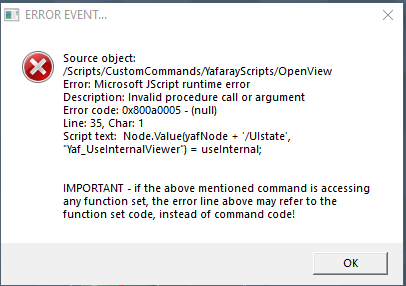
Error
Capture.PNG
Thought I would bring this to your attention in case you wanted to update your YafarayScripts to be backwards compatible.
Or simply update it's YafaRay4tS panel.
Attachments
BlendMaterial scene.RsScn
(3.89 MiB) Downloaded 230 times
Saul
Senior Chief Petty Officer
Posts: 308
Joined: 22 May 2009, 16:50

Re: YafaRay for trueSpace 2019

Post by Saul »

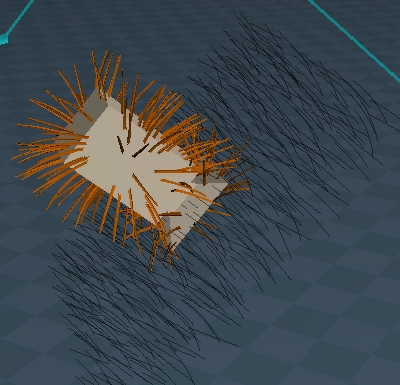
Yafaray hair is perfect camouflage for the Yafaray Cameras....
ScreenHunter 67.jpg
Not quite so good on the regular Camera
ScreenHunter 68.jpg
ScreenHunter 68.jpg (115.86 KiB) Viewed 5252 times
User avatar
trueBlue
Captain
Posts: 5548
Joined: 06 Jul 2009, 22:50
Type the number ten into the box: 10

Re: YafaRay for trueSpace 2019

Post by trueBlue »

Here is all of the updated YafaRay Materials.
Several changes to the UI and is uniform through out.
Double checked all links and new buttons.
Changed the Normal Map status
User avatar
clintonman
Captain
Posts: 5659
Joined: 21 May 2009, 21:08
Type the number ten into the box: 0
Location: California

Re: YafaRay for trueSpace 2019

Post by clintonman »

trueBlue wrote: 13 Dec 2019, 21:20 Here is all of the updated YafaRay Materials.
Several changes to the UI and is uniform through out.
Double checked all links and new buttons.
Changed the Normal Map status
Looks good.
What is Normal Map status?

I think the Blend Material Collection still has old Shiny Diffuse as default.
Clinton Reese

http://clintons3d.com
User avatar
trueBlue
Captain
Posts: 5548
Joined: 06 Jul 2009, 22:50
Type the number ten into the box: 10

Re: YafaRay for trueSpace 2019

Post by trueBlue »

I changed it to a YafaRay con

Code: Select all

		if(Node.Exists("/Status Line")) {
			if(!Node.ConExists("/Status Line", "YafaRay"))
				Node.ConCreate("Status Line", "YafaRay", "string", 4);
			Node.Value("/Status Line", "YafaRay") = " Updating Bump Map..."
		}
Right, I'll fix the Blend Material Collection.
User avatar
trueBlue
Captain
Posts: 5548
Joined: 06 Jul 2009, 22:50
Type the number ten into the box: 10

Re: YafaRay for trueSpace 2019

Post by trueBlue »

Last minute change to all of the YafaRay Materials.
Color controls
Resized to 32x32
Capture.PNG
Capture.PNG (7.56 KiB) Viewed 5272 times
YafaRay4tS Help file includes updates to the materials info and pictures.

Hopefully you can update this page
http://clintons3d.com/plugins/truespace ... faray.html

Has the old instructions for the Model Mesh Processing! :shock:
User avatar
trueBlue
Captain
Posts: 5548
Joined: 06 Jul 2009, 22:50
Type the number ten into the box: 10

Re: YafaRay for trueSpace 2019

Post by trueBlue »

Noticed I made a few mistakes with the YafaRay4tS Help file, that I am correcting.

Is the Blend - Per Material attributes correct?
Blend.PNG
Blend.PNG (1.79 KiB) Viewed 5250 times
YafaRay material - Per Material attributes
Capture.PNG
Capture.PNG (2.23 KiB) Viewed 5250 times
Looks like the Visibility and Pass ID attributes need to be swapped.
But what about the Additional depth?
User avatar
clintonman
Captain
Posts: 5659
Joined: 21 May 2009, 21:08
Type the number ten into the box: 0
Location: California

Re: YafaRay for trueSpace 2019

Post by clintonman »

trueBlue wrote: 15 Dec 2019, 15:27 Noticed I made a few mistakes with the YafaRay4tS Help file, that I am correcting.

Is the Blend - Per Material attributes correct?
Blend.PNG
YafaRay material - Per Material attributes
Capture.PNG

Looks like the Visibility and Pass ID attributes need to be swapped.
But what about the Additional depth?
Blend Material does not use Additional depth, so not needed.
Clinton Reese

http://clintons3d.com
User avatar
trueBlue
Captain
Posts: 5548
Joined: 06 Jul 2009, 22:50
Type the number ten into the box: 10

Re: YafaRay for trueSpace 2019

Post by trueBlue »

Thanks!
Just noticed that the Render buttons on the YafaRay4tS panel do not work like the YafaRay4tS toolbar.
Steps
Vray selected as the Offline Renderer
Select the YafaRay4tS panel
Select Render and or Render Animation buttons from the YafaRay4tS panel
Is it possible to make the Render buttons work like the toolbar?
Maybe add code to the DoFrameRender2 script that checks if Yafaray is the selected Offline Renderer?
Saul
Senior Chief Petty Officer
Posts: 308
Joined: 22 May 2009, 16:50

Re: YafaRay for trueSpace 2019

Post by Saul »

Would it be possible to reduce the size of the yafaray render to file dialogue in the stack? It ruins my nicely organised layout!
ScreenHunter 73.jpg
User avatar
trueBlue
Captain
Posts: 5548
Joined: 06 Jul 2009, 22:50
Type the number ten into the box: 10

Re: YafaRay for trueSpace 2019

Post by trueBlue »

Saul wrote: 16 Dec 2019, 17:21 Would it be possible to reduce the size of the yafaray render to file dialogue in the stack? It ruins my nicely organised layout!
ScreenHunter 73.jpg
Try using these to call the Render to File panel.
Screenshot.png
User avatar
trueBlue
Captain
Posts: 5548
Joined: 06 Jul 2009, 22:50
Type the number ten into the box: 10

Re: YafaRay for trueSpace 2019

Post by trueBlue »

Bump
Capture.PNG
trueBlue wrote: 16 Dec 2019, 16:37 Thanks!
Just noticed that the Render buttons on the YafaRay4tS panel do not work like the YafaRay4tS toolbar.
Steps
Vray selected as the Offline Renderer
Select the YafaRay4tS panel
Select Render and or Render Animation buttons from the YafaRay4tS panel
Is it possible to make the Render buttons work like the toolbar?
Maybe add code to the DoFrameRender2 script that checks if Yafaray is the selected Offline Renderer?
I tested this by adding this to the DoFrameRender script, and it works as expected.

Code: Select all

// Switch to Yafaray
	if(Node.Exists("/Offline renderers/Yafaray")) {
		var myenum = System.CreateDO("Common Data Package/String Enum Data");
		myenum = Node.Value("/Offline renderers", "Renderer");
		var str = myenum.GetSelectedString();
		myenum.SetSelectedString("Yafaray");
		Node.Value("/Offline renderers", "Renderer") = myenum;
	}
	OfflineRender.OpenView('',0,0);
And adding this to the Render Animation button for the Anim aspect and the Render Animation button on the Render to File aspect.

Code: Select all

if(Node.Exists("/Offline renderers/Yafaray")) {
var myenum = System.CreateDO("Common Data Package/String Enum Data");
myenum = Node.Value("/Offline renderers", "Renderer");
var str = myenum.GetSelectedString();
myenum.SetSelectedString("Yafaray");
Node.Value("/Offline renderers", "Renderer") = myenum;
}
OfflineRender.OpenView('',0,0);
Activity.Run('%THIS_NAME%/RenderAnim2')
Batch Rendering has the same issue! So I did the same as above by converting it into a button.
Batch button.PNG
Batch button.PNG (5.79 KiB) Viewed 7481 times

Code: Select all

Node.Value(Space.CurrentScene() + "/YafaRay4tS", "Yaf_DeleteTempFiles") = true
if(Node.Exists("/Offline renderers/Yafaray")) {
var myenum = System.CreateDO("Common Data Package/String Enum Data");
myenum = Node.Value("/Offline renderers", "Renderer");
var str = myenum.GetSelectedString();
myenum.SetSelectedString("Yafaray");
Node.Value("/Offline renderers", "Renderer") = myenum;
}
OfflineRender.OpenView('',0,0);
Activity.Run('%THIS_NAME%/RenderAnim2')
Also I have noticed this before where the Alert has no info. End Frame = 0
End Frame 0.PNG
I am also proposing to bring back the Render to File icon for the YafaRay4tS toolbar using the same commands as the Render Animation icon. I know it is redundant but t does not hurt having it.
User avatar
clintonman
Captain
Posts: 5659
Joined: 21 May 2009, 21:08
Type the number ten into the box: 0
Location: California

Re: YafaRay for trueSpace 2019

Post by clintonman »

It looks like in every case you are adding code then calling OfflineRender.OpenView('',0,0);
So you should probably remove the code from all those buttons and scripts and put it inside the YafarayScripts/OpenView which is called by the OfflineRender.OpenView('',0,0);

Below is a summary of what the standard button commands do.


trueSpace Render System button actions provided by the interface

Code: Select all

OfflineRender.OpenView('',0,0);
runs YafarayScripts/OpenView

Code: Select all

OfflineRender.RenderScene('')
runs YafarayScripts/RenderScene

Code: Select all

OfflineRender.RenderObject('')
runs YafarayScripts/RenderObject

Code: Select all

OfflineRender.RenderAnimation('')
runs YafarayScripts/RenderAnimation

Code: Select all

Widgets.ReplaceWidget('{88839603-7F98-41f0-96AC-BE94E801CFF3}','/Widgets/Tools/Offline render/Area scene render','Default','','dummy')
after rectangle selection
runs YafarayScripts/OpenView then runs YafarayScripts/RenderArea

Code: Select all

OfflineRender.OpenPreferencesPanel()
runs YafarayScripts/EnumPropertiesPanels

when vray is the active renderer the OfflineRender commands call the corresponding vray functions
Clinton Reese

http://clintons3d.com
User avatar
trueBlue
Captain
Posts: 5548
Joined: 06 Jul 2009, 22:50
Type the number ten into the box: 10

Re: YafaRay for trueSpace 2019

Post by trueBlue »

I am just adding your script that changes the Offline Renderer to Yafaray, to your script that includes the OfflineRender.OpenView('',0,0); command
As an example look in your DoFrameRender script

The OfflineRender.OpenView('',0,0); command exist in your YafaRay4tS/Render Animation button too.

I removed the OfflineRender.OpenView('',0,0); commands from all of the modifications and that works too.
Edit: Removing the OfflineRender.OpenView('',0,0); commands from all of the modifications does not work!
Disable All Viewers does not work without it.
User avatar
trueBlue
Captain
Posts: 5548
Joined: 06 Jul 2009, 22:50
Type the number ten into the box: 10

Re: YafaRay for trueSpace 2019

Post by trueBlue »

YafaRay4tS Help
Animation

Create XML and begin batch render - Creates XML files for frame range specified in Start Frame to End Frame and a Win Batch file which is used to call YafaRay to render the frames sequentially in the background. This option doesn't tie up trueSpace. Unchecking this box will cause YafaRay4tS to wait for each frame to render and display the updates in the internal viewer. While the unchecked option does tie up trueSpace, when used in combination with the "Delete XML files after rendering" option, it uses considerably less hard drive space.
This option doesn't tie up trueSpace.
The above info in the help file is not correct from what I can tell.
When rendering a Batch Render, it dose tie up trueSpace.
Has this changed from previous versions?
Edit: Never mind, the above is true. It does not tie up tS after the all of the XML files are exported.
Capture.PNG
Capture.PNG (7.21 KiB) Viewed 7395 times
And if you cancel the batch render at Frame 0, the Yaf_render.cmd and yaf_test_0000.xml are not deleted.

Rendering an Animation with the TGA viewer and or External Viewer, should not be available.
User avatar
clintonman
Captain
Posts: 5659
Joined: 21 May 2009, 21:08
Type the number ten into the box: 0
Location: California

Re: YafaRay for trueSpace 2019

Post by clintonman »

trueBlue wrote: 17 Dec 2019, 00:25 I am just adding your script that changes the Offline Renderer to Yafaray,...
Ok, I see what you're doing now. Good work, the yafaray4ts node render buttons should force the use of the yafaray renderer. Placing the code in OpenView like I suggested wouldn't work because if vray is active it would never be called.
Clinton Reese

http://clintons3d.com
User avatar
trueBlue
Captain
Posts: 5548
Joined: 06 Jul 2009, 22:50
Type the number ten into the box: 10

Re: YafaRay for trueSpace 2019

Post by trueBlue »

clintonman wrote: 21 Dec 2019, 17:40
trueBlue wrote: 17 Dec 2019, 00:25 I am just adding your script that changes the Offline Renderer to Yafaray,...
Ok, I see what you're doing now. Good work, the yafaray4ts node render buttons should force the use of the yafaray renderer. Placing the code in OpenView like I suggested wouldn't work because if vray is active it would never be called.
Right!
User avatar
clintonman
Captain
Posts: 5659
Joined: 21 May 2009, 21:08
Type the number ten into the box: 0
Location: California

Re: YafaRay for trueSpace 2019

Post by clintonman »

trueBlue wrote: 16 Dec 2019, 18:15 ...

I am also proposing to bring back the Render to File icon for the YafaRay4tS toolbar using the same commands as the Render Animation icon. I know it is redundant but t does not hurt having it.
That makes no sense to me to have 2 buttons that do the exact same thing.
If you like the render to file icon, you should get rid of the render animation icon.
Clinton Reese

http://clintons3d.com
User avatar
trueBlue
Captain
Posts: 5548
Joined: 06 Jul 2009, 22:50
Type the number ten into the box: 10

Re: YafaRay for trueSpace 2019

Post by trueBlue »

clintonman wrote: 21 Dec 2019, 17:46
trueBlue wrote: 16 Dec 2019, 18:15 ...

I am also proposing to bring back the Render to File icon for the YafaRay4tS toolbar using the same commands as the Render Animation icon. I know it is redundant but t does not hurt having it.
That makes no sense to me to have 2 buttons that do the exact same thing.
If you like the render to file icon, you should get rid of the render animation icon.
I know it is redundant but it does not hurt.
The Render to File's RMB is different calling the current lighting method given that you can render an animation or just render.
I brought it back because of Saul's post, blame him! ;)
User avatar
clintonman
Captain
Posts: 5659
Joined: 21 May 2009, 21:08
Type the number ten into the box: 0
Location: California

Re: YafaRay for trueSpace 2019

Post by clintonman »

trueBlue wrote: 11 Dec 2019, 19:50 ...
Error
Capture.PNG

Thought I would bring this to your attention in case you wanted to update your YafarayScripts to be backwards compatible.
Or simply update it's YafaRay4tS panel.
Fix for old version yafaray4ts node.
Attachments
OpenView.RsObj
(14.95 KiB) Downloaded 302 times
Clinton Reese

http://clintons3d.com
User avatar
clintonman
Captain
Posts: 5659
Joined: 21 May 2009, 21:08
Type the number ten into the box: 0
Location: California

Re: YafaRay for trueSpace 2019

Post by clintonman »

I don't see any outstanding issues with your last unofficial update so I plan to make the final standalone installer and update the sample scenes within the next few days.
Clinton Reese

http://clintons3d.com
User avatar
trueBlue
Captain
Posts: 5548
Joined: 06 Jul 2009, 22:50
Type the number ten into the box: 10

Re: YafaRay for trueSpace 2019

Post by trueBlue »

YAY! :D
Thanks again!
Is YafaRay4tS 0.9.9 the final version?
Curious... is possible to make the YafaRay Light Material reads color from a image? As an example from a gradient texture.

Been dabbling porting over all of your yafaray scripts to trueSpace7.6 from trueSpace7.61 by exporting your scripts from the Script Editor. Then I starting looking at the materials. Ugh!
Lots of talk about trueSpace7.6 being better then trueSpace7.61.
Maybe something to think about with your dribble project.
User avatar
clintonman
Captain
Posts: 5659
Joined: 21 May 2009, 21:08
Type the number ten into the box: 0
Location: California

Re: YafaRay for trueSpace 2019

Post by clintonman »

trueBlue wrote: 22 Dec 2019, 15:54 YAY!
Thanks again!
Is YafaRay4tS 0.9.9 the final version?
...
Yes, if that's the final number you came up with.
trueBlue wrote: 22 Dec 2019, 15:54 ...
Curious... is possible to make the YafaRay Light Material reads color from a image? As an example from a gradient texture.

...
It's possible to do it indirectly with the compositing color picker node.
Clinton Reese

http://clintons3d.com
User avatar
trueBlue
Captain
Posts: 5548
Joined: 06 Jul 2009, 22:50
Type the number ten into the box: 10

Re: YafaRay for trueSpace 2019

Post by trueBlue »

I just Loaded the iOptDetector plugin and noticed something that I have not seen before.
I have the Internal Viewer enabled and iOptDetector Viewer disabled.
The update Opti display script is running with status messages that I have not seen before.
Image does not exist yet. Render view update is pending...
############# Rendering ############# (# = different numbers)

1). Since I do not have the iOptDetector Viewer enabled, why is the update Opti display script running?
2.) What is the meaning of the numbers?

Code: Select all

Node.Value("/Status Line","YafaRay") = FTval + " Rendering " + lastTime;
I am just rendering one image from the Render Scene toolbar icon, but the status messages seems to update the messages several times with different messages.
If I enable the iOptDetector Viewer the render scene process looks like Bucket Render is enabled but I do not have it enabled.
If I unloaded the iOptDetector plugin, everything works as expected.

Edit: Further testing it seems to be working as expected now. Very strange!
The only thing I could tell that is different, is it that the update Opti display script was stuck as the attributes were not resetting.
User avatar
clintonman
Captain
Posts: 5659
Joined: 21 May 2009, 21:08
Type the number ten into the box: 0
Location: California

Re: YafaRay for trueSpace 2019

Post by clintonman »

If you can repeat it we can fix it. Otherwise...
Clinton Reese

http://clintons3d.com
User avatar
trueBlue
Captain
Posts: 5548
Joined: 06 Jul 2009, 22:50
Type the number ten into the box: 10

Re: YafaRay for trueSpace 2019

Post by trueBlue »

I added your Tiff Loader to the Sequence Player.
Its up to you if you want to include this modification.
Capture.PNG
User avatar
clintonman
Captain
Posts: 5659
Joined: 21 May 2009, 21:08
Type the number ten into the box: 0
Location: California

Re: YafaRay for trueSpace 2019

Post by clintonman »

trueBlue wrote: 23 Dec 2019, 18:38 I added your Tiff Loader to the Sequence Player.
Its up to you if you want to include this modification.
Capture.PNG
Not a problem, I figured you'd come out of retirement and add at least one more thing.
Clinton Reese

http://clintons3d.com
User avatar
trueBlue
Captain
Posts: 5548
Joined: 06 Jul 2009, 22:50
Type the number ten into the box: 10

Re: YafaRay for trueSpace 2019

Post by trueBlue »

I am out x-mas shopping. I have not tested this nor is there code to check for the plugin
User avatar
clintonman
Captain
Posts: 5659
Joined: 21 May 2009, 21:08
Type the number ten into the box: 0
Location: California

Re: YafaRay for trueSpace 2019

Post by clintonman »

Roger that, I intend to test it before adding it.
Clinton Reese

http://clintons3d.com
User avatar
trueBlue
Captain
Posts: 5548
Joined: 06 Jul 2009, 22:50
Type the number ten into the box: 10

Re: YafaRay for trueSpace 2019

Post by trueBlue »

Test in tS761StdB8.5
Unloaded the tif plugin, loaded a sequence of tif(s), it still works like it used to, without errors.
So it should be good to go as is.
The Off/On calls the SwitchBitmap script.

Return to “Rendering”