just re install ts full version...
I notice the animation in modelside can transfer in workspace without any hassle it automatically update or it play you just have the scene editor open in modelside so that you can play it when you transfer to workspace no need to have modelside window open. now if we can only do that to workspace? I don't know why workspace animation cannot transfer to modelside when modelside can do that easily.
just curious
DS
workspace and modelside animation
-
DarkScythe
- Senior Chief Petty Officer
- Posts: 243
- Joined: 23 Sep 2009, 08:57
workspace and modelside animation
-
trueBlue

- Captain
- Posts: 5548
- Joined: 06 Jul 2009, 22:50
- Type the number ten into the box: 10
Re: workspace and modelside animation
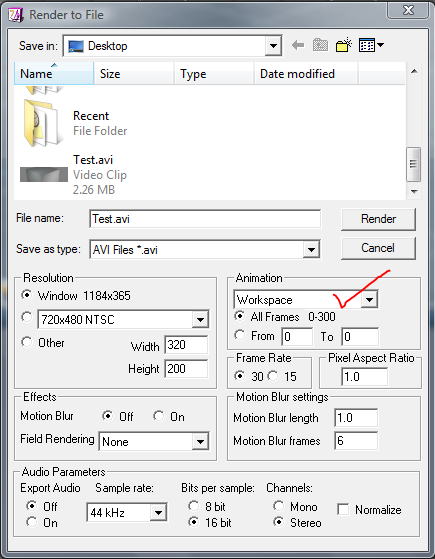
You can when you select Workspace from the Animation options.
- Attachments
-
-
Prodigy

- Site Admin
- Posts: 957
- Joined: 21 May 2009, 14:46
- Type the number ten into the box: 0
- Location: Uruguay
Re: workspace and modelside animation
BTw,
Modelside keyframes are not compatible with Workspace keyframes..
Anyone knows any trick to solve that???
I have a camera path on model side and i want to have it on workspace side.. is that possible?
Modelside keyframes are not compatible with Workspace keyframes..
Anyone knows any trick to solve that???
I have a camera path on model side and i want to have it on workspace side.. is that possible?
๑۩۞۩๑ prodigy ๑۩۞۩๑
-
trueBlue
- Captain
- Posts: 5548
- Joined: 06 Jul 2009, 22:50
- Type the number ten into the box: 10
Re: workspace and modelside animation
Took me forever to find this but Dele found a way to do this sometime ago:
http://forums1.caligari.com/truespace/s ... php?t=3014"
http://forums1.caligari.com/truespace/s ... php?t=3014"
-
Prodigy
- Site Admin
- Posts: 957
- Joined: 21 May 2009, 14:46
- Type the number ten into the box: 0
- Location: Uruguay
Re: workspace and modelside animation
Thanks alot TB,
Since that is a very cool tutorial i made a copy on our server.. just in case
vi ... =18&t=1162"
BTW, Thanks Dele very smart indeed!
Since that is a very cool tutorial i made a copy on our server.. just in case
vi ... =18&t=1162"
BTW, Thanks Dele very smart indeed!
๑۩۞۩๑ prodigy ๑۩۞۩๑
-
DarkScythe
- Senior Chief Petty Officer
- Posts: 243
- Joined: 23 Sep 2009, 08:57
Re: workspace and modelside animation
I try what you've just said,but it seems I cannot transfer the animation... maybe I am missing somethingYou can when you select Workspace from the Animation options.
here's the step I take
1)create a cube in workspace side, animate it (I made it a moving sphere from 0 to
30 frames)
2)set bridge on and turn view to 4 view then switch one of the window to
modelside
3)then in modelside chose render to file and put the settings that you've just said then render (I chose .avi and series of jpg images but din't work)
All I get is the first frame of the sequence and it seems that first frame is the transfer scene when you bridge it no animation from workspace had been recorded.
thanks for the time
DS
-
trueBlue
- Captain
- Posts: 5548
- Joined: 06 Jul 2009, 22:50
- Type the number ten into the box: 10
Re: workspace and modelside animation
Ah right, sorry about that. Seems to only work with Vray.
-
Karthogen
- Master Chief Petty Officer
- Posts: 454
- Joined: 03 Jun 2009, 14:12
Re: workspace and modelside animation
It works without VRAY.
I was able to do basic animation accross the bridge with no issues. When i tried it with bones it did start having a lot of issues, but it still rendered the motion of th ecomplete object, but I loss the mesh animation from bones and even the textures(could not figure that out).
It has something to do with your setting. or the fact you have both windows open. It should work with those options selected.
I was able to do basic animation accross the bridge with no issues. When i tried it with bones it did start having a lot of issues, but it still rendered the motion of th ecomplete object, but I loss the mesh animation from bones and even the textures(could not figure that out).
It has something to do with your setting. or the fact you have both windows open. It should work with those options selected.
-
RAYMAN

- Captain
- Posts: 2547
- Joined: 21 May 2009, 18:56
Re: workspace and modelside animation
The problem with animations from modelside to workspace and back is one of the biggest problems
that Truespace has apart from some instability that the program always had.
The use of paths and camera movement make it no pleasure at all !
2. Truespace doesnt like big files and lots of objects ... second big drawback.
Thats why I dont use that workflow any more but I still use Truespace.
If your endresult is an animation I found the workflow with Vue 8 as the last stage (sort of like the animation space)
as the cleanest way of getting all the pieces together.
Model inside Truespace modelside or on the workspace side ...... rig on the workspace side only or run physical simulations on workspace side
and export the prerigged objects out to Vue via Collada format. There you have full access to camera paths and banking fully automated
with the animation Wizard. Even animation loops like turning wheels or spinning cameras around objects can be made from the menu.
When you import the animations from Truespace via Collada format you can save them out from Vue with the vue object file with an animation attached to
it and reimport it as an instance and spray the animated files onto any object.
As a bonus you can tie Truespace animations together with animations from Daz studio and animeeple and Poser up to version 8 all on one stage.
If we could get procedural animations from Truespace keyframable we could also be able to use those.
that Truespace has apart from some instability that the program always had.
The use of paths and camera movement make it no pleasure at all !
2. Truespace doesnt like big files and lots of objects ... second big drawback.
Thats why I dont use that workflow any more but I still use Truespace.
If your endresult is an animation I found the workflow with Vue 8 as the last stage (sort of like the animation space)
as the cleanest way of getting all the pieces together.
Model inside Truespace modelside or on the workspace side ...... rig on the workspace side only or run physical simulations on workspace side
and export the prerigged objects out to Vue via Collada format. There you have full access to camera paths and banking fully automated
with the animation Wizard. Even animation loops like turning wheels or spinning cameras around objects can be made from the menu.
When you import the animations from Truespace via Collada format you can save them out from Vue with the vue object file with an animation attached to
it and reimport it as an instance and spray the animated files onto any object.
As a bonus you can tie Truespace animations together with animations from Daz studio and animeeple and Poser up to version 8 all on one stage.
If we could get procedural animations from Truespace keyframable we could also be able to use those.
- Attachments
-
- camera animation.zip
- (286.37 KiB) Downloaded 232 times