Does TS 'see' triangles?
-
Dragneye

- Lieutenant
- Posts: 906
- Joined: 02 Sep 2009, 22:09
Does TS 'see' triangles?
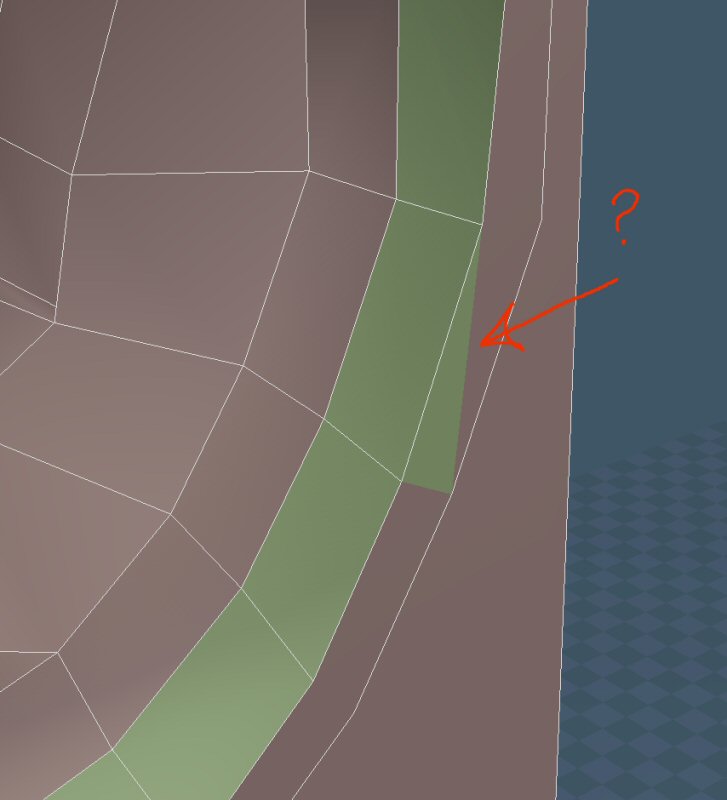
Though we actually see what we make as polygons, is TS calculating, internally processing them as triangles?
-
clintonman

- Captain
- Posts: 5659
- Joined: 21 May 2009, 21:08
- Type the number ten into the box: 0
- Location: California
Re: Does TS 'see' triangles?
Yep. It's triangles with flags to make edges visible or invisible to look like polygons.
-
Dragneye
- Lieutenant
- Posts: 906
- Joined: 02 Sep 2009, 22:09
Re: Does TS 'see' triangles?
mm... interesting.
Thanx for the reply clintonman
Can't figure out the why but, is that the norm for software like this?
Thanx for the reply clintonman
Can't figure out the why but, is that the norm for software like this?
-
froo
- Captain
- Posts: 2554
- Joined: 22 May 2009, 12:13
Re: Does TS 'see' triangles?
Hey Dragneye.
If you change your selection settings from 'triangle' to 'faces',
you should see only faces selected, not triangles.
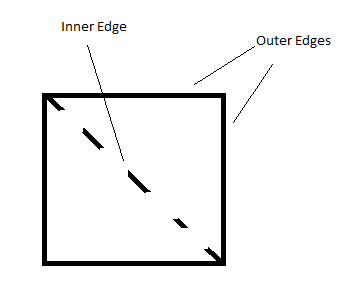
As clinton said, (in technical terms), an edge flag indicates whether
a particular edge of a triangle is the outer edge of the polygon of
which the triangle is a part. Think of a square, composed of two triangles.
Each triangle has 3 edges. So we have 6 edges, two of which are shared,
in the square: 4 'outer' edges, which we would want to see drawn, and 1 'shared',
'inner' edge, which we may not want to see, in a square shape.
If we do not want to see that inner edge, then for each triangle, we set the
edge flag for that edge = 0 (we turn it off). If we want to see that edge,
then, for each triangle, we set that edge flag = 1 (we turn it On) or, some other
nonzero value. I have seen the edge flag set to other nonzero values, but forget why.
- Attachments
-
- outerInner.png (5.13 KiB) Viewed 5004 times
-
Dragneye
- Lieutenant
- Posts: 906
- Joined: 02 Sep 2009, 22:09
Re: Does TS 'see' triangles?
FROO!
Hey buddy
I don't think I've set it for triangles (don't know where to look for the setting actually); (I hate triangulation because it becomes even more tedious to edit a mesh). It only exposes itself sometimes when I have a face with a 'bunch' of edges/points, or when I separate a part of a mesh with two different colors. Doesn't affect my work; just wondering if I was seeing it right, or if the separation was creating a glitch in the renderer.
Thanx for the details though. Appreciated.
-
clintonman
- Captain
- Posts: 5659
- Joined: 21 May 2009, 21:08
- Type the number ten into the box: 0
- Location: California
Re: Does TS 'see' triangles?
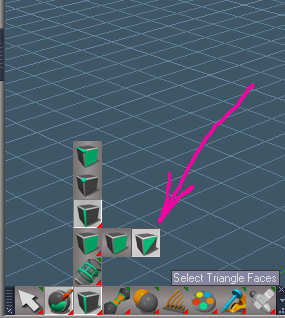
Here it is. There is also a triangle edge selection. I haven't used either one myself.Dragneye wrote:...
I don't think I've set it for triangles (don't know where to look for the setting actually);...
- triangleSelection.jpg (22.73 KiB) Viewed 4993 times
I think it's true of 3dsmax at least the older versions of the software. I think that's why the 3ds file format is triangles and ase is triangles with edge flags.Dragneye wrote:mm... interesting.
Thanx for the reply clintonman
Can't figure out the why but, is that the norm for software like this?
-
froo
- Captain
- Posts: 2554
- Joined: 22 May 2009, 12:13
Re: Does TS 'see' triangles?
Thanks for the screenshot clinton; I did not have truespace installed on the machine I was using.
Hm I wonder, if it is possible that a quad has one triangle inverted? Which may explain why you only
see one triangle highlighted? That is if you do not have 'triangle selection' enabled. Nah;
if that were the case you would see a triangular hole in your object, unless your object is double sided.
Mmm... no; I don't think so about that either. sigh. I dunno.
BTW... I think ts also sees dead people!
Hm I wonder, if it is possible that a quad has one triangle inverted? Which may explain why you only
see one triangle highlighted? That is if you do not have 'triangle selection' enabled. Nah;
if that were the case you would see a triangular hole in your object, unless your object is double sided.
Mmm... no; I don't think so about that either. sigh.
I dunno.BTW... I think ts also sees dead people!
-
Breech Block

- Master Chief Petty Officer
- Posts: 482
- Joined: 13 Jun 2009, 20:31
Re: Does TS 'see' triangles?
The only time I have used the switching "on" or "off" of triangles is when I have had surface imperfections in my renders in very complex, curved shapes. In particular, I'm thinking of an aircraft canopy i once did. Because of numerous design changes, the model had been point edited quite a bit and as a consequence, one of the "hidden lines" had been placed so that it flowed out of alignment (by 90 degrees) with all the others and that was what was causing the imperfection in the final image.

-
bitkar

- Captain
- Posts: 2089
- Joined: 16 Mar 2010, 07:14
- Type the number ten into the box: 0
- Location: Czech Republic
Re: Does TS 'see' triangles?
what about old good "model" part of tS? working with triangles internaly?
Michal aka bitkar
tS freak since tS2 (1998) and forever (tS7.61 modeler)
tS freak since tS2 (1998) and forever (tS7.61 modeler)
-
Dragneye
- Lieutenant
- Posts: 906
- Joined: 02 Sep 2009, 22:09
Re: Does TS 'see' triangles?
Hey there Breech. I'm going to go and play with that button and see what the difference is.
There are instances when I can't get a specific vert to smooth out with the rest of them (don't know if I'm talking about the same thing as you mention). Now I'm wondering if it has anything to do with this issue.
Bitkar, are you saying you Want to work with triangles?
There are instances when I can't get a specific vert to smooth out with the rest of them (don't know if I'm talking about the same thing as you mention). Now I'm wondering if it has anything to do with this issue.
Bitkar, are you saying you Want to work with triangles?
-
bitkar
- Captain
- Posts: 2089
- Joined: 16 Mar 2010, 07:14
- Type the number ten into the box: 0
- Location: Czech Republic
Re: Does TS 'see' triangles?
definatly not... just curious about internals of the "old" engine. I could use them after pressing "triangulate button". But working with triangles is no joy. One of things because of I was lauging at 3Dmax :) (not sure if the new versions can handle n-gons, propably they can)Dragneye wrote:Bitkar, are you saying you Want to work with triangles?
Michal aka bitkar
tS freak since tS2 (1998) and forever (tS7.61 modeler)
tS freak since tS2 (1998) and forever (tS7.61 modeler)