Realistic metal shader?

frank
Senior Chief Petty Officer
Posts: 161
Joined: 28 May 2009, 13:25

Realistic metal shader?

Post by frank »

What are you guys' formulas for realistic metal shading in trueSpace? Or links to existing materials, darktree files, etc.?

I'm working on some CG characters to be inserted into live-action footage and would really appreciate any help.

Also, HOW IS EVERYONE?!?!?! LOL! It's so cool that the tS community is still going. :)
User avatar
MikomDude
Captain
Posts: 1930
Joined: 04 Oct 2010, 11:12
Type the number ten into the box: 0
Location: The Hague, Netherlands

Re: Realistic metal shader?

Post by MikomDude »

Have you tried the Symbiont for tS shaders? http://www.darksim.com/html/download_archive.shtml :)
User avatar
RAYMAN
Captain
Posts: 2547
Joined: 21 May 2009, 18:56

Re: Realistic metal shader?

Post by RAYMAN »

frank wrote:What are you guys' formulas for realistic metal shading in trueSpace? Or links to existing materials, darktree files, etc.?

I'm working on some CG characters to be inserted into live-action footage and would really appreciate any help.

Also, HOW IS EVERYONE?!?!?! LOL! It's so cool that the tS community is still going. :)

Hi Frank ! good to hear from you again !
What type of metal.....metal could be anything from gold to rusted....
If you need shiny crank up the reflection and use a Hdri.. if its dull and you need weathered use a normal phong shader with a map...
you know most shaderlab and other files links are already broken... try using the wayback machine you can find a lot that way...
there are textures at Mayang but i havent downloaded from thre for a long time...


There are some free Darktrees in the metal section quite good ones.....look under metal...mechanical and techno...
Peter
frank
Senior Chief Petty Officer
Posts: 161
Joined: 28 May 2009, 13:25

Re: Realistic metal shader?

Post by frank »

Mikom Dude: Thanks! I've actually already got those. I've been going through some of the included ones (rusted metal, etc.) and they seem pretty good. I've been doing some experiments mixing with real textures (ie. using the DarkTree for reflectance and bump, but normal texture for color channel) and have gotten some seemingly better results.

RAYMAN: Thank you! Oh yeah... guess I should have specified on the type of metal. Ha! Sorry 'bout that. :) This would be for a mechanical character, so I'm looking for matte portions, as well as shiny parts for the pneumatic rods and such.

I've been playing around with layered textures (ie. having a somewhat shiny layer show through the edges of the metal structure, where the paint would be worn away) and that has been fairly successful.

By the way... was Vray ever updated to allow layered textures? Doesn't seem so, but was curious if there was something in the works.

Thanks for the help, guys!
frank
Senior Chief Petty Officer
Posts: 161
Joined: 28 May 2009, 13:25

Re: Realistic metal shader?

Post by frank »

RAYMAN: Thanks also for that video link. :)
User avatar
Buzz
Chief Petty Officer
Posts: 150
Joined: 05 Jul 2009, 12:46
Type the number ten into the box: 0
Location: Netherlands

Re: Realistic metal shader?

Post by Buzz »

Frank, some time ago I did some experiments with combined shaders and textures to create a galvanized metal look. Here is the link: vi ... =11&t=1885"
User avatar
Steinie
Captain
Posts: 2958
Joined: 21 May 2009, 17:38
Type the number ten into the box: 10

Re: Realistic metal shader?

Post by Steinie »

frank wrote: I've been playing around with layered textures (ie. having a somewhat shiny layer show through the edges of the metal structure, where the paint would be worn away) and that has been fairly successful.

By the way... was Vray ever updated to allow layered textures? Doesn't seem so, but was curious if there was something in the works.

Thanks for the help, guys!
Welcome back Frank!
Nope. No layered textures in VRay.
User avatar
bitkar
Captain
Posts: 2089
Joined: 16 Mar 2010, 07:14
Type the number ten into the box: 0
Location: Czech Republic

Re: Realistic metal shader?

Post by bitkar »

the realisticity of metal material depends maybe more on a environment map or environment and lighting. I think standard shader can look good. Only thing is soft shadows, which can be sometimes problem. But if you have vray you can use that vray shader which has blured reflections.
Michal aka bitkar
tS freak since tS2 (1998) and forever (tS7.61 modeler)
frank
Senior Chief Petty Officer
Posts: 161
Joined: 28 May 2009, 13:25

Re: Realistic metal shader?

Post by frank »

Steinie: Thank you for the confirmation.

bitkar: Thank you for the tip! I've not messed with blurred reflections in Vray much. I'm after more of a "worn" metal look, but that may still help. (Again, would be nice if I could use layered textures in Vray, so I could have a matte "paint" on top with some semi/soft-reflective metal showing through.)

Buzz... I've just downloaded your metal.zip file. I'm eager to try it. Thank you!
User avatar
bitkar
Captain
Posts: 2089
Joined: 16 Mar 2010, 07:14
Type the number ten into the box: 0
Location: Czech Republic

Re: Realistic metal shader?

Post by bitkar »

oh ya, layers are great. Bit of a problem in vray. I think the best worn metals are simbiont shaders. but... One more tip - there was a custom shader (.tss) called "free coolpowers reflects pro" (i think it was originally from simon windmill) which works pretty smooth. Supports everything you need, incl. blurring, mapping, etc.. Its for lightworks so you can use layers. But bluring uses some relatively slow algorythm, some sampling. And iam not sure how stable it is in tS7.6. In case of troubles you will need to disable multithreading. It has some odd side, but its really not bad.
Michal aka bitkar
tS freak since tS2 (1998) and forever (tS7.61 modeler)
User avatar
RAYMAN
Captain
Posts: 2547
Joined: 21 May 2009, 18:56

Re: Realistic metal shader?

Post by RAYMAN »

If you are after a worn metal look you rather need 3d coat or something simular......
You need to find some good pictures or make them yourself of worn metal parts and then paint those sections
onto the right spots of your models.. something that is VERY difficult to do with just simple UV mapping....
3d coat can also paint in layers.. and is good for a lot of other things.(auto retopology after sculptris and sculpting....many on this forum use it !
http://3d-coat.com/gallery/images-gallery/"
Its not about a shader in your case I´m pretty sure its a bout realistic painting on an uv map and you can paint with pictures as templets.. thats called pojection painting !
Peter
PS .:
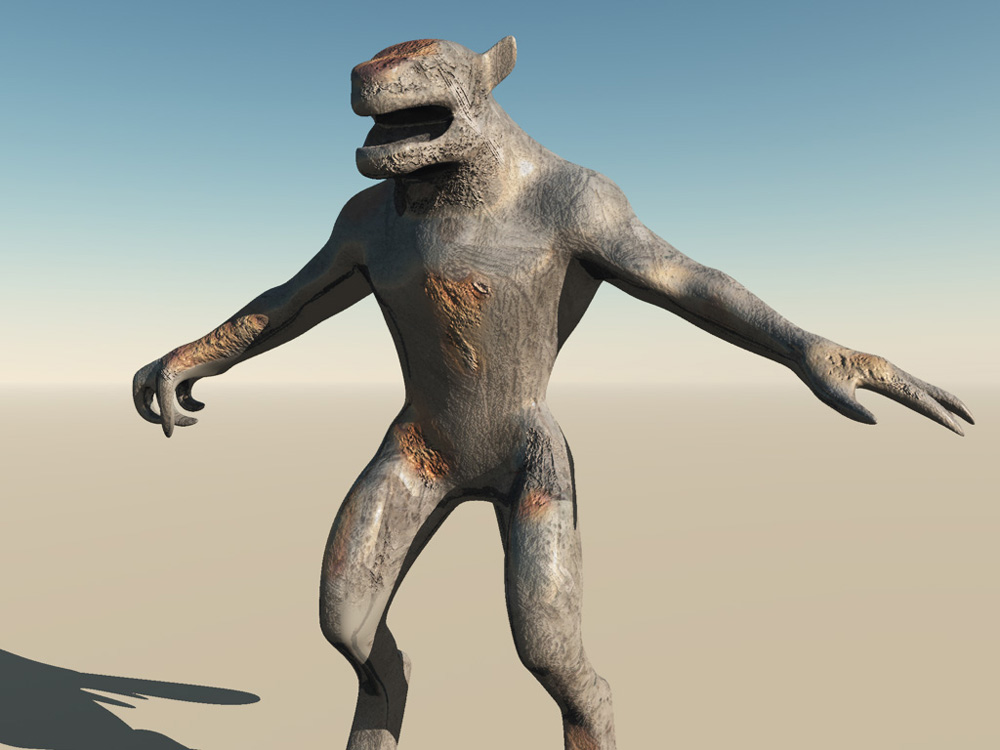
Here isa quick render i did for you using some samyang texture pictures inside 3d Coat......
it took me about 5 minutes to do this.. with a lot more time you can get some realy good results though !
there is a free demo that saves for 30 days so you can try it out pretty easily.. learning the basics is very easy !
Attachments
rusted final.jpg

Return to “General Discussion”