Ok. New problem.
I have made a shape by using the boolean subtract function. I then rotated the axis of the object. Then I keyframed a "0" frame. However, when I then rotated the object and tried to keyframe another frame.
As soon as i push the record button, the mesh gets distorted. What???
I've tried a lot of things, including using different ways to make the shape. The thing that seems to create this odd behavior is when I rotate the axis. I can't figure out why animating would cause a mesh deformation.
I've even uninstalled 7.61 and installed the latest 7.61 std addition. Started over from scratch and encountered the same problem.
Anyone have any suggestions?
keyframing animation distorts mesh
-
legios
- Seaman Recruit
- Posts: 3
- Joined: 04 Sep 2011, 01:19
- Type the number ten into the box: 9
keyframing animation distorts mesh
-
BNG

- Chief Warrant Officer
- Posts: 684
- Joined: 16 Oct 2009, 03:26
- Type the number ten into the box: 0
- Location: Texas
Re: keyframing animation distorts mesh
That is odd. Try entering frame 1 then enter, and the record button. Afterwards, do your rotation and see what happens. I'm not sure but frame 0 may be the problem itself. Not sure though.legios wrote:Ok. New problem.
I have made a shape by using the boolean subtract function. I then rotated the axis of the object. Then I keyframed a "0" frame. However, when I then rotated the object and tried to keyframe another frame.
As soon as i push the record button, the mesh gets distorted. What???
I've tried a lot of things, including using different ways to make the shape. The thing that seems to create this odd behavior is when I rotate the axis. I can't figure out why animating would cause a mesh deformation.
I've even uninstalled 7.61 and installed the latest 7.61 std addition. Started over from scratch and encountered the same problem.
Anyone have any suggestions?
Casual Truespace 3D modeling hobbyist. My Truespace blog and simple 3d Modeling Tutorials for Casual Model Makers.
-
Breech Block

- Master Chief Petty Officer
- Posts: 482
- Joined: 13 Jun 2009, 20:31
Re: keyframing animation distorts mesh
It sounds a bit like like you have the auto-record function activated and that ts is attempting to return the shape back to its original form. In addition, if you expand an objects properties in the Scene Editor, you should be able to individually edit/delete all the objects' keyframe data such as look, scale, move, rotation etc. etc..

-
BNG
- Chief Warrant Officer
- Posts: 684
- Joined: 16 Oct 2009, 03:26
- Type the number ten into the box: 0
- Location: Texas
Re: keyframing animation distorts mesh
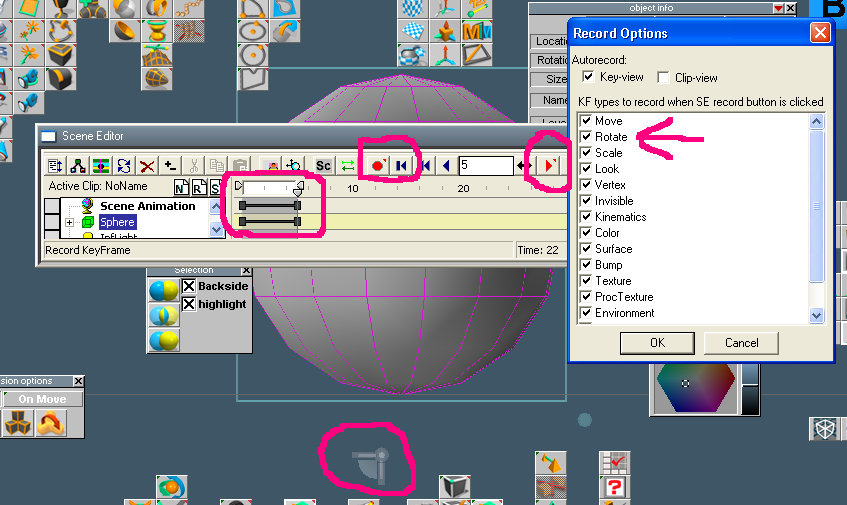
Try right clicking the record button and un x it. Do your booleen as you did before then re-enable the auto record function afterwords and then try your object rotation again. Try using more then just one frame to give more a frame range for the rotation to play out. In the scene editor with the frame range window visible type in 5 in the frame box hit enter to add the new frame range and then hit the record button. You should see 2 bars appear in the frame window. Now use the rotation widget tool next to the object to left click and drag the desired axes to rotate the object in the workspace (modelside). Now hit the Return to Start button and then the play button to play the animation.
If the object still distorts as before then right click the record button and un x everything in the popup menu except the one for rotate and repeat the process on a new object. The keyframe options are quite extensive, but having too many of them active at once may be part of your problem as you may be keyframing an undisirable aspect related to distorting your object.
If the object still distorts as before then right click the record button and un x everything in the popup menu except the one for rotate and repeat the process on a new object. The keyframe options are quite extensive, but having too many of them active at once may be part of your problem as you may be keyframing an undisirable aspect related to distorting your object.
- Attachments
-
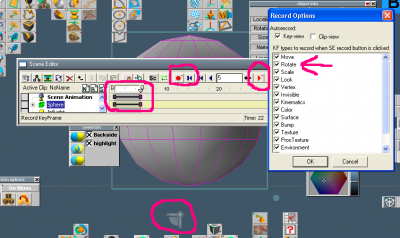
- TS 7.61 Beta 8 Modelside view.
Casual Truespace 3D modeling hobbyist. My Truespace blog and simple 3d Modeling Tutorials for Casual Model Makers.