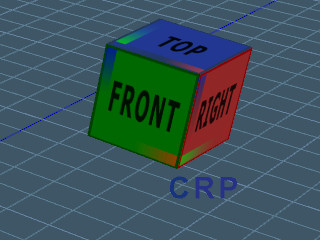
I updated the cube view widget to respond to mouse clicks. Click on the cube to change the view. Left click C for camera view. Right click C for a new camera at the current view. Click R to reset the view. Click P to switch from camera to perspective view.
About 1/3 down the page
http://www.clintons3d.com/plugins/trues ... index.html"
Updated Cube View Widget
-
clintonman
- Captain
- Posts: 5659
- Joined: 21 May 2009, 21:08
- Type the number ten into the box: 0
- Location: California
Updated Cube View Widget
-
trueBlue
- Captain
- Posts: 5548
- Joined: 06 Jul 2009, 22:50
- Type the number ten into the box: 10
Re: Updated Cube View Widget
Wow, that is awesome!
You are making working in Workspace so much easier.
Love the LMB switching views back a forth and Alt + LMB switching opposite views.
You are making working in Workspace so much easier.
Love the LMB switching views back a forth and Alt + LMB switching opposite views.
