I installed TS7.61 on Windows 7 Home Premium 64bit. At the end of the installation, it flashed something about fixing/installing (?) MS Visual C++ 2005 Redistributable. Could this have screwed up my MS Visual C++ 2008 Redistributable, which was on the system? I've had some problems since the installation and so am restoring to before the installation. Is there a way to install tS761B8.exe without it touching Visual C++? WIll TS7.61 work OK with my updated-for-64bit MS Visual C++ 2008?
Thanks,
Janet
MS Visual C++ 2005 Redistributable
-
janetb
- Petty Officer Second Class
- Posts: 32
- Joined: 21 May 2009, 22:57
MS Visual C++ 2005 Redistributable
-
Shell1850
- Chief Petty Officer
- Posts: 135
- Joined: 21 May 2009, 21:44
Re: MS Visual C++ 2005 Redistributable
I don't think you have a problem. You will find for each version 2005, 2008 and 2010 has two library's - 32 bit and 64 bit. TS tried to install the 32 bit version of 2005. Check your Installed Programs in the control panel.
-
froo
- Captain
- Posts: 2554
- Joined: 22 May 2009, 12:13
Re: MS Visual C++ 2005 Redistributable
Yes, I believe Shell is correct;
trueSpace is looking for a particular MSVC redistributable package, which is a collection
of libraries required by tS to run. You may have, say, the 64 bit version, but as Shell said,
tS may need the 32 bit version.
-
janetb
- Petty Officer Second Class
- Posts: 32
- Joined: 21 May 2009, 22:57
Re: MS Visual C++ 2005 Redistributable
So it would have added the missing one? I was afraid it may have replaced the new one with the ancient one.....
-
froo
- Captain
- Posts: 2554
- Joined: 22 May 2009, 12:13
Re: MS Visual C++ 2005 Redistributable
Hey Janet.
I do not think the dll's are overwritten.
-
janetb
- Petty Officer Second Class
- Posts: 32
- Joined: 21 May 2009, 22:57
Re: MS Visual C++ 2005 Redistributable
I just took a look at RevoUninstaller and found that only MS Visual C++ 2008 Redistributable is listed---but it is listed as x86 (many programs install on Win7 64bit in the x86 folder). I was kind of hoping to see both. Actually, I had done a re-install of TS7 due to a problem, and now I recall that when it quickly, unexpectedly flashes you that it is installing MS Visual C++ 2005, I quickly hit the Cancel button, figuring I could always reinstall again if TS didn't work. But it seems to be OK. So far. Is there anything anyone can think of that NOT-having-2005 might affect?
-
trueBlue

- Captain
- Posts: 5548
- Joined: 06 Jul 2009, 22:50
- Type the number ten into the box: 10
Re: MS Visual C++ 2005 Redistributable
This should help:
http://www.winvistaclub.com/f16.html"
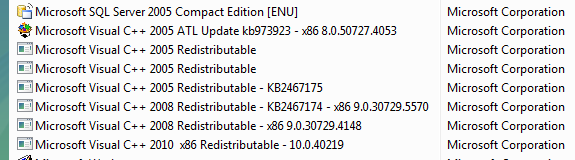
I have these in Vista32/Add and Remove Programs
BTW: Some of these are installed via Windows Update
- Attachments
-
-
Shell1850
- Chief Petty Officer
- Posts: 135
- Joined: 21 May 2009, 21:44
Re: MS Visual C++ 2005 Redistributable
If you check your Microsoft update history, you will find updates to each version of C++ redistributable files.
I just checked my winsys folder. It takes up almost 10 gb of space on my harddrive. Is there a program to manage it.