Unofficial Update 3?

User avatar
trueBlue
Captain
Posts: 5548
Joined: 06 Jul 2009, 22:50
Type the number ten into the box: 10

Re: Unofficial Update 3?

Post by trueBlue »

Saul wrote:
trueBlue wrote:Now I can render any view that has focus. The key here is to leave the Vray render view open.
I can confirm this!
On another note, hot keys are still a problem. I cannot set a hot key for the 'set camera' command from either the unoffical toolbar or the official one! Additionally the hot key for 'set camera' mentioned in tS761 Workspace Shortcut List.rtf, does not work for me either!
Where is the userdefined.xml you mention in an earlier post? I cannot find it in tS directory.
TIA
There is no userdifined.xml. I mentioned a Group as "Userdefined" read from inside the Window.Shortcuts.xml after creating a shortcut.
Ctrl + ~
is the original shortcut for "Set the selected camera as active". Please select the desired Camera and a Workspace View first. Does that work for you? If not there is a included backup (modified) Window.Shortcuts.xml file named "Window.Shortcuts.default". Delete the Window.Shortcuts.xml file and rename the Window.Shortcuts.default file to Window.Shortcuts.xml
Besides me modifying the Window.Shortcut.xml file by hand there should be no reason why this update would affect tS761 from writing shortcuts. As Draise and Tiles have mentioned I too gave up on tS761 ability to write shortcuts a long time ago.
Saul
Senior Chief Petty Officer
Posts: 308
Joined: 22 May 2009, 16:50

Re: Unofficial Update 3?

Post by Saul »

trueBlue wrote: As Draise and Tiles have mentioned I too gave up on tS761 ability to write shortcuts a long time ago.
Why didn't you say? i'd have given up long ago too!))
Can't it be fixed?
User avatar
trueBlue
Captain
Posts: 5548
Joined: 06 Jul 2009, 22:50
Type the number ten into the box: 10

Re: Unofficial Update 3?

Post by trueBlue »

Not that I know of.
I have narrowed down the VRay issue to the script I created that resizes the Vray render view. The only way I can get it to run is after the Vray render view, renders. Which is not very pretty.
options:
1.) Do the above.
2.) Leave it as is.
3.) No resizer script. (original way)
What say you?
Saul
Senior Chief Petty Officer
Posts: 308
Joined: 22 May 2009, 16:50

Re: Unofficial Update 3?

Post by Saul »

trueBlue wrote: 3.) No resizer script. (original way)
What say you?
Well this seems best to me as long as it doesn't screw up anything else in the update. I am easy with a vRay window that has to be pulled about to show the full render. At least it stays open until user closes it!
Saul
Senior Chief Petty Officer
Posts: 308
Joined: 22 May 2009, 16:50

Re: Unofficial Update 3?

Post by Saul »

Is there really nothing that can be done about the short-cuts?
User avatar
Draise
Captain
Posts: 3200
Joined: 21 Sep 2009, 19:33
Type the number ten into the box: 0
Location: Bogota, Colombia

Re: Unofficial Update 3?

Post by Draise »

Rewriting code in the kernel? trueSpace 8?
Saul
Senior Chief Petty Officer
Posts: 308
Joined: 22 May 2009, 16:50

Re: Unofficial Update 3?

Post by Saul »

Draise wrote:Rewriting code in the kernel? trueSpace 8?
That difficult? it's only an .xml file and so many other scripts work fine. tS directory is full of them!
User avatar
trueBlue
Captain
Posts: 5548
Joined: 06 Jul 2009, 22:50
Type the number ten into the box: 10

Re: Unofficial Update 3?

Post by trueBlue »

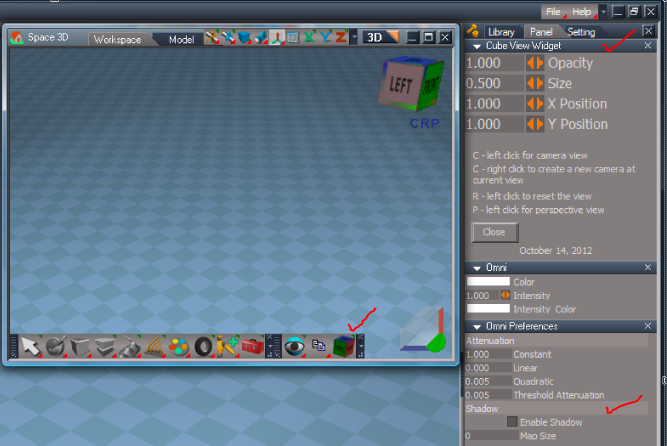
Updated the trueSpace 7.61 Beta 8 Unofficial Update

Added:
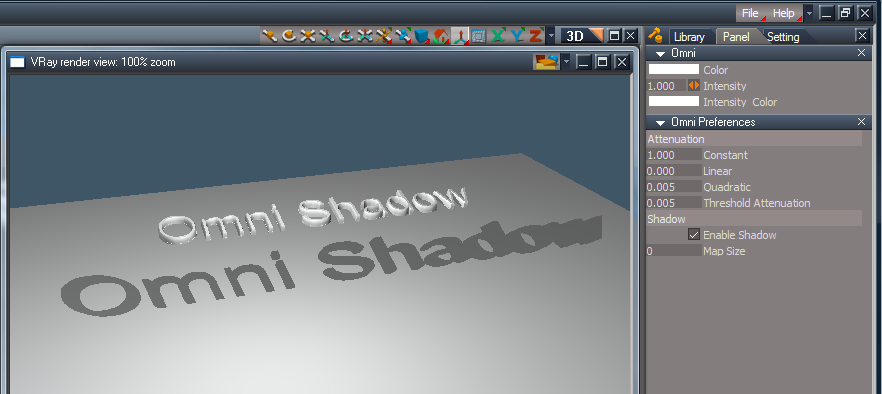
Omni Shadow
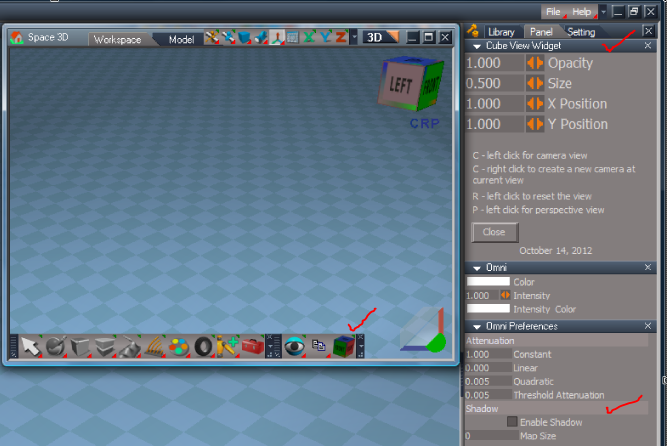
Cube View Widget to the Custom Toolbar. Contributed by Clinton Reese http://www.clintons3d.com"
Capture.PNG
Removed:
Offline Render icons (VRay) window resizer scripts.
If you want to still use this you can download it here:
vi ... 296#p28296"
User avatar
Tiles
Master Chief Petty Officer
Posts: 401
Joined: 27 May 2009, 08:34

Re: Unofficial Update 3?

Post by Tiles »

That difficult? it's only an .xml file and so many other scripts work fine. tS directory is full of them!
You cannot modify the core of tS anymore. This door is closed. No fix possible at this end. And as told, i even tried to write a tool to modify the xml file. And had to give up because of a very uncommon encoding. I remember a 16 instead of a common 8 somewhere, but cannot remember if this was utf or another encoding. Funny enough this just counts for the Window.Shortcuts.default xml file. Most of the other xml files have an encoding that can be modified. Dunno what the devs did here. And why.

Mh, one thing jumps into my mind here too. The Modeler shortcuts interferes with the ones in the Workspace. When a shortcut exists in Modeler then you normally cannot set it in Workspace. But that`s just an additionally hurdle.

Anyways, when you want to modify the shortcuts, and it fails, then you can still modify the Window.Shortcuts.default xml file in the C:\trueSpace761\tS\Scripts directory by hand :)
Free Gamegraphics, Freeware Games http://reinerstilesets.de
Saul
Senior Chief Petty Officer
Posts: 308
Joined: 22 May 2009, 16:50

Re: Unofficial Update 3?

Post by Saul »

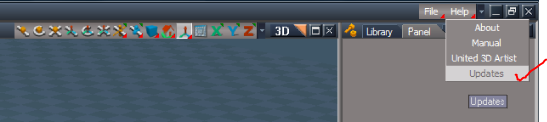
Sorry to be thicker than usual truBlue but where is the updated update? Is it the one earlier in this thread?
TIA
User avatar
Draise
Captain
Posts: 3200
Joined: 21 Sep 2009, 19:33
Type the number ten into the box: 0
Location: Bogota, Colombia

Re: Unofficial Update 3?

Post by Draise »

Tiles wrote: Mh, one thing jumps into my mind here too. The Modeler shortcuts interferes with the ones in the Workspace. When a shortcut exists in Modeler then you normally cannot set it in Workspace. But that`s just an additionally hurdle.

Anyways, when you want to modify the shortcuts, and it fails, then you can still modify the Window.Shortcuts.default xml file in the C:\trueSpace761\tS\Scripts directory by hand :)
I modified the shortcuts by hand and placed most of them NOT as global but window type/group specific. Then that frees up the modelspace shortcuts when you switch over.. simple solution.

I must have posted about this somewhere.........
User avatar
trueBlue
Captain
Posts: 5548
Joined: 06 Jul 2009, 22:50
Type the number ten into the box: 10

Re: Unofficial Update 3?

Post by trueBlue »

Try here Saul...
Attachments
Capture.PNG
Saul
Senior Chief Petty Officer
Posts: 308
Joined: 22 May 2009, 16:50

Re: Unofficial Update 3?

Post by Saul »

Tiles wrote:Anyways, when you want to modify the shortcuts, and it fails, then you can still modify the Window.Shortcuts.default xml
Hmmm. I have a file called Window.Shortcuts.xml and another without a file extension called Window.Shortcuts.default. i have added the .xml to the Window.Shortcuts.default file and i can read it in dreamweaver. I also have a short cut that works, Shift-A, which i have set to look at selection, i can find no reference to it in either of these 2 .xml files!
Thanks trueBlue for the update button!
User avatar
trueBlue
Captain
Posts: 5548
Joined: 06 Jul 2009, 22:50
Type the number ten into the box: 10

Re: Unofficial Update 3?

Post by trueBlue »

Saul wrote:
Tiles wrote:Anyways, when you want to modify the shortcuts, and it fails, then you can still modify the Window.Shortcuts.default xml
Hmmm. I have a file called Window.Shortcuts.xml and another without a file extension called Window.Shortcuts.default. i have added the .xml to the Window.Shortcuts.default file and i can read it in dreamweaver. I also have a short cut that works, Shift-A, which i have set to look at selection, i can find no reference to it in either of these 2 .xml files!
Thanks trueBlue for the update button!
These two files mentioned were modified by hand in the update(s). the "Window.Shortcuts.default" file is a backup of the "Window.Shortcuts.xml". tS761 writes to the "Window.Shortcuts.xml" file. If needed you could delete the "Window.Shortcuts.xml" file and rename the "Window.Shortcuts.default" file to Window.Shortcuts.xml to restore the original (modified in the update(s)) shortcuts.
I RMB select the Window.Shortcuts.xml file and select Edit, which opens in Notepad.
If you do not use tS761 to add shortcuts the Window.Shortcuts.xml file looks like this:
Capture.PNG
If you do it looks like this:
Note the &apos added to the file? Making impossible to edit. Which is why I try not to use tS761 to write the shortcuts.
Capture2.PNG
@ Saul: If I use tS761 to make a shortcut for the Unofficial View Bar's, Look At Selection, I can see it written as:
<RS_ACC KEY="SHIFT A" GROUP="USERDEFINED" CONTEXT="" DESC="Look at Selection - Look at Selection" COMMAND="RsTool.LookAtSelection(&apos;&apos;);WindowsManager.Activate()" />
It will not be in the Backup file.
It is also used here:
<RS_ACC KEY="SHIFT A" GROUP="VIEW3D" CONTEXT="POINTEDIT" DESC="Select Connected" COMMAND="MeshModifiers.ApplySelectionTool(&apos;/Widgets/Tools/PE Select tool&apos;,&apos;apply_cmd:{0502CC2A-7F8C-4d29-BBB4-9F1F2ECDC84C}&apos;);" />
Both work as expected and coexist.
HTH

More importantly you could save your modified Window.Shortcuts.xml file outside of the tS761 directory and replace the one installed by tS761 or the updates.
User avatar
trueBlue
Captain
Posts: 5548
Joined: 06 Jul 2009, 22:50
Type the number ten into the box: 10

Re: Unofficial Update 3?

Post by trueBlue »

Tiles wrote:
That difficult? it's only an .xml file and so many other scripts work fine. tS directory is full of them!
Mh, one thing jumps into my mind here too. The Modeler shortcuts interferes with the ones in the Workspace. When a shortcut exists in Modeler then you normally cannot set it in Workspace. But that`s just an additionally hurdle.
Are you sure abouts this?
I see several Model "Hotkeys" that are duplicated in Workspace. I think Draise may be correct in with which these shared shortcuts are in the GLOBAl group and no CONTEXT.
Attachments
Capture.PNG
User avatar
Draise
Captain
Posts: 3200
Joined: 21 Sep 2009, 19:33
Type the number ten into the box: 0
Location: Bogota, Colombia

Re: Unofficial Update 3?

Post by Draise »

Yes, any Global shortcut with no Context will trump any modelside shortcuts....

I LOVE THIS UPDATE! It fixed my selection bug I had! Now I can select one face with a click of the mouse using the selection tools without any issues! GREAT!
User avatar
Tiles
Master Chief Petty Officer
Posts: 401
Joined: 27 May 2009, 08:34

Re: Unofficial Update 3?

Post by Tiles »

No, not sure. It`s too long ago. Possible that my memories made a joke to me here. But i remember problems with same hotkeys at both sides.
Free Gamegraphics, Freeware Games http://reinerstilesets.de
User avatar
trueBlue
Captain
Posts: 5548
Joined: 06 Jul 2009, 22:50
Type the number ten into the box: 10

Re: Unofficial Update 3?

Post by trueBlue »

Draise wrote:Yes, any Global shortcut with no Context will trump any modelside shortcuts....

I LOVE THIS UPDATE! It fixed my selection bug I had! Now I can select one face with a click of the mouse using the selection tools without any issues! GREAT!
I doubt the update(s) had anything to do with that. I find that tS7 can get in a funk, most likely user (me) error. Resetting the Default Context seems to fix these issues.
User avatar
trueBlue
Captain
Posts: 5548
Joined: 06 Jul 2009, 22:50
Type the number ten into the box: 10

Re: Unofficial Update 3?

Post by trueBlue »

trueBlue wrote:Updated the trueSpace 7.61 Beta 8 Unofficial Update

Added:
Omni Shadow
Cube View Widget to the Custom Toolbar. Contributed by Clinton Reese http://www.clintons3d.com"
Capture.PNG
Removed:
Offline Render icons (VRay) window resizer scripts.
If you want to still use this you can download it here:
vi ... 296#p28296"
Looks like I forgot to add the Omni light addition. It's now included. Sorry!
vi ... =55&t=3732"
Saul
Senior Chief Petty Officer
Posts: 308
Joined: 22 May 2009, 16:50

Re: Unofficial Update 3?

Post by Saul »

trueBlue wrote:Looks like I forgot to add the Omni light addition. It's now included. Sorry!
Still not here, should be in the stack?
Latest update dated 12/11/12?
Attachments
ScreenHunter_ 2012-11-13.jpg
ScreenHunter_ 2012-11-13.jpg (10.11 KiB) Viewed 4623 times
Saul
Senior Chief Petty Officer
Posts: 308
Joined: 22 May 2009, 16:50

Re: Unofficial Update 3?

Post by Saul »

I am getting strange behaviour with camera:
tS7.61 fresh install
Update3
Reset default context
Add camera
Click on the yellow lens part
My screen goes to camera view (set camera)
Saul
Senior Chief Petty Officer
Posts: 308
Joined: 22 May 2009, 16:50

Re: Unofficial Update 3?

Post by Saul »

Probably wrong place for this but related to camera so:
In moDel the camera FOV can be animated via the Z size in the object info.
I cannot animate the camera FOV in workSpace either via prefs in stack or by the object info box.
What me doing wrong?
User avatar
trueBlue
Captain
Posts: 5548
Joined: 06 Jul 2009, 22:50
Type the number ten into the box: 10

Re: Unofficial Update 3?

Post by trueBlue »

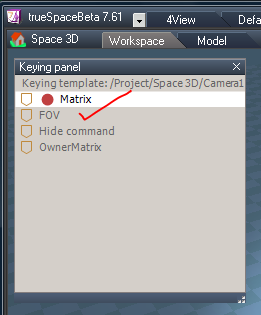
Workspace's Camera FOV
With your camera selected, RMB select the Set Keyframe button.
In the Keying panel, select your camera's FOV attribute.
Workspace does not use Z for FOV
Capture.PNG
Capture.PNG (18.43 KiB) Viewed 4577 times
Workspace's Camera Widget2
In the update(s) there is two Camera Widgets, The original and the one I created, Camera Widget2.
Selecting the Camera Widget2's FOV shape switches to it's view.
When viewing from the camera, Ctrl + MMB switches back to your last view.
All documented in the thread and the included readme file and in the Objects - tS7.61 Update objects/tS761 Widget Controls.RsObj
Shift + LMB select any parts of the Camera Widget(s) switches Camera Widget 1 and 2

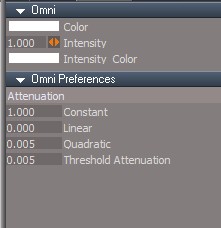
Omni light
I can confirm the Omni light modifications is not present in the present update.
Edit: Fixed 11/13/2012 8:03AM
vi ... =55&t=3732"
Capture2.PNG
Note: The Omni Shadow attributes only work in Vray.
Saul
Senior Chief Petty Officer
Posts: 308
Joined: 22 May 2009, 16:50

Re: Unofficial Update 3?

Post by Saul »

Thanks trueBlue
I have to get over the habit of a lifetime and start reading the help files!!!
Saul
Senior Chief Petty Officer
Posts: 308
Joined: 22 May 2009, 16:50

Re: Unofficial Update 3?

Post by Saul »

trueBlue wrote:In the Keying panel
Blimey, thanks trueBlue, this is very cool for Additive blending, all attributes can have their own track.
I have only ever made animations on moDel side but workSpace controls are so much more sophisticated!
Saul
Senior Chief Petty Officer
Posts: 308
Joined: 22 May 2009, 16:50

Re: Unofficial Update 3?

Post by Saul »

A problem with animated rotatation and encapsulated objects:

Reset default context.
Load Cube.
Copy Cube and move above original.
Ctrl select the 2 Cube and '3D encapsulate selected objects'.
Record keyframe at frame 0.
Move to frame 30.
Rotate encapsulated object and record keyframe.
Go to frame 0.
Play.
Notice the object does not rotate about its centre.

Reset default context.
Load Cube.
Copy Cube and move above original.
Ctrl select the 2 Cube and '3D encapsulate selected objects'.
Select 'Axis tool'.
With axis visible, record keyframe at 0.
Move to frame 30.
Rotate encapsulated object with the axis visible and record keyframe.
Go to frame 0.
Play.
Notice the object now rotates around its centre.

Is this correct behaviour?
User avatar
trueBlue
Captain
Posts: 5548
Joined: 06 Jul 2009, 22:50
Type the number ten into the box: 10

Re: Unofficial Update 3?

Post by trueBlue »

I can confirm the first steps do not seem to be working as expected.
Same in an unpatched tS761 installation, so it has nothing to do with the Unofficial Update.
Very strange!
Adding a Pivot/Axis to the encapsulation does seem to work. (No need for the Axis to be showing when recording)
Bug/Workaround? I dunno.
Saul
Senior Chief Petty Officer
Posts: 308
Joined: 22 May 2009, 16:50

Re: Unofficial Update 3?

Post by Saul »

trueBlue wrote:I can confirm the first steps do not seem to be working as expected.
Same in an unpatched tS761 installation, so it has nothing to do with the Unofficial Update.
OK thanks trueBlue!
I am going to move this to the Bugs part of forum, i have found some other stuff that i will report there.
User avatar
trueBlue
Captain
Posts: 5548
Joined: 06 Jul 2009, 22:50
Type the number ten into the box: 10

Re: Unofficial Update 3?

Post by trueBlue »

Saul wrote:
trueBlue wrote:In the Keying panel
Blimey, thanks trueBlue, this is very cool for Additive blending, all attributes can have their own track.
I have only ever made animations on moDel side but workSpace controls are so much more sophisticated!
Don forget the Attribute Browser by RMB selecting inside the Keying panel.
Attachments
Capture.PNG
Capture.PNG (35.39 KiB) Viewed 4565 times
Saul
Senior Chief Petty Officer
Posts: 308
Joined: 22 May 2009, 16:50

Re: Unofficial Update 3?

Post by Saul »

Tiles wrote:You cannot modify the core of tS anymore. This door is closed.
Does this mean that for modifications the whole code has to rewritten?
Or is there a 'key' to unlock and modify the code, held by microSoft presumably?
User avatar
Tiles
Master Chief Petty Officer
Posts: 401
Joined: 27 May 2009, 08:34

Re: Unofficial Update 3?

Post by Tiles »

This means that we just have the *.exe now, and not longer the *.c and *.h files, which you need to do modifications and to build the exe from. You can theoretically add code to an existing exe. There are ways to extend and to modify it, that`s what basically crackers do. But for modifications you would still need to do lots of reverse engineering because you need to isolate the vital parts.

There is no unlock key anymore. We don`t have the source code. But even when somebody would be able to get the hands on the source code, this baby is the result of several years of developments, with hundrets of thousands of lines of code. And it would take months up to years and a very passionated programmer to find yourself comfortable with this code monster.
Free Gamegraphics, Freeware Games http://reinerstilesets.de
froo
Captain
Posts: 2554
Joined: 22 May 2009, 12:13

Re: Unofficial Update 3?

Post by froo »

Yeah theoretically you can 'create new applications' by attaching and / or replacing dll's. But, it's easier to use something else instead. :)
User avatar
clintonman
Captain
Posts: 5659
Joined: 21 May 2009, 21:08
Type the number ten into the box: 0
Location: California

Re: Unofficial Update 3?

Post by clintonman »

I just installed the updates for standalone and full 7.61
Full 7.61 looks ok but the standalone only updated to version 2.
Clinton Reese

http://clintons3d.com
User avatar
trueBlue
Captain
Posts: 5548
Joined: 06 Jul 2009, 22:50
Type the number ten into the box: 10

Re: Unofficial Update 3?

Post by trueBlue »

Okay now the Standalone version includes all of the Update 3 updates.
Thanks for all of your help and contributions Clinton!
viewforum.php?f=55"
User avatar
clintonman
Captain
Posts: 5659
Joined: 21 May 2009, 21:08
Type the number ten into the box: 0
Location: California

Re: Unofficial Update 3?

Post by clintonman »

Thanks, got it.
Clinton Reese

http://clintons3d.com

Return to “General Discussion”