Just started the cours on piero from the blender cookie ,-sculpted the body then retropoygy
added the feathers and open eyes shape keys , also added a shape key for the smile .
now for textures and the mega hard rig for him hope it works this time ,
blender piero
-
pugman 1
- Captain
- Posts: 1555
- Joined: 21 May 2009, 19:26
- Type the number ten into the box: 0
- Location: Germany
blender piero
- Attachments
-
-


-
Draise

- Captain
- Posts: 3200
- Joined: 21 Sep 2009, 19:33
- Type the number ten into the box: 0
- Location: Bogota, Colombia
Re: blender piero
Nice one! You're following the tutorial well! I plan to do that one eventually..... eventually... 
-
pugman 1
- Captain
- Posts: 1555
- Joined: 21 May 2009, 19:26
- Type the number ten into the box: 0
- Location: Germany
Re: blender piero
Update ,uvs done and base color finished ,now for
the rest of the maps
the rest of the maps
- Attachments
-

-
froo
- Captain
- Posts: 2554
- Joined: 22 May 2009, 12:13
Re: blender piero
Very nice pugman!
-
pugman 1
- Captain
- Posts: 1555
- Joined: 21 May 2009, 19:26
- Type the number ten into the box: 0
- Location: Germany
Re: blender piero
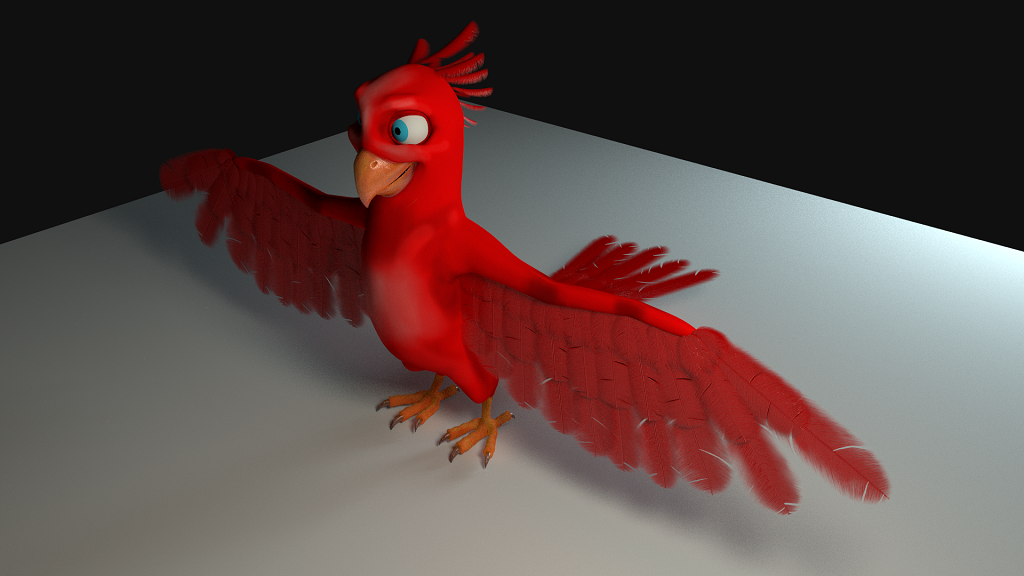
Here is a update with feathers , just hav to do the body feathers then on to rigging
- Attachments
-
-
Steinie

- Captain
- Posts: 2958
- Joined: 21 May 2009, 17:38
- Type the number ten into the box: 10
Re: blender piero
Hey this is looking good! Your putting my characters out of business!!!
Keep it up!
Keep it up!
-
pugman 1
- Captain
- Posts: 1555
- Joined: 21 May 2009, 19:26
- Type the number ten into the box: 0
- Location: Germany
Re: blender piero
Thanks guys , im not sure if i should continue with the body feathers
they look way to untidy and not good .maybe i just rig him as he is
he looks cool i think , i will try the body again but if it looks like crap ill leave it
they look way to untidy and not good .maybe i just rig him as he is
he looks cool i think , i will try the body again but if it looks like crap ill leave it
-
Finis

- Captain
- Posts: 5410
- Joined: 21 May 2009, 18:26
- Type the number ten into the box: 0
- Location: America!
Re: blender piero
I hope you make some characters from scratch with your own style Pugman1 to give Steinie competition.
It is encouraging to see people learning Blender. It shows that it isn't nearly impossible like it used to be but is worth the effort now.
It is encouraging to see people learning Blender. It shows that it isn't nearly impossible like it used to be but is worth the effort now.
I prefer dangerous freedom over peaceful servitude. -- Thomas Jefferson/Jean Jacques Rousseau
-
Dragneye

- Lieutenant
- Posts: 906
- Joined: 02 Sep 2009, 22:09
Re: blender piero
VERY nice pugman!
I have the rig but not the course (monetary hard times) so sort of gave up trying to figure him out. The rig seems a bit more complex than it should be. Just trying to fold his wings seems like a big deal for example but would love to see what you can do with him.
Keep it up buddy.
I have the rig but not the course (monetary hard times) so sort of gave up trying to figure him out. The rig seems a bit more complex than it should be. Just trying to fold his wings seems like a big deal for example but would love to see what you can do with him.
Keep it up buddy.
-
pugman 1
- Captain
- Posts: 1555
- Joined: 21 May 2009, 19:26
- Type the number ten into the box: 0
- Location: Germany
Re: blender piero
here a prob with the render , the good pic is a preveiw render the other a full render .
i dont like him with fethers but i wanted to finish him like the course .
any blender users have any idea why this hapens .
Cheers Ralph
i dont like him with fethers but i wanted to finish him like the course .
any blender users have any idea why this hapens .
Cheers Ralph
- Attachments
-
-


-
pugman 1
- Captain
- Posts: 1555
- Joined: 21 May 2009, 19:26
- Type the number ten into the box: 0
- Location: Germany
Re: blender piero
sorry all ok nearly , i pluged the node in where it should be the feathers went black in preveiw render
that threw me of course. I hit then render and it ok .but why in the preveiw render the feathers go black?
that threw me of course. I hit then render and it ok .but why in the preveiw render the feathers go black?
-
Draise
- Captain
- Posts: 3200
- Joined: 21 Sep 2009, 19:33
- Type the number ten into the box: 0
- Location: Bogota, Colombia
Re: blender piero
Good question, but good to know! Glad you found a solution. The feathers are looking great btw.
-
pugman 1
- Captain
- Posts: 1555
- Joined: 21 May 2009, 19:26
- Type the number ten into the box: 0
- Location: Germany
Re: blender piero
Thanks , i must first make the textures better and do the eye properly when
thats finished ill post the render . after that comes rigging and it a f....... hard rig
why so complicated i dont know . i tryed this befor with jethro but the rig went wrong
and iv lost the file thats why i am doing this ,and i learn the hair sysem painting maps for the hair
density and lenth ,also how to make prober uvs and textures ,rigging and all that goes with it ,
and the animation, thats the hardest .but when im done i have a plan for a cool model with animation .
just hope i have the motivation to do this .
thats finished ill post the render . after that comes rigging and it a f....... hard rig
why so complicated i dont know . i tryed this befor with jethro but the rig went wrong
and iv lost the file thats why i am doing this ,and i learn the hair sysem painting maps for the hair
density and lenth ,also how to make prober uvs and textures ,rigging and all that goes with it ,
and the animation, thats the hardest .but when im done i have a plan for a cool model with animation .
just hope i have the motivation to do this .
-
Draise
- Captain
- Posts: 3200
- Joined: 21 Sep 2009, 19:33
- Type the number ten into the box: 0
- Location: Bogota, Colombia
Re: blender piero
It's a very valid project! Don't worry about the animation, it's hard, but the most gratifying; and the complicated rig will only make the animation that much easier to make the puppet do what you want. Animation is probably my favorite aspect of 3D, it's certainly most satisfying thing ever making something come alive. Keep at it!
Learning the discipline of self motivation and completion is better than the most talented of all artists. Keep at it! You're doing great.
Learning the discipline of self motivation and completion is better than the most talented of all artists. Keep at it! You're doing great.
-
pugman 1
- Captain
- Posts: 1555
- Joined: 21 May 2009, 19:26
- Type the number ten into the box: 0
- Location: Germany
Re: blender piero
here the finished shaders .i mest up the lighting but i am no good with that anyway.
Now for the rigging
Now for the rigging
- Attachments
-
-
-


-
Steinie
- Captain
- Posts: 2958
- Joined: 21 May 2009, 17:38
- Type the number ten into the box: 10
Re: blender piero
Could you post a link to the tutorial? Your bird looks fantastic!
-
pugman 1
- Captain
- Posts: 1555
- Joined: 21 May 2009, 19:26
- Type the number ten into the box: 0
- Location: Germany
Re: blender piero
hi,bud here the link, http://cgcookie.com/blender/cgc-courses/piero/"
I joined cg cookie for 3 mounths it costs 1 month 18 dollers ,3 months 38 dollers .
In that time you can download all the vidios for the courses with content .
i have a few on a extra hardrive saved but i intend to get more of them which
could be usefull for the future when my membership runs out.
Cheers Ralph.
I joined cg cookie for 3 mounths it costs 1 month 18 dollers ,3 months 38 dollers .
In that time you can download all the vidios for the courses with content .
i have a few on a extra hardrive saved but i intend to get more of them which
could be usefull for the future when my membership runs out.
Cheers Ralph.
-
pugman 1
- Captain
- Posts: 1555
- Joined: 21 May 2009, 19:26
- Type the number ten into the box: 0
- Location: Germany
Re: blender piero
Started on the rig for him ,here is the complecated wing rig finished
for some reason i could not get the drivers for it to work prob with blender 2.70a.
the wing has fk. ik. curve spline .scale and twist for the feathers.i managed to get it
working without drivers ,they are for a switch between fk an ik when the wing is bent
but you can do this under the influence panel its just more steps to do when animating .
Next the leg and claws ther nearly as bad as the wing
for some reason i could not get the drivers for it to work prob with blender 2.70a.
the wing has fk. ik. curve spline .scale and twist for the feathers.i managed to get it
working without drivers ,they are for a switch between fk an ik when the wing is bent
but you can do this under the influence panel its just more steps to do when animating .
Next the leg and claws ther nearly as bad as the wing
- Attachments
-

-
pugman 1
- Captain
- Posts: 1555
- Joined: 21 May 2009, 19:26
- Type the number ten into the box: 0
- Location: Germany
Re: blender piero
Finaly got the rig over to the other half the wing is a major prob but got all
working how it should now to conect it to the mesh hope it works .
then the shapes for the controls i have no idea how he does that even watching the vid time
and time again .
working how it should now to conect it to the mesh hope it works .
then the shapes for the controls i have no idea how he does that even watching the vid time
and time again .
- Attachments
-

-
pugman 1
- Captain
- Posts: 1555
- Joined: 21 May 2009, 19:26
- Type the number ten into the box: 0
- Location: Germany
Re: blender piero
Here posed ,fully riged works like a dream , just one prob,
anyone know how to get the particle systems to move with the body
in pose mode ,in object mode the stick to the body when posing they dont .
Cheers Ralph
anyone know how to get the particle systems to move with the body
in pose mode ,in object mode the stick to the body when posing they dont .
Cheers Ralph
- Attachments
-

-
Draise
- Captain
- Posts: 3200
- Joined: 21 Sep 2009, 19:33
- Type the number ten into the box: 0
- Location: Bogota, Colombia
Re: blender piero
Hey there! I've been playing around with it. It's nice. I can't seem to move the body controls though, they are not doing anything. But the wings and head are working nicely. Do you have eyelid and eyelid controls?
I'm still pretty new to rigging and animating rigs in Blender, so um.. still working on it all.
Haven't tried fiddlign with the Baboon yet, but the piero has some rad wings, good job on those!
TIP: hide the feathers for faster playback/animation. And for full playback speed, do "Render Only" in the display options.
I'm still pretty new to rigging and animating rigs in Blender, so um.. still working on it all.
Haven't tried fiddlign with the Baboon yet, but the piero has some rad wings, good job on those!
TIP: hide the feathers for faster playback/animation. And for full playback speed, do "Render Only" in the display options.